Weekly Wiki

Greetings
This is Frank in Seeed Studio and welcome to the Seeed Studio weekly wiki! Each Monday, I will introduce you our latest wiki, including the ones related to our new products, the interesting projects published by Seeed Studio, and the tutorials, introductions, etc... You name it.
✨ For each week, when a collaborator contributes a project or fixes something important, we put the stars at the end of title of "Weekly Wiki" for more people be able to see their efforts👍.
Today is March 23rd, and a brand new week has begun! Check out what Seeed Studio did last week!
Latest Wiki Launched
Getting Started with reTerminal E1003

reTerminal E1003 is a 10.3 inch touch-supported, open-source monochrome ePaper display featuring 16 levels of grayscale and a high-resolution of 1404×1872 pixels, with up to 6-month battery life. Powered by ESP32-S3, it natively supports our SenseCraft HMI no-code UI platform for effortless dashboard creation, while supporting Home Assistant (via ESPHome & Open Display), Arduino, PlatformIO for further development. Whether for smart home dashboard visualization and control, office information displays, or educational projects, this ready-to-use touch-enabled device delivers stunning visuals and flexible customization to meet all your needs.
Meshtastic Firmware Source Code Practical Tutorial for Solar Nod

This tutorial is intended for users who are just getting started with the Meshtastic firmware source code. It includes common workflows for both Windows and macOS. The goal is straightforward: clone the official repository, complete a successful build, make one simple UI change, and flash the modified firmware to the device for verification.
For other Seeed devices, you can refer to the corresponding tutorials: T1000-E, Wio Tracker L1, and XIAO ESP32S3 & Wio SX1262 Kit.
Meshtastic Node Map
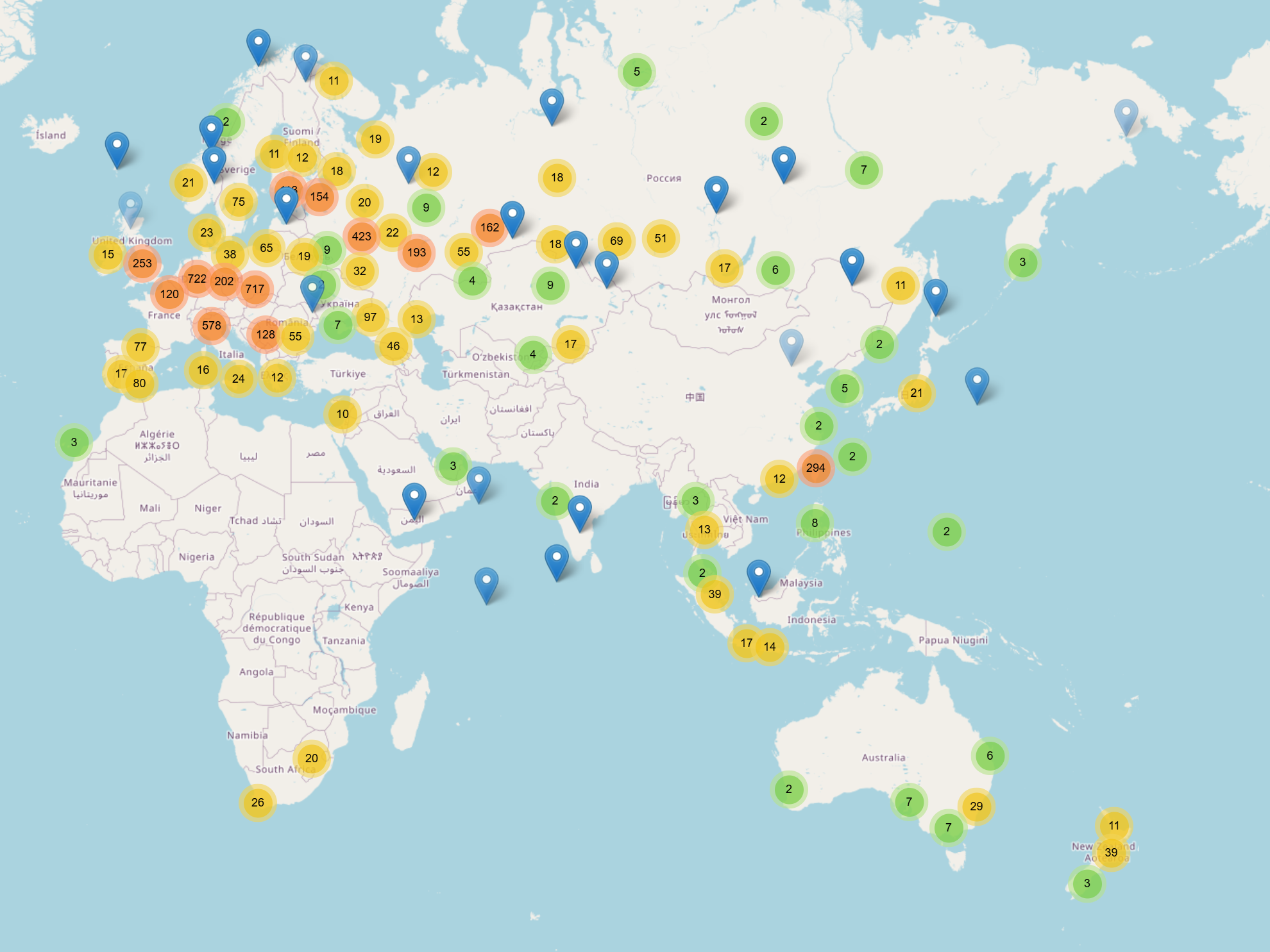
This guide explains how to display the locations of Meshtastic devices on Meshtastic Node Maps using Wio Tracker L1 Pro and T1000-E devices, assuming the devices have already been flashed with the Meshtastic firmware.
Getting Started with OpenClaw on reComputer Industrial

This guide introduces how to get started with OpenClaw on the reComputer R series devices, covering environment setup, installation, and basic configuration. It enables users to deploy and run a self-hosted AI agent system on edge hardware.
The Efforts of Contributor
- Check on GitHub for more information.
- We will be really appreciate if you can share your ideas with us!
Past Weekly wiki
Click here
- weekly wiki on 2025.1.06th
- weekly wiki on 2025.1.13th
- weekly wiki on 2025.1.20th
- weekly wiki on 2025.1.27th
- weekly wiki on 2025.2.10th
- weekly wiki on 2025.2.17th
- weekly wiki on 2025.2.24th
- weekly wiki on 2025.3.03rd
- weekly wiki on 2025.3.10th
- weekly wiki on 2025.3.17th
- weekly wiki on 2025.3.24th
- weekly wiki on 2025.3.31st
- weekly wiki on 2025.4.07th
- weekly wiki on 2025.4.14th
- weekly wiki on 2025.4.21st
- weekly wiki on 2025.4.28th
- weekly wiki on 2025.5.05th
- weekly wiki on 2025.5.12th
- weekly wiki on 2025.5.19th
- weekly wiki on 2025.5.26th
- weekly wiki on 2025.6.02nd
- weekly wiki on 2025.6.09th
- weekly wiki on 2025.6.16th
- weekly wiki on 2025.6.23rd
- weekly wiki on 2025.6.30th
- weekly wiki on 2025.7.07th
- weekly wiki on 2025.7.14th
- weekly wiki on 2025.7.21st
- weekly wiki on 2025.7.28th
- weekly wiki on 2025.8.04th
- weekly wiki on 2025.8.11th
- weekly wiki on 2025.8.18th
- weekly wiki on 2025.8.25th
- weekly wiki on 2025.9.01st
- weekly wiki on 2025.9.08th
- weekly wiki on 2025.9.15th
- weekly wiki on 2025.9.22nd
- weekly wiki on 2025.9.29th
- weekly wiki on 2025.10.13th
- weekly wiki on 2025.10.20th
- weekly wiki on 2025.10.27th
- weekly wiki on 2025.11.03rd
- weekly wiki on 2025.11.10th
- weekly wiki on 2025.11.17th
- weekly wiki on 2025.11.24th
- weekly wiki on 2025.12.01st
- weekly wiki on 2025.12.08th
- weekly wiki on 2025.12.15th
- weekly wiki on 2025.12.22nd
- weekly wiki on 2025.12.29th
- weekly wiki on 2026.1.05th
- weekly wiki on 2026.1.12th
- weekly wiki on 2026.1.19th
- weekly wiki on 2026.1.26th
- weekly wiki on 2026.2.02nd
- weekly wiki on 2026.2.09th
- weekly wiki on 2026.3.02nd
- weekly wiki on 2026.3.09th
- weekly wiki on 2026.3.16th