Getting Started with reComputer Robotics J50 Mini

reComputer Robotics J50 Mini (reComputer Mini J501) is a compact edge AI computer for robotics and embedded AI development, available as J5011 with NVIDIA Jetson AGX Orin 32GB and J5012 with NVIDIA Jetson AGX Orin 64GB. Both GMSL configurations include a 128GB NVMe SSD and an eight-channel GMSL expansion board. The enclosure measures 119 × 119 × 100 mm and weighs 1325 g.
The platform can be used with NVIDIA Isaac ROS, ROS, PyTorch, and other Jetson-compatible software for multi-camera perception, sensor integration, and robotics development.
Available customization options: logo branding, packaging, and firmware flashing.
Features
- AGX Orin performance: Up to 275 TOPS with the 64GB module, supporting perception and edge AI workloads.
- Compact enclosure: A 119 × 119 mm footprint for space-constrained robot integration.
- Camera connectivity: The J5012 with GMSL includes the GMSL expansion board for up to eight GMSL2 cameras; use compatible cameras and drivers.
- Wired and wireless expansion: 10GbE and 1GbE networking, plus M.2 Key E for Wi-Fi/Bluetooth expansion.
- Robotics I/O: Isolated CAN and RS485, digital inputs/outputs, I2S, USB, and HDMI.
- 48V system integration: XT30 power input with a specified 19–48V DC operating range and a 54V maximum input rating.
Specifications
| Jetson AGX Orin System on Module | |||
|---|---|---|---|
| Specifications | reComputer Mini J5011 | reComputer Mini J5012 | |
| Module | NVIDIA Jetson AGX Orin 32GB | NVIDIA Jetson AGX Orin 64GB | |
| AI Performance | Up to 200 TOPS | Up to 275 TOPS | |
| GPU | 1792-core NVIDIA Ampere architecture GPU 56 Tensor Cores | 2048-core NVIDIA Ampere architecture GPU 64 Tensor Cores | |
| GPU Max Frequency | 930 MHz | 1.3 GHz | |
| CPU | 8-core Arm Cortex-A78AE | 12-core Arm Cortex-A78AE | |
| CPU Max Frequency | 2.2 GHz | ||
| Memory | 32GB 256-bit LPDDR5 204.8 GB/s | 64GB 256-bit LPDDR5 204.8 GB/s | |
| Module Storage | 64GB eMMC 5.1 | ||
| Video Encoder | 1 × 4K60 / 3 × 4K30 (H.265) 6 × 1080p60 / 12 × 1080p30 (H.265) | 2 × 4K60 / 4 × 4K30 (H.265) 8 × 1080p60 / 16 × 1080p30 (H.265) | |
| Video Decoder | 1 × 8K30 / 2 × 4K60 / 4 × 4K30 (H.265) 9 × 1080p60 / 18 × 1080p30 (H.265) | 1 × 8K30 / 3 × 4K60 / 7 × 4K30 (H.265) 11 × 1080p60 / 22 × 1080p30 (H.265) | |
| Module Power | 15W / 40W | 15W / 60W | |
| JetPack | Preinstalled JetPack 6.2; supports JetPack 7.2 | ||
| Carrier Board | |||
| Storage | 128GB NVMe SSD included 1 × M.2 Key M for NVMe 2280 SSD | ||
| Networking | Ethernet | 1 × RJ45 10GbE; 1 × RJ45 1GbE | |
| Wireless Expansion | 1 × M.2 Key E for a Wi-Fi/Bluetooth module | ||
| I/O | USB | 2 × USB 3.2 Gen 2 Type-A (10Gbps) 1 × USB 2.0 Type-C (Debug) 1 × USB 3.0 Type-C (Recovery) | |
| Display | 1 × HDMI 2.1 | ||
| CAN | 2 × isolated CAN | ||
| RS485 | 1 × isolated RS485 | ||
| Digital I/O | 4 × GPI (3.3V); 4 × GPO (3.3V) | ||
| I2S | 1 × I2S (3.3V) | ||
| Fan | 1 × 4-pin fan connector (12V PWM) | ||
| RTC | 1 × 2-pin RTC header | ||
| Indicators | PWR, ACT and USR LEDs | ||
| Buttons | 1 × Reset; 1 × Recovery | ||
| Power Input | 1 × XT30; 19–48V DC; maximum input 54V | ||
| GMSL Extension Board | |||
| GMSL Connectivity | Included in both with-GMSL configurations 2 × Mini-Fakra connectors for up to 8 GMSL2 cameras | ||
| Others | |||
| Mechanical | Dimensions (W × D × H) | 119 × 119 × 100 mm | |
| Weight | 1325 g | ||
| Installation | Desktop | ||
| Operating Temperature | −10°C to 60°C | ||
Hardware Overview


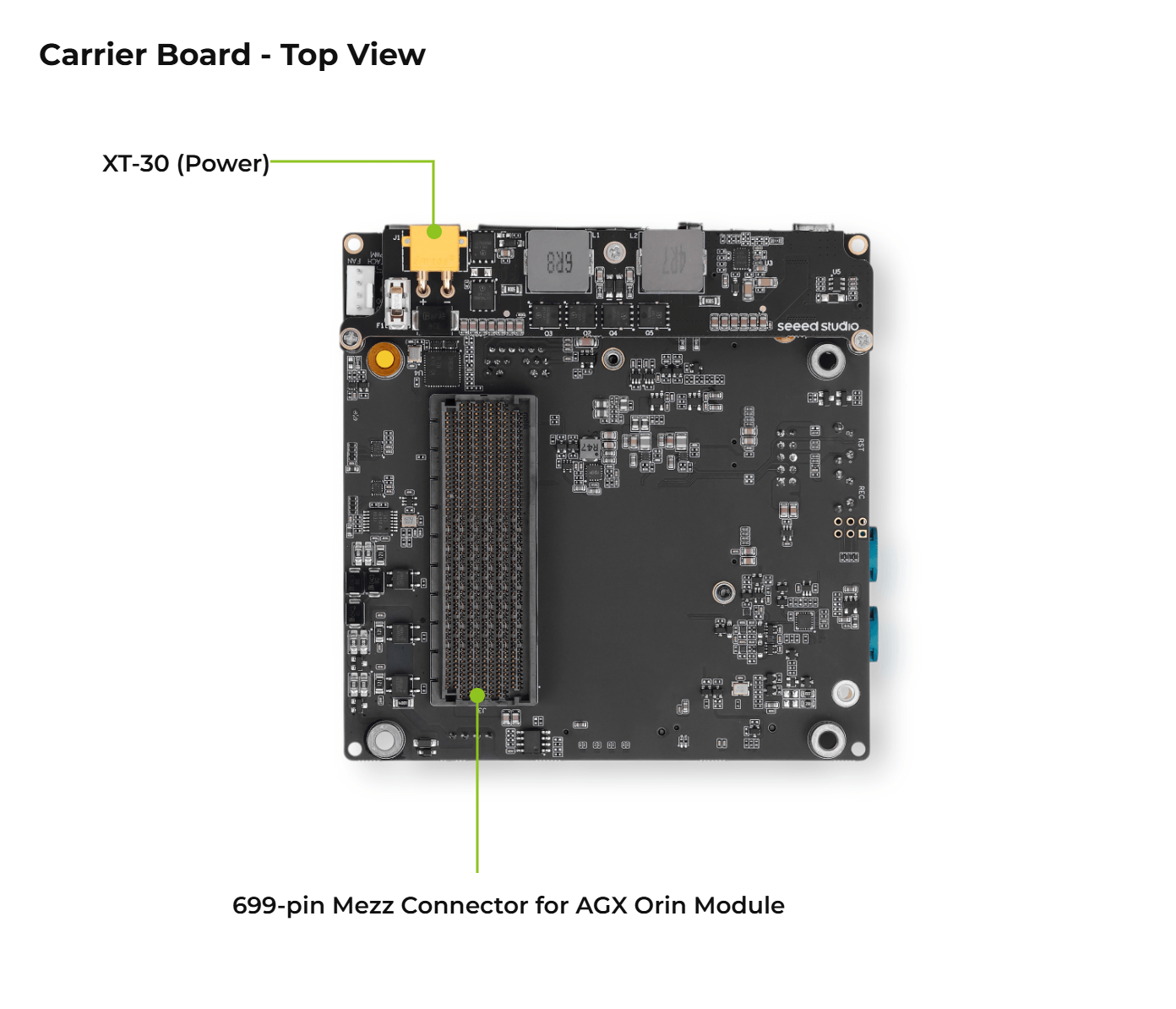
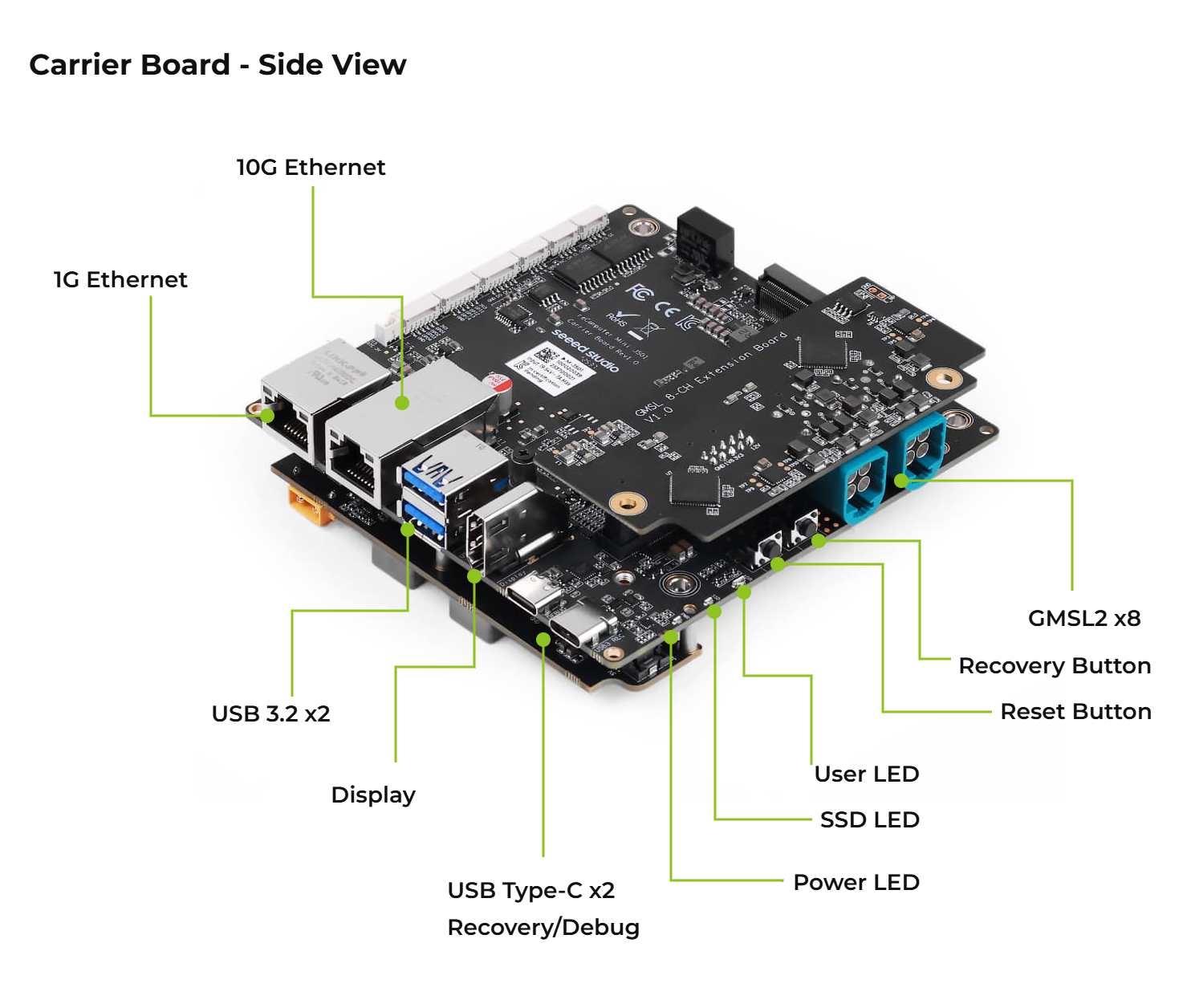
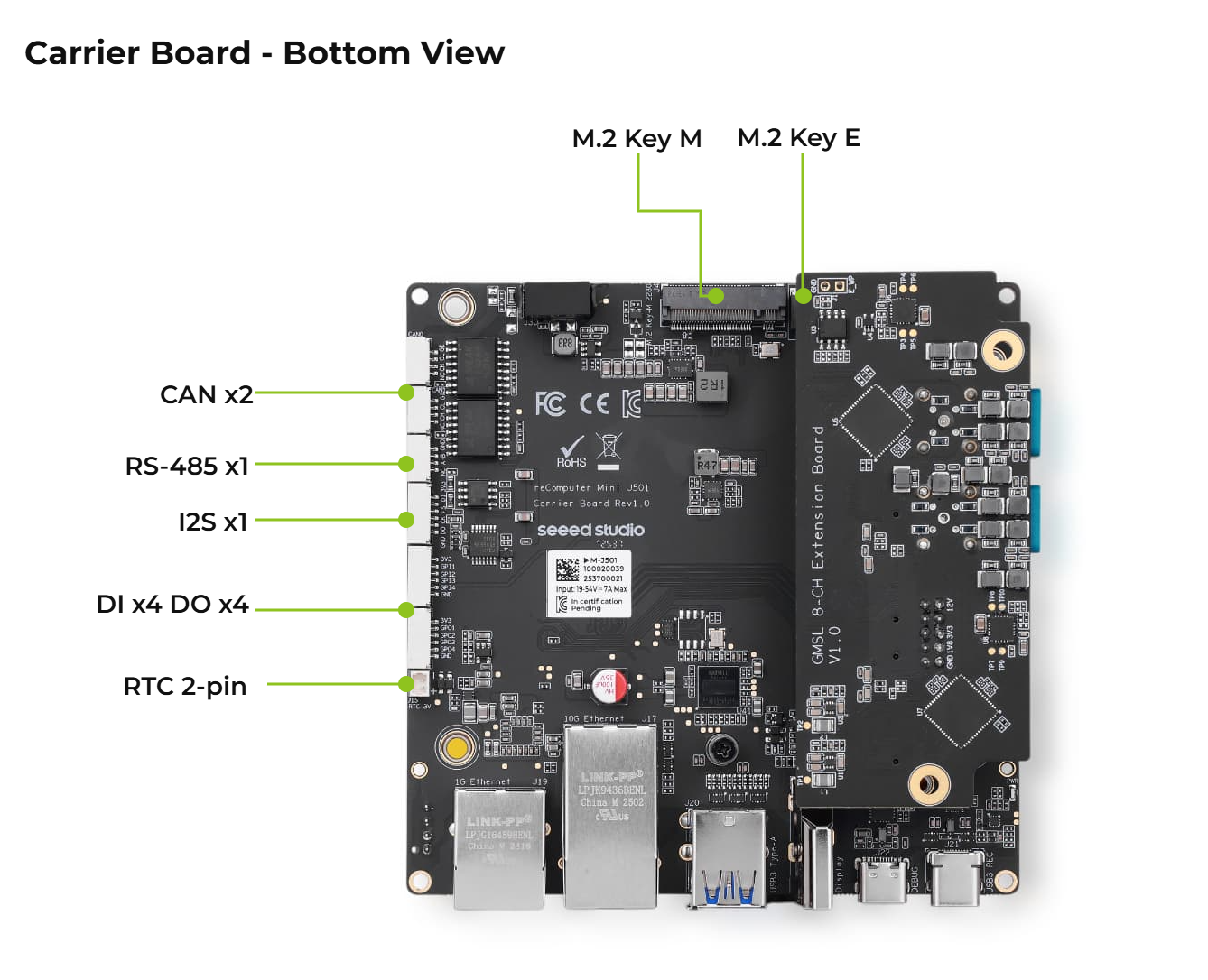
Flash JetPack OS
This section shows how to flash the Mini J501 system image to the NVMe SSD in reComputer Robotics J50 Mini.
Supported NVIDIA Jetson Modules
Prerequisites
- Ubuntu host PC
- reComputer Robotics J50 Mini with its Jetson AGX Orin module, NVMe SSD, and compatible power supply
- USB Type-C data transmission cable
We recommend that you use physical ubuntu host devices instead of virtual machines. Please refer to the table below to prepare the host machine.
| JetPack Version | Ubuntu Version (Host Computer) | |||
| 18.04 | 20.04 | 22.04 | 24.04 | |
| JetPack 6.x | ✅ | ✅ | ||
| JetPack 7.2 | ✅ | ✅ | ✅ | |
Note: For JetPack 7.2, Ubuntu 24.04 is supported for flashing and target-side component installation only. Use Ubuntu 20.04 or 22.04 if you need host development components.
Prepare the JetPack Image
Here, we need to download the system image to our Ubuntu PC corresponding to the Jetson module we are using:
| Jetpack Version | Jetson Module | GMSL | Download Link1 | SHA256 |
|---|---|---|---|---|
| 7.2 | AGX Orin 64GB | ✅ | Download | 1cd0d7004f426a524a55761bf01dd22280829b9834cbd11d4094b29865f46fe9 |
| AGX Orin 32GB | ✅ | Download | c369b02c979a8d0e1bd926725e94eba19be0e1b6a1a145e03a1179e77b72c5fd | |
| 6.2.1 | AGX Orin 64GB | ✅ | Download | 53859b314aba332c417c7295d9f6b6711bc7d8c4352dad55aa917af80757330c |
| AGX Orin 32GB | ✅ | Download | 16408ec8d3b8b0e01eb7edd81b0367357f7dddfdee09388da4c74591d31f917a |
The JetPack image files are large and may take around 60 minutes to download. Please wait for the download to complete.
To verify the integrity of the downloaded firmware, you can compare the SHA256 hash value.
On an Ubuntu host machine, open the terminal and run the command sha256sum <File> to obtain the SHA256 hash value of the downloaded file. If the resulting hash matches the SHA256 hash provided in the wiki, it confirms that the firmware you downloaded is complete and intact.
Enter Force Recovery Mode
Before we can move on to the installation steps, we need to make sure that the board is in force recovery mode.
Step-by-Step
Step 1. Press and hold the REC button.
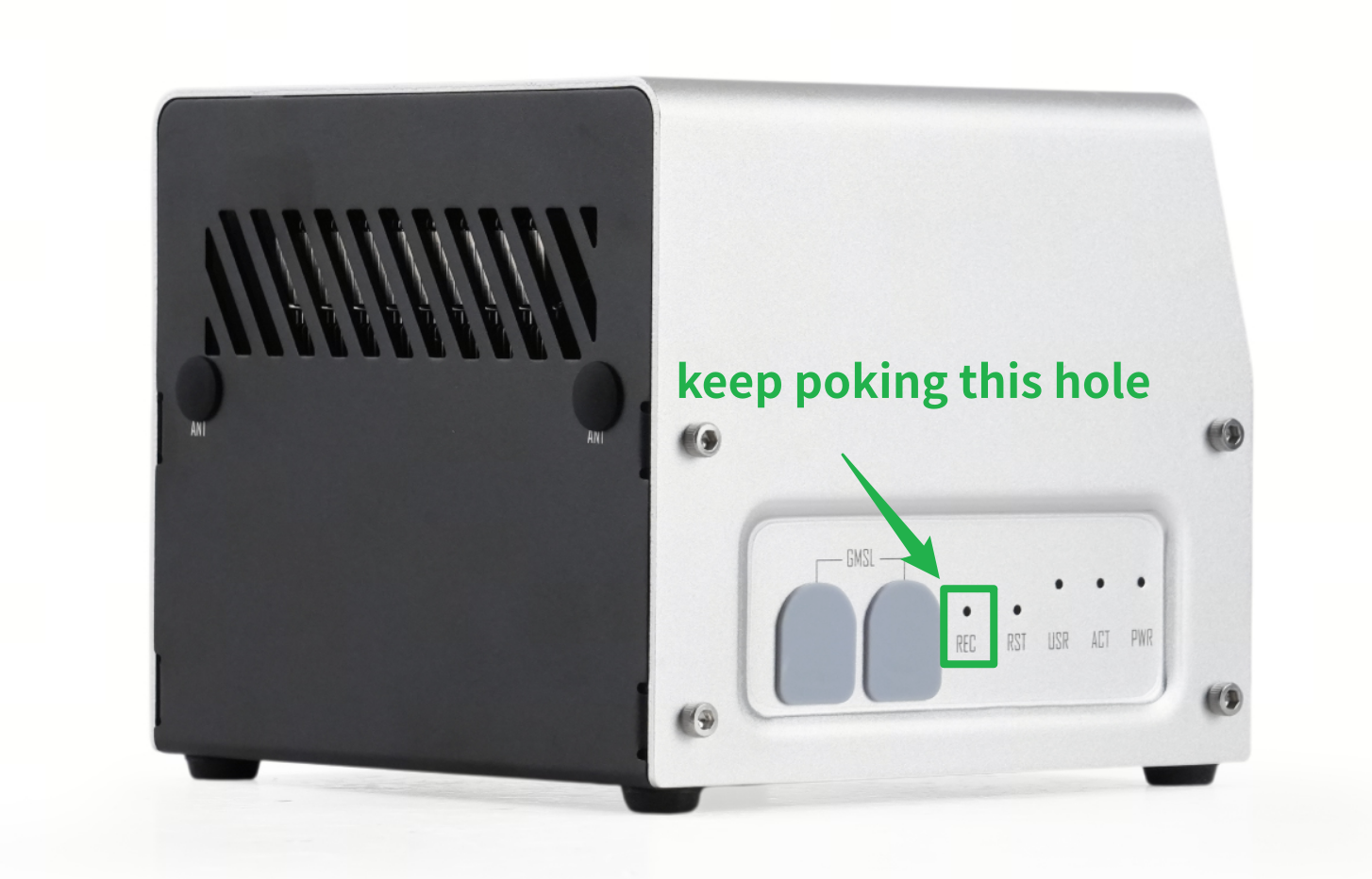
Step 2. Power up the carrier board by connecting the power cable, then release REC button .
Step 3. Connect the board to the Ubuntu host PC with a USB Type-C data transmission cable.
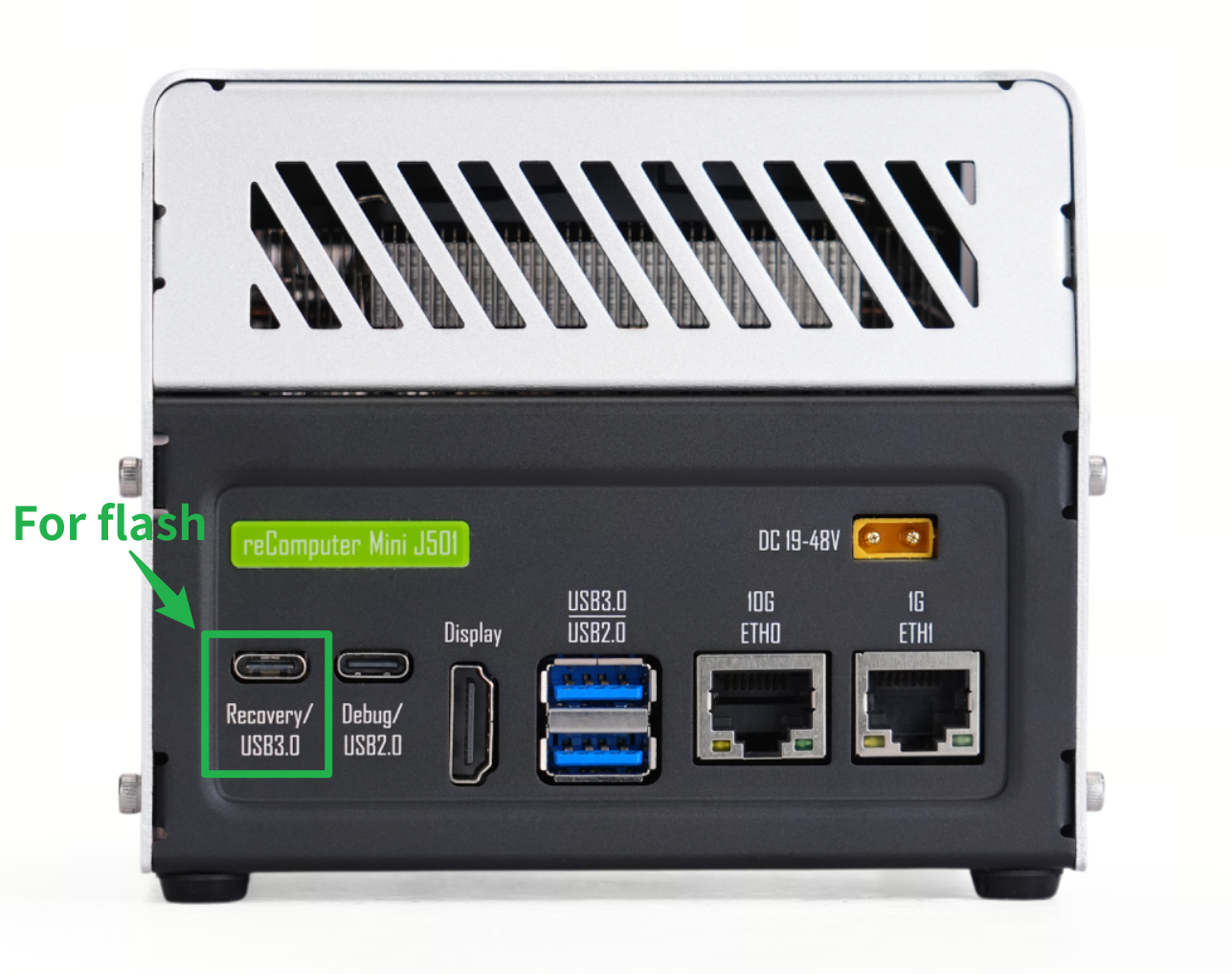
Step 4. On the Linux host PC, open a Terminal window and enter the command lsusb. If the returned content has one of the following outputs according to the Jetson SoM you use, then the board is in force recovery mode.
- For AGX Orin 32GB: 0955:7223 NVidia Corp
- For AGX Orin 64GB: 0955:7023 NVidia Corp
The below image is for AGX Orin 32GB:

Flash to Jetson Step by Step
Step 1: Extract the downloaded image file:
cd <path-to-image>
sudo tar xpf mfi_xxxx.tar.gz
# For JetPack 7.2 example: sudo tar xpf mfi_recomputer-mini-agx-orin-j501x-32g-7.2.0-39.2.0-2026-06-25.tar.gz
# For JetPack 6.2.1 example: sudo tar xpf mfi_recomputer-mini-agx-orin-32g-j501-6.2.1-36.4.4-2026-02-11.tar.gz
Step 2: Execute the following command to flash jetpack system to the NVMe SSD:
cd mfi_xxxx
# For example: cd mfi_recomputer-mini-agx-orin-32g-j501-6.2.1-36.4.4-2026-02-11
sudo ./tools/kernel_flash/l4t_initrd_flash.sh --flash-only --massflash 1 --network usb0  --showlogs
You will see the following output if the flashing process is successful

The flash command may run for 2-10 minutes.
Step 3: Connect reComputer Robotics J50 Mini to a display through HDMI, then complete the initial system configuration:
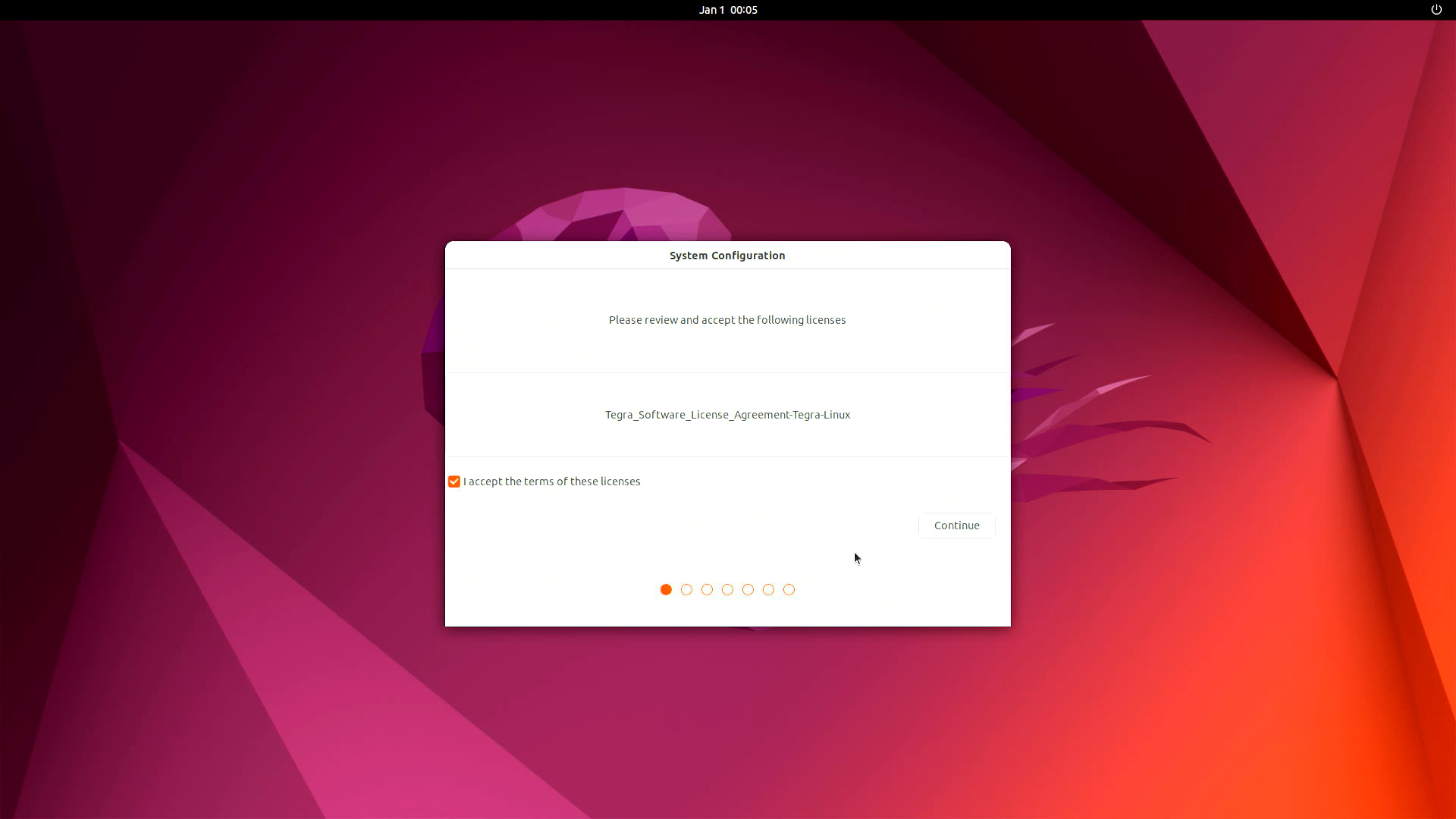
Please complete the System Configuration according to your needs.
Step 4 (optional): Install the NVIDIA JetPack SDK. Open a terminal on the Jetson and run:
sudo apt update
sudo apt install nvidia-jetpack
Hardware Interfaces Usage
Click the button below to open the Mini J501 interface guide for connector pinouts, wiring, and step-by-step usage instructions.
Resources
- Seeed Jetson BSP source code
- Complete-system User Manual & Datasheet
- Mini J501 carrier board schematic
Tech Support & Product Discussion
Thank you for choosing our products! For technical support and product discussions, use the following channels.