YOLOv26 Dual GMSL Camera Image Processing System on Jetson
Introduction
With the rapid advancement of artificial intelligence and edge computing technology, industrial vision systems are evolving towards greater intelligence and real-time processing capabilities. Dual-camera image processing systems powered by deep learning models enable simultaneous multi-perspective analysis, object detection, pose estimation, and instance segmentation. This enhances the efficiency and accuracy of industrial inspection, robotics, and automated monitoring applications. This guide will introduce how to build a high-performance dual GMSL camera image processing system using YOLOv26 and TensorRT acceleration on the NVIDIA Jetson platform.
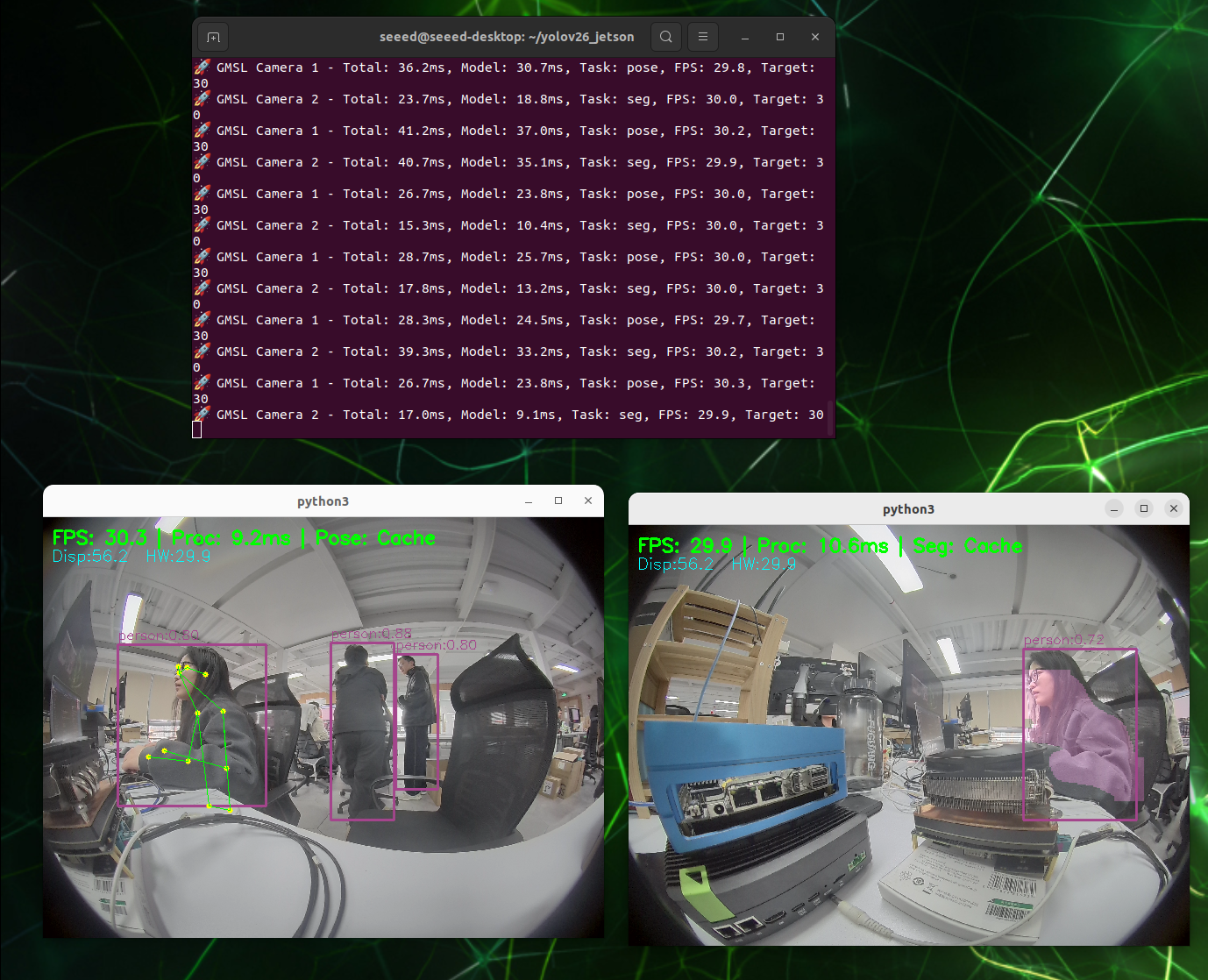
In this wiki, we will deploy YOLOv26 models optimized with TensorRT on the reComputer Robotics J5011 to achieve real-time multi-task vision analysis. The system utilizes GMSL (Gigabit Multimedia Serial Link) cameras for high-bandwidth, low-latency video transmission, making it ideal for industrial applications in challenging environments. We will run three YOLOv26 model variants concurrently: Object Detection, Pose Estimation, and Instance Segmentation, all accelerated by TensorRT for maximum throughput on Jetson Orin's powerful GPU.
What is a Dual GMSL Camera Image Processing System?
A dual GMSL camera image processing system is an edge AI solution that integrates dual high-resolution cameras with deep learning inference capabilities. Unlike traditional single-camera vision systems, a dual-camera setup provides:
- Stereo Vision: Enables depth perception and 3D scene reconstruction
- Wider Field of View: Covers larger areas with overlapping perspectives
- Redundancy: Ensures continuous operation even if one camera fails
- Multi-angle Analysis: Captures objects from different viewpoints for better recognition accuracy
The system leverages the GMSL interface for reliable video transmission over long distances (up to 15 meters) with shielded cables, making it suitable for industrial environments with electromagnetic interference.
Why YOLOv26 on Jetson?
The Ultralytics Jetson Guide lists lists several advantages of YOLOv26 for embedded deployment:
- High Efficiency on ARM64: The model architecture is optimized for the ARM64 processor in Jetson devices, keeping power consumption low while maintaining high throughput.
- Tensor Core Acceleration: When exported to TensorRT, YOLOv26 uses the dedicated Tensor Cores in Jetson Orin's Ampere GPU architecture. This enables:
- Low Latency: Critical for real-time industrial inspection.
- High Throughput: Capable of processing multiple high-resolution streams simultaneously.
- Unified Framework: A single architecture supports multiple tasks (Detection, Segmentation, Pose), which simplifies deployment on edge devices with limited resources.
Key Features
- High-Resolution GMSL Capture: Supports dual Sensing SG3S-ISX031C-GMSL2F cameras at 1920x1536 resolution.
- TensorRT-Only Inference: Removes PyTorch runtime overhead by using pure TensorRT engines for maximum throughput.
- Multi-task Vision Analysis: Concurrent Object Detection, Pose Estimation, and Instance Segmentation.
- Industrial Optimization:
- Input: 1920x1536 @ 30fps (Raw YUY2)
- Latency: Minimized via DMA buffers and multi-threaded pipeline
YOLOv26 Model Overview
The system uses YOLOv26 architecture for real-time computer vision. We deploy Nano (n) series models, which work well on edge AI devices like NVIDIA Jetson Orin.
Deployed Models
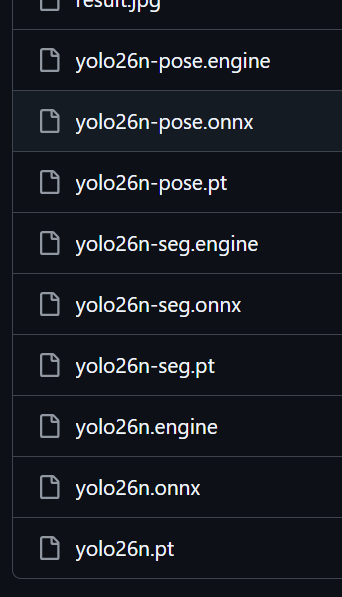
We run three model variants concurrently:
-
Object Detection (
yolov26n):- Task: Bounding box detection and classification.
- Classes: 80 standard COCO classes (Person, Vehicle, etc.).
- Advantage: Extremely fast inference for primary object localization.
-
Pose Estimation (
yolov26n-pose):- Task: Human skeletal keypoint detection (17 keypoints).
- Advantage: Real-time behavior analysis without heavy external pose libraries.
-
Instance Segmentation (
yolov26n-seg):- Task: Pixel-level object masking.
- Advantage: Provides precise object contours, useful for defect detection where bounding boxes are insufficient.
Optimization Strategy: All models are exported to TensorRT Engine format (.engine) with FP16 precision. This removes PyTorch runtime overhead and maximizes the use of Orin's 100+ TOPS (Tera Operations Per Second) AI performance.
Prerequisites
Hardware
- reComputer Robotics J5011
- 2x Sensing SG3S-ISX031C-GMSL2F Camera
- GMSL Deserializer Board: Compatible with Jetson Orin (ensure drivers are installed)
- Cables: High-quality Fakra cables
Software
- JetPack 6.x (L4T 36.x)
- GStreamer with NVIDIA acceleration plugins (
nvv4l2camerasrcor standardv4l2srcwithio-mode=dmabuf) - Python 3.10+
- Ultralytics YOLOv26
Installation & Setup
Step 0: Check Camera Parameters
First, check your camera's supported formats and frame rates using v4l2-ctl:
v4l2-ctl -d /dev/video0 --list-formats-ext
v4l2-ctl -d /dev/video1 --list-formats-ext
This command will display the camera's maximum frame rate at different resolutions. Using the SG3S-ISX031C-GMSL2F camera as an example, the output shows:
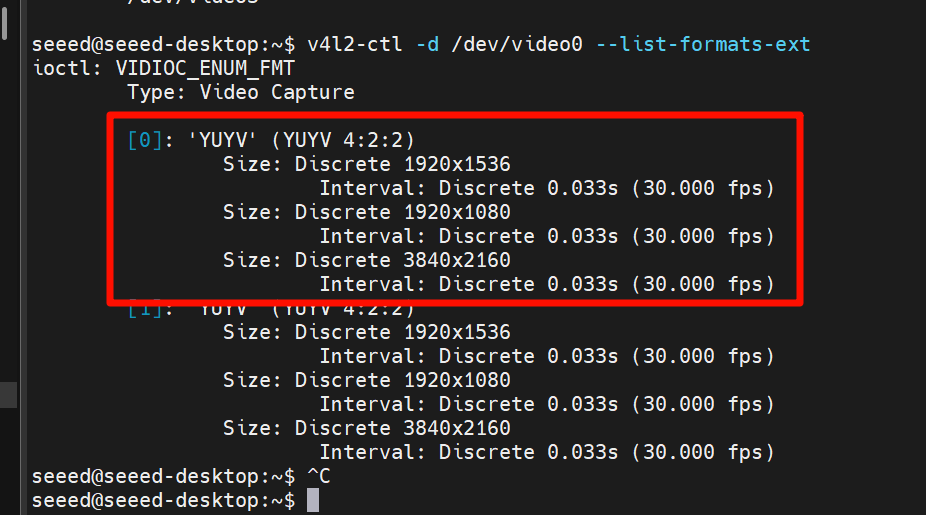
The 30fps limit at 1920x1536 resolution is a camera hardware limitation, not the AGX Orin's performance ceiling. The AGX Orin is capable of processing much higher frame rates with lower resolution or lighter models. If you are using a different camera model, refer to its datasheet for the maximum frame rate at your target resolution.
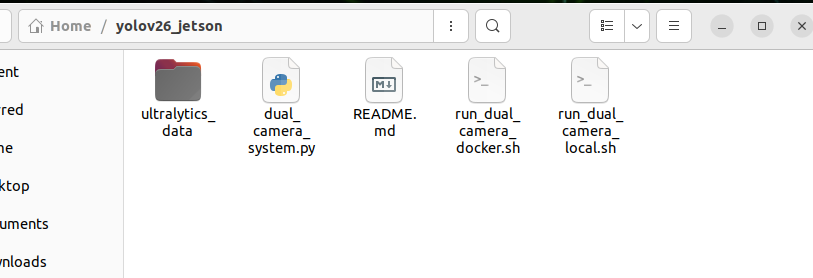
Step 1: Clone Repository
cd /home/seeed
git clone https://github.com/bleaaach/yolov26_jetson.git
cd yolov26_jetson
Detailed Installation Steps
Follow these steps to set up the environment from scratch.
Step 1: Update Package List and Install pip
sudo apt update
sudo apt install python3-pip -y
pip install -U pip
If pip is not pre-installed on the system, use this command to install:
curl https://bootstrap.pypa.io/get-pip.py -o get-pip.py
python3 get-pip.py --user
Step 2: Install Ultr Ultralytics Package
~/.local/bin/pip install ultralytics[export]
Step 3: Install PyTorch and Torchvision
PyTorch and Torchvision installed via pip are not compatible with Jetson's ARM64 architecture. You need to manually install versions built specifically for Jetson.
First uninstall incompatible versions:
~/.local/bin/pip uninstall torch torchvision -y
Then install JetPack 6.1 compatible versions:
~/.local/bin/pip install https://github.com/ultralytics/assets/releases/download/v0.0.0/torch-2.5.0a0+872d972e41.nv24.08-cp310-cp310-linux_aarch64.whl
~/.local/bin/pip install https://github.com/ultralytics/assets/releases/download/v0.0.0/torchvision-0.20.0a0+afc54f7-cp310-cp310-linux_aarch64.whl
If GitHub download is slow, you can use an acceleration proxy:
~/.local/bin/pip install https://gh-proxy.com/https://github.com/ultralytics/assets/releases/download/v0.0.0/torch-2.5.0a0+872d972e41.nv24.08-cp310-cp310-linux_aarch64.whl
~/.local/bin/pip install https://gh-proxy.com/https://github.com/ultralytics/assets/releases/download/v0.0.0/torchvision-0.20.0a0+afc54f7-cp310-cp310-linux_aarch64.whl
Step 4: Install cuSPARSELt
sudo apt-get install -y libcusparselt0
Step 5: Install onnxruntime-gpu
onnxruntime-gpu is used for some model export functions. Since the package on PyPI doesn't contain aarch64 binaries for Jetson, manual installation is required:
~/.local/bin/pip install https://gh-proxy.com/https://github.com/ultralytics/assets/releases/download/v0.0.0/onnxruntime_gpu-1.23.0-cp310-cp310-linux_aarch64.whl
Or use version 1.20.0:
~/.local/bin/pip install https://gh-proxy.com/https://github.com/ultralytics/assets/releases/download/v0.0.0/onnxruntime_gpu-1.20.0-cp310-cp310-linux_aarch64.whl
Step 6: Configure PATH Environment Variable
echo 'export PATH=$PATH:~/.local/bin' >> ~/.bashrc
source ~/.bashrc
Step 7: Verify Installation
python3 -c "import ultralytics; import torch; import torchvision; import onnxruntime; print('ultralytics version:', ultralytics.__version__); print('torch version:', torch.__version__); print('torchvision version:', torchvision.__version__); print('onnxruntime version:', onnxruntime.__version__)"
Expected output:
ultralytics version: 8.4.7
torch version: 2.5.0a0+872d972e41.nv24.08
torchvision version: 0.20.0a0+afc54f7
onnxruntime version: 1.23.0
Step 8: Test YOLOv26 Inference Functionality
from ultralytics import YOLO
import torch

print(f"CUDA available: {torch.cuda.is_available()}")
if torch.cuda.is_available():
    print(f"CUDA device count: {torch.cuda.device_count()}")
    print(f"CUDA device name: {torch.cuda.get_device_name(0)}")

model = YOLO('yolov26n.pt')
print(f"Model loaded successfully!")

results = model('https://ultralytics.com/images/bus.jpg')
print(f"Inference successful! Detected {len(results[0].boxes)} objects")

for i, box in enumerate(results[0].boxes):
    cls_id = int(box.cls[0])
    conf = float(box.conf[0])
    cls_name = model.names[cls_id]
    print(f"  Object {i+1}: {cls_name} (confidence: {conf:.2f})")
Step 9: Prepare Model Files
ls -la /home/seeed/ultralytics_data/
mkdir -p /home/seeed/ultralytics_data
If model files don't exist, download them first:
cd /home/seeed/ultralytics_data
yolo export model=yolov26n.pt format=engine device=0 half=True
yolo export model=yolov26n-pose.pt format=engine device=0 half=True
yolo export model=yolov26n-seg.pt format=engine device=0 half=True
ls -la
You should see the following files:
yolov26n.engineyolov26n-pose.engineyolov26n-seg.engine
Step 10: Run Local Script
cd /home/seeed/yolov26_jetson
chmod +x run_dual_gmsl_local.sh
./run_dual_gmsl_local.sh
Configuration & Running
The system uses run_dual_gmsl_local.sh which is pre-configured for the SG3S-ISX031C camera.
Camera Configuration Details
| Parameter | Value | Note |
|---|---|---|
| Camera Model | SG3S-ISX031C-GMSL2F | Sensing GMSL2 Camera |
| Capture Resolution | 1920 x 1536 | Full Sensor Resolution |
| Capture FPS | 30 FPS | Native Frame Rate |
| Process Resolution | 640 x 480 | Downscaled via Hardware (VIC) for Inference |
| Pixel Format | YUY2 | Converted to BGR via Hardware |
Running the System
cd /home/seeed/yolov26_jetson
chmod +x run_dual_gmsl_local.sh
./run_dual_gmsl_local.sh
The SG3S-ISX031C-G-GMSL2F camera has a maximum display frame rate of 30fps at full resolution (1920x1536). This is a camera hardware limitation, not the AGX Orin's performance ceiling. The AGX Orin is capable of processing much higher frame rates with lower resolution or lighter models. For reference on AGX Orin's typical inference performance, see Ultralytics Jetson Guide.
Troubleshooting
- Low FPS?: Ensure you are using the
.enginemodels, not.pt. The script enforces.engineusage. - No Video?: Check GMSL connections and ensure
/dev/video*devices exist. Verify drivers withv4l2-ctl --list-devices.
Resources
- Sensing SG3S-ISX031C-GMSL2F Product Page
- NVIDIA Jetson Download Center
- Ultralytics YOLOv26 on NVIDIA Jetson Guide
Tech Support & Product Discussion
Thank you for choosing Seeed Studio products! For technical support and product discussion, please use the following channels: