Getting started with Atom-X
Introduction
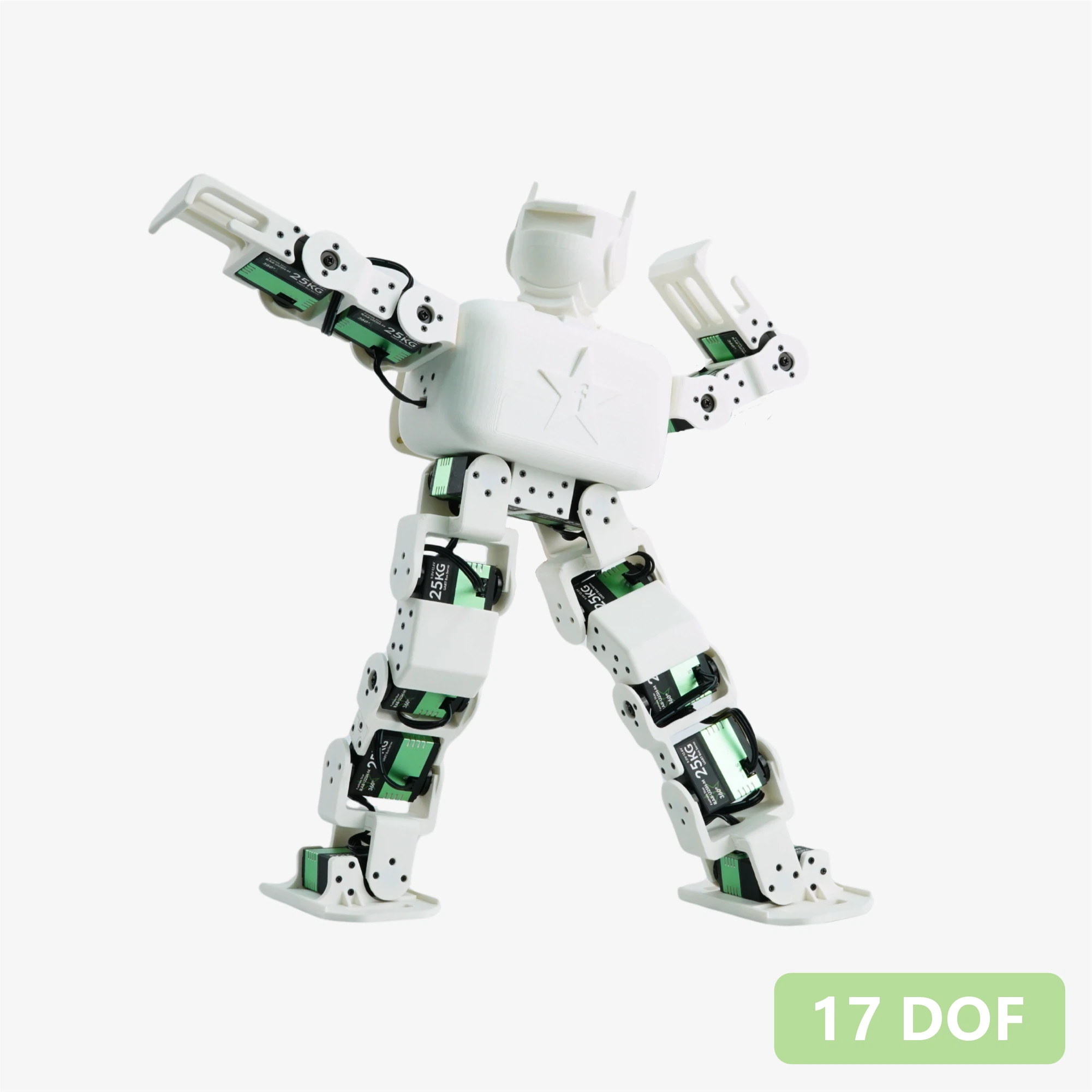
Atom X is an open-source 17-Degree-of-Freedom (DOF) bipedal humanoid robot kit designed for robotics developers, makers, and educational institutions. The robot is driven by 17 Fashionstar RA8-U25H-M bus servo motors, featuring a fully 3D-printed open-source structure. It is equipped with a Seeed Studio XIAO ESP32-S3 main controller and Grove expansion board, with complete control firmware pre-installed from the factory. Its Web visual motion editor supports browser-based real-time debugging, teach programming, and JSON export, facilitating cross-platform secondary development. The included RUC-01 adapter board provides regulated power supply and UART interfaces, and supports Bluetooth/Web remote control. Ready to use out of the box, it is an ideal platform for motion algorithm verification and desktop robot development.
1. Product Introduction
- DOF Configuration: 17 DOF in total, covering arm, torso, and leg joints.
- Structure and Appearance: Fully 3D-printed structure with officially open-sourced STP/STL model files, facilitating part replacement, structural reinforcement, and exterior redesign.
- Joint Actuators: Fashionstar RA8-U25H-M bus servo motors × 17 (supporting bus communication with simplified wiring).
- Web Visual Motion Editor: Provides a browser-based control platform requiring no installation, supporting real-time servo debugging and teach-mode programming. Completed motion groups can be exported as standard
.jsonformat files for easy parsing and integration by various main controllers (such as Arduino, STM32, Raspberry Pi). - Ready to Use Out of the Box: Pre-configured with the Seeed Studio XIAO ESP32-S3 as the main controller, with factory demonstration programs provided.
- Multi-Module Expansion: Paired with the Seeed Studio XIAO expansion board featuring onboard Grove interfaces for connecting Seeed Grove series sensors/controller modules.
- Ecosystem Expandability: Through the Grove interfaces on the Seeed Studio XIAO expansion board, vision, environmental perception, and other Grove ecosystem sensors and control modules can be quickly integrated.
- Cross-Platform Compatibility: To lower the development threshold, we provide the RUC-01 adapter board with onboard 5V/3.3V power output and UART interfaces. Any controller with serial port functionality can communicate with it!
2. Specifications
| Parameter | Value |
|---|---|
| Degrees of Freedom (DOF) | 17 |
| Chassis | 3D Printed |
| Servo Motors | RA8-U25H-M Bus Servo Motors |
| Servo Power Interface Board | RUC-01 provides 4 servo interfaces, 5V/3.3V control board power supply, serial communication interface (Grove interface) |
| Main Controller | Seeedstudio XIAO ESP32-S3 + Seeed Studio XIAO Expansion Board |
| Communication Protocol | Asynchronous Serial Communication (UART) |
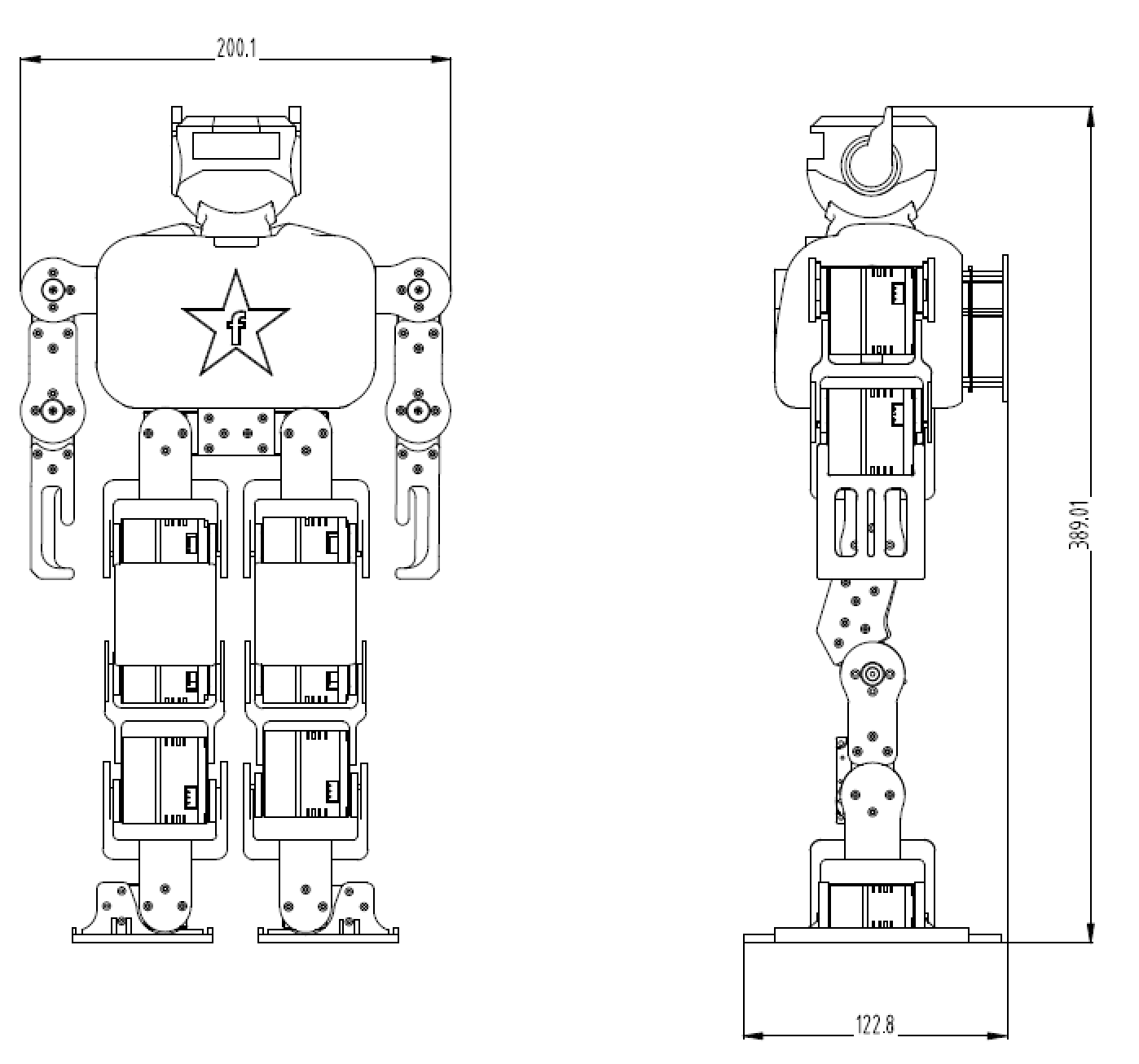
| Dimensions | 200×122×389 mm |
3. Parts List
| Item | Qty |
|---|---|
| 17-DOF Robot Assembly | 1 |
| Screws KM M2*7mm | 10 |
| Screws KB M2*7mm | 10 |
| Screws PM M3*6mm | 2 |
| Servo Cable 200mm 3-pin | 2 |
17-DOF Robot Assembly includes
- RA8-U25H-M × 17
- Robot structural parts (set) × 1
- RUC-01 Adapter Board × 1
- Seeed XIAO ESP32-S3 × 1
- Seeed XIAO Expansion Board × 1
4. Dimensions
5. Hardware Architecture
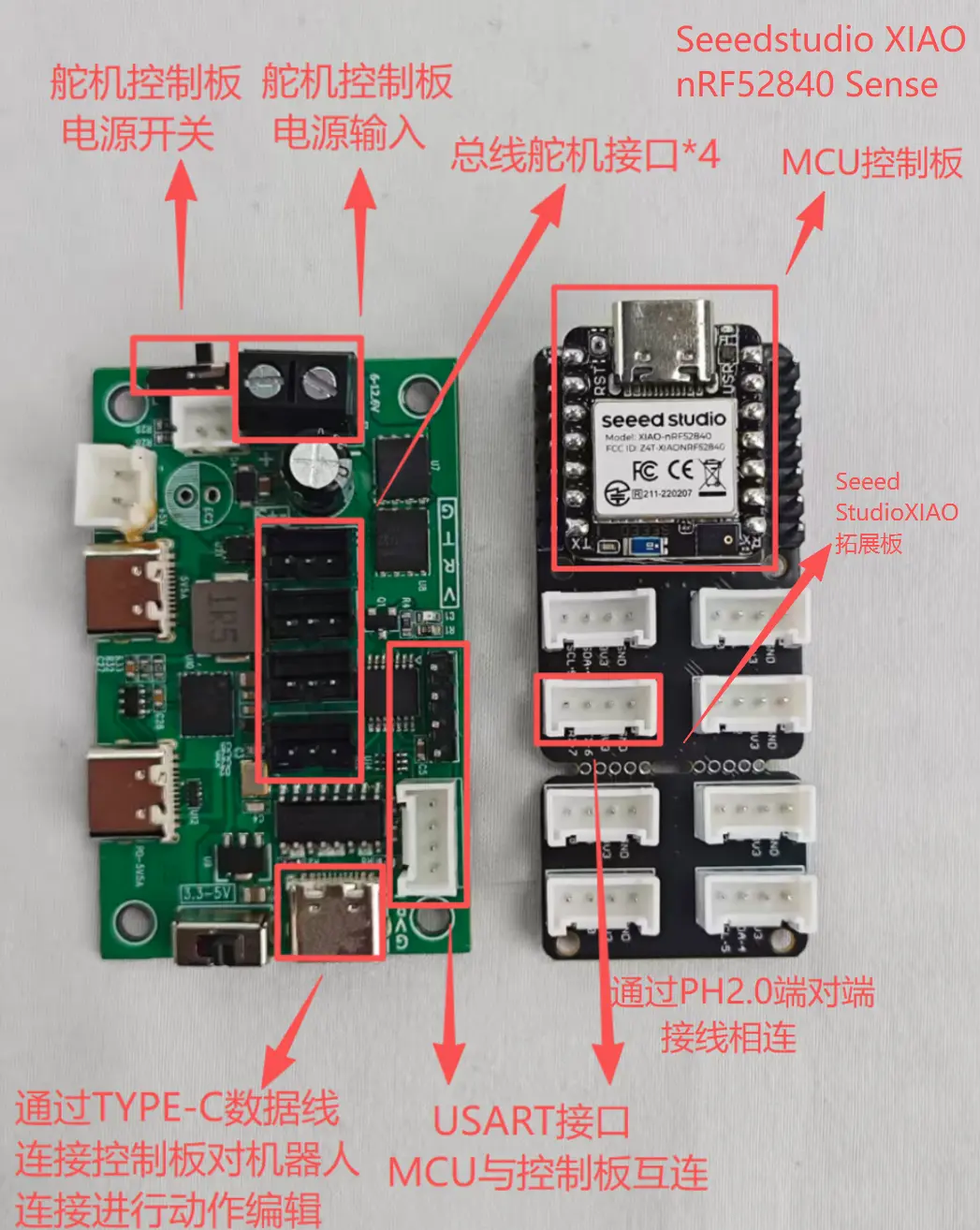
Drive and Power Management (RUC-01 Interface Board)
Serving as the robot's power hub, the Drive and Power Management (RUC-01 Interface Board) module is responsible for bus communication management and power distribution:
- Servo Communication: 4 onboard bus servo interfaces (supporting daisy-chain expansion) responsible for signal and power delivery to the 17 bus servo motors.
- PC Debug Interface: Integrated USB Type-C port for direct connection to a PC host for motion group editing and debugging.
- System Power Supply: Handles voltage conversion and provides stable power input to the main controller board.
- Communication Interface: Provides a standard UART serial port for receiving control commands from the upper-level main controller board.
Logic Main Controller and Expansion (MCU + Grove Shield)
Serving as the robot's "brain", the Logic Main Controller and Expansion (MCU + Grove Shield) is responsible for running control algorithms and processing sensor data:
- Core Controller: Utilizes the Seeed Studio XIAO series development board, compact in size yet powerful in performance.
- Ecosystem Expansion: Paired with a Grove interface expansion board providing abundant general-purpose interfaces.
- Primary Functions: Runs robot kinematics programs and seamlessly connects to various sensors (such as ultrasonic, vision, voice modules, etc.) through Grove interfaces to achieve complex interactive functions.
Data Flow Description
Debug/Edit Mode (Debug Mode)
PC --(USB)--> RUC-01 --(Bus)--> Servos
Description: Directly adjust servo angles and save motion groups via PC software, bypassing the XIAO main controller.
Autonomous Mode (Autonomous Mode)
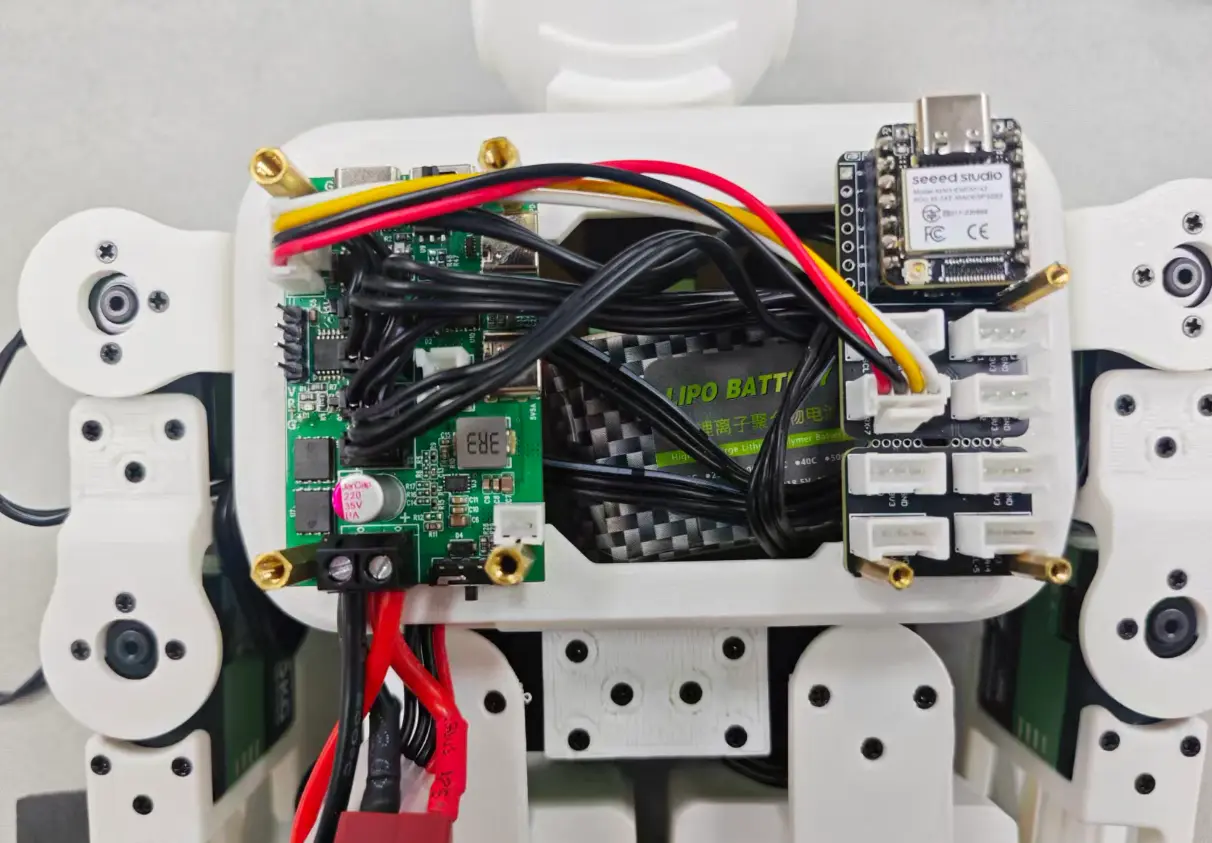
Sensor / Remote --(Signal)--> XIAO --(UART Command)--> RUC-01 --(Bus)--> Servos
Description: The XIAO main controller autonomously controls the robot's actions based on sensor feedback or pre-stored code.
6. Mechanical Structure
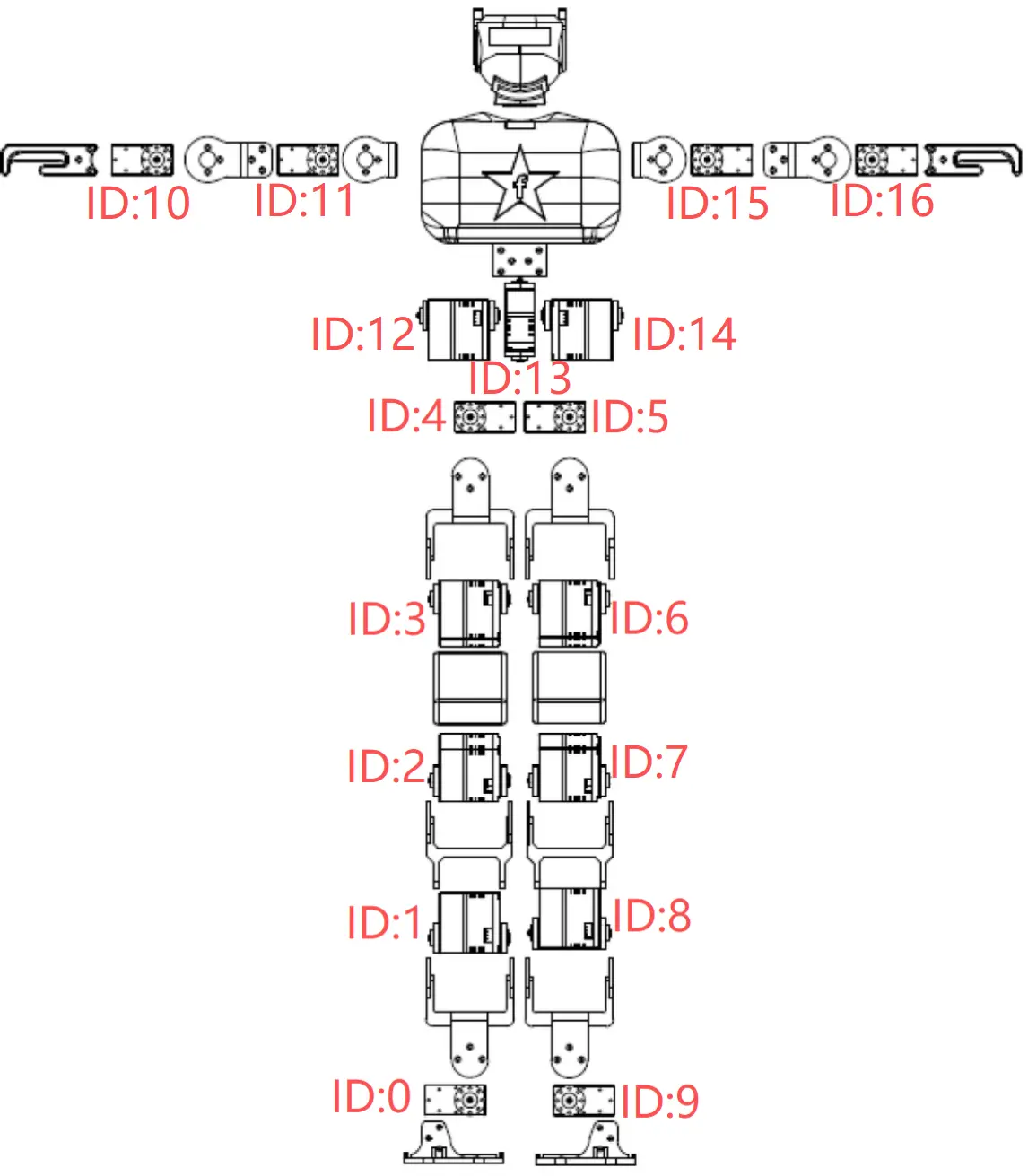
- Robot structure display and default servo ID numbering
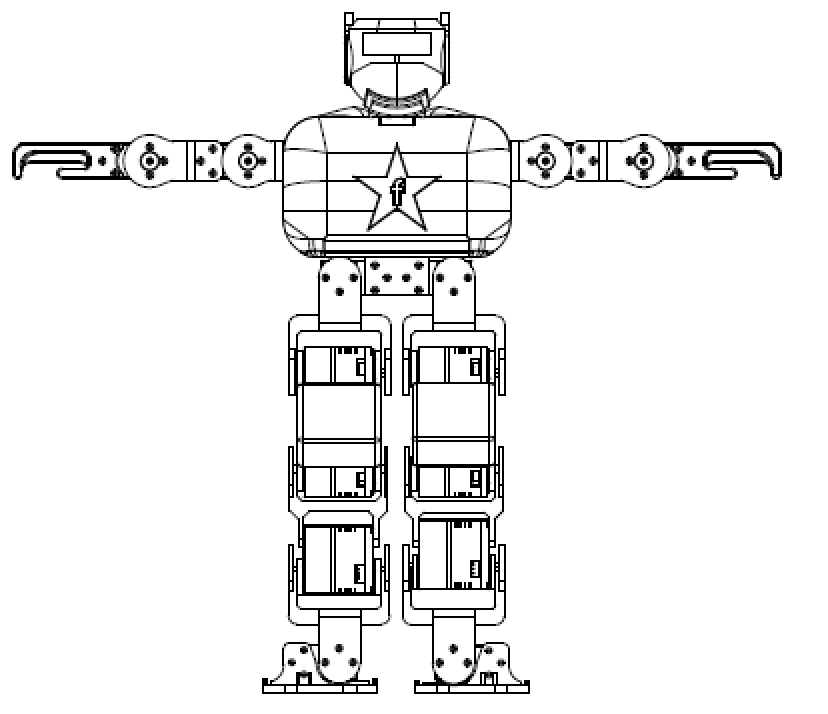
- Robot posture when all servo motors are at zero degrees
7. Drawings and Model Downloads
To obtain the complete 3D printing data, please visit: MakerWorld - Atom X
We will gradually provide more complete assembly videos and illustrated instructions later. Please stay tuned for updates on this page.
8. Connection Guide
9. Usage Instructions
Please refer to the Atom-S user manual for Atom-X usage. All operations are identical to those of the Atom-S.
Motion Editor link:
Remote Controller link:
FAQ
Q1: What battery should be used with the Atom-X?
A: A 2S or 3S Li-Po battery is recommended, used with an XT60 connector.
Q2: Can other main controller boards be used instead of the XIAO ESP32-S3?
A: The design is optimized for the XIAO ESP32-S3, but any ESP32 development board with sufficient GPIO can be adapted by modifying the code.
Q3: How do I update the firmware?
A: Connect the XIAO ESP32-S3 to your computer via USB and upload the new program using Arduino IDE or PlatformIO.