Build and Flash Yocto for Seeed Jetson Carrier Boards
This guide provides a common workflow for building and flashing an OpenEmbedded/Yocto image on the Seeed Studio Jetson carrier boards defined by the seeed-tegra-demo-distro repository.
The repository uses the OE4T wrynose branches and the meta-tegra BSP for Jetson Linux R39.2.0 / JetPack 7.2. A Yocto image uses NVIDIA Jetson Linux BSP components, but it is not the Ubuntu root filesystem installed by NVIDIA SDK Manager. Package management, image composition, desktop environment, and update behavior are controlled by Yocto metadata.
The commands and parameter tables in this article follow the repository state reviewed on August 31, 2026. Before building, check the repository README and support matrix again because available machines, module SKUs, branches, and hardware-validation status can change.
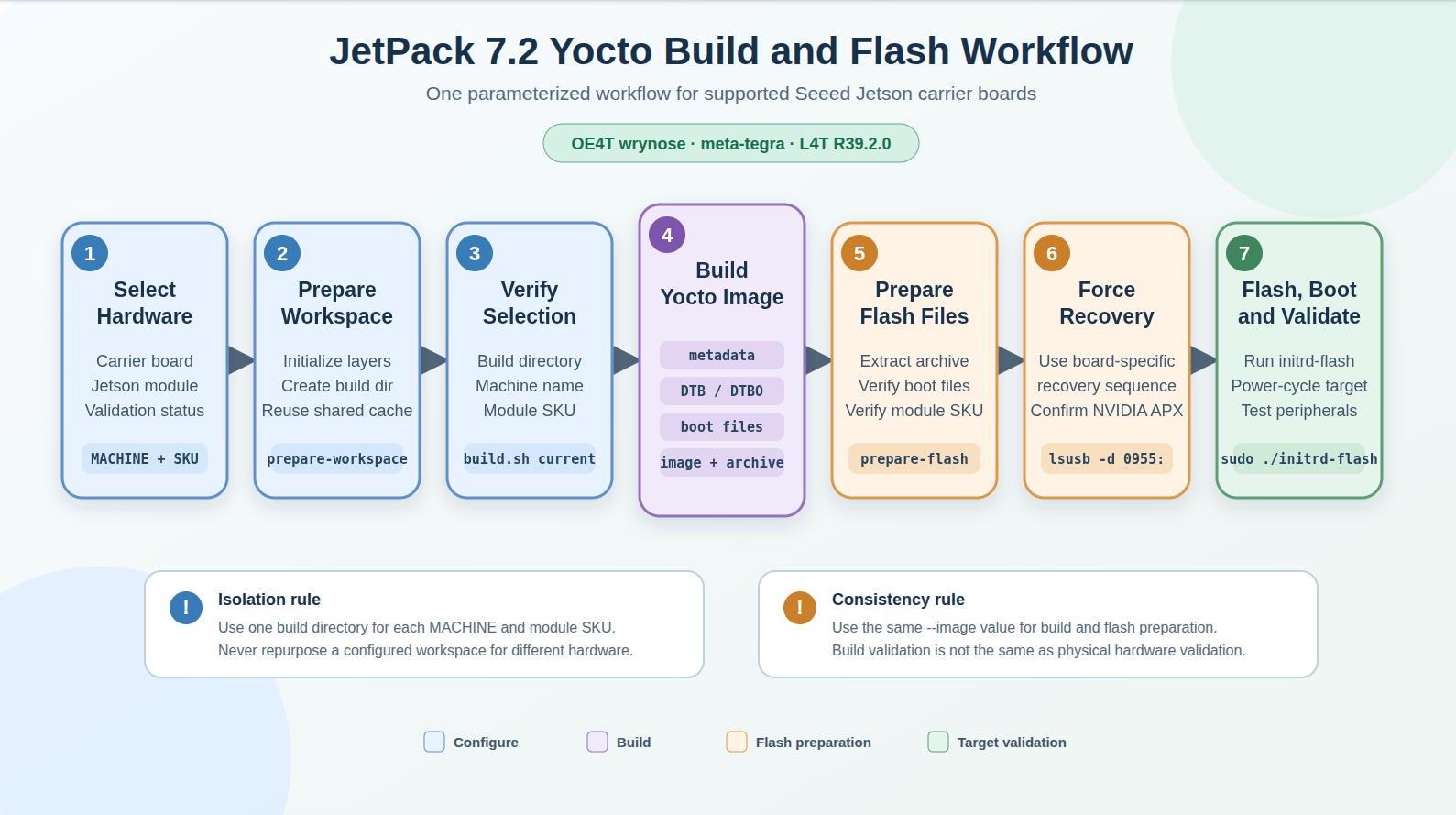
The following diagram summarizes the full workflow. Select the carrier board and Jetson module first, then keep the same machine, SKU, build directory, and image recipe through building and flashing.
Before You Start
Use a physical x86_64 Linux host with a fast local SSD, a stable network connection, and sudo access. Prepare a data-capable USB cable for the carrier board's recovery/device port. A full Yocto development build can consume several hundred gigabytes, so reserve approximately 400 GB of free storage when possible. Use at least 16 GB RAM, with 32 GB or more recommended.
Install the commonly required build and flashing packages on an Ubuntu host:
sudo apt update
sudo apt install -y \
  gawk wget git diffstat unzip texinfo gcc build-essential chrpath socat cpio \
  python3 python3-pip python3-pexpect python3-git python3-jinja2 \
  xz-utils debianutils iputils-ping libegl1-mesa libsdl1.2-dev \
  pylint xterm zstd liblz4-tool file locales \
  gdisk parted udev udisks2
Package names can differ between host distributions. Follow the Yocto Project Quick Build and OE4T flashing requirements for the branch used by the repository. If BitBake reports an unsupported host distribution, use a supported host instead of bypassing the validation.
The helper scripts use the following parameters throughout the workflow:
| Parameter | Purpose | Important rule |
|---|---|---|
--machine | Selects the carrier-board Yocto MACHINE configuration. | It must match the physical carrier board. |
--module-sku | Selects the Jetson module installed on a configurable Orin carrier. It is the final four digits of the NVIDIA module number. | Required for configurable Orin machines; omit it for fixed-module Thor machines. |
--build-dir | Stores the selected configuration, BitBake work files, and deploy artifacts. | Use a separate directory for every carrier and module SKU combination. |
--cache-dir | Stores shared downloads and sstate cache data. | Reuse one host-local cache across builds. |
--image | Selects the BitBake image recipe. | Use the same image name for building and flash preparation. |
--output-dir | Selects where the verified tegraflash package is extracted. | Use a new or empty host-local directory. |
MACHINE is the Yocto hardware target name, not only a product label. It selects a machine configuration from layers/meta-seeed/conf/machine/, which determines the SoC family, carrier DTB, module configuration, BPMP data, pinmux and pad-voltage files, overlays, and flash variables used by BitBake and tegraflash.
The recomputer-orin-super-j401 commands in this guide are only a concrete example. Before preparing the workspace, select the MACHINE and module SKU that match your carrier and Jetson module from the carrier-board table.
Choose an image based on the target's purpose:
| Image recipe | Use case |
|---|---|
demo-image-full | OE4T reference/demo image with graphics, containers, OpenCV, and NVIDIA samples. This is the helper-script default. |
seeed-image-jetson-runtime | Seeed runtime profile aligned with the OE4T/NVIDIA runtime stack. |
seeed-image-jetson-development | Runtime image plus target-side CUDA development packages, headers, build/debug tools, samples, and tests. |
The examples below use seeed-image-jetson-development.
Choose the Carrier Board and Jetson Module
The repository reviewed for this guide defines 16 Seeed machine configurations. You can also print the current checkout's machine list with ./scripts/seeed/build.sh machines.
| Product or carrier configuration | MACHINE | Supported module selection |
|---|---|---|
| reComputer Industrial J401 | recomputer-industrial-orin-j401 | P3767 Orin NX/Nano: 0000, 0001, 0003, 0004 |
| reComputer Mini AGX Orin J501X | recomputer-mini-agx-orin-j501x | P3701 AGX Orin: 0004, 0005 |
| reComputer Orin J401 | recomputer-orin-j401 | P3767 Orin NX/Nano: 0000, 0001, 0003, 0004 |
| reComputer Orin J40mini | recomputer-orin-j40mini | P3767 Orin NX/Nano: 0000, 0001, 0003, 0004 |
| reComputer Robotics J401 | recomputer-orin-robotics-j401 | P3767 Orin NX/Nano: 0000, 0001, 0003, 0004 |
| reComputer Robotics J401 GMSL | recomputer-orin-robotics-j401-gmsl | P3767 Orin NX/Nano: 0000, 0001, 0003, 0004 |
| reComputer Super J401 | recomputer-orin-super-j401 | P3767 Orin NX/Nano: 0000, 0001, 0003, 0004 |
| reComputer Robo AGX Orin J501X | recomputer-robo-agx-orin-j501x | P3701 AGX Orin: 0004, 0005 |
| reComputer Rugged Orin J401 | recomputer-rugged-orin-j401 | P3767 Orin NX/Nano: 0000, 0001, 0003, 0004 |
| reComputer Thor Carrier J601 | recomputer-thor-carrier-j601 | Fixed P3834-0008 T5000; omit --module-sku |
| reComputer Thor Carrier J6014 | recomputer-thor-carrier-j6014 | Fixed P3834-0000 T4000; omit --module-sku |
| reComputer Thor Carrier J6015 | recomputer-thor-carrier-j6015 | Fixed P3834-0008 T5000; omit --module-sku |
| reServer AGX Orin J501X | reserver-agx-orin-j501x | P3701 AGX Orin: 0000, 0001, 0002, 0004, 0005 |
| reServer AGX Orin J501X GMSL | reserver-agx-orin-j501x-gmsl | P3701 AGX Orin: 0000, 0001, 0002, 0004, 0005 |
| reServer Industrial Orin J401 | reserver-industrial-orin-j401 | P3767 Orin NX/Nano: 0000, 0001, 0003, 0004 |
| Seeed AGX Orin Kit | seeed-agx-orin-kit | P3701 AGX Orin: 0000, 0001, 0002, 0004, 0005 |
--module-sku is the last four digits printed in the NVIDIA module part number. Check the module label or EEPROM rather than selecting a value from memory.
| Module family | --module-sku | Complete module number | Module model or repository mapping |
|---|---|---|---|
| P3767 | 0000 | P3767-0000 | Jetson Orin NX 16GB |
| P3767 | 0001 | P3767-0001 | Jetson Orin NX 8GB |
| P3767 | 0003 | P3767-0003 | Jetson Orin Nano 8GB |
| P3767 | 0004 | P3767-0004 | Jetson Orin Nano 4GB |
| P3701 | 0000 | P3701-0000 | Jetson AGX Orin developer-kit module |
| P3701 | 0001 | P3701-0001 | Compatibility SKU using the repository's 0000 DTB/BPMP mapping |
| P3701 | 0002 | P3701-0002 | Compatibility SKU using the repository's 0000 DTB/BPMP mapping |
| P3701 | 0004 | P3701-0004 | Jetson AGX Orin 32GB |
| P3701 | 0005 | P3701-0005 | Jetson AGX Orin 64GB |
| P3834 | not selectable | P3834-0000 | Jetson T4000, selected by the Thor MACHINE |
| P3834 | not selectable | P3834-0008 | Jetson T5000 / AGX Thor developer-kit module, selected by the Thor MACHINE |
The repository provides machine metadata and build validation for all listed configurations. This does not mean every carrier, module SKU, camera option, and peripheral has completed physical validation. In the reviewed support matrix, recomputer-orin-super-j401 has completed flash, NVMe boot, HDMI, and basic USB validation. reserver-agx-orin-j501x-gmsl with SKU 0004 has completed flash and boot validation, while GMSL and wider peripheral validation remain pending. Treat the other machines as build-validated until their hardware status is updated.
The command sequence in the next sections uses reComputer Super J401 with an Orin NX 16GB module as a concrete example. Replace its machine, SKU, and directory names with the values selected from the tables above. The same parameterized workflow also applies to other machines in the support table, such as reComputer Mini J5011.
| reComputer Super J401 | reComputer Mini J5011 |
|---|---|
 |  |
Using the wrong MACHINE or module SKU can select incompatible DTB, BPMP, pinmux, memory, or flash configuration files. Never reuse an existing build directory after changing either value.
Prepare and Verify the Workspace
Clone the Seeed repository and record the commit used for the build:
mkdir -p ~/work/jetson-yocto
cd ~/work/jetson-yocto

git clone \
  --branch master \
  --single-branch \
  https://github.com/jjjadand/seeed-tegra-demo-distro.git \
  tegra-demo-distro

cd tegra-demo-distro
git rev-parse HEAD
Prepare one workspace for the example carrier and module:
./scripts/seeed/prepare-workspace.sh \
  --machine recomputer-orin-super-j401 \
  --module-sku 0000 \
  --build-dir build-recomputer-orin-super-j401-sku0000 \
  --cache-dir "$HOME/.cache/yocto-seeed"
For an AGX Orin carrier, replace the values with its machine and supported P3701 SKU. For a Thor carrier, omit --module-sku because the module is fixed by the selected machine file. The helper also accepts --no-activate, --no-submodules, and --full-history for advanced workspace management.
Verify the selected build directory, machine, and module SKU before building:
./scripts/seeed/build.sh current \
  --build-dir build-recomputer-orin-super-j401-sku0000 \
  --machine recomputer-orin-super-j401

Do not continue if the displayed values do not match the physical hardware.
Build the Image and Flash Package
The recommended first build uses the all command. It runs metadata validation, Seeed DTB/DTBO compilation, boot-file installation checks, and the complete image build in sequence:
./scripts/seeed/build.sh all \
  --build-dir build-recomputer-orin-super-j401-sku0000 \
  --machine recomputer-orin-super-j401 \
  --image seeed-image-jetson-development
The first build downloads and compiles many components and can take several hours. A successful run ends after all four stages complete:
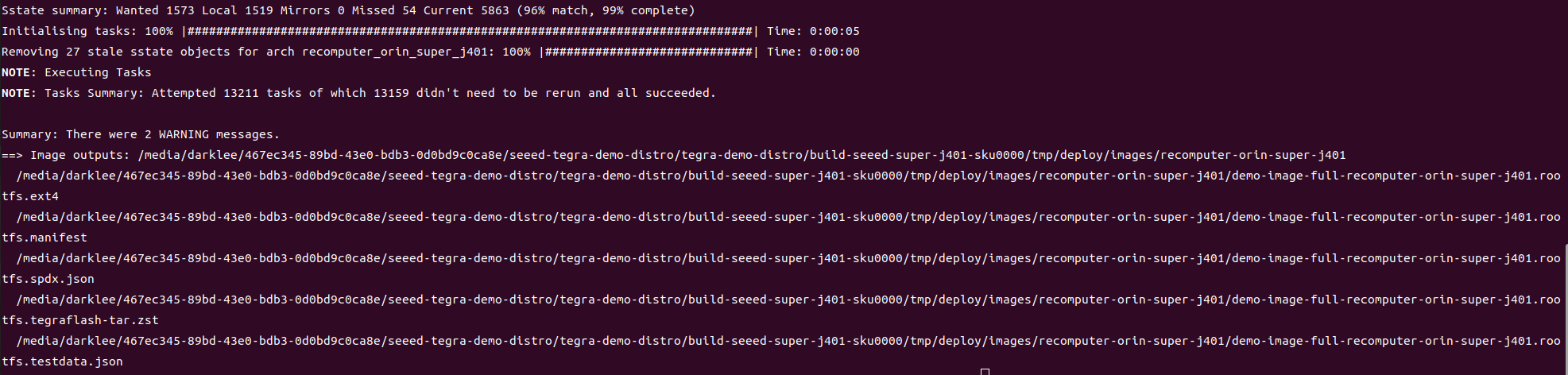
Generated files are placed under <build-dir>/tmp/deploy/images/<machine>/. Important outputs follow this naming pattern:
<image>-<machine>.rootfs.ext4
<image>-<machine>.rootfs.manifest
<image>-<machine>.rootfs.spdx.json
<image>-<machine>.rootfs.testdata.json
<image>-<machine>.rootfs.tegraflash-tar.zst
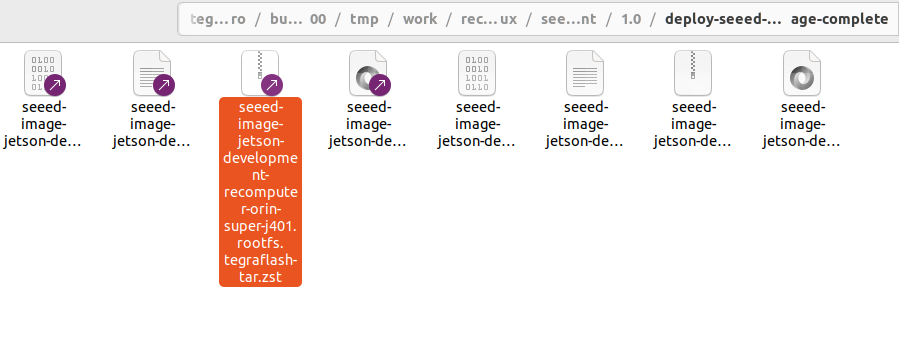
The .tegraflash-tar.zst archive contains the files used by the flash-preparation helper.
For debugging or partial rebuilds, replace all with metadata, dtb, bootfiles, image, or flash-package. Keep the same --build-dir, --machine, and --image values. To build an optional x86_64 cross-development SDK, run:
./scripts/seeed/build.sh sdk \
  --build-dir build-recomputer-orin-super-j401-sku0000 \
  --machine recomputer-orin-super-j401 \
  --image seeed-image-jetson-development
The SDK installer is written under <build-dir>/tmp/deploy/sdk/. It is not required to build or flash the target image, and it is unnecessary when compiling directly on the Jetson.
Prepare and Flash the Target
Extract and verify the flash archive with the same build directory, machine, and image values used for the build:
./scripts/seeed/prepare-flash.sh \
  --build-dir build-recomputer-orin-super-j401-sku0000 \
  --machine recomputer-orin-super-j401 \
  --image seeed-image-jetson-development \
  --output-dir "$HOME/seeed-flash-recomputer-orin-super-j401-sku0000"
The helper checks the rootfs, initrd-flash, flash variables, DTB/BPMP DTB, pinmux, pad-voltage, and other selected boot files. For configurable carriers, it also verifies that the module SKU in the flash archive matches the prepared workspace. The helper does not run sudo or flash the target by itself.
Put the target into Force Recovery Mode using the recovery-button or recovery-switch sequence documented for that specific Seeed carrier board. Connect the carrier's USB device/debug port directly to the Linux host with a data-capable cable, then verify that an NVIDIA APX device is visible:
lsusb -d 0955:
The USB product ID varies by Jetson module. Do not start flashing until the NVIDIA recovery device appears.
Run the generated flasher from the prepared output directory:
cd "$HOME/seeed-flash-recomputer-orin-super-j401-sku0000"
sudo ./initrd-flash
The script boots a temporary initrd through USB, exposes the target storage device to the host, writes the partition layout and root filesystem, and reports the final status. Do not disconnect power or USB while flashing.
The temporary host block-device name is assigned dynamically. Never assume it is always /dev/sdb or /dev/sdc, and do not manually redirect the workflow to a host drive.
First Boot and Validation
After flashing finishes successfully, disconnect the recovery USB cable, return the carrier's recovery controls to their normal state if required, power-cycle the target, and connect its display and peripherals.
The Yocto desktop should boot from the selected target storage:
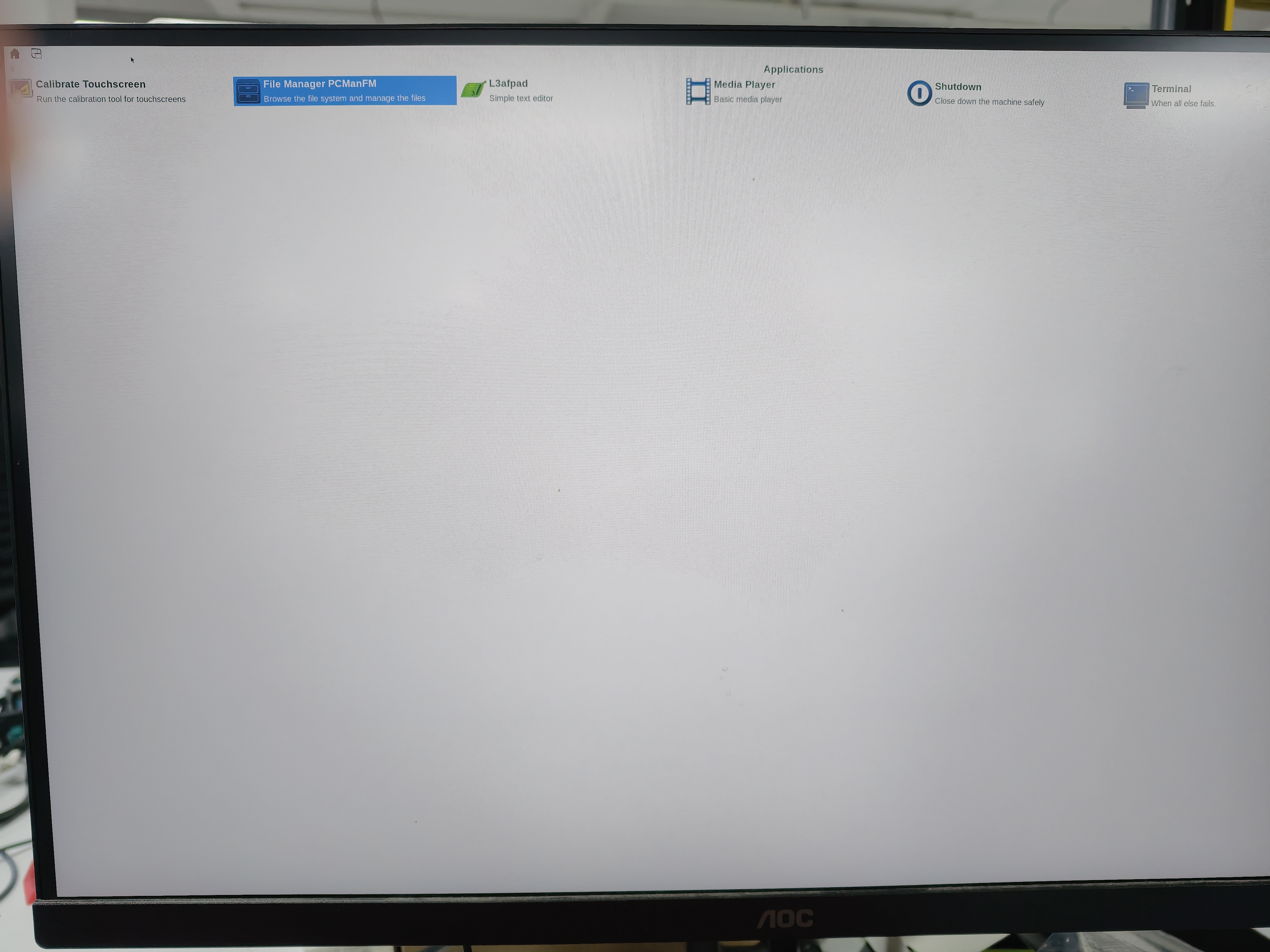
The default tegrademo configuration enables an empty initial root password and root login for development. Set a password immediately:
passwd
For the development image, verify the required target-side tools and libraries, then test the carrier-specific interfaces used by your application:
nvcc --version
gcc --version
cmake --version
pkg-config --modversion opencv4
Successful image building or booting does not validate every camera, GMSL link, display mode, USB port, network interface, or expansion connector. Complete product-specific peripheral testing before deployment.
Troubleshooting
The build directory reports the wrong machine or SKU: Create a new build directory with prepare-workspace.sh. Do not edit or reuse an existing workspace to switch carrier boards or module SKUs.
The flash archive cannot be found: Pass the same --image value to build.sh and prepare-flash.sh. Both helpers default to demo-image-full, so a build of seeed-image-jetson-development must explicitly use that name during flash preparation.
Metadata parses but the hardware does not boot: Check the repository support matrix. Metadata and DTB build validation do not prove physical flash, storage boot, display, camera, GMSL, or peripheral operation for every machine and module combination.
Flashing stops at Waiting for USB storage device flashpkg: At this stage, the host is waiting for the Jetson initrd to enumerate a temporary USB mass-storage device; rootfs partition writing has not started. Check the data cable, direct host USB connection, recovery-mode state, and the compiled device tree's USB device-mode path. Do not treat repeated dots as normal slow storage writing.
References
- Seeed tegra-demo-distro repository
- Seeed carrier-board support matrix
- Yocto Project Quick Build
- OE4T meta-tegra documentation
- OE4T flashing basics
Thank you for choosing Seeed Studio products! For technical support and product discussion, please use the following channels: