Grove - Wio-E5 Helium 和 TinyML 应用演示
入门指南
在这里,我们将构建一个利用 tinyML 和 helium LoRa 物联网网络来防止非法砍伐木材的项目。
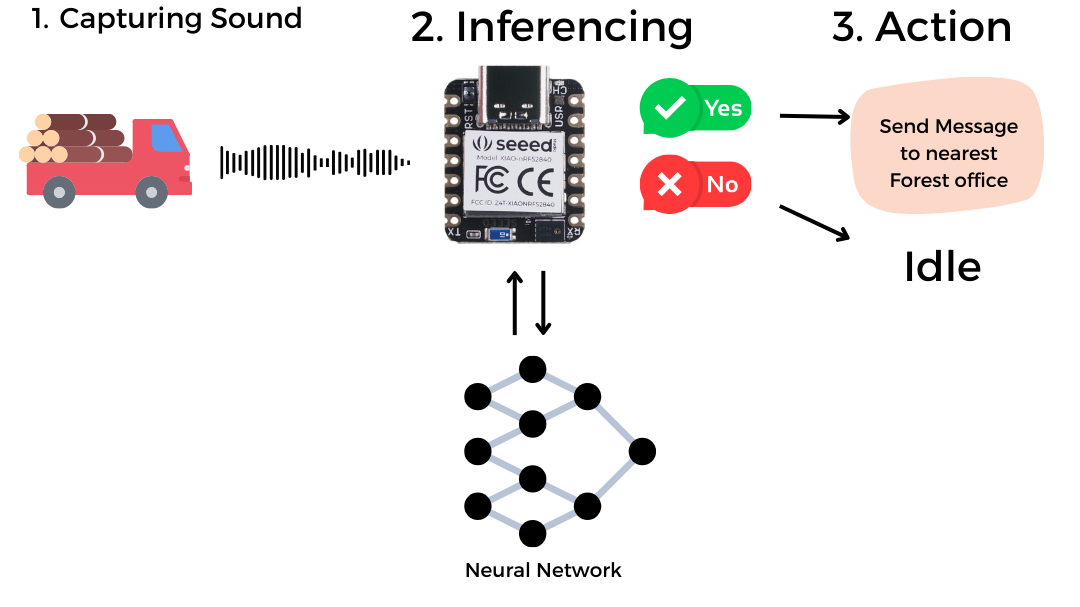
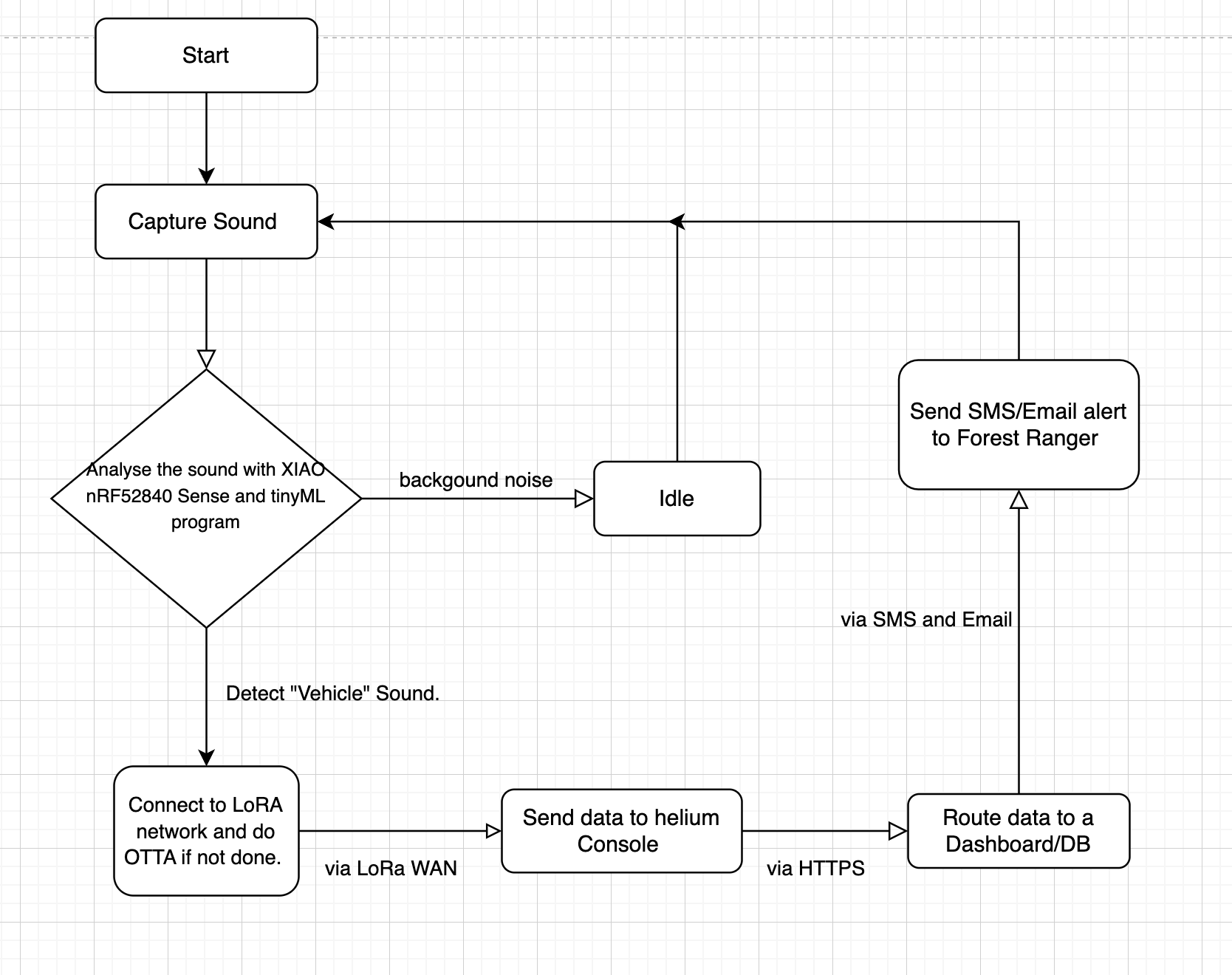
流程图
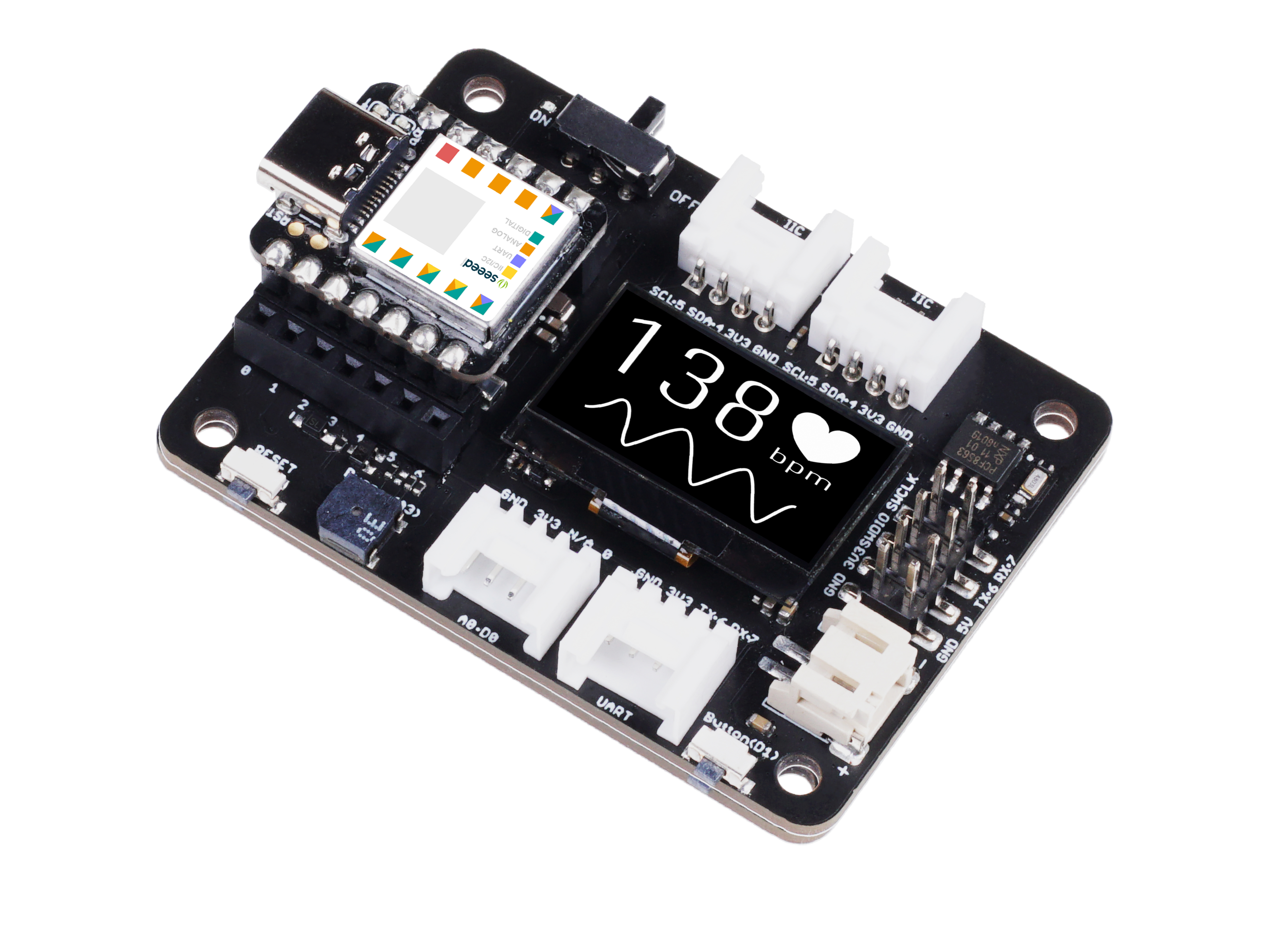
所需硬件
| Seeeduino XIAO nRF52840 Sense | Grove - Wio-E5 | Seeeduino XIAO 扩展板 |
|---|---|---|
|
|
|


所需软件工具/服务
- 1x Arduino IDE
- 1x Helium IoT Console
- 1x 计算机
- 1x USB Type-C 数据线
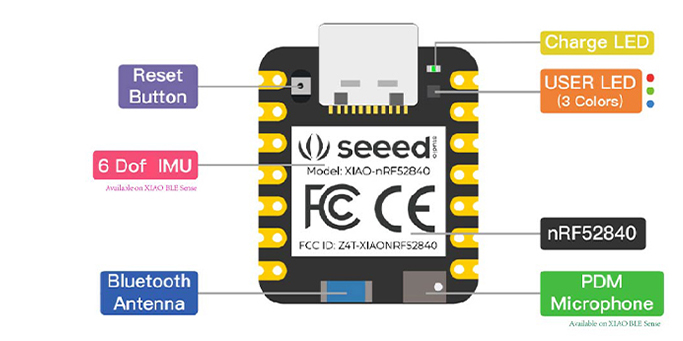
在 Arduino IDE 上设置 XIAO nRF52840 Sense


某些 USB 数据线只能供电而无法传输数据。如果您没有 USB 数据线或不知道您的 USB 数据线是否可以传输数据,您可以查看 Seeed USB Type-C 支持 USB 3.1。
通过 USB Type-C 数据线将 Seeed Studio XIAO nRF52840 (Sense) 连接到您的计算机。

软件设置
- 步骤 1. 根据您的操作系统下载并安装最新版本的 Arduino IDE

-
步骤 2. 启动 Arduino 应用程序
-
步骤 3. 将 Seeed Studio XIAO nRF52840 (Sense) 开发板包添加到您的 Arduino IDE
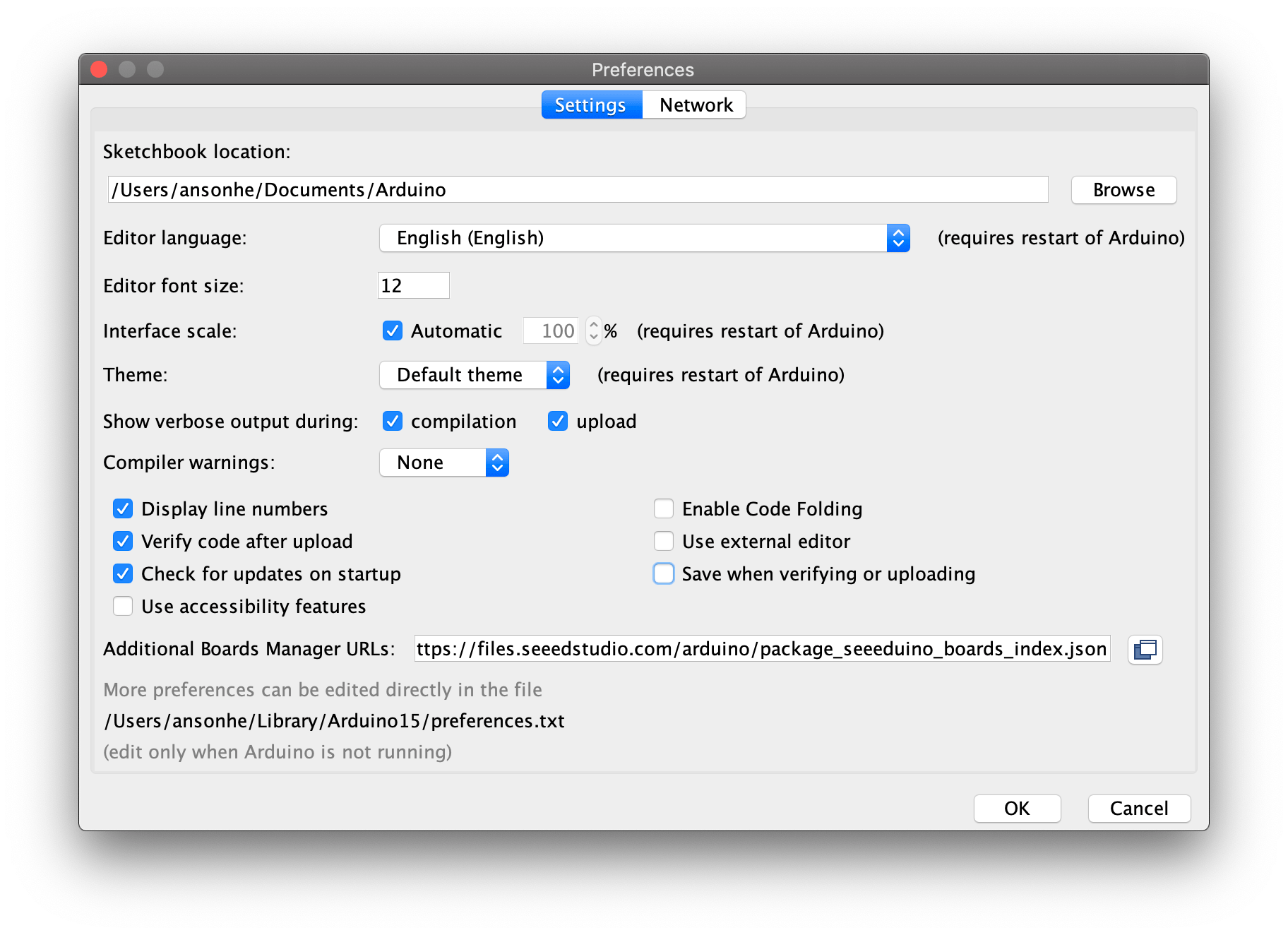
导航到 文件 > 首选项,并在 "附加开发板管理器网址" 中填入以下网址: https://files.seeedstudio.com/arduino/package_seeeduino_boards_index.json
导航到 工具 > 开发板 > 开发板管理器...,在搜索框中输入关键词 "seeed nrf52",选择您想要的开发板的最新版本,然后安装它。您可以同时安装两个。

- 步骤 4. 选择您的开发板和端口
开发板
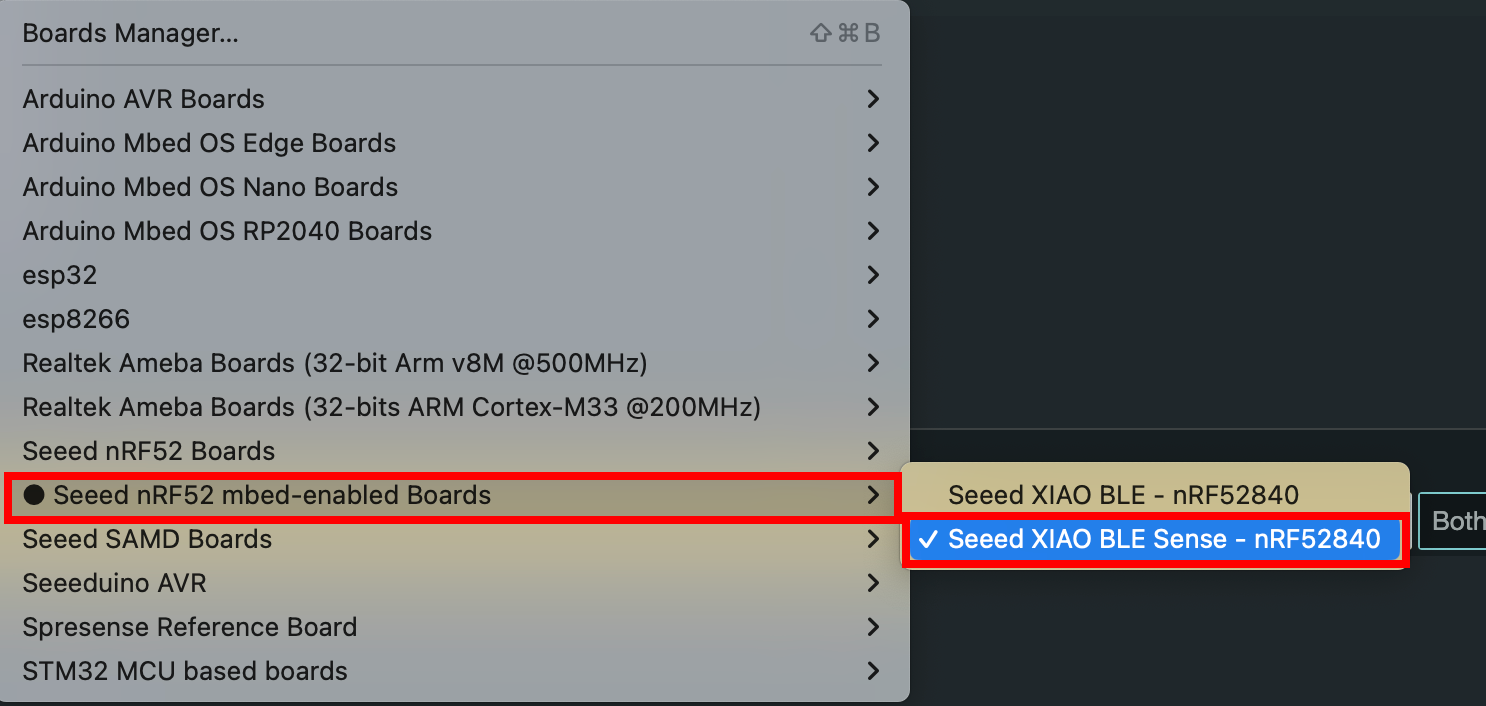
安装开发板包后,导航到 工具 > 开发板 并选择您想要的开发板,继续从 "Seeed nRF mbed-enabled Boards" 中选择 "Seeed XIAO BLE Sense nRF52840"。现在我们已经完成了为 Arduino IDE 设置 Seeed Studio XIAO nRF52840 (Sense)。
端口
导航到 工具 > 端口 并选择已连接的 Seeed Studio XIAO nRF52840 (Sense) 的串行端口名称。这通常是 COM3 或更高(COM1 和 COM2 通常保留给硬件串行端口)。已连接的 Seeed Studio XIAO nRF52840 (Sense) 的串行端口通常包含括号,其中写着 Seeed Studio XIAO nRF52840(对于 Seeed Studio XIAO nRF52840)或 Seeed Studio XIAO nRF52840 Sense(对于 Seeed Studio XIAO nRF52840 Sense)。

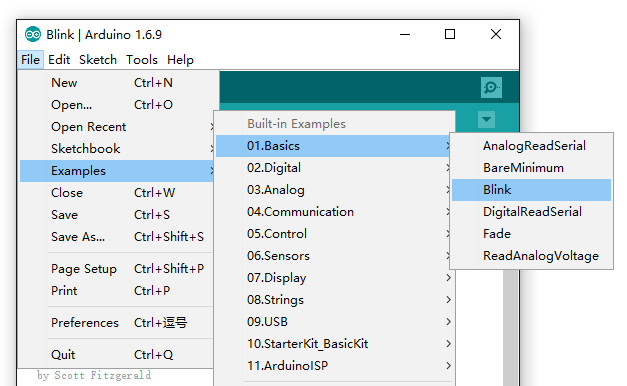
- 步骤 5. 导航到 文件 > 示例 > 01.Basics > Blink 打开 Blink 示例
- 步骤 6. 点击 上传 按钮将 Blink 示例代码上传到开发板
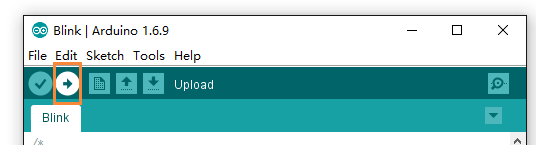
上传完成后,您将看到内置的红色 LED 以每次闪烁之间 1 秒的延迟进行闪烁。这意味着连接成功,现在您可以使用 Seeed Studio XIAO nRF52840 (Sense) 探索更多项目!
设置 Helium LoRa WAN 控制台。
确保您在 helium 网络覆盖范围内。您可以在 explorer.helium.com 找到网络覆盖范围
请按照此说明确保终端节点、网关和您使用的 Helium 配置之间频段的一致性。 此演示应用的频率计划适用于 IN865。
Helium IOT 网络使用 LoRaWAN 协议为"物联网"设备提供互联网连接,是 Helium 生态系统中的原始子网络。世界各地的开发者和公司都依赖 Helium IOT 网络进行连接。
Helium IoT 控制台准备
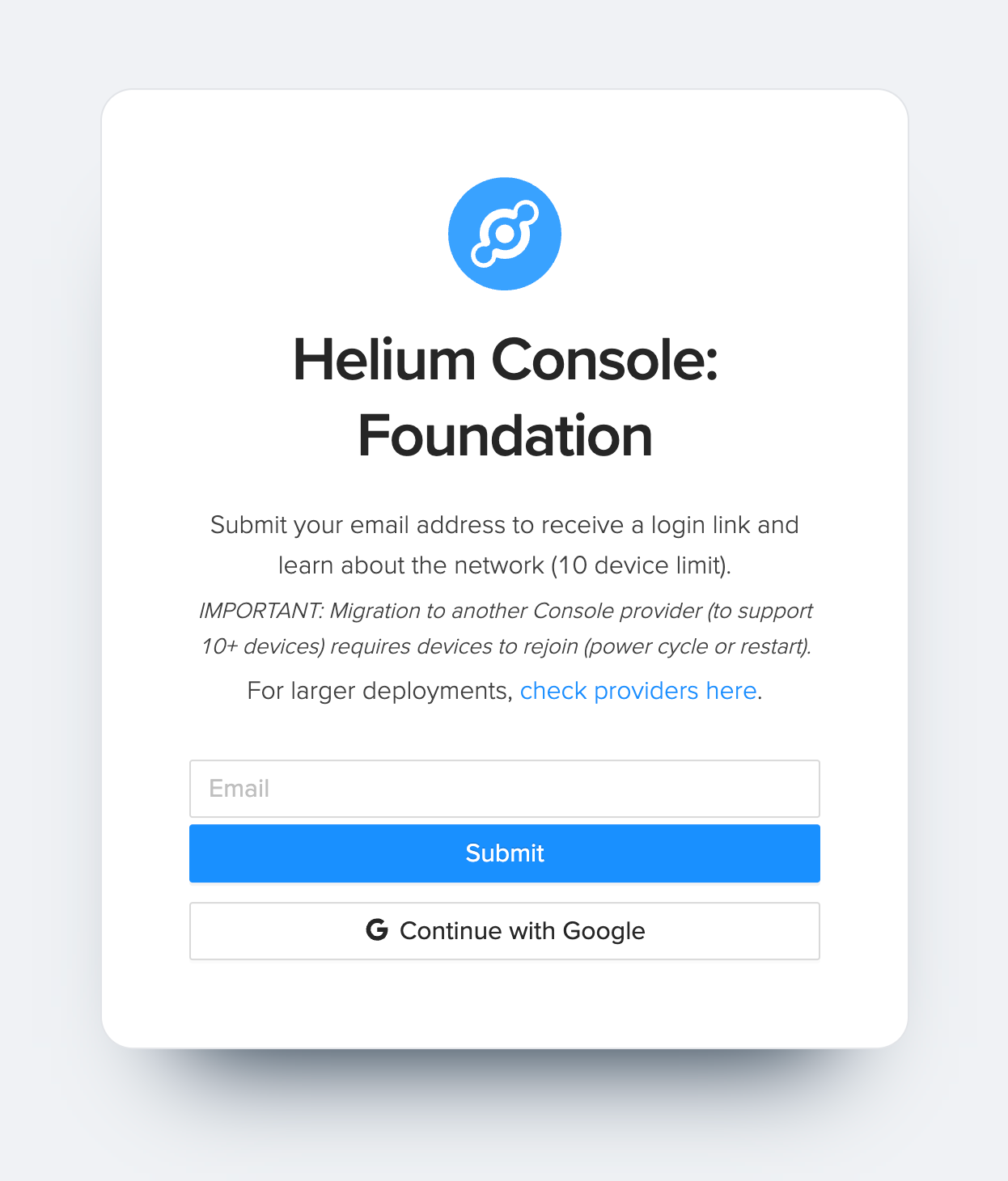
- 步骤 1. 访问 Helium Console 网站并注册新账户
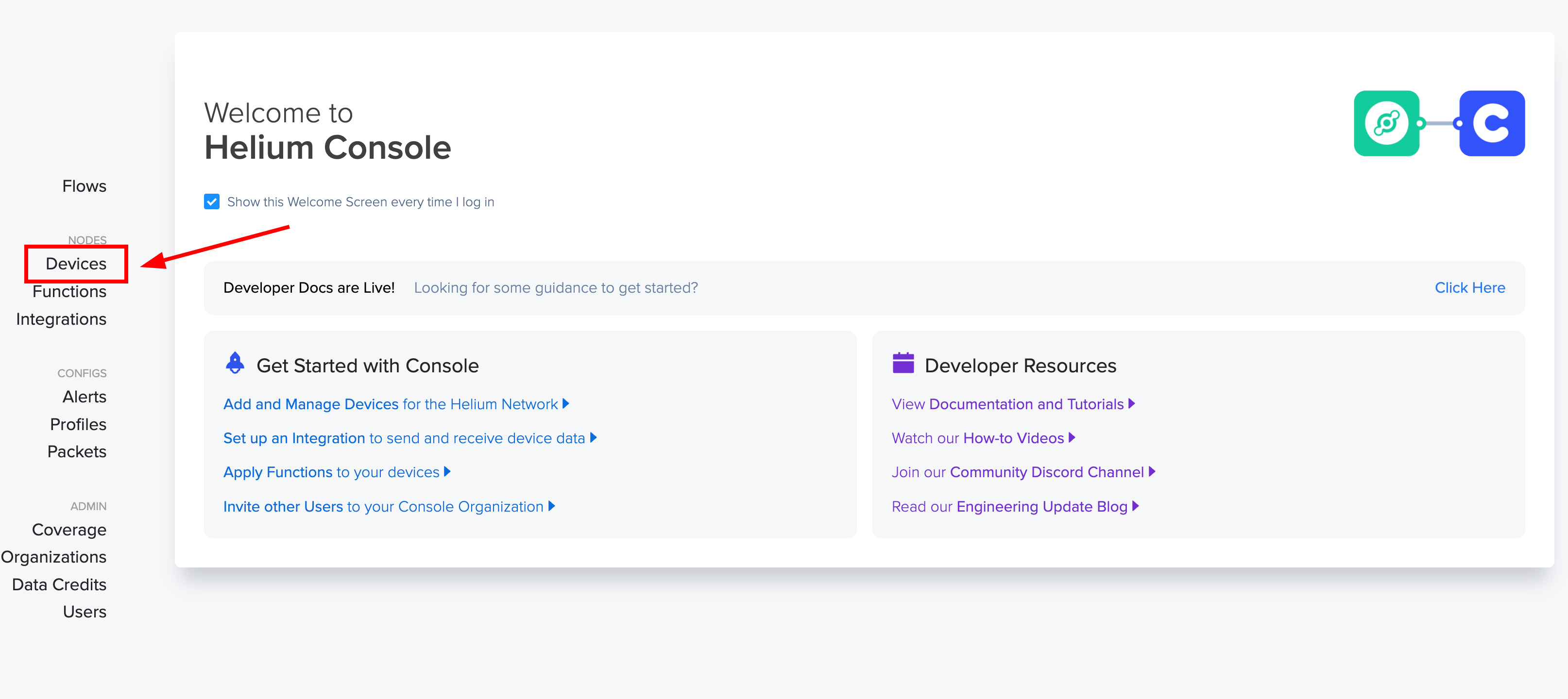
- 步骤 2. 登录后,点击"Devices"来管理设备。
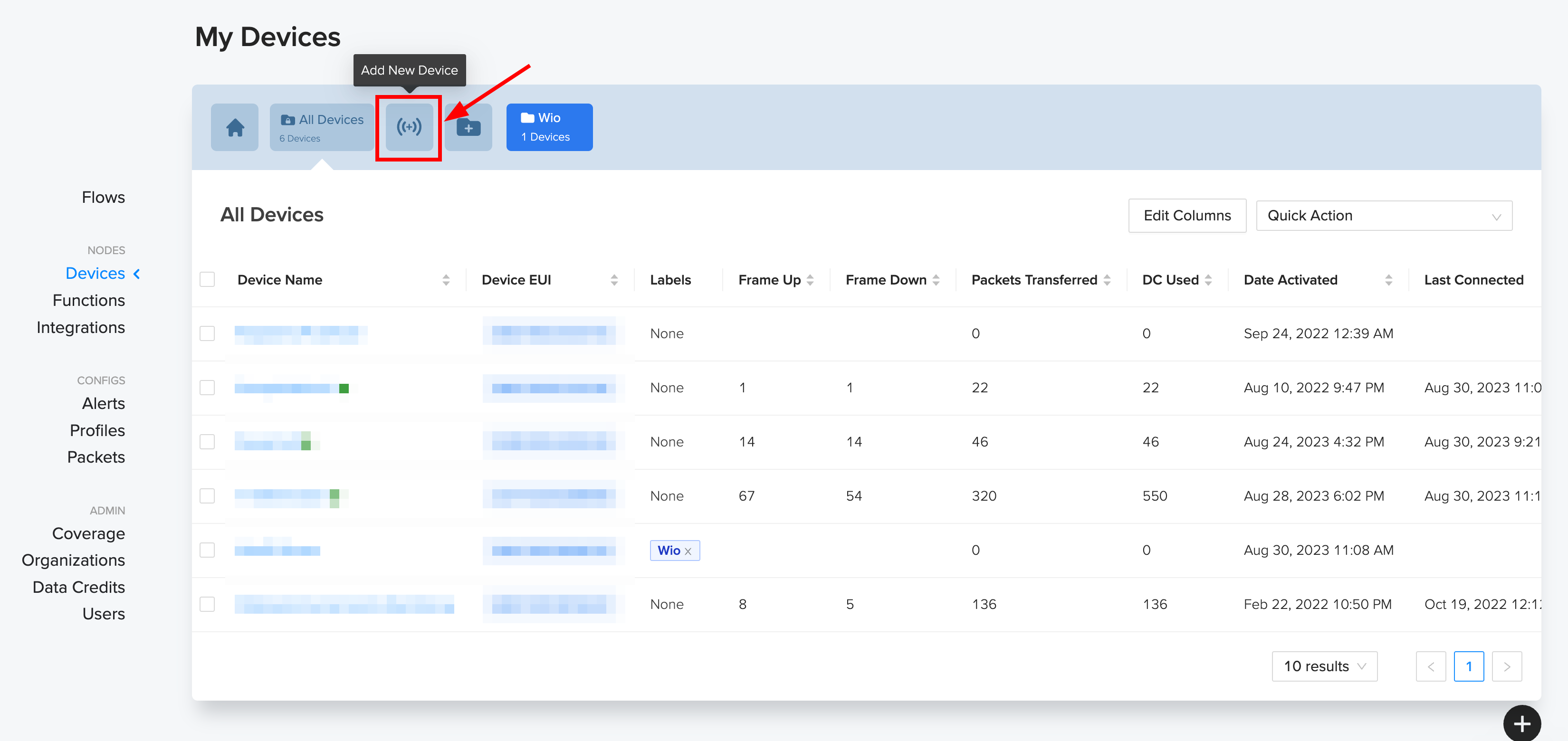
- 步骤 3. 然后点击"Add New Device"
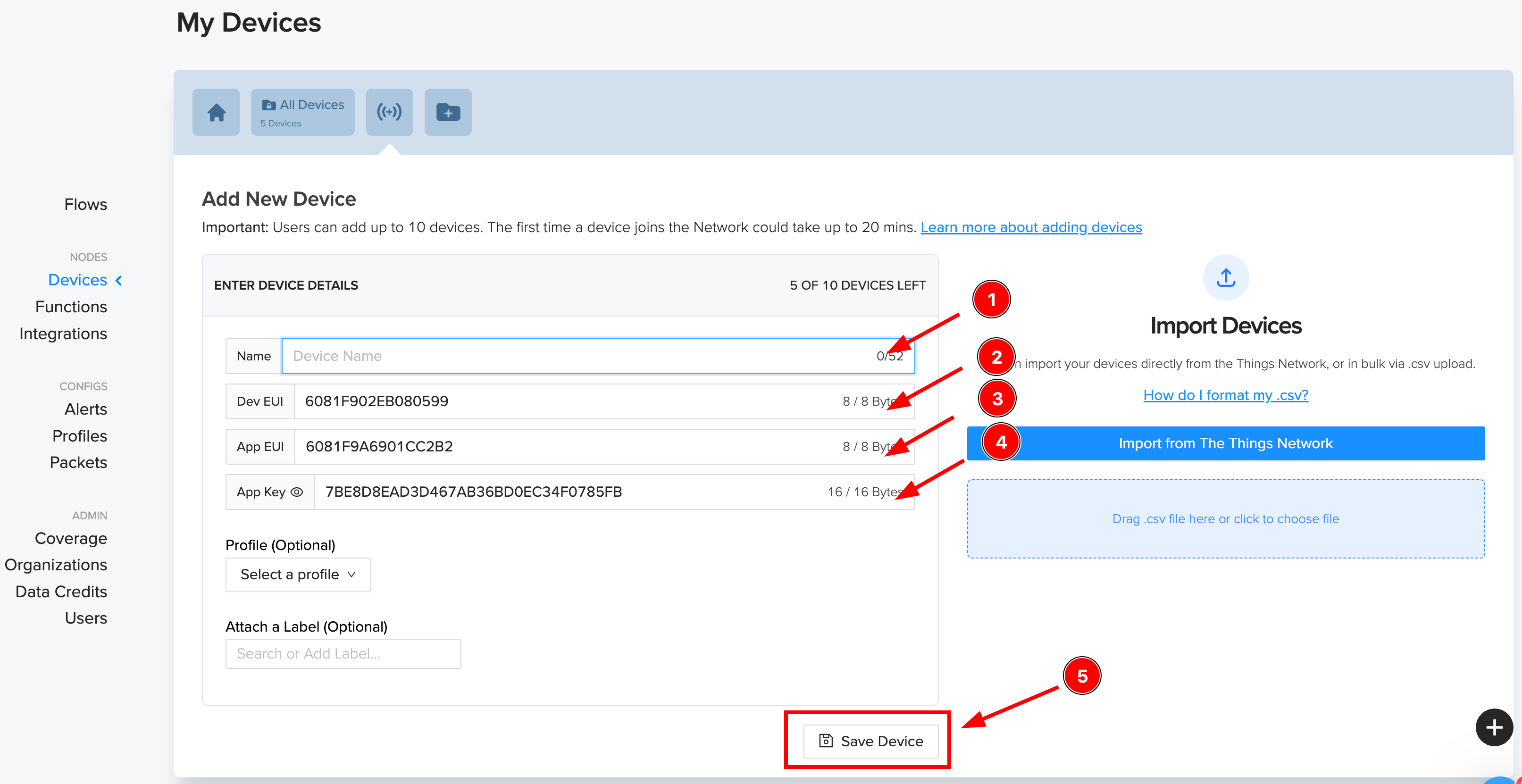
- 步骤 4. 在这里,1) 添加新设备 ,2) 复制 Dev EUI ,3) 复制 App EUI,4) 复制 App Key,5) 最后点击保存。
- 步骤 5. 现在您可以在"Devices"部分下看到设备。

现在,helium 控制台设置完成。我们可以转到软件部分,通过 helium LoRa 网络将数据上传到 helium 控制台。
硬件准备。
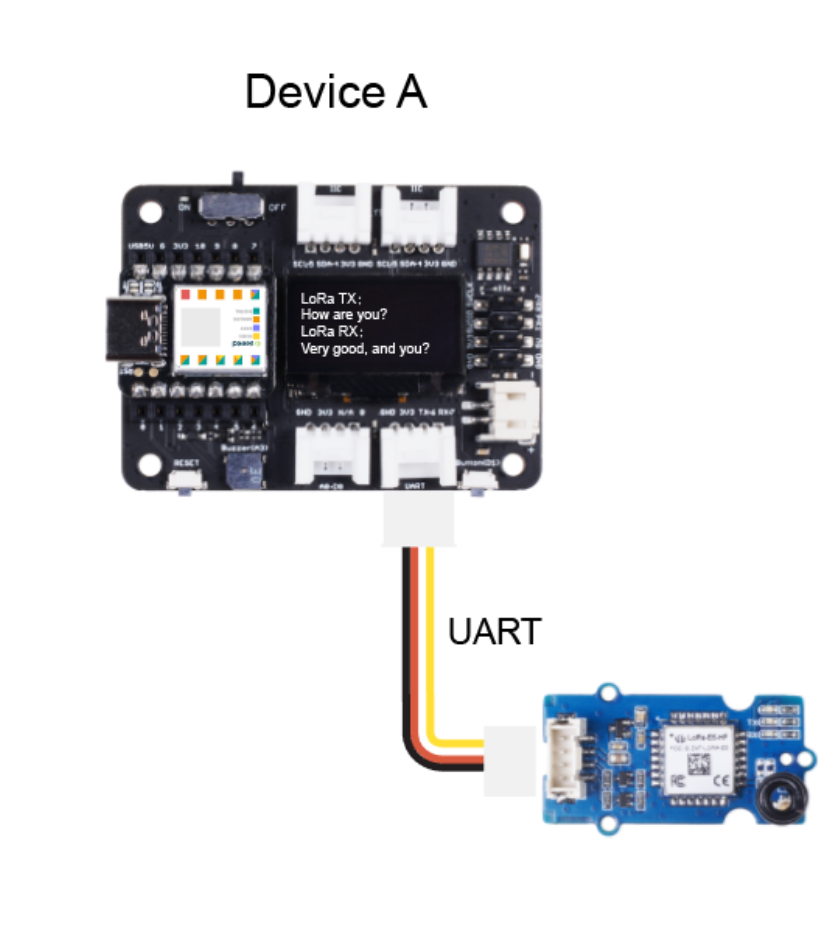
将 XIAO nRF52840 BLE Sense 放置到 Seeeduino XIAO 扩展板上,然后将 Grove - Wio E5 连接到 XIAO 扩展板的 UART 端口。
软件准备。
我们使用 Edge impulse 工具开发了 tinyML 模型,您可以在这里找到数据集和项目详细信息,您也可以克隆项目并根据需要进行修改。
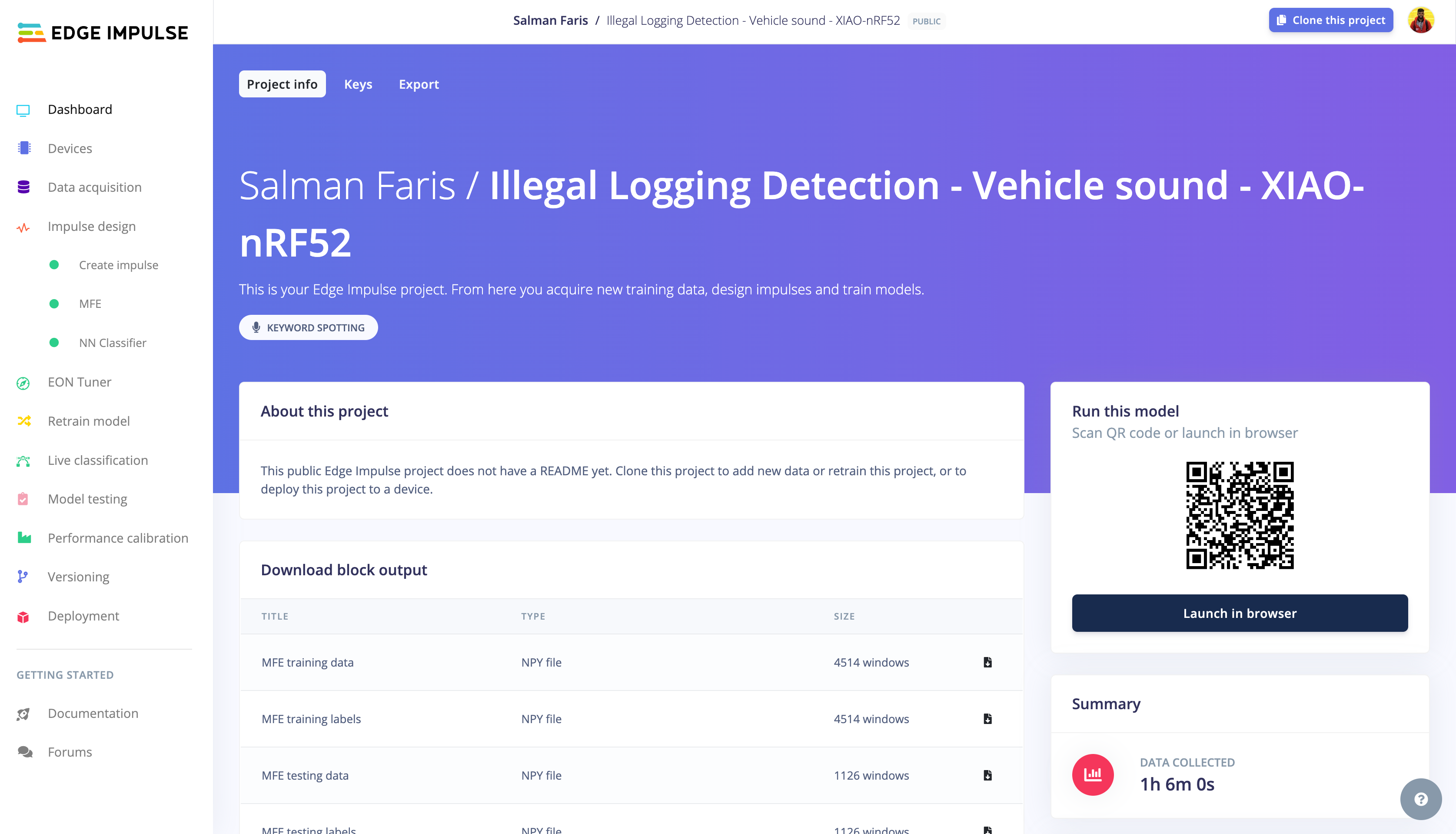
现在,从这里下载 Edge Impulse tinyML 库并将其添加到 arduino。按照此指南学习如何添加 ZIP 库。
添加库后,复制下面的代码并粘贴到您的 arduino 草图中,并替换 helium LoRa WAN 凭据。
/* Edge Impulse ingestion SDK
* Copyright (c) 2022 EdgeImpulse Inc.
*
* Licensed under the Apache License, Version 2.0 (the "License");
* you may not use this file except in compliance with the License.
* You may obtain a copy of the License at
* http://www.apache.org/licenses/LICENSE-2.0
*
* Unless required by applicable law or agreed to in writing, software
* distributed under the License is distributed on an "AS IS" BASIS,
* WITHOUT WARRANTIES OR CONDITIONS OF ANY KIND, either express or implied.
* See the License for the specific language governing permissions and
* limitations under the License.
*
*/
// If your target is limited in memory remove this macro to save 10K RAM
#define EIDSP_QUANTIZE_FILTERBANK 0
/*
** NOTE: If you run into TFLite arena allocation issue.
**
** This may be due to may dynamic memory fragmentation.
** Try defining "-DEI_CLASSIFIER_ALLOCATION_STATIC" in boards.local.txt (create
** if it doesn't exist) and copy this file to
** `<ARDUINO_CORE_INSTALL_PATH>/arduino/hardware/<mbed_core>/<core_version>/`.
**
** See
** (https://support.arduino.cc/hc/en-us/articles/360012076960-Where-are-the-installed-cores-located-)
** to find where Arduino installs cores on your machine.
**
** If the problem persists then there's not enough memory for this model and application.
*/
/*
** Developed by Salman Faris
** Date: 20/09/2023
*/
/* Includes ---------------------------------------------------------------- */
#include <PDM.h>
#include <Illegal_Logging_Detection_-_Vehicle_sound_-_XIAO-nRF52_inferencing.h>
#include <Arduino.h>
#include <U8x8lib.h>
U8X8_SSD1306_128X64_NONAME_HW_I2C u8x8(/*reset=*/U8X8_PIN_NONE);
/** Audio buffers, pointers and selectors */
typedef struct {
int16_t *buffer;
uint8_t buf_ready;
uint32_t buf_count;
uint32_t n_samples;
} inference_t;
static inference_t inference;
static signed short sampleBuffer[2048];
static bool debug_nn = false; // Set this to true to see e.g. features generated from the raw signal
//LoRa Buffer
static char recv_buf[512];
static bool is_exist = false;
static bool is_join = false;
static int led = 0;
//Inference Data
int pred_index = 0; // Initialize pred_index
float pred_value = 0; // Initialize pred_value
static int at_send_check_response(char *p_ack, int timeout_ms, char *p_cmd, ...) {
int ch;
int num = 0;
int index = 0;
int startMillis = 0;
va_list args;
char cmd_buffer[256]; // Adjust the buffer size as needed
memset(recv_buf, 0, sizeof(recv_buf));
va_start(args, p_cmd);
vsprintf(cmd_buffer, p_cmd, args); // Format the command string
Serial1.print(cmd_buffer);
Serial.print(cmd_buffer);
va_end(args);
delay(200);
startMillis = millis();
if (p_ack == NULL) {
return 0;
}
do {
while (Serial1.available() > 0) {
ch = Serial1.read();
recv_buf[index++] = ch;
Serial.print((char)ch);
delay(2);
}
if (strstr(recv_buf, p_ack) != NULL) {
return 1;
}
} while (millis() - startMillis < timeout_ms);
return 0;
}
static void recv_prase(char *p_msg) {
if (p_msg == NULL) {
return;
}
char *p_start = NULL;
int data = 0;
int rssi = 0;
int snr = 0;
p_start = strstr(p_msg, "RX");
if (p_start && (1 == sscanf(p_start, "RX: \"%d\"\r\n", &data))) {
Serial.println(data);
u8x8.setCursor(2, 4);
u8x8.print("led :");
led = !!data;
u8x8.print(led);
if (led) {
digitalWrite(LED_BUILTIN, LOW);
} else {
digitalWrite(LED_BUILTIN, HIGH);
}
}
p_start = strstr(p_msg, "RSSI");
if (p_start && (1 == sscanf(p_start, "RSSI %d,", &rssi))) {
u8x8.setCursor(0, 6);
u8x8.print(" ");
u8x8.setCursor(2, 6);
u8x8.print("rssi:");
u8x8.print(rssi);
}
p_start = strstr(p_msg, "SNR");
if (p_start && (1 == sscanf(p_start, "SNR %d", &snr))) {
u8x8.setCursor(0, 7);
u8x8.print(" ");
u8x8.setCursor(2, 7);
u8x8.print("snr :");
u8x8.print(snr);
}
}
/**
* @brief Arduino setup function
*/
void setup() {
// put your setup code here, to run once:
Serial.begin(115200);
Serial1.begin(9600);
// comment out the below line to cancel the wait for USB connection (needed for native USB)
while (!Serial)
;
Serial.println("Edge Impulse Inferencing Demo");
// summary of inferencing settings (from model_metadata.h)
ei_printf("Inferencing settings:\n");
ei_printf("\tInterval: %.2f ms.\n", (float)EI_CLASSIFIER_INTERVAL_MS);
ei_printf("\tFrame size: %d\n", EI_CLASSIFIER_DSP_INPUT_FRAME_SIZE);
ei_printf("\tSample length: %d ms.\n", EI_CLASSIFIER_RAW_SAMPLE_COUNT / 16);
ei_printf("\tNo. of classes: %d\n", sizeof(ei_classifier_inferencing_categories) / sizeof(ei_classifier_inferencing_categories[0]));
if (microphone_inference_start(EI_CLASSIFIER_RAW_SAMPLE_COUNT) == false) {
ei_printf("ERR: Could not allocate audio buffer (size %d), this could be due to the window length of your model\r\n", EI_CLASSIFIER_RAW_SAMPLE_COUNT);
return;
}
u8x8.begin();
u8x8.setFlipMode(1);
u8x8.setFont(u8x8_font_chroma48medium8_r);
Serial.begin(115200);
pinMode(LED_BUILTIN, OUTPUT);
digitalWrite(LED_BUILTIN, HIGH);
Serial1.begin(9600);
Serial.print("E5 LORAWAN TEST\r\n");
u8x8.setCursor(0, 0);
if (at_send_check_response("+AT: OK", 100, "AT\r\n")) {
is_exist = true;
at_send_check_response("+ID: DevEui", 1000, "AT+ID=DevEui,\"XXXXXXXXXX"\r\n");
at_send_check_response("+ID: AppEui", 1000, "AT+ID=AppEui,\"XXXXXXXXXXX\"\r\n");
at_send_check_response("+KEY: APPKEY", 1000, "AT+KEY=APPKEY,\"XXXXXXXXXXXX\"\r\n");
at_send_check_response("+ID: DevAddr", 1000, "AT+ID=DevAddr\r\n");
at_send_check_response("+ID: AppEui", 1000, "AT+ID\r\n");
at_send_check_response("+MODE: LWOTAA", 1000, "AT+MODE=LWOTAA\r\n");
at_send_check_response("+DR: IN865", 1000, "AT+DR=IN865\r\n");
at_send_check_response("+CH: NUM", 1000, "AT+CH=NUM,0-2\r\n");
at_send_check_response("+CLASS: A", 1000, "AT+CLASS=A\r\n");
at_send_check_response("+PORT: 8", 1000, "AT+PORT=8\r\n");
delay(200);
u8x8.setCursor(5, 0);
u8x8.print("LoRaWAN");
is_join = true;
} else {
is_exist = false;
Serial.print("No E5 module found.\r\n");
u8x8.setCursor(0, 1);
u8x8.print("unfound E5 !");
}
//dht.begin();
}
/**
* @brief Arduino main function. Runs the inferencing loop.
*/
void loop() {
ei_printf("Starting inferencing in 2 seconds...\n");
delay(2000);
ei_printf("Recording...\n");
bool m = microphone_inference_record();
if (!m) {
ei_printf("ERR: Failed to record audio...\n");
return;
}
ei_printf("Recording done\n");
signal_t signal;
signal.total_length = EI_CLASSIFIER_RAW_SAMPLE_COUNT;
signal.get_data = µphone_audio_signal_get_data;
ei_impulse_result_t result = { 0 };
EI_IMPULSE_ERROR r = run_classifier(&signal, &result, debug_nn);
if (r != EI_IMPULSE_OK) {
ei_printf("ERR: Failed to run classifier (%d)\n", r);
return;
}
int pred_index = 0; // Initialize pred_index
float pred_value = 0; // Initialize pred_value
// print the predictions
ei_printf("Predictions ");
ei_printf("(DSP: %d ms., Classification: %d ms., Anomaly: %d ms.)",
result.timing.dsp, result.timing.classification, result.timing.anomaly);
ei_printf(": \n");
for (size_t ix = 0; ix < EI_CLASSIFIER_LABEL_COUNT; ix++) {
ei_printf(" %s: %.5f\n", result.classification[ix].label, result.classification[ix].value);
ei_printf("\n");
if (result.classification[ix].value > pred_value) {
pred_index = ix;
pred_value = result.classification[ix].value;
}
}
// Display inference result and Send message to Helium Console.
if ((pred_index == 1 && (pred_value > 0.8))) {
ei_printf("Vehicle Sound is Detected ");
ei_printf("\n");
int SOS = 10;
int DeviceID = 1;
if (is_exist) {
int ret = 0;
if (is_join) {
ret = at_send_check_response("+JOIN: Network joined", 12000, "AT+JOIN\r\n");
if (ret) {
is_join = false;
} else {
at_send_check_response("+ID: AppEui", 1000, "AT+ID\r\n");
Serial.print("JOIN failed!\r\n\r\n");
delay(5000);
}
} else {
char cmd[128];
sprintf(cmd, "AT+CMSGHEX=\"%04X%04X\"\r\n", (int)DeviceID, (int)SOS);
ret = at_send_check_response("Done", 5000, cmd);
u8x8.setCursor(0, 2);
u8x8.print(" ");
u8x8.setCursor(2, 2);
u8x8.print("Vehicle Detected");
u8x8.setCursor(2, 3);
u8x8.print("Sending SOS");
if (ret) {
recv_prase(recv_buf);
} else {
Serial.print("Send failed!\r\n\r\n");
}
delay(5000);
}
} else {
delay(1000);
}
}
else {
u8x8.setCursor(0, 2);
u8x8.print(" ");
u8x8.setCursor(2, 2);
u8x8.print("Normal Condition");
u8x8.setCursor(2, 3);
u8x8.print("idle");
}
#if EI_CLASSIFIER_HAS_ANOMALY == 1
ei_printf(" anomaly score: %.3f\n", result.anomaly);
#endif
}
/**
* @brief PDM buffer full callback
* Get data and call audio thread callback
*/
static void pdm_data_ready_inference_callback(void) {
int bytesAvailable = PDM.available();
// read into the sample buffer
int bytesRead = PDM.read((char *)&sampleBuffer[0], bytesAvailable);
if (inference.buf_ready == 0) {
for (int i = 0; i < bytesRead >> 1; i++) {
inference.buffer[inference.buf_count++] = sampleBuffer[i];
if (inference.buf_count >= inference.n_samples) {
inference.buf_count = 0;
inference.buf_ready = 1;
break;
}
}
}
}
/**
* @brief Init inferencing struct and setup/start PDM
*
* @param[in] n_samples The n samples
*
* @return { description_of_the_return_value }
*/
static bool microphone_inference_start(uint32_t n_samples) {
inference.buffer = (int16_t *)malloc(n_samples * sizeof(int16_t));
if (inference.buffer == NULL) {
return false;
}
inference.buf_count = 0;
inference.n_samples = n_samples;
inference.buf_ready = 0;
// configure the data receive callback
PDM.onReceive(&pdm_data_ready_inference_callback);
PDM.setBufferSize(4096);
// initialize PDM with:
// - one channel (mono mode)
// - a 16 kHz sample rate
if (!PDM.begin(1, EI_CLASSIFIER_FREQUENCY)) {
ei_printf("Failed to start PDM!");
microphone_inference_end();
return false;
}
// set the gain, defaults to 20
PDM.setGain(127);
return true;
}
/**
* @brief Wait on new data
*
* @return True when finished
*/
static bool microphone_inference_record(void) {
inference.buf_ready = 0;
inference.buf_count = 0;
while (inference.buf_ready == 0) {
delay(10);
}
return true;
}
/**
* Get raw audio signal data
*/
static int microphone_audio_signal_get_data(size_t offset, size_t length, float *out_ptr) {
numpy::int16_to_float(&inference.buffer[offset], out_ptr, length);
return 0;
}
/**h
* @brief Stop PDM and release buffers
*/
static void microphone_inference_end(void) {
PDM.end();
free(inference.buffer);
}
#if !defined(EI_CLASSIFIER_SENSOR) || EI_CLASSIFIER_SENSOR != EI_CLASSIFIER_SENSOR_MICROPHONE
#error "Invalid model for current sensor."
#endif
将 DevEUI、AppEUI 和 APPKEY 替换为您从 Helium 控制台获得的凭据。同时确保根据您所在地区的频率计划替换 IN865。
at_send_check_response("+ID: DevEui", 1000, "AT+ID=DevEui,\"xxxxxxxxxxx\"\r\n");
at_send_check_response("+ID: AppEui", 1000, "AT+ID=AppEui,\"xxxxxxxxxxx\"\r\n");
at_send_check_response("+KEY: APPKEY", 1000, "AT+KEY=APPKEY,\"xxxxxxxxxxxxxxx\"\r\n");
at_send_check_response("+ID: DevAddr", 1000, "AT+ID=DevAddr\r\n");
at_send_check_response("+ID: AppEui", 1000, "AT+ID\r\n");
at_send_check_response("+MODE: LWOTAA", 1000, "AT+MODE=LWOTAA\r\n");
at_send_check_response("+DR: IN865", 1000, "AT+DR=IN865\r\n");
at_send_check_response("+CH: NUM", 1000, "AT+CH=NUM,0-2\r\n");
at_send_check_response("+CLASS: A", 1000, "AT+CLASS=A\r\n");
at_send_check_response("+PORT: 8", 1000, "AT+PORT=8\r\n");
在下面的部分中,您可以看到 XIAO 将检查是否检测到任何车辆声音,如果检测到,它将建立到 helium 控制台的 LoRa WAN 连接并发送数据 1 作为检测到车辆声音的符号。
// Display inference result and Send message to Helium Console.
  if ((pred_index == 1 && (pred_value > 0.8))) {
    ei_printf("Vehicle Sound is Detected ");
    ei_printf("\n");
    int SOS = 10;
    int DeviceID = 1;
    if (is_exist) {
      int ret = 0;
      if (is_join) {

        ret = at_send_check_response("+JOIN: Network joined", 12000, "AT+JOIN\r\n");
        if (ret) {
          is_join = false;
        } else {
          at_send_check_response("+ID: AppEui", 1000, "AT+ID\r\n");
          Serial.print("JOIN failed!\r\n\r\n");
          delay(5000);
        }
      } else {
        char cmd[128];
        sprintf(cmd, "AT+CMSGHEX=\"%04X%04X\"\r\n", (int)DeviceID, (int)SOS);
        ret = at_send_check_response("Done", 5000, cmd);

        u8x8.setCursor(0, 2);
        u8x8.print("      ");
        u8x8.setCursor(2, 2);
        u8x8.print("Vehicle Detected");
        u8x8.setCursor(2, 3);
        u8x8.print("Sending SOS");
        if (ret) {
          recv_prase(recv_buf);
        } else {
          Serial.print("Send failed!\r\n\r\n");
        }
        delay(5000);
      }
    } else {
      delay(1000);
    }

  }
  else {
        u8x8.setCursor(0, 2);
        u8x8.print("      ");
        u8x8.setCursor(2, 2);
        u8x8.print("Normal Condition");
        u8x8.setCursor(2, 3);
        u8x8.print("idle");
  }
演示
确保您在 helium 网络覆盖范围内。您可以在 explorer.helium.com 找到网络覆盖范围
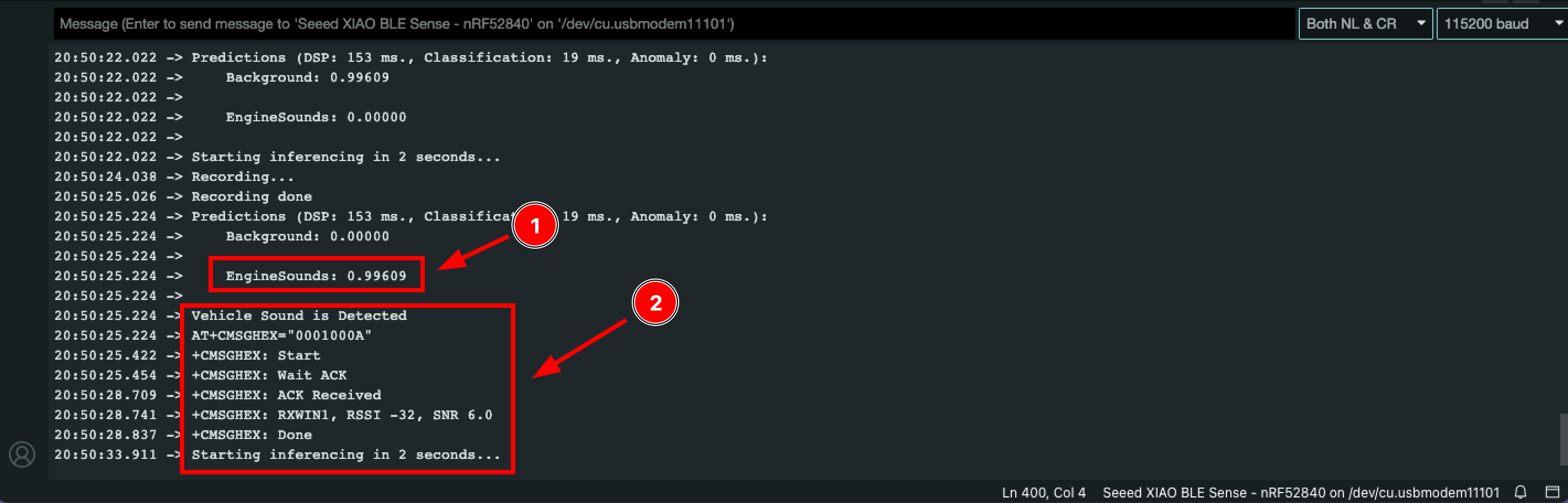
上传代码后,XIAO nRF52840 Sense 将捕获声音并使用 tinyML 检查是否有任何引擎声音,因此请尝试播放引擎声音来触发动作。一旦检测到引擎声音 (1),XIAO 将建立 Helium LoRa 网络连接并发送命令 "1" 作为检测到车辆声音的符号 (2)。
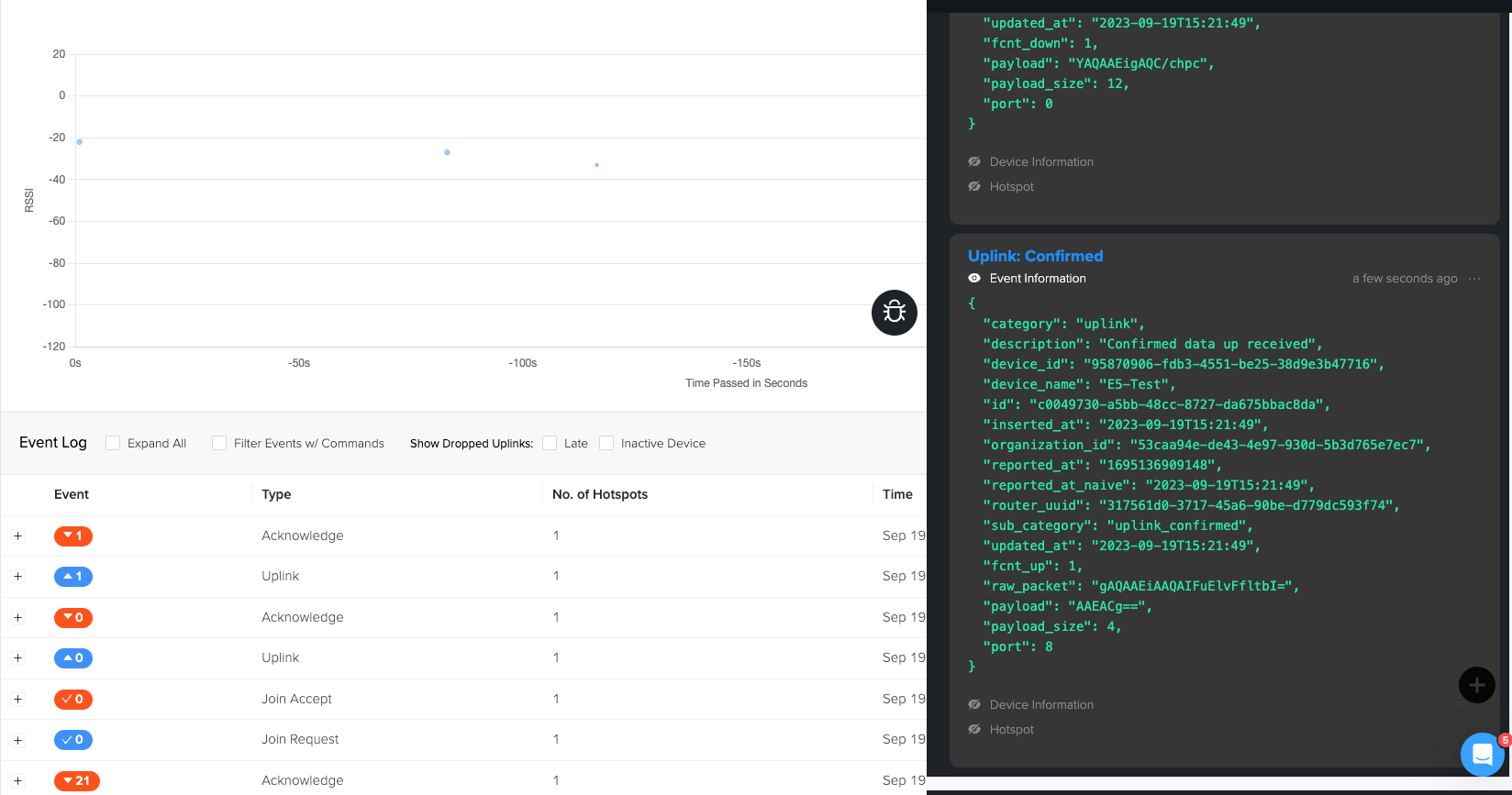
您可以在 helium 控制台及其调试窗口中查看数据。
待办事项
到目前为止,我们已经完成了 tinyML 和 LoRa 的集成。我们还有一些待办事项,您可以将其作为练习来改进项目。
- 将 helium 控制台与仪表板集成并可视化数据
- 创建带有自定义仪表板的电子邮件/短信/电话警报来通知森林护林员。
资源
数据手册:
认证:
相关 SDK:
技术支持与产品讨论
感谢您选择我们的产品!我们在这里为您提供不同的支持,以确保您使用我们产品的体验尽可能顺畅。我们提供多种沟通渠道,以满足不同的偏好和需求。