将语音 AI 引入你的业务系统(MCP)
概述
本指南演示如何使用模型上下文协议(Model Context Protocol, MCP)将语音 AI 与你现有的软件生态系统连接起来。通过将 REST API 封装为 MCP 工具,你可以让 SenseCAP Watcher 直接与业务逻辑交互——无论是仓储管理系统(WMS)、CRM、ERP,还是自研的 IT 看板。
| 智能空间交互 |
|---|
 |
智能空间交互
从语音到 API:将意图转化为行动。无需从零开发新应用,只需将现有 WMS 的接口暴露给 Watcher,即可为一线员工立刻启用语音控制能力。
真正的免手操作生产力
操作员即使戴着手套或正在驾驶叉车,也能查询库存或记录出入库。双眼始终关注任务、双手握紧方向盘,从而最大化安全与效率。
零延迟数据同步
彻底消除纸质记录带来的滞后。语音指令会直接触发对 ERP 的 API 调用,确保库存数据在物品移动的瞬间同步更新。
通用系统互操作性
无论你使用 SAP、Oracle,还是自建的 SQL 后端,只要系统提供 API,Watcher 就能控制它。无需迁移遗留系统即可引入 AI 能力。
架构
在编写代码前,理解数据流至关重要。本次集成采用桥接模式,其中 MCP Server 充当 AI 与内网之间的安全网关。
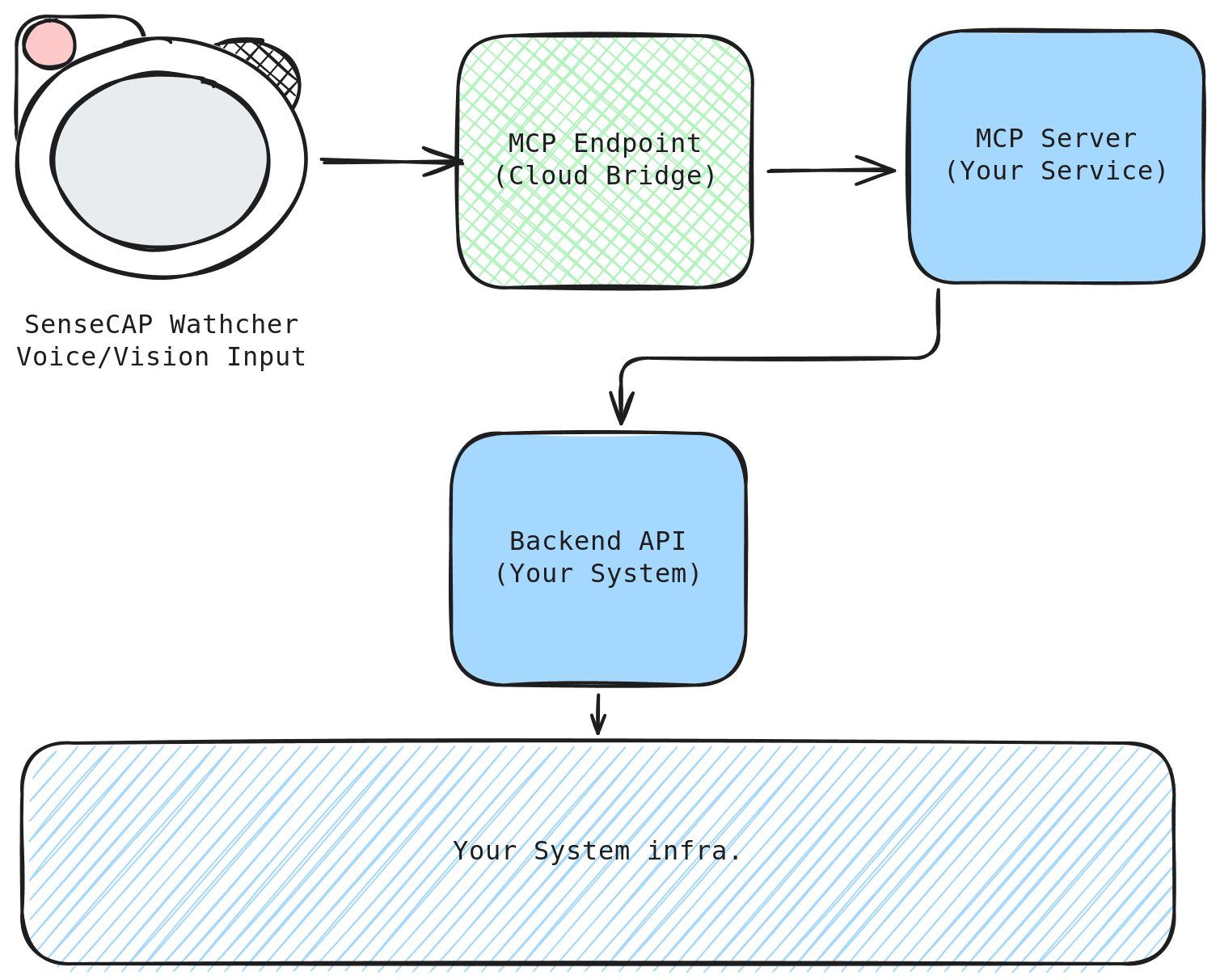
关键组件:
- Watcher 设备: 捕获自然语言意图(例如 “Check stock”),并将其发送到云端。
- MCP Endpoint(云端): 由 SenseCraft 提供的安全隧道,将意图转发到你的本地环境。
- MCP Server(本地桥): 运行在你设备上的轻量级 Python 脚本,用于将 AI 的意图翻译为具体的代码函数。
- 后端 API: 你现有的业务应用(FastAPI、Flask 等),负责执行实际业务逻辑。
- 基础设施: 后端依赖的数据库或其他服务。
通用集成场景:
虽然本指南以 仓储系统 作为参考实现,但该架构具有通用性,可应用于各种场景:
| 行业 | 语音指令 | 底层系统操作 |
|---|---|---|
| 物流 | "Stock in 50 units." | POST /api/inventory/add |
| 销售(CRM) | "Update deal status to Closed." | PUT /api/deals/{id}/status |
| IT 运维 | "Restart the staging server." | POST /api/servers/restart |
演示 1:语音控制仓储系统
我们将在本地运行一个模拟的 仓储后端 和一个 MCP Bridge 来构建业务环境。本演示将实现:
- 🗣️ 库存查询: “How many Xiaozhi Standard units do we have?”
- 🗣️ 数据录入: “Stock in 5 units of Watcher Xiaozhi.”
- 🗣️ 业务洞察: “What's today's inventory summary?”
前置条件
- 硬件: SenseCAP Watcher,一台支持 Docker 的电脑
- 软件: Docker 或 Docker Desktop(包含 Docker Compose)、Git
- 账号: SenseCraft AI Platform 账户
请确保你的 SenseCAP Watcher 已通过 SenseCraft AI Device Center 配置为使用 Xiaozhi AI。

步骤 1:部署仓储系统
我们使用 Docker 进行部署,以确保在所有平台(Windows、macOS、Linux)上的运行环境一致。
1. 克隆代码仓库:
git clone https://github.com/suharvest/warehouse_system.git
cd warehouse_system
2. 使用 Docker Compose 启动:
docker-compose -f docker-compose.prod.yml up -d
这个命令将会:
- 构建并启动仓储应用服务(端口 2125)
- 为数据库创建一个持久化卷
3. 验证部署是否成功:
等待容器启动约 30 秒,然后执行检查:
docker-compose -f docker-compose.prod.yml ps
你应该能看到 warehouse-prod 容器正在运行。
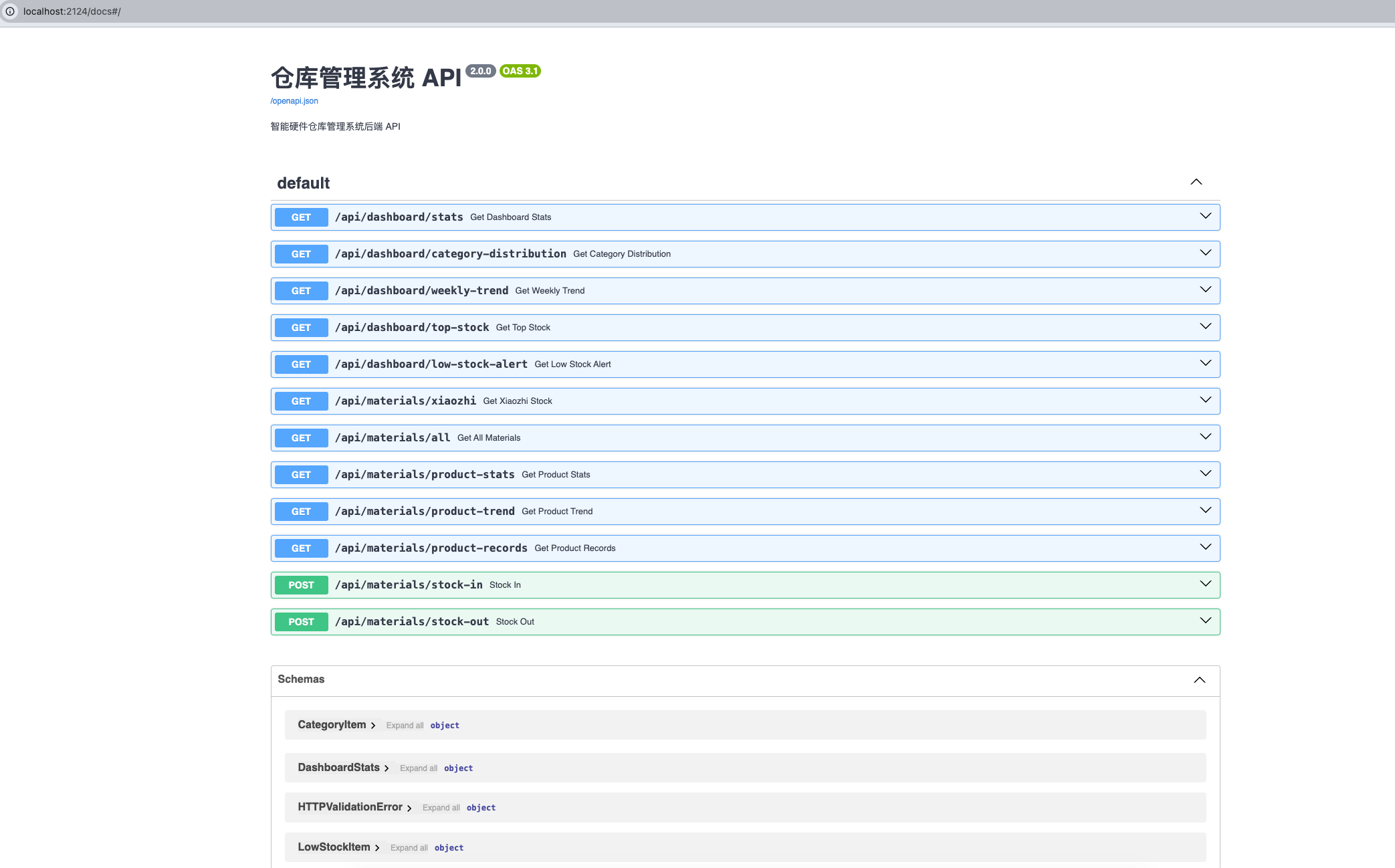
- Web 界面: 在浏览器中打开
http://localhost:2125 - API 文档: 打开
http://localhost:2125/docs查看 Swagger UI
步骤 2:系统初始化设置
仓储系统内置了用户认证和 API Key 管理机制以保证安全。在连接 MCP 之前,你需要先完成这些设置。
1. 创建管理员账号:
在浏览器中打开 http://localhost:2125。首次访问时,你会看到一个注册表单:
- 输入你想要的 用户名(例如:
admin) - 输入 密码(例如:
admin123) - 点击 Register
第一个注册的用户会自动成为管理员。
2. 登录并进入用户管理:
注册完成后,使用你的账号登录。然后点击导航栏中的 User Management 选项卡。
3. 创建一个 API Key:
在用户管理页面中,找到 API Key Management 区域:
- 为密钥输入一个便于识别的名称(例如:
MCP Bridge) - 点击 Create API Key
- 重要: 立刻复制生成的 API Key!它只会显示一次。
API Key 的格式类似:wh_xxxxxxxxxxxxxxxxxxxx
API Key 仅在创建时显示一次。请安全保存——下一步你将会用到它。
步骤 3:配置 MCP Bridge
现在,我们要将后端与 AI 连接起来。Bridge 代码位于 mcp/ 目录中。
MCP bridge 使用 uv 作为 Python 环境管理器。可以通过以下命令安装:
- Linux/macOS
- Windows (PowerShell)
curl -LsSf https://astral.sh/uv/install.sh | sh
irm https://astral.sh/uv/install.ps1 | iex
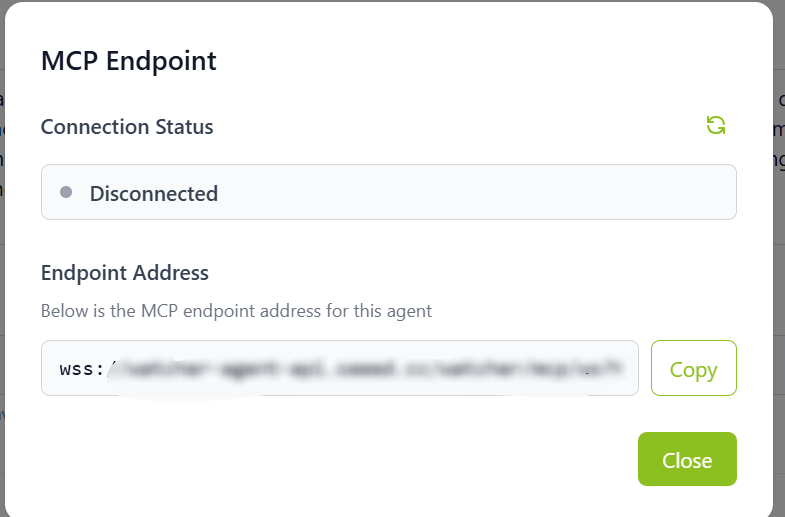
1. 获取 MCP Endpoint:
从 SenseCraft AI Platform -> Watcher Agent -> Configuration 中获取你的 MCP Endpoint Address(wss://...)。
2. 配置 API Key:
打开终端并导航到 mcp 文件夹:
cd mcp

# Copy the example config file
cp config.yml.example config.yml
使用你在步骤 2 中获得的 API Key 编辑 config.yml:
config.yml.example 中默认的 api_base_url 为 http://localhost:2124/api(本地开发端口)。由于我们是通过使用端口 2125 的 docker-compose.prod.yml 进行部署的,所以你必须相应地更新该配置。
# Backend API address (change from default 2124 to 2125 for Docker deployment)
api_base_url: "http://localhost:2125/api"

# API key authentication (from User Management -> API Key Management)
auth:
  type: api_key
  key: "wh_your-api-key-here"
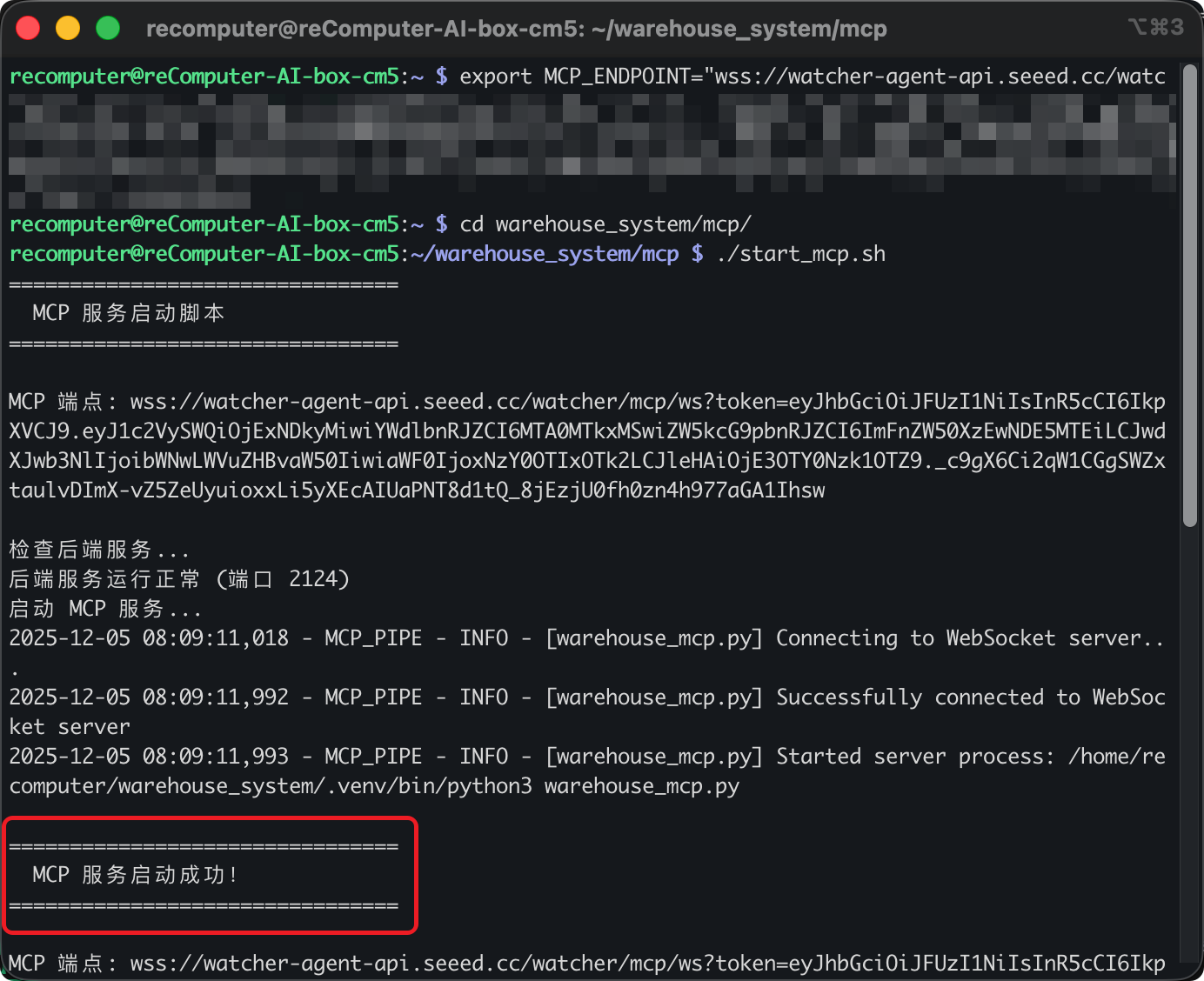
3. 启动 MCP Bridge:
- Linux/macOS
- Windows (PowerShell)
# Set the MCP Endpoint (replace with your actual address)
export MCP_ENDPOINT="wss://your-endpoint-address"

# Start the Bridge
./start_mcp.sh
# Set the MCP Endpoint (replace with your actual address)
$env:MCP_ENDPOINT="wss://your-endpoint-address"

# Start the Bridge
./start_mcp.ps1
如果启动成功,你会看到:MCP 服务启动成功!(MCP 服务已成功启动)
步骤 4:验证
现在一切都已连接完成。接下来,使用 SenseCAP Watcher 与本地系统进行交互。
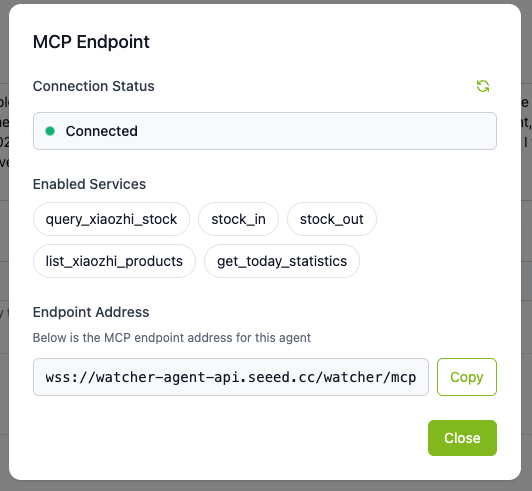
现在我们可以使用你的 Watcher 设备来测试这一集成方案了!
示例语音指令
| 语音指令 | 预期动作 |
|---|---|
| “查询一下小智标准版的库存” | 调用 query_stock 工具 |
| “我们还有多少台小智专业版?” | 使用专业版参数调用 query_stock |
| “入库 5 台 Watcher 小智标准版” | 调用 stock_in 工具,quantity=5 |
| “出库 3 台小智用于销售” | 调用 stock_out 工具,quantity=3 |
| “今天的库存汇总情况怎样?” | 调用 get_today_statistics 工具 |
| “列出所有小智产品” | 调用 search 工具,entity_type="material" |
幕后发生了什么?
| 组件 | 动作 |
|---|---|
| Watcher | 将语音音频发送到云端。 |
| MCP Bridge | 接收意图,并确定要调用的工具是 query_stock。 |
| System | 使用 API Key 认证执行 GET /materials/product-stats。 |
| Result | Watcher 语音播报:“当前库存为 150 件。” |
预期回复示例
查询库存:
“库存查询成功。Watcher 小智标准版目前在 A-01-01 货位有 150 件库存,库存状态正常。”
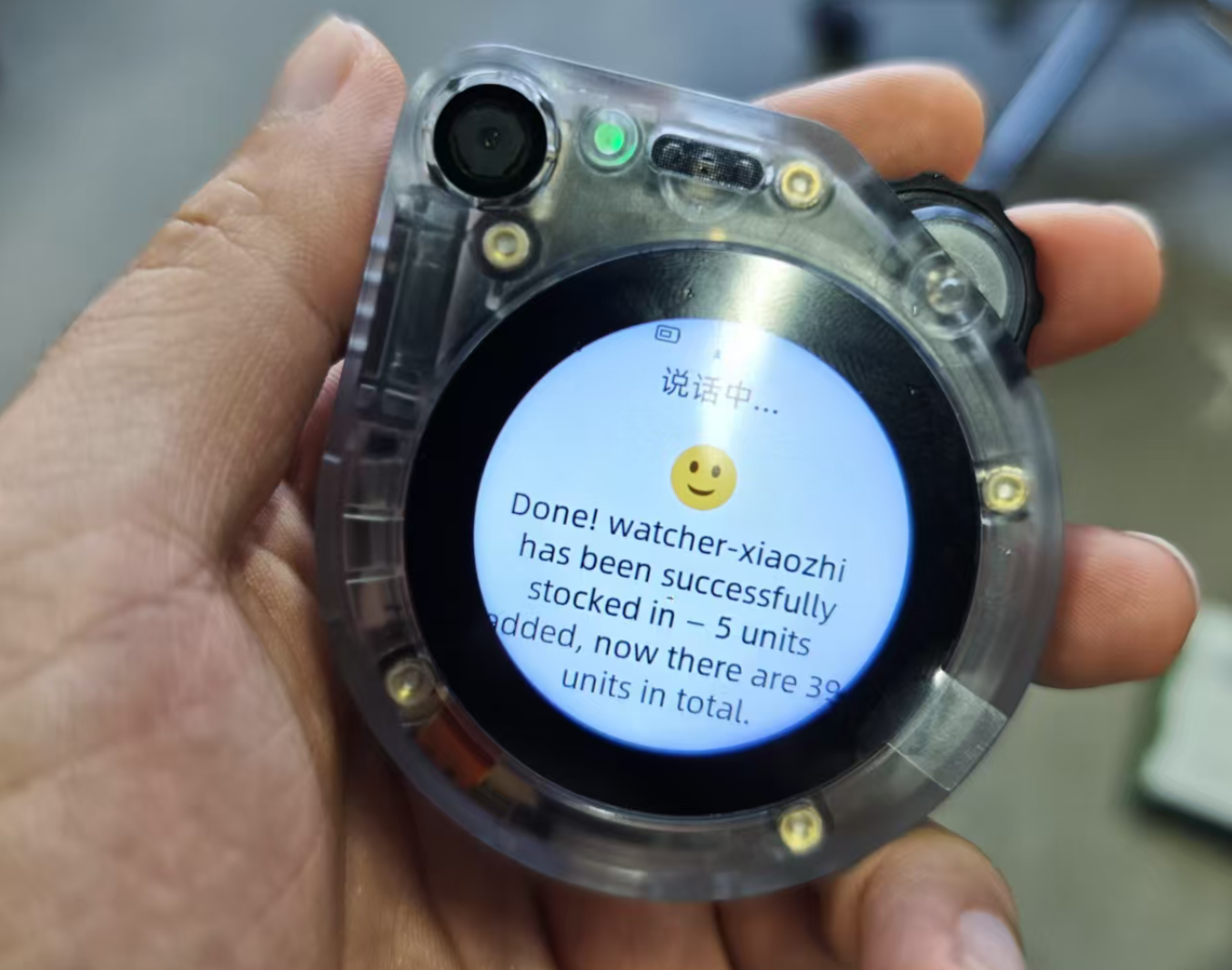
入库:
“已成功入库 5 件 Watcher 小智标准版。原库存数量为 150,新库存数量为 155。”
为你的系统做定制
仓库演示只是一个起点。MCP Bridge 使用 Provider 插件架构 —— 你无需修改任何现有代码,而是通过创建一个新的 Provider,将 Bridge 适配到你自己的后端系统。
工作原理
该 Bridge 具有清晰的职责分离:
warehouse_mcp.py—— 定义了 6 个固定的 MCP 工具(query_stock、stock_in、stock_out、search、resolve_name、get_today_statistics)。你不需要修改这个文件。providers/base.py—— 定义接口(6 个方法)的抽象基类。providers/default.py—— 演示仓库后端的默认实现。- 你的自定义 Provider —— 在
providers/下新增的.py文件,用来将这 6 个方法适配到你系统的 API。
1. 创建自定义 Provider
创建新文件 mcp/providers/my_erp.py:
from .base import BaseProvider

class MyERPProvider(BaseProvider):
    """Adapter for My ERP System."""

    PROVIDER_NAME = "my_erp"

    def query_stock(self, product_name, show_batches=False):
        # Call your ERP's inventory API
        return self.http_get(f"/inventory/query", params={"sku": product_name})

    def stock_in(self, product_name, quantity, reason, operator, fuzzy,
                 location=None, contact_id=None, variant=None):
        return self.http_post("/inventory/receive", {
            "sku": product_name, "qty": quantity, "note": reason
        })

    def stock_out(self, product_name, quantity, reason, operator, fuzzy,
                  variant=None):
        return self.http_post("/inventory/ship", {
            "sku": product_name, "qty": quantity, "note": reason
        })

    def search(self, query, entity_type, category, status, contact_type,
               fuzzy, include_batches=False, max_results=0):
        return self.http_get("/search", params={"q": query, "type": entity_type})

    def resolve_name(self, text, entity_type="all"):
        return self.http_get("/fuzzy-match", params={"q": text})

    def get_today_statistics(self):
        return self.http_get("/dashboard/today")
基类(BaseProvider)提供了内置的 http_get() 和 http_post() 助手函数,包含自动注入认证头和错误处理 —— 因此你的 Provider 代码可以保持精简。
只需将 .py 文件放入 mcp/providers/ 目录中。Bridge 会自动发现并注册所有 BaseProvider 子类 —— 无需手动注册。
2. 通过 config.yml 进行配置
如果还没有,请先从模板创建 config.yml:
cd mcp
cp config.yml.example config.yml
然后切换到你的 Provider,并指向真实服务器 —— 无需修改任何代码:
# Switch to your custom provider
provider: "my_erp"

# Your production API address
api_base_url: "http://192.168.50.10:8080/api/v1"

# Authentication (supports api_key, bearer, basic)
auth:
  type: api_key
  key: "your-production-api-key"
你也可以使用环境变量覆盖这些设置:WAREHOUSE_API_URL、WAREHOUSE_API_KEY 和 WAREHOUSE_PROVIDER。
支持的认证方式
基类通过 config.yml 开箱即用地支持多种认证类型:
# API Key (default)
auth:
  type: api_key
  header: X-API-Key    # optional, defaults to X-API-Key
  key: "your-key"

# Bearer Token
auth:
  type: bearer
  token: "your-bearer-token"

# Basic Auth
auth:
  type: basic
  username: "admin"
  password: "secret"
对于自定义认证方式(例如 HMAC 签名),请在你的 Provider 中重写 get_auth_headers() 方法。
Provider 开发最佳实践
返回值格式
返回值会被 AI 读取并生成语音回复。请保持简洁(通常不超过 1024 字节)。
# Good — concise
return {
    "success": True,
    "quantity": 150,
    "message": "Stock query successful"
}

# Bad — too verbose
return {
    "success": True,
    "full_product_details": {...},
    "complete_history": [...]
}
错误处理
基类的 http_get() / http_post() 已经处理了连接错误和 HTTP 状态码。对于额外的业务逻辑错误,请返回一个结构化的错误字典:
return {
    "success": False,
    "error": "Product not found",
    "message": "No matching product in the ERP system."
}
日志记录
MCP 使用标准输入/输出(stdio)进行通信。使用 print() 会破坏协议数据流。请始终使用日志记录器:
import logging
logger = logging.getLogger("WarehouseMCP")
logger.info(f"Querying stock for: {product_name}")
3. 生产环境部署
演示版本运行在你的本地终端中。若要长期 24/7 运行:
- Docker 化: 将
mcp/文件夹打包为 Docker 容器,以确保环境稳定性。 - 后台服务: 不要在打开的终端中运行
./start_mcp.sh,而应使用systemd(Linux)或NSSM(Windows)将脚本作为后台服务运行。 - 网络: 确保运行 MCP Bridge 的机器具有稳定的互联网连接,以便连上 SenseCraft Cloud(
wss://...)。
故障排查
❌ Docker 容器无法启动
- 现象:
docker-compose ps显示容器处于 “Exited” 状态。 - 解决方法:
- 确认 Docker Desktop 已启动
- 查看日志:
docker-compose -f docker-compose.prod.yml logs - 确保 2125 端口未被占用
- 尝试重新构建:
docker-compose -f docker-compose.prod.yml up -d --build
❌ API Key 无效(401 Unauthorized)
- 现象: MCP Bridge 日志显示
401 Unauthorized或 “Invalid API Key”。 - 解决方法:
- 确认
mcp/config.yml中配置的 API Key 正确无误 - 检查该 API Key 在用户管理中是否仍为激活状态
- 确保密钥周围没有多余的空格或引号
- 尝试创建一个新的 API 密钥
- 确认
❌ 后端服务未运行
- 症状: AI 返回 "Cannot connect to backend service"。
- 解决方案:
- 检查容器是否正在运行:
docker-compose -f docker-compose.prod.yml ps - 验证后端健康状况:
curl http://localhost:2125/api/dashboard/stats - 检查日志:
docker-compose -f docker-compose.prod.yml logs
- 检查容器是否正在运行:
❌ MCP 连接超时
- 症状: 脚本一直停在 "Connecting to WebSocket server..." 无响应。
- 解决方案:
- 确认你的
MCP_ENDPOINT是否正确(检查是否有拼写错误)。 - 确保 URL 以
wss://开头(安全 WebSocket)。 - 检查你的网络连接(需要到 SenseCraft Cloud 的出站流量)。
- 确认你的
❌ 工具未被识别
- 症状: 你说出一条指令,但 AI 回答 "I don't know how to do that" 或者没有触发工具。
- 解决方案:
- 检查命名: 为函数使用清晰的英文描述性名称。
- 检查 Docstring: 确保 docstring 明确描述 意图(例如,"Use this to check stock")。
- 重启: 每次修改代码后都必须重启 MCP 服务器脚本。
❌ 连接数限制超出
- 症状: 错误日志显示 "Maximum connections reached"。
- 解决方案:
- 每个 Endpoint 都有连接数限制。确保你没有在多个终端同时运行脚本。
- 关闭其他连接,等待几分钟后再重试。
❌ 连接被拒绝 / WebSocket 443 端口被阻止
症状:
你看到 [WinError 1225] Connection refused,或者脚本卡在 Connecting to WebSocket server...,即使 Endpoint URL 是正确的。
原因: 企业防火墙拦截。 许多办公网络(或 VPN)会严格阻止 WebSocket (wss://) 流量或非标准协议,即使是在 443 端口上。
快速解决方案:
-
📱 “热点测试”(推荐) 断开办公网络/VPN,将电脑连接到 手机热点(4G/5G)。
- 如果这样可以连接: 说明你的办公网络在阻止该连接。
-
🔧 配置代理 如果公司要求使用代理,在运行前进行设置:
- Windows:
$env:HTTPS_PROXY="http://your-proxy:port" - Mac/Linux:
export HTTPS_PROXY="http://your-proxy:port"
- Windows:
-
🛡️ 加入白名单 请 IT 允许以下域名的 WebSocket (WSS) 流量:
*.seeed.cc。
资源
- MCP Endpoint 设置指南 - 了解如何创建和管理 MCP Endpoint。
- Warehouse System 仓储系统仓库 - 完整源代码,包括 Provider 示例。
- FastMCP 文档 - 更深入了解高级工具定义。