使用 reSpeaker XVF3800 44mm 和 XIAO ESP32-S3 Plus 进行录音与回放
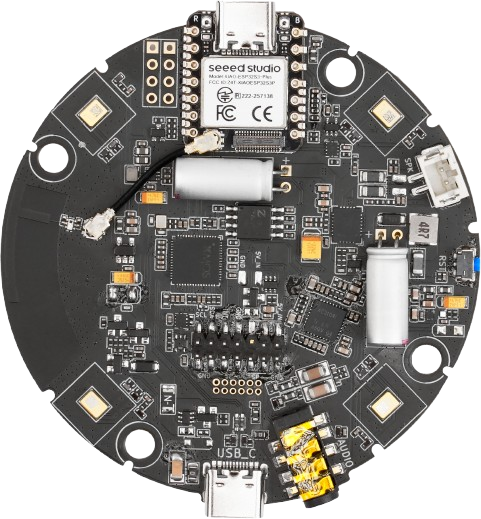
本示例通过 I2S 从 XVF3800 采集 5 秒立体声音频到 XIAO 的 PSRAM 中,然后通过 I2S 发送路径回放同一缓冲区。这是在无需 PC 的情况下验证完整音频往返是否工作的最快方式,也是语音录制应用的良好起点。
前置条件
- 阵列必须运行 I2S 固件。参见 Update Firmware。
- 已安装带有 ESP32 开发板包和 Arduino Audio Tools 库的 Arduino IDE。参见 Software Preparation。
- 已选择开发板为 XIAO_ESP32S3_Plus,并选择好端口号。
- 已启用 PSRAM:
Tools > PSRAM > OPI PSRAM。录音缓冲区无法放入内部 RAM。
note
48 kHz、立体声、32 位、5 秒需要 1,920,000 字节(48,000 × 2 通道 × 4 字节 × 5 秒)。如果没有 PSRAM,示例程序会以 PSRAM allocation failed! 停止。
该示例将 XIAO 作为 I2S 从机(config.is_master = false),因为 XVF3800 产生 BCLK、LRCLK 和 MCLK。
工作原理
- 启动时,示例程序会报告 PSRAM 的总量和空闲量,然后使用
heap_caps_malloc(..., MALLOC_CAP_SPIRAM)分配RECORD_BYTES(5 秒)的空间。 - 录音:I2S 以
RX_MODE重新启动,以 8 KB 为一块将字节拉入缓冲区,直到缓冲区填满或 1 秒读取超时触发。 - 将字节数修整为整数量的立体声帧,以便回放保持对齐。
- 回放:I2S 以
TX_MODE重新启动,以 8 KB 为一块写出缓冲区,随后调用flush()并短暂延时,以便在停止流之前让最后几帧发送完成。 - 循环重复,在 1 秒暂停后再次开始录音。
Arduino 示例程序
#include "AudioTools.h"
#include "esp_heap_caps.h"

// Audio configuration
constexpr uint32_t SAMPLE_RATE = 48000;
constexpr uint16_t CHANNELS = 2;
constexpr uint16_t BITS_PER_SAMPLE = 32;

// Recording configuration
constexpr uint32_t RECORD_SECONDS = 5;

constexpr size_t FRAME_BYTES =
    CHANNELS * (BITS_PER_SAMPLE / 8);

constexpr size_t BYTES_PER_SECOND =
    SAMPLE_RATE * FRAME_BYTES;

constexpr size_t RECORD_BYTES =
    BYTES_PER_SECOND * RECORD_SECONDS;

// Process audio in smaller blocks
constexpr size_t CHUNK_BYTES = 8192;

AudioInfo info(SAMPLE_RATE, CHANNELS, BITS_PER_SAMPLE);

I2SStream out;
I2SConfig config;

// PSRAM recording buffer
uint8_t *audioBuffer = nullptr;

size_t bytes_read = 0;
size_t bytes_write = 0;

// Start I2S
bool startI2S() {
    if (!out.begin(config)) {
        Serial.println("I2S initialization failed!");
        return false;
    }
    return true;
}

// Arduino Setup
void setup() {

    Serial.begin(115200);
    while (!Serial);

    AudioLogger::instance().begin(
        Serial,
        AudioLogger::Info
    );

    Serial.println("\nI2S Record / Playback Test");

    // Check PSRAM availability
    size_t psramTotal =
        heap_caps_get_total_size(MALLOC_CAP_SPIRAM);

    size_t psramFree =
        heap_caps_get_free_size(MALLOC_CAP_SPIRAM);

    Serial.printf(
        "PSRAM total: %lu bytes\n",
        (unsigned long)psramTotal
    );

    Serial.printf(
        "PSRAM free: %lu bytes\n",
        (unsigned long)psramFree
    );

    Serial.printf(
        "Recording buffer required: %lu bytes\n",
        (unsigned long)RECORD_BYTES
    );

    // Allocate audio buffer in PSRAM
    audioBuffer = (uint8_t *)heap_caps_malloc(
        RECORD_BYTES,
        MALLOC_CAP_SPIRAM | MALLOC_CAP_8BIT
    );

    if (audioBuffer == nullptr) {
        Serial.println("PSRAM allocation failed!");
        Serial.println(
            "Enable Tools -> PSRAM -> OPI PSRAM"
        );

        while (true) {
            delay(1000);
        }
    }

    Serial.println("PSRAM buffer allocated successfully");

    // Configure I2S
    config = out.defaultConfig(TX_MODE);
    config.copyFrom(info);

    // XIAO ESP32-S3 Plus pins
    config.pin_bck = 8;       // D9 - GPIO8
    config.pin_ws = 7;        // D8 - GPIO7
    config.pin_data = 44;     // D7 - GPIO44 - TX
    config.pin_data_rx = 43;  // D6 - GPIO43 - RX

    // XVF3800 is I2S master
    config.is_master = false;

    if (!startI2S()) {
        while (true) delay(1000);
    }

    Serial.println("I2S initialized successfully");
}

// Arduino Loop
void loop() {

    // =========================================
    // STEP 1: RECORD AUDIO
    // =========================================

    Serial.println("\n========== RECORDING ==========");

    out.end();

    config.rx_tx_mode = RX_MODE;

    if (!startI2S()) {
        delay(1000);
        return;
    }

    bytes_read = 0;

    uint32_t lastReadTime = millis();

    Serial.println("Recording started...");

    while (bytes_read < RECORD_BYTES) {

        size_t remaining = RECORD_BYTES - bytes_read;

        size_t request =
            (remaining > CHUNK_BYTES)
            ? CHUNK_BYTES
            : remaining;

        size_t received = out.readBytes(
            audioBuffer + bytes_read,
            request
        );

        if (received == 0) {

            if (millis() - lastReadTime > 1000) {
                Serial.println("RX timeout!");
                break;
            }

            delay(1);
            continue;
        }

        bytes_read += received;
        lastReadTime = millis();
    }

    // Stop receiving
    out.end();

    // Keep complete stereo frames only
    bytes_read -= bytes_read % FRAME_BYTES;

    Serial.println("Recording finished");

    Serial.printf(
        "Captured bytes: %lu / %lu\n",
        (unsigned long)bytes_read,
        (unsigned long)RECORD_BYTES
    );

    Serial.print("Recorded duration: ");
    Serial.print(
        (float)bytes_read / BYTES_PER_SECOND,
        2
    );
    Serial.println(" seconds");

    if (bytes_read == 0) {

        Serial.println("No audio captured!");
        delay(1000);
        return;
    }

    // =========================================
    // STEP 2: PLAYBACK AUDIO
    // =========================================

    Serial.println("\n========== PLAYBACK ==========");

    config.rx_tx_mode = TX_MODE;

    if (!startI2S()) {
        delay(1000);
        return;
    }

    bytes_write = 0;

    Serial.println("Playback started...");

    while (bytes_write < bytes_read) {

        size_t remaining = bytes_read - bytes_write;

        size_t request =
            (remaining > CHUNK_BYTES)
            ? CHUNK_BYTES
            : remaining;

        size_t written = out.write(
            audioBuffer + bytes_write,
            request
        );

        if (written == 0) {
            Serial.println("TX write failed!");
            break;
        }

        bytes_write += written;
    }

    // Allow queued audio to finish playing
    out.flush();
    delay(150);

    // Stop transmitting
    out.end();

    Serial.println("Playback finished");

    Serial.printf(
        "Transmitted bytes: %lu / %lu\n",
        (unsigned long)bytes_write,
        (unsigned long)bytes_read
    );

    Serial.println("\n========== TEST COMPLETE ==========");

    // Wait before next recording
    delay(1000);
}
预期输出
I2S Record / Playback Test
PSRAM total: 8388608 bytes
PSRAM free: 8386804 bytes
Recording buffer required: 1920000 bytes
PSRAM buffer allocated successfully
I2S initialized successfully

========== RECORDING ==========
Recording started...
Recording finished
Captured bytes: 1920000 / 1920000
Recorded duration: 5.00 seconds

========== PLAYBACK ==========
Playback started...
Playback finished
Transmitted bytes: 1920000 / 1920000

========== TEST COMPLETE ==========
PSRAM 总量取决于模组。关键在于 Recording buffer required 小于 PSRAM free,能够完整捕获 1920000 / 1920000,并且发送计数与之匹配。
将扬声器或耳机连接到阵列,在回放阶段即可听到录音。
故障排查
PSRAM allocation failed!
未启用 Tools > PSRAM > OPI PSRAM,或者所选开发板不是 XIAO_ESP32S3_Plus。请重新选择开发板,启用 PSRAM,然后重新上传程序。
技术支持与产品讨论
感谢您选择我们的产品!我们为您提供多种支持方式,以确保您在使用我们产品时拥有尽可能顺畅的体验。我们提供多种沟通渠道,以满足不同的偏好和需求。