将 reSpeaker Clip 集成到你的服务中
本指南展示如何将 reSpeaker Clip 作为受管音频源添加到现有的 Python 服务中。它聚焦于集成边界:一个设备适配器、一个长连接、小而清晰的 API 表面,以及明确的状态归属。
reSpeaker Clip 是一个输入源。
ClipClient负责设备通信,ClipService将其适配到你的应用中,而你的服务继续拥有处理和业务逻辑的所有权。
关于传输配置、完整的 ClipClient API、AT 命令以及文件传输协议,请参阅 reSpeaker Clip Basic SDK Guide。本页不会重新解释 BLE/GATT、帧格式、CRC 处理或 CLI 工具。
集成方法
将设备隐藏在一个窄适配器之后,并将下载的录音发送到你的服务已经在使用的处理入口点:
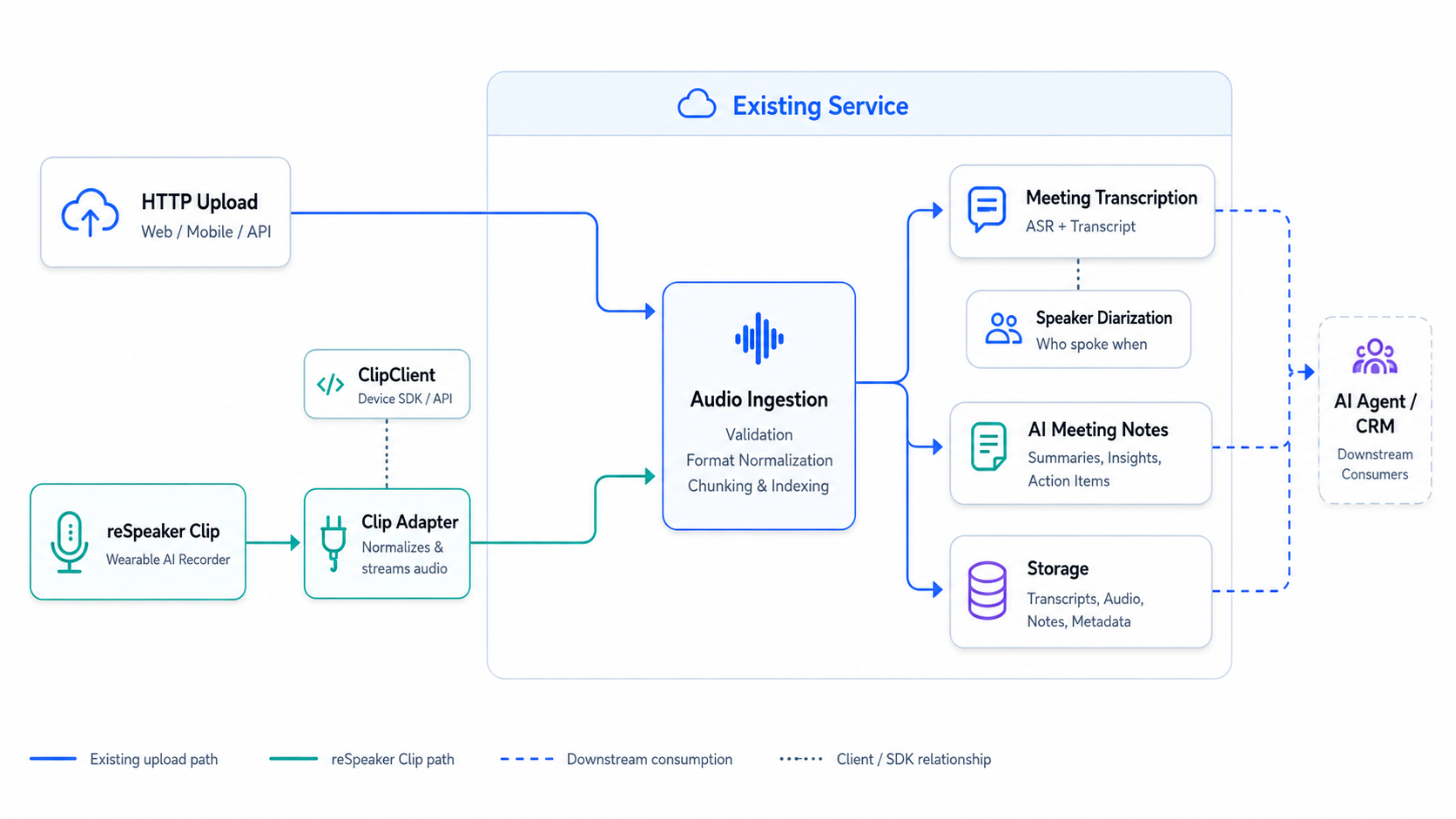
- 为每个物理设备创建一个
ClipService。 - 在应用启动时连接,在关闭时断开。
- 只暴露你的服务所需的录音操作。
- 将完成的音频文件传递给现有的处理流水线。
开始之前
本指南假设你已经可以在自己的机器上与 Clip 通信。在继续之前,请确保你可以:
- 安装 reSpeaker Clip Python SDK 并连接到一个 Clip;
- 启动和停止一次录音;
- 列出已完成的会话;
- 成功下载一段录音。
如果上述任一项失败,请先暂停,完成 reSpeaker Clip Basic SDK Guide。Basic SDK Guide 是传输配置、设备命令和文件传输细节的权威来源;本指南通过链接引用它,而不是重复内容。
选择合适的 reSpeaker Clip 指南
reSpeaker Clip 文档按开发层次组织。先从 Getting Started 开始进行产品设置和常规工作流。主机应用需要控制设备或下载录音时,使用 Basic SDK。当一个长时间运行的服务需要拥有设备连接并暴露 API 时,继续阅读 Service Integration。只有在你需要更改设备端行为、协议或音频处理时,才使用 Firmware SDK。
将 reSpeaker Clip 作为音频源添加到你的现有服务中
按照以下步骤,将设备适配器连接到现有的 FastAPI 服务。
步骤 1:准备流水线
假设你的服务已经有一个接收音频文件的函数:
async def process_audio(path: Path) -> dict:
    # your existing processing pipeline
    ...
现有的上传路由已经调用了该函数:
@app.post("/audio")
async def upload_audio(file: UploadFile):
    path = await save_upload(file)
    return await process_audio(path)
Clip 集成应生成一个普通的本地音频文件,并调用相同的 process_audio() 函数。处理流程应与音频采集设备保持独立。
将该函数封装到 Clip 数据摄取路由所使用的服务对象中:
# audio_service.py
from pathlib import Path


class AudioService:
    def __init__(self, recordings_dir: Path):
        self.recordings_dir = recordings_dir
        self.recordings_dir.mkdir(parents=True, exist_ok=True)

    async def process(self, path: Path) -> dict:
        return await process_audio(path)
步骤 2:构建适配器
仅封装此集成所需的操作:连接、断开连接、开始、停止和下载。
# clip_service.py
from __future__ import annotations
from pathlib import Path

from clip import ClipClient, ClipError


class ClipUnavailable(Exception):
    """The Clip device is not connected or could not perform an operation."""


class ClipStateError(Exception):
    """The device is in the wrong state for this operation."""


class ClipService:
    """Application-level adapter over a single long-lived ClipClient."""

    def __init__(self, transport, *, command_timeout: float = 10.0):
        self._client = ClipClient(transport, command_timeout=command_timeout)
        self._connected = False
        self._active_session: str | None = None

    async def connect(self) -> None:
        await self._client.connect()
        self._connected = True

    async def disconnect(self) -> None:
        if self._connected:
            await self._client.disconnect()
            self._connected = False

    async def start_recording(self, mode: str | None = None) -> str:
        if not self._connected:
            raise ClipUnavailable("Clip is not connected")
        if self._active_session is not None:
            raise ClipStateError("a recording is already in progress")
        try:
            session_id = await self._client.start_recording(mode)
        except ClipError as exc:
            raise ClipUnavailable("Clip could not start recording") from exc
        if not session_id:
            raise ClipStateError("Clip did not return a session id")
        self._active_session = session_id
        return session_id

    async def stop_recording(self) -> str | None:
        if not self._connected:
            raise ClipUnavailable("Clip is not connected")
        if self._active_session is None:
            raise ClipStateError("no recording in progress")
        session_id = self._active_session
        try:
            await self._client.stop_recording()
        except ClipError as exc:
            raise ClipUnavailable("Clip could not stop recording") from exc
        self._active_session = None
        return session_id

    async def download_session(self, session_id: str, destination: str | Path):
        if not self._connected:
            raise ClipUnavailable("Clip is not connected")
        try:
            return await self._client.download_session(session_id, destination)
        except ClipError as exc:
            raise ClipUnavailable("Clip could not download the recording") from exc
步骤 3:绑定生命周期
在 FastAPI 启动期间创建适配器,将其存储在应用状态中,并在关闭时断开连接。
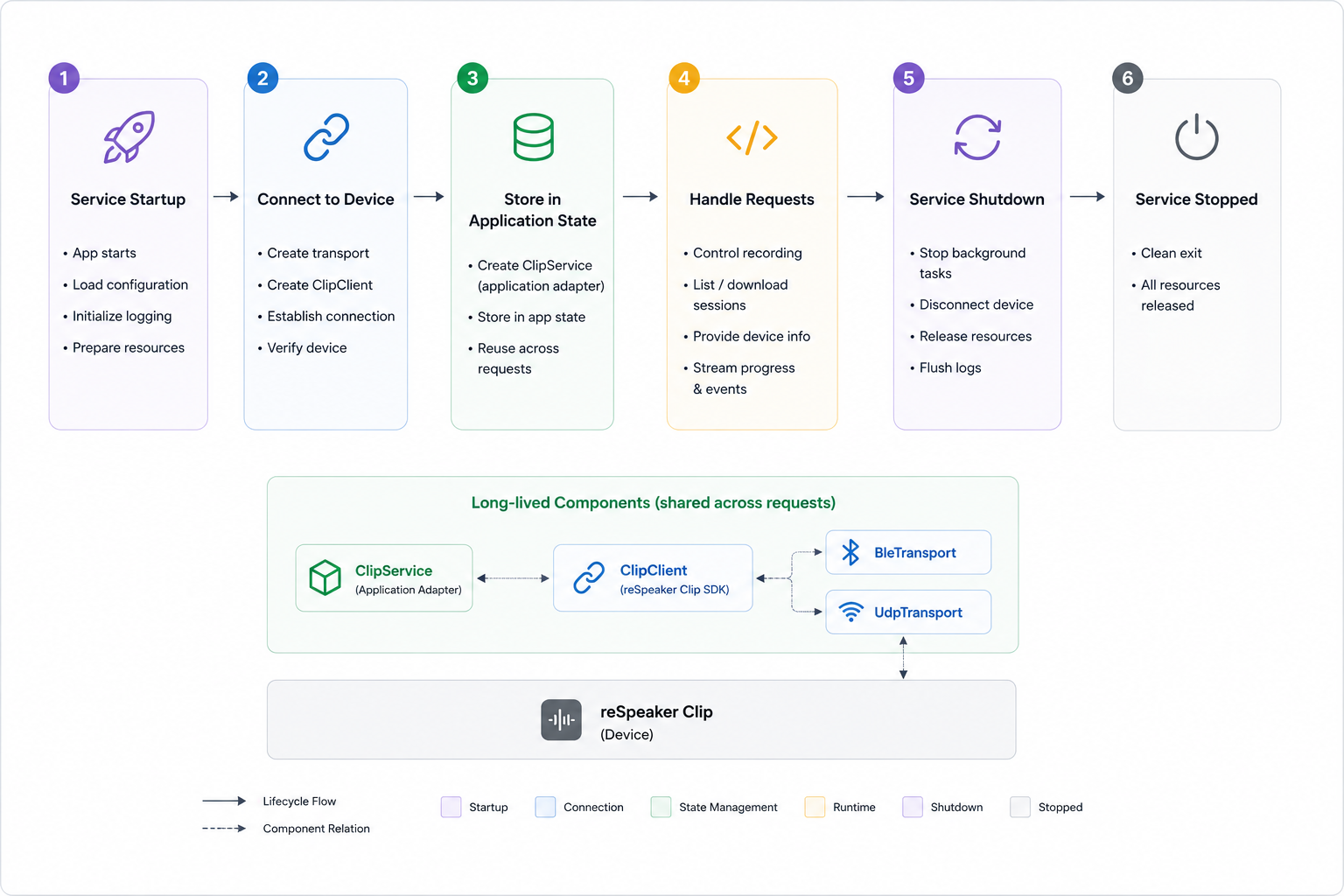
将连接绑定到 FastAPI 的 lifespan,这样它会在启动时打开一次,在停止时关闭一次:
# main.py
from contextlib import asynccontextmanager
from pathlib import Path

from fastapi import FastAPI

from clip import BleTransport  # or UdpTransport after the Wi-Fi AP is on
from clip_service import ClipService
from audio_service import AudioService


@asynccontextmanager
async def lifespan(app: FastAPI):
    transport = BleTransport(name="Clip")
    clip = ClipService(transport)
    await clip.connect()
    app.state.clip = clip
    app.state.audio = AudioService(recordings_dir=Path("recordings"))
    try:
        yield
    finally:
        await clip.disconnect()


app = FastAPI(lifespan=lifespan)
步骤 4:添加路由
为开始、停止以及摄取已完成录音创建端点:
POST /clip/recordings/start
POST /clip/recordings/stop
POST /clip/sessions/{session_id}/ingest
# routes.py
from pathlib import Path

from fastapi import APIRouter, HTTPException, Request

from audio_service import AudioService
from clip_service import ClipService, ClipStateError, ClipUnavailable

router = APIRouter(prefix="/clip")


@router.post("/recordings/start")
async def start_recording(request: Request, mode: str | None = None):
    clip: ClipService = request.app.state.clip
    try:
        session_id = await clip.start_recording(mode)
    except ClipStateError as exc:
        raise HTTPException(status_code=409, detail=str(exc))
    except ClipUnavailable as exc:
        raise HTTPException(status_code=503, detail=str(exc))
    return {"session_id": session_id}


@router.post("/recordings/stop")
async def stop_recording(request: Request):
    clip: ClipService = request.app.state.clip
    try:
        session_id = await clip.stop_recording()
    except ClipStateError as exc:
        raise HTTPException(status_code=409, detail=str(exc))
    except ClipUnavailable as exc:
        raise HTTPException(status_code=503, detail=str(exc))
    return {"session_id": session_id, "status": "stopped"}


@router.post("/sessions/{session_id}/ingest")
async def ingest_session(session_id: str, request: Request):
    clip: ClipService = request.app.state.clip
    audio: AudioService = request.app.state.audio
    try:
        result = await clip.download_session(session_id, audio.recordings_dir)
    except ClipUnavailable as exc:
        raise HTTPException(status_code=502, detail=str(exc))
    ingested = [await audio.process(Path(file.path)) for file in result.files]
    return {"session_id": session_id, "files": ingested}
步骤 5:注册路由器
在 main.py 中导入路由器,并在创建 FastAPI 应用后注册它:
from routes import router

app = FastAPI(lifespan=lifespan)
app.include_router(router)
现在,该集成由应用包中的 main.py、routes.py、clip_service.py 和 audio_service.py 组成。
步骤 6:验证 API
启动服务,然后按顺序调用这些路由:
curl -X POST "http://localhost:8000/clip/recordings/start"
curl -X POST "http://localhost:8000/clip/recordings/stop"
curl -X POST "http://localhost:8000/clip/sessions/<session_id>/ingest"
开始和停止的响应应包含相同的 session_id。摄取的响应应包含由你现有的 AudioService 流水线返回的文件。
BLE 断连与命令超时恢复
上面的适配器只覆盖了正常路径。一个长时间运行的服务还必须处理两种故障:
- 链路丢失:设备移出范围、休眠、主机蓝牙适配器重置,或被其他应用接管。
- 命令超时:设备未能在截止时间前响应。固件协议没有请求 ID,因此传输层无法将延迟响应与下一条命令关联。因此,超时需要重新连接,而不是直接重试。
本节提供一个参考实现,可直接替换 clip_service.py。它保留 connect()、disconnect()、start_recording()、stop_recording() 和 download_session() 接口,并添加自动恢复功能。
设计
- 连接锁:业务操作和断开/重连共享一个
asyncio.Lock,因此不会有任何命令或下载跨越一次重连。 - 后台健康检查:每隔
health_check_interval秒,任务检查一次ClipClient.is_connected。捕获到掉线或超时的业务操作会通过事件立即唤醒该任务。 - 有界指数退避:等待时间从 1 秒开始,每次失败尝试加倍,最多到 30 秒。每次连接尝试都有自己的 30 秒限制。成功连接会重置退避。
- 不重放命令:失败的开始、停止或下载只会抛出
ClipUnavailable。设备可能已经执行了命令,只是响应丢失;重放可能会创建重复的录音或传输。 - 重连后的就绪探测:适配器调用一次
status()。如果设备仍在录音并返回session_id,则恢复_active_session;否则清除本地会话状态。这同时覆盖“掉线期间录音继续”和“停止响应丢失”两种情况。 - 优雅关闭:在关闭客户端之前取消并等待后台任务完成;关闭后不会再调度重连。
- 仅使用公共 API:掉线检测使用
ClipClient.is_connected;恢复使用ClipClient.status()。不添加新的 SDK API。
BLE 订阅清理。 当前 SDK 的
BleTransport.disconnect()在链路已断开时会跳过底层 Bleak 客户端,因此 BlueZ 会保留该客户端的通知订阅。随后使用同一个传输对象重连时,每条通知都会被投递两次(包括命令响应和文件帧),下载会因received FILE_START before previous file ended而失败。参考实现中的_close_link()在传输层断开之后调用底层客户端的公共disconnect()来释放订阅。UDP 传输不受影响。
启动竞态。 固件可以在音频线程发布会话 ID 之前,用
ok和空的data来响应AT+START。start_recording()会轮询status()以获取该 ID,而不是把正在进行的录音视为启动失败。
配置
| 参数 | 默认值 | 作用 |
|---|---|---|
command_timeout | 10.0 | 传递给 ClipClient 的每条命令响应超时时间 |
health_check_interval | 2.0 | 后台执行 is_connected 检查的间隔秒数 |
reconnect_initial_delay | 1.0 | 第一次重连尝试前的等待时间(秒) |
reconnect_max_delay | 30.0 | 退避上限(秒) |
reconnect_attempt_timeout | 30.0 | 单次连接尝试及其就绪探测的时间上限(秒) |
完整参考实现
将 clip_service.py 替换为以下版本:
"""Application-level Clip adapter with BLE drop and command-timeout recovery.

This module is the reference implementation referenced by the reSpeaker Clip
Service Integration wiki page.  It keeps the small application surface used by
the integration guide (connect, disconnect, start, stop, download) and adds:

* one connection lock that serializes business operations against reconnect;
* one background task that polls ``ClipClient.is_connected`` every
  ``health_check_interval`` seconds;
* a wake event so a failed command can request an immediate reconnect;
* bounded exponential backoff (1 s .. 30 s by default);
* a ``status()`` readiness probe after reconnect that restores or clears
  ``_active_session``.

A failed command is never replayed: the device may already have executed it and
only the response was lost.
"""

from __future__ import annotations

import asyncio
import logging
from pathlib import Path

from clip import (
    ClipClient,
    ClipError,
    CommandTimeoutError,
    ConnectionError,
    DownloadResult,
    Status,
)

logger = logging.getLogger(__name__)


class ClipUnavailable(Exception):
    """The Clip device is not connected or could not perform an operation."""


class ClipStateError(Exception):
    """The device is in the wrong state for this operation."""


class ClipService:
    """Application-level adapter over a single long-lived ``ClipClient``."""

    def __init__(
        self,
        transport,
        *,
        command_timeout: float = 10.0,
        health_check_interval: float = 2.0,
        reconnect_initial_delay: float = 1.0,
        reconnect_max_delay: float = 30.0,
        reconnect_attempt_timeout: float = 30.0,
    ) -> None:
        for name, value in (
            ("command_timeout", command_timeout),
            ("health_check_interval", health_check_interval),
            ("reconnect_initial_delay", reconnect_initial_delay),
            ("reconnect_max_delay", reconnect_max_delay),
            ("reconnect_attempt_timeout", reconnect_attempt_timeout),
        ):
            if value <= 0:
                raise ValueError(f"{name} must be positive")
        if reconnect_initial_delay > reconnect_max_delay:
            raise ValueError("reconnect_initial_delay must not exceed reconnect_max_delay")

        self._client = ClipClient(transport, command_timeout=command_timeout)
        self._connected = False
        self._active_session: str | None = None

        # Serializes business operations with connect/disconnect/reconnect.
        self._connection_lock = asyncio.Lock()
        # Set by a failed command; the background task wakes immediately.
        self._wake = asyncio.Event()
        self._closed = False
        self._monitor_task: asyncio.Task[None] | None = None

        self._health_check_interval = health_check_interval
        self._reconnect_initial_delay = reconnect_initial_delay
        self._reconnect_max_delay = reconnect_max_delay
        self._reconnect_attempt_timeout = reconnect_attempt_timeout
        self._reconnect_delay = reconnect_initial_delay

    # ------------------------------------------------------------------
    # Connection lifecycle
    # ------------------------------------------------------------------

    @property
    def is_connected(self) -> bool:
        """Whether the device link is currently usable (read-only)."""
        return self._connected and self._client.is_connected

    async def connect(self) -> None:
        """Open the initial connection.

        A startup failure still propagates: background recovery only covers
        drops that happen after the service is running.
        """
        async with self._connection_lock:
            if self._connected:
                return
            await self._client.connect()
            self._connected = True
            self._closed = False
            self._reconnect_delay = self._reconnect_initial_delay
        if self._monitor_task is None or self._monitor_task.done():
            self._monitor_task = asyncio.create_task(
                self._monitor_loop(), name="clip-reconnect"
            )

    async def disconnect(self) -> None:
        """Stop recovery first, then close the client exactly once."""
        self._closed = True
        self._wake.set()

        task, self._monitor_task = self._monitor_task, None
        if task is not None:
            task.cancel()
            try:
                await task
            except asyncio.CancelledError:
                pass

        async with self._connection_lock:
            await self._close_link()
            self._connected = False
            self._active_session = None

    # ------------------------------------------------------------------
    # Business operations
    # ------------------------------------------------------------------

    async def start_recording(self, mode: str | None = None) -> str:
        async with self._connection_lock:
            self._require_connection()
            if self._active_session is not None:
                raise ClipStateError("a recording is already in progress")
            try:
                session_id = await self._client.start_recording(mode)
                if not session_id:
                    # AT+START can answer ok before the audio thread has
                    # published its session id.  Recover it from device state
                    # instead of reporting a failure for a running recording.
                    session_id = await self._probe_session_id()
            except (ConnectionError, CommandTimeoutError) as exc:
                await self._handle_link_failure(exc)
                raise ClipUnavailable("Clip could not start recording") from exc
            except ClipError as exc:
                logger.warning("Clip start failed: %s", exc)
                raise ClipUnavailable("Clip could not start recording") from exc
            if not session_id:
                raise ClipStateError("Clip did not return a session id")
            self._active_session = session_id
            return session_id

    async def stop_recording(self) -> str | None:
        async with self._connection_lock:
            self._require_connection()
            if self._active_session is None:
                raise ClipStateError("no recording in progress")
            session_id = self._active_session
            try:
                await self._client.stop_recording()
            except (ConnectionError, CommandTimeoutError) as exc:
                await self._handle_link_failure(exc)
                raise ClipUnavailable("Clip could not stop recording") from exc
            except ClipError as exc:
                logger.warning("Clip stop failed: %s", exc)
                raise ClipUnavailable("Clip could not stop recording") from exc
            self._active_session = None
            return session_id

    async def download_session(
        self, session_id: str, destination: str | Path
    ) -> DownloadResult:
        async with self._connection_lock:
            self._require_connection()
            try:
                return await self._client.download_session(session_id, destination)
            except (ConnectionError, CommandTimeoutError) as exc:
                await self._handle_link_failure(exc)
                raise ClipUnavailable("Clip could not download the recording") from exc
            except ClipError as exc:
                logger.warning("Clip download failed: %s", exc)
                raise ClipUnavailable("Clip could not download the recording") from exc

    # ------------------------------------------------------------------
    # Link failure and recovery
    # ------------------------------------------------------------------

    async def _probe_session_id(
        self, attempts: int = 5, delay: float = 0.1
    ) -> str | None:
        """Recover the session id published just after AT+START succeeded."""
        for attempt in range(attempts):
            status = await self._client.status()
            if status.recording and status.session_id:
                return status.session_id
            if attempt + 1 < attempts:
                await asyncio.sleep(delay)
        return None

    def _require_connection(self) -> None:
        if not self.is_connected:
            self._connected = False
            # The monitor may still be asleep; ask it to look now.
            self._wake.set()
            raise ClipUnavailable("Clip is not connected")

    async def _handle_link_failure(self, exc: Exception) -> None:
        """Mark the link unusable and hand recovery to the background task."""
        self._connected = False
        logger.warning(
            "Clip link failure (%s: %s); requesting reconnect without replaying the command",
            type(exc).__name__,
            exc,
        )
        # Best effort: a desynchronized transport must not be reused.
        await self._close_link()
        self._wake.set()

    async def _close_link(self) -> None:
        """Close the link and release a subscription left by a dead link.

        ``BleTransport.disconnect()`` skips the underlying Bleak client when
        the link is already down.  BlueZ keeps that client's notification
        subscription, so a later connection receives every notification
        twice.  Calling the client's public ``disconnect()`` releases it.
        Transports without a ``_client`` (for example UDP) are unaffected.
        """
        stale_client = getattr(self._client.transport, "_client", None)
        try:
            await self._client.disconnect()
        except Exception as exc:  # noqa: BLE001 - cleanup must not mask
            logger.debug("Clip disconnect failed: %s", exc)
        if stale_client is not None:
            try:
                await stale_client.disconnect()
            except Exception as exc:  # noqa: BLE001 - best effort
                logger.debug("Clip stale-client cleanup failed: %s", exc)

    async def _monitor_loop(self) -> None:
        while not self._closed:
            try:
                await asyncio.wait_for(
                    self._wake.wait(), timeout=self._health_check_interval
                )
            except asyncio.TimeoutError:
                pass
            self._wake.clear()
            if self._closed:
                return
            if self.is_connected:
                self._reconnect_delay = self._reconnect_initial_delay
                continue
            if self._connected:
                logger.warning("Clip link dropped; starting reconnect")
                self._connected = False
            await self._reconnect_until_connected()

    async def _reconnect_until_connected(self) -> None:
        attempt = 0
        while not self._closed and not self.is_connected:
            delay = self._reconnect_delay
            logger.info(
                "Clip reconnect attempt %d in %.1f s", attempt + 1, delay
            )
            await asyncio.sleep(delay)
            if self._closed:
                return

            attempt += 1
            async with self._connection_lock:
                if self._closed:
                    return
                await self._close_link()

                try:
                    await asyncio.wait_for(
                        self._client.connect(),
                        timeout=self._reconnect_attempt_timeout,
                    )
                except asyncio.CancelledError:
                    raise
                except Exception as exc:  # noqa: BLE001 - retry any connect failure
                    logger.warning(
                        "Clip reconnect attempt %d failed: %s", attempt, exc
                    )
                    self._connected = False
                else:
                    try:
                        status = await asyncio.wait_for(
                            self._client.status(),
                            timeout=self._reconnect_attempt_timeout,
                        )
                    except asyncio.CancelledError:
                        raise
                    except Exception as exc:  # noqa: BLE001 - probe failure = retry
                        logger.warning(
                            "Clip readiness probe after attempt %d failed: %s",
                            attempt,
                            exc,
                        )
                        self._connected = False
                        await self._close_link()
                    else:
                        self._connected = True
                        self._reconnect_delay = self._reconnect_initial_delay
                        self._restore_session(status)
                        logger.info(
                            "Clip reconnected after %d attempt(s): recording=%s session=%s",
                            attempt,
                            status.recording,
                            status.session_id,
                        )
                        return

            self._reconnect_delay = min(
                self._reconnect_delay * 2, self._reconnect_max_delay
            )

    def _restore_session(self, status: Status) -> None:
        if status.recording and status.session_id:
            if self._active_session != status.session_id:
                logger.info("Recovered active session %s", status.session_id)
            self._active_session = status.session_id
        else:
            if self._active_session is not None:
                logger.info("Cleared stale active session %s", self._active_session)
            self._active_session = None
应用代码和路由无需更改:ClipService(transport) 的调用形式保持不变。初始连接期间的失败仍然会向外传播;后台恢复仅覆盖服务成功启动之后发生的掉线。
验证
下面的行为已在一台通过 BLE 连接的物理 Clip 上完成验证:
- 链路丢失:在从主机强制断开 BLE 连接后,后台任务会在下一次健康检查周期中检测到该断开并重新连接;恢复后命令可以正常工作。
- 命令超时:在注入一次
CommandTimeoutError后,旧链路会被关闭,失败的命令只执行一次,并且适配器会恢复。 - 退避序列:连续连接失败时会依次等待 1、2、4、8、16、30 和 30 秒;一旦成功,等待时间会重置为 1 秒。
- 录音恢复:设备在掉线期间会持续录音;重连后
_active_session会通过status()恢复。当设备空闲时,本地会话状态会被清除。 - 并发性:在重连期间,业务请求会以
ClipUnavailable快速失败(映射为503),而不是一直等待。连接锁可以防止命令跨越连接或断开过程。 - 关闭:后台任务退出后,不会再调度新的重连尝试。
- 恢复后的下载:在重连后下载的会话可以通过长度和 CRC32 校验。
长时间运行服务的生产注意事项
当集成以服务形式运行时,请保持连接、错误和工作流状态是显式的。
适配器边界
将所有 ClipClient 调用保持在 ClipService 内部。适配器拥有连接访问、录音命令、下载以及 SDK 错误转换;它不负责处理、存储或其他业务逻辑。
适配器之上的代码应使用诸如 session_id 和应用异常等应用概念,而不是传输、AT 命令或文件传输等细节。
客户端复用
将一个物理 Clip 映射到一个长生命周期的 ClipClient 和一个 ClipService。由于固件没有请求 ID,ClipClient 会串行化命令。对于多个设备,在 ClipManager 中按设备 ID 为 ClipService 实例建立键。
连接生命周期
一个常见错误是在请求处理器内部打开设备:
# WRONG — do not do this in a service
@app.post("/clip/start")
async def start():
    async with ClipClient(BleTransport(name="Clip")) as clip:
        await clip.start_recording()
这会在每次调用时重新连接,并在请求之间丢失活动会话。应用的生命周期拥有连接;请求只是复用它。
错误边界
在 ClipService 内部将 SDK 异常转换为应用异常,然后在路由边界将它们映射到 HTTP 响应。
一个简单的映射示例(用于说明,而非 SDK 强制要求):
| 应用条件 | HTTP 状态码 |
|---|---|
| Clip 不可用 | 503 |
| 设备状态无效 | 409 |
| 设备命令失败 | 502 |
| 客户端请求错误 | 400 |
具体状态码取决于应用。适配器之外的代码应依赖 ClipUnavailable 和 ClipStateError,而不是 SDK 异常。
重新连接
在发生设备错误时,将设备标记为不可用,并重新连接或重新创建传输层。命令超时需要在下一条命令之前重新连接,因为传输层无法再关联响应。将故障暴露为 ClipUnavailable,然后从后台任务或下一次请求中重新连接。完整实现(包含连接锁、后台健康检查、指数退避和会话恢复)请参见 BLE 断连与命令超时恢复。
幂等性
HTTP 重试、工作进程重试和重启可能会多次提交相同的 session_id。在处理之前检查持久化状态。
在数据库中跟踪每个会话:
session_id | downloaded | processed | result_id | created_at |
|---|---|---|---|---|
| 唯一设备会话 | 下载状态 | 流水线状态 | 结果引用 | 首次摄取时间 |
async def ingest_clip_session(session_id: str):
    if repository.is_processed(session_id):
        return repository.get_result(session_id)

    result = await clip_service.download_session(session_id, Path("recordings"))
    for file in result.files:
        await process_audio(Path(file.path))

    repository.mark_processed(session_id)
    return repository.get_result(session_id)
这可以防止重复处理和下游副作用。
状态归属
将设备状态与工作流状态分开:
| 状态 | 所有者 | 示例值 |
|---|---|---|
| Clip 状态 | 设备集成层(ClipService) | 已连接、录音中、会话可用、可下载 |
| 工作流状态 | 应用/作业层 | 摄取中、处理中、已完成、失败 |
不要将这两个状态机折叠到一个字段中。会话在其应用工作流仍在运行时就可以被下载。
后续步骤
在适配器工作之后,继续将设备集成与任何特定于应用的处理分离。相关页面:
- reSpeaker Clip Basic SDK Guide — 设备协议、
ClipClientAPI、BLE/UDP 传输、文件传输 - Getting Started with the reSpeaker Clip Firmware SDK — 当你需要修改设备端固件而不是集成 SDK 时
技术支持与产品讨论
感谢你选择我们的产品!我们将为你提供多种支持,以确保你在使用我们产品时的体验尽可能顺畅。我们提供多种沟通渠道,以满足不同的偏好和需求。