使用 Xiao ESP32S3 对 reSpeaker Flex 进行 HTTP 流式传输
介绍
本指南介绍如何使用 ESP32-S3(XIAO ESP32S3)从 reSpeaker Flex XVF3800 麦克风阵列采集音频,录制 5 秒 16 kHz 立体声 32 位 PCM 音频,并将数据存储在 PSRAM 中以处理大容量音频缓冲区。随后通过 Wi-Fi 将录制的音频上传到基于 Python 的 Flask HTTP 服务器,在服务器端接收并保存为标准 WAV 文件。该方案非常适合语音采集、远程音频日志记录,以及包括语音转文本(STT)和基于机器学习的音频分析在内的语音处理流水线等应用。
| reSpeaker Flex XVF3800 线性阵列搭配 XIAO ESP32S3 | reSpeaker Flex XVF3800 环形阵列搭配 XIAO ESP32S3 | |
|---|---|---|
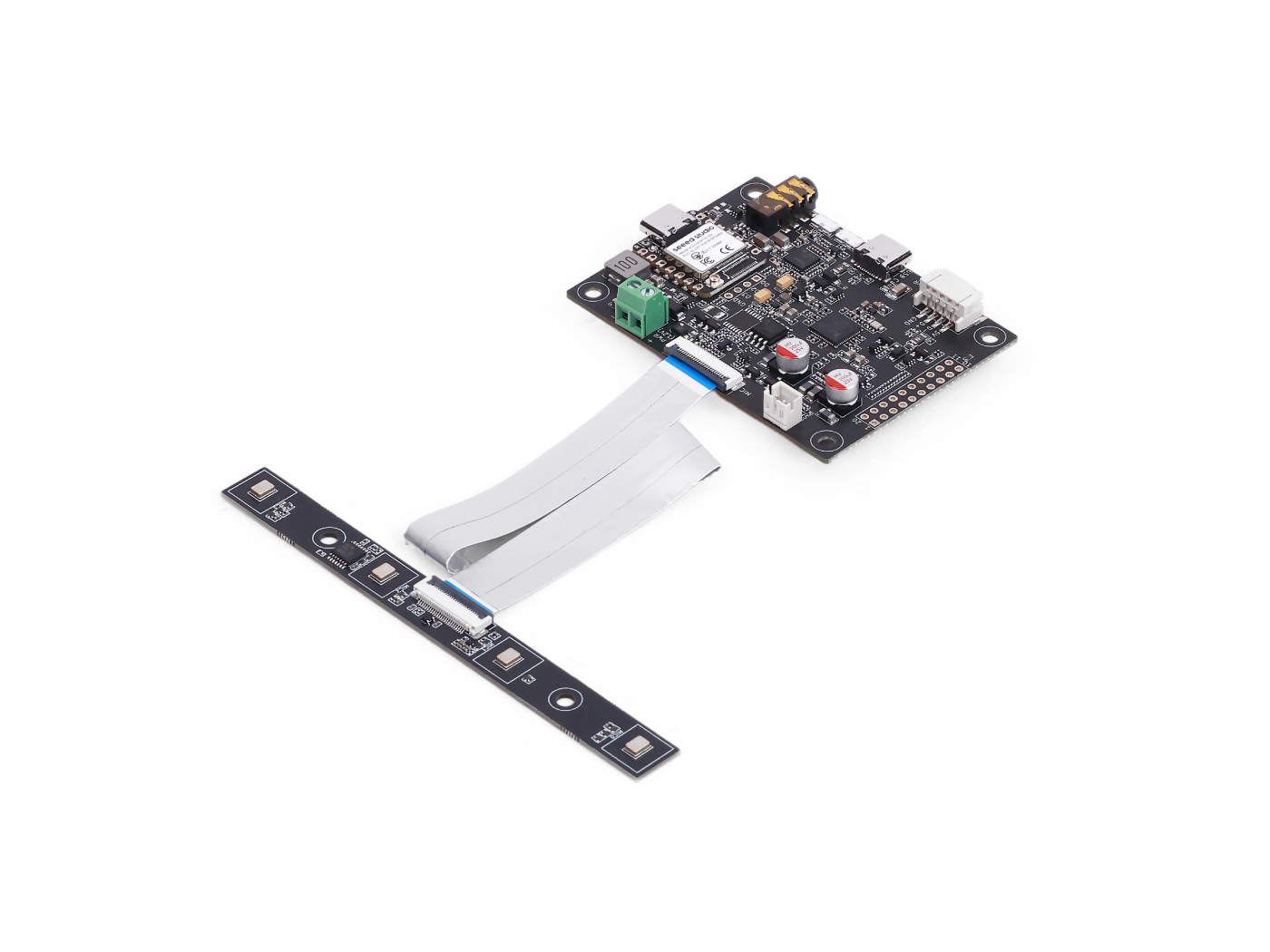 | 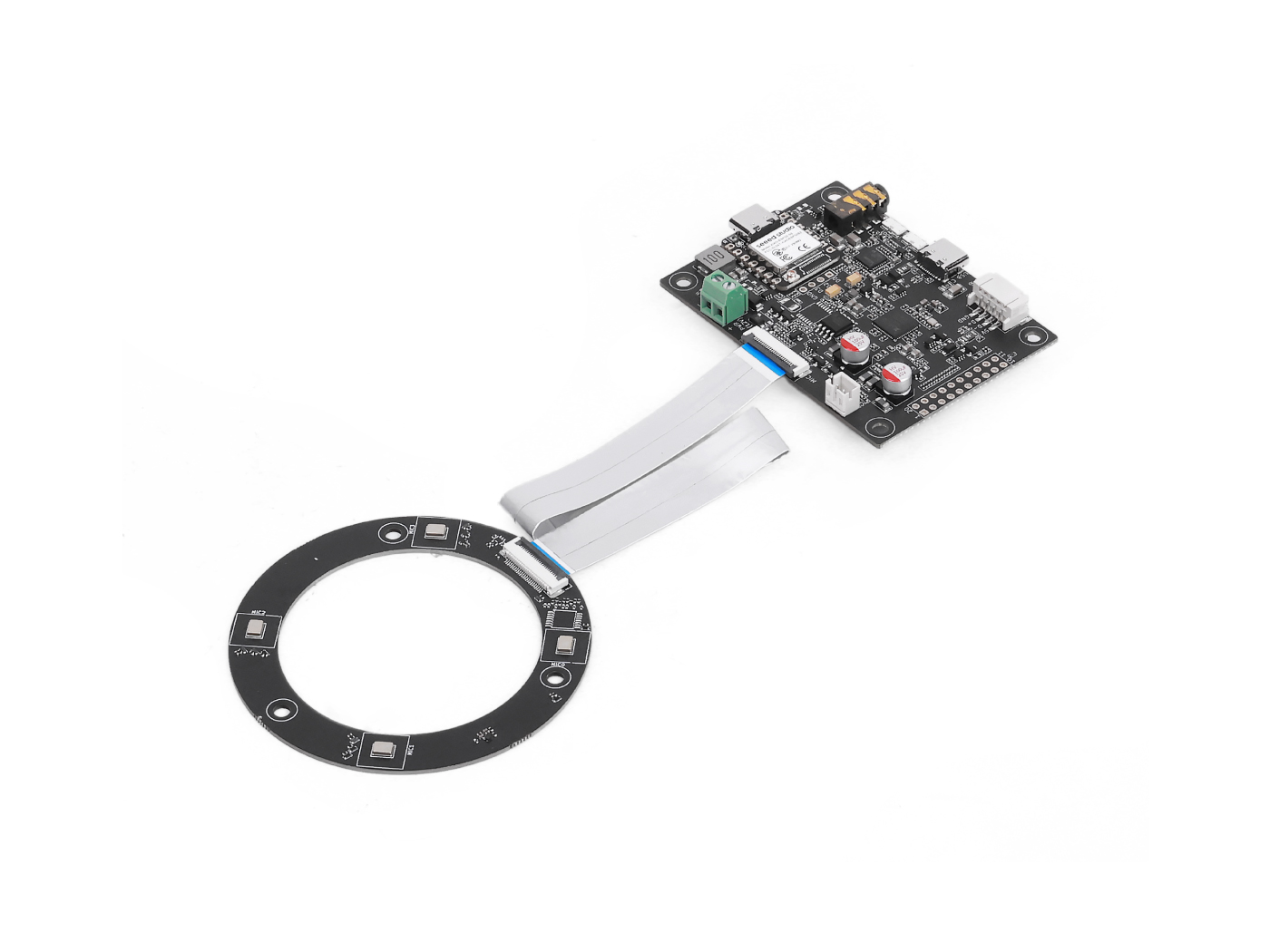 | |
Arduino 代码
note
你必须启用 PSRAM,否则 malloc() 会失败。
在上传之前更新以下字段:
// WiFi credentials
const char* ssid = "your SSID";
const char* password = "your password";

// HTTP server (your PC)
const char* serverUrl = "http://<flask-server>:8000/upload"; // please replace with your PC IP /flask server
完整 Arduino 代码
#include "WiFi.h"
#include "HTTPClient.h"
#include "AudioTools.h"

// WiFi credentials
const char* ssid = "your SSID";
const char* password = "your password";

// HTTP server (your PC)
const char* serverUrl = "http://<flask-server>:8000/upload"; // please replace with your PC IP /flask server

// Audio: 16kHz, stereo, 32-bit
AudioInfo info(16000, 2, 32);
I2SStream i2s_in;
I2SConfig i2s_config;

// 5 seconds of audio = 640,000 bytes
#define RECORDING_SECONDS 5
#define BYTES_PER_SECOND 128000
#define TOTAL_BYTES (RECORDING_SECONDS * BYTES_PER_SECOND)

// Buffer for recording
uint8_t* audioBuffer = nullptr;

void connectWiFi() {
  Serial.printf("Connecting to WiFi: %s\n", ssid);
  WiFi.begin(ssid, password);

  int attempts = 0;
  while (WiFi.status() != WL_CONNECTED && attempts < 20) {
    delay(500);
    Serial.print(".");
    attempts++;
  }

  if (WiFi.status() == WL_CONNECTED) {
    Serial.println("\nConnected!");
    Serial.printf("IP Address: %s\n", WiFi.localIP().toString().c_str());
  } else {
    Serial.println("\nFailed to connect!");
  }
}

void setupI2SInput() {
  i2s_config = i2s_in.defaultConfig(RX_MODE);
  i2s_config.copyFrom(info);

  // XVF3800 pins
  i2s_config.pin_bck = 8;
  i2s_config.pin_ws = 7;
  i2s_config.pin_data = 44;
  i2s_config.pin_data_rx = 43;
  i2s_config.is_master = false;

  i2s_in.begin(i2s_config);
  Serial.println("I2S input started.");
}

void setup() {
  Serial.begin(115200);
  while(!Serial);

  AudioLogger::instance().begin(Serial, AudioLogger::Info);

  // Allocate memory for audio buffer
  audioBuffer = (uint8_t*)malloc(TOTAL_BYTES);
  if (!audioBuffer) {
    Serial.println("Failed to allocate memory!");
    return;
  }

  connectWiFi();
  setupI2SInput();

  // Wait for I2S to stabilize
  delay(500);

  // Record audio
  Serial.printf("Recording %d seconds of audio...\n", RECORDING_SECONDS);
  size_t total_read = 0;
  size_t bytes_read = 0;

  unsigned long start_time = millis();

  while (total_read < TOTAL_BYTES) {
    bytes_read = i2s_in.readBytes(audioBuffer + total_read,
                                   min(4096, (int)(TOTAL_BYTES - total_read)));

    if (bytes_read > 0) {
      total_read += bytes_read;

      // Progress indicator
      if (total_read % BYTES_PER_SECOND == 0) {
        Serial.printf("Recorded %.1f seconds\n", total_read / (float)BYTES_PER_SECOND);
      }
    }
  }

  unsigned long record_time = millis() - start_time;
  Serial.printf("Recording complete! %d bytes in %lu ms\n", total_read, record_time);

  // Send via HTTP POST
  if (WiFi.status() == WL_CONNECTED) {
    HTTPClient http;

    Serial.printf("Sending audio to %s\n", serverUrl);

    http.begin(serverUrl);
    http.addHeader("Content-Type", "application/octet-stream");
    http.addHeader("X-Sample-Rate", String(info.sample_rate));
    http.addHeader("X-Channels", String(info.channels));
    http.addHeader("X-Bits-Per-Sample", String(info.bits_per_sample));

    int httpResponseCode = http.POST(audioBuffer, total_read);

    if (httpResponseCode > 0) {
      Serial.printf("HTTP Response code: %d\n", httpResponseCode);
      String response = http.getString();
      Serial.println("Response: " + response);
    } else {
      Serial.printf("Error code: %d\n", httpResponseCode);
      Serial.println("Error: " + http.errorToString(httpResponseCode));
    }

    http.end();
  } else {
    Serial.println("WiFi not connected!");
  }

  // Free memory
  free(audioBuffer);

  Serial.println("Done!");
}

void loop() {
  // Nothing - runs once
}
预期输出
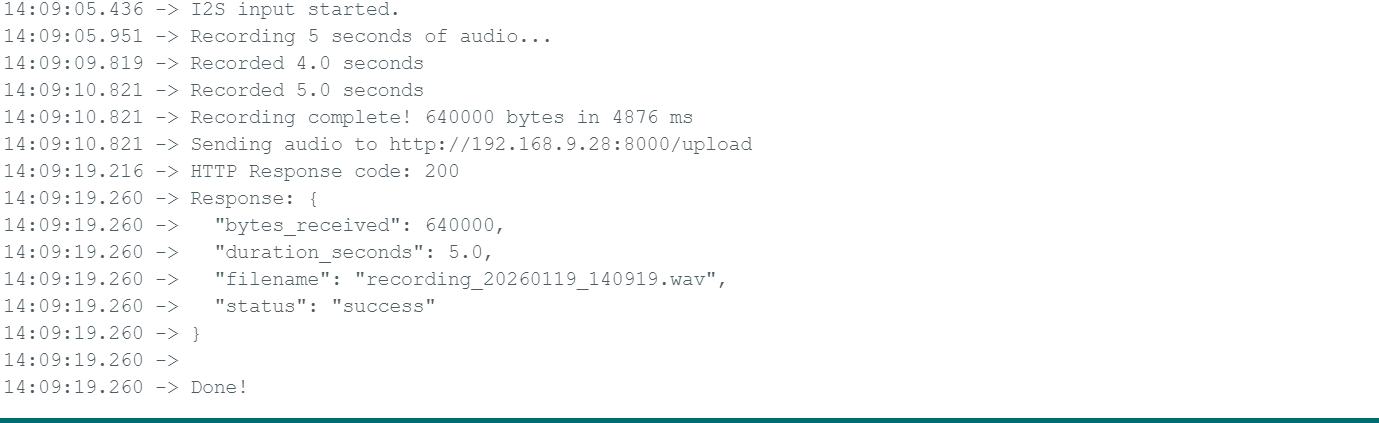
Python 服务器代码(Flask)
你需要在你的环境中安装并运行 flask pip install flask
from flask import Flask, request, jsonify
import wave
import datetime

app = Flask(__name__)


@app.route('/upload', methods=['POST'])
def upload_audio():
    try:
        # Get audio parameters from headers
        sample_rate = int(request.headers.get('X-Sample-Rate', 16000))
        channels = int(request.headers.get('X-Channels', 2))
        bits_per_sample = int(request.headers.get('X-Bits-Per-Sample', 32))

        # Get raw audio data
        audio_data = request.data

        print(f"Received {len(audio_data)} bytes")
        print(f"Format: {sample_rate}Hz, {channels} channels, {bits_per_sample}-bit")

        # Generate filename with timestamp
        timestamp = datetime.datetime.now().strftime("%Y%m%d_%H%M%S")
        filename = f"recording_{timestamp}.wav"

        # Save as WAV file
        with wave.open(filename, 'wb') as wav_file:
            wav_file.setnchannels(channels)
            wav_file.setsampwidth(bits_per_sample // 8)  # Convert bits to bytes
            wav_file.setframerate(sample_rate)
            wav_file.writeframes(audio_data)

        duration = len(audio_data) / (sample_rate * channels * (bits_per_sample // 8))

        print(f"Saved to {filename} ({duration:.2f} seconds)")

        return jsonify({
            'status': 'success',
            'filename': filename,
            'bytes_received': len(audio_data),
            'duration_seconds': duration
        }), 200

    except Exception as e:
        print(f"Error: {str(e)}")
        return jsonify({'status': 'error', 'message': str(e)}), 500


@app.route('/', methods=['GET'])
def index():
    return "Audio Upload Server Running"


if __name__ == '__main__':
    print("Starting HTTP server on port 8000...")
    print("Waiting for audio uploads from ESP32...")
    app.run(host='0.0.0.0', port=8000, debug=True)
预期输出
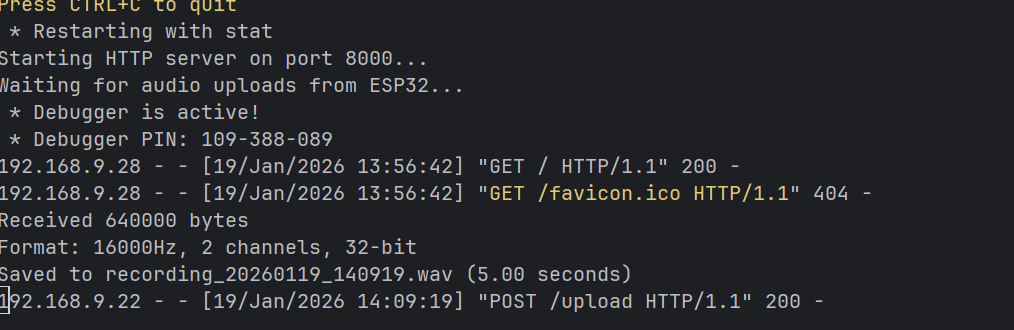
技术支持与产品讨论
感谢你选择我们的产品!我们将为你提供多种支持,确保你在使用我们产品的过程中尽可能顺利。我们提供多种沟通渠道,以满足不同的偏好和需求。