使用 Home Assistant 与 reSpeaker XVF3800 实现智能家居语音控制
概述
与智能空间对话,使用全新的 ReSpeaker XMOS XVF3800 搭配 XIAO ESP32S3,通过语音即可切换灯光、调高音乐音量,甚至询问天气。
本章节中,我们将使用搭载 XIAO ESP32S3 的 ReSpeaker XMOS XVF3800 和 HA Voice Assistant 连接 Sonoff 智能开关,实现对灯光开关的语音控制。
所需硬件
| ReSpeaker XVF3800 搭配 XIAO ESP32S3 | Home Assistant 设备 | Sonoff BASICR2 |
|---|---|---|
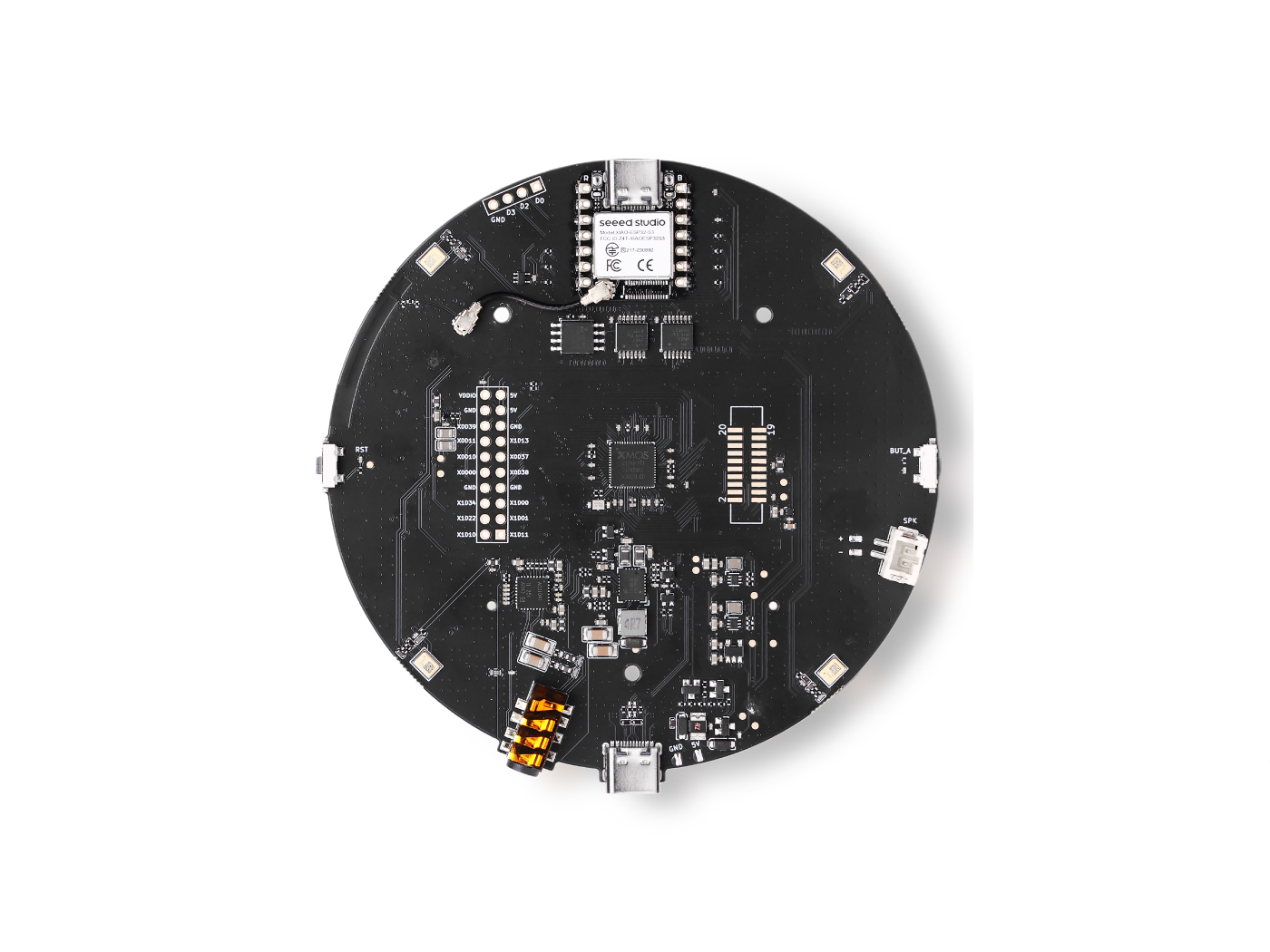 |  |  |
固件更新
为了获得最佳的播放体验,我们需要将 XMOS 固件更新到最新版本。 从这里下载固件。在电脑上插入搭载 XIAO ESP32S3 的 ReSpeaker XMOS XVF3800,并按照我们的指南运行相应步骤:
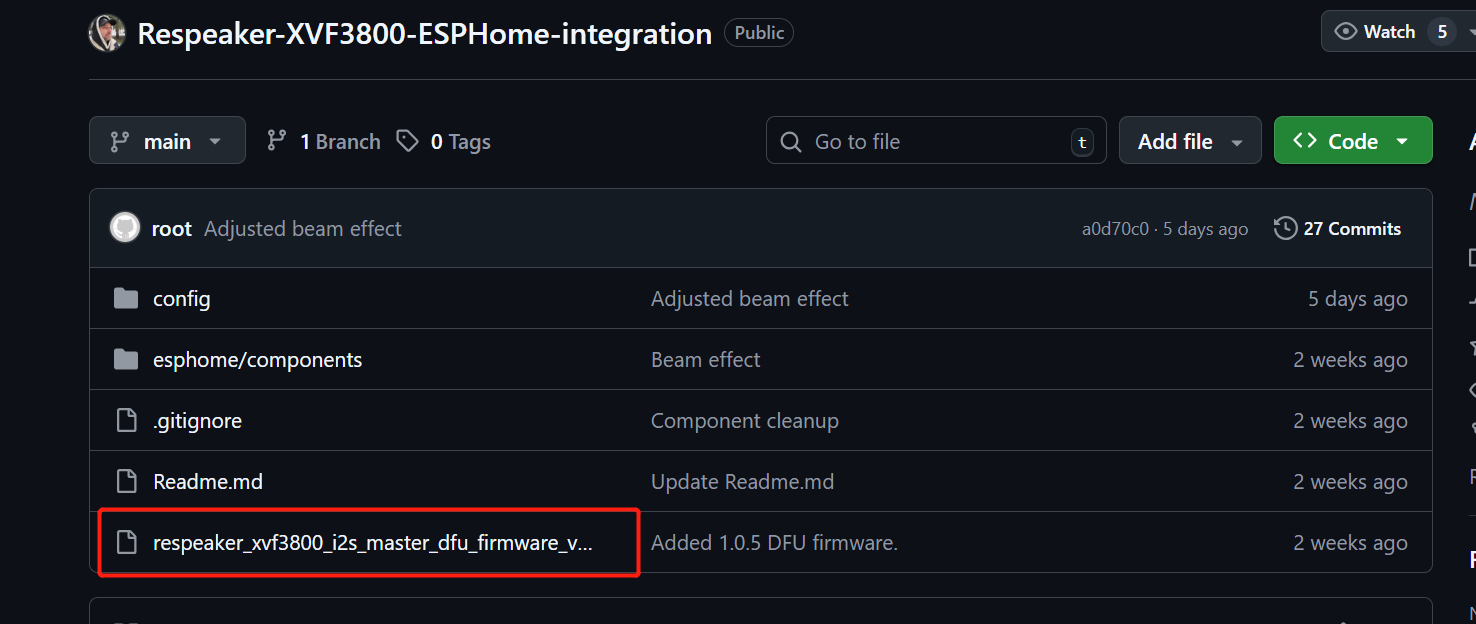
XVF3800 麦克风阵列需要 12.288 MHz 的 MCLK 才能工作,但 ESPHome(在 Home Assistant 中使用)由于 API 限制无法生成该时钟。此固件让 XVF3800 作为 I2S 主设备工作,从而可以自行生成时钟,而不再需要从 ESP32 获取 MCLK。 我们的固件修复了这一限制,使麦克风能够在 Home Assistant 中正常工作。
你可以从这里下载固件
安装指南在这里
准备 ReSpeaker XMOS XVF3800 搭配 XIAO ESP32S3
进入 Home Assistant > Settings > Apps。
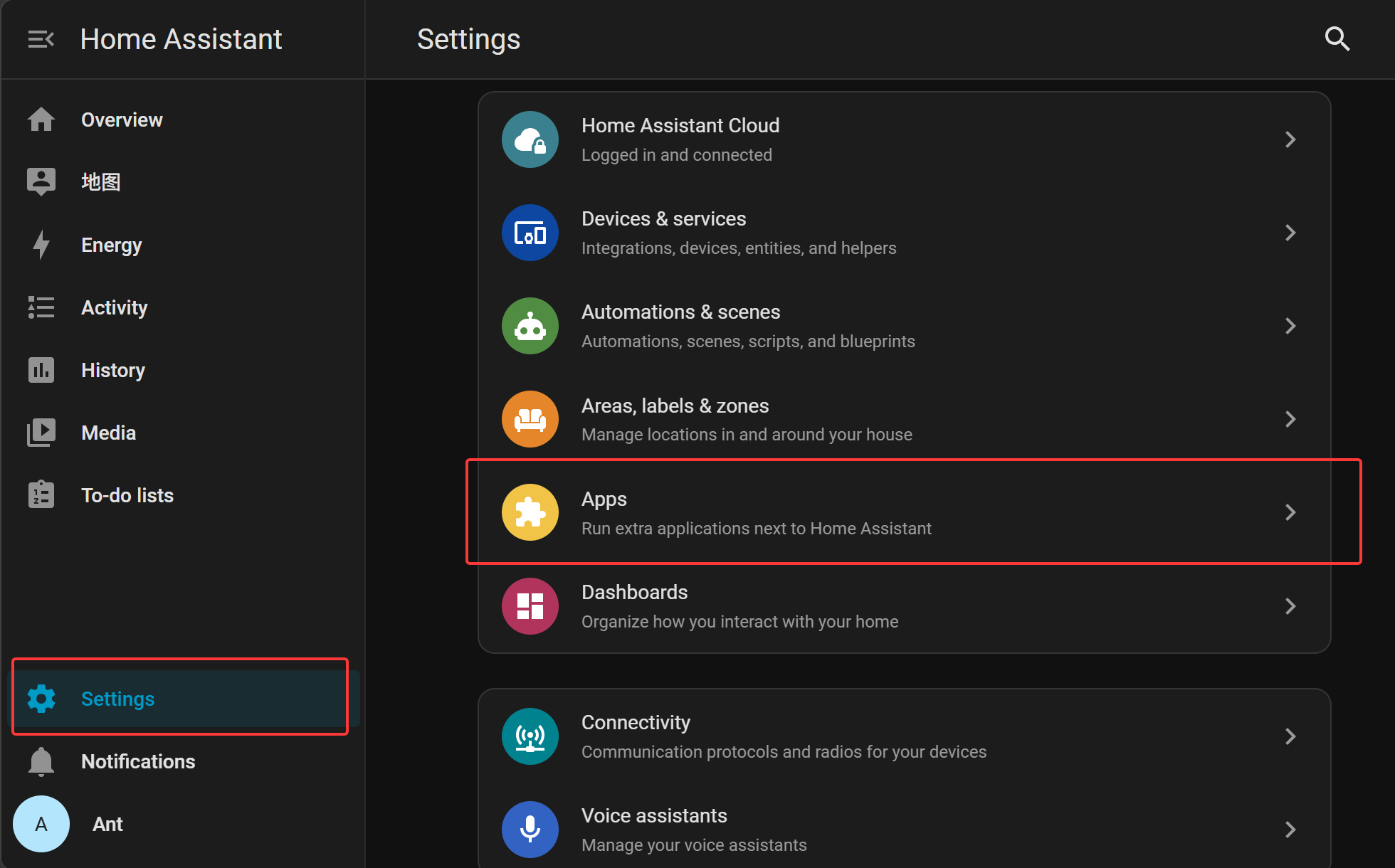
点击 Install app(通常在右下角)
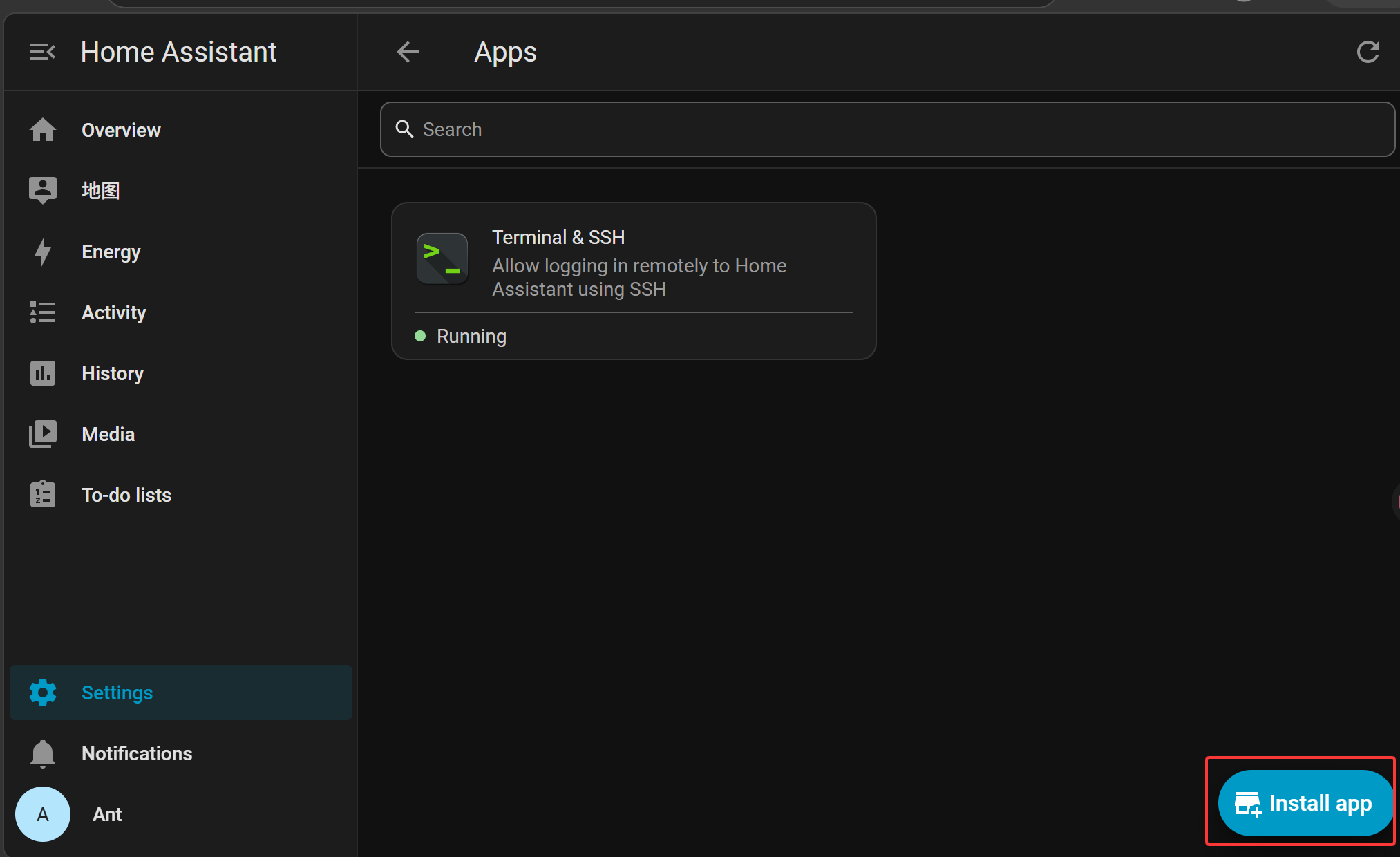
在 App Store 中搜索并安装 ESPHome Device Builder。
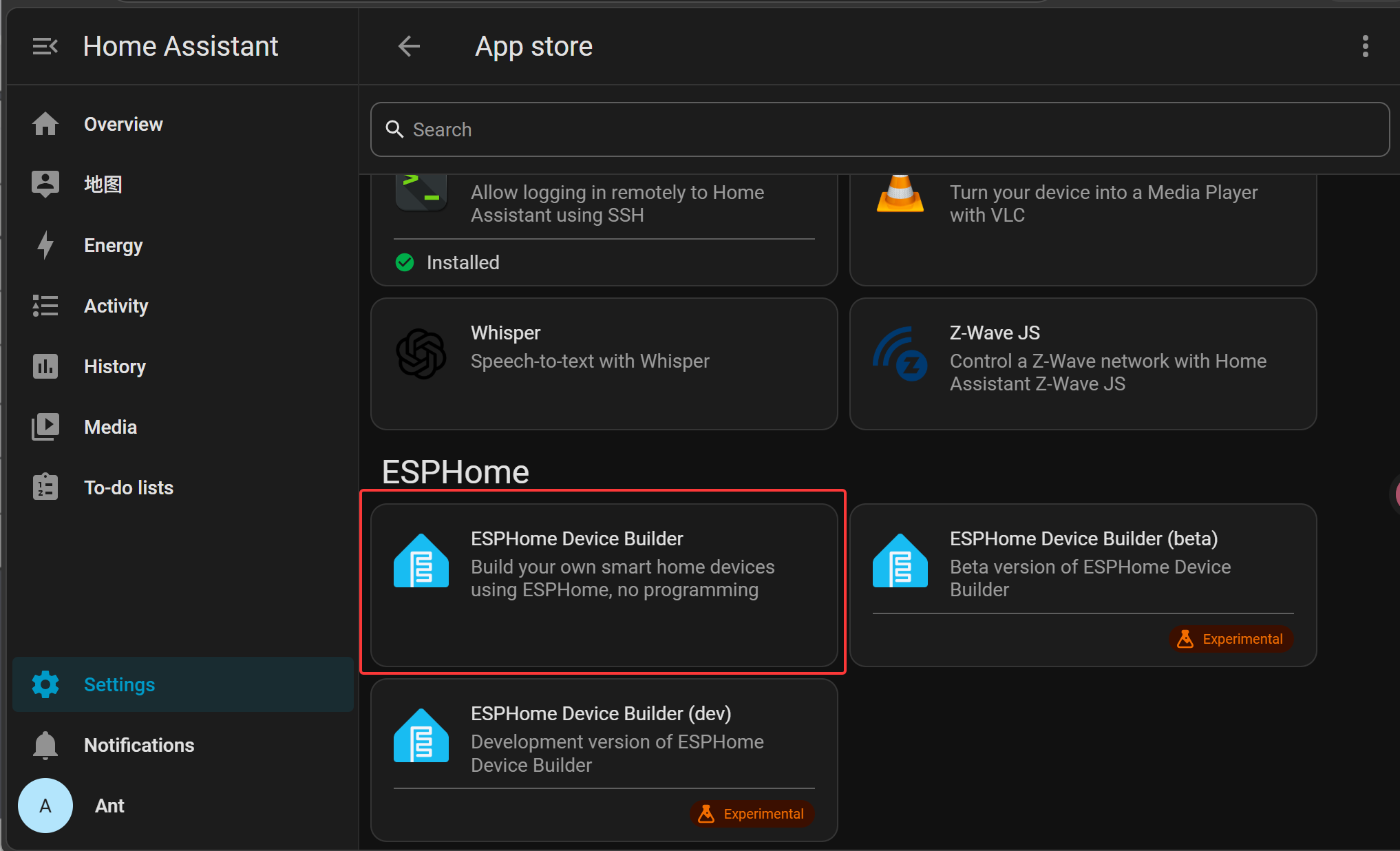
点击 Install 安装 ESPHome 插件。

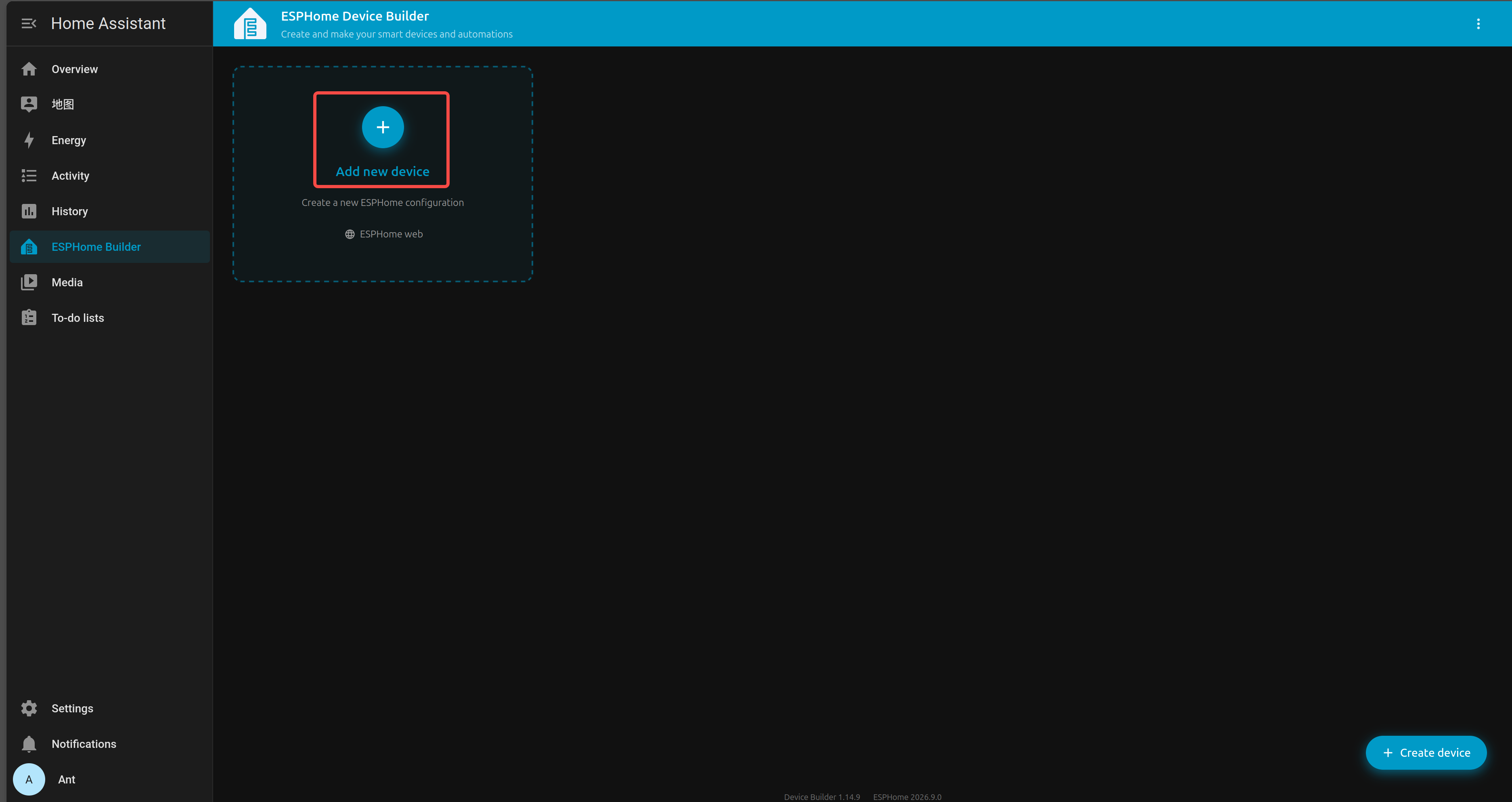
在 Home Assistant 侧边栏中进入 ESPHome Builder。
点击 + NEW DEVICE。
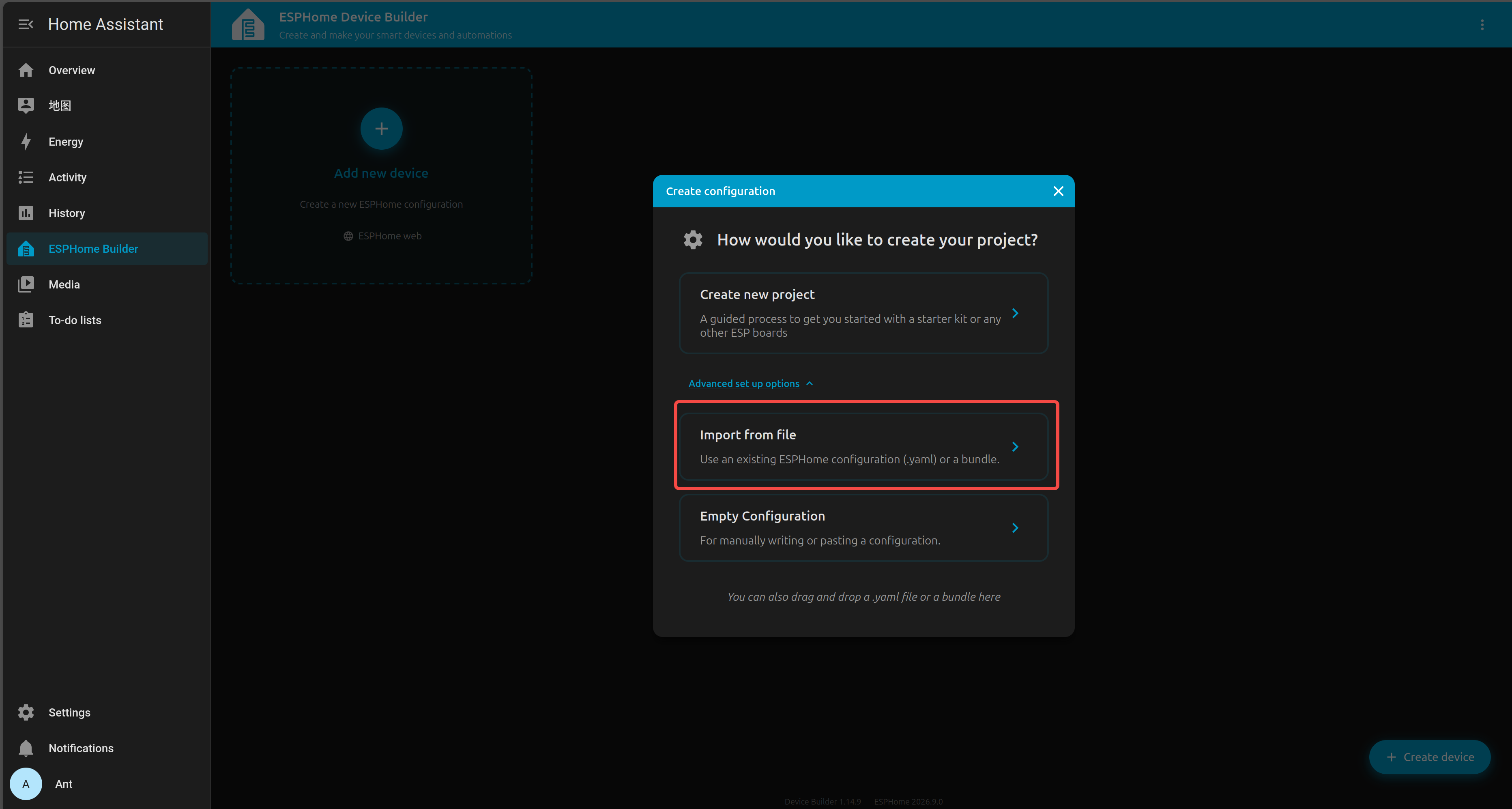
选择你新建的设备条目并点击 Import from file。
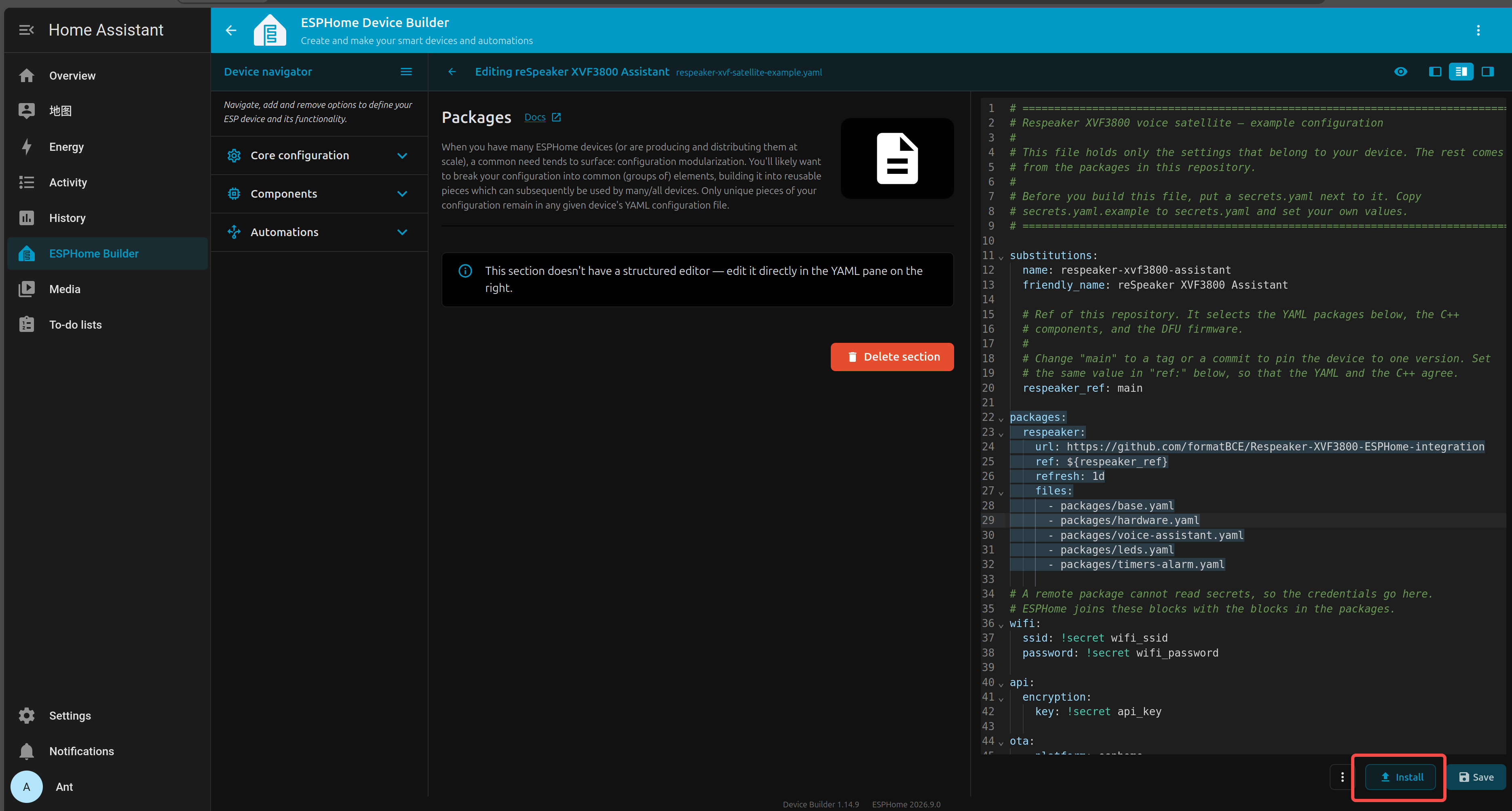
将内容替换为你的自定义 YAML 配置
你可以从这里找到 YAML 文件
保存 YAML 后,点击 INSTALL。
选择 Advanced opinions 和 Download firmware binary
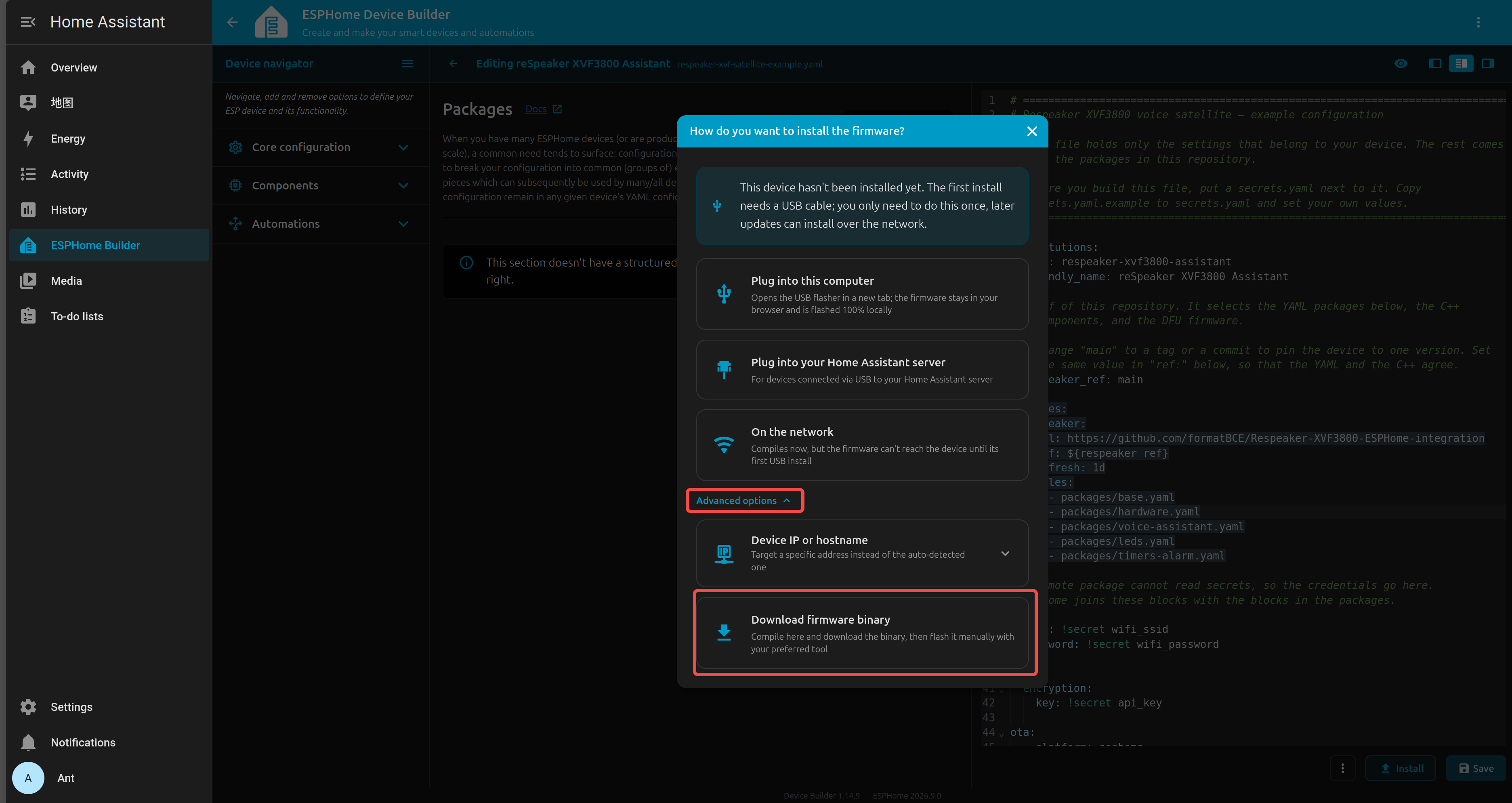
等待固件编译完成。
将生成的 .bin 固件文件下载到你的电脑。
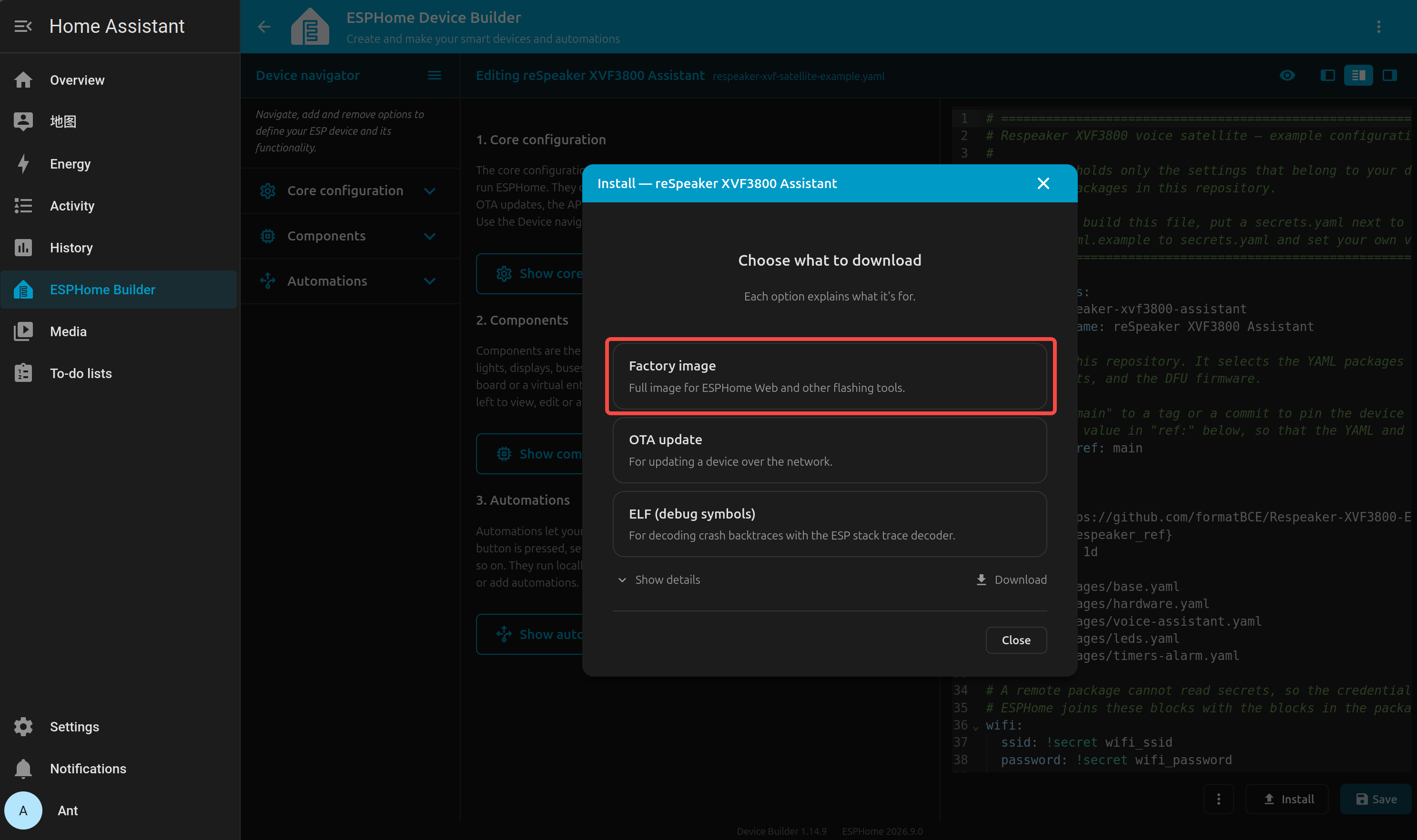
使用 USB Type-C 线缆将 ESP32-S3 开发板(已连接 XVF3800)连接到电脑。
在 Chrome 或 Edge 中打开 Web-ESPHome。
点击 CONNECT 并选择合适的串口

连接成功后,点击 INSTALL
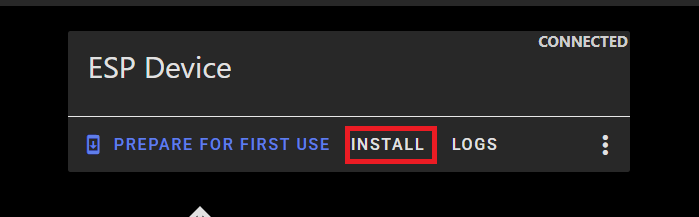
选择刚刚下载的 .bin 文件。
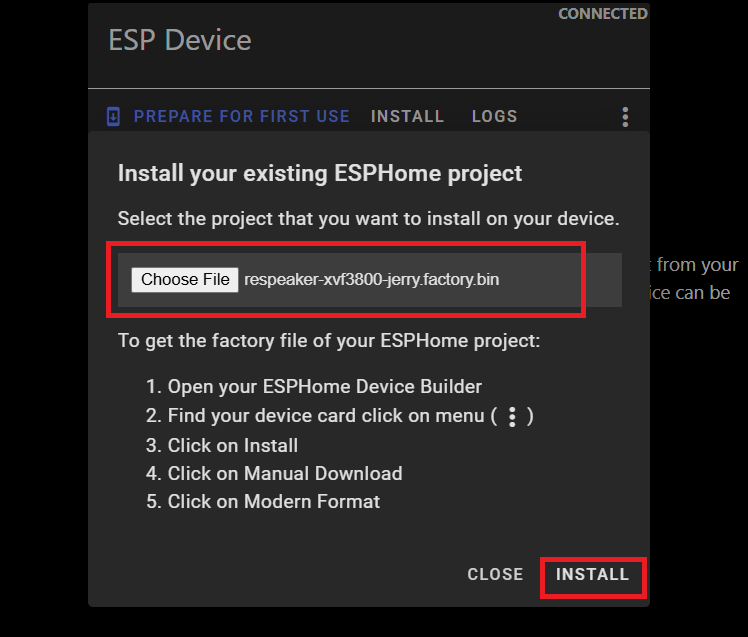
等待安装完成(可能需要几分钟)。
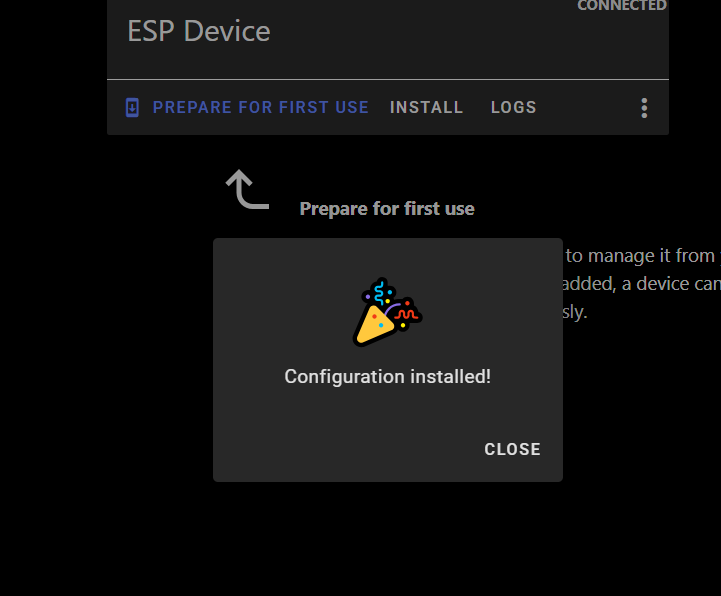
安装成功后,你会看到确认信息。
返回 Home Assistant > Settings > Devices & Services。
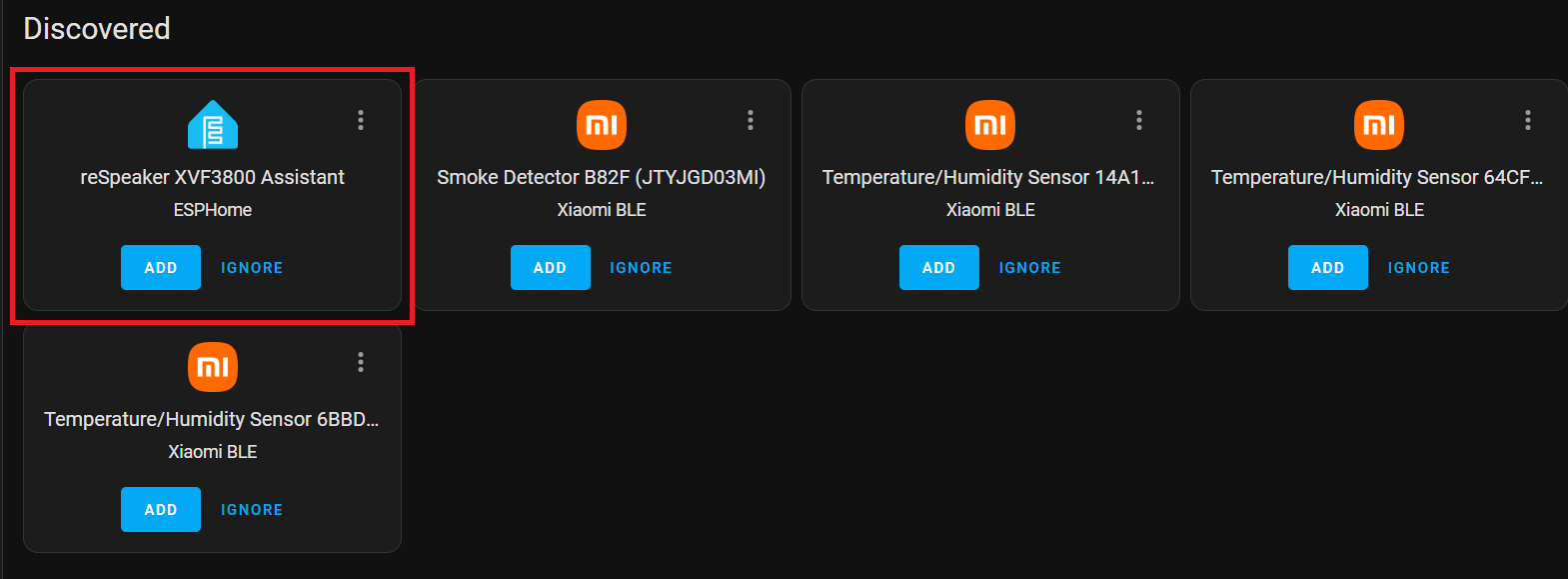
你应该能看到 ESPHome 被列为已发现的集成。
点击 CONFIGURE,然后点击 Submit 完成设置。
添加你的智能设备
按照厂家用户手册设置 Sonoff BASICR2 设备。你需要创建 eWELink 账号。
安装 HACS
如果尚未安装,请按照官方指南设置 Home Assistant Community Store:
从侧边栏打开 HACS。 在搜索区域中搜索 Sonoff LAN。
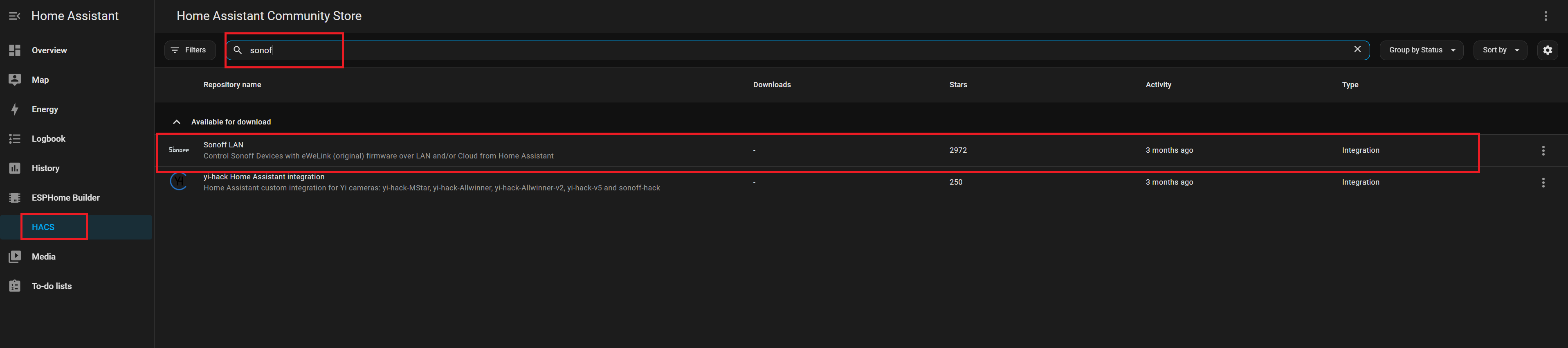
点击 Install 添加该集成。 重启 Home Assistant 以应用更改。
Sonoff
进入 Settings → Devices & Services。 点击 Add Integration。 搜索并选择 Sonoff。
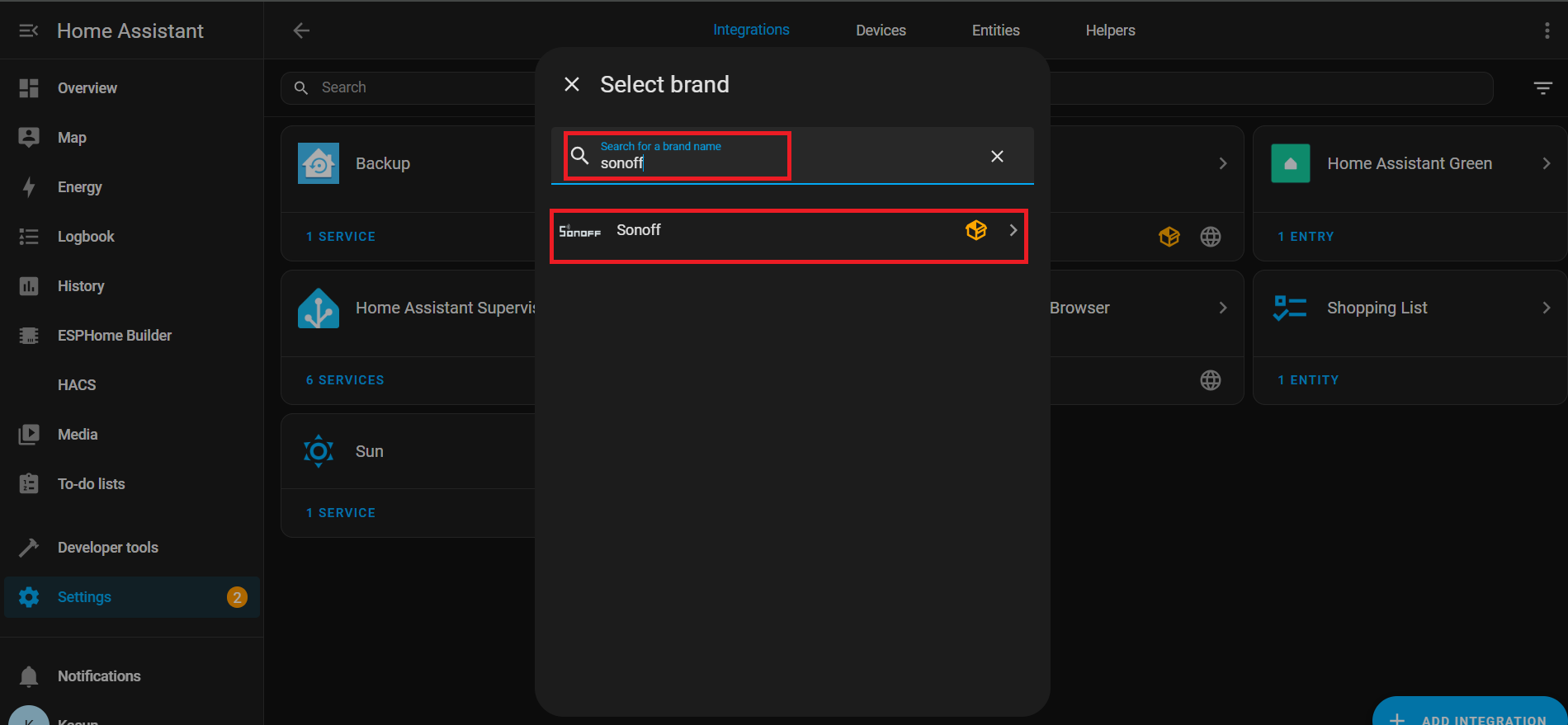
输入你的 eWeLink 账号凭据进行认证。

连接成功后,你会在以下位置看到关联的实体列表: Settings → Devices & Services → Entities

使用 Nabu Cloud 的语音助手
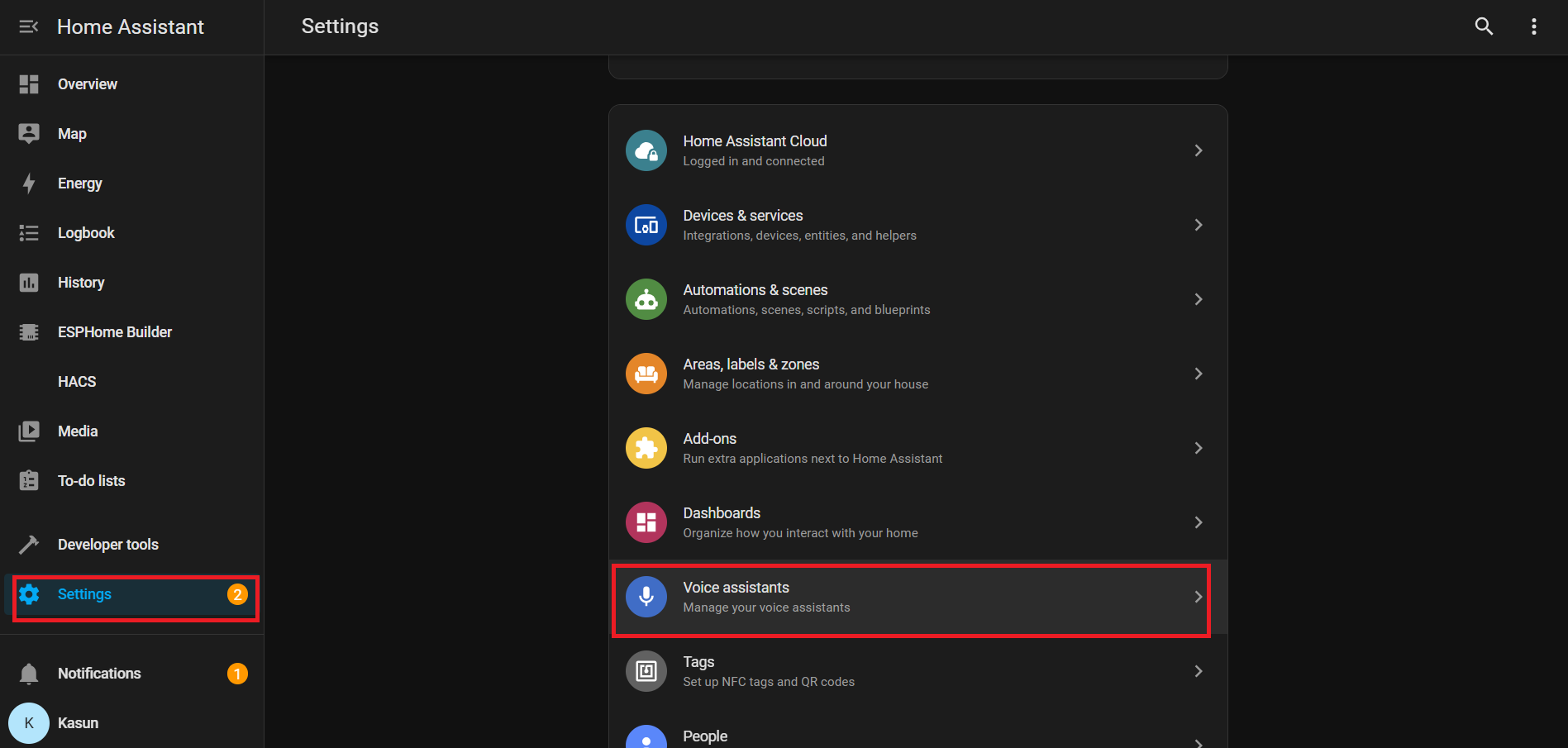
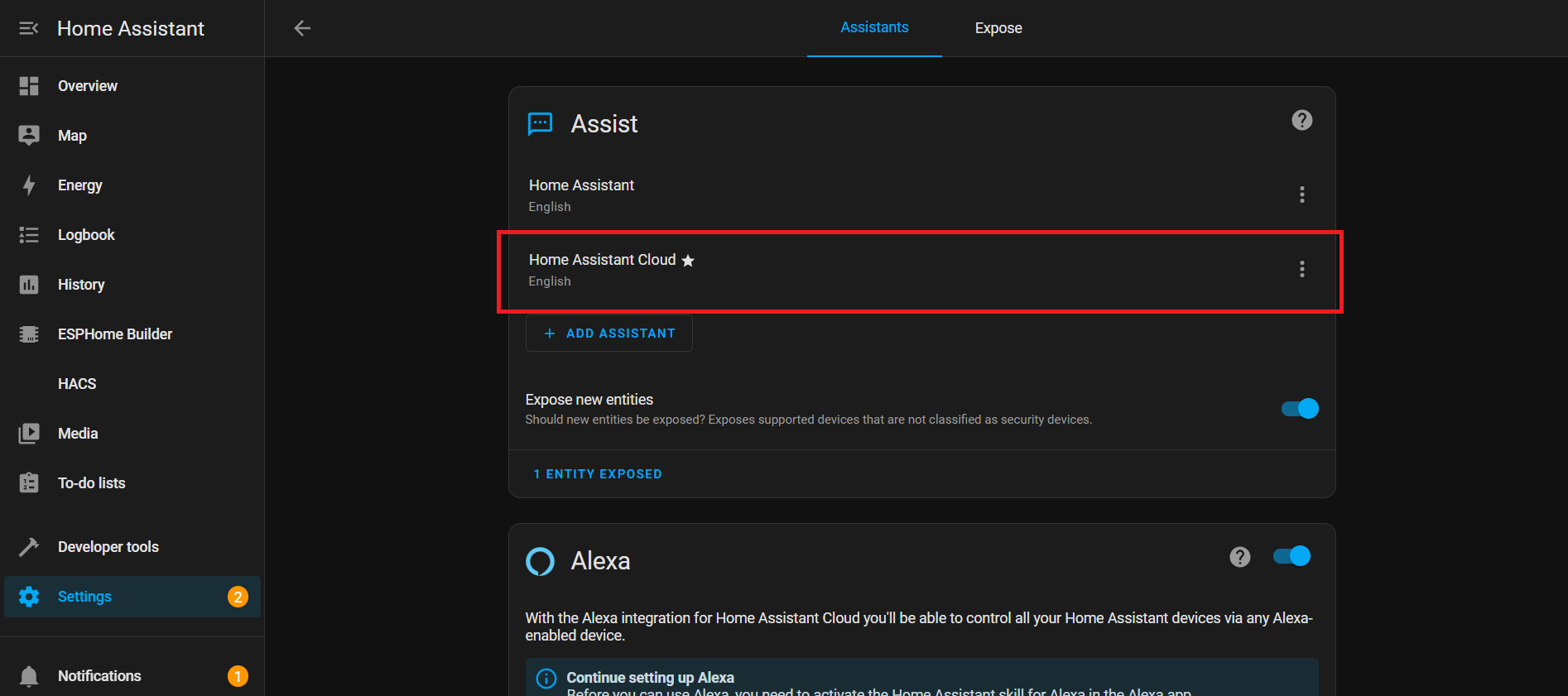
在本演示中,我们展示如何通过语音连接 Home Assistant Cloud(Nabu Casa)。整个配置非常简单,你可以利用 一个月的免费试用期 来体验其完整功能。 借助内置的 唤醒词:“Okay Nabu”,你可以轻松触发语音指令,并与各类设备和服务 无缝集成,实现 随时随地 的控制——而无需复杂配置。
YAML 说明
WiFi
本节用于配置设备如何连接到 Wi-Fi。
wifi:
  ssid: !secret wifi_ssid
  password: !secret wifi_password
- ssid & password: 从你的 secrets.yaml 文件中读取,这样密码就不会以明文形式显示。
- 事件:在 Wi-Fi 连接或断开时运行动作:
-
on_connect:
- 停止 BLE improv 设置。
- 运行 control_leds 脚本(Wi-Fi 已连接时的 LED 效果)。
-
on_disconnect:
- 运行 control_leds 脚本(Wi-Fi 已断开时的 LED 效果)。
-
I²C 总线
I²C 是一条通信线路,让你的 ESP32 可以与其他芯片(如麦克风或音频编解码器)进行通信。
i2c:
  id: internal_i2c
  sda: GPIO5
  scl: GPIO6
  scan: true
  frequency: 100kHz
- id:在其他地方引用此总线时使用的名称。
- sda / scl:用于数据和时钟的引脚。
- scan:在启动时检查已连接的设备。
- frequency:通信速度(100kHz 为标准值)。
开关
开关
switch:
  # Mute Sound Switch.
  - platform: template
    id: mute_sound
    name: Mute/unmute sound
    icon: "mdi:bullhorn"
    entity_category: config
    optimistic: true
    restore_mode: RESTORE_DEFAULT_ON
  # Wake Word Sound Switch.
  - platform: template
    id: wake_sound
    name: Wake sound
    icon: "mdi:bullhorn"
    entity_category: config
    optimistic: true
    restore_mode: RESTORE_DEFAULT_ON
  # Internal switch to track when a timer is ringing on the device.
  - platform: template
    id: timer_ringing
    optimistic: true
    internal: true
    restore_mode: ALWAYS_OFF
    on_turn_off:
      # Disable stop wake word
      - micro_wake_word.disable_model: stop
      - script.execute: disable_repeat
      # Stop any current annoucement (ie: stop the timer ring mid playback)
      - if:
          condition:
            media_player.is_announcing:
          then:
            media_player.stop:
              announcement: true
      # Set back ducking ratio to zero
      - mixer_speaker.apply_ducking:
          id: media_mixing_input
          decibel_reduction: 0
          duration: 1.0s
      # Refresh the LED ring
      - script.execute: control_leds
    on_turn_on:
      # Duck audio
      - mixer_speaker.apply_ducking:
          id: media_mixing_input
          decibel_reduction: 20
          duration: 0.0s
      # Enable stop wake word
      - micro_wake_word.enable_model: stop
      # Ring timer
      - script.execute: ring_timer
      # Refresh LED
      - script.execute: control_leds
      # If 15 minutes have passed and the timer is still ringing, stop it.
      - delay: 15min
      - switch.turn_off: timer_ringing
  # Defines if alarm is active
  - platform: template
    optimistic: true
    restore_mode: RESTORE_DEFAULT_OFF
    id: alarm_on
    icon: mdi:bell-badge
    name: "Alarm on"
    on_turn_on:
      - script.execute: control_leds
    on_turn_off:
      - script.execute: control_leds
开关是 Home Assistant 中由软件控制的“按钮”。它们控制诸如声音、计时器或闹钟等功能。
唤醒词声音开关:控制唤醒词音频。
# Wake Word Sound Switch.
  - platform: template
    id: wake_sound
    name: Wake sound
    icon: "mdi:bullhorn"
    entity_category: config
    optimistic: true
    restore_mode: RESTORE_DEFAULT_ON
计时器响铃内部开关:
- 跟踪计时器是否处于激活状态。
- on_turn_on:将其他音频衰减 -20dB,启动计时器声音,更新 LED,并在 15 分钟后自动停止。
- on_turn_off:停止计时器,恢复音量,更新 LED。
# Internal switch to track when a timer is ringing on the device.
  - platform: template
    id: timer_ringing
    optimistic: true
    internal: true
    restore_mode: ALWAYS_OFF
    ...
    ...
闹钟开启开关:
# Defines if alarm is active
  - platform: template
    optimistic: true
    restore_mode: RESTORE_DEFAULT_OFF
    id: alarm_on
    ...
    ...
- 跟踪闹钟状态。
- 在开启/关闭时运行 LED 脚本。
传感器
传感器
number:
  - platform: template
    id: led_ring_brightness
    name: "LED Ring Brightness"
    icon: mdi:brightness-6
    entity_category: config
    optimistic: true
    restore_value: true
    min_value: 0.4
    max_value: 1.0
    step: 0.05
    initial_value: 0.8
    mode: slider

sensor:
  - platform: template
    id: next_timer
    name: "Next timer"
    update_interval: never
    disabled_by_default: true
    device_class: duration
    unit_of_measurement: s
    icon: "mdi:timer"
    accuracy_decimals: 0

text_sensor:
  - platform: template
    id: next_timer_name
    name: "Next timer name"
    icon: "mdi:timer"
    disabled_by_default: true
  - platform: template
    name: "Alarm time"
    id: alarm_time
    icon: mdi:bell-ring
  - platform: template
    name: "Current device time"
    id: current_time
    icon: mdi:clock
这个 YAML 块为计时器、闹钟和 LED 亮度添加了控制和传感器。它允许你通过滑块调节 LED 灯环亮度,跟踪下一个计时器(时间 + 名称),并在 Home Assistant 中显示闹钟时间和设备当前时间。
LED 灯环亮度:
number:
  - platform: template
    id: led_ring_brightness
    name: "LED Ring Brightness"
    icon: mdi:brightness-6
    ...
- 允许用户通过滑块调节亮度。
- min_value / max_value 定义范围限制。
- restore_value 在重启后保留之前的设置。
下一个计时器
sensor:
  - platform: template
    id: next_timer
    name: "Next timer"
    update_interval: never
    ...
- 显示下一个计时器的剩余时间。
- 仅在计时器变化时更新(节省资源)。
闹钟时间与设备时间
text_sensor:
  - platform: template
    id: next_timer_name
    name: "Next timer name"
    icon: "mdi:timer"
    ...
- 显示当前闹钟时间和 ESP32 系统时间。
定时间隔的 LED 效果
interval:
  - interval: 50ms
    id: led_animation_interval
    then:
      - lambda: |-
          if (id(volume_display_active)) {
            id(update_volume_display_effect).execute();
            return;
          }
          std::string effect = id(current_led_effect);
          if (effect == "off") {
            return;
          } else if (effect == "breathe") {
            id(update_breathe_effect).execute();
          } else if (effect == "rainbow") {
            id(update_rainbow_effect).execute();
          } else if (effect == "comet_cw") {
            id(update_comet_cw_effect).execute();
          } else if (effect == "comet_ccw") {
            id(update_comet_ccw_effect).execute();
          } else if (effect == "twinkle") {
            id(update_twinkle_effect).execute();
          } else if (effect == "timer_tick") {
            id(update_timer_tick_effect).execute();
          } else if (effect == "led_beam") {
            id(update_led_beam_effect).execute();
          }
- interval 会在后台反复运行代码。
- 50ms:每秒运行 20 次代码。
- 根据系统状态或所选效果控制 LED 动画。
LED 控制
LED 控制
script:
# =========================================================================
# == Centralized script to control all LED effects ==
# =========================================================================
- id: led_set_effect
mode: restart
parameters:
effect: std::string
r: float
g: float
b: float
speed: float
then:
- lambda: |-
// Update global variables with the new parameters
id(led_ring_color_r) = r;
id(led_ring_color_g) = g;
id(led_ring_color_b) = b;
id(led_ring_speed) = speed;
id(current_led_effect) = effect;
// Handle the two types of effects: Off and Animated
if (effect == "off") {
uint32_t colors[12] = {0};
id(respeaker).set_led_ring(colors);
} else {
id(last_led_update_time) = millis(); // Reset timer for smooth animation start
}
# Individual update scripts for each animated effect
- id: update_breathe_effect
then:
- lambda: |-
static float phase = 0.0f;
uint32_t now = millis();
float dt = (now - id(last_led_update_time)) / 1000.0f;
id(last_led_update_time) = now;
phase += dt * id(led_ring_speed);
while (phase >= 1.0f) phase -= 1.0f;
float master_brightness = id(led_ring_brightness).state;
float breath_brightness = 0.5f * (1.0f + sinf(phase * 2.0f * M_PI)) * master_brightness;
uint8_t r = (uint8_t)(id(led_ring_color_r) * 255.0f * breath_brightness);
uint8_t g = (uint8_t)(id(led_ring_color_g) * 255.0f * breath_brightness);
uint8_t b = (uint8_t)(id(led_ring_color_b) * 255.0f * breath_brightness);
uint32_t current_color = (r << 16) | (g << 8) | b;
uint32_t colors[12];
for (int i = 0; i < 12; i++) colors[i] = current_color;
id(respeaker).set_led_ring(colors);
- id: update_rainbow_effect
then:
- lambda: |-
static float hue_offset = 0.0f;
uint32_t now = millis();
float dt = (now - id(last_led_update_time)) / 1000.0f;
id(last_led_update_time) = now;
hue_offset += dt * id(led_ring_speed);
if (hue_offset >= 1.0f) hue_offset -= 1.0f;
constexpr int NUM_LEDS = 12;
constexpr float HUE_STEP = 1.0f / NUM_LEDS;
uint32_t colors[NUM_LEDS];
float brightness = id(led_ring_brightness).state;
float current_hue = hue_offset;
for (int i = 0; i < NUM_LEDS; i++) {
float r, g, b;
if (current_hue >= 1.0f) current_hue -= 1.0f;
hsv_to_rgb((int)(current_hue * 360.0f), 1.0f, brightness, r, g, b);
colors[i] = ((uint8_t)(r * 255.0f) << 16) | ((uint8_t)(g * 255.0f) << 8) | ((uint8_t)(b * 255.0f));
current_hue += HUE_STEP;
}
id(respeaker).set_led_ring(colors);
- id: update_comet_cw_effect
then:
- lambda: |-
static float comet_pos = 0.0f;
uint32_t now = millis();
float dt = (now - id(last_led_update_time)) / 1000.0f;
id(last_led_update_time) = now;
constexpr int NUM_LEDS = 12;
constexpr int BASE_TAIL = 3;
float leds_per_sec = id(led_ring_speed) * NUM_LEDS;
comet_pos += dt * leds_per_sec;
while (comet_pos >= NUM_LEDS) comet_pos -= NUM_LEDS;
int head_index = (int)comet_pos;
int tail_length = BASE_TAIL + (int)(id(led_ring_speed));
if (tail_length > NUM_LEDS - 1) tail_length = NUM_LEDS - 1;
uint32_t colors[NUM_LEDS] = {0};
float brightness = id(led_ring_brightness).state;
uint8_t head_r = (uint8_t)(id(led_ring_color_r) * 255.0f * brightness);
uint8_t head_g = (uint8_t)(id(led_ring_color_g) * 255.0f * brightness);
uint8_t head_b = (uint8_t)(id(led_ring_color_b) * 255.0f * brightness);
colors[head_index % NUM_LEDS] = (head_r << 16) | (head_g << 8) | head_b;
for (int i = 1; i <= tail_length; i++) {
float tail_factor = (float)i / (tail_length + 1);
float tail_brightness = (1.0f - tail_factor) * brightness;
uint8_t r = (uint8_t)(id(led_ring_color_r) * 255.0f * tail_brightness);
uint8_t g = (uint8_t)(id(led_ring_color_g) * 255.0f * tail_brightness);
uint8_t b = (uint8_t)(id(led_ring_color_b) * 255.0f * tail_brightness);
int tail_index = (head_index - i + NUM_LEDS) % NUM_LEDS;
colors[tail_index] = (r << 16) | (g << 8) | b;
}
id(respeaker).set_led_ring(colors);
- id: update_comet_ccw_effect
then:
- lambda: |-
static float comet_pos = 0.0f;
uint32_t now = millis();
float dt = (now - id(last_led_update_time)) / 1000.0f;
id(last_led_update_time) = now;
constexpr int NUM_LEDS = 12;
constexpr int BASE_TAIL = 3;
float leds_per_sec = id(led_ring_speed) * NUM_LEDS;
comet_pos -= dt * leds_per_sec;
while (comet_pos < 0.0f) comet_pos += NUM_LEDS;
int head_index = (int)comet_pos;
int tail_length = BASE_TAIL + (int)(id(led_ring_speed));
if (tail_length > NUM_LEDS - 1) tail_length = NUM_LEDS - 1;
uint32_t colors[NUM_LEDS] = {0};
float brightness = id(led_ring_brightness).state;
uint8_t head_r = (uint8_t)(id(led_ring_color_r) * 255.0f * brightness);
uint8_t head_g = (uint8_t)(id(led_ring_color_g) * 255.0f * brightness);
uint8_t head_b = (uint8_t)(id(led_ring_color_b) * 255.0f * brightness);
colors[head_index % NUM_LEDS] = (head_r << 16) | (head_g << 8) | head_b;
for (int i = 1; i <= tail_length; i++) {
float tail_factor = (float)i / (tail_length + 1);
float tail_brightness = (1.0f - tail_factor) * brightness;
uint8_t r = (uint8_t)(id(led_ring_color_r) * 255.0f * tail_brightness);
uint8_t g = (uint8_t)(id(led_ring_color_g) * 255.0f * tail_brightness);
uint8_t b = (uint8_t)(id(led_ring_color_b) * 255.0f * tail_brightness);
int tail_index = (head_index + i) % NUM_LEDS;
colors[tail_index] = (r << 16) | (g << 8) | b;
}
id(respeaker).set_led_ring(colors);
- id: update_twinkle_effect
then:
- lambda: |-
constexpr int NUM_LEDS = 12;
static float led_brightness[NUM_LEDS] = {0.0f};
static float led_fade_speed[NUM_LEDS] = {0.0f};
uint32_t now = millis();
float dt = (now - id(last_led_update_time)) / 1000.0f;
id(last_led_update_time) = now;
// Update existing twinkles
for (int i = 0; i < NUM_LEDS; i++) {
if (led_fade_speed[i] != 0.0f) {
led_brightness[i] += led_fade_speed[i] * dt;
if (led_fade_speed[i] > 0.0f && led_brightness[i] >= 1.0f) {
led_brightness[i] = 1.0f;
led_fade_speed[i] *= -1.0f;
} else if (led_fade_speed[i] < 0.0f && led_brightness[i] <= 0.0f) {
led_brightness[i] = 0.0f;
led_fade_speed[i] = 0.0f;
}
}
}
// Start new twinkles
float twinkle_chance = dt * id(led_ring_speed);
if (random_float() < twinkle_chance) {
int led_to_start = (int)(random_float() * NUM_LEDS);
if (led_fade_speed[led_to_start] == 0.0f) {
led_brightness[led_to_start] = 0.0f;
float min_speed = 1.5f, max_speed = 3.0f;
led_fade_speed[led_to_start] = min_speed + (random_float() * (max_speed - min_speed));
}
}
// Render colors
uint32_t colors[NUM_LEDS];
float master_brightness = id(led_ring_brightness).state;
uint8_t base_r = (uint8_t)(id(led_ring_color_r) * 255.0f);
uint8_t base_g = (uint8_t)(id(led_ring_color_g) * 255.0f);
uint8_t base_b = (uint8_t)(id(led_ring_color_b) * 255.0f);
for (int i = 0; i < NUM_LEDS; i++) {
float current_led_brightness = led_brightness[i] * master_brightness;
uint8_t r = (uint8_t)(base_r * current_led_brightness);
uint8_t g = (uint8_t)(base_g * current_led_brightness);
uint8_t b = (uint8_t)(base_b * current_led_brightness);
colors[i] = (r << 16) | (g << 8) | b;
}
id(respeaker).set_led_ring(colors);
- id: update_timer_tick_effect
then:
- lambda: |-
constexpr int NUM_LEDS = 12;
static int tick_index = 0;
uint32_t now = millis();
// Only update tick position every 100ms to reduce I2C traffic
static uint32_t last_tick_update = 0;
if (now - last_tick_update >= 100) {
tick_index = (tick_index - 1 + NUM_LEDS) % NUM_LEDS;
last_tick_update = now;
}
uint32_t colors[NUM_LEDS] = {0};
uint32_t seconds_left = id(first_active_timer).seconds_left;
uint32_t total_seconds = id(first_active_timer).total_seconds;
float timer_ratio = (float)NUM_LEDS * seconds_left / std::max(total_seconds, (uint32_t)1);
float master_brightness = id(led_ring_brightness).state;
uint8_t base_r = (uint8_t)(id(led_ring_color_r) * 255.0f);
uint8_t base_g = (uint8_t)(id(led_ring_color_g) * 255.0f);
uint8_t base_b = (uint8_t)(id(led_ring_color_b) * 255.0f);
for (int i = 0; i < NUM_LEDS; i++) {
float bar_brightness = clamp(timer_ratio - i, 0.0f, 1.0f);
if (bar_brightness > 0.0f) {
float tick_dip = (i == tick_index) ? 0.9f : 1.0f;
float final_brightness = bar_brightness * tick_dip * master_brightness;
uint8_t r = (uint8_t)(base_r * final_brightness);
uint8_t g = (uint8_t)(base_g * final_brightness);
uint8_t b = (uint8_t)(base_b * final_brightness);
colors[i] = (r << 16) | (g << 8) | b;
}
}
id(respeaker).set_led_ring(colors);
- id: update_volume_display_effect
then:
- lambda: |-
constexpr int NUM_LEDS = 12;
uint32_t colors[NUM_LEDS] = {0};
if (id(external_media_player).is_ready()) {
bool is_muted = id(external_media_player).is_muted();
float volume = id(external_media_player).volume;
if (is_muted || volume == 0.0f) {
uint32_t mute_color = (255 << 16); // Red
colors[0] = mute_color;
colors[6] = mute_color;
} else {
float num_leds_on = volume * NUM_LEDS;
float master_brightness = id(led_ring_brightness).state;
uint8_t base_r = (uint8_t)(id(led_ring_color_r) * 255.0f);
uint8_t base_g = (uint8_t)(id(led_ring_color_g) * 255.0f);
uint8_t base_b = (uint8_t)(id(led_ring_color_b) * 255.0f);
for (int i = 0; i < NUM_LEDS; i++) {
float brightness = clamp(num_leds_on - i, 0.0f, 1.0f);
if (brightness > 0.0f) {
uint8_t r = (uint8_t)(base_r * brightness * master_brightness);
uint8_t g = (uint8_t)(base_g * brightness * master_brightness);
uint8_t b = (uint8_t)(base_b * brightness * master_brightness);
colors[i] = (r << 16) | (g << 8) | b;
}
}
}
}
id(respeaker).set_led_ring(colors);
- id: update_led_beam_effect
then:
- lambda: |-
constexpr int NUM_LEDS = 12;
constexpr int FADE_LEDS = 3;
constexpr float TRANSITION_DURATION = 0.5f; // Duration of the smooth transition
uint32_t colors[NUM_LEDS] = {0};
uint32_t now = millis();
float dt = (now - id(last_led_update_time)) / 1000.0f;
id(last_led_update_time) = now;
if (id(beam_direction).has_state()) {
// CORRECTING THE OFFSET: add 5 from the sensor reading
float target_pos = ((int)id(beam_direction).state + 5) % NUM_LEDS;
float current_pos = id(animated_beam_position);
// Calculate the shortest path around the circle
float diff = target_pos - current_pos;
if (diff > NUM_LEDS / 2.0f) {
diff -= NUM_LEDS;
} else if (diff < -NUM_LEDS / 2.0f) {
diff += NUM_LEDS;
}
// Move current position towards target
if (abs(diff) > 0.01f) {
float move_speed = diff / TRANSITION_DURATION;
current_pos += move_speed * dt;
} else {
current_pos = target_pos;
}
// Handle wrap-around for the animated position
if (current_pos >= NUM_LEDS) current_pos -= NUM_LEDS;
if (current_pos < 0.0f) current_pos += NUM_LEDS;
id(animated_beam_position) = current_pos;
// Render the smoothed beam
float master_brightness = id(led_ring_brightness).state;
uint8_t base_r = (uint8_t)(id(led_ring_color_r) * 255.0f);
uint8_t base_g = (uint8_t)(id(led_ring_color_g) * 255.0f);
uint8_t base_b = (uint8_t)(id(led_ring_color_b) * 255.0f);
for (int i = 0; i < NUM_LEDS; i++) {
// Calculate circular distance from current LED to the animated position
float dist = abs(i - current_pos);
if (dist > NUM_LEDS / 2.0f) {
dist = NUM_LEDS - dist;
}
// Calculate brightness based on distance (linear falloff)
float brightness_factor = 1.0f - (dist / (FADE_LEDS + 1.0f));
brightness_factor = std::max(0.0f, brightness_factor);
if (brightness_factor > 0.0f) {
float final_brightness = brightness_factor * master_brightness;
uint8_t r = (uint8_t)(base_r * final_brightness);
uint8_t g = (uint8_t)(base_g * final_brightness);
uint8_t b = (uint8_t)(base_b * final_brightness);
colors[i] = (r << 16) | (g << 8) | b;
}
}
}
id(respeaker).set_led_ring(colors);
# Master script controlling the LEDs, based on different conditions : initialization in progress, wifi and api connected and voice assistant phase.
# For the sake of simplicity and re-usability, the script calls child scripts defined below.
# This script will be called every time one of these conditions is changing.
- id: control_leds
mode: single # Prevent multiple simultaneous executions
then:
- lambda: |
// Cache expensive component checks
static bool last_respeaker_failed = false;
static bool last_wifi_connected = false;
static bool last_api_connected = false;
static int last_voice_phase = -1;
static bool last_timer_ringing = false;
static bool last_timer_active = false;
static bool last_improv_ble = false;
static bool last_init_progress = false;
bool respeaker_failed = id(respeaker).is_failed();
bool wifi_connected = id(wifi_id).is_connected();
bool api_connected = id(api_id).is_connected();
int voice_phase = id(voice_assistant_phase);
bool new_timer_ringing = id(timer_ringing).state;
bool improv_ble = id(improv_ble_in_progress);
bool init_progress = id(init_in_progress);
// Only update if something actually changed
bool needs_update = (
respeaker_failed != last_respeaker_failed ||
wifi_connected != last_wifi_connected ||
api_connected != last_api_connected ||
voice_phase != last_voice_phase ||
new_timer_ringing != last_timer_ringing ||
improv_ble != last_improv_ble ||
init_progress != last_init_progress
);
if (!needs_update) return;
// Update cache
last_respeaker_failed = respeaker_failed;
last_wifi_connected = wifi_connected;
last_api_connected = api_connected;
last_voice_phase = voice_phase;
last_timer_ringing = new_timer_ringing;
last_improv_ble = improv_ble;
last_init_progress = init_progress;
if (respeaker_failed) {
id(control_leds_respeaker_startup_failed).execute();
return;
}
// Only check timers if we need to
id(check_if_timers_active).execute();
if (id(is_timer_active)){
id(fetch_first_active_timer).execute();
}
// Continue with existing logic...
if (improv_ble) {
id(control_leds_improv_ble_state).execute();
} else if (init_progress) {
id(control_leds_init_state).execute();
} else if (!wifi_connected || !api_connected){
id(control_leds_no_ha_connection_state).execute();
} else if (new_timer_ringing) {
id(control_leds_timer_ringing).execute();
} else if (voice_phase == ${voice_assist_waiting_for_command_phase_id}) {
id(control_leds_voice_assistant_waiting_for_command_phase).execute();
} else if (voice_phase == ${voice_assist_listening_for_command_phase_id}) {
id(control_leds_voice_assistant_listening_for_command_phase).execute();
} else if (voice_phase == ${voice_assist_thinking_phase_id}) {
id(control_leds_voice_assistant_thinking_phase).execute();
} else if (voice_phase == ${voice_assist_replying_phase_id}) {
id(control_leds_voice_assistant_replying_phase).execute();
} else if (voice_phase == ${voice_assist_error_phase_id}) {
id(control_leds_voice_assistant_error_phase).execute();
} else if (voice_phase == ${voice_assist_not_ready_phase_id}) {
id(control_leds_voice_assistant_not_ready_phase).execute();
} else if (id(is_timer_active)) {
id(control_leds_timer_ticking).execute();
} else if (voice_phase == ${voice_assist_idle_phase_id}) {
id(control_leds_voice_assistant_idle_phase).execute();
}
# Script executed if respeaker startup failed
- id: control_leds_respeaker_startup_failed
then:
- script.execute:
id: led_set_effect
effect: "breathe"
r: 0.7
g: 0.0
b: 0.0
speed: 0.5
# Script executed during Improv BLE
- id: control_leds_improv_ble_state
then:
- script.execute:
id: led_set_effect
effect: "twinkle"
r: 1.0
g: 0.89
b: 0.71
speed: 10.0
# Script executed during initialization
- id: control_leds_init_state
then:
- if:
condition:
wifi.connected:
then:
- script.execute:
id: led_set_effect
effect: "twinkle"
r: 0.09
g: 0.73
b: 0.95
speed: 20.0
else:
- script.execute:
id: led_set_effect
effect: "twinkle"
r: 0.09
g: 0.73
b: 0.95
speed: 4.0
# Script executed when the device has no connection to Home Assistant
- id: control_leds_no_ha_connection_state
then:
- script.execute:
id: led_set_effect
effect: "twinkle"
r: 1.0
g: 0.0
b: 0.0
speed: 10.0
# Script executed when the voice assistant is waiting for a command (After the wake word)
- id: control_leds_voice_assistant_waiting_for_command_phase
then:
- lambda: |
id(animated_beam_position) = id(beam_direction).state;
- script.execute:
id: led_set_effect
effect: "led_beam"
r: 0.5
g: 0.0
b: 0.5
speed: 0.0
# Script executed when the voice assistant is listening to a command
- id: control_leds_voice_assistant_listening_for_command_phase
then:
- script.execute:
id: led_set_effect
effect: "led_beam"
r: 0.8
g: 0.0
b: 0.8
speed: 0.0
# Script executed when the voice assistant is thinking to a command
- id: control_leds_voice_assistant_thinking_phase
then:
- script.execute:
id: led_set_effect
effect: "breathe"
r: 0.6
g: 0.0
b: 0.6
speed: 1.0
# Script executed when the voice assistant is replying to a command
- id: control_leds_voice_assistant_replying_phase
then:
- script.execute:
id: led_set_effect
effect: "comet_ccw"
r: 0.6
g: 0.0
b: 0.6
speed: 1.0
# Script executed when the voice assistant is in error
- id: control_leds_voice_assistant_error_phase
then:
- script.execute:
id: led_set_effect
effect: "breathe"
r: 1.0
g: 0.0
b: 0.0
speed: 3.0
# Script executed when the voice assistant is not ready
- id: control_leds_voice_assistant_not_ready_phase
then:
- script.execute:
id: led_set_effect
effect: "twinkle"
r: 1.0
g: 0.0
b: 0.0
speed: 5.0
# Script executed when the volume is changed
- id: control_leds_volume_changed
mode: restart
then:
- lambda: |-
id(volume_display_active) = true;
- delay: 2s
- lambda: |-
id(volume_display_active) = false;
# Script executed when the timer is ringing, to control the LEDs
- id: control_leds_timer_ringing
then:
- script.execute:
id: led_set_effect
effect: "breathe"
r: 0.6
g: 0.0
b: 0.6
speed: 5.0
# Script executed when the timer is ticking, to control the LEDs
- id: control_leds_timer_ticking
then:
- script.execute:
id: led_set_effect
effect: "timer_tick"
r: 0.6
g: 0.0
b: 0.6
speed: 1.0
# Script executed when the voice assistant is idle (waiting for a wake word)
- id: control_leds_voice_assistant_idle_phase
then:
- script.execute:
id: led_set_effect
effect: "off"
r: 0.0
g: 0.0
b: 0.0
speed: 0.0
# Script executed when the timer is ringing, to playback sounds.
- id: ring_timer
then:
- script.execute: enable_repeat_one
- script.execute:
id: play_sound
priority: true
sound_file: !lambda return id(timer_finished_sound);
# Script executed when the timer is ringing, to repeat the timer finished sound.
- id: enable_repeat_one
then:
# Turn on the repeat mode and pause for 500 ms between playlist items/repeats
- lambda: |-
id(external_media_player)
->make_call()
.set_command(media_player::MediaPlayerCommand::MEDIA_PLAYER_COMMAND_REPEAT_ONE)
.set_announcement(true)
.perform();
id(external_media_player)->set_playlist_delay_ms(speaker::AudioPipelineType::ANNOUNCEMENT, 500);
# Script execute when the timer is done ringing, to disable repeat mode.
- id: disable_repeat
then:
# Turn off the repeat mode and pause for 0 ms between playlist items/repeats
- lambda: |-
id(external_media_player)
->make_call()
.set_command(media_player::MediaPlayerCommand::MEDIA_PLAYER_COMMAND_REPEAT_OFF)
.set_announcement(true)
.perform();
id(external_media_player)->set_playlist_delay_ms(speaker::AudioPipelineType::ANNOUNCEMENT, 0);
# Script executed when we want to play sounds on the device.
- id: play_sound
parameters:
priority: bool
sound_file: "audio::AudioFile*"
then:
- lambda: |-
if (priority) {
id(external_media_player)
->make_call()
.set_command(media_player::MediaPlayerCommand::MEDIA_PLAYER_COMMAND_STOP)
.set_announcement(true)
.perform();
}
if ( (id(external_media_player).state != media_player::MediaPlayerState::MEDIA_PLAYER_STATE_ANNOUNCING ) || priority) {
id(external_media_player)
->play_file(sound_file, true, false);
}
# Script used to fetch the first active timer (Stored in global first_active_timer)
- id: fetch_first_active_timer
mode: single
then:
- lambda: |
static uint32_t last_fetch_time = 0;
uint32_t now = millis();
// Only fetch every 500ms to reduce overhead
if (now - last_fetch_time < 500) return;
last_fetch_time = now;
const auto timers = id(va).get_timers();
if (timers.empty()) return;
auto output_timer = timers.begin()->second;
for (auto &iterable_timer : timers) {
if (iterable_timer.second.is_active &&
iterable_timer.second.seconds_left <= output_timer.seconds_left) {
output_timer = iterable_timer.second;
}
}
id(first_active_timer) = output_timer;
# Script used to check if a timer is active (Stored in global is_timer_active)
- id: check_if_timers_active
then:
- lambda: |
const auto timers = id(va).get_timers();
bool output = false;
if (timers.size() > 0) {
for (auto &iterable_timer : timers) {
if(iterable_timer.second.is_active) {
output = true;
}
}
}
id(is_timer_active) = output;
# Script used activate the stop word if the TTS step is long.
# Why is this wrapped on a script?
# Becasue we want to stop the sequence if the TTS step is faster than that.
# This allows us to prevent having the deactivation of the stop word before its own activation.
- id: activate_stop_word_once
then:
- delay: 1s
# Enable stop wake word
- if:
condition:
switch.is_off: timer_ringing
then:
- micro_wake_word.enable_model: stop
- wait_until:
not:
media_player.is_announcing:
- if:
condition:
switch.is_off: timer_ringing
then:
- micro_wake_word.disable_model: stop
- id: check_alarm
then:
- lambda: |-
id(publish_current_time).execute();
// Check alarm
if (id(alarm_on).state && id(alarm_time).has_state()) {
// Get the stored alarm time from the sensor
auto set_alarm_time = id(alarm_time).state;
if (set_alarm_time.length() == 5 &&
isdigit(set_alarm_time[0]) && isdigit(set_alarm_time[1]) &&
isdigit(set_alarm_time[3]) && isdigit(set_alarm_time[4])) {
auto alarm_hour = std::stoi(set_alarm_time.substr(0, 2));
auto alarm_minute = std::stoi(set_alarm_time.substr(3, 2));
// Trigger action if current time matches alarm time
auto time_now = id(homeassistant_time).now();
if (time_now.hour == alarm_hour && time_now.minute == alarm_minute) {
auto action = id(alarm_action).state;
if (action == "Play sound") {
id(timer_ringing).turn_on();
} else if (action == "Send event") {
id(send_alarm_event).execute();
} else if (action == "Sound and event") {
id(timer_ringing).turn_on();
id(send_alarm_event).execute();
}
}
} else {
ESP_LOGW("alarm", "Incorrect alarm time setting");
}
}
- id: send_alarm_event
then:
- homeassistant.event:
event: esphome.alarm_ringing
- id: send_tts_uri_event
parameters:
tts_uri: string
then:
- homeassistant.event:
event: esphome.tts_uri
data:
uri: !lambda return tts_uri;
- id: send_stt_text_event
parameters:
stt_text: string
then:
- homeassistant.event:
event: esphome.stt_text
data:
text: !lambda return stt_text;
- id: publish_current_time
mode: single
then:
- lambda: |-
static std::string last_time_string = "";
auto time_now = id(homeassistant_time).now();
std::string current_time_string = time_now.strftime("%H:%M");
// Only publish if time actually changed
if (current_time_string != last_time_string) {
id(current_time).publish_state(current_time_string);
last_time_string = current_time_string;
}
中央控制器(led_set_effect)
script:
  # =========================================================================
  # == Centralized script to control all LED effects ==
  # =========================================================================
  - id: led_set_effect
    mode: restart
    parameters:
      effect: std::string
      r: float
      g: float
      b: float
      speed: float
      ....
- 在一个地方管理所有 LED 效果。
- 可以动态设置效果类型、颜色(R/G/B)和速度。
- 使用更新脚本实现平滑运动。
- 关闭效果会立即关闭 LED。
独立脚本
- 每个动画(呼吸、彩虹、彗星、闪烁、计时器跳动、音量显示、LED 光束)都有自己的脚本。
- 使系统模块化且易于维护。
- 由 led_animation_interval 或中央控制器周期性触发。
| 设备状态 | LED 效果 |
|---|---|
| 启动失败 | 红色呼吸 |
| Improv BLE 模式 | 暖色闪烁 |
| 初始化 | 蓝色闪烁 |
| 无 HA 连接 | 红色闪烁 |
| 语音助手等待 | 紫色光束 |
| 语音助手正在聆听 | 明亮紫色光束 |
| 语音助手正在思考 | 紫色呼吸 |
| 语音助手正在回复 | 紫色彗星 |
| 语音助手错误 | 红色呼吸 |
| 语音助手空闲 | LED 关闭 |
| 计时器响铃 | 紫色快速呼吸 |
| 音量变化 | 临时显示 |
LED 控制如何工作(流程概览)
-
触发一个效果
-
当某些事情发生时(例如启动失败、语音助手正在聆听、计时器响铃),会运行一个脚本。
-
该脚本调用中央 LED 控制器(
led_set_effect),并告诉它:- 运行哪种效果(例如呼吸、彩虹、彗星)
- 什么颜色(R、G、B 值)
- 多快(速度)。
如果启动失败 → 调用
led_set_effect,effect = breathe,color = red。 -
-
中央控制器(interval 循环)
-
每 50ms(每秒 20 次),
led_animation_interval循环会检查当前的效果是什么。 -
基于该效果名称,它会将控制权转发给匹配的更新脚本。
- 如果 effect = breathe → 运行
update_breathe_effect。 - 如果 effect = rainbow → 运行
update_rainbow_effect。 - 以此类推,用于闪烁、彗星、计时器跳动、LED 光束等。
- 如果 effect = breathe → 运行
-
这个循环就像一个调度器:它决定下一步运行哪个动画脚本。
interval:
  - interval: 50ms
    id: led_animation_interval
    then:
      - lambda: |-
          if (id(volume_display_active)) {
            id(update_volume_display_effect).execute();
            return;
          }
          std::string effect = id(current_led_effect);
          if (effect == "off") {
            return;
          } else if (effect == "breathe") {
            id(update_breathe_effect).execute();
          } else if (effect == "rainbow") {
            id(update_rainbow_effect).execute();
          } else if (effect == "comet_cw") {
            id(update_comet_cw_effect).execute();
          } else if (effect == "comet_ccw") {
            id(update_comet_ccw_effect).execute();
          } else if (effect == "twinkle") {
            id(update_twinkle_effect).execute();
          } else if (effect == "timer_tick") {
            id(update_timer_tick_effect).execute();
          } else if (effect == "led_beam") {
            id(update_led_beam_effect).execute();
          }
-
效果更新脚本
-
每种效果都有自己的脚本,用于逐帧计算 LED 颜色。
-
示例:呼吸效果
- 使用正弦波让亮度平滑地渐亮和渐暗。
- 将亮度与 LED 环的全局设置(速度、亮度滑块、R/G/B 颜色)相乘。
- 为所有 12 颗 LED 构建一个颜色数组。
- 将颜色发送到 Respeaker LED 环。
-
示例:
 # Individual update scripts for each animated effect
  - id: update_breathe_effect
    then:
      - lambda: |-
          static float phase = 0.0f;
          uint32_t now = millis();
          float dt = (now - id(last_led_update_time)) / 1000.0f;
          id(last_led_update_time) = now;

          phase += dt * id(led_ring_speed);
          while (phase >= 1.0f) phase -= 1.0f;

          float master_brightness = id(led_ring_brightness).state;
          float breath_brightness = 0.5f * (1.0f + sinf(phase * 2.0f * M_PI)) * master_brightness;

          uint8_t r = (uint8_t)(id(led_ring_color_r) * 255.0f * breath_brightness);
          uint8_t g = (uint8_t)(id(led_ring_color_g) * 255.0f * breath_brightness);
          uint8_t b = (uint8_t)(id(led_ring_color_b) * 255.0f * breath_brightness);
          uint32_t current_color = (r << 16) | (g << 8) | b;

          uint32_t colors[12];
          for (int i = 0; i < 12; i++) colors[i] = current_color;
          id(respeaker).set_led_ring(colors);
这使得动画平滑、动态且可自定义。
音频配置
I²S 输入 / 输出
I²S(Inter-IC Sound)是一种数字连接方式,使 ESP32 能够与编解码器、麦克风和扬声器等芯片之间发送和接收高质量音频。
i2s_audio:
  - id: i2s_output
    i2s_lrclk_pin:
      number: GPIO7
      allow_other_uses: true
    i2s_bclk_pin:
      number: GPIO8
      allow_other_uses: true
    # i2s_mclk_pin:
    #   number: GPIO9
    #   allow_other_uses: true

  - id: i2s_input
    i2s_lrclk_pin:
      number: GPIO7
      allow_other_uses: true
    i2s_bclk_pin:
      number: GPIO8
      allow_other_uses: true
    # i2s_mclk_pin:
    #   number: GPIO9
    #   allow_other_uses: true
麦克风
- 从 I²S 麦克风阵列 / 编解码器采集音频。
- GPIO43:麦克风音频数据输入的引脚。
- 采样率 48 kHz、32 位:高质量录音(立体声,2 通道)。
- adc_type: external:使用外部编解码器(而不是 ESP32 内置 ADC)。
- i2s_mode: secondary:ESP32 跟随编解码器时钟(从模式)。
microphone:
  - platform: i2s_audio
    id: i2s_mics
    i2s_din_pin: GPIO43
    adc_type: external
    pdm: false
    sample_rate: 48000
    bits_per_sample: 32bit
    i2s_mode: secondary
    i2s_audio_id: i2s_input
    channel: stereo
扬声器
- 通过编解码器(AIC3104 DAC)向扬声器发送音频。
- GPIO44:数字音频输出的引脚。
- 48 kHz、32 位立体声:高质量播放。
- buffer_duration 100ms:保持音频平滑(防止卡顿)。
- timeout: never:保持扬声器通道常开(不会关闭)。
speaker:
  # Hardware speaker output
  - platform: i2s_audio
    id: i2s_audio_speaker
    sample_rate: 48000
    i2s_mode: secondary
    i2s_dout_pin: GPIO44
    bits_per_sample: 32bit
    i2s_audio_id: i2s_output
    dac_type: external
    channel: stereo
    timeout: never
    buffer_duration: 100ms
    audio_dac: aic3104_dac
混音器
- 将多个音频流(媒体 + 提示音)合成为一个输出。
  # Virtual speakers to combine the announcement and media streams together into one output
  - platform: mixer
    id: mixing_speaker
    output_speaker: i2s_audio_speaker
    num_channels: 2
    source_speakers:
      - id: announcement_mixing_input
        timeout: never
      - id: media_mixing_input
        timeout: never
重采样器
- 确保所有音频源的采样率和位深一致。
  # Vritual speakers to resample each pipelines' audio, if necessary, as the mixer speaker requires the same sample rate
  - platform: resampler
    id: announcement_resampling_speaker
    output_speaker: announcement_mixing_input
    sample_rate: 48000
    bits_per_sample: 16
  - platform: resampler
    id: media_resampling_speaker
    output_speaker: media_mixing_input
    sample_rate: 48000
    bits_per_sample: 16
媒体播放器
- 控制音量、静音、播放和压低(在提示音期间降低媒体音量)。
- 为事件(计时器、唤醒词、错误)预加载声音。
media_player:
  - platform: speaker
    id: external_media_player
    name: None
    internal: False
    volume_increment: 0.05
    volume_min: 0.0
    volume_max: 1.0
    ...
    ...
Respeaker XVF3800 集成
- i2c 地址:0x2C
- ID:respeaker
- 麦克风静音开关:每 1 秒更新一次,切换时播放声音。
- DFU 版本上报:每 120 秒上报固件。
- 波束方向传感器:跟踪语音波束(仅内部使用)。
- 固件管理:如有需要自动烧录 XVF3800 固件。
respeaker_xvf3800:
  id: respeaker
  address: 0x2C
  mute_switch:
    id: mic_mute_switch
    name: "Microphone Mute"
    update_interval: 1s
    on_turn_on:
    ...
    ...
参考 / 仓库
external_components:
  - source:
      type: git
      url: https://github.com/formatBCE/esphome
      ref: respeaker_microphone
    components:
      - i2s_audio
    refresh: 0s
  - source:
      type: git
      url: https://github.com/formatBCE/Respeaker-XVF3800-ESPHome-integration
      ref: main
    components:
      - respeaker_xvf3800
      - aic3104
    refresh: 0s
- formatBCE/esphome:自定义 I²S 音频组件。
- formatBCE/Respeaker-XVF3800-ESPHome-integration:
- XVF3800 驱动
- AIC3104 音频编解码器驱动
- refresh: 0s:始终从仓库获取最新代码。
Micro Wake Word
micro_wake_word:
  id: mww
  microphone:
    microphone: i2s_mics
    channels: 1
    # gain_factor: 4
  stop_after_detection: false
  ....
  ....
检测你的唤醒词(如 “Okay Nabu”),并启动语音助手。
- id: mww → 引用名称。
- microphone: i2s_mics,1 通道。
- stop_after_detection: false → 持续监听。
- okay_nabu, kenobi, hey_jarvis, hey_mycroft, stop(内部停止命令;你可以添加自己的命令)。
- vad probability_cutoff: 0.05 → 语音敏感度。
检测到时(如果麦克风未静音)
- 如果计时器、播报或语音助手处于活动状态,则将其停止。
- 播放唤醒音(如果已启用)。
- 启动语音助手以接收指令。
语音助手
voice_assistant:
  id: va
  microphone:
    microphone: i2s_mics
    channels: 0
  media_player: external_media_player
  micro_wake_word: mww
  use_wake_word: false
  noise_suppression_level: 0
  ....
  ....
控制你的语音助手(VA)的行为和交互。
- 麦克风和媒体:使用 i2s_mics 和外部媒体播放器。
- 唤醒词:关联到 mww,但不要求唤醒词(use_wake_word: false)。
- 音频设置:噪声抑制关闭,自动增益 0 dB,音量正常。
事件 / 会发生什么
- on_client_connected:启动 VA,更新 LED,如有需要取消麦克风静音。
- on_client_disconnected:停止 VA,重置 LED。
- on_error:在 LED 上显示错误状态;如果云端认证失败则播放本地声音。
- on_start:当 VA 启动时降低媒体音量(ducking)。
- on_listening / on_stt_vad_start / on_stt_vad_end:在监听和思考过程中更新 VA 阶段和 LED。
- on_intent_progress / on_tts_start / on_tts_end:处理说话过程,更新 LED,可触发停止词脚本。
- on_stt_end:发送识别文本事件。
- on_end:停止 VA,重置 LED,结束 ducking。
计时器事件
- on_timer_started / on_timer_updated / on_timer_cancelled / on_timer_finished / on_timer_tick:
- 更新计时器状态和名称。
- 更新 LED。
- 对正在计时的计时器,将 LED 更新频率降低为每 5 秒一次。
特别鸣谢
我们要感谢 FormatBCE 为 Seeed Studio ReSpeaker XVF3800 创建了这个非常棒的 YAML 文件。 在他的 GitHub 上支持他
技术支持与产品讨论
感谢你选择我们的产品!我们将为你提供多种支持,以确保你在使用我们产品时的体验尽可能顺畅。我们提供多种沟通渠道,以满足不同的偏好和需求。