Arduino Cookbook:ePaper 显示屏(reTerminal E 系列)
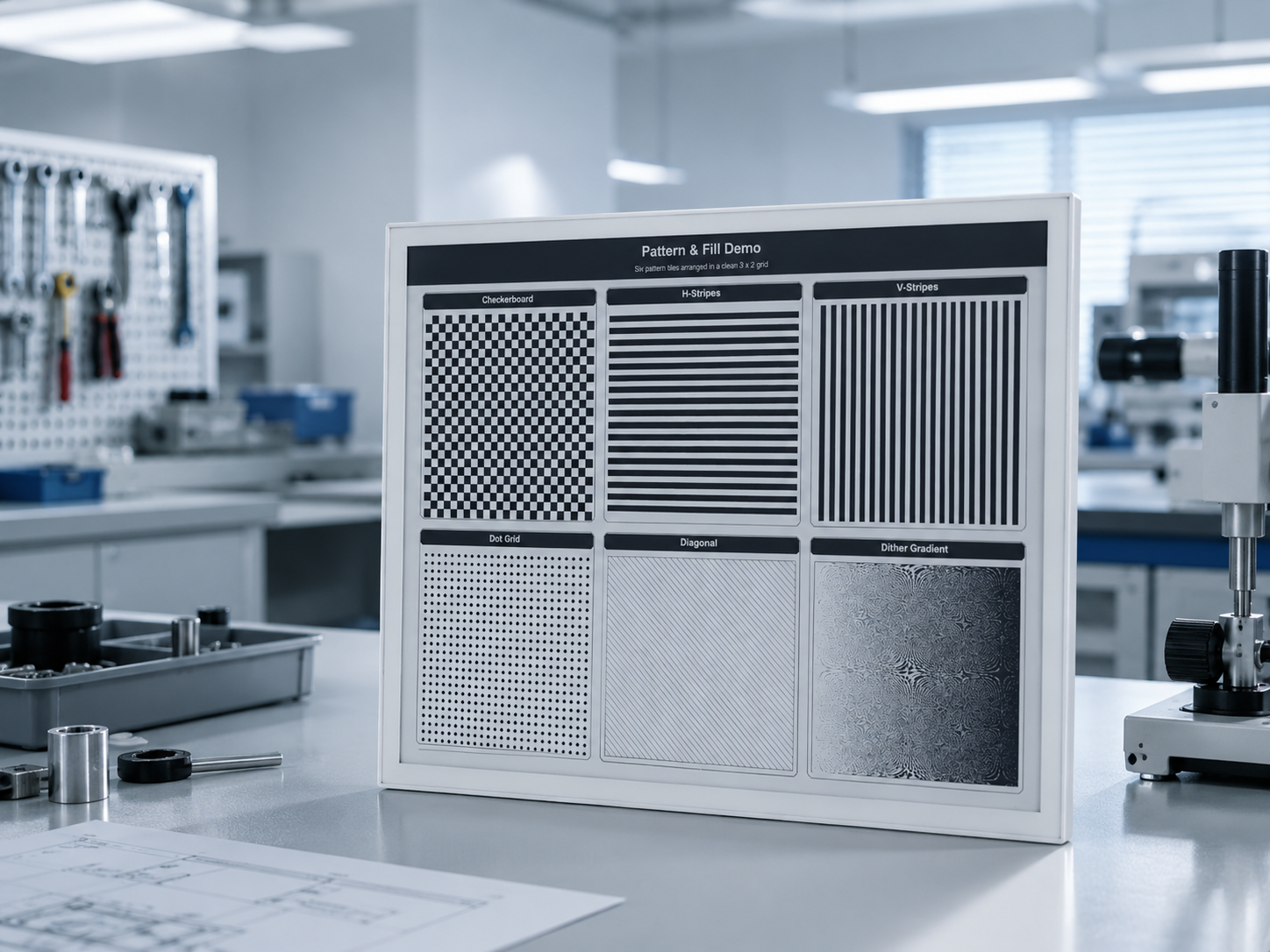
如果你想在搭建开发环境之前,快速预览项目效果或体验基础示例固件,请打开 reTerminal E-Series Firmware Hub。你可以选择受支持的 reTerminal E 系列设备,并直接通过浏览器烧录示例固件。
本页重点介绍如何在 Arduino 中驱动 ePaper 屏幕。如果你想使用板载 LED、蜂鸣器、按键、SHT4x 传感器、电池监测或 microSD 卡槽,请前往 Arduino Cookbook:板载外设。关于 RTC、低功耗模式、板载麦克风和电容触摸绘图,请参阅 Arduino Cookbook:RTC、低功耗、音频与触摸。
通用的样板内容——Arduino IDE 配置、ESP32 开发板包、安装 Seeed_GFX、生成 driver.h——也都在 使用 Arduino 开发 中。如果你是第一次在 Seeed ePaper 上使用 Arduino,建议先快速浏览那一页。
介绍
reTerminal E 系列是 Seeed Studio 的工业 HMI 产品线,基于 XIAO ESP32-S3,集成了 ePaper 显示屏。本 cookbook 将带你完成在屏幕上渲染文本、图形和图像所需的一切步骤:
- E1001 / E1002 / E1003 / E1004 的硬件概览与购买链接。
- 四款型号通用的 Arduino IDE 环境配置(XIAO_ESP32S3 开发板、OPI PSRAM)。
- 使用 Seeed_GFX 库(配套的
BOARD_SCREEN_COMBO)在每款型号上实现第一个 Hello World。 - 使用 Seeed_GFX 的面板专用进阶示例——E1001 上的 4 级灰度以及 E1003 上的 16 级灰度。
- 使用流行的 GxEPD2 库实现另一种 Hello World。
- ePaper 刷新问题与烧录失败的排查技巧。
所需材料
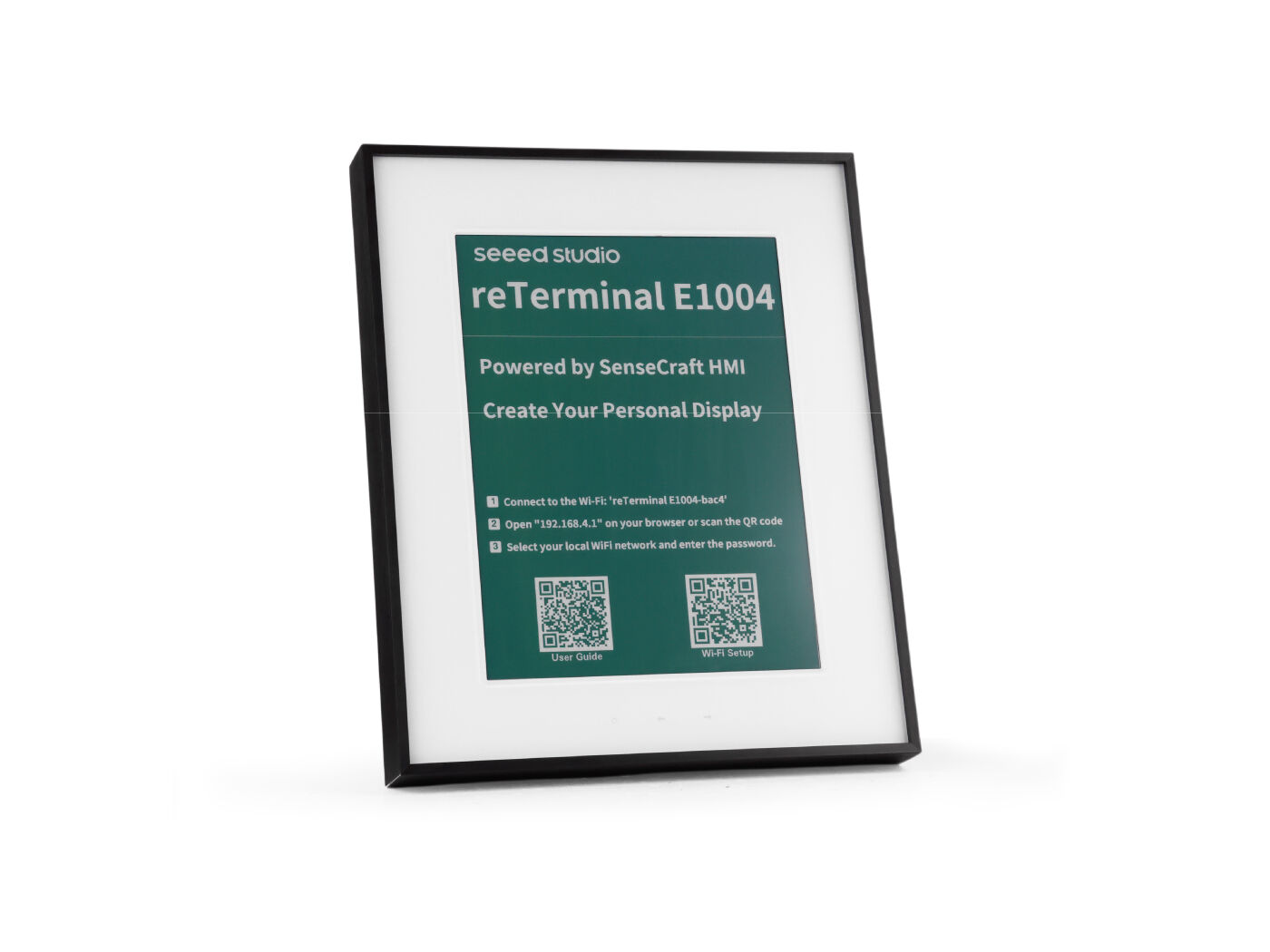
要完成本教程,请准备以下 reTerminal E 系列设备之一:
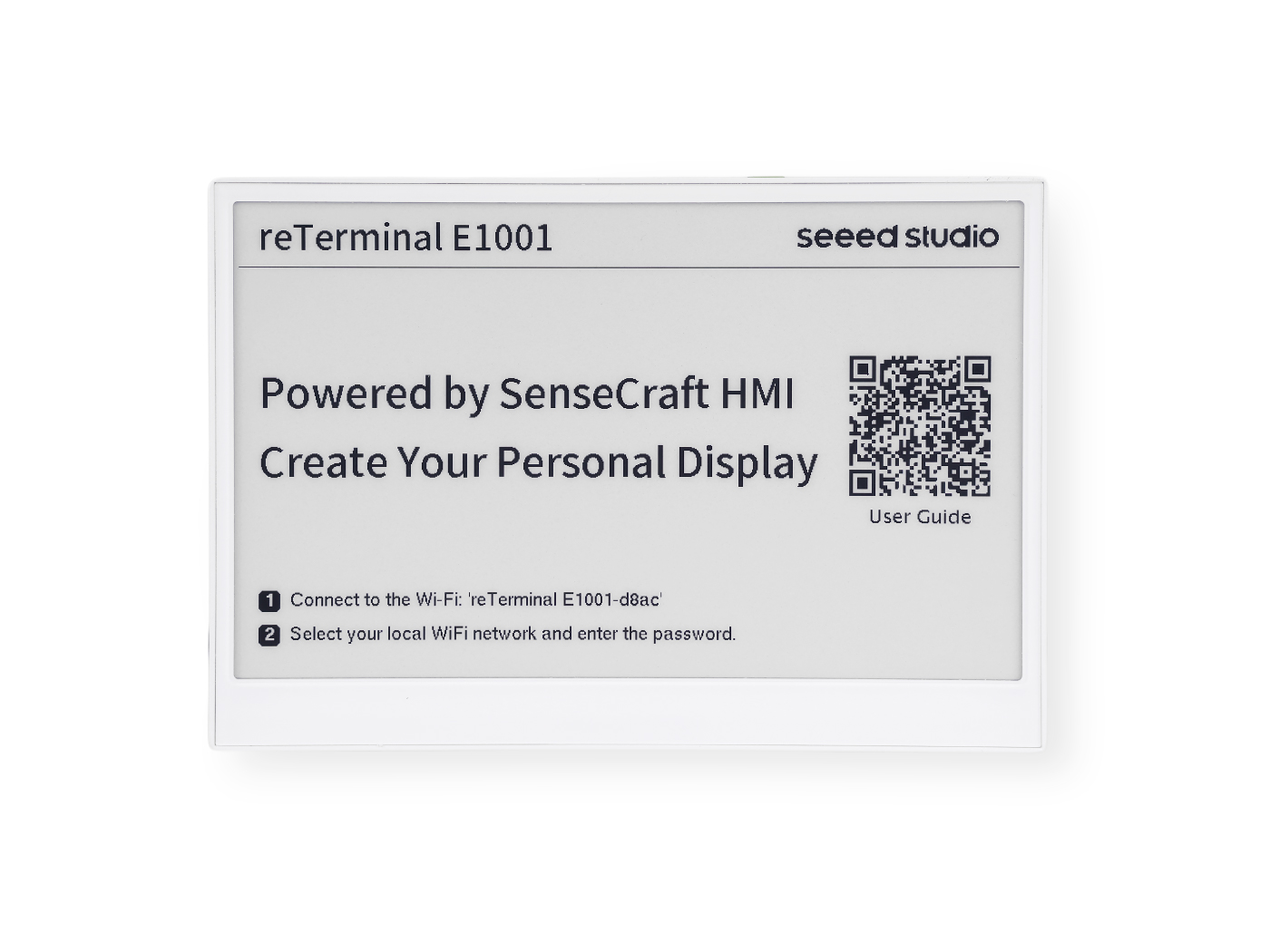
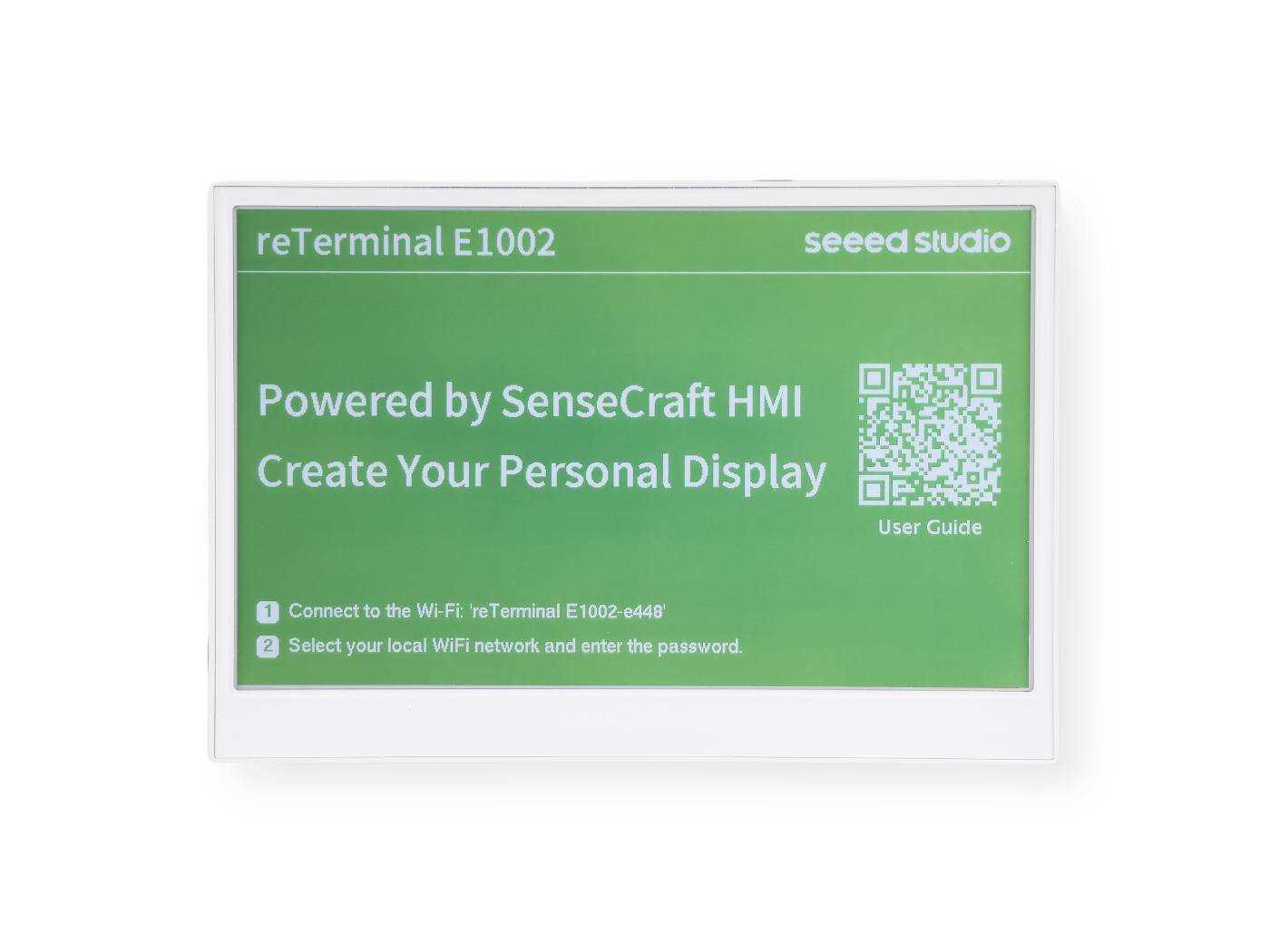
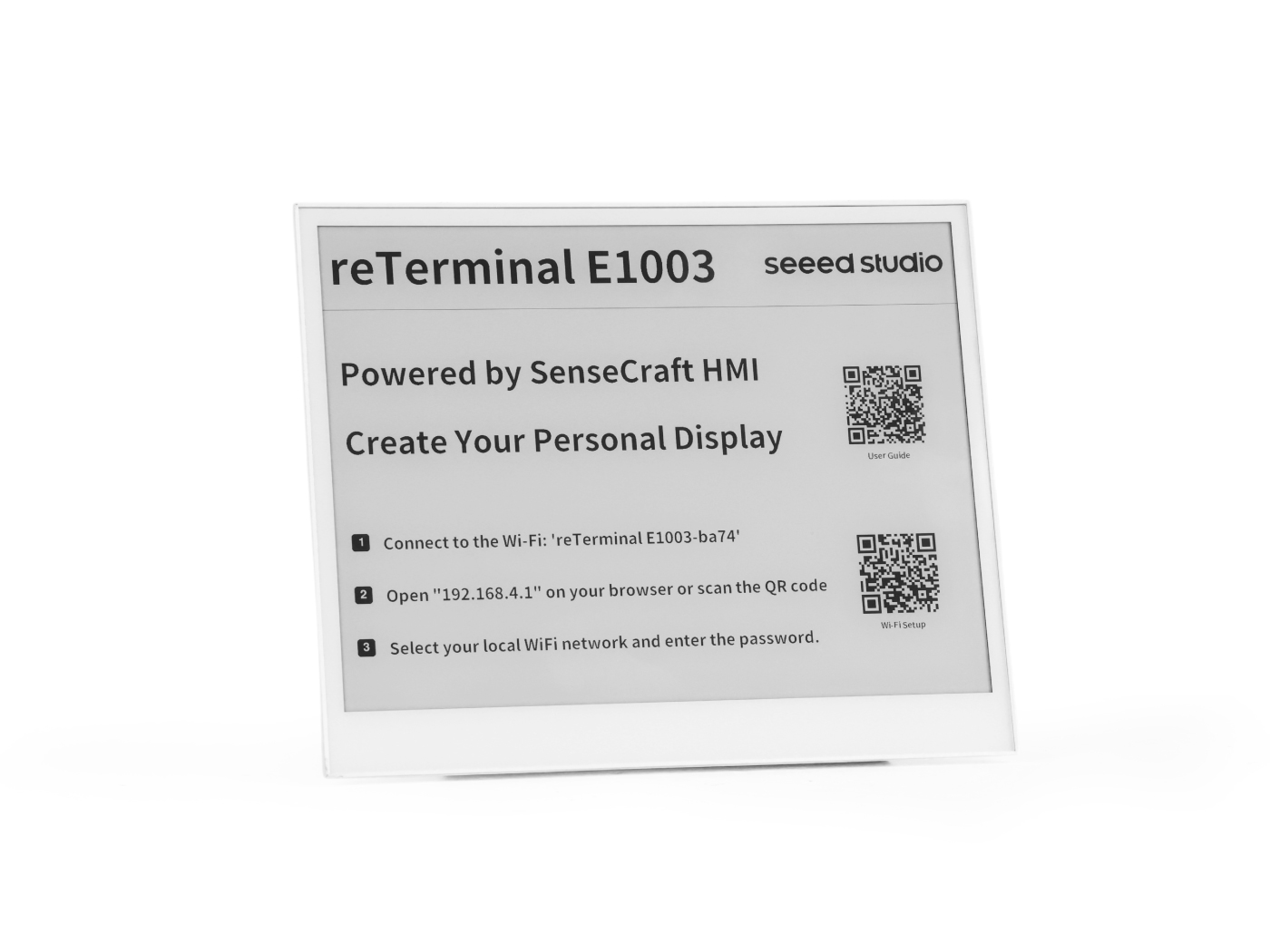
环境准备
要使用 Arduino 为 reTerminal E 系列 ePaper 显示屏编程,你需要在 Arduino IDE 中配置 ESP32 支持。
如果这是你第一次使用 Arduino,我们强烈建议你参考 Arduino 入门指南。
Arduino IDE 配置
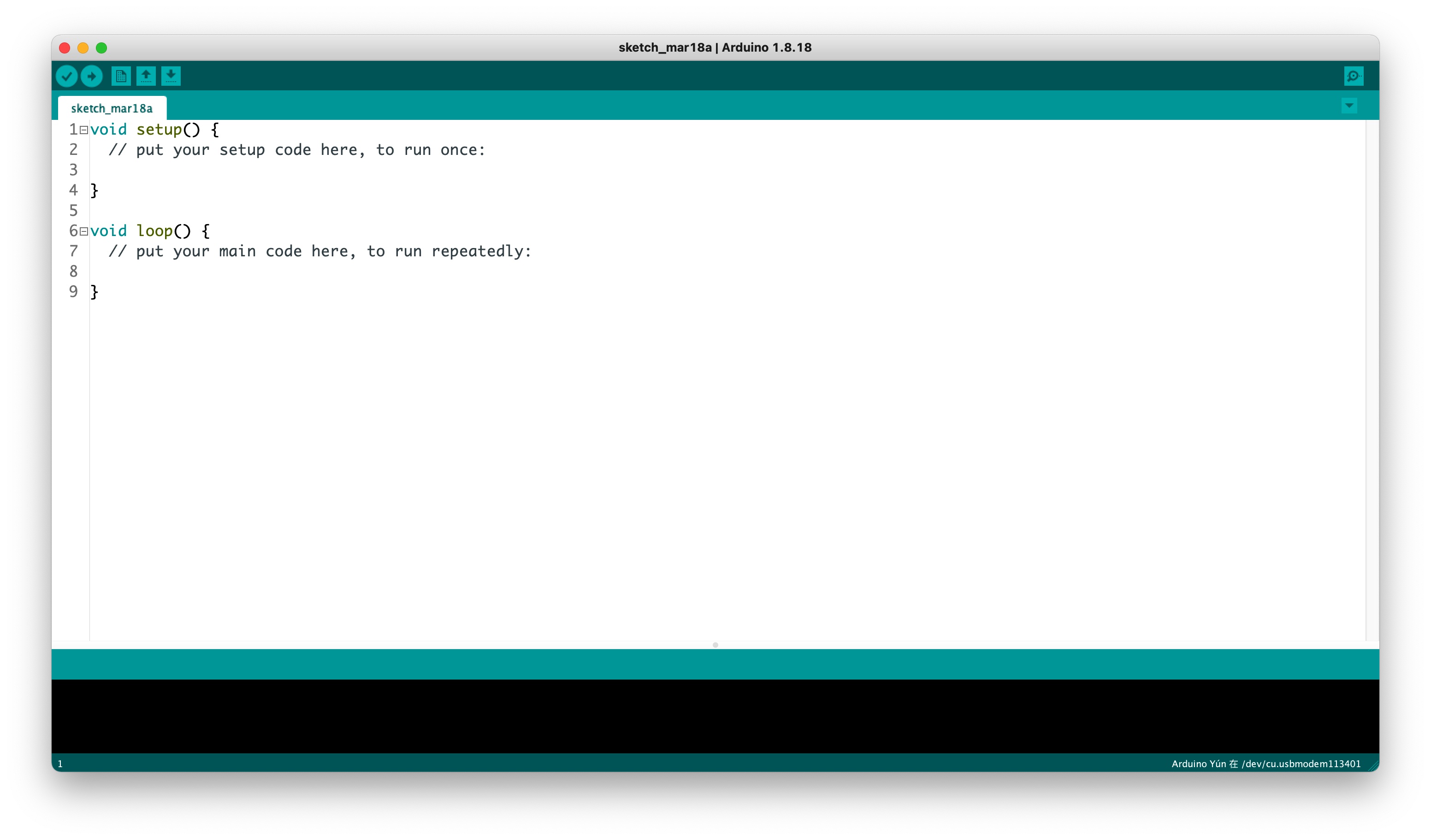
步骤 1. 下载并安装 Arduino IDE,然后启动 Arduino 应用程序。
步骤 2. 在 Arduino IDE 中添加 ESP32 开发板支持。
在 Arduino IDE 中,依次点击 File > Preferences,并在 “Additional Boards Manager URLs” 字段中添加以下 URL:
https://raw.githubusercontent.com/espressif/arduino-esp32/gh-pages/package_esp32_index.json
步骤 3. 安装 ESP32 开发板包。
依次进入 Tools > Board > Boards Manager,搜索 “esp32”,并安装 Espressif Systems 提供的 ESP32 包。
步骤 4. 选择正确的开发板。
依次进入 Tools > Board > ESP32 Arduino,并选择 XIAO_ESP32S3。
步骤 5. 使用 USB-C 线将 reTerminal E 系列 ePaper 显示屏连接到电脑。
步骤 6. 在 Tools > Port 中选择正确的端口。
ePaper 显示屏编程
reTerminal E1001 配备 7.5 英寸黑白 ePaper 显示屏,而 reTerminal E1002 则配备 7.3 英寸全彩 ePaper 显示屏。这两款显示屏在各种光照条件下都具有出色的可视性,并且功耗极低,非常适合需要长时间常亮、但又要尽量降低功耗的工业应用。
使用 Seeed_GFX 库
为了控制 ePaper 显示屏,我们将使用 Seeed_GFX 库,它为多种 Seeed Studio 显示设备提供了全面支持。
步骤 1. 从 GitHub 下载 Seeed_GFX 库:
步骤 2. 在 Arduino IDE 中通过添加 ZIP 文件的方式安装该库。依次点击 Sketch > Include Library > Add .ZIP Library,然后选择刚刚下载的 ZIP 文件。
如果你之前安装过 TFT_eSPI 库,可能需要暂时从 Arduino 库文件夹中移除或重命名它,以避免冲突,因为 Seeed_GFX 是在 TFT_eSPI 基础上进行扩展的分支,专门为 Seeed Studio 显示屏增加了额外特性。
- Programming reTerminal E1001
- Programming reTerminal E1002
- Programming reTerminal E1003
- Programming reTerminal E1004
为 reTerminal E1001 编程(7.5 英寸黑白 ePaper)
下面我们通过一个简单示例来演示在黑白 ePaper 显示屏上的基础绘图操作。
步骤 1. 在 Seeed_GFX 库中打开示例草图:File > Examples > Seeed_GFX > ePaper > Basic > HelloWorld
步骤 2. 在 Arduino IDE 中启用 OPI PSRAM:Tools > PSRAM > OPI PSRAM
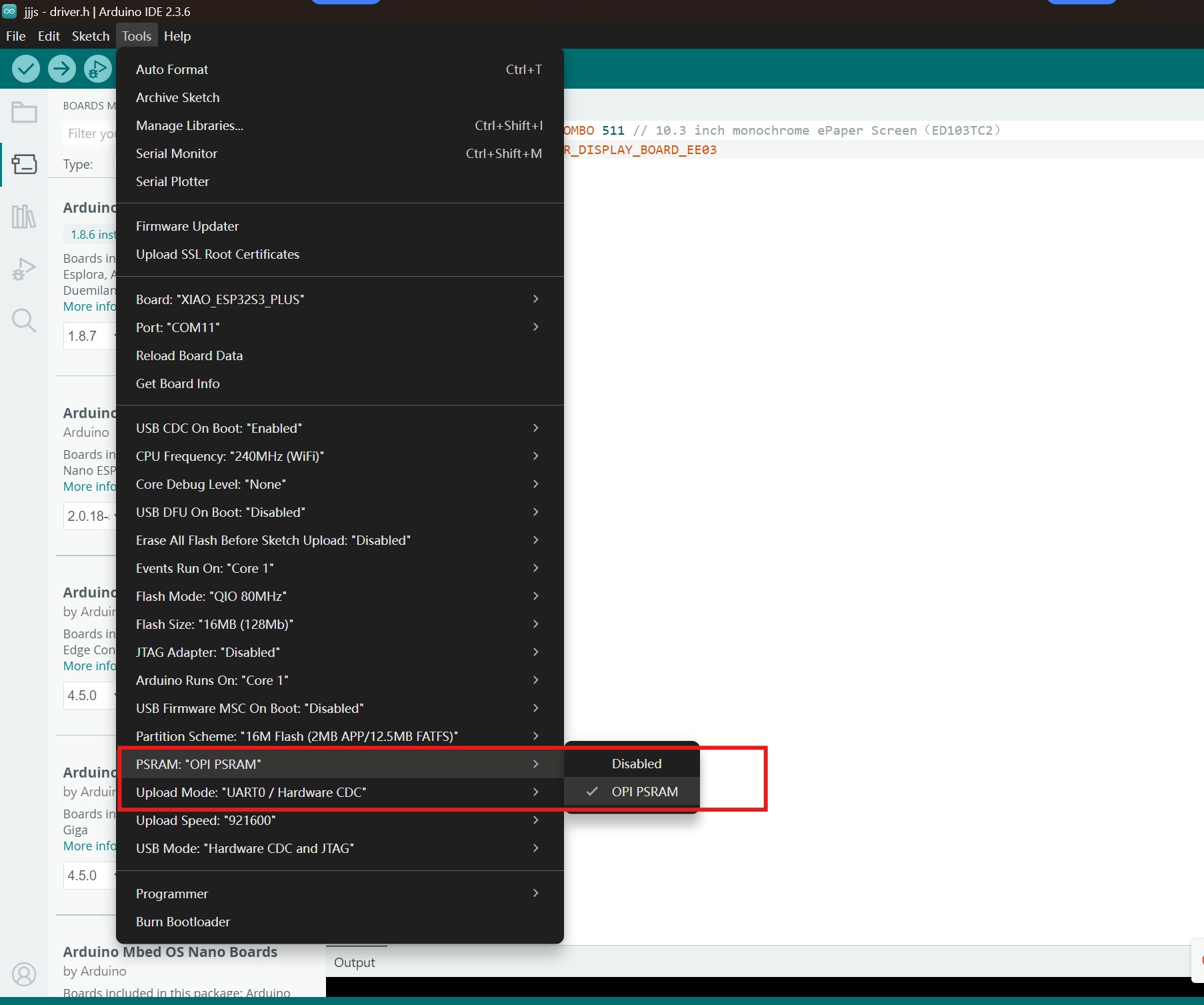
步骤 3. 在与你的草图相同的文件夹中创建一个名为 driver.h 的新文件。你可以点击 Arduino IDE 中的箭头按钮并选择 “New Tab”,然后将其命名为 driver.h。

步骤 4. 复制生成的配置代码,并将其粘贴到 driver.h 文件中。代码应如下所示:
#define BOARD_SCREEN_COMBO 520 // reTerminal E1001 (UC8179)
步骤 5. 将示例程序上传到你的 reTerminal E1001。你应该会看到显示屏展示多种图形,包括线条、文本和形状,用于演示基本绘图能力。

编程 reTerminal E1002(7.3 英寸全彩色电子纸)
全彩色电子纸显示屏支持红色、黑色和白色,可以实现更加丰富的可视化界面。
步骤 1. 从 Seeed_GFX 库中打开彩色示例程序:File > Examples > Seeed_GFX > ePaper > Colorful > HelloWorld
步骤 2. 在 Arduino IDE 中启用 OPI PSRAM:Tools > PSRAM > OPI PSRAM
步骤 3. 在与你的示例程序相同的文件夹中创建一个名为 driver.h 的新文件,操作流程与之前相同。

步骤 4. 复制生成的配置代码,并将其粘贴到 driver.h 文件中。代码应如下所示:
#define BOARD_SCREEN_COMBO 521 // reTerminal E1002 (UC8179C)
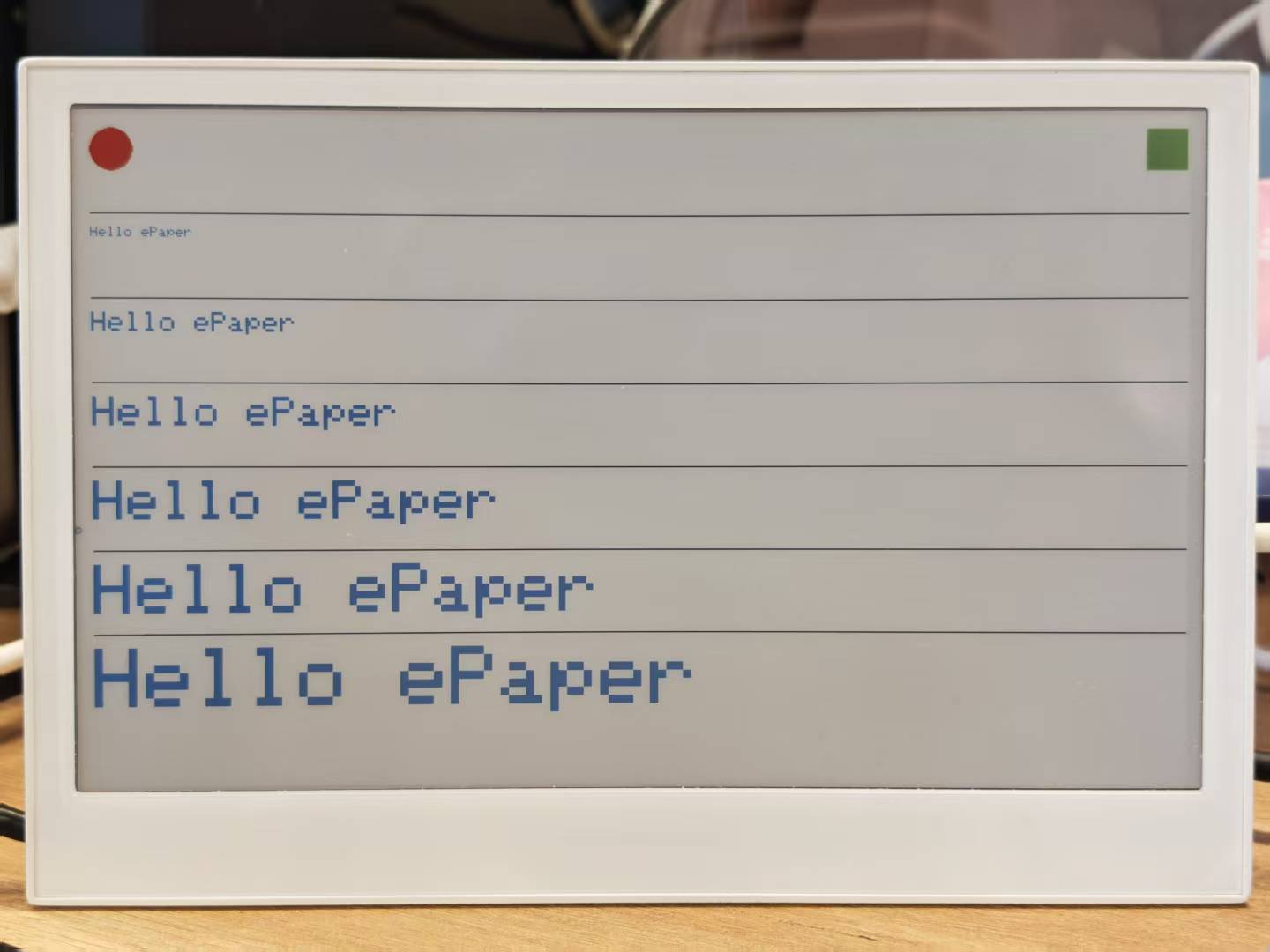
步骤 5. 将示例程序上传到你的 reTerminal E1002。显示屏将展示彩色图形,用于演示电子纸显示屏的全彩能力。
编程 reTerminal E1003(10.3 英寸电子纸)
使用 Seeed_GFX 库,以相同的工作流程来配置并驱动 reTerminal E1003 上的电子纸。
步骤 1. 从 Seeed_GFX 库中打开一个示例程序:File > Examples > Seeed_GFX > ePaper > Basic > HelloWorld
步骤 2. 在 Arduino IDE 中启用 OPI PSRAM:Tools > PSRAM > OPI PSRAM
步骤 3. 在与你的示例程序相同的文件夹中创建一个名为 driver.h 的新文件。
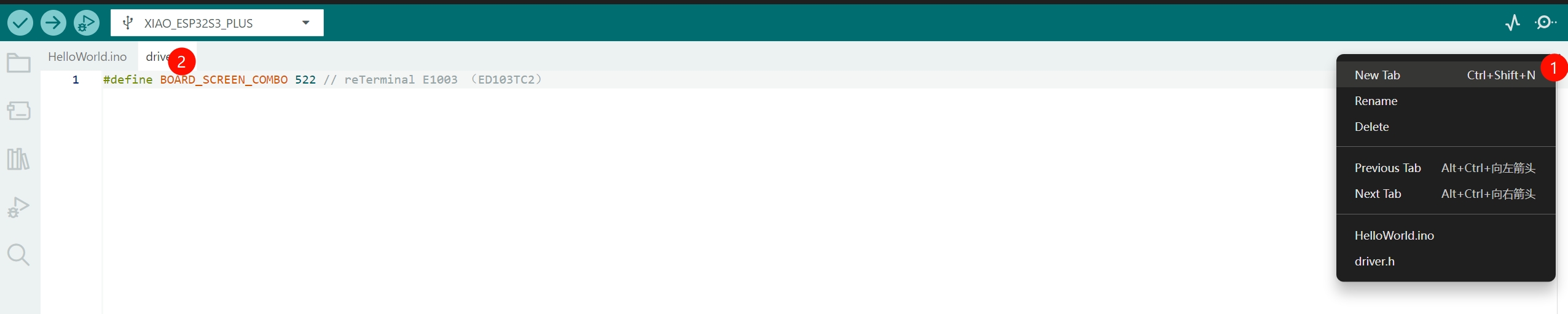
步骤 4. 复制生成的配置代码,并将其粘贴到 E1003 使用的 driver.h 文件中。
#define BOARD_SCREEN_COMBO 522 // reTerminal E1003 (ED103TC2)
步骤 5. 将示例程序上传到你的 reTerminal E1003,以验证绘图基本图元、文本渲染以及全屏刷新行为。
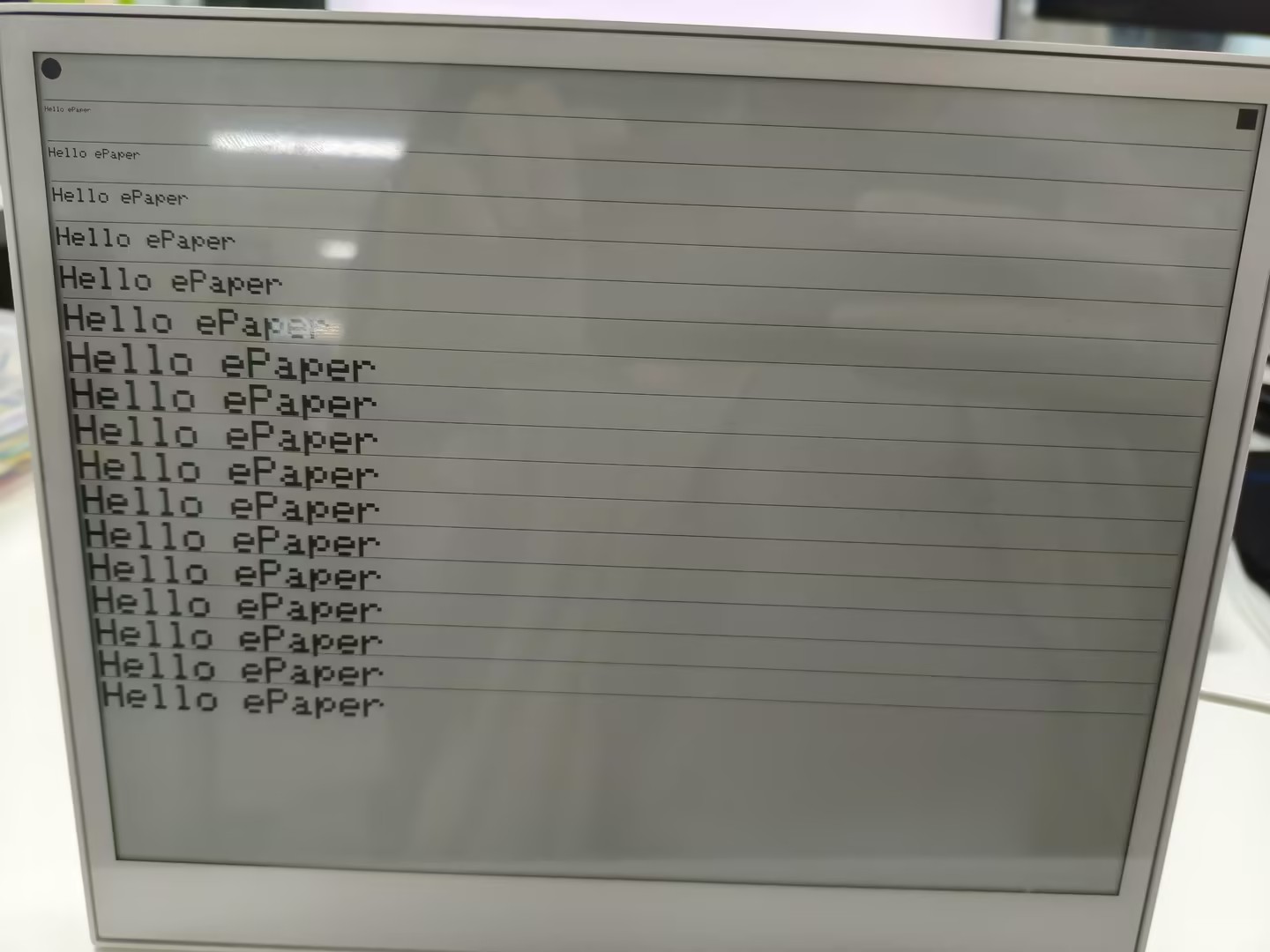
编程 reTerminal E1004(13.3 英寸全彩色电子纸)
使用 Seeed_GFX 库,在 reTerminal E1004 上配置并驱动 E Ink® Spectra™ 6 全彩电子纸显示屏。
步骤 1. 从 Seeed_GFX 库中打开彩色示例程序:File > Examples > Seeed_GFX > ePaper > Basic > HelloWorld
步骤 2. 在 Arduino IDE 中启用 OPI PSRAM:Tools > PSRAM > OPI PSRAM
步骤 3. 在与你的示例程序相同的文件夹中创建一个名为 driver.h 的新文件。
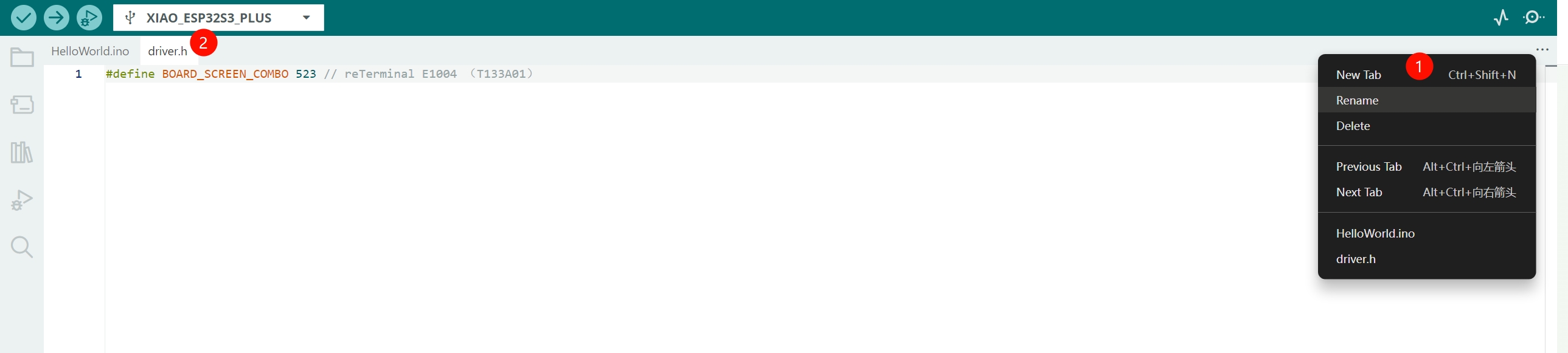
步骤 4. 复制生成的配置代码,并将其粘贴到 E1004 使用的 driver.h 文件中。
#define BOARD_SCREEN_COMBO 523 // reTerminal E1004 (T133A01)
步骤 5. 将示例程序上传到你的 reTerminal E1004,以验证颜色渲染、绘图基本图元、文本渲染以及全屏刷新行为。
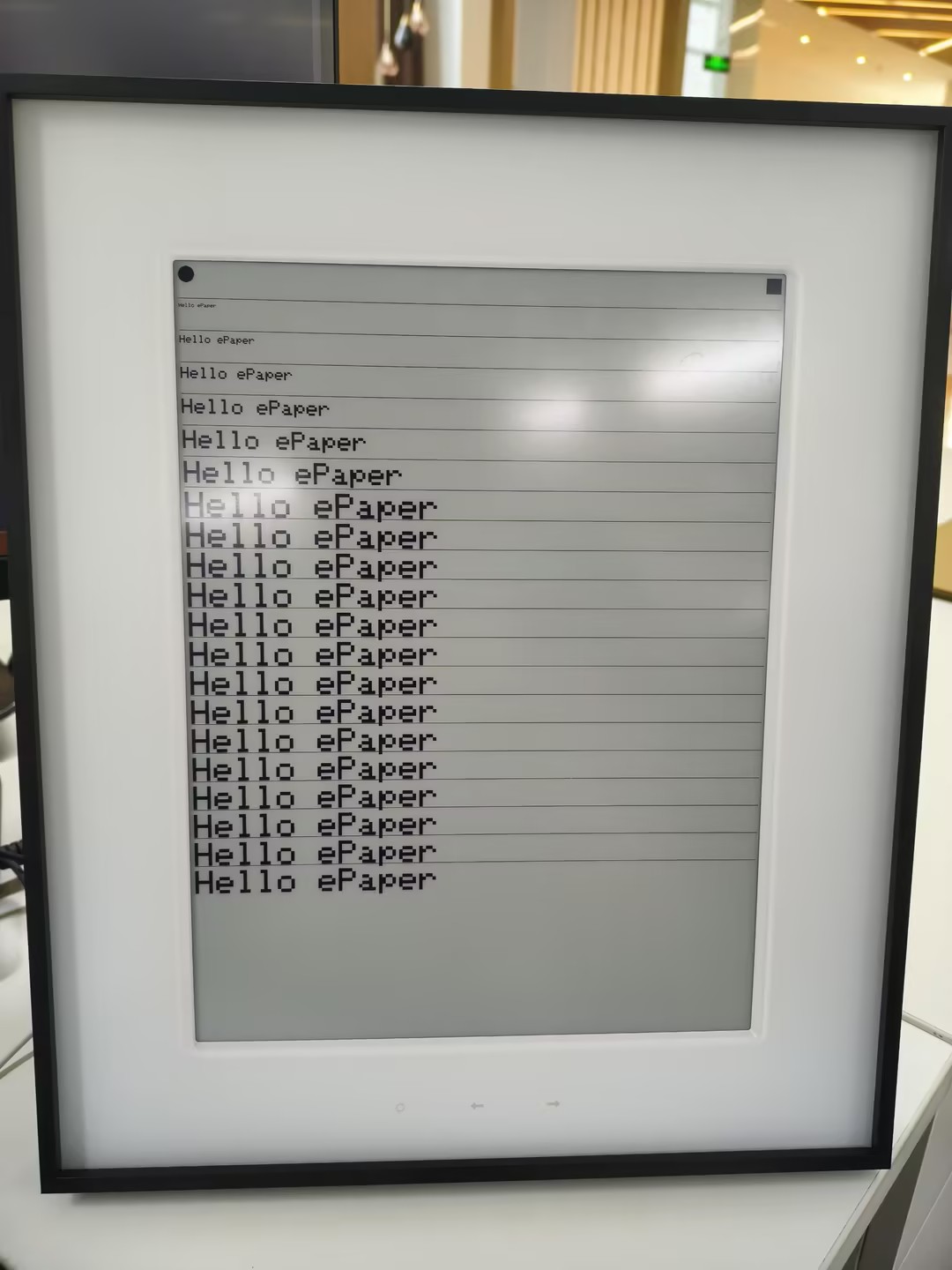
使用 Seeed_GFX 实现多级灰度
上面的 Hello World 示例程序刻意保持精简,以便适配每一款型号。E1001 和 E1003 上的单色面板实际上在纯黑白之上还支持多级灰度——E1001 支持 4 级,E1003 支持 16 级——并且 Seeed_GFX 通过 epaper.initGrayMode(...) 加上一组 TFT_GRAY_* 调色板常量同时暴露这两种模式。下面两个示例分别进行讲解。
- E1001 — 4-Level Grayscale
- E1003 — 16-Level Grayscale
在 reTerminal E1001 上实现 4 级灰度
reTerminal E1001 的 7.5 英寸单色面板可以渲染4 级灰度,而不仅仅是纯黑白。Seeed_GFX 通过 epaper.initGrayMode(GRAY_LEVEL4) 和四个调色板常量来实现这一点:
| 常量 | 显示的色阶 |
|---|---|
TFT_GRAY_0 | 黑色 |
TFT_GRAY_1 | 深灰色 |
TFT_GRAY_2 | 浅灰色 |
TFT_GRAY_3 | 白色 |
下面的示例首先绘制四条水平条纹——每条对应一个灰度级——以便你可以直观验证调色板,然后将一个 800×480 的灰度位图块传输到屏幕上。Seeed_GFX 库已经自带了这个可直接烧录的示例,包括预先转换好的 image.h,因此你无需自己生成任何位图数据。
步骤 1. 从 Seeed_GFX 库中打开示例程序:File > Examples > Seeed_GFX > ePaper > Gray > GrayLevel4。示例程序及其配套的 image.h 会在编辑器中打开。
步骤 2. 在 Arduino IDE 中启用 OPI PSRAM:Tools > PSRAM > OPI PSRAM。
步骤 3. 在示例程序旁边添加一个 driver.h 文件(与 Hello World 相同的工作流程),并选择 E1001 的板卡与屏幕组合:
#define BOARD_SCREEN_COMBO 520 // reTerminal E1001 (UC8179)
步骤 4. 上传示例程序。显示屏首先会显示四条灰度条纹——顶部为黑色,然后是深灰、浅灰,底部为白色——随后清屏并渲染来自 image.h 的位图。
作为参考,示例程序如下所示:
/*
 * 4-Level Grayscale demo for reTerminal E1001
 * (Seeed_GFX/examples/ePaper/Gray/Shape/Shape.ino)
 *
 * The 7.5" monochrome panel supports 4 gray levels:
 *   TFT_GRAY_0  black
 *   TFT_GRAY_1  dark gray
 *   TFT_GRAY_2  light gray
 *   TFT_GRAY_3  white
 */
#include "TFT_eSPI.h"
#include "image.h"

#ifdef EPAPER_ENABLE  // Defined when an ePaper combo is selected in driver.h
EPaper epaper;
#endif

void setup() {
#ifdef EPAPER_ENABLE
  epaper.begin();
  epaper.fillScreen(TFT_WHITE);
  epaper.update();
  epaper.initGrayMode(GRAY_LEVEL4);

  // Draw four horizontal stripes, one per gray level
  epaper.fillRect(0, 0,                       epaper.width(), epaper.height() / 4, TFT_GRAY_0);
  epaper.fillRect(0, epaper.height() * 1 / 4, epaper.width(), epaper.height() / 4, TFT_GRAY_1);
  epaper.fillRect(0, epaper.height() * 2 / 4, epaper.width(), epaper.height() / 4, TFT_GRAY_2);
  epaper.fillRect(0, epaper.height() * 3 / 4, epaper.width(), epaper.height() / 4, TFT_GRAY_3);
  epaper.update();

  // Then clear and show a 800x480 grayscale bitmap from image.h
  epaper.fillScreen(TFT_GRAY_3);
  epaper.pushImage(0, 0, 800, 480, (uint16_t *)L4_GRAY);
  epaper.update();
#endif
}

void loop() {
  // Nothing to do — ePaper holds the last frame without power
}
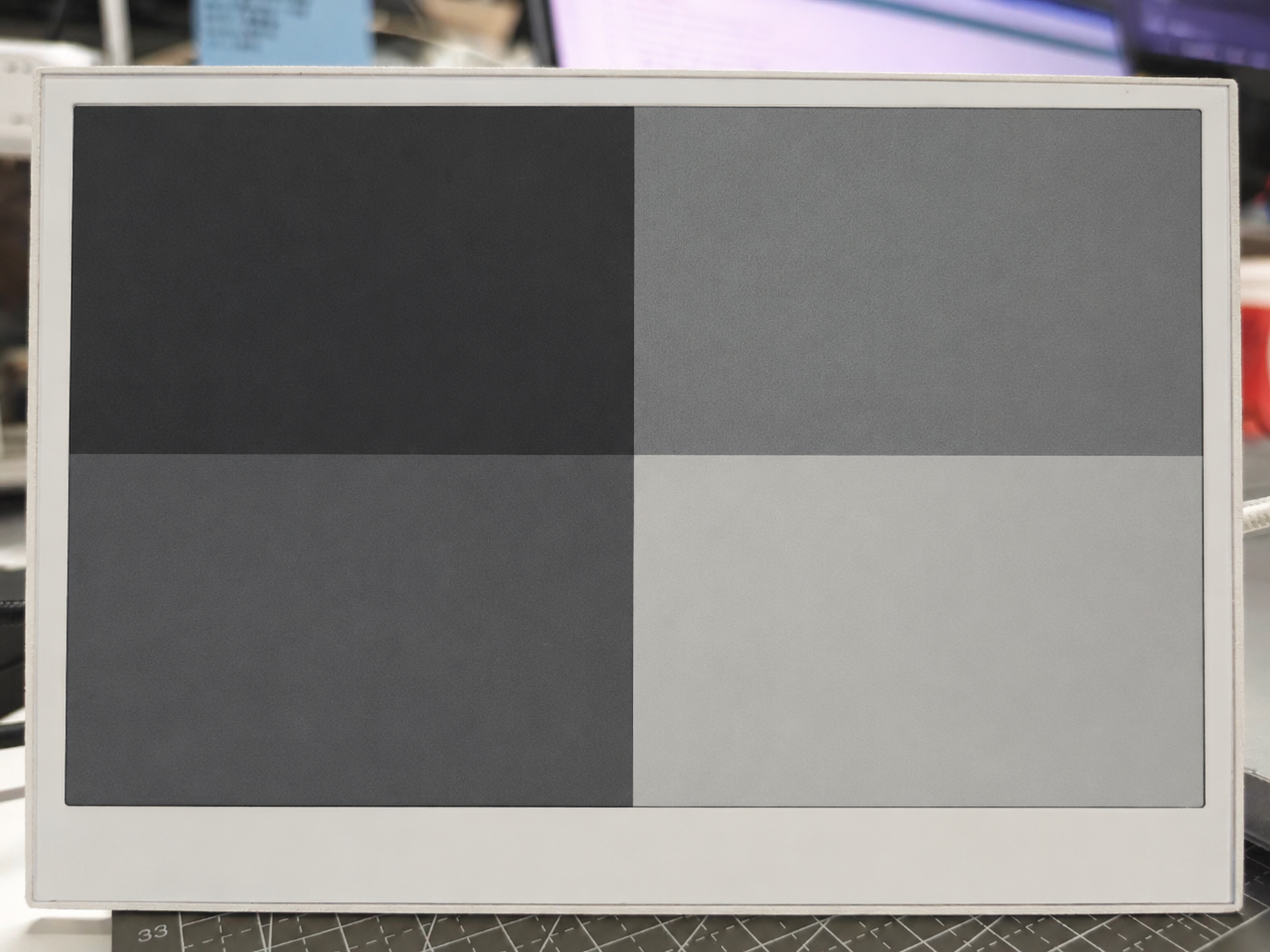
image.h 中的 L4_GRAY 数组只是一个 800×480 的灰度位图,预先转换成了 C 数组。若要替换为你自己的图片,请从一个 800×480 的灰度源图像生成数组(使用任意标准的“image to C array”转换工具),然后在 image.h 中替换 L4_GRAY。示例程序本身无需修改。
4 级灰度刷新大约比 1 位黑白更新慢 4 倍,因为控制器需要将每个像素从两个目标电压扩展为四个。请将其用于照片、插画或细节丰富的仪表盘等静态内容,而对于需要快速更新的 UI,请坚持使用标准的 1 位模式。
在 reTerminal E1003 上实现 16 级灰度
reTerminal E1003 的 10.3 英寸面板在 1404×1872 分辨率下将灰度级提升到16 级灰度。Seeed_GFX 通过 epaper.initGrayMode(GRAY_LEVEL16) 和从 TFT_GRAY_0(黑色)一直到 TFT_GRAY_15(白色)的 16 个调色板常量来实现这一点:
| 常量 | 显示的色阶 |
|---|---|
TFT_GRAY_0 | 黑色 |
TFT_GRAY_1 … TFT_GRAY_14 | 14 个中间灰度(从最暗 → 最亮) |
TFT_GRAY_15 | 白色 |
下面的示例会绘制 16 条水平带状区域——每个灰度级一条——这样你就可以在面板上直观地验证完整调色板。Seeed_GFX 库已经将此示例作为可直接烧录的示例提供,并且配套的 driver.h 已为 E1003 预先配置好,因此你无需手动连接任何线路。
步骤 1. 在 Seeed_GFX 库中打开示例草图:File > Examples > Seeed_GFX > ePaper > Gray > GrayLevel16。草图会与其捆绑的 driver.h 一起打开(已为 E1003 的 ED103TC2 面板设置为 BOARD_SCREEN_COMBO 522)——你不需要对其进行任何编辑。
步骤 2. 在 Arduino IDE 中启用 OPI PSRAM:Tools > PSRAM > OPI PSRAM。
步骤 3. 上传草图。显示屏会显示 16 条水平灰度带,从顶部的纯黑到底部的纯白。
作为参考,示例草图如下所示:
/* This is a 4-color electronic ink screen, but in GRAY_LEVEL16 mode
   it can render 16 levels of gray (TFT_GRAY_0 ~ TFT_GRAY_15).

   TFT_GRAY_0   -> black
   ...
   TFT_GRAY_15  -> white
*/

#include "TFT_eSPI.h"
#include "image.h"

#ifdef EPAPER_ENABLE  // Only compile this code if EPAPER_ENABLE is defined in User_Setup.h
EPaper epaper;
#endif

void setup()
{
#ifdef EPAPER_ENABLE
  epaper.begin();
  epaper.fillScreen(TFT_WHITE);
  epaper.update();                       // refresh once to clear the screen
  epaper.initGrayMode(GRAY_LEVEL16);     // switch to 16-level gray mode

  // 16 levels of gray: TFT_GRAY_0 (black) ... TFT_GRAY_15 (white)
  const uint8_t grayLevels[16] = {
    TFT_GRAY_0,  TFT_GRAY_1,  TFT_GRAY_2,  TFT_GRAY_3,
    TFT_GRAY_4,  TFT_GRAY_5,  TFT_GRAY_6,  TFT_GRAY_7,
    TFT_GRAY_8,  TFT_GRAY_9,  TFT_GRAY_10, TFT_GRAY_11,
    TFT_GRAY_12, TFT_GRAY_13, TFT_GRAY_14, TFT_GRAY_15
  };

  int16_t screenW = epaper.width();
  int16_t screenH = epaper.height();
  int16_t bandH   = screenH / 16;        // height of each gray band

  for (uint8_t i = 0; i < 16; i++) {
    int16_t y = i * bandH;
    // Make the last band absorb any remainder pixels so the screen is fully covered
    int16_t h = (i == 15) ? (screenH - y) : bandH;
    epaper.fillRect(0, y, screenW, h, grayLevels[i]);
  }

  epaper.update();
#endif
}

void loop()
{
  // Nothing to do — ePaper holds the last frame without power
}
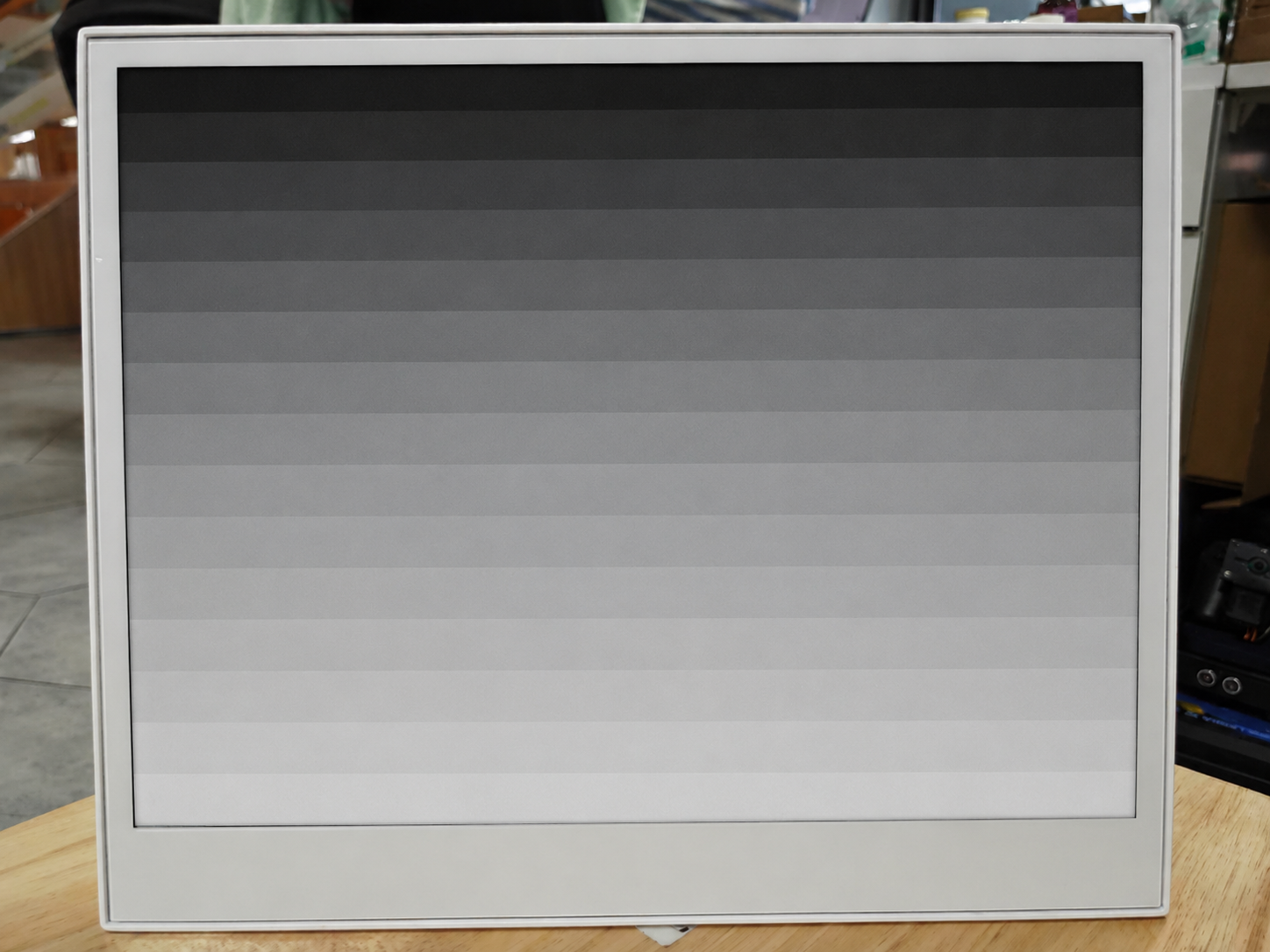
在该面板上,16 级灰度是刷新速度最慢的模式,因为每个像素必须经过 16 个电压目标而不是 2 个。请将其用于静态照片风格内容和仪表盘,并在需要快速 UI 更新时退回到标准的 1 位模式。
使用 GxEPD2 库
除了 Seeed_GFX,你还可以使用 GxEPD2 库来驱动 reTerminal 的电子墨水屏显示。Seeed 已经 fork 了流行的 GxEPD2 库,并为 reTerminal E10xx 系列添加了专用支持,使其成为 reTerminal 用户的推荐选择。
安装 Seeed_GxEPD2 库
要在 reTerminal 产品上使用此库,你需要安装 Seeed_GxEPD2——这是 Seeed 专门为 reTerminal E10xx 系列定制适配的 fork。
步骤 1. 访问 Seeed_GxEPD2 的 GitHub 仓库。点击 "Code" 按钮,然后选择 "Download ZIP" 将该库下载到你的电脑。
步骤 2. 在 Arduino IDE 中,从下载的文件安装该库。依次进入 Sketch > Include Library > Add .ZIP Library...,然后选择你刚刚下载的 ZIP 文件。
步骤 3. Seeed_GxEPD2 库需要 Adafruit GFX Library 才能工作,你也必须安装它。最简单的方式是通过库管理器:进入 Tools > Manage Libraries...,搜索 "Adafruit GFX Library",然后点击 "Install"。
Seeed_GxEPD2 是 Seeed 基于原始 GxEPD2 库定制的 fork,针对 reTerminal E10xx 系列提供了专用驱动和优化。我们强烈建议使用这个 fork,而不是上游库,以确保与你的 reTerminal 设备完全兼容。
- reTerminal E1001
- reTerminal E1002
- reTerminal E1003
- reTerminal E1004
编程 reTerminal E1001(7.5" 黑白屏)
reTerminal E1001 配备一块 7.5" 黑白电子墨水屏(800×480,GDEY075T7 面板,UC8179 控制器)。下面的示例演示了多个屏幕,包括启动画面、系统信息、排版、几何图形、图案以及仪表盘布局。
安装 Seeed_GxEPD2 库后,你可以在 Arduino IDE 中通过 File > Examples > Seeed_GxEPD2 > GxEPD2_reTerminal_E1001 找到此示例,或者在 Seeed_GxEPD2/examples/GxEPD2_reTerminal_E1001/GxEPD2_reTerminal_E1001.ino 中手动定位。点击此处查看完整代码
#include <SPI.h>
#include <GxEPD2_BW.h>
#include <Fonts/FreeMonoBold9pt7b.h>
#include <Fonts/FreeMonoBold12pt7b.h>
#include <Fonts/FreeSansBold24pt7b.h>
#include <Fonts/FreeSansBold18pt7b.h>
#include <Fonts/FreeSansBold12pt7b.h>
#include <Fonts/FreeSans9pt7b.h>
#include <Fonts/FreeMono9pt7b.h>

// ===== Pin mapping =====
#define EPD_SCK_PIN   7
#define EPD_MOSI_PIN  9
#define EPD_CS_PIN    10
#define EPD_DC_PIN    11
#define EPD_RES_PIN   12
#define EPD_BUSY_PIN  13

SPIClass hspi(HSPI);

// ===== Display: 7.5" B&W 800x480 =====
#define MAX_DISPLAY_BUFFER_SIZE 16000u
#define MAX_HEIGHT(EPD) \
    (EPD::HEIGHT <= MAX_DISPLAY_BUFFER_SIZE / (EPD::WIDTH / 8) \
         ? EPD::HEIGHT \
         : MAX_DISPLAY_BUFFER_SIZE / (EPD::WIDTH / 8))

GxEPD2_BW<GxEPD2_750_GDEY075T7, MAX_HEIGHT(GxEPD2_750_GDEY075T7)>
    display(GxEPD2_750_GDEY075T7(EPD_CS_PIN, EPD_DC_PIN, EPD_RES_PIN, EPD_BUSY_PIN));

void setup()
{
  Serial.begin(115200);
  delay(200);
  Serial.println(F("[E1001] GxEPD2 reTerminal E1001 Demo (7.5\" B&W)"));

  pinMode(EPD_RES_PIN, OUTPUT);
  pinMode(EPD_DC_PIN,  OUTPUT);
  pinMode(EPD_CS_PIN,  OUTPUT);

  hspi.begin(EPD_SCK_PIN, -1, EPD_MOSI_PIN, -1);
  display.epd2.selectSPI(hspi, SPISettings(2000000, MSBFIRST, SPI_MODE0));
  display.init(0);

  Serial.println(F("[E1001] Screen 1: Splash"));
  showSplashScreen();
  delay(3000);

  Serial.println(F("[E1001] Screen 2: System Info"));
  showSystemInfo();
  delay(3000);

  Serial.println(F("[E1001] Screen 3: Typography"));
  showTypographyDemo();
  delay(3000);

  Serial.println(F("[E1001] Screen 4: Geometry"));
  showGeometryDemo();
  delay(3000);

  Serial.println(F("[E1001] Screen 5: Patterns"));
  showPatternDemo();
  delay(3000);

  Serial.println(F("[E1001] Screen 6: Dashboard"));
  showDashboardDemo();

  Serial.println(F("[E1001] Demo complete. Hibernating."));
  delay(2000);
  display.hibernate();
}

void loop() {}

// =====================================================================
void drawCenteredText(const char* text, int16_t y, const GFXfont* font)
{
  display.setFont(font);
  int16_t tbx, tby; uint16_t tbw, tbh;
  display.getTextBounds(text, 0, 0, &tbx, &tby, &tbw, &tbh);
  display.setCursor((display.width() - tbw) / 2 - tbx, y);
  display.print(text);
}

// =====================================================================
// Screen 1: Splash
// =====================================================================
void showSplashScreen()
{
  const uint16_t W = display.width();
  const uint16_t H = display.height();
  display.setRotation(0);
  display.setFullWindow();
  display.firstPage();
  do {
    display.fillScreen(GxEPD_WHITE);
    display.drawRect(10, 10, W - 20, H - 20, GxEPD_BLACK);
    display.drawRect(14, 14, W - 28, H - 28, GxEPD_BLACK);

    display.setTextColor(GxEPD_BLACK);
    drawCenteredText("reTerminal E1001", H / 2 - 60, &FreeSansBold24pt7b);
    drawCenteredText("7.5\" e-Paper Display", H / 2 - 10, &FreeSansBold12pt7b);
    display.drawFastHLine(W / 4, H / 2 + 10, W / 2, GxEPD_BLACK);
    drawCenteredText("GxEPD2 + UC8179 Driver Demo", H / 2 + 45, &FreeSansBold12pt7b);
    drawCenteredText("800 x 480 pixels | Black & White", H / 2 + 75, &FreeSans9pt7b);
    drawCenteredText("Seeed Studio x GxEPD2", H - 40, &FreeSans9pt7b);
  } while (display.nextPage());
}

// =====================================================================
// Screen 2: System Info
// =====================================================================
void showSystemInfo()
{
  const uint16_t W = display.width();
  const uint16_t H = display.height();
  display.setRotation(0);
  display.setFullWindow();
  display.firstPage();
  do {
    display.fillScreen(GxEPD_WHITE);
    display.fillRect(0, 0, W, 40, GxEPD_BLACK);
    display.setTextColor(GxEPD_WHITE);
    drawCenteredText("System Information", 30, &FreeSansBold12pt7b);

    display.setTextColor(GxEPD_BLACK);
    display.setFont(&FreeMonoBold9pt7b);

    const char* labels[] = {"MCU", "Display", "Panel", "Controller", "Interface", "Color Depth"};
    char chipBuf[48];
    snprintf(chipBuf, sizeof(chipBuf), "ESP32-S3 @ %lu MHz", (unsigned long)ESP.getCpuFreqMHz());
    const char* values[] = {chipBuf, "800 x 480", "GDEY075T7", "UC8179", "SPI (HSPI) @ 2MHz", "B&W (1-bit)"};

    int y = 95;
    for (int i = 0; i < 6; i++) {
      display.setCursor(50, y);
      display.print(labels[i]);
      display.setCursor(250, y);
      display.print(": ");
      display.print(values[i]);
      y += 48;
      if (i < 5) display.drawFastHLine(50, y - 18, W - 100, GxEPD_BLACK);
    }

    display.drawFastHLine(30, H - 40, W - 60, GxEPD_BLACK);
    drawCenteredText("reTerminal E1001 | GxEPD2 Demo", H - 20, &FreeSans9pt7b);
  } while (display.nextPage());
}

// =====================================================================
// Screen 3: Typography
// =====================================================================
void showTypographyDemo()
{
  const uint16_t W = display.width();
  const uint16_t H = display.height();
  display.setRotation(0);
  display.setFullWindow();
  display.firstPage();
  do {
    display.fillScreen(GxEPD_WHITE);
    display.fillRect(0, 0, W, 40, GxEPD_BLACK);
    display.setTextColor(GxEPD_WHITE);
    drawCenteredText("Typography Demo", 30, &FreeSansBold12pt7b);

    display.setTextColor(GxEPD_BLACK);
    int y = 85, x = 40;

    display.setFont(&FreeSansBold24pt7b);
    display.setCursor(x, y); display.print("Sans Bold 24pt");
    y += 65;

    display.setFont(&FreeSansBold18pt7b);
    display.setCursor(x, y); display.print("Sans Bold 18pt");
    y += 50;

    display.setFont(&FreeSansBold12pt7b);
    display.setCursor(x, y); display.print("Sans Bold 12pt - Clean and Modern");
    y += 42;

    display.setFont(&FreeSans9pt7b);
    display.setCursor(x, y); display.print("Sans 9pt - Body text for dense info display.");
    y += 40;

    display.drawFastHLine(x, y, W - 80, GxEPD_BLACK);
    y += 25;

    display.setFont(&FreeMonoBold12pt7b);
    display.setCursor(x, y); display.print("Mono Bold 12pt");
    y += 38;

    display.setFont(&FreeMono9pt7b);
    display.setCursor(x, y); display.print("Mono 9pt: 0123456789 ABCDEF");
    y += 38;

    display.setFont(&FreeSansBold18pt7b);
    display.setCursor(x, y); display.print("0 1 2 3 4 5 6 7 8 9");

    drawCenteredText("Multiple fonts supported", H - 20, &FreeSans9pt7b);
  } while (display.nextPage());
}

// =====================================================================
// Screen 4: Geometry
// =====================================================================
void showGeometryDemo()
{
  const uint16_t W = display.width();
  const uint16_t H = display.height();
  display.setRotation(0);
  display.setFullWindow();
  display.firstPage();
  do {
    display.fillScreen(GxEPD_WHITE);
    display.fillRect(0, 0, W, 40, GxEPD_BLACK);
    display.setTextColor(GxEPD_WHITE);
    drawCenteredText("Geometry Demo", 30, &FreeSansBold12pt7b);
    display.setTextColor(GxEPD_BLACK);

    // Rectangles
    for (int i = 0; i < 4; i++)
      display.drawRect(40 + i * 80, 60, 60, 50, GxEPD_BLACK);
    display.fillRect(40 + 4 * 80, 60, 60, 50, GxEPD_BLACK);

    // Circles
    for (int i = 0; i < 4; i++)
      display.drawCircle(70 + i * 90, 170, 25 + i * 3, GxEPD_BLACK);
    for (int i = 0; i < 3; i++)
      display.fillCircle(70 + (i + 4) * 90, 170, 25 + i * 3, GxEPD_BLACK);

    // Triangles
    for (int i = 0; i < 5; i++) {
      int tx = 50 + i * 120, sz = 40 + i * 5;
      display.drawTriangle(tx, 270 + sz, tx + sz / 2, 270, tx + sz, 270 + sz, GxEPD_BLACK);
    }

    // Fan of lines
    int fcx = 150, fcy = 410;
    for (int a = 0; a < 180; a += 12) {
      float rad = a * 3.14159f / 180.0f;
      display.drawLine(fcx, fcy, fcx + (int)(60 * cosf(rad)), fcy - (int)(60 * sinf(rad)), GxEPD_BLACK);
    }

    // Concentric circles
    for (int r = 8; r <= 56; r += 8)
      display.drawCircle(400, 400, r, GxEPD_BLACK);

    // Rounded rects
    for (int i = 0; i < 3; i++)
      display.drawRoundRect(550 + i * 8, 340 + i * 8, 120 - i * 16, 100 - i * 16, 8 + i * 4, GxEPD_BLACK);

    drawCenteredText("Adafruit GFX primitives on 7.5\" e-Paper", H - 15, &FreeSans9pt7b);
  } while (display.nextPage());
}

// =====================================================================
// Screen 5: Patterns
// =====================================================================
void showPatternDemo()
{
  const uint16_t W = display.width();
  const uint16_t H = display.height();
  display.setRotation(0);
  display.setFullWindow();
  display.firstPage();
  do {
    display.fillScreen(GxEPD_WHITE);
    display.fillRect(0, 0, W, 40, GxEPD_BLACK);
    display.setTextColor(GxEPD_WHITE);
    drawCenteredText("Pattern Demo", 30, &FreeSansBold12pt7b);
    display.setTextColor(GxEPD_BLACK);
    display.setFont(&FreeSans9pt7b);

    int bx = 30, by = 55, bw = 150, bh = 150, gap = 30;

    // Checkerboard
    display.setCursor(bx + 25, by + 15); display.print("Checker");
    by += 20;
    for (int py = 0; py < bh / 12; py++)
      for (int px = 0; px < bw / 12; px++)
        if ((px + py) & 1)
          display.fillRect(bx + px * 12, by + py * 12, 12, 12, GxEPD_BLACK);

    // H-stripes
    int bx2 = bx + bw + gap; int by2 = by - 20;
    display.setCursor(bx2 + 25, by2 + 15); display.print("H-Stripes");
    by2 += 20;
    for (int py = 0; py < bh; py += 8)
      if ((py / 8) & 1)
        display.fillRect(bx2, by2 + py, bw, 8, GxEPD_BLACK);

    // V-stripes
    int bx3 = bx2 + bw + gap; int by3 = by2 - 20;
    display.setCursor(bx3 + 25, by3 + 15); display.print("V-Stripes");
    by3 += 20;
    for (int px = 0; px < bw; px += 8)
      if ((px / 8) & 1)
        display.fillRect(bx3 + px, by3, 8, bh, GxEPD_BLACK);

    // Dot grid
    int bx4 = bx3 + bw + gap; int by4 = by3 - 20;
    display.setCursor(bx4 + 30, by4 + 15); display.print("Dot Grid");
    by4 += 20;
    for (int py = 0; py < bh; py += 12)
      for (int px = 0; px < bw; px += 12)
        display.fillCircle(bx4 + px + 6, by4 + py + 6, 3, GxEPD_BLACK);

    // Dither gradient (bottom)
    int gx = 30, gy = 310, gw = W - 60, gh = 120;
    display.setFont(&FreeSans9pt7b);
    display.setCursor(gx, gy - 5); display.print("Dither Gradient:");
    display.drawRect(gx, gy, gw, gh, GxEPD_BLACK);
    for (int py = 0; py < gh; py++)
      for (int px = 0; px < gw; px++) {
        int density = (px * 255) / gw;
        if ((((px * 7 + py * 13) ^ (px * py)) & 0xFF) < density)
          display.drawPixel(gx + px, gy + py, GxEPD_BLACK);
      }

    drawCenteredText("Fill patterns and dithering", H - 15, &FreeSans9pt7b);
  } while (display.nextPage());
}

// =====================================================================
// Screen 6: Dashboard
// =====================================================================
void drawCard(int x, int y, int w, int h, const char* title, const char* value, const char* unit)
{
  display.drawRoundRect(x, y, w, h, 6, GxEPD_BLACK);
  display.fillRoundRect(x + 2, y + 2, w - 4, 26, 4, GxEPD_BLACK);
  display.setTextColor(GxEPD_WHITE);
  display.setFont(&FreeSansBold12pt7b);
  int16_t tbx, tby; uint16_t tbw, tbh;
  display.getTextBounds(title, 0, 0, &tbx, &tby, &tbw, &tbh);
  display.setCursor(x + (w - tbw) / 2 - tbx, y + 22);
  display.print(title);

  display.setTextColor(GxEPD_BLACK);
  display.setFont(&FreeSansBold18pt7b);
  display.getTextBounds(value, 0, 0, &tbx, &tby, &tbw, &tbh);
  display.setCursor(x + (w - tbw) / 2 - tbx, y + h / 2 + 12);
  display.print(value);

  display.setFont(&FreeSans9pt7b);
  display.getTextBounds(unit, 0, 0, &tbx, &tby, &tbw, &tbh);
  display.setCursor(x + (w - tbw) / 2 - tbx, y + h - 10);
  display.print(unit);
}

void showDashboardDemo()
{
  const uint16_t W = display.width();
  const uint16_t H = display.height();
  display.setRotation(0);
  display.setFullWindow();
  display.firstPage();
  do {
    display.fillScreen(GxEPD_WHITE);
    display.fillRect(0, 0, W, 40, GxEPD_BLACK);
    display.setTextColor(GxEPD_WHITE);
    drawCenteredText("Dashboard Demo", 30, &FreeSansBold12pt7b);
    display.setTextColor(GxEPD_BLACK);

    int cw = 170, ch = 130, gap = 20;
    int sx = (W - 4 * cw - 3 * gap) / 2;
    int row1Y = 60;

    char uptBuf[16]; snprintf(uptBuf, sizeof(uptBuf), "%lu", millis() / 1000);
    char heapBuf[16]; snprintf(heapBuf, sizeof(heapBuf), "%lu", (unsigned long)(ESP.getFreeHeap() / 1024));

    drawCard(sx,                       row1Y, cw, ch, "Temp",     "23.5",  "Celsius");
    drawCard(sx + cw + gap,            row1Y, cw, ch, "Humidity", "65",    "% RH");
    drawCard(sx + 2 * (cw + gap),      row1Y, cw, ch, "Heap",    heapBuf, "kB free");
    drawCard(sx + 3 * (cw + gap),      row1Y, cw, ch, "Uptime",  uptBuf,  "seconds");

    // Log area
    int logY = row1Y + ch + 20;
    display.drawRoundRect(sx, logY, W - 2 * sx, 200, 6, GxEPD_BLACK);
    display.fillRoundRect(sx + 2, logY + 2, W - 2 * sx - 4, 26, 4, GxEPD_BLACK);
    display.setTextColor(GxEPD_WHITE);
    display.setFont(&FreeSansBold12pt7b);
    display.setCursor(sx + 15, logY + 22);
    display.print("Activity Log");
    display.setTextColor(GxEPD_BLACK);
    display.setFont(&FreeMono9pt7b);

    const char* logs[] = {
      "[00:01] System boot - ESP32-S3",
      "[00:02] Panel: GDEY075T7 800x480",
      "[00:03] UC8179 controller ready",
      "[00:04] SPI @ 2MHz (HSPI)",
      "[00:05] Demo sequence started",
    };
    int ly = logY + 50;
    for (int i = 0; i < 5; i++) {
      display.setCursor(sx + 15, ly);
      display.print(logs[i]);
      ly += 28;
    }

    // Progress bar
    int barY = logY + 210;
    display.setFont(&FreeSansBold12pt7b);
    display.setCursor(sx, barY + 15);
    display.print("Progress:");
    int barX = sx + 170, barW = W - 2 * sx - 180, barH = 20;
    display.drawRect(barX, barY, barW, barH, GxEPD_BLACK);
    display.fillRect(barX + 2, barY + 2, barW - 4, barH - 4, GxEPD_BLACK);
    display.setFont(&FreeSans9pt7b);
    display.setCursor(barX + barW + 8, barY + 14);
    display.print("100%");

    drawCenteredText("E-paper: zero power to maintain image", H - 15, &FreeSans9pt7b);
  } while (display.nextPage());
}
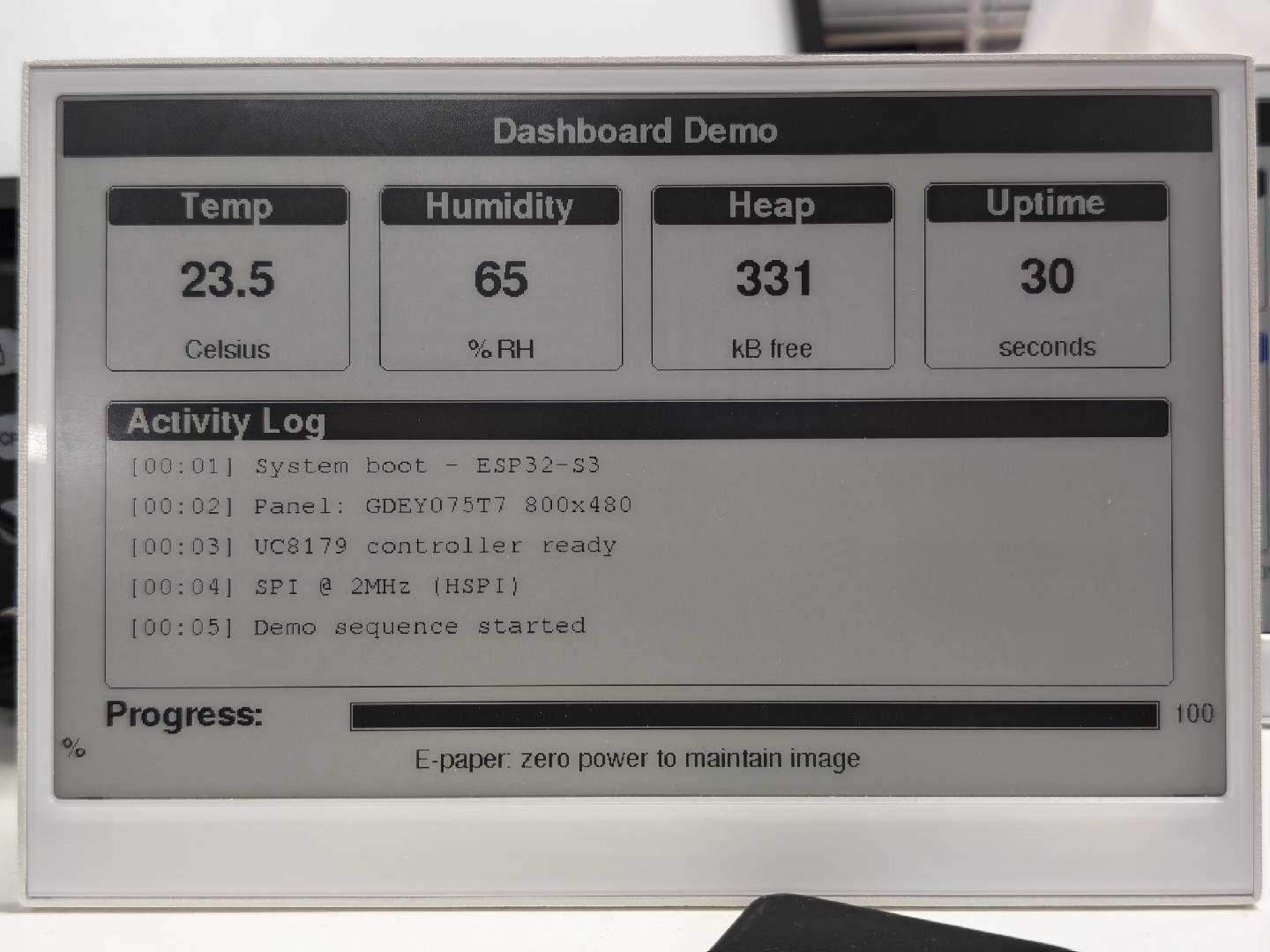
下图展示了 E1001 示例的实际显示效果:
编程 reTerminal E1002(7.3" 6 色屏幕)
reTerminal E1002 配备 7.3" 6 色电子纸显示屏(800×480,GDEP073E01 面板,ED2208 控制器)。它支持黑、白、红、绿、蓝和黄六种颜色。下面的示例演示了在多个屏幕上的颜色渲染效果。
安装 Seeed_GxEPD2 库后,你可以在 Arduino IDE 中通过 File > Examples > Seeed_GxEPD2 > GxEPD2_reTerminal_E1002 找到此示例,或者在 Seeed_GxEPD2/examples/GxEPD2_reTerminal_E1002/GxEPD2_reTerminal_E1002.ino 路径下手动定位。点击此处查看完整代码
#include <SPI.h>
#include <GxEPD2_7C.h>
#include <Fonts/FreeMonoBold9pt7b.h>
#include <Fonts/FreeMonoBold12pt7b.h>
#include <Fonts/FreeSansBold24pt7b.h>
#include <Fonts/FreeSansBold18pt7b.h>
#include <Fonts/FreeSansBold12pt7b.h>
#include <Fonts/FreeSans9pt7b.h>
#include <Fonts/FreeMono9pt7b.h>

// ===== Pin mapping =====
#define EPD_SCK_PIN   7
#define EPD_MOSI_PIN  9
#define EPD_CS_PIN    10
#define EPD_DC_PIN    11
#define EPD_RES_PIN   12
#define EPD_BUSY_PIN  13

SPIClass hspi(HSPI);

// ===== Display: 7.3" 6-Color 800x480 =====
#define MAX_DISPLAY_BUFFER_SIZE 16000u
#define MAX_HEIGHT(EPD) \
    (EPD::HEIGHT <= (MAX_DISPLAY_BUFFER_SIZE) / (EPD::WIDTH / 2) \
         ? EPD::HEIGHT \
         : (MAX_DISPLAY_BUFFER_SIZE) / (EPD::WIDTH / 2))

GxEPD2_7C<GxEPD2_730c_GDEP073E01, MAX_HEIGHT(GxEPD2_730c_GDEP073E01)>
    display(GxEPD2_730c_GDEP073E01(EPD_CS_PIN, EPD_DC_PIN, EPD_RES_PIN, EPD_BUSY_PIN));

// Convenience color names for the GDEP073E01 6-color palette.
// Note: GxEPD_ORANGE is intentionally NOT used — this panel has no orange,
// and the driver would silently map it to the closest available color
// (usually yellow or red), producing wrong-looking renders.
#define C_BLACK   GxEPD_BLACK
#define C_WHITE   GxEPD_WHITE
#define C_GREEN   GxEPD_GREEN
#define C_BLUE    GxEPD_BLUE
#define C_RED     GxEPD_RED
#define C_YELLOW  GxEPD_YELLOW

void setup()
{
  Serial.begin(115200);
  delay(200);
  Serial.println(F("[E1002] GxEPD2 reTerminal E1002 Demo (7.3\" 6-Color)"));

  pinMode(EPD_RES_PIN, OUTPUT);
  pinMode(EPD_DC_PIN,  OUTPUT);
  pinMode(EPD_CS_PIN,  OUTPUT);

  hspi.begin(EPD_SCK_PIN, -1, EPD_MOSI_PIN, -1);
  display.epd2.selectSPI(hspi, SPISettings(2000000, MSBFIRST, SPI_MODE0));
  display.init(0);

  // E1002 is a 6-color panel. Each full refresh itself takes ~25-30s, and
  // we want each rendered page to stay visible for a good while before the
  // next refresh kicks in. Keep PAGE_HOLD_MS >= 60s.
  const uint32_t PAGE_HOLD_MS = 60000;

  Serial.println(F("[E1002] Screen 1: Splash"));
  showSplashScreen();
  delay(PAGE_HOLD_MS);

  Serial.println(F("[E1002] Screen 2: Color Palette"));
  showColorPalette();
  delay(PAGE_HOLD_MS);

  Serial.println(F("[E1002] Screen 3: Color Typography"));
  showColorTypography();
  delay(PAGE_HOLD_MS);

  Serial.println(F("[E1002] Screen 4: Color Geometry"));
  showColorGeometry();
  delay(PAGE_HOLD_MS);

  Serial.println(F("[E1002] Screen 5: Color Patterns"));
  showColorPatterns();
  delay(PAGE_HOLD_MS);

  Serial.println(F("[E1002] Screen 6: Dashboard"));
  showDashboard();
  delay(PAGE_HOLD_MS);

  Serial.println(F("[E1002] Demo complete. Hibernating."));
  display.hibernate();
}

void loop() {}

// =====================================================================
void drawCenteredText(const char* text, int16_t y, const GFXfont* font)
{
  display.setFont(font);
  int16_t tbx, tby; uint16_t tbw, tbh;
  display.getTextBounds(text, 0, 0, &tbx, &tby, &tbw, &tbh);
  display.setCursor((display.width() - tbw) / 2 - tbx, y);
  display.print(text);
}

// =====================================================================
// Screen 1: Splash
// =====================================================================
void showSplashScreen()
{
  const uint16_t W = display.width();
  const uint16_t H = display.height();
  display.setRotation(0);
  display.setFullWindow();
  display.firstPage();
  do {
    display.fillScreen(C_WHITE);

    // Colorful top stripe — 6 native colors
    int stripeH = 12, stripeY = 10;
    uint16_t colors[] = {C_RED, C_YELLOW, C_GREEN, C_BLUE, C_BLACK, C_RED};
    int stripeW = (W - 20) / 6;
    for (int i = 0; i < 6; i++)
      display.fillRect(10 + i * stripeW, stripeY, stripeW, stripeH, colors[i]);

    display.drawRect(10, 30, W - 20, H - 40, C_BLACK);

    display.setTextColor(C_BLACK);
    drawCenteredText("reTerminal E1002", H / 2 - 60, &FreeSansBold24pt7b);

    display.setTextColor(C_RED);
    drawCenteredText("7.3\" 6-Color e-Paper", H / 2 - 10, &FreeSansBold12pt7b);

    display.drawFastHLine(W / 4, H / 2 + 15, W / 2, C_BLUE);

    display.setTextColor(C_GREEN);
    drawCenteredText("GxEPD2 + GDEP073E01 Demo", H / 2 + 50, &FreeSansBold12pt7b);

    display.setTextColor(C_BLUE);
    drawCenteredText("800 x 480 | 6 Colors", H / 2 + 85, &FreeSans9pt7b);

    // Bottom colorful stripe (reversed order)
    uint16_t bottomColors[] = {C_BLUE, C_GREEN, C_YELLOW, C_RED, C_BLACK, C_BLUE};
    for (int i = 0; i < 6; i++)
      display.fillRect(10 + i * stripeW, H - 22, stripeW, stripeH, bottomColors[i]);

    display.setTextColor(C_BLACK);
    drawCenteredText("Seeed Studio x GxEPD2", H - 35, &FreeSans9pt7b);
  } while (display.nextPage());
}

// =====================================================================
// Screen 2: Color Palette
// =====================================================================
void showColorPalette()
{
  const uint16_t W = display.width();
  const uint16_t H = display.height();
  display.setRotation(0);
  display.setFullWindow();
  display.firstPage();
  do {
    display.fillScreen(C_WHITE);
    display.fillRect(0, 0, W, 40, C_BLACK);
    display.setTextColor(C_WHITE);
    drawCenteredText("6-Color Palette", 30, &FreeSansBold12pt7b);

    const uint16_t swatchColors[] = {C_BLACK, C_WHITE, C_RED, C_GREEN, C_BLUE, C_YELLOW};
    const char* names[] = {"Black", "White", "Red", "Green", "Blue", "Yellow"};
    int sw = 110, sh = 140, gap = 18;
    int sx = (W - 6 * sw - 5 * gap) / 2;
    int sy = 70;

    for (int i = 0; i < 6; i++) {
      int x = sx + i * (sw + gap);
      display.fillRoundRect(x, sy, sw, sh, 6, swatchColors[i]);
      display.drawRoundRect(x, sy, sw, sh, 6, C_BLACK);
      display.setFont(&FreeSansBold12pt7b);
      display.setTextColor(C_BLACK);
      int16_t tbx, tby; uint16_t tbw, tbh;
      display.getTextBounds(names[i], 0, 0, &tbx, &tby, &tbw, &tbh);
      display.setCursor(x + (sw - tbw) / 2 - tbx, sy + sh + 25);
      display.print(names[i]);
    }

    // Mixed-color row: circles on different backgrounds (5 combos)
    int row2Y = sy + sh + 60;
    display.setFont(&FreeSans9pt7b);
    display.setTextColor(C_BLACK);
    display.setCursor(sx, row2Y - 5);
    display.print("Color combinations:");

    int cx = sx + 40;
    uint16_t bgColors[] =  {C_RED,    C_GREEN, C_BLUE,   C_YELLOW, C_BLACK};
    uint16_t fgColors[] =  {C_YELLOW, C_RED,   C_YELLOW, C_BLUE,   C_RED};
    for (int i = 0; i < 5; i++) {
      int x = cx + i * 130;
      display.fillRoundRect(x, row2Y + 10, 80, 80, 8, bgColors[i]);
      display.fillCircle(x + 40, row2Y + 50, 25, fgColors[i]);
    }

    // Bottom row: colored bars as gradient (5 bars, no orange)
    int barY = row2Y + 110;
    display.setTextColor(C_BLACK);
    display.setCursor(sx, barY - 5);
    display.print("Full-width color bars:");
    uint16_t barColors[] = {C_RED, C_YELLOW, C_GREEN, C_BLUE, C_BLACK};
    int barH = 18;
    for (int i = 0; i < 5; i++)
      display.fillRect(sx, barY + 10 + i * (barH + 4), W - 2 * sx, barH, barColors[i]);

    drawCenteredText("All 6 native colors on the GDEP073E01 panel", H - 15, &FreeSans9pt7b);
  } while (display.nextPage());
}

// =====================================================================
// Screen 3: Color Typography
// =====================================================================
void showColorTypography()
{
  const uint16_t W = display.width();
  const uint16_t H = display.height();
  display.setRotation(0);
  display.setFullWindow();
  display.firstPage();
  do {
    display.fillScreen(C_WHITE);
    display.fillRect(0, 0, W, 40, C_BLUE);
    display.setTextColor(C_WHITE);
    drawCenteredText("Color Typography", 30, &FreeSansBold12pt7b);

    int y = 82, x = 40;

    display.setTextColor(C_BLACK);
    display.setFont(&FreeSansBold24pt7b);
    display.setCursor(x, y); display.print("Black");
    display.setTextColor(C_RED);
    display.setCursor(x + 200, y); display.print("Red");
    display.setTextColor(C_GREEN);
    display.setCursor(x + 340, y); display.print("Green");
    display.setTextColor(C_BLUE);
    display.setCursor(x + 530, y); display.print("Blue");
    y += 58;

    display.setTextColor(C_YELLOW);
    display.setFont(&FreeSansBold18pt7b);
    display.setCursor(x, y); display.print("Yellow text - warm and bright");
    y += 48;

    display.setTextColor(C_RED);
    display.setFont(&FreeSansBold18pt7b);
    display.setCursor(x, y); display.print("Red - emphasis and warnings");
    y += 52;

    display.drawFastHLine(x, y, W - 80, C_RED);
    y += 22;

    // Inverted: white text on color rectangles (4 combos)
    display.setFont(&FreeSansBold12pt7b);
    int bx = x, bw = 220, bh = 40, bgap = 16;
    uint16_t tColors[] = {C_RED, C_GREEN, C_BLUE, C_BLACK};
    const char* labels[] = {"White on Red", "White on Green", "White on Blue", "White on Black"};
    for (int i = 0; i < 4; i++) {
      int by2 = y + i * (bh + bgap);
      display.fillRoundRect(bx, by2, bw, bh, 4, tColors[i]);
      display.setTextColor(C_WHITE);
      display.setCursor(bx + 10, by2 + 28);
      display.print(labels[i]);
    }

    // Right column: Black bg with all native colors
    int rbx = bx + bw + 50;
    display.fillRoundRect(rbx, y, 310, 218, 6, C_BLACK);
    display.setFont(&FreeSansBold18pt7b);
    int ry = y + 38;
    uint16_t rColors[] = {C_RED, C_GREEN, C_BLUE, C_YELLOW, C_WHITE};
    const char* rLabels[] = {"Red",  "Green", "Blue", "Yellow", "White"};
    for (int i = 0; i < 5; i++) {
      display.setTextColor(rColors[i]);
      display.setCursor(rbx + 20, ry);
      display.print(rLabels[i]);
      ry += 38;
    }

    display.setTextColor(C_BLACK);
    drawCenteredText("6-color text rendering", H - 15, &FreeSans9pt7b);
  } while (display.nextPage());
}

// =====================================================================
// Screen 4: Color Geometry
// =====================================================================
void showColorGeometry()
{
  const uint16_t W = display.width();
  const uint16_t H = display.height();
  display.setRotation(0);
  display.setFullWindow();
  display.firstPage();
  do {
    display.fillScreen(C_WHITE);
    display.fillRect(0, 0, W, 40, C_GREEN);
    display.setTextColor(C_WHITE);
    drawCenteredText("Color Geometry", 30, &FreeSansBold12pt7b);
    display.setTextColor(C_BLACK);

    // Colored rectangles cascade (5 colors)
    uint16_t rcColors[] = {C_RED, C_YELLOW, C_GREEN, C_BLUE, C_BLACK};
    for (int i = 0; i < 5; i++)
      display.fillRect(40 + i * 55, 60 + i * 14, 110, 65, rcColors[i]);

    // Colored circles (5 colors)
    uint16_t ccColors[] = {C_BLUE, C_RED, C_GREEN, C_YELLOW, C_BLACK};
    for (int i = 0; i < 5; i++)
      display.fillCircle(500 + i * 60, 100, 25, ccColors[i]);

    // Colored triangles (5 colors)
    int ty = 210;
    uint16_t triColors[] = {C_RED, C_GREEN, C_BLUE, C_YELLOW, C_BLACK};
    for (int i = 0; i < 5; i++) {
      int tx2 = 60 + i * 130;
      display.fillTriangle(tx2, ty + 60, tx2 + 30, ty, tx2 + 60, ty + 60, triColors[i]);
    }

    // Olympic rings
    int oly = 340, ox = 200;
    uint16_t olyColors[] = {C_BLUE, C_BLACK, C_RED, C_YELLOW, C_GREEN};
    int olyX[] = {0, 70, 140, 35, 105};
    int olyY[] = {0, 0, 0, 35, 35};
    for (int i = 0; i < 5; i++)
      for (int r = 0; r < 4; r++)
        display.drawCircle(ox + olyX[i], oly + olyY[i], 30 - r, olyColors[i]);

    // 6-color swatch grid (2 rows x 3 cols)
    int wx = 560, wy = 310;
    display.fillRect(wx,        wy,      45, 45, C_RED);
    display.fillRect(wx + 45,   wy,      45, 45, C_YELLOW);
    display.fillRect(wx + 90,   wy,      45, 45, C_GREEN);
    display.fillRect(wx,        wy + 45, 45, 45, C_BLUE);
    display.fillRect(wx + 45,   wy + 45, 45, 45, C_BLACK);
    display.fillRect(wx + 90,   wy + 45, 45, 45, C_WHITE);
    display.drawRect(wx + 90,   wy + 45, 45, 45, C_BLACK);

    // Concentric circles (5 colors)
    uint16_t concColors[] = {C_RED, C_YELLOW, C_GREEN, C_BLUE, C_BLACK};
    for (int r = 0; r < 5; r++) {
      for (int t = 0; t < 3; t++)
        display.drawCircle(150, 410, 55 - r * 11 + t, concColors[r]);
    }

    display.setTextColor(C_BLACK);
    drawCenteredText("Colorful GFX primitives", H - 15, &FreeSans9pt7b);
  } while (display.nextPage());
}

// =====================================================================
// Screen 5: Color Patterns
// =====================================================================
void showColorPatterns()
{
  const uint16_t W = display.width();
  const uint16_t H = display.height();
  display.setRotation(0);
  display.setFullWindow();
  display.firstPage();
  do {
    display.fillScreen(C_WHITE);
    display.fillRect(0, 0, W, 40, C_RED);
    display.setTextColor(C_WHITE);
    drawCenteredText("Color Patterns", 30, &FreeSansBold12pt7b);
    display.setTextColor(C_BLACK);
    display.setFont(&FreeSans9pt7b);

    int bx = 30, by = 55, bw = 150, bh = 150, gap = 25;
    uint16_t pColors[] = {C_RED, C_GREEN, C_BLUE, C_YELLOW, C_BLACK};
    const int nColors = 5;

    // Colored checkerboard
    display.setCursor(bx + 10, by + 15);
    display.print("Color Check");
    by += 20;
    for (int py = 0; py < bh / 15; py++)
      for (int px = 0; px < bw / 15; px++)
        display.fillRect(bx + px * 15, by + py * 15, 15, 15, pColors[(px + py) % nColors]);

    // Horizontal color stripes
    int bx2 = bx + bw + gap; int by2 = by - 20;
    display.setCursor(bx2 + 10, by2 + 15); display.print("H-Stripes");
    by2 += 20;
    for (int py = 0; py < bh; py += 15) {
      int ci = (py / 15) % nColors;
      display.fillRect(bx2, by2 + py, bw, 15, pColors[ci]);
    }

    // Vertical color stripes
    int bx3 = bx2 + bw + gap; int by3 = by2 - 20;
    display.setCursor(bx3 + 10, by3 + 15); display.print("V-Stripes");
    by3 += 20;
    for (int px = 0; px < bw; px += 15) {
      int ci = (px / 15) % nColors;
      display.fillRect(bx3 + px, by3, 15, bh, pColors[ci]);
    }

    // Colored dot grid
    int bx4 = bx3 + bw + gap; int by4 = by3 - 20;
    display.setCursor(bx4 + 10, by4 + 15); display.print("Color Dots");
    by4 += 20;
    for (int py = 0; py < bh; py += 18)
      for (int px = 0; px < bw; px += 18) {
        int ci = (px / 18 + py / 18) % nColors;
        display.fillCircle(bx4 + px + 9, by4 + py + 9, 6, pColors[ci]);
      }

    // Full-width color bar sequence
    int barY = by4 + bh + 20;
    display.setCursor(bx, barY - 5);
    display.print("Color bar sequence:");
    for (int i = 0; i < nColors; i++)
      display.fillRect(bx, barY + 10 + i * 24, W - 2 * bx, 20, pColors[i]);

    drawCenteredText("Patterns with the 6 native colors", H - 15, &FreeSans9pt7b);
  } while (display.nextPage());
}

// =====================================================================
// Screen 6: Dashboard
// =====================================================================
void drawColorCard(int x, int y, int w, int h, const char* title,
                   const char* value, const char* unit, uint16_t accent)
{
  display.drawRoundRect(x, y, w, h, 6, C_BLACK);
  display.fillRoundRect(x + 2, y + 2, w - 4, 26, 4, accent);
  display.setTextColor(C_WHITE);
  display.setFont(&FreeSansBold12pt7b);
  int16_t tbx, tby; uint16_t tbw, tbh;
  display.getTextBounds(title, 0, 0, &tbx, &tby, &tbw, &tbh);
  display.setCursor(x + (w - tbw) / 2 - tbx, y + 22);
  display.print(title);

  display.setTextColor(accent);
  display.setFont(&FreeSansBold18pt7b);
  display.getTextBounds(value, 0, 0, &tbx, &tby, &tbw, &tbh);
  display.setCursor(x + (w - tbw) / 2 - tbx, y + h / 2 + 12);
  display.print(value);

  display.setTextColor(C_BLACK);
  display.setFont(&FreeSans9pt7b);
  display.getTextBounds(unit, 0, 0, &tbx, &tby, &tbw, &tbh);
  display.setCursor(x + (w - tbw) / 2 - tbx, y + h - 10);
  display.print(unit);
}

void showDashboard()
{
  const uint16_t W = display.width();
  const uint16_t H = display.height();
  display.setRotation(0);
  display.setFullWindow();
  display.firstPage();
  do {
    display.fillScreen(C_WHITE);
    display.fillRect(0, 0, W, 40, C_BLACK);
    display.setTextColor(C_WHITE);
    drawCenteredText("Dashboard", 30, &FreeSansBold12pt7b);
    display.setTextColor(C_BLACK);

    int cw = 170, ch = 130, gap = 20;
    int sx = (W - 4 * cw - 3 * gap) / 2;
    int row1Y = 60;

    char uptBuf[16]; snprintf(uptBuf, sizeof(uptBuf), "%lu", millis() / 1000);
    char heapBuf[16]; snprintf(heapBuf, sizeof(heapBuf), "%lu", (unsigned long)(ESP.getFreeHeap() / 1024));

    drawColorCard(sx,                    row1Y, cw, ch, "Temp",     "23.5",  "Celsius",  C_RED);
    drawColorCard(sx + cw + gap,         row1Y, cw, ch, "Humidity", "65",    "% RH",     C_BLUE);
    drawColorCard(sx + 2 * (cw + gap),   row1Y, cw, ch, "Heap",    heapBuf, "kB free",  C_GREEN);
    drawColorCard(sx + 3 * (cw + gap),   row1Y, cw, ch, "Uptime",  uptBuf,  "seconds",  C_BLACK);

    // Log area with colored markers
    int logY = row1Y + ch + 20;
    display.drawRoundRect(sx, logY, W - 2 * sx, 200, 6, C_BLACK);
    display.fillRoundRect(sx + 2, logY + 2, W - 2 * sx - 4, 26, 4, C_BLUE);
    display.setTextColor(C_WHITE);
    display.setFont(&FreeSansBold12pt7b);
    display.setCursor(sx + 15, logY + 22);
    display.print("Activity Log");
    display.setFont(&FreeMono9pt7b);

    const char* logs[] = {
      " System boot - ESP32-S3",
      " Panel: GDEP073E01 6-Color",
      " ED2208 controller ready",
      " SPI @ 2MHz (HSPI)",
      " Demo: 6 screens completed",
    };
    uint16_t logColors[] = {C_GREEN, C_BLUE, C_YELLOW, C_RED, C_GREEN};
    int ly = logY + 50;
    for (int i = 0; i < 5; i++) {
      display.fillCircle(sx + 20, ly - 4, 5, logColors[i]);
      display.setTextColor(C_BLACK);
      display.setCursor(sx + 30, ly);
      display.print(logs[i]);
      ly += 28;
    }

    // Multi-color progress bar
    int barY = logY + 210;
    display.setFont(&FreeSansBold12pt7b);
    display.setTextColor(C_BLACK);
    display.setCursor(sx, barY + 15);
    display.print("Progress:");
    int barX = sx + 170, barW = W - 2 * sx - 210, barH = 20;
    display.drawRect(barX, barY, barW, barH, C_BLACK);
    uint16_t barColors[] = {C_RED, C_YELLOW, C_GREEN, C_BLUE, C_BLACK};
    int segW = barW / 5;
    for (int i = 0; i < 5; i++)
      display.fillRect(barX + i * segW, barY + 1, segW, barH - 2, barColors[i]);

    display.setTextColor(C_GREEN);
    display.setFont(&FreeSans9pt7b);
    display.setCursor(barX + barW + 8, barY + 14);
    display.print("100%");

    display.setTextColor(C_BLACK);
    drawCenteredText("6-color ePaper: vivid and power-efficient", H - 15, &FreeSans9pt7b);
  } while (display.nextPage());
}
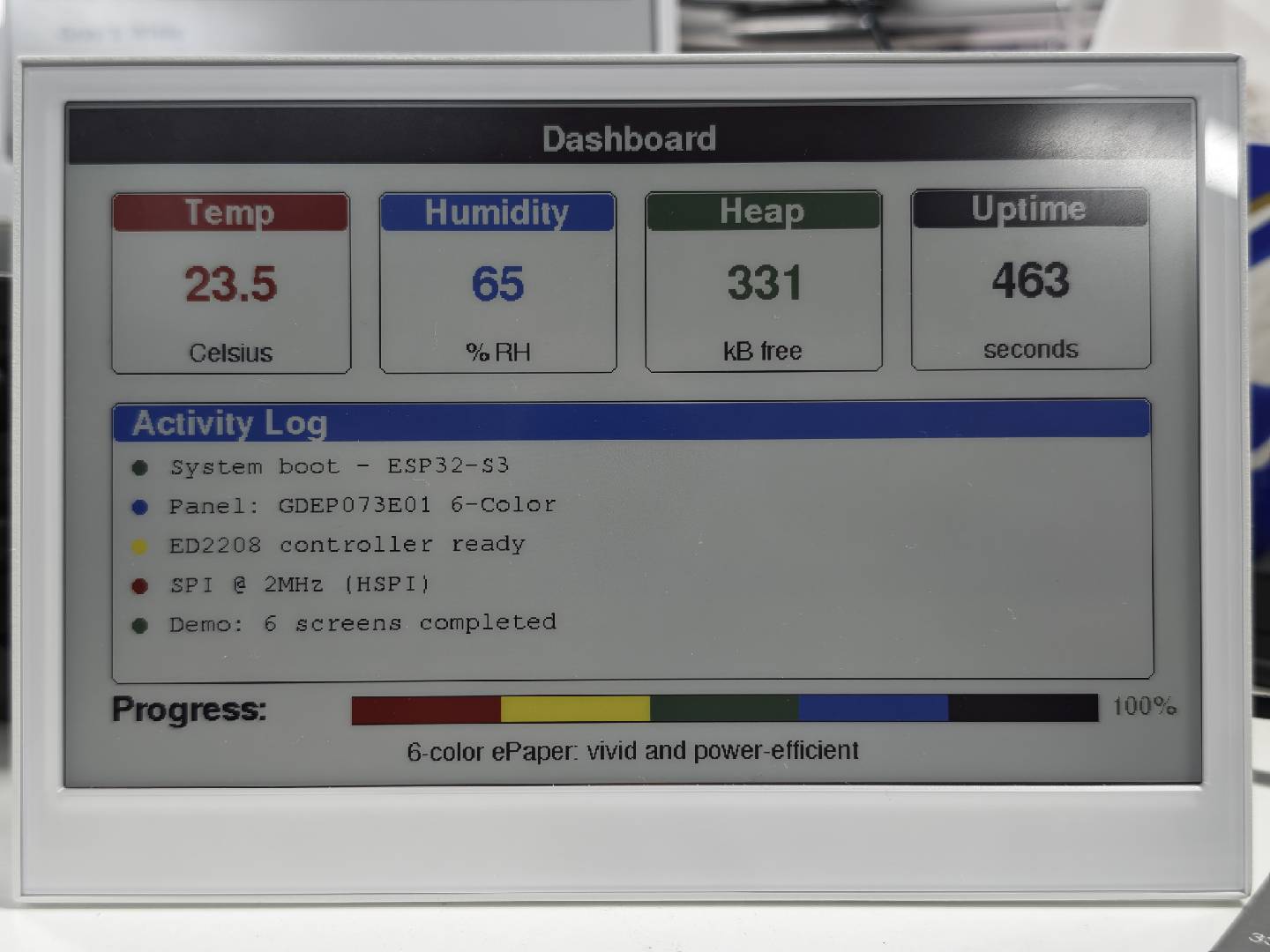
下图展示了 E1002 示例的实际显示效果:
编程 reTerminal E1003(10.3" 单色屏幕)
reTerminal E1003 配备 10.3" 单色电子纸显示屏(1872×1404,ED103TC2 面板,IT8951 控制器)。它支持 16 级灰度,并且需要 OPI PSRAM。本示例依赖于示例文件夹中包含的自定义驱动文件 GxEPD2_ED103TC2_1872x1404.h。
安装 Seeed_GxEPD2 库后,你可以在 Arduino IDE 中通过 File > Examples > Seeed_GxEPD2 > GxEPD2_reTerminal_E1003 找到此示例,或者在 Seeed_GxEPD2/examples/GxEPD2_reTerminal_E1003/ 中手动定位。
E1003 需要在 Arduino IDE 中启用 OPI PSRAM:Tools > PSRAM > OPI PSRAM。约 321 kB 的帧缓冲区存放在 PSRAM 中。
点击此处查看完整代码
#include <SPI.h>
#include <GxEPD2_BW.h>
#include <Fonts/FreeMonoBold9pt7b.h>
#include <Fonts/FreeMonoBold12pt7b.h>
#include <Fonts/FreeSansBold24pt7b.h>
#include <Fonts/FreeSansBold18pt7b.h>
#include <Fonts/FreeSansBold12pt7b.h>
#include <Fonts/FreeSans9pt7b.h>
#include <Fonts/FreeMono9pt7b.h>

#include "GxEPD2_ED103TC2_1872x1404.h"

#define DBG Serial0

// ===== reTerminal E1003 pin mapping =====
#define EPD_SCK_PIN       7
#define EPD_MISO_PIN      8
#define EPD_MOSI_PIN      9
#define EPD_CS_PIN        10
#define EPD_RES_PIN       12
#define EPD_BUSY_PIN      13
#define EPD_TFT_ENABLE    11
#define EPD_ITE_ENABLE    21

SPIClass hspi(HSPI);

// ===== Display object =====
#define MAX_DISPLAY_BUFFER_SIZE 65536u
#define MAX_HEIGHT(EPD) \
    (EPD::HEIGHT <= MAX_DISPLAY_BUFFER_SIZE / (EPD::WIDTH / 8) \
         ? EPD::HEIGHT \
         : MAX_DISPLAY_BUFFER_SIZE / (EPD::WIDTH / 8))

GxEPD2_BW<GxEPD2_ED103TC2_1872x1404, MAX_HEIGHT(GxEPD2_ED103TC2_1872x1404)>
    display(GxEPD2_ED103TC2_1872x1404(EPD_CS_PIN, -1, EPD_RES_PIN, EPD_BUSY_PIN));

// ===== Layout constants =====
static const int HEADER_H = 96;
static const int FOOTER_H = 72;
static const int PAGE_MARGIN = 48;
static const int PANEL_GAP = 24;

// ===== Forward declarations =====
void showSplashScreen();
void showSystemInfo();
void showGeometryDemo();
void showPatternDemo();
void showTypographyDemo();
void showDashboardDemo();

void drawCenteredText(const char* text, int16_t y, const GFXfont* font);
void drawCenteredTextInBox(const char* text, int16_t x, int16_t y, int16_t w, int16_t h, const GFXfont* font);
void drawPageHeader(const char* title, const char* subtitle);
void drawPageFooter(const char* text);
void drawPanelFrame(int x, int y, int w, int h);
void drawCardShell(int x, int y, int w, int h, const char* title);
void drawMetricCard(int x, int y, int w, int h, const char* title, const char* value, const char* unit);
void drawInfoCard(int x, int y, int w, int h, const char* label, const char* value, const GFXfont* valueFont);
void drawTypographyCard(int x, int y, int w, int h, const char* title, const char* sample, const GFXfont* font);

// ===== Setup =====
void setup()
{
  DBG.begin(115200);
  delay(100);
  DBG.println();
  DBG.println(F("=================================================="));
  DBG.println(F("[E1003] GxEPD2 reTerminal E1003 Demo"));
  DBG.print  (F("[E1003] PSRAM = ")); DBG.print(ESP.getPsramSize() / 1024);
  DBG.println(F(" kB"));
  DBG.println(F("=================================================="));

  pinMode(EPD_TFT_ENABLE, OUTPUT); digitalWrite(EPD_TFT_ENABLE, HIGH);
  pinMode(EPD_ITE_ENABLE, OUTPUT); digitalWrite(EPD_ITE_ENABLE, HIGH);
  delay(50);

  pinMode(EPD_RES_PIN, OUTPUT);
  pinMode(EPD_CS_PIN,  OUTPUT); digitalWrite(EPD_CS_PIN, HIGH);

  hspi.begin(EPD_SCK_PIN, EPD_MISO_PIN, EPD_MOSI_PIN, -1);
  display.epd2.selectSPI(hspi, SPISettings(10000000, MSBFIRST, SPI_MODE0));

  display.init(0, true, 10, false);
  DBG.println(F("[E1003] display initialized"));

  // --- Run demo screens ---
  DBG.println(F("[E1003] Screen 1: Splash"));
  showSplashScreen();
  delay(5000);

  DBG.println(F("[E1003] Screen 2: System Info"));
  showSystemInfo();
  delay(5000);

  DBG.println(F("[E1003] Screen 3: Typography"));
  showTypographyDemo();
  delay(5000);

  DBG.println(F("[E1003] Screen 4: Geometry"));
  showGeometryDemo();
  delay(5000);

  DBG.println(F("[E1003] Screen 5: Patterns"));
  showPatternDemo();
  delay(5000);

  DBG.println(F("[E1003] Screen 6: Dashboard"));
  showDashboardDemo();

  DBG.println(F("[E1003] Demo complete. Hibernating."));
  delay(2000);
  display.hibernate();
}

void loop() {}

// =====================================================================
// Helpers
// =====================================================================
void drawCenteredText(const char* text, int16_t y, const GFXfont* font)
{
  display.setFont(font);
  int16_t tbx, tby;
  uint16_t tbw, tbh;
  display.getTextBounds(text, 0, 0, &tbx, &tby, &tbw, &tbh);
  display.setCursor((display.width() - tbw) / 2 - tbx, y);
  display.print(text);
}

void drawCenteredTextInBox(const char* text, int16_t x, int16_t y, int16_t w, int16_t h, const GFXfont* font)
{
  if (!text) return;
  display.setFont(font);
  int16_t tbx, tby;
  uint16_t tbw, tbh;
  display.getTextBounds(text, 0, 0, &tbx, &tby, &tbw, &tbh);
  const int16_t cx = x + (w - tbw) / 2 - tbx;
  const int16_t cy = y + (h - tbh) / 2 - tby;
  display.setCursor(cx, cy);
  display.print(text);
}

void drawPageHeader(const char* title, const char* subtitle)
{
  const uint16_t W = display.width();
  display.fillRect(0, 0, W, HEADER_H, GxEPD_BLACK);

  display.setTextColor(GxEPD_WHITE);
  drawCenteredText(title, 40, &FreeSansBold18pt7b);

  if (subtitle && subtitle[0] != '\0') {
    drawCenteredText(subtitle, 78, &FreeSans9pt7b);
  }

  display.setTextColor(GxEPD_BLACK);
}

void drawPageFooter(const char* text)
{
  const uint16_t W = display.width();
  const uint16_t H = display.height();

  display.drawFastHLine(64, H - 60, W - 128, GxEPD_BLACK);
  display.setFont(&FreeSans9pt7b);
  drawCenteredText(text, H - 34, &FreeSans9pt7b);
}

void drawPanelFrame(int x, int y, int w, int h)
{
  display.drawRoundRect(x, y, w, h, 16, GxEPD_BLACK);
  display.drawRoundRect(x + 2, y + 2, w - 4, h - 4, 14, GxEPD_BLACK);
}

void drawCardShell(int x, int y, int w, int h, const char* title)
{
  drawPanelFrame(x, y, w, h);
  display.fillRoundRect(x + 4, y + 4, w - 8, 38, 10, GxEPD_BLACK);
  display.setTextColor(GxEPD_WHITE);
  drawCenteredTextInBox(title, x + 10, y + 8, w - 20, 24, &FreeSansBold12pt7b);
  display.setTextColor(GxEPD_BLACK);
}

void drawMetricCard(int x, int y, int w, int h, const char* title, const char* value, const char* unit)
{
  drawCardShell(x, y, w, h, title);
  drawCenteredTextInBox(value, x + 18, y + 58, w - 36, h - 108, &FreeSansBold24pt7b);

  if (unit && unit[0] != '\0') {
    display.setFont(&FreeSans9pt7b);
    drawCenteredTextInBox(unit, x + 20, y + h - 36, w - 40, 20, &FreeSans9pt7b);
  }
}

void drawInfoCard(int x, int y, int w, int h, const char* label, const char* value, const GFXfont* valueFont)
{
  drawCardShell(x, y, w, h, label);
  display.setTextColor(GxEPD_BLACK);
  drawCenteredTextInBox(value, x + 20, y + 54, w - 40, h - 78, valueFont);
}

void drawTypographyCard(int x, int y, int w, int h, const char* title, const char* sample, const GFXfont* font)
{
  drawCardShell(x, y, w, h, title);
  drawCenteredTextInBox(sample, x + 20, y + 54, w - 40, h - 78, font);
}

// =====================================================================
// Screen 1: Splash screen
// =====================================================================
void showSplashScreen()
{
  const uint16_t W = display.width();
  const uint16_t H = display.height();

  display.setRotation(0);
  display.setFullWindow();
  display.firstPage();
  do {
    display.fillScreen(GxEPD_WHITE);

    // Outer frame
    display.drawRect(24, 24, W - 48, H - 48, GxEPD_BLACK);
    display.drawRect(34, 34, W - 68, H - 68, GxEPD_BLACK);

    // Hero panel in the center
    const int heroX = 140;
    const int heroY = 150;
    const int heroW = W - 280;
    const int heroH = H - 420;

    drawPanelFrame(heroX, heroY, heroW, heroH);

    display.fillRoundRect(heroX + 6, heroY + 6, heroW - 12, 54, 12, GxEPD_BLACK);
    display.setTextColor(GxEPD_WHITE);
    drawCenteredTextInBox("reTerminal E1003", heroX + 20, heroY + 14, heroW - 40, 30, &FreeSansBold18pt7b);

    display.setTextColor(GxEPD_BLACK);
    drawCenteredTextInBox("10.3\" e-Paper Display", heroX + 40, heroY + 96, heroW - 80, 90, &FreeSansBold24pt7b);
    drawCenteredTextInBox("GxEPD2 + IT8951 Driver Demo", heroX + 40, heroY + 210, heroW - 80, 64, &FreeSansBold18pt7b);

    display.drawFastHLine(heroX + 120, heroY + 292, heroW - 240, GxEPD_BLACK);
    drawCenteredTextInBox("1872 x 1404 pixels | ED103TC2 panel", heroX + 40, heroY + 316, heroW - 80, 44, &FreeSansBold12pt7b);
    drawCenteredTextInBox("Powered by ESP32-S3 + PSRAM", heroX + 40, heroY + 366, heroW - 80, 34, &FreeSans9pt7b);

    // Bottom three badges
    const int badgeY = H - 180;
    const int badgeW = (W - 2 * PAGE_MARGIN - 2 * PANEL_GAP) / 3;
    const int badgeH = 92;
    const int badgeX1 = PAGE_MARGIN;
    const int badgeX2 = badgeX1 + badgeW + PANEL_GAP;
    const int badgeX3 = badgeX2 + badgeW + PANEL_GAP;

    drawPanelFrame(badgeX1, badgeY, badgeW, badgeH);
    drawPanelFrame(badgeX2, badgeY, badgeW, badgeH);
    drawPanelFrame(badgeX3, badgeY, badgeW, badgeH);

    drawCenteredTextInBox("Large Canvas", badgeX1 + 12, badgeY + 12, badgeW - 24, badgeH - 24, &FreeSansBold12pt7b);
    drawCenteredTextInBox("High Contrast", badgeX2 + 12, badgeY + 12, badgeW - 24, badgeH - 24, &FreeSansBold12pt7b);
    drawCenteredTextInBox("Low Power Image Hold", badgeX3 + 12, badgeY + 12, badgeW - 24, badgeH - 24, &FreeSansBold12pt7b);

    // Footer note
    drawCenteredText("Seeed Studio x GxEPD2", H - 70, &FreeSans9pt7b);

  } while (display.nextPage());
}

// =====================================================================
// Screen 2: System information
// =====================================================================
void showSystemInfo()
{
  const uint16_t W = display.width();
  const uint16_t H = display.height();

  display.setRotation(0);
  display.setFullWindow();
  display.firstPage();
  do {
    display.fillScreen(GxEPD_WHITE);
    drawPageHeader("System Information", "Hardware, memory and display details laid out as cards");

    const int contentX = PAGE_MARGIN;
    const int contentY = HEADER_H + 18;
    const int contentW = W - 2 * PAGE_MARGIN;
    const int contentH = H - HEADER_H - FOOTER_H - 36;
    const int gapX = PANEL_GAP;
    const int gapY = 16;
    const int cardW = (contentW - gapX) / 2;
    const int cardH = (contentH - 4 * gapY) / 5;

    char psramBuf[32], heapBuf[32], chipBuf[64], dispBuf[32], uptimeBuf[32];
    snprintf(psramBuf, sizeof(psramBuf), "%lu kB", (unsigned long)(ESP.getPsramSize() / 1024));
    snprintf(heapBuf,  sizeof(heapBuf),  "%lu kB free", (unsigned long)(ESP.getFreeHeap() / 1024));
    snprintf(chipBuf,  sizeof(chipBuf),  "ESP32-S3 @ %lu MHz", (unsigned long)(ESP.getCpuFreqMHz()));
    snprintf(dispBuf,  sizeof(dispBuf),  "%d x %d", display.width(), display.height());
    unsigned long sec = millis() / 1000;
    snprintf(uptimeBuf, sizeof(uptimeBuf), "%lu.%01lu s", sec, (millis() % 1000) / 100);

    struct InfoCardSpec {
      const char* label;
      const char* value;
      const GFXfont* font;
    };

    InfoCardSpec cards[] = {
      {"MCU",        chipBuf,     &FreeSansBold18pt7b},
      {"PSRAM",      psramBuf,    &FreeSansBold18pt7b},
      {"Heap",       heapBuf,     &FreeSansBold18pt7b},
      {"Display",    dispBuf,     &FreeSansBold18pt7b},
      {"Panel",      "E Ink ED103TC2", &FreeSansBold12pt7b},
      {"Controller", "IT8951",    &FreeSansBold18pt7b},
      {"Interface",  "SPI (HSPI/SPI3) @ 10MHz", &FreeSansBold12pt7b},
      {"Color",      "Monochrome (BW)", &FreeSansBold18pt7b},
      {"Library",    "GxEPD2",    &FreeSansBold18pt7b},
      {"Uptime",     uptimeBuf,   &FreeSansBold18pt7b},
    };

    for (int i = 0; i < 10; i++) {
      const int col = i % 2;
      const int row = i / 2;
      const int x = contentX + col * (cardW + gapX);
      const int y = contentY + row * (cardH + gapY);
      drawInfoCard(x, y, cardW, cardH, cards[i].label, cards[i].value, cards[i].font);
    }

    drawPageFooter("reTerminal E1003 | GxEPD2 Demo");

  } while (display.nextPage());
}

// =====================================================================
// Screen 3: Typography showcase
// =====================================================================
void showTypographyDemo()
{
  const uint16_t W = display.width();
  const uint16_t H = display.height();

  display.setRotation(0);
  display.setFullWindow();
  display.firstPage();
  do {
    display.fillScreen(GxEPD_WHITE);
    drawPageHeader("Typography Demo", "Font families and sizes shown in a balanced card grid");

    const int contentX = PAGE_MARGIN;
    const int contentY = HEADER_H + 18;
    const int contentW = W - 2 * PAGE_MARGIN;
    const int contentH = H - HEADER_H - FOOTER_H - 36;
    const int gapX = PANEL_GAP;
    const int gapY = PANEL_GAP;
    const int cardW = (contentW - gapX) / 2;
    const int cardH = (contentH - 2 * gapY) / 3;

    drawTypographyCard(contentX,                    contentY,                    cardW, cardH, "FreeSans Bold 24pt", "Display Title", &FreeSansBold24pt7b);
    drawTypographyCard(contentX + cardW + gapX,     contentY,                    cardW, cardH, "FreeSans Bold 18pt", "Section Heading", &FreeSansBold18pt7b);
    drawTypographyCard(contentX,                    contentY + cardH + gapY,     cardW, cardH, "FreeSans Bold 12pt", "Clean and readable", &FreeSansBold12pt7b);
    drawTypographyCard(contentX + cardW + gapX,     contentY + cardH + gapY,     cardW, cardH, "FreeSans 9pt", "Body text for dense data", &FreeSans9pt7b);
    drawTypographyCard(contentX,                    contentY + 2 * (cardH + gapY), cardW, cardH, "FreeMono Bold 12pt", "0123456789 ABCDEF", &FreeMonoBold12pt7b);
    drawTypographyCard(contentX + cardW + gapX,     contentY + 2 * (cardH + gapY), cardW, cardH, "FreeMono 9pt", "Code / tables / logs", &FreeMono9pt7b);

    drawPageFooter("Typography is easier to scan when the page is divided into readable blocks");

  } while (display.nextPage());
}

// =====================================================================
// Screen 4: Geometric shapes
// =====================================================================
void showGeometryDemo()
{
  const uint16_t W = display.width();
  const uint16_t H = display.height();

  display.setRotation(0);
  display.setFullWindow();
  display.firstPage();
  do {
    display.fillScreen(GxEPD_WHITE);
    drawPageHeader("Geometry & Shapes Demo", "Each panel gets enough space to breathe");

    const int contentX = PAGE_MARGIN;
    const int contentY = HEADER_H + 18;
    const int contentW = W - 2 * PAGE_MARGIN;
    const int contentH = H - HEADER_H - FOOTER_H - 36;
    const int gapX = PANEL_GAP;
    const int gapY = PANEL_GAP;
    const int panelW = (contentW - gapX) / 2;
    const int panelH = (contentH - gapY) / 2;

    // Top-left: rectangles
    const int p1x = contentX;
    const int p1y = contentY;
    drawCardShell(p1x, p1y, panelW, panelH, "Rectangles");
    for (int i = 0; i < 4; i++) {
      display.drawRect(p1x + 80 + i * 130, p1y + 100 + i * 10, 100, 70, GxEPD_BLACK);
    }
    display.fillRect(p1x + 650, p1y + 100, 120, 90, GxEPD_BLACK);
    display.drawRect(p1x + 620, p1y + 70, 160, 150, GxEPD_BLACK);

    // Top-right: circles
    const int p2x = contentX + panelW + gapX;
    const int p2y = contentY;
    drawCardShell(p2x, p2y, panelW, panelH, "Circles");
    for (int i = 0; i < 5; i++) {
      display.drawCircle(p2x + 130 + i * 120, p2y + 150, 28 + i * 7, GxEPD_BLACK);
    }
    for (int i = 0; i < 4; i++) {
      display.fillCircle(p2x + 170 + i * 150, p2y + 340, 18 + i * 6, GxEPD_BLACK);
    }

    // Bottom-left: triangles and line fan
    const int p3x = contentX;
    const int p3y = contentY + panelH + gapY;
    drawCardShell(p3x, p3y, panelW, panelH, "Triangles and Lines");
    for (int i = 0; i < 5; i++) {
      int tx = p3x + 90 + i * 120;
      int ty = p3y + 120;
      int sz = 70 + i * 10;
      display.drawTriangle(tx, ty + sz, tx + sz / 2, ty, tx + sz, ty + sz, GxEPD_BLACK);
    }
    const int fanCx = p3x + 180;
    const int fanCy = p3y + 380;
    for (int angle = 0; angle < 180; angle += 12) {
      const float rad = angle * 3.1415926f / 180.0f;
      const int ex = fanCx + (int)(150.0f * cosf(rad));
      const int ey = fanCy - (int)(150.0f * sinf(rad));
      display.drawLine(fanCx, fanCy, ex, ey, GxEPD_BLACK);
    }

    // Bottom-right: concentric circles and rounded rectangles
    const int p4x = contentX + panelW + gapX;
    const int p4y = contentY + panelH + gapY;
    drawCardShell(p4x, p4y, panelW, panelH, "Rounded Shapes");
    const int ccx = p4x + 240;
    const int ccy = p4y + 235;
    for (int r = 30; r <= 150; r += 24) {
      display.drawCircle(ccx, ccy, r, GxEPD_BLACK);
    }
    const int rrx = p4x + 520;
    const int rry = p4y + 120;
    for (int i = 0; i < 4; i++) {
      display.drawRoundRect(rrx + i * 14, rry + i * 14,
                            250 - i * 28, 230 - i * 28,
                            24 - i * 3, GxEPD_BLACK);
    }

    drawPageFooter("Adafruit GFX primitives on a wide e-paper canvas");

  } while (display.nextPage());
}

// =====================================================================
// Screen 5: Patterns
// =====================================================================
void showPatternDemo()
{
  const uint16_t W = display.width();
  const uint16_t H = display.height();

  display.setRotation(0);
  display.setFullWindow();
  display.firstPage();
  do {
    display.fillScreen(GxEPD_WHITE);
    drawPageHeader("Pattern & Fill Demo", "Six pattern tiles arranged in a clean 3 x 2 grid");

    const int contentX = PAGE_MARGIN;
    const int contentY = HEADER_H + 18;
    const int contentW = W - 2 * PAGE_MARGIN;
    const int contentH = H - HEADER_H - FOOTER_H - 36;
    const int gapX = PANEL_GAP;
    const int gapY = PANEL_GAP;
    const int tileW = (contentW - 2 * gapX) / 3;
    const int tileH = (contentH - gapY) / 2;

    struct TileSpec {
      const char* title;
    };

    TileSpec tiles[] = {
      {"Checkerboard"},
      {"H-Stripes"},
      {"V-Stripes"},
      {"Dot Grid"},
      {"Diagonal"},
      {"Dither Gradient"},
    };

    for (int i = 0; i < 6; i++) {
      const int col = i % 3;
      const int row = i / 3;
      const int x = contentX + col * (tileW + gapX);
      const int y = contentY + row * (tileH + gapY);
      drawCardShell(x, y, tileW, tileH, tiles[i].title);

      const int innerX = x + 16;
      const int innerY = y + 58;
      const int innerW = tileW - 32;
      const int innerH = tileH - 74;

      if (i == 0) {
        const int sz = 22;
        for (int py = 0; py < innerH / sz + 1; py++) {
          for (int px = 0; px < innerW / sz + 1; px++) {
            if ((px + py) & 1) {
              display.fillRect(innerX + px * sz, innerY + py * sz, sz, sz, GxEPD_BLACK);
            }
          }
        }
      } else if (i == 1) {
        for (int py = 0; py < innerH; py += 14) {
          if ((py / 14) & 1) {
            display.fillRect(innerX, innerY + py, innerW, 14, GxEPD_BLACK);
          }
        }
      } else if (i == 2) {
        for (int px = 0; px < innerW; px += 14) {
          if ((px / 14) & 1) {
            display.fillRect(innerX + px, innerY, 14, innerH, GxEPD_BLACK);
          }
        }
      } else if (i == 3) {
        for (int py = 0; py < innerH; py += 22) {
          for (int px = 0; px < innerW; px += 22) {
            display.fillCircle(innerX + px + 11, innerY + py + 11, 4, GxEPD_BLACK);
          }
        }
      } else if (i == 4) {
        display.drawRect(innerX, innerY, innerW, innerH, GxEPD_BLACK);
        for (int d = -innerH; d < innerW; d += 18) {
          int x0 = innerX + max(0, d);
          int y0 = innerY + max(0, -d);
          int x1 = innerX + min(innerW - 1, d + innerH - 1);
          int y1 = innerY + min(innerH - 1, -d + innerW - 1);
          display.drawLine(x0, y0, x1, y1, GxEPD_BLACK);
        }
      } else {
        display.drawRect(innerX, innerY, innerW, innerH, GxEPD_BLACK);
        for (int py = 0; py < innerH; py++) {
          for (int px = 0; px < innerW; px++) {
            int density = (px * 255) / innerW;
            if ((((px * 7 + py * 13) ^ (px * py)) & 0xFF) < density) {
              display.drawPixel(innerX + px, innerY + py, GxEPD_BLACK);
            }
          }
        }
      }
    }

    drawPageFooter("Patterns are easier to compare when each sample gets the same amount of space");

  } while (display.nextPage());
}

// =====================================================================
// Screen 6: Dashboard-style layout
// =====================================================================
void showDashboardDemo()
{
  const uint16_t W = display.width();
  const uint16_t H = display.height();

  display.setRotation(0);
  display.setFullWindow();
  display.firstPage();
  do {
    display.fillScreen(GxEPD_WHITE);
    drawPageHeader("Dashboard Demo", "A large, readable layout with metrics, logs and a status bar");

    const int contentX = PAGE_MARGIN;
    const int contentY = HEADER_H + 18;
    const int contentW = W - 2 * PAGE_MARGIN;
    const int contentH = H - HEADER_H - FOOTER_H - 36;
    const int gapX = PANEL_GAP;
    const int gapY = PANEL_GAP;

    // Top row metrics
    const int metricH = 220;
    const int metricW = (contentW - 3 * gapX) / 4;

    char uptimeBuf[16];
    snprintf(uptimeBuf, sizeof(uptimeBuf), "%lu", millis() / 1000);

    char heapBuf[16];
    snprintf(heapBuf, sizeof(heapBuf), "%lu", (unsigned long)(ESP.getFreeHeap() / 1024));

    drawMetricCard(contentX + 0 * (metricW + gapX), contentY, metricW, metricH, "Temperature", "23.5", "Celsius");
    drawMetricCard(contentX + 1 * (metricW + gapX), contentY, metricW, metricH, "Humidity", "65", "% RH");
    drawMetricCard(contentX + 2 * (metricW + gapX), contentY, metricW, metricH, "Free Heap", heapBuf, "kB");
    drawMetricCard(contentX + 3 * (metricW + gapX), contentY, metricW, metricH, "Uptime", uptimeBuf, "seconds");

    // Activity log panel
    const int logY = contentY + metricH + gapY;
    const int logH = 460;
    drawCardShell(contentX, logY, contentW, logH, "Activity Log");

    const char* logEntries[] = {
      "[00:00:01] System boot complete - ESP32-S3 @ 240MHz",
      "[00:00:02] PSRAM initialized: 8192 kB available",
      "[00:00:03] IT8951 controller detected (FW: eSee_d.v.0)",
      "[00:00:03] Panel: ED103TC2 1872x1404, VCOM=-1.40V",
      "[00:00:04] SPI bus configured: HSPI @ 10MHz",
      "[00:00:05] Display driver ready - full refresh mode",
      "[00:00:06] Demo sequence started...",
    };

    display.setFont(&FreeMono9pt7b);
    const int lineX = contentX + 24;
    const int lineY = logY + 72;
    const int lineH = 48;

    for (int i = 0; i < 7; i++) {
      display.setCursor(lineX, lineY + i * lineH);
      display.print(logEntries[i]);
      if (i < 6) {
        display.drawFastHLine(contentX + 20, lineY + i * lineH + 18, contentW - 40, GxEPD_BLACK);
      }
    }

    // Bottom status strip
    const int statusY = logY + logH + gapY;
    const int statusH = contentH - metricH - logH - 2 * gapY;
    drawPanelFrame(contentX, statusY, contentW, statusH);

    display.fillRoundRect(contentX + 4, statusY + 4, contentW - 8, 42, 10, GxEPD_BLACK);
    display.setTextColor(GxEPD_WHITE);
    drawCenteredTextInBox("Progress", contentX + 20, statusY + 10, 160, 24, &FreeSansBold12pt7b);

    const int barX = contentX + 180;
    const int barY = statusY + 18;
    const int barW = contentW - 360;
    const int barH = 28;

    display.setTextColor(GxEPD_BLACK);
    display.drawRect(barX, barY, barW, barH, GxEPD_BLACK);
    display.fillRect(barX + 2, barY + 2, barW - 4, barH - 4, GxEPD_BLACK);

    display.setFont(&FreeSans9pt7b);
    display.setCursor(barX + barW + 16, barY + 22);
    display.print("100% - Demo Complete!");

    display.setFont(&FreeSans9pt7b);
    display.setCursor(contentX + 24, statusY + statusH - 18);
    display.print("E-paper is ideal for dashboards: the image stays visible without refresh power");

    drawPageFooter("Wide screens work better when the key information is grouped into strong blocks");

  } while (display.nextPage());
}
下图展示了 E1003 示例的实际显示效果:
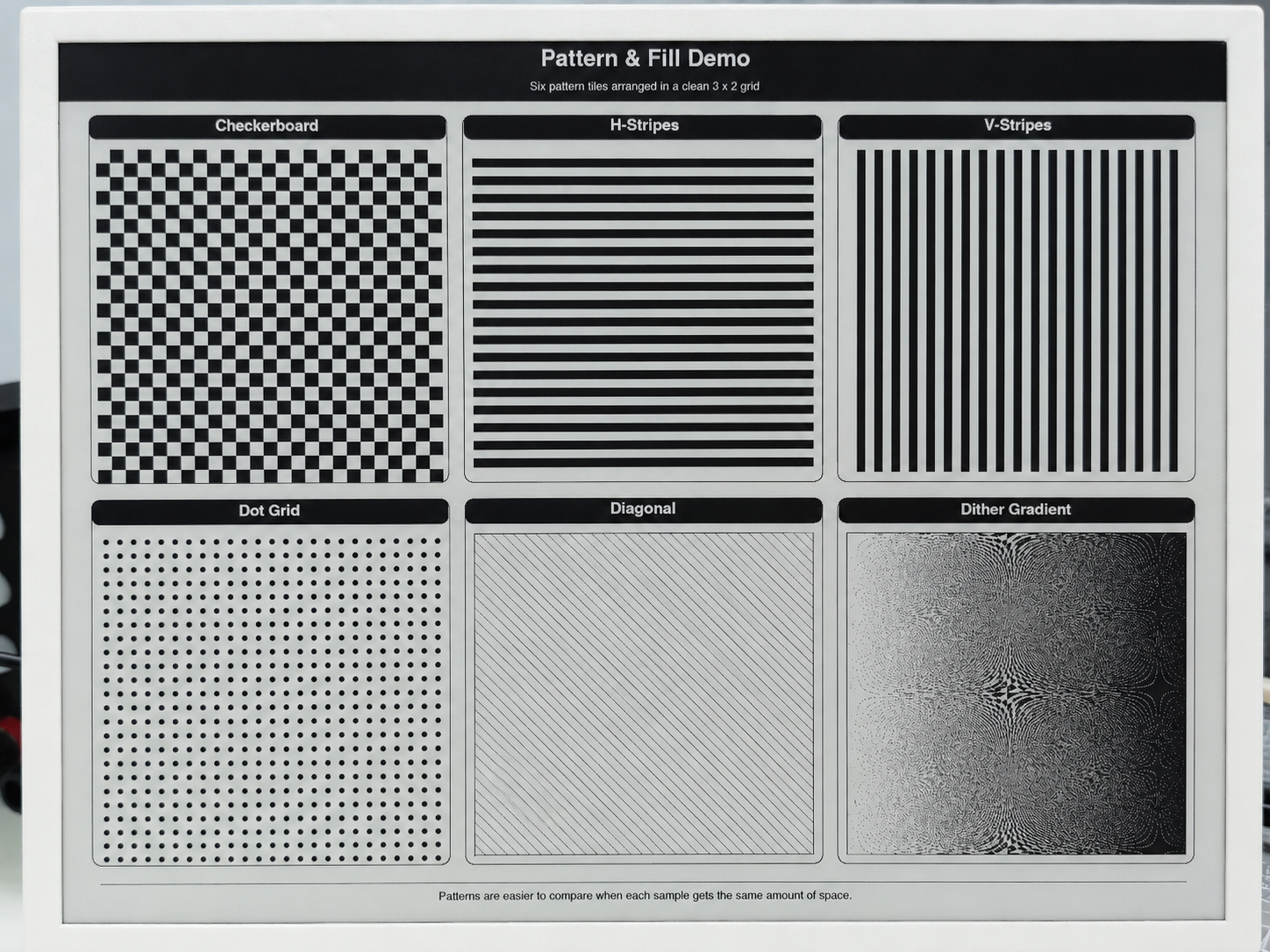
E1003 示例的完整源代码(包含所有 6 个演示界面,并完整实现了 Splash、System Info、Typography、Geometry、Patterns 和 Dashboard)可在仓库 Seeed_GxEPD2/examples/GxEPD2_reTerminal_E1003/ 中找到。该示例包含用于居中文本、页面页眉/页脚以及针对 10.3" 大屏优化的卡片式布局的辅助函数。
编程 reTerminal E1004(13.3" 6 色屏幕)
reTerminal E1004 配备一块 13.3" 6 色电子纸显示屏(1200×1600,T133A01 面板,双芯片控制器,Spectra 6)。它支持黑、白、红、绿、蓝和黄六种颜色。该示例依赖示例文件夹中包含的自定义驱动文件 GxEPD2_T133A01_1200x1600.h。
安装 Seeed_GxEPD2 库后,你可以在 Arduino IDE 中通过 File > Examples > Seeed_GxEPD2 > GxEPD2_reTerminal_E1004 找到该示例,或者在 Seeed_GxEPD2/examples/GxEPD2_reTerminal_E1004/ 路径下手动定位。
E1004 需要在 Arduino IDE 中启用 OPI PSRAM:Tools > PSRAM > OPI PSRAM。约 937 KB 的帧缓冲区存放在 PSRAM 中。
点击此处查看完整代码
#include <SPI.h>
#include <GxEPD2_7C.h>
#include "GxEPD2_T133A01_1200x1600.h"

// reTerminal serial monitor uses UART0.  With "USB CDC On Boot: Enabled",
// Serial = USB CDC, Serial0 = UART0 (the physical TX/RX pads on the board).
// All driver-level diagnostic output is sent through Serial0.
#define DBG Serial0
#include <Fonts/FreeMonoBold9pt7b.h>
#include <Fonts/FreeMonoBold12pt7b.h>
#include <Fonts/FreeSansBold24pt7b.h>
#include <Fonts/FreeSansBold18pt7b.h>
#include <Fonts/FreeSansBold12pt7b.h>
#include <Fonts/FreeSans9pt7b.h>
#include <Fonts/FreeMono9pt7b.h>

// ===== Pin mapping =====
#define EPD_SCK_PIN   7
#define EPD_MISO_PIN  8
#define EPD_MOSI_PIN  9
#define EPD_CS_PIN    10
#define EPD_DC_PIN    11
#define EPD_CS1_PIN   2
#define EPD_RES_PIN   38
#define EPD_BUSY_PIN  13
#define EPD_ENABLE_PIN 12

SPIClass hspi(HSPI);

// ===== Display: 13.3" 6-Color 1200x1600, dual-chip =====
#define MAX_DISPLAY_BUFFER_SIZE 24000u
#define MAX_HEIGHT(EPD) \
    (EPD::HEIGHT <= (MAX_DISPLAY_BUFFER_SIZE) / (EPD::WIDTH / 2) \
         ? EPD::HEIGHT \
         : (MAX_DISPLAY_BUFFER_SIZE) / (EPD::WIDTH / 2))

GxEPD2_7C<GxEPD2_T133A01_1200x1600, MAX_HEIGHT(GxEPD2_T133A01_1200x1600)>
    display(GxEPD2_T133A01_1200x1600(EPD_CS_PIN, EPD_DC_PIN, EPD_RES_PIN,
                                      EPD_BUSY_PIN, EPD_CS1_PIN, EPD_ENABLE_PIN));

// Color shorthand — T133A01 is a Spectra 6 panel.  Only these six
// colors are physically reproducible; the demo never references
// GxEPD_ORANGE because the panel has no native orange ink.
#define C_BLACK   GxEPD_BLACK
#define C_WHITE   GxEPD_WHITE
#define C_GREEN   GxEPD_GREEN
#define C_BLUE    GxEPD_BLUE
#define C_RED     GxEPD_RED
#define C_YELLOW  GxEPD_YELLOW

void setup()
{
  Serial.begin(115200);
  DBG.begin(115200);     // hardware UART0 (where the user's serial monitor is attached)
  delay(200);
  Serial.println(F("[E1004] GxEPD2 reTerminal E1004 Demo (13.3\" 6-Color)"));
  DBG.println(F("[E1004] GxEPD2 reTerminal E1004 Demo (13.3\" 6-Color)"));

  hspi.begin(EPD_SCK_PIN, EPD_MISO_PIN, EPD_MOSI_PIN, -1);
  // Match Seeed_GFX: 10 MHz SPI clock (XIAO_SPI_Frequency.h)
  display.epd2.selectSPI(hspi, SPISettings(10000000, MSBFIRST, SPI_MODE0));
  display.init(115200);  // enable diagnostic prints over Serial0/UART0

  // E1004 is a 13.3" 6-color panel — full refresh itself takes around 40s.
  // Keep each rendered page visible for at least 60s before moving on.
  const uint32_t PAGE_HOLD_MS = 60000;

  Serial.println(F("[E1004] Screen 1: Splash"));
  showSplashScreen();
  delay(PAGE_HOLD_MS);

  Serial.println(F("[E1004] Screen 2: Color Palette"));
  showColorPalette();
  delay(PAGE_HOLD_MS);

  Serial.println(F("[E1004] Screen 3: Typography"));
  showColorTypography();
  delay(PAGE_HOLD_MS);

  Serial.println(F("[E1004] Screen 4: Geometry"));
  showColorGeometry();
  delay(PAGE_HOLD_MS);

  Serial.println(F("[E1004] Screen 5: Patterns"));
  showColorPatterns();
  delay(PAGE_HOLD_MS);

  Serial.println(F("[E1004] Screen 6: Dashboard"));
  showDashboard();
  delay(PAGE_HOLD_MS);

  Serial.println(F("[E1004] Demo complete. Hibernating."));
  display.hibernate();
}

void loop() {}

// =====================================================================
void drawCenteredText(const char* text, int16_t y, const GFXfont* font)
{
  display.setFont(font);
  int16_t tbx, tby; uint16_t tbw, tbh;
  display.getTextBounds(text, 0, 0, &tbx, &tby, &tbw, &tbh);
  display.setCursor((display.width() - tbw) / 2 - tbx, y);
  display.print(text);
}

// =====================================================================
// Screen 1: Splash
// =====================================================================
void showSplashScreen()
{
  const uint16_t W = display.width();
  const uint16_t H = display.height();
  display.setRotation(0);
  display.setFullWindow();
  display.firstPage();
  do {
    display.fillScreen(C_WHITE);

    // Colorful top band (5 panel colors, excluding white)
    uint16_t colors[] = {C_RED, C_YELLOW, C_GREEN, C_BLUE, C_BLACK};
    int stripeW = (W - 40) / 5;
    for (int i = 0; i < 5; i++)
      display.fillRect(20 + i * stripeW, 20, stripeW, 16, colors[i]);

    display.drawRect(20, 50, W - 40, H - 70, C_BLACK);
    display.drawRect(24, 54, W - 48, H - 78, C_BLACK);

    display.setTextColor(C_BLACK);
    drawCenteredText("reTerminal E1004", H / 2 - 120, &FreeSansBold24pt7b);

    display.setTextColor(C_RED);
    drawCenteredText("13.3\" 6-Color e-Paper", H / 2 - 60, &FreeSansBold18pt7b);

    display.drawFastHLine(W / 4, H / 2 - 20, W / 2, C_BLUE);

    display.setTextColor(C_GREEN);
    drawCenteredText("GxEPD2 + T133A01 Driver", H / 2 + 20, &FreeSansBold18pt7b);

    display.setTextColor(C_BLUE);
    drawCenteredText("1200 x 1600 | Dual-Chip | 6 Colors", H / 2 + 70, &FreeSansBold12pt7b);

    display.setTextColor(C_RED);
    drawCenteredText("PSRAM framebuffer | ~937 KB", H / 2 + 110, &FreeSans9pt7b);

    // Bottom colorful band (reverse order)
    for (int i = 0; i < 5; i++)
      display.fillRect(20 + i * stripeW, H - 36, stripeW, 16, colors[4 - i]);

    display.setTextColor(C_BLACK);
    drawCenteredText("Seeed Studio x GxEPD2", H - 50, &FreeSans9pt7b);
  } while (display.nextPage());
}

// =====================================================================
// Screen 2: Color Palette
// =====================================================================
void showColorPalette()
{
  const uint16_t W = display.width();
  const uint16_t H = display.height();
  display.setRotation(0);
  display.setFullWindow();
  display.firstPage();
  do {
    display.fillScreen(C_WHITE);
    display.fillRect(0, 0, W, 50, C_BLACK);
    display.setTextColor(C_WHITE);
    drawCenteredText("6-Color Palette", 38, &FreeSansBold18pt7b);

    const uint16_t swatchColors[] = {C_BLACK, C_WHITE, C_RED, C_GREEN, C_BLUE, C_YELLOW};
    const char* names[] = {"Black", "White", "Red", "Green", "Blue", "Yellow"};
    int sw = 160, sh = 180, gap = 14;
    int sx = (W - 6 * sw - 5 * gap) / 2;
    int sy = 90;

    for (int i = 0; i < 6; i++) {
      int x = sx + i * (sw + gap);
      display.fillRoundRect(x, sy, sw, sh, 8, swatchColors[i]);
      display.drawRoundRect(x, sy, sw, sh, 8, C_BLACK);
      display.setFont(&FreeSansBold12pt7b);
      display.setTextColor(C_BLACK);
      int16_t tbx, tby; uint16_t tbw, tbh;
      display.getTextBounds(names[i], 0, 0, &tbx, &tby, &tbw, &tbh);
      display.setCursor(x + (sw - tbw) / 2 - tbx, sy + sh + 30);
      display.print(names[i]);
    }

    // Color combos (circles on colored backgrounds)
    int row2Y = sy + sh + 85;
    display.setFont(&FreeSansBold12pt7b);
    display.setTextColor(C_BLACK);
    display.setCursor(sx, row2Y - 10);
    display.print("Color combinations:");

    int cx = sx + 20;
    uint16_t bgCols[] = {C_RED, C_GREEN, C_BLUE, C_YELLOW, C_BLACK};
    uint16_t fgCols[] = {C_YELLOW, C_RED, C_GREEN, C_BLUE, C_RED};
    for (int i = 0; i < 5; i++) {
      int x = cx + i * 180;
      display.fillRoundRect(x, row2Y + 10, 150, 120, 10, bgCols[i]);
      display.fillCircle(x + 75, row2Y + 70, 40, fgCols[i]);
    }

    // Full-width bars
    int barY = row2Y + 180;
    display.setTextColor(C_BLACK);
    display.setCursor(sx, barY - 10);
    display.print("Full-width color bars:");
    uint16_t barCols[] = {C_RED, C_YELLOW, C_GREEN, C_BLUE, C_BLACK};
    for (int i = 0; i < 5; i++)
      display.fillRect(sx, barY + 10 + i * 32, W - 2 * sx, 24, barCols[i]);

    // Large circle ring composition
    int ringY = barY + 240;
    display.setTextColor(C_BLACK);
    display.setCursor(sx, ringY - 10);
    display.print("Overlapping circles:");
    uint16_t ringColors[] = {C_RED, C_YELLOW, C_GREEN, C_BLUE, C_BLACK};
    for (int i = 0; i < 5; i++)
      display.fillCircle(sx + 100 + i * 200, ringY + 100, 80, ringColors[i]);

    drawCenteredText("All 6 colors on 13.3\" e-Paper", H - 30, &FreeSans9pt7b);
  } while (display.nextPage());
}

// =====================================================================
// Screen 3: Typography
// =====================================================================
void showColorTypography()
{
  const uint16_t W = display.width();
  const uint16_t H = display.height();
  display.setRotation(0);
  display.setFullWindow();
  display.firstPage();
  do {
    display.fillScreen(C_WHITE);
    display.fillRect(0, 0, W, 50, C_BLUE);
    display.setTextColor(C_WHITE);
    drawCenteredText("Color Typography", 38, &FreeSansBold18pt7b);

    int y = 110, x = 50;

    // Large colored headings
    display.setTextColor(C_BLACK);
    display.setFont(&FreeSansBold24pt7b);
    display.setCursor(x, y); display.print("Black 24pt");
    display.setTextColor(C_RED);
    display.setCursor(x + 420, y); display.print("Red 24pt");
    y += 75;

    display.setTextColor(C_GREEN);
    display.setFont(&FreeSansBold24pt7b);
    display.setCursor(x, y); display.print("Green");
    display.setTextColor(C_BLUE);
    display.setCursor(x + 280, y); display.print("Blue");
    display.setTextColor(C_YELLOW);
    display.setCursor(x + 500, y); display.print("Yellow");
    y += 85;

    display.setTextColor(C_YELLOW);
    display.setFont(&FreeSansBold18pt7b);
    display.setCursor(x, y); display.print("Yellow 18pt - warm sunshine");
    y += 72;

    display.drawFastHLine(x, y, W - 100, C_RED);
    y += 35;

    // Color text on color backgrounds
    display.setFont(&FreeSansBold12pt7b);
    uint16_t bgColors[] = {C_RED, C_GREEN, C_BLUE, C_YELLOW, C_BLACK, C_WHITE};
    const char* labels[] = {
      " White on Red ", " White on Green ", " White on Blue ",
      " Black on Yellow ", " Red on Black ", " Black on White "
    };
    uint16_t fgText[] = {C_WHITE, C_WHITE, C_WHITE, C_BLACK, C_RED, C_BLACK};
    for (int i = 0; i < 6; i++) {
      int bx = (i < 3) ? x : x + 500;
      int by = y + (i % 3) * 65;
      display.fillRoundRect(bx, by, 400, 45, 6, bgColors[i]);
      display.setTextColor(fgText[i]);
      display.setCursor(bx + 15, by + 32);
      display.print(labels[i]);
    }
    y += 240;

    // Right-side: black box with colored text
    int rbx = x, rby = y;
    display.fillRoundRect(rbx, rby, W - 100, 420, 10, C_BLACK);
    display.setFont(&FreeSansBold24pt7b);
    int ry = rby + 60;
    uint16_t rColors[] = {C_RED, C_GREEN, C_BLUE, C_YELLOW, C_WHITE};
    const char* rLabels[] = {"Red on Dark", "Green on Dark", "Blue on Dark",
                              "Yellow on Dark", "White on Dark"};
    for (int i = 0; i < 5; i++) {
      display.setTextColor(rColors[i]);
      display.setCursor(rbx + 30, ry);
      display.print(rLabels[i]);
      ry += 65;
    }

    display.setTextColor(C_BLACK);
    drawCenteredText("6-color text on 13.3\" panel", H - 30, &FreeSans9pt7b);
  } while (display.nextPage());
}

// =====================================================================
// Screen 4: Geometry
// =====================================================================
void showColorGeometry()
{
  const uint16_t W = display.width();
  const uint16_t H = display.height();
  display.setRotation(0);
  display.setFullWindow();
  display.firstPage();
  do {
    display.fillScreen(C_WHITE);
    display.fillRect(0, 0, W, 50, C_GREEN);
    display.setTextColor(C_WHITE);
    drawCenteredText("Color Geometry", 38, &FreeSansBold18pt7b);
    display.setTextColor(C_BLACK);

    // Cascading colored rectangles
    uint16_t rColors[] = {C_RED, C_YELLOW, C_GREEN, C_BLUE, C_BLACK};
    for (int i = 0; i < 5; i++)
      display.fillRect(50 + i * 55, 80 + i * 15, 150, 90, rColors[i]);

    // Colored circles row
    uint16_t cColors[] = {C_BLUE, C_RED, C_GREEN, C_BLACK, C_YELLOW};
    for (int i = 0; i < 5; i++)
      display.fillCircle(600 + i * 100, 160, 40, cColors[i]);

    // Colored triangles
    int ty = 300;
    uint16_t triColors[] = {C_RED, C_GREEN, C_BLUE, C_YELLOW, C_BLACK};
    for (int i = 0; i < 5; i++) {
      int tx = 60 + i * 170;
      display.fillTriangle(tx, ty + 80, tx + 40, ty, tx + 80, ty + 80, triColors[i]);
    }

    // Olympic rings
    int ox = 250, oy = 500;
    uint16_t olyColors[] = {C_BLUE, C_BLACK, C_RED, C_YELLOW, C_GREEN};
    int olyX[] = {0, 90, 180, 45, 135};
    int olyY[] = {0, 0, 0, 50, 50};
    for (int i = 0; i < 5; i++)
      for (int r = 0; r < 5; r++)
        display.drawCircle(ox + olyX[i], oy + olyY[i], 40 - r, olyColors[i]);

    // Color mosaic (right side)
    int mx = 700, my = 450;
    display.setFont(&FreeSansBold12pt7b);
    display.setTextColor(C_BLACK);
    display.setCursor(mx, my - 10);
    display.print("Color Mosaic:");
    for (int py = 0; py < 6; py++)
      for (int px = 0; px < 6; px++) {
        uint16_t c = rColors[(px + py) % 5];
        display.fillRect(mx + px * 55, my + 10 + py * 55, 50, 50, c);
      }

    // Concentric colored circles (bottom)
    int cx = 300, cy = 850;
    uint16_t ccColors[] = {C_BLUE, C_GREEN, C_YELLOW, C_RED, C_BLACK};
    for (int i = 0; i < 5; i++)
      for (int r = 0; r < 5; r++)
        display.drawCircle(cx, cy, 70 - i * 12 + r, ccColors[i]);

    // Fan of colored lines
    int fx = 800, fy = 900;
    for (int a = 0; a < 180; a += 8) {
      float rad = a * 3.14159f / 180.0f;
      uint16_t lc = rColors[(a / 8) % 5];
      display.drawLine(fx, fy, fx + (int)(100 * cosf(rad)), fy - (int)(100 * sinf(rad)), lc);
    }

    // Large rounded rects (bottom section)
    int rrY = 1050;
    display.fillRoundRect(60, rrY, 250, 150, 15, C_RED);
    display.fillRoundRect(340, rrY, 250, 150, 15, C_GREEN);
    display.fillRoundRect(620, rrY, 250, 150, 15, C_BLUE);
    display.fillRoundRect(900, rrY, 250, 150, 15, C_YELLOW);

    display.setTextColor(C_WHITE);
    display.setFont(&FreeSansBold18pt7b);
    display.setCursor(90, rrY + 90); display.print("Red");
    display.setCursor(370, rrY + 90); display.print("Green");
    display.setCursor(660, rrY + 90); display.print("Blue");
    display.setTextColor(C_BLACK);
    display.setCursor(910, rrY + 90); display.print("Yellow");

    display.setTextColor(C_BLACK);
    drawCenteredText("GFX primitives on 13.3\" e-Paper", H - 30, &FreeSans9pt7b);
  } while (display.nextPage());
}

// =====================================================================
// Screen 5: Patterns
// =====================================================================
void showColorPatterns()
{
  const uint16_t W = display.width();
  const uint16_t H = display.height();
  display.setRotation(0);
  display.setFullWindow();
  display.firstPage();
  do {
    display.fillScreen(C_WHITE);
    display.fillRect(0, 0, W, 50, C_RED);
    display.setTextColor(C_WHITE);
    drawCenteredText("Color Patterns", 38, &FreeSansBold18pt7b);
    display.setTextColor(C_BLACK);
    display.setFont(&FreeSansBold12pt7b);

    uint16_t pColors[] = {C_RED, C_GREEN, C_BLUE, C_YELLOW, C_BLACK};
    int bx = 40, by = 75, bw = 230, bh = 230, gap = 30;

    // Color checkerboard
    display.setCursor(bx + 20, by + 20);
    display.print("Color Checker");
    int tby2 = by + 30;
    for (int py = 0; py < bh / 20; py++)
      for (int px = 0; px < bw / 20; px++)
        display.fillRect(bx + px * 20, tby2 + py * 20, 20, 20, pColors[(px + py) % 5]);

    // Horizontal stripes
    int bx2 = bx + bw + gap;
    display.setCursor(bx2 + 20, by + 20);
    display.print("H-Stripes");
    int tby3 = by + 30;
    for (int py = 0; py < bh; py += 20) {
      int ci = (py / 20) % 5;
      display.fillRect(bx2, tby3 + py, bw, 20, pColors[ci]);
    }

    // Vertical stripes
    int bx3 = bx2 + bw + gap;
    display.setCursor(bx3 + 20, by + 20);
    display.print("V-Stripes");
    int tby4 = by + 30;
    for (int px = 0; px < bw; px += 20) {
      int ci = (px / 20) % 5;
      display.fillRect(bx3 + px, tby4, 20, bh, pColors[ci]);
    }

    // Color dot grid
    int bx4 = bx3 + bw + gap;
    display.setCursor(bx4 + 20, by + 20);
    display.print("Color Dots");
    int tby5 = by + 30;
    for (int py = 0; py < bh; py += 24)
      for (int px = 0; px < bw; px += 24) {
        int ci = (px / 24 + py / 24) % 5;
        display.fillCircle(bx4 + px + 12, tby5 + py + 12, 8, pColors[ci]);
      }

    // Full-width rainbow bars
    int barY = tby5 + bh + 30;
    display.setFont(&FreeSansBold12pt7b);
    display.setCursor(bx, barY - 10);
    display.print("Rainbow bars:");
    for (int i = 0; i < 5; i++)
      display.fillRect(bx, barY + 10 + i * 30, W - 2 * bx, 24, pColors[i]);

    // Diamond pattern
    int diaY = barY + 210;
    display.setCursor(bx, diaY - 10);
    display.print("Diamond pattern:");
    for (int py = 0; py < 5; py++)
      for (int px = 0; px < 10; px++) {
        int cx2 = bx + 50 + px * 100;
        int cy2 = diaY + 20 + py * 60;
        uint16_t dc = pColors[(px + py) % 5];
        display.fillTriangle(cx2, cy2, cx2 - 30, cy2 + 30, cx2 + 30, cy2 + 30, dc);
        display.fillTriangle(cx2, cy2 + 60, cx2 - 30, cy2 + 30, cx2 + 30, cy2 + 30, dc);
      }

    drawCenteredText("Patterns with 6-color palette", H - 30, &FreeSans9pt7b);
  } while (display.nextPage());
}

// =====================================================================
// Screen 6: Dashboard
// =====================================================================
void drawColorCard(int x, int y, int w, int h, const char* title,
                   const char* value, const char* unit, uint16_t accent)
{
  display.drawRoundRect(x, y, w, h, 8, C_BLACK);
  display.fillRoundRect(x + 2, y + 2, w - 4, 34, 6, accent);
  display.setTextColor(C_WHITE);
  display.setFont(&FreeSansBold12pt7b);
  int16_t tbx, tby; uint16_t tbw, tbh;
  display.getTextBounds(title, 0, 0, &tbx, &tby, &tbw, &tbh);
  display.setCursor(x + (w - tbw) / 2 - tbx, y + 28);
  display.print(title);

  display.setTextColor(accent);
  display.setFont(&FreeSansBold24pt7b);
  display.getTextBounds(value, 0, 0, &tbx, &tby, &tbw, &tbh);
  display.setCursor(x + (w - tbw) / 2 - tbx, y + h / 2 + 15);
  display.print(value);

  display.setTextColor(C_BLACK);
  display.setFont(&FreeSans9pt7b);
  display.getTextBounds(unit, 0, 0, &tbx, &tby, &tbw, &tbh);
  display.setCursor(x + (w - tbw) / 2 - tbx, y + h - 15);
  display.print(unit);
}

void showDashboard()
{
  const uint16_t W = display.width();
  const uint16_t H = display.height();
  display.setRotation(0);
  display.setFullWindow();
  display.firstPage();
  do {
    display.fillScreen(C_WHITE);
    display.fillRect(0, 0, W, 50, C_BLACK);
    display.setTextColor(C_WHITE);
    drawCenteredText("Dashboard", 38, &FreeSansBold18pt7b);
    display.setTextColor(C_BLACK);

    int cw = 250, ch = 180, gap = 25;
    int sx = (W - 4 * cw - 3 * gap) / 2;
    int row1Y = 75;

    char uptBuf[16]; snprintf(uptBuf, sizeof(uptBuf), "%lu", millis() / 1000);
    char heapBuf[16]; snprintf(heapBuf, sizeof(heapBuf), "%lu", (unsigned long)(ESP.getFreeHeap() / 1024));

    drawColorCard(sx,                    row1Y, cw, ch, "Temp",     "23.5",  "Celsius",  C_RED);
    drawColorCard(sx + cw + gap,         row1Y, cw, ch, "Humidity", "65",    "% RH",     C_BLUE);
    drawColorCard(sx + 2 * (cw + gap),   row1Y, cw, ch, "Heap",    heapBuf, "kB free",  C_GREEN);
    drawColorCard(sx + 3 * (cw + gap),   row1Y, cw, ch, "Uptime",  uptBuf,  "seconds",  C_YELLOW);

    // Activity log
    int logY = row1Y + ch + 30;
    display.drawRoundRect(sx, logY, W - 2 * sx, 300, 8, C_BLACK);
    display.fillRoundRect(sx + 2, logY + 2, W - 2 * sx - 4, 34, 6, C_BLUE);
    display.setTextColor(C_WHITE);
    display.setFont(&FreeSansBold12pt7b);
    display.setCursor(sx + 20, logY + 28);
    display.print("Activity Log");

    display.setFont(&FreeMonoBold9pt7b);
    const char* logs[] = {
      " System boot - ESP32-S3 + PSRAM",
      " Panel: T133A01 1200x1600 6-Color",
      " Dual-chip controller (CS + CS1)",
      " SPI @ 4MHz (HSPI)",
      " Framebuffer: 937 KB in PSRAM",
      " Demo: 6 screens completed",
    };
    uint16_t logColors[] = {C_GREEN, C_BLUE, C_YELLOW, C_RED, C_BLACK, C_GREEN};
    int ly = logY + 65;
    for (int i = 0; i < 6; i++) {
      display.fillCircle(sx + 25, ly - 4, 6, logColors[i]);
      display.setTextColor(C_BLACK);
      display.setCursor(sx + 40, ly);
      display.print(logs[i]);
      ly += 36;
    }

    // Multi-color progress bar
    int barY = logY + 310;
    display.setFont(&FreeSansBold12pt7b);
    display.setTextColor(C_BLACK);
    display.setCursor(sx, barY + 20);
    display.print("Progress:");
    int barX = sx + 200, barW = W - 2 * sx - 260, barH = 30;
    display.drawRect(barX, barY, barW, barH, C_BLACK);
    uint16_t barColors[] = {C_RED, C_YELLOW, C_GREEN, C_BLUE, C_BLACK};
    int segW = barW / 5;
    for (int i = 0; i < 5; i++)
      display.fillRect(barX + i * segW, barY + 1, segW, barH - 2, barColors[i]);
    display.setTextColor(C_GREEN);
    display.setFont(&FreeSans9pt7b);
    display.setCursor(barX + barW + 10, barY + 20);
    display.print("100%");

    // Status cards row
    int sY = barY + 60;
    display.setFont(&FreeSansBold12pt7b);
    display.setTextColor(C_BLACK);
    display.setCursor(sx, sY);
    display.print("System Status:");

    int scW = (W - 2 * sx - 3 * 15) / 4, scH = 100;
    sY += 20;
    uint16_t scColors[] = {C_GREEN, C_BLUE, C_YELLOW, C_RED};
    const char* scLabels[] = {"SPI", "PSRAM", "Display", "Power"};
    const char* scValues[] = {"OK", "8 MB", "Ready", "Stable"};
    for (int i = 0; i < 4; i++) {
      int scX = sx + i * (scW + 15);
      display.fillRoundRect(scX, sY, scW, scH, 8, scColors[i]);
      display.setTextColor(C_WHITE);
      display.setFont(&FreeSansBold18pt7b);
      int16_t tbx2, tby2; uint16_t tbw2, tbh2;
      display.getTextBounds(scValues[i], 0, 0, &tbx2, &tby2, &tbw2, &tbh2);
      display.setCursor(scX + (scW - tbw2) / 2 - tbx2, sY + 45);
      display.print(scValues[i]);
      display.setFont(&FreeSans9pt7b);
      display.getTextBounds(scLabels[i], 0, 0, &tbx2, &tby2, &tbw2, &tbh2);
      display.setCursor(scX + (scW - tbw2) / 2 - tbx2, sY + scH - 12);
      display.print(scLabels[i]);
    }

    display.setTextColor(C_BLACK);
    drawCenteredText("13.3\" 6-color ePaper: vivid and power-efficient", H - 30, &FreeSans9pt7b);
  } while (display.nextPage());
}
下图展示了 E1004 示例的实际显示效果:
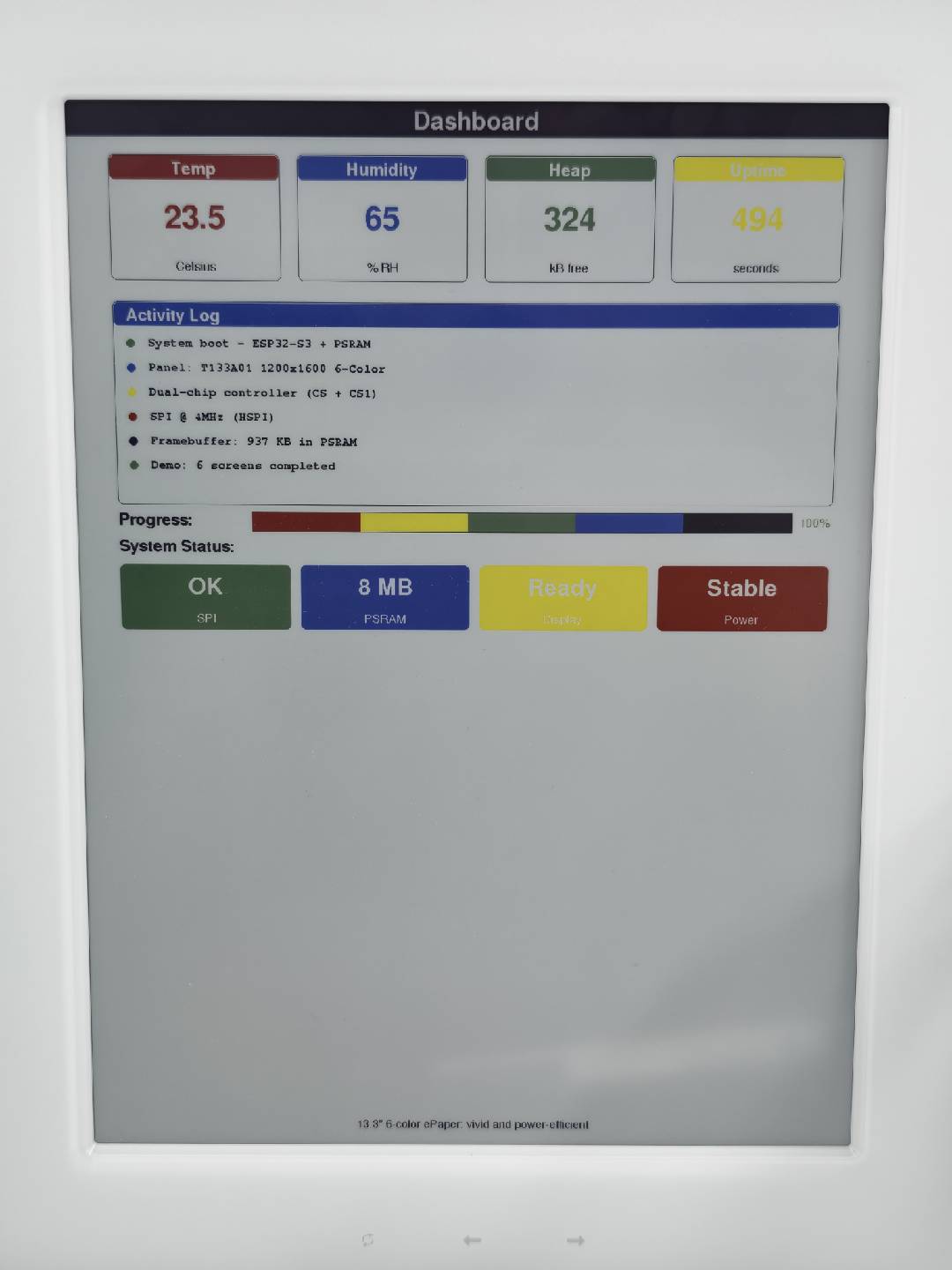
E1004 示例的完整源代码(包括 Splash、Color Palette、Typography、Geometry、Patterns 和 Dashboard 共 6 个演示界面的完整实现)可在仓库 Seeed_GxEPD2/examples/GxEPD2_reTerminal_E1004/ 中找到。该示例包含色卡、多色进度条、状态卡片和活动日志,并针对 13.3 英寸 6 色大屏进行了优化。
使用 GxEPD2 库实现多级灰度显示
除了标准的黑白和 6 色模式外,一些 reTerminal 显示屏还支持多级灰度渲染。Seeed_GxEPD2 库包含专门的灰度示例,这些示例绕过常规的 GxEPD2_BW / GxEPD2_7C 驱动,改为使用自定义 LUT 波形直接驱动显示控制器,同时仍然利用 Adafruit_GFX 进行绘图。
- reTerminal E1001 (7.5" B&W):UC8179 控制器通过专用的 VCOM/WW/KW/WK/KK LUT 表支持 4 级灰度 模式。使用 2bpp(96 KB)帧缓冲区,每个像素可以是黑色、深灰、浅灰或白色。
- reTerminal E1003 (10.3" Monochrome):IT8951 控制器通过其 GC16 波形模式原生支持 16 级灰度。在 PSRAM 中分配 4bpp(约 1.25 MB)帧缓冲区,每个像素可以呈现 16 个灰度级之一。
- reTerminal E1001 (4-Gray)
- reTerminal E1003 (16-Gray)
编程 reTerminal E1001 — 4 级灰度
E1001 的 UC8179 控制器可以通过上传自定义 LUT 表(VCOM、LUTWW、LUTKW、LUTWK、LUTKK),从正常的 1 位模式切换到 4 级灰度模式。该示例创建一个 Gray4Canvas(2bpp,96 KB),并使用 Adafruit_GFX 进行绘图,然后将两个位平面上传到控制器以实现灰度渲染。
安装 Seeed_GxEPD2 库后,你可以在 Arduino IDE 中通过 File > Examples > Seeed_GxEPD2 > GxEPD2_reTerminal_E1001_Gray4 找到此示例,或在 Seeed_GxEPD2/examples/GxEPD2_reTerminal_E1001_Gray4/GxEPD2_reTerminal_E1001_Gray4.ino 中手动定位。点击此处查看完整代码
#include <SPI.h>
#include <Adafruit_GFX.h>
#include <Fonts/FreeMonoBold9pt7b.h>
#include <Fonts/FreeMonoBold12pt7b.h>
#include <Fonts/FreeSansBold18pt7b.h>
#include <Fonts/FreeSansBold12pt7b.h>
#include <Fonts/FreeSans9pt7b.h>

// ===== Pin mapping (E1001) =====
#define EPD_SCK_PIN   7
#define EPD_MOSI_PIN  9
#define EPD_CS_PIN    10
#define EPD_DC_PIN    11
#define EPD_RES_PIN   12
#define EPD_BUSY_PIN  13

#define EPD_W  800
#define EPD_H  480

SPIClass hspi(HSPI);
SPISettings spiSet(2000000, MSBFIRST, SPI_MODE0);

// Gray levels
#define G_BLACK       0
#define G_DARK_GRAY   1
#define G_LIGHT_GRAY  2
#define G_WHITE       3

// UC8179 gray LUT tables (verbatim from Seeed_GFX UC8179_Defines.h)
// Each LUT is 7 phases x 6 bytes = 42 bytes.
static const uint8_t LUT_VCOM_GRAY[] = {
  0x00,0x00,0x06,0x08,0x07,0x01,
  0x00,0x06,0x0A,0x0B,0x0A,0x01,
  0x00,0x03,0x03,0x00,0x00,0x03,
  0x00,0x05,0x09,0x06,0x06,0x01,
  0x00,0x02,0x02,0x0A,0x0A,0x01,
  0x00,0x0A,0x11,0x06,0x07,0x01,
  0x00,0x02,0x01,0x02,0x01,0x01,
};

static const uint8_t LUT_WW_GRAY[] = {
  0x15,0x00,0x06,0x08,0x07,0x01,
  0x54,0x06,0x0A,0x0B,0x0A,0x01,
  0x90,0x03,0x03,0x00,0x00,0x03,
  0x2A,0x05,0x09,0x06,0x06,0x01,
  0xAA,0x02,0x02,0x0A,0x0A,0x01,
  0x00,0x0A,0x11,0x06,0x07,0x01,
  0x28,0x02,0x01,0x02,0x01,0x01,
};

static const uint8_t LUT_KW_GRAY[] = {
  0x2A,0x00,0x06,0x08,0x07,0x01,
  0x59,0x06,0x0A,0x0B,0x0A,0x01,
  0x90,0x03,0x03,0x00,0x00,0x03,
  0x5A,0x05,0x09,0x06,0x06,0x01,
  0xA8,0x02,0x02,0x0A,0x0A,0x01,
  0x45,0x0A,0x11,0x06,0x07,0x01,
  0xA8,0x02,0x01,0x02,0x01,0x01,
};

static const uint8_t LUT_WK_GRAY[] = {
  0x16,0x00,0x06,0x08,0x07,0x01,
  0xA0,0x06,0x0A,0x0B,0x0A,0x01,
  0x90,0x03,0x03,0x00,0x00,0x03,
  0x99,0x05,0x09,0x06,0x06,0x01,
  0xA0,0x02,0x02,0x0A,0x0A,0x01,
  0x40,0x0A,0x11,0x06,0x07,0x01,
  0x20,0x02,0x01,0x02,0x01,0x01,
};

static const uint8_t LUT_KK_GRAY[] = {
  0x26,0x00,0x06,0x08,0x07,0x01,
  0x6A,0x06,0x0A,0x0B,0x0A,0x01,
  0x90,0x03,0x03,0x00,0x00,0x03,
  0x65,0x05,0x09,0x06,0x06,0x01,
  0x50,0x02,0x02,0x0A,0x0A,0x01,
  0x10,0x0A,0x11,0x06,0x07,0x01,
  0x10,0x02,0x01,0x02,0x01,0x01,
};

static const uint8_t CMD_USER_GRAY[] = {
  0x17, 0x3F, 0x3F, 0x07, 0x06, 0x12,
};

// ============================================================
// 4-level grayscale canvas (2bpp)
// ============================================================
class Gray4Canvas : public Adafruit_GFX
{
public:
  Gray4Canvas(uint16_t w, uint16_t h) : Adafruit_GFX(w, h), _buf(nullptr) {}

  bool begin()
  {
    uint32_t sz = uint32_t(_width) * _height / 4;
    _buf = (uint8_t*)malloc(sz);
    if (_buf) memset(_buf, 0xFF, sz); // fill white (0b11 = 3 = white)
    return _buf != nullptr;
  }

  void drawPixel(int16_t x, int16_t y, uint16_t color) override
  {
    if (!_buf) return;
    if (x < 0 || x >= width() || y < 0 || y >= height()) return;

    int16_t rx = x, ry = y;
    switch (getRotation()) {
      case 1: rx = _width - 1 - y; ry = x; break;
      case 2: rx = _width - 1 - x; ry = _height - 1 - y; break;
      case 3: rx = y; ry = _height - 1 - x; break;
    }

    uint8_t g = color & 0x03;
    uint32_t idx = uint32_t(ry) * (_width / 4) + rx / 4;
    uint8_t shift = (3 - (rx & 3)) * 2;
    _buf[idx] = (_buf[idx] & ~(0x03 << shift)) | (g << shift);
  }

  void fillScreen(uint16_t color) override
  {
    if (!_buf) return;
    uint8_t g = color & 0x03;
    uint8_t fill = (g << 6) | (g << 4) | (g << 2) | g;
    memset(_buf, fill, uint32_t(_width) * _height / 4);
  }

  uint8_t getPixel(int16_t x, int16_t y) const
  {
    if (!_buf || x < 0 || x >= _width || y < 0 || y >= _height) return 0;
    uint32_t idx = uint32_t(y) * (_width / 4) + x / 4;
    uint8_t shift = (3 - (x & 3)) * 2;
    return (_buf[idx] >> shift) & 0x03;
  }

  uint8_t* buffer() { return _buf; }

private:
  uint8_t* _buf;
};

Gray4Canvas canvas(EPD_W, EPD_H);

// ============================================================
// UC8179 SPI helpers
// ============================================================
void checkBusy() {
  delay(10);
  while (!digitalRead(EPD_BUSY_PIN)) delay(10);
}

void writeCommand(uint8_t cmd) {
  hspi.beginTransaction(spiSet);
  digitalWrite(EPD_DC_PIN, LOW);
  digitalWrite(EPD_CS_PIN, LOW);
  hspi.transfer(cmd);
  digitalWrite(EPD_CS_PIN, HIGH);
  digitalWrite(EPD_DC_PIN, HIGH);
  hspi.endTransaction();
}

void writeData(uint8_t data) {
  hspi.beginTransaction(spiSet);
  digitalWrite(EPD_CS_PIN, LOW);
  hspi.transfer(data);
  digitalWrite(EPD_CS_PIN, HIGH);
  hspi.endTransaction();
}

void writeLUT(uint8_t cmd, const uint8_t* lut, uint16_t len) {
  writeCommand(cmd);
  for (uint16_t i = 0; i < len; i++) writeData(lut[i]);
}

// ============================================================
// UC8179 gray mode initialization
// ============================================================
void initGrayMode()
{
  // Hardware reset
  digitalWrite(EPD_RES_PIN, LOW); delay(10);
  digitalWrite(EPD_RES_PIN, HIGH); delay(10);
  checkBusy();

  // Power setting (0x01)
  writeCommand(0x01);
  writeData(0x07);
  writeData(CMD_USER_GRAY[0]);
  writeData(CMD_USER_GRAY[1]);
  writeData(CMD_USER_GRAY[2]);
  writeData(CMD_USER_GRAY[3]);

  // PLL (0x30)
  writeCommand(0x30);
  writeData(CMD_USER_GRAY[4]);

  // VCOM DC (0x82)
  writeCommand(0x82);
  writeData(CMD_USER_GRAY[5]);

  // Booster (0x06)
  writeCommand(0x06);
  writeData(0x27);
  writeData(0x27);
  writeData(0x28);
  writeData(0x17);

  // Power ON (0x04)
  writeCommand(0x04);
  delay(100);
  checkBusy();

  // Panel Setting (0x00)
  writeCommand(0x00);
  writeData(0x3F);

  // Power saving (0xE3)
  writeCommand(0xE3);
  writeData(0x88);

  // VCOM and Data interval (0x50)
  writeCommand(0x50);
  writeData(0x10);
  writeData(0x07);

  // PLL setting (0x52)
  writeCommand(0x52);
  writeData(0x00);

  // Resolution (0x61)
  writeCommand(0x61);
  writeData(EPD_W >> 8);
  writeData(EPD_W & 0xFF);
  writeData(EPD_H >> 8);
  writeData(EPD_H & 0xFF);

  // Write LUTs for gray mode. CRITICAL ordering — UC8179:
  //   0x20 = LUTC  (VCOM)   ← must be present
  //   0x21 = LUTWW (W -> W)
  //   0x22 = LUTKW (K -> W)
  //   0x23 = LUTWK (W -> K)
  //   0x24 = LUTKK (K -> K)
  writeLUT(0x20, LUT_VCOM_GRAY, sizeof(LUT_VCOM_GRAY));
  checkBusy();
  writeLUT(0x21, LUT_WW_GRAY,   sizeof(LUT_WW_GRAY));
  checkBusy();
  writeLUT(0x22, LUT_KW_GRAY,   sizeof(LUT_KW_GRAY));
  checkBusy();
  writeLUT(0x23, LUT_WK_GRAY,   sizeof(LUT_WK_GRAY));
  writeLUT(0x24, LUT_KK_GRAY,   sizeof(LUT_KK_GRAY));

  Serial.println(F("[Gray4] UC8179 gray mode init done"));
}

// ============================================================
// Upload 2bpp canvas to UC8179 as two bit-planes.
// ============================================================
void uploadGray4Frame()
{
  const uint32_t bytesPerRow = EPD_W / 4; // 200 bytes (2bpp, 4 pixels/byte)

  // ---- Bit plane → DTM1 (command 0x10) ----
  writeCommand(0x10);
  hspi.beginTransaction(spiSet);
  digitalWrite(EPD_CS_PIN, LOW);
  for (uint16_t row = 0; row < EPD_H; row++) {
    const uint8_t* rp = canvas.buffer() + uint32_t(row) * bytesPerRow;
    for (uint16_t col8 = 0; col8 < EPD_W / 8; col8++) {
      uint8_t out = 0;
      for (uint8_t bit = 0; bit < 8; bit++) {
        uint16_t px = col8 * 8 + bit;
        uint32_t idx = px / 4;
        uint8_t shift = (3 - (px & 3)) * 2;
        uint8_t gray = 3 - ((rp[idx] >> shift) & 0x03);  // INVERT
        if (gray & 0x01) out |= (0x80 >> bit);
      }
      hspi.transfer(out);
    }
  }
  digitalWrite(EPD_CS_PIN, HIGH);
  hspi.endTransaction();

  // ---- Bit plane → DTM2 (command 0x13) ----
  writeCommand(0x13);
  hspi.beginTransaction(spiSet);
  digitalWrite(EPD_CS_PIN, LOW);
  for (uint16_t row = 0; row < EPD_H; row++) {
    const uint8_t* rp = canvas.buffer() + uint32_t(row) * bytesPerRow;
    for (uint16_t col8 = 0; col8 < EPD_W / 8; col8++) {
      uint8_t out = 0;
      for (uint8_t bit = 0; bit < 8; bit++) {
        uint16_t px = col8 * 8 + bit;
        uint32_t idx = px / 4;
        uint8_t shift = (3 - (px & 3)) * 2;
        uint8_t gray = 3 - ((rp[idx] >> shift) & 0x03);  // INVERT
        if (gray & 0x02) out |= (0x80 >> bit);
      }
      hspi.transfer(out);
    }
  }
  digitalWrite(EPD_CS_PIN, HIGH);
  hspi.endTransaction();

  Serial.println(F("[Gray4] Frame uploaded (2 bit planes)"));
}

void refreshDisplay()
{
  unsigned long t0 = millis();
  writeCommand(0x12); // Display Refresh
  delay(100);
  checkBusy();
  Serial.printf("[Gray4] Refresh %lu ms\n", millis() - t0);
}

void sleepDisplay()
{
  writeCommand(0x02); // Power OFF
  checkBusy();
  writeCommand(0x07); // Deep sleep
  writeData(0xA5);
}

// ============================================================
// Demo drawing
// ============================================================
void drawCenteredText(const char* text, int16_t y, const GFXfont* font, uint8_t gray)
{
  canvas.setFont(font);
  canvas.setTextColor(gray);
  int16_t tbx, tby; uint16_t tbw, tbh;
  canvas.getTextBounds(text, 0, 0, &tbx, &tby, &tbw, &tbh);
  canvas.setCursor((EPD_W - tbw) / 2 - tbx, y);
  canvas.print(text);
}

void showGrayscaleDemo()
{
  Serial.println(F("[Gray4] Drawing demo..."));
  canvas.fillScreen(G_WHITE);

  // Title bar
  canvas.fillRect(0, 0, EPD_W, 40, G_BLACK);
  drawCenteredText("4-Level Grayscale Demo - E1001", 30, &FreeMonoBold12pt7b, G_WHITE);

  // 4 large gray bands
  int bandH = 70, startY = 55;
  const char* labels[] = {"Gray 0: Black", "Gray 1: Dark Gray", "Gray 2: Light Gray", "Gray 3: White"};
  for (int i = 0; i < 4; i++) {
    int y = startY + i * (bandH + 8);
    canvas.fillRect(30, y, EPD_W - 60, bandH, i);
    uint8_t textGray = (i < 2) ? G_WHITE : G_BLACK;
    canvas.setFont(&FreeSansBold12pt7b);
    canvas.setTextColor(textGray);
    canvas.setCursor(60, y + bandH / 2 + 8);
    canvas.print(labels[i]);
  }

  // Concentric gray circles
  int areaTop = startY + 4 * (bandH + 8);
  int areaBot = EPD_H - 30;
  int cy = (areaTop + areaBot) / 2;
  int cx = EPD_W - 80;
  canvas.setFont(&FreeMonoBold9pt7b);
  canvas.setTextColor(G_BLACK);
  canvas.setCursor(30, cy - 6);
  canvas.print("Concentric gray circles");
  canvas.setCursor(30, cy + 14);
  canvas.print("(black / dark / light / white)");
  canvas.fillCircle(cx, cy, 38, G_BLACK);
  canvas.fillCircle(cx, cy, 28, G_DARK_GRAY);
  canvas.fillCircle(cx, cy, 18, G_LIGHT_GRAY);
  canvas.fillCircle(cx, cy,  9, G_WHITE);

  // Footer
  canvas.fillRect(0, EPD_H - 30, EPD_W, 30, G_BLACK);
  drawCenteredText("UC8179 4-gray LUT mode | E1001", EPD_H - 8, &FreeMonoBold9pt7b, G_WHITE);

  Serial.println(F("[Gray4] Uploading..."));
  uploadGray4Frame();
  refreshDisplay();
  Serial.println(F("[Gray4] Done."));
}

// ============================================================
void setup()
{
  Serial.begin(115200);
  delay(200);
  Serial.println(F("[E1001 Gray4] Starting..."));

  pinMode(EPD_CS_PIN, OUTPUT);  digitalWrite(EPD_CS_PIN, HIGH);
  pinMode(EPD_DC_PIN, OUTPUT);  digitalWrite(EPD_DC_PIN, HIGH);
  pinMode(EPD_RES_PIN, OUTPUT); digitalWrite(EPD_RES_PIN, HIGH);
  pinMode(EPD_BUSY_PIN, INPUT);

  hspi.begin(EPD_SCK_PIN, -1, EPD_MOSI_PIN, -1);

  if (!canvas.begin()) {
    Serial.println(F("[Gray4] FATAL: alloc failed (96 KB)"));
    while (true) delay(1000);
  }
  Serial.printf("[Gray4] Canvas OK (%lu bytes)\n", (unsigned long)(EPD_W * EPD_H / 4));

  initGrayMode();
  showGrayscaleDemo();
  sleepDisplay();
}

void loop() {}
下图展示了 E1001 4 级灰度示例的实际显示效果:
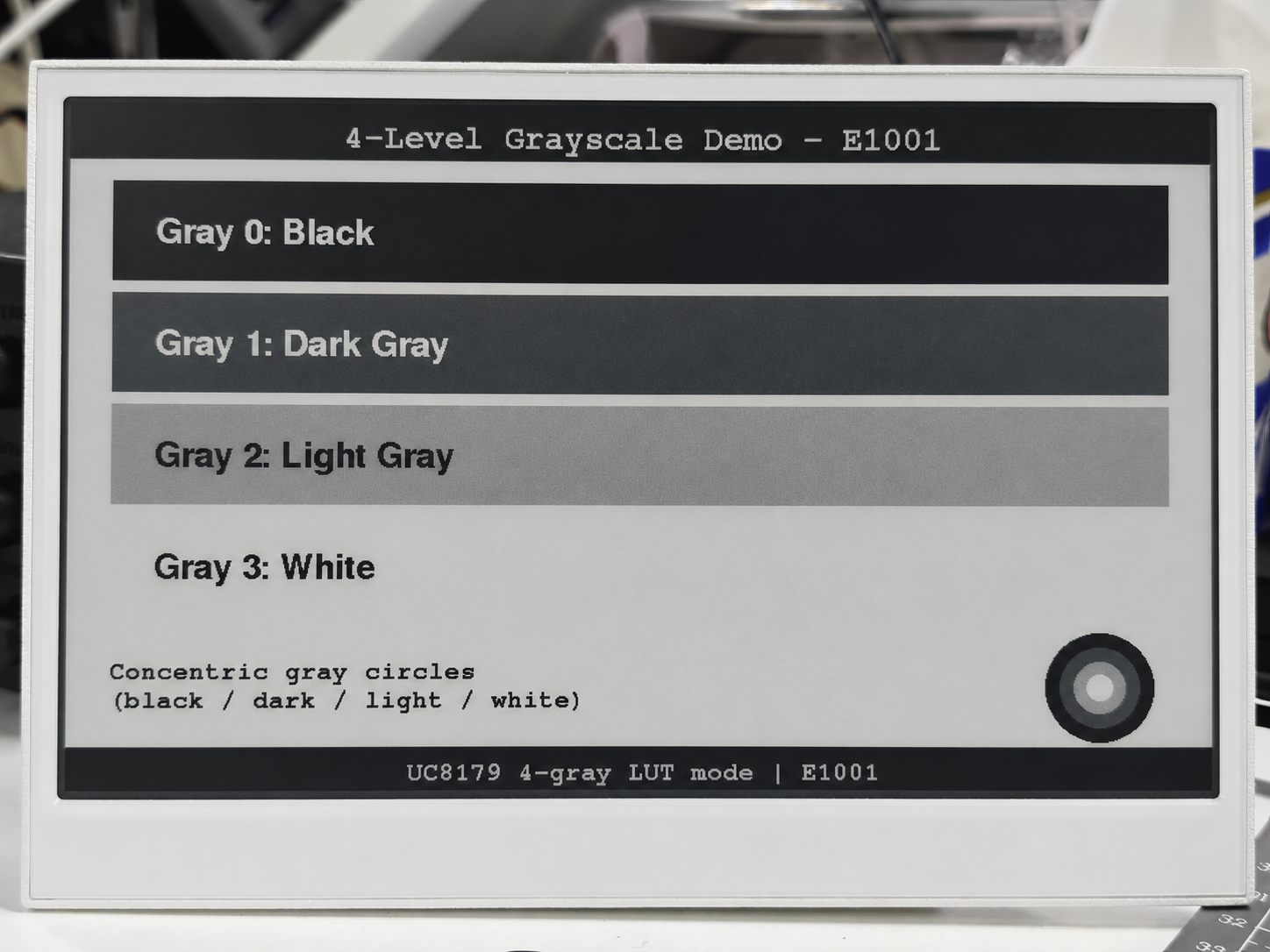
编程 reTerminal E1003 — 16 级灰度
E1003 的 IT8951 控制器通过其 GC16 波形模式原生支持 16 级灰度。此示例在 PSRAM 中分配一个 4bpp(约 1.25 MB)帧缓冲区,并通过 Gray16Canvas 类配合 Adafruit_GFX 进行绘图,然后将该帧以 8BPP 数据上传到 IT8951 进行 GC16 刷新。
此示例需要在 Arduino IDE 中启用 OPI PSRAM:Tools > PSRAM > OPI PSRAM。约 1.25 MB 的帧缓冲区存放在 PSRAM 中。
安装 Seeed_GxEPD2 库后,你可以在 Arduino IDE 中通过 File > Examples > Seeed_GxEPD2 > GxEPD2_reTerminal_E1003_Gray16 找到此示例,或在 Seeed_GxEPD2/examples/GxEPD2_reTerminal_E1003_Gray16/GxEPD2_reTerminal_E1003_Gray16.ino 中手动定位。点击此处查看完整代码
#include <SPI.h>
#include <Adafruit_GFX.h>
#include <Fonts/FreeMonoBold9pt7b.h>
#include <Fonts/FreeMonoBold12pt7b.h>

// ===== Pin mapping (E1003) =====
#define EPD_SCK_PIN     7
#define EPD_MISO_PIN    8
#define EPD_MOSI_PIN    9
#define EPD_CS_PIN      10
#define EPD_BUSY_PIN    13  // HRDY
#define EPD_TFT_ENABLE  11
#define EPD_ITE_ENABLE  21

// Panel geometry
#define EPD_W  1872
#define EPD_H  1404

SPIClass hspi(HSPI);
SPISettings spiSet(10000000, MSBFIRST, SPI_MODE0);

// IT8951 commands
#define CMD_SYS_RUN       0x0001
#define CMD_STANDBY       0x0002
#define CMD_SLEEP         0x0003
#define CMD_REG_RD        0x0010
#define CMD_REG_WR        0x0011
#define CMD_LD_IMG_AREA   0x0021
#define CMD_LD_IMG_END    0x0022
#define CMD_DPY_AREA      0x0034
#define REG_LISAR         0x0208

#define IT8951_8BPP        3
#define IT8951_B_ENDIAN    1
#define IT8951_ROTATE_0    0

#define DBG Serial0

// ============================================================
// Minimal 16-level grayscale canvas (4bpp, PSRAM-backed)
// ============================================================
class Gray16Canvas : public Adafruit_GFX
{
public:
  Gray16Canvas(uint16_t w, uint16_t h) : Adafruit_GFX(w, h), _buf(nullptr) {}

  bool begin()
  {
    uint32_t sz = uint32_t(_width) * _height / 2;
#if defined(ESP32)
    _buf = (uint8_t*)heap_caps_malloc(sz, MALLOC_CAP_SPIRAM | MALLOC_CAP_8BIT);
#else
    _buf = (uint8_t*)malloc(sz);
#endif
    return _buf != nullptr;
  }

  void drawPixel(int16_t x, int16_t y, uint16_t color) override
  {
    if (!_buf) return;
    if (x < 0 || x >= _width || y < 0 || y >= _height) return;
    switch (getRotation()) {
      case 1: { int16_t t = x; x = _width - 1 - y; y = t; break; }
      case 2: x = _width - 1 - x; y = _height - 1 - y; break;
      case 3: { int16_t t = x; x = y; y = _height - 1 - t; break; }
    }
    uint8_t g = color & 0x0F;
    uint32_t idx = uint32_t(y) * (_width / 2) + x / 2;
    if (x & 1) _buf[idx] = (_buf[idx] & 0xF0) | g;
    else       _buf[idx] = (_buf[idx] & 0x0F) | (g << 4);
  }

  void fillScreen(uint16_t color) override
  {
    if (!_buf) return;
    uint8_t g = color & 0x0F;
    memset(_buf, (g << 4) | g, uint32_t(_width) * _height / 2);
  }

  uint8_t getPixel4bpp(int16_t x, int16_t y) const
  {
    if (!_buf || x < 0 || x >= _width || y < 0 || y >= _height) return 0;
    uint32_t idx = uint32_t(y) * (_width / 2) + x / 2;
    return (x & 1) ? (_buf[idx] & 0x0F) : ((_buf[idx] >> 4) & 0x0F);
  }

  uint8_t* buffer() { return _buf; }

private:
  uint8_t* _buf;
};

Gray16Canvas canvas(EPD_W, EPD_H);

// IT8951 device info
uint32_t imgBufAddr = 0;

// ============================================================
// IT8951 SPI helpers
// ============================================================
void waitHRDY() { while (digitalRead(EPD_BUSY_PIN) == LOW) delay(1); }

uint16_t xfer16(uint16_t v) {
  uint16_t r = hspi.transfer16(v);
  return r;
}

void writeCmd16(uint16_t cmd) {
  waitHRDY();
  hspi.beginTransaction(spiSet);
  digitalWrite(EPD_CS_PIN, LOW);
  xfer16(0x6000);
  waitHRDY();
  xfer16(cmd);
  digitalWrite(EPD_CS_PIN, HIGH);
  hspi.endTransaction();
}

void writeData16(uint16_t data) {
  waitHRDY();
  hspi.beginTransaction(spiSet);
  digitalWrite(EPD_CS_PIN, LOW);
  xfer16(0x0000);
  waitHRDY();
  xfer16(data);
  digitalWrite(EPD_CS_PIN, HIGH);
  hspi.endTransaction();
}

uint16_t readData16() {
  waitHRDY();
  hspi.beginTransaction(spiSet);
  digitalWrite(EPD_CS_PIN, LOW);
  xfer16(0x1000);
  waitHRDY();
  xfer16(0);          // dummy
  uint16_t v = xfer16(0);
  digitalWrite(EPD_CS_PIN, HIGH);
  hspi.endTransaction();
  return v;
}

void writeReg(uint16_t reg, uint16_t val) {
  writeCmd16(CMD_REG_WR);
  writeData16(reg);
  writeData16(val);
}

uint16_t readReg(uint16_t reg) {
  writeCmd16(CMD_REG_RD);
  writeData16(reg);
  return readData16();
}

void readDevInfo() {
  writeCmd16(0x0302);
  uint16_t buf[20];
  waitHRDY();
  hspi.beginTransaction(spiSet);
  digitalWrite(EPD_CS_PIN, LOW);
  xfer16(0x1000);
  waitHRDY();
  xfer16(0);
  for (int i = 0; i < 20; i++) buf[i] = xfer16(0);
  digitalWrite(EPD_CS_PIN, HIGH);
  hspi.endTransaction();
  imgBufAddr = (uint32_t(buf[3]) << 16) | buf[2];
  DBG.printf("[IT8951] panel %ux%u, imgBuf=0x%08lX\n", buf[0], buf[1], imgBufAddr);
}

void setVCOM(uint16_t mV) {
  writeCmd16(0x0039);
  writeData16(0x0001);
  writeData16(mV);
}

void setTemperature(uint16_t t) {
  writeCmd16(0x0040);
  writeData16(0x0001);
  writeData16(t);
}

// ============================================================
// Upload 4bpp framebuffer to IT8951 as 8BPP, X-mirrored
// ============================================================
void uploadGray16Frame()
{
  writeReg(REG_LISAR,     (uint16_t)(imgBufAddr & 0xFFFF));
  writeReg(REG_LISAR + 2, (uint16_t)(imgBufAddr >> 16));

  setTemperature(16);

  uint16_t args[5];
  args[0] = (IT8951_B_ENDIAN << 8) | (IT8951_8BPP << 4) | IT8951_ROTATE_0;
  args[1] = 0;
  args[2] = 0;
  args[3] = EPD_W;
  args[4] = EPD_H;
  writeCmd16(CMD_LD_IMG_AREA);
  for (int i = 0; i < 5; i++) writeData16(args[i]);

  unsigned long t0 = millis();
  hspi.beginTransaction(spiSet);
  digitalWrite(EPD_CS_PIN, LOW);
  waitHRDY();
  xfer16(0x0000);
  waitHRDY();

  const uint16_t WB = EPD_W / 2;
  for (uint16_t row = 0; row < EPD_H; row++) {
    const uint8_t* rp = canvas.buffer() + uint32_t(row) * WB;
    // X-mirror: send bytes right-to-left, nibbles LSB-first within each byte
    for (int16_t col = WB - 1; col >= 0; col--) {
      uint8_t byte_val = rp[col];
      uint8_t lo = byte_val & 0x0F;
      uint8_t hi = (byte_val >> 4) & 0x0F;
      hspi.transfer(lo * 17);  // low nibble = right pixel (sent first due to X-mirror)
      hspi.transfer(hi * 17);  // high nibble = left pixel
    }
    if ((row & 0x3F) == 0) yield();
  }

  digitalWrite(EPD_CS_PIN, HIGH);
  hspi.endTransaction();

  writeCmd16(CMD_LD_IMG_END);
  waitHRDY();

  DBG.printf("[Gray16] upload %lu ms\n", millis() - t0);
}

void displayRefreshGC16()
{
  unsigned long t0 = millis();
  writeCmd16(CMD_DPY_AREA);
  waitHRDY(); writeData16(0);
  waitHRDY(); writeData16(0);
  waitHRDY(); writeData16(EPD_W);
  waitHRDY(); writeData16(EPD_H);
  waitHRDY(); writeData16(2);  // mode 2 = GC16

  while (digitalRead(EPD_BUSY_PIN) == LOW) {
    if (millis() - t0 > 15000) break;
    delay(100);
  }
  DBG.printf("[Gray16] refresh %lu ms\n", millis() - t0);
}

// ============================================================
// Demo drawing functions
// ============================================================

// Gray colors 0-15 (0=black, 15=white)
#define G_BLACK   0
#define G_WHITE  15

void drawCenteredText(const char* text, int16_t y, const GFXfont* font, uint8_t gray)
{
  canvas.setFont(font);
  canvas.setTextColor(gray);
  int16_t tbx, tby; uint16_t tbw, tbh;
  canvas.getTextBounds(text, 0, 0, &tbx, &tby, &tbw, &tbh);
  canvas.setCursor((EPD_W - tbw) / 2 - tbx, y);
  canvas.print(text);
}

void showGrayscaleDemo()
{
  DBG.println(F("[Gray16] Drawing grayscale demo..."));
  canvas.fillScreen(G_WHITE);

  // Title
  canvas.fillRect(0, 0, EPD_W, 60, G_BLACK);
  drawCenteredText("16-Level Grayscale Demo - E1003", 45, &FreeMonoBold12pt7b, G_WHITE);

  // 16 horizontal gray bands
  int bandH = 60, startY = 80;
  canvas.setFont(&FreeMonoBold9pt7b);
  for (int i = 0; i < 16; i++) {
    int y = startY + i * bandH;
    canvas.fillRect(50, y, EPD_W - 100, bandH - 4, i);
    uint8_t textColor = (i < 8) ? 15 : 0;
    canvas.setTextColor(textColor);
    char buf[32];
    snprintf(buf, sizeof(buf), "Gray %2d  (8bpp = %3d)", i, i * 17);
    canvas.setCursor(80, y + bandH / 2 + 5);
    canvas.print(buf);
  }

  // Gradient bar (smooth)
  int gradY = startY + 16 * bandH + 20;
  canvas.setFont(&FreeMonoBold9pt7b);
  canvas.setTextColor(G_BLACK);
  canvas.setCursor(50, gradY - 5);
  canvas.print("Smooth 16-step gradient:");
  for (int x = 0; x < EPD_W - 100; x++) {
    uint8_t g = (x * 15) / (EPD_W - 101);
    canvas.drawFastVLine(50 + x, gradY + 10, 60, g);
  }
  canvas.drawRect(49, gradY + 9, EPD_W - 98, 62, G_BLACK);

  // Concentric circles with gray levels
  int cx = EPD_W / 2;
  int cy = gradY + 102;
  canvas.setTextColor(G_BLACK);
  canvas.setCursor(50, cy);
  canvas.print("Concentric gray circles:");
  cy += 35;
  for (int r = 7; r >= 0; r--) {
    int radius = 24 + r * 12;
    canvas.fillCircle(cx, cy + 45, radius, r * 2);
  }

  DBG.println(F("[Gray16] Uploading..."));
  uploadGray16Frame();
  displayRefreshGC16();
  DBG.println(F("[Gray16] Done."));
}

void setup()
{
  Serial.begin(115200);
  delay(200);
  Serial.println(F("[E1003 Gray16] Starting..."));

  pinMode(EPD_CS_PIN, OUTPUT);
  digitalWrite(EPD_CS_PIN, HIGH);
  pinMode(EPD_BUSY_PIN, INPUT);
  pinMode(EPD_TFT_ENABLE, OUTPUT);
  digitalWrite(EPD_TFT_ENABLE, HIGH);
  pinMode(EPD_ITE_ENABLE, OUTPUT);
  digitalWrite(EPD_ITE_ENABLE, HIGH);

  hspi.begin(EPD_SCK_PIN, EPD_MISO_PIN, EPD_MOSI_PIN, -1);

  delay(100);
  writeCmd16(CMD_SYS_RUN);
  delay(100);

  readDevInfo();
  setVCOM(1400);

  if (!canvas.begin()) {
    DBG.println(F("[Gray16] FATAL: PSRAM alloc failed (~1.25 MB needed)"));
    while (true) delay(1000);
  }
  DBG.printf("[Gray16] Framebuffer OK (%lu bytes)\n", (unsigned long)(EPD_W * EPD_H / 2));

  showGrayscaleDemo();
}

void loop() {}
下图展示了 E1003 16 级灰度示例的实际显示效果:
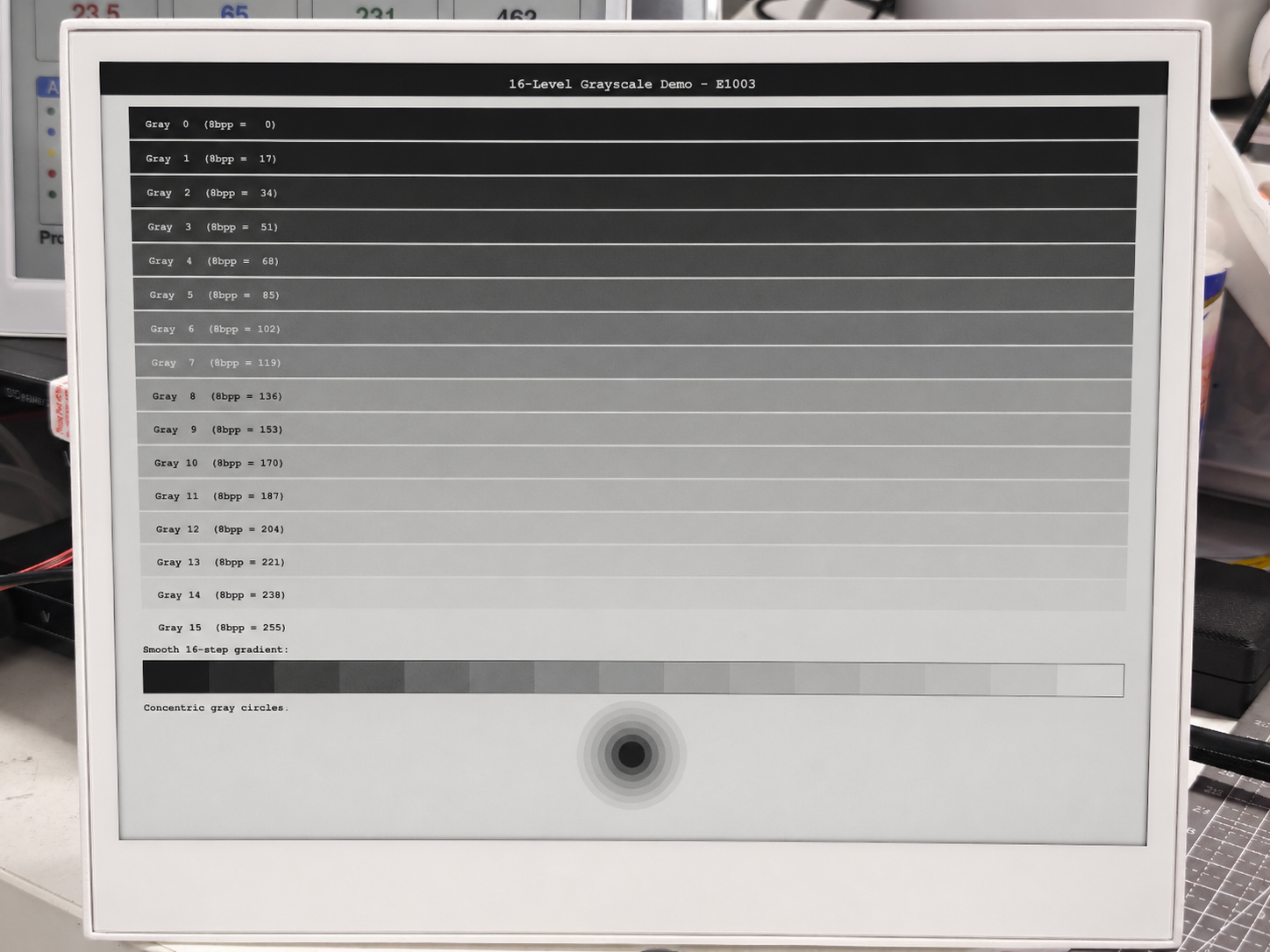
ePaper 显示屏的刷新率相对较慢。黑白显示屏(E1001、E1003)通常在 1–3 秒内完成刷新,而 6 色显示屏(E1002、E1004)一次完整刷新可能需要 25–40 秒。这是正常现象,是为了实现超低功耗以及在无背光条件下仍具备出色可视性的权衡。
故障排查
Q1:为什么在运行上述代码时,reTerminal 的 ePaper 显示屏没有任何显示或不刷新?
如果你在 reTerminal 中插入了 MicroSD 卡,可能会出现此问题。原因是 MicroSD 卡和 ePaper 显示屏在 reTerminal 上共用同一条 SPI 总线。如果插入了 MicroSD 卡但其使能(片选)引脚未被正确管理,就会在 SPI 总线上产生冲突。具体来说,MicroSD 卡可能会将 BUSY 线保持为高电平,从而阻止 ePaper 显示屏正常工作——导致没有显示更新或刷新。
// Initialize SD Card
pinMode(SD_EN_PIN, OUTPUT);
digitalWrite(SD_EN_PIN, HIGH);
pinMode(SD_DET_PIN, INPUT_PULLUP);
要解决这个问题,你必须确保使用上面提供的代码正确使能 MicroSD 卡。该代码通过设置正确的引脚状态来初始化并使能 MicroSD 卡,从而避免 SPI 总线冲突,并使 SD 卡和 ePaper 显示屏都能正常协同工作。在 reTerminal 上使用 MicroSD 卡时,请务必使用推荐的初始化代码,以避免此类问题。
如果你的项目中不使用 MicroSD 卡,我们建议先关闭设备电源并取出卡片,然后再运行显示程序。如果卡已经插入 reTerminal,则无论你是否实际使用 MicroSD 卡,都需要添加上述代码,以确保屏幕能够正常显示。
Q2:为什么我无法向 reTerminal 上传程序?
如果你在向 reTerminal 上传程序时遇到如下错误。

那么,很可能是你的 Arduino IDE 上传速率设置得过高。请将其修改为 115200 波特率以解决此问题。
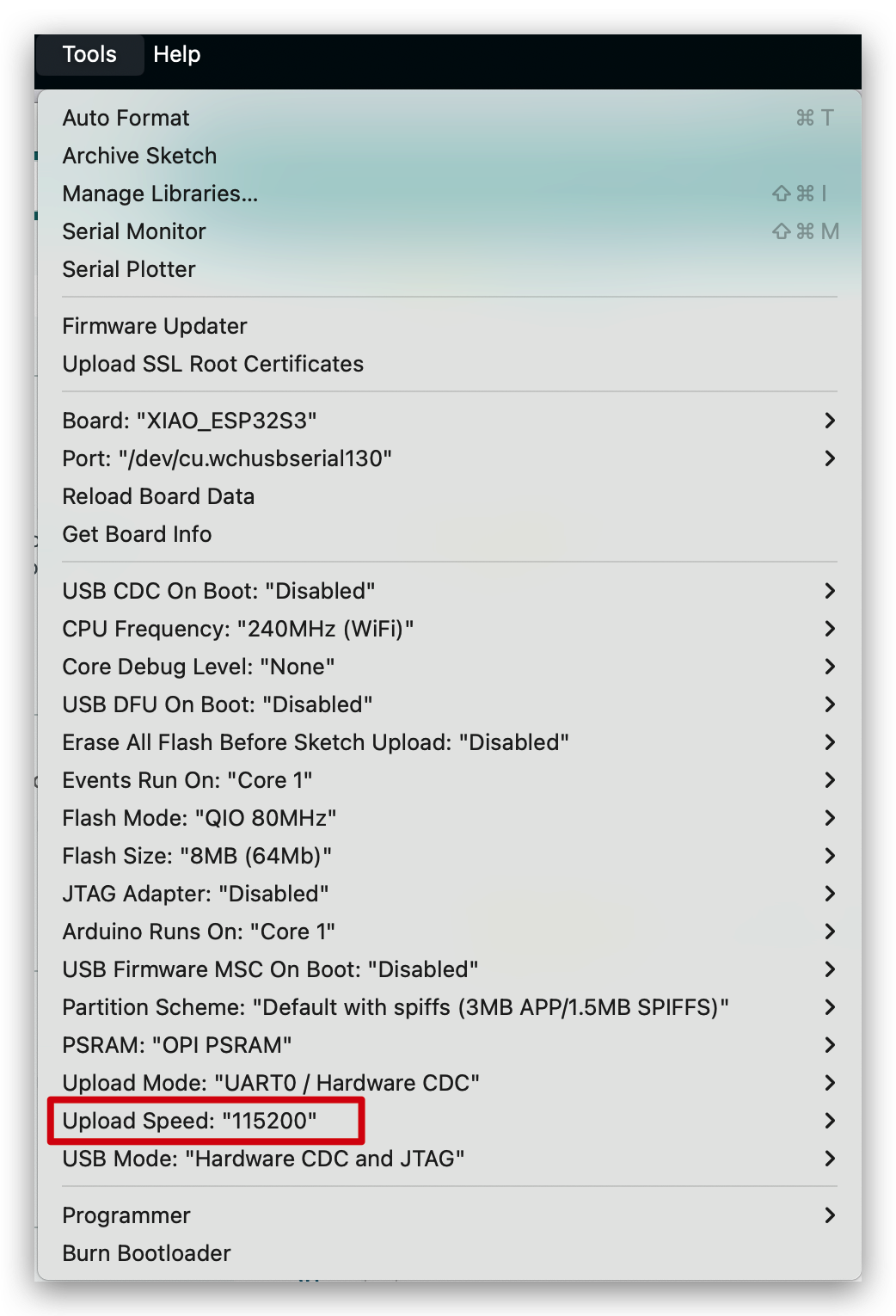
技术支持与产品讨论
感谢你选择我们的产品!我们将为你提供多种支持,确保你在使用我们产品的过程中尽可能顺畅。我们提供多种沟通渠道,以满足不同的偏好和需求。