ESPHome Cookbook:RTC、SD 卡与麦克风(reTerminal E 系列)
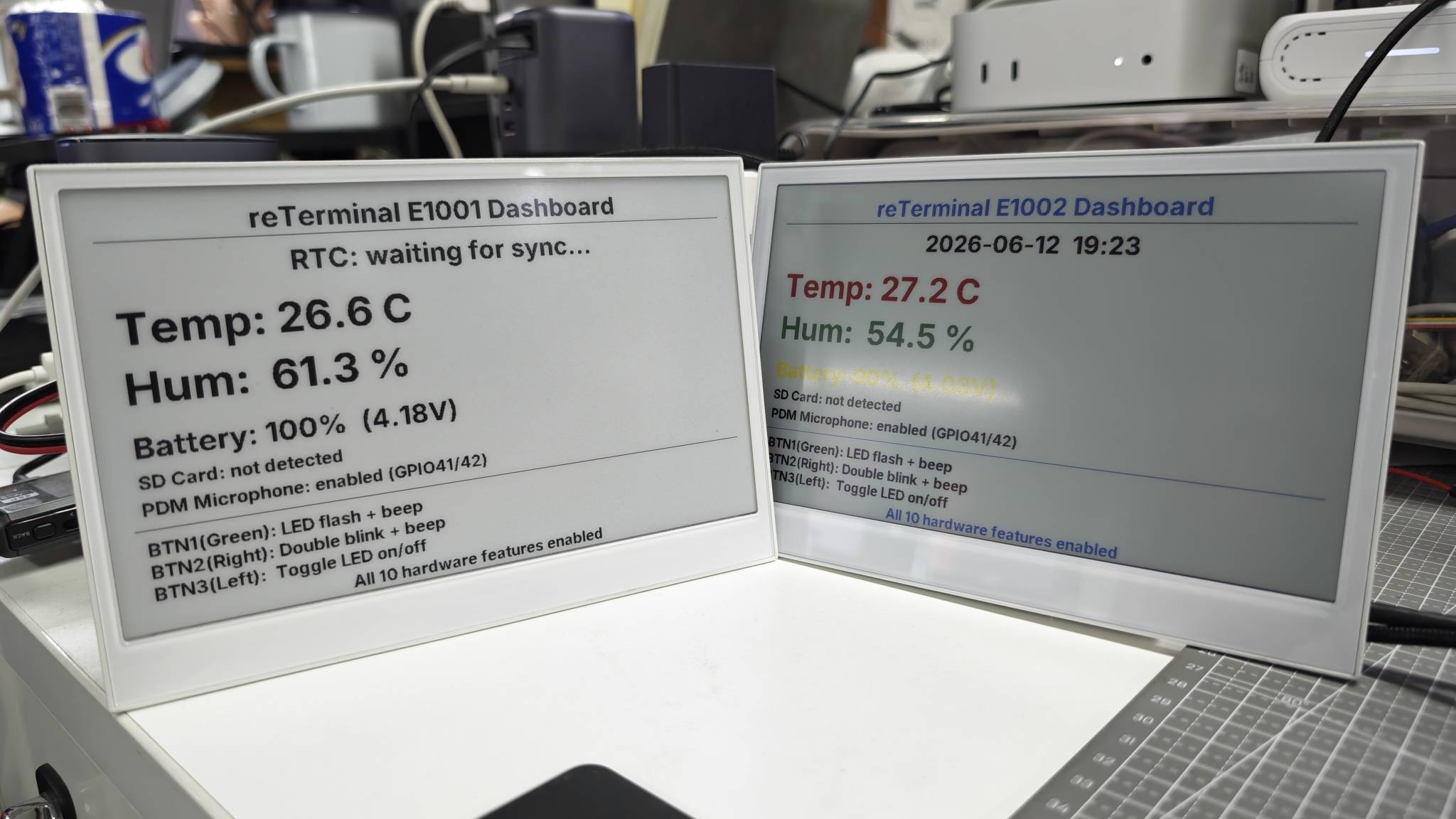
本页假设你已经完成了 reTerminal E 系列的 ESPHome 显示 cookbook,并且你的设备已经在 Home Assistant 中在线。关于按键、蜂鸣器、LED、电池监测、SHT4x、电容触摸(E1003)以及深度睡眠,请参阅 ESPHome Cookbook:按键、蜂鸣器、LED、电池、触摸与低功耗。
想要一个现成的 ESPHome 配置,而不是手动拼装每一个引脚?打开 reTerminal E-Series Firmware Hub,选择 ESPHome 卡片,挑选你的设备(E1001 / E1002 / E1003 / E1004),然后勾选你需要的板载功能——显示屏、按键、电池、传感器、RTC、SD 卡、麦克风、触摸、深度睡眠等。Hub 会生成匹配的 ESPHome YAML,你可以复制或下载到自己的 ESPHome 控制台中。
同一个 Hub 也可以直接通过浏览器(桌面版 Chrome 或 Edge)烧录演示固件。关于通用的 ESPHome 工作流程,请参阅 使用 ESPHome 工作。
本 cookbook 在 reTerminal E 系列 ESPHome 示例的基础上,继续介绍三个在显示与 I/O cookbooks 中尚未覆盖的板载硬件模块:
- PCF8563 RTC - 从板载 RTC 读取硬件时间,并从 Home Assistant 同步时间到 RTC。
- microSD 卡槽 - 使能 SD 供电电源轨,并上报是否插入了卡。
- PDM 麦克风 - 使能板载麦克风供电电源轨,并通过 ESPHome 初始化 PDM 麦克风。
下面每一节都组织为一个小型的独立 ESPHome 演示。你可以复制一个完整的 YAML 示例,替换 API 和 OTA 占位符,然后直接从 ESPHome 上传。
本页中可直接复制的示例覆盖 reTerminal E1001 / E1002 / E1003 / E1004。E1003 和 E1004 需要 ESPHome 2026.7.0 或更高版本。板载麦克风示例适用于包含 PDM 麦克件硬件的机型(E1001 / E1002 / E1003);reTerminal E1004 不包含麦克风。
硬件能力
本 cookbook 中的演示会使用到以下引脚。
| 功能 | ESPHome 组件 | 引脚 / 地址 |
|---|---|---|
| PCF8563 RTC | time.pcf8563 | I2C 地址 0x51,SDA GPIO19,SCL GPIO20 |
| microSD 卡检测 | binary_sensor.gpio | GPIO15,低电平有效 |
| microSD 供电使能 | output.gpio | GPIO16(E1001 / E1002 / E1004),GPIO39(E1003) |
| PDM 麦克风供电使能 | output.gpio | GPIO38 |
| PDM 麦克风时钟 | i2s_audio | GPIO42 |
| PDM 麦克风数据 | microphone.i2s_audio | GPIO41 |
| 共享 SPI 总线 | spi | CLK GPIO7,MOSI GPIO9,MISO GPIO8 |
这些示例使用了诸如 REPLACE_WITH_YOUR_API_KEY 和 REPLACE_WITH_YOUR_OTA_PASSWORD 之类的占位符。请不要公开你的真实 API 加密密钥、OTA 密码、Wi-Fi 密码或 Home Assistant 令牌。
RTC 时间同步
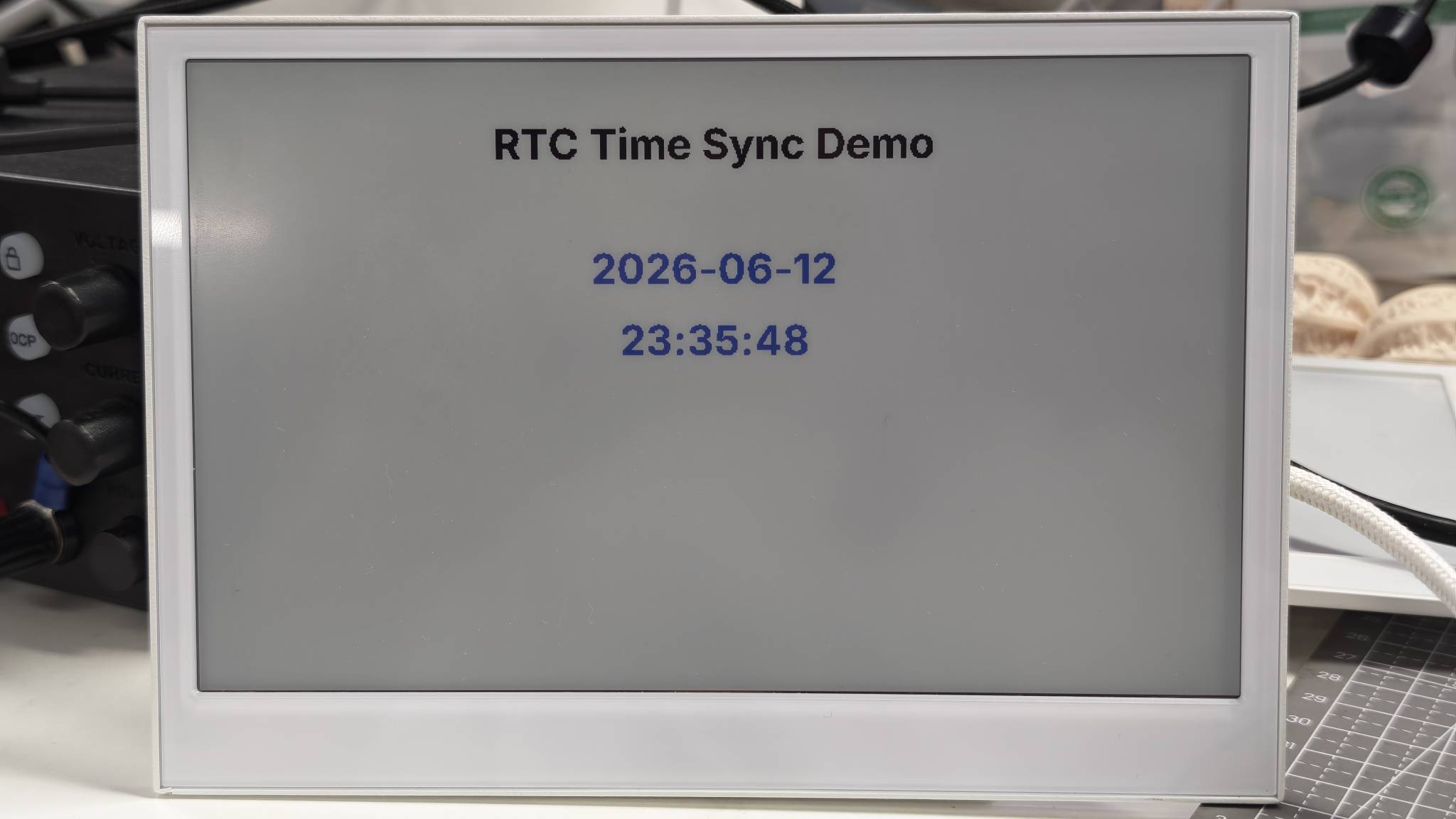
本演示从板载 PCF8563 RTC 读取时间,并将其显示在电子纸屏幕上。当 Home Assistant 将时间同步到设备时,ESPHome 会把该时间写回到硬件 RTC。
RTC 使用共享的 I2C 总线:
- SDA:
GPIO19 - SCL:
GPIO20 - RTC 地址:
0x51
你可以通过替换占位符的值来使用此示例,然后将完整的 YAML 上传到你的设备。
- 适用于 E1001
- 适用于 E1002
- 适用于 E1003
- 适用于 E1004
esphome:
  name: reterminal-e1001-rtc-demo
  friendly_name: reTerminal_E1001_RTC_Demo
  on_boot:
    priority: 600
    then:
      - pcf8563.read_time:

esp32:
  board: esp32-s3-devkitc-1
  framework:
    type: arduino

logger:
  hardware_uart: UART0

api:
  encryption:
    key: "REPLACE_WITH_YOUR_API_KEY"

ota:
  - platform: esphome
    password: "REPLACE_WITH_YOUR_OTA_PASSWORD"

wifi:
  ssid: !secret wifi_ssid
  password: !secret wifi_password
  ap:
    ssid: "E1001-RTC-Demo"
    password: "ChangeMe123"

captive_portal:

i2c:
  scl: GPIO20
  sda: GPIO19

spi:
  clk_pin: GPIO7
  mosi_pin: GPIO9

time:
  - platform: pcf8563
    id: rtc_time
    address: 0x51
    update_interval: never

  - platform: homeassistant
    on_time_sync:
      then:
        - pcf8563.write_time:
        - component.update: epaper_display

font:
  - file: "gfonts://Inter@700"
    id: font_title
    size: 32
  - file: "gfonts://Inter@700"
    id: font_body
    size: 26

display:
  - platform: waveshare_epaper
    id: epaper_display
    model: 7.50inv2
    cs_pin: GPIO10
    dc_pin: GPIO11
    reset_pin:
      number: GPIO12
      inverted: false
    busy_pin:
      number: GPIO13
      inverted: true
    update_interval: 300s
    lambda: |-
      it.printf(400, 40, id(font_title), TextAlign::TOP_CENTER, "RTC Time Sync Demo");
      auto now = id(rtc_time).now();
      if (now.is_valid()) {
        it.strftime(400, 135, id(font_title), TextAlign::TOP_CENTER, "%Y-%m-%d", now);
        it.strftime(400, 190, id(font_title), TextAlign::TOP_CENTER, "%H:%M:%S", now);
        ESP_LOGD("rtc_demo", "RTC time is valid");
      } else {
        it.printf(400, 150, id(font_body), TextAlign::TOP_CENTER, "RTC: waiting for sync");
        ESP_LOGW("rtc_demo", "RTC time is not valid yet");
      }
esphome:
  name: reterminal-e1002-rtc-demo
  friendly_name: reTerminal_E1002_RTC_Demo
  on_boot:
    priority: 600
    then:
      - pcf8563.read_time:

esp32:
  board: esp32-s3-devkitc-1
  framework:
    type: arduino

logger:
  hardware_uart: UART0

api:
  encryption:
    key: "REPLACE_WITH_YOUR_API_KEY"

ota:
  - platform: esphome
    password: "REPLACE_WITH_YOUR_OTA_PASSWORD"

wifi:
  ssid: !secret wifi_ssid
  password: !secret wifi_password
  ap:
    ssid: "E1002-RTC-Demo"
    password: "ChangeMe123"

captive_portal:

i2c:
  scl: GPIO20
  sda: GPIO19

spi:
  clk_pin: GPIO7
  mosi_pin: GPIO9

time:
  - platform: pcf8563
    id: rtc_time
    address: 0x51
    update_interval: never

  - platform: homeassistant
    on_time_sync:
      then:
        - pcf8563.write_time:
        - component.update: epaper_display

font:
  - file: "gfonts://Inter@700"
    id: font_title
    size: 32
  - file: "gfonts://Inter@700"
    id: font_body
    size: 26

display:
  - platform: epaper_spi
    id: epaper_display
    model: Seeed-reTerminal-E1002
    update_interval: 300s
    lambda: |-
      const auto BLACK = Color(0, 0, 0, 0);
      const auto RED = Color(255, 0, 0, 0);
      const auto BLUE = Color(0, 0, 255, 0);

      it.printf(400, 40, id(font_title), BLACK, TextAlign::TOP_CENTER, "RTC Time Sync Demo");
      auto now = id(rtc_time).now();
      if (now.is_valid()) {
        it.strftime(400, 135, id(font_title), BLUE, TextAlign::TOP_CENTER, "%Y-%m-%d", now);
        it.strftime(400, 190, id(font_title), BLUE, TextAlign::TOP_CENTER, "%H:%M:%S", now);
        ESP_LOGD("rtc_demo", "RTC time is valid");
      } else {
        it.printf(400, 150, id(font_body), RED, TextAlign::TOP_CENTER, "RTC: waiting for sync");
        ESP_LOGW("rtc_demo", "RTC time is not valid yet");
      }
请将你的 ESPHome 版本更新到 2026.7.0 或更高版本。
esphome:
  name: reterminal-e1003-rtc-demo
  friendly_name: reTerminal_E1003_RTC_Demo
  on_boot:
    priority: 600
    then:
      - pcf8563.read_time:

esp32:
  board: seeed_xiao_esp32s3
  framework:
    type: esp-idf

psram:
  mode: octal

logger:
  hardware_uart: UART0

api:
  encryption:
    key: "REPLACE_WITH_YOUR_API_KEY"

ota:
  - platform: esphome
    password: "REPLACE_WITH_YOUR_OTA_PASSWORD"

wifi:
  ssid: !secret wifi_ssid
  password: !secret wifi_password
  ap:
    ssid: "E1003-RTC-Demo"
    password: "ChangeMe123"

captive_portal:

i2c:
  scl: GPIO20
  sda: GPIO19

spi:
  clk_pin: GPIO7
  mosi_pin: GPIO9

time:
  - platform: pcf8563
    id: rtc_time
    address: 0x51
    update_interval: never

  - platform: homeassistant
    on_time_sync:
      then:
        - pcf8563.write_time:
        - component.update: epaper_display

font:
  - file: "gfonts://Inter@700"
    id: font_title
    size: 32
  - file: "gfonts://Inter@700"
    id: font_body
    size: 26

display:
  - platform: it8951
    id: epaper_display
    spi_id: epaper_spi_bus
    model: seeed-reterminal-e1003
    update_interval: 300s
    full_update_every: 30
    grayscale: true
    dithering: true
    update_mode: GC16
    transform:
      mirror_x: true
      mirror_y: false
    lambda: |-
      it.printf(400, 40, id(font_title), Color::BLACK, TextAlign::TOP_CENTER, "RTC Time Sync Demo");
      auto now = id(rtc_time).now();
      if (now.is_valid()) {
        it.strftime(400, 135, id(font_title), Color::BLACK, TextAlign::TOP_CENTER, "%Y-%m-%d", now);
        it.strftime(400, 190, id(font_title), Color::BLACK, TextAlign::TOP_CENTER, "%H:%M:%S", now);
        ESP_LOGD("rtc_demo", "RTC time is valid");
      } else {
        it.printf(400, 150, id(font_body), Color::BLACK, TextAlign::TOP_CENTER, "RTC: waiting for sync");
        ESP_LOGW("rtc_demo", "RTC time is not valid yet");
      }
请将 ESPHome 版本更新到 2026.7.0 或更高版本。
esphome:
  name: reterminal-e1004-rtc-demo
  friendly_name: reTerminal_E1004_RTC_Demo
  on_boot:
    priority: 600
    then:
      - pcf8563.read_time:

esp32:
  board: seeed_xiao_esp32s3
  framework:
    type: esp-idf

psram:
  mode: octal

logger:
  hardware_uart: UART0

api:
  encryption:
    key: "REPLACE_WITH_YOUR_API_KEY"

ota:
  - platform: esphome
    password: "REPLACE_WITH_YOUR_OTA_PASSWORD"

wifi:
  ssid: !secret wifi_ssid
  password: !secret wifi_password
  ap:
    ssid: "E1004-RTC-Demo"
    password: "ChangeMe123"

captive_portal:

i2c:
  scl: GPIO20
  sda: GPIO19

spi:
  clk_pin: GPIO7
  mosi_pin: GPIO9

time:
  - platform: pcf8563
    id: rtc_time
    address: 0x51
    update_interval: never

  - platform: homeassistant
    on_time_sync:
      then:
        - pcf8563.write_time:
        - component.update: epaper_display

font:
  - file: "gfonts://Inter@700"
    id: font_title
    size: 32
  - file: "gfonts://Inter@700"
    id: font_body
    size: 26

display:
  - platform: epaper_spi
    id: epaper_display
    model: seeed-reterminal-e1004
    update_interval: 300s
    lambda: |-
      const auto BLACK = Color(0, 0, 0, 0);
      const auto RED = Color(255, 0, 0, 0);
      const auto BLUE = Color(0, 0, 255, 0);

      it.printf(400, 40, id(font_title), BLACK, TextAlign::TOP_CENTER, "RTC Time Sync Demo");
      auto now = id(rtc_time).now();
      if (now.is_valid()) {
        it.strftime(400, 135, id(font_title), BLUE, TextAlign::TOP_CENTER, "%Y-%m-%d", now);
        it.strftime(400, 190, id(font_title), BLUE, TextAlign::TOP_CENTER, "%H:%M:%S", now);
        ESP_LOGD("rtc_demo", "RTC time is valid");
      } else {
        it.printf(400, 150, id(font_body), RED, TextAlign::TOP_CENTER, "RTC: waiting for sync");
        ESP_LOGW("rtc_demo", "RTC time is not valid yet");
      }
此配置:
- 在启动期间读取一次 PCF8563 RTC。
- 在设备连接后,将 Home Assistant 时间作为权威时间源。
- 将 Home Assistant 时间写回到硬件 RTC。
- 在电子纸屏幕上显示当前日期和时间。
下图展示了在 reTerminal E1002 上的预期效果。同一演示模式适用于整个 reTerminal E 系列。请选择上方与您设备匹配的选项卡。黑白 / 灰度面板(E1001、E1003)和彩色面板(E1002、E1004)主要在显示平台和颜色绘制 API 上有所不同。
如果在完全断电后 RTC 时间无法保持正确,请为 RTC 备用电池座安装或更换 CR1220 纽扣电池。
MicroSD 卡检测
此演示会报告是否插入了 microSD 卡。它还会通过 GPIO16(E1001 / E1002 / E1004)或 GPIO39(E1003)打开 SD 卡电源轨。
卡检测引脚为低电平有效,因此二进制传感器使用 inverted: true。
你可以通过替换占位符值并将完整的 YAML 上传到你的设备来使用此示例。
- 适用于 E1001
- 适用于 E1002
- 适用于 E1003
- 适用于 E1004
esphome:
  name: reterminal-e1001-sd-demo
  friendly_name: reTerminal_E1001_SD_Demo
  on_boot:
    priority: 600
    then:
      - output.turn_on: bsp_sd_enable
      - delay: 200ms
      - component.update: epaper_display

esp32:
  board: esp32-s3-devkitc-1
  framework:
    type: arduino

logger:
  hardware_uart: UART0

api:
  encryption:
    key: "REPLACE_WITH_YOUR_API_KEY"

ota:
  - platform: esphome
    password: "REPLACE_WITH_YOUR_OTA_PASSWORD"

wifi:
  ssid: !secret wifi_ssid
  password: !secret wifi_password
  ap:
    ssid: "E1001-SD-Demo"
    password: "ChangeMe123"

captive_portal:

spi:
  id: epaper_spi_bus
  clk_pin: GPIO7
  mosi_pin: GPIO9
  miso_pin: GPIO8

output:
  - platform: gpio
    pin: GPIO16
    id: bsp_sd_enable

binary_sensor:
  - platform: gpio
    pin:
      number: GPIO15
      mode: INPUT_PULLUP
      inverted: true
    id: sd_card_detect
    name: "SD Card Detected"
    on_press:
      then:
        - logger.log: "SD card inserted"
        - component.update: epaper_display
    on_release:
      then:
        - logger.log: "SD card removed"
        - component.update: epaper_display

font:
  - file: "gfonts://Inter@700"
    id: font_title
    size: 32
  - file: "gfonts://Inter@700"
    id: font_body
    size: 28

display:
  - platform: waveshare_epaper
    id: epaper_display
    model: 7.50inv2
    cs_pin: GPIO10
    dc_pin: GPIO11
    reset_pin:
      number: GPIO12
      inverted: false
    busy_pin:
      number: GPIO13
      inverted: true
    update_interval: 300s
    lambda: |-
      it.printf(400, 40, id(font_title), TextAlign::TOP_CENTER, "microSD Card Detection");
      if (id(sd_card_detect).state) {
        it.printf(400, 160, id(font_body), TextAlign::TOP_CENTER, "SD Card: inserted");
      } else {
        it.printf(400, 160, id(font_body), TextAlign::TOP_CENTER, "SD Card: not detected");
      }
      it.printf(400, 230, id(font_body), TextAlign::TOP_CENTER, "Detect pin: GPIO15");
esphome:
  name: reterminal-e1002-sd-demo
  friendly_name: reTerminal_E1002_SD_Demo
  on_boot:
    priority: 600
    then:
      - output.turn_on: bsp_sd_enable
      - delay: 200ms
      - component.update: epaper_display

esp32:
  board: esp32-s3-devkitc-1
  framework:
    type: arduino

logger:
  hardware_uart: UART0

api:
  encryption:
    key: "REPLACE_WITH_YOUR_API_KEY"

ota:
  - platform: esphome
    password: "REPLACE_WITH_YOUR_OTA_PASSWORD"

wifi:
  ssid: !secret wifi_ssid
  password: !secret wifi_password
  ap:
    ssid: "E1002-SD-Demo"
    password: "ChangeMe123"

captive_portal:

spi:
  id: epaper_spi_bus
  clk_pin: GPIO7
  mosi_pin: GPIO9
  miso_pin: GPIO8

output:
  - platform: gpio
    pin: GPIO16
    id: bsp_sd_enable

binary_sensor:
  - platform: gpio
    pin:
      number: GPIO15
      mode: INPUT_PULLUP
      inverted: true
    id: sd_card_detect
    name: "SD Card Detected"
    on_press:
      then:
        - logger.log: "SD card inserted"
        - component.update: epaper_display
    on_release:
      then:
        - logger.log: "SD card removed"
        - component.update: epaper_display

font:
  - file: "gfonts://Inter@700"
    id: font_title
    size: 32
  - file: "gfonts://Inter@700"
    id: font_body
    size: 28

display:
  - platform: epaper_spi
    id: epaper_display
    model: Seeed-reTerminal-E1002
    update_interval: 300s
    lambda: |-
      const auto BLACK = Color(0, 0, 0, 0);
      const auto RED = Color(255, 0, 0, 0);
      const auto GREEN = Color(0, 255, 0, 0);

      it.printf(400, 40, id(font_title), BLACK, TextAlign::TOP_CENTER, "microSD Card Detection");
      if (id(sd_card_detect).state) {
        it.printf(400, 160, id(font_body), GREEN, TextAlign::TOP_CENTER, "SD Card: inserted");
      } else {
        it.printf(400, 160, id(font_body), RED, TextAlign::TOP_CENTER, "SD Card: not detected");
      }
      it.printf(400, 230, id(font_body), BLACK, TextAlign::TOP_CENTER, "Detect pin: GPIO15");
请将 ESPHome 版本更新到 2026.7.0 或更高版本。E1003 使用 GPIO39 作为 SD 电源使能引脚。
esphome:
  name: reterminal-e1003-sd-demo
  friendly_name: reTerminal_E1003_SD_Demo
  on_boot:
    priority: 600
    then:
      - output.turn_on: bsp_sd_enable
      - delay: 200ms
      - component.update: epaper_display

esp32:
  board: seeed_xiao_esp32s3
  framework:
    type: esp-idf

psram:
  mode: octal

logger:
  hardware_uart: UART0

api:
  encryption:
    key: "REPLACE_WITH_YOUR_API_KEY"

ota:
  - platform: esphome
    password: "REPLACE_WITH_YOUR_OTA_PASSWORD"

wifi:
  ssid: !secret wifi_ssid
  password: !secret wifi_password
  ap:
    ssid: "E1003-SD-Demo"
    password: "ChangeMe123"

captive_portal:

spi:
  id: epaper_spi_bus
  clk_pin: GPIO7
  mosi_pin: GPIO9
  miso_pin: GPIO8

output:
  - platform: gpio
    pin: GPIO39
    id: bsp_sd_enable

binary_sensor:
  - platform: gpio
    pin:
      number: GPIO15
      mode: INPUT_PULLUP
      inverted: true
    id: sd_card_detect
    name: "SD Card Detected"
    on_press:
      then:
        - logger.log: "SD card inserted"
        - component.update: epaper_display
    on_release:
      then:
        - logger.log: "SD card removed"
        - component.update: epaper_display

font:
  - file: "gfonts://Inter@700"
    id: font_title
    size: 32
  - file: "gfonts://Inter@700"
    id: font_body
    size: 28

display:
  - platform: it8951
    id: epaper_display
    spi_id: epaper_spi_bus
    model: seeed-reterminal-e1003
    update_interval: 300s
    full_update_every: 30
    grayscale: true
    dithering: true
    update_mode: GC16
    transform:
      mirror_x: true
      mirror_y: false
    lambda: |-
      it.printf(400, 40, id(font_title), Color::BLACK, TextAlign::TOP_CENTER, "microSD Card Detection");
      if (id(sd_card_detect).state) {
        it.printf(400, 160, id(font_body), Color::BLACK, TextAlign::TOP_CENTER, "SD Card: inserted");
      } else {
        it.printf(400, 160, id(font_body), Color::BLACK, TextAlign::TOP_CENTER, "SD Card: not detected");
      }
      it.printf(400, 230, id(font_body), Color::BLACK, TextAlign::TOP_CENTER, "Detect pin: GPIO15");
请将 ESPHome 版本更新到 2026.7.0 或更高版本。
esphome:
  name: reterminal-e1004-sd-demo
  friendly_name: reTerminal_E1004_SD_Demo
  on_boot:
    priority: 600
    then:
      - output.turn_on: bsp_sd_enable
      - delay: 200ms
      - component.update: epaper_display

esp32:
  board: seeed_xiao_esp32s3
  framework:
    type: esp-idf

psram:
  mode: octal

logger:
  hardware_uart: UART0

api:
  encryption:
    key: "REPLACE_WITH_YOUR_API_KEY"

ota:
  - platform: esphome
    password: "REPLACE_WITH_YOUR_OTA_PASSWORD"

wifi:
  ssid: !secret wifi_ssid
  password: !secret wifi_password
  ap:
    ssid: "E1004-SD-Demo"
    password: "ChangeMe123"

captive_portal:

spi:
  id: epaper_spi_bus
  clk_pin: GPIO7
  mosi_pin: GPIO9
  miso_pin: GPIO8

output:
  - platform: gpio
    pin: GPIO16
    id: bsp_sd_enable

binary_sensor:
  - platform: gpio
    pin:
      number: GPIO15
      mode: INPUT_PULLUP
      inverted: true
    id: sd_card_detect
    name: "SD Card Detected"
    on_press:
      then:
        - logger.log: "SD card inserted"
        - component.update: epaper_display
    on_release:
      then:
        - logger.log: "SD card removed"
        - component.update: epaper_display

font:
  - file: "gfonts://Inter@700"
    id: font_title
    size: 32
  - file: "gfonts://Inter@700"
    id: font_body
    size: 28

display:
  - platform: epaper_spi
    id: epaper_display
    model: seeed-reterminal-e1004
    update_interval: 300s
    lambda: |-
      const auto BLACK = Color(0, 0, 0, 0);
      const auto RED = Color(255, 0, 0, 0);
      const auto GREEN = Color(0, 255, 0, 0);

      it.printf(400, 40, id(font_title), BLACK, TextAlign::TOP_CENTER, "microSD Card Detection");
      if (id(sd_card_detect).state) {
        it.printf(400, 160, id(font_body), GREEN, TextAlign::TOP_CENTER, "SD Card: inserted");
      } else {
        it.printf(400, 160, id(font_body), RED, TextAlign::TOP_CENTER, "SD Card: not detected");
      }
      it.printf(400, 230, id(font_body), BLACK, TextAlign::TOP_CENTER, "Detect pin: GPIO15");
此配置:
- 通过
GPIO16(E1001 / E1002 / E1004)或GPIO39(E1003)启用 SD 卡电源。 - 从
GPIO15读取卡检测信号。 - 在电子纸屏幕上显示卡的状态。
- 将
SD Card Detected作为二进制传感器暴露给 Home Assistant。
下图展示了在 reTerminal E1002 上的预期结果。相同的演示模式适用于整个 reTerminal E 系列。请在上方选择与你设备匹配的选项卡。黑白 / 灰度面板(E1001、E1003)和彩色面板(E1002、E1004)主要在显示平台和颜色绘制 API 上有所不同。
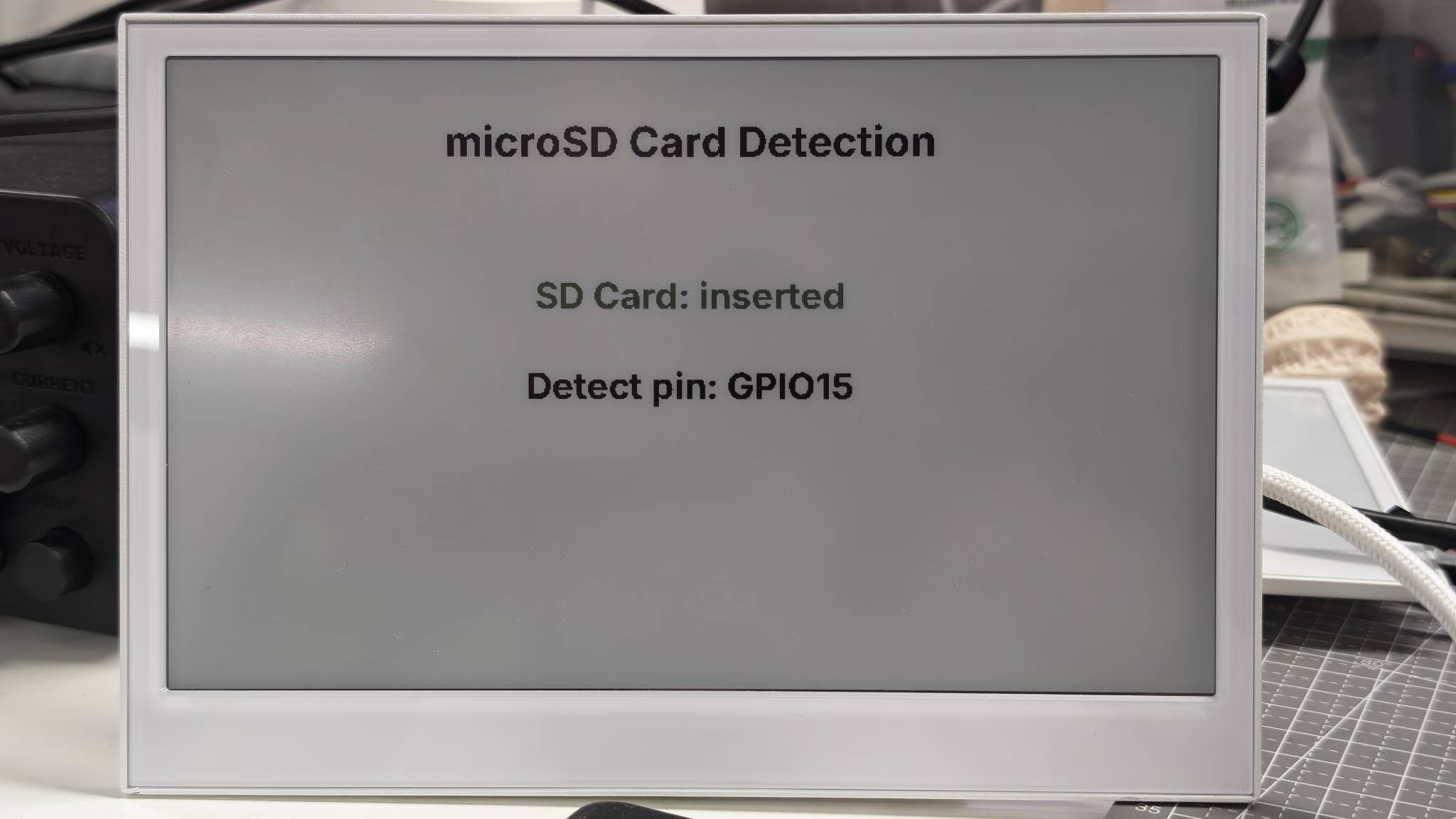
在本 ESPHome cookbook 中,microSD 卡被用作设备状态信号。该演示会检查是否插入了卡,在屏幕上显示结果,并将相同状态暴露给 Home Assistant。
这是因为 ESPHome 主要是为传感器、开关、显示屏和 Home Assistant 自动化而设计的。它通常不会被用作设备上的本地文件管理器。诸如打开文件、创建文件夹、写入日志或将 WAV 音频直接录制到 SD 卡等任务,更适合使用 Arduino,在那里你的固件可以直接控制 SD 卡文件系统。
在典型的 ESPHome 设置中,SD 卡状态可以用于:
- 显示存储是否在物理上可用;
- 在插入或移除卡时触发 Home Assistant 自动化;
- 与 RTC、电池和麦克风状态一起显示硬件健康信息。
如果你的目标是直接对 SD 卡进行文件读写,请参考 Arduino SD 卡 cookbook。
PDM 麦克风电源检查
此演示会启用板载 PDM 麦克风电源轨,并在电子纸屏幕上显示麦克风引脚分配。它保持 YAML 尽量精简,以便你可以先验证显示更新,然后如果希望将麦克风用于 Home Assistant 语音助手,再添加可选的 ESPHome I2S 麦克风配置。
麦克风使用以下引脚:
- 电源使能:
GPIO38 - PDM 时钟:
GPIO42 - PDM 数据:
GPIO41
你可以通过替换占位符值并将完整 YAML 上传到你的设备来使用此示例。
- 适用于 E1001
- 适用于 E1002
- 适用于 E1003
- 适用于 E1004
esphome:
  name: reterminal-e1001-mic-demo
  friendly_name: reTerminal_E1001_Mic_Demo
  on_boot:
    priority: 600
    then:
      - output.turn_on: mic_power_enable
      - delay: 200ms
      - logger.log: "PDM microphone power enabled"
      - component.update: epaper_display

esp32:
  board: esp32-s3-devkitc-1
  framework:
    type: arduino

logger:
  hardware_uart: UART0

api:
  encryption:
    key: "REPLACE_WITH_YOUR_API_KEY"

ota:
  - platform: esphome
    password: "REPLACE_WITH_YOUR_OTA_PASSWORD"

wifi:
  ssid: !secret wifi_ssid
  password: !secret wifi_password
  ap:
    ssid: "E1001-Mic-Demo"
    password: "ChangeMe123"

captive_portal:

spi:
  clk_pin: GPIO7
  mosi_pin: GPIO9

output:
  - platform: gpio
    pin: GPIO38
    id: mic_power_enable

font:
  - file: "gfonts://Inter@700"
    id: font_title
    size: 32
  - file: "gfonts://Inter@700"
    id: font_body
    size: 26

display:
  - platform: waveshare_epaper
    id: epaper_display
    model: 7.50inv2
    cs_pin: GPIO10
    dc_pin: GPIO11
    reset_pin:
      number: GPIO12
      inverted: false
    busy_pin:
      number: GPIO13
      inverted: true
    update_interval: 300s
    lambda: |-
      it.printf(400, 40, id(font_title), TextAlign::TOP_CENTER, "PDM Microphone Power");
      it.printf(400, 135, id(font_body), TextAlign::TOP_CENTER, "Mic Power: ON");
      it.printf(400, 190, id(font_body), TextAlign::TOP_CENTER, "CLK GPIO42 / DATA GPIO41");
      it.printf(400, 245, id(font_body), TextAlign::TOP_CENTER, "I2S microphone: optional");
esphome:
  name: reterminal-e1002-mic-demo
  friendly_name: reTerminal_E1002_Mic_Demo
  on_boot:
    priority: 600
    then:
      - output.turn_on: mic_power_enable
      - delay: 200ms
      - logger.log: "PDM microphone power enabled"
      - component.update: epaper_display

esp32:
  board: esp32-s3-devkitc-1
  framework:
    type: arduino

logger:
  hardware_uart: UART0

api:
  encryption:
    key: "REPLACE_WITH_YOUR_API_KEY"

ota:
  - platform: esphome
    password: "REPLACE_WITH_YOUR_OTA_PASSWORD"

wifi:
  ssid: !secret wifi_ssid
  password: !secret wifi_password
  ap:
    ssid: "E1002-Mic-Demo"
    password: "ChangeMe123"

captive_portal:

spi:
  clk_pin: GPIO7
  mosi_pin: GPIO9

output:
  - platform: gpio
    pin: GPIO38
    id: mic_power_enable

font:
  - file: "gfonts://Inter@700"
    id: font_title
    size: 32
  - file: "gfonts://Inter@700"
    id: font_body
    size: 26

display:
  - platform: epaper_spi
    id: epaper_display
    model: Seeed-reTerminal-E1002
    update_interval: 300s
    lambda: |-
      const auto BLACK = Color(0, 0, 0, 0);
      const auto BLUE = Color(0, 0, 255, 0);

      it.printf(400, 40, id(font_title), BLACK, TextAlign::TOP_CENTER, "PDM Microphone Power");
      it.printf(400, 135, id(font_body), BLUE, TextAlign::TOP_CENTER, "Mic Power: ON");
      it.printf(400, 190, id(font_body), BLACK, TextAlign::TOP_CENTER, "CLK GPIO42 / DATA GPIO41");
      it.printf(400, 245, id(font_body), BLACK, TextAlign::TOP_CENTER, "I2S microphone: optional");
请将你的 ESPHome 版本更新到 2026.7.0 或更高版本。reTerminal E1003 包含板载 PDM 麦克风。
esphome:
  name: reterminal-e1003-mic-demo
  friendly_name: reTerminal_E1003_Mic_Demo
  on_boot:
    priority: 600
    then:
      - output.turn_on: mic_power_enable
      - delay: 200ms
      - logger.log: "PDM microphone power enabled"
      - component.update: epaper_display

esp32:
  board: seeed_xiao_esp32s3
  framework:
    type: esp-idf

psram:
  mode: octal

logger:
  hardware_uart: UART0

api:
  encryption:
    key: "REPLACE_WITH_YOUR_API_KEY"

ota:
  - platform: esphome
    password: "REPLACE_WITH_YOUR_OTA_PASSWORD"

wifi:
  ssid: !secret wifi_ssid
  password: !secret wifi_password
  ap:
    ssid: "E1003-Mic-Demo"
    password: "ChangeMe123"

captive_portal:

spi:
  clk_pin: GPIO7
  mosi_pin: GPIO9

output:
  - platform: gpio
    pin: GPIO38
    id: mic_power_enable

font:
  - file: "gfonts://Inter@700"
    id: font_title
    size: 32
  - file: "gfonts://Inter@700"
    id: font_body
    size: 26

display:
  - platform: it8951
    id: epaper_display
    spi_id: epaper_spi_bus
    model: seeed-reterminal-e1003
    update_interval: 300s
    full_update_every: 30
    grayscale: true
    dithering: true
    update_mode: GC16
    transform:
      mirror_x: true
      mirror_y: false
    lambda: |-
      it.printf(400, 40, id(font_title), Color::BLACK, TextAlign::TOP_CENTER, "PDM Microphone Power");
      it.printf(400, 135, id(font_body), Color::BLACK, TextAlign::TOP_CENTER, "Mic Power: ON");
      it.printf(400, 190, id(font_body), Color::BLACK, TextAlign::TOP_CENTER, "CLK GPIO42 / DATA GPIO41");
      it.printf(400, 245, id(font_body), Color::BLACK, TextAlign::TOP_CENTER, "I2S microphone: optional");
reTerminal E1004 不包含板载 PDM 麦克风。 对于 E1004,请使用本页中的 RTC 和 microSD 演示,或跳过本节。
此配置:
- 通过
GPIO38启用麦克风电源。 - 在电子纸屏幕上显示 PDM 时钟引脚
GPIO42和数据引脚GPIO41。 - 使主演示尽量接近 RTC 和 microSD 演示,以便在添加音频组件之前先验证显示刷新。
如果你想将板载 PDM 麦克风暴露给 ESPHome,请在确认屏幕演示能够正确刷新后,添加以下可选代码块:
i2s_audio:
  i2s_lrclk_pin: GPIO42

microphone:
  - platform: i2s_audio
    id: onboard_mic
    adc_type: external
    pdm: true
    i2s_din_pin: GPIO41
下图展示了在 reTerminal E1002 上的预期结果。相同的演示模式适用于整个 reTerminal E 系列。请在上方选择与你设备匹配的选项卡。黑白 / 灰度面板(E1001、E1003)和彩色面板(E1002、E1004)主要在显示平台和颜色绘制 API 上有所不同。
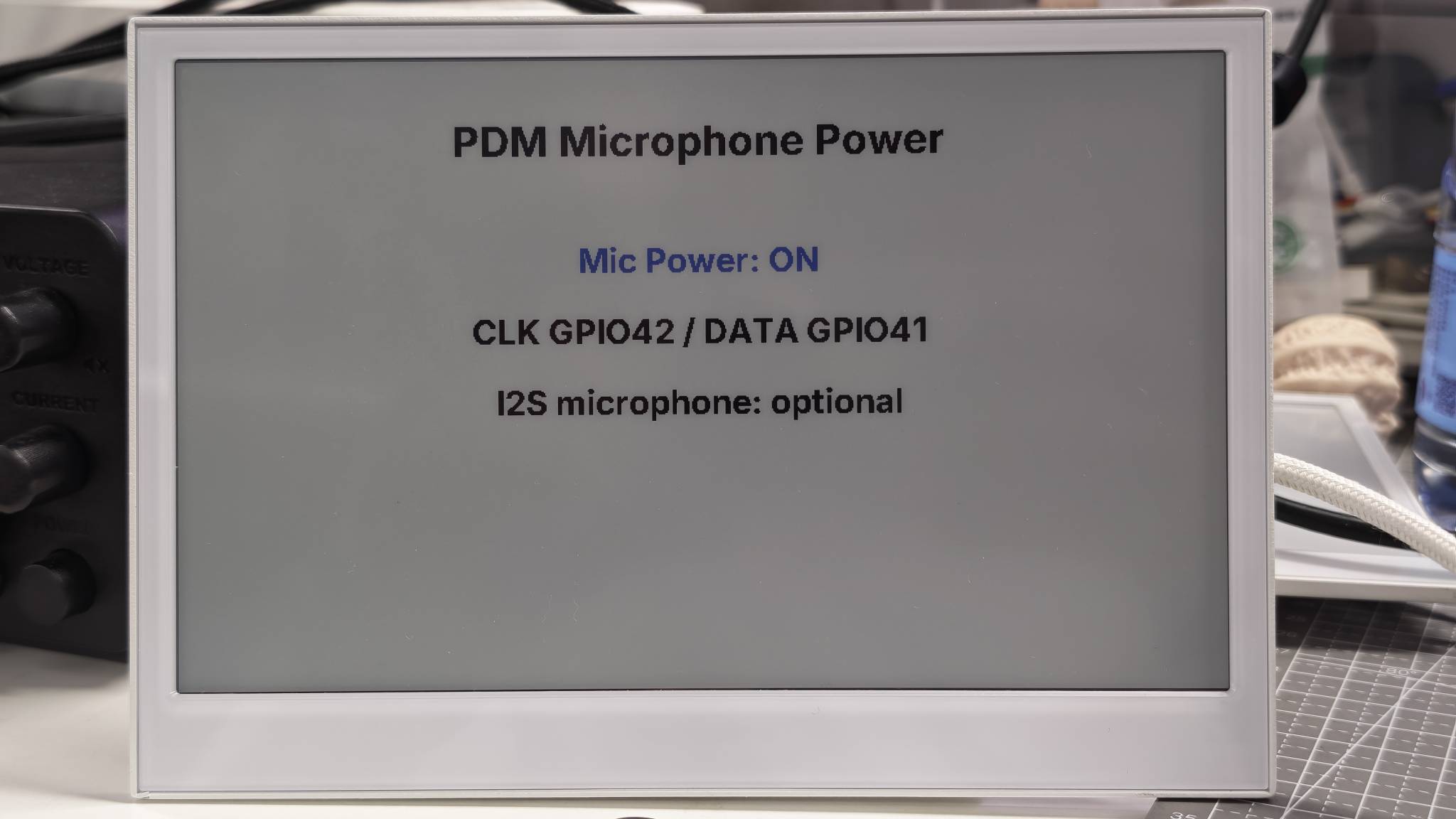
此演示仅验证电子纸屏幕上的麦克风电源控制及相关引脚分配。完整的 Home Assistant Assist 语音流水线需要上方的可选麦克风代码块以及额外的语音助手配置。将音频直接录制到 SD 卡更适合使用 Arduino 麦克风示例来实现。
演示 4:完整的 RTC、SD 卡和麦克风状态仪表板
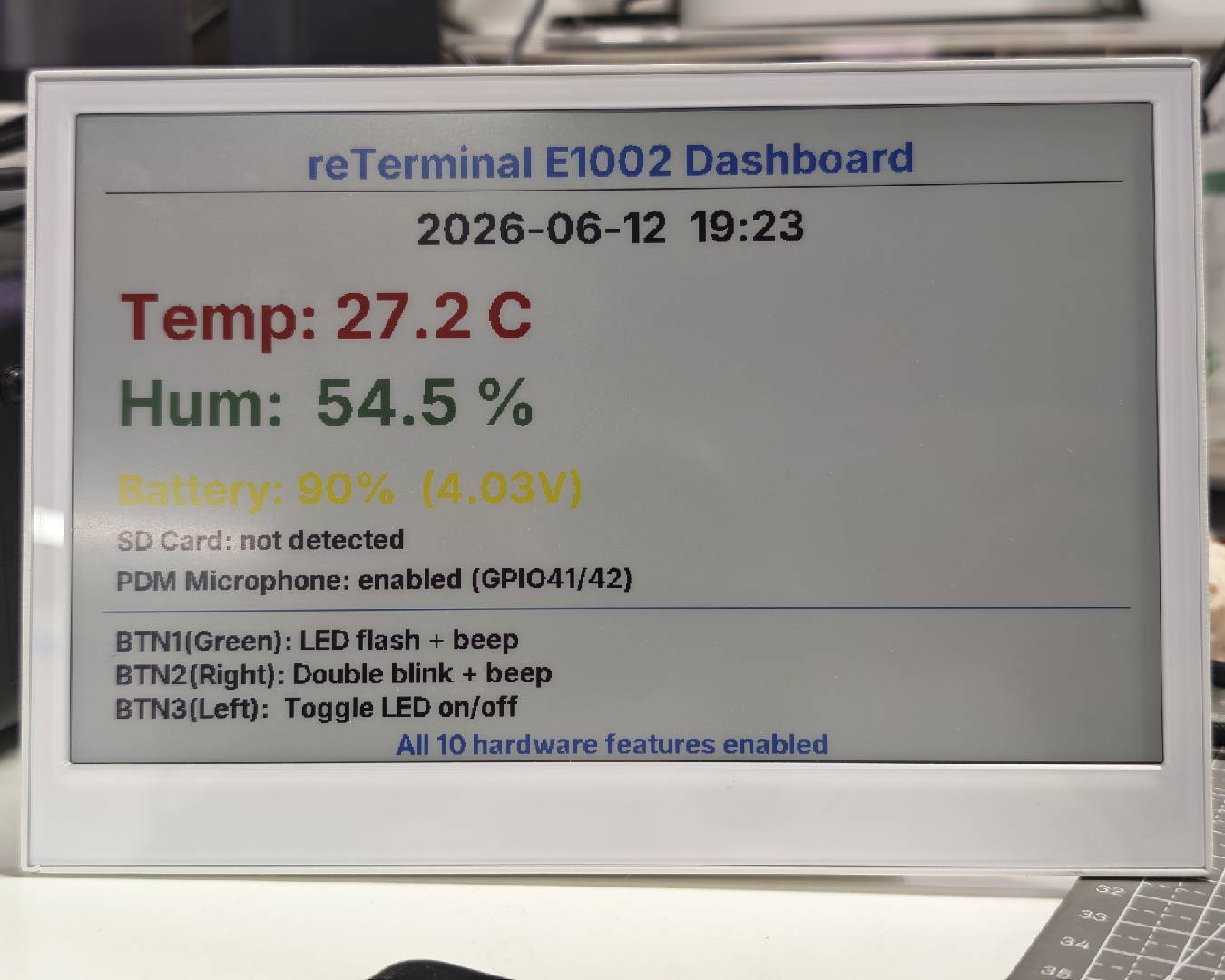
此演示将上述三个功能组合成一个硬件状态页面:
- 来自 PCF8563 的 RTC 日期和时间。
- 来自
GPIO15的 microSD 卡插入状态。 - PDM 麦克风初始化状态。
为了更好地理解,建议先运行单功能演示,再尝试此组合示例。
点击此处查看完整代码
- 适用于 E1001
- 适用于 E1002
- 适用于 E1003
- 适用于 E1004
esphome:
  name: reterminal-e1001-hardware-status
  friendly_name: reTerminal_E1001_Hardware_Status
  on_boot:
    priority: 600
    then:
      - output.turn_on: bsp_sd_enable
      - output.turn_on: mic_power_enable
      - delay: 200ms
      - pcf8563.read_time:
      - component.update: epaper_display

esp32:
  board: esp32-s3-devkitc-1
  framework:
    type: arduino

logger:
  hardware_uart: UART0

api:
  encryption:
    key: "REPLACE_WITH_YOUR_API_KEY"

ota:
  - platform: esphome
    password: "REPLACE_WITH_YOUR_OTA_PASSWORD"

wifi:
  ssid: !secret wifi_ssid
  password: !secret wifi_password
  ap:
    ssid: "E1001-HW-Status"
    password: "ChangeMe123"

captive_portal:

spi:
  id: epaper_spi_bus
  clk_pin: GPIO7
  mosi_pin: GPIO9
  miso_pin: GPIO8

i2c:
  scl: GPIO20
  sda: GPIO19

i2s_audio:
  i2s_lrclk_pin: GPIO42

output:
  - platform: gpio
    pin: GPIO16
    id: bsp_sd_enable

  - platform: gpio
    pin: GPIO38
    id: mic_power_enable

time:
  - platform: pcf8563
    id: rtc_time
    address: 0x51
    update_interval: never

  - platform: homeassistant
    on_time_sync:
      then:
        - pcf8563.write_time:
        - component.update: epaper_display

microphone:
  - platform: i2s_audio
    id: onboard_mic
    adc_type: external
    pdm: true
    i2s_din_pin: GPIO41

binary_sensor:
  - platform: gpio
    pin:
      number: GPIO15
      mode: INPUT_PULLUP
      inverted: true
    id: sd_card_detect
    name: "SD Card Detected"
    on_press:
      then:
        - component.update: epaper_display
    on_release:
      then:
        - component.update: epaper_display

font:
  - file: "gfonts://Inter@700"
    id: font_small
    size: 20
  - file: "gfonts://Inter@700"
    id: font_medium
    size: 32

display:
  - platform: waveshare_epaper
    id: epaper_display
    model: 7.50inv2
    cs_pin: GPIO10
    dc_pin: GPIO11
    reset_pin:
      number: GPIO12
      inverted: false
    busy_pin:
      number: GPIO13
      inverted: true
    update_interval: 300s
    lambda: |-
      it.printf(400, 20, id(font_medium), TextAlign::TOP_CENTER,
                "reTerminal E1001 Hardware Status");
      it.line(20, 60, 780, 60);

      auto now = id(rtc_time).now();
      if (now.is_valid()) {
        it.strftime(30, 95, id(font_medium), "%Y-%m-%d %H:%M", now);
        ESP_LOGD("status", "RTC time is valid");
      } else {
        it.printf(30, 95, id(font_medium), "RTC: waiting for sync");
        ESP_LOGW("status", "RTC time is not valid yet");
      }

      if (id(sd_card_detect).state) {
        it.printf(30, 155, id(font_medium), "SD Card: inserted");
      } else {
        it.printf(30, 155, id(font_medium), "SD Card: not detected");
      }

      it.printf(30, 215, id(font_medium), "PDM Mic: initialized");
      it.printf(30, 265, id(font_small), "RTC: I2C address 0x51");
      it.printf(30, 295, id(font_small), "SD: DET GPIO15 / EN GPIO16");
      it.printf(30, 325, id(font_small), "Mic: CLK GPIO42 / DATA GPIO41 / EN GPIO38");
esphome:
  name: reterminal-e1002-hardware-status
  friendly_name: reTerminal_E1002_Hardware_Status
  on_boot:
    priority: 600
    then:
      - output.turn_on: bsp_sd_enable
      - output.turn_on: mic_power_enable
      - delay: 200ms
      - pcf8563.read_time:
      - component.update: epaper_display

esp32:
  board: esp32-s3-devkitc-1
  framework:
    type: arduino

logger:
  hardware_uart: UART0

api:
  encryption:
    key: "REPLACE_WITH_YOUR_API_KEY"

ota:
  - platform: esphome
    password: "REPLACE_WITH_YOUR_OTA_PASSWORD"

wifi:
  ssid: !secret wifi_ssid
  password: !secret wifi_password
  ap:
    ssid: "E1002-HW-Status"
    password: "ChangeMe123"

captive_portal:

spi:
  id: epaper_spi_bus
  clk_pin: GPIO7
  mosi_pin: GPIO9
  miso_pin: GPIO8

i2c:
  scl: GPIO20
  sda: GPIO19

i2s_audio:
  i2s_lrclk_pin: GPIO42

output:
  - platform: gpio
    pin: GPIO16
    id: bsp_sd_enable

  - platform: gpio
    pin: GPIO38
    id: mic_power_enable

time:
  - platform: pcf8563
    id: rtc_time
    address: 0x51
    update_interval: never

  - platform: homeassistant
    on_time_sync:
      then:
        - pcf8563.write_time:
        - component.update: epaper_display

microphone:
  - platform: i2s_audio
    id: onboard_mic
    adc_type: external
    pdm: true
    i2s_din_pin: GPIO41

binary_sensor:
  - platform: gpio
    pin:
      number: GPIO15
      mode: INPUT_PULLUP
      inverted: true
    id: sd_card_detect
    name: "SD Card Detected"
    on_press:
      then:
        - component.update: epaper_display
    on_release:
      then:
        - component.update: epaper_display

font:
  - file: "gfonts://Inter@700"
    id: font_small
    size: 20
  - file: "gfonts://Inter@700"
    id: font_medium
    size: 32

display:
  - platform: epaper_spi
    id: epaper_display
    model: Seeed-reTerminal-E1002
    update_interval: 300s
    lambda: |-
      const auto BLACK = Color(0, 0, 0, 0);
      const auto BLUE = Color(0, 0, 255, 0);
      const auto GREEN = Color(0, 255, 0, 0);
      const auto RED = Color(255, 0, 0, 0);

      it.printf(400, 20, id(font_medium), BLACK, TextAlign::TOP_CENTER,
                "reTerminal E1002 Hardware Status");
      it.line(20, 60, 780, 60, BLACK);

      auto now = id(rtc_time).now();
      if (now.is_valid()) {
        it.strftime(30, 95, id(font_medium), BLUE, "%Y-%m-%d %H:%M", now);
        ESP_LOGD("status", "RTC time is valid");
      } else {
        it.printf(30, 95, id(font_medium), RED, "RTC: waiting for sync");
        ESP_LOGW("status", "RTC time is not valid yet");
      }

      if (id(sd_card_detect).state) {
        it.printf(30, 155, id(font_medium), GREEN, "SD Card: inserted");
      } else {
        it.printf(30, 155, id(font_medium), RED, "SD Card: not detected");
      }

      it.printf(30, 215, id(font_medium), BLUE, "PDM Mic: initialized");
      it.printf(30, 265, id(font_small), BLACK, "RTC: I2C address 0x51");
      it.printf(30, 295, id(font_small), BLACK, "SD: DET GPIO15 / EN GPIO16");
      it.printf(30, 325, id(font_small), BLACK, "Mic: CLK GPIO42 / DATA GPIO41 / EN GPIO38");
请将 ESPHome 版本更新到 2026.7.0 或更高版本。
esphome:
  name: reterminal-e1003-hardware-status
  friendly_name: reTerminal_E1003_Hardware_Status
  on_boot:
    priority: 600
    then:
      - output.turn_on: bsp_sd_enable
      - output.turn_on: mic_power_enable
      - delay: 200ms
      - pcf8563.read_time:
      - component.update: epaper_display

esp32:
  board: seeed_xiao_esp32s3
  framework:
    type: esp-idf

psram:
  mode: octal

logger:
  hardware_uart: UART0

api:
  encryption:
    key: "REPLACE_WITH_YOUR_API_KEY"

ota:
  - platform: esphome
    password: "REPLACE_WITH_YOUR_OTA_PASSWORD"

wifi:
  ssid: !secret wifi_ssid
  password: !secret wifi_password
  ap:
    ssid: "E1003-HW-Status"
    password: "ChangeMe123"

captive_portal:

spi:
  id: epaper_spi_bus
  clk_pin: GPIO7
  mosi_pin: GPIO9
  miso_pin: GPIO8

i2c:
  scl: GPIO20
  sda: GPIO19

i2s_audio:
  i2s_lrclk_pin: GPIO42

output:
  - platform: gpio
    pin: GPIO39
    id: bsp_sd_enable

  - platform: gpio
    pin: GPIO38
    id: mic_power_enable

time:
  - platform: pcf8563
    id: rtc_time
    address: 0x51
    update_interval: never

  - platform: homeassistant
    on_time_sync:
      then:
        - pcf8563.write_time:
        - component.update: epaper_display

microphone:
  - platform: i2s_audio
    id: onboard_mic
    adc_type: external
    pdm: true
    i2s_din_pin: GPIO41

binary_sensor:
  - platform: gpio
    pin:
      number: GPIO15
      mode: INPUT_PULLUP
      inverted: true
    id: sd_card_detect
    name: "SD Card Detected"
    on_press:
      then:
        - component.update: epaper_display
    on_release:
      then:
        - component.update: epaper_display

font:
  - file: "gfonts://Inter@700"
    id: font_small
    size: 20
  - file: "gfonts://Inter@700"
    id: font_medium
    size: 32

display:
  - platform: it8951
    id: epaper_display
    spi_id: epaper_spi_bus
    model: seeed-reterminal-e1003
    update_interval: 300s
    full_update_every: 30
    grayscale: true
    dithering: true
    update_mode: GC16
    transform:
      mirror_x: true
      mirror_y: false
    lambda: |-
      it.printf(400, 20, id(font_medium), Color::BLACK, TextAlign::TOP_CENTER,
                "reTerminal E1003 Hardware Status");
      it.line(20, 60, 780, 60, Color::BLACK);

      auto now = id(rtc_time).now();
      if (now.is_valid()) {
        it.strftime(30, 95, id(font_medium), Color::BLACK, "%Y-%m-%d %H:%M", now);
        ESP_LOGD("status", "RTC time is valid");
      } else {
        it.printf(30, 95, id(font_medium), Color::BLACK, "RTC: waiting for sync");
        ESP_LOGW("status", "RTC time is not valid yet");
      }

      if (id(sd_card_detect).state) {
        it.printf(30, 155, id(font_medium), Color::BLACK, "SD Card: inserted");
      } else {
        it.printf(30, 155, id(font_medium), Color::BLACK, "SD Card: not detected");
      }

      it.printf(30, 215, id(font_medium), Color::BLACK, "PDM Mic: initialized");
      it.printf(30, 265, id(font_small), Color::BLACK, "RTC: I2C address 0x51");
      it.printf(30, 295, id(font_small), Color::BLACK, "SD: DET GPIO15 / EN GPIO39");
      it.printf(30, 325, id(font_small), Color::BLACK, "Mic: CLK GPIO42 / DATA GPIO41 / EN GPIO38");
请将 ESPHome 版本更新到 2026.7.0 或更高版本。reTerminal E1004 不包含板载 PDM 麦克风,因此此状态演示仅涵盖 RTC 和 microSD。
esphome:
  name: reterminal-e1004-hardware-status
  friendly_name: reTerminal_E1004_Hardware_Status
  on_boot:
    priority: 600
    then:
      - output.turn_on: bsp_sd_enable
      - delay: 200ms
      - pcf8563.read_time:
      - component.update: epaper_display

esp32:
  board: seeed_xiao_esp32s3
  framework:
    type: esp-idf

psram:
  mode: octal

logger:
  hardware_uart: UART0

api:
  encryption:
    key: "REPLACE_WITH_YOUR_API_KEY"

ota:
  - platform: esphome
    password: "REPLACE_WITH_YOUR_OTA_PASSWORD"

wifi:
  ssid: !secret wifi_ssid
  password: !secret wifi_password
  ap:
    ssid: "E1004-HW-Status"
    password: "ChangeMe123"

captive_portal:

spi:
  clk_pin: GPIO7
  mosi_pin: GPIO9
  miso_pin: GPIO8

i2c:
  scl: GPIO20
  sda: GPIO19

output:
  - platform: gpio
    pin: GPIO16
    id: bsp_sd_enable

time:
  - platform: pcf8563
    id: rtc_time
    address: 0x51
    update_interval: never

  - platform: homeassistant
    on_time_sync:
      then:
        - pcf8563.write_time:
        - component.update: epaper_display

binary_sensor:
  - platform: gpio
    pin:
      number: GPIO15
      mode: INPUT_PULLUP
      inverted: true
    id: sd_card_detect
    name: "SD Card Detected"
    on_press:
      then:
        - component.update: epaper_display
    on_release:
      then:
        - component.update: epaper_display

font:
  - file: "gfonts://Inter@700"
    id: font_small
    size: 20
  - file: "gfonts://Inter@700"
    id: font_medium
    size: 32

display:
  - platform: epaper_spi
    id: epaper_display
    model: seeed-reterminal-e1004
    update_interval: 300s
    lambda: |-
      const auto BLACK = Color(0, 0, 0, 0);
      const auto BLUE = Color(0, 0, 255, 0);
      const auto GREEN = Color(0, 255, 0, 0);
      const auto RED = Color(255, 0, 0, 0);

      it.printf(400, 20, id(font_medium), BLACK, TextAlign::TOP_CENTER,
                "reTerminal E1004 Hardware Status");
      it.line(20, 60, 780, 60, BLACK);

      auto now = id(rtc_time).now();
      if (now.is_valid()) {
        it.strftime(30, 95, id(font_medium), BLUE, "%Y-%m-%d %H:%M", now);
        ESP_LOGD("status", "RTC time is valid");
      } else {
        it.printf(30, 95, id(font_medium), RED, "RTC: waiting for sync");
        ESP_LOGW("status", "RTC time is not valid yet");
      }

      if (id(sd_card_detect).state) {
        it.printf(30, 155, id(font_medium), GREEN, "SD Card: inserted");
      } else {
        it.printf(30, 155, id(font_medium), RED, "SD Card: not detected");
      }

      it.printf(30, 215, id(font_medium), BLUE, "PDM Mic: not available on E1004");
      it.printf(30, 265, id(font_small), BLACK, "RTC: I2C address 0x51");
      it.printf(30, 295, id(font_small), BLACK, "SD: DET GPIO15 / EN GPIO16");
当固件正在运行时,屏幕会在一个页面上显示 RTC 时间和 SD 卡状态。带有板载 PDM 麦克风的型号(E1001 / E1002 / E1003)还会显示麦克风初始化状态;E1004 则显示麦克风不可用。
下图展示了在 reTerminal E1002 上的预期效果。同一演示模式适用于整个 reTerminal E 系列。单色 / 灰度面板(E1001、E1003)和彩色面板(E1002、E1004)主要在显示平台和颜色绘制 API 上有所不同。
常见问题
Q1:为什么屏幕显示“RTC: waiting for sync”?
设备尚未接收到有效时间。请确认 Wi-Fi 已连接、ESPHome API 已连接到 Home Assistant,并且 Home Assistant 的系统时间是正确的。在 Home Assistant 完成时间同步后,ESPHome 会将时间写回到 PCF8563 RTC。
Q2:为什么通过 USB 没有串口日志输出?
reTerminal E 系列在 UART0 上使用 CH340K USB 转 UART 转换芯片。请在你的 YAML 中保持如下日志配置:
logger:
  hardware_uart: UART0
Q3:为什么在 RTC 或麦克风示例中屏幕不刷新?
如果插入了 microSD 卡,请先取出该卡并重启设备。除 microSD 卡检测示例外,本页的其他示例都不需要插入卡。保持插卡状态可能会影响共享的 SPI 总线,从而导致电子纸屏幕无法正常刷新。
取出卡后,请重新上传或重启 RTC 或麦克风示例。电子纸屏幕应能正常刷新。
资源
- [工具] reTerminal E-Series Firmware Hub — 通过选择设备特性生成 ESPHome YAML,或直接在浏览器中烧录示例
- [Wiki] ESPHome Cookbook:显示基础
- [Wiki] ESPHome Cookbook:按键、蜂鸣器、LED、电池、触摸与低功耗
- [Wiki] 与 ESPHome 协同工作
- [Wiki] Arduino Cookbook:板载外设
- [Wiki] Arduino Cookbook:RTC、低功耗、音频与触摸
- [文档] ESPHome 时间组件
- [文档] ESPHome I2S 音频组件
技术支持与产品讨论
感谢您选择我们的产品!我们将为您提供多种支持,确保您在使用我们产品的过程中尽可能顺畅。我们提供多种沟通渠道,以满足不同的偏好和需求。