21. 使用 Isaac GR00T 微调 reBot Arm
本章基于 LeRobot + GR00T N1.7(nvidia/GR00T-N1.7-3B)。请确保第 20 章数据集已就绪。
本章基于 LeRobot + GR00T N1.7(nvidia/GR00T-N1.7-3B)。请确保第 20 章数据集已就绪。

环境准备
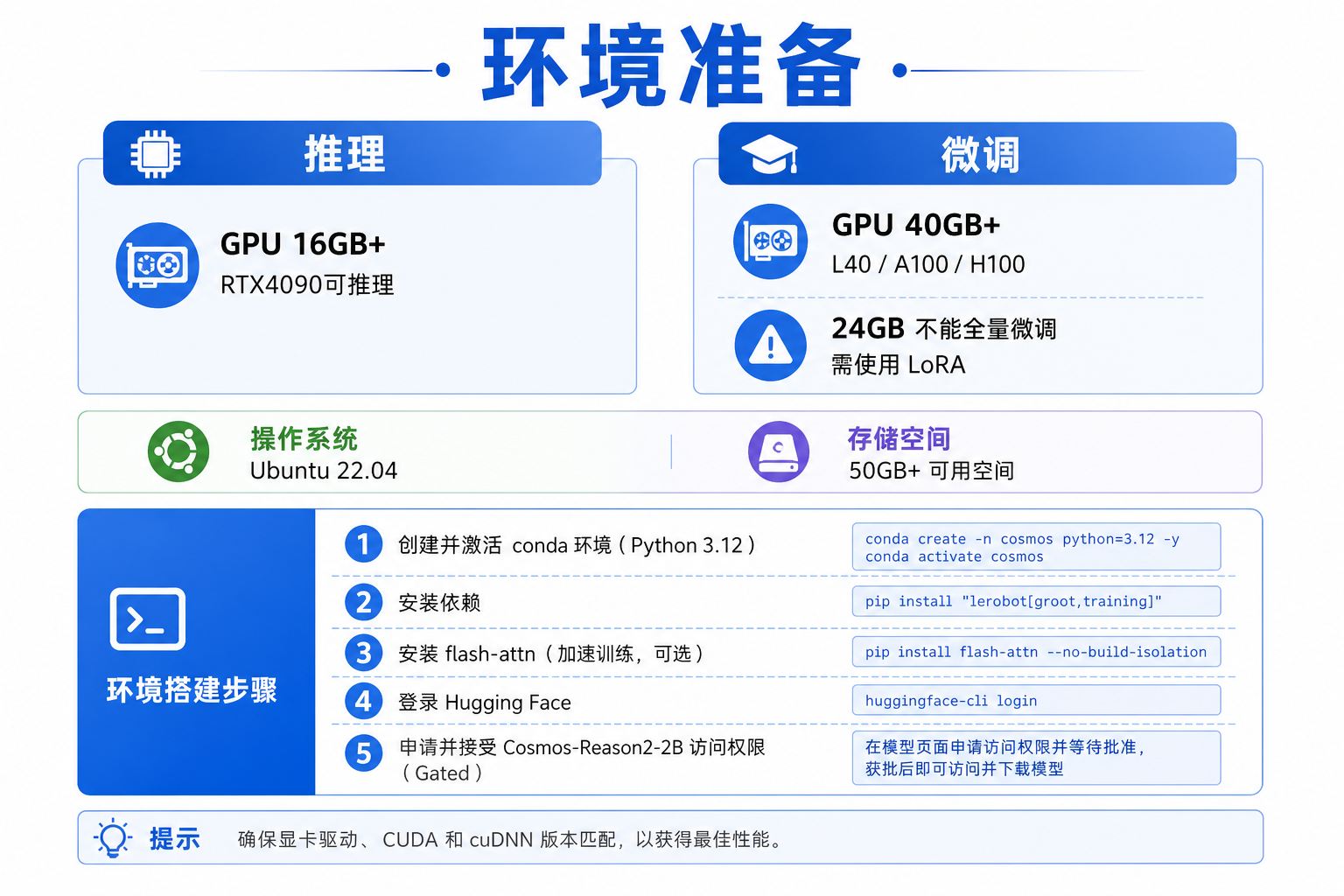
推荐硬件
| 配置 | 推理最低 | 微调推荐 |
|---|---|---|
| GPU | 16 GB+(RTX 4090 可推理) | 40 GB+(L40 / A100 80GB / H100);官方仿真微调要求 ≥ 48 GB |
| 系统 | Linux(Ubuntu 22.04+) | 原生 Linux 或 WSL2 |
| 存储 | 50 GB 可用空间 | 100 GB+(含模型缓存) |
GR00T 需要 CUDA GPU,不支持 CPU-only 训练。默认微调(projector + DiT head)峰值约 35 GB。RTX 4090 / 24 GB 不能做全量微调,只适合推理;若必须在 24 GB 上训,请用 LoRA / PEFT(pip install "lerobot[peft]"),效果与官方全量微调不可等同。
安装 LeRobot 与 GR00T 依赖
按 LeRobot 安装文档 创建 Python 3.12 环境后:
conda create -y -n lerobot python=3.12
conda activate lerobot

# 安装 ffmpeg(视频解码,Linux + TorchCodec 场景)
conda install ffmpeg -c conda-forge

# 安装 LeRobot + GR00T + 训练工具
pip install "lerobot[groot,training]"
Flash Attention(重要)
GR00T N1.7 依赖 Flash Attention 加速。建议先安装匹配 CUDA 的 PyTorch,再装 flash-attn:
# 示例:CUDA 12.8 + PyTorch 2.7(RTX 50 系列可参考此组合)
pip install torch torchvision --index-url https://download.pytorch.org/whl/cu128

pip install ninja "packaging>=24.2,<26.0"
pip install "flash-attn>=2.5.9,<3.0.0" --no-build-isolation

python -c "import flash_attn; print(f'Flash Attention {flash_attn.__version__} OK')"
若 flash-attn 编译失败,常见原因:
- PyTorch 与 CUDA 版本不匹配 → 重装对应 wheel
- 缺少编译工具 →
sudo apt install build-essential - 显存/内存不足 → 关闭其他 GPU 进程后重试
登录 Hugging Face 与 W&B
huggingface-cli login
wandb login   # 可选,用于训练曲线可视化
下载基础模型
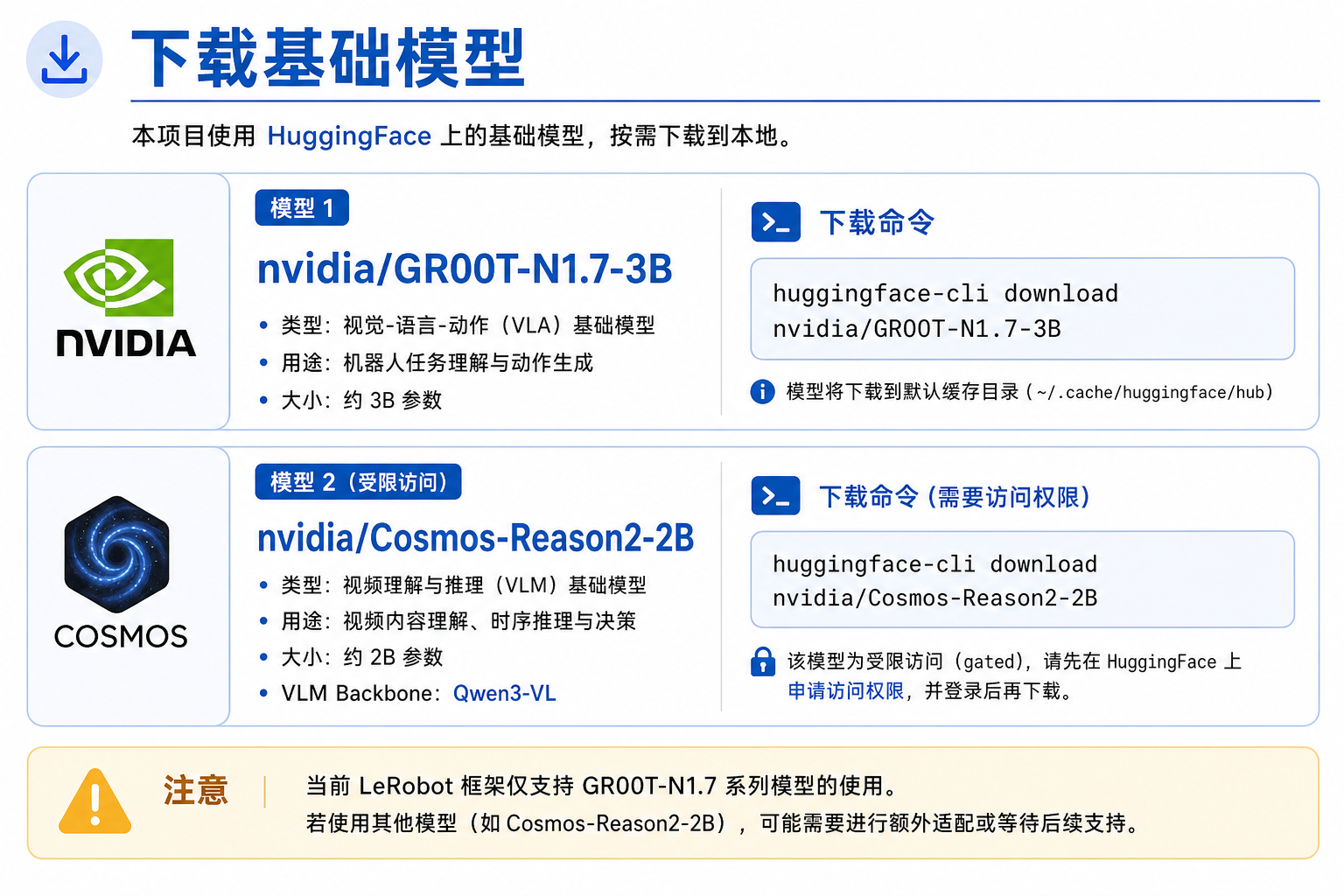
基础模型托管在 Hugging Face:
nvidia/GR00T-N1.7-3B
首次训练时 LeRobot 会自动下载到 -/.cache/huggingface/hub/。N1.7 的 VLM 骨干 nvidia/Cosmos-Reason2-2B 是 gated 模型,需在 Hugging Face 接受条款后再 huggingface-cli login。也可手动预下载:
huggingface-cli download nvidia/GR00T-N1.7-3B --local-dir ./models/GR00T-N1.7-3B
huggingface-cli download nvidia/Cosmos-Reason2-2B
训练参数中指定:
--policy.base_model_path=nvidia/GR00T-N1.7-3B
版本注意:当前 LeRobot 仅支持 GR00T N1.7。N1.5 需固定旧版
lerobot==0.5.1,本教程不覆盖。
配置数据集路径

本地数据集
若数据在本地缓存(未上传 Hub),repo_id 须与录制时一致:
export DATASET_REPO_ID="seeed_rebot_b601_rs/pick_cube" # DM:seeed_rebot_b601_dm/pick_cube
LeRobot 自动从 -/.cache/huggingface/lerobot/ 加载。
Hub 数据集
export HF_USER="your_hf_username"
export DATASET_REPO_ID="${HF_USER}/rebot_vla_pick_cube"
确保 Hub 上的数据集包含 meta/modality.json(第 20 章已创建)。
启动单 GPU 微调
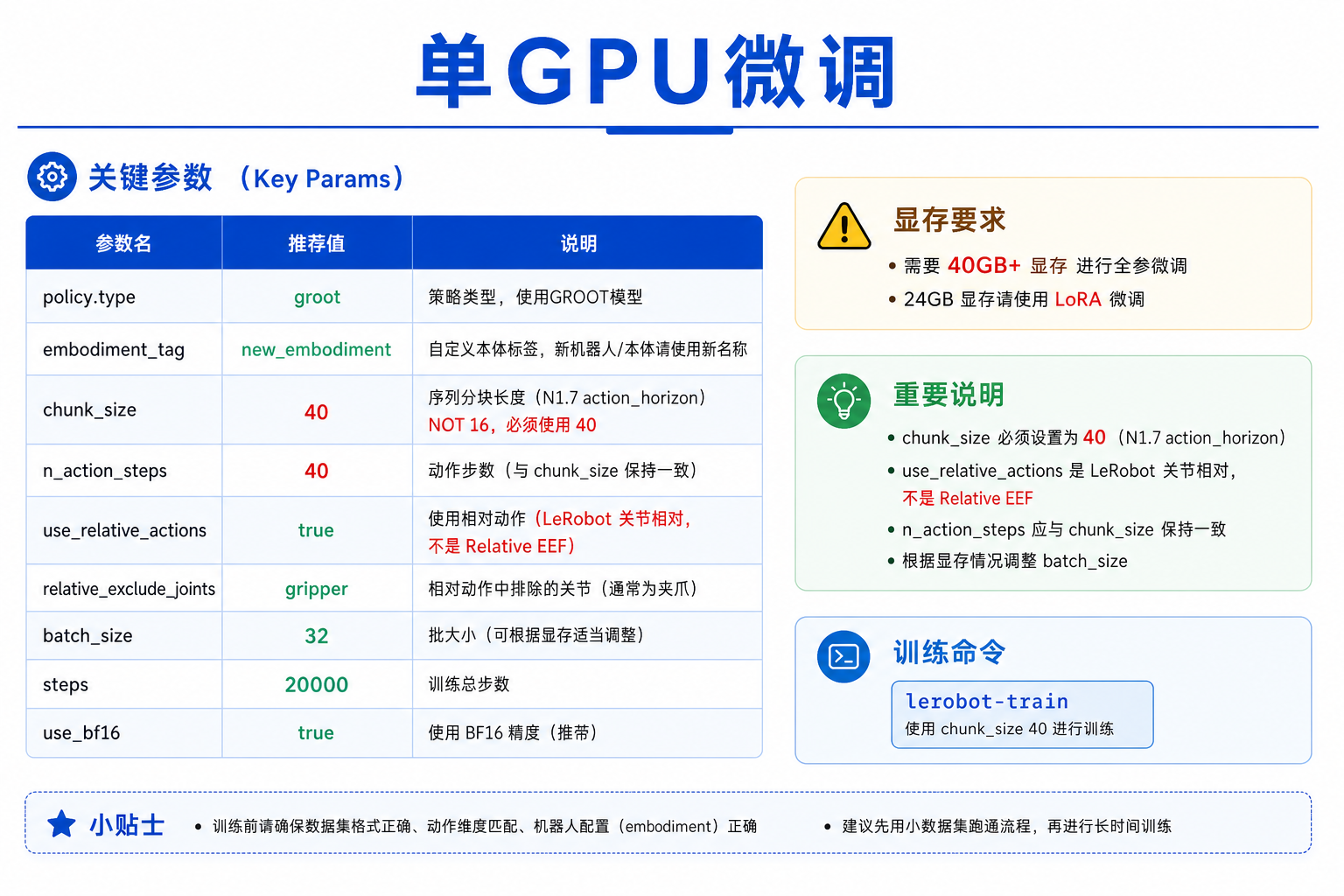
以下命令针对 reBot Arm 单臂、new_embodiment(数据集 repo_id 按 RS/DM 替换)。chunk_size=40 对齐 N1.7 官方 action_horizon;LeRobot groot 源码默认是 50,二者都远大于 N1.5/N1.6 的 16,不要用 16。
export HF_USER="your_hf_username"
export DATASET_REPO_ID="seeed_rebot_b601_rs/pick_cube"   # 本地或 Hub;DM 改 b601_dm
export REPO_ID="${HF_USER}/rebot_groot17_pick_cube"      # 微调后模型上传名
export OUTPUT_DIR="outputs/train/${REPO_ID}"

lerobot-train \
  --dataset.repo_id=${DATASET_REPO_ID} \
  --dataset.image_transforms.enable=true \
  --policy.type=groot \
  --policy.device=cuda \
  --policy.base_model_path=nvidia/GR00T-N1.7-3B \
  --policy.embodiment_tag=new_embodiment \
  --policy.chunk_size=40 \
  --policy.n_action_steps=40 \
  --policy.use_relative_actions=true \
  --policy.relative_exclude_joints='["gripper"]' \
  --policy.use_bf16=true \
  --policy.push_to_hub=true \
  --policy.repo_id=${REPO_ID} \
  --seed=42 \
  --batch_size=32 \
  --steps=20000 \
  --save_checkpoint=true \
  --save_freq=5000 \
  --use_policy_training_preset=true \
  --env_eval_freq=0 \
  --eval_steps=0 \
  --log_freq=10 \
  --output_dir=${OUTPUT_DIR} \
  --job_name=rebot_groot_finetune \
  --wandb.enable=true \
  --wandb.disable_artifact=true
关键参数说明
| 参数 | 值 | 说明 |
|---|---|---|
--policy.type | groot | 使用 GR00T 策略 |
--policy.embodiment_tag | new_embodiment | reBot 自定义本体 |
--policy.chunk_size | 40 | 对齐 N1.7 action_horizon=40(勿用 16) |
--policy.n_action_steps | 40 | 训练时通常与 chunk 一致;推理可再减小 |
--policy.use_relative_actions | true | LeRobot 关节相对预处理,不是 Relative EEF |
--policy.relative_exclude_joints | ["gripper"] | 夹爪保持绝对控制 |
--policy.use_bf16 | true | 混合精度,节省显存 |
--batch_size | 32(可调) | 40 GB 卡可试 32;OOM 时降至 8 或 16 |
--steps | 20000 | 微调步数;数据少可降至 10000 |
--save_freq | 5000 | 每 5000 步存一次 checkpoint |
仅本地保存、不上传 Hub 时:
--policy.push_to_hub=false
启动多 GPU 微调
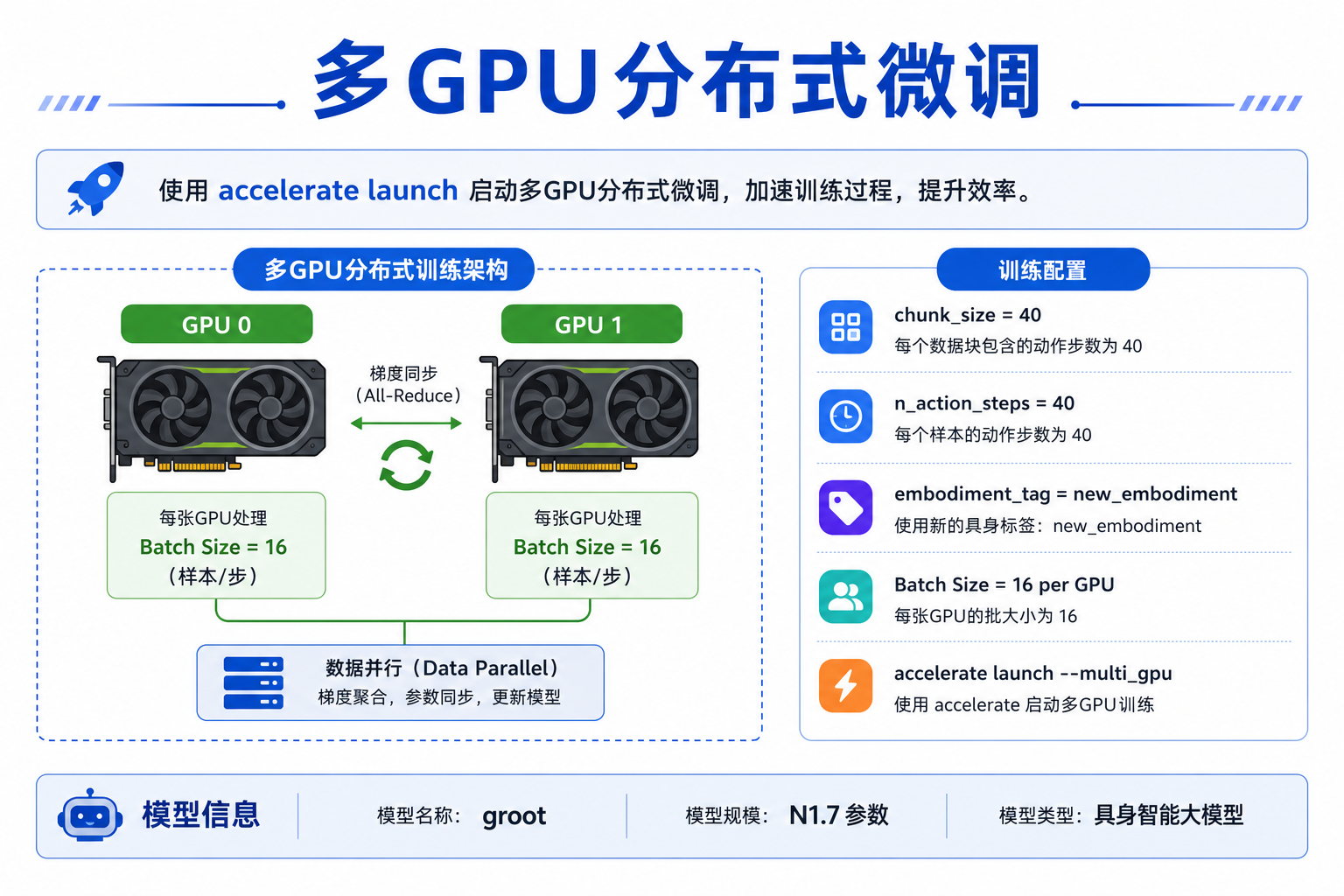
多卡环境使用 accelerate:
export NUM_GPUS=2
export BATCH_SIZE=16        # 每卡 batch,总 batch = 16 × GPU 数
export NUM_STEPS=20000
export SAVE_FREQ=5000
export LOG_FREQ=10
export DATASET_REPO_ID="seeed_rebot_b601_rs/pick_cube"
export REPO_ID="${HF_USER}/rebot_groot17_pick_cube"
export OUTPUT_DIR="outputs/train/${REPO_ID}"

accelerate launch \
  --multi_gpu \
  --num_processes=${NUM_GPUS} \
  $(which lerobot-train) \
  --dataset.repo_id=${DATASET_REPO_ID} \
  --dataset.image_transforms.enable=true \
  --policy.type=groot \
  --policy.device=cuda \
  --policy.base_model_path=nvidia/GR00T-N1.7-3B \
  --policy.embodiment_tag=new_embodiment \
  --policy.chunk_size=40 \
  --policy.n_action_steps=40 \
  --policy.use_relative_actions=true \
  --policy.relative_exclude_joints='["gripper"]' \
  --policy.use_bf16=true \
  --policy.push_to_hub=true \
  --policy.repo_id=${REPO_ID} \
  --output_dir=${OUTPUT_DIR} \
  --save_checkpoint=true \
  --batch_size=${BATCH_SIZE} \
  --steps=${NUM_STEPS} \
  --save_freq=${SAVE_FREQ} \
  --log_freq=${LOG_FREQ} \
  --use_policy_training_preset=true \
  --wandb.enable=true \
  --wandb.disable_artifact=true \
  --job_name=rebot_groot_multi_gpu
查看显存、Loss 和训练日志
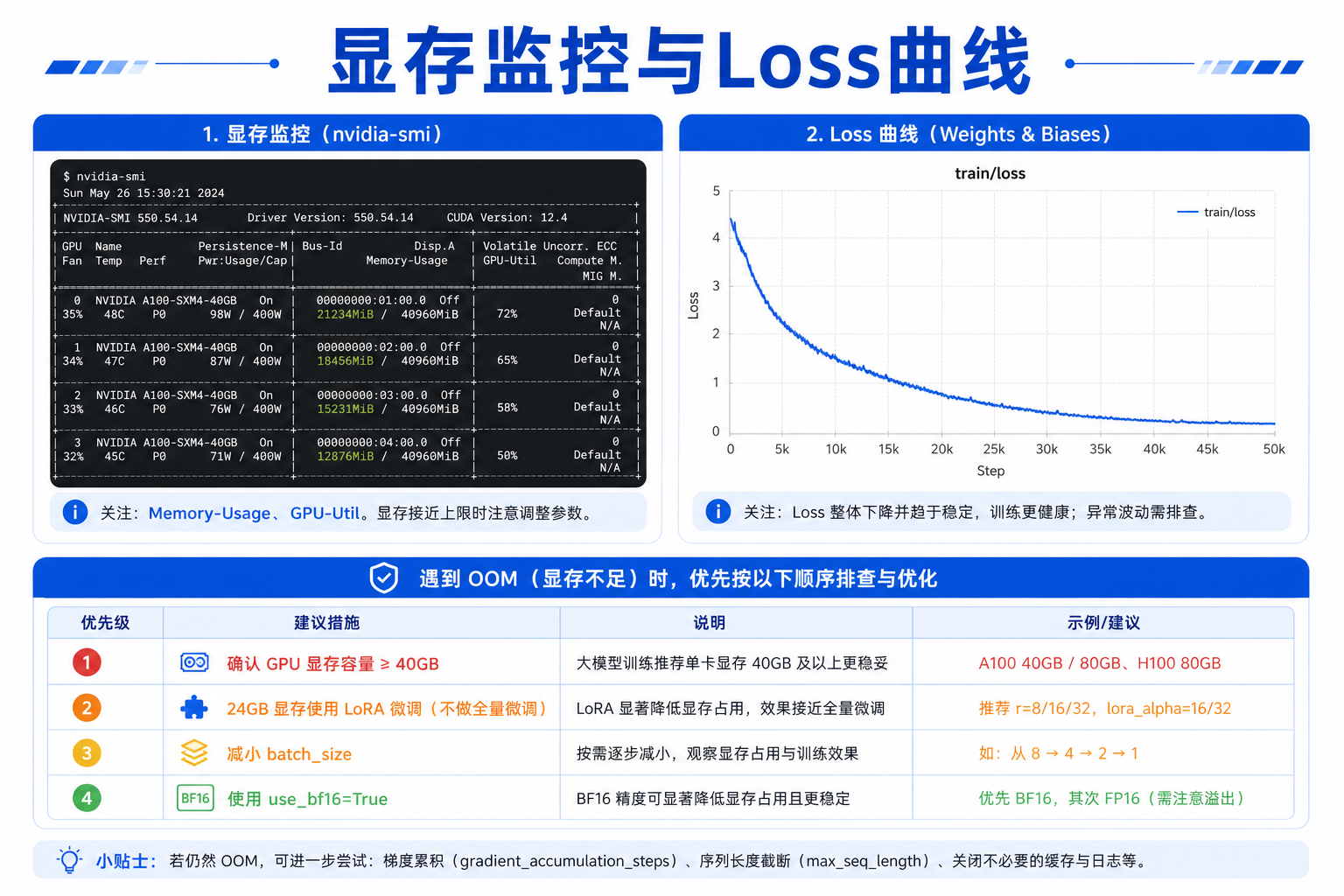
显存监
另开终端:
watch -n 1 nvidia-smi
| 现象 | 处理 |
|---|---|
| OOM(显存不足) | 先确认 GPU ≥ 40 GB;再降低 --batch_size、保持 --policy.use_bf16=true。24 GB 请改 LoRA/PEFT,不要硬降 batch 做全量微调 |
| 显存有余量 | 适当增大 batch_size 加速训练 |
| 利用率低 | 检查 num_workers;确认数据在 SSD 本地 |
Loss 曲线
启用 W&B 后,在网页端查看 train/loss 下降趋势。正常微调:
- 前 1000 步 loss 快速下降
- 5000 步后趋于平稳
- 若 loss 不下降:检查
modality.json、数据维度、语言标注
本地日志
tail -f ${OUTPUT_DIR}/logs/*.log
或查看 W&B 离线/在线面板。
保存 Checkpoint
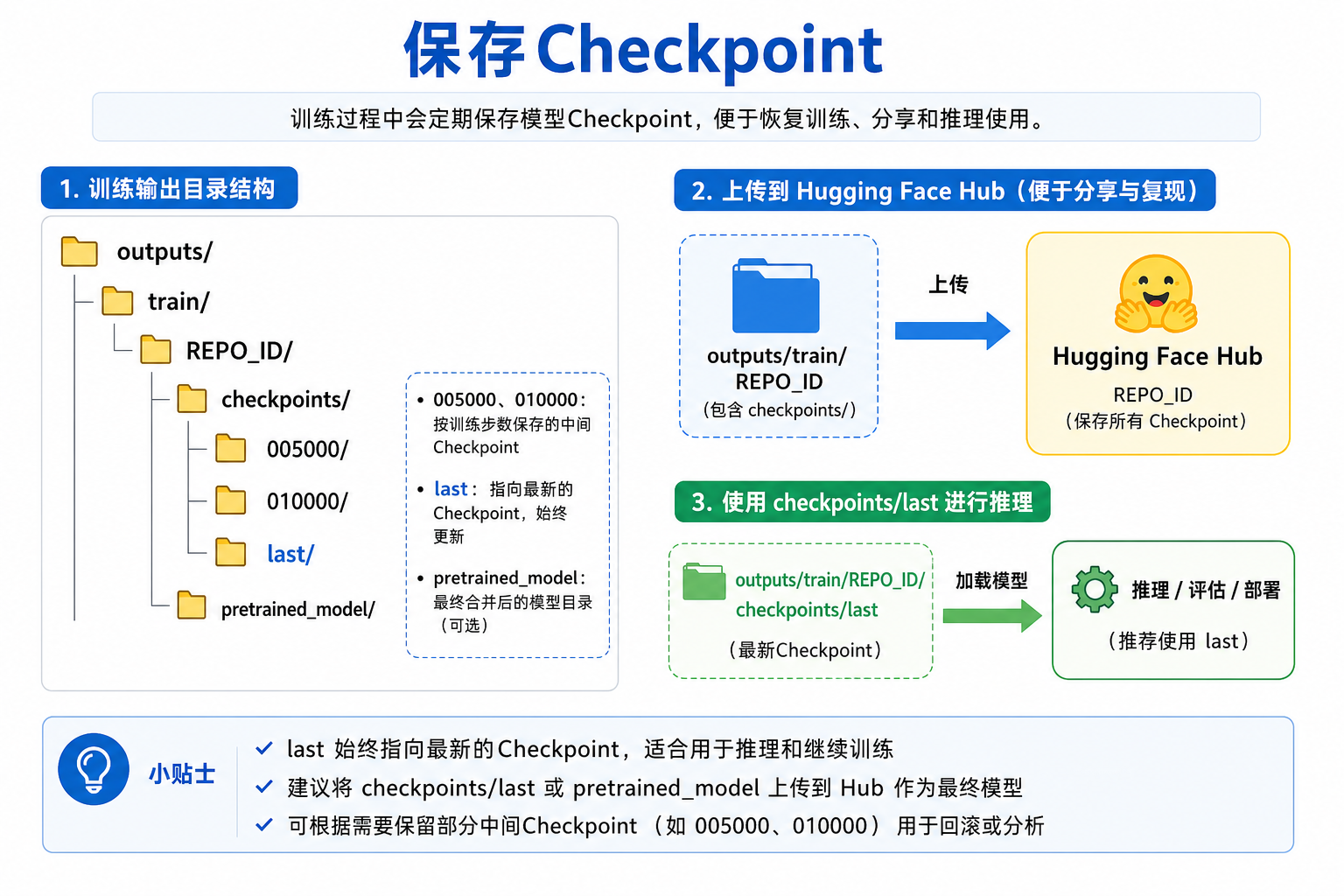
训练过程中 checkpoint 保存在:
outputs/train/<REPO_ID>/
├── checkpoints/
│   ├── 005000/
│   │   └── pretrained_model/
│   ├── 010000/
│   ├── 015000/
│   ├── 020000/
│   └── last/
│       └── pretrained_model/    ← 最新权重,推理用这个
└── logs/
使用指定 checkpoint 推理
--policy.path=outputs/train/${REPO_ID}/checkpoints/010000/pretrained_model
上传到 Hub
若 --policy.push_to_hub=true,训练结束自动上传。手动上传:
huggingface-cli upload ${REPO_ID} \
  outputs/train/${REPO_ID}/checkpoints/last/pretrained_model
真机推理与评估
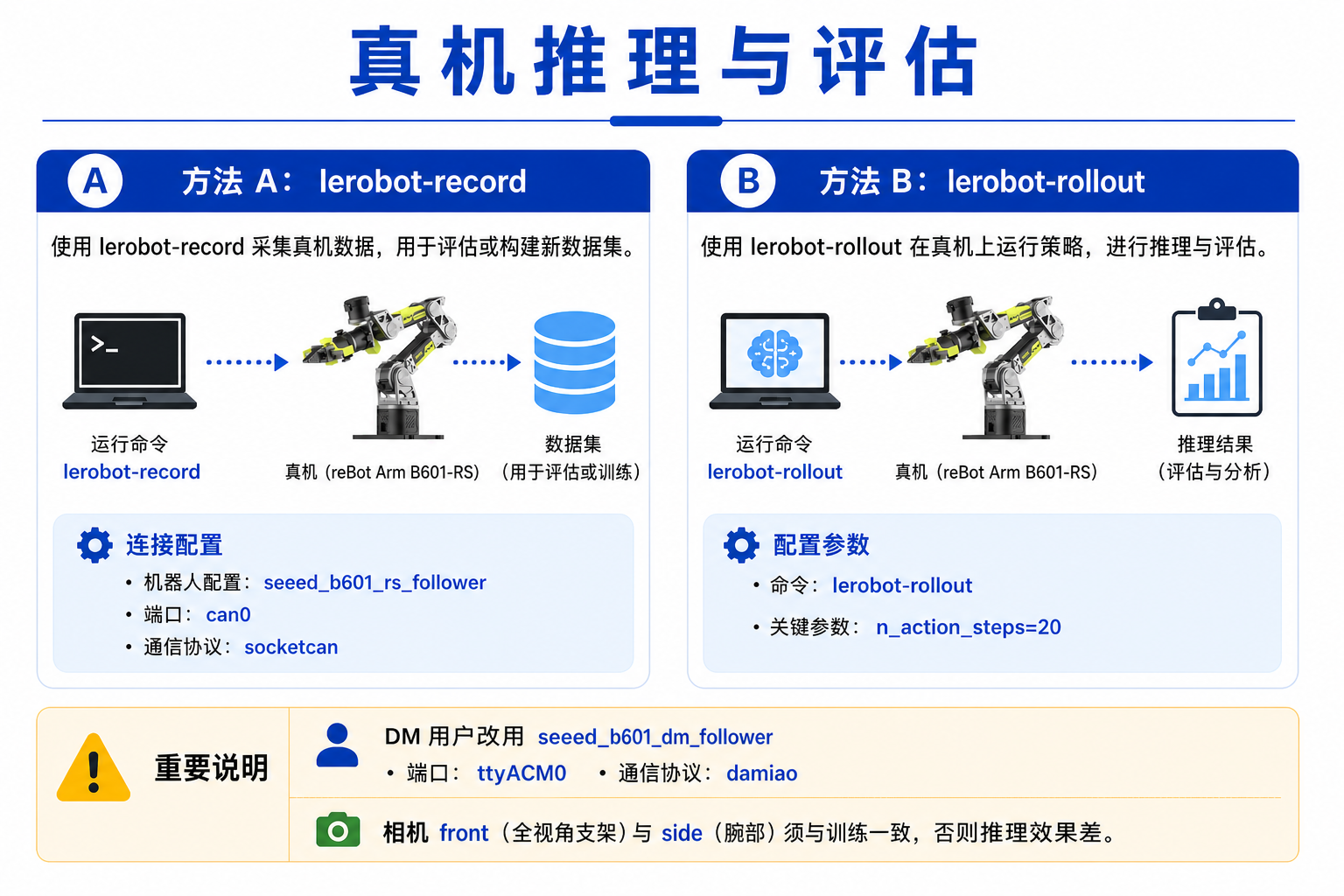
方式 A:lerobot-record 带策略录制(推荐入门)
与 ACT 评估流程相同,换成 GR00T checkpoint。下面以 B601-RS 为例;DM 替换 type / port / can_adapter。
export HF_USER="your_hf_username"
export MODEL_PATH="${HF_USER}/rebot_groot17_pick_cube"   # Hub 或本地路径

# RS CAN
sudo ip link set can0 down 2>/dev/null
sudo ip link set can0 type can bitrate 1000000
sudo ip link set can0 up

lerobot-record \
  --robot.type=seeed_b601_rs_follower \
  --robot.port=can0 \
  --robot.id=follower1 \
  --robot.can_adapter=socketcan \
  --robot.cameras="{ front: {type: opencv, index_or_path: 0, width: 640, height: 480, fps: 30, fourcc: \"MJPG\"}, side: {type: opencv, index_or_path: 2, width: 640, height: 480, fps: 30, fourcc: \"MJPG\"}}" \
  --display_data=true \
  --dataset.repo_id=${HF_USER}/eval_groot_rebot \
  --dataset.num_episodes=10 \
  --dataset.single_task="把黑色方块放到蓝色托盘里" \
  --dataset.episode_time_s=30 \
  --dataset.reset_time_s=15 \
  --policy.path=${MODEL_PATH} \
  --policy.base_model_path=nvidia/GR00T-N1.7-3B \
  --policy.embodiment_tag=new_embodiment
注意:--robot.cameras 中的 front、side 必须与训练数据集键名一致。
方式 B:lerobot-rollout 实时部署(进阶)
适合低延迟闭环控制,支持 RTC(Real-Time Chunking):
export MODEL_PATH="${HF_USER}/rebot_groot17_pick_cube"

lerobot-rollout \
  --strategy.type=base \
  --policy.path=${MODEL_PATH} \
  --policy.base_model_path=nvidia/GR00T-N1.7-3B \
  --policy.embodiment_tag=new_embodiment \
  --policy.chunk_size=40 \
  --policy.n_action_steps=20 \
  --policy.use_relative_actions=true \
  --policy.relative_exclude_joints='["gripper"]' \
  --robot.type=seeed_b601_rs_follower \
  --robot.port=can0 \
  --robot.id=follower1 \
  --robot.can_adapter=socketcan \
  --robot.cameras="{ front: {type: opencv, index_or_path: 0, width: 640, height: 480, fps: 30, fourcc: \"MJPG\"}, side: {type: opencv, index_or_path: 2, width: 640, height: 480, fps: 30, fourcc: \"MJPG\"}}" \
  --task="把黑色方块放到蓝色托盘里" \
  --duration=60 \
  --device=cuda \
  --display_data=true \
  --inference.type=rtc \
  --inference.rtc.enabled=true \
  --inference.rtc.execution_horizon=20 \
  --inference.queue_threshold=2
若 RTC 导致抖动,设 --inference.rtc.enabled=false。queue_threshold 建议设为 2–5(设为 0 会频繁触发重推理,易抖动)。
常见问题排查
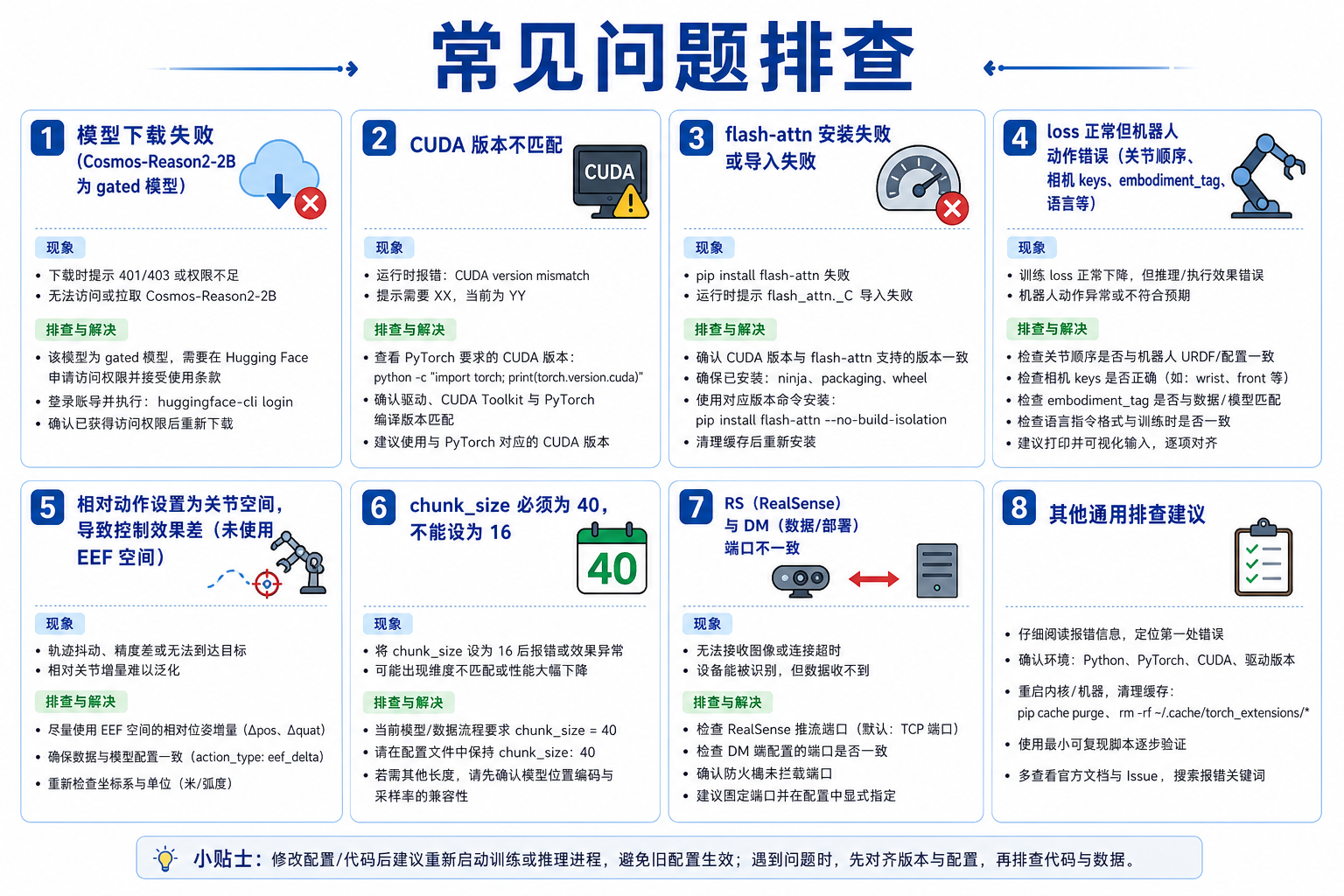
模型下载失败
# 设置镜像或代理后重试
export HF_ENDPOINT=https://hf-mirror.com   # 可选
huggingface-cli download nvidia/GR00T-N1.7-3B
huggingface-cli download nvidia/Cosmos-Reason2-2B   # gated,需先在 HF 接受条款
CUDA / PyTorch 版本不匹配
python -c "import torch; print(torch.__version__, torch.cuda.is_available(), torch.version.cuda)"
nvidia-smi
确保驱动版本满足 PyTorch CUDA 要求。
Flash Attention 安装失败
- 确认
nvcc --version与 PyTorch CUDA 一致 - 尝试预编译 wheel:
pip install flash-attn --no-build-isolation - RTX 50 系列可试:
pip install flash_attn==2.8.0.post2 torch==2.7.1 --no-build-isolation - 仍失败时查阅 Isaac GR00T 官方文档
训练 loss 正常但真机乱动
| 可能原因 | 排查 |
|---|---|
| 关节顺序不一致 | 对比数据集 meta 与 --robot.cameras / 驱动 |
| 角度单位错误 | 确认度/弧度训练推理一致 |
| 相机键名不匹配 | front/side 与训练数据对齐 |
| embodiment_tag 错误 | 必须为 new_embodiment |
| 语言指令不匹配 | --task 句式与训练数据一致 |
| 相对动作未正确还原 | 确认 use_relative_actions 训练与推理一致;这是关节相对,不是 Relative EEF |
mean is infinity 报错
通常因评估时相机键名与训练不一致。检查 --robot.cameras 键名。
训练效果优化建议
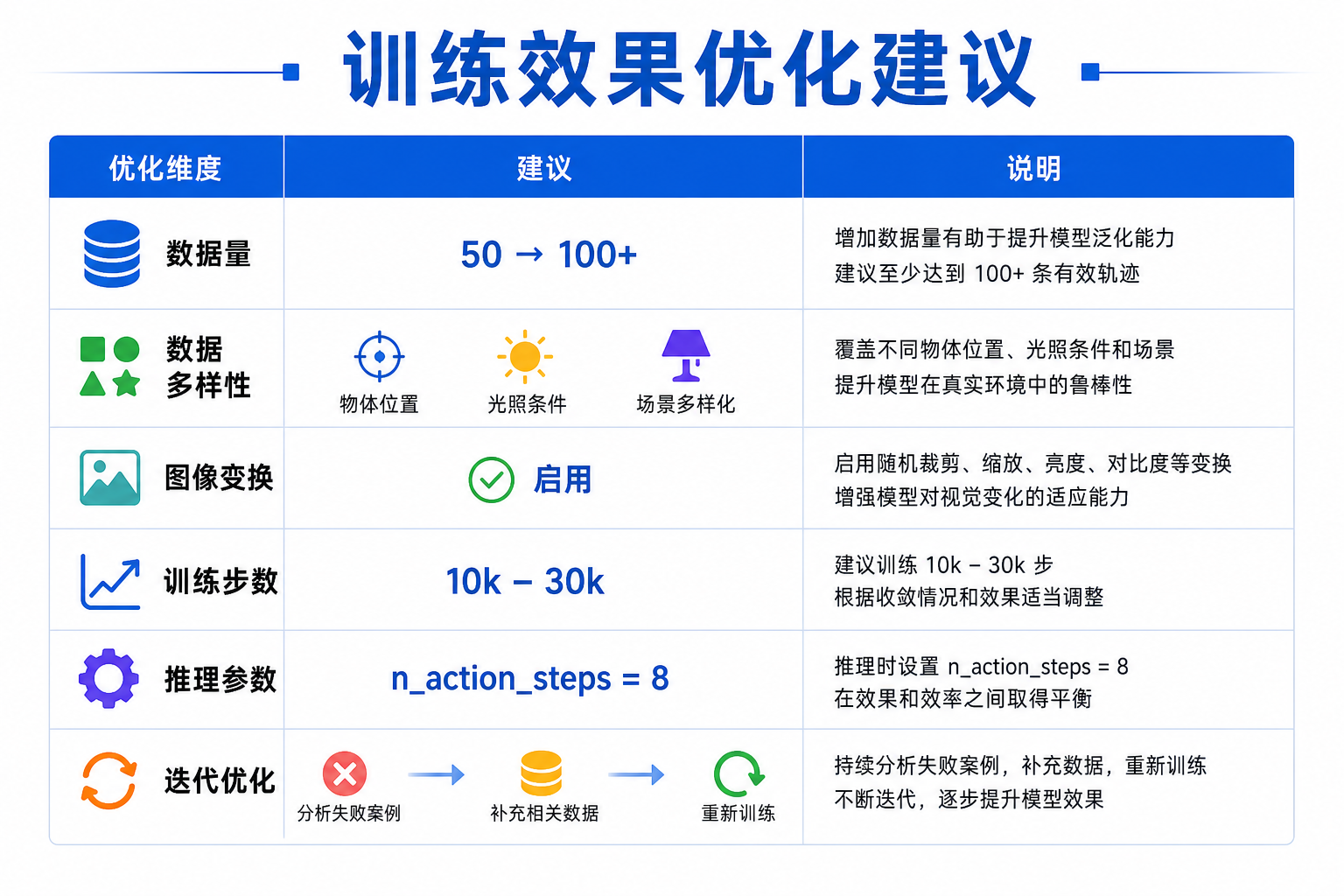
| 方向 | 建议 |
|---|---|
| 数据量 | 单任务先 50 条跑通,再扩到 100+ |
| 数据多样性 | 物体位置、光照、初始姿态多样化 |
| 增强 | 保持 --dataset.image_transforms.enable=true |
| 步数 | 数据少 10k–15k;数据多 20k–30k |
| 推理 | 先试 n_action_steps=20(须 ≤ 训练时的 chunk_size=40),再调 RTC |
| 迭代 | 失败 case 补采数据 → 合并数据集 → 继续微调 |
本章小结
- 环境:
pip install "lerobot[groot,training]"+ Flash Attention + 40 GB+ GPU 微调(16 GB 仅推理) - 基础模型:
nvidia/GR00T-N1.7-3B(骨干Cosmos-Reason2-2B) - 训练:
lerobot-train --policy.type=groot --policy.embodiment_tag=new_embodiment - reBot 关键配置:关节空间 + 可选 LeRobot 关节相对动作(夹爪绝对)+
chunk_size=40(对齐 N1.7) - 机型:RS 用
seeed_b601_rs_follower+can0+socketcan;DM 用seeed_b601_dm_follower+/dev/ttyACM0+damiao - 评估:
lerobot-record或lerobot-rollout,相机与语言须与训练对齐 - Checkpoint 位于
outputs/train/<REPO_ID>/checkpoints/last/pretrained_model
完成本章后,你应能在 reBot Arm 上用自然语言指令驱动 VLA 策略。若效果不理想,优先回到第 20 章检查数据质量,再增加演示数量迭代微调。