使用 Seeed Studio XIAO nRF54L15 Sense 进行引脚复用
为了便于使用,以下所有引脚复用示例都基于 PlatformIO。请点击此链接查看 XIAO nRF54L5 的配置和使用指南。
基于 VS Code,如果你想在 nRF Connect SDK 上使用以下示例,请参考所提供的连接,添加 app.overlay 文件并在 prj.conf 中修改内容。
板载按键
XIAO nRF54L15(Sense) 配备了两个在设备运行和固件编程中起关键作用的重要物理按键:复位按键(Reset Button) 和 用户按键(User Button)。理解它们的功能对于日常使用和固件更新至关重要。
硬件概览
- XIAO nRF54L15
- XIAO nRF54L15 Sense
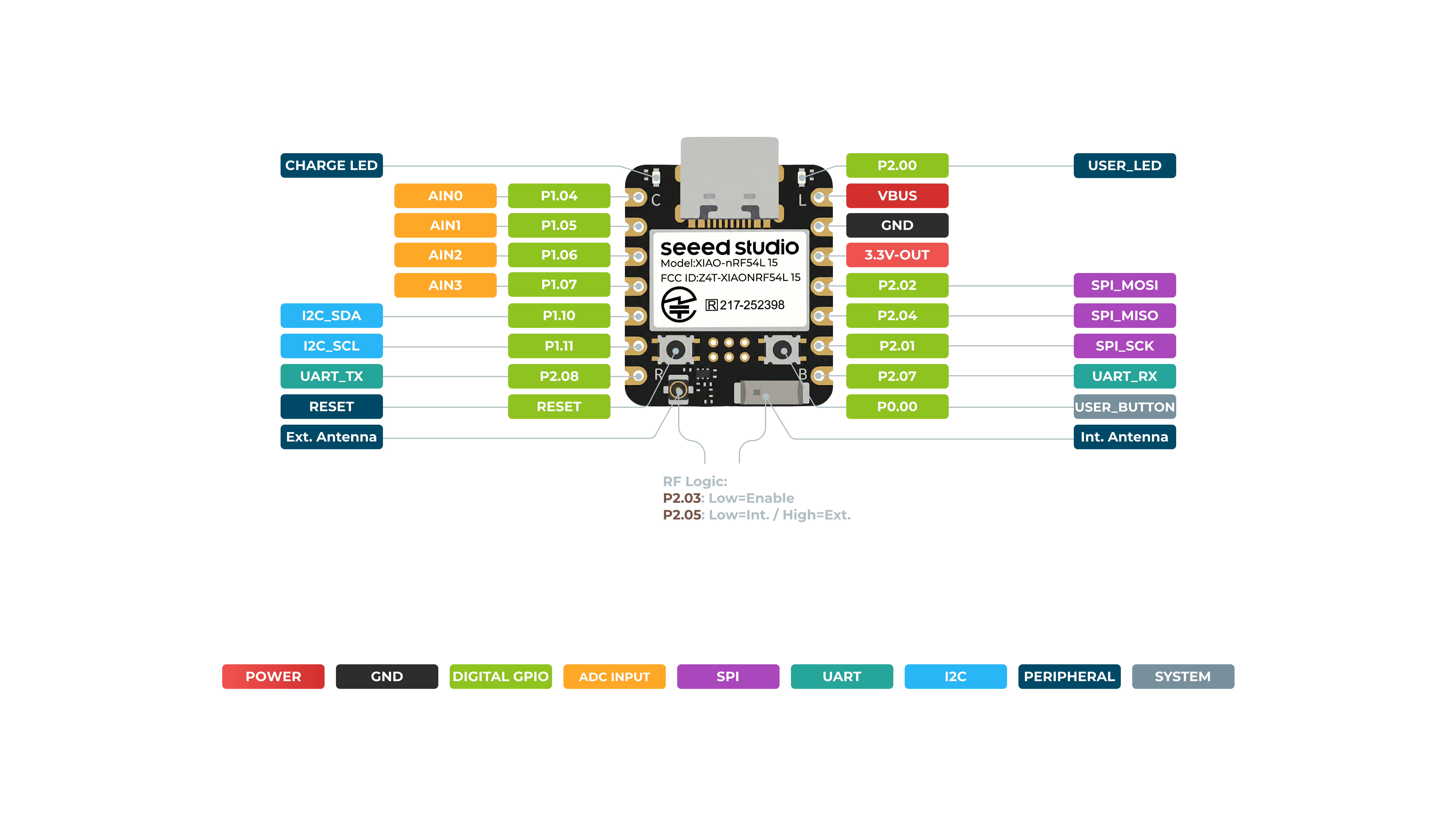
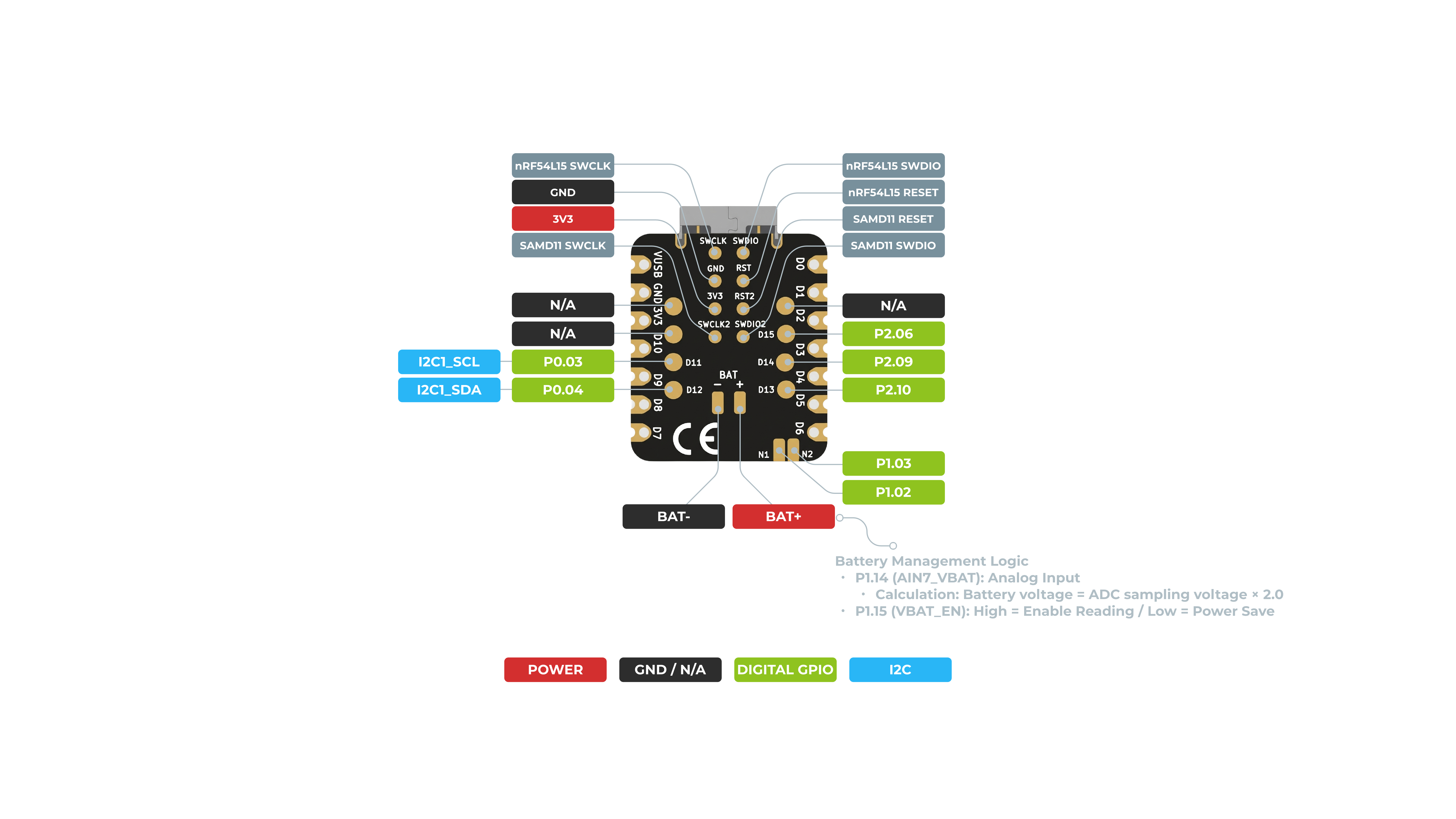
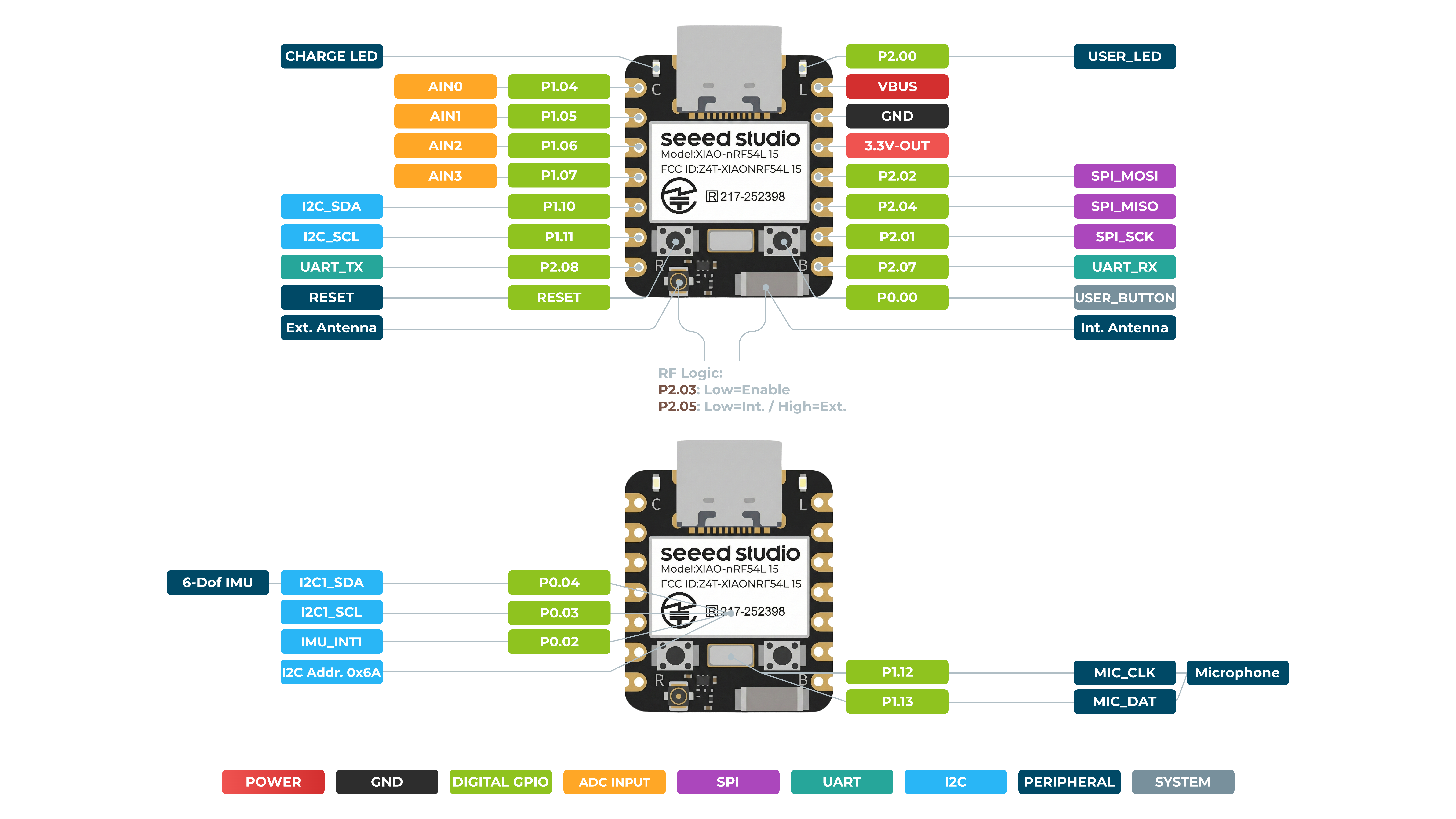
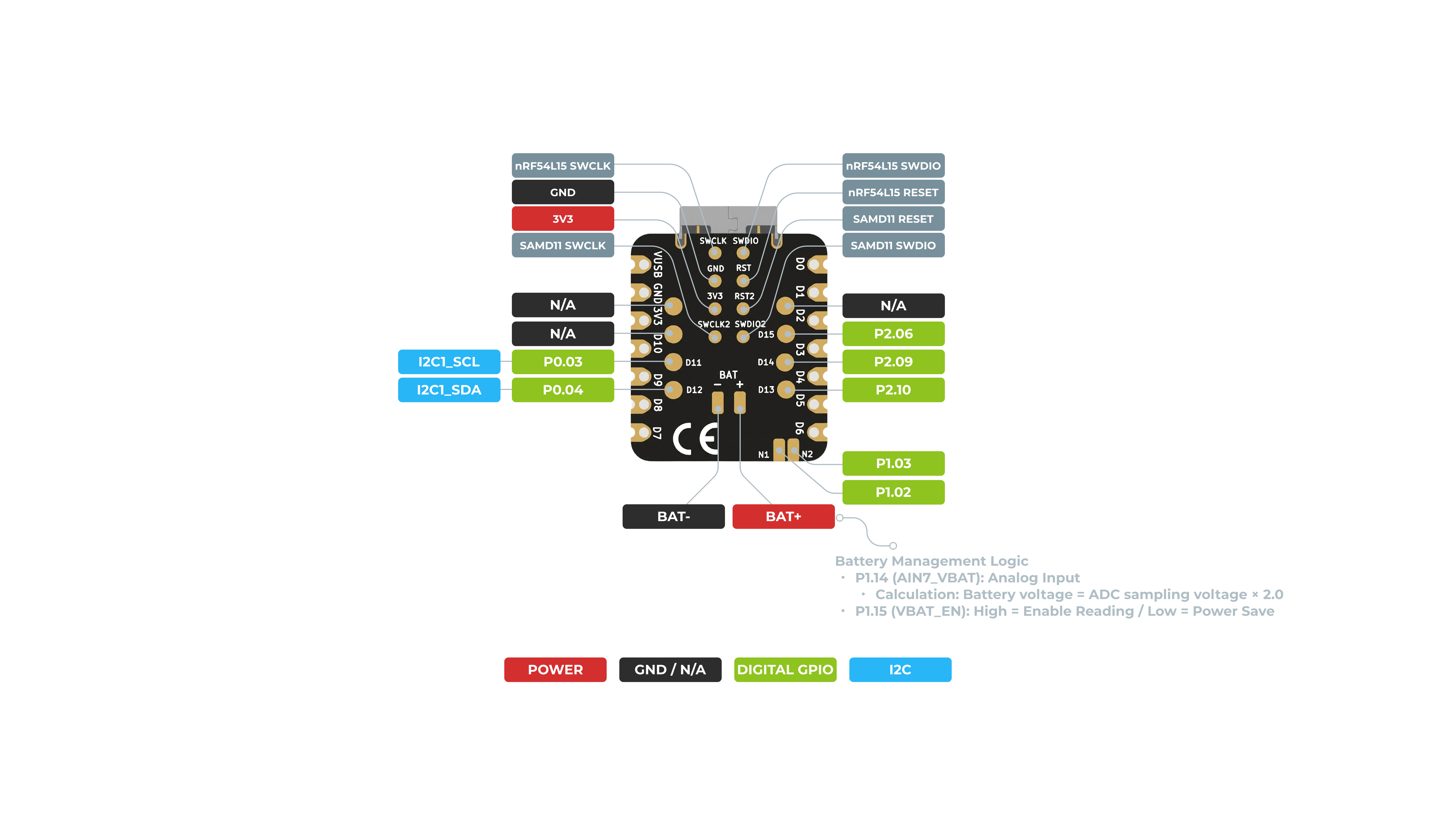
复位按键(Reset Button)
Reset 按键用于对设备执行硬复位操作。
- 功能:
- 强制重启: 按下该按键会立即中断设备当前的所有操作并使其重启,类似于断电重上电。
- 解决程序卡死: 当设备运行的程序崩溃、进入死循环或无响应时,按下 Reset 按键是将其强制恢复到正常工作状态的最快方式。
- 不影响固件: 复位操作不会擦除或更改已烧录到设备中的固件,它只是重新启动当前正在运行的应用程序。
用户按键(User Button)
User 按键是一个多功能、可编程的输入,在你的应用中提供灵活的控制方式。
功能:
-
可自定义输入:与功能固定的 Reset 按键不同,User 按键的行为完全由你编写的固件来定义。
-
事件触发:它可以被编程为触发特定事件、控制不同功能,或在你的应用中作为通用输入使用。
数字 IO
硬件准备
| Seeed Studio XIAO nRF54L15 Sense | Seeed Studio Expansion Base for XIAO with Grove OLED | Grove - Relay |
|---|---|---|
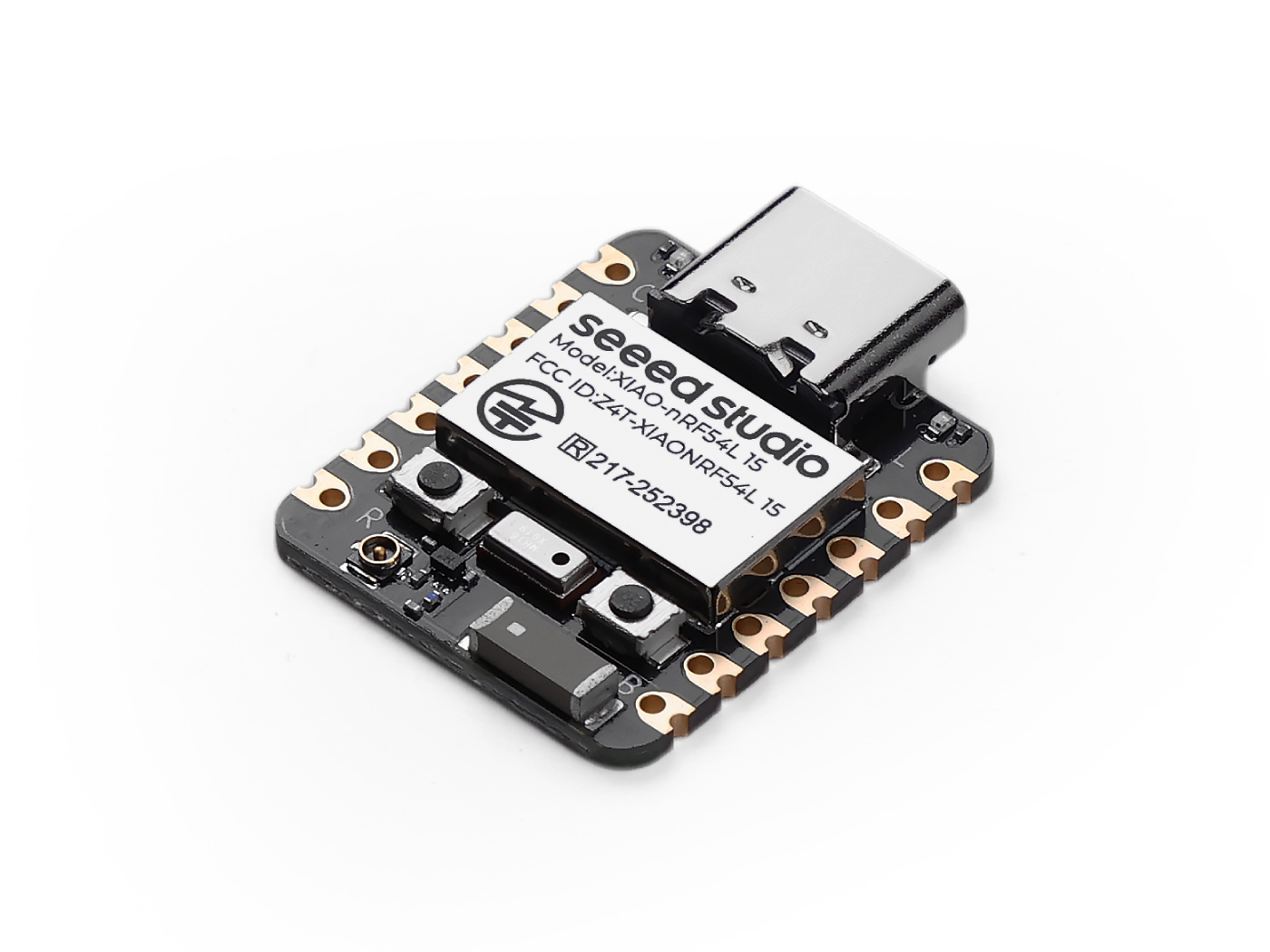 | 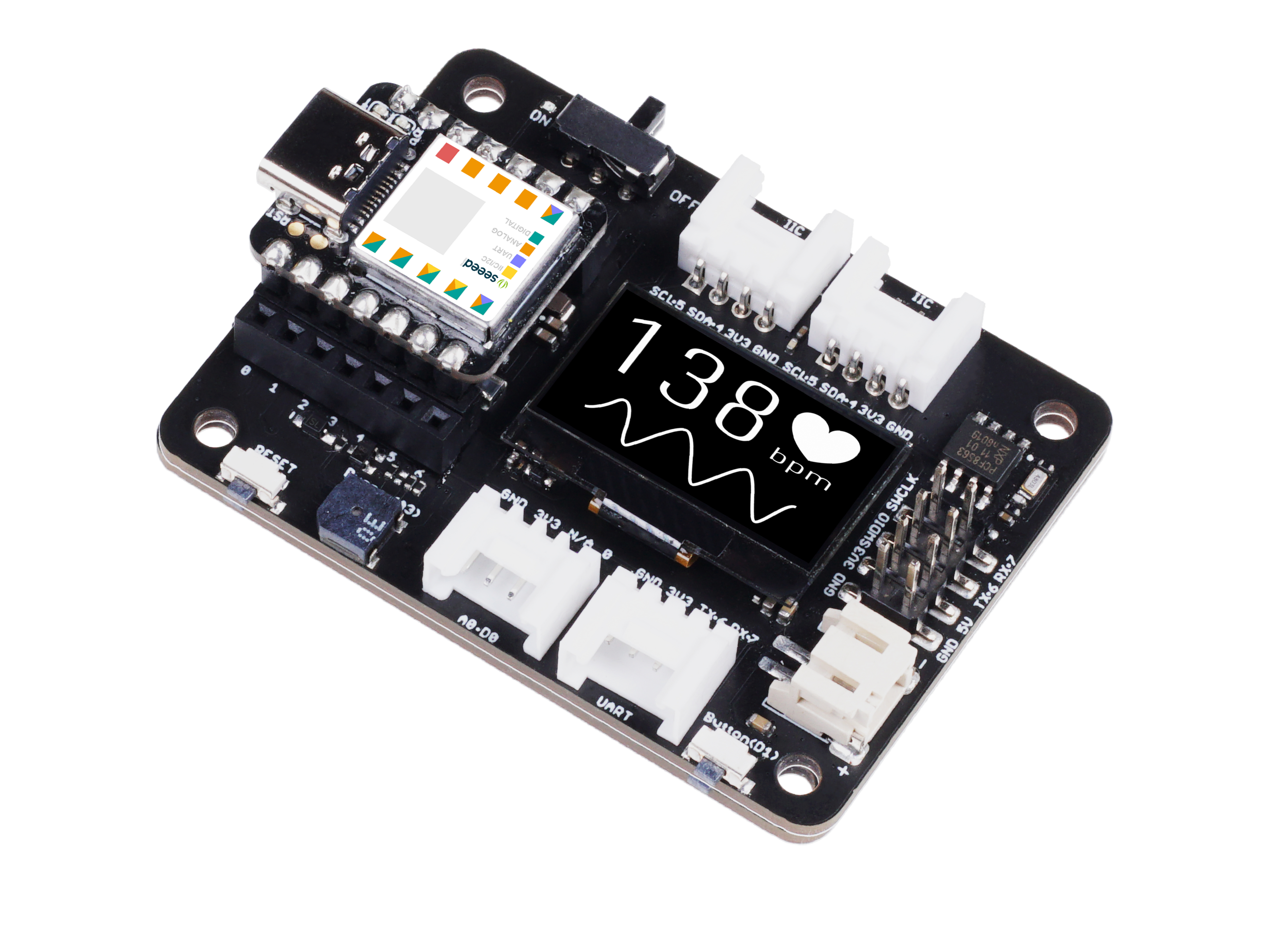 |  |
软件实现
#include <zephyr/kernel.h>
#include <zephyr/drivers/gpio.h>
#include <zephyr/logging/log.h>


LOG_MODULE_REGISTER(main_app, CONFIG_LOG_DEFAULT_LEVEL);

static const struct gpio_dt_spec button = GPIO_DT_SPEC_GET(DT_ALIAS(sw1), gpios); // Get the button device from the device tree alias
static const struct gpio_dt_spec relay = GPIO_DT_SPEC_GET(DT_ALIAS(relay0), gpios); // Get the relay device from the device tree alias

int main(void)
{
    int ret;

    LOG_INF("Starting Zephyr button and relay example...");

    /* Check if GPIO devices are ready */
    if (!gpio_is_ready_dt(&button)) {
        LOG_ERR("Button device %s is not ready", button.port->name);
        return -1;
    }

    if (!gpio_is_ready_dt(&relay)) {
        LOG_ERR("Relay device %s is not ready", relay.port->name);
        return -1;
    }

    /* Configure button pin as input mode */
    ret = gpio_pin_configure_dt(&button, GPIO_INPUT);
    if (ret != 0) {
        LOG_ERR("Failed to configure %s pin %d (error %d)", button.port->name, button.pin, ret);
        return -1;
    }

    /* Configure relay pin as output mode */
    ret = gpio_pin_configure_dt(&relay, GPIO_OUTPUT_ACTIVE);
    if (ret != 0) {
        LOG_ERR("Failed to configure %s pin %d (error %d)", relay.port->name, relay.pin, ret);
        return -1;
    }

    LOG_INF("Press the button to toggle the relay...");

    while (1) {
        /* Read button state */
        int button_state = gpio_pin_get_dt(&button);

        /* Check if read is successful */
        if (button_state < 0) {
            LOG_ERR("Error reading button pin: %d", button_state);
            return -1;
        }

        if (button_state == 0) { // Button pressed (ACTIVE_LOW)
            gpio_pin_set_dt(&relay, 1); // Turn on relay (high level)
        } else { // Button not pressed
            gpio_pin_set_dt(&relay, 0); // Turn off relay (low level)
        }

        k_msleep(10); /* Short delay to avoid busy looping */
    }
    return 0;
}
设备树配置
static const struct gpio_dt_spec button = GPIO_DT_SPEC_GET(DT_ALIAS(sw1), gpios);
- 这行代码利用 Zephyr 的设备树系统,通过名为 sw1 的别名获取按键的 GPIO 设备信息。这种方式将代码与具体硬件引脚解耦,提高了可移植性。
static const struct gpio_dt_spec relay = GPIO_DT_SPEC_GET(DT_ALIAS(relay0), gpios);
- 同样,这行代码获取名为 relay0 的继电器 GPIO 设备信息。
设备就绪检查
if (!gpio_is_ready_dt(&button)) 和 if (!gpio_is_ready_dt(&relay))
- 在程序开始执行任何操作之前,代码会检查按键和继电器设备是否成功初始化并处于就绪状态。这是 Zephyr 驱动编程中的最佳实践,可防止在设备未正确配置时导致程序崩溃。
引脚配置
gpio_pin_configure_dt(&button, GPIO_INPUT);
- 这行代码将按键的 GPIO 引脚配置为输入模式。这是读取引脚电平的必要步骤,程序会监测该引脚的电压水平以判断按键是否被按下。
gpio_pin_configure_dt(&relay, GPIO_OUTPUT_ACTIVE);
- 这行代码将继电器的 GPIO 引脚配置为输出模式。
GPIO_OUTPUT_ACTIVE标志通常表示该引脚在配置完成后会处于激活状态,以便控制继电器。
主循环逻辑
while (1): 代码进入一个无限循环,持续执行以下操作。
int button_state = gpio_pin_get_dt(&button);: 在每次循环中,程序都会读取按键引脚当前的电平状态。
if (button_state == 0): 此逻辑用于检查按钮是否被按下。在许多电路设计中,按下按钮会将引脚连接到地(GND),从而得到电平 0(即低电平)。
gpio_pin_set_dt(&relay, 1);: 如果按钮状态为 0(被按下),则将继电器引脚设置为 1(高电平),这会闭合继电器并打开与其连接的设备(例如灯)。
else: 如果按钮未被按下(状态为 1),则 perform gpio_pin_set_dt(&relay, 0); 将继电器引脚设置为 0(低电平),这会闭合继电器并关闭与其连接的设备。
k_msleep(10);: 代码在每次循环结束时增加了 10 毫秒的短暂延时,以避免 CPU 一直处于忙碌状态等。这是一个简单的防抖处理。这个简单的防抖处理可以防止由于按钮的物理抖动导致的多次触发,同时也降低功耗。
结果图
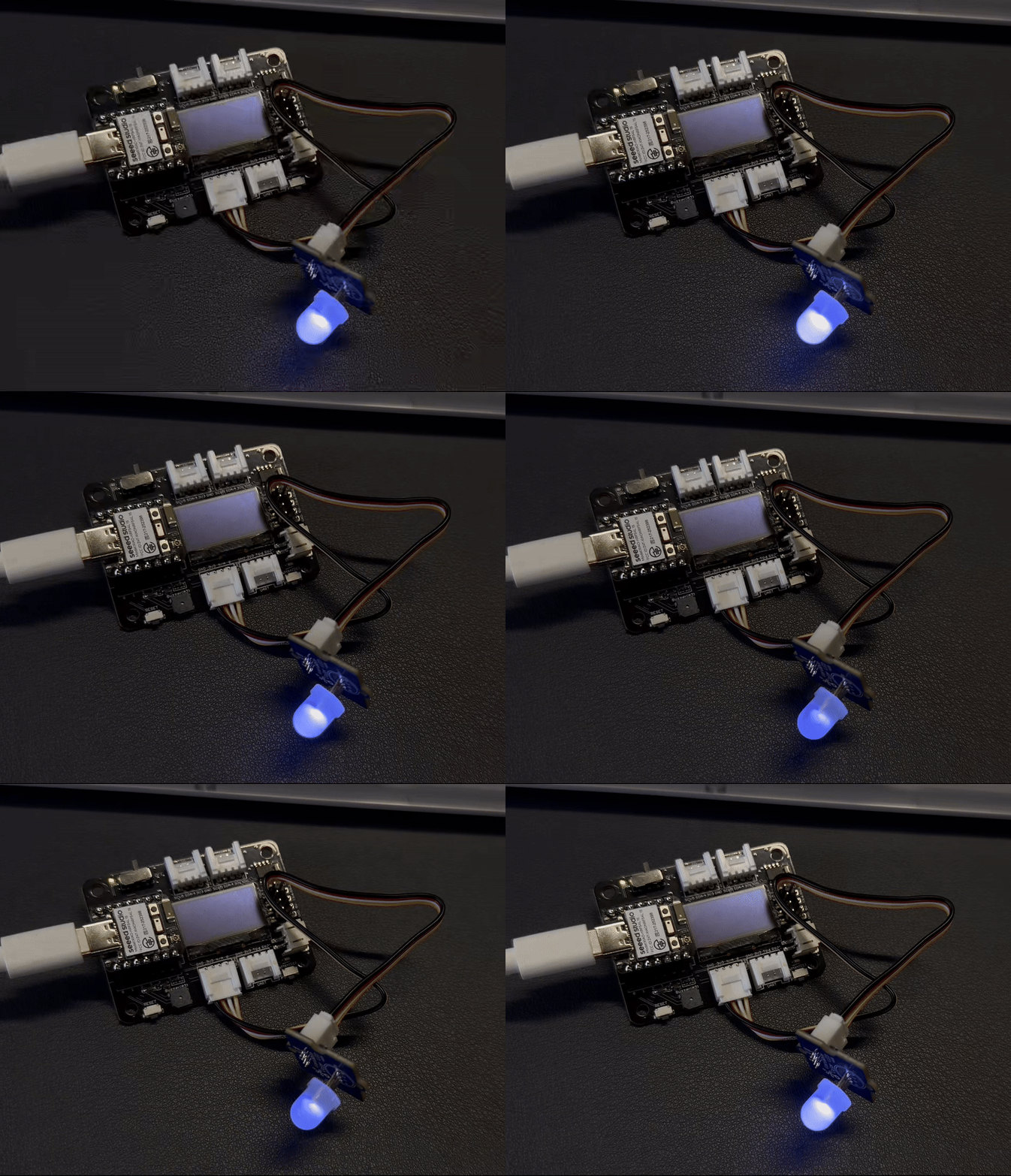
模拟量
硬件准备
| Seeed Studio XIAO nRF54L15 Sense | Grove-Variable Color LED | Grove-Rotary Angle Sensor | Seeed Studio Grove Base for XIAO |
|---|---|---|---|
|  |  |  |
软件实现
#include <zephyr/kernel.h>
#include <zephyr/drivers/adc.h>
#include <zephyr/drivers/pwm.h>
#include <zephyr/logging/log.h>

// Register log module
LOG_MODULE_REGISTER(pot_pwm_example, CONFIG_LOG_DEFAULT_LEVEL);

// --- ADC Configuration ---
#if !DT_NODE_EXISTS(DT_PATH(zephyr_user)) || \
    !DT_NODE_HAS_PROP(DT_PATH(zephyr_user), io_channels)
#error "No suitable devicetree overlay specified for ADC channels"
#endif

#define DT_SPEC_AND_COMMA(node_id, prop, idx) \
    ADC_DT_SPEC_GET_BY_IDX(node_id, idx),

static const struct adc_dt_spec adc_channels[] = {
    DT_FOREACH_PROP_ELEM(DT_PATH(zephyr_user), io_channels, DT_SPEC_AND_COMMA)
};

// Define the index of the potentiometer ADC channel in the adc_channels array
#define POTENTIOMETER_ADC_CHANNEL_IDX 1

// --- PWM Configuration ---
// Get PWM LED device
static const struct pwm_dt_spec led = PWM_DT_SPEC_GET(DT_ALIAS(pwm_led));

// Define PWM period as 1 millisecond (1,000,000 nanoseconds)
// This corresponds to a 1 kHz PWM frequency, suitable for LED brightness adjustment without visible flicker
#define PWM_PERIOD_NS 1000000UL

int main(void)
{
    int ret;
    uint16_t adc_raw_value;
    int32_t adc_millivolts;

    LOG_INF("Starting Zephyr Potentiometer to PWM example...");

    // --- ADC initialization and setup ---
    if (!adc_is_ready_dt(&adc_channels[POTENTIOMETER_ADC_CHANNEL_IDX])) {
        LOG_ERR("ADC controller device %s not ready", adc_channels[POTENTIOMETER_ADC_CHANNEL_IDX].dev->name);
        return 0;
    }

    ret = adc_channel_setup_dt(&adc_channels[POTENTIOMETER_ADC_CHANNEL_IDX]);
    if (ret < 0) {
        LOG_ERR("Could not setup ADC channel for potentiometer (%d)", ret);
        return 0;
    }
    LOG_INF("ADC device %s, channel %d ready for potentiometer.",
            adc_channels[POTENTIOMETER_ADC_CHANNEL_IDX].dev->name,
            adc_channels[POTENTIOMETER_ADC_CHANNEL_IDX].channel_id);

    // --- PWM initialization and setup ---
    if (!device_is_ready(led.dev)) {
        LOG_ERR("Error: PWM device %s is not ready", led.dev->name);
        return 0;
    }
    LOG_INF("PWM Period for LED set to %lu ns (%.1f Hz)",
            PWM_PERIOD_NS, (double)NSEC_PER_SEC / PWM_PERIOD_NS); // Use PWM_PERIOD_NS instead of led.period


    // ADC sequence configuration
    struct adc_sequence sequence = {
        .buffer = &adc_raw_value,
        .buffer_size = sizeof(adc_raw_value),
        .resolution = adc_channels[POTENTIOMETER_ADC_CHANNEL_IDX].resolution,
    };

    // --- Main loop ---
    while (1) {
        (void)adc_sequence_init_dt(&adc_channels[POTENTIOMETER_ADC_CHANNEL_IDX], &sequence);

        ret = adc_read(adc_channels[POTENTIOMETER_ADC_CHANNEL_IDX].dev, &sequence);
        if (ret < 0) {
            LOG_ERR("Error %d: ADC read failed for channel %d",
                    ret, adc_channels[POTENTIOMETER_ADC_CHANNEL_IDX].channel_id);
            k_msleep(100);
            continue;
        }

        int sensor_value = adc_raw_value;

        uint32_t max_adc_raw = (1U << adc_channels[POTENTIOMETER_ADC_CHANNEL_IDX].resolution) - 1;

        // --- Map ADC raw value to PWM duty cycle ---
        uint32_t output_duty_ns = (PWM_PERIOD_NS * sensor_value) / max_adc_raw;

        // Set PWM duty cycle
        ret = pwm_set_dt(&led, PWM_PERIOD_NS, output_duty_ns);
        if (ret < 0) {
            LOG_ERR("Error %d: failed to set PWM duty cycle.", ret);
        }

        // --- Print information ---
        adc_millivolts = sensor_value;
        ret = adc_raw_to_millivolts_dt(&adc_channels[POTENTIOMETER_ADC_CHANNEL_IDX], &adc_millivolts);
        if (ret < 0) {
            LOG_WRN("ADC to mV conversion not supported/failed: %d", ret);
            LOG_INF("Sensor Raw Value = %d\tOutput Duty (ns) = %u", sensor_value, output_duty_ns);
        } else {
            LOG_INF("Sensor Raw Value = %d (%d mV)\tOutput Duty (ns) = %u",
                    sensor_value, adc_millivolts, output_duty_ns);
        }

        k_msleep(100);
    }
    return 0;
}
ADC(模数转换器)和 PWM(脉宽调制)设备配置
-
pot_pwm_example 日志模块:
- LOG_MODULE_REGISTER(pot_pwm_example, CONFIG_LOG_DEFAULT_LEVEL):这会注册一个名为 pot_pwm_example 的日志模块,并将其日志级别设置为系统的默认配置,以便于调试。
-
ADC 配置:
-
#if !DT_NODE_EXISTS(DT_PATH(zephyr_user)) ... #endif:该预处理指令是一个设备树检查,用于确保存在包含 ADC 通道定义的有效 overlay 文件。这要求用户必须为特定硬件提供正确的配置。
-
static const struct adc_dt_spec adc_channels[];: 这部分代码利用 Zephyr 的设备树自动获取所有已配置 ADC 通道的信息。这种方式使代码在不同硬件之间具有良好的灵活性和可移植性,而无需手动修改配置。
-
#define POTENTIOMETER_ADC_CHANNEL_IDX 1:定义了一个宏,用于指定电位器连接在 adc_channels 数组中的哪个通道上。
-
-
PWM 配置:
-
static const struct pwm_dt_spec led = PWM_DT_SPEC_GET(DT_ALIAS(pwm_led));: 这一行从设备树中获取别名为 pwm_led 的 PWM 设备信息。这是 Zephyr 中查找和引用硬件设备的标准做法。
-
#define PWM_PERIOD_NS 1000000UL: 这将 PWM 信号周期定义为 1 毫秒(1,000,000 纳秒),对应的频率为 1 kHz。这个频率非常适合用于 LED 调光,因为它足够高,可以避免可见的闪烁。
-
初始化与设置
-
日志信息:
- LOG_INF("Starting Zephyr Potentiometer to PWM example...");: 在程序开始时打印一条信息日志,用于通知用户示例已经启动。
-
ADC 初始化:
-
!adc_is_ready_dt(): 在尝试使用 ADC 设备之前,会先检查其是否已就绪。如果设备未就绪,则记录错误日志并退出程序。
-
adc_channel_setup_dt(): 此函数配置连接到电位器的特定 ADC 通道,包括其分辨率和增益。
-
-
PWM 初始化:
-
!device_is_ready(led.dev): 与 ADC 类似,此行检查 PWM 设备是否已就绪。如果未就绪,则记录错误日志并退出程序。
-
LOG_INF(...): 打印 PWM 周期和频率信息,以帮助用户确认配置是否正确。
-
-
ADC 序列配置:
- struct adc_sequence sequence: 定义一个 adc_sequence 结构体,用于描述一次 ADC 转换操作。它指定用于存储结果的缓冲区(adc_raw_value)、其大小(sizeof(adc_raw_value)),以及要使用的 ADC 分辨率。
主循环 代码的核心逻辑在一个无限的 while (1) 循环中运行:
-
ADC 读取:
-
adc_sequence_init_dt(): 初始化 ADC 序列,以确保每次读取都使用正确的配置。
-
adc_read(): 触发一次 ADC 转换,从电位器读取模拟值。如果读取失败,则记录错误日志,并在继续之前让程序暂停 100 毫秒。
-
int sensor_value = adc_raw_value;: 将原始 ADC 值赋给变量 sensor_value。
-
-
将 ADC 值映射到 PWM 占空比:
-
uint32_t max_adc_raw: 计算可能的最大原始 ADC 值。
-
uint32_t output_duty_ns = (PWM_PERIOD_NS * sensor_value) / max_adc_raw;: 这是核心映射逻辑。它将原始 ADC 值(sensor_value)按比例缩放到 PWM 周期范围(PWM_PERIOD_NS)内,从而得到一个占空比值,用于调节 LED 的亮度。
-
-
设置 PWM 占空比:
- pwm_set_dt(): 此函数将新计算出的占空比(output_duty_ns)应用到 PWM 设备上,立即改变 LED 的亮度。
-
延时:
- k_msleep(100): 每次循环后程序暂停 100 毫秒。这控制了 ADC 读取和 PWM 更新的频率,防止 CPU 负载过高,并提供稳定的用户体验。
结果图
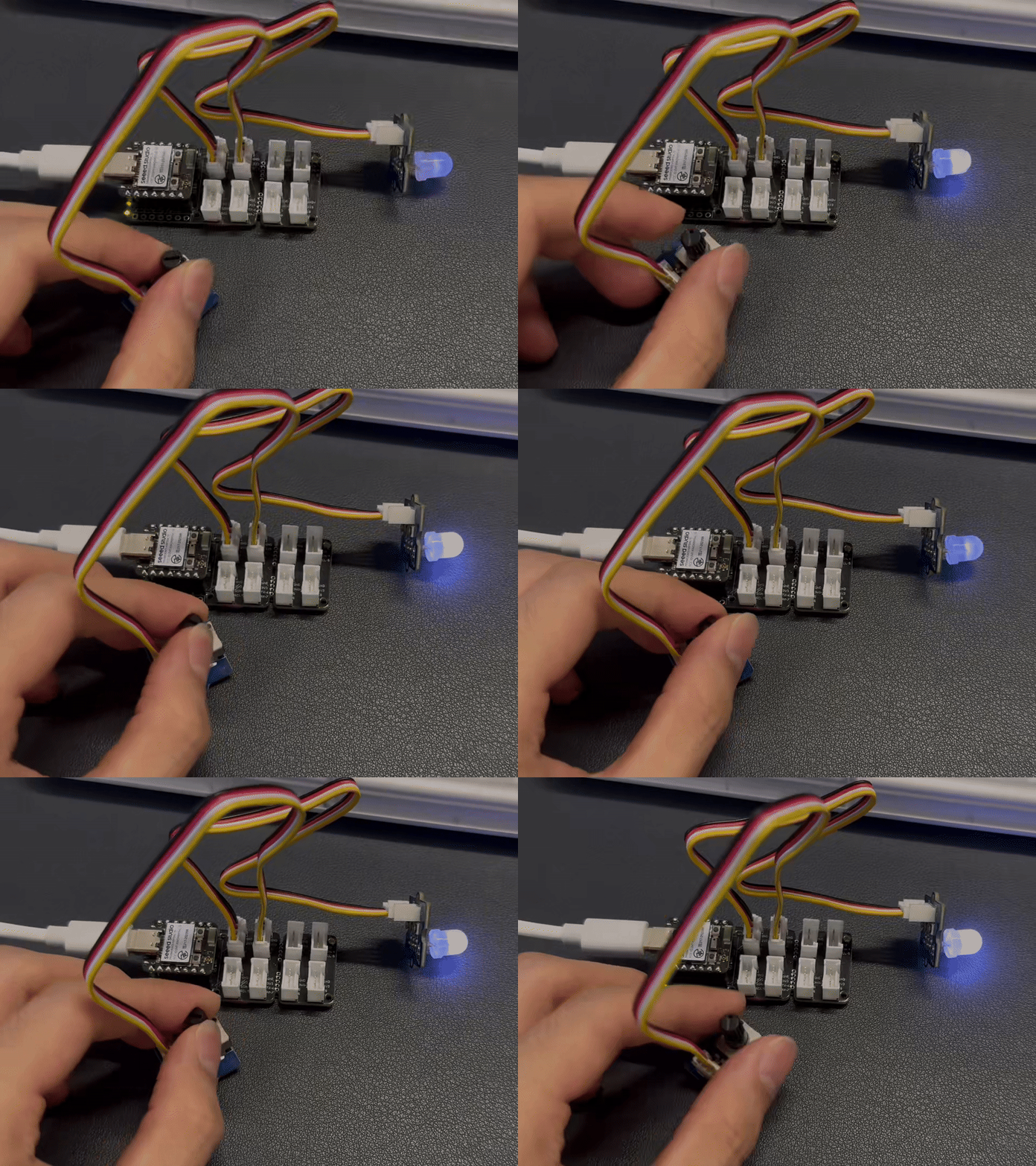
UART
硬件准备
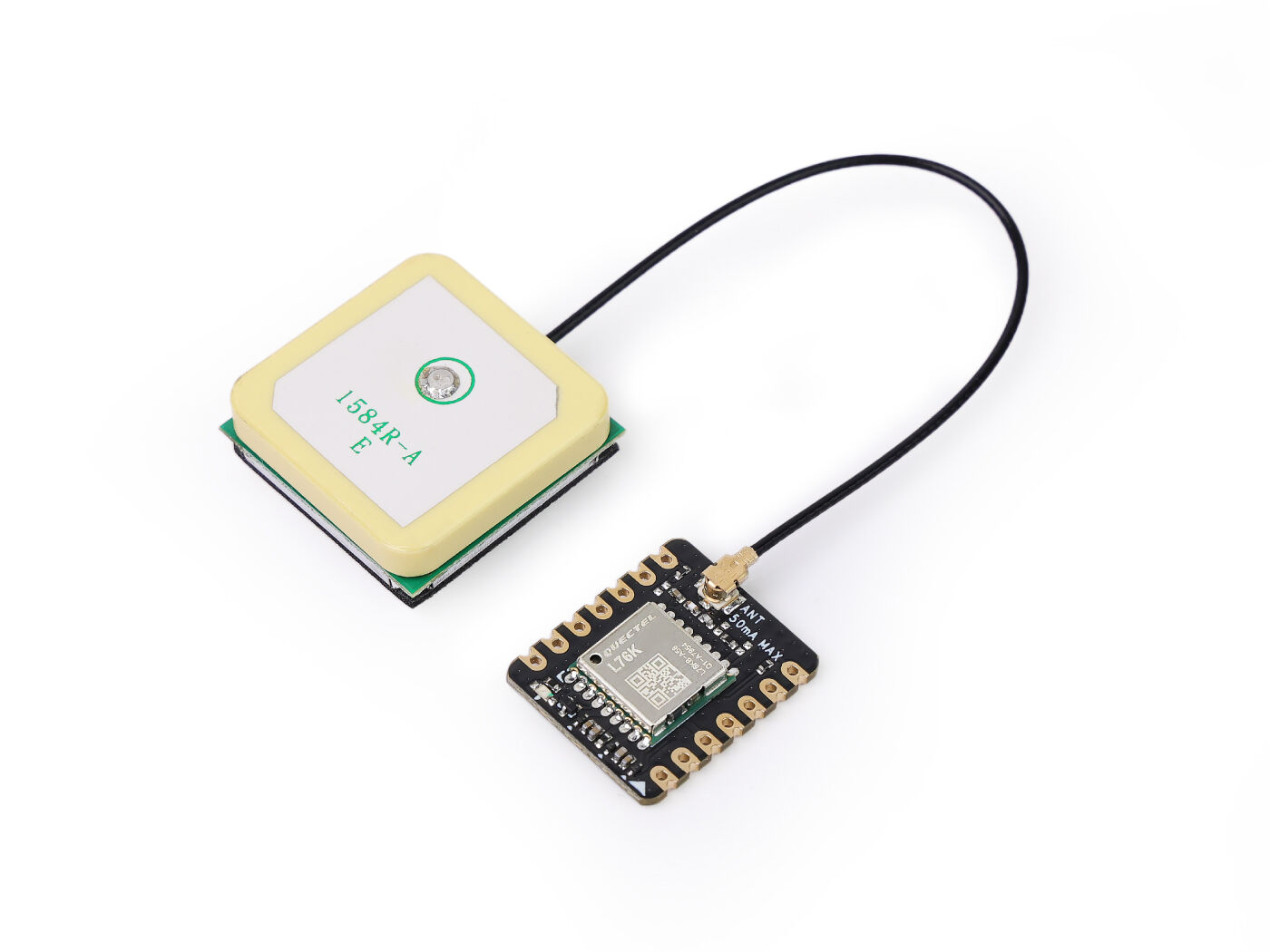
软件实现
Software
#include <zephyr/kernel.h>
#include <zephyr/device.h>
#include <zephyr/drivers/uart.h>
#include <zephyr/logging/log.h>
#include <nrfx_power.h>
#include <string.h>
#include <math.h>
#include <stdio.h>
#include <stdlib.h>

// Register log module
LOG_MODULE_REGISTER(gps_app, LOG_LEVEL_INF);

// Type definitions
#define UBYTE uint8_t
#define UWORD uint16_t
#define UDOUBLE uint32_t

// Buffer sizes
#define SENTENCE_SIZE 100
#define BUFFSIZE 800

// NMEA Commands
#define HOT_START "$PMTK101"
#define WARM_START "$PMTK102"
#define COLD_START "$PMTK103"
#define FULL_COLD_START "$PMTK104"
#define SET_PERPETUAL_STANDBY_MODE "$PMTK161"
#define SET_PERIODIC_MODE "$PMTK225"
#define SET_NORMAL_MODE "$PMTK225,0"
#define SET_PERIODIC_BACKUP_MODE "$PMTK225,1,1000,2000"
#define SET_PERIODIC_STANDBY_MODE "$PMTK225,2,1000,2000"
#define SET_PERPETUAL_BACKUP_MODE "$PMTK225,4"
#define SET_ALWAYSLOCATE_STANDBY_MODE "$PMTK225,8"
#define SET_ALWAYSLOCATE_BACKUP_MODE "$PMTK225,9"
#define SET_POS_FIX "$PMTK220"
#define SET_POS_FIX_100MS "$PMTK220,100"
#define SET_POS_FIX_200MS "$PMTK220,200"
#define SET_POS_FIX_400MS "$PMTK220,400"
#define SET_POS_FIX_800MS "$PMTK220,800"
#define SET_POS_FIX_1S "$PMTK220,1000"
#define SET_POS_FIX_2S "$PMTK220,2000"
#define SET_POS_FIX_4S "$PMTK220,4000"
#define SET_POS_FIX_8S "$PMTK220,8000"
#define SET_POS_FIX_10S "$PMTK220,10000"
#define SET_SYNC_PPS_NMEA_OFF "$PMTK255,0"
#define SET_SYNC_PPS_NMEA_ON "$PMTK255,1"
#define SET_NMEA_BAUDRATE "$PMTK251"
#define SET_NMEA_BAUDRATE_115200 "$PMTK251,115200"
#define SET_NMEA_BAUDRATE_57600 "$PMTK251,57600"
#define SET_NMEA_BAUDRATE_38400 "$PMTK251,38400"
#define SET_NMEA_BAUDRATE_19200 "$PMTK251,19200"
#define SET_NMEA_BAUDRATE_14400 "$PMTK251,14400"
#define SET_NMEA_BAUDRATE_9600 "$PMTK251,9600"
#define SET_NMEA_BAUDRATE_4800 "$PMTK251,4800"
#define SET_REDUCTION "$PMTK314,-1"
#define SET_NMEA_OUTPUT "$PMTK314,0,1,1,1,1,0,0,0,0,0,0,0,0,0,0,0,0,0,0"

// Struct definitions
typedef struct
{
 double Lon;    // GPS Longitude
 double Lat;    // GPS Latitude
 char Lon_area; // E or W
 char Lat_area; // N or S
 UBYTE Time_H;  // Time Hour
 UBYTE Time_M;  // Time Minute
 UBYTE Time_S;  // Time Second
 UBYTE Status;  // 1: Successful positioning, 0: Positioning failed
} GNRMC;

typedef struct
{
 double Lon;
 double Lat;
} Coordinates;

// Global variables and constants
char const Temp[16] = {'0', '1', '2', '3', '4', '5', '6', '7', '8', '9', 'A', 'B', 'C', 'D', 'E', 'F'};
static const double pi = 3.14159265358979324;
static const double a = 6378245.0;
static const double ee = 0.00669342162296594323;
static const double x_pi = 3.14159265358979324 * 3000.0 / 180.0;

static char buff_t[BUFFSIZE] = {0};
static GNRMC GPS;

// UART device and buffers
static const struct device *uart_dev;
static char latest_gnrmc[SENTENCE_SIZE];
static volatile bool new_gnrmc_available = false;

// Function prototypes
void DEV_Uart_SendByte(char data);
void DEV_Uart_SendString(char *data);
void L76X_Send_Command(char *data);
GNRMC L76X_Gat_GNRMC(void);
Coordinates L76X_Baidu_Coordinates(void);
Coordinates L76X_Google_Coordinates(void);
static double transformLat(double x, double y);
static double transformLon(double x, double y);
static Coordinates bd_encrypt(Coordinates gg);
static Coordinates transform(Coordinates gps);

// UART interrupt callback
static void uart_callback(const struct device *dev, void *user_data)
{
 ARG_UNUSED(user_data);
 static char temp_buffer[SENTENCE_SIZE];
 static int temp_index = 0;

 while (uart_irq_update(dev) && uart_irq_is_pending(dev))
 {
  if (uart_irq_rx_ready(dev))
  {
   uint8_t byte;
   if (uart_fifo_read(dev, &byte, 1) == 1)
   {
    if (byte == '\n')
    {
     temp_buffer[temp_index] = '\0';
     if (strncmp(temp_buffer, "$GNRMC", 6) == 0 || strncmp(temp_buffer, "$PNRMC", 6) == 0)
     {
      strncpy(latest_gnrmc, temp_buffer, SENTENCE_SIZE);
      new_gnrmc_available = true;
     }
     temp_index = 0;
    }
    else
    {
     if (temp_index < SENTENCE_SIZE - 1)
     {
      temp_buffer[temp_index++] = byte;
     }
     else
     {
      temp_index = 0; // Reset on overflow
     }
    }
   }
  }
 }
}

// Main function
int main(void)
{
 // Request constant latency mode for power management
 nrfx_power_constlat_mode_request();
 LOG_INF("Starting L76X GPS Module Example");

 // Initialize UART device
 uart_dev = DEVICE_DT_GET(DT_NODELABEL(xiao_serial));
 if (!device_is_ready(uart_dev))
 {
  LOG_ERR("UART device not ready!");
  return -1;
 }
 LOG_INF("UART device initialized.");

 // Configure UART interrupt
 if (uart_irq_callback_user_data_set(uart_dev, uart_callback, NULL) != 0)
 {
  LOG_ERR("Failed to set UART callback!");
  return -1;
 }
 uart_irq_rx_enable(uart_dev);
 LOG_INF("UART interrupt enabled.");

 // Initialize GPS module
 L76X_Send_Command(SET_NMEA_OUTPUT);
 k_msleep(100);
 L76X_Send_Command(SET_POS_FIX_1S);
 k_msleep(100);

 LOG_INF("GPS module initialized. Waiting for data...");

 while (true)
 {
  // Check for new GNRMC sentence
  if (new_gnrmc_available)
  {
   strncpy(buff_t, latest_gnrmc, BUFFSIZE);
   new_gnrmc_available = false;

   // Log raw GNRMC sentence for debugging
   LOG_INF("Raw GNRMC: %s", buff_t);

   // Parse GNRMC data
   GPS = L76X_Gat_GNRMC();

   // Output GPS data
   LOG_INF("\n--- GPS Data ---");
   LOG_INF("Time (GMT+8): %02d:%02d:%02d", GPS.Time_H, GPS.Time_M, GPS.Time_S);
   if (GPS.Status == 1)
   {
    LOG_INF("Latitude (WGS-84): %.6f %c", GPS.Lat, GPS.Lat_area);
    LOG_INF("Longitude (WGS-84): %.6f %c", GPS.Lon, GPS.Lon_area);

    // Coordinate conversion
    Coordinates baidu_coords = L76X_Baidu_Coordinates();
    LOG_INF("Baidu Latitude: %.6f", baidu_coords.Lat);
    LOG_INF("Baidu Longitude: %.6f", baidu_coords.Lon);

    Coordinates google_coords = L76X_Google_Coordinates();
    LOG_INF("Google Latitude: %.6f", google_coords.Lat);
    LOG_INF("Google Longitude: %.6f", google_coords.Lon);
    LOG_INF("GPS positioning successful.");
   }
   else
   {
    LOG_INF("GPS positioning failed or no valid data.");
   }
  }
  else
  {
   LOG_INF("No new GNRMC data available.");
  }

  k_msleep(2000); // Wait 2 seconds before next reading
 }

 return 0;
}

// Send a single byte
void DEV_Uart_SendByte(char data)
{
 uart_poll_out(uart_dev, data);
}

// Send a string
void DEV_Uart_SendString(char *data)
{
 while (*data)
 {
  DEV_Uart_SendByte(*data++);
 }
}

// Send L76X command with checksum
void L76X_Send_Command(char *data)
{
 char Check = data[1], Check_char[3] = {0};
 UBYTE i = 0;
 DEV_Uart_SendByte('\r');
 DEV_Uart_SendByte('\n');

 for (i = 2; data[i] != '\0'; i++)
 {
  Check ^= data[i]; // Calculate checksum
 }
 Check_char[0] = Temp[Check / 16 % 16];
 Check_char[1] = Temp[Check % 16];
 Check_char[2] = '\0';

 DEV_Uart_SendString(data);
 DEV_Uart_SendByte('*');
 DEV_Uart_SendString(Check_char);
 DEV_Uart_SendByte('\r');
 DEV_Uart_SendByte('\n');
}

// Parse GNRMC data
GNRMC L76X_Gat_GNRMC(void)
{
 GNRMC gps = {0}; // Initialize with zeros
 UWORD add = 0, x = 0, z = 0, i = 0;
 UDOUBLE Time = 0;

 add = 0;
 while (add < BUFFSIZE)
 {
  // Look for GNRMC or PNRMC sentence
  if (buff_t[add] == '$' && buff_t[add + 1] == 'G' && (buff_t[add + 2] == 'N' || buff_t[add + 2] == 'P') &&
   buff_t[add + 3] == 'R' && buff_t[add + 4] == 'M' && buff_t[add + 5] == 'C')
  {
   x = 0;
   for (z = 0; x < 12; z++)
   {
    if (buff_t[add + z] == '\0')
    {
     break;
    }
    if (buff_t[add + z] == ',')
    {
     x++;
     if (x == 1)
     { // Time field
      if (buff_t[add + z + 1] != ',')
      { // Check if time field is not empty
       Time = 0;
       for (i = 0; buff_t[add + z + i + 1] != '.'; i++)
       {
        if (buff_t[add + z + i + 1] == '\0' || buff_t[add + z + i + 1] == ',')
        {
         break;
        }
        Time = (buff_t[add + z + i + 1] - '0') + Time * 10;
       }
       gps.Time_H = Time / 10000 + 8; // Adjust for GMT+8
       gps.Time_M = (Time / 100) % 100;
       gps.Time_S = Time % 100;
       if (gps.Time_H >= 24)
       {
        gps.Time_H = gps.Time_H - 24;
       }
      }
     }
     else if (x == 2)
     { // Status field
      if (buff_t[add + z + 1] == 'A')
      {
       gps.Status = 1; // Position successful
      }
      else
      {
       gps.Status = 0; // Positioning failed
       break;   // Exit early if invalid
      }
     }
     else if (x == 3)
     { // Latitude field
      if (buff_t[add + z + 1] != ',')
      { // Check if latitude field is not empty
       double latitude_val = 0;
       UBYTE decimal_found = 0;
       double decimal_multiplier = 0.1;

       int k = 1;
       while (buff_t[add + z + k] != ',' && buff_t[add + z + k] != '\0')
       {
        if (buff_t[add + z + k] == '.')
        {
         decimal_found = 1;
         k++;
         continue;
        }
        if (!decimal_found)
        {
         latitude_val = latitude_val * 10 + (buff_t[add + z + k] - '0');
        }
        else
        {
         latitude_val = latitude_val + (buff_t[add + z + k] - '0') * decimal_multiplier;
         decimal_multiplier *= 0.1;
        }
        k++;
       }
       gps.Lat = latitude_val;
       gps.Lat_area = buff_t[add + z + k + 1]; // N or S
       z += k + 1;
      }
      else
      {
       gps.Status = 0; // Invalid data
       break;
      }
     }
     else if (x == 5)
     { // Longitude field
      if (buff_t[add + z + 1] != ',')
      { // Check if longitude field is not empty
       double longitude_val = 0;
       UBYTE decimal_found = 0;
       double decimal_multiplier = 0.1;

       int k = 1;
       while (buff_t[add + z + k] != ',' && buff_t[add + z + k] != '\0')
       {
        if (buff_t[add + z + k] == '.')
        {
         decimal_found = 1;
         k++;
         continue;
        }
        if (!decimal_found)
        {
         longitude_val = longitude_val * 10 + (buff_t[add + z + k] - '0');
        }
        else
        {
         longitude_val = longitude_val + (buff_t[add + z + k] - '0') * decimal_multiplier;
         decimal_multiplier *= 0.1;
        }
        k++;
       }
       gps.Lon = longitude_val;
       gps.Lon_area = buff_t[add + z + k + 1]; // E or W
       z += k + 1;
       break;
      }
      else
      {
       gps.Status = 0; // Invalid data
       break;
      }
     }
    }
   }
   break;
  }
  add++;
 }
 return gps;
}

// Convert to Baidu coordinates (BD-09)
Coordinates L76X_Baidu_Coordinates(void)
{
 Coordinates wgs84_coords;
 wgs84_coords.Lat = GPS.Lat;
 wgs84_coords.Lon = GPS.Lon;

 Coordinates gcj02_coords = transform(wgs84_coords);
 Coordinates bd09_coords = bd_encrypt(gcj02_coords);
 return bd09_coords;
}

// Convert to Google coordinates (GCJ-02)
Coordinates L76X_Google_Coordinates(void)
{
 Coordinates wgs84_coords;
 wgs84_coords.Lat = GPS.Lat;
 wgs84_coords.Lon = GPS.Lon;

 Coordinates gcj02_coords = transform(wgs84_coords);
 return gcj02_coords;
}

// Coordinate transformation helper functions
static double transformLat(double x, double y)
{
 double ret = -100.0 + 2.0 * x + 3.0 * y + 0.2 * y * y + 0.1 * x * y + 0.2 * sqrt(fabs(x));
 ret += (20.0 * sin(6.0 * x * pi) + 20.0 * sin(2.0 * x * pi)) * 2.0 / 3.0;
 ret += (20.0 * sin(y * pi) + 40.0 * sin(y / 3.0 * pi)) * 2.0 / 3.0;
 ret += (160.0 * sin(y / 12.0 * pi) + 320 * sin(y * pi / 30.0)) * 2.0 / 3.0;
 return ret;
}

static double transformLon(double x, double y)
{
 double ret = 300.0 + x + 2.0 * y + 0.1 * x * x + 0.1 * x * y + 0.1 * sqrt(fabs(x));
 ret += (20.0 * sin(6.0 * x * pi) + 20.0 * sin(2.0 * x * pi)) * 2.0 / 3.0;
 ret += (20.0 * sin(x * pi) + 40.0 * sin(x / 3.0 * pi)) * 2.0 / 3.0;
 ret += (150.0 * sin(x / 12.0 * pi) + 300.0 * sin(x / 30.0 * pi)) * 2.0 / 3.0;
 return ret;
}

static Coordinates bd_encrypt(Coordinates gg)
{
 Coordinates bd;
 double x = gg.Lon, y = gg.Lat;
 double z = sqrt(x * x + y * y) + 0.00002 * sin(y * x_pi);
 double theta = atan2(y, x) + 0.000003 * cos(x * x_pi);
 bd.Lon = z * cos(theta) + 0.0065;
 bd.Lat = z * sin(theta) + 0.006;
 return bd;
}

static Coordinates transform(Coordinates gps)
{
 Coordinates gg;
 double dLat = transformLat(gps.Lon - 105.0, gps.Lat - 35.0);
 double dLon = transformLon(gps.Lon - 105.0, gps.Lat - 35.0);
 double radLat = gps.Lat / 180.0 * pi;
 double magic = sin(radLat);
 magic = 1 - ee * magic * magic;
 double sqrtMagic = sqrt(magic);
 dLat = (dLat * 180.0) / ((a * (1 - ee)) / (magic * sqrtMagic) * pi);
 dLon = (dLon * 180.0) / (a / sqrtMagic * cos(radLat) * pi);
 gg.Lat = gps.Lat + dLat;
 gg.Lon = gps.Lon + dLon;
 return gg;
}
GPS 模块配置与初始化
gps_app日志模块:
-LOG_MODULE_REGISTER(gps_app, LOG_LEVEL_INF): 这会注册一个名为 gps_app 的日志模块,并将其日志级别设置为 INFO。这样程序就可以通过 Zephyr 的日志系统输出信息,有助于调试和监控。
- 类型定义和宏:
-UBYTE, UWORD, UDOUBLE:这些是自定义的无符号整数类型别名,通过明确变量的预期大小来提高代码可读性。
-
SENTENCE_SIZE, BUFFSIZE:这些定义了用于存储 NMEA 语句和更大数据缓冲区的固定缓冲区大小。 -
像
HOT_START, SET_NMEA_OUTPUT:这样的宏定义了发送到 L76X GPS 模块的各种 NMEA 协议命令,用于配置其工作模式、输出频率、波特率等。 -
结构体定义:
-
GNRMC:该结构体用于存储从 GNRMC(GPS 推荐最小特定数据)NMEA 语句中解析出的关键信息,包括经度、纬度、时间、状态和方位。 -
Coordinates:一个用于存储地理坐标经度和纬度的简单结构体。
-
-
全局变量和常量:
buff_t:一个大小为 BUFFSIZE 的全局缓冲区,用于存储原始 UART 数据。
-GPS:一个全局 GNRMC 结构体实例,用于保存解析后的 GPS 数据。
-
uart_dev:指向 UART 设备结构体的指针,用于 UART 通信。 -
new_gnrmc_available:一个易失性的布尔标志,当接收到新的有效 GNRMC 语句时被置为 true,用于通知主循环有新数据可供处理。 -
uart_callback() 函数:-
这是一个 UART 中断回调函数,在 UART 接收到数据时触发。
-
该函数逐字节读取 UART FIFO,并在遇到换行符 \n 时将数据作为完整语句进行处理。
-
主函数 main()
-
系统初始化:
-
nrfx_power_constlat_mode_request():请求恒定延迟模式,以确保电源管理不会干扰实时操作。 -
uart_dev = DEVICE_DT_GET:获取 UART 设备句柄,并使用 device_is_ready() 检查设备是否就绪。 -
uart_irq_callback_user_data_set()和uart_irq_rx_enable():这些函数配置并启用 UART 接收中断,将 uart_callback 函数注册为中断处理程序,以确保 GPS 数据的异步接收。
-
-
GPS 模块初始化:
L76X_Send_Command(SET_NMEA_OUTPUT):发送一条命令,将 GPS 模块配置为仅输出指定的 NMEA 语句(如 GNRMC),以减少不必要的数据流量。
-L76X_Send_Command(SET_POS_FIX_1S):将 GPS 模块的位置更新频率设置为 1 秒。
-
主循环:
-
循环无限运行,不断检查 new_gnrmc_available 标志。
-
如果该标志为 true,则将最新的 GPS 语句从 latest_gnrmc 复制到 buff_t,然后调用 L76X_Gat_GNRMC() 来解析数据。
-
根据解析结果,打印时间、WGS-84 经度和纬度,以及转换后的百度和 Google 坐标。
-
如果 GPS.Status 为 0,则打印“定位失败”的信息。
-
如果没有新数据可用,则打印“No new GNRMC data available.”。
-
k_msleep(2000): 程序在每次循环后暂停 2 秒,以控制输出频率。
-
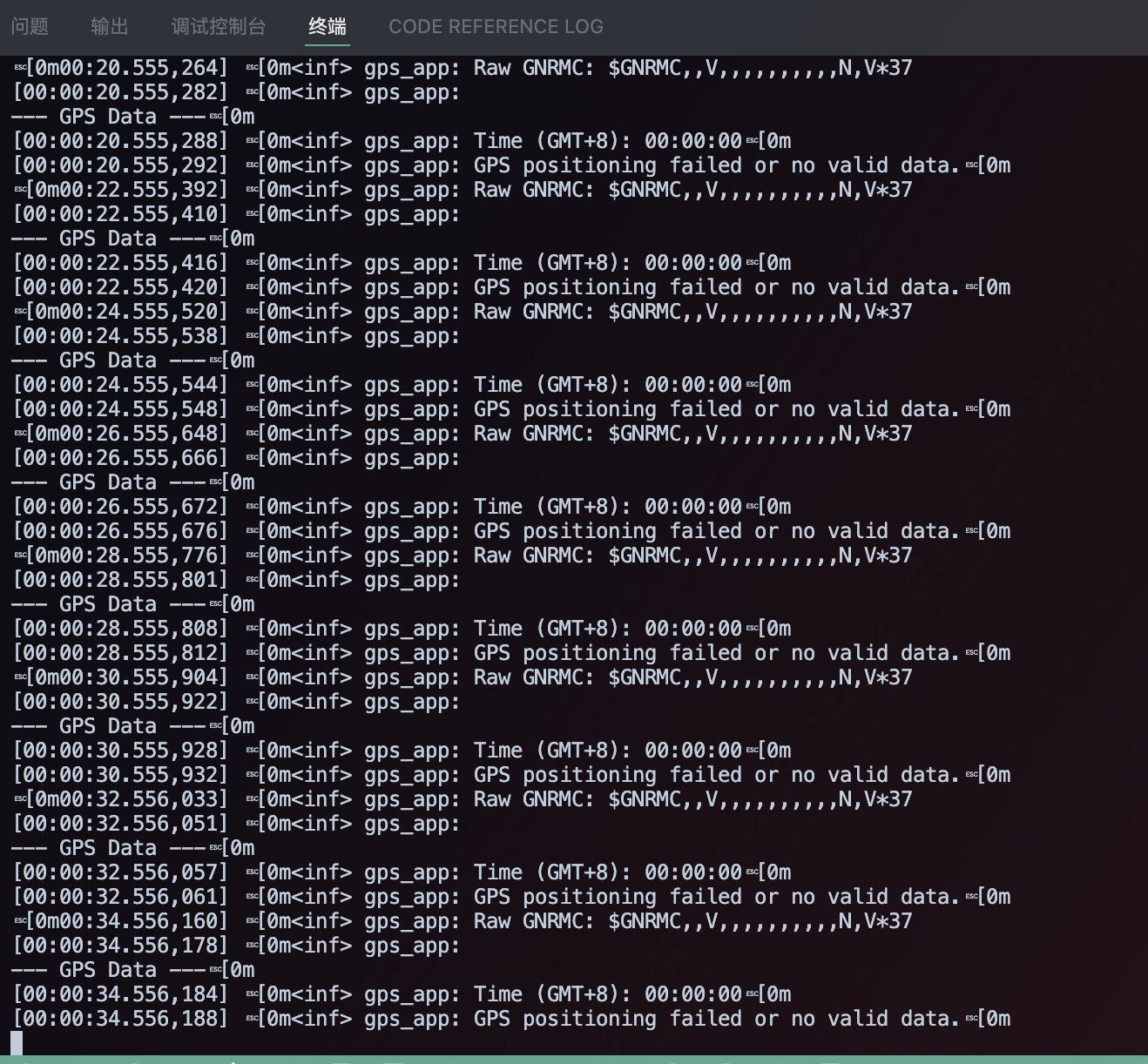
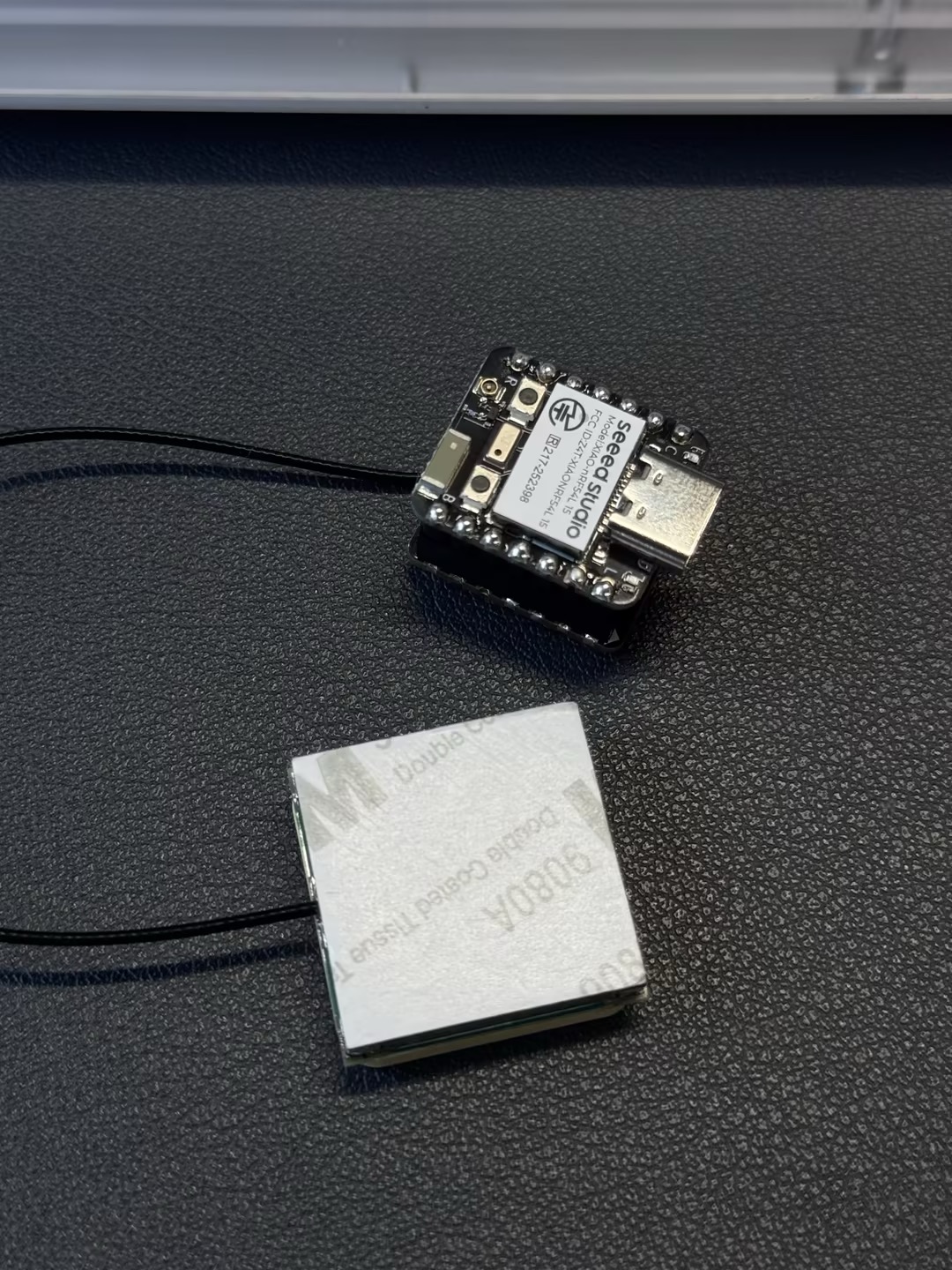
结果图
 |  |
I2C
硬件准备
软件实现
#include <zephyr/kernel.h>
#include <zephyr/device.h>
#include <zephyr/display/cfb.h>
#include <stdio.h>
#include <string.h>
#define LOG_LEVEL CONFIG_LOG_DEFAULT_LEVEL
#include <zephyr/logging/log.h>
LOG_MODULE_REGISTER(main_app, LOG_LEVEL);
/**
* @brief Initializes the display device.
* @param[out] dev Pointer to the display device struct.
* @return 0 on success, -1 on failure.
*/
static int display_init(const struct device **dev) {
*dev = DEVICE_DT_GET(DT_CHOSEN(zephyr_display));
if (!device_is_ready(*dev)) {
LOG_ERR("Device %s not ready", (*dev)->name);
return -1;
}
if (display_set_pixel_format(*dev, PIXEL_FORMAT_MONO10) != 0) {
if (display_set_pixel_format(*dev, PIXEL_FORMAT_MONO01) != 0) {
LOG_ERR("Failed to set required pixel format");
return -1;
}
}
LOG_INF("Initialized %s", (*dev)->name);
return 0;
}
/**
* @brief Initializes the Compact Framebuffer (CFB) and display blanking.
* @param dev Pointer to the display device struct.
* @return 0 on success, -1 on failure.
*/
static int framebuffer_setup(const struct device *dev) {
if (cfb_framebuffer_init(dev)) {
LOG_ERR("Framebuffer initialization failed!");
return -1;
}
cfb_framebuffer_clear(dev, true);
display_blanking_off(dev);
return 0;
}
/**
* @brief Selects a suitable font for the display.
* @param dev Pointer to the display device struct.
* @param[out] font_width Pointer to store the width of the selected font.
* @param[out] font_height Pointer to store the height of the selected font.
* @return 0 on success, -1 if no suitable font is found.
*/
static int select_font(const struct device *dev, uint8_t *font_width, uint8_t *font_height) {
int chosen_font_idx = -1;
uint8_t current_font_width, current_font_height;
for (int idx = 0; idx < 42; idx++) {
if (cfb_get_font_size(dev, idx, ¤t_font_width, ¤t_font_height) == 0) {
if (current_font_width == 8 && current_font_height == 8) {
chosen_font_idx = idx;
*font_width = current_font_width;
*font_height = current_font_height;
cfb_framebuffer_set_font(dev, chosen_font_idx);
LOG_INF("Selected font idx: %d, width: %d, height: %d", chosen_font_idx, *font_width, *font_height);
break;
}
if (chosen_font_idx == -1 && current_font_width > 0 && current_font_height > 0) {
chosen_font_idx = idx;
*font_width = current_font_width;
*font_height = current_font_height;
cfb_framebuffer_set_font(dev, chosen_font_idx);
LOG_INF("Defaulting to font idx: %d, width: %d, height: %d", chosen_font_idx, *font_width, *font_height);
}
} else {
break;
}
}
if (chosen_font_idx == -1) {
LOG_ERR("No suitable font found or loaded!");
return -1;
}
return 0;
}
/**
* @brief Prints a single line of text at specified row and column.
* @param dev Pointer to the display device struct.
* @param text The string to print.
* @param row The row number (0-indexed) where the text should start.
* @param col The column number (0-indexed) where the text should start.
* @param font_width The width of the currently selected font in pixels.
* @param font_height The height of the currently selected font in pixels.
*/
static void print_text_by_row_col(const struct device *dev, const char *text, int row, int col,
uint8_t font_width, uint8_t font_height) {
int pixel_x = col * font_width;
int pixel_y = row * font_height;
if (cfb_print(dev, text, pixel_x, pixel_y)) {
LOG_ERR("Failed to print text: \"%s\" at row %d, col %d", text, row, col);
}
}
int main(void) {
const struct device *dev;
uint8_t font_width = 0;
uint8_t font_height = 0;
uint16_t x_res, y_res;
if (display_init(&dev) != 0) {
return 0;
}
if (framebuffer_setup(dev) != 0) {
return 0;
}
if (select_font(dev, &font_width, &font_height) != 0) {
return 0;
}
x_res = cfb_get_display_parameter(dev, CFB_DISPLAY_WIDTH);
y_res = cfb_get_display_parameter(dev, CFB_DISPLAY_HEIGHT);
LOG_INF("Display resolution: %dx%d", x_res, y_res);
cfb_set_kerning(dev, 0);
while (1) {
cfb_framebuffer_clear(dev, false);
const char *line1_text = "nRF54L15";
// Print line1 at row 1, column 2
print_text_by_row_col(dev, line1_text, 1, 2, font_width, font_height);
const char *line2_text = "Hello World";
// Print line2 at row 2, column 1
print_text_by_row_col(dev, line2_text, 2, 1, font_width, font_height);
cfb_framebuffer_finalize(dev);
k_sleep(K_MSEC(1000));
}
return 0;
}
显示设备配置与初始化
-
main_app日志模块:- 使用 #define LOG_LEVEL CONFIG_LOG_DEFAULT_LEVEL 和 LOG_MODULE_REGISTER(main_app, LOG_LEVEL) 注册一个名为 main_app 的日志模块,并将其日志级别设置为系统的默认配置。这使开发者可以通过 Zephyr 的日志系统轻松进行调试和输出信息。
-
display_init()函数:-
*dev = DEVICE_DT_GET(DT_CHOSEN(zephyr_display));:这一行从 Zephyr 设备树中获取选定的显示设备。这种方式确保代码与具体硬件无关。 -
display_set_pixel_format(*dev, PIXEL_FORMAT_MONO10):代码尝试将显示屏的像素格式设置为 PIXEL_FORMAT_MONO10。如果失败,则尝试 PIXEL_FORMAT_MONO01。这样可以确保显示屏以单色模式工作,这对某些显示技术(例如 OLED 或电子纸)是必要的。
-
-
framebuffer_setup()函数:-
cfb_framebuffer_init(dev):这会初始化 Compact Framebuffer(CFB)。CFB 是 Zephyr 中用于在显示屏上绘制文本和简单图形的轻量级图形库。 -
cfb_framebuffer_clear(dev, true):这会清空帧缓冲区并立即将其内容写入显示屏,确保屏幕处于干净状态。 -
display_blanking_off(dev):这会关闭显示屏的 blanking 功能,通常表示显示屏已准备好接收数据并显示图像。
-
-
select_font()函数:-
cfb_get_font_size():该函数会遍历可用字体以找到合适的字体。 -
代码优先选择
8x8像素字体,因为它是一种常见且易于阅读的小号字体。 -
如果未找到
8x8字体,则选择第一个可用的非零大小字体作为回退选项。 -
cfb_framebuffer_set_font(dev, chosen_font_idx):一旦找到合适的字体,就将其设置为帧缓冲区当前使用的字体。
-
-
print_text_by_row_col()函数:
-int pixel_x = col * font_width;和 int pixel_y = row * font_height;: 该函数将文本的行列坐标(以字符为单位)转换为像素坐标,使文本定位更加直观。
cfb_print():这是 CFB 库的核心函数,用于在指定像素位置打印文本。
主循环
代码的核心逻辑在一个无限的 while (1) 循环中运行:
-
清屏:
cfb_framebuffer_clear(dev, false):在每次循环开始时,清空帧缓冲区但不立即刷新显示屏。这样可以一次性绘制多个元素,避免屏幕闪烁。 -
打印文本:
-
定义了两个字符串
line1_text和line2_text。 -
print_text_by_row_col():使用自定义函数在屏幕上指定的行列位置打印这两行文本。第一行打印在
(1, 2),第二行打印在(2, 1)。 -
刷新显示屏:
cfb_framebuffer_finalize(dev):该函数一次性将帧缓冲区中所有待处理的绘图命令发送到显示屏,使所有内容同时显示出来。 -
延时:
k_sleep(K_MSEC(1000)):每次循环后,程序暂停 1000 毫秒(1 秒)。这控制了屏幕的更新频率,适用于以稳定方式显示静态信息(如时钟或传感器数据)的应用。
-
结果图

SPI
硬件准备

软件实现
#include <zephyr/kernel.h>
#include <zephyr/device.h>
#include <zephyr/drivers/display.h>
#include <lvgl.h>

#define LOG_LEVEL CONFIG_LOG_DEFAULT_LEVEL
#include <zephyr/logging/log.h>
LOG_MODULE_REGISTER(epaper_simple);

int main(void)
{
    // Get display device
    const struct device *display_dev = DEVICE_DT_GET(DT_CHOSEN(zephyr_display));
    if (!device_is_ready(display_dev)) {
        LOG_ERR("Display device not ready!");
        return 0;
    }
    LOG_INF("Display device ready.");

    // Initialize LVGL
    // Must be called before any LVGL object creation or operation
    lv_init();

    // Turn off display blanking (for ePaper, this usually triggers a full refresh to clear old content)
    if (display_blanking_off(display_dev)) {
        LOG_ERR("Failed to turn off display blanking!");
        return 0;
    }
    LOG_INF("Display blanking is off. Screen should be cleared by full refresh.");

    // Get the current active screen and set its background to white
    // This is also an LVGL-level "clear" operation to ensure the canvas is white
    lv_obj_t *scr = lv_scr_act();
    lv_obj_set_style_bg_color(scr, lv_color_white(), LV_STATE_DEFAULT);
    lv_obj_set_style_bg_opa(scr, LV_OPA_COVER, LV_STATE_DEFAULT);

    // Remove screen padding and scrollbar
    lv_obj_set_style_pad_all(scr, 0, LV_STATE_DEFAULT);
    lv_obj_set_scrollbar_mode(scr, LV_SCROLLBAR_MODE_OFF);


    // Get display width and height (for layout)
    lv_disp_t *disp = lv_disp_get_default();
    lv_coord_t width = lv_disp_get_hor_res(disp);
    lv_coord_t height = lv_disp_get_ver_res(disp);
    LOG_INF("Display width: %d, height: %d", width, height);


    // Create a centered panel
    lv_obj_t *panel = lv_obj_create(scr);
    lv_obj_set_size(panel, 300, 100);
    lv_obj_align(panel, LV_ALIGN_CENTER, 0, 0);

    // Set panel background to white, border to black for visibility
    lv_obj_set_style_bg_color(panel, lv_color_white(), LV_STATE_DEFAULT);
    lv_obj_set_style_border_color(panel, lv_color_black(), LV_STATE_DEFAULT);
    lv_obj_set_style_border_width(panel, 2, LV_STATE_DEFAULT);
    lv_obj_set_style_pad_all(panel, 10, LV_STATE_DEFAULT);


    // Add text to the panel
    lv_obj_t *label = lv_label_create(panel);
    lv_label_set_text(label, "HELLO EPAPER");

    // Set text color to black for visibility on white background
    lv_obj_set_style_text_color(label, lv_color_black(), LV_STATE_DEFAULT);
    lv_obj_set_style_text_font(label, &lv_font_montserrat_24, LV_STATE_DEFAULT);
    lv_obj_align(label, LV_ALIGN_CENTER, 0, 0);

    // Add a time label at the top right
    lv_obj_t *time_label = lv_label_create(scr);
    lv_label_set_text(time_label, "Time 07:21 PM");
    lv_obj_set_style_text_color(time_label, lv_color_black(), LV_STATE_DEFAULT);
    lv_obj_set_style_text_font(time_label, &lv_font_montserrat_18, LV_STATE_DEFAULT);
    lv_obj_align(time_label, LV_ALIGN_TOP_RIGHT, -20, 10);

    // Add a Zephyr logo at the top left
    lv_obj_t *zephyr_label = lv_label_create(scr);
    lv_label_set_text(zephyr_label, "Powered by Zephyr");
    lv_obj_set_style_text_color(zephyr_label, lv_color_black(), LV_STATE_DEFAULT);
    lv_obj_set_style_text_font(zephyr_label, &lv_font_montserrat_24, LV_STATE_DEFAULT);
    lv_obj_align(zephyr_label, LV_ALIGN_BOTTOM_LEFT, 20, -10);

    // Add author label at the bottom right
    lv_obj_t *author_label = lv_label_create(scr);
    lv_label_set_text(author_label, "Author: Stellar");
    lv_obj_set_style_text_color(author_label, lv_color_black(), LV_STATE_DEFAULT);
    lv_obj_set_style_text_font(author_label, &lv_font_montserrat_16, LV_STATE_DEFAULT);
    lv_obj_align(author_label, LV_ALIGN_BOTTOM_RIGHT, -20, -10);


    // Add four squares at the top left with a for loop
    lv_obj_t *squares[4];
    int square_offsets = 20;
    for (int i = 0; i < 4; i++) {
        squares[i] = lv_obj_create(scr);
        lv_obj_set_size(squares[i], 30, 30);
        lv_obj_set_style_bg_color(squares[i], lv_color_white(), LV_STATE_DEFAULT);
        lv_obj_set_style_border_color(squares[i], lv_color_black(), LV_STATE_DEFAULT);
        lv_obj_set_style_border_width(squares[i], 2, LV_STATE_DEFAULT);
        lv_obj_set_style_radius(squares[i], 0, LV_STATE_DEFAULT);
        lv_obj_align(squares[i], LV_ALIGN_TOP_LEFT, square_offsets, 20);
        square_offsets+=40;
    }

    while (1) {
        lv_task_handler();
        k_sleep(K_MSEC(1000)); // Lower refresh rate, suitable for ePaper
    }
    return 0;
}
设备初始化:
-
代码首先使用
DEVICE_DT_GET(DT_CHOSEN(zephyr_display)).从设备树中获取显示设备。 -
然后调用
device_is_ready()来检查设备是否已正确初始化并准备好运行。这是进行任何硬件交互前的关键第一步。
LVGL 初始化:
lv_init()是 LVGL 图形库的入口函数。在创建任何 LVGL 对象或执行任何操作之前必须调用它,因为它会初始化库的内部状态。
屏幕清空:
-
调用了
display_blanking_off()函数。对于电子纸显示器,这通常会触发一次全屏刷新,以清除屏幕上的旧内容。 -
为了进一步确保画布干净,代码使用
lv_scr_act()获取当前活动屏幕,并使用lv_obj_set_style_bg_color()将其背景颜色设置为白色,从而覆盖整个显示区域。
屏幕布局准备:
-
使用
lv_disp_get_hor_res()和lv_disp_get_ver_res()函数获取显示器的实际宽度和高度,这有助于后续精确放置 UI 元素。 -
代码还移除了屏幕的内边距
(lv_obj_set_style_pad_all())和滚动条(lv_obj_set_scrollbar_mode()),以最大化可用绘图区域。
UI 元素创建与配置:
-
面板:使用
lv_obj_create(scr)创建一个面板对象。通过lv_obj_set_size()和lv_obj_align()设置其尺寸和居中对齐。其样式(包括白色背景和黑色边框)通过lv_obj_set_style_bg_color()和lv_obj_set_style_border_color()等函数进行配置。 -
标签:
-
使用
lv_label_create()创建文本标签。 -
使用
lv_label_set_text()设置标签的文本内容。 -
使用
lv_obj_set_style_text_color()和 lv_obj_set_style_text_font() 设置文本颜色和字体大小。
-
-
lv_obj_align()函数将每个标签放置在屏幕上的特定位置,例如中心、右上角、左下角和右下角。
方块:使用一个 for 循环创建四个小方块对象。依次设置它们的尺寸、样式(白色填充配黑色边框)和位置,将它们水平排列在屏幕左上角。
主循环:
-
while(1)循环是程序持续执行的部分。 -
在循环中持续调用
lv_task_handler(),用于处理所有 LVGL 内部任务,例如更新 UI 元素和处理事件。 -
k_sleep(K_MSEC(1000))让线程暂停 1000 毫秒。对于静态 d
结果图

技术支持与产品讨论
感谢您选择我们的产品!我们将为您提供多种支持,确保您在使用我们产品的过程中尽可能顺利。我们提供多种沟通渠道,以满足不同的偏好和需求。