XIAO nRF54LM20A Sense 的 Bluetooth LE
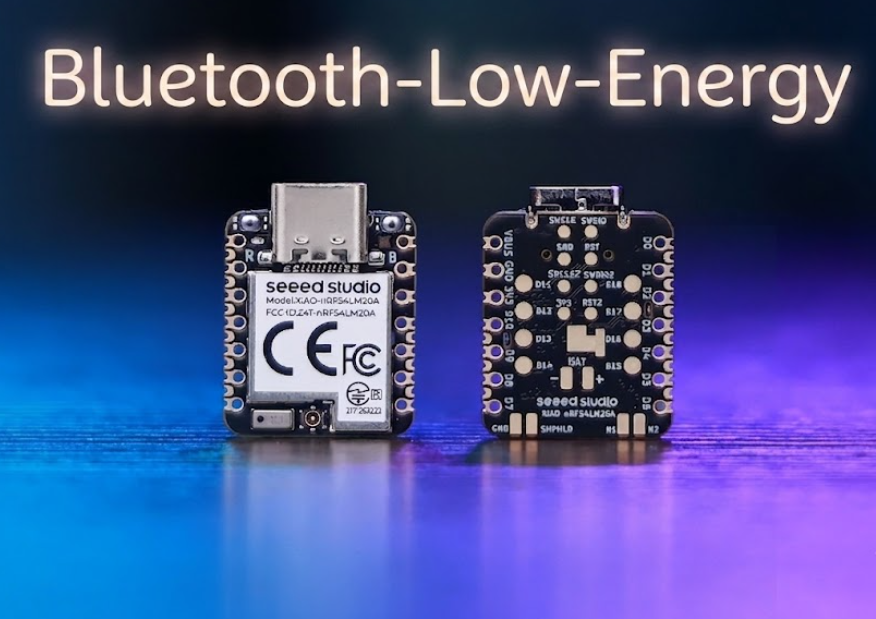
Bluetooth Low Energy(BLE)是 Bluetooth 4.0 中引入的一种低功耗无线通信标准。它专为间歇性的小数据传输而设计,可在数十米范围内实现无线连接,同时将平均电流消耗保持在微安级的超低水平。BLE 被广泛应用于可穿戴设备、智能家居传感器、室内定位以及工业物联网场景。
得益于 nRF54LM20A SoC,XIAO nRF54LM20A 系列支持 Bluetooth LE、Matter、Thread、Zigbee 和 2.4GHz 私有协议,在低延迟场景下可提供高达 4 Mbps 的峰值数据速率。它还支持 Bluetooth Channel Sounding 和 Bluetooth Mesh。本文通过两个实用示例来展示其 BLE 功能:基础广播 Beacon 发送,以及 Central 与 Peripheral 设备之间的 BLE LED Button Service(LBS)连接。
- 本教程基于 PlatformIO 构建系统和 Zephyr RTOS。如果你还不熟悉如何为 XIAO nRF54LM20A 创建 PlatformIO 工程,请参考 Getting Started with Seeed Studio XIAO nRF54LM20A。
- 如果你想进一步了解 nRF54LM20A SoC 和 BLE,请访问以下链接:nRF54LM20A SoC Introduction 和 Bluetooth-Low-Energy for Nordic
硬件准备
在开始之前,如果你计划运行 BLE LBS 示例,请至少准备两块 XIAO nRF54LM20A Sense 开发板。
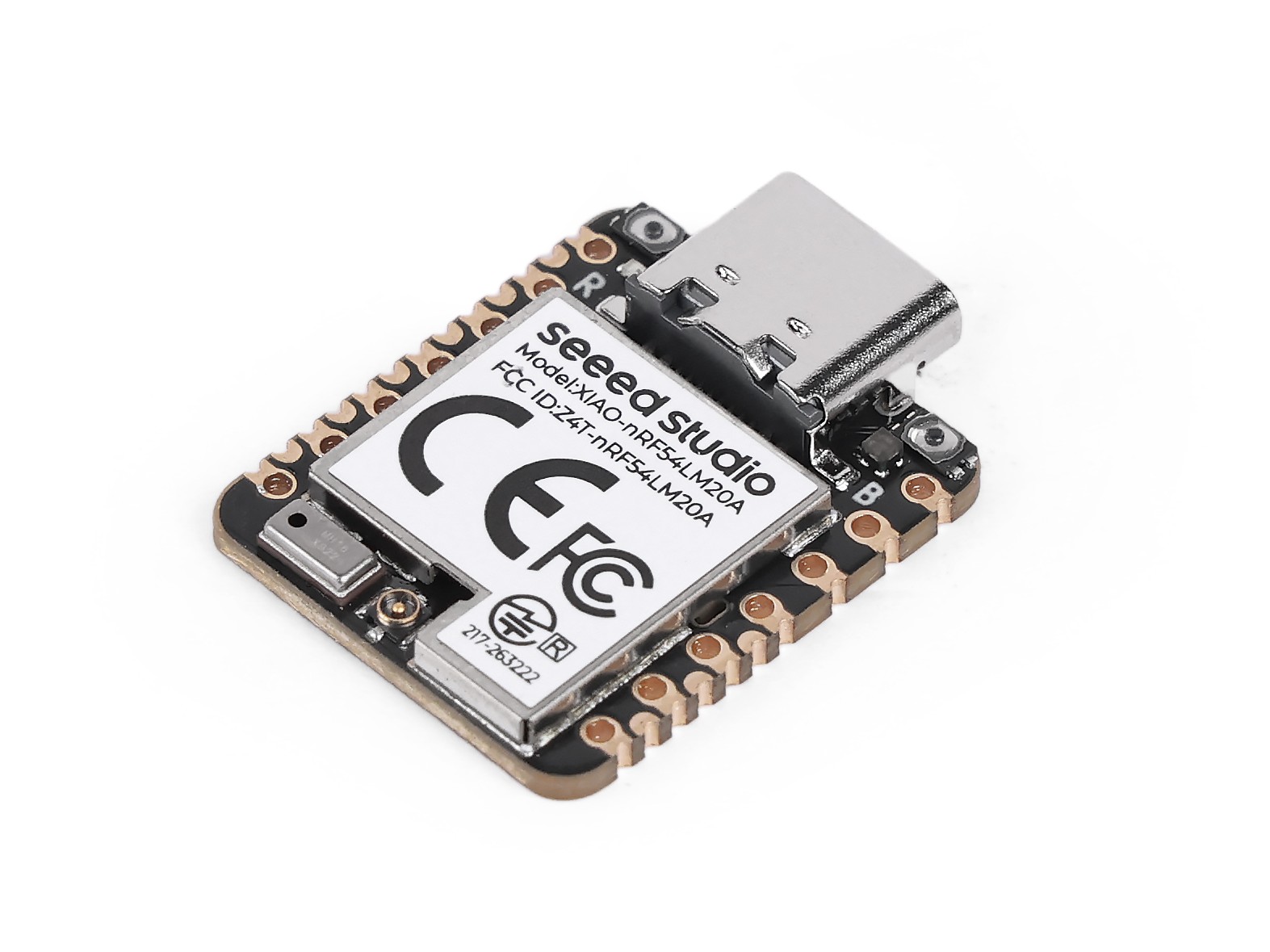
| Seeed Studio XIAO nRF54LM20A Sense |
|---|
 |
蓝牙天线
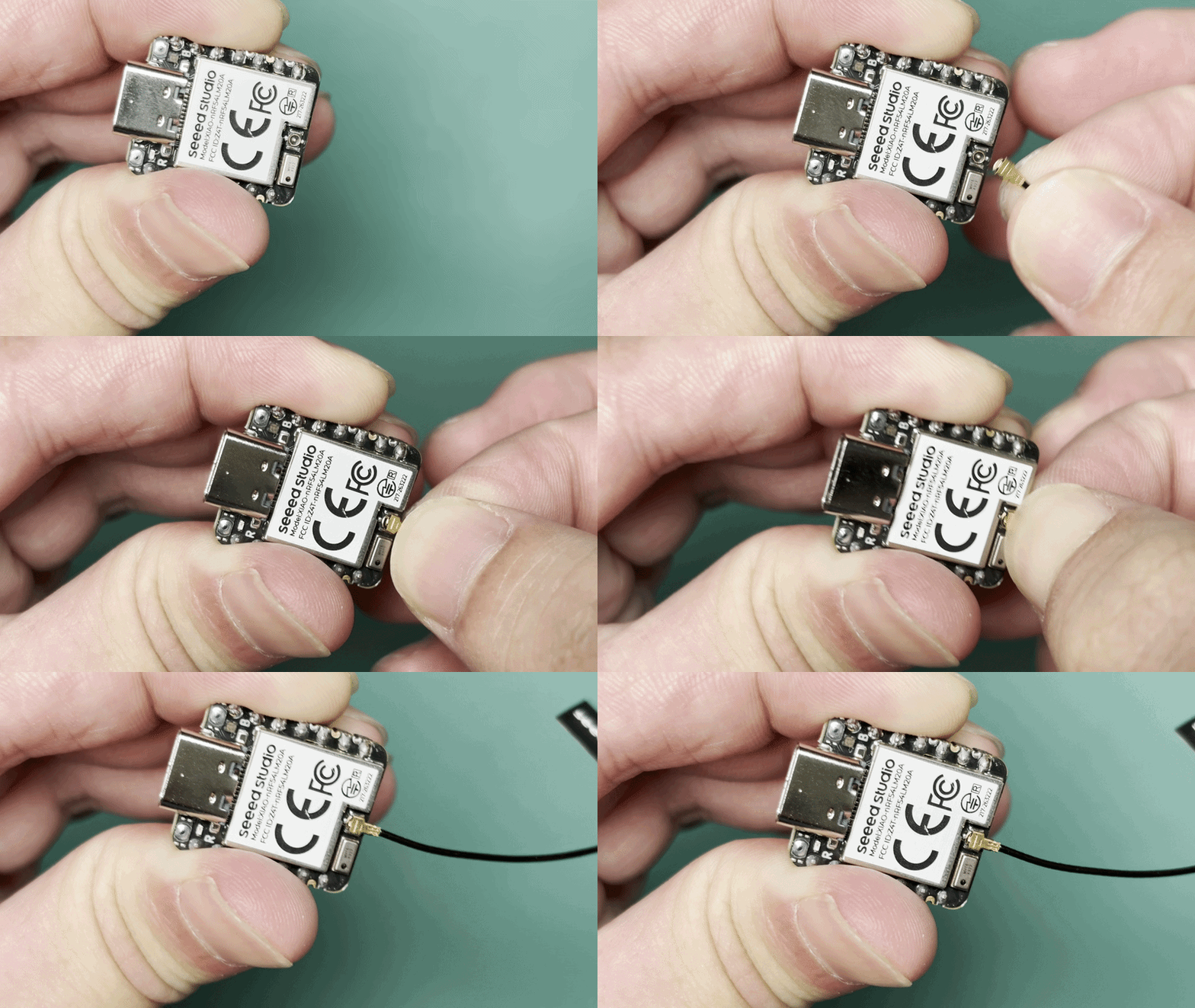
该开发板使用外置蓝牙天线。为确保更好的蓝牙信号质量并提升你的蓝牙使用体验,建议安装蓝牙天线。 连接方式如下所示:
天线安装
Seeed Studio XIAO nRF54LM20A 的包装中包含一根专用的 2.4 GHz 天线。为了获得最佳的蓝牙性能,请将随附天线连接到板载天线连接器上。
| 适用于 XIAO nRF54 系列的 2.4GHz FPC 天线 A-04 |
|---|
 |
应用
本节将通过实际案例介绍 BLE 的核心特性以及在 XIAO nRF54LM20A Sense 上使用 BLE 的方法。
BLE Beacon
本示例在 XIAO nRF54LM20A 上实现一个 BLE Beacon。启动后,设备会持续广播包含 Manufacturer Specific Data 的广播数据包。数据包中包含一个每秒递增一次的计数器,可通过 nRF Connect 实时监控数据变化。
软件
- 在
app.overlay中启用相关设备树配置,将 BLE 控制器切换为原生 Zephyr 实现。
/* Enable Zephyr native BLE controller (LL SW Split) */
&bt_hci_controller {
        status = "okay";
};

/ {
        chosen {
                zephyr,bt-hci = &bt_hci_controller;
        };
};
- 在
prj.conf中启用相关 Bluetooth 配置,设置日志输出模式,并将 Bluetooth 设备名称重命名为 XIAO-Beacon。
# GPIO
CONFIG_GPIO=y
# XIAO nRF54LM20A can fault early with the MPU enabled in this toolchain/board package.
CONFIG_ARM_MPU=n
# Regulator (for power_en)
CONFIG_REGULATOR=y
# Logging
CONFIG_LOG=y
# UART for console logging
CONFIG_SERIAL=y
CONFIG_UART_ASYNC_API=y
CONFIG_UART_20_ASYNC=y
CONFIG_UART_21_ASYNC=y
CONFIG_UART_NRFX_UARTE_ENHANCED_RX=y
# BLE
CONFIG_BT=y
CONFIG_BT_PERIPHERAL=y
CONFIG_BT_DEVICE_NAME="XIAO-Beacon"
# Avoid GCC 8.2 rejecting the controller's optimized assert inline asm path.
CONFIG_BT_CTLR_ASSERT_OPTIMIZE_FOR_SIZE=n
CONFIG_BT_CTLR_ASSERT_DEBUG=n
CONFIG_BT_CTLR_ASSERT_OVERHEAD_START=n
# Disable auto-procedures to avoid LL Procedure Collision on nRF54L
CONFIG_BT_AUTO_PHY_UPDATE=n
CONFIG_BT_DATA_LEN_UPDATE=n
# Memory
CONFIG_HEAP_MEM_POOL_SIZE=8192
# System workqueue stack
CONFIG_SYSTEM_WORKQUEUE_STACK_SIZE=2048
# Assert level
CONFIG_ASSERT=y
- 在
main.c中实现广播数据格式和更新逻辑。
main.c
#include <stdio.h>

#include <zephyr/kernel.h>
#include <zephyr/device.h>
#include <zephyr/drivers/gpio.h>
#include <zephyr/drivers/regulator.h>
#include <zephyr/bluetooth/bluetooth.h>
#include <zephyr/bluetooth/hci.h>
#include <zephyr/logging/log.h>

LOG_MODULE_REGISTER(ble_beacon, LOG_LEVEL_INF);

/* Manufacturer Data configuration */
#define MANUF_COMPANY_ID    0x0059
#define MANUF_DATA_SIZE     8

static uint32_t manufacturer_counter;

static const uint8_t adv_flags[] __aligned(4) = {
    BT_LE_AD_GENERAL | BT_LE_AD_NO_BREDR,
};

static const uint8_t adv_name[] __aligned(4) = CONFIG_BT_DEVICE_NAME;

static uint8_t manuf_data[MANUF_DATA_SIZE] __aligned(4);

static const struct bt_data ad[] __aligned(4) = {
    BT_DATA(BT_DATA_FLAGS, adv_flags, sizeof(adv_flags)),
    BT_DATA(BT_DATA_NAME_COMPLETE, adv_name, sizeof(adv_name) - 1),
    BT_DATA(BT_DATA_MANUFACTURER_DATA, manuf_data, sizeof(manuf_data)),
};

/* Power enable regulator (GPIO1_12) - must be enabled before BLE init */
static const struct device *const power_en_dev =
    DEVICE_DT_GET(DT_NODELABEL(power_en));

static void adv_update_work_handler(struct k_work *work);

static K_WORK_DELAYABLE_DEFINE(adv_update_work, adv_update_work_handler);

static void fill_manuf_data(uint32_t counter)
{
    /* [Company ID (2B)][Counter (4B)][Custom (2B)] */
    manuf_data[0] = MANUF_COMPANY_ID & 0xFF;
    manuf_data[1] = (MANUF_COMPANY_ID >> 8) & 0xFF;
    manuf_data[2] = (counter >> 0) & 0xFF;
    manuf_data[3] = (counter >> 8) & 0xFF;
    manuf_data[4] = (counter >> 16) & 0xFF;
    manuf_data[5] = (counter >> 24) & 0xFF;
    manuf_data[6] = 0xAA;
    manuf_data[7] = 0xBB;
}

static int enable_power(void)
{
    int ret;

    if (!device_is_ready(power_en_dev)) {
        LOG_ERR("power_en regulator is not ready");
        return -ENODEV;
    }

    ret = regulator_enable(power_en_dev);
    if (ret < 0 && ret != -EALREADY) {
        LOG_ERR("Failed to enable power_en: %d", ret);
        return ret;
    }

    k_sleep(K_MSEC(20));
    LOG_INF("Power rail enabled");
    return 0;
}

static void adv_update_work_handler(struct k_work *work)
{
    int err;

    manufacturer_counter++;
    fill_manuf_data(manufacturer_counter);

    err = bt_le_adv_update_data(ad, ARRAY_SIZE(ad), NULL, 0);
    if (err < 0) {
        LOG_ERR("Failed to update advertising data (err %d)", err);
    } else {
        LOG_INF("Manufacturer counter: %u", manufacturer_counter);
    }

    k_work_schedule(&adv_update_work, K_SECONDS(1));
}

int main(void)
{
    int err;

    LOG_INF("BLE Manufacturer Data Beacon");

    /* Enable board power rail before BLE initialization */
    err = enable_power();
    if (err < 0) {
        LOG_ERR("Power enable failed (err %d)", err);
        return err;
    }

    LOG_INF("Initializing BLE...");

    err = bt_enable(NULL);
    if (err < 0) {
        LOG_ERR("Bluetooth enable failed (err %d)", err);
        return err;
    }

    LOG_INF("BLE initialized");

    /* Initial advertising data with counter = 0 */
    fill_manuf_data(0);

    err = bt_le_adv_start(BT_LE_ADV_NCONN, ad, ARRAY_SIZE(ad), NULL, 0);
    if (err < 0) {
        LOG_ERR("Advertising failed to start (err %d)", err);
        return err;
    }

    LOG_INF("BLE advertising started");

    /* Schedule counter update after 1 second */
    k_work_schedule(&adv_update_work, K_SECONDS(1));

    for (;;) {
        k_sleep(K_FOREVER);
    }

    return 0;
}
结果
- 在烧录固件后,安装 nRF Connect 应用以扫描并检测 BLE 设备。
同时,你可以在各大手机应用商店中搜索并下载 nRF Connect 应用,它可以让你的手机扫描并连接蓝牙设备。
- Android:nRF Connect
- IOS:nRF Connect
- 安装软件后,扫描名为 XIAO-Beacon 的蓝牙设备,并查看接收到的 Manufacturer Data。同时,打开串口以查看输出日志。
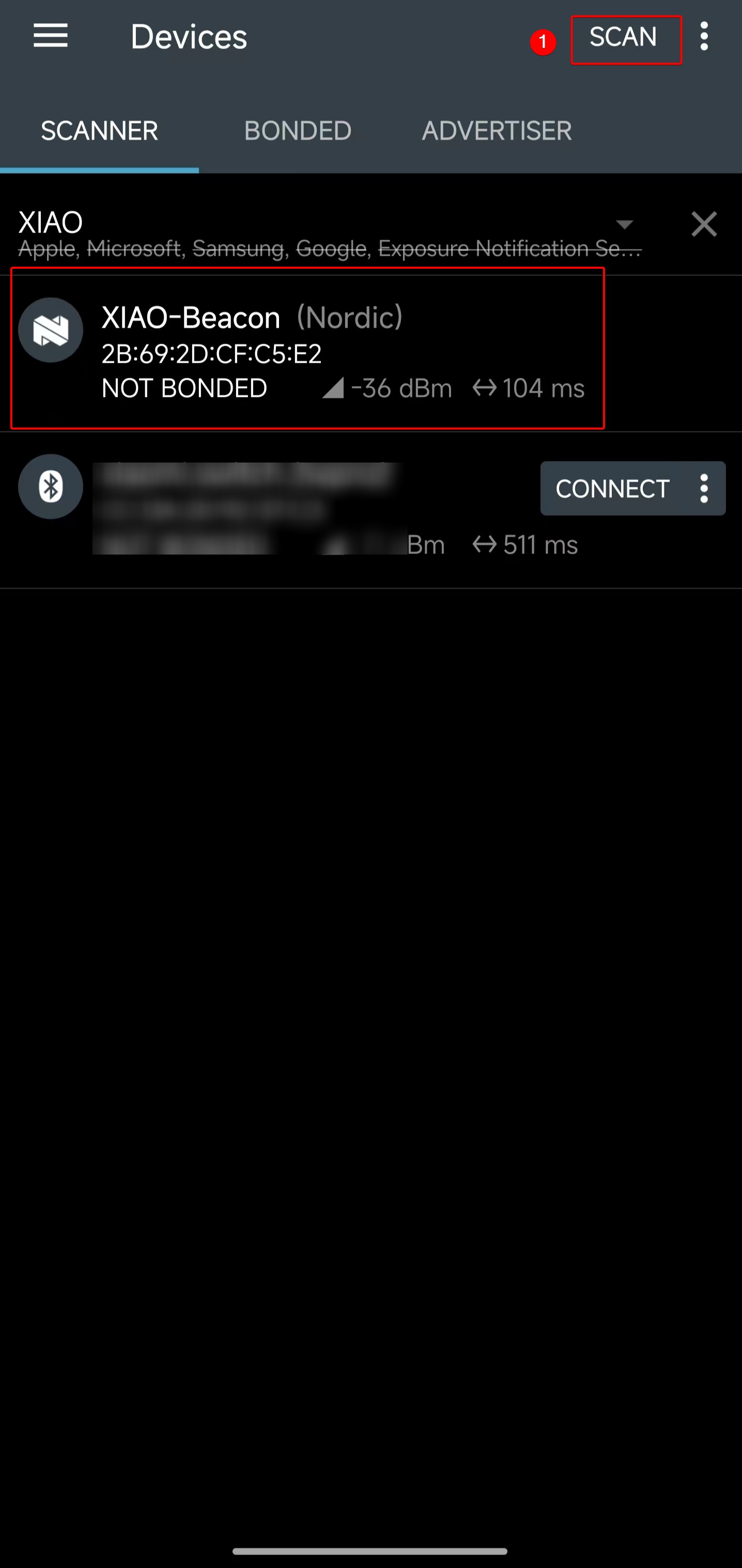 | 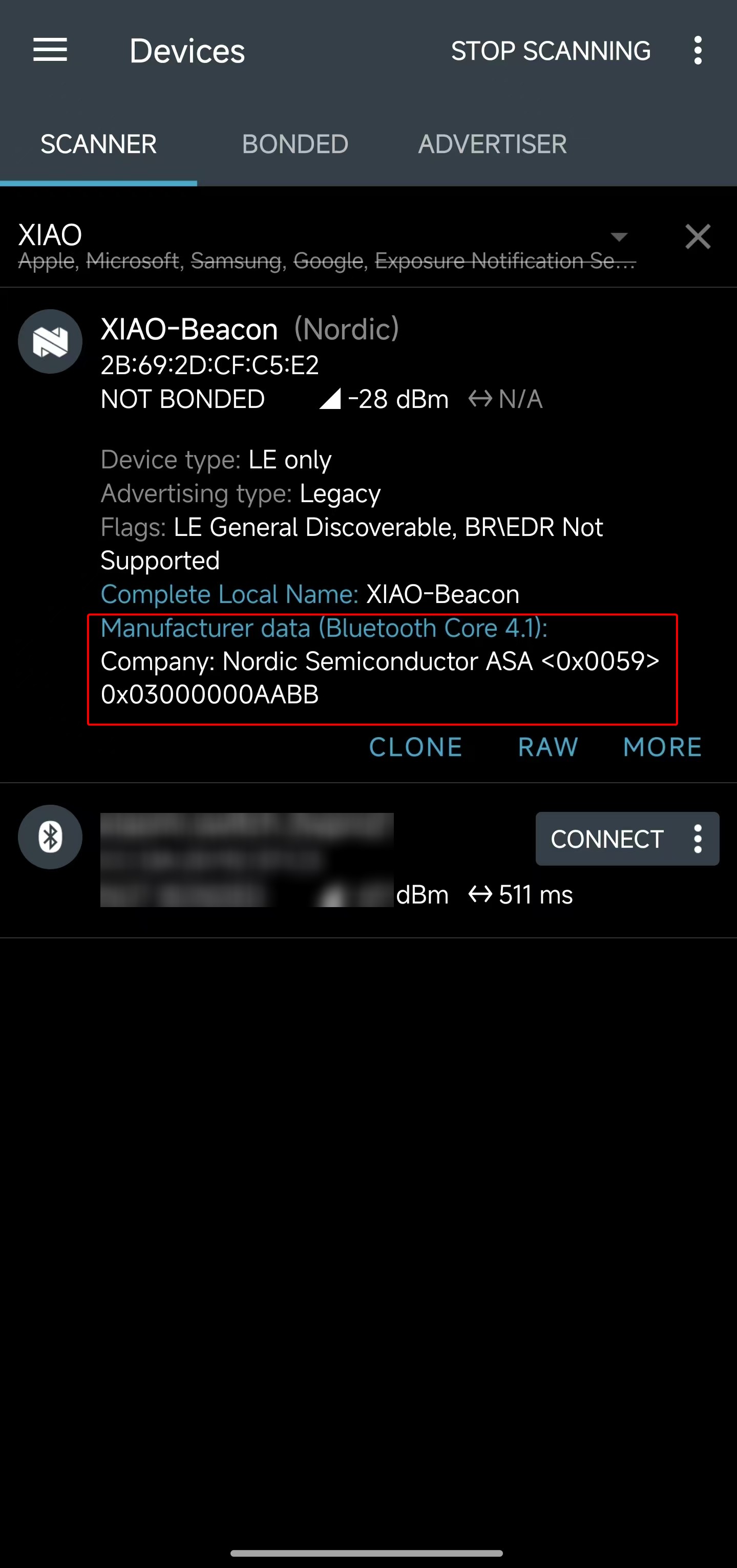 |
- 获取到的 Manufacturer Data 为十六进制值
<0x0059> 0x03000000AABB。通过查看程序代码可知,其中的0x03000000段表示当前计数器值为 3。
#define MANUF_COMPANY_ID    0x0059
static uint32_t manufacturer_counter;
...
manuf_data[0] = MANUF_COMPANY_ID & 0xFF;
manuf_data[1] = (MANUF_COMPANY_ID >> 8) & 0xFF;
manuf_data[2] = (manufacturer_counter >> 0) & 0xFF;
manuf_data[3] = (manufacturer_counter >> 8) & 0xFF;
manuf_data[4] = (manufacturer_counter >> 16) & 0xFF;
manuf_data[5] = (manufacturer_counter >> 24) & 0xFF;
manuf_data[6] = 0xAA;
manuf_data[7] = 0xBB;
- 打开串口工具,可以看到计数器的数值被一行一行地打印出来,当前计数已达到 3。
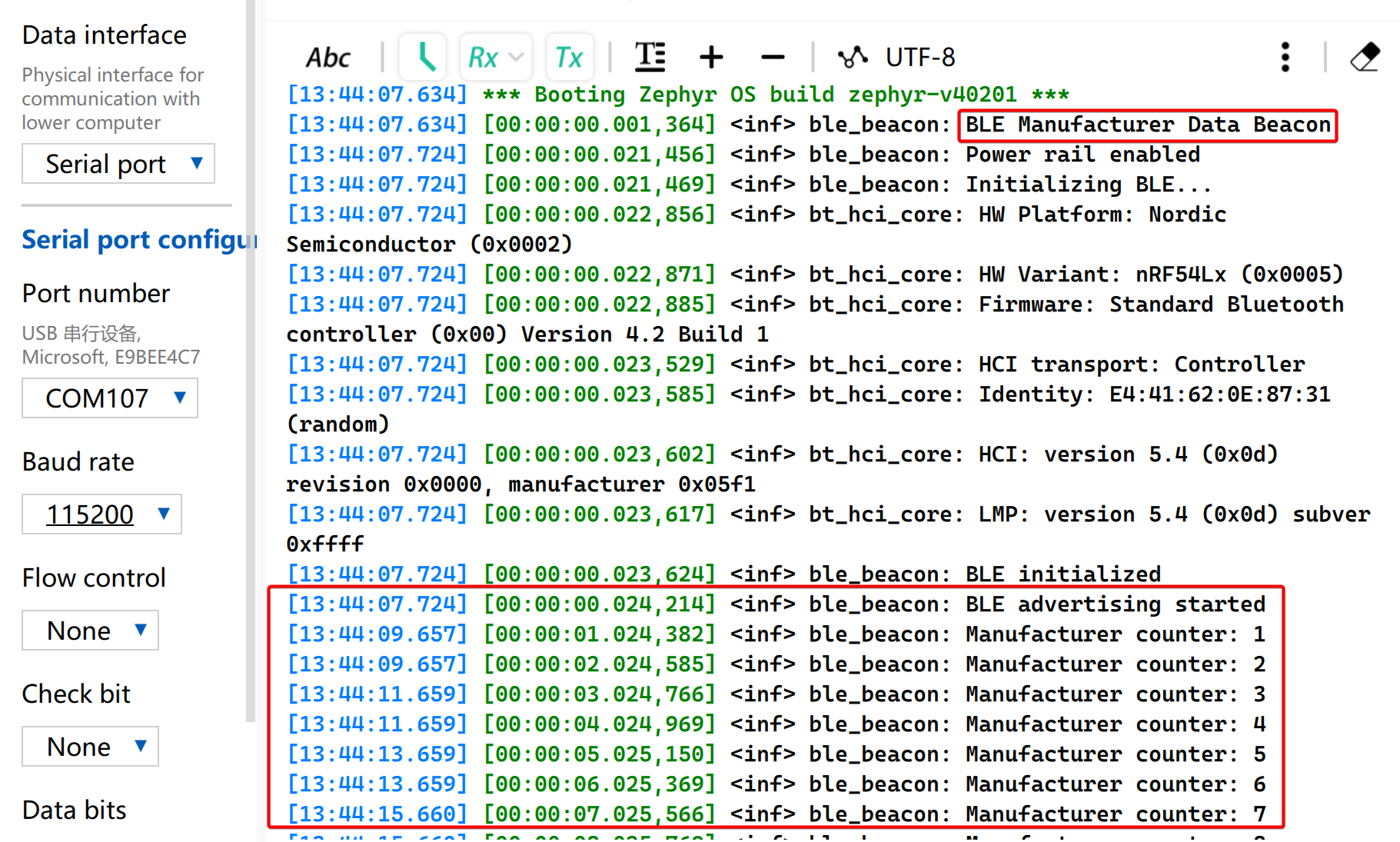
从以上结果可以清晰地了解在 XIAO nRF54LM20A Sense 上发送自定义 BLE 广播数据包的过程,这有助于进一步研究 BLE 的工作特性。在具体应用场景中,可以通过广播数据来判断触发条件,而无需建立实际连接。
BLE LBS
本示例使用两块 XIAO nRF54 开发板来实现 BLE LED Button Service(LBS)。一块板作为 BLE 外设,广播自定义的 LBS 服务;另一块板作为 BLE 中心设备,扫描该服务并自动连接,然后通过 GATT 写特征来控制外设上的 LED。
不需要额外的 app.overlay 文件,因为开发板定义中已经提供了本示例所使用的 led0 和 sw0 别名。
软件
BLE 中心设备
- 在
CMakeLists.txt中配置工程。
# SPDX-License-Identifier: Apache-2.0

cmake_minimum_required(VERSION 3.13.1)
find_package(Zephyr REQUIRED HINTS $ENV{ZEPHYR_BASE})
project(ble-lbs-min-central)

target_sources(app PRIVATE src/main.c)
- 在
prj.conf中启用与蓝牙相关的配置
CONFIG_GPIO=y
CONFIG_SERIAL=y
CONFIG_CONSOLE=y
CONFIG_UART_CONSOLE=y
CONFIG_PRINTK=y

CONFIG_LOG=y
CONFIG_LOG_BACKEND_UART=y
CONFIG_LOG_BUFFER_SIZE=2048

CONFIG_BT=y
CONFIG_BT_CENTRAL=y
CONFIG_BT_OBSERVER=y
CONFIG_BT_GATT_CLIENT=y
CONFIG_BT_CTLR_TX_PWR_PLUS_8=y
CONFIG_BT_DEVICE_NAME="zephyr_ble_lbs_central"

CONFIG_BT_BUF_ACL_RX_SIZE=255
CONFIG_BT_BUF_ACL_TX_SIZE=251
CONFIG_BT_BUF_CMD_TX_SIZE=255
CONFIG_BT_BUF_EVT_DISCARDABLE_SIZE=255
CONFIG_BT_L2CAP_TX_MTU=247

CONFIG_MAIN_STACK_SIZE=4096
CONFIG_SYSTEM_WORKQUEUE_STACK_SIZE=2048
- 在
main.c中实现 BLE 应用逻辑。
main.c
#include <zephyr/kernel.h>
#include <zephyr/drivers/gpio.h>
#include <zephyr/logging/log.h>
#include <zephyr/sys/atomic.h>

#include <zephyr/bluetooth/bluetooth.h>
#include <zephyr/bluetooth/conn.h>
#include <zephyr/bluetooth/hci.h>
#include <zephyr/bluetooth/uuid.h>
#include <zephyr/bluetooth/gatt.h>

#include <string.h>

LOG_MODULE_REGISTER(app, LOG_LEVEL_INF);

#define BT_UUID_LBS_MIN_VAL BT_UUID_128_ENCODE(0x8e7f1a23, 0x4b2c, 0x11ee, 0xbe56, 0x0242ac120002)
#define BT_UUID_LBS_MIN BT_UUID_DECLARE_128(BT_UUID_LBS_MIN_VAL)

#define BT_UUID_LBS_MIN_WRITE_VAL \
	BT_UUID_128_ENCODE(0x8e7f1a24, 0x4b2c, 0x11ee, 0xbe56, 0x0242ac120002)
#define BT_UUID_LBS_MIN_WRITE BT_UUID_DECLARE_128(BT_UUID_LBS_MIN_WRITE_VAL)

#define LED0_NODE DT_ALIAS(led0)
#define SW0_NODE DT_ALIAS(sw0)

static const struct gpio_dt_spec led0 = GPIO_DT_SPEC_GET_OR(LED0_NODE, gpios, {0});
static const struct gpio_dt_spec sw0 = GPIO_DT_SPEC_GET_OR(SW0_NODE, gpios, {0});

static struct bt_conn *default_conn;
static struct bt_conn *discover_conn;
static struct bt_gatt_discover_params discover_params;
static struct bt_gatt_write_params write_params;
static struct gpio_callback sw0_cb;
static struct k_work button_work;
static struct k_work_delayable debounce_work;
static struct k_work_delayable blink_work;
static atomic_t write_busy;

static uint16_t svc_start_handle;
static uint16_t svc_end_handle;
static uint16_t write_handle;
static uint8_t remote_led_state;
static uint8_t blink_led_state;
static bool blink_active;

static bool gpio_ready(const struct gpio_dt_spec *spec)
{
	return spec->port != NULL && device_is_ready(spec->port);
}

static void status_led_apply(uint8_t value)
{
	if (!gpio_ready(&led0)) {
		return;
	}

	(void)gpio_pin_set_dt(&led0, value ? 1 : 0);
}

static void blink_handler(struct k_work *work)
{
	ARG_UNUSED(work);

	if (!blink_active) {
		return;
	}

	blink_led_state = blink_led_state ? 0U : 1U;
	status_led_apply(blink_led_state);
	k_work_reschedule(&blink_work, K_MSEC(500));
}

static int init_status_led(void)
{
	int err;

	k_work_init_delayable(&blink_work, blink_handler);

	if (!gpio_ready(&led0)) {
		return -ENODEV;
	}

	err = gpio_pin_configure_dt(&led0, GPIO_OUTPUT_INACTIVE);
	if (err) {
		return err;
	}

	status_led_apply(0U);
	return 0;
}

static void start_blink(void)
{
	if (!gpio_ready(&led0)) {
		return;
	}

	blink_active = true;
	k_work_reschedule(&blink_work, K_NO_WAIT);
}

static void stop_blink(void)
{
	blink_active = false;
	(void)k_work_cancel_delayable(&blink_work);
	blink_led_state = 0U;
	status_led_apply(0U);
}

static bool ad_has_uuid(struct bt_data *data, void *user_data)
{
	bool *found = user_data;
	struct bt_uuid_128 uuid;

	if (data->type != BT_DATA_UUID128_ALL && data->type != BT_DATA_UUID128_SOME) {
		return true;
	}

	if ((data->data_len % 16U) != 0U) {
		return true;
	}

	for (size_t i = 0; i < data->data_len; i += 16U) {
		memcpy(uuid.val, &data->data[i], 16U);
		uuid.uuid.type = BT_UUID_TYPE_128;
		if (bt_uuid_cmp(&uuid.uuid, BT_UUID_LBS_MIN) == 0) {
			*found = true;
			return false;
		}
	}

	return true;
}

static void start_scan(void);

static void device_found(const bt_addr_le_t *addr, int8_t rssi, uint8_t type,
			 struct net_buf_simple *ad)
{
	bool found = false;
	int err;

	ARG_UNUSED(rssi);

	if (default_conn != NULL) {
		return;
	}

	if (type != BT_GAP_ADV_TYPE_ADV_IND &&
	    type != BT_GAP_ADV_TYPE_ADV_DIRECT_IND &&
	    type != BT_GAP_ADV_TYPE_ADV_SCAN_IND &&
	    type != BT_GAP_ADV_TYPE_SCAN_RSP) {
		return;
	}

	bt_data_parse(ad, ad_has_uuid, &found);
	if (!found) {
		return;
	}

	{
		char addr_str[BT_ADDR_LE_STR_LEN];

		bt_addr_le_to_str(addr, addr_str, sizeof(addr_str));
		LOG_INF("LBS adv matched from %s (type=0x%02x)", addr_str, type);
	}

	err = bt_le_scan_stop();
	if (err) {
		LOG_WRN("scan stop failed: %d", err);
	}

	err = bt_conn_le_create(addr, BT_CONN_LE_CREATE_CONN, BT_LE_CONN_PARAM_DEFAULT,
				&default_conn);
	if (err) {
		LOG_ERR("create conn failed: %d", err);
		start_scan();
	} else {
		LOG_INF("connecting to matching peripheral");
	}
}

static void start_scan(void)
{
	int err = bt_le_scan_start(BT_LE_SCAN_ACTIVE, device_found);

	if (err) {
		LOG_ERR("scan start failed: %d", err);
		return;
	}

	LOG_INF("scanning");
}

static uint8_t discover_func(struct bt_conn *conn, const struct bt_gatt_attr *attr,
			     struct bt_gatt_discover_params *params)
{
	if (attr == NULL) {
		LOG_INF("discover complete (attr=NULL) write_handle=0x%04x", write_handle);
		memset(params, 0, sizeof(*params));
		if (discover_conn) {
			bt_conn_unref(discover_conn);
			discover_conn = NULL;
		}
		return BT_GATT_ITER_STOP;
	}

	if (params->type == BT_GATT_DISCOVER_PRIMARY) {
		const struct bt_gatt_service_val *svc = attr->user_data;

		svc_start_handle = attr->handle;
		svc_end_handle = svc->end_handle;
		LOG_INF("primary svc found: start=0x%04x end=0x%04x",
			svc_start_handle, svc_end_handle);

		memset(params, 0, sizeof(*params));
		/* Discover all characteristics in the service, then match the write
		 * characteristic in code. Filtering by the 128-bit UUID at ATT level
		 * can return nothing even when the characteristic exists.
		 */
		params->uuid = NULL;
		params->func = discover_func;
		params->start_handle = svc_start_handle + 1U;
		params->end_handle = svc_end_handle;
		params->type = BT_GATT_DISCOVER_CHARACTERISTIC;

		if (bt_gatt_discover(conn, params)) {
			LOG_ERR("characteristic discover failed");
		}

		return BT_GATT_ITER_STOP;
	}

	if (params->type == BT_GATT_DISCOVER_CHARACTERISTIC) {
		const struct bt_gatt_chrc *chrc = attr->user_data;
		char uuid_str[37];

		bt_uuid_to_str(chrc->uuid, uuid_str, sizeof(uuid_str));
		LOG_INF("chrc: value_handle=0x%04x props=0x%02x uuid=%s",
			chrc->value_handle, chrc->properties, uuid_str);

		if (bt_uuid_cmp(chrc->uuid, BT_UUID_LBS_MIN_WRITE) == 0) {
			write_handle = chrc->value_handle;
			LOG_INF("write handle found: 0x%04x", write_handle);
			return BT_GATT_ITER_STOP;
		}
	}

	return BT_GATT_ITER_CONTINUE;
}

static void discover_lbs_service(struct bt_conn *conn)
{
	svc_start_handle = 0U;
	svc_end_handle = 0U;
	write_handle = 0U;

	if (discover_conn) {
		bt_conn_unref(discover_conn);
	}

	discover_conn = bt_conn_ref(conn);

	memset(&discover_params, 0, sizeof(discover_params));
	discover_params.uuid = BT_UUID_LBS_MIN;
	discover_params.func = discover_func;
	discover_params.start_handle = BT_ATT_FIRST_ATTRIBUTE_HANDLE;
	discover_params.end_handle = BT_ATT_LAST_ATTRIBUTE_HANDLE;
	discover_params.type = BT_GATT_DISCOVER_PRIMARY;

	if (bt_gatt_discover(conn, &discover_params)) {
		LOG_ERR("service discover failed");
	} else {
		LOG_INF("discovering LBS service");
	}
}

static void write_cb(struct bt_conn *conn, uint8_t err, struct bt_gatt_write_params *params)
{
	ARG_UNUSED(conn);
	ARG_UNUSED(params);

	atomic_set(&write_busy, 0);

	if (err) {
		LOG_ERR("write failed: 0x%02x", err);
		return;
	}

	LOG_INF("write ok");
}

static void button_work_handler(struct k_work *work)
{
	uint8_t next_state;
	int err;

	ARG_UNUSED(work);

	if (default_conn == NULL || write_handle == 0U) {
		return;
	}

	if (!atomic_cas(&write_busy, 0, 1)) {
		return;
	}

	next_state = remote_led_state ? 0U : 1U;
	remote_led_state = next_state;
	LOG_INF("button press -> write 0x%02x", remote_led_state);

	write_params.handle = write_handle;
	write_params.offset = 0U;
	write_params.data = &remote_led_state;
	write_params.length = sizeof(remote_led_state);
	write_params.func = write_cb;

	err = bt_gatt_write(default_conn, &write_params);
	if (err) {
		atomic_set(&write_busy, 0);
		LOG_ERR("write start failed: %d", err);
	} else {
		LOG_INF("write started");
	}
}

static void debounce_handler(struct k_work *work)
{
	ARG_UNUSED(work);

	if (gpio_pin_get_dt(&sw0) > 0) {
		LOG_INF("button debounced");
		k_work_submit(&button_work);
	}
}

static void sw0_isr(const struct device *dev, struct gpio_callback *cb, uint32_t pins)
{
	ARG_UNUSED(dev);
	ARG_UNUSED(cb);
	ARG_UNUSED(pins);

	k_work_reschedule(&debounce_work, K_MSEC(30));
}

static int init_button(void)
{
	int err;

	if (!gpio_ready(&sw0)) {
		return -ENODEV;
	}

	err = gpio_pin_configure_dt(&sw0, GPIO_INPUT);
	if (err) {
		return err;
	}

	k_work_init(&button_work, button_work_handler);
	k_work_init_delayable(&debounce_work, debounce_handler);

	gpio_init_callback(&sw0_cb, sw0_isr, BIT(sw0.pin));
	err = gpio_add_callback(sw0.port, &sw0_cb);
	if (err) {
		return err;
	}

	return gpio_pin_interrupt_configure_dt(&sw0, GPIO_INT_EDGE_TO_ACTIVE);
}

static void connected(struct bt_conn *conn, uint8_t err)
{
	if (err) {
		LOG_ERR("connect failed: 0x%02x %s", err, bt_hci_err_to_str(err));
		if (default_conn) {
			bt_conn_unref(default_conn);
			default_conn = NULL;
		}
		start_scan();
		return;
	}

	LOG_INF("connected");
	stop_blink();
	discover_lbs_service(conn);
}

static void disconnected(struct bt_conn *conn, uint8_t reason)
{
	ARG_UNUSED(conn);

	LOG_INF("disconnected: 0x%02x %s", reason, bt_hci_err_to_str(reason));

	if (default_conn) {
		bt_conn_unref(default_conn);
		default_conn = NULL;
	}

	write_handle = 0U;
	atomic_set(&write_busy, 0);
	start_blink();
	start_scan();
}

BT_CONN_CB_DEFINE(conn_callbacks) = {
	.connected = connected,
	.disconnected = disconnected,
};

int main(void)
{
	int err;

	remote_led_state = 0U;

	err = init_status_led();
	if (err) {
		LOG_WRN("status led init failed: %d", err);
	}

	err = init_button();
	if (err) {
		LOG_WRN("button init failed: %d", err);
	}

	err = bt_enable(NULL);
	if (err) {
		LOG_ERR("bt enable failed: %d", err);
		return err;
	}

	LOG_INF("bluetooth initialized");
	start_blink();
	start_scan();

	for (;;) {
		k_sleep(K_FOREVER);
	}
}
- 在
platformio.ini中配置 PlatformIO 项目。
[env:seeed-xiao-nrf54lm20a]
platform = https://github.com/Seeed-Studio/platform-seeedboards.git
framework = zephyr
board = seeed-xiao-nrf54lm20a
platform_packages =
  platformio/toolchain-gccarmnoneeabi@~1.90201.0
monitor_speed = 115200
BLE 外设
- 在
CMakeLists.txt中配置项目。
# SPDX-License-Identifier: Apache-2.0

cmake_minimum_required(VERSION 3.13.1)
find_package(Zephyr REQUIRED HINTS $ENV{ZEPHYR_BASE})
project(ble-lbs-min-peripheral)

target_sources(app PRIVATE src/main.c)
- 在
prj.conf中启用与 Bluetooth 相关的配置
CONFIG_GPIO=y
CONFIG_SERIAL=y
CONFIG_CONSOLE=y
CONFIG_UART_CONSOLE=y
CONFIG_PRINTK=y

CONFIG_LOG=y
CONFIG_LOG_BACKEND_UART=y
CONFIG_LOG_BUFFER_SIZE=2048

CONFIG_BT=y
CONFIG_BT_PERIPHERAL=y
CONFIG_BT_CTLR_TX_PWR_PLUS_8=y
CONFIG_BT_DEVICE_NAME="zephyr_ble_lbs"

CONFIG_MAIN_STACK_SIZE=4096
CONFIG_SYSTEM_WORKQUEUE_STACK_SIZE=2048
- 在
main.c中实现 BLE 应用逻辑。
main.c
#include <zephyr/kernel.h>
#include <zephyr/drivers/gpio.h>
#include <zephyr/logging/log.h>

#include <zephyr/bluetooth/bluetooth.h>
#include <zephyr/bluetooth/conn.h>
#include <zephyr/bluetooth/hci.h>
#include <zephyr/bluetooth/uuid.h>
#include <zephyr/bluetooth/gatt.h>

LOG_MODULE_REGISTER(app, LOG_LEVEL_INF);

#define BT_UUID_LBS_MIN_VAL BT_UUID_128_ENCODE(0x8e7f1a23, 0x4b2c, 0x11ee, 0xbe56, 0x0242ac120002)

#define BT_UUID_LBS_MIN_WRITE_VAL \
	BT_UUID_128_ENCODE(0x8e7f1a24, 0x4b2c, 0x11ee, 0xbe56, 0x0242ac120002)

#define BT_UUID_LBS_MIN_READ_VAL \
	BT_UUID_128_ENCODE(0x8e7f1a25, 0x4b2c, 0x11ee, 0xbe56, 0x0242ac120003)

static const struct bt_uuid_128 lbs_min_uuid __aligned(4) =
	BT_UUID_INIT_128(BT_UUID_LBS_MIN_VAL);
static const struct bt_uuid_128 lbs_min_write_uuid __aligned(4) =
	BT_UUID_INIT_128(BT_UUID_LBS_MIN_WRITE_VAL);
static const struct bt_uuid_128 lbs_min_read_uuid __aligned(4) =
	BT_UUID_INIT_128(BT_UUID_LBS_MIN_READ_VAL);

#define BT_UUID_LBS_MIN ((const struct bt_uuid *)&lbs_min_uuid.uuid)
#define BT_UUID_LBS_MIN_WRITE ((const struct bt_uuid *)&lbs_min_write_uuid.uuid)
#define BT_UUID_LBS_MIN_READ ((const struct bt_uuid *)&lbs_min_read_uuid.uuid)

#define LED0_NODE DT_ALIAS(led0)

static const struct gpio_dt_spec led0 = GPIO_DT_SPEC_GET_OR(LED0_NODE, gpios, {0});
static struct k_work_delayable blink_work;
static uint8_t led_state __aligned(4);
static uint8_t blink_led_state __aligned(4);
static bool blink_active;

static bool gpio_ready(const struct gpio_dt_spec *spec)
{
	return spec->port != NULL && device_is_ready(spec->port);
}

static void led_apply(uint8_t value)
{
	if (!gpio_ready(&led0)) {
		return;
	}

	(void)gpio_pin_set_dt(&led0, value ? 1 : 0);
}

static void blink_handler(struct k_work *work)
{
	ARG_UNUSED(work);

	if (!blink_active) {
		return;
	}

	blink_led_state = blink_led_state ? 0U : 1U;
	led_apply(blink_led_state);
	k_work_reschedule(&blink_work, K_MSEC(500));
}

static void start_blink(void)
{
	if (!gpio_ready(&led0)) {
		return;
	}

	blink_active = true;
	k_work_reschedule(&blink_work, K_NO_WAIT);
}

static void stop_blink(void)
{
	blink_active = false;
	(void)k_work_cancel_delayable(&blink_work);
	blink_led_state = 0U;
	led_apply(led_state);
}

static ssize_t read_led(struct bt_conn *conn, const struct bt_gatt_attr *attr,
			void *buf, uint16_t len, uint16_t offset)
{
	const uint8_t *value = attr->user_data;

	return bt_gatt_attr_read(conn, attr, buf, len, offset, value, sizeof(*value));
}

static ssize_t write_led(struct bt_conn *conn, const struct bt_gatt_attr *attr,
			 const void *buf, uint16_t len, uint16_t offset, uint8_t flags)
{
	uint8_t value;

	ARG_UNUSED(conn);
	ARG_UNUSED(attr);
	ARG_UNUSED(flags);

	if (len != 1U) {
		return BT_GATT_ERR(BT_ATT_ERR_INVALID_ATTRIBUTE_LEN);
	}

	if (offset != 0U) {
		return BT_GATT_ERR(BT_ATT_ERR_INVALID_OFFSET);
	}

	value = ((const uint8_t *)buf)[0];
	if (value != 0U && value != 1U) {
		return BT_GATT_ERR(BT_ATT_ERR_VALUE_NOT_ALLOWED);
	}

	led_state = value;
	led_apply(led_state);
	LOG_INF("remote led state=%u", led_state);

	return len;
}

BT_GATT_SERVICE_DEFINE(lbs_min_svc,
	BT_GATT_PRIMARY_SERVICE(BT_UUID_LBS_MIN),
	BT_GATT_CHARACTERISTIC(BT_UUID_LBS_MIN_WRITE, BT_GATT_CHRC_WRITE,
			       BT_GATT_PERM_WRITE, NULL, write_led, NULL),
	BT_GATT_CHARACTERISTIC(BT_UUID_LBS_MIN_READ, BT_GATT_CHRC_READ,
			       BT_GATT_PERM_READ, read_led, NULL, &led_state),
);

static const struct bt_data ad[] __aligned(4) = {
	BT_DATA_BYTES(BT_DATA_FLAGS, (BT_LE_AD_GENERAL | BT_LE_AD_NO_BREDR)),
	BT_DATA(BT_DATA_NAME_COMPLETE, CONFIG_BT_DEVICE_NAME,
		sizeof(CONFIG_BT_DEVICE_NAME) - 1),
};

static const struct bt_data sd[] __aligned(4) = {
	BT_DATA_BYTES(BT_DATA_UUID128_ALL, BT_UUID_LBS_MIN_VAL),
};

static void connected(struct bt_conn *conn, uint8_t err)
{
	ARG_UNUSED(conn);

	if (err) {
		LOG_ERR("connect failed: 0x%02x %s", err, bt_hci_err_to_str(err));
		return;
	}

	LOG_INF("connected");
	stop_blink();
}

static void disconnected(struct bt_conn *conn, uint8_t reason)
{
	ARG_UNUSED(conn);

	LOG_INF("disconnected: 0x%02x %s", reason, bt_hci_err_to_str(reason));
	start_blink();
}

BT_CONN_CB_DEFINE(conn_callbacks) = {
	.connected = connected,
	.disconnected = disconnected,
};

int main(void)
{
	int err;

	k_work_init_delayable(&blink_work, blink_handler);

	led_state = 0U;
	if (gpio_ready(&led0)) {
		err = gpio_pin_configure_dt(&led0, GPIO_OUTPUT_INACTIVE);
		if (err == 0) {
			led_apply(led_state);
		}
	}

	err = bt_enable(NULL);
	if (err) {
		LOG_ERR("bt enable failed: %d", err);
		return err;
	}

	LOG_INF("bluetooth initialized");

	err = bt_le_adv_start(BT_LE_ADV_CONN_FAST_1, ad, ARRAY_SIZE(ad), sd, ARRAY_SIZE(sd));
	if (err) {
		LOG_ERR("advertising failed: %d", err);
		return err;
	}

	LOG_INF("advertising");
	start_blink();

	for (;;) {
		k_sleep(K_FOREVER);
	}
}
- 在
platformio.ini中配置 PlatformIO 项目。
[env:seeed-xiao-nrf54lm20a]
platform = https://github.com/Seeed-Studio/platform-seeedboards.git
framework = zephyr
board = seeed-xiao-nrf54lm20a
platform_packages =
  platformio/toolchain-gccarmnoneeabi@~1.90201.0
monitor_speed = 115200
结果
-
将外设固件烧录到一块 XIAO 开发板,将中心固件烧录到另一块开发板。
-
重置两块开发板。在建立连接之前,外设的 LED 会闪烁以指示正在广播,而中心的 LED 会闪烁以指示正在扫描。
-
一旦中心发现外设,两块开发板会自动建立连接。连接建立后,两块板上的 LED 都会停止闪烁。
-
按下中心板上的 BOOT 按钮。中心通过 GATT 写特征向外设写入
0或1,外设会相应更新其 LED 状态。
通过本示例,你将学习如何构建一个完整的 BLE 中心和外设应用,包括 BLE 广播、扫描、自动连接、GATT 服务发现,以及使用一块开发板上的按钮远程控制另一块开发板上 LED 的基本通信流程。
总结
本示例演示了如何构建一个 BLE 中心和外设应用,包括 BLE 广播、扫描、自动连接、GATT 服务发现,以及通过 GATT 写特征实现远程 LED 控制。
技术支持与产品讨论
感谢你选择我们的产品!我们为你提供多种支持方式,以确保你在使用我们产品的过程中尽可能顺利。我们提供多种沟通渠道,以满足不同的偏好和需求。