Control reBot Arm B601 with NemoClaw on Nvidia Jetson Thor
1. Project Overview
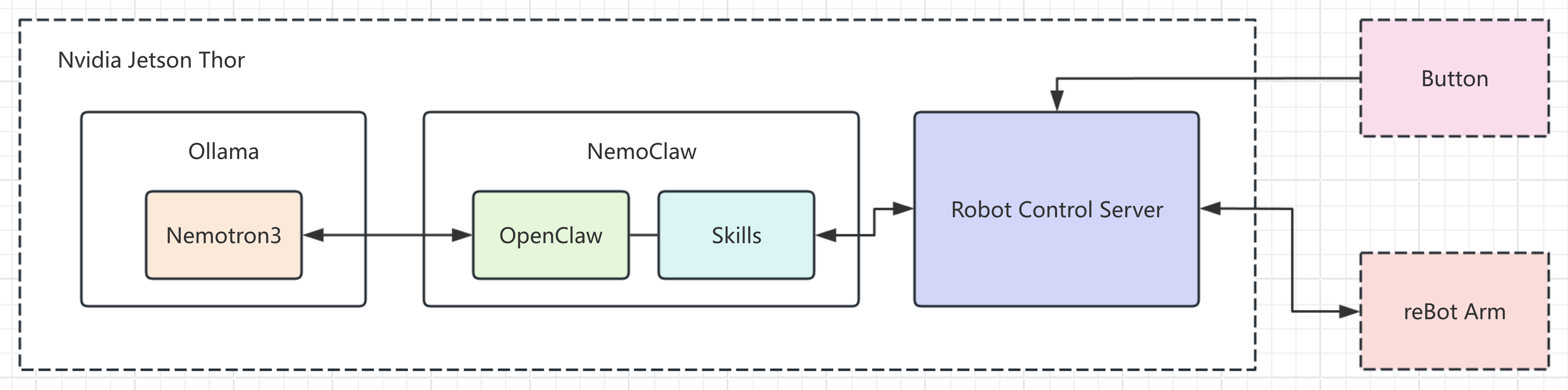
NVIDIA NemoClaw is an open-source reference stack that simplifies running OpenClaw always-on assistants more safely. This wiki explains how to deploy NemoClaw on Jetson Thor and connect reBot Arm B601 capabilities into the NemoClaw agent workflow, forming a closed loop of: semantic understanding + visual detection + robotic execution.
NemoClaw: Local agent/control framework for task orchestration and command routing.Nemotron3: Optional model capability for intent understanding and high-level decision making.Nvidia Jetson Thor: Local compute platform for inference, backend services, and device drivers.reBot Arm B601: robotic arm for grasping and placement.
2. Hardware Requirements
- Nvidia Jetson Thor (JetPack 7.x installed)
- reBot Arm B601 DM
- USB-to-CAN adapter
- USB camera
- Power supply and USB cable for the robotic arm
- USB button (optional)
| reBot Arm B601 | NVIDIA® Jetson AGX Thor™ Developer Kit |
|---|---|
 |  |
3. Hardware Connection
- Assemble and configure the robotic arm.
- Connect the USB-to-CAN adapter, USB camera, and robotic arm to Jetson Thor USB Type-A ports.
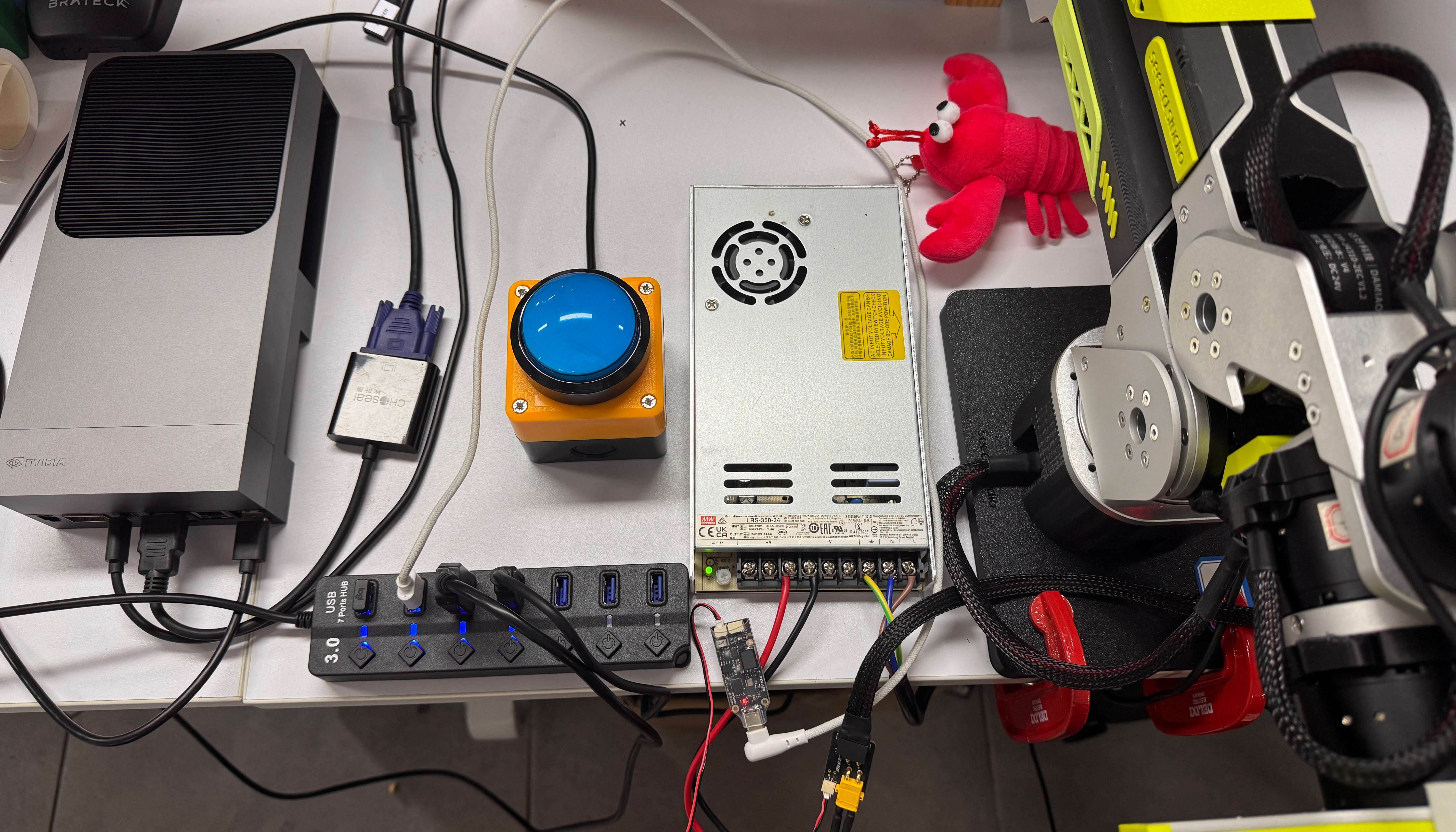
Jetson devices may only provide two USB Type-A ports. Use a USB hub if you need more ports.
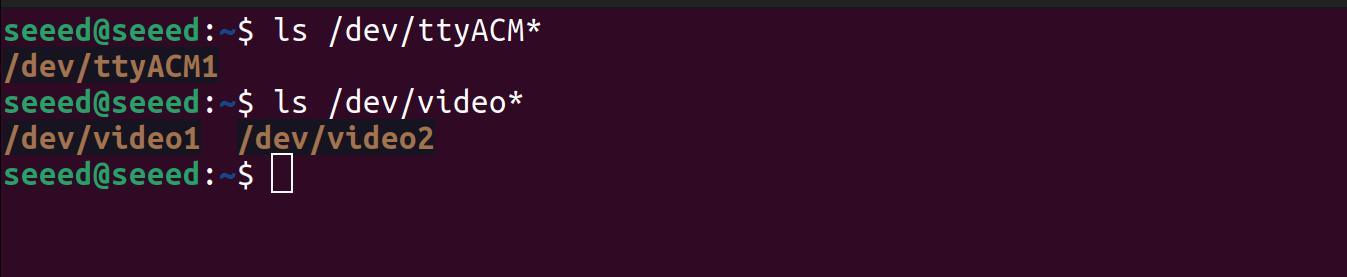
After power-on, verify devices:
ls /dev/ttyACM*
ls /dev/video*
If everything is connected correctly, you should see output similar to:
4. System and Dependency Setup
4.1 Install Ollama
If local LLM capability is needed (optional):
curl -fsSL https://ollama.com/install.sh | sh
ollama pull nemotron3:33b

4.2 Install NemoClaw
Install NemoClaw on Jetson:
curl -fsSL https://www.nvidia.com/nemoclaw.sh | bash
Then run nemoclaw onboard to create a new app. A sample interactive onboarding log is shown in:
nemoclaw onboard log
seeed@seeed:~$ nemoclaw onboard --no-gpu

  NemoClaw Onboarding
  ===================

  [1/8] Preflight checks
  ──────────────────────────────────────────────────
  ✓ Docker is running
  ✓ Container DNS resolution works
  ✓ Container runtime: docker
  ✓ Container runtime resources: 14 vCPU / 122.8 GiB
  ✓ openshell CLI: openshell 0.0.37
  Cleaning up previous NemoClaw session...
! No active forward found for port 18789
  ✓ Previous session cleaned up
  ✓ Port 8080 available (OpenShell gateway)
  ✓ NVIDIA GPU detected (NVIDIA Thor, 125771 MB)
  ✓ Sandbox GPU: disabled by configuration
  ✓ Memory OK: 125771 MB RAM + 0 MB swap
  NVIDIA GPU hardware detected but nvidia-smi is not available.
  Install NVIDIA drivers and the Container Toolkit for default GPU passthrough.

  [2/8] Starting OpenShell gateway
  ──────────────────────────────────────────────────
  Starting OpenShell Docker-driver gateway...
  Gateway log: /home/seeed/.local/state/nemoclaw/openshell-docker-gateway/openshell-gateway.log
  ✓ Docker-driver gateway is healthy

  [3/8] Configuring inference (NIM)
  ──────────────────────────────────────────────────
  Detected local inference option: Ollama


  Inference options:
    1) NVIDIA Endpoints
    2) OpenAI
    3) Other OpenAI-compatible endpoint
    4) Anthropic
    5) Other Anthropic-compatible endpoint
    6) Google Gemini
    7) Local Ollama (localhost:11434) — running (suggested)
    8) Model Router (experimental)

  Choose [1]: 7
  ✓ Using Ollama on localhost:11434 (proxy on :11435)

  Ollama models:
    1) nemotron3:33b
    2) qwen3.5:0.8b
    3) nemotron-3-nano:30b
    4) Other...

  Choose model [3]: 1
  Loading Ollama model: nemotron3:33b
  Chat Completions API available — OpenClaw will use openai-completions.
  Sandbox name (lowercase, starts with a letter, letters/numbers/internal hyphens only, ends with letter/number) [my-assistant]:

  ──────────────────────────────────────────────────
  Review configuration
  ──────────────────────────────────────────────────
  Provider:      ollama-local
  Model:         nemotron3:33b
  API key:       (not required for ollama-local)
  Web search:    disabled
  Messaging:     none
  Sandbox name:  my-assistant
  Note:          Sandbox build typically takes 3–8 minutes on this host.
  ──────────────────────────────────────────────────
  Web search and messaging channels will be prompted next.
  Apply this configuration? [Y/n]:

  [4/8] Setting up inference provider
  ──────────────────────────────────────────────────
✓ Active gateway set to 'nemoclaw'
✓ Updated provider ollama-local
Gateway inference configured:

  Route: inference.local
  Provider: ollama-local
  Model: nemotron3:33b
  Version: 12
  Timeout: 180s
  Priming Ollama model: nemotron3:33b
  ✓ Inference route set: ollama-local / nemotron3:33b
  Enable Brave Web Search? [y/N]:

  [5/8] Messaging channels
  ──────────────────────────────────────────────────

  Available messaging channels:
    [1] ○ telegram — Telegram bot messaging
    [2] ○ discord — Discord bot messaging
    [3] ○ slack — Slack bot messaging

  Press 1-3 to toggle, Enter when done:
  Skipping messaging channels.

  [6/8] Creating sandbox
  ──────────────────────────────────────────────────
  Creating sandbox 'my-assistant' (this takes a few minutes on first run)...
  Pinning base image to sha256:1fb69ddbe730...
  Building sandbox image...
  Building image openshell/sandbox-from:1778663150 from /tmp/nemoclaw-bu...
  Step 1/63 : ARG BASE_IMAGE=ghcr.io/nvidia/nemoclaw/sandbox-base@sha256...
  Step 2/63 : FROM node:22-trixie-slim@sha256:2d9f5c76c8f4dd36e8f253bee5...
  Step 3/63 : ENV NPM_CONFIG_AUDIT=false     NPM_CONFIG_FUND=false     N...
  Step 4/63 : COPY nemoclaw/package.json nemoclaw/package-lock.json nemo...
  Step 5/63 : COPY nemoclaw/src/ /opt/nemoclaw/src/
  Step 6/63 : WORKDIR /opt/nemoclaw
  Step 7/63 : RUN npm ci && npm run build
  Step 8/63 : FROM ${BASE_IMAGE}
  Step 9/63 : RUN set -eu;     apt-mark manual procps e2fsprogs 2>/dev/n...
  Step 10/63 : COPY --from=builder /opt/nemoclaw/dist/ /opt/nemoclaw/dist/
  Step 11/63 : COPY nemoclaw/openclaw.plugin.json /opt/nemoclaw/
  Step 12/63 : COPY nemoclaw/package.json nemoclaw/package-lock.json /op...
  Step 13/63 : COPY nemoclaw-blueprint/ /opt/nemoclaw-blueprint/
  Step 14/63 : WORKDIR /opt/nemoclaw
  Step 15/63 : RUN npm ci --omit=dev
  Step 16/63 : RUN set -eu;     MIN_VER=$(grep -m 1 'min_openclaw_versio...
  Step 17/63 : COPY scripts/rcf_patch.py /usr/local/lib/nemoclaw/rcf_pat...
  Step 18/63 : RUN set -eu;     OC_DIST=/usr/local/lib/node_modules/open...
  Step 19/63 : RUN mkdir -p /sandbox/.nemoclaw/blueprints/0.1.0     && c...
  Step 20/63 : COPY scripts/lib/sandbox-init.sh /usr/local/lib/nemoclaw/...
  Step 21/63 : COPY scripts/nemoclaw-start.sh /usr/local/bin/nemoclaw-start
  Step 22/63 : COPY nemoclaw-blueprint/scripts/*.js /usr/local/lib/nemoc...
  Step 23/63 : COPY scripts/codex-acp-wrapper.sh /usr/local/bin/nemoclaw...
  Step 24/63 : COPY scripts/generate-openclaw-config.py /usr/local/lib/n...
  Step 25/63 : COPY nemoclaw-blueprint/openclaw-plugins/ /usr/local/shar...
  Step 26/63 : RUN chmod 755 /usr/local/bin/nemoclaw-start /usr/local/bi...
  Step 27/63 : ARG NEMOCLAW_MODEL=nemotron3:33b
  Step 28/63 : ARG NEMOCLAW_PROVIDER_KEY=inference
  Step 29/63 : ARG NEMOCLAW_PRIMARY_MODEL_REF=inference/nemotron3:33b
  Step 30/63 : ARG CHAT_UI_URL=http://127.0.0.1:18789
  Step 31/63 : ARG NEMOCLAW_INFERENCE_BASE_URL=https://inference.local/v1
  Step 32/63 : ARG NEMOCLAW_INFERENCE_API=openai-completions
  Step 33/63 : ARG NEMOCLAW_CONTEXT_WINDOW=131072
  Step 34/63 : ARG NEMOCLAW_MAX_TOKENS=4096
  Step 35/63 : ARG NEMOCLAW_REASONING=false
  Step 36/63 : ARG NEMOCLAW_INFERENCE_INPUTS=text
  Step 37/63 : ARG NEMOCLAW_AGENT_TIMEOUT=600
  Step 38/63 : ARG NEMOCLAW_AGENT_HEARTBEAT_EVERY=
  Step 39/63 : ARG NEMOCLAW_INFERENCE_COMPAT_B64=e30=
  Step 40/63 : ARG NEMOCLAW_MESSAGING_CHANNELS_B64=W10=
  Step 41/63 : ARG NEMOCLAW_MESSAGING_ALLOWED_IDS_B64=e30=
  Step 42/63 : ARG NEMOCLAW_DISCORD_GUILDS_B64=e30=
  Step 43/63 : ARG NEMOCLAW_TELEGRAM_CONFIG_B64=e30=
  Step 44/63 : ARG NEMOCLAW_DISABLE_DEVICE_AUTH=1
  Step 45/63 : ARG NEMOCLAW_BUILD_ID=1778663150303
  Step 46/63 : ARG NEMOCLAW_PROXY_HOST=10.200.0.1
  Step 47/63 : ARG NEMOCLAW_PROXY_PORT=3128
  Step 48/63 : ARG NEMOCLAW_WEB_SEARCH_ENABLED=0
  Step 49/63 : ENV NEMOCLAW_MODEL=${NEMOCLAW_MODEL}     NEMOCLAW_PROVIDE...
  Step 50/63 : WORKDIR /sandbox
  Step 51/63 : USER sandbox
  Step 52/63 : RUN python3 /usr/local/lib/nemoclaw/generate-openclaw-con...
  Step 53/63 : RUN (openclaw doctor --fix > /dev/null 2>&1 || true)     ...
  Still building sandbox image... (20s elapsed)
  Still building sandbox image... (30s elapsed)
  Still building sandbox image... (45s elapsed)
  Still building sandbox image... (60s elapsed)
  Still building sandbox image... (75s elapsed)
  Still building sandbox image... (90s elapsed)
  Still building sandbox image... (105s elapsed)
  Still building sandbox image... (120s elapsed)
  Still building sandbox image... (135s elapsed)
  Step 54/63 : RUN python3 -c "import json, os; path = os.path.expanduse...
  Step 55/63 : USER root
  Step 56/63 : RUN set -eu;     config_dir=/sandbox/.openclaw;     data_...
  Step 57/63 : RUN if id gateway >/dev/null 2>&1 && id sandbox >/dev/nul...
  Step 58/63 : RUN chown -R sandbox:sandbox /sandbox/.openclaw     && ch...
  Still building sandbox image... (175s elapsed)
  Step 59/63 : RUN if ! grep -q "/tmp/nemoclaw-proxy-env.sh" /etc/profil...
  Step 60/63 : RUN sha256sum /sandbox/.openclaw/openclaw.json > /sandbox...
  Step 61/63 : RUN chown root:root /sandbox/.nemoclaw     && chmod 1755 ...
  Step 62/63 : ENTRYPOINT ["/usr/local/bin/nemoclaw-start"]
  Step 63/63 : CMD ["/bin/bash"]
  Built image openshell/sandbox-from:1778663150
  Waiting for sandbox to become ready...
  Sandbox reported Ready before create stream exited; continuing.
  Waiting for sandbox to become ready...
  Waiting for NemoClaw dashboard to become ready...
  ✓ Dashboard is live
! No active forward found for port 18789
  ✓ Sandbox 'my-assistant' created

  [7/8] Setting up OpenClaw inside sandbox
  ──────────────────────────────────────────────────
  ✓ OpenClaw gateway launched inside sandbox

  [8/8] Policy presets
  ──────────────────────────────────────────────────

  Policy tier — controls which network presets are enabled:
     [ ] Restricted
     [ ] Balanced
   > [✓] Open

  ↑/↓ j/k  move    Space  select    Enter  confirm


  Presets  (Open defaults):
   > [✓] [rw] npm
     [✓] [rw] pypi
     [✓] [rw] huggingface
     [✓] [rw] brew
     [✓] [rw] brave
     [✓] [rw] slack
     [✓] [rw] discord
     [✓] [rw] telegram
     [✓] [rw] jira
     [✓] [rw] outlook
     [ ]      github
     [✓] [rw] local-inference

  ↑/↓ j/k  move    Space  include    r  toggle rw    Enter  confirm

  Widening sandbox egress — adding: registry.npmjs.org, registry.yarnpkg.com
✓ Policy version 3 submitted (hash: 77d8e31dfb8c)
✓ Policy version 3 loaded (active version: 3)
  Applied preset: npm
  Widening sandbox egress — adding: pypi.org, files.pythonhosted.org
✓ Policy version 4 submitted (hash: 6637ad37a7b2)
✓ Policy version 4 loaded (active version: 4)
  Applied preset: pypi
  Widening sandbox egress — adding: huggingface.co, cdn-lfs.huggingface.co, router.huggingface.co
✓ Policy version 5 submitted (hash: e81bc64dabe1)
✓ Policy version 5 loaded (active version: 5)
  Applied preset: huggingface
  Widening sandbox egress — adding: formulae.brew.sh, github.com, ghcr.io, pkg-containers.githubusercontent.com, objects.githubusercontent.com, raw.githubusercontent.com
✓ Policy version 6 submitted (hash: d96caba06e19)
✓ Policy version 6 loaded (active version: 6)
  Applied preset: brew
  Widening sandbox egress — adding: api.search.brave.com
✓ Policy version 7 submitted (hash: be83e02b9a1c)
✓ Policy version 7 loaded (active version: 7)
  Applied preset: brave
  Widening sandbox egress — adding: slack.com, api.slack.com, hooks.slack.com, wss-primary.slack.com, wss-backup.slack.com
✓ Policy version 8 submitted (hash: 2b5d1cafea38)
✓ Policy version 8 loaded (active version: 8)
  Applied preset: slack
  Widening sandbox egress — adding: discord.com, gateway.discord.gg, cdn.discordapp.com, media.discordapp.net
✓ Policy version 9 submitted (hash: c4b43ab2846f)
✓ Policy version 9 loaded (active version: 9)
  Applied preset: discord
  Widening sandbox egress — adding: api.telegram.org
✓ Policy version 10 submitted (hash: 0bd5f6fdf97c)
✓ Policy version 10 loaded (active version: 10)
  Applied preset: telegram
  Widening sandbox egress — adding: *.atlassian.net, auth.atlassian.com, api.atlassian.com
✓ Policy version 11 submitted (hash: 3b7cf306a733)
✓ Policy version 11 loaded (active version: 11)
  Applied preset: jira
  Widening sandbox egress — adding: graph.microsoft.com, login.microsoftonline.com, outlook.office365.com, outlook.office.com
✓ Policy version 12 submitted (hash: 48737772cbc4)
✓ Policy version 12 loaded (active version: 12)
  Applied preset: outlook
  Widening sandbox egress — adding: host.openshell.internal, host.openshell.internal, host.openshell.internal
✓ Policy version 13 submitted (hash: a176881916b5)
✓ Policy version 13 loaded (active version: 13)
  Applied preset: local-inference
  ✓ Deployment verified — gateway and dashboard are healthy.
    OpenClaw version: 2026.4.24

  ──────────────────────────────────────────────────
  Sandbox      my-assistant (Landlock + seccomp + netns)
  Model        nemotron3:33b (Local Ollama)
  ──────────────────────────────────────────────────
  Run:         nemoclaw my-assistant connect
  Status:      nemoclaw my-assistant status
  Logs:        nemoclaw my-assistant logs --follow

  OpenClaw UI (auth token redacted from displayed URLs)
  Port 18789 must be forwarded before opening these URLs.
  Dashboard: http://127.0.0.1:18789/
  Token:       nemoclaw my-assistant gateway-token --quiet
               append  #token=<token> locally if the browser asks for auth.
  ──────────────────────────────────────────────────

  To change settings later:
    Model:       nemoclaw inference set --model <model> --provider <provider> --sandbox my-assistant
    Policies:    nemoclaw my-assistant policy-add
    Credentials: nemoclaw credentials reset <KEY>  then  nemoclaw onboard

seeed@seeed:~$
Considering that we may need to access services deployed on the host machine from within the NeMoClaw container in the future, please execute the following command to configure the network access for this application.
nemoclaw my-assistant policy-add --from-file ~/rebot_arm_service/host-camera.yaml --yes
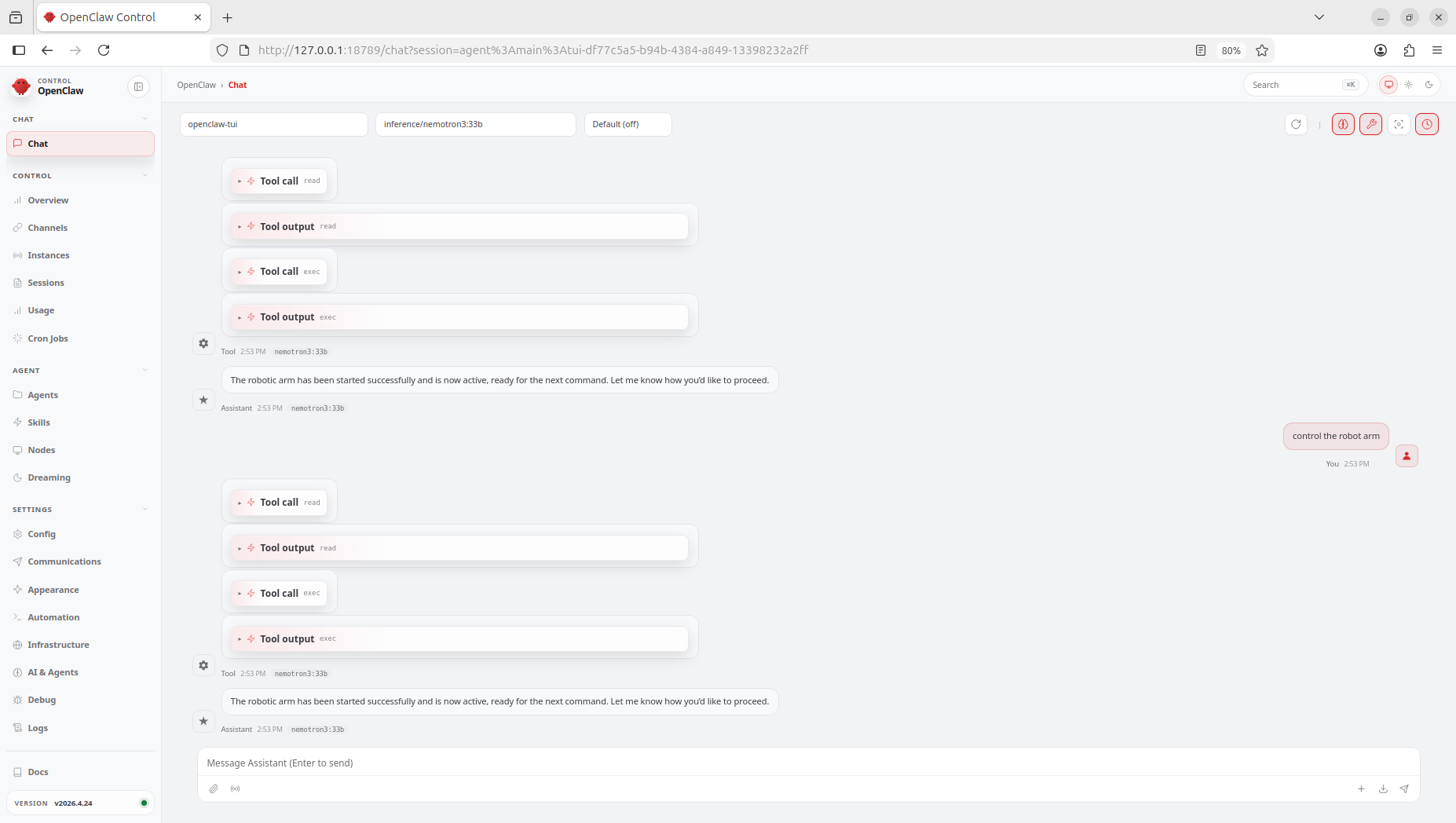
If onboarding succeeds, run:
nemoclaw my-assistant connect
You should enter a working OpenClaw app environment:
More NemoClaw CLI details: https://docs.nvidia.com/nemoclaw/latest/reference/cli-selection-guide.html
4.3 Install Robotic Arm Service
Run on Jetson:
git clone https://github.com/yuyoujiang/rebot_arm_service.git ~
cd ~/rebot_arm_service
uv sync
# Configure GPU PyTorch runtime libraries
export LD_LIBRARY_PATH=/home/seeed/rebot_arm_service/.venv/lib/python3.12/site-packages/nvpl/lib:/usr/local/lib/ollama/cuda_v12:$LD_LIBRARY_PATH
python -c "import torch; print(torch.cuda.is_available())"

5. Device Permission Setup
There are two ways to setpu the device permission.
- Temporary permission (lost after reboot):
sudo chmod 666 /dev/ttyACM0
- Persistent udev rule (recommended):
echo 'SUBSYSTEM=="tty", KERNEL=="ttyACM0", MODE:="0666", GROUP:="dialout"' | sudo tee /etc/udev/rules.d/99-rebot-arm.rules
sudo udevadm control --reload-rules
sudo udevadm trigger
6. Start Services
6.1 Start Robotic Arm Backend
cd ~/rebot_arm_service
export REBOT_CAMERA_DEVICE_INDEX=0
uv run rebot-arm-service
Access:
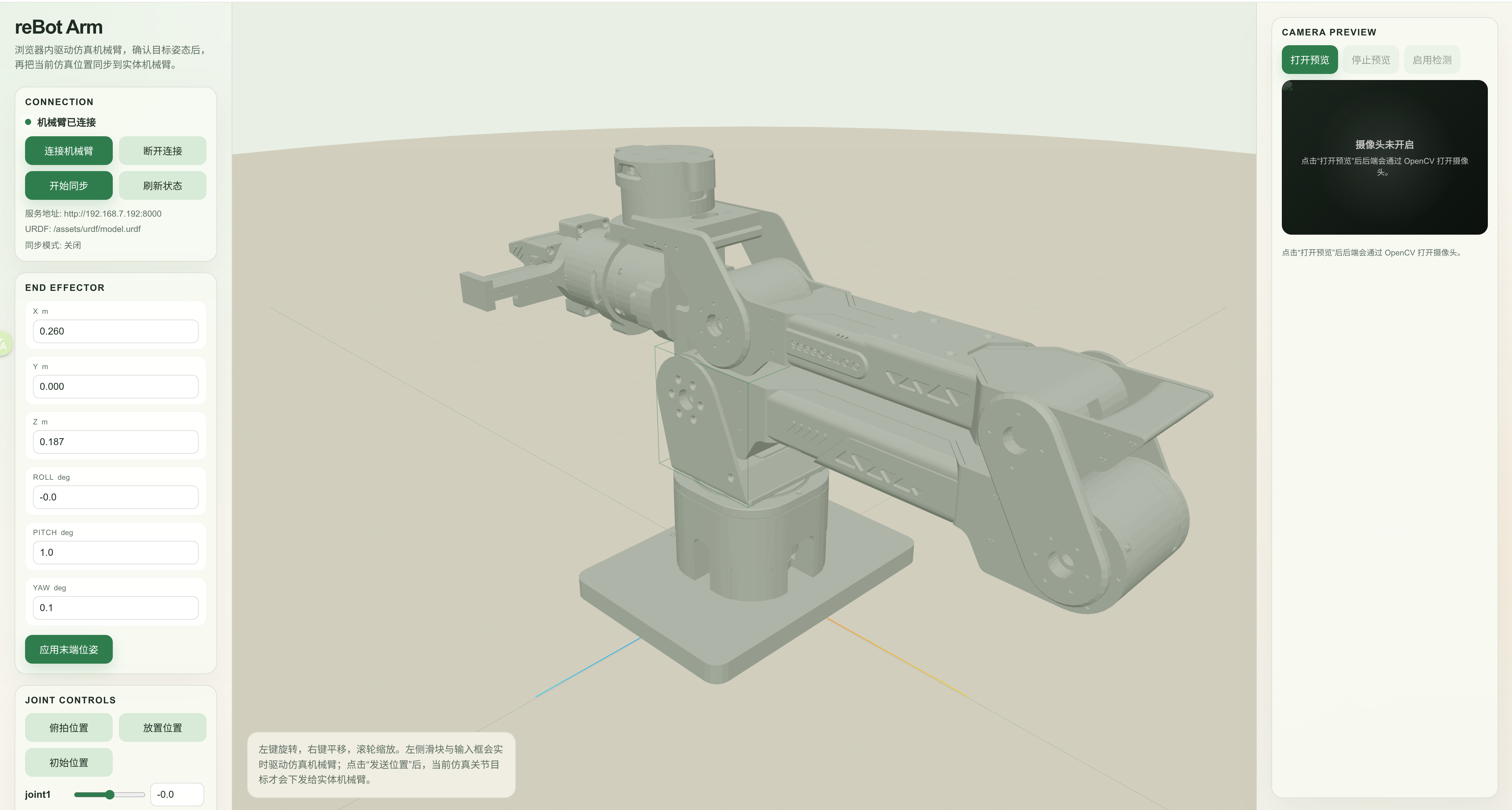
- WebUI:
http://127.0.0.1:8000/webui - Health check:
http://127.0.0.1:8000/healthz
6.2 Start Keyboard Listener (Optional)
To quickly trigger detection/grasp (without waiting for long agent reasoning), use the F1 hotkey listener.
When F1 is pressed, it automatically requests the grasp mission endpoint.
Run directly:
cd ~/rebot_arm_service
sudo ./.venv/bin/python scripts/space_mission_listener_evdev.py
Or via script:
cd ~/rebot_arm_service
./scripts/start_space_listener_evdev.sh
6.3 Enable Auto-Start at Boot (Optional)
Configure two systemd services:
rebot-arm.service: backend service
/etc/systemd/system/rebot-arm.service
[Unit]
Description=reBot Arm Backend Service
After=network-online.target
Wants=network-online.target

[Service]
Type=simple
User=seeed
WorkingDirectory=/home/seeed/rebot_arm_service
Environment=PYTHONUNBUFFERED=1
Environment=LD_LIBRARY_PATH=/home/seeed/rebot_arm_service/.venv/lib/python3.12/site-packages/nvpl/lib:/usr/local/lib/ollama/cuda_v12
ExecStart=/home/seeed/rebot_arm_service/.venv/bin/rebot-arm-service
Restart=always
RestartSec=2

[Install]
WantedBy=multi-user.target
rebot-f1-listener.service: F1 hotkey trigger
/etc/systemd/system/rebot-f1-listener.service
[Unit]
Description=reBot F1 Keyboard Listener
After=network-online.target rebot-arm.service
Wants=network-online.target
Requires=rebot-arm.service

[Service]
Type=simple
User=root
WorkingDirectory=/home/seeed/rebot_arm_service
Environment=PYTHONUNBUFFERED=1
Environment=MISSION_BASE_URL=http://127.0.0.1:8000
ExecStart=/home/seeed/rebot_arm_service/.venv/bin/python /home/seeed/rebot_arm_service/scripts/space_mission_listener_evdev.py
Restart=always
RestartSec=2

[Install]
WantedBy=multi-user.target
Please modify the path in the configuration file before starting the service.
Management commands:
sudo systemctl daemon-reload
sudo systemctl enable --now rebot-arm.service rebot-f1-listener.service
systemctl status rebot-arm.service
sudo systemctl status rebot-f1-listener.service
Logs:
journalctl -u rebot-arm.service -f
sudo journalctl -u rebot-f1-listener.service -f
7. Feature Demo
8. Troubleshooting
-
Serial busy (
Device or resource busy)
Stop stale processes, then reconnect. Ensure only one controller process is using the arm. -
Empty WebUI scene
Check URDF and mesh requests return200, especially/assets/urdf/.... -
Detection does not respond
Checkcamera/statusisrunning=true, then check mission status endpoint. -
Torch import fails with missing libs
EnsureLD_LIBRARY_PATHincludes bothnvplandcuda_v12paths. -
F1 hotkey has no effect
Checkrebot-f1-listener.servicelogs and confirm it listens to the correct keyboard device. -
Other keyboard keys stop working after listener starts
Make sure the script does not usedev.grab()(exclusive keyboard capture must be removed). -
Second arm connection fails
Ensure previous connection is fully released; call disconnect before reconnecting.
9. References
- https://docs.nvidia.com/jetson/agx-thor-devkit/user-guide/latest/index.html
- https://github.com/Seeed-Projects/reBot-DevArm
- https://docs.nvidia.com/nemoclaw/latest/about/overview.html
- https://docs.openclaw.ai/
- https://wiki.seeedstudio.com/lerobot_so100m_new/
10. Tech Support & Product Discussion
Thank you for choosing our products! We are here to provide you with different support to ensure that your experience with our products is as smooth as possible. We offer several communication channels to cater to different preferences and needs.