Deploy Live VLM WebUI on reComputer Jetson
Introduction
Live VLM WebUI is a universal web interface for real-time Vision Language Model interaction and benchmarking. It can stream your webcam to any VLM and get live AI-powered analysis - perfect for testing models, benchmarking performance, and exploring vision AI capabilities across multiple domains and hardware platforms.
This wiki will show you how to deploy Live VLM WebUI on the reComputer Super J4012.
Prerequisites
- reComputer Super J4012
- USB Camera
| reComputer Super J4012 | USB Camera |
|---|---|
 |  |
Please ensure that your Jetson device has the Jetpack 6.2 operating system installed.
Before configuring the software, please connect the USB camera to the Type-A port of the reComputer Super J4012.
Deploy Live VLM WebUI
Step1. Install and run ollama in reComputer Jetson.
Run the following command in the terminal window on reComputer Jetson.
curl -fsSL https://ollama.com/install.sh | sh
ollama pull llama3.2-vision:11b
The model download will take approximately 10 minutes. Please wait patiently.
Step2. Install the Live VLM WebUI.
Run the following command in the terminal window on reComputer Jetson.
# Install dependencies
sudo apt install openssl python3-pip

# Install the package
python3 -m pip install --user live-vlm-webui

# Add to PATH (one-time setup)
echo 'export PATH="$HOME/.local/bin:$PATH"' >> ~/.bashrc
source ~/.bashrc

# Run it
live-vlm-webui
Step3.Configure and launch Live VLM WebUI.
If the application runs successfully, you can open the WebUI by entering https://localhost:8090 in the browser.
- In VLM API Configuration, select the
ollamainference engine and thellama3.2-visionmodel you just downloaded. - In Camera and App Control, select
USB Camera. - After clicking the Run button, you can wait for the inference results from the backend.
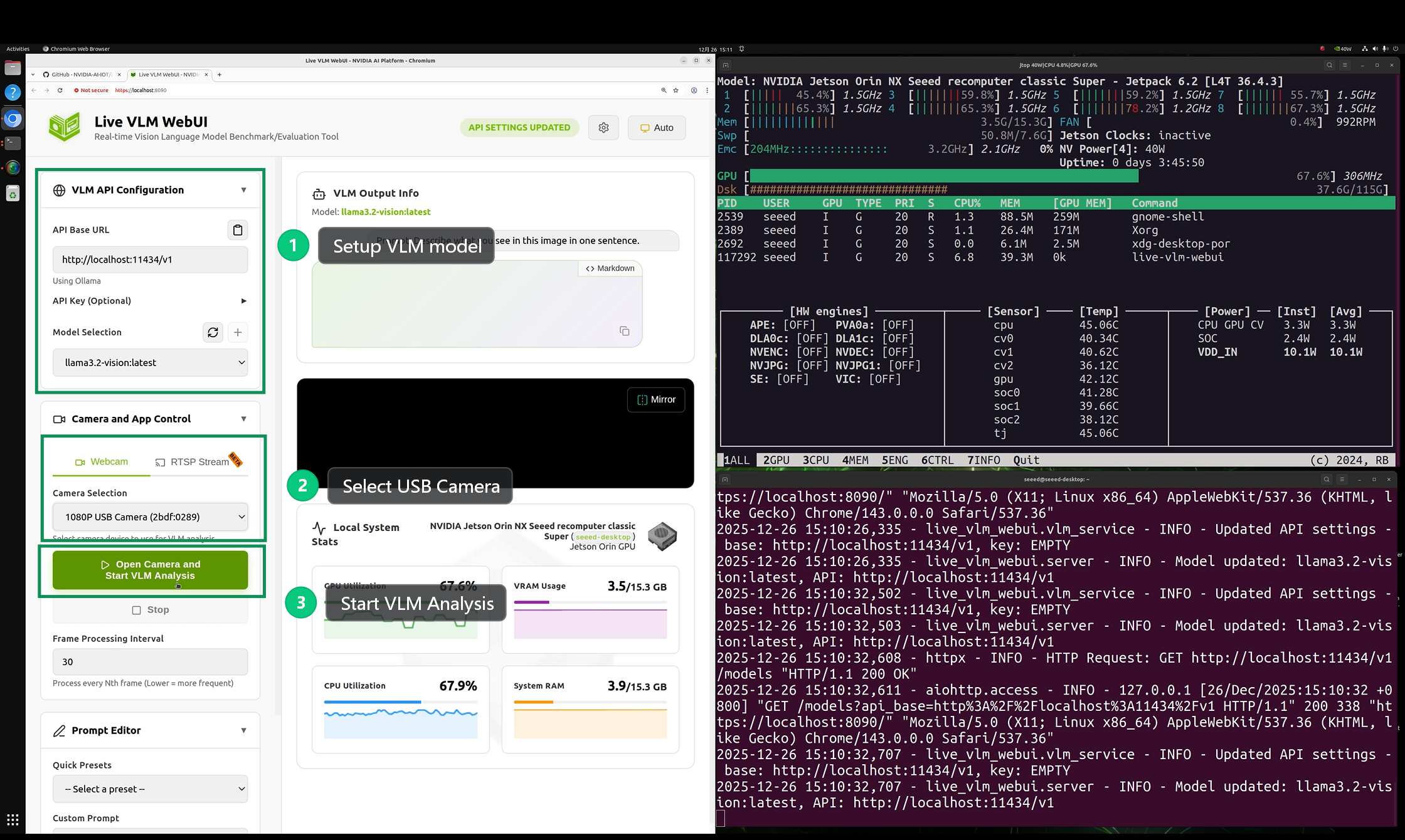
Effect Demonstration
The entire workflow can run normally on a reComputer Super J4012 device with 16GB of memory. However, during actual testing, it was found that the inference speed is very slow.
References
Tech Support & Product Discussion
Thank you for choosing our products! We are here to provide you with different support to ensure that your experience with our products is as smooth as possible. We offer several communication channels to cater to different preferences and needs.