Cookbook de ESPHome: Placas controladoras XIAO ePaper (EE0x)
Esta página es el cookbook de ESPHome para las placas controladoras EE0x, aplicable a EE02 / EE03 / EE04 / EE05. Como las cuatro placas comparten la misma base XIAO ESP32-S3 y la misma interfaz ePaper conectada por SPI, el flujo de trabajo es idéntico; lo único que cambia entre ellas es el modelo de pantalla que seleccionas en el bloque YAML display:.
Ejemplo práctico: EE04 con la pantalla monocroma de 7,5" y 800×480. Sustituye tu propia combinación de placa + pantalla en la línea display.model y el resto de la configuración se aplica tal cual.
El código base compartido — elegir una ruta de flasheo, el esqueleto YAML genérico, conectar con Home Assistant — se encuentra en Trabajar con ESPHome. Échale un vistazo primero si eres nuevo en ESPHome en las pantallas ePaper de Seeed.
¿Qué es ESPHome?
ESPHome es un framework de firmware de código abierto que simplifica el proceso de crear firmware personalizado para microcontroladores populares con WiFi. Con ESPHome puedes:
- Crear dispositivos domóticos personalizados usando sencillos archivos de configuración YAML
- Integrarte sin problemas con Home Assistant para una experiencia domótica unificada
- Controlar y monitorizar tus dispositivos a través de múltiples interfaces (web, API, MQTT)
- Automatizar tu hogar con potentes automatizaciones en el propio dispositivo
- Actualizar tus dispositivos de forma inalámbrica mediante actualizaciones “Over The Air” (OTA) sin acceso físico
Primeros pasos
Descripción general del hardware
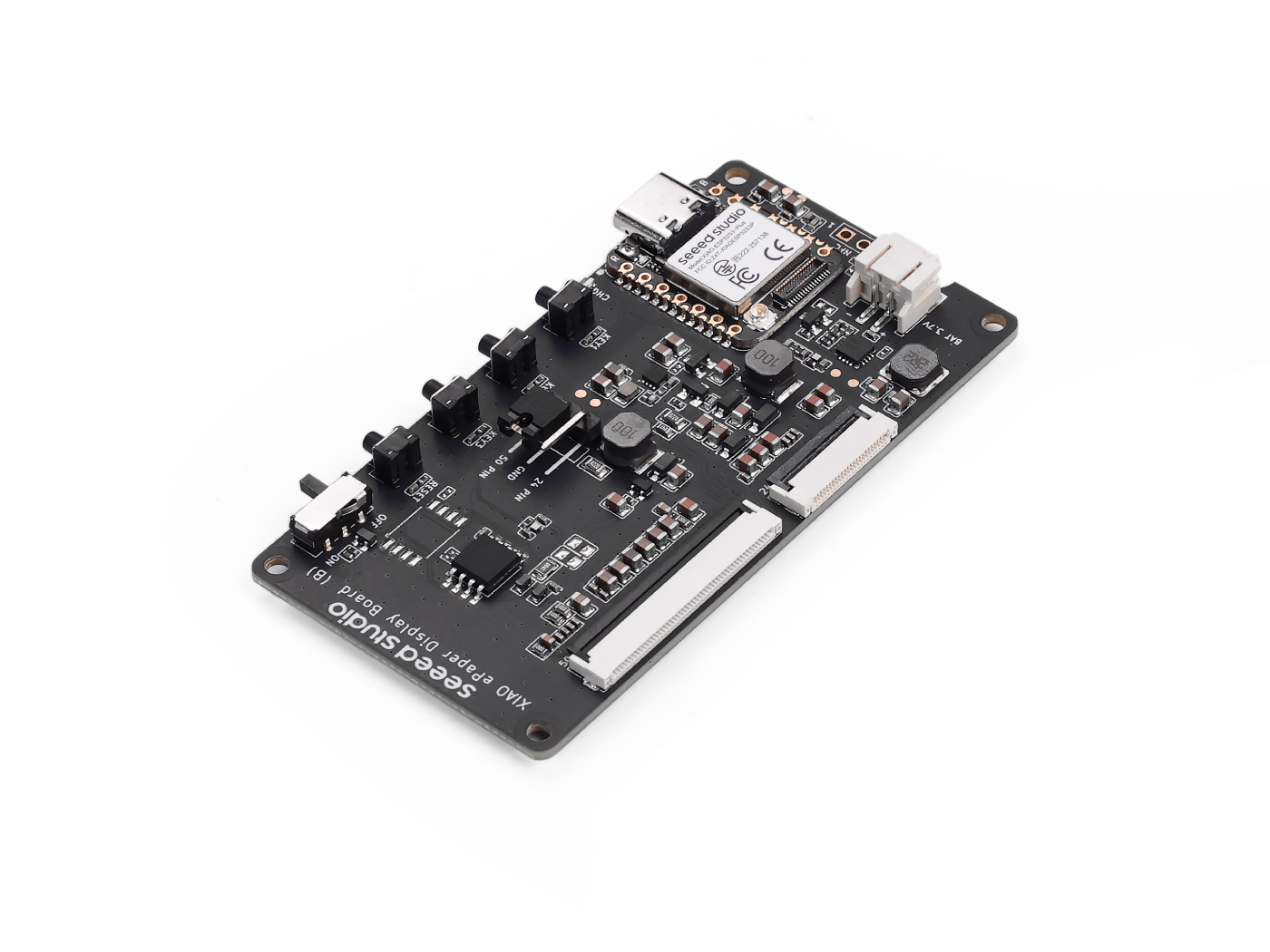
| Placa XIAO ePaper Display (ESP32-S3) - EE04 | Home Assistant Green |
|---|---|
 |  |
Home Assistant Green es la forma más sencilla y centrada en la privacidad de automatizar tu hogar. Ofrece una configuración sin esfuerzo y te permite controlar todos los dispositivos inteligentes con un solo sistema, donde todos los datos se almacenan localmente de forma predeterminada. Esta placa se beneficia del próspero ecosistema de Home Assistant y se mejorará cada mes gracias al código abierto.
También hemos escrito cómo instalar Home Assistant para algunos productos de Seeed Studio; por favor, consúltalos.
- Primeros pasos con Home Assistant en ODYSSEY-X86
- Primeros pasos con Home Assistant en LinkStar H68K/reRouter CM4
Si no estás usando un producto de Seeed Studio, también puedes consultar y aprender cómo instalar Home Assistant para otros productos en el sitio web oficial de Home Assistant.
Paso 1. Instalar ESPHome
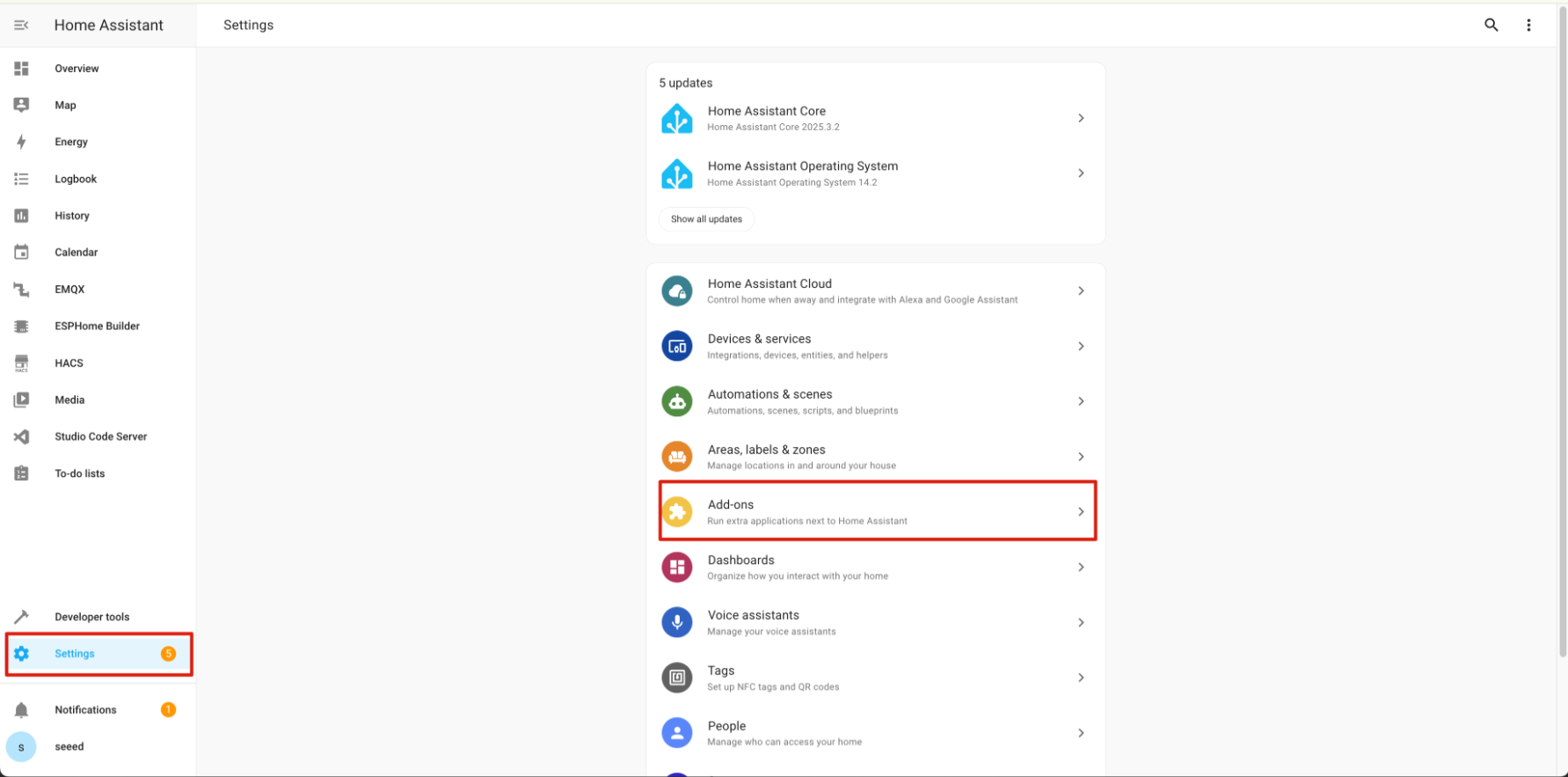
Ve a Settings -> Add-ons -> ADD-ON STORE
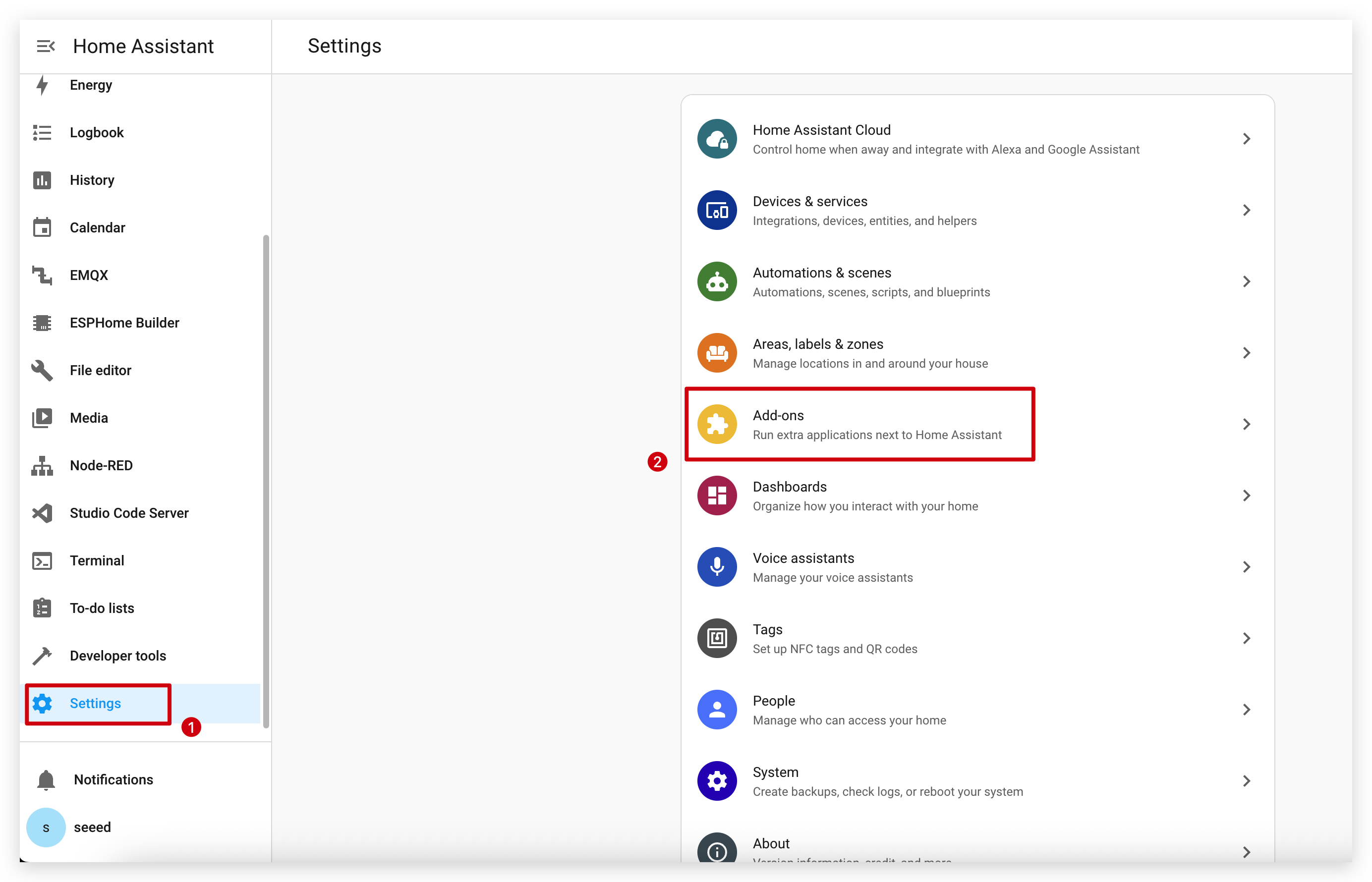
Introduce el término de búsqueda ESPHome.
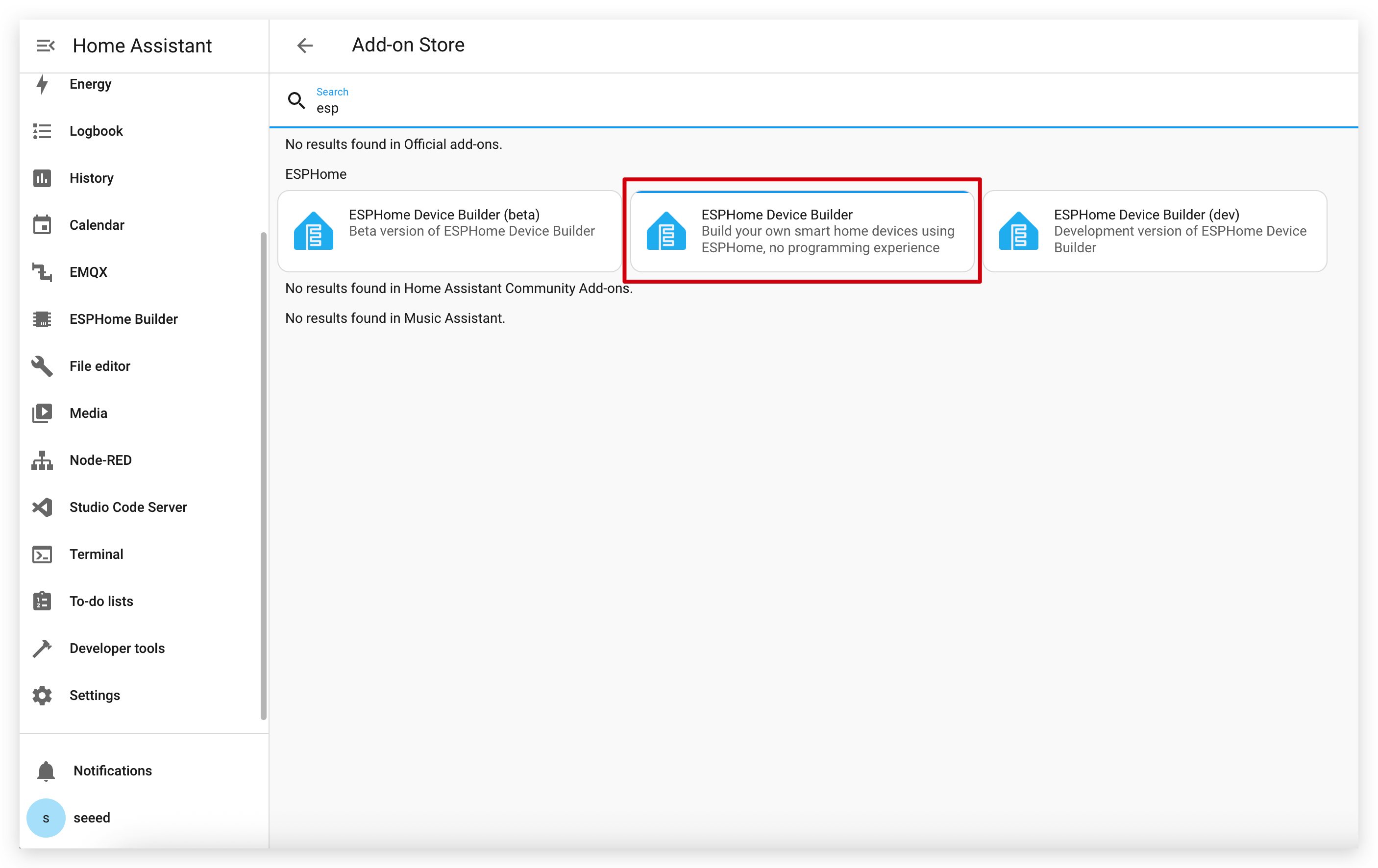
Haz clic en INSTALL y START.
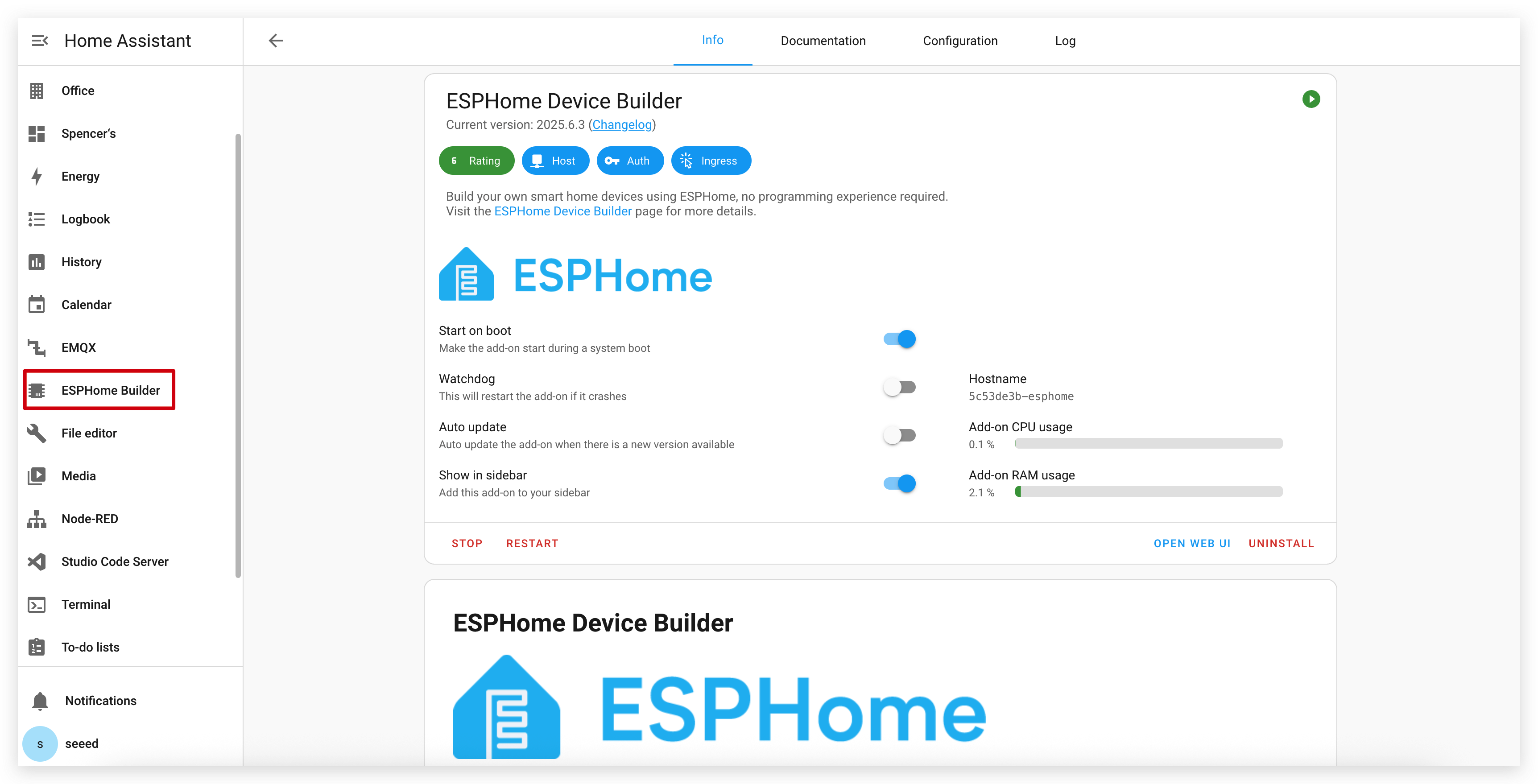
Si no puedes encontrar ESPHome en la tienda de complementos, asegúrate de que estás usando una instalación de Home Assistant que admita complementos (como Home Assistant OS o instalaciones supervisadas). Para otros tipos de instalación (como Home Assistant Container), puede que necesites ejecutar ESPHome Device Builder de forma independiente usando Docker. Consulta la documentación oficial de ESPHome para más detalles.
Paso 2. Añadir un nuevo dispositivo
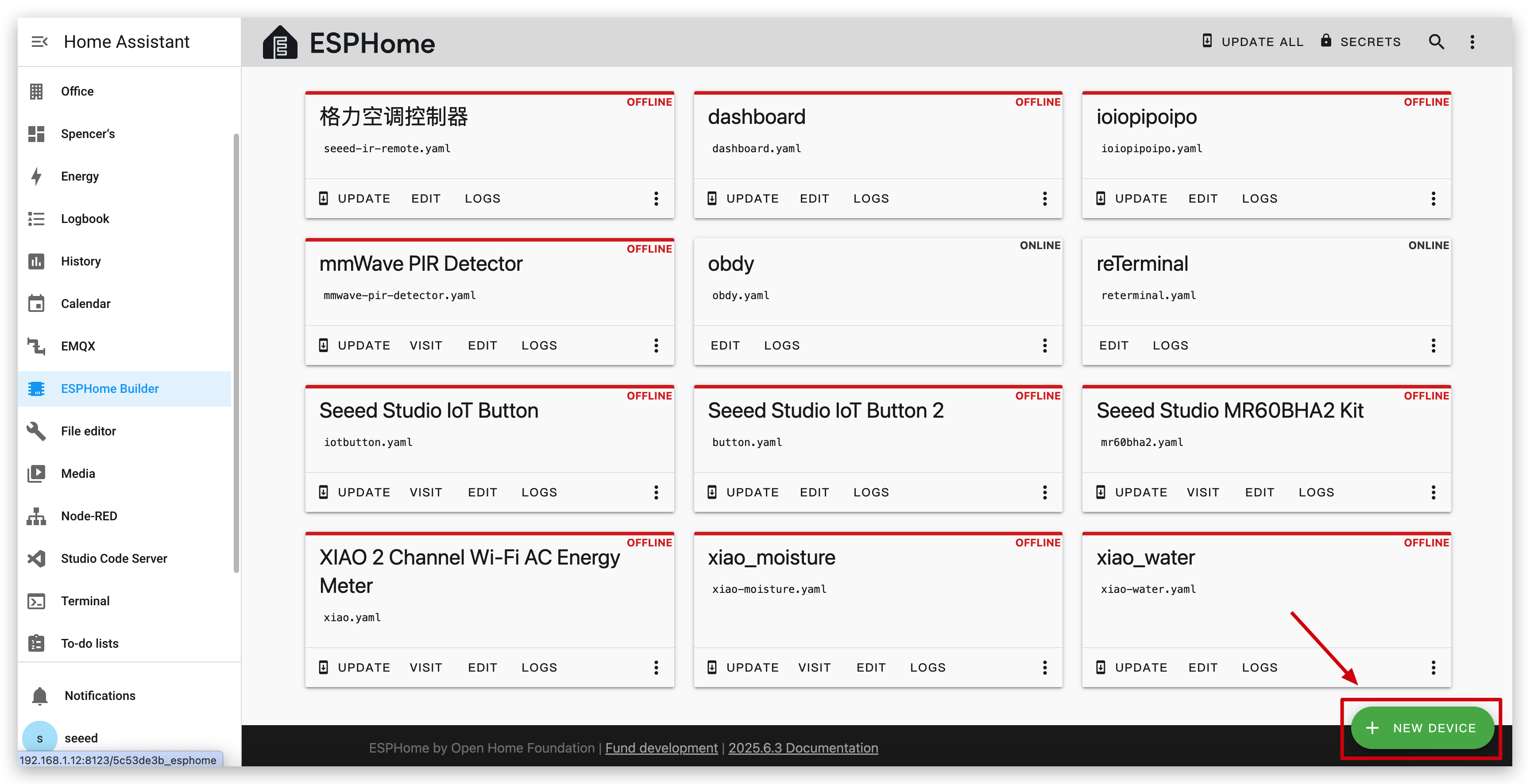
Ve a ESPHome y haz clic en NEW DEVICE.
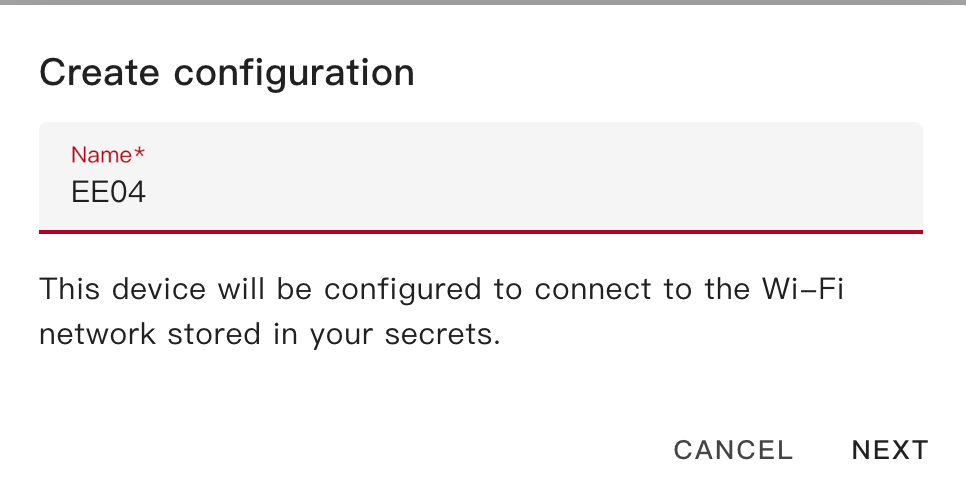
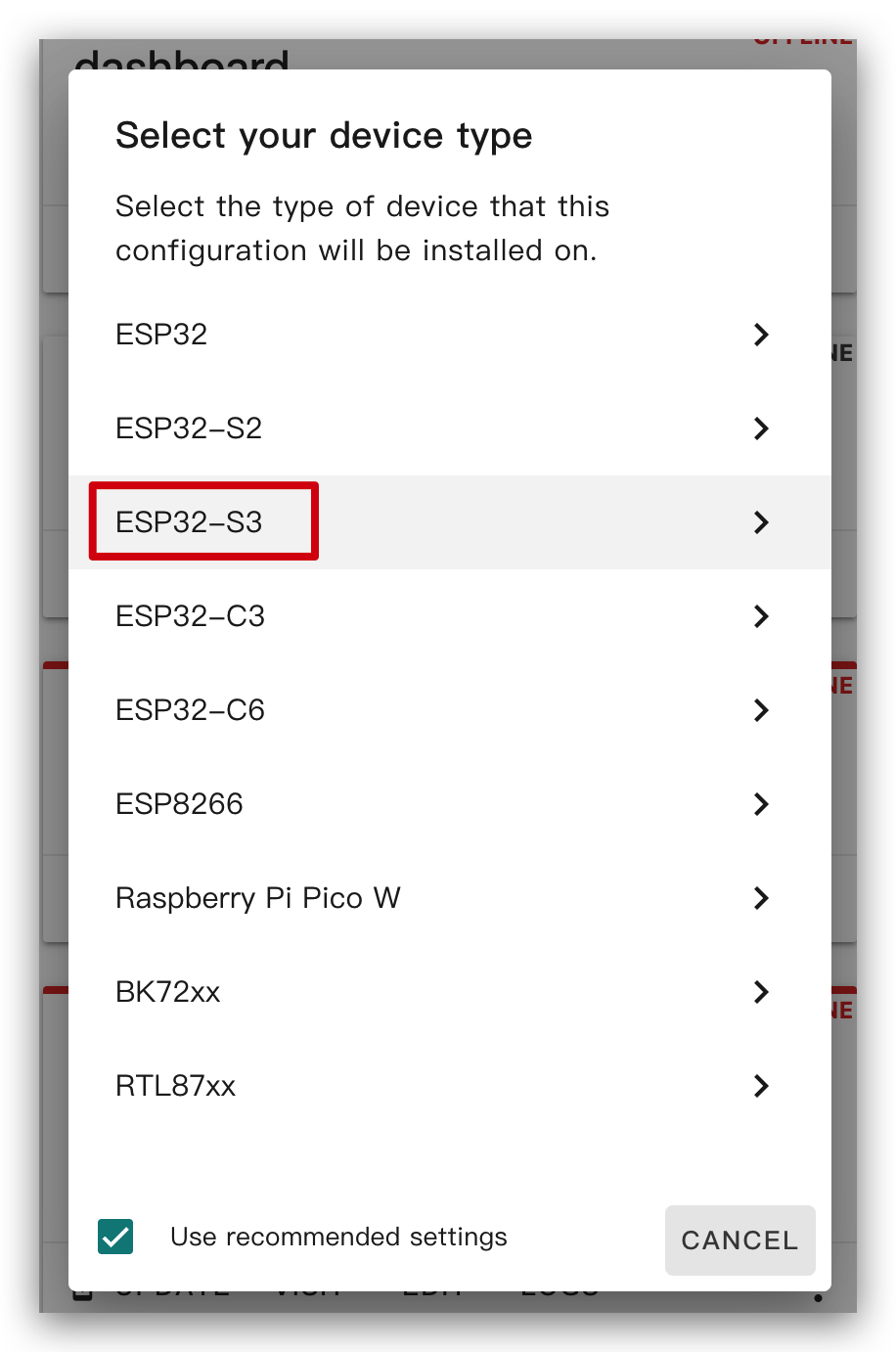
Ponle al XIAO ePaper Display Board(ESP32-S3) - EE04 el nombre que quieras y selecciona ESP32-S3 como tipo de chip, luego haz clic en SKIP.
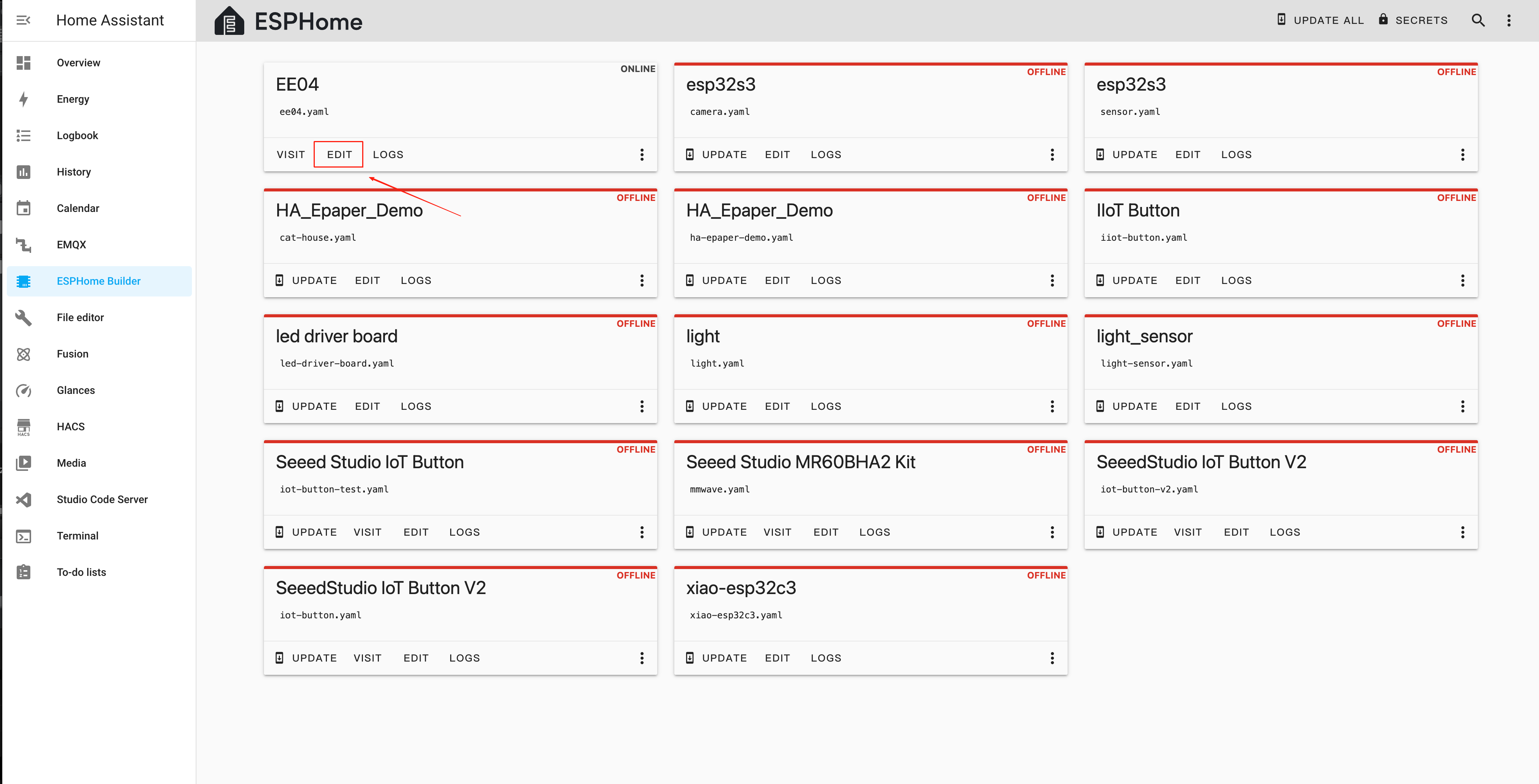
Después de crear un nuevo dispositivo, haz clic en EDIT.
Paso 3. Instalar el firmware
Este es un ejemplo básico y mostrará "Hello World!" en la pantalla.
El objetivo principal es mostrarte diferentes formas de instalar firmware en el dispositivo.
Puedes usar este ejemplo copiando el código de abajo y pegándolo después de la línea de código captive_portal en tu archivo YAML.
- Dado que la siguiente rutina requiere fuentes antes de descargar el firmware, haz clic en este enlace para completar la configuración.
ssid:,password:Aquí necesitas añadir el nombre y la contraseña de la red.- Las pantallas Quadruple Color 2.13 y Quadruple Color 2.9 usan bibliotecas externas, por lo que los nombres de
boardusados en ESPHome son diferentes.
Los siguientes son tipos de pantallas con conector de 24 pines:
- 1.54 Inch Monochrome Color
- 2.13 Inch Monochrome Color
- 2.13 Inch Quadruple Color
- 2.9 Inch Monochrome Color
- 2.9 Inch Quadruple Color
- 4.2 Inch Monochrome Color
- 5.83 Inc Monochrome Color
- 7.5 Inch Monochrome Color
esphome:
  name: ee04
  friendly_name: EE04

esp32:
  board: esp32-s3-devkitc-1
  framework:
    type: esp-idf

# Enable logging
logger:

# Enable Home Assistant API
api:
  encryption:
    key: "b0AIbJ+kbeMayi1PgSGXtiD1yQCapUBF4A/7v7btys0="

ota:
  - platform: esphome
    password: "5d7cca6f4b3f38aba559ab0d6aaf5926"

wifi:
  ssid:
  password:

  # Enable fallback hotspot (captive portal) in case wifi connection fails
  ap:
    ssid: "Ee04 Fallback Hotspot"
    password: "zxPMBtCEWonm"

# define font to display words
font:
  - file: "gfonts://Inter@700"
    id: myFont
    size: 24

captive_portal:

# define SPI interface
spi:
  clk_pin: GPIO7
  mosi_pin: GPIO9

display:
  - platform: waveshare_epaper
    id: epaper_display
    model: 1.54inv2
    cs_pin: GPIO44
    dc_pin: GPIO10
    busy_pin: GPIO4
    reset_pin:  GPIO38
    rotation: 0
    update_interval: 300s
    lambda: |-
      it.print(0, 0, id(myFont), "Hello World!");
esphome:
  name: ee04
  friendly_name: EE04

esp32:
  board: esp32-s3-devkitc-1
  framework:
    type: esp-idf

# Enable logging
logger:

# Enable Home Assistant API
api:
  encryption:
    key: "b0AIbJ+kbeMayi1PgSGXtiD1yQCapUBF4A/7v7btys0="

ota:
  - platform: esphome
    password: "5d7cca6f4b3f38aba559ab0d6aaf5926"

wifi:
  ssid:
  password:

  # Enable fallback hotspot (captive portal) in case wifi connection fails
  ap:
    ssid: "Ee04 Fallback Hotspot"
    password: "zxPMBtCEWonm"

# define font to display words
font:
  - file: "gfonts://Inter@700"
    id: myFont
    size: 24

captive_portal:

# define SPI interface
spi:
  clk_pin: GPIO7
  mosi_pin: GPIO9

display:
  - platform: waveshare_epaper
    id: epaper_display
    model: 2.13inv2 #More models you can refer to here: https://esphome.io/components/display/waveshare_epaper/
    cs_pin: GPIO44
    dc_pin: GPIO10
    busy_pin: GPIO4
    reset_pin:  GPIO38
    rotation: 0
    update_interval: 300s
    lambda: |-
      it.print(0, 0, id(myFont), "Hello World!");
esphome:
  name: ee04
  friendly_name: EE04
  libraries:
    - SPI


esp32:
  board: esp32-s3-devkitc-1
  framework:
    type: arduino


# Enable logging
logger:

# Enable Home Assistant API
api:
  encryption:
    key: "eg2Jyse0gE146lJ2mVaqAnwteb4U2GJ7d1sZc2BOOsc="

ota:
  - platform: esphome
    password: "e2f184b95aac832509885f676abf5b73"

wifi:
  ssid:
  password:

  # Enable fallback hotspot (captive portal) in case wifi connection fails
  ap:
    ssid: "ESPHome_Epaper"
    password: "123456789"

external_components:
  - source: github://xcjk-tofuture/esphome@dev
    components: [ waveshare_epaper ]

font:
  - file: "gfonts://Inter@700"
    id: font1
    size: 24

captive_portal:

spi:
  clk_pin: GPIO7
  mosi_pin: GPIO9

display:
  - platform: waveshare_epaper
    id: my_display
    model: gdey0213f51
    cs_pin: GPIO44
    dc_pin: GPIO10
    busy_pin: GPIO4
    reset_pin:  GPIO38
    rotation: 90
    update_interval: 30s
    full_update_every: 1
    lambda: |-
      const auto BLACK   = Color(0,   0,   0,   0);
      const auto RED     = Color(255, 0,   0,   0);
      const auto YELLOW  = Color(255, 255, 0,   0);
      const auto WHITE   = Color(255, 255, 255, 0);

      it.fill(YELLOW);
      it.print(0, 0, id(font1), BLACK, "Hello World in BLACK!");
      it.print(0, 30, id(font1), RED, "Hello World in RED!");
      it.print(0, 60, id(font1), YELLOW, "Hello World in YELLOW!");
esphome:
  name: ee04
  friendly_name: EE04

esp32:
  board: esp32-s3-devkitc-1
  framework:
    type: esp-idf

# Enable logging
logger:

# Enable Home Assistant API
api:
  encryption:
    key: "b0AIbJ+kbeMayi1PgSGXtiD1yQCapUBF4A/7v7btys0="

ota:
  - platform: esphome
    password: "5d7cca6f4b3f38aba559ab0d6aaf5926"

wifi:
  ssid:
  password:

  # Enable fallback hotspot (captive portal) in case wifi connection fails
  ap:
    ssid: "Ee04 Fallback Hotspot"
    password: "zxPMBtCEWonm"

# define font to display words
font:
  - file: "gfonts://Inter@700"
    id: myFont
    size: 24

captive_portal:

# define SPI interface
spi:
  clk_pin: GPIO7
  mosi_pin: GPIO9

display:
  - platform: waveshare_epaper
    id: epaper_display
    model: 2.90inv2
    cs_pin: GPIO44
    dc_pin: GPIO10
    busy_pin: GPIO4
    reset_pin:  GPIO38
    rotation: 0
    update_interval: 300s
    lambda: |-
      it.print(0, 0, id(myFont), "Hello World!");
esphome:
  name: ee04
  friendly_name: EE04
  libraries:
    - SPI


esp32:
  board: esp32-s3-devkitc-1
  framework:
    type: arduino


# Enable logging
logger:

# Enable Home Assistant API
api:
  encryption:
    key: "eg2Jyse0gE146lJ2mVaqAnwteb4U2GJ7d1sZc2BOOsc="

ota:
  - platform: esphome
    password: "e2f184b95aac832509885f676abf5b73"

wifi:
  ssid:
  password:

  # Enable fallback hotspot (captive portal) in case wifi connection fails
  ap:
    ssid: "ESPHome_Epaper"
    password: "123456789"

external_components:
  - source: github://xcjk-tofuture/esphome@dev
    components: [ waveshare_epaper ]


# external_components:
#   - source:
#       type: local
#       path: components_epaper
#     components : [waveshare_epaper]

font:
  - file: "gfonts://Inter@700"
    id: font1
    size: 24

captive_portal:

spi:
  clk_pin: GPIO7
  mosi_pin: GPIO9
display:
  - platform: waveshare_epaper
    id: my_display
    model: gdey029f51h
    cs_pin: GPIO44
    dc_pin: GPIO10
    busy_pin: GPIO4
    reset_pin:  GPIO38
    rotation: 90
    update_interval: 30s
    full_update_every: 1
    lambda: |-
      const auto BLACK   = Color(0,   0,   0,   0);
      const auto RED     = Color(255, 0,   0,   0);
      const auto YELLOW  = Color(255, 255, 0,   0);
      const auto WHITE   = Color(255, 255, 255, 0);

      it.print(0, 0, id(font1), BLACK, "Hello World in BLACK!");
      it.print(0, 30, id(font1), RED, "Hello World in RED!");
      it.print(0, 60, id(font1), YELLOW, "Hello World in YELLOW!");
      ESP_LOGD("epaper", "reflash......");
esphome:
  name: ee04
  friendly_name: EE04

esp32:
  board: esp32-s3-devkitc-1
  framework:
    type: esp-idf

# Enable logging
logger:

# Enable Home Assistant API
api:
  encryption:
    key: "b0AIbJ+kbeMayi1PgSGXtiD1yQCapUBF4A/7v7btys0="

ota:
  - platform: esphome
    password: "5d7cca6f4b3f38aba559ab0d6aaf5926"

wifi:
  ssid:
  password:

  # Enable fallback hotspot (captive portal) in case wifi connection fails
  ap:
    ssid: "Ee04 Fallback Hotspot"
    password: "zxPMBtCEWonm"


# define font to display words
font:
  - file: "gfonts://Inter@700"
    id: myFont
    size: 24

captive_portal:

# define SPI interface
spi:
  clk_pin: GPIO7
  mosi_pin: GPIO9

display:
  - platform: waveshare_epaper
    id: epaper_display
    model: gdey042t81
    cs_pin: GPIO44
    dc_pin: GPIO10
    busy_pin: GPIO4
    reset_pin:  GPIO38
    rotation: 0
    update_interval: 300s
    lambda: |-
      it.print(0, 0, id(myFont), "Hello World!");
esphome:
  name: ee04
  friendly_name: EE04

esp32:
  board: esp32-s3-devkitc-1
  framework:
    type: esp-idf

# Enable logging
logger:

# Enable Home Assistant API
api:
  encryption:
    key: "b0AIbJ+kbeMayi1PgSGXtiD1yQCapUBF4A/7v7btys0="

ota:
  - platform: esphome
    password: "5d7cca6f4b3f38aba559ab0d6aaf5926"

wifi:
  ssid:
  password:

  # Enable fallback hotspot (captive portal) in case wifi connection fails
  ap:
    ssid: "Ee04 Fallback Hotspot"
    password: "zxPMBtCEWonm"

# define font to display words
font:
  - file: "gfonts://Inter@700"
    id: myFont
    size: 24

captive_portal:

# define SPI interface
spi:
  clk_pin: GPIO7
  mosi_pin: GPIO9

display:
  - platform: waveshare_epaper
    id: epaper_display
    model: gdey0583t81
    cs_pin: GPIO44
    dc_pin: GPIO10
    busy_pin: GPIO4
    reset_pin:  GPIO38
    rotation: 0
    update_interval: 300s
    lambda: |-
      it.print(0, 0, id(myFont), "Hello World!");
esphome:
  name: ee04
  friendly_name: EE04

esp32:
  board: esp32-s3-devkitc-1
  framework:
    type: esp-idf

# Enable logging
logger:

# Enable Home Assistant API
api:
  encryption:
    key: "b0AIbJ+kbeMayi1PgSGXtiD1yQCapUBF4A/7v7btys0="

ota:
  - platform: esphome
    password: "5d7cca6f4b3f38aba559ab0d6aaf5926"

wifi:
  ssid:
  password:

  # Enable fallback hotspot (captive portal) in case wifi connection fails
  ap:
    ssid: "Ee04 Fallback Hotspot"
    password: "zxPMBtCEWonm"

# define font to display words
font:
  - file: "gfonts://Inter@700"
    id: myFont
    size: 24

captive_portal:

# define SPI interface
spi:
  clk_pin: GPIO7
  mosi_pin: GPIO9

display:
  - platform: waveshare_epaper
    id: epaper_display
    model: 7.50inv2
    cs_pin: GPIO44
    dc_pin: GPIO10
    busy_pin: GPIO4
    reset_pin:  GPIO38
    rotation: 0
    update_interval: 300s
    lambda: |-
      it.print(0, 0, id(myFont), "Hello World!");
Los siguientes son tipos de pantallas con conector de 50 pines:
- 7.3 Inch spectra™ 6
esphome:
  name: ee04
  friendly_name: EE04

esp32:
  board: esp32-s3-devkitc-1
  framework:
    type: esp-idf

# Enable logging
logger:

# Enable Home Assistant API
api:
  encryption:
    key: "b0AIbJ+kbeMayi1PgSGXtiD1yQCapUBF4A/7v7btys0="

ota:
  - platform: esphome
    password: "5d7cca6f4b3f38aba559ab0d6aaf5926"

wifi:
  ssid:
  password:

  # Enable fallback hotspot (captive portal) in case wifi connection fails
  ap:
    ssid: "Ee04 Fallback Hotspot"
    password: "zxPMBtCEWonm"

font:
  - file: "gfonts://Inter@700"
    id: font1
    size: 24

captive_portal:

external_components:
  - source:
      type: git
      url: https://github.com/esphome/esphome/
      ref: 2025.10.5
    components: [ epaper_spi, display ]

spi:
  clk_pin: GPIO7
  mosi_pin: GPIO9

display:
  - platform: epaper_spi
    id: my_display
    model: 7.3in-Spectra-E6
    cs_pin: GPIO44
    dc_pin:
      number: GPIO10
      inverted: false
    busy_pin:
      number: GPIO4
      inverted: true
    reset_pin:  GPIO38
    rotation: 0
    update_interval: 30s
    lambda: |-
      const auto BLACK   = Color(0,   0,   0,   0);
      const auto RED     = Color(255, 0,   0,   0);
      const auto BLUE     = Color(0, 0,   255,   0);
      const auto GREEN     = Color(0, 255,   0,   0);
      const auto YELLOW  = Color(255, 255, 0,   0);
      const auto WHITE   = Color(255, 255, 255, 0);

      it.fill(WHITE);
      it.print(0, 0, id(font1), BLACK, "Hello World in BLACK!");
      it.print(0, 30, id(font1), RED, "Hello World in RED!");
      it.print(0, 60, id(font1), YELLOW, "Hello World in YELLOW!");
      it.print(0, 90, id(font1), GREEN, "Hello World in GREEN!");
      it.print(0, 120, id(font1), BLUE, "Hello World in BLUE!");
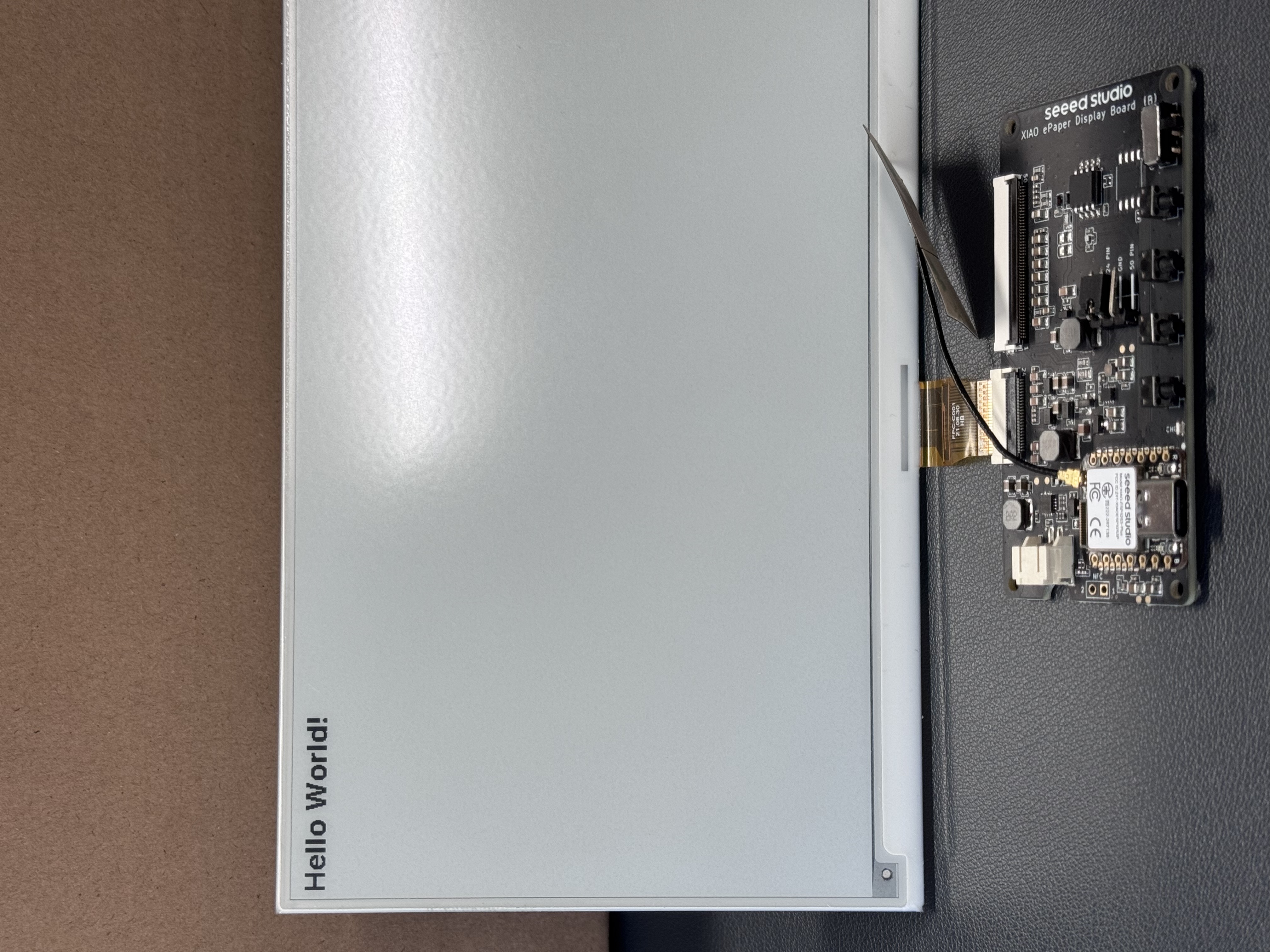
Haz clic en INSTALL para instalar el código en el dispositivo y verás la siguiente imagen.

- Install through browser
- Install through host
- Install through Wi-Fi
Si tu Host de Home Assistant (Raspberry PI/Green/Yellow, etc.) está lejos de ti, recomendamos usar este método. Puedes instalarlo con el ordenador que tengas a mano.
Primero, debes hacer clic en Manual download para descargar el firmware compilado.

Abre este sitio web donde subiremos el firmware al panel de ePaper.

Vuelve a ESPHome para descargar el firmware.

Selecciona Factory format.

Usa un cable USB para conectar el panel ePaper a tu ordenador y haz clic en CONNECT.

Selecciona usbmodemxxx (en Windows es COMxxx) y haz clic en connect.

Haz clic en INSTALL y selecciona el firmware que acabas de descargar.

Espera un momento y verás 'Hello world!' en la pantalla ~
Si tu Home Assistant Host (Raspberry PI/Green/Yellow, etc.) está cerca, recomendamos usar este método ya que es más sencillo.
Antes de instalar el código en el dispositivo, necesitas usar un cable USB para conectar este dispositivo a tu Raspberry Pi o HA Green(Yellow), etc. que esté ejecutando Home Assistant.
Haz clic en las opciones siguiendo la imagen para instalar el código en el dispositivo.

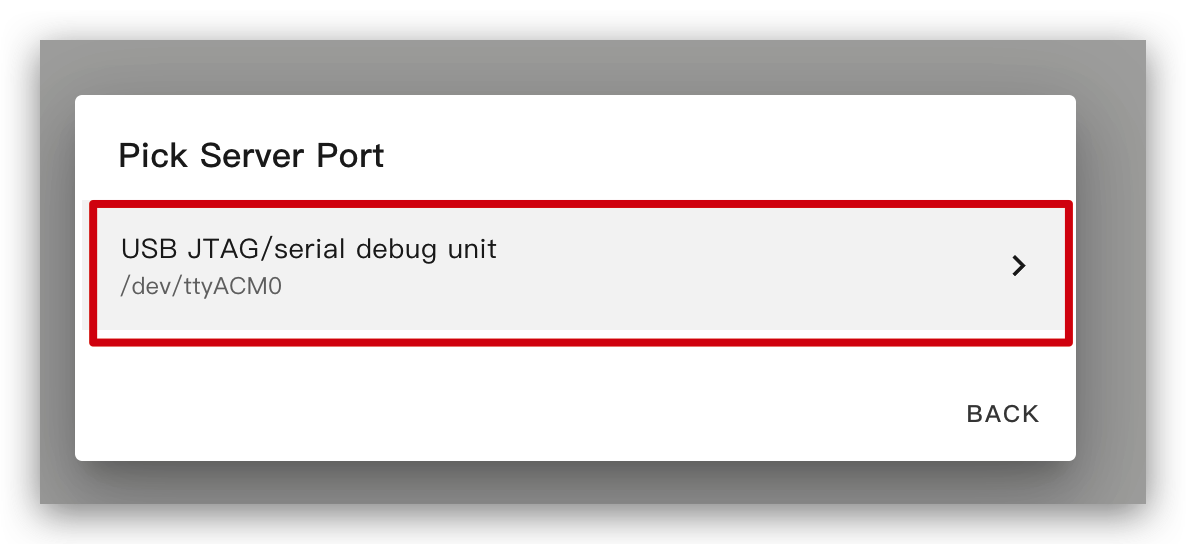
Espera un momento y verás un mensaje como en la siguiente imagen. Significa que el código se está ejecutando correctamente.
Esta es la forma más sencilla, pero con la premisa de que, al instalar el programa por primera vez, primero debes subir el programa al ePaper Panel usando el método de la izquierda. Después de eso, puedes subirlo vía wifi. Además, asegúrate de que tu configuración YAML incluya secciones ota y api correctamente configuradas con claves de cifrado válidas para que este método funcione.
De esta manera, no necesitas conectar el panel ePaper a nada, solo asegúrate de que esté en línea.
Haz clic en la opción y entonces el firmware se instalará automáticamente en el panel ePaper.

Conceptos básicos para dibujar en ESPHome
Dibujo de gráficos simples
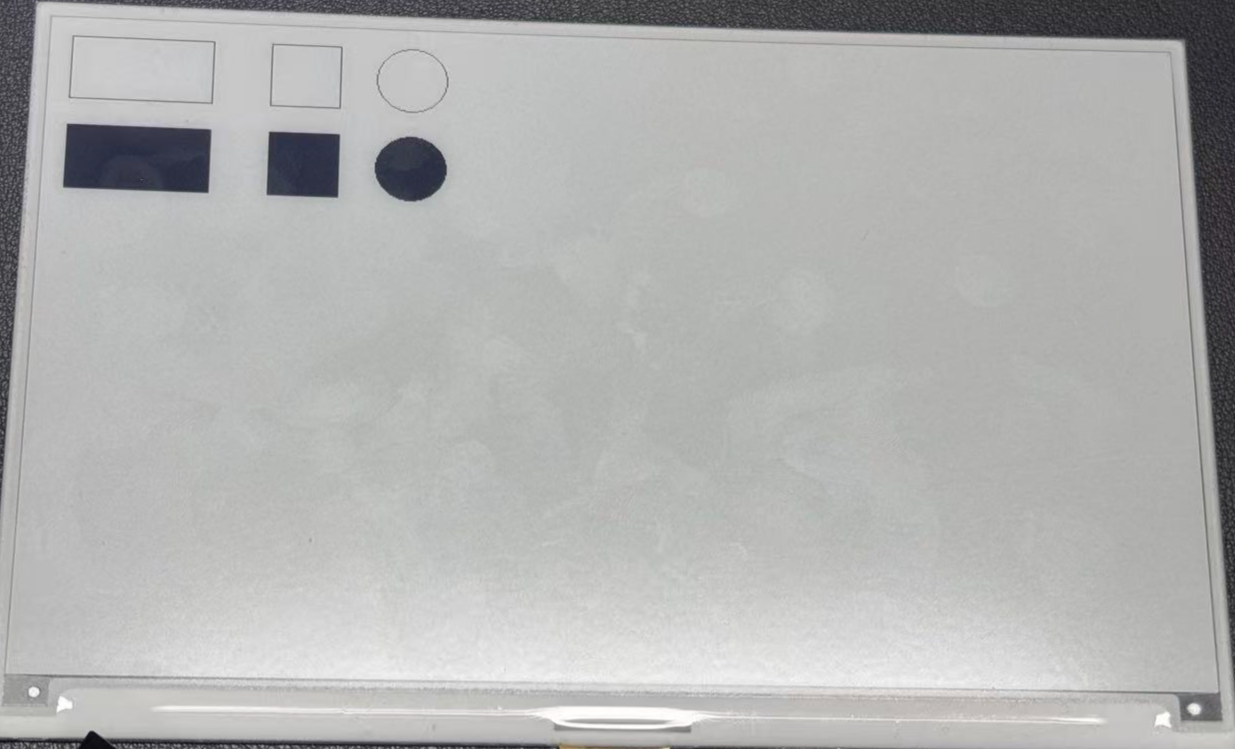
Este ejemplo de código YAML configura la interfaz SPI y la XIAO ePaper Display Board(ESP32-S3) - EE04 para un proyecto ESPHome. La sección lambda contiene comandos de dibujo que representan formas simples en la pantalla:
- Dos rectángulos (uno en la posición (10, 10) con tamaño 100x50, y otro en (150, 10) con tamaño 50x50)
- Un círculo en (250, 35) con un radio de 25
- Dos rectángulos rellenos (en (10, 80) y (150, 80))
- Un círculo relleno en (250, 105) con un radio de 25
Puedes usar este ejemplo copiando el código de abajo y pegándolo después de la línea de código captive_portal en tu archivo YAML.
- 1.54 Inch Monochrome Color
- 2.13 Inch Quadruple Color
- 2.13 Inch Monochrome Color
- 2.9 Inch Quadruple Color
- 2.9 Inch Monochrome Color
- 4.2 Inch Monochrome Color
- 5.83 Inch Monochrome Color
- 7.5 Inch Monochrome Color
esphome:
  name: ee04
  friendly_name: EE04

esp32:
  board: esp32-s3-devkitc-1
  framework:
    type: esp-idf

# Enable logging
logger:

# Enable Home Assistant API
api:
  encryption:
    key: "b0AIbJ+kbeMayi1PgSGXtiD1yQCapUBF4A/7v7btys0="

ota:
  - platform: esphome
    password: "5d7cca6f4b3f38aba559ab0d6aaf5926"

wifi:
  ssid:
  password:

  # Enable fallback hotspot (captive portal) in case wifi connection fails
  ap:
    ssid: "Ee04 Fallback Hotspot"
    password: "zxPMBtCEWonm"

captive_portal:

spi:
  clk_pin: GPIO7
  mosi_pin: GPIO9

display:
  - platform: waveshare_epaper
    id: epaper_display
    model: 1.54inv2
    cs_pin: GPIO44
    dc_pin: GPIO10
    busy_pin: GPIO4
    reset_pin:  GPIO38
    rotation: 0
    update_interval: 300s
    lambda: |-
      it.rectangle(10, 10, 100, 50);
      it.rectangle(150, 10, 50, 50);
      it.circle(250, 35, 25);
      it.filled_rectangle(10, 80, 100, 50);
      it.filled_rectangle(150, 80, 50, 50);
      it.filled_circle(250, 105, 25);
esphome:
  name: ee04
  friendly_name: EE04
  libraries:
    - SPI


esp32:
  board: esp32-s3-devkitc-1
  framework:
    type: arduino


# Enable logging
logger:

# Enable Home Assistant API
api:
  encryption:
    key: "eg2Jyse0gE146lJ2mVaqAnwteb4U2GJ7d1sZc2BOOsc="

ota:
  - platform: esphome
    password: "e2f184b95aac832509885f676abf5b73"

wifi:
  ssid:
  password:

  # Enable fallback hotspot (captive portal) in case wifi connection fails
  ap:
    ssid: "ESPHome_Epaper"
    password: "123456789"

external_components:
  - source: github://xcjk-tofuture/esphome@dev
    components: [ waveshare_epaper ]

font:
  - file: "gfonts://Inter@700"
    id: font1
    size: 24

captive_portal:

spi:
  clk_pin: GPIO7
  mosi_pin: GPIO9

display:
  - platform: waveshare_epaper
    id: my_display
    model: gdey0213f51
    cs_pin: GPIO44
    dc_pin: GPIO10
    busy_pin: GPIO4
    reset_pin:  GPIO38
    rotation: 90
    update_interval: 30s
    full_update_every: 1
    lambda: |-
      const auto BLACK   = Color(0,   0,   0,   0);
      const auto RED     = Color(255, 0,   0,   0);
      const auto YELLOW  = Color(255, 255, 0,   0);
      const auto WHITE   = Color(255, 255, 255, 0);

      it.rectangle(10, 10, 100, 50,YELLOW);
      it.rectangle(150, 10, 50, 50,YELLOW);
      it.circle(250, 35, 25,YELLOW);
      it.filled_rectangle(10, 80, 100, 50,YELLOW);
      it.filled_rectangle(150, 80, 50, 50,YELLOW);
      it.filled_circle(250, 105, 25,YELLOW);
esphome:
  name: ee04
  friendly_name: EE04

esp32:
  board: esp32-s3-devkitc-1
  framework:
    type: esp-idf

# Enable logging
logger:

# Enable Home Assistant API
api:
  encryption:
    key: "b0AIbJ+kbeMayi1PgSGXtiD1yQCapUBF4A/7v7btys0="

ota:
  - platform: esphome
    password: "5d7cca6f4b3f38aba559ab0d6aaf5926"

wifi:
  ssid:
  password:

  # Enable fallback hotspot (captive portal) in case wifi connection fails
  ap:
    ssid: "Ee04 Fallback Hotspot"
    password: "zxPMBtCEWonm"

captive_portal:

spi:
  clk_pin: GPIO7
  mosi_pin: GPIO9

display:
  - platform: waveshare_epaper
    id: epaper_display
    model: 2.13inv2 #More models you can refer to here: https://esphome.io/components/display/waveshare_epaper/
    cs_pin: GPIO44
    dc_pin: GPIO10
    busy_pin: GPIO4
    reset_pin:  GPIO38
    rotation: 0
    update_interval: 300s
    lambda: |-
      it.rectangle(10, 10, 100, 50);
      it.rectangle(150, 10, 50, 50);
      it.circle(250, 35, 25);
      it.filled_rectangle(10, 80, 100, 50);
      it.filled_rectangle(150, 80, 50, 50);
      it.filled_circle(250, 105, 25);
esphome:
  name: ee04
  friendly_name: EE04
  libraries:
    - SPI


esp32:
  board: esp32-s3-devkitc-1
  framework:
    type: arduino


# Enable logging
logger:

# Enable Home Assistant API
api:
  encryption:
    key: "eg2Jyse0gE146lJ2mVaqAnwteb4U2GJ7d1sZc2BOOsc="

ota:
  - platform: esphome
    password: "e2f184b95aac832509885f676abf5b73"

wifi:
  ssid:
  password:

  # Enable fallback hotspot (captive portal) in case wifi connection fails
  ap:
    ssid: "ESPHome_Epaper"
    password: "123456789"

external_components:
  - source: github://xcjk-tofuture/esphome@dev
    components: [ waveshare_epaper ]

captive_portal:

spi:
  clk_pin: GPIO7
  mosi_pin: GPIO9

display:
  - platform: waveshare_epaper
    id: my_display
    model: gdey029f51h
    cs_pin: GPIO44
    dc_pin: GPIO10
    busy_pin: GPIO4
    reset_pin:  GPIO38
    rotation: 90
    update_interval: 30s
    full_update_every: 1
    lambda: |-
      const auto BLACK   = Color(0,   0,   0,   0);
      const auto RED     = Color(255, 0,   0,   0);
      const auto YELLOW  = Color(255, 255, 0,   0);
      const auto WHITE   = Color(255, 255, 255, 0);

      it.rectangle(10, 10, 100, 50,YELLOW);
      it.rectangle(150, 10, 50, 50,YELLOW);
      it.circle(250, 35, 25,YELLOW);
      it.filled_rectangle(10, 80, 100, 50,YELLOW);
      it.filled_rectangle(150, 80, 50, 50,YELLOW);
      it.filled_circle(250, 105, 25,YELLOW);
esphome:
  name: ee04
  friendly_name: EE04

esp32:
  board: esp32-s3-devkitc-1
  framework:
    type: esp-idf

# Enable logging
logger:

# Enable Home Assistant API
api:
  encryption:
    key: "b0AIbJ+kbeMayi1PgSGXtiD1yQCapUBF4A/7v7btys0="

ota:
  - platform: esphome
    password: "5d7cca6f4b3f38aba559ab0d6aaf5926"

wifi:
  ssid:
  password:

  # Enable fallback hotspot (captive portal) in case wifi connection fails
  ap:
    ssid: "Ee04 Fallback Hotspot"
    password: "zxPMBtCEWonm"

captive_portal:

spi:
  clk_pin: GPIO7
  mosi_pin: GPIO9

display:
  - platform: waveshare_epaper
    id: epaper_display
    model: 2.90inv2
    cs_pin: GPIO44
    dc_pin: GPIO10
    busy_pin: GPIO4
    reset_pin:  GPIO38
    rotation: 0
    update_interval: 300s
    lambda: |-
      it.rectangle(10, 10, 100, 50);
      it.rectangle(150, 10, 50, 50);
      it.circle(250, 35, 25);
      it.filled_rectangle(10, 80, 100, 50);
      it.filled_rectangle(150, 80, 50, 50);
      it.filled_circle(250, 105, 25);
esphome:
  name: ee04
  friendly_name: EE04

esp32:
  board: esp32-s3-devkitc-1
  framework:
    type: esp-idf

# Enable logging
logger:

# Enable Home Assistant API
api:
  encryption:
    key: "b0AIbJ+kbeMayi1PgSGXtiD1yQCapUBF4A/7v7btys0="

ota:
  - platform: esphome
    password: "5d7cca6f4b3f38aba559ab0d6aaf5926"

wifi:
  ssid:
  password:

  # Enable fallback hotspot (captive portal) in case wifi connection fails
  ap:
    ssid: "Ee04 Fallback Hotspot"
    password: "zxPMBtCEWonm"

captive_portal:

spi:
  clk_pin: GPIO7
  mosi_pin: GPIO9

display:
  - platform: waveshare_epaper
    id: epaper_display
    model: gdey042t81
    cs_pin: GPIO44
    dc_pin: GPIO10
    busy_pin: GPIO4
    reset_pin:  GPIO38
    rotation: 0
    update_interval: 300s
    lambda: |-
      it.rectangle(10, 10, 100, 50);
      it.rectangle(150, 10, 50, 50);
      it.circle(250, 35, 25);
      it.filled_rectangle(10, 80, 100, 50);
      it.filled_rectangle(150, 80, 50, 50);
      it.filled_circle(250, 105, 25);
esphome:
  name: ee04
  friendly_name: EE04

esp32:
  board: esp32-s3-devkitc-1
  framework:
    type: esp-idf

# Enable logging
logger:

# Enable Home Assistant API
api:
  encryption:
    key: "b0AIbJ+kbeMayi1PgSGXtiD1yQCapUBF4A/7v7btys0="

ota:
  - platform: esphome
    password: "5d7cca6f4b3f38aba559ab0d6aaf5926"

wifi:
  ssid:
  password:

  # Enable fallback hotspot (captive portal) in case wifi connection fails
  ap:
    ssid: "Ee04 Fallback Hotspot"
    password: "zxPMBtCEWonm"

captive_portal:

spi:
  clk_pin: GPIO7
  mosi_pin: GPIO9

display:
  - platform: waveshare_epaper
    id: epaper_display
    model: gdey0583t81
    cs_pin: GPIO44
    dc_pin: GPIO10
    busy_pin: GPIO4
    reset_pin:  GPIO38
    rotation: 0
    update_interval: 300s
    lambda: |-
      it.rectangle(10, 10, 100, 50);
      it.rectangle(150, 10, 50, 50);
      it.circle(250, 35, 25);
      it.filled_rectangle(10, 80, 100, 50);
      it.filled_rectangle(150, 80, 50, 50);
      it.filled_circle(250, 105, 25);
esphome:
  name: ee04
  friendly_name: EE04

esp32:
  board: esp32-s3-devkitc-1
  framework:
    type: esp-idf

# Enable logging
logger:

# Enable Home Assistant API
api:
  encryption:
    key: "b0AIbJ+kbeMayi1PgSGXtiD1yQCapUBF4A/7v7btys0="

ota:
  - platform: esphome
    password: "5d7cca6f4b3f38aba559ab0d6aaf5926"

wifi:
  ssid:
  password:

  # Enable fallback hotspot (captive portal) in case wifi connection fails
  ap:
    ssid: "Ee04 Fallback Hotspot"
    password: "zxPMBtCEWonm"

captive_portal:

spi:
  clk_pin: GPIO7
  mosi_pin: GPIO9

display:
  - platform: waveshare_epaper
    id: epaper_display
    model: 7.50inv2
    cs_pin: GPIO44
    dc_pin: GPIO10
    busy_pin: GPIO4
    reset_pin:  GPIO38
    rotation: 0
    update_interval: 300s
    lambda: |-
      it.rectangle(10, 10, 100, 50);
      it.rectangle(150, 10, 50, 50);
      it.circle(250, 35, 25);
      it.filled_rectangle(10, 80, 100, 50);
      it.filled_rectangle(150, 80, 50, 50);
      it.filled_circle(250, 105, 25);
- 7.3 Inch spectra™ 6
esphome:
  name: ee04
  friendly_name: EE04

esp32:
  board: esp32-s3-devkitc-1
  framework:
    type: esp-idf

# Enable logging
logger:

# Enable Home Assistant API
api:
  encryption:
    key: "b0AIbJ+kbeMayi1PgSGXtiD1yQCapUBF4A/7v7btys0="

ota:
  - platform: esphome
    password: "5d7cca6f4b3f38aba559ab0d6aaf5926"

wifi:
  ssid:
  password:

  # Enable fallback hotspot (captive portal) in case wifi connection fails
  ap:
    ssid: "Ee04 Fallback Hotspot"
    password: "zxPMBtCEWonm"

captive_portal:

external_components:
  - source:
      type: git
      url: https://github.com/esphome/esphome/
      ref: 2025.10.5
    components: [ epaper_spi, display ]

spi:
  clk_pin: GPIO7
  mosi_pin: GPIO9

display:
  - platform: epaper_spi
    id: my_display
    model: 7.3in-Spectra-E6
    cs_pin: GPIO44
    dc_pin:
      number: GPIO10
      inverted: false
    busy_pin:
      number: GPIO4
      inverted: true
    reset_pin:  GPIO38
    rotation: 0
    update_interval: 30s
    lambda: |-
      const auto BLACK   = Color(0,   0,   0,   0);
      const auto RED     = Color(255, 0,   0,   0);
      const auto BLUE     = Color(0, 0,   255,   0);
      const auto GREEN     = Color(0, 255,   0,   0);
      const auto YELLOW  = Color(255, 255, 0,   0);
      const auto WHITE   = Color(255, 255, 255, 0);

      it.rectangle(10, 10, 100, 50,BLACK);
      it.rectangle(150, 10, 50, 50,RED);
      it.circle(250, 35, 25,BLUE);
      it.filled_rectangle(10, 80, 100, 50,GREEN);
      it.filled_rectangle(150, 80, 50, 50,YELLOW);
      it.filled_circle(250, 105, 25,WHITE);
Cuando veas una respuesta como en la siguiente imagen, significa que el código se está ejecutando correctamente.
Debido a las limitaciones de espacio, no profundizaremos demasiado en los métodos de dibujo y los principios de otros patrones; si es necesario, se recomienda al lector leer ESPHome en esta parte de los ejemplos detallados.
Dibujo de fuentes TrueType
Este ejemplo muestra cómo visualizar iconos personalizados en tu XIAO ePaper Display Board(ESP32-S3) - EE04 utilizando fuentes TrueType. Material Design Icons proporciona una amplia gama de símbolos escalables perfectos para pantallas de tinta electrónica.
Instalación de las herramientas necesarias
Paso 1. Primero, necesitamos instalar el complemento Studio Code Server para gestionar archivos. Ve a la tienda de complementos de Home Assistant, busca Studio Code Server y haz clic en él.
Paso 2. Haz clic en INSTALL y espera a que la instalación se complete. Una vez instalado, haz clic en START para iniciar el editor.

Configuración de las fuentes de iconos
Paso 3. Crea una nueva carpeta llamada fonts en tu directorio de configuración de ESPHome. Esta carpeta almacenará los archivos de fuentes TrueType necesarios para mostrar iconos.
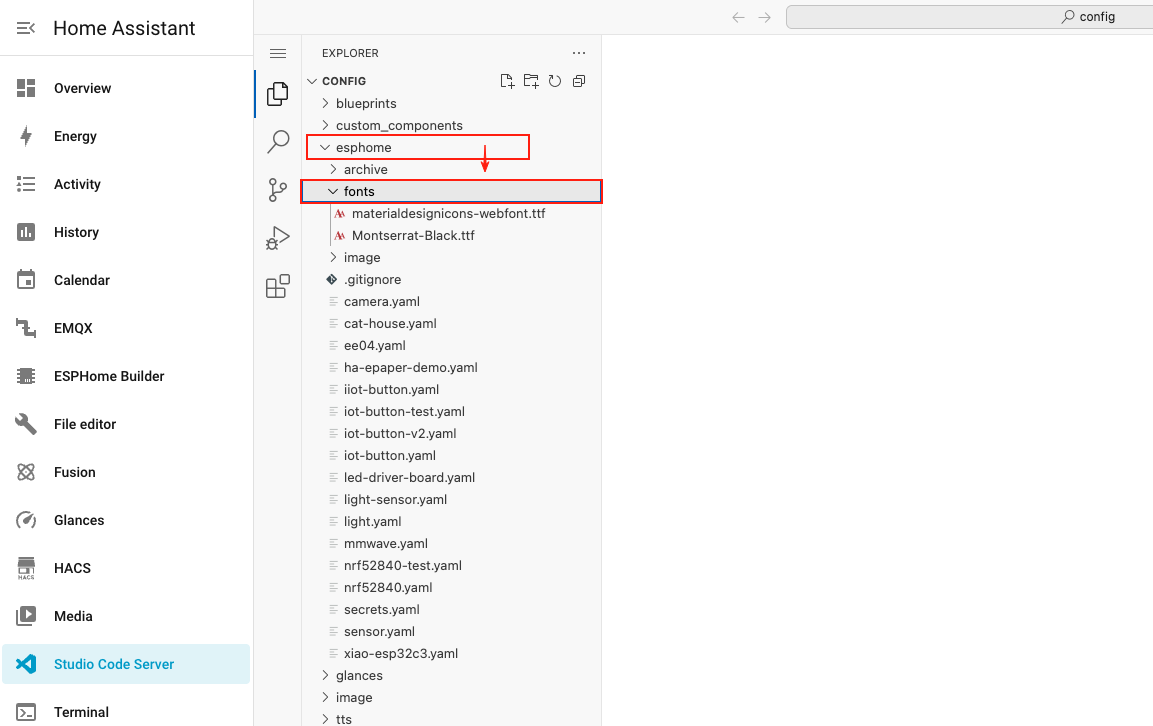
Paso 4. Descarga el archivo de fuente Material Design Icons haciendo clic en el botón de abajo y extrae el contenido.
Paso 5. Sube el archivo de fuente descargado (materialdesignicons-webfont.ttf) a la carpeta fonts que creaste antes.

Configuración de ESPHome para iconos
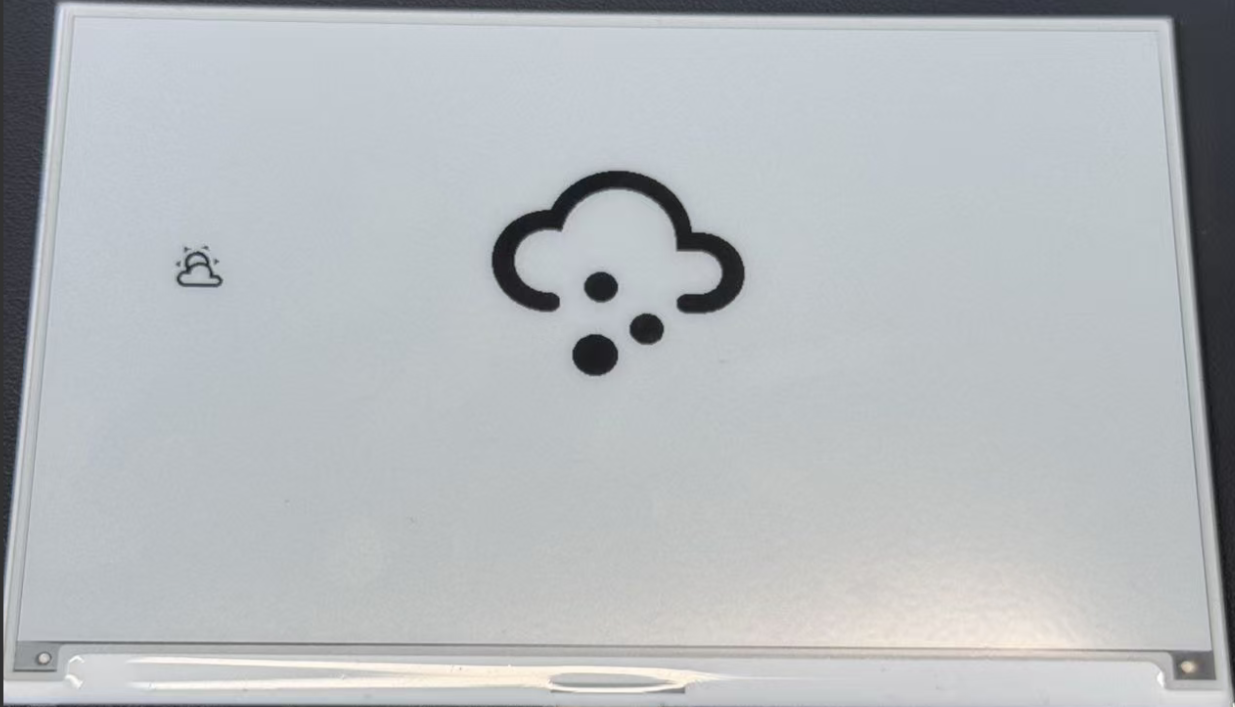
Paso 6. Añade el siguiente código a tu archivo de configuración de ESPHome después de la sección captive_portal. Este código define dos tamaños de fuente para iconos y configura la pantalla para mostrar iconos meteorológicos.
- 1.54 Inch Monochrome Color
- 2.13 Inch Quadruple Color
- 2.13 Inch Monochrome Color
- 2.9 Inch Quadruple Color
- 2.9 Inch Monochrome Color
- 4.2 Inch Monochrome Color
- 5.83 Inch Monochrome Color
- 7.5 Inch Monochrome Color
esphome:
  name: ee04
  friendly_name: EE04

esp32:
  board: esp32-s3-devkitc-1
  framework:
    type: esp-idf

# Enable logging
logger:

# Enable Home Assistant API
api:
  encryption:
    key: "b0AIbJ+kbeMayi1PgSGXtiD1yQCapUBF4A/7v7btys0="

ota:
  - platform: esphome
    password: "5d7cca6f4b3f38aba559ab0d6aaf5926"

wifi:
  ssid:
  password:

  # Enable fallback hotspot (captive portal) in case wifi connection fails
  ap:
    ssid: "Ee04 Fallback Hotspot"
    password: "zxPMBtCEWonm"

captive_portal:

# define font to display words
font:
  - file: 'fonts/materialdesignicons-webfont.ttf'  # Path to the font file
    id: font_mdi_large
    size: 200        # Large icon size
    glyphs: &mdi-weather-glyphs
      - "\U000F0595" # weather-cloudy icon
      - "\U000F0592" # weather-hail icon
  - file: 'fonts/materialdesignicons-webfont.ttf'
    id: font_mdi_medium   # Medium icon size
    size: 40
    glyphs: *mdi-weather-glyphs

# define SPI interface
spi:
  clk_pin: GPIO7
  mosi_pin: GPIO9

display:
  - platform: waveshare_epaper
    id: epaper_display
    model: 1.54inv2
    cs_pin: GPIO44
    dc_pin: GPIO10
    reset_pin:
      number: GPIO38
      inverted: false
    busy_pin:
      number: GPIO4
      inverted: true
    update_interval: 300s
    lambda: |-
      it.printf(100, 200, id(font_mdi_medium), TextAlign::CENTER, "\U000F0595");
      it.printf(400, 200, id(font_mdi_large), TextAlign::CENTER, "\U000F0592");
esphome:
  name: ee04
  friendly_name: EE04
  libraries:
    - SPI


esp32:
  board: esp32-s3-devkitc-1
  framework:
    type: arduino


# Enable logging
logger:

# Enable Home Assistant API
api:
  encryption:
    key: "eg2Jyse0gE146lJ2mVaqAnwteb4U2GJ7d1sZc2BOOsc="

ota:
  - platform: esphome
    password: "e2f184b95aac832509885f676abf5b73"

wifi:
  ssid:
  password:

  # Enable fallback hotspot (captive portal) in case wifi connection fails
  ap:
    ssid: "ESPHome_Epaper"
    password: "123456789"

external_components:
  - source: github://xcjk-tofuture/esphome@dev
    components: [ waveshare_epaper ]


# define font to display words
font:
  - file: 'fonts/materialdesignicons-webfont.ttf'  # Path to the font file
    id: font_mdi_large
    size: 200        # Large icon size
    glyphs: &mdi-weather-glyphs
      - "\U000F0595" # weather-cloudy icon
      - "\U000F0592" # weather-hail icon
  - file: 'fonts/materialdesignicons-webfont.ttf'
    id: font_mdi_medium   # Medium icon size
    size: 40
    glyphs: *mdi-weather-glyphs

captive_portal:

spi:
  clk_pin: GPIO7
  mosi_pin: GPIO9

display:
  - platform: waveshare_epaper
    id: my_display
    model: gdey0213f51
    cs_pin: GPIO44
    dc_pin: GPIO10
    busy_pin: GPIO4
    reset_pin:  GPIO38
    rotation: 90
    update_interval: 30s
    full_update_every: 1
    lambda: |-
      it.printf(100, 200, id(font_mdi_medium), TextAlign::CENTER, "\U000F0595");
      it.printf(400, 200, id(font_mdi_large), TextAlign::CENTER, "\U000F0592");
esphome:
  name: ee04
  friendly_name: EE04

esp32:
  board: esp32-s3-devkitc-1
  framework:
    type: esp-idf

# Enable logging
logger:

# Enable Home Assistant API
api:
  encryption:
    key: "b0AIbJ+kbeMayi1PgSGXtiD1yQCapUBF4A/7v7btys0="

ota:
  - platform: esphome
    password: "5d7cca6f4b3f38aba559ab0d6aaf5926"

wifi:
  ssid:
  password:

  # Enable fallback hotspot (captive portal) in case wifi connection fails
  ap:
    ssid: "Ee04 Fallback Hotspot"
    password: "zxPMBtCEWonm"

captive_portal:

# define font to display words
font:
  - file: 'fonts/materialdesignicons-webfont.ttf'  # Path to the font file
    id: font_mdi_large
    size: 200        # Large icon size
    glyphs: &mdi-weather-glyphs
      - "\U000F0595" # weather-cloudy icon
      - "\U000F0592" # weather-hail icon
  - file: 'fonts/materialdesignicons-webfont.ttf'
    id: font_mdi_medium   # Medium icon size
    size: 40
    glyphs: *mdi-weather-glyphs

# define SPI interface
spi:
  clk_pin: GPIO7
  mosi_pin: GPIO9

display:
  - platform: waveshare_epaper
    id: epaper_display
    model: 2.13inv2 #More models you can refer to here: https://esphome.io/components/display/waveshare_epaper/
    cs_pin: GPIO44
    dc_pin: GPIO10
    reset_pin:
      number: GPIO38
      inverted: false
    busy_pin:
      number: GPIO4
      inverted: true
    update_interval: 300s
    lambda: |-
      it.printf(100, 200, id(font_mdi_medium), TextAlign::CENTER, "\U000F0595");
      it.printf(400, 200, id(font_mdi_large), TextAlign::CENTER, "\U000F0592");
esphome:
  name: ee04
  friendly_name: EE04
  libraries:
    - SPI


esp32:
  board: esp32-s3-devkitc-1
  framework:
    type: arduino


# Enable logging
logger:

# Enable Home Assistant API
api:
  encryption:
    key: "eg2Jyse0gE146lJ2mVaqAnwteb4U2GJ7d1sZc2BOOsc="

ota:
  - platform: esphome
    password: "e2f184b95aac832509885f676abf5b73"

wifi:
  ssid:
  password:

  # Enable fallback hotspot (captive portal) in case wifi connection fails
  ap:
    ssid: "ESPHome_Epaper"
    password: "123456789"

external_components:
  - source: github://xcjk-tofuture/esphome@dev
    components: [ waveshare_epaper ]


# external_components:
#   - source:
#       type: local
#       path: components_epaper
#     components : [waveshare_epaper]


captive_portal:

# define font to display words
font:
  - file: 'fonts/materialdesignicons-webfont.ttf'  # Path to the font file
    id: font_mdi_large
    size: 200        # Large icon size
    glyphs: &mdi-weather-glyphs
      - "\U000F0595" # weather-cloudy icon
      - "\U000F0592" # weather-hail icon
  - file: 'fonts/materialdesignicons-webfont.ttf'
    id: font_mdi_medium   # Medium icon size
    size: 40
    glyphs: *mdi-weather-glyphs

spi:
  clk_pin: GPIO7
  mosi_pin: GPIO9
display:
  - platform: waveshare_epaper
    id: my_display
    model: gdey029f51h
    cs_pin: GPIO44
    dc_pin: GPIO10
    busy_pin: GPIO4
    reset_pin:  GPIO38
    rotation: 90
    update_interval: 30s
    full_update_every: 1
    lambda: |-
      it.printf(100, 200, id(font_mdi_medium), TextAlign::CENTER, "\U000F0595");
      it.printf(400, 200, id(font_mdi_large), TextAlign::CENTER, "\U000F0592");
esphome:
  name: ee04
  friendly_name: EE04

esp32:
  board: esp32-s3-devkitc-1
  framework:
    type: esp-idf

# Enable logging
logger:

# Enable Home Assistant API
api:
  encryption:
    key: "b0AIbJ+kbeMayi1PgSGXtiD1yQCapUBF4A/7v7btys0="

ota:
  - platform: esphome
    password: "5d7cca6f4b3f38aba559ab0d6aaf5926"

wifi:
  ssid:
  password:

  # Enable fallback hotspot (captive portal) in case wifi connection fails
  ap:
    ssid: "Ee04 Fallback Hotspot"
    password: "zxPMBtCEWonm"

captive_portal:

# define font to display words
font:
  - file: 'fonts/materialdesignicons-webfont.ttf'  # Path to the font file
    id: font_mdi_large
    size: 200        # Large icon size
    glyphs: &mdi-weather-glyphs
      - "\U000F0595" # weather-cloudy icon
      - "\U000F0592" # weather-hail icon
  - file: 'fonts/materialdesignicons-webfont.ttf'
    id: font_mdi_medium   # Medium icon size
    size: 40
    glyphs: *mdi-weather-glyphs

# define SPI interface
spi:
  clk_pin: GPIO7
  mosi_pin: GPIO9

display:
  - platform: waveshare_epaper
    id: epaper_display
    model: 2.90inv2
    cs_pin: GPIO44
    dc_pin: GPIO10
    reset_pin:
      number: GPIO38
      inverted: false
    busy_pin:
      number: GPIO4
      inverted: true
    update_interval: 300s
    lambda: |-
      it.printf(100, 200, id(font_mdi_medium), TextAlign::CENTER, "\U000F0595");
      it.printf(400, 200, id(font_mdi_large), TextAlign::CENTER, "\U000F0592");
esphome:
  name: ee04
  friendly_name: EE04

esp32:
  board: esp32-s3-devkitc-1
  framework:
    type: esp-idf

# Enable logging
logger:

# Enable Home Assistant API
api:
  encryption:
    key: "b0AIbJ+kbeMayi1PgSGXtiD1yQCapUBF4A/7v7btys0="

ota:
  - platform: esphome
    password: "5d7cca6f4b3f38aba559ab0d6aaf5926"

wifi:
  ssid:
  password:

  # Enable fallback hotspot (captive portal) in case wifi connection fails
  ap:
    ssid: "Ee04 Fallback Hotspot"
    password: "zxPMBtCEWonm"

captive_portal:

# define font to display words
font:
  - file: 'fonts/materialdesignicons-webfont.ttf'  # Path to the font file
    id: font_mdi_large
    size: 200        # Large icon size
    glyphs: &mdi-weather-glyphs
      - "\U000F0595" # weather-cloudy icon
      - "\U000F0592" # weather-hail icon
  - file: 'fonts/materialdesignicons-webfont.ttf'
    id: font_mdi_medium   # Medium icon size
    size: 40
    glyphs: *mdi-weather-glyphs

# define SPI interface
spi:
  clk_pin: GPIO7
  mosi_pin: GPIO9

display:
  - platform: waveshare_epaper
    id: epaper_display
    model: gdey042t81
    cs_pin: GPIO44
    dc_pin: GPIO10
    reset_pin:
      number: GPIO38
      inverted: false
    busy_pin:
      number: GPIO4
      inverted: true
    update_interval: 300s
    lambda: |-
      it.printf(100, 200, id(font_mdi_medium), TextAlign::CENTER, "\U000F0595");
      it.printf(400, 200, id(font_mdi_large), TextAlign::CENTER, "\U000F0592");
esphome:
  name: ee04
  friendly_name: EE04

esp32:
  board: esp32-s3-devkitc-1
  framework:
    type: esp-idf

# Enable logging
logger:

# Enable Home Assistant API
api:
  encryption:
    key: "b0AIbJ+kbeMayi1PgSGXtiD1yQCapUBF4A/7v7btys0="

ota:
  - platform: esphome
    password: "5d7cca6f4b3f38aba559ab0d6aaf5926"

wifi:
  ssid:
  password:

  # Enable fallback hotspot (captive portal) in case wifi connection fails
  ap:
    ssid: "Ee04 Fallback Hotspot"
    password: "zxPMBtCEWonm"

captive_portal:

# define font to display words
font:
  - file: 'fonts/materialdesignicons-webfont.ttf'  # Path to the font file
    id: font_mdi_large
    size: 200        # Large icon size
    glyphs: &mdi-weather-glyphs
      - "\U000F0595" # weather-cloudy icon
      - "\U000F0592" # weather-hail icon
  - file: 'fonts/materialdesignicons-webfont.ttf'
    id: font_mdi_medium   # Medium icon size
    size: 40
    glyphs: *mdi-weather-glyphs

# define SPI interface
spi:
  clk_pin: GPIO7
  mosi_pin: GPIO9

display:
  - platform: waveshare_epaper
    id: epaper_display
    model: gdey0583t81
    cs_pin: GPIO44
    dc_pin: GPIO10
    reset_pin:
      number: GPIO38
      inverted: false
    busy_pin:
      number: GPIO4
      inverted: true
    update_interval: 300s
    lambda: |-
      it.printf(100, 200, id(font_mdi_medium), TextAlign::CENTER, "\U000F0595");
      it.printf(400, 200, id(font_mdi_large), TextAlign::CENTER, "\U000F0592");
esphome:
  name: ee04
  friendly_name: EE04

esp32:
  board: esp32-s3-devkitc-1
  framework:
    type: esp-idf

# Enable logging
logger:

# Enable Home Assistant API
api:
  encryption:
    key: "b0AIbJ+kbeMayi1PgSGXtiD1yQCapUBF4A/7v7btys0="

ota:
  - platform: esphome
    password: "5d7cca6f4b3f38aba559ab0d6aaf5926"

wifi:
  ssid:
  password:

  # Enable fallback hotspot (captive portal) in case wifi connection fails
  ap:
    ssid: "Ee04 Fallback Hotspot"
    password: "zxPMBtCEWonm"

captive_portal:

# define font to display words
font:
  - file: 'fonts/materialdesignicons-webfont.ttf'  # Path to the font file
    id: font_mdi_large
    size: 200        # Large icon size
    glyphs: &mdi-weather-glyphs
      - "\U000F0595" # weather-cloudy icon
      - "\U000F0592" # weather-hail icon
  - file: 'fonts/materialdesignicons-webfont.ttf'
    id: font_mdi_medium   # Medium icon size
    size: 40
    glyphs: *mdi-weather-glyphs

# define SPI interface
spi:
  clk_pin: GPIO7
  mosi_pin: GPIO9

display:
  - platform: waveshare_epaper
    id: epaper_display
    model: 7.50inv2
    cs_pin: GPIO44
    dc_pin: GPIO10
    reset_pin:
      number: GPIO38
      inverted: false
    busy_pin:
      number: GPIO4
      inverted: true
    update_interval: 300s
    lambda: |-
      it.printf(100, 200, id(font_mdi_medium), TextAlign::CENTER, "\U000F0595");
      it.printf(400, 200, id(font_mdi_large), TextAlign::CENTER, "\U000F0592");
- 7.3 Inch spectra™ 6
esphome:
  name: ee04
  friendly_name: EE04

esp32:
  board: esp32-s3-devkitc-1
  framework:
    type: esp-idf

# Enable logging
logger:

# Enable Home Assistant API
api:
  encryption:
    key: "b0AIbJ+kbeMayi1PgSGXtiD1yQCapUBF4A/7v7btys0="

ota:
  - platform: esphome
    password: "5d7cca6f4b3f38aba559ab0d6aaf5926"

wifi:
  ssid:
  password:

  # Enable fallback hotspot (captive portal) in case wifi connection fails
  ap:
    ssid: "Ee04 Fallback Hotspot"
    password: "zxPMBtCEWonm"

captive_portal:

external_components:
  - source:
      type: git
      url: https://github.com/esphome/esphome/
      ref: 2025.10.5
    components: [ epaper_spi, display ]

# define font to display words
font:
  - file: 'fonts/materialdesignicons-webfont.ttf'  # Path to the font file
    id: font_mdi_large
    size: 200        # Large icon size
    glyphs: &mdi-weather-glyphs
      - "\U000F0595" # weather-cloudy icon
      - "\U000F0592" # weather-hail icon
  - file: 'fonts/materialdesignicons-webfont.ttf'
    id: font_mdi_medium   # Medium icon size
    size: 40
    glyphs: *mdi-weather-glyphs

# define SPI interface
spi:
  clk_pin: GPIO7
  mosi_pin: GPIO9

display:
  - platform: epaper_spi
    id: my_display
    model: 7.3in-Spectra-E6
    cs_pin: GPIO44
    dc_pin:
      number: GPIO10
      inverted: false
    busy_pin:
      number: GPIO4
      inverted: true
    reset_pin:  GPIO38
    rotation: 0
    update_interval: 30s
    lambda: |-
      it.printf(100, 200, id(font_mdi_medium), TextAlign::CENTER, "\U000F0595");
      it.printf(400, 200, id(font_mdi_large), TextAlign::CENTER, "\U000F0592");
-
La sección
glyphsdefine qué iconos se cargan desde el archivo de fuente. Cargar solo los iconos que necesitas ahorra memoria en tu dispositivo. -
El programa puede tardar de 2 a 3 minutos desde que finaliza la grabación hasta la visualización final.
Paso 7. Guarda tu configuración y súbela a tu XIAO ePaper Display Board(ESP32-S3) - EE04. Cuando veas una respuesta como en la siguiente imagen, significa que el código se está ejecutando correctamente.
Personalización con diferentes iconos
La biblioteca Material Design Icons contiene miles de iconos que puedes usar en tus proyectos. Aquí te mostramos cómo encontrar y usar diferentes iconos:
Paso 1. Visita el sitio web de Material Design Icons haciendo clic en el botón de abajo.
Paso 2. Busca un icono que quieras usar en tu proyecto. Puedes explorar por categoría o usar la función de búsqueda.

Paso 3. Cuando encuentres un icono que te guste, haz clic en él para ver sus detalles. Busca el valor Unicode, que tendrá el formato F0595.
Paso 4. Añade el valor Unicode a tu configuración de ESPHome:
- Añadiéndolo a la lista
glyphsen tu configuración de fuente - Actualizando el código de la pantalla para usar el nuevo icono
Por ejemplo, para usar un nuevo icono con Unicode F0123:
glyphs:
  - "\U000F0595" # weather-cloudy icon
  - "\U000F0592" # weather-hail icon
  - "\U000F0123" # your new icon
Y en la lambda de la pantalla:
lambda: |-
  it.printf(100, 200, id(font_mdi_medium), TextAlign::CENTER, "\U000F0123");
Paso 5. Guarda tu configuración actualizada y súbela a tu dispositivo para ver el nuevo icono.
Para paneles de control del clima, considera usar iconos como F0590 (soleado), F0591 (parcialmente nublado), F0593 (lluvioso) y F059E (ventoso).
Combinando estos iconos con los datos meteorológicos de Home Assistant que configuramos antes, puedes crear una pantalla meteorológica dinámica que muestre las condiciones actuales usando iconos apropiados.
Mostrar imágenes personalizadas
Este ejemplo demuestra cómo mostrar imágenes personalizadas en tu XIAO ePaper Display Board(ESP32-S3) - EE04. Puedes usar esta función para mostrar logotipos, iconos o cualquier gráfico que mejore la experiencia de tu panel.
Preparación
Paso 1. Asegúrate de tener el complemento Studio Code Server instalado en Home Assistant. Si aún no lo has instalado, sigue las instrucciones del ejemplo anterior.
Paso 2. Crea una nueva carpeta llamada image en tu directorio de configuración de ESPHome. Esta carpeta almacenará los archivos de imagen que quieras mostrar.
config/
└── esphome/
    ├── your_device.yaml
    └── image/         <- Create this folder
Añadir imágenes
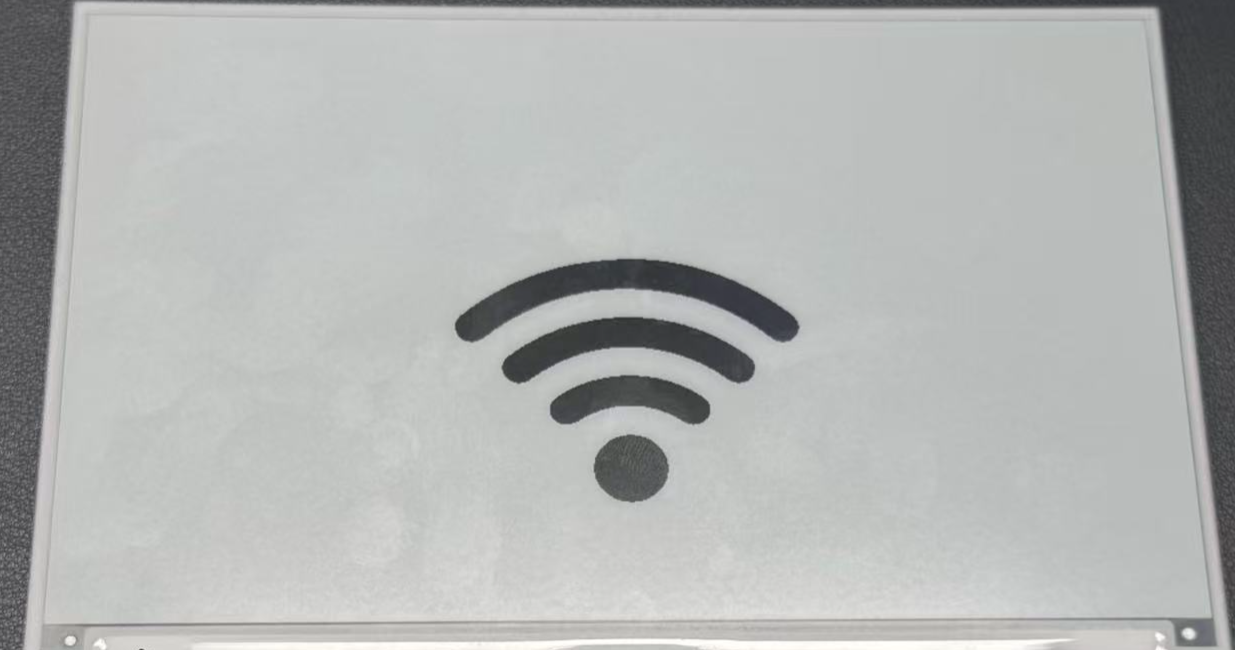
Paso 3. Descarga una imagen de ejemplo para probar la funcionalidad. Puedes usar el icono de WiFi que se proporciona a continuación o usar tu propia imagen.
Paso 4. Sube la imagen descargada a la carpeta image que creaste antes usando el administrador de archivos de Studio Code Server.

Para obtener los mejores resultados en pantallas de papel electrónico, usa imágenes de alto contraste con áreas claras en blanco y negro. Se admiten los formatos JPG y PNG.
Configurar ESPHome para mostrar imágenes
Paso 5. Añade el siguiente código a tu archivo de configuración de ESPHome después de la sección captive_portal. Este código define el recurso de imagen y configura la pantalla para mostrarlo.
- 1.54 Inch Monochrome Color
- 2.13 Inch Monochrome Color
- 2.13 Inch Quadruple Color
- 2.9 Inch Quadruple Color
- 2.9 Inch Monochrome Color
- 4.2 Inch Monochrome Color
- 5.83 Inch Monochrome Color
- 7.5 Inch Monochrome Color
esphome:
  name: ee04
  friendly_name: EE04

esp32:
  board: esp32-s3-devkitc-1
  framework:
    type: esp-idf

# Enable logging
logger:

# Enable Home Assistant API
api:
  encryption:
    key: "b0AIbJ+kbeMayi1PgSGXtiD1yQCapUBF4A/7v7btys0="

ota:
  - platform: esphome
    password: "5d7cca6f4b3f38aba559ab0d6aaf5926"

wifi:
  ssid:
  password:

  # Enable fallback hotspot (captive portal) in case wifi connection fails
  ap:
    ssid: "Ee04 Fallback Hotspot"
    password: "zxPMBtCEWonm"

captive_portal:

image:
  - file: /config/esphome/image/wifi.jpg    # Path to your image file (JPG or PNG)
    id: myImage
    type: BINARY                            # Binary mode works best for e-paper
    resize: 800x480                         # Resize to match display resolution
    invert_alpha: true                      # Invert colors if needed

spi:
  clk_pin: GPIO7
  mosi_pin: GPIO9

display:
  - platform: waveshare_epaper
    id: epaper_display
    model: 1.54inv2
    cs_pin: GPIO44
    dc_pin: GPIO10
    reset_pin:
      number: GPIO38
      inverted: false
    busy_pin:
      number: GPIO4
      inverted: true
    update_interval: 300s
    lambda: |-
      it.image(0, 0, id(myImage));          # Display image at position (0,0)
esphome:
  name: ee04
  friendly_name: EE04

esp32:
  board: esp32-s3-devkitc-1
  framework:
    type: esp-idf

# Enable logging
logger:

# Enable Home Assistant API
api:
  encryption:
    key: "b0AIbJ+kbeMayi1PgSGXtiD1yQCapUBF4A/7v7btys0="

ota:
  - platform: esphome
    password: "5d7cca6f4b3f38aba559ab0d6aaf5926"

wifi:
  ssid:
  password:

  # Enable fallback hotspot (captive portal) in case wifi connection fails
  ap:
    ssid: "Ee04 Fallback Hotspot"
    password: "zxPMBtCEWonm"

captive_portal:

image:
  - file: /config/esphome/image/wifi.jpg    # Path to your image file (JPG or PNG)
    id: myImage
    type: BINARY                            # Binary mode works best for e-paper
    resize: 800x480                         # Resize to match display resolution
    invert_alpha: true                      # Invert colors if needed

spi:
  clk_pin: GPIO7
  mosi_pin: GPIO9

display:
  - platform: waveshare_epaper
    id: epaper_display
    model: 2.13inv2 #More models you can refer to here: https://esphome.io/components/display/waveshare_epaper/
    cs_pin: GPIO44
    dc_pin: GPIO10
    reset_pin:
      number: GPIO38
      inverted: false
    busy_pin:
      number: GPIO4
      inverted: true
    update_interval: 300s
    lambda: |-
      it.image(0, 0, id(myImage));          # Display image at position (0,0)
esphome:
  name: ee04
  friendly_name: EE04
  libraries:
    - SPI


esp32:
  board: esp32-s3-devkitc-1
  framework:
    type: arduino


# Enable logging
logger:

# Enable Home Assistant API
api:
  encryption:
    key: "eg2Jyse0gE146lJ2mVaqAnwteb4U2GJ7d1sZc2BOOsc="

ota:
  - platform: esphome
    password: "e2f184b95aac832509885f676abf5b73"

wifi:
  ssid:
  password:

  # Enable fallback hotspot (captive portal) in case wifi connection fails
  ap:
    ssid: "ESPHome_Epaper"
    password: "123456789"

external_components:
  - source: github://xcjk-tofuture/esphome@dev
    components: [ waveshare_epaper ]


image:
  - file: /config/esphome/image/wifi.jpg    # Path to your image file (JPG or PNG)
    id: myImage
    type: BINARY                            # Binary mode works best for e-paper
    resize: 800x480                         # Resize to match display resolution
    invert_alpha: true                      # Invert colors if needed

captive_portal:

spi:
  clk_pin: GPIO7
  mosi_pin: GPIO9

display:
  - platform: waveshare_epaper
    id: my_display
    model: gdey0213f51
    cs_pin: GPIO44
    dc_pin: GPIO10
    busy_pin: GPIO4
    reset_pin:  GPIO38
    rotation: 90
    update_interval: 30s
    full_update_every: 1
    lambda: |-
      it.image(0, 0, id(myImage));          # Display image at position (0,0)
esphome:
  name: ee04
  friendly_name: EE04
  libraries:
    - SPI


esp32:
  board: esp32-s3-devkitc-1
  framework:
    type: arduino


# Enable logging
logger:

# Enable Home Assistant API
api:
  encryption:
    key: "eg2Jyse0gE146lJ2mVaqAnwteb4U2GJ7d1sZc2BOOsc="

ota:
  - platform: esphome
    password: "e2f184b95aac832509885f676abf5b73"

wifi:
  ssid:
  password:

  # Enable fallback hotspot (captive portal) in case wifi connection fails
  ap:
    ssid: "ESPHome_Epaper"
    password: "123456789"

external_components:
  - source: github://xcjk-tofuture/esphome@dev
    components: [ waveshare_epaper ]

captive_portal:

image:
  - file: /config/esphome/image/wifi.jpg    # Path to your image file (JPG or PNG)
    id: myImage
    type: BINARY                            # Binary mode works best for e-paper
    resize: 800x480                         # Resize to match display resolution
    invert_alpha: true                      # Invert colors if needed

spi:
  clk_pin: GPIO7
  mosi_pin: GPIO9
display:
  - platform: waveshare_epaper
    id: my_display
    model: gdey029f51h
    cs_pin: GPIO44
    dc_pin: GPIO10
    busy_pin: GPIO4
    reset_pin:  GPIO38
    rotation: 90
    update_interval: 30s
    full_update_every: 1
    lambda: |-
      it.image(0, 0, id(myImage));          # Display image at position (0,0)
esphome:
  name: ee04
  friendly_name: EE04

esp32:
  board: esp32-s3-devkitc-1
  framework:
    type: esp-idf

# Enable logging
logger:

# Enable Home Assistant API
api:
  encryption:
    key: "b0AIbJ+kbeMayi1PgSGXtiD1yQCapUBF4A/7v7btys0="

ota:
  - platform: esphome
    password: "5d7cca6f4b3f38aba559ab0d6aaf5926"

wifi:
  ssid:
  password:

  # Enable fallback hotspot (captive portal) in case wifi connection fails
  ap:
    ssid: "Ee04 Fallback Hotspot"
    password: "zxPMBtCEWonm"

captive_portal:

image:
  - file: /config/esphome/image/wifi.jpg    # Path to your image file (JPG or PNG)
    id: myImage
    type: BINARY                            # Binary mode works best for e-paper
    resize: 800x480                         # Resize to match display resolution
    invert_alpha: true                      # Invert colors if needed

spi:
  clk_pin: GPIO7
  mosi_pin: GPIO9

display:
  - platform: waveshare_epaper
    id: epaper_display
    model: 2.90inv2
    cs_pin: GPIO44
    dc_pin: GPIO10
    reset_pin:
      number: GPIO38
      inverted: false
    busy_pin:
      number: GPIO4
      inverted: true
    update_interval: 300s
    lambda: |-
      it.image(0, 0, id(myImage));          # Display image at position (0,0)
esphome:
  name: ee04
  friendly_name: EE04

esp32:
  board: esp32-s3-devkitc-1
  framework:
    type: esp-idf

# Enable logging
logger:

# Enable Home Assistant API
api:
  encryption:
    key: "b0AIbJ+kbeMayi1PgSGXtiD1yQCapUBF4A/7v7btys0="

ota:
  - platform: esphome
    password: "5d7cca6f4b3f38aba559ab0d6aaf5926"

wifi:
  ssid:
  password:

  # Enable fallback hotspot (captive portal) in case wifi connection fails
  ap:
    ssid: "Ee04 Fallback Hotspot"
    password: "zxPMBtCEWonm"

captive_portal:

image:
  - file: /config/esphome/image/wifi.jpg    # Path to your image file (JPG or PNG)
    id: myImage
    type: BINARY                            # Binary mode works best for e-paper
    resize: 800x480                         # Resize to match display resolution
    invert_alpha: true                      # Invert colors if needed

spi:
  clk_pin: GPIO7
  mosi_pin: GPIO9

display:
  - platform: waveshare_epaper
    id: epaper_display
    model: gdey042t81
    cs_pin: GPIO44
    dc_pin: GPIO10
    reset_pin:
      number: GPIO38
      inverted: false
    busy_pin:
      number: GPIO4
      inverted: true
    update_interval: 300s
    lambda: |-
      it.image(0, 0, id(myImage));          # Display image at position (0,0)
esphome:
  name: ee04
  friendly_name: EE04

esp32:
  board: esp32-s3-devkitc-1
  framework:
    type: esp-idf

# Enable logging
logger:

# Enable Home Assistant API
api:
  encryption:
    key: "b0AIbJ+kbeMayi1PgSGXtiD1yQCapUBF4A/7v7btys0="

ota:
  - platform: esphome
    password: "5d7cca6f4b3f38aba559ab0d6aaf5926"

wifi:
  ssid:
  password:

  # Enable fallback hotspot (captive portal) in case wifi connection fails
  ap:
    ssid: "Ee04 Fallback Hotspot"
    password: "zxPMBtCEWonm"

captive_portal:

image:
  - file: /config/esphome/image/wifi.jpg    # Path to your image file (JPG or PNG)
    id: myImage
    type: BINARY                            # Binary mode works best for e-paper
    resize: 800x480                         # Resize to match display resolution
    invert_alpha: true                      # Invert colors if needed

spi:
  clk_pin: GPIO7
  mosi_pin: GPIO9

display:
  - platform: waveshare_epaper
    id: epaper_display
    model: gdey0583t81
    cs_pin: GPIO44
    dc_pin: GPIO10
    reset_pin:
      number: GPIO38
      inverted: false
    busy_pin:
      number: GPIO4
      inverted: true
    update_interval: 300s
    lambda: |-
      it.image(0, 0, id(myImage));          # Display image at position (0,0)
esphome:
  name: ee04
  friendly_name: EE04

esp32:
  board: esp32-s3-devkitc-1
  framework:
    type: esp-idf

# Enable logging
logger:

# Enable Home Assistant API
api:
  encryption:
    key: "b0AIbJ+kbeMayi1PgSGXtiD1yQCapUBF4A/7v7btys0="

ota:
  - platform: esphome
    password: "5d7cca6f4b3f38aba559ab0d6aaf5926"

wifi:
  ssid:
  password:

  # Enable fallback hotspot (captive portal) in case wifi connection fails
  ap:
    ssid: "Ee04 Fallback Hotspot"
    password: "zxPMBtCEWonm"

captive_portal:

image:
  - file: /config/esphome/image/wifi.jpg    # Path to your image file (JPG or PNG)
    id: myImage
    type: BINARY                            # Binary mode works best for e-paper
    resize: 800x480                         # Resize to match display resolution
    invert_alpha: true                      # Invert colors if needed

spi:
  clk_pin: GPIO7
  mosi_pin: GPIO9

display:
  - platform: waveshare_epaper
    id: epaper_display
    model: 7.50inv2
    cs_pin: GPIO44
    dc_pin: GPIO10
    reset_pin:
      number: GPIO38
      inverted: false
    busy_pin:
      number: GPIO4
      inverted: true
    update_interval: 300s
    lambda: |-
      it.image(0, 0, id(myImage));          # Display image at position (0,0)
- 7.3 Inch spectra™ 6
esphome:
  name: ee04
  friendly_name: EE04

esp32:
  board: esp32-s3-devkitc-1
  framework:
    type: esp-idf

# Enable logging
logger:

# Enable Home Assistant API
api:
  encryption:
    key: "b0AIbJ+kbeMayi1PgSGXtiD1yQCapUBF4A/7v7btys0="

ota:
  - platform: esphome
    password: "5d7cca6f4b3f38aba559ab0d6aaf5926"

wifi:
  ssid:
  password:

  # Enable fallback hotspot (captive portal) in case wifi connection fails
  ap:
    ssid: "Ee04 Fallback Hotspot"
    password: "zxPMBtCEWonm"

captive_portal:

external_components:
  - source:
      type: git
      url: https://github.com/esphome/esphome/
      ref: 2025.10.5
    components: [ epaper_spi, display ]

image:
  - file: /config/esphome/image/wifi.jpg    # Path to your image file (JPG or PNG)
    id: myImage
    type: BINARY                            # Binary mode works best for e-paper
    resize: 800x480                         # Resize to match display resolution
    invert_alpha: true                      # Invert colors if needed

spi:
  clk_pin: GPIO7
  mosi_pin: GPIO9

display:
  - platform: epaper_spi
    id: my_display
    model: 7.3in-Spectra-E6
    cs_pin: GPIO44
    dc_pin:
      number: GPIO10
      inverted: false
    busy_pin:
      number: GPIO4
      inverted: true
    reset_pin:  GPIO38
    rotation: 0
    update_interval: 30s
    lambda: |-
      it.image(0, 0, id(myImage));          # Display image at position (0,0)
Paso 6. Guarda tu configuración y súbela a tu XIAO ePaper Display Board(ESP32-S3) - EE04. Cuando la actualización se complete, tu pantalla de tinta electrónica mostrará la imagen.
Técnicas avanzadas de imágenes
Puedes mejorar la visualización de tus imágenes con estas técnicas adicionales:
Posicionamiento de imágenes
Para posicionar tu imagen en coordenadas específicas de la pantalla:
lambda: |-
  // Display image at position (100,50)
  it.image(100, 50, id(myImage));
Combinar imágenes con texto
Puedes mostrar tanto imágenes como texto en la misma pantalla:
lambda: |-
  // Display image
  it.image(0, 0, id(myImage));

  // Add text below or beside the image
  it.printf(400, 400, id(myFont), TextAlign::CENTER, "WiFi Connected");
Uso de múltiples imágenes
Para mostrar múltiples imágenes en la misma pantalla, define cada imagen en tu configuración:
image:
  - file: /config/esphome/image/wifi.jpg
    id: wifiImage
    type: BINARY
    resize: 200x200

  - file: /config/esphome/image/temperature.png
    id: tempImage
    type: BINARY
    resize: 200x200

# In the display lambda:
lambda: |-
  it.image(50, 50, id(wifiImage));
  it.image(300, 50, id(tempImage));
Recuerda que las pantallas de tinta electrónica tienen tasas de actualización limitadas. El ajuste update_interval: 300s significa que tu pantalla se actualizará solo cada 5 minutos. Ajusta este valor según tus necesidades, pero ten en cuenta que las actualizaciones frecuentes pueden reducir la vida útil de las pantallas de tinta electrónica.
Al combinar imágenes con texto y otros elementos de visualización tratados en ejemplos anteriores, puedes crear paneles de control ricos e informativos en tu XIAO ePaper Display Board(ESP32-S3) - EE04.
Referencias y recursos
Soporte técnico y debate sobre el producto
Gracias por elegir nuestros productos. Estamos aquí para ofrecerte diferentes tipos de soporte y garantizar que tu experiencia con nuestros productos sea lo más fluida posible. Ofrecemos varios canales de comunicación para adaptarnos a diferentes preferencias y necesidades.