reSpeaker XVF3800 USB Mic Array con XIAO ESP32S3 Transmisión de Audio HTTP
Introducción
Esta guía describe cómo capturar audio de un arreglo de micrófonos XVF3800 usando un ESP32-S3 (XIAO ESP32S3), grabar 5 segundos de audio PCM estéreo de 32 bits a 16 kHz, y almacenar los datos en PSRAM para manejar buffers de audio grandes. El audio grabado se sube luego por Wi-Fi a un servidor HTTP Flask basado en Python, donde se recibe y guarda como un archivo WAV estándar. Esta configuración es muy adecuada para aplicaciones como captura de voz, registro de audio remoto y pipelines de procesamiento de voz incluyendo conversión de voz a texto (STT) y análisis de audio basado en aprendizaje automático.
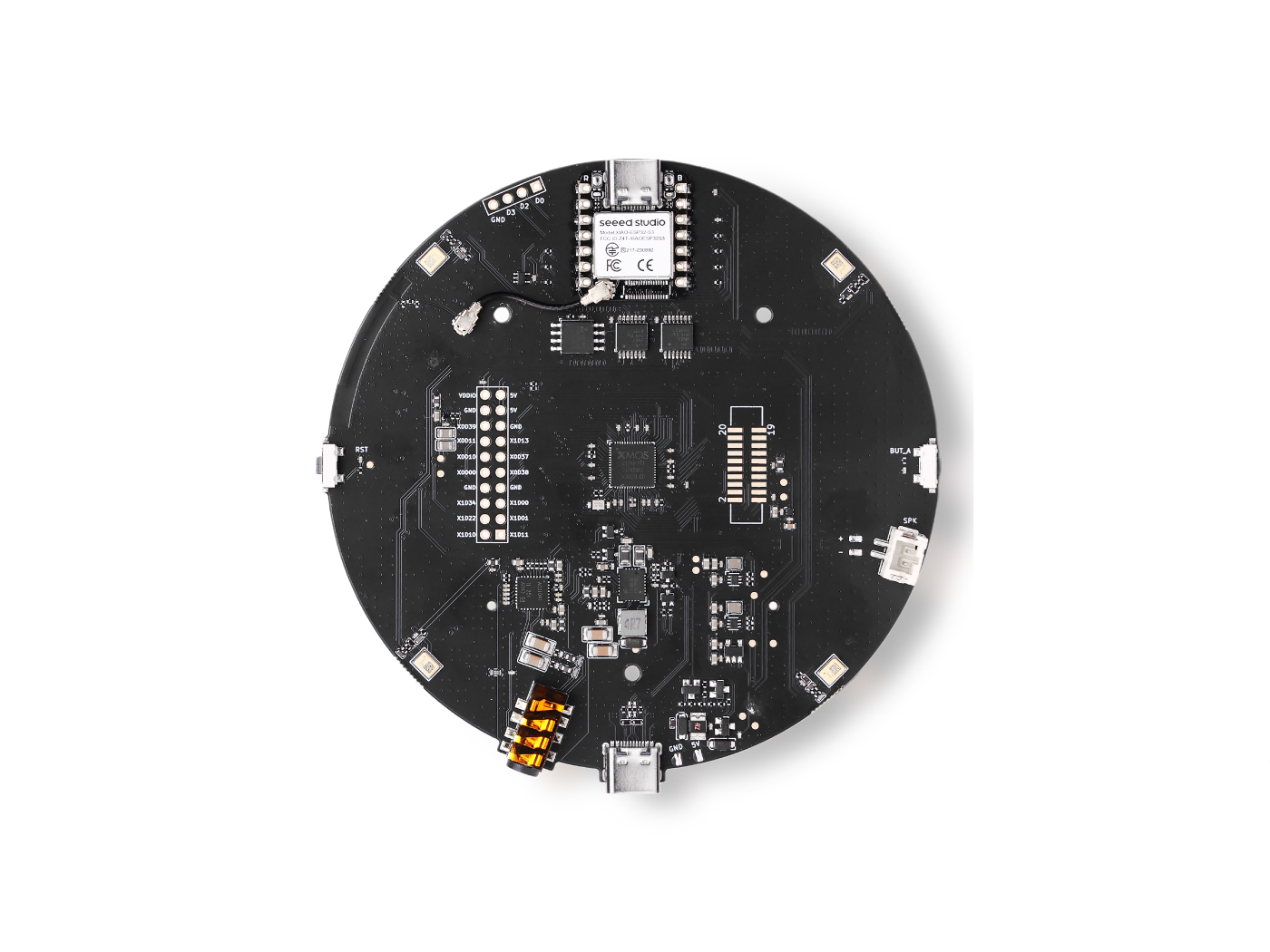
Código Arduino
Debes habilitar PSRAM, de lo contrario malloc() fallará.
Actualiza estos campos antes de subir:
// WiFi credentials
const char* ssid = "your SSID";
const char* password = "your password";

// HTTP server (your PC)
const char* serverUrl = "http://<flask-server>:8000/upload"; // please replace with your PC IP /flask server
Código Arduino Completo
#include "WiFi.h"
#include "HTTPClient.h"
#include "AudioTools.h"

// WiFi credentials
const char* ssid = "your SSID";
const char* password = "your password";

// HTTP server (your PC)
const char* serverUrl = "http://<flask-server>:8000/upload"; // please replace with your PC IP /flask server

// Audio: 16kHz, stereo, 32-bit
AudioInfo info(16000, 2, 32);
I2SStream i2s_in;
I2SConfig i2s_config;

// 5 seconds of audio = 640,000 bytes
#define RECORDING_SECONDS 5
#define BYTES_PER_SECOND 128000
#define TOTAL_BYTES (RECORDING_SECONDS * BYTES_PER_SECOND)

// Buffer for recording
uint8_t* audioBuffer = nullptr;

void connectWiFi() {
  Serial.printf("Connecting to WiFi: %s\n", ssid);
  WiFi.begin(ssid, password);

  int attempts = 0;
  while (WiFi.status() != WL_CONNECTED && attempts < 20) {
    delay(500);
    Serial.print(".");
    attempts++;
  }

  if (WiFi.status() == WL_CONNECTED) {
    Serial.println("\nConnected!");
    Serial.printf("IP Address: %s\n", WiFi.localIP().toString().c_str());
  } else {
    Serial.println("\nFailed to connect!");
  }
}

void setupI2SInput() {
  i2s_config = i2s_in.defaultConfig(RX_MODE);
  i2s_config.copyFrom(info);

  // XVF3800 pins
  i2s_config.pin_bck = 8;
  i2s_config.pin_ws = 7;
  i2s_config.pin_data = 44;
  i2s_config.pin_data_rx = 43;
  i2s_config.is_master = true;

  i2s_in.begin(i2s_config);
  Serial.println("I2S input started.");
}

void setup() {
  Serial.begin(115200);
  while(!Serial);

  AudioLogger::instance().begin(Serial, AudioLogger::Info);

  // Allocate memory for audio buffer
  audioBuffer = (uint8_t*)malloc(TOTAL_BYTES);
  if (!audioBuffer) {
    Serial.println("Failed to allocate memory!");
    return;
  }

  connectWiFi();
  setupI2SInput();

  // Wait for I2S to stabilize
  delay(500);

  // Record audio
  Serial.printf("Recording %d seconds of audio...\n", RECORDING_SECONDS);
  size_t total_read = 0;
  size_t bytes_read = 0;

  unsigned long start_time = millis();

  while (total_read < TOTAL_BYTES) {
    bytes_read = i2s_in.readBytes(audioBuffer + total_read,
                                   min(4096, (int)(TOTAL_BYTES - total_read)));

    if (bytes_read > 0) {
      total_read += bytes_read;

      // Progress indicator
      if (total_read % BYTES_PER_SECOND == 0) {
        Serial.printf("Recorded %.1f seconds\n", total_read / (float)BYTES_PER_SECOND);
      }
    }
  }

  unsigned long record_time = millis() - start_time;
  Serial.printf("Recording complete! %d bytes in %lu ms\n", total_read, record_time);

  // Send via HTTP POST
  if (WiFi.status() == WL_CONNECTED) {
    HTTPClient http;

    Serial.printf("Sending audio to %s\n", serverUrl);

    http.begin(serverUrl);
    http.addHeader("Content-Type", "application/octet-stream");
    http.addHeader("X-Sample-Rate", String(info.sample_rate));
    http.addHeader("X-Channels", String(info.channels));
    http.addHeader("X-Bits-Per-Sample", String(info.bits_per_sample));

    int httpResponseCode = http.POST(audioBuffer, total_read);

    if (httpResponseCode > 0) {
      Serial.printf("HTTP Response code: %d\n", httpResponseCode);
      String response = http.getString();
      Serial.println("Response: " + response);
    } else {
      Serial.printf("Error code: %d\n", httpResponseCode);
      Serial.println("Error: " + http.errorToString(httpResponseCode));
    }

    http.end();
  } else {
    Serial.println("WiFi not connected!");
  }

  // Free memory
  free(audioBuffer);

  Serial.println("Done!");
}

void loop() {
  // Nothing - runs once
}
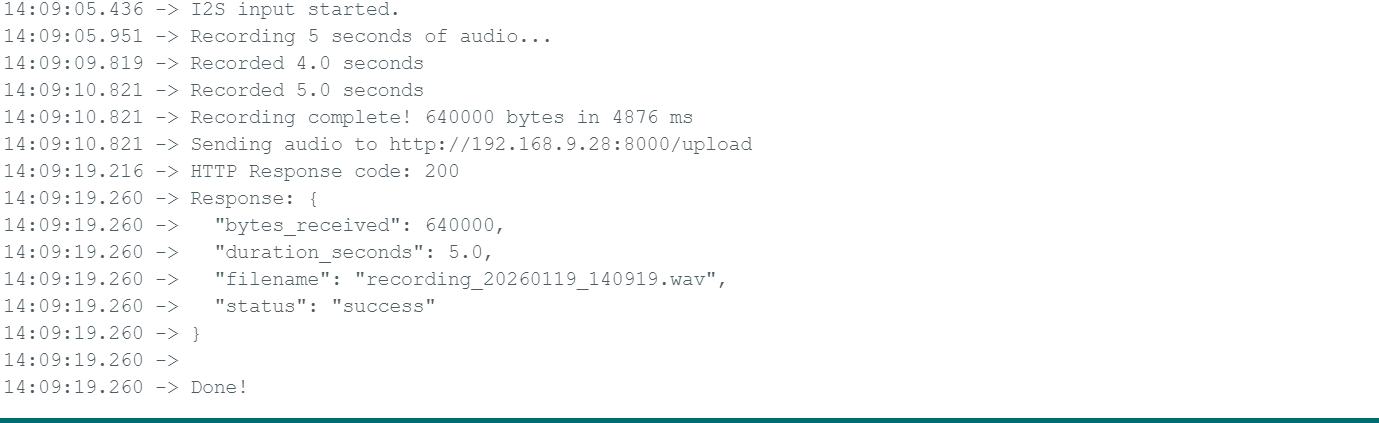
Salida Esperada
Código del Servidor Python (Flask)
Necesitas instalar flask para ejecutar en tu entorno pip install flask
from flask import Flask, request, jsonify
import wave
import datetime

app = Flask(__name__)


@app.route('/upload', methods=['POST'])
def upload_audio():
    try:
        # Get audio parameters from headers
        sample_rate = int(request.headers.get('X-Sample-Rate', 16000))
        channels = int(request.headers.get('X-Channels', 2))
        bits_per_sample = int(request.headers.get('X-Bits-Per-Sample', 32))

        # Get raw audio data
        audio_data = request.data

        print(f"Received {len(audio_data)} bytes")
        print(f"Format: {sample_rate}Hz, {channels} channels, {bits_per_sample}-bit")

        # Generate filename with timestamp
        timestamp = datetime.datetime.now().strftime("%Y%m%d_%H%M%S")
        filename = f"recording_{timestamp}.wav"

        # Save as WAV file
        with wave.open(filename, 'wb') as wav_file:
            wav_file.setnchannels(channels)
            wav_file.setsampwidth(bits_per_sample // 8)  # Convert bits to bytes
            wav_file.setframerate(sample_rate)
            wav_file.writeframes(audio_data)

        duration = len(audio_data) / (sample_rate * channels * (bits_per_sample // 8))

        print(f"Saved to {filename} ({duration:.2f} seconds)")

        return jsonify({
            'status': 'success',
            'filename': filename,
            'bytes_received': len(audio_data),
            'duration_seconds': duration
        }), 200

    except Exception as e:
        print(f"Error: {str(e)}")
        return jsonify({'status': 'error', 'message': str(e)}), 500


@app.route('/', methods=['GET'])
def index():
    return "Audio Upload Server Running"


if __name__ == '__main__':
    print("Starting HTTP server on port 8000...")
    print("Waiting for audio uploads from ESP32...")
    app.run(host='0.0.0.0', port=8000, debug=True)
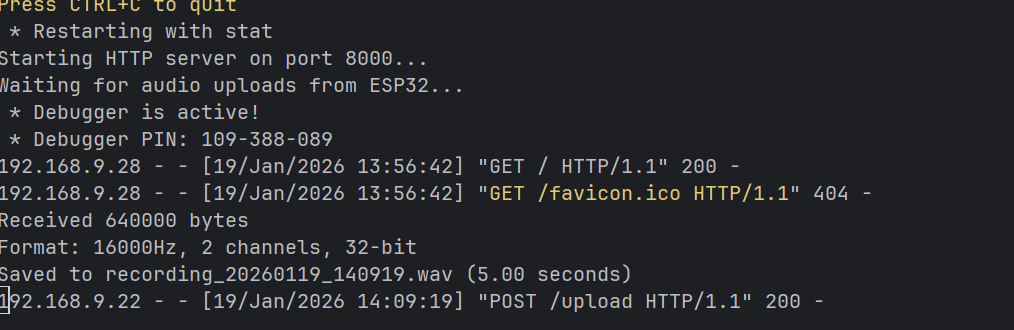
Salida Esperada
Soporte Técnico y Discusión del Producto
¡Gracias por elegir nuestros productos! Estamos aquí para brindarte diferentes tipos de soporte para asegurar que tu experiencia con nuestros productos sea lo más fluida posible. Ofrecemos varios canales de comunicación para atender diferentes preferencias y necesidades.