Introducción al Módulo de Detección de Eventos de Sonido
Introducción
Una compacta placa de audio en el borde ofrece detección de sonido en tiempo real con una sólida protección de privacidad de datos locales. Detecta cinco eventos de sonido anómalos — llanto de bebé, rotura de vidrio, disparo, alarmas T3/T4 y ronquidos, lo que permite una respuesta inmediata y una alerta temprana fiable. Diseñada para una integración nativa con ESPHome y compatibilidad perfecta con Home Assistant mediante la serie XIAO, es ideal para la monitorización de seguridad en el hogar o como disparador de automatizaciones reactivas.
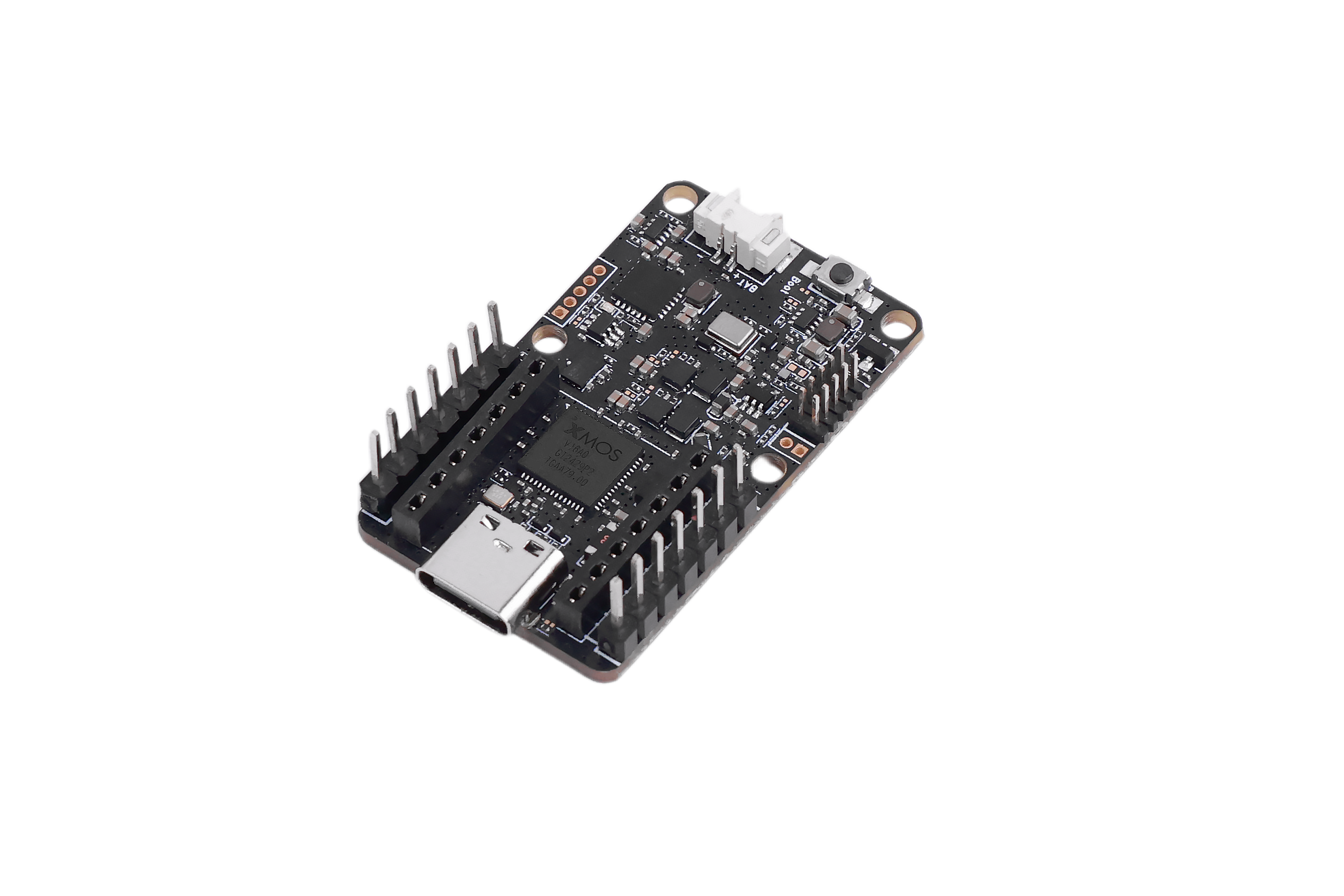
Especificaciones
| Característica | Descripción |
|---|---|
| Chip principal | XMOS XU316-1024-QF60BC24 |
| Eventos compatibles | Llanto de bebé / Rotura de vidrio / Disparo / Alarma de humo y alarma de CO (T3/T4) / Ronquidos |
| Micrófonos digitales | Micrófonos digitales de alto rendimiento × 1 |
| Sensibilidad | -26 dBFS |
| Punto de sobrecarga acústica | 120 dBL |
| SNR | 64 dBA |
| Alimentación | USB 5V, 5V externa |
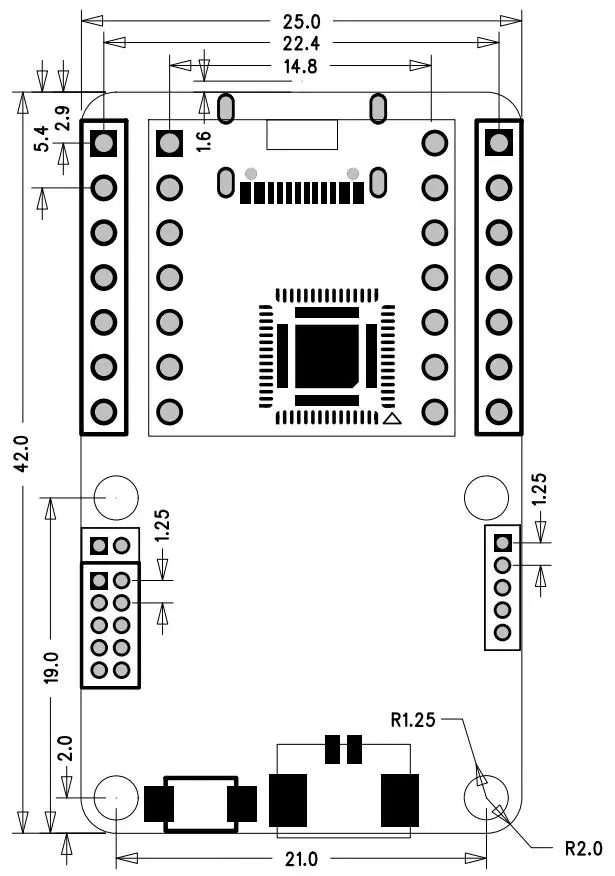
| Dimensiones | 40 × 20 mm |
| Temperatura de funcionamiento | 0℃ – 65℃ |
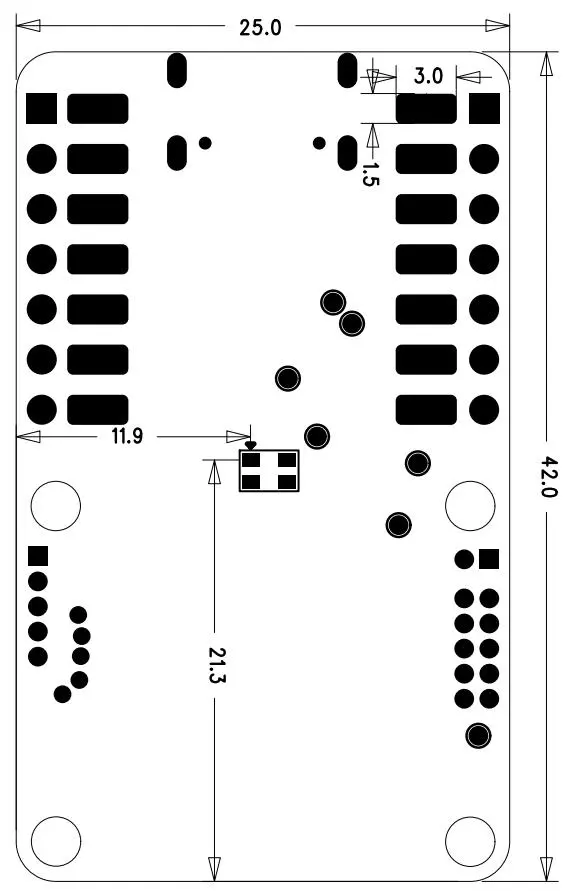
Descripción de hardware y dimensiones
Vista frontal
Vista trasera
Uso por USB
Este dispositivo puede funcionar en modo independiente y admite comunicación plug-and-play a través de la interfaz USB usando comandos AT.
Primero, conecta el dispositivo a tu ordenador usando un cable USB Type-C a USB Type-A.
-
Paso 1 :A continuación, abre PuTTY o cualquier otro software de terminal serie. Si aún no has instalado uno, puedes descargar PuTTY desde el siguiente enlace:
-
Paso 2 :Después de abrir el terminal serie, selecciona el puerto COM correcto y ajusta la velocidad en baudios a 115200. Una vez conectado, podrás interactuar con el dispositivo a través de la interfaz USB.
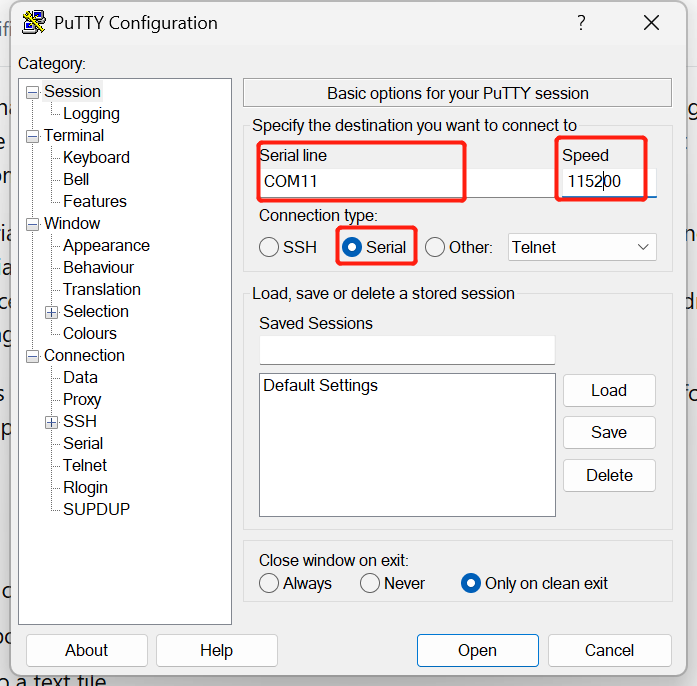
Dado que el dispositivo escucha continuamente eventos de sonido, puedes probarlo generando cerca de él los eventos de sonido compatibles.
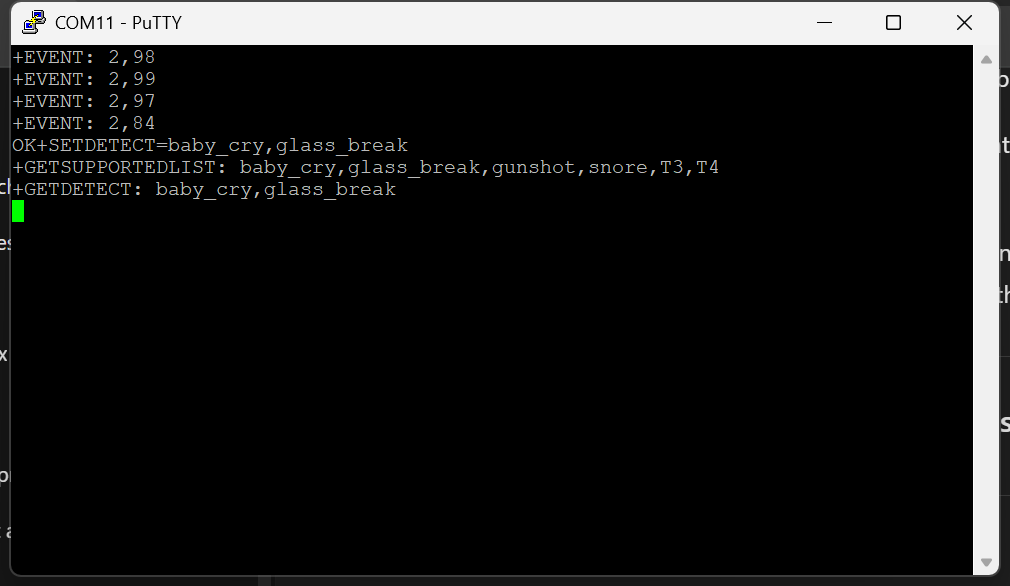
Además, puedes ajustar los parámetros del dispositivo usando comandos AT. A continuación se muestran algunos comandos que puedes usar para interactuar con el dispositivo.
| Comando | Descripción | Ejemplo |
|---|---|---|
AT+GETDETECT | Obtiene los tipos de detección actualmente habilitados (1–5 tipos). | AT+GETDETECT → +GETDETECT:baby_cry,glass_break |
AT+SETDETECT=<types> | Establece los tipos de eventos a detectar (separados por comas, máximo 5). | AT+SETDETECT=baby_cry,snore |
AT+GETEVENTTHRESHOLD=<type> | Obtiene el umbral de confianza para un evento específico. | AT+GETEVENTTHRESHOLD=baby_cry → +GETEVENTTHRESHOLD:baby_cry,70 |
AT+SETEVENTTHRESHOLD=<type>,<val> | Establece el umbral de confianza para un evento específico. | AT+SETEVENTTHRESHOLD=baby_cry,75 |
AT+GETSUPPORTEDLIST | Enumera todos los tipos de eventos compatibles con el dispositivo. | AT+GETSUPPORTEDLIST → +GETSUPPORTEDLIST:doorbell,glass_break,baby_cry,... |
AT+SETOUTPUTTYPE=<type> | Define qué se envía como salida cuando se detecta un evento. | AT+SETOUTPUTTYPE=highest_confidence |
AT+GETINTMODE | Obtiene el modo de interrupción actual. | AT+GETINTMODE → +GETINTMODE:single |
AT+SETINTMODE=<mode> | Establece el modo de funcionamiento de la interrupción. | AT+SETINTMODE=continuous |
AT+RESETINT | Restablece el estado de la interrupción y pone el pin INT_N en HIGH. | AT+RESETINT |
AT+SAVECONFIG | Guarda la configuración actual para que persista tras el reinicio. | AT+SAVECONFIG |
AT+GETFWVERSION | Obtiene la cadena de versión del firmware. | AT+GETFWVERSION → +GETFWVERSION:1.0.2 |
AT+RESET | Restaura los ajustes predeterminados y reinicia el dispositivo (borra toda la configuración personalizada). | AT+RESET |
Cuando se detecta un evento, el dispositivo envía automáticamente:
+EVENT: <event_id>,<confidence>
Ejemplo: +EVENT: 1,87 → ID de evento 1 (baby_cry), 87% de confianza
AT+SETOUTPUTTYPE valores
| Valor | Comportamiento |
|---|---|
highest_confidence | Solo se informa el único evento con mayor confianza |
all_events | Todos los eventos detectados se informan en cada ciclo de detección |
AT+SETINTMODE valores
| Valor | Comportamiento |
|---|---|
single | INT_N se activa una vez y luego debe restablecerse con AT+RESETINT |
continuous | INT_N se activa continuamente mientras se detecta el evento |
Uso con Arduino
Conectar XIAO
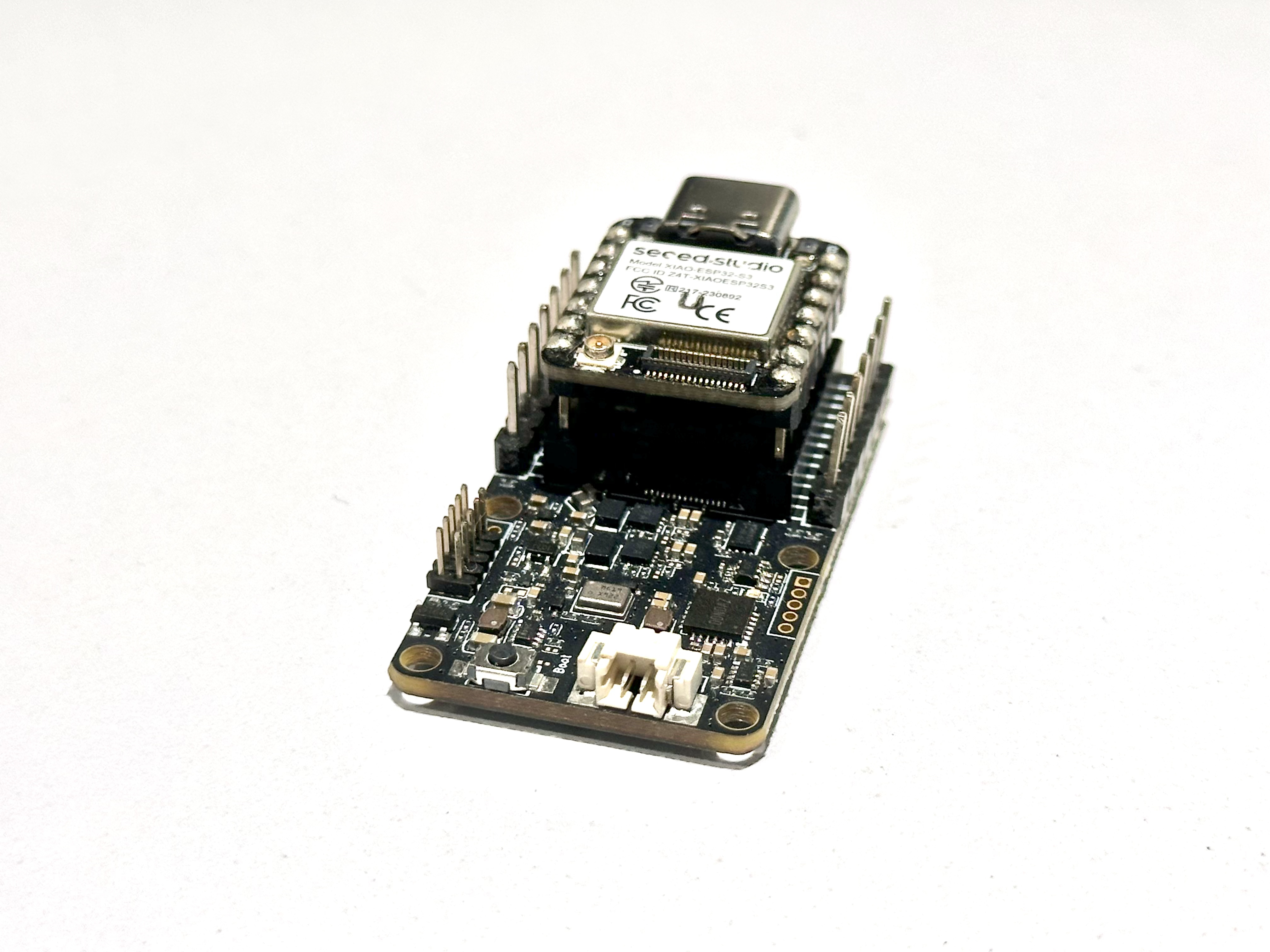
Este dispositivo es compatible con módulos XIAO y puede conectarse a cualquier pin UART disponible en la placa. Es compatible con los módulos ESP32S3, ESP32C6 y ESP32C3, por lo que solo necesitas modificar en el código las definiciones de los pines RX y TX según corresponda. Conecta el dispositivo con la misma orientación que se muestra en las imágenes.
Descargar la biblioteca
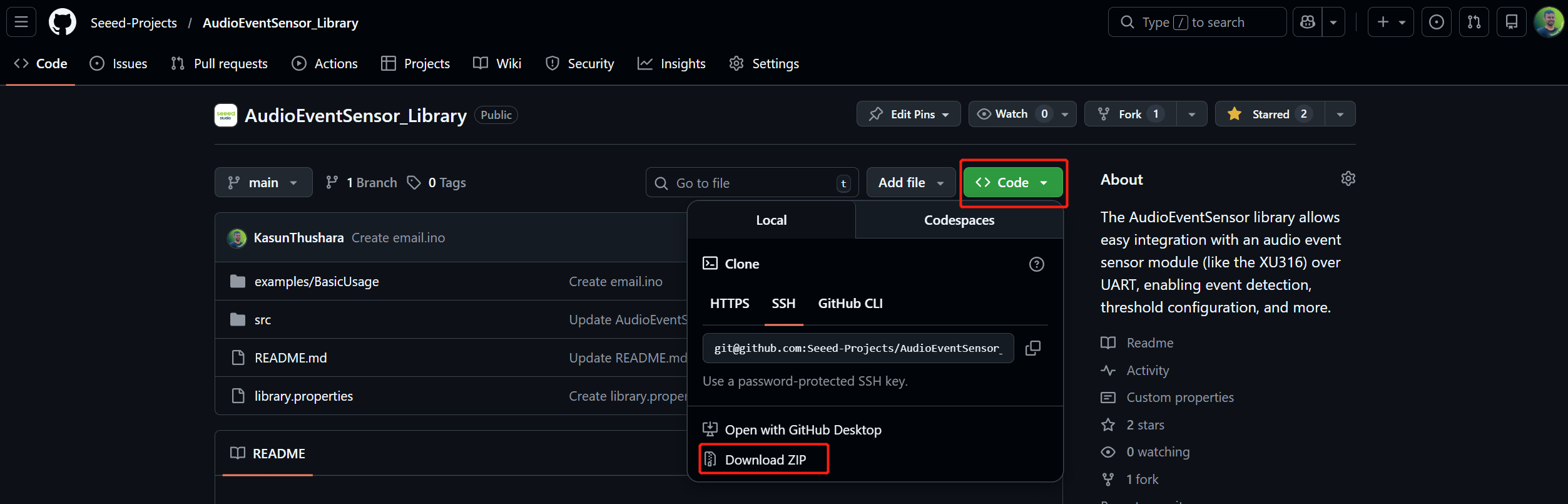
- Ve al repositorio de GitHub Link
- Haz clic en el botón verde "Code"
- Selecciona "Download ZIP"
- Guarda el archivo (por ejemplo, AudioEventSensor-main.zip) en tu ordenador
Instalar la biblioteca en Arduino IDE
Usando Arduino IDE (recomendado)
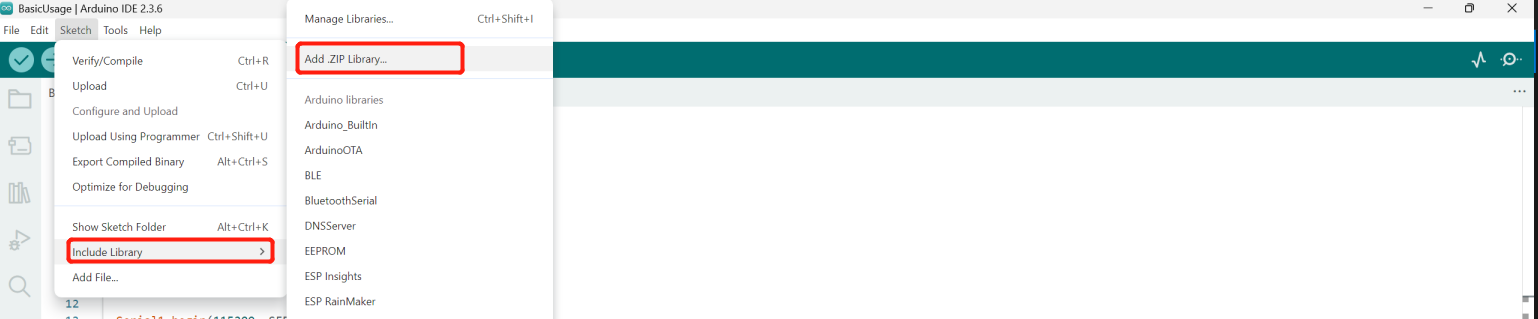
- Abre Arduino IDE
- Ve a Sketch → Include Library → Add .ZIP Library...
- Navega hasta tu archivo ZIP descargado
- Haz clic en "Open" para instalar
Verificar la instalación
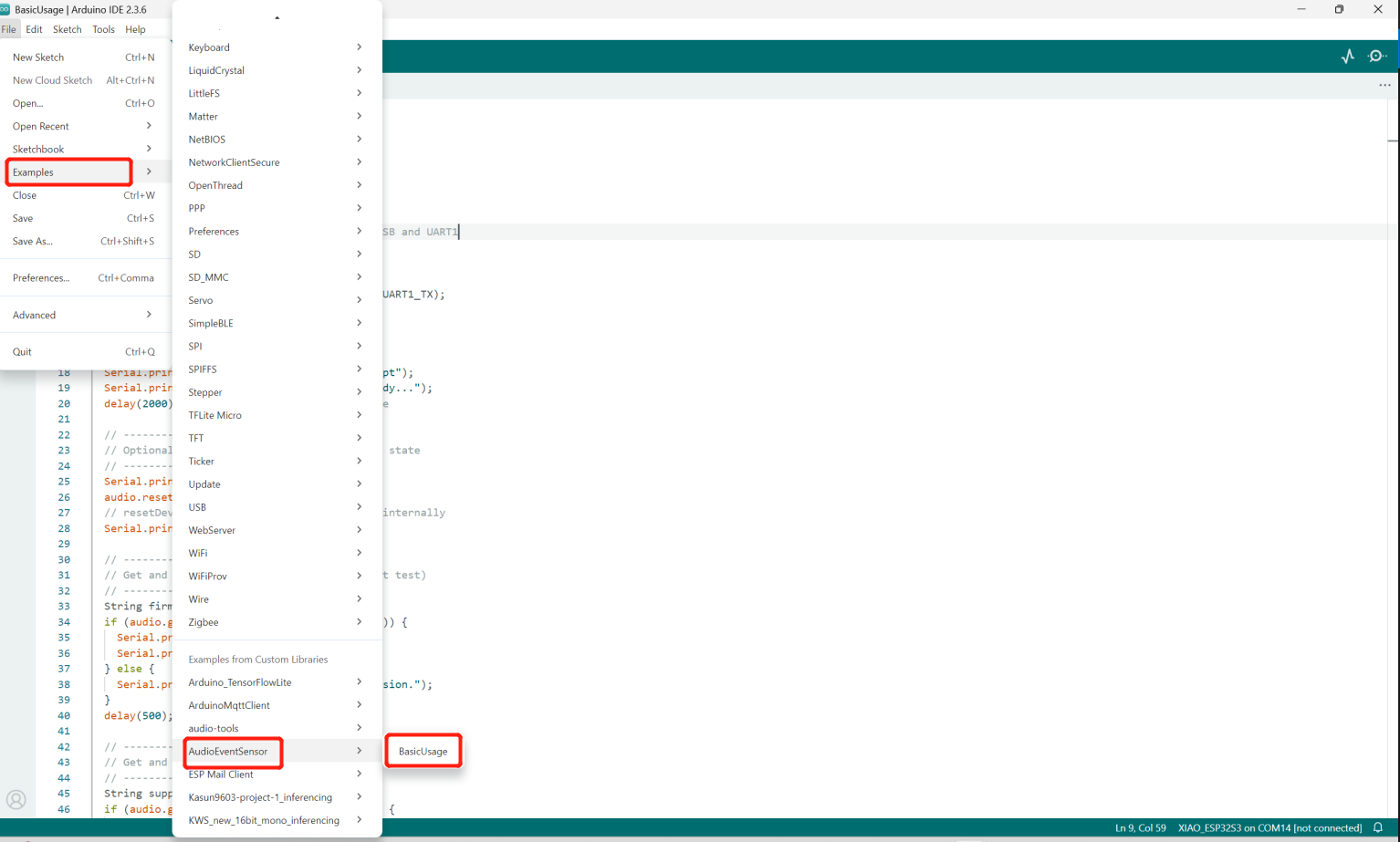
Ve a File → Examples → AudioEventSensor para ver los ejemplos de sketches
Cambiar los pines UART
Según tu placa XIAO, debes cambiar en el código las definiciones de los pines UART. En este ejemplo, usamos la XIAO ESP32S3.
#define UART1_TX 43
#define UART1_RX 44
Uso básico
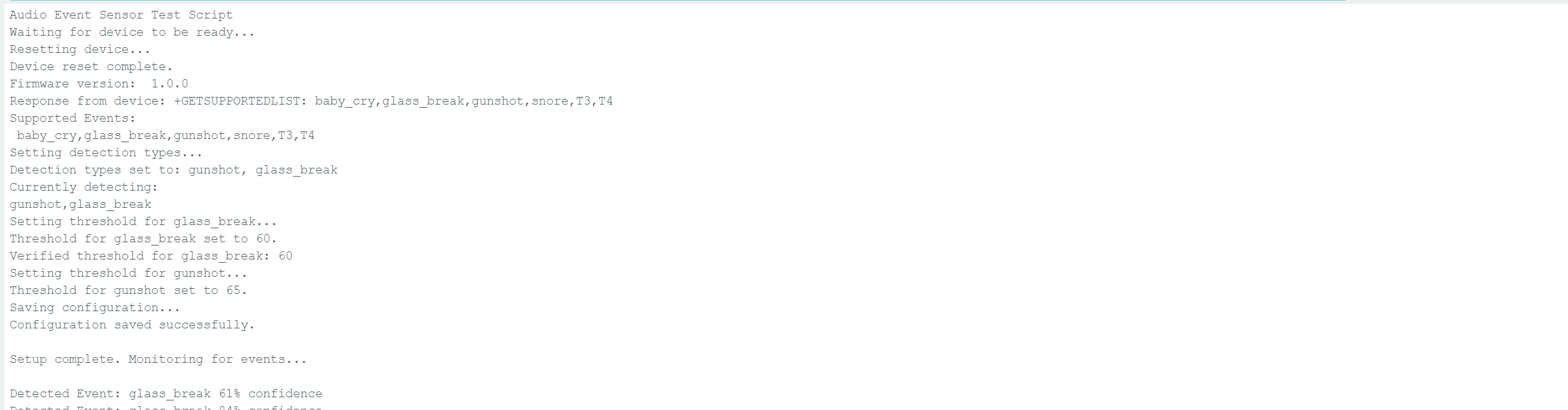
Después de grabar el código en el ESP32, este inicializa un sensor de eventos de audio sobre UART y lo configura para detectar eventos de sonido específicos como disparos y rotura de vidrio. Durante la fase de configuración, reinicia el dispositivo, lee la versión del firmware, obtiene la lista de eventos de sonido compatibles y establece los umbrales de detección para cada evento seleccionado. A continuación, la configuración se guarda para que los ajustes persistan tras el reinicio. En el bucle principal, el programa escucha continuamente los eventos de sonido detectados y los imprime en el monitor serie en tiempo real. Esto permite que el sistema actúe como una solución de monitorización y alerta temprana para eventos acústicos anómalos.
Extra : Notificaciones por correo electrónico
- Primero, necesitas crear una contraseña de aplicación. Consulta esta guía
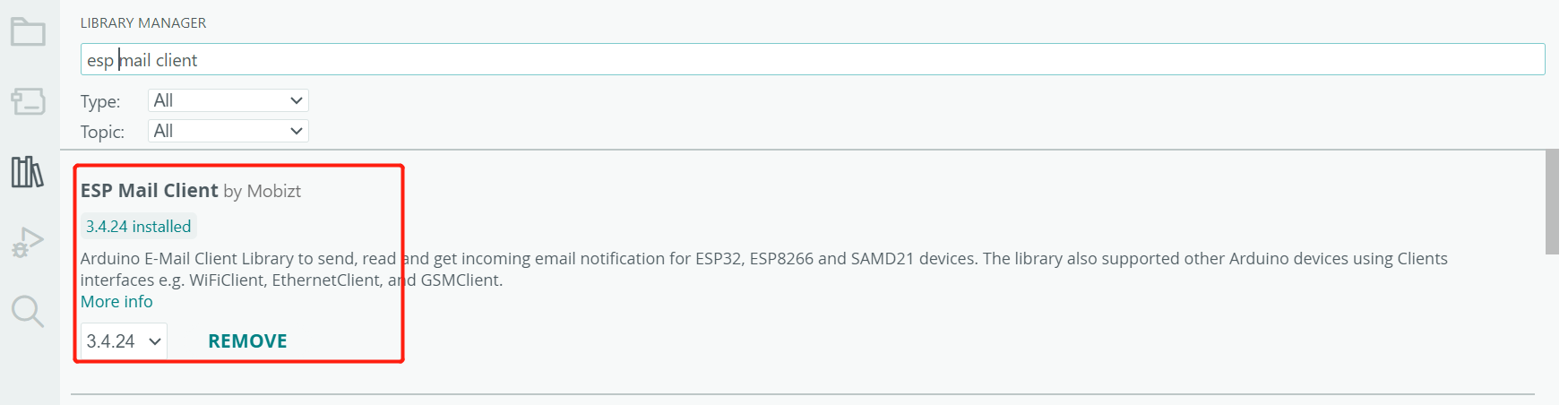
- A continuación, descarga e instala las bibliotecas de soporte necesarias. Instala la biblioteca ESP Mail Client desde el Administrador de Bibliotecas de Arduino.
Código
Email Ino
#include <WiFi.h>
#include <ESP_Mail_Client.h>
#include <AudioEventSensor.h>

// WiFi credentials
#define WIFI_SSID "WIFI-SSID"
#define WIFI_PASSWORD "PASSWORD"

// Email credentials
#define SENDER_EMAIL "[email protected]"
#define SENDER_PASSWORD "abcd efgh ijkh xvyz"
#define RECIPIENT_EMAIL "[email protected]"

#define SMTP_HOST "smtp.gmail.com"
#define SMTP_PORT 587

// UART pins for audio sensor
#define UART1_TX 43
#define UART1_RX 44

// Cooldown period in milliseconds (30 seconds)
#define EVENT_COOLDOWN_MS 30000

// Event tracking structure
struct EventTracker {
  String eventType;
  unsigned long lastTriggerTime;
  int detectionCount;
};

// Track multiple event types
EventTracker events[] = {
  {"baby_cry", 0, 0},
  {"glass_break", 0, 0},
  {"gunshot", 0, 0},
  {"snore", 0, 0},
  {"T3", 0, 0},
  {"T4", 0, 0}
};
const int EVENT_COUNT = 6;

SMTPSession smtp;
AudioEventSensor audio(Serial1);

void setup() {
  Serial.begin(115200);
  delay(1000);

  Serial1.begin(115200, SERIAL_8N1, UART1_RX, UART1_TX);
  audio.begin(115200);

  Serial.println("=================================");
  Serial.println("Audio Event Email Alert System");
  Serial.println("=================================\n");

  // Connect to WiFi
  WiFi.begin(WIFI_SSID, WIFI_PASSWORD);
  Serial.print("Connecting to Wi-Fi");

  while (WiFi.status() != WL_CONNECTED) {
    Serial.print(".");
    delay(300);
  }

  Serial.println();
  Serial.print("Connected with IP: ");
  Serial.println(WiFi.localIP());
  Serial.println();

  // Initialize audio sensor
  Serial.println("Initializing audio sensor...");
  delay(2000);

  audio.resetDevice();
  delay(500);

  // Get firmware version
  String firmwareVersion;
  if (audio.getFirmwareVersion(firmwareVersion)) {
    Serial.print("Firmware version: ");
    Serial.println(firmwareVersion);
  }

  // Configure detection
  Serial.println("Setting detection types...");
  if (audio.setDetectTypes("gunshot,glass_break,baby_cry,snore,T3")) {
    Serial.println("✓ Detection types set: gunshot, glass_break");
  } else {
    Serial.println("✗ Failed to set detection types");
  }
  delay(500);

  // Set thresholds
  audio.setEventThreshold("glass_break", 60);
  audio.setEventThreshold("gunshot", 65);
  delay(500);

  // Save configuration
  audio.saveConfig();
  delay(500);

  Serial.println("\n=================================");
  Serial.println("System ready. Monitoring events...");
  Serial.println("=================================\n");
}

void loop() {
  // Check for audio events
  if (audio.available()) {
    String eventData = audio.readEvent();

    if (eventData.length() > 0) {
      Serial.print("[" + getTimestamp() + "] ");
      Serial.println(eventData);

      // Extract event type from the event string
      String eventType = extractEventType(eventData);
      int confidence = extractConfidence(eventData);

      // Check if we should send an email for this event
      if (shouldSendEmail(eventType)) {
        Serial.println("\n>>> ALERT: New " + eventType + " detected!");
        Serial.println(">>> Sending email notification...");

        sendEventEmail(eventType, confidence);

        Serial.println(">>> Email sent. Cooldown active for " +
                      String(EVENT_COOLDOWN_MS/1000) + " seconds.\n");
      }
    }
  }

  delay(100);
}

// Extract event type from event string (e.g., "glass_break 95% confidence")
String extractEventType(String eventData) {
  int spaceIndex = eventData.indexOf(' ');
  if (spaceIndex > 0) {
    return eventData.substring(0, spaceIndex);
  }
  return eventData;
}

// Extract confidence from event string
int extractConfidence(String eventData) {
  int percentIndex = eventData.indexOf('%');
  if (percentIndex > 0) {
    // Find the last space before %
    int lastSpace = eventData.lastIndexOf(' ', percentIndex);
    if (lastSpace > 0) {
      String confStr = eventData.substring(lastSpace + 1, percentIndex);
      return confStr.toInt();
    }
  }
  return 0;
}

// Check if enough time has passed since last email for this event type
bool shouldSendEmail(String eventType) {
  unsigned long currentTime = millis();

  for (int i = 0; i < EVENT_COUNT; i++) {
    if (events[i].eventType == eventType) {
      // Check if cooldown period has passed
      if (currentTime - events[i].lastTriggerTime >= EVENT_COOLDOWN_MS) {
        // Update last trigger time
        events[i].lastTriggerTime = currentTime;
        events[i].detectionCount++;
        return true;
      } else {
        // Still in cooldown period
        unsigned long timeRemaining = EVENT_COOLDOWN_MS - (currentTime - events[i].lastTriggerTime);
        Serial.println("    ⏳ Cooldown active. " + String(timeRemaining/1000) + "s remaining.");
        return false;
      }
    }
  }

  return false; // Unknown event type
}

// Send email notification
void sendEventEmail(String eventType, int confidence) {
  // Prepare email subject and body
  String subject = "🚨 ALERT: " + formatEventName(eventType) + " Detected!";

  String body = "SECURITY ALERT\n";
  body += "═══════════════════════════════\n\n";
  body += "Event Type: " + formatEventName(eventType) + "\n";
  body += "Confidence: " + String(confidence) + "%\n";
  body += "Time: " + getTimestamp() + "\n";
  body += "Device: ESP32 Audio Sensor\n";
  body += "Location: [Your Location]\n\n";
  body += "═══════════════════════════════\n";
  body += "This is an automated alert from your audio monitoring system.\n";

  // Send the email
  gmail_send(subject, body);
}

// Format event name for display
String formatEventName(String eventType) {
  if (eventType == "glass_break") return "Glass Breaking";
  if (eventType == "gunshot") return "Gunshot";
  if (eventType == "baby_cry") return "Baby Crying";
  if (eventType == "snore") return "Snoring";
  return eventType;
}

// Get formatted timestamp
String getTimestamp() {
  unsigned long seconds = millis() / 1000;
  unsigned long minutes = seconds / 60;
  unsigned long hours = minutes / 60;

  seconds = seconds % 60;
  minutes = minutes % 60;
  hours = hours % 24;

  char timestamp[12];
  sprintf(timestamp, "%02lu:%02lu:%02lu", hours, minutes, seconds);
  return String(timestamp);
}

// Gmail send function
void gmail_send(String subject, String textMsg) {
  MailClient.networkReconnect(true);

  smtp.debug(0); // Set to 1 for debug output
  smtp.callback(smtpCallback);

  Session_Config config;
  config.server.host_name = SMTP_HOST;
  config.server.port = SMTP_PORT;
  config.login.email = SENDER_EMAIL;
  config.login.password = SENDER_PASSWORD;
  config.login.user_domain = F("127.0.0.1");
  config.time.ntp_server = F("pool.ntp.org,time.nist.gov");
  config.time.gmt_offset = 3;
  config.time.day_light_offset = 0;

  SMTP_Message message;
  message.sender.name = F("ESP32 Security System");
  message.sender.email = SENDER_EMAIL;
  message.subject = subject;
  message.addRecipient(F("Security Admin"), RECIPIENT_EMAIL);
  message.text.content = textMsg;
  message.text.transfer_encoding = "base64";
  message.text.charSet = F("utf-8");
  message.priority = esp_mail_smtp_priority::esp_mail_smtp_priority_high;
  message.addHeader(F("Message-ID: <[email protected]>"));

  if (!smtp.connect(&config)) {
    Serial.printf("✗ Connection error, Status Code: %d, Error Code: %d, Reason: %s\n",
                  smtp.statusCode(), smtp.errorCode(), smtp.errorReason().c_str());
    return;
  }

  if (!MailClient.sendMail(&smtp, &message)) {
    Serial.printf("✗ Send error, Status Code: %d, Error Code: %d, Reason: %s\n",
                  smtp.statusCode(), smtp.errorCode(), smtp.errorReason().c_str());
  } else {
    Serial.println("✓ Email sent successfully!");
  }
}

void smtpCallback(SMTP_Status status) {
  Serial.println(status.info());

  if (status.success()) {
    Serial.println("────────────────────");
    Serial.printf("✓ Message sent: %d\n", status.completedCount());
    Serial.printf("✗ Message failed: %d\n", status.failedCount());
    Serial.println("────────────────────\n");
    smtp.sendingResult.clear();
  }
}
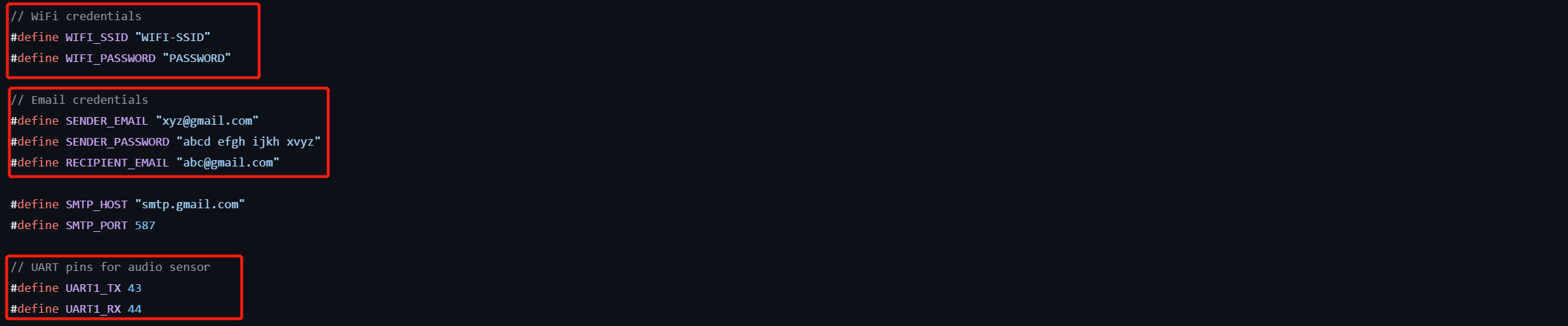
Luego, reemplaza los siguientes parámetros en el código con tus propios valores: la dirección de correo electrónico del remitente, los pines UART, la contraseña de la aplicación, la dirección de correo electrónico del destinatario y el SSID y la contraseña de tu red Wi‑Fi.
Soporte técnico y debate sobre el producto
Gracias por elegir nuestros productos. Estamos aquí para ofrecerte distintos tipos de soporte y asegurarnos de que tu experiencia con nuestros productos sea lo más fluida posible. Ofrecemos varios canales de comunicación para adaptarnos a diferentes preferencias y necesidades.