Bluetooth LE para XIAO nRF54LM20A Sense
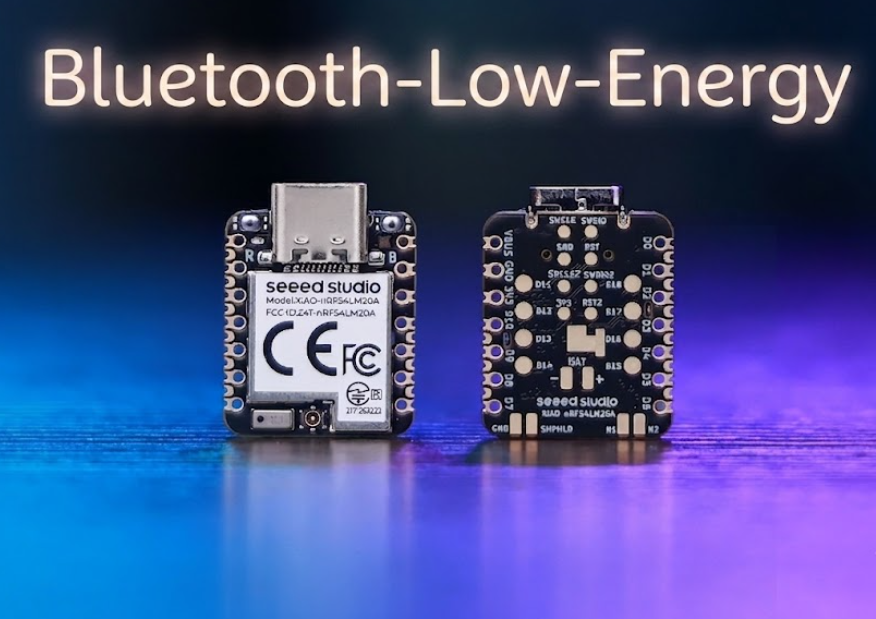
Bluetooth Low Energy (BLE) es un estándar de comunicación inalámbrica de bajo consumo introducido en Bluetooth 4.0. Diseñado para la transmisión intermitente de pequeños datos, permite la conectividad inalámbrica dentro de decenas de metros mientras mantiene un consumo medio de corriente ultrabajo a nivel de microamperios. Se aplica ampliamente en dispositivos wearables, sensores de hogar inteligente, posicionamiento en interiores y escenarios de IoT industrial.
Impulsada por el SoC nRF54LM20A, la Serie XIAO nRF54LM20A es compatible con Bluetooth LE, Matter, Thread, Zigbee y protocolos propietarios de 2,4 GHz, ofreciendo una tasa de datos máxima de 4 Mbps ideal para escenarios de baja latencia. También incorpora compatibilidad con Bluetooth Channel Sounding y Bluetooth Mesh. Este artículo ilustra su funcionalidad BLE mediante dos ejemplos prácticos: transmisión básica de Beacon de difusión y una conexión de servicio de botón LED BLE (LBS) entre dispositivos Central y Peripheral.
- Este tutorial se basa en el sistema de compilación PlatformIO y en Zephyr RTOS. Si no estás familiarizado con la creación de un proyecto PlatformIO para el XIAO nRF54LM20A, consulta Getting Started with Seeed Studio XIAO nRF54LM20A.
- Si deseas obtener más información sobre el SoC nRF54LM20A y BLE, visita los siguientes enlaces: nRF54LM20A SoC Introduction y Bluetooth-Low-Energy for Nordic
Preparación de hardware
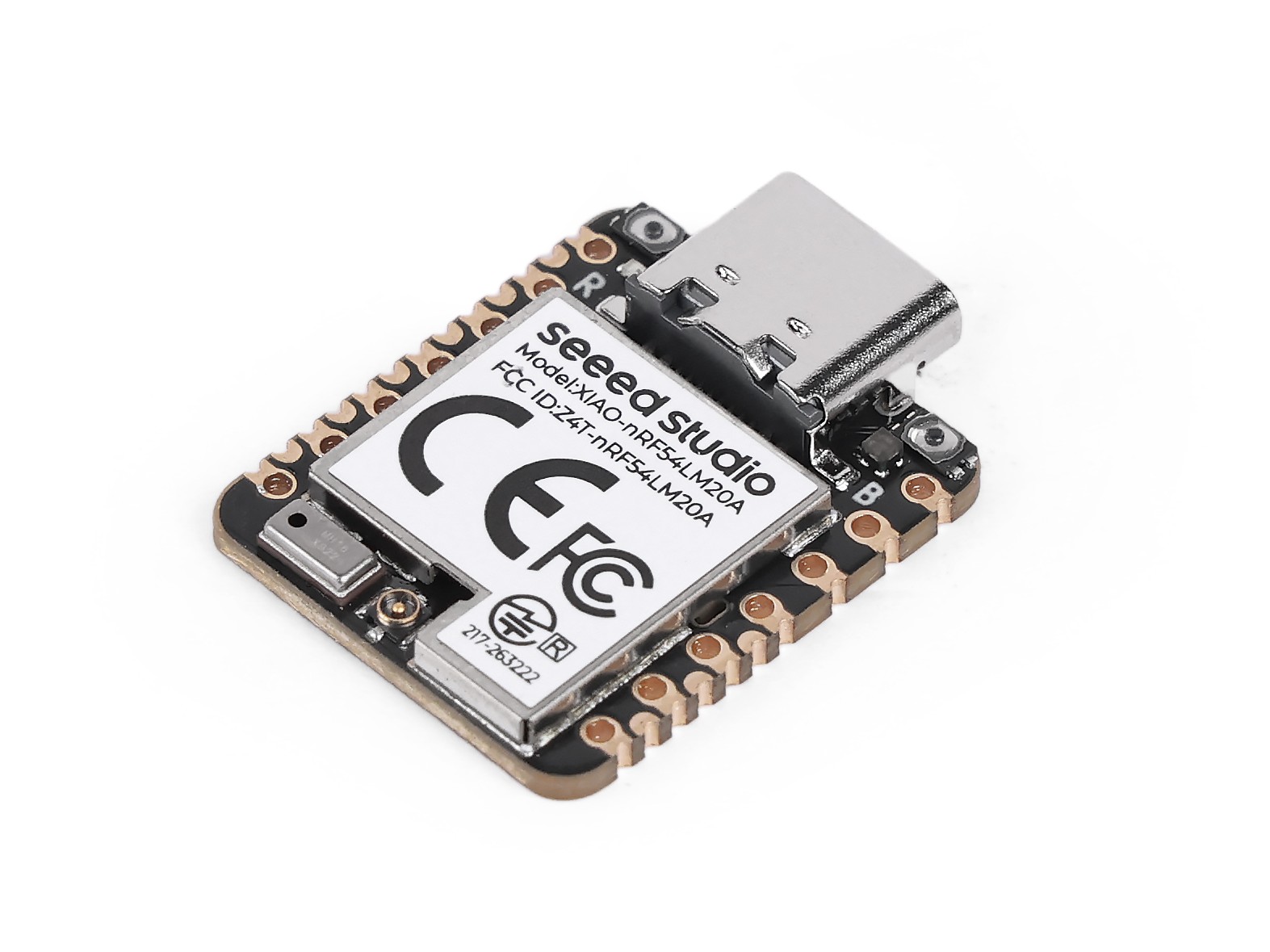
Antes de comenzar, prepara al menos dos placas XIAO nRF54LM20A Sense si planeas ejecutar el ejemplo BLE LBS.
| Seeed Studio XIAO nRF54LM20A Sense |
|---|
 |
Antena Bluetooth
Esta placa utiliza una antena Bluetooth externa. Para garantizar una mejor calidad de la señal Bluetooth y mejorar tu experiencia de uso de Bluetooth, se recomienda instalar una antena Bluetooth. El método de conexión se muestra a continuación:
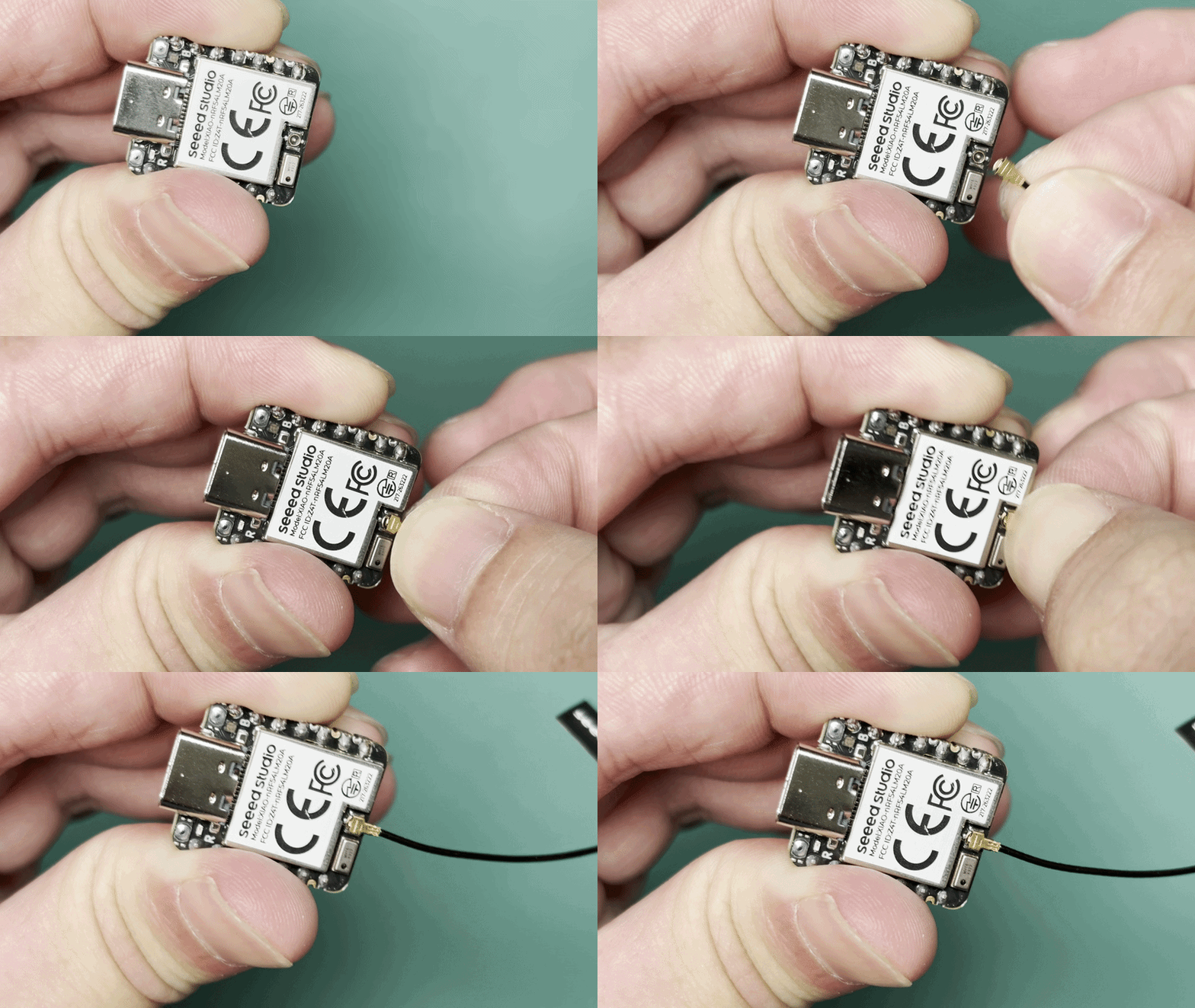
Instalación de la antena
El paquete Seeed Studio XIAO nRF54LM20A incluye una antena dedicada de 2,4 GHz. Para un rendimiento Bluetooth óptimo, conecta la antena suministrada al conector de antena integrado en la placa.
| Antena FPC de 2,4GHz A-04 para XIAO nRF54 Serie |
|---|
 |
Aplicación
Esta sección presenta las funciones principales de BLE y el método de uso de BLE en XIAO nRF54LM20A Sense mediante casos prácticos.
Beacon BLE
Este ejemplo implementa un Beacon BLE en el XIAO nRF54LM20A. Tras el arranque, el dispositivo transmite continuamente paquetes de advertising que contienen datos específicos del fabricante (Manufacturer Specific Data). El paquete incluye un contador que se incrementa una vez por segundo, lo que permite supervisar los cambios de datos en tiempo real utilizando nRF Connect.
Software
- Las configuraciones relevantes del device tree deben habilitarse en
app.overlaypara cambiar el controlador BLE a la implementación nativa de Zephyr.
/* Enable Zephyr native BLE controller (LL SW Split) */
&bt_hci_controller {
        status = "okay";
};

/ {
        chosen {
                zephyr,bt-hci = &bt_hci_controller;
        };
};
- Habilita las configuraciones de Bluetooth relevantes en
prj.conf, establece el modo de salida de registro y cambia el nombre del dispositivo Bluetooth a XIAO-Beacon.
# GPIO
CONFIG_GPIO=y
# XIAO nRF54LM20A can fault early with the MPU enabled in this toolchain/board package.
CONFIG_ARM_MPU=n
# Regulator (for power_en)
CONFIG_REGULATOR=y
# Logging
CONFIG_LOG=y
# UART for console logging
CONFIG_SERIAL=y
CONFIG_UART_ASYNC_API=y
CONFIG_UART_20_ASYNC=y
CONFIG_UART_21_ASYNC=y
CONFIG_UART_NRFX_UARTE_ENHANCED_RX=y
# BLE
CONFIG_BT=y
CONFIG_BT_PERIPHERAL=y
CONFIG_BT_DEVICE_NAME="XIAO-Beacon"
# Avoid GCC 8.2 rejecting the controller's optimized assert inline asm path.
CONFIG_BT_CTLR_ASSERT_OPTIMIZE_FOR_SIZE=n
CONFIG_BT_CTLR_ASSERT_DEBUG=n
CONFIG_BT_CTLR_ASSERT_OVERHEAD_START=n
# Disable auto-procedures to avoid LL Procedure Collision on nRF54L
CONFIG_BT_AUTO_PHY_UPDATE=n
CONFIG_BT_DATA_LEN_UPDATE=n
# Memory
CONFIG_HEAP_MEM_POOL_SIZE=8192
# System workqueue stack
CONFIG_SYSTEM_WORKQUEUE_STACK_SIZE=2048
# Assert level
CONFIG_ASSERT=y
- Implementa el formato de los datos de advertising y la lógica de actualización en
main.c.
main.c
#include <stdio.h>

#include <zephyr/kernel.h>
#include <zephyr/device.h>
#include <zephyr/drivers/gpio.h>
#include <zephyr/drivers/regulator.h>
#include <zephyr/bluetooth/bluetooth.h>
#include <zephyr/bluetooth/hci.h>
#include <zephyr/logging/log.h>

LOG_MODULE_REGISTER(ble_beacon, LOG_LEVEL_INF);

/* Manufacturer Data configuration */
#define MANUF_COMPANY_ID    0x0059
#define MANUF_DATA_SIZE     8

static uint32_t manufacturer_counter;

static const uint8_t adv_flags[] __aligned(4) = {
    BT_LE_AD_GENERAL | BT_LE_AD_NO_BREDR,
};

static const uint8_t adv_name[] __aligned(4) = CONFIG_BT_DEVICE_NAME;

static uint8_t manuf_data[MANUF_DATA_SIZE] __aligned(4);

static const struct bt_data ad[] __aligned(4) = {
    BT_DATA(BT_DATA_FLAGS, adv_flags, sizeof(adv_flags)),
    BT_DATA(BT_DATA_NAME_COMPLETE, adv_name, sizeof(adv_name) - 1),
    BT_DATA(BT_DATA_MANUFACTURER_DATA, manuf_data, sizeof(manuf_data)),
};

/* Power enable regulator (GPIO1_12) - must be enabled before BLE init */
static const struct device *const power_en_dev =
    DEVICE_DT_GET(DT_NODELABEL(power_en));

static void adv_update_work_handler(struct k_work *work);

static K_WORK_DELAYABLE_DEFINE(adv_update_work, adv_update_work_handler);

static void fill_manuf_data(uint32_t counter)
{
    /* [Company ID (2B)][Counter (4B)][Custom (2B)] */
    manuf_data[0] = MANUF_COMPANY_ID & 0xFF;
    manuf_data[1] = (MANUF_COMPANY_ID >> 8) & 0xFF;
    manuf_data[2] = (counter >> 0) & 0xFF;
    manuf_data[3] = (counter >> 8) & 0xFF;
    manuf_data[4] = (counter >> 16) & 0xFF;
    manuf_data[5] = (counter >> 24) & 0xFF;
    manuf_data[6] = 0xAA;
    manuf_data[7] = 0xBB;
}

static int enable_power(void)
{
    int ret;

    if (!device_is_ready(power_en_dev)) {
        LOG_ERR("power_en regulator is not ready");
        return -ENODEV;
    }

    ret = regulator_enable(power_en_dev);
    if (ret < 0 && ret != -EALREADY) {
        LOG_ERR("Failed to enable power_en: %d", ret);
        return ret;
    }

    k_sleep(K_MSEC(20));
    LOG_INF("Power rail enabled");
    return 0;
}

static void adv_update_work_handler(struct k_work *work)
{
    int err;

    manufacturer_counter++;
    fill_manuf_data(manufacturer_counter);

    err = bt_le_adv_update_data(ad, ARRAY_SIZE(ad), NULL, 0);
    if (err < 0) {
        LOG_ERR("Failed to update advertising data (err %d)", err);
    } else {
        LOG_INF("Manufacturer counter: %u", manufacturer_counter);
    }

    k_work_schedule(&adv_update_work, K_SECONDS(1));
}

int main(void)
{
    int err;

    LOG_INF("BLE Manufacturer Data Beacon");

    /* Enable board power rail before BLE initialization */
    err = enable_power();
    if (err < 0) {
        LOG_ERR("Power enable failed (err %d)", err);
        return err;
    }

    LOG_INF("Initializing BLE...");

    err = bt_enable(NULL);
    if (err < 0) {
        LOG_ERR("Bluetooth enable failed (err %d)", err);
        return err;
    }

    LOG_INF("BLE initialized");

    /* Initial advertising data with counter = 0 */
    fill_manuf_data(0);

    err = bt_le_adv_start(BT_LE_ADV_NCONN, ad, ARRAY_SIZE(ad), NULL, 0);
    if (err < 0) {
        LOG_ERR("Advertising failed to start (err %d)", err);
        return err;
    }

    LOG_INF("BLE advertising started");

    /* Schedule counter update after 1 second */
    k_work_schedule(&adv_update_work, K_SECONDS(1));

    for (;;) {
        k_sleep(K_FOREVER);
    }

    return 0;
}
Resultado
- Después de flashear el firmware, instala la app nRF Connect para escanear y detectar dispositivos BLE.
Mientras tanto, puedes buscar y descargar la app nRF Connect en las principales tiendas de aplicaciones móviles, lo que permite que tu teléfono escanee y se conecte a dispositivos Bluetooth.
- Android: nRF Connect
- IOS: nRF Connect
- Después de instalar el software, escanea el dispositivo Bluetooth llamado XIAO-Beacon y comprueba los datos de fabricante recibidos (Manufacturer Data). Al mismo tiempo, abre el puerto serie para ver los registros de salida.
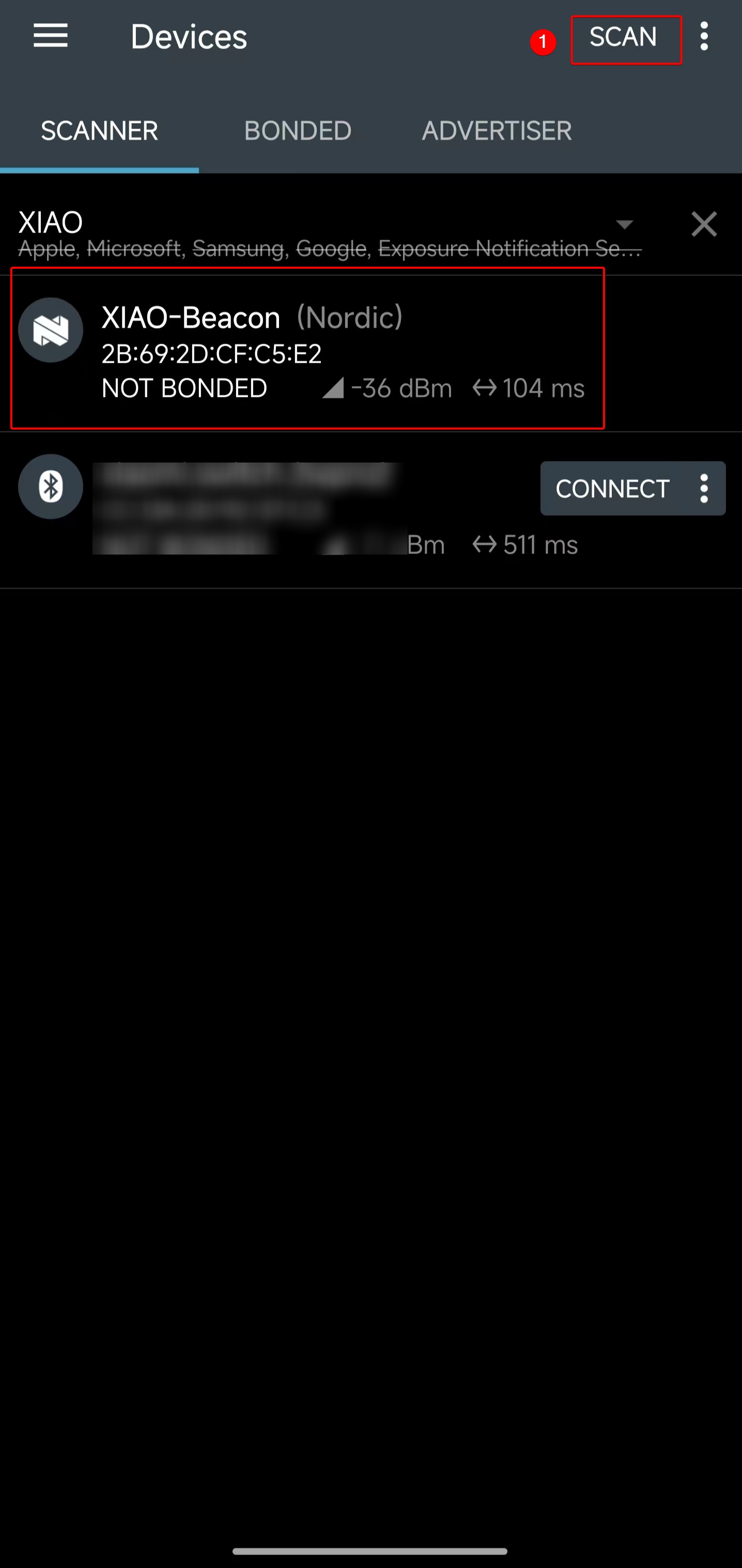 | 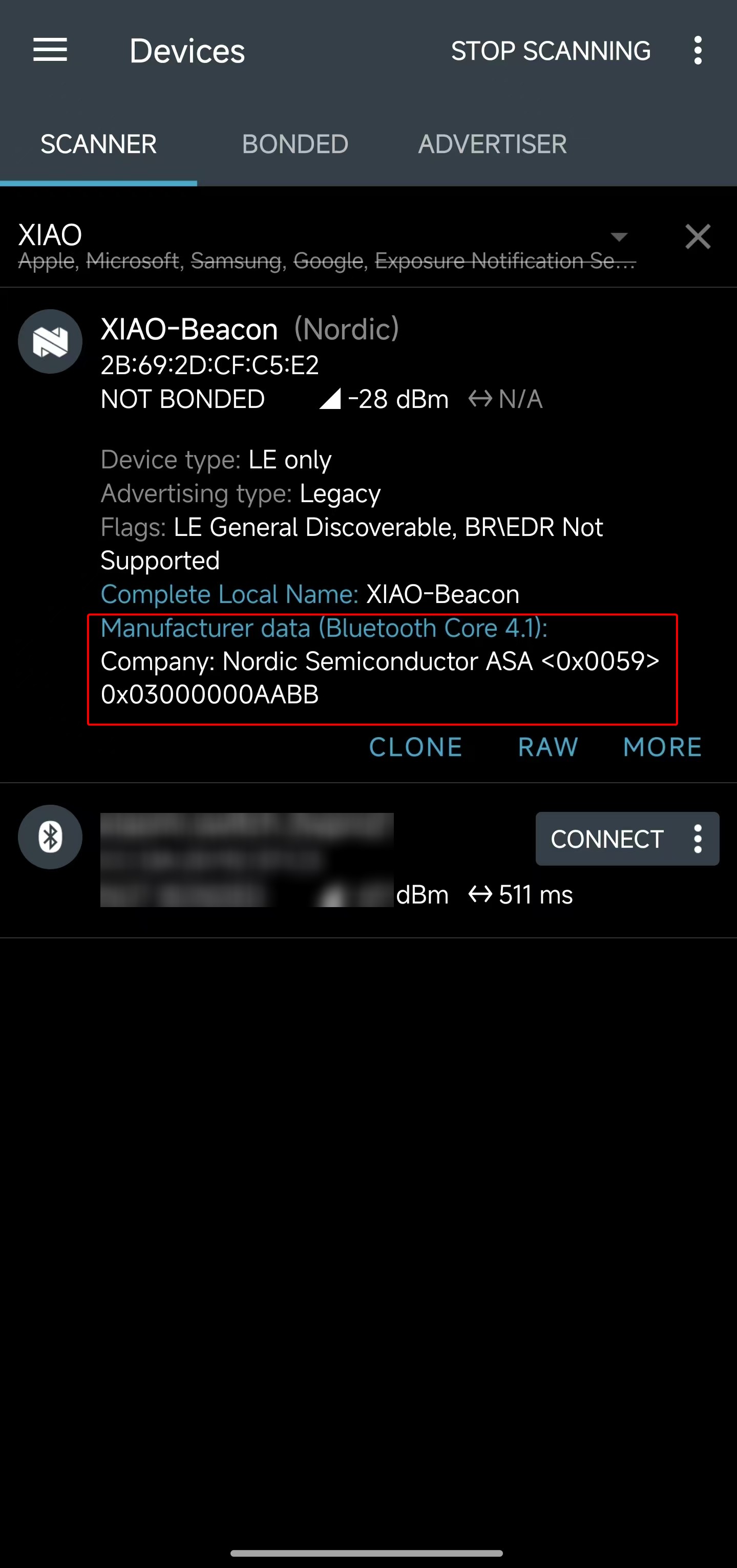 |
- Los datos de fabricante obtenidos (Manufacturer Data) son el valor hexadecimal
<0x0059> 0x03000000AABB. Al comprobar el código del programa, el segmento0x03000000indica que el valor actual del contador es 3.
#define MANUF_COMPANY_ID    0x0059
static uint32_t manufacturer_counter;
...
manuf_data[0] = MANUF_COMPANY_ID & 0xFF;
manuf_data[1] = (MANUF_COMPANY_ID >> 8) & 0xFF;
manuf_data[2] = (manufacturer_counter >> 0) & 0xFF;
manuf_data[3] = (manufacturer_counter >> 8) & 0xFF;
manuf_data[4] = (manufacturer_counter >> 16) & 0xFF;
manuf_data[5] = (manufacturer_counter >> 24) & 0xFF;
manuf_data[6] = 0xAA;
manuf_data[7] = 0xBB;
- Abre la herramienta de puerto serie y comprueba que los valores del contador se imprimen línea por línea, alcanzando el conteo actual el valor 3.
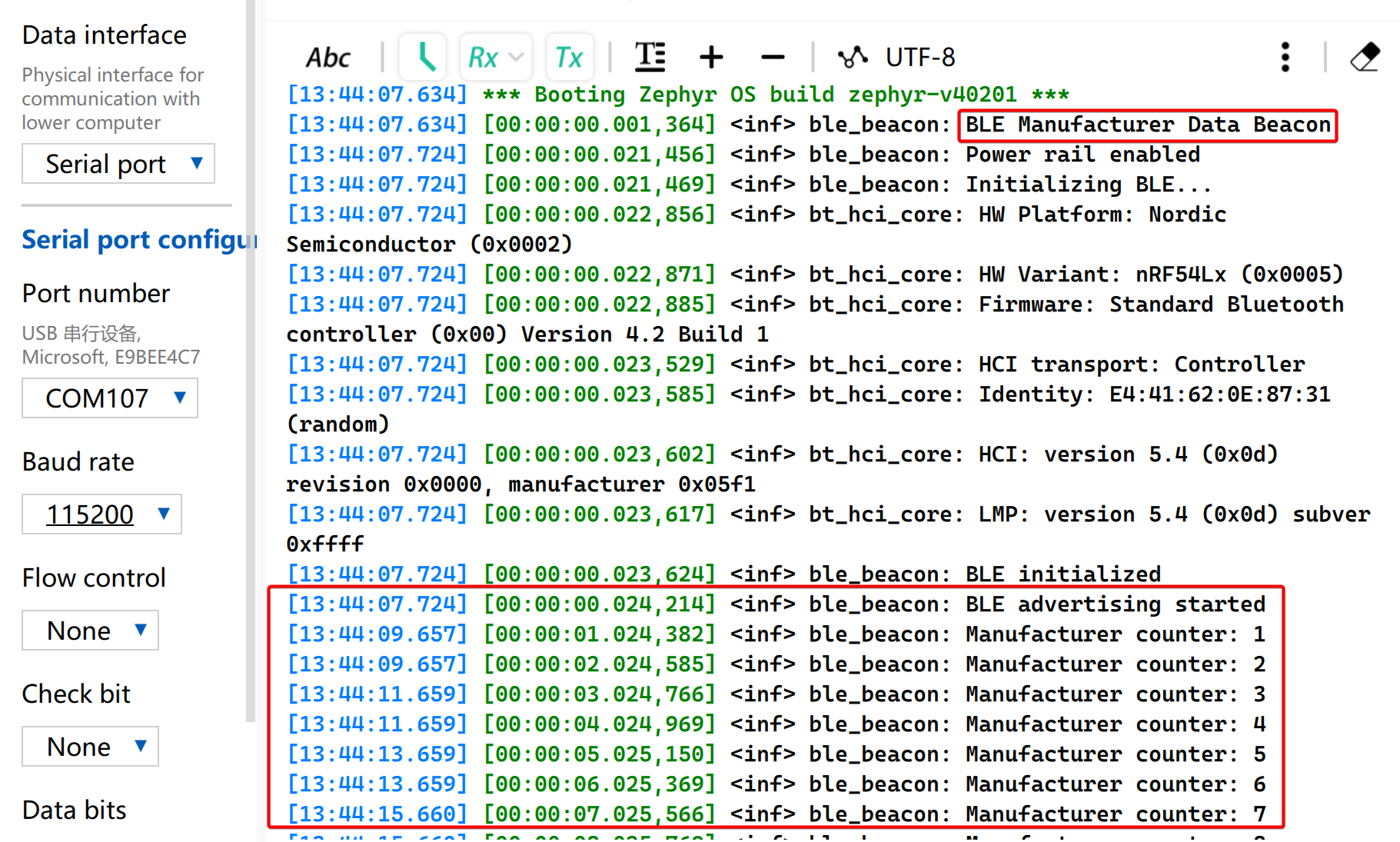
A partir de los resultados anteriores, se puede comprender claramente el proceso de transmisión de paquetes de publicidad BLE personalizados en XIAO nRF54LM20A Sense, lo que facilita una investigación más profunda sobre las características de funcionamiento de BLE. En escenarios de aplicación específicos, se pueden adoptar datos de publicidad para juzgar condiciones de disparo sin establecer conexiones reales.
BLE LBS
Este ejemplo utiliza dos placas XIAO nRF54 para implementar un servicio BLE LED Button Service (LBS). Una placa actúa como Periférico BLE y anuncia un servicio LBS personalizado. La otra actúa como Central BLE, escanea el servicio, se conecta automáticamente y controla el LED del Periférico mediante una característica de escritura GATT (GATT Write Characteristic).
No se requiere ningún archivo app.overlay adicional porque la definición de la placa ya proporciona los alias led0 y sw0 utilizados por este ejemplo.
Software
BLE Central
- Configura el proyecto en
CMakeLists.txt.
# SPDX-License-Identifier: Apache-2.0

cmake_minimum_required(VERSION 3.13.1)
find_package(Zephyr REQUIRED HINTS $ENV{ZEPHYR_BASE})
project(ble-lbs-min-central)

target_sources(app PRIVATE src/main.c)
- Habilita las configuraciones relacionadas con Bluetooth en
prj.conf
CONFIG_GPIO=y
CONFIG_SERIAL=y
CONFIG_CONSOLE=y
CONFIG_UART_CONSOLE=y
CONFIG_PRINTK=y

CONFIG_LOG=y
CONFIG_LOG_BACKEND_UART=y
CONFIG_LOG_BUFFER_SIZE=2048

CONFIG_BT=y
CONFIG_BT_CENTRAL=y
CONFIG_BT_OBSERVER=y
CONFIG_BT_GATT_CLIENT=y
CONFIG_BT_CTLR_TX_PWR_PLUS_8=y
CONFIG_BT_DEVICE_NAME="zephyr_ble_lbs_central"

CONFIG_BT_BUF_ACL_RX_SIZE=255
CONFIG_BT_BUF_ACL_TX_SIZE=251
CONFIG_BT_BUF_CMD_TX_SIZE=255
CONFIG_BT_BUF_EVT_DISCARDABLE_SIZE=255
CONFIG_BT_L2CAP_TX_MTU=247

CONFIG_MAIN_STACK_SIZE=4096
CONFIG_SYSTEM_WORKQUEUE_STACK_SIZE=2048
- Implementa la lógica de la aplicación BLE en
main.c.
main.c
#include <zephyr/kernel.h>
#include <zephyr/drivers/gpio.h>
#include <zephyr/logging/log.h>
#include <zephyr/sys/atomic.h>

#include <zephyr/bluetooth/bluetooth.h>
#include <zephyr/bluetooth/conn.h>
#include <zephyr/bluetooth/hci.h>
#include <zephyr/bluetooth/uuid.h>
#include <zephyr/bluetooth/gatt.h>

#include <string.h>

LOG_MODULE_REGISTER(app, LOG_LEVEL_INF);

#define BT_UUID_LBS_MIN_VAL BT_UUID_128_ENCODE(0x8e7f1a23, 0x4b2c, 0x11ee, 0xbe56, 0x0242ac120002)
#define BT_UUID_LBS_MIN BT_UUID_DECLARE_128(BT_UUID_LBS_MIN_VAL)

#define BT_UUID_LBS_MIN_WRITE_VAL \
	BT_UUID_128_ENCODE(0x8e7f1a24, 0x4b2c, 0x11ee, 0xbe56, 0x0242ac120002)
#define BT_UUID_LBS_MIN_WRITE BT_UUID_DECLARE_128(BT_UUID_LBS_MIN_WRITE_VAL)

#define LED0_NODE DT_ALIAS(led0)
#define SW0_NODE DT_ALIAS(sw0)

static const struct gpio_dt_spec led0 = GPIO_DT_SPEC_GET_OR(LED0_NODE, gpios, {0});
static const struct gpio_dt_spec sw0 = GPIO_DT_SPEC_GET_OR(SW0_NODE, gpios, {0});

static struct bt_conn *default_conn;
static struct bt_conn *discover_conn;
static struct bt_gatt_discover_params discover_params;
static struct bt_gatt_write_params write_params;
static struct gpio_callback sw0_cb;
static struct k_work button_work;
static struct k_work_delayable debounce_work;
static struct k_work_delayable blink_work;
static atomic_t write_busy;

static uint16_t svc_start_handle;
static uint16_t svc_end_handle;
static uint16_t write_handle;
static uint8_t remote_led_state;
static uint8_t blink_led_state;
static bool blink_active;

static bool gpio_ready(const struct gpio_dt_spec *spec)
{
	return spec->port != NULL && device_is_ready(spec->port);
}

static void status_led_apply(uint8_t value)
{
	if (!gpio_ready(&led0)) {
		return;
	}

	(void)gpio_pin_set_dt(&led0, value ? 1 : 0);
}

static void blink_handler(struct k_work *work)
{
	ARG_UNUSED(work);

	if (!blink_active) {
		return;
	}

	blink_led_state = blink_led_state ? 0U : 1U;
	status_led_apply(blink_led_state);
	k_work_reschedule(&blink_work, K_MSEC(500));
}

static int init_status_led(void)
{
	int err;

	k_work_init_delayable(&blink_work, blink_handler);

	if (!gpio_ready(&led0)) {
		return -ENODEV;
	}

	err = gpio_pin_configure_dt(&led0, GPIO_OUTPUT_INACTIVE);
	if (err) {
		return err;
	}

	status_led_apply(0U);
	return 0;
}

static void start_blink(void)
{
	if (!gpio_ready(&led0)) {
		return;
	}

	blink_active = true;
	k_work_reschedule(&blink_work, K_NO_WAIT);
}

static void stop_blink(void)
{
	blink_active = false;
	(void)k_work_cancel_delayable(&blink_work);
	blink_led_state = 0U;
	status_led_apply(0U);
}

static bool ad_has_uuid(struct bt_data *data, void *user_data)
{
	bool *found = user_data;
	struct bt_uuid_128 uuid;

	if (data->type != BT_DATA_UUID128_ALL && data->type != BT_DATA_UUID128_SOME) {
		return true;
	}

	if ((data->data_len % 16U) != 0U) {
		return true;
	}

	for (size_t i = 0; i < data->data_len; i += 16U) {
		memcpy(uuid.val, &data->data[i], 16U);
		uuid.uuid.type = BT_UUID_TYPE_128;
		if (bt_uuid_cmp(&uuid.uuid, BT_UUID_LBS_MIN) == 0) {
			*found = true;
			return false;
		}
	}

	return true;
}

static void start_scan(void);

static void device_found(const bt_addr_le_t *addr, int8_t rssi, uint8_t type,
			 struct net_buf_simple *ad)
{
	bool found = false;
	int err;

	ARG_UNUSED(rssi);

	if (default_conn != NULL) {
		return;
	}

	if (type != BT_GAP_ADV_TYPE_ADV_IND &&
	    type != BT_GAP_ADV_TYPE_ADV_DIRECT_IND &&
	    type != BT_GAP_ADV_TYPE_ADV_SCAN_IND &&
	    type != BT_GAP_ADV_TYPE_SCAN_RSP) {
		return;
	}

	bt_data_parse(ad, ad_has_uuid, &found);
	if (!found) {
		return;
	}

	{
		char addr_str[BT_ADDR_LE_STR_LEN];

		bt_addr_le_to_str(addr, addr_str, sizeof(addr_str));
		LOG_INF("LBS adv matched from %s (type=0x%02x)", addr_str, type);
	}

	err = bt_le_scan_stop();
	if (err) {
		LOG_WRN("scan stop failed: %d", err);
	}

	err = bt_conn_le_create(addr, BT_CONN_LE_CREATE_CONN, BT_LE_CONN_PARAM_DEFAULT,
				&default_conn);
	if (err) {
		LOG_ERR("create conn failed: %d", err);
		start_scan();
	} else {
		LOG_INF("connecting to matching peripheral");
	}
}

static void start_scan(void)
{
	int err = bt_le_scan_start(BT_LE_SCAN_ACTIVE, device_found);

	if (err) {
		LOG_ERR("scan start failed: %d", err);
		return;
	}

	LOG_INF("scanning");
}

static uint8_t discover_func(struct bt_conn *conn, const struct bt_gatt_attr *attr,
			     struct bt_gatt_discover_params *params)
{
	if (attr == NULL) {
		LOG_INF("discover complete (attr=NULL) write_handle=0x%04x", write_handle);
		memset(params, 0, sizeof(*params));
		if (discover_conn) {
			bt_conn_unref(discover_conn);
			discover_conn = NULL;
		}
		return BT_GATT_ITER_STOP;
	}

	if (params->type == BT_GATT_DISCOVER_PRIMARY) {
		const struct bt_gatt_service_val *svc = attr->user_data;

		svc_start_handle = attr->handle;
		svc_end_handle = svc->end_handle;
		LOG_INF("primary svc found: start=0x%04x end=0x%04x",
			svc_start_handle, svc_end_handle);

		memset(params, 0, sizeof(*params));
		/* Discover all characteristics in the service, then match the write
		 * characteristic in code. Filtering by the 128-bit UUID at ATT level
		 * can return nothing even when the characteristic exists.
		 */
		params->uuid = NULL;
		params->func = discover_func;
		params->start_handle = svc_start_handle + 1U;
		params->end_handle = svc_end_handle;
		params->type = BT_GATT_DISCOVER_CHARACTERISTIC;

		if (bt_gatt_discover(conn, params)) {
			LOG_ERR("characteristic discover failed");
		}

		return BT_GATT_ITER_STOP;
	}

	if (params->type == BT_GATT_DISCOVER_CHARACTERISTIC) {
		const struct bt_gatt_chrc *chrc = attr->user_data;
		char uuid_str[37];

		bt_uuid_to_str(chrc->uuid, uuid_str, sizeof(uuid_str));
		LOG_INF("chrc: value_handle=0x%04x props=0x%02x uuid=%s",
			chrc->value_handle, chrc->properties, uuid_str);

		if (bt_uuid_cmp(chrc->uuid, BT_UUID_LBS_MIN_WRITE) == 0) {
			write_handle = chrc->value_handle;
			LOG_INF("write handle found: 0x%04x", write_handle);
			return BT_GATT_ITER_STOP;
		}
	}

	return BT_GATT_ITER_CONTINUE;
}

static void discover_lbs_service(struct bt_conn *conn)
{
	svc_start_handle = 0U;
	svc_end_handle = 0U;
	write_handle = 0U;

	if (discover_conn) {
		bt_conn_unref(discover_conn);
	}

	discover_conn = bt_conn_ref(conn);

	memset(&discover_params, 0, sizeof(discover_params));
	discover_params.uuid = BT_UUID_LBS_MIN;
	discover_params.func = discover_func;
	discover_params.start_handle = BT_ATT_FIRST_ATTRIBUTE_HANDLE;
	discover_params.end_handle = BT_ATT_LAST_ATTRIBUTE_HANDLE;
	discover_params.type = BT_GATT_DISCOVER_PRIMARY;

	if (bt_gatt_discover(conn, &discover_params)) {
		LOG_ERR("service discover failed");
	} else {
		LOG_INF("discovering LBS service");
	}
}

static void write_cb(struct bt_conn *conn, uint8_t err, struct bt_gatt_write_params *params)
{
	ARG_UNUSED(conn);
	ARG_UNUSED(params);

	atomic_set(&write_busy, 0);

	if (err) {
		LOG_ERR("write failed: 0x%02x", err);
		return;
	}

	LOG_INF("write ok");
}

static void button_work_handler(struct k_work *work)
{
	uint8_t next_state;
	int err;

	ARG_UNUSED(work);

	if (default_conn == NULL || write_handle == 0U) {
		return;
	}

	if (!atomic_cas(&write_busy, 0, 1)) {
		return;
	}

	next_state = remote_led_state ? 0U : 1U;
	remote_led_state = next_state;
	LOG_INF("button press -> write 0x%02x", remote_led_state);

	write_params.handle = write_handle;
	write_params.offset = 0U;
	write_params.data = &remote_led_state;
	write_params.length = sizeof(remote_led_state);
	write_params.func = write_cb;

	err = bt_gatt_write(default_conn, &write_params);
	if (err) {
		atomic_set(&write_busy, 0);
		LOG_ERR("write start failed: %d", err);
	} else {
		LOG_INF("write started");
	}
}

static void debounce_handler(struct k_work *work)
{
	ARG_UNUSED(work);

	if (gpio_pin_get_dt(&sw0) > 0) {
		LOG_INF("button debounced");
		k_work_submit(&button_work);
	}
}

static void sw0_isr(const struct device *dev, struct gpio_callback *cb, uint32_t pins)
{
	ARG_UNUSED(dev);
	ARG_UNUSED(cb);
	ARG_UNUSED(pins);

	k_work_reschedule(&debounce_work, K_MSEC(30));
}

static int init_button(void)
{
	int err;

	if (!gpio_ready(&sw0)) {
		return -ENODEV;
	}

	err = gpio_pin_configure_dt(&sw0, GPIO_INPUT);
	if (err) {
		return err;
	}

	k_work_init(&button_work, button_work_handler);
	k_work_init_delayable(&debounce_work, debounce_handler);

	gpio_init_callback(&sw0_cb, sw0_isr, BIT(sw0.pin));
	err = gpio_add_callback(sw0.port, &sw0_cb);
	if (err) {
		return err;
	}

	return gpio_pin_interrupt_configure_dt(&sw0, GPIO_INT_EDGE_TO_ACTIVE);
}

static void connected(struct bt_conn *conn, uint8_t err)
{
	if (err) {
		LOG_ERR("connect failed: 0x%02x %s", err, bt_hci_err_to_str(err));
		if (default_conn) {
			bt_conn_unref(default_conn);
			default_conn = NULL;
		}
		start_scan();
		return;
	}

	LOG_INF("connected");
	stop_blink();
	discover_lbs_service(conn);
}

static void disconnected(struct bt_conn *conn, uint8_t reason)
{
	ARG_UNUSED(conn);

	LOG_INF("disconnected: 0x%02x %s", reason, bt_hci_err_to_str(reason));

	if (default_conn) {
		bt_conn_unref(default_conn);
		default_conn = NULL;
	}

	write_handle = 0U;
	atomic_set(&write_busy, 0);
	start_blink();
	start_scan();
}

BT_CONN_CB_DEFINE(conn_callbacks) = {
	.connected = connected,
	.disconnected = disconnected,
};

int main(void)
{
	int err;

	remote_led_state = 0U;

	err = init_status_led();
	if (err) {
		LOG_WRN("status led init failed: %d", err);
	}

	err = init_button();
	if (err) {
		LOG_WRN("button init failed: %d", err);
	}

	err = bt_enable(NULL);
	if (err) {
		LOG_ERR("bt enable failed: %d", err);
		return err;
	}

	LOG_INF("bluetooth initialized");
	start_blink();
	start_scan();

	for (;;) {
		k_sleep(K_FOREVER);
	}
}
- Configura el proyecto PlatformIO en
platformio.ini.
[env:seeed-xiao-nrf54lm20a]
platform = https://github.com/Seeed-Studio/platform-seeedboards.git
framework = zephyr
board = seeed-xiao-nrf54lm20a
platform_packages =
  platformio/toolchain-gccarmnoneeabi@~1.90201.0
monitor_speed = 115200
Periférico BLE
- Configura el proyecto en
CMakeLists.txt.
# SPDX-License-Identifier: Apache-2.0

cmake_minimum_required(VERSION 3.13.1)
find_package(Zephyr REQUIRED HINTS $ENV{ZEPHYR_BASE})
project(ble-lbs-min-peripheral)

target_sources(app PRIVATE src/main.c)
- Habilita las configuraciones relacionadas con Bluetooth en
prj.conf
CONFIG_GPIO=y
CONFIG_SERIAL=y
CONFIG_CONSOLE=y
CONFIG_UART_CONSOLE=y
CONFIG_PRINTK=y

CONFIG_LOG=y
CONFIG_LOG_BACKEND_UART=y
CONFIG_LOG_BUFFER_SIZE=2048

CONFIG_BT=y
CONFIG_BT_PERIPHERAL=y
CONFIG_BT_CTLR_TX_PWR_PLUS_8=y
CONFIG_BT_DEVICE_NAME="zephyr_ble_lbs"

CONFIG_MAIN_STACK_SIZE=4096
CONFIG_SYSTEM_WORKQUEUE_STACK_SIZE=2048
- Implementa la lógica de la aplicación BLE en
main.c.
main.c
#include <zephyr/kernel.h>
#include <zephyr/drivers/gpio.h>
#include <zephyr/logging/log.h>

#include <zephyr/bluetooth/bluetooth.h>
#include <zephyr/bluetooth/conn.h>
#include <zephyr/bluetooth/hci.h>
#include <zephyr/bluetooth/uuid.h>
#include <zephyr/bluetooth/gatt.h>

LOG_MODULE_REGISTER(app, LOG_LEVEL_INF);

#define BT_UUID_LBS_MIN_VAL BT_UUID_128_ENCODE(0x8e7f1a23, 0x4b2c, 0x11ee, 0xbe56, 0x0242ac120002)

#define BT_UUID_LBS_MIN_WRITE_VAL \
	BT_UUID_128_ENCODE(0x8e7f1a24, 0x4b2c, 0x11ee, 0xbe56, 0x0242ac120002)

#define BT_UUID_LBS_MIN_READ_VAL \
	BT_UUID_128_ENCODE(0x8e7f1a25, 0x4b2c, 0x11ee, 0xbe56, 0x0242ac120003)

static const struct bt_uuid_128 lbs_min_uuid __aligned(4) =
	BT_UUID_INIT_128(BT_UUID_LBS_MIN_VAL);
static const struct bt_uuid_128 lbs_min_write_uuid __aligned(4) =
	BT_UUID_INIT_128(BT_UUID_LBS_MIN_WRITE_VAL);
static const struct bt_uuid_128 lbs_min_read_uuid __aligned(4) =
	BT_UUID_INIT_128(BT_UUID_LBS_MIN_READ_VAL);

#define BT_UUID_LBS_MIN ((const struct bt_uuid *)&lbs_min_uuid.uuid)
#define BT_UUID_LBS_MIN_WRITE ((const struct bt_uuid *)&lbs_min_write_uuid.uuid)
#define BT_UUID_LBS_MIN_READ ((const struct bt_uuid *)&lbs_min_read_uuid.uuid)

#define LED0_NODE DT_ALIAS(led0)

static const struct gpio_dt_spec led0 = GPIO_DT_SPEC_GET_OR(LED0_NODE, gpios, {0});
static struct k_work_delayable blink_work;
static uint8_t led_state __aligned(4);
static uint8_t blink_led_state __aligned(4);
static bool blink_active;

static bool gpio_ready(const struct gpio_dt_spec *spec)
{
	return spec->port != NULL && device_is_ready(spec->port);
}

static void led_apply(uint8_t value)
{
	if (!gpio_ready(&led0)) {
		return;
	}

	(void)gpio_pin_set_dt(&led0, value ? 1 : 0);
}

static void blink_handler(struct k_work *work)
{
	ARG_UNUSED(work);

	if (!blink_active) {
		return;
	}

	blink_led_state = blink_led_state ? 0U : 1U;
	led_apply(blink_led_state);
	k_work_reschedule(&blink_work, K_MSEC(500));
}

static void start_blink(void)
{
	if (!gpio_ready(&led0)) {
		return;
	}

	blink_active = true;
	k_work_reschedule(&blink_work, K_NO_WAIT);
}

static void stop_blink(void)
{
	blink_active = false;
	(void)k_work_cancel_delayable(&blink_work);
	blink_led_state = 0U;
	led_apply(led_state);
}

static ssize_t read_led(struct bt_conn *conn, const struct bt_gatt_attr *attr,
			void *buf, uint16_t len, uint16_t offset)
{
	const uint8_t *value = attr->user_data;

	return bt_gatt_attr_read(conn, attr, buf, len, offset, value, sizeof(*value));
}

static ssize_t write_led(struct bt_conn *conn, const struct bt_gatt_attr *attr,
			 const void *buf, uint16_t len, uint16_t offset, uint8_t flags)
{
	uint8_t value;

	ARG_UNUSED(conn);
	ARG_UNUSED(attr);
	ARG_UNUSED(flags);

	if (len != 1U) {
		return BT_GATT_ERR(BT_ATT_ERR_INVALID_ATTRIBUTE_LEN);
	}

	if (offset != 0U) {
		return BT_GATT_ERR(BT_ATT_ERR_INVALID_OFFSET);
	}

	value = ((const uint8_t *)buf)[0];
	if (value != 0U && value != 1U) {
		return BT_GATT_ERR(BT_ATT_ERR_VALUE_NOT_ALLOWED);
	}

	led_state = value;
	led_apply(led_state);
	LOG_INF("remote led state=%u", led_state);

	return len;
}

BT_GATT_SERVICE_DEFINE(lbs_min_svc,
	BT_GATT_PRIMARY_SERVICE(BT_UUID_LBS_MIN),
	BT_GATT_CHARACTERISTIC(BT_UUID_LBS_MIN_WRITE, BT_GATT_CHRC_WRITE,
			       BT_GATT_PERM_WRITE, NULL, write_led, NULL),
	BT_GATT_CHARACTERISTIC(BT_UUID_LBS_MIN_READ, BT_GATT_CHRC_READ,
			       BT_GATT_PERM_READ, read_led, NULL, &led_state),
);

static const struct bt_data ad[] __aligned(4) = {
	BT_DATA_BYTES(BT_DATA_FLAGS, (BT_LE_AD_GENERAL | BT_LE_AD_NO_BREDR)),
	BT_DATA(BT_DATA_NAME_COMPLETE, CONFIG_BT_DEVICE_NAME,
		sizeof(CONFIG_BT_DEVICE_NAME) - 1),
};

static const struct bt_data sd[] __aligned(4) = {
	BT_DATA_BYTES(BT_DATA_UUID128_ALL, BT_UUID_LBS_MIN_VAL),
};

static void connected(struct bt_conn *conn, uint8_t err)
{
	ARG_UNUSED(conn);

	if (err) {
		LOG_ERR("connect failed: 0x%02x %s", err, bt_hci_err_to_str(err));
		return;
	}

	LOG_INF("connected");
	stop_blink();
}

static void disconnected(struct bt_conn *conn, uint8_t reason)
{
	ARG_UNUSED(conn);

	LOG_INF("disconnected: 0x%02x %s", reason, bt_hci_err_to_str(reason));
	start_blink();
}

BT_CONN_CB_DEFINE(conn_callbacks) = {
	.connected = connected,
	.disconnected = disconnected,
};

int main(void)
{
	int err;

	k_work_init_delayable(&blink_work, blink_handler);

	led_state = 0U;
	if (gpio_ready(&led0)) {
		err = gpio_pin_configure_dt(&led0, GPIO_OUTPUT_INACTIVE);
		if (err == 0) {
			led_apply(led_state);
		}
	}

	err = bt_enable(NULL);
	if (err) {
		LOG_ERR("bt enable failed: %d", err);
		return err;
	}

	LOG_INF("bluetooth initialized");

	err = bt_le_adv_start(BT_LE_ADV_CONN_FAST_1, ad, ARRAY_SIZE(ad), sd, ARRAY_SIZE(sd));
	if (err) {
		LOG_ERR("advertising failed: %d", err);
		return err;
	}

	LOG_INF("advertising");
	start_blink();

	for (;;) {
		k_sleep(K_FOREVER);
	}
}
- Configura el proyecto PlatformIO en
platformio.ini.
[env:seeed-xiao-nrf54lm20a]
platform = https://github.com/Seeed-Studio/platform-seeedboards.git
framework = zephyr
board = seeed-xiao-nrf54lm20a
platform_packages =
  platformio/toolchain-gccarmnoneeabi@~1.90201.0
monitor_speed = 115200
Resultado
-
Flashea el firmware del Periférico en una placa XIAO y el firmware del Central en otra.
-
Reinicia ambas placas. Antes de que se establezca una conexión, el LED del Periférico parpadea para indicar la publicidad, mientras que el LED del Central parpadea para indicar el escaneo.
-
Una vez que el Central descubre el Periférico, las dos placas se conectan automáticamente. Después de que se establece la conexión, ambos LED dejan de parpadear.
-
Pulsa el botón BOOT en la placa Central. El Central escribe
0o1en el Periférico a través de la característica de escritura GATT, y el Periférico actualiza su LED en consecuencia.
A través de este ejemplo, aprenderás cómo crear una aplicación completa de Central y Periférico BLE, incluyendo publicidad BLE, escaneo, conexión automática, descubrimiento de servicios GATT y el proceso básico de comunicación usando un botón en una placa de desarrollo para controlar de forma remota el LED en otra placa de desarrollo.
Resumen
Este ejemplo demuestra cómo crear una aplicación de Central y Periférico BLE, incluyendo publicidad BLE, escaneo, conexión automática, descubrimiento de servicios GATT y control remoto de LED mediante una característica de escritura GATT.
Soporte técnico y debate sobre el producto
Gracias por elegir nuestros productos. Estamos aquí para ofrecerte diferentes tipos de soporte y garantizar que tu experiencia con nuestros productos sea lo más fluida posible. Ofrecemos varios canales de comunicación para adaptarnos a diferentes preferencias y necesidades.