HaLowLink 2 Wi-Fi HaLow Gateway
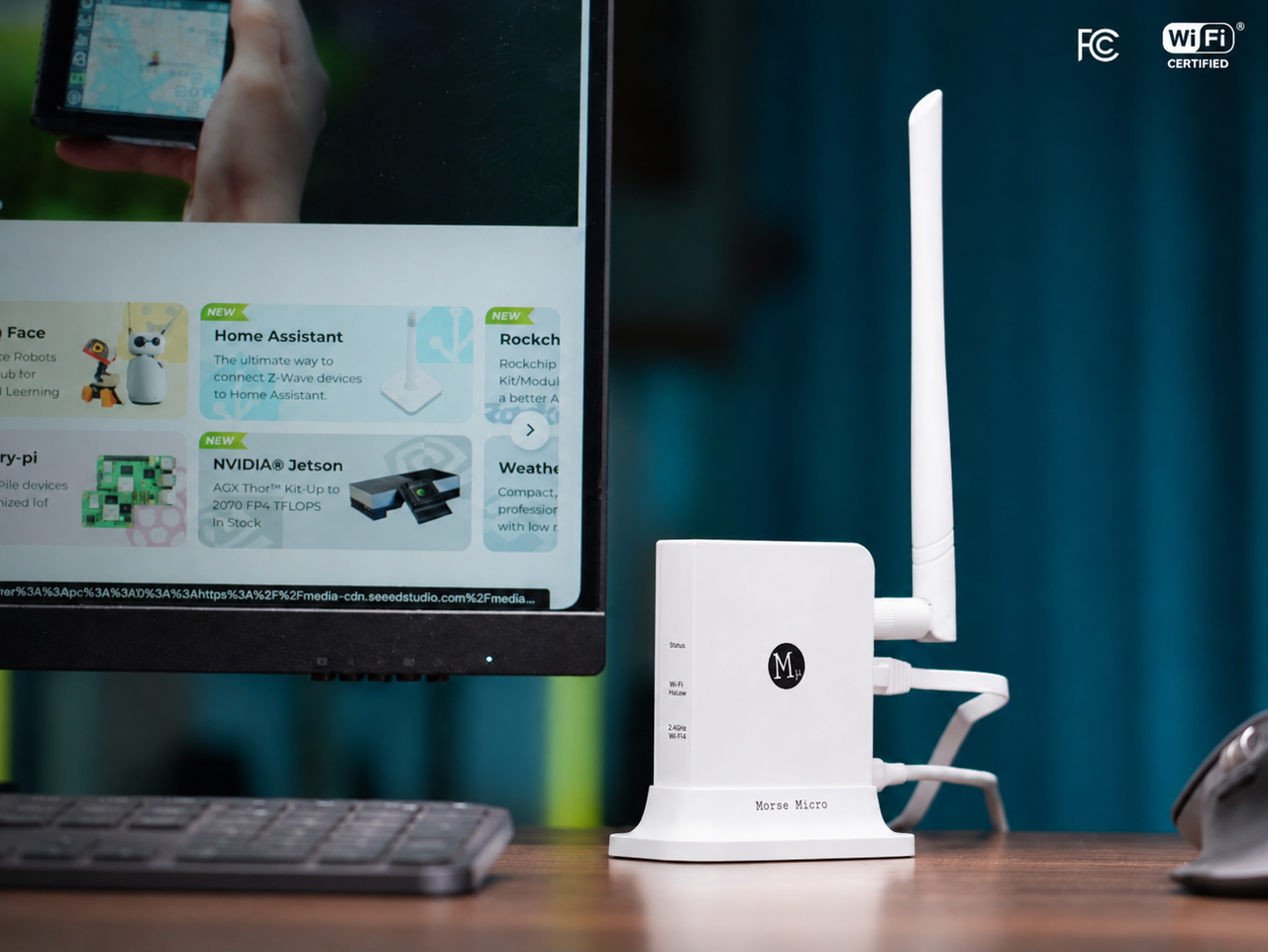
HaLowLink 2 on its stand with the region-specific antenna attached.
Introduction
The HaLowLink 2 is a Wi-Fi HaLow (IEEE 802.11ah) gateway sold by Seeed Studio (SKU 100072966). It operates as a Wi-Fi HaLow Router, Access Point, or Extender: create a new HaLow network, add HaLow connectivity to an existing network, or pair two units to reach remote sites up to 1 km away (line of sight; environment-dependent). Its MM8108 sub-1 GHz radio provides the HaLow link.
With a second unit as Extender, it also carries 2.4 GHz Wi-Fi hotspots and wired Ethernet to remote sites over the HaLow link — so ordinary phones, laptops, and IoT devices join too. Router and Access Point configurations are selected in the OpenWrt-based setup wizard; the physical Mode button switches the unit to Extender mode, starts pairing, or performs a factory reset.
Features
- Long-range sub-1 GHz Wi-Fi HaLow — IEEE 802.11ah on the MM8108 radio: up to 1 km line-of-sight range, better penetration than 2.4 GHz Wi-Fi, 1 / 2 / 4 / 8 MHz channel bandwidths, and a 43.3 Mbps maximum PHY rate.
- Three modes, wizard or button — works as a Wi-Fi HaLow Router, Access Point, or Extender. Choose Router or Access Point in the setup wizard; use the Mode button to switch a unit to Extender mode and pair it.
- HaLow and 2.4 GHz connectivity — Wi-Fi HaLow plus a 2.4 GHz (802.11n, 2×2) access point, so non-HaLow devices can also join the network.
- Gigabit wired interfaces — 2× Gigabit Ethernet ports (WAN and LAN) and a USB-C port that carries both power and Ethernet data.
- OpenWrt-based management — based on OpenWrt 23.05, with a web UI, setup wizards, diagnostics, SSH/CLI, and online upgrades.
43.3 Mbps is the maximum PHY (physical-layer) data rate at 8 MHz bandwidth, not the application throughput measured in practice; "up to 1 km" is a line-of-sight maximum and is not guaranteed in every environment.
Specifications
Wireless
| Item | Value |
|---|---|
| Wi-Fi HaLow Standard | IEEE 802.11ah |
| HaLow Module / Radio | AzureWave AW-HM677 / Morse Micro MM8108 |
| Channel Bandwidth | 1 / 2 / 4 / 8 MHz (region-dependent) |
| Maximum PHY Data Rate | 43.3 Mbps at 8 MHz bandwidth (PHY rate, not application throughput) |
| TX Power | Up to 26 dBm (region-dependent) |
| 2.4 GHz Wi-Fi | IEEE 802.11n, MediaTek MT7603E, 2×2 with internal antennas |
| Network Modes | Wi-Fi HaLow Router / Access Point / Extender |
| Range | Up to 1 km line of sight (environment-dependent, not guaranteed) |
Hardware
| Item | Value |
|---|---|
| CPU | MediaTek MT7621 |
| Memory / Storage | 256 MB DRAM / 32 MB NAND Flash |
| Power Input | 5 V ⎓ 2 A (USB-C) |
| Operating Temperature | 0–40 °C, 5–95% RH non-condensing |
| Dimensions / Weight | 88 × 68 × 24 mm / 102 g (168 g with stand and antenna) |
Interfaces & Software
| Item | Value |
|---|---|
| Ethernet | 2× Gigabit Ethernet ports (labeled WAN and LAN) |
| USB-C | 1× USB-C port (power and Ethernet data) |
| Antenna Connector | SMA (region-specific external antenna included) |
| Control / Indicators | Mode button; Status, Wi-Fi HaLow, and Wi-Fi 2.4 GHz LEDs |
| Operating System | Based on OpenWrt 23.05 (may change with firmware updates) |
| Configuration | Web UI (HTTPS) and SSH/CLI (SSH disabled by default) |
| Management Address | https://192.168.12.1 (default) |
The product family supports regional markets including USA, Canada, Australia, UK, Europe, and Japan. TX power is limited to 14 dBm in the EU/UK and 16 dBm in Japan; available bands, channels, and bandwidths vary by regional model, and EasyMesh / 802.11s mesh operation is not supported in the EU or UK. Use the model intended for your country or region, with the supplied antenna and power adapter. The regulatory region cannot be changed through supported user configuration. Certifications and declarations apply to specific models and regions; confirm the exact regional variant before purchase.
Hardware Overview
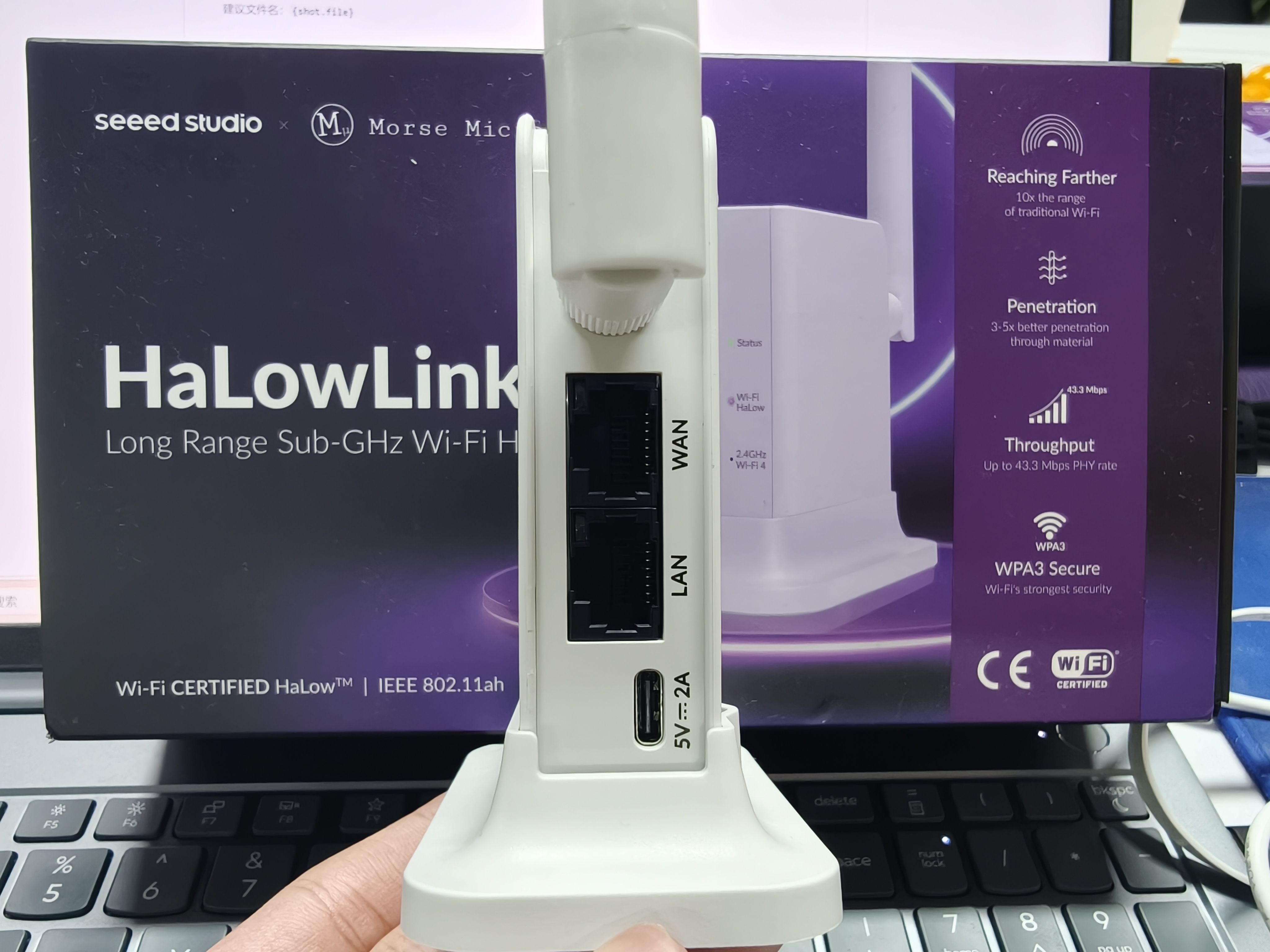
Rear panel: WAN and LAN Gigabit Ethernet ports and the USB-C power port (5 V ⎓ 2 A); the SMA antenna connector sits on the top edge.
| Interface | Role |
|---|---|
| Ethernet Port (WAN) | Uplink — connect to your existing router or network |
| Ethernet Port (LAN) | Local network — connect a computer for configuration or a downstream device |
| USB-C Port | Power input (5 V ⎓ 2 A), and Ethernet data when connected to a computer |
| SMA Connector | External region-specific Wi-Fi HaLow antenna (connect before powering on) |
| Mode Button | Enter Extender mode (hold until the Status LED flashes fast aqua, then release); start pairing (short press); perform a factory reset (hold until the Status LED flashes slowly green, then release) |
Three LEDs — Status, Wi-Fi HaLow, and Wi-Fi 2.4 GHz — show the device state. The Status LED is solid green in Router or Access Point configuration (both host the HaLow AP) and solid aqua in Extender mode. On an Extender, a solid purple Wi-Fi HaLow LED means it is associated over HaLow; on the Access Point, solid purple only means HaLow is enabled, so confirm clients under Connected Devices. A labeled close-up is in Pair the Devices; full LED behavior in Getting Started.
Package Contents
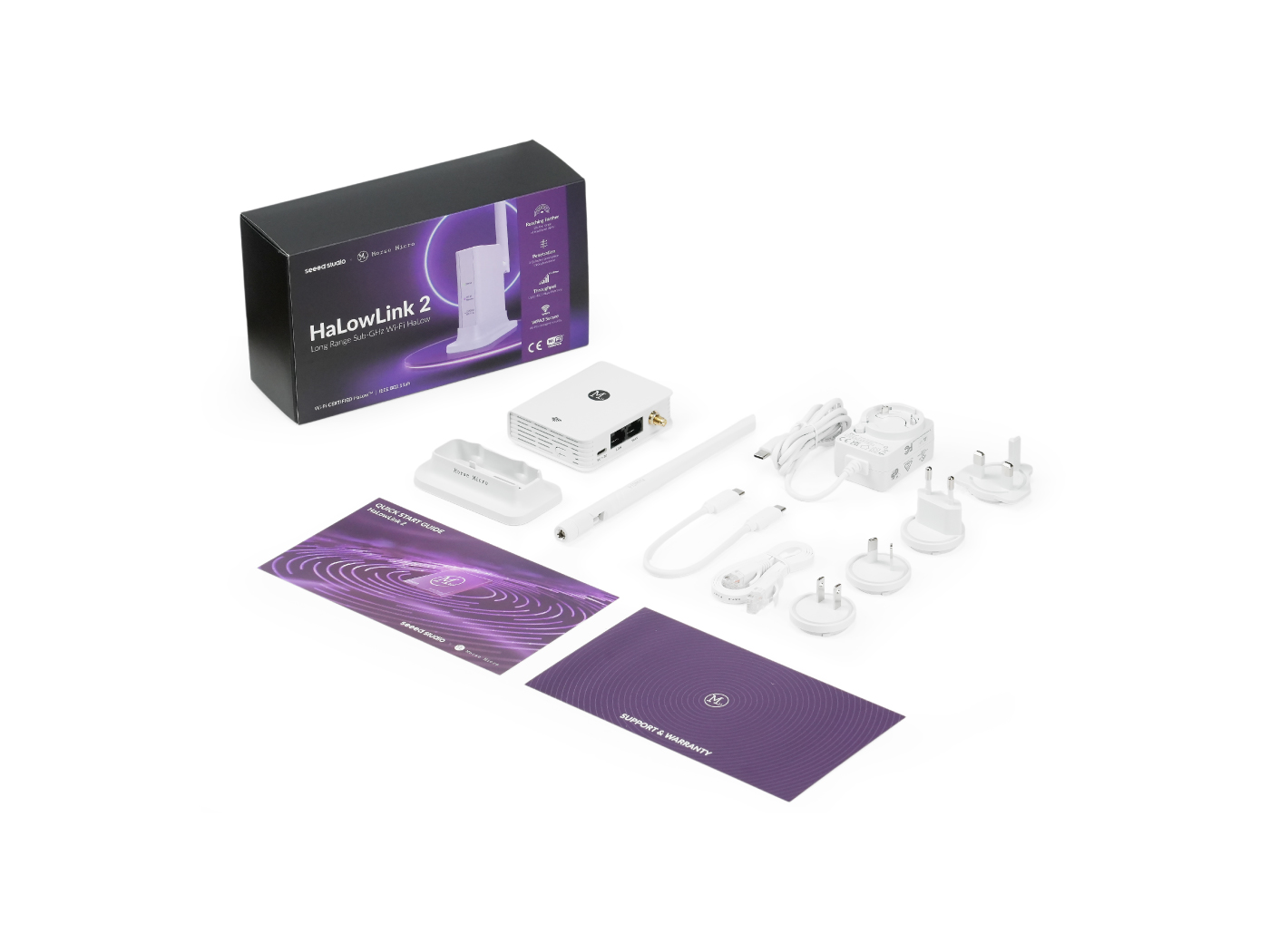
Retail package contents next to the retail box: device, stand, region-specific antenna, USB-C to USB-C cable, Ethernet cable, power adapter with regional plug adapters, and printed documentation (Quick Start Guide and Support & Warranty card).
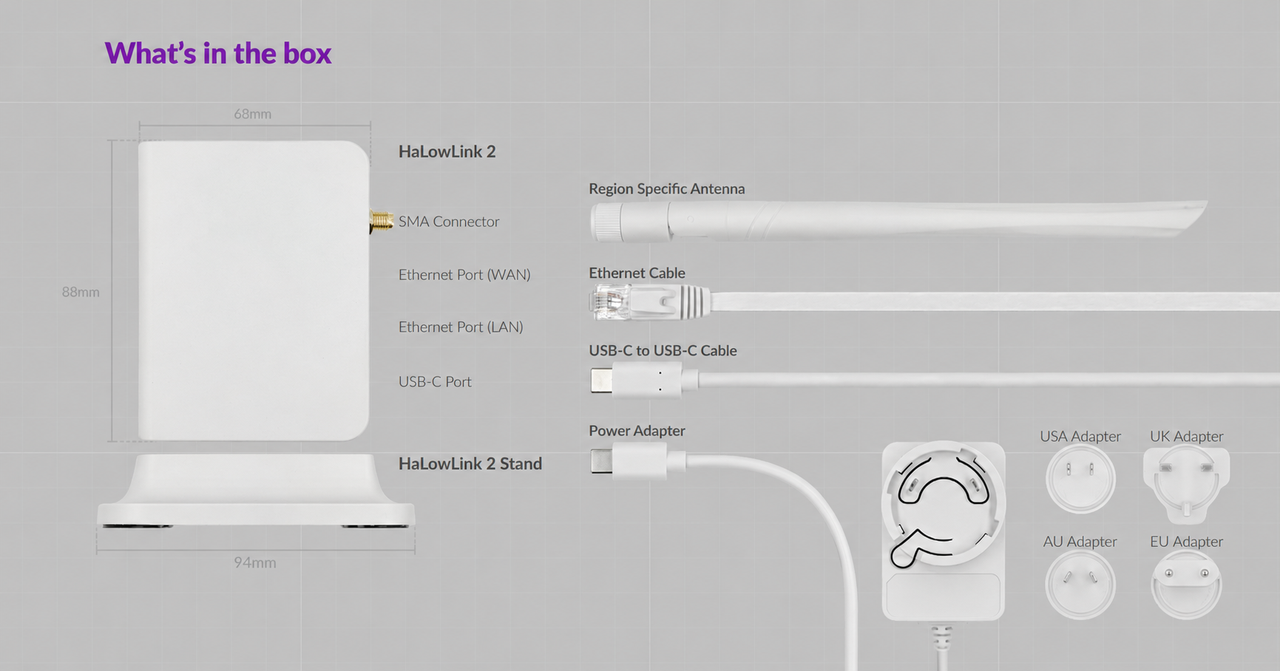
Official package diagram: labelled ports (SMA connector, WAN, LAN, USB-C), device dimensions (88 × 68 mm; 94 mm stand), and every included accessory with its regional plug adapter.
- HaLowLink 2 device
- HaLowLink 2 stand
- Power adapter
- USB-C to USB-C cable
- Ethernet cable
- Region-specific antenna (SMA)
- Region adapters: USA, AU, UK, EU
- Quick Start Guide
- Support & Warranty card
Resources
- Seeed Studio product page — HaLowLink 2 Wi-Fi HaLow Gateway (SKU 100072966)
- HaLowLink 2 Product Brief (PDF)
- HaLowLink User Guide (PDF)
- HaLowLink 2 software release notes
- Morse Micro OpenWrt source code (GitHub)
Related Seeed Studio Wiki tutorials:
- Getting Started with Wi-Fi HaLow Module for XIAO (Wio-WM6180)
- Getting Started with Wi-Fi HaLow Mini PCIe Module (Wio-WM6108 family)
Next step: continue with Getting Started to set up your HaLowLink 2 for the first time.
Tech Support & Product Discussion
Thank you for choosing our products! We are here to provide you with different support to ensure that your experience with our products is as smooth as possible. We offer several communication channels to cater to different preferences and needs.