Raspberry Pi AI ボックスに Whisper をデプロイする
はじめに
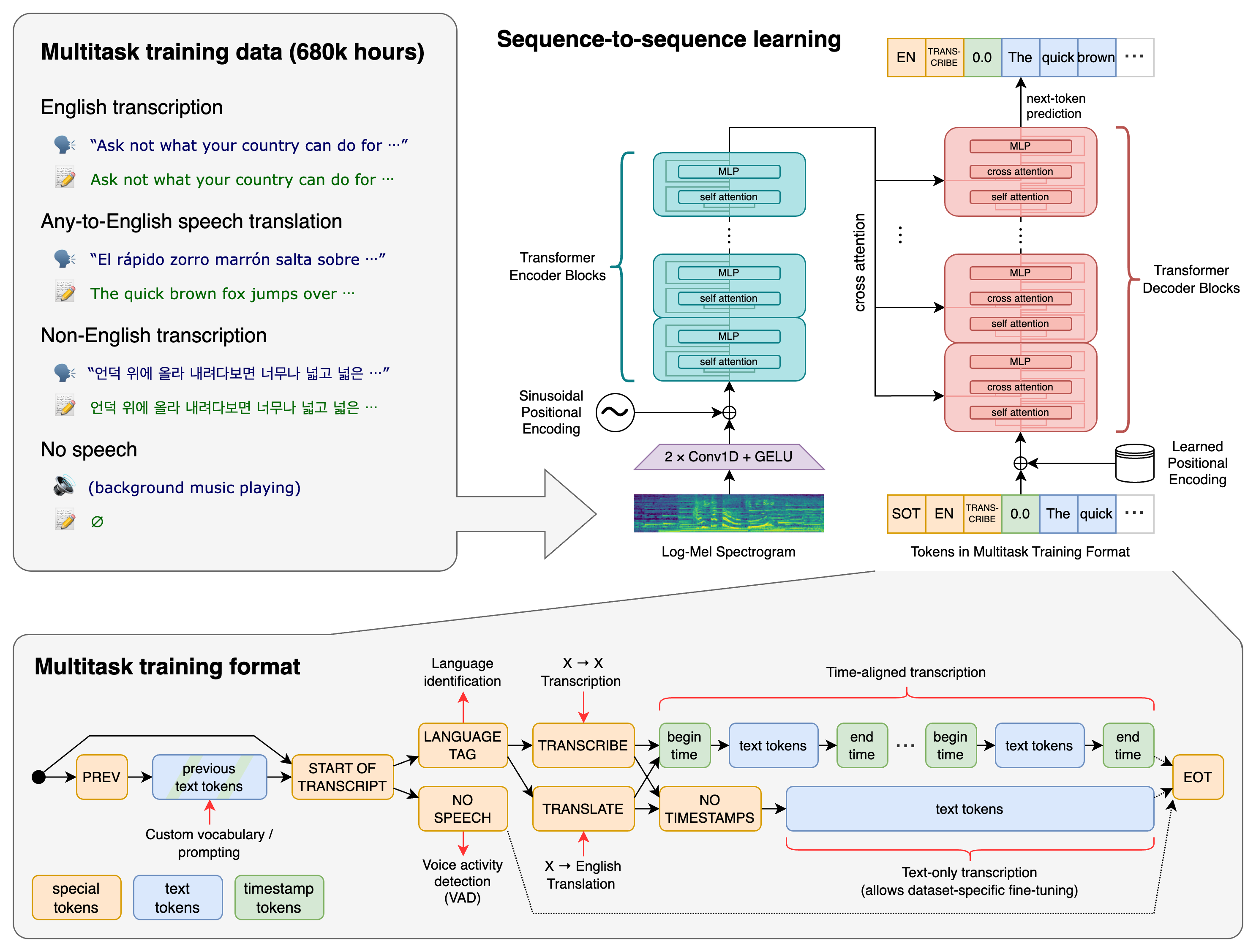
Whisper は、OpenAI によって開発された多用途で最先端の自動音声認識(ASR)および音声処理モデルです。従来の音声テキスト変換システムとは異なり、Whisper はウェブから収集された 680,000 時間の多言語・多タスク教師ありデータで訓練されました。この大規模で多様なデータセットにより、モデルはアクセント、背景ノイズ、専門用語に対して非常に堅牢になっています。
このガイドでは、Raspberry Pi AI ボックスでの Whisper のデプロイと活用について包括的なウォークスルーを提供します。
ハードウェアの準備
AI ボックス
| reComputer AI R2130 | reComputer AI Industrial R2145 | reComputer Industrial R20xx | reComputer Industrial R21xx |
|---|---|---|---|
 |  |  |  |
マイクロフォンアレイ

ソフトウェアの準備
システムの更新
sudo apt update
sudo apt full-upgrade
更新中に以下の問題が発生することがあります。
Get:1 http://deb.debian.org/debian bookworm InRelease [151 kB]
Get:2 http://deb.debian.org/debian-security bookworm-security InRelease [48.0 kB]
Get:3 http://deb.debian.org/debian bookworm-updates InRelease [55.4 kB]
Get:4 http://archive.raspberrypi.com/debian bookworm InRelease [39.0 kB]
Reading package lists... Done
E: Release file for http://deb.debian.org/debian/dists/bookworm/InRelease is not valid yet (invalid for another 58d 8h 26min 35s). Updates for this repository will not be applied.
E: Release file for http://deb.debian.org/debian-security/dists/bookworm-security/InRelease is not valid yet (invalid for another 84d 18h 23min 59s). Updates for this repository will not be applied.
E: Release file for http://archive.raspberrypi.com/debian/dists/bookworm/InRelease is not valid yet (invalid for another 84d 13h 13min 5s). Updates for this repository will not be applied.
E: Release file for http://deb.debian.org/debian/dists/bookworm-updates/InRelease is not valid yet (invalid for another 85d 0h 52min 29s). Updates for this repository will not be applied.
これは Raspberry Pi の時刻が正しく設定されていないためです。以下のコマンドで Raspberry Pi の時刻を手動で設定する必要があります:
# This command only you can connect google.com
sudo date -s "$(wget -qSO- --max-redirect=0 google.com 2>&1 | grep Date: | cut -d' ' -f5-8)Z"
Raspberry Pi の時刻を設定した後、Raspberry Pi を更新できます。
PCIe を gen2/gen3 に設定(gen3 は gen2 より高速)
/boot/firmware/config.txt に以下のテキストを追加します
#Enable the PCIe external connector

dtparam=pciex1

#Force Gen 3.0 speeds

dtparam=pciex1_gen=3
gen2 を使用したい場合は、dtparam=pciex1_gen=3 をコメントアウトしてください
hailo-all をインストールして再起動
Raspberry Pi5 でターミナルを開き、以下のコマンドを入力して Hailo ソフトウェアをインストールします。
sudo apt install hailo-all
sudo apt-get -y install libblas-dev nlohmann-json3-dev
sudo reboot
ソフトウェアとハードウェアの確認
Raspberry Pi5 でターミナルを開き、以下のコマンドを入力して hailo-all がインストールされているかを確認します。
hailortcli fw-control identify
正しい結果は以下のように表示されます:

Raspberry Pi5 でターミナルを開き、以下のコマンドを入力して hailo-8L が接続されているかを確認します。
lspci | grep Hailo
正しい結果は以下のように表示されます:

プロジェクトのインストール
プロジェクトのダウンロード
cd ~ && git clone https://github.com/Seeed-Projects/STT_hailo_whisper.git
cd STT_hailo_whisper
必要なパッケージのインストール
sudo apt update
sudo apt install ffmpeg
sudo apt install libportaudio2
sudo apt install portaudio19-dev python3-pyaudio
sudo apt install hailo-all
Python 環境の作成
python -m venv .env --system-site-packages && source .env/bin/activate
cd app && python download_resources.py
cd .. && pip install -r requirements.txt
プロジェクトの実行
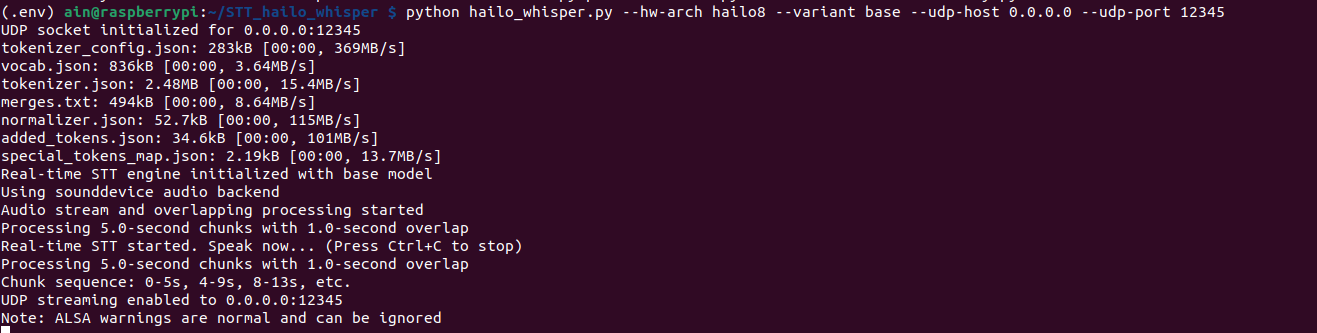
バックエンドを開始します。
python hailo_whisper.py --hw-arch hailo8 --variant base --udp-host 0.0.0.0 --udp-port 12345
結果
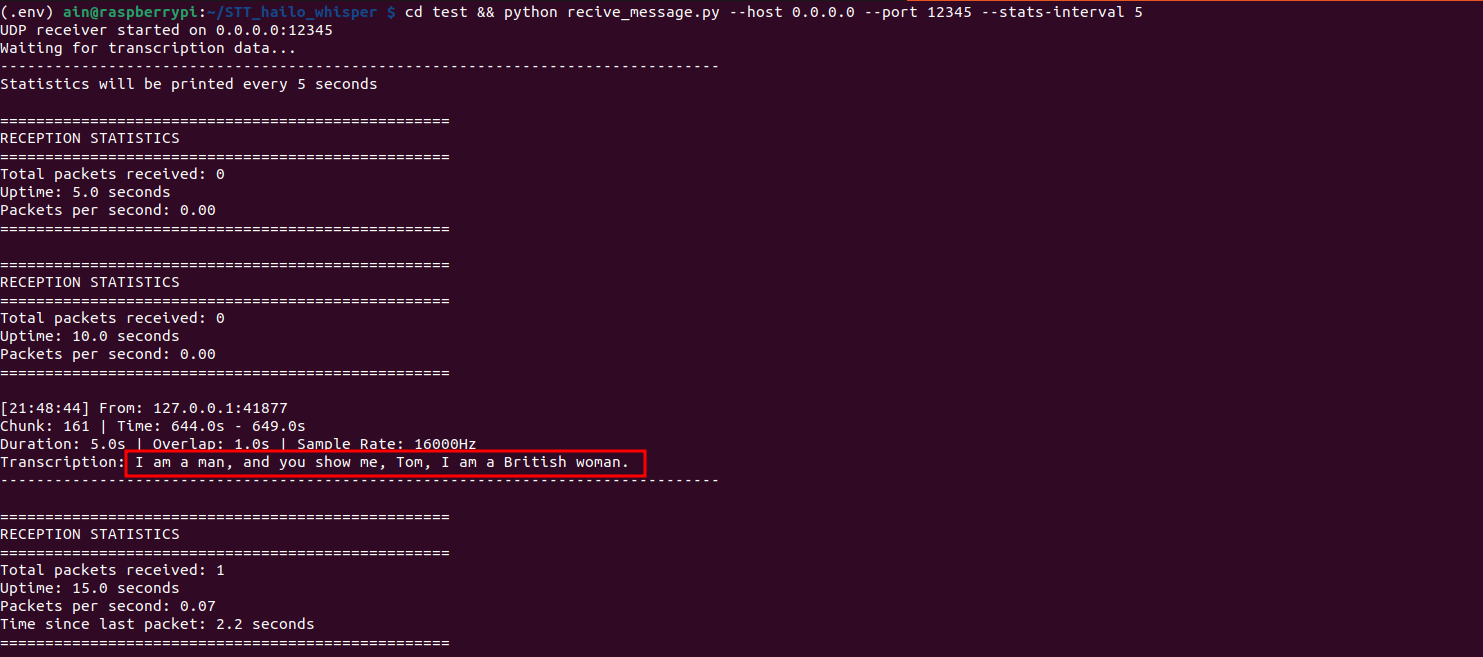
フロントエンドを開始すると、リアルタイムの STT 結果を確認できます。
cd test && python recive_message.py --host 0.0.0.0 --port 12345 --stats-interval 5
技術サポート & 製品ディスカッション
弊社製品をお選びいただきありがとうございます!弊社製品での体験が可能な限りスムーズになるよう、さまざまなサポートを提供しています。さまざまな好みやニーズに対応するため、複数のコミュニケーションチャネルを提供しています。