28. 物体検出とハンドアイキャリブレーション
Seeed Physical AI Beginner's Course 第28章 — 物体検出とハンドアイキャリブレーション:ビジョンタスクの分類、YOLO とオープンボキャブラリ検出、回転バウンディングボックス、NMS と mAP、solvePnP を用いた ArUco マーカー、AX = XB ハンドアイキャリブレーション、そして GraspNet による 6-DoF 把持姿勢推定。
28.1 章の概要
前章では、ロボットビジョンの基本パイプライン、すなわち環境 -> カメラ撮像 -> 2D 画像 -> 深度情報 -> 3D 空間座標 -> ロボット座標、を学びましたが、各段階のアルゴリズム原理や実装の詳細には踏み込みませんでした。本章では各段階をもう一段深く掘り下げ、読者がアルゴリズムの背後にある数学とエンジニアリング上のトレードオフを理解できるようにします。
実際のロボットシステムでは、ロボットはあらかじめアノテーションされたターゲット位置に直面しているわけではありません。そのため、次の 4 つの中核的な問いを掘り下げて解く必要があります:
- 質問 1: なぜ検出アルゴリズムは YOLO なのか?YOLOE はどのようにしてカスタムクラスを定義できるのか?
- 参照:物体検出アルゴリズムの原理(28.3)
- 質問 2: なぜカメラキャリブレーションにチェッカーボードではなく ArUco を使うのか?
- 参照:ArUco マーカーの原理(28.4)
- 質問 3: なぜアクティブ深度カメラは深度マップを直接生成できるのか?深度と RGB はどのようにアラインされるのか?
- 参照:アクティブ深度カメラの原理(第27章 27.5 節)
- 質問 4: 画像から 6-DoF 把持姿勢はどのように推定されるのか?
- 参照:6-DoF 把持姿勢推定(28.6)
- 本章では次のような流れで理解を深めます:
- 検出アルゴリズム(YOLOE / OBB) -> ArUco カメラキャリブレーション -> アクティブ深度カメラの原理 -> 6-DoF 把持姿勢推定
28.2 ビジョンタスクの分類
ロボットビジョンにおけるタスクチェーン
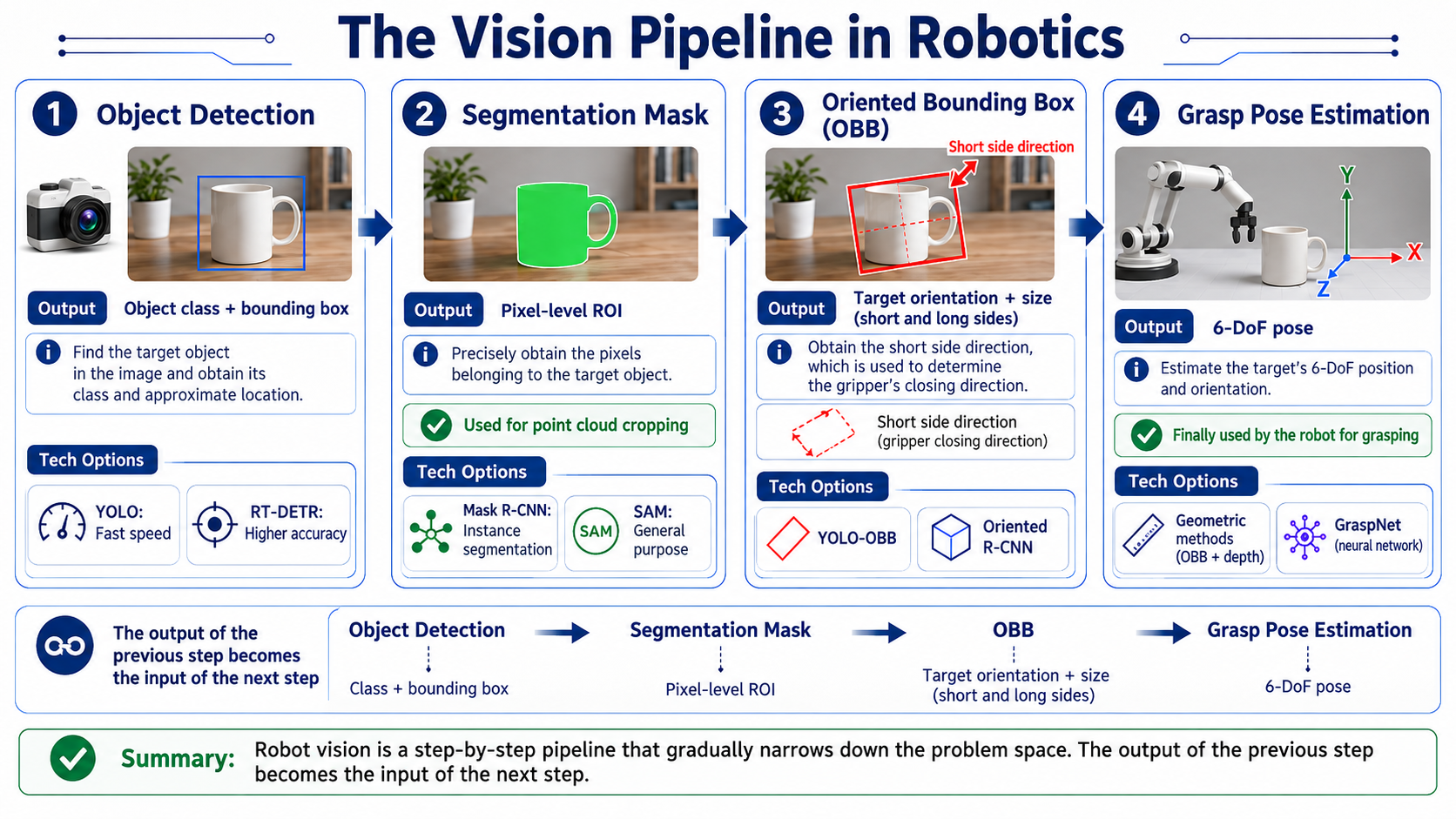
各ステージにはそれぞれ技術的な選択肢があります:
| ステージ | 出力 | 代表的なアルゴリズム |
|---|---|---|
| 物体検出 | クラス + 粗い位置 | YOLO(高速)または RT-DETR(高精度) |
| セグメンテーション | 点群を切り出すためのピクセルレベル ROI | Mask R-CNN(インスタンス)または SAM(ゼロショット) |
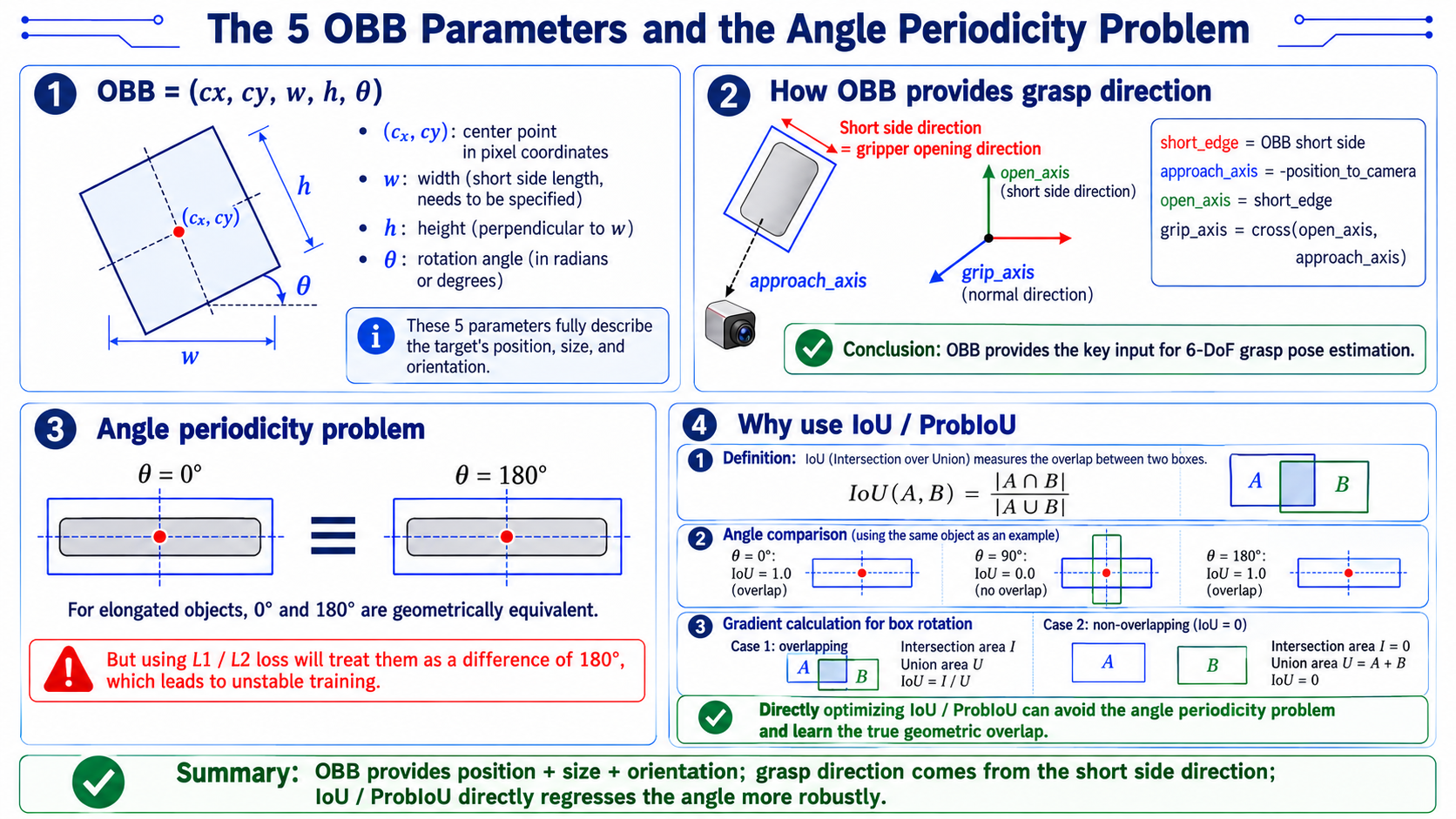
| 回転バウンディングボックス | 短辺方向 = グリッパの開閉方向 | YOLO-OBB または Oriented R-CNN |
| 把持姿勢推定 | 6-DoF 姿勢 | 幾何学的手法(OBB + 深度)または GraspNet(ニューラルネットワーク) |
4 つのビジョンタスクの比較
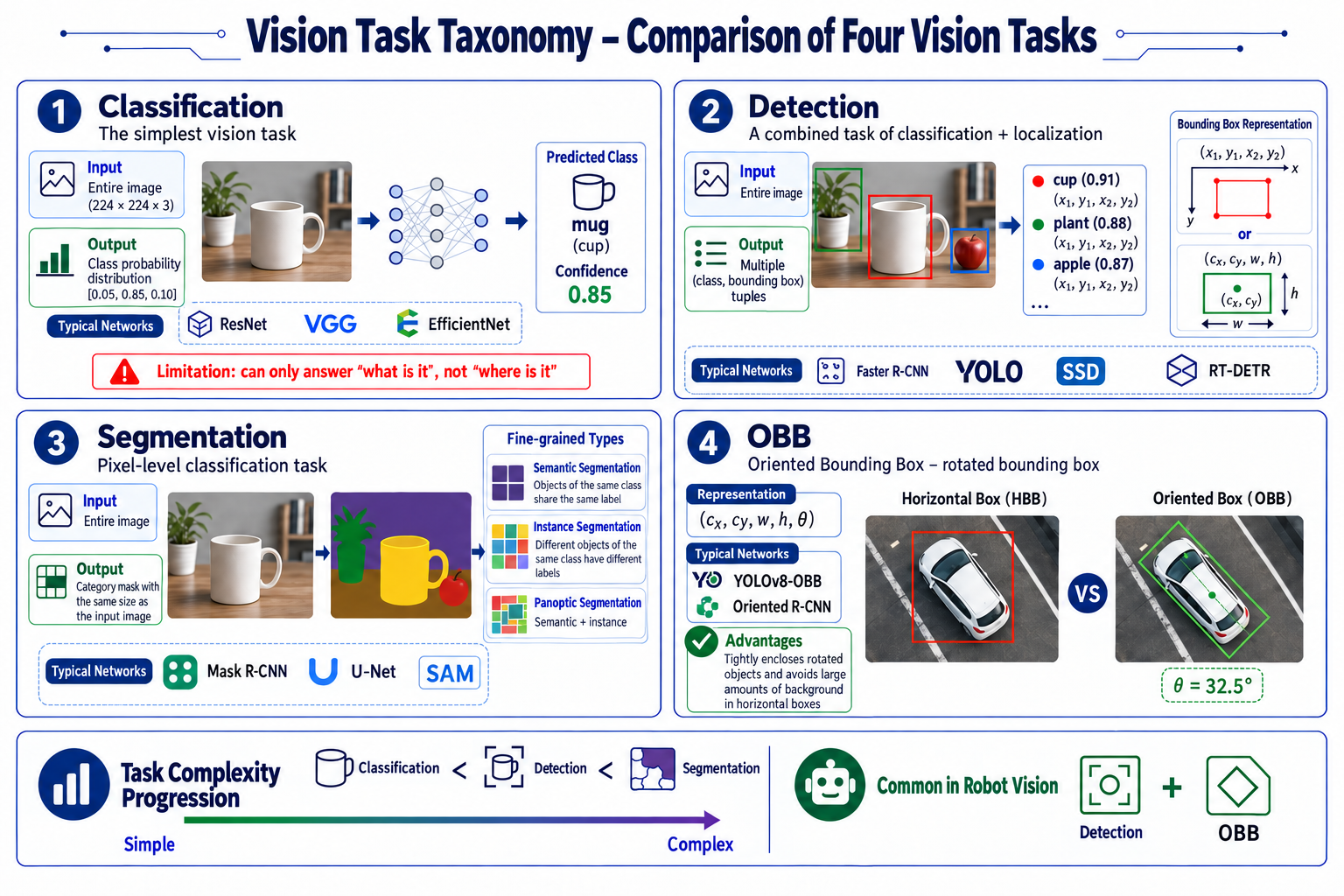
これら 4 つのタスクは互いに積み重なっており、入力と出力が異なります:
| タスク | 何をするか | 入力 | 出力 | 代表的なネットワーク |
|---|---|---|---|---|
| 分類 | 最も単純なタスク:画像を入力しクラスラベルを出力 | 画像全体(例:224x224x3) | クラスの確率分布(例:[0.05, 0.85, 0.10]) | ResNet, VGG, EfficientNet |
| 検出 | 分類 + 位置推定 | 画像全体 | 物体ごとに 1 つの (class, bounding box) タプル;ボックスは (x1, y1, x2, y2) または (cx, cy, w, h) | Faster R-CNN, YOLO, SSD, RT-DETR |
| セグメンテーション | ピクセルレベルの分類:ピクセルごとに 1 つのクラスラベル | 画像全体 | 入力と同じサイズのクラスマスク | Mask R-CNN(インスタンス)、U-Net(セマンティック)、SAM |
| 回転バウンディングボックス (OBB) | 回転角を持つバウンディングボックス | 画像全体 | (cx, cy, w, h, theta) | YOLOv8-OBB, Oriented R-CNN |
覚えておくべき点が 3 つあります。分類は「何があるか」には答えられますが「どこにあるか」には答えられないこと。セグメンテーションには 3 つの種類があり、セマンティック(同じクラスは 1 つのラベルを共有)、インスタンス(同じクラスでも異なる物体は別ラベル)、パノプティック(セマンティック + インスタンス)であること。そして OBB は、水平ボックスが背景まで巻き込んでしまうのに対し、回転した物体にぴったり沿う形で囲むという点です。
28.3 検出アルゴリズムの深掘り
なぜリアルタイムロボットビジョンに YOLO を使うのか
ロボットビジョンアルゴリズムの中核要件はリアルタイム性です。典型的なシナリオを考えてみましょう:
- 物体が 0.1 m/s でコンベア上を移動し、視野は 0.5 m、通過時間は 5 秒とします。制御周期を 20 Hz(フレーム間隔 50 ms)と仮定すると、もし検出に 1 フレームあたり 200 ms(5 Hz)かかると、ロボットは追従できず、把持を頻繁に取り逃してしまいます。
- YOLO の「一度見るだけ(You Only Look Once)」という発想:画像を SxS のグリッドに分割し、各グリッドが B 個のボックスとクラスを直接予測し、1 回の順伝播で結果を出力します。
オープンボキャブラリ検出(YOLOE / YOLO-World)
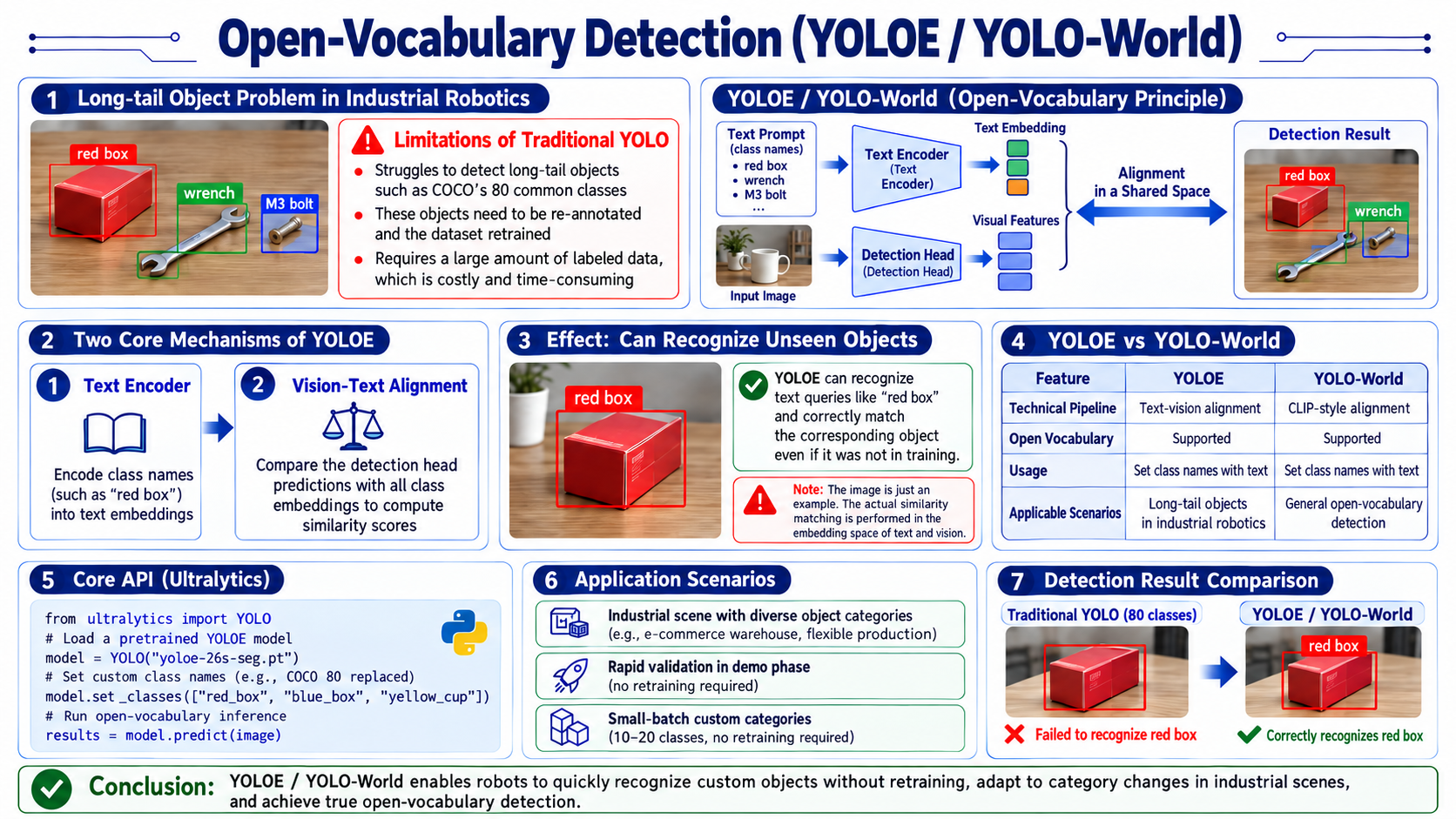
産業用ロボットは、COCO の 80 クラスには含まれない物体にしばしば遭遇します:特定の色の箱(「red box」)、カスタム部品(「M3 bolt」)、一時的に置かれた工具(「wrench」)などです。従来の YOLO では、これらを認識するにはデータセット(数百枚のアノテーション)で再学習する必要があり、コストがかかります。
YOLOE(YOLO with Extended vocabulary)は、次の 2 つの仕組みによってオープンボキャブラリを実現します:
- テキストエンコーダ:クラス名(例:「red box」)を意味ベクトルにエンコードする;
- ビジョンとテキストのアラインメント:検出ヘッドが、予測されたボックスとすべてのクラスベクトルとの類似度を比較する。
- テキストエンコーダは「red box」というフレーズの背後にある視覚概念を知っています。学習中に red box を一度も見ていなくても、テキスト「red box」と画像中の赤い箱を対応付けることができます。ここで行っているのはテキストと画像の類似度マッチングであり、真の言語理解ではない点に注意してください。また、テキストエンコーダが見たことのない単語は理解できません。
YOLO-World も同様のアプローチを用いています。
- YOLO-World は、オープンボキャブラリのために CLIP 方式の画像-テキストアラインメントを使用しており、その動作原理は YOLOE と同じです。
コア API
from ultralytics import YOLO

# load pretrained YOLOE model
model = YOLO("yoloe-26s-seg.pt")

# set custom classes (replace default 80)
model.set_classes(["red_box", "blue_box", "yellow_cup"])

# now the model detects only these three classes
results = model.predict(image)
適したシナリオ
- カテゴリの変化が多いアーム用途(EC 倉庫、フレキシブル生産)
- デモの迅速な検証(学習なしでテスト)
- 少量多品種カスタマイズ(10〜20 クラスで再学習なし)
なぜロボットビジョンでは OBB がよく使われるのか
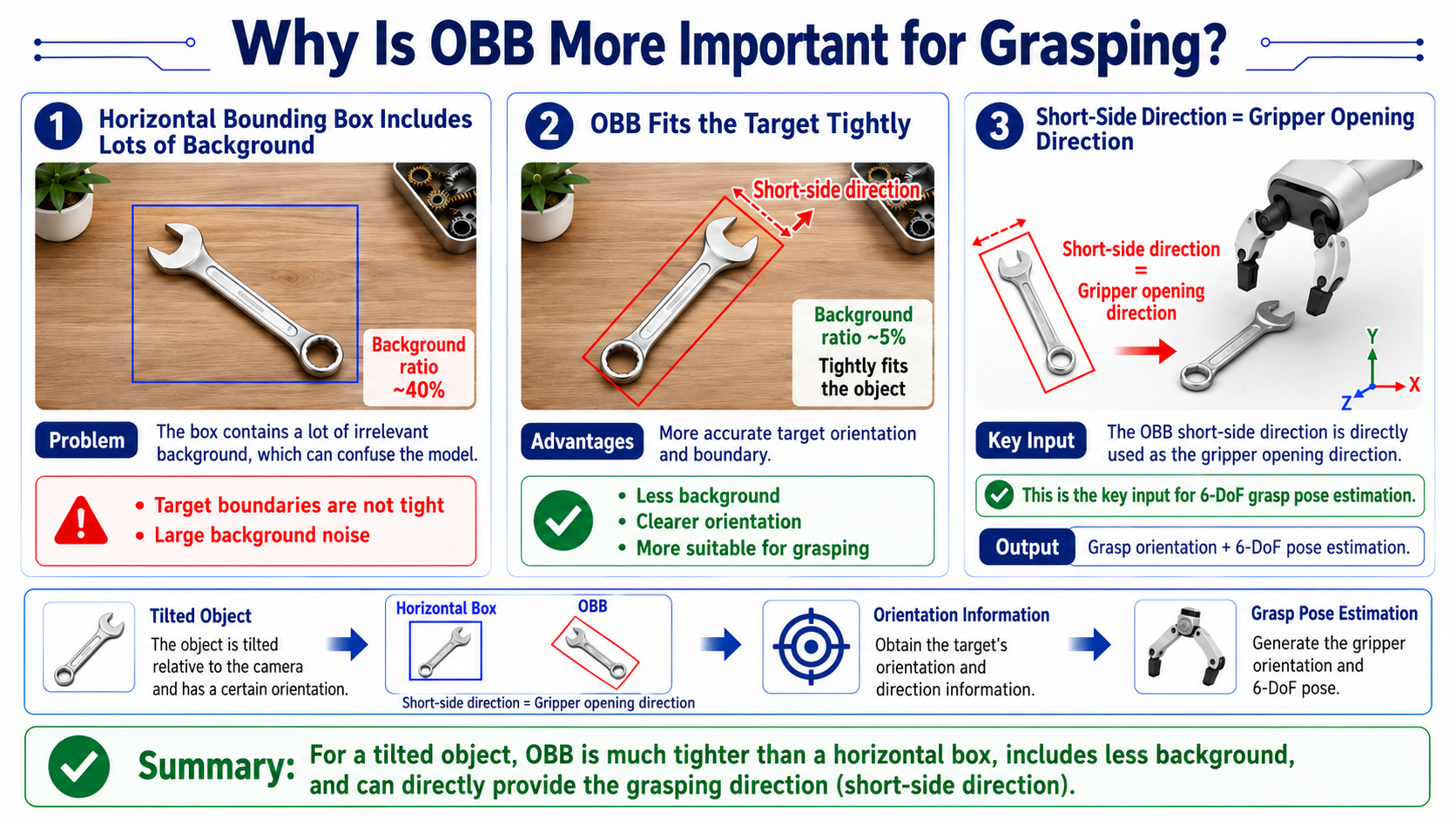
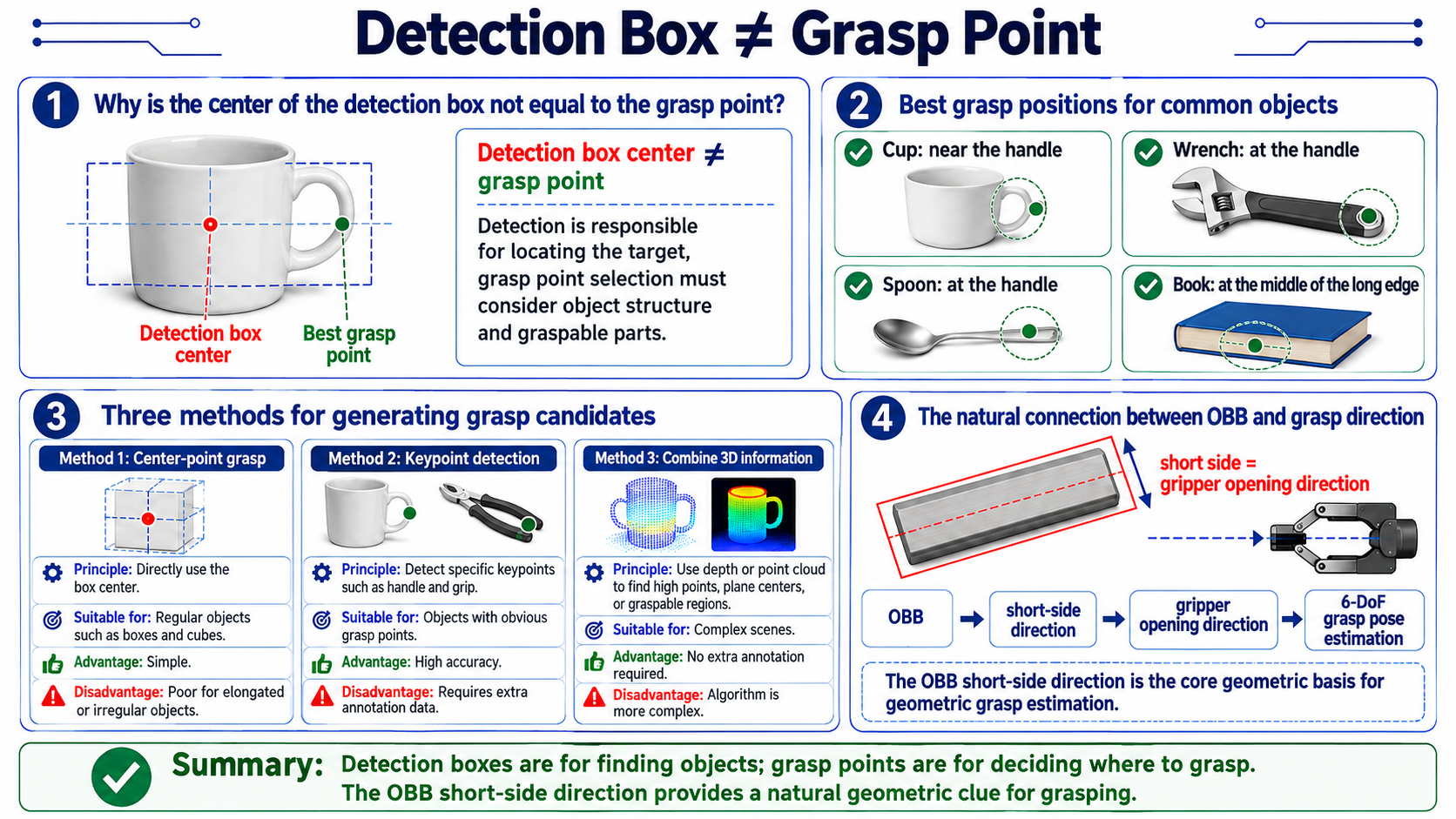
OBB の短辺方向は、そのままグリッパの開閉方向を与えてくれます。これは後段の 6-DoF 把持推定にとって重要な入力です。
回転バウンディングボックス (OBB) の原理
後処理:NMS
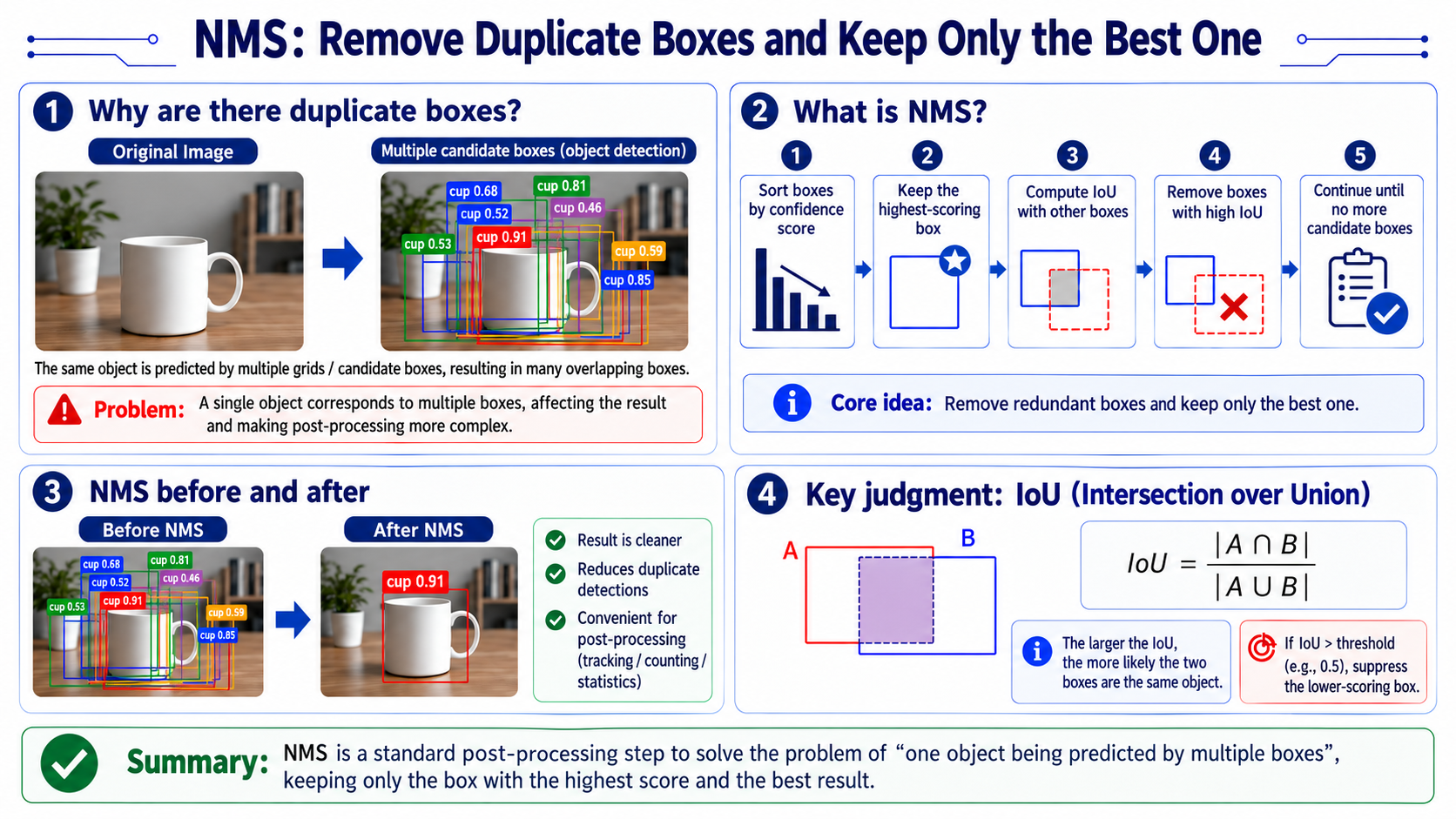
NMS は検出後の標準的な後処理ステップです。YOLO が画像を検出した後、同じ物体が複数のグリッドセルによって「繰り返し」予測され、いくつかの重なり合うボックスとして出力されることがあります。NMS はこれらの重複を取り除き、最も良いものだけを残します。
-
コード例
def nms(boxes, scores, iou_threshold):
    """
    boxes: [(x1, y1, x2, y2), ...]
    scores: [confidence, ...]
    returns: list of kept indices
    """
    # 1. sort by confidence descending
    order = sorted(range(len(scores)), key=lambda i: scores[i], reverse=True)

    keep = []
    while order:
        # 2. pick the highest-scoring box
        i = order[0]
        keep.append(i)

        # 3. compute IoU with other boxes
        rest = order[1:]
        ious = [compute_iou(boxes[i], boxes[j]) for j in rest]

        # 4. keep boxes with IoU < threshold (remove redundant)
        order = [rest[j] for j, iou in enumerate(ious) if iou < iou_threshold]

    return keep
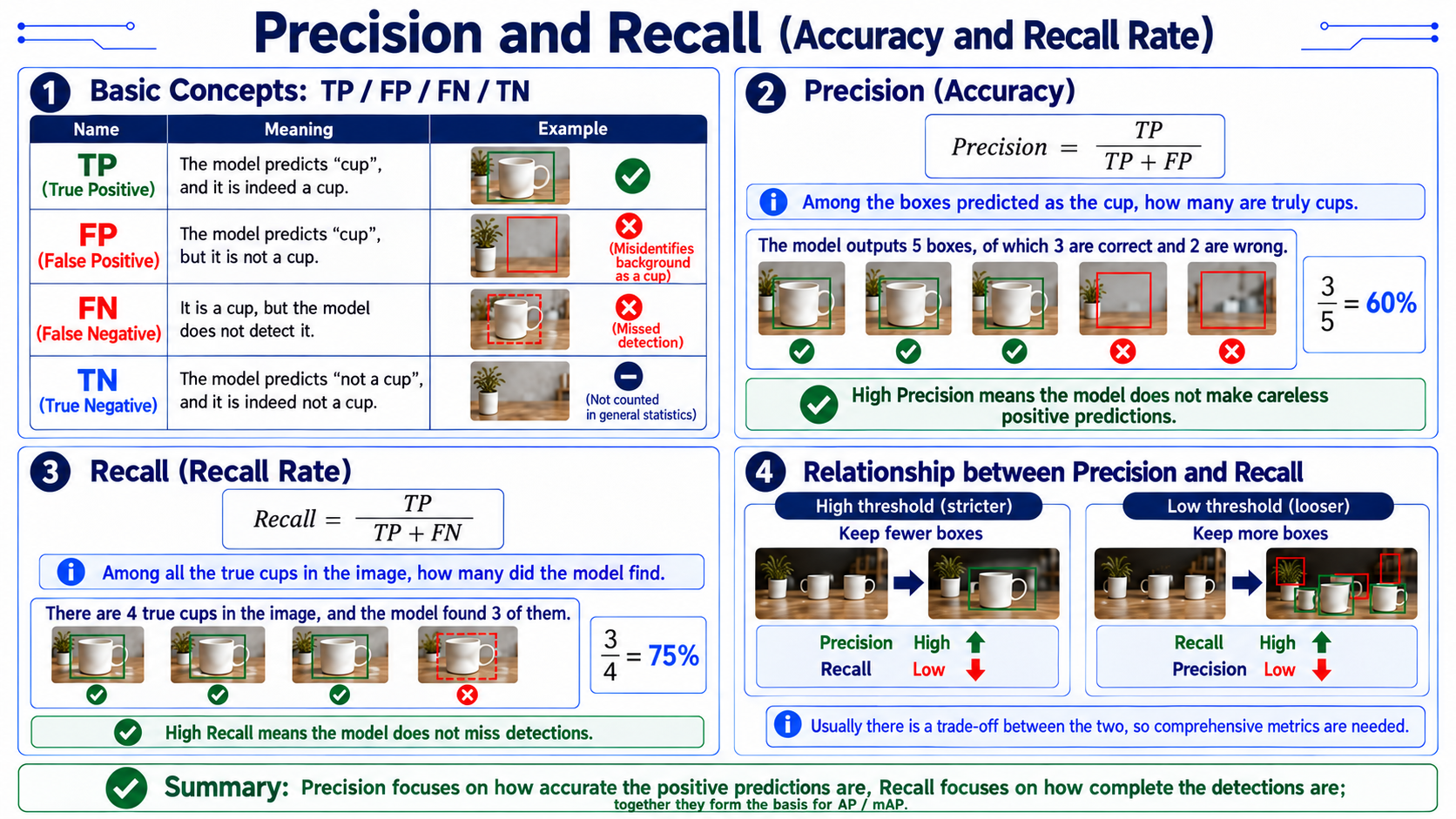
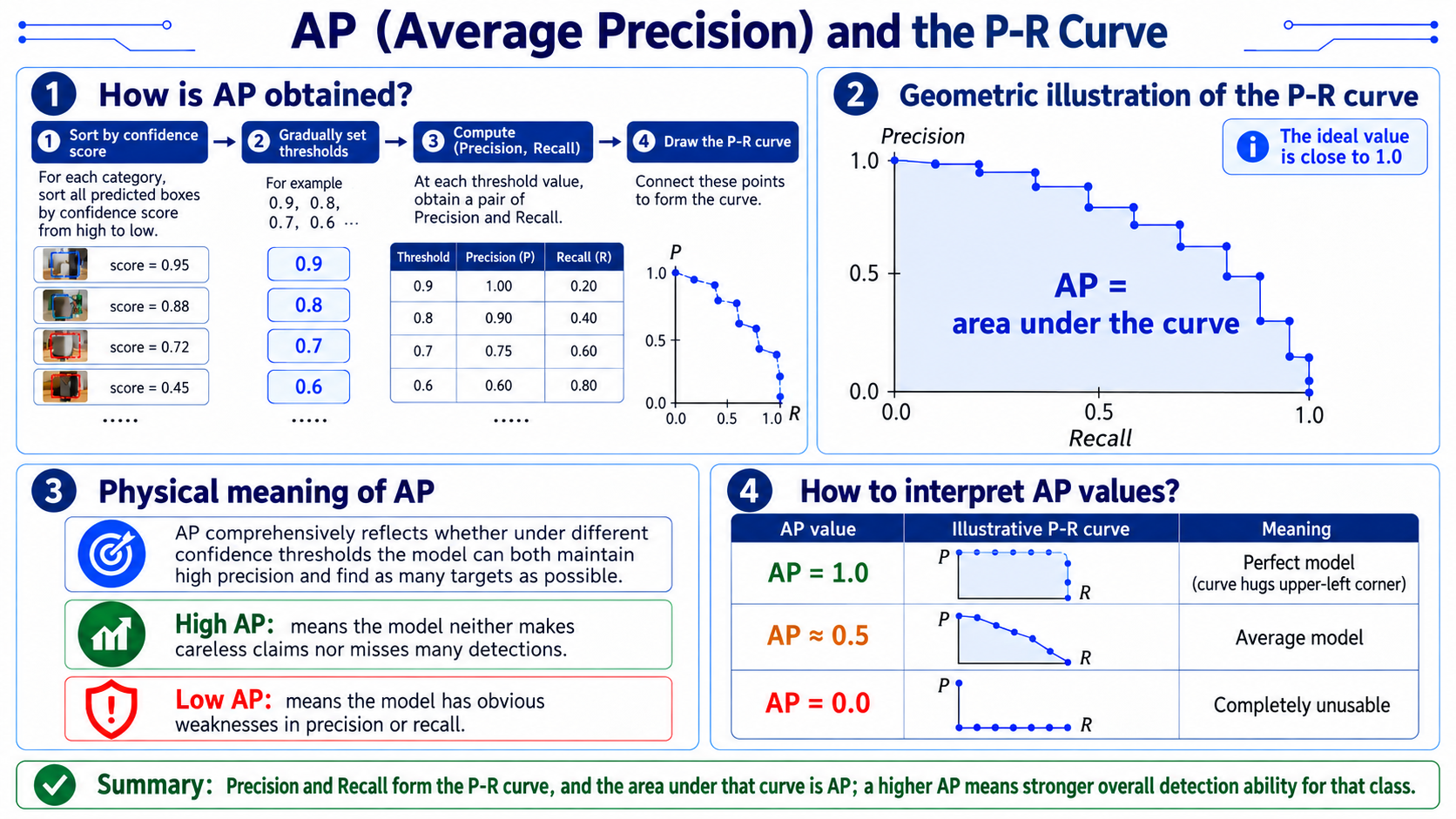
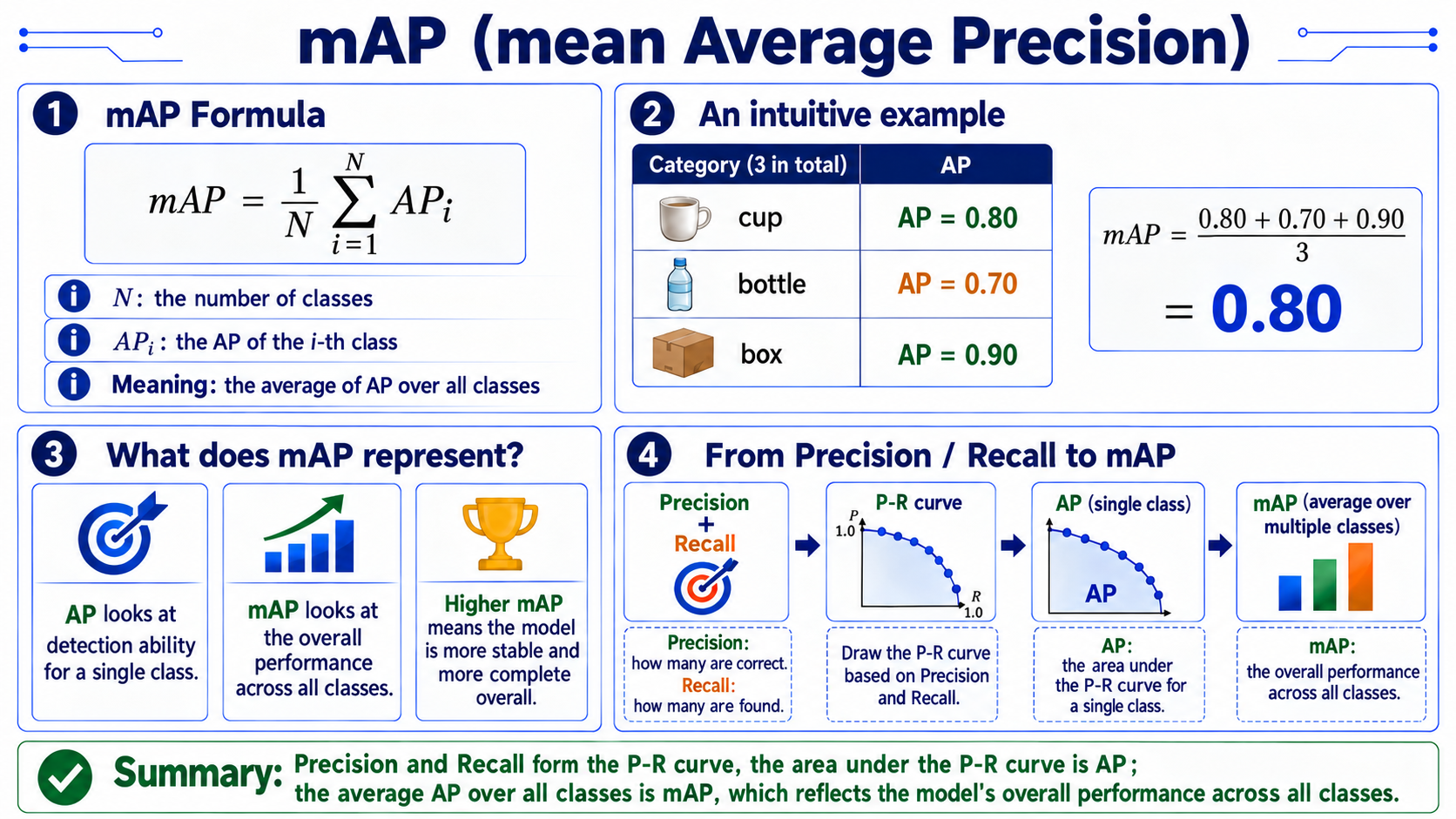
mAP(評価指標)
検出結果から把持方向へ
28.4 ArUco とカメラキャリブレーション
完全な導出:ピクセルから 3D 座標へ
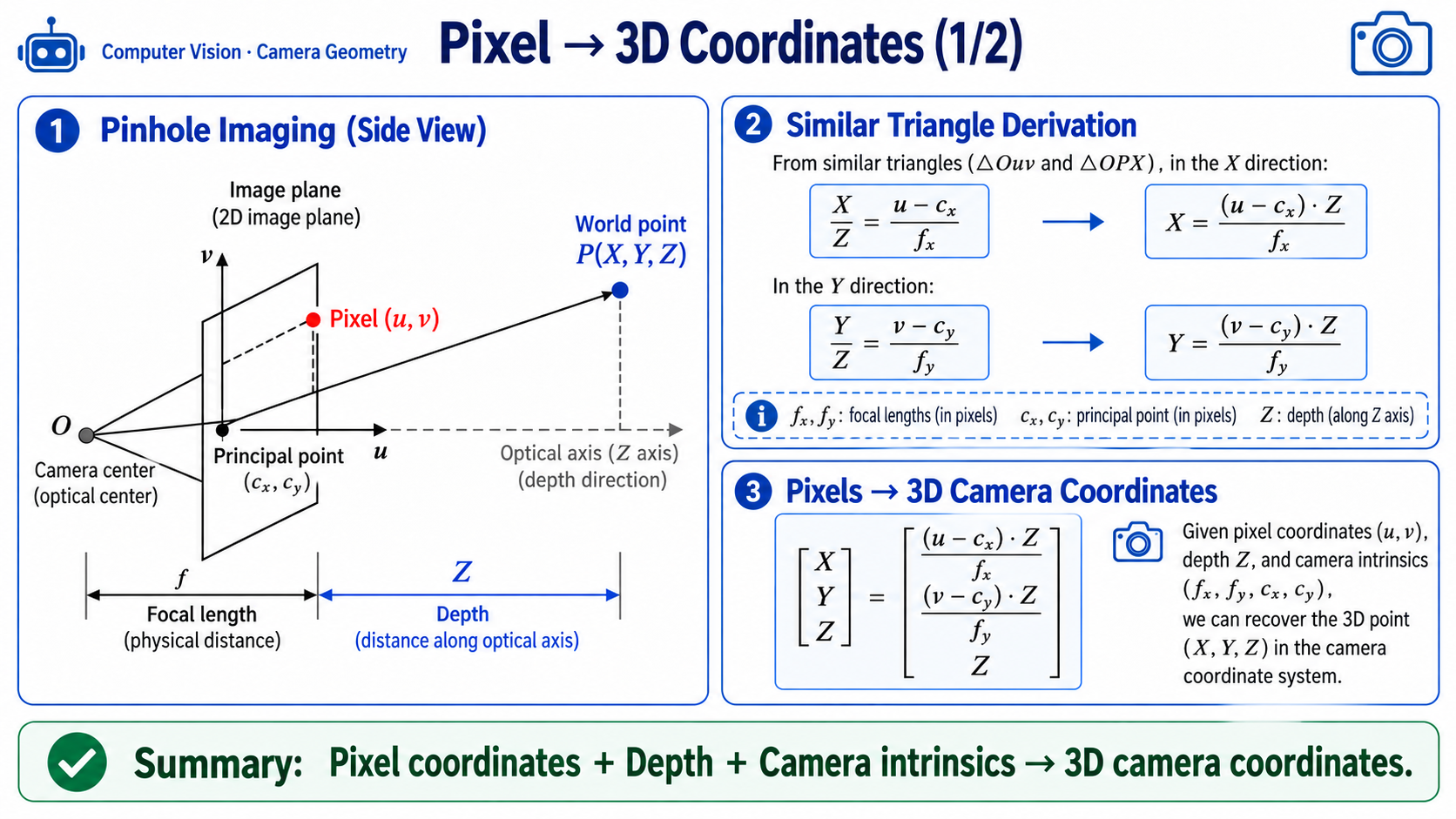
相似三角形による導出
-
相似三角形から(画像平面の X 軸):
-
変形すると:
誤差伝播解析
-
奥行き誤差を とすると、X の式から:
- つまり:画素が光学中心 (cx, cy) から離れるほど、奥行き誤差はより大きく増幅されます。
- 物理的な意味:画像の端に近い物体は視差角が大きいため、小さな奥行き誤差でも X, Y 位置推定に大きく影響します。
-
数値例:, , , , m、画素 とします。
-
カメラ座標系における物体の位置:(0.217, 0, 0.65) m
-
実装リファレンス:
# ordinary_grasp.py L398-403 implementation reference
def _backproject(u, v, z_m, K):
    fx, fy = float(K[0, 0]), float(K[1, 1])
    cx, cy = float(K[0, 2]), float(K[1, 2])
    x = (u - cx) * z_m / fx
    y = (v - cy) * z_m / fy
    return np.array([x, y, z_m], dtype=np.float32)
ArUco マーカーの原理
ArUco マーカーの構造
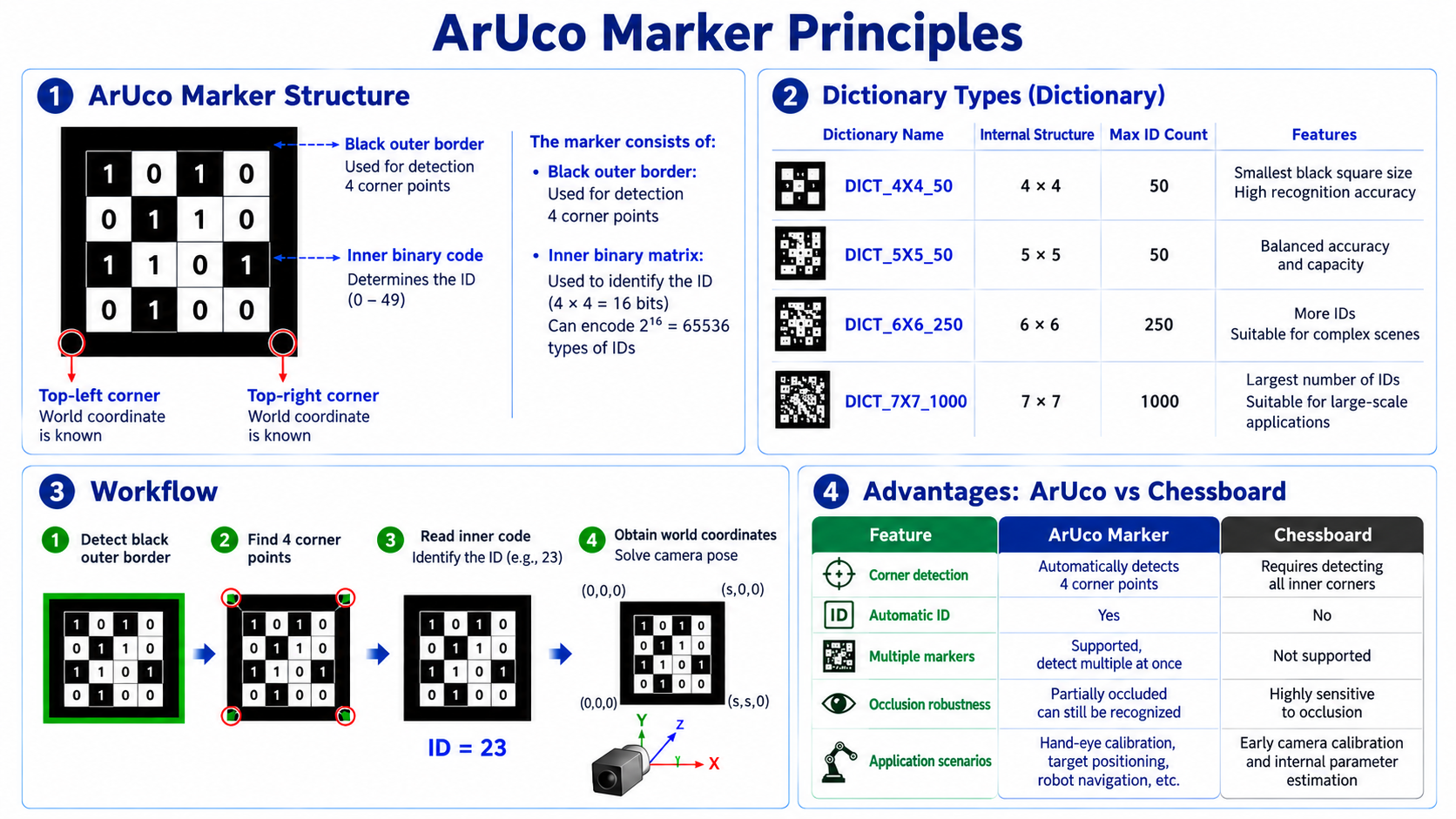
ArUco の姿勢推定(solvePnP)
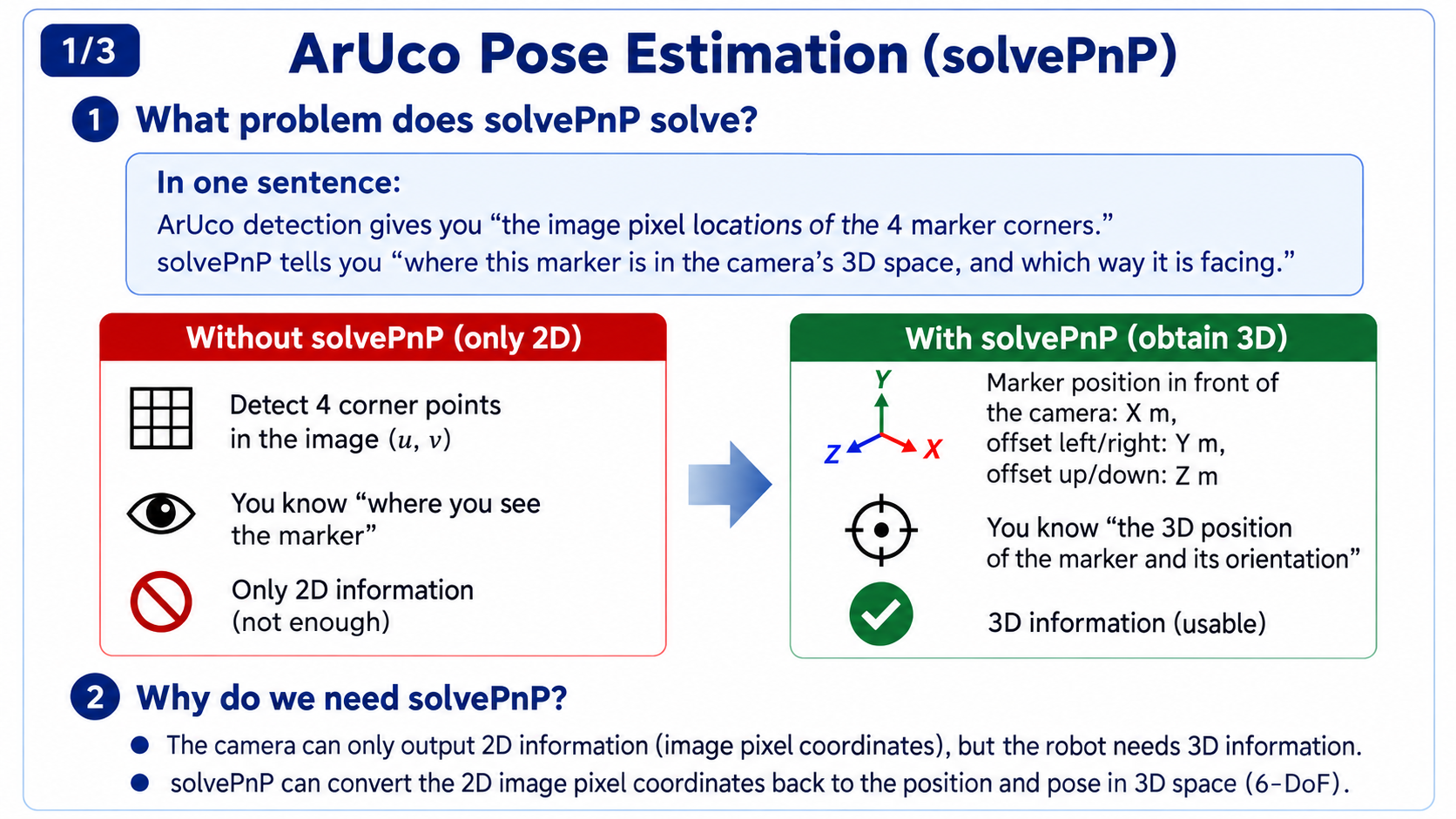
solvePnP が解く問題
- 一言で言うと:ArUco 検出は「マーカーの 4 つのコーナーが画素座標でどこにあるか」を教えてくれます。solvePnP は「このマーカーがカメラの 3D 空間のどこにあり、どの向きか」を教えてくれます。
なぜ solvePnP が必要か
- カメラが出力するのは 2D 情報(画素座標)のみですが、ロボットには 3D 情報が必要です:
- ハンドアイキャリブレーションを思い出してください。その方程式は AX = XB で、B はマーカーからカメラへの変換 T_marker2cam です。そして B はまさに ArUco コーナー検出の後に solvePnP によって得られます。solvePnP がなければ B は得られず、B がなければ X を解くことはできず、ハンドアイキャリブレーションは進められません。
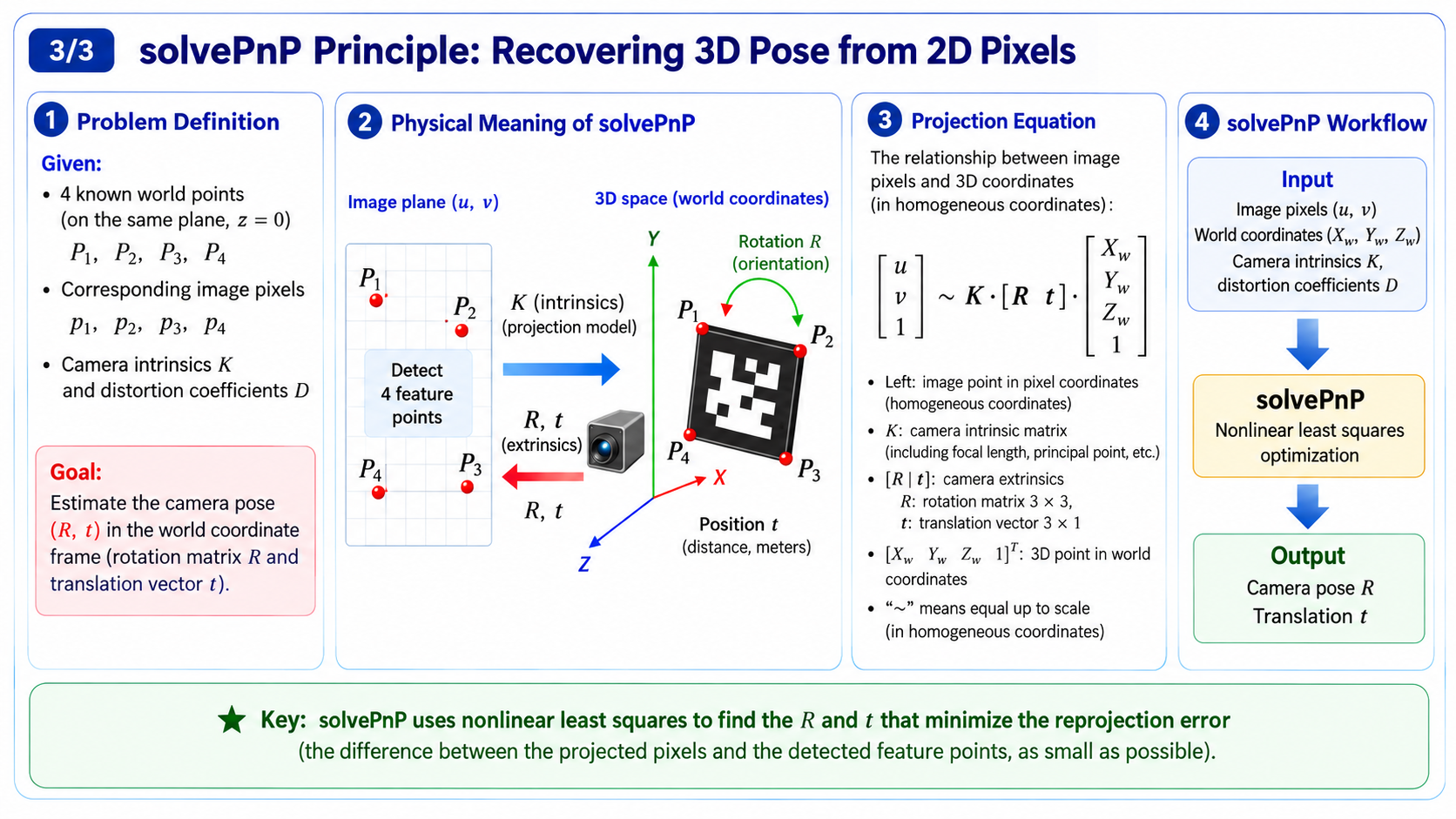
solvePnP の物理的意味
- 3D ワールド座標(実空間における「マーカーのコーナーがどこにあるか」を 3 つの数 (X, Y, Z) で表す固定 3D 座標系、単位は cm/m)、対応する 2D 画素座標(画像上で「そのコーナーがどこに写ったか」を 2 つの数 (u, v) で表す 2D 画像座標系)、およびカメラ内部パラメータ K が与えられると、solvePnP はカメラの回転 R と並進 t を逆算します。内部的には最小二乗最適化を用いて射影誤差を最小化し、その出力はカメラに対するマーカーの姿勢となります。
28.5 深掘り:ハンドアイキャリブレーション
AX = XB の幾何学的意味
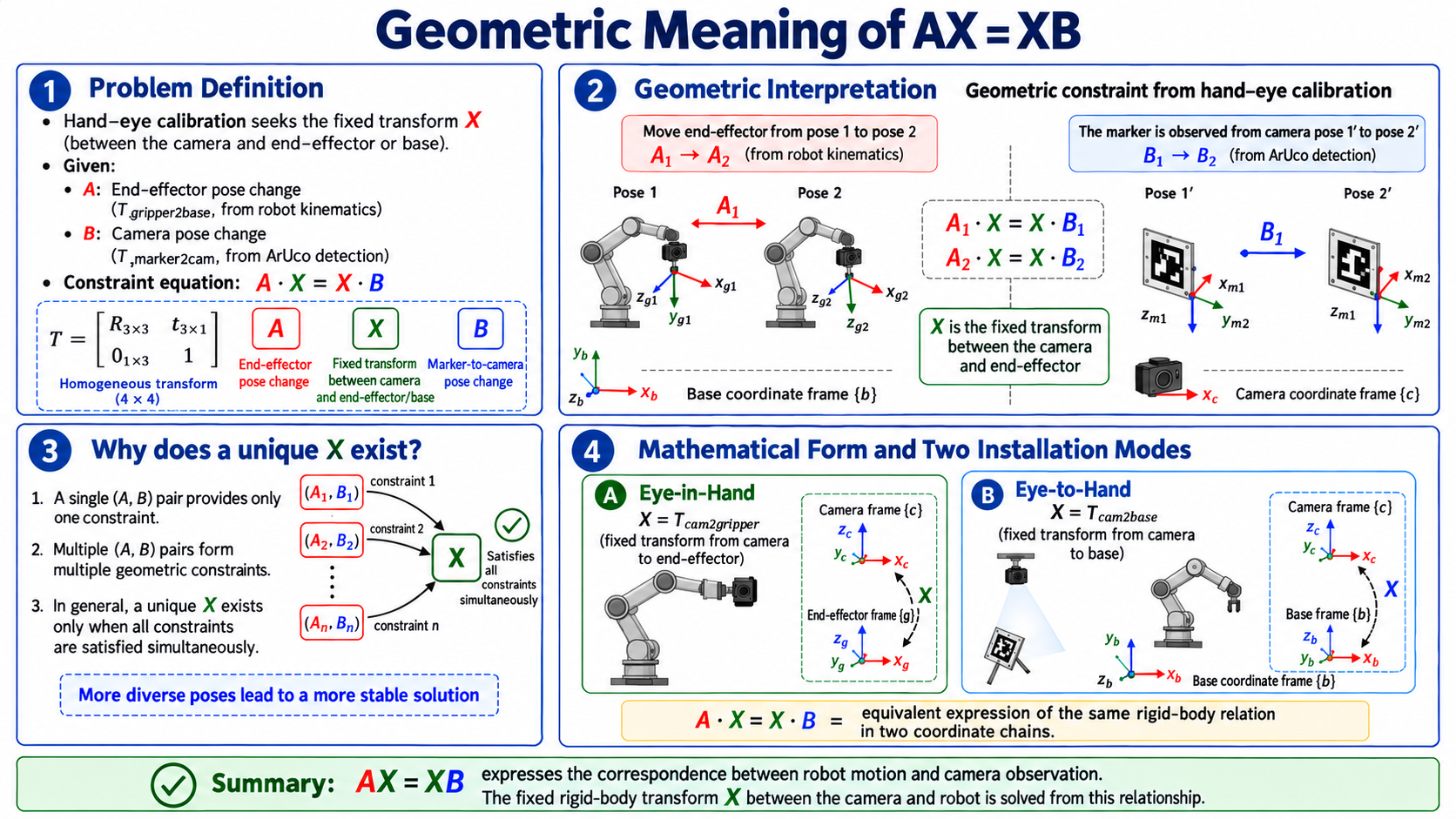
問題の定義
-
ハンドアイキャリブレーションは、次が与えられたときに X(カメラとエンドまたはベース間の固定変換)を求めます:
- A: エンドからベースへの変換(T_gripper2base、アームの順運動学から)
- B: マーカーからカメラへの変換(T_marker2cam、ArUco 検出から)
-
制約方程式:
-
X はハンドアイ行列であり、カメラ座標系の姿勢(向き + 位置)をアームエンド座標系に対して表す 4x4 の同次変換です。
- 3x3 の回転行列 R_X(姿勢)と 3x1 の並進 t_X(位置)を含みます。
- オイラー角は R_X を読み替えた別の表現にすぎません。同じ姿勢は回転行列でもオイラー角でも表現でき、相互に変換可能です。
幾何学的な解釈
幾何学的には、この制約は単純です。エンドは姿勢 1 から姿勢 2 へと動き、(アームによって記録)、同時にカメラはマーカーが から へと動くのを (ArUco 検出)として観測します。 はカメラとエンドの間の固定変換(エンド上のカメラ)なので、同じ剛体関係がすべての姿勢で成り立たなければなりません:
複数の (A, B) ペアが複数の制約を与えますが、幾何学的には それらすべてを満たす X はただ 1 つだけ です。
数学的な形式
- アイインハンド(Eye-in-Hand):X = T_cam2gripper(エンドに対するカメラの固定姿勢)を解く
- アイトゥハンド(Eye-to-Hand):X = T_cam2base(ベースに対するカメラの固定姿勢)を解く
- 実装では、サンプリングされた各 (A, B) を保存し、十分な数が集まったらキャリブレーションソルバでまとめて解きます。
剛体変換の数学基礎
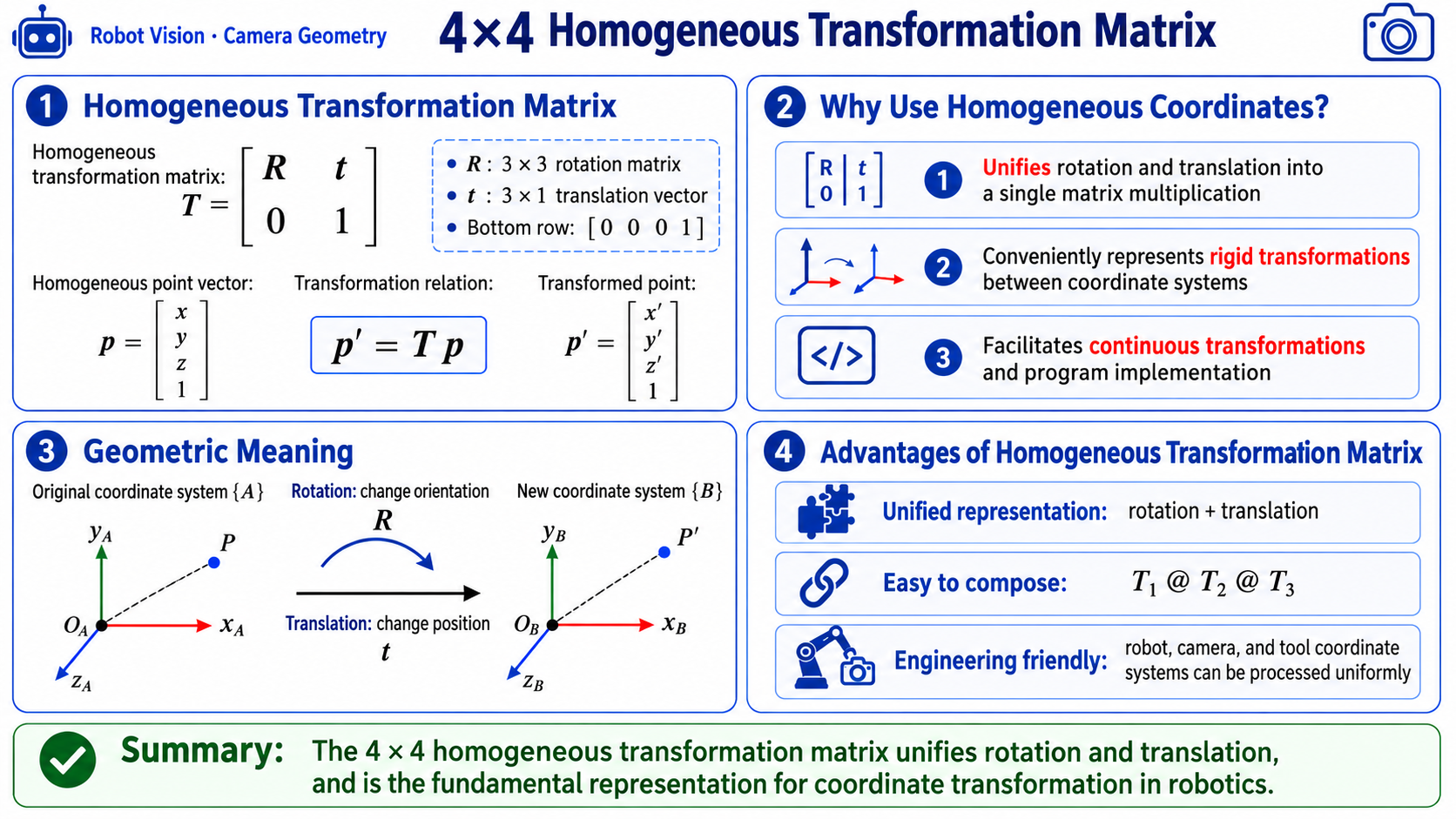
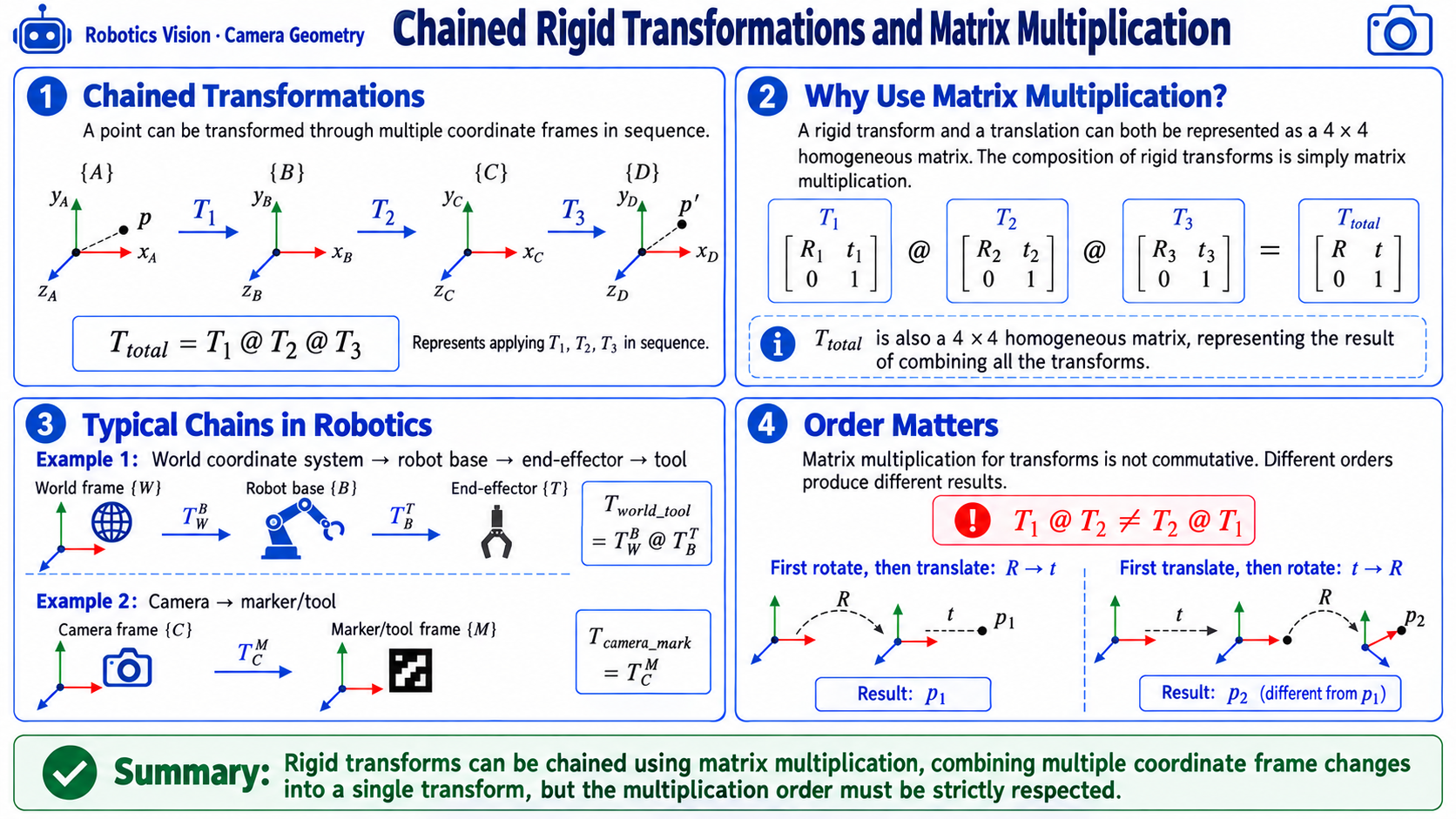
4x4 同次変換行列
T = [ R   t ]    R: 3x3 rotation matrix
    [ 0   1 ]    t: 3x1 translation vector
同次変換の利点:
- 回転と並進を 1 回の行列積に統一できる
- 連鎖可能:T1 @ T2 @ T3 は、T1, T2, T3 を順に適用する変換を意味します。ただし注意:行列積は可換ではありません。順序が違えば結果はまったく異なります。「90 度回転してから並進する」のと「並進してから 90 度回転する」のは同じではありません。
3 つの回転表現
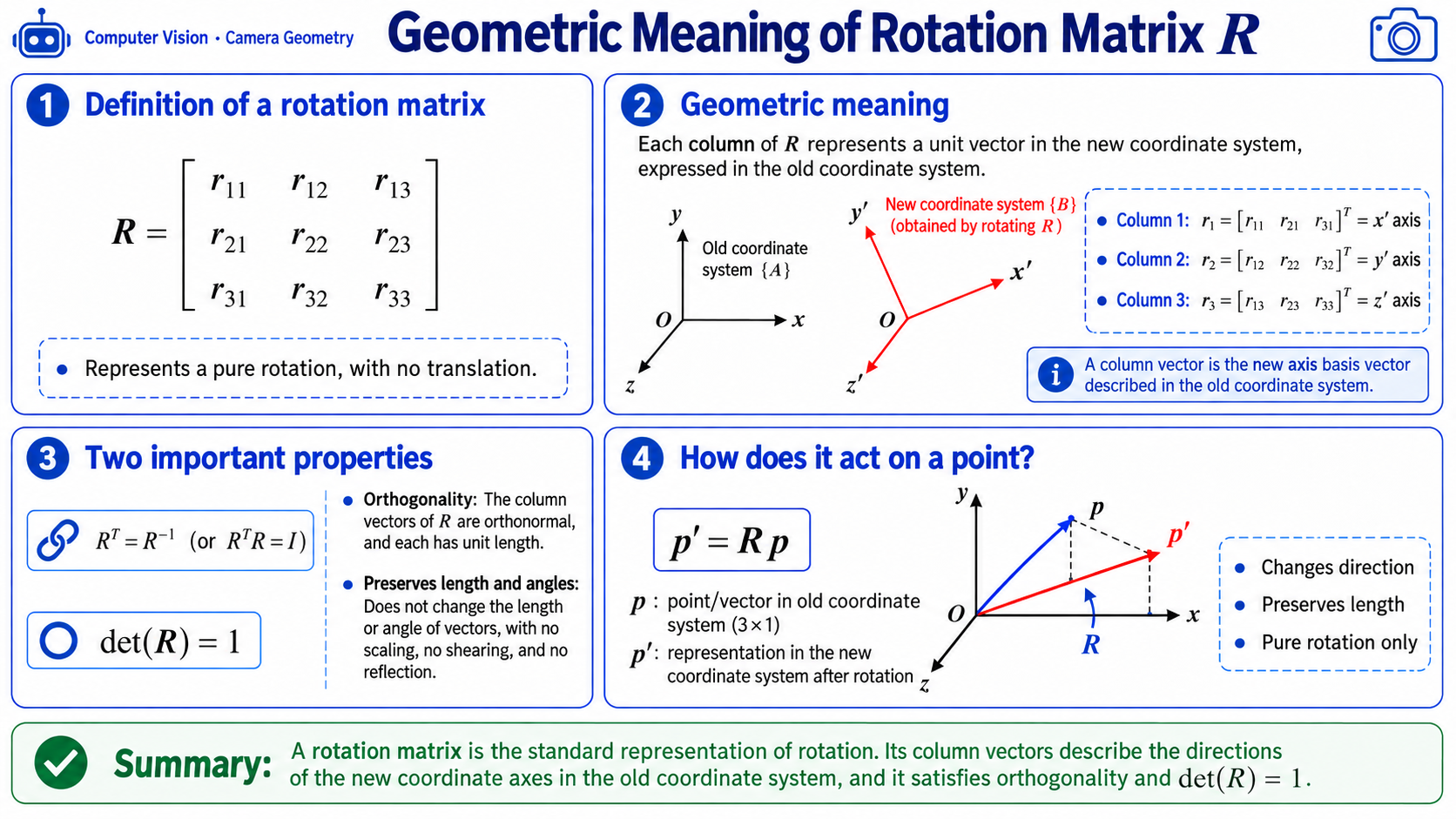
- 回転行列 R
-
性質:
- R^T = R^(-1)(直交性)
- det(R) = 1
[diagram: geometric meaning of R]

R = [ r11 r12 r13 ]    each column is a basis vector
    [ r21 r22 r23 ]    expressed in the new frame
    [ r31 r32 r33 ]
-
-
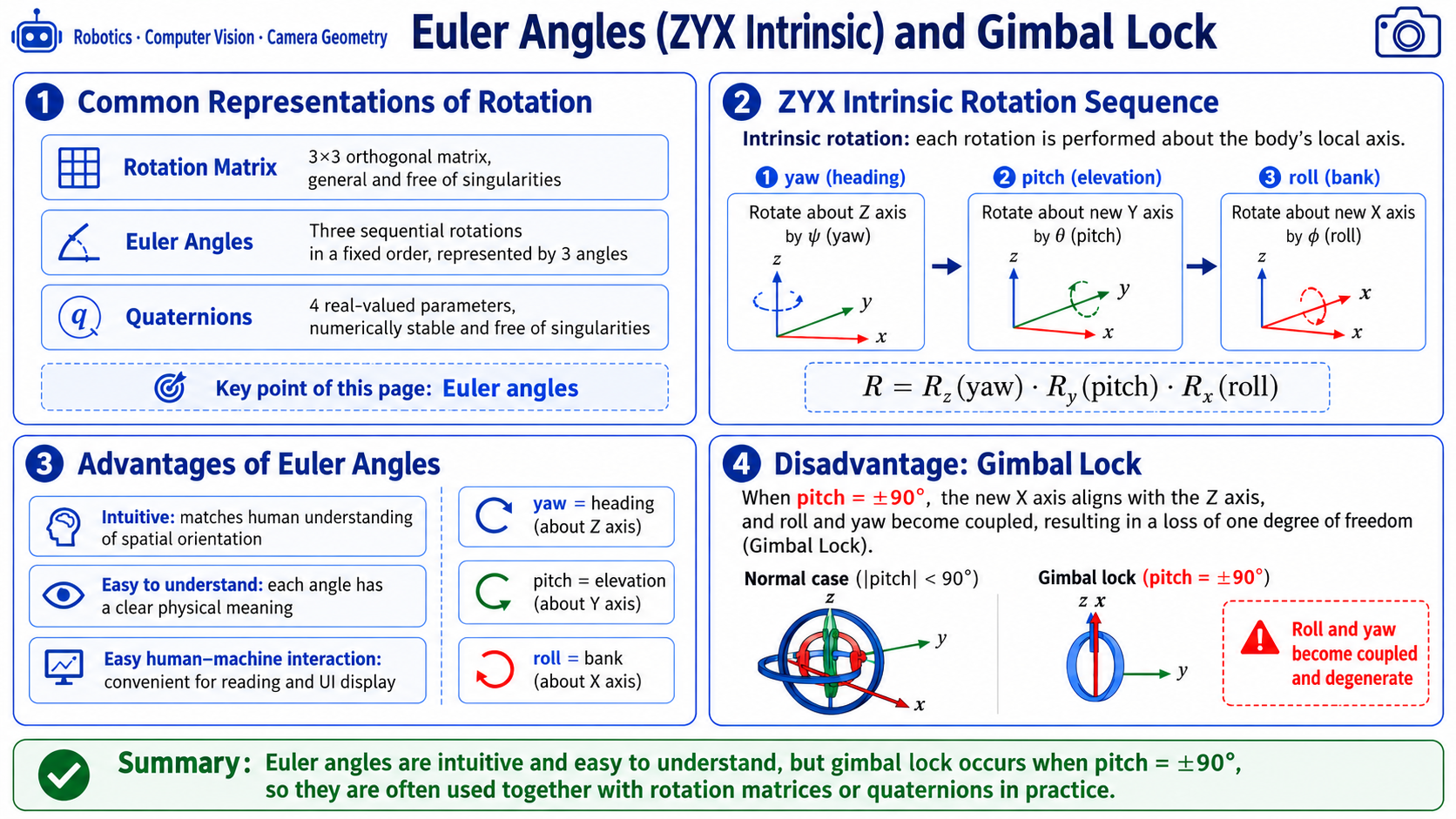
オイラー角(ZYX 内部回転)
-
実装:Z 軸(ヨー)まわりに回転 -> 新しい Y 軸(ピッチ)まわりに回転 -> 新しい X 軸(ロール)まわりに回転:
# transforms.py L32-72 implementation reference
def pose6d_to_mat4(x, y, z, rx, ry, rz, degrees=False):
    if degrees:
        rx, ry, rz = np.radians(rx), np.radians(ry), np.radians(rz)

# Rotation around X (roll)
    Rx = np.array([
        [1,          0,           0],
        [0,  np.cos(rx), -np.sin(rx)],
        [0,  np.sin(rx),  np.cos(rx)],
    ])
# Rotation around Y (pitch)
    Ry = np.array([
        [ np.cos(ry), 0, np.sin(ry)],
        [          0, 1,          0],
        [-np.sin(ry), 0, np.cos(ry)],
    ])
# Rotation around Z (yaw)
    Rz = np.array([
        [np.cos(rz), -np.sin(rz), 0],
        [np.sin(rz),  np.cos(rz), 0],
        [         0,           0, 1],
    ])

# Intrinsic ZYX rotation: R = Rz @ Ry @ Rx
    R = Rz @ Ry @ Rx

    T = np.eye(4, dtype=np.float64)
    T[:3, :3] = R
    T[:3, 3] = [x, y, z]
    return T
-
-
特異点(ジンバルロック):
-
オイラー角には「ジンバルロック」と呼ばれる有名な落とし穴があります。ピッチが +/-90 度になると X 軸と Z 軸が一致し、ロールとヨーが縮退して自由度が 3 から 2 に落ち、姿勢表現が一意でなくなります。そのため特異点付近ではコードはフォールバック用の式を使います。これが、工学ではオイラー角がしばしば回転行列やクォータニオンと組み合わせて使われる理由です。
# transforms.py L110-122 implementation (handling singularities)
def rotation_matrix_to_euler_zyx(R):
    R = _nearest_rotation_matrix(R)
    sy = np.sqrt(R[0, 0] ** 2 + R[1, 0] ** 2)
    if sy > 1e-6:
        rx = np.arctan2(R[2, 1], R[2, 2])
        ry = np.arctan2(-R[2, 0], sy)
        rz = np.arctan2(R[1, 0], R[0, 0])
    else:
# near singularity, use fallback formula
        rx = np.arctan2(-R[1, 2], R[1, 1])
        ry = np.arctan2(-R[2, 0], sy)
        rz = 0.0
    return np.array([rx, ry, rz], dtype=np.float64)
-
アイインハンド vs アイトゥハンド
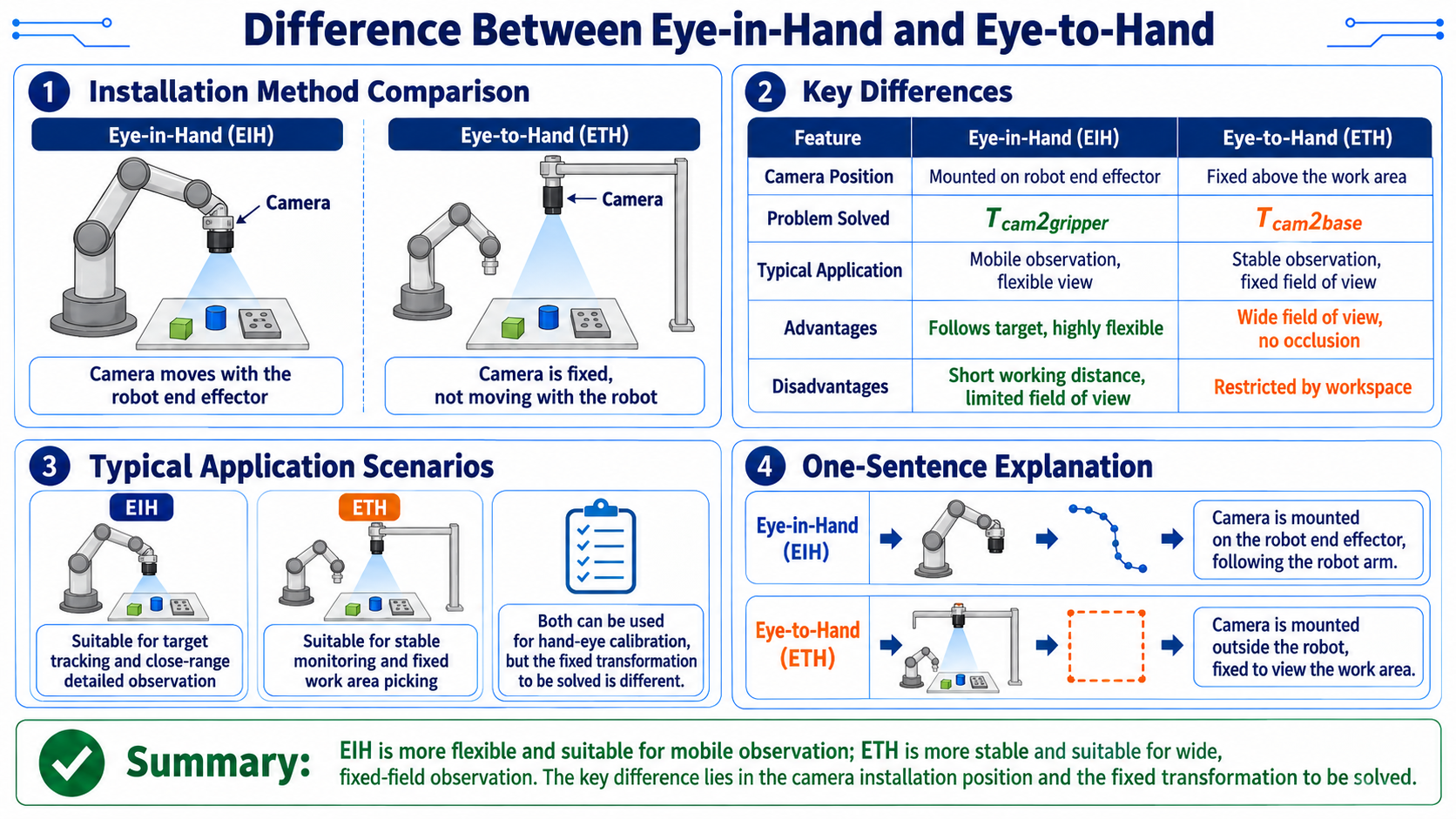
[diagram: EIH vs ETH mounting]

Eye-in-Hand:
  arm end -- camera -- looking at workspace
  camera moves with the end

Eye-to-Hand:
  above workspace -- camera -- looking down
  camera fixed, does not move with the end
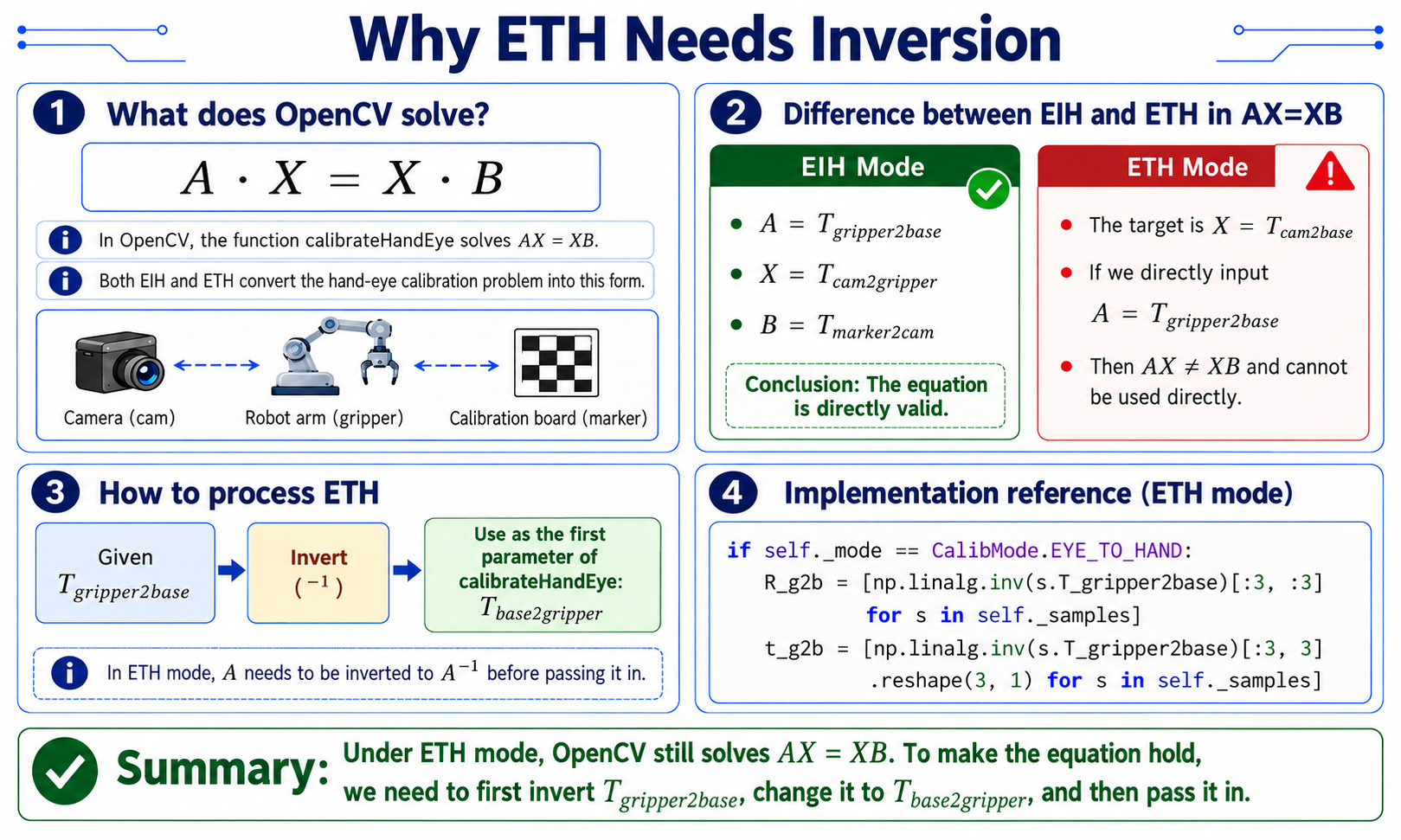
ETH の特別な扱い(逆行列を取る)
実装:
# hand_eye.py L110-114 implementation (ETH mode: invert A)
if self._mode == CalibMode.EYE_TO_HAND:
# OpenCV calibrateHandEye solves AX=XB; in ETH mode, invert
# T_gripper2base and pass it as the first argument; it returns T_cam2base.
    R_g2b = [np.linalg.inv(s.T_gripper2base)[:3, :3] for s in self._samples]
    t_g2b = [np.linalg.inv(s.T_gripper2base)[:3, 3].reshape(3, 1) for s in self._samples]
ETH で逆行列が必要な理由:
- OpenCV の
calibrateHandEyeは内部で AX=XB を解きます。 - EIH モード:A は T_gripper2base(エンドの動き)、X は T_cam2gripper(固定カメラ-エンド)、B は T_marker2cam。式はそのまま成り立ちます。
- ETH モード:A は依然として T_gripper2base ですが、X は T_cam2base(固定カメラ-ベース)です。このとき AX != XB となるため、そのままでは成り立ちません。渡す前に A を逆行列にする必要があります。
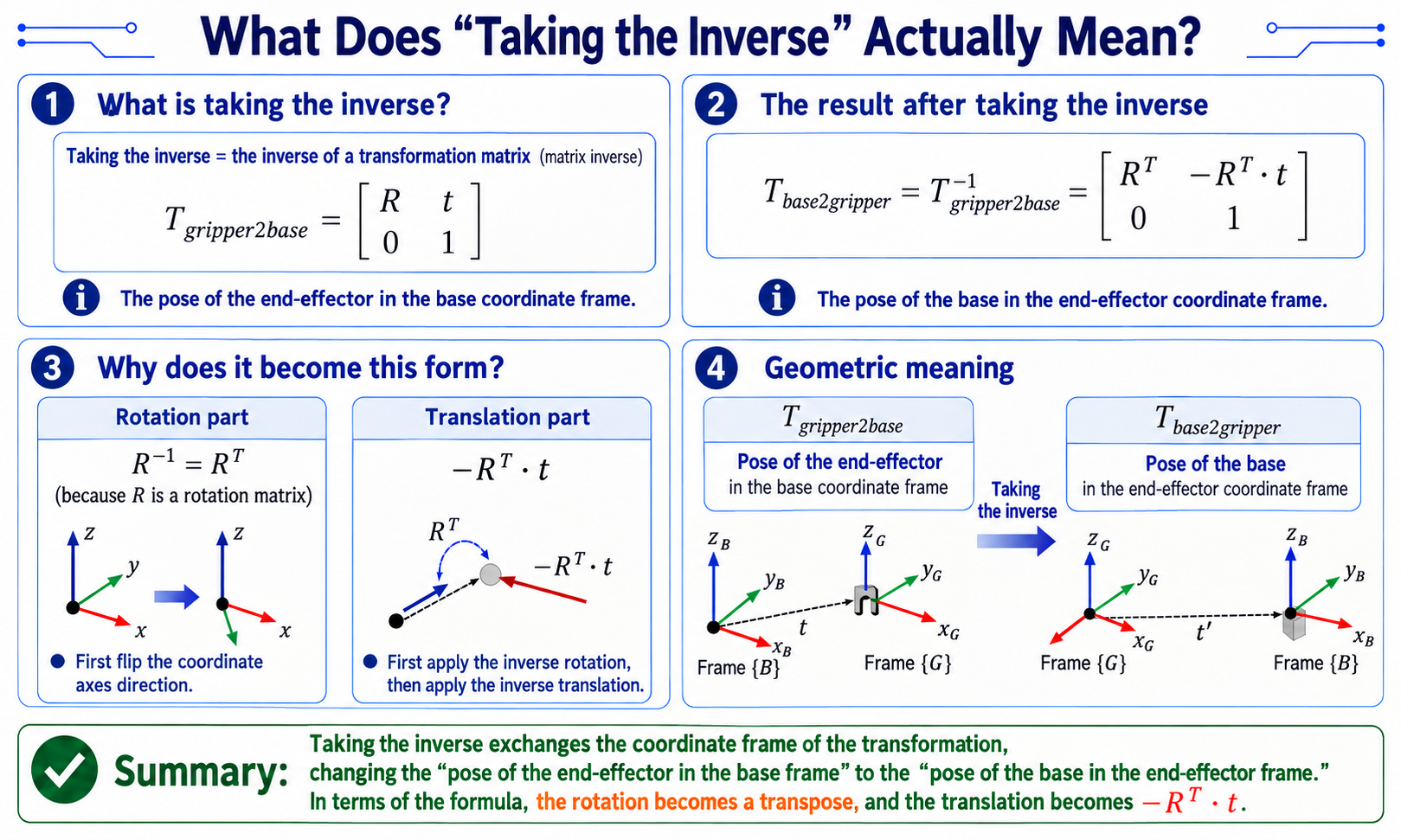
「逆行列を取る」とは何か
-
「逆行列を取る」 = 行列の逆行列を求めること。 ETH モードでは、OpenCV は
T_gripper2baseを受け付けず、T_base2gripperを要求するため、行列の逆行列 を取ります。# what we have (arm FK output)
T_gripper2base = [R t] # end pose (in base frame)
[0 1]
# what OpenCV ETH mode wants (after inversion)
T_base2gripper = T_gripper2base^-1 = [R^T -R^T.t] # base in end frame
[0 1 ] -
回転成分:R の逆行列 = R の転置(R は直交行列)
-
並進成分:-R^T . t(まず逆回転してから、逆方向に並進)
-
幾何学的な意味:逆行列を取ると、「ベース座標系で表したエンドの姿勢」が「エンド座標系で表したベースの姿勢」になります。
キャリブレーション姿勢設計の原則
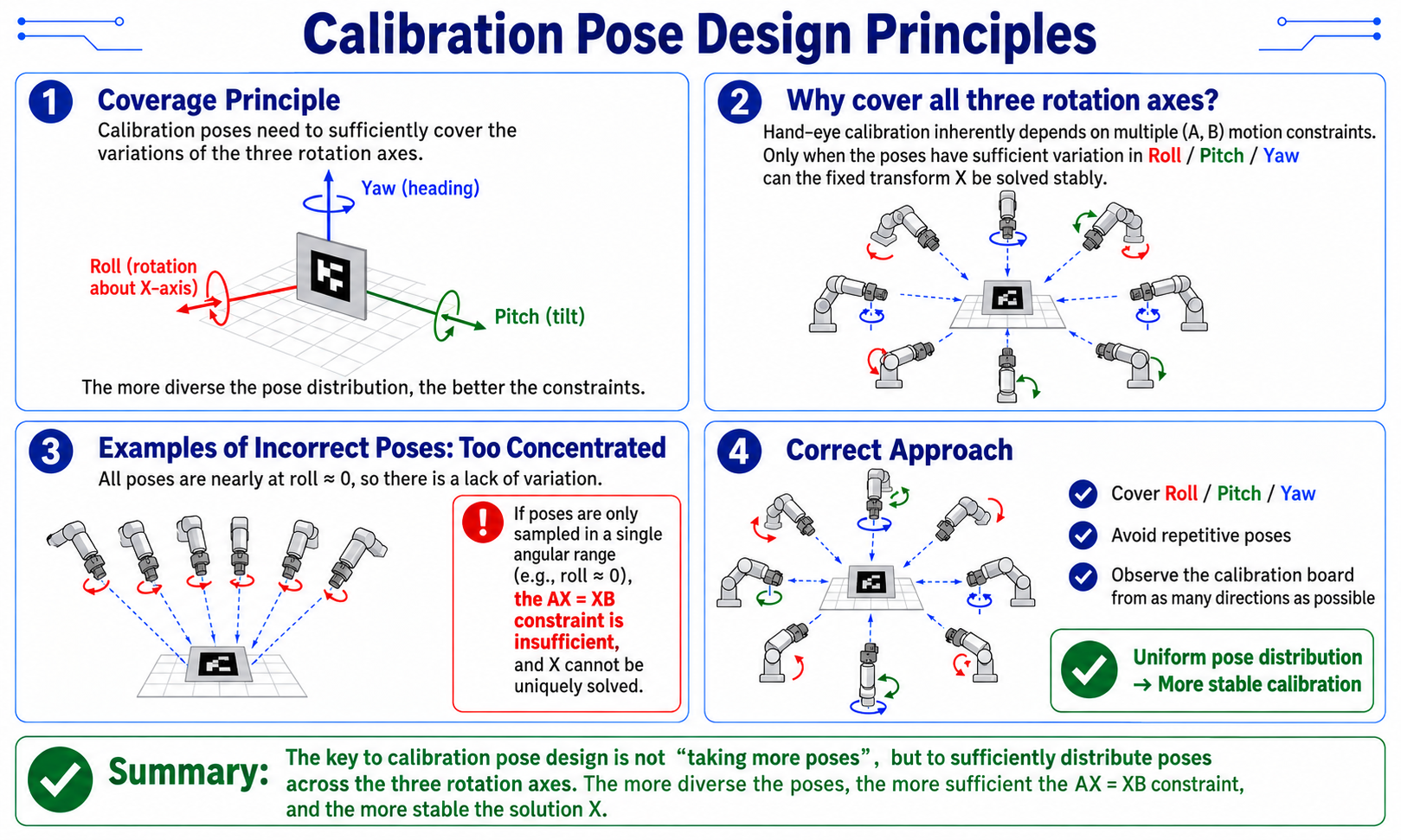
カバレッジの原則
-
キャリブレーション姿勢は、3 つすべての回転軸 にわたる変化をカバーする必要があります:
[diagram: calibration pose distribution]

      Roll ^
           |
   +-------+-------+
   |       |       |
   |  Yaw -+-->    |
   |       |       |
   +-------+-------+
           |
v Pitch -
姿勢が 1 つの角度範囲に制限されている場合(例:すべてのロールが約 0)、AX=XB は拘束条件が不足し、X は一意に定まりません。したがってキャリブレーション中は、アームの姿勢に Roll、Pitch、Yaw の変化を含める必要があります。
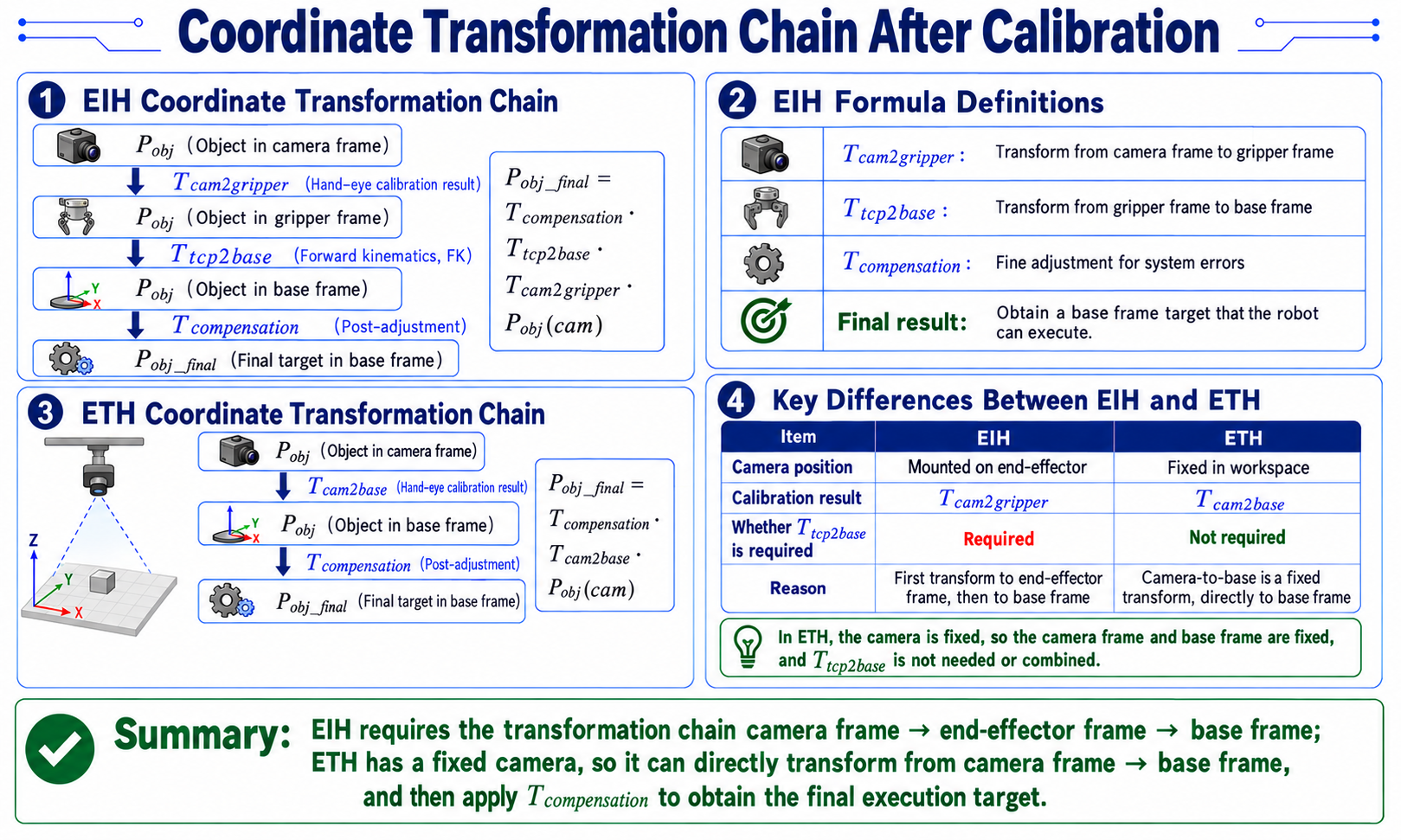
キャリブレーション後の座標変換チェーン
実装:
"""Transform a camera-observed pose into the arm base frame"""
    T_compensation = hand_eye_compensation_matrix(cfg)
    T_he = np.asarray(T_hand_eye, dtype=np.float64)

    if hand_eye_mode == "eye_in_hand":
# EIH: T_cam2base = T_comp x T_tcp2base x T_hand_eye
        return T_compensation @ np.asarray(T_tcp2base, dtype=np.float64) @ T_he
    if hand_eye_mode == "eye_to_hand":
# ETH: T_cam2base = T_comp x T_hand_eye
        return T_compensation @ T_he
EIH 公式の意味
[diagram: EIH transform chain]

  P_obj (target in camera frame)
       |
       | T_cam2gripper (hand-eye result)
       v
  P_obj (target in end frame)
       |
       | T_tcp2base (forward kinematics)
       v
  P_obj (target in base frame)
       |
       | T_compensation (post-hoc fine tune)
       v
  P_obj_final (final target in base frame)
-
実装:
"""Read compensation matrix from config"""
    calibration = cfg.get("calibration") or {}
    compensation = calibration.get("hand_eye_compensation_m") or {}
    T = np.eye(4, dtype=np.float64)
    T[:3, 3] = [
        float(compensation.get("x", 0.0)),
        float(compensation.get("y", 0.0)),
        float(compensation.get("z", 0.0)),
    ]
    return T
ETH 公式
- カメラが固定されているため、ベース-カメラ変換は固定であり、T_tcp2base は合成に入ってきません。
キャリブレーション誤差と再投影解析
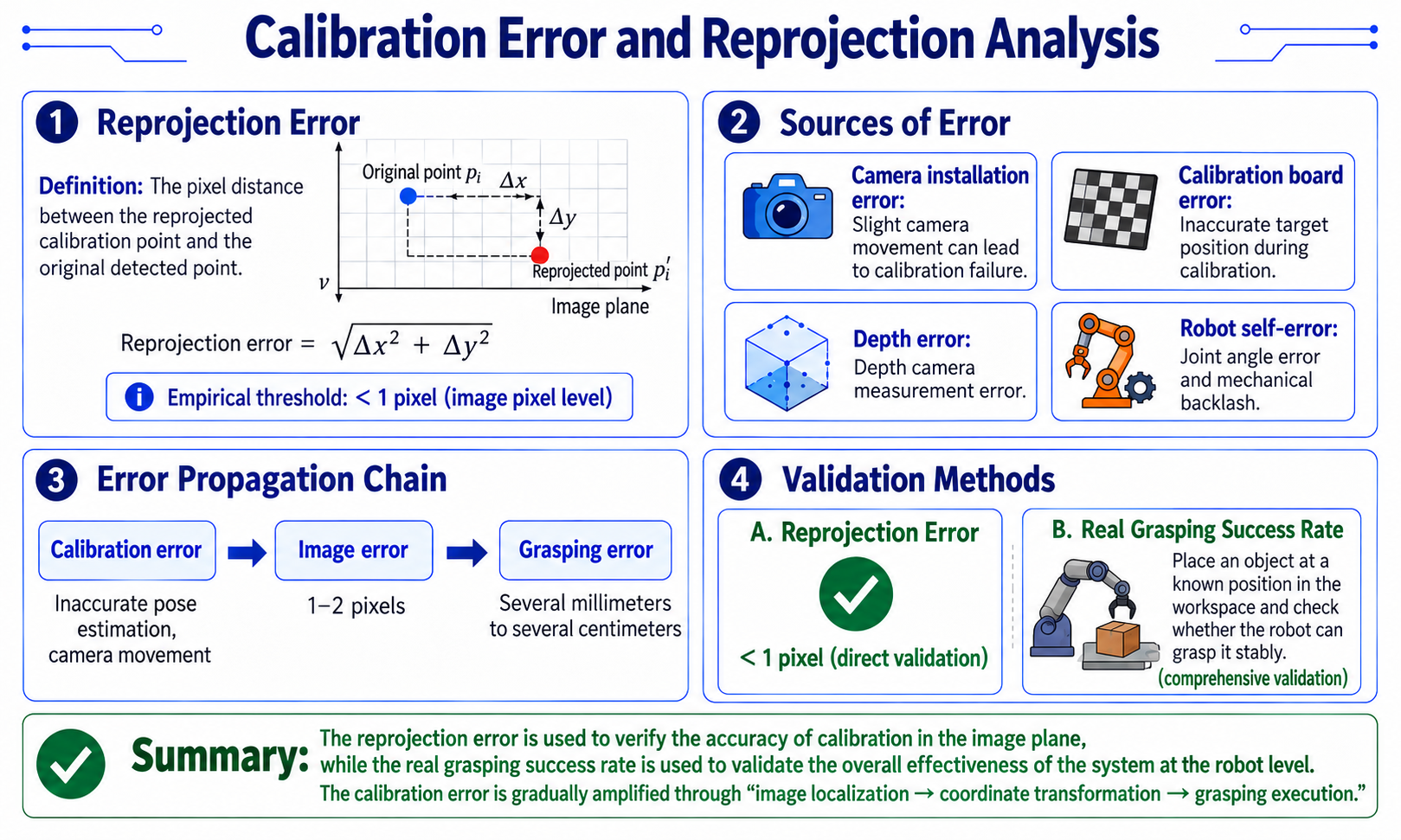
再投影誤差
-
定義:キャリブレーション点を画像上に再投影し、元の検出点との画素距離を計算します。
[diagram: reprojection error]

  original point p_i      reprojected point p_i'
       |                    |
       +---- dx, dy -------+

reprojection error = sqrt(dx^2 + dy^2)-
経験的なしきい値:1 ピクセル未満(サブピクセル)。
-
誤差要因
Source Effect Camera mounting error わずかなカメラのずれでキャリブレーションが無効になる Calibration board error キャリブレーション中のターゲット位置の不正確さ Depth error Depth カメラの計測誤差 Robot error 関節誤差および機械的バックラッシュ
-
誤差伝播チェーン
calibration error -> pixel error -> grasp deviation
   ^                  ^              ^
   |                  |              |
   |            1-2 pixels     a few mm to cm
   |
   +-- poor calibration poses, camera moved
検証方法
- 再投影誤差:1 ピクセル未満(直接的な検証)
- 実際の把持成功率:ワークスペース内の既知位置に物体を配置し、ロボットが安定して把持できるかを確認する(統合的な検証)
28.6 6-DoF 把持姿勢推定
6-DoF 把持のための座標系の取り決め
ビジョン把持座標系(GraspNet の規約)
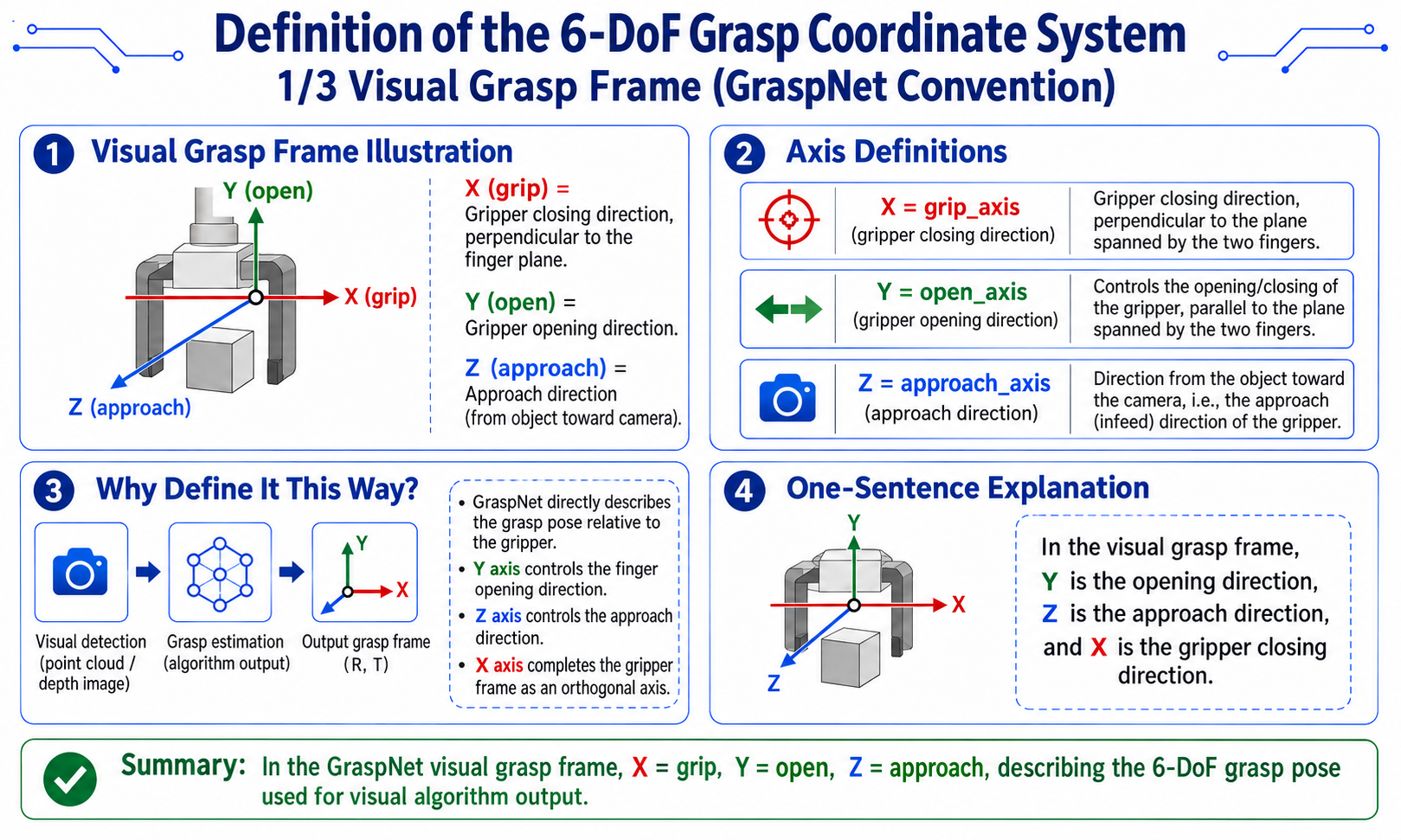
[diagram: vision grasp frame]

Y (open)
|
|   gripper open/close direction
|
+------ X (grip) -> gripper axis (grasp direction)
/
Z (approach)
v approach direction (object toward camera)
- X = grip_axis(グリッパ軸、フィンガ平面に垂直)
- Y = open_axis(開閉方向)
- Z = approach_axis(接近方向、物体からカメラに向かう向き)
ロボット TCP 座標系(reBotArm の規約)
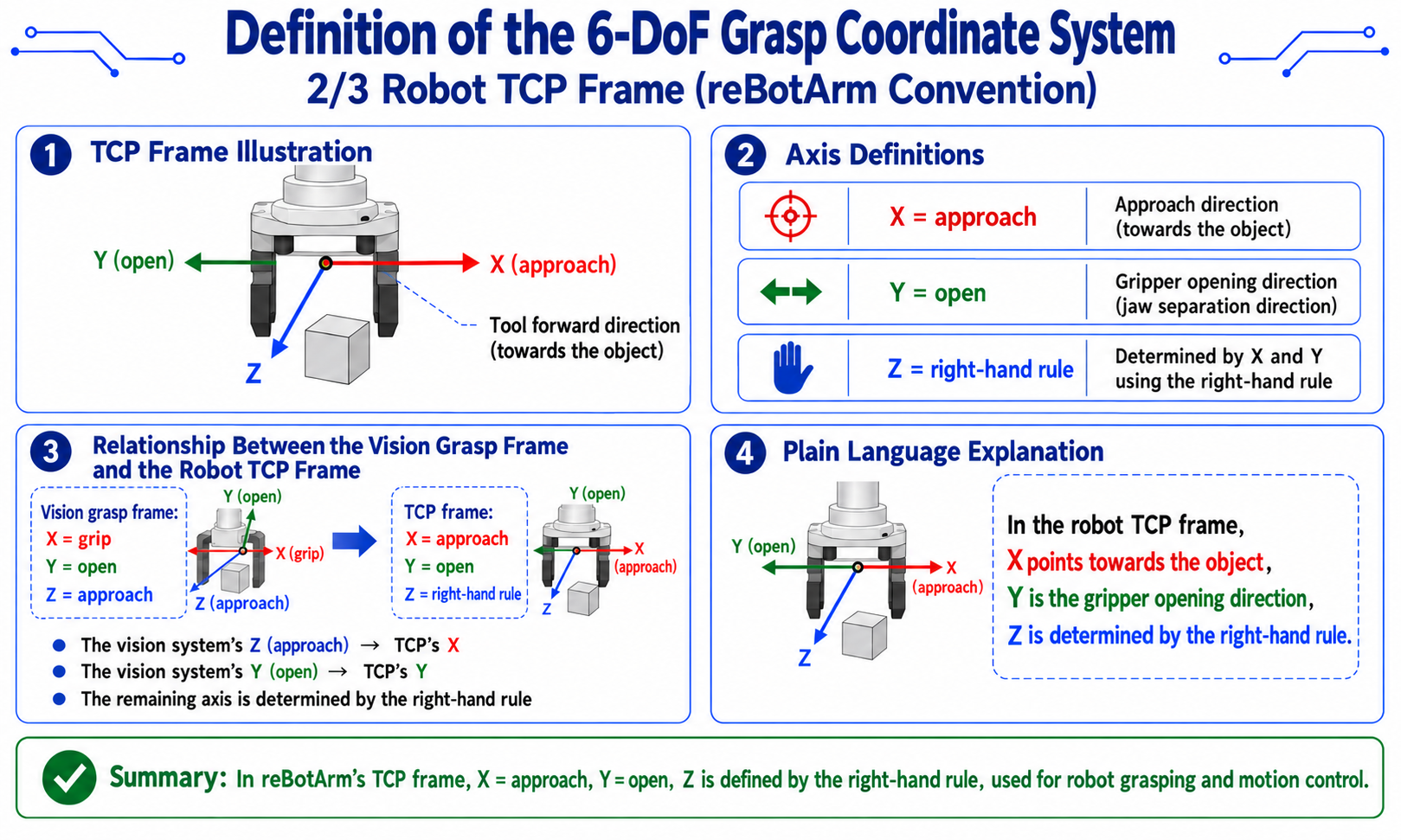
[diagram: TCP frame]

Z
|  / Y (open)
| /
+------ X (approach) -> tool forward direction (approach object)
- X = approach
- Y = open
- Z = 右ねじの法則で決まる
2 つの座標系間の変換
-
実装:
# transforms.py L141-182 implementation reference
def grasp_axes_to_rebot_tcp_rotation(grip_axis, open_axis, approach_axis):
    """Map grasp-frame axes to the reBotArm TCP frame."""
    grip = grip_axis / norm(grip_axis)
    open_vec = open_axis / norm(open_axis)
    approach = approach_axis / norm(approach_axis)

# tcp_x = tool forward = approach direction (negate, since plane normal faces camera)
    tcp_x = -approach
# tcp_y = open direction, subtract approach component to make orthogonal
    tcp_y = open_vec - dot(open_vec, tcp_x) * tcp_x
    tcp_y = tcp_y / norm(tcp_y)
# tcp_z = right-hand cross product
    tcp_z = cross(tcp_x, tcp_y)
    tcp_z = tcp_z / norm(tcp_z)

# keep tcp_z aligned with grip_axis
    if dot(tcp_z, grip) < 0:
        tcp_y = -tcp_y
        tcp_z = -tcp_z

    R = np.column_stack([tcp_x, tcp_y, tcp_z]).astype(np.float64)
    if np.linalg.det(R) < 0.0:
        R[:, 2] *= -1.0
    return R
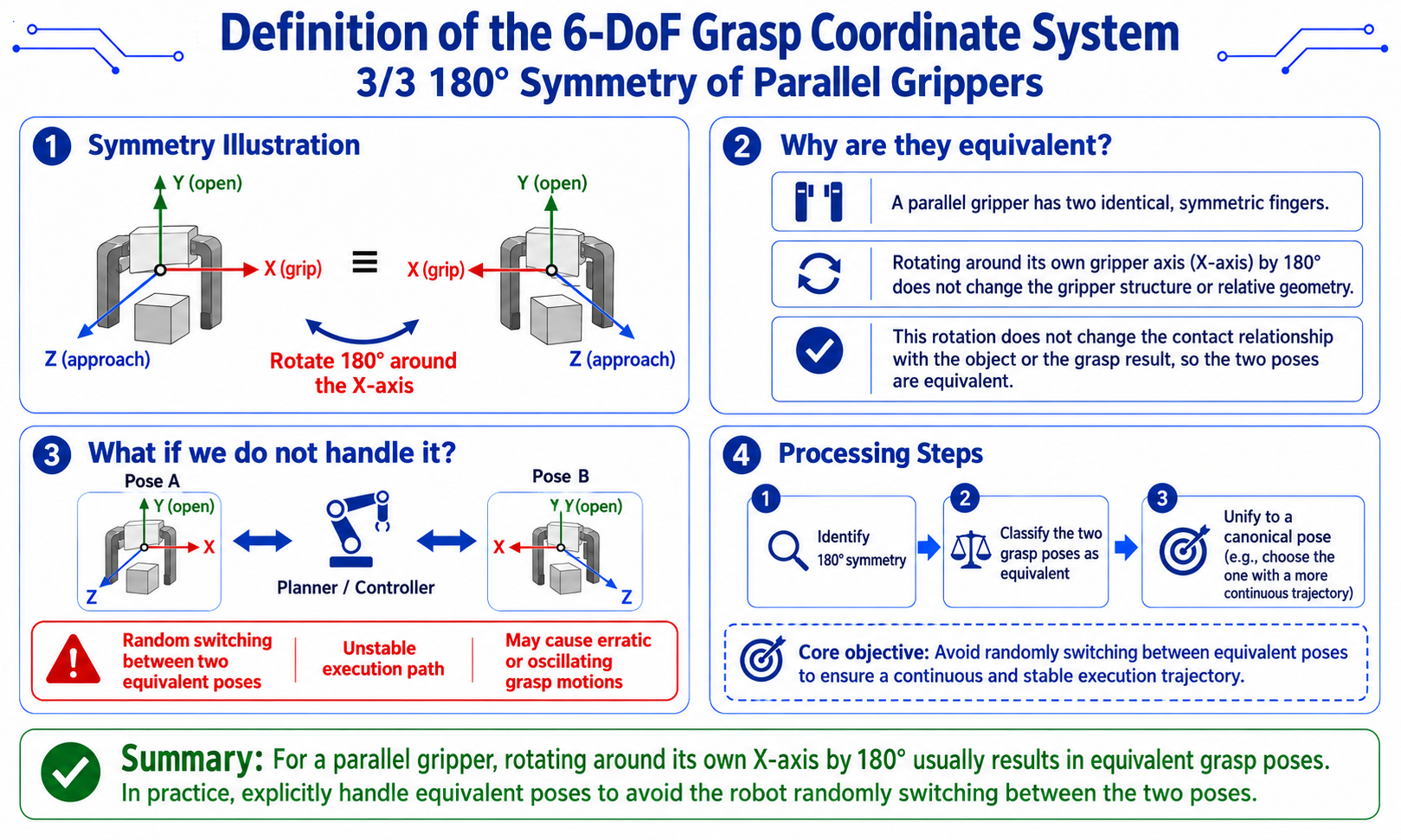
平行グリッパの 180 度対称性
-
平行(二指)グリッパには特別な対称性があり、自分自身の X 軸(グリッパ軸)まわりに 180 度回転させても等価 です。
[diagram: parallel-gripper symmetry]

   X (grip)     X (grip)
   |            |
   +-+    <=>    +-+
   | |   rotate  | |
   +-+  180 deg  +-+
| | -
これを処理しないと、ロボットは等価な姿勢の間をランダムに切り替え、実行経路が不安定になります。
-
実装:
# transforms.py L125-138 implementation reference
def canonicalize_parallel_gripper_tcp_rotation(R):
    """Pick a stable equivalent pose."""
    alt = R @ Rx(pi)  # rotate 180 deg about X

    roll = rotation_matrix_to_euler_zyx(R)[0]
    alt_roll = rotation_matrix_to_euler_zyx(alt)[0]

# pick the branch with smaller |roll| (roll~0 is usually more stable)
    return alt if abs(alt_roll) < abs(roll) else R
-
OBB + Depth 分位点による幾何学的把持推定
全体パイプライン
-
実装:
# ordinary_grasp.py L98-219 core pseudocode
def estimate_grasp(result, index, depth_mm, K, depth_quantile=0.75):
# 1. get OBB
    rect_points = _rect_points(result, index, depth_mm.shape, bbox_xyxy)
    center = rect_points.mean(axis=0).astype(np.float32)

# 2. short edge = grasp direction
    short_vec_uv, short_len_px = _short_edge(rect_points)
    short_dir_uv = _normalize(short_vec_uv)

# 3. mask refinement (for curved objects)
    if short_dir_uv is not None:
        refined = _refine_grasp_line_from_mask(mask, center, short_dir_uv, long_len_px)
        if refined is not None:
            center, short_edge_points, grasp_span_px = refined

# 4. depth sampling (75th quantile within mask)
    depth_values = depth_mm[mask > 0]
    depth_values = depth_values[depth_values > 0]
    if len(depth_values) == 0:
        center_depth = get_depth_mm(depth_mm, center_px[0], center_px[1], 5)
        if center_depth > 0:
            depth_values = np.array([center_depth], dtype=np.float32)

    z_m = float(np.quantile(depth_values, depth_quantile) / 1000.0)

# 5. backproject center to 3D
    position = _backproject(float(center[0]), float(center[1]), z_m, K)

# 6. build three axes
    approach = _normalize(-position)       # Z axis: object toward camera
    open_axis = _pixel_vec_to_3d(short_dir_uv, z_m, K)
    open_axis = open_axis - float(np.dot(open_axis, approach)) * approach  # Gram-Schmidt
    open_axis = _normalize(open_axis)

# ensure open_axis[0] >= 0 (avoid symmetry ambiguity)
    if open_axis[0] < 0:
        open_axis = -open_axis

    grip_axis = _normalize(np.cross(open_axis, approach))
    open_axis = _normalize(np.cross(approach, grip_axis))

# 7. assemble rotation matrix
    rotation = np.column_stack([grip_axis, open_axis, approach]).astype(np.float32)

# 8. convert to reBotArm TCP rotation
    tcp_rotation = grasp_axes_to_rebot_tcp_rotation(
        rotation[:, 0], rotation[:, 1], rotation[:, 2]
    ).astype(np.float32)

# 9. estimate grasp width
    jaw_width_m = float(np.linalg.norm(
        _pixel_vec_to_3d(short_dir_uv * grasp_span_px, z_m, K)
    ))

    return grasp_pose
三軸の直交化の詳細
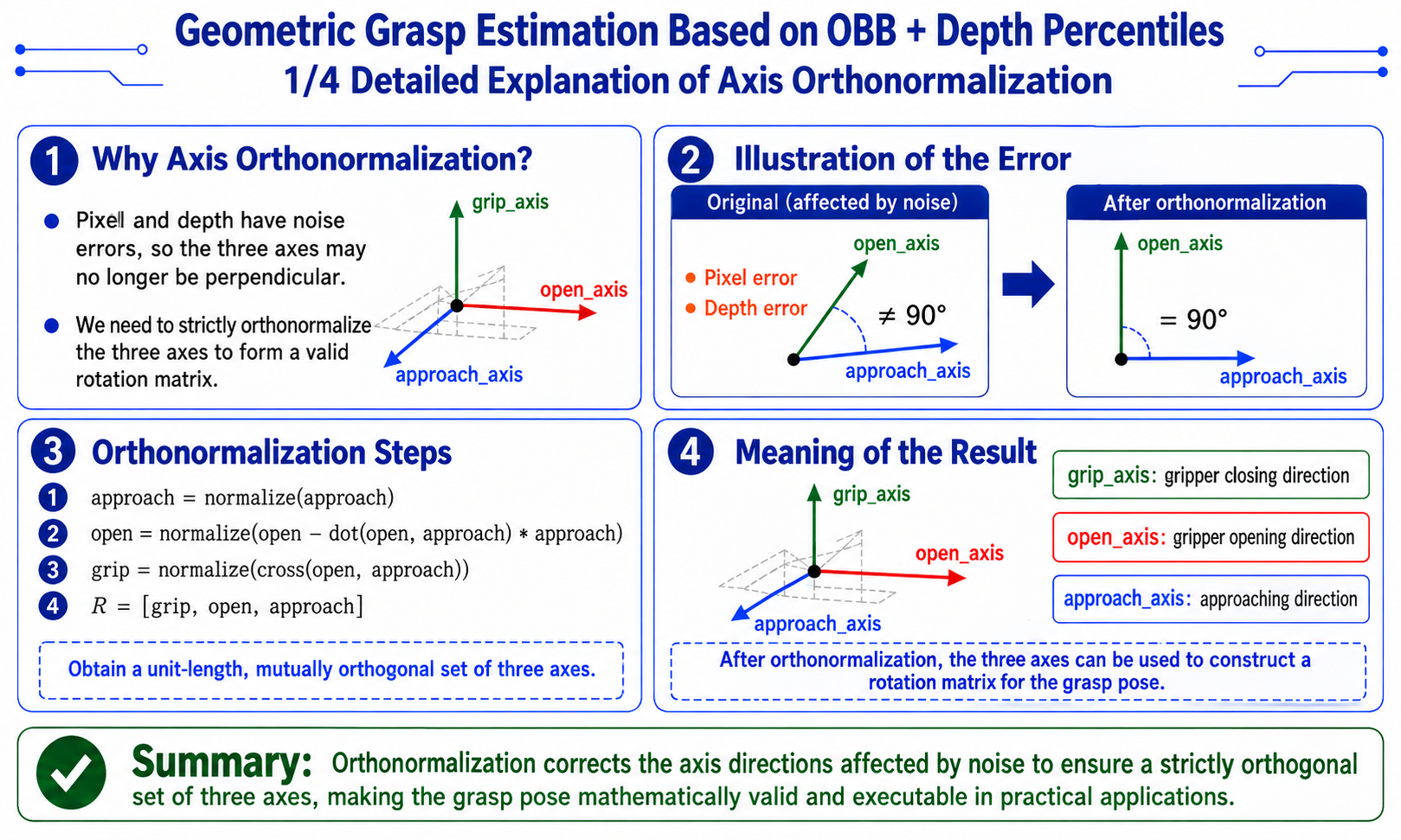
- なぜ直交化するのか:
-
数値計算では、ピクセルベクトルと深度の両方に誤差があるため、
open_axisとapproachが直交していない場合があります。Gram-Schmidt 直交化により、厳密に直交した三つ組が保証され、有効な回転行列を構成できます。# key steps
approach = -position / norm(position) # object toward camera
open_3d = pixel_to_3d(short_dir_uv, z_m, K) # short-edge direction in 3D
open_axis = open_3d - dot(open_3d, approach) * approach # Gram-Schmidt
open_axis = normalize(open_axis)
grip_axis = normalize(cross(open_axis, approach))
open_axis = normalize(cross(approach, grip_axis)) # re-orthogonalize for numerical stability
-
バックプロジェクション関数
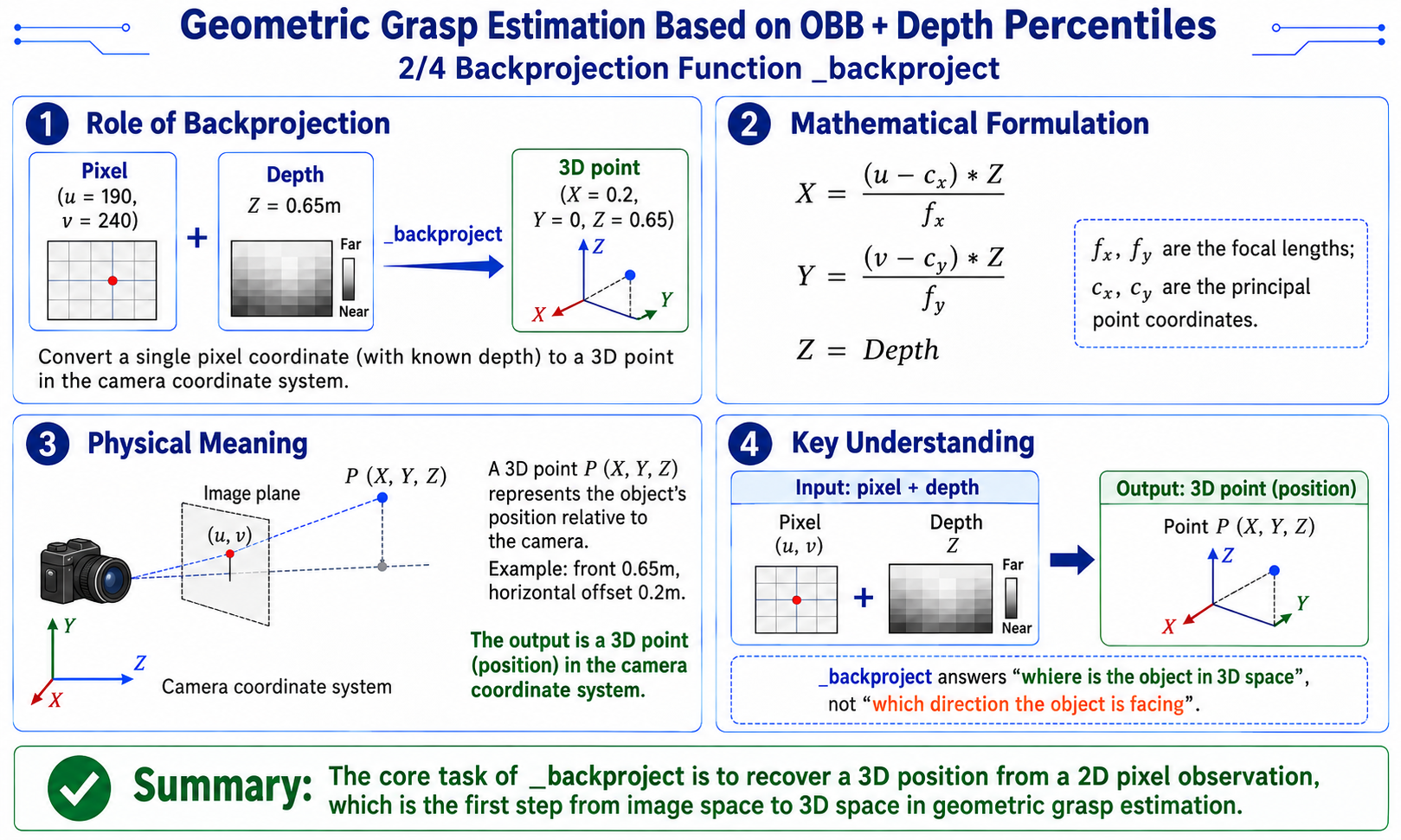
-
役割:単一のピクセル座標(既知の深度付き)を、カメラ座標系における 3D 点(位置)に変換します。
[diagram: physical meaning of backprojection]

  pixel (u=190, v=240) + depth Z=0.65m
           v _backproject
  3D point (X=0.2, Y=0, Z=0.65)
           v
"object is 0.65m ahead, 0.2m to the right" -
実装:
# ordinary_grasp.py L398-403 implementation
def _backproject(u, v, z_m, K):
    fx, fy = float(K[0, 0]), float(K[1, 1])
    cx, cy = float(K[0, 2]), float(K[1, 2])
    x = (u - cx) * z_m / fx
    y = (v - cy) * z_m / fy
    return np.array([x, y, z_m], dtype=np.float32)
ピクセルベクトルから 3D ベクトルへ
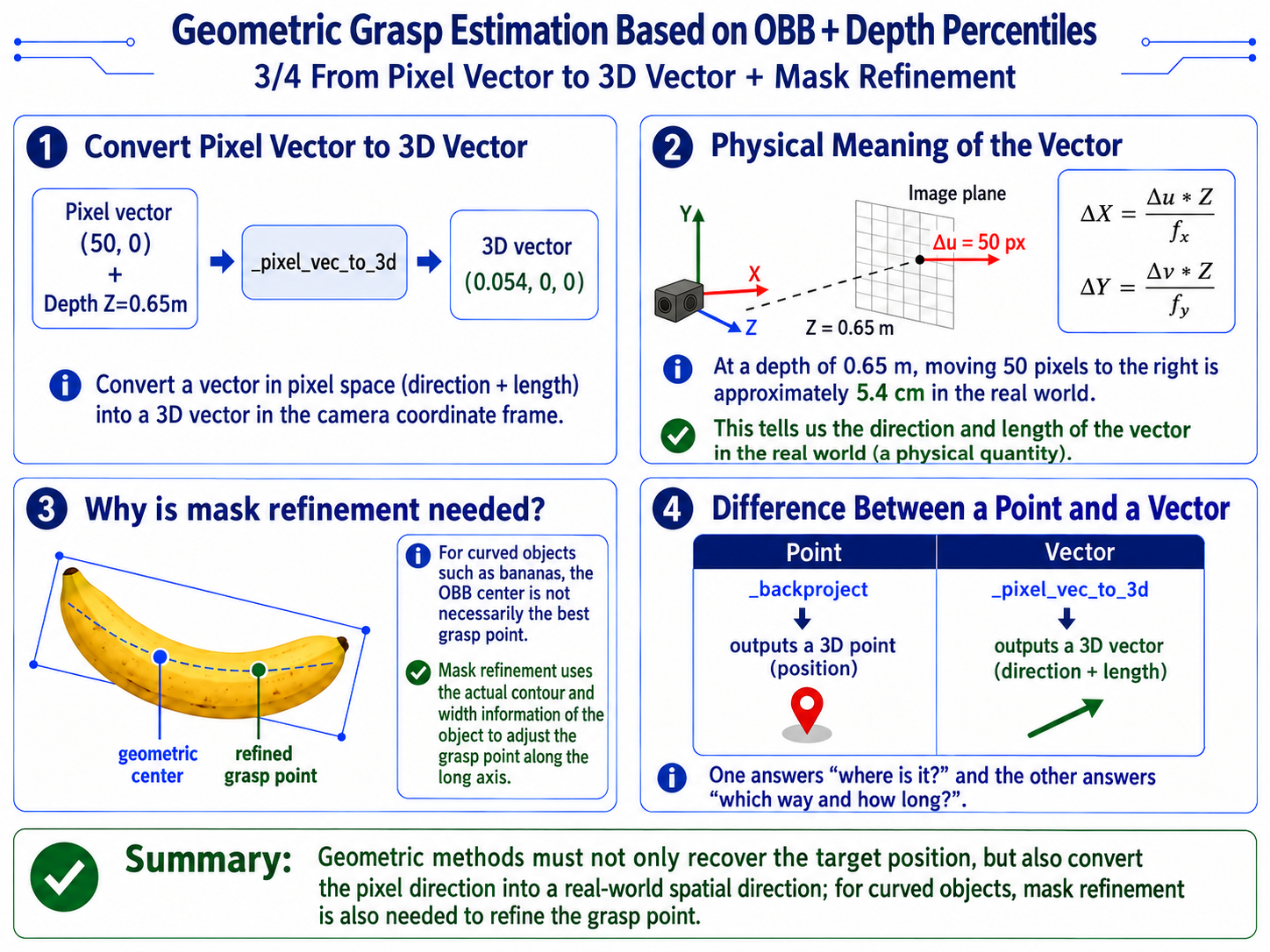
-
役割:ピクセル空間の ベクトル(方向 + 長さ)を、カメラ座標系の 3D ベクトル(方向 + 長さ)に変換します。
[diagram: physical meaning of a pixel vector]

  pixel vector (50, 0) + depth Z=0.65m
           v _pixel_vec_to_3d
  3D vector (0.054, 0, 0)
           v
"at depth 0.65m, 50 pixels right = 5.4 cm physical" -
実装:
# ordinary_grasp.py L406-408 implementation
def _pixel_vec_to_3d(vec_uv, z_m, K):
    fx, fy = max(float(K[0, 0]), 1e-6), max(float(K[1, 1]), 1e-6)
    return np.array([
        float(vec_uv[0]) * z_m / fx,
        float(vec_uv[1]) * z_m / fy,
        0.0
    ], dtype=np.float32)
マスクのリファインメント(曲面オブジェクト)
- なぜマスクのリファインメントが必要なのか:
-
OBB の中心は物体の幾何学的中心ですが、バナナのような曲面オブジェクトでは、最適な把持点は長軸に沿った特定の位置(通常は中央付近)になります。リファインメントでは、マスクの実際の幅を用いて把持点を調整します。
-
実装:
utils/ordinary_grasp.py_refine_grasp_line_from_mask()(L233-275)# ordinary_grasp.py L233-275 implementation
def _refine_grasp_line_from_mask(mask, center, short_dir_uv, long_len_px):
"""Refine the short-axis grasp point using the mask's central cross-section."""
ys, xs = np.nonzero(mask > 0)
if len(xs) < 32:
return None # mask too small, skip refinement
points = np.column_stack([xs, ys]).astype(np.float32)
grip_dir_uv = np.array([-short_dir_uv[1], short_dir_uv[0]], dtype=np.float32)
rel = points - center.reshape(1, 2)
grip_coord = rel @ grip_dir_uv # coordinate along short axis
open_coord = rel @ short_dir_uv # coordinate along long axis
grip_center = float(np.median(grip_coord))
band_half_width = clip(long_len_px * 0.04, 2.0, 12.0)
band_mask = np.abs(grip_coord - grip_center) <= band_half_width
if count(band_mask) < 24:
band_half_width = clip(long_len_px * 0.08, 4.0, 18.0)
band_mask = np.abs(grip_coord - grip_center) <= band_half_width
if count(band_mask) < 24:
return None
# within the band, take 5%/95% quantiles along open direction
open_min = np.percentile(open_coord[band_mask], 5.0)
open_max = np.percentile(open_coord[band_mask], 95.0)
open_center = 0.5 * (open_min + open_max)
# recombine center
refined_center = center + grip_center * grip_dir_uv + open_center * short_dir_uv
short_edge_points = _line_from_center(refined_center, short_dir_uv * (open_max - open_min))
return refined_center, short_edge_points, float(open_max - open_min)
-
幾何学的手法が有効な場合とその限界
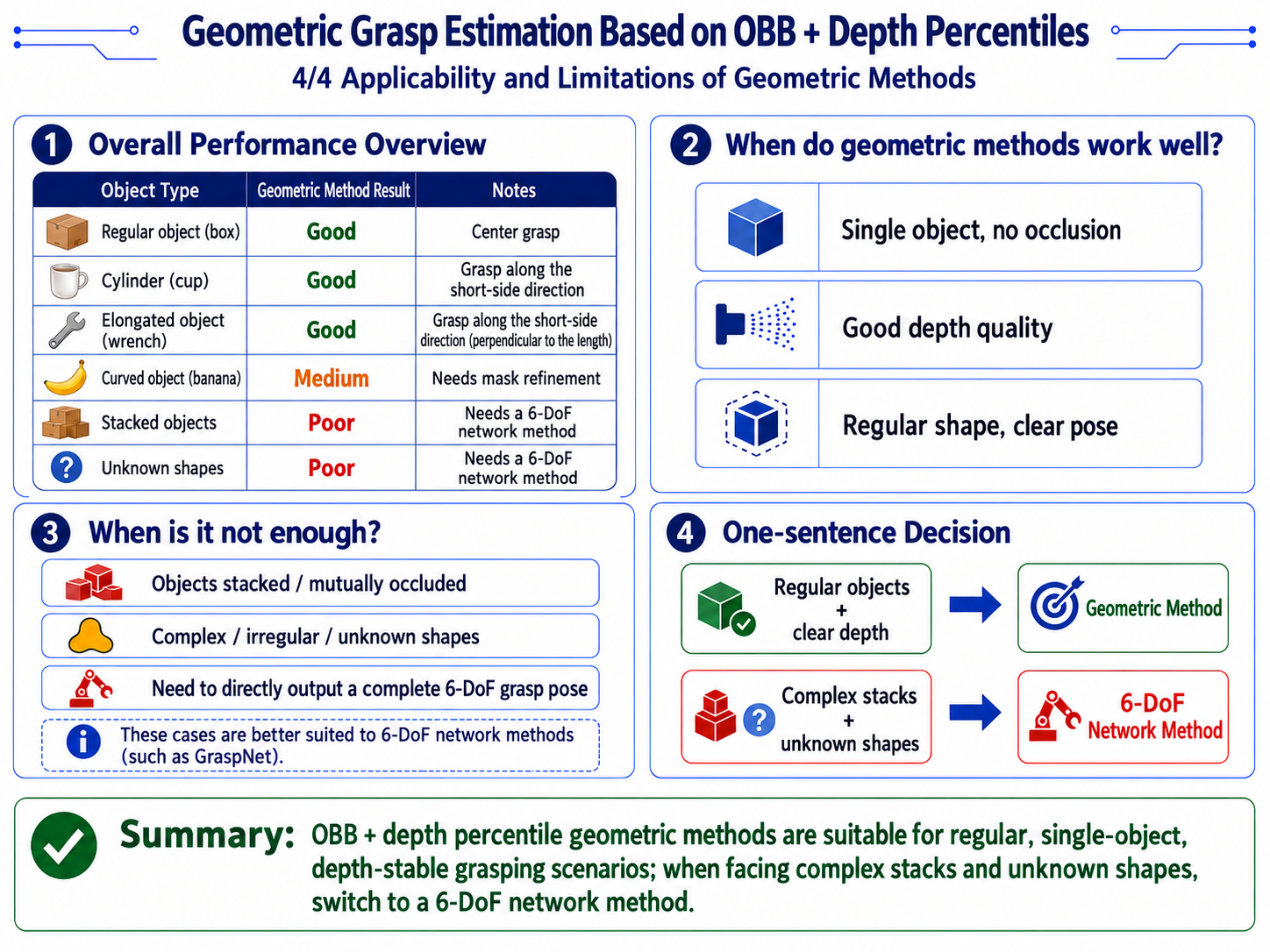
点群ネットワーク(GraspNet)による 6-DoF 把持推定
実装:
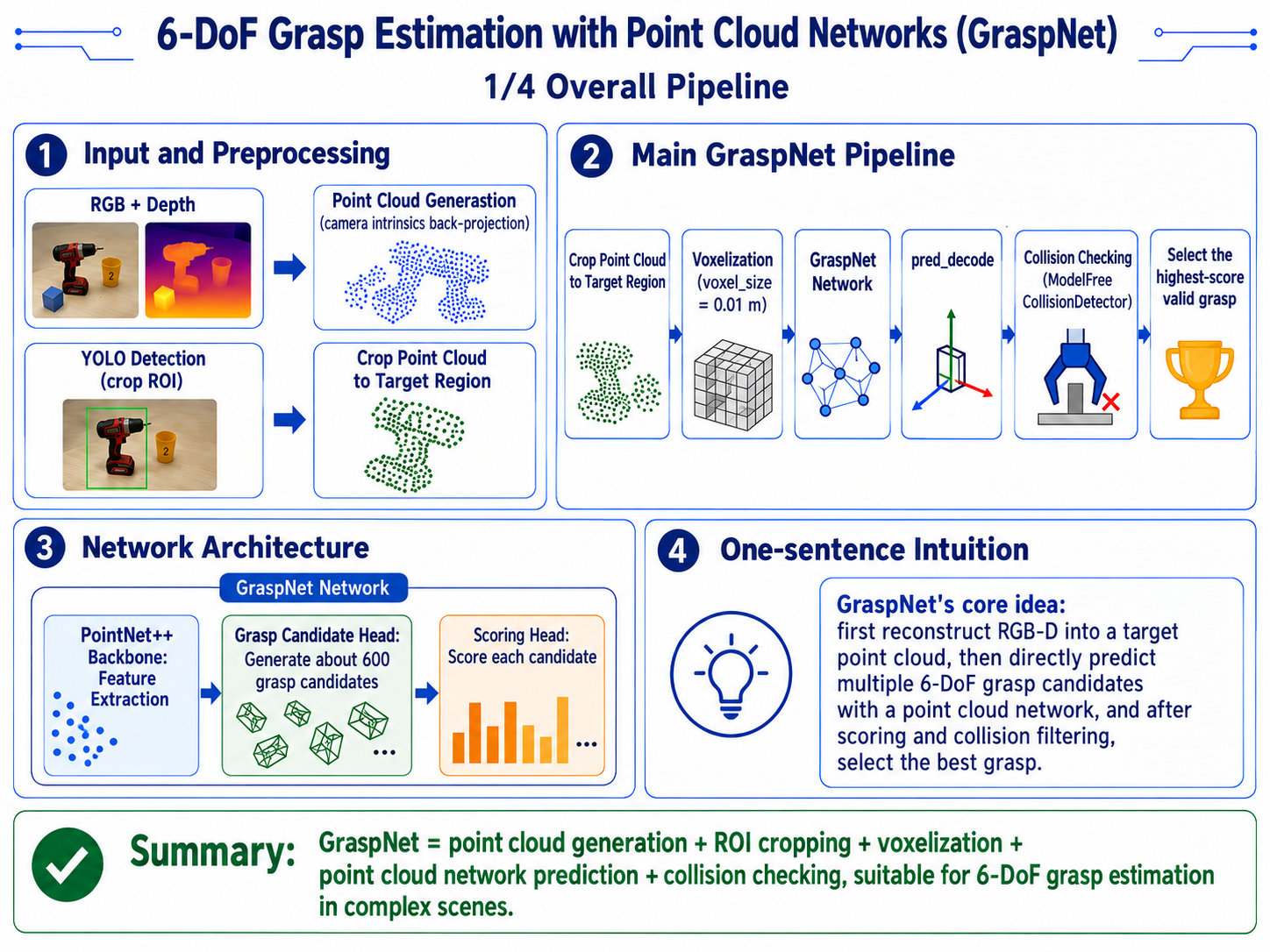
[diagram: GraspNet pipeline]

RGB + depth
  |
  +-> point cloud generation (backproject with camera intrinsics)
  |
  +-> YOLO detection (crop ROI)
       |
       +-> crop point cloud to target region
            |
            +-> voxelize (voxel_size = 0.01 m)
                 |
                 +-> GraspNet network
                      |
                      +-> PointNet++ backbone (feature extraction)
                      |
                      +-> grasp candidate head (~600 candidates)
                      |
                      +-> scoring head (scores each candidate)
                           |
                           +-> pred_decode (parse into Grasp objects)
                                |
                                +-> collision detection (ModelFreeCollisionDetector)
                                     |
                                     +-> pick the highest-scoring valid grasp
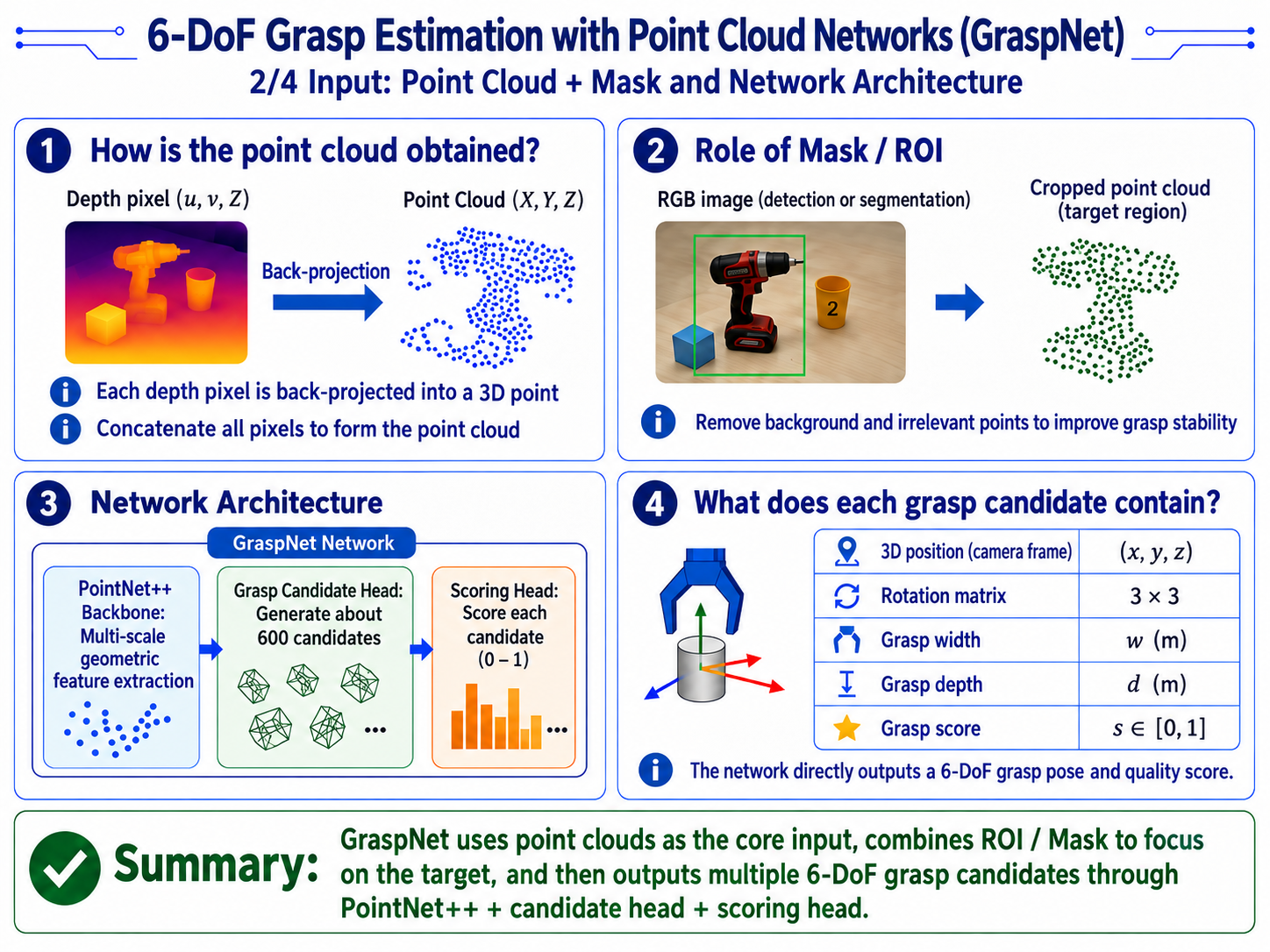
入力:点群 + マスク
-
実装:
# graspnet_utils.py L21-25 implementation
PROJECT_ROOT = Path(__file__).resolve().parents[1]
GRASPNET_ROOT = PROJECT_ROOT / "sdk" / "graspnet-baseline"
DEFAULT_NUM_VIEW = 300
DEFAULT_VOXEL_SIZE = 0.01              # 1 cm voxel
DEFAULT_WARMUP_FRAMES = 20
DISPLAY_FLIP_X = np.diag([1.0, -1.0, -1.0, 1.0]).astype(np.float64) -
深度マップからバックプロジェクションされた点群:
- 各深度ピクセル (u, v, Z) を (X, Y, Z) にバックプロジェクション
- すべてのピクセルを連結して点群を構成
-
ネットワーク構造
- PointNet++ バックボーン
- ローカルからグローバルまでの多段階の幾何学的特徴を抽出する点群特徴バックボーン。
- 把持候補ヘッド
- 多数の 6-DoF 把持候補(約 600)を出力し、それぞれに 3D 位置(カメラ座標系)、回転行列、把持幅、把持深さを含みます。
- スコアリングヘッド
- 各候補にスコア(0〜1)を付与し、スコアが高いほど成功確率が高いことを意味します。
- PointNet++ バックボーン
出力フォーマット
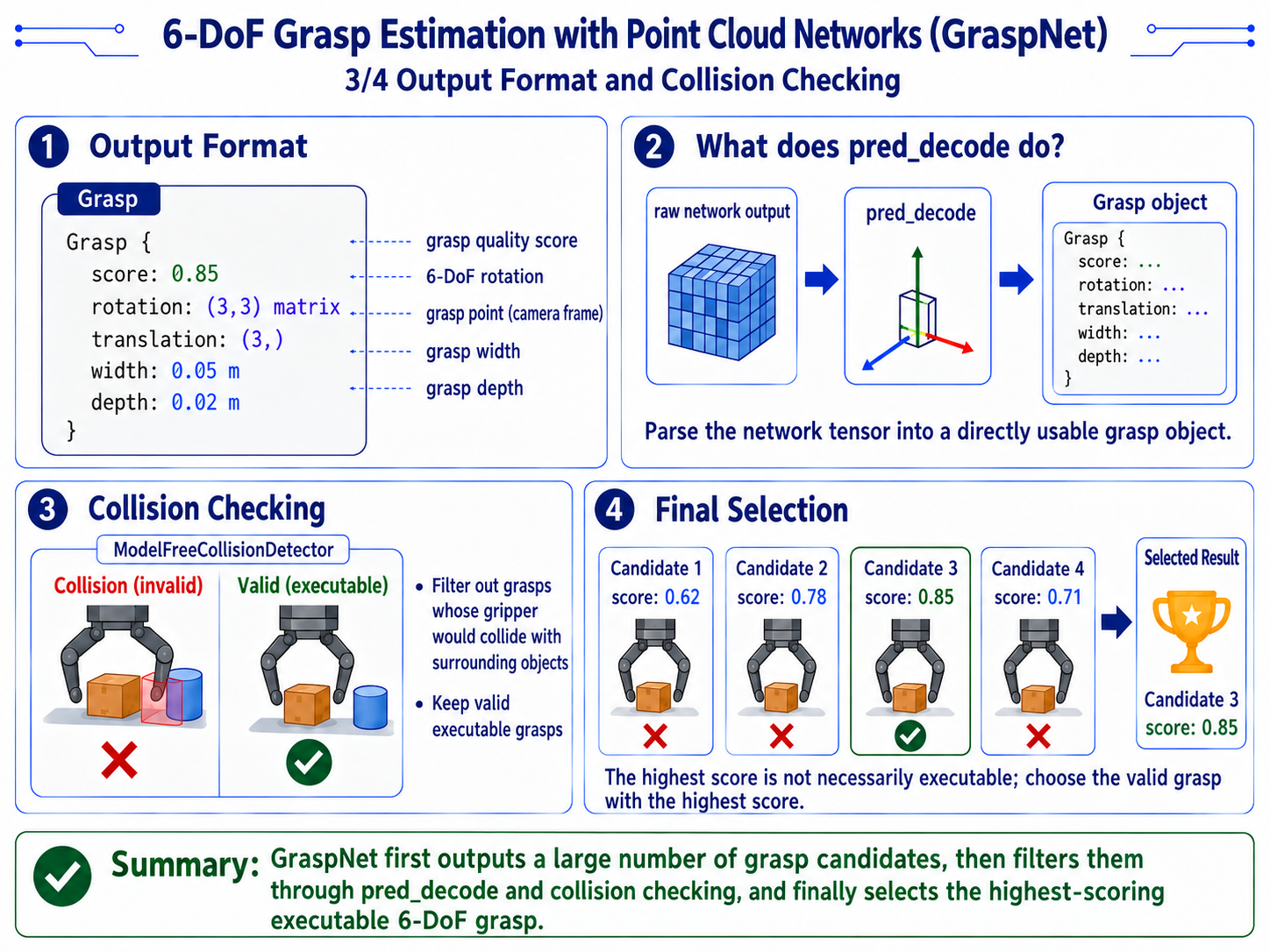
Grasp {
  score: 0.85              # grasp quality score
  rotation: (3, 3) matrix  # 6-DoF rotation
  translation: (3,)        # grasp point (camera frame)
  width: 0.05              # grasp width (m)
  depth: 0.02              # grasp depth (m)
}
衝突検出
-
実装:
# graspnet_utils.py L45 implementation
from collision_detector import ModelFreeCollisionDetector # noqa -
衝突検出器は、把持を実行する際にグリッパが周囲の物体に衝突するかどうかをチェックし、衝突する把持を除外します。
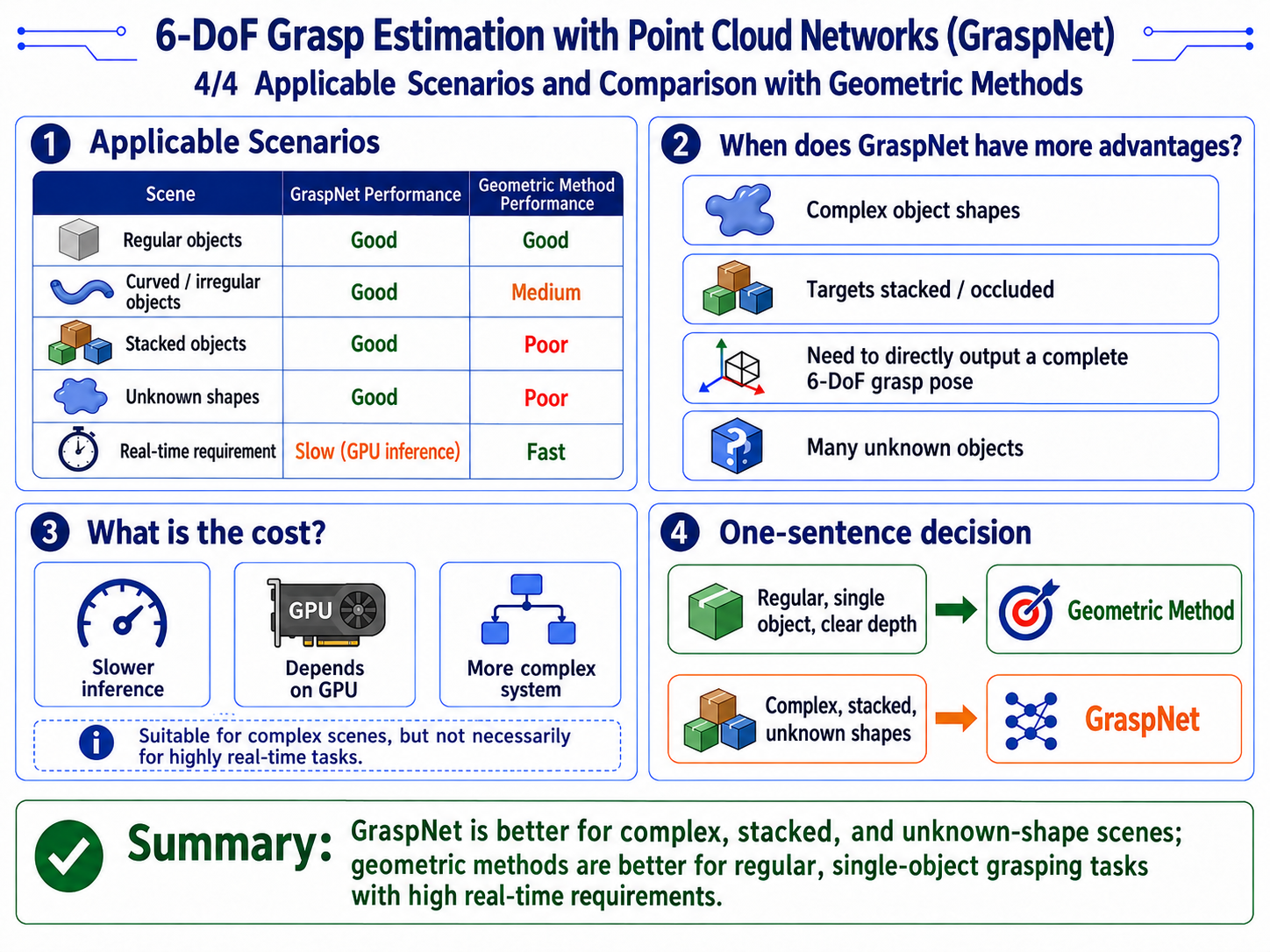
適したシナリオ
把持姿勢をベース座標系へ変換する
-
実装:
# transforms.py L227-240 implementation
def transform_grasp_pose_to_base_with_retreat(
    position_cam,           # grasp point (camera frame)
    tcp_rotation_cam,       # TCP rotation (camera frame)
    T_cam2base,             # hand-eye camera->base matrix
    pregrasp_offset_m,      # pregrasp retract distance
    retreat_offset_m,       # retreat distance
    insertion_depth_m=0.0,
):
# 1. transform grasp point to base frame
    T_grasp_cam = make_T(position_cam, tcp_rotation_cam)
    T_grasp_base = T_cam2base @ T_grasp_cam

# 2. canonicalize parallel-gripper symmetry
    T_grasp_base[:3, :3] = canonicalize_parallel_gripper_tcp_rotation(T_grasp_base[:3, :3])

# 3. offset along TCP X to get pregrasp and retreat
    T_grasp_base = offset_along_tool_x(T_grasp_base, -insertion_depth_m)
    T_pregrasp_base = offset_along_tool_x(T_grasp_base, pregrasp_offset_m)
    T_retreat_base = offset_along_tool_x(T_grasp_base, retreat_offset_m)

# 4. convert back to 6D pose
return mat4_to_pose6d(T_grasp_base), mat4_to_pose6d(T_pregrasp_base), mat4_to_pose6d(T_retreat_base)-
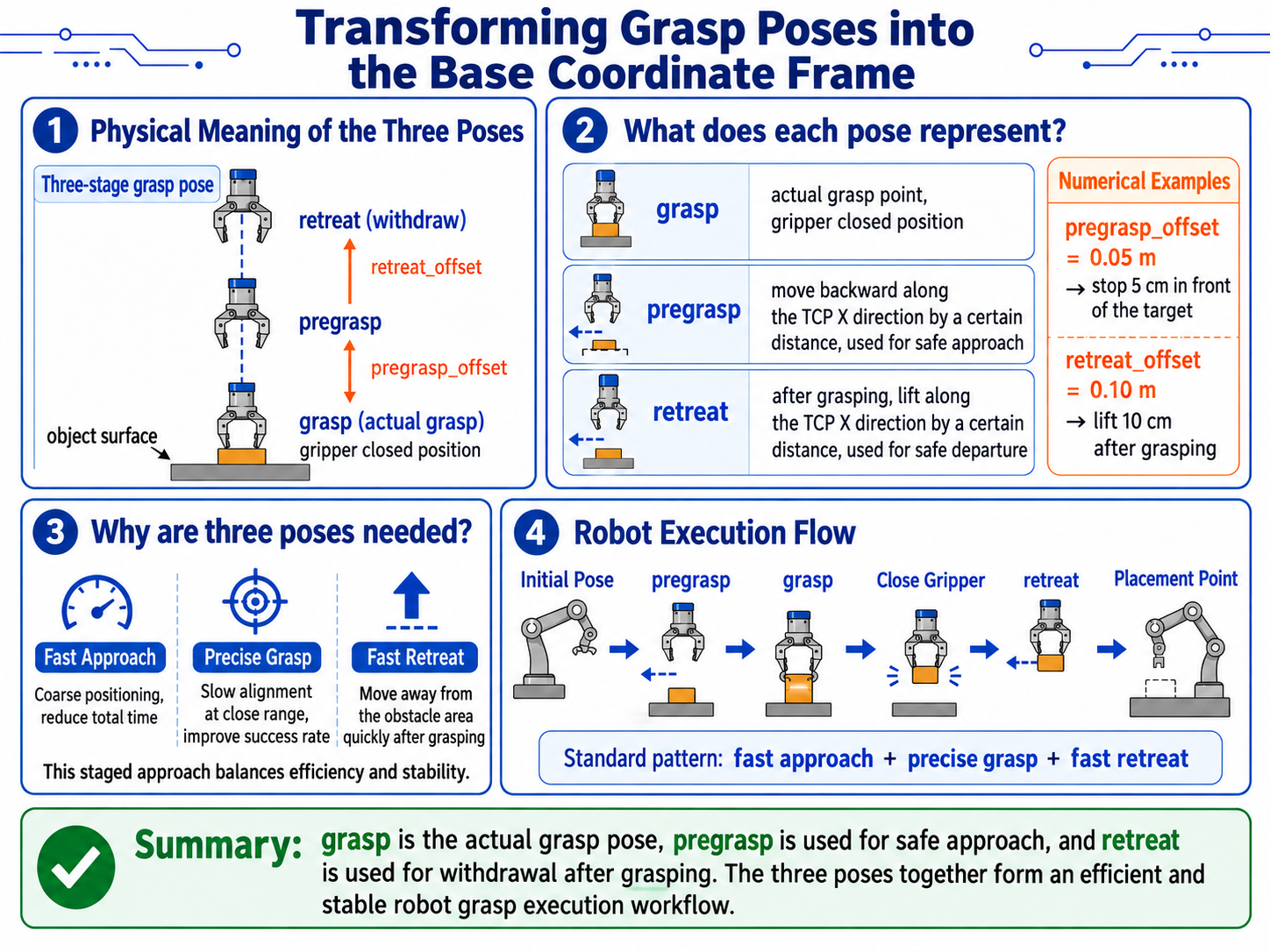
3つの姿勢の物理的な意味
[diagram: three grasp-pose stages]

       retreat
         ^
         | retreat_offset
         |
       pregrasp
         ^
         | pregrasp_offset
         |
       grasp
v object surface- grasp: 実際の把持点で、グリッパが閉じる位置
- pregrasp: 事前把持点で、障害物のないアプローチのために TCP X 方向へ一定距離だけ後退した位置
- retreat: 把持後の姿勢で、把持後に TCP X 方向へ一定距離だけ持ち上げた位置
- 例えば:
- pregrasp_offset = 0.05 m -> 近づく前に 5 cm 手前で停止
- retreat_offset = 0.10 m -> 把持後に 10 cm 持ち上げる
-
なぜ3つの姿勢が必要なのか
- 標準的なロボットの把持フロー:
- 初期位置から pregrasp へ移動(高速・粗位置決め)
- pregrasp から grasp へゆっくり移動(高精度な位置合わせ)
- グリッパを閉じる
- grasp から retreat へ持ち上げる(高速な引き上げ)
- retreat から配置位置へ移動
この「高速アプローチ + 高精度把持 + 高速退避」というパターンにより、把持精度を確保しつつ全体の効率を向上させることができます。