XIAO ESP32-C5 と FreeRTOS
概要
FreeRTOS は、リアルタイムカーネルと補完的な機能を実装するモジュラーライブラリのセットで構成される C ライブラリのコレクションです。FreeRTOS カーネルは、FreeRTOS 上に構築されたアプリケーションがハードリアルタイム要件を満たすことを可能にするリアルタイムカーネル(またはリアルタイムスケジューラ)です。これにより、アプリケーションを独立した実行スレッドのコレクションとして整理することができます。

参考:Mastering the FreeRTOS Real Time Kernel
FreeRTOS ポート
FreeRTOS は、Arduino ESP32 Core(ESP-IDF 上に構築)に事前統合されたオープンソース RTOS カーネルです。したがって、ESP32 上で実行されるすべての Arduino スケッチは、実際にはバックグラウンドで FreeRTOS を利用しています。FreeRTOS カーネルは、Xtensa と RISC-V(例:XIAO ESP32-C5)を含むすべての ESP チップアーキテクチャに移植されています。
したがって、このチュートリアルは、よりアクセスしやすい開発体験を提供するために Arduino フレームワークに基づいて書かれています。
ハードウェアの準備
| Seeed Studio XIAO ESP32-C5 |
|---|
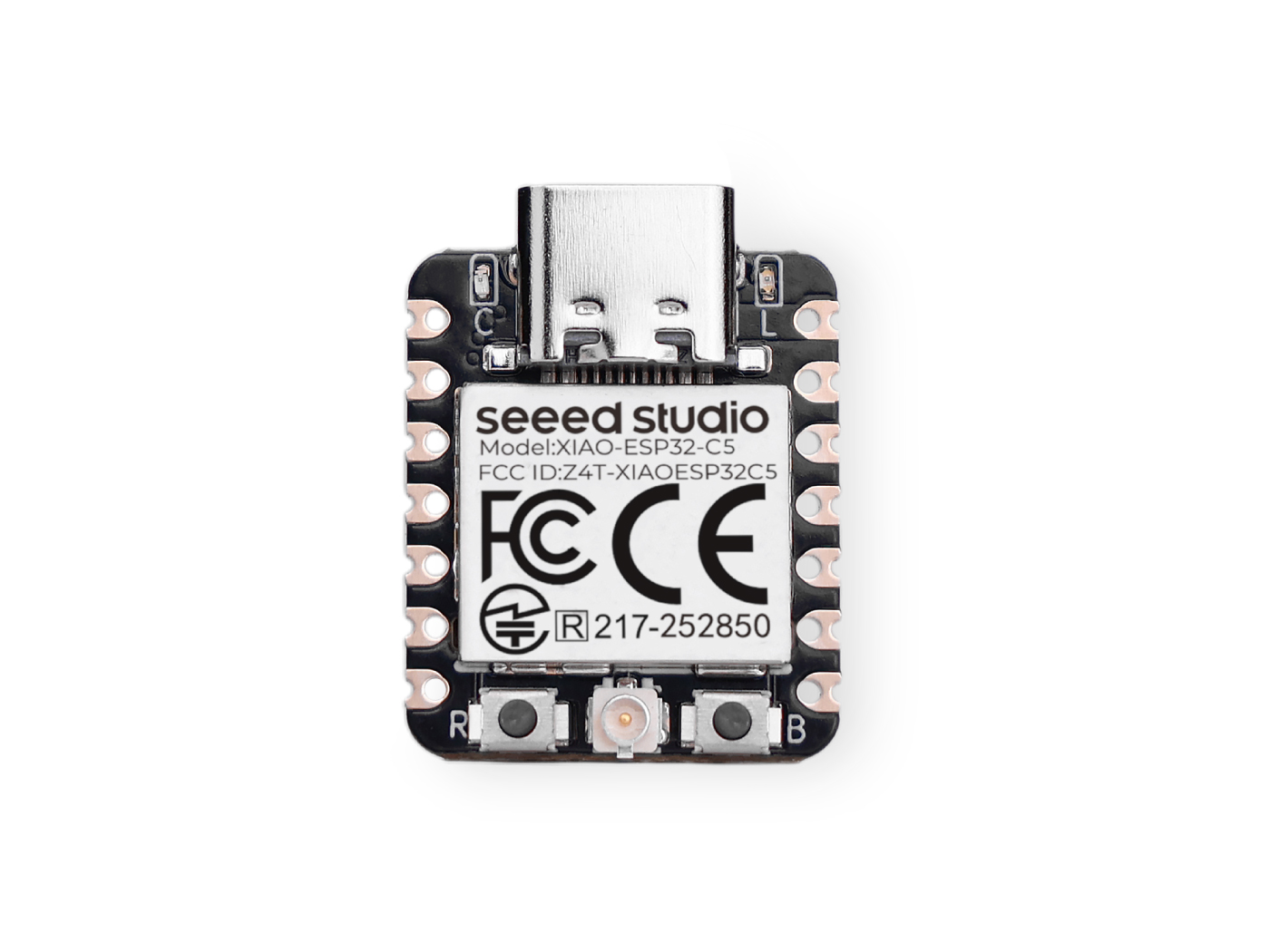 |
ソフトウェアの準備
Arduino IDE をまだ使用していない場合は、Seeed Studio XIAO ESP32-C5 入門ガイドを参照してください。
タスクの紹介
タスクは、プロセッサが一連の設定で実行を要求される小さな関数/ジョブです。タスクは小さな関数から無限ループ関数まで様々です。
タスクは FreeRTOS アプリケーションにおける実行の基本単位です。これらは本質的に他のタスクと同時に実行される関数です。これにより、効率的なマルチタスクと応答性が可能になります。
タスクのプロパティ
- TaskFunction:これはタスクの実際のロジックを含む関数です。タスクの実行のエントリーポイントです。
- StackSize:これはタスクのスタックに割り当てられるメモリ量を指定します。スタックはローカル変数、関数の戻りアドレス、一時データを格納するために使用されます。
- TaskPriority:これは他のタスクと比較したタスクの相対的な重要度を決定します。優先度の高いタスクは、優先度の低いタスクよりも先に実行される可能性が高くなります。
- TaskParameters:これらはタスクが作成されるときにタスク関数に渡すことができるオプションの引数です。タスクに追加のコンテキストや設定を提供するために使用できます。
- CoreAffinity:これはタスクが割り当てられる CPU コアを指定します。複数のコアを持つシステムでは、これはパフォーマンスを最適化したり、ワークロードのバランスを取るために使用できます。
タスクの作成
FreeRTOS でタスクを作成するには、xTaskCreate 関数を使用します。この関数は、タスク関数、タスク名、スタックサイズ、パラメータ、優先度、作成されたタスクへのハンドルなど、いくつかのパラメータを取ります。
TaskHandle_t task;
xTaskCreate(
        taskFunction,             /* Function that implements the task. */
        "taskName",               /* Text name for the task. */
        configMINIMAL_STACK_SIZE, /* Stack size in words, or bytes. */
        NULL,                     /* Parameter passed into the task. */
        tskIDLE_PRIORITY,         /* Priority at which the task is created. */
        &task                     /* Used to pass out the created task's handle. */
        );
タスク関数
タスク関数は、タスクによって実行される実際のコードです。
void taskFunction(void * pvParameters) {
  /*
  Function definition goes here
  */
}
タスクの可視化
FreeRTOS の動作を可視化するために、4つの簡単なタスクを作成します。
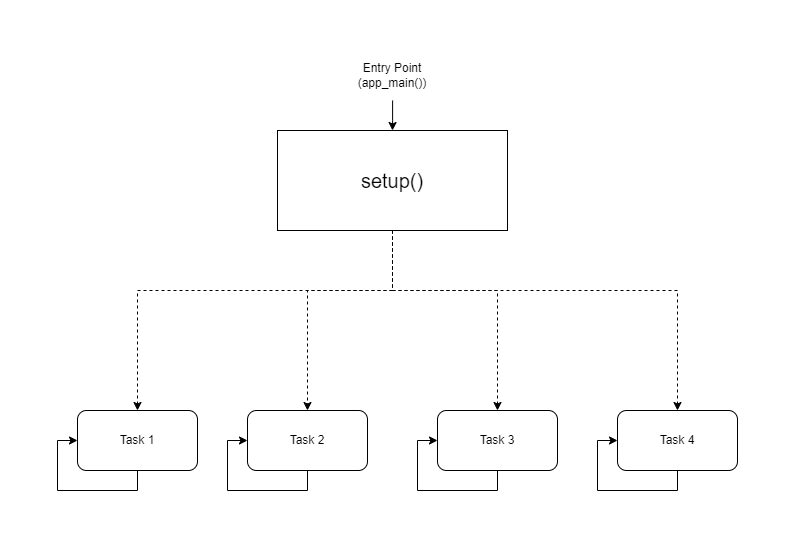
- 視覚的表現
taskFunction1 (1000ms delay)
taskFunction2 (500ms delay)
taskFunction3 (500ms delay)
taskFunction4 (500ms delay)
- 参考コード
freertos.ino
#include <Arduino.h>

// Task handles
TaskHandle_t task1, task2, task3, task4;

// ---------------------- Task Function Definitions ----------------------

void taskFunction1(void * pvParameters) {
    for (;;) { // Infinite loop, equivalent to while(true)
        // Print Task 1 and Hello message
        Serial.println("Task 1: Hello from task 1");

        // Delay 1000ms (1 second)
        vTaskDelay(pdMS_TO_TICKS(1000));
    }
}

void taskFunction2(void * pvParameters) {
    for (;;) {
        Serial.println("Task 2: Hello from task 2");
        vTaskDelay(pdMS_TO_TICKS(500)); // Delay 500ms
    }
}

void taskFunction3(void * pvParameters) {
    for (;;) {
        Serial.println("Task 3: Hello from task 3");
        vTaskDelay(pdMS_TO_TICKS(500));
    }
}

void taskFunction4(void * pvParameters) {
    for (;;) {
        Serial.println("Task 4: Hello from task 4");
        vTaskDelay(pdMS_TO_TICKS(500));
    }
}

// ---------------------- Main Program Entry ----------------------

void setup() {
    // 1. Initialize serial port (C5 typically uses USB CDC)
    Serial.begin(115200);

    // Give the serial port some startup time to prevent loss of initial prints
    delay(2000);
    Serial.println("--- ESP32-C5 FreeRTOS Tasks Demo ---");

    // 2. Create tasks
    // Use xTaskCreate, no need to specify core - the system will automatically schedule on the only Core 0
    // Important: Set stack size to 4096 bytes to prevent Stack Overflow

    xTaskCreate(
        taskFunction1,    /* Task function */
        "task_1",         /* Task name */
        4096,             /* Stack size (Bytes) - Do NOT use configMINIMAL_STACK_SIZE */
        NULL,             /* Parameters */
        1,                /* Priority */
        &task1            /* Handle */
    );

    xTaskCreate(
        taskFunction2,
        "task_2",
        4096,
        NULL,
        1,
        &task2
    );

    xTaskCreate(
        taskFunction3,
        "task_3",
        4096,
        NULL,
        1,
        &task3
    );

    xTaskCreate(
        taskFunction4,
        "task_4",
        4096,
        NULL,
        1,
        &task4
    );
}

void loop() {
    // Main loop is idle, reserved for task execution
    // To prove the main loop is still active, you can print occasionally or leave it empty
    delay(1000);
}
configMINIMAL_STACK_SIZE は sdkconfig で変更できます。
- 4つのタスク:コードは taskFunction1、taskFunction2、taskFunction3、taskFunction4 の4つのタスクを定義します。
- タスクの優先度:すべてのタスクは tskIDLE_PRIORITY で作成されます。これは同じ優先度を持つことを意味します。
- タスクの遅延:taskFunction1 は 1000ms の遅延を持ち、他の3つは 500ms の遅延を持ちます。
XIAO ESP32-C5 は高周波数のシングルコア RISC-V マイクロコントローラーなので、コア切り替えは不可能です。そうしないとスタックオーバーフローが発生します。
センサーと FreeRTOS
次に、XIAO ESP32-C5、FreeRTOS、および様々なセンサーを使用してスマート玄関ウェルカムシステムを実装します。
このシステムは、スマートホームの玄関シナリオをシミュレートします:
-
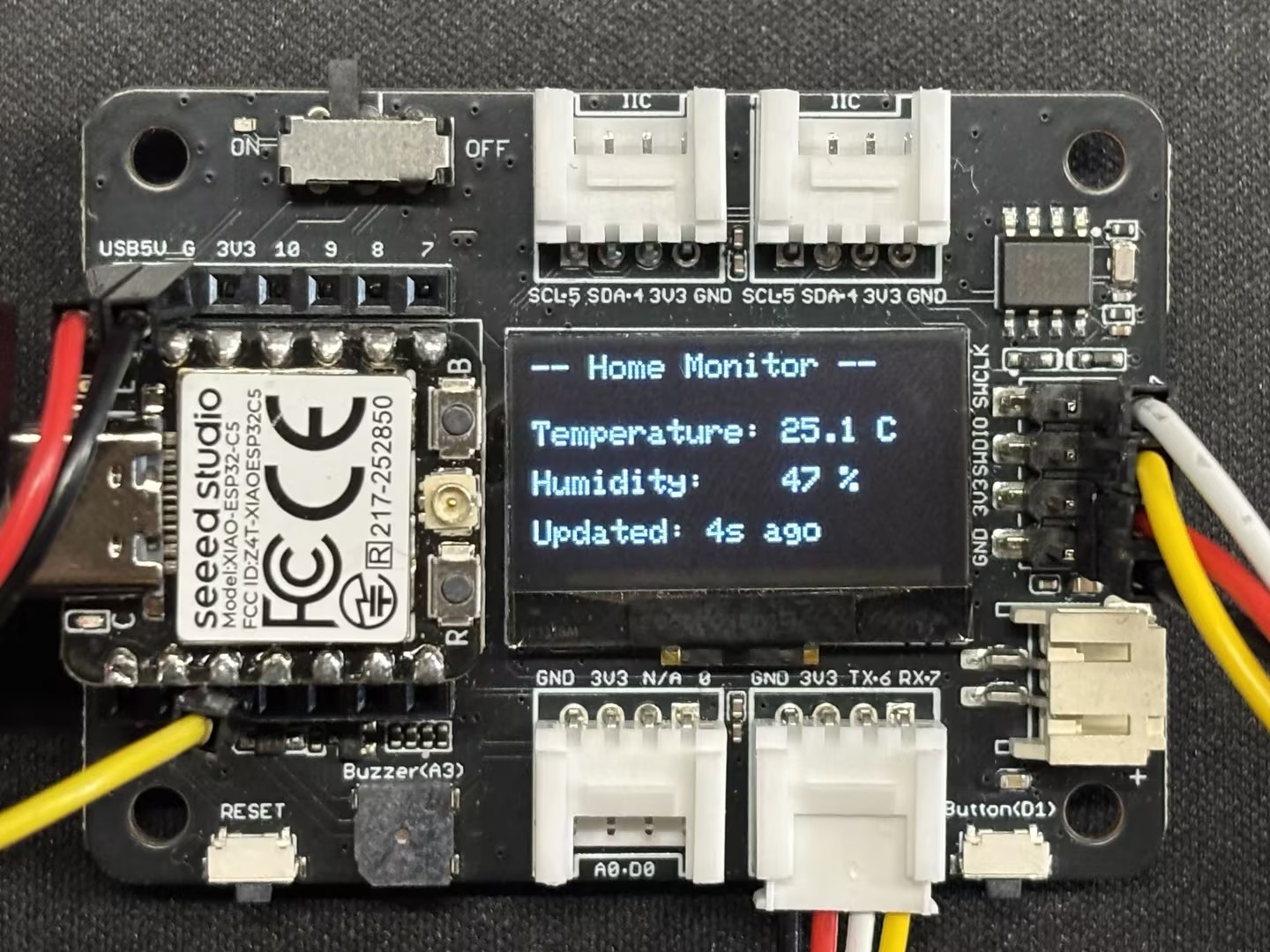
環境監視: 玄関の温度と湿度をリアルタイムで監視し(DHT11 センサーを使用)、データを画面に表示します。
-
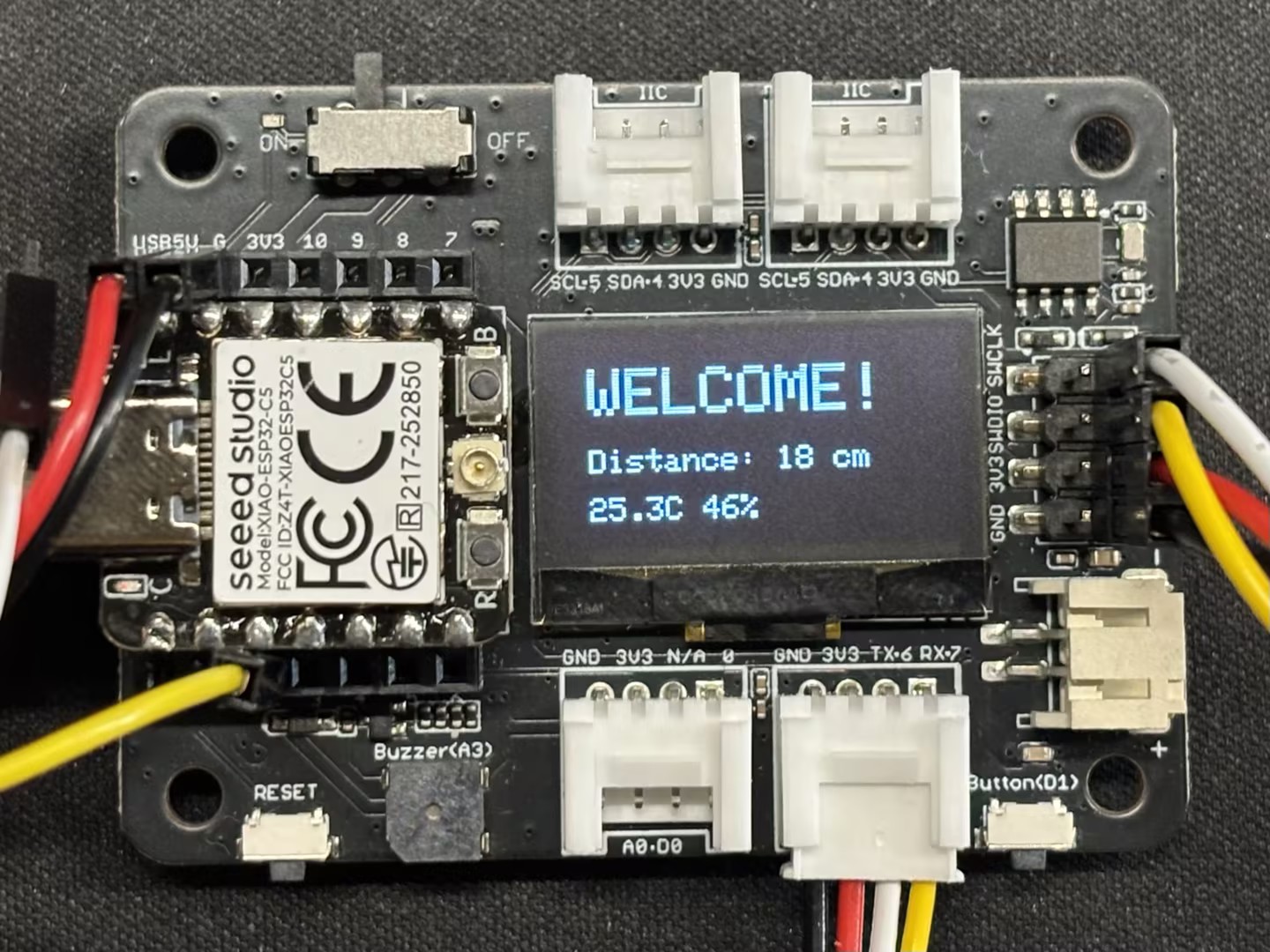
人体感知: 超音波センサーを利用して、誰かが近づいているかを検出します。
-
スマートウェルカム:
-
誰もいない場合(距離が遠い): LED は消灯し、画面は環境データを表示し、システムは省電力/スタンバイ UI に入ります。
-
誰かが近づいた場合(距離が近い、例:< 30cm): LED が自動的に点灯し(玄関ライトをシミュレート)、画面に**Welcome!**を表示します。
-
ハードウェアの準備
XIAO ESP32-C5 ボード1台と以下のセンサーを準備する必要があります。
| Seeed Studio XIAO ESP32-C5 | Seeed Studio Expansion Board Base for XIAO | Grove - Purple LED | Grove - Temperature & Humidity Sensor (DHT11) | Grove - Ultrasonic Distance Sensor |
|---|---|---|---|---|
| 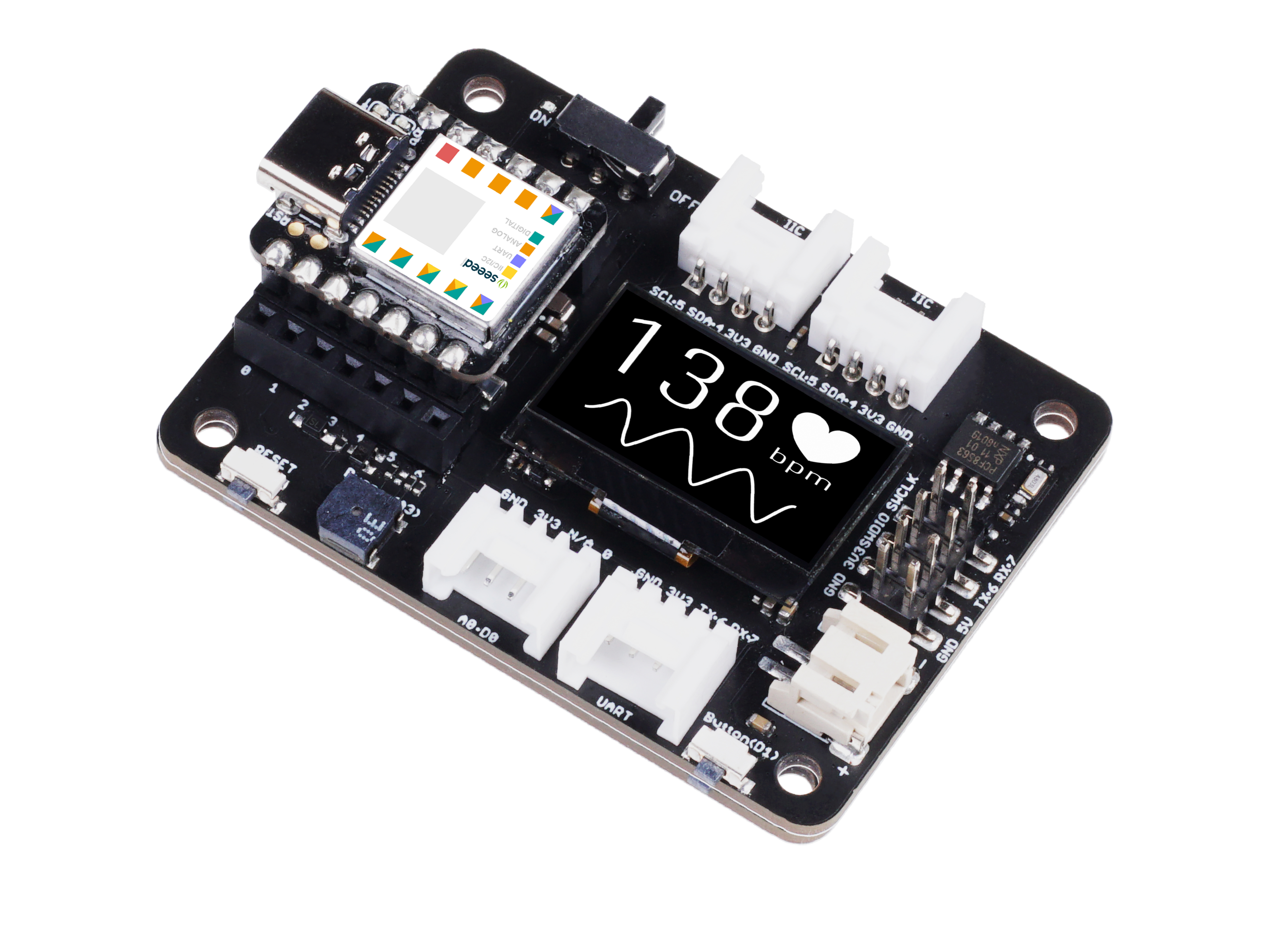 |  |  |  |
ソフトウェア
ライブラリをダウンロードして、Arduinoライブラリパスに配置してください。
-
Grove - Temperature & Humidity Sensor (DHT11)
-
Grove - Ultrasonic Distance Sensor
-
参考コード
Smart_Entrance_Welcome_System.ino
#include <Arduino.h>
#include <Wire.h>
#include <Adafruit_GFX.h>
#include <Adafruit_SSD1306.h>
#include "Ultrasonic.h"
#include "Grove_Temperature_And_Humidity_Sensor.h"

// ---------------- Configuration Area ----------------
// Pin Definitions
#define PIN_DHT         D6   // DHT11 connection pin
#define PIN_ULTRASONIC  D7   // Ultrasonic sensor connection pin
#define PIN_LED         D2   // LED light pin
#define PIN_SDA         D4   // OLED SDA pin
#define PIN_SCL         D5   // OLED SCL pin

// Sensor Type Definition
#define DHTTYPE DHT11

// OLED Parameters
#define SCREEN_WIDTH 128
#define SCREEN_HEIGHT 64
#define OLED_RESET    -1

// Logic Parameters
#define DIST_THRESHOLD 30 // Person detected if within 30cm
#define DHT_READ_INTERVAL 3000 // DHT11 reading interval (milliseconds)
#define DHT_TIMEOUT 250 // DHT11 reading timeout (milliseconds)

// ---------------- Object Initialization ----------------
Ultrasonic ultrasonic(PIN_ULTRASONIC);
DHT dht(PIN_DHT, DHTTYPE);
Adafruit_SSD1306 display(SCREEN_WIDTH, SCREEN_HEIGHT, &Wire, OLED_RESET);

// ---------------- Shared Data Structure ----------------
struct SystemState {
    float temperature;
    float humidity;
    long distanceCm;
    bool personDetected;
    bool dhtValid; // Whether DHT data is valid
    unsigned long lastDHTUpdate; // Last DHT update time
};

// Global State Variable
SystemState currentState = {0.0, 0.0, 0, false, false, 0};

// Mutex: Protect shared data access
SemaphoreHandle_t xMutex;

// I2C Mutex: Protect I2C bus access
SemaphoreHandle_t xI2CMutex;

// Task Handles
TaskHandle_t taskDHTHandle, taskUltraHandle, taskOLEDHandle, taskLogicHandle;

// ---------------- Task Function Implementations ----------------

// Task 1: DHT Temperature & Humidity Reading (Optimized - Non-blocking)
void taskDHT(void *pvParameters) {
    dht.begin();

    float temp_hum_val[2] = {0};
    unsigned long lastReadTime = 0;

    for (;;) {
        unsigned long currentTime = millis();

        // Control reading frequency to avoid frequent reads
        if (currentTime - lastReadTime >= DHT_READ_INTERVAL) {

            // Release CPU before sensor reading to allow other tasks to run
            // Read sensor without holding mutex
            bool readSuccess = !dht.readTempAndHumidity(temp_hum_val);

            if (readSuccess) {
                // Only acquire lock and update data quickly after successful reading
                if (xSemaphoreTake(xMutex, pdMS_TO_TICKS(100)) == pdTRUE) {
                    currentState.humidity = temp_hum_val[0];
                    currentState.temperature = temp_hum_val[1];
                    currentState.dhtValid = true;
                    currentState.lastDHTUpdate = currentTime;
                    xSemaphoreGive(xMutex);
                }

                Serial.printf("[DHT] Temp: %.1f°C, Humi: %.1f%%\n",
                             temp_hum_val[1], temp_hum_val[0]);
            } else {
                Serial.println("[DHT] Read failed");

                // Mark data as invalid
                if (xSemaphoreTake(xMutex, pdMS_TO_TICKS(100)) == pdTRUE) {
                    currentState.dhtValid = false;
                    xSemaphoreGive(xMutex);
                }
            }

            lastReadTime = currentTime;
        }

        // Use longer delay to yield CPU time
        vTaskDelay(pdMS_TO_TICKS(500));
    }
}

// Task 2: Ultrasonic Distance Measurement (Optimized)
void taskUltrasonic(void *pvParameters) {
    for (;;) {
        // Perform measurement without holding mutex
        long RangeInCentimeters = ultrasonic.MeasureInCentimeters();

        // Update data quickly
        if (xSemaphoreTake(xMutex, pdMS_TO_TICKS(50)) == pdTRUE) {
            currentState.distanceCm = RangeInCentimeters;

            // Determine if person is present
            if (RangeInCentimeters > 0 && RangeInCentimeters < DIST_THRESHOLD) {
                currentState.personDetected = true;
            } else {
                currentState.personDetected = false;
            }
            xSemaphoreGive(xMutex);
        }

        // Appropriate delay to avoid excessive frequency
        vTaskDelay(pdMS_TO_TICKS(100));
    }
}

// Task 3: LED Logic Control (Optimized)
void taskLogic(void *pvParameters) {
    pinMode(PIN_LED, OUTPUT);
    bool isPerson = false;
    bool lastState = false;

    for (;;) {
        // Read state quickly
        if (xSemaphoreTake(xMutex, pdMS_TO_TICKS(10)) == pdTRUE) {
            isPerson = currentState.personDetected;
            xSemaphoreGive(xMutex);
        }

        // Perform operation only when state changes
        if (isPerson != lastState) {
            digitalWrite(PIN_LED, isPerson ? HIGH : LOW);
            Serial.printf("[Logic] LED %s\n", isPerson ? "ON" : "OFF");
            lastState = isPerson;
        }

        vTaskDelay(pdMS_TO_TICKS(50));
    }
}

// Task 4: OLED Display (Optimized - Using I2C Mutex)
void taskOLED(void *pvParameters) {
    // Initialize I2C
    Wire.begin(PIN_SDA, PIN_SCL);
    Wire.setClock(400000); // Set I2C to fast mode 400kHz

    // Protect initialization with I2C mutex
    if (xSemaphoreTake(xI2CMutex, portMAX_DELAY) == pdTRUE) {
        if(!display.begin(SSD1306_SWITCHCAPVCC, 0x3C)) {
            Serial.println(F("[OLED] Init failed"));
            xSemaphoreGive(xI2CMutex);
            vTaskDelete(NULL);
        }
        display.clearDisplay();
        display.setTextColor(SSD1306_WHITE);
        display.display();
        xSemaphoreGive(xI2CMutex);
    }

    SystemState localState;
    unsigned long lastUpdate = 0;
    const unsigned long UPDATE_INTERVAL = 250; // Reduce refresh rate to 4Hz

    for (;;) {
        unsigned long currentTime = millis();

        // Control refresh rate
        if (currentTime - lastUpdate < UPDATE_INTERVAL) {
            vTaskDelay(pdMS_TO_TICKS(50));
            continue;
        }

        // Copy data quickly
        if (xSemaphoreTake(xMutex, pdMS_TO_TICKS(50)) == pdTRUE) {
            localState = currentState;
            xSemaphoreGive(xMutex);
        } else {
            // Skip update if mutex acquisition fails
            vTaskDelay(pdMS_TO_TICKS(50));
            continue;
        }

        // Protect display operations with I2C mutex
        if (xSemaphoreTake(xI2CMutex, pdMS_TO_TICKS(100)) == pdTRUE) {
            display.clearDisplay();

            if (localState.personDetected) {
                // --- Person Approaching Mode ---
                display.setTextSize(2);
                display.setCursor(10, 10);
                display.println(F("WELCOME!"));

                display.setTextSize(1);
                display.setCursor(10, 35);
                display.print(F("Distance: "));
                display.print(localState.distanceCm);
                display.println(F(" cm"));

                // Display temperature and humidity (if valid)
                if (localState.dhtValid) {
                    display.setCursor(10, 50);
                    display.print(localState.temperature, 1);
                    display.print(F("C "));
                    display.print(localState.humidity, 0);
                    display.println(F("%"));
                }
            } else {
                // --- Environment Monitoring Mode ---
                display.setTextSize(1);
                display.setCursor(0, 0);
                display.println(F("-- Home Monitor --"));

                if (localState.dhtValid) {
                    display.setCursor(0, 20);
                    display.print(F("Temperature: "));
                    display.print(localState.temperature, 1);
                    display.println(F(" C"));

                    display.setCursor(0, 35);
                    display.print(F("Humidity:    "));
                    display.print(localState.humidity, 0);
                    display.println(F(" %"));

                    // Display data age
                    unsigned long dataAge = (millis() - localState.lastDHTUpdate) / 1000;
                    display.setCursor(0, 50);
                    display.print(F("Updated: "));
                    display.print(dataAge);
                    display.println(F("s ago"));
                } else {
                    display.setCursor(0, 28);
                    display.println(F("Sensor reading..."));
                }
            }

            display.display();
            xSemaphoreGive(xI2CMutex);
        }

        lastUpdate = currentTime;
        vTaskDelay(pdMS_TO_TICKS(50));
    }
}

// ---------------- Setup & Loop ----------------

void setup() {
    Serial.begin(115200);
    delay(1000);
    Serial.println("\n=== System Starting ===");

    // Create mutexes
    xMutex = xSemaphoreCreateMutex();
    xI2CMutex = xSemaphoreCreateMutex();

    if (xMutex == NULL || xI2CMutex == NULL) {
        Serial.println("[ERROR] Failed to create mutex!");
        while(1) delay(1000);
    }

    // Create tasks - adjust priority and stack size
    // Priority: Higher number = higher priority
    // DHT task: lowest priority (1) - slow reading and non-urgent
    xTaskCreate(taskDHT, "DHT_Task", 4096, NULL, 1, &taskDHTHandle);

    // Ultrasonic task: medium priority (2) - requires fast response
    xTaskCreate(taskUltrasonic, "Ultra_Task", 3072, NULL, 2, &taskUltraHandle);

    // Logic task: medium priority (2) - same level as ultrasonic
    xTaskCreate(taskLogic, "Logic_Task", 2048, NULL, 2, &taskLogicHandle);

    // OLED task: low priority (1) - display does not require real-time performance
    xTaskCreate(taskOLED, "OLED_Task", 4096, NULL, 1, &taskOLEDHandle);

    Serial.println("=== FreeRTOS Tasks Started ===");
    Serial.printf("Free heap: %d bytes\n", ESP.getFreeHeap());
}

void loop() {
    // Monitor system status
    static unsigned long lastReport = 0;
    unsigned long now = millis();

    if (now - lastReport > 10000) { // Report every 10 seconds
        Serial.printf("\n[System] Uptime: %lu s, Free heap: %d bytes\n",
                     now / 1000, ESP.getFreeHeap());
        lastReport = now;
    }

    vTaskDelay(pdMS_TO_TICKS(1000));
}
結果
- コードをアップロードした後、シリアルモニターを通じて結果を観察できます。
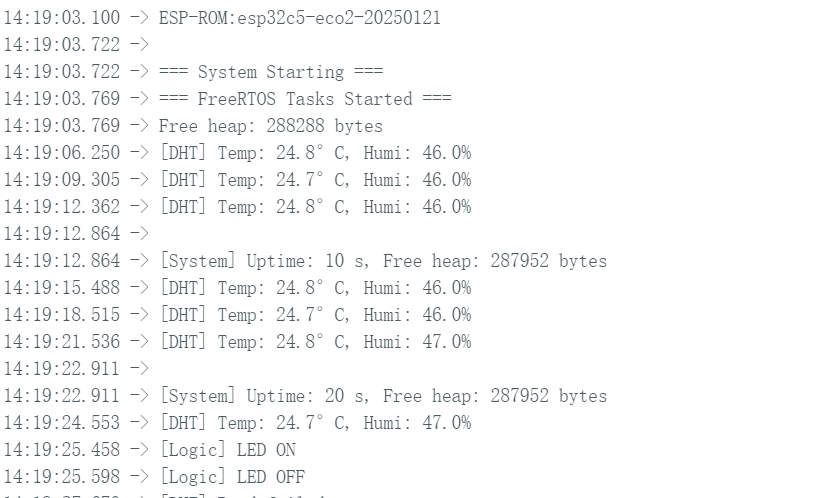
- ディスプレイ画面効果
 |  |
- 実際の効果
まとめ
このガイドを通じて、XIAO ESP32-C5とFreeRTOSをしっかりと習得していただけたと信じています。幅広いアプリケーションでの革新的な創作と発明を楽しみにしています!
技術サポート & 製品ディスカッション
弊社製品をお選びいただき、ありがとうございます!弊社製品での体験が可能な限りスムーズになるよう、さまざまなサポートを提供いたします。異なる好みやニーズに対応するため、複数のコミュニケーションチャンネルを用意しています。