JetPack 7.2 Wireless Module Setup Guide
After upgrading a Seeed Jetson device to JetPack 7.2, some users may find that the M.2 Key E Wi-Fi module is detected on PCIe but no wireless network interface appears.
This guide covers the JetPack 7.2 repair flow for the following modules:
- Intel AX210 / AX200, using
iwlwifiandiwlmvm. - Realtek RTL8852BE / 8852BE, using the
rtw89driver stack.
The fix usually requires two parts: installing the kernel modules that match JetPack 7.2 kernel 6.8.12-1021-tegra, and decompressing the corresponding firmware files under /lib/firmware.
This guide is intended for JetPack 7.2 systems using kernel 6.8.12-1021-tegra. The repair driver modules are built for this kernel. If uname -r shows a different kernel, use the driver package for that exact kernel version.
Symptoms
After upgrading to JetPack 7.2, you may see one or more of the following symptoms:
lspcican detect the Wi-Fi module, butip linkdoes not showwlan0.dmesgreportsiwlwifiorrtw89firmware loading errors.modprobereports that the expected module cannot be found.- Loading the driver manually works temporarily, but Wi-Fi disappears again after reboot.
Prerequisites
- A Seeed Jetson device flashed with JetPack 7.2.
- Kernel version
6.8.12-1021-tegra. - A supported M.2 Key E Wi-Fi module installed correctly: Intel AX210, Intel AX200, or Realtek RTL8852BE.
- Temporary Internet access through Ethernet, USB networking, or another network adapter.
sudopermission on the Jetson device.
Check the kernel version and PCIe device first:
uname -r
lspci -nnk | grep -A3 -i network
Common PCI IDs include:
| Module | Example PCI ID |
|---|---|
| Intel AX210 | 8086:2725 |
| Intel AX200 | 8086:2723 |
| Realtek RTL8852BE | 10ec:b852 |
Option 1: One-click Repair Script
Use this option if the Jetson can access the Internet through Ethernet or another network adapter.
The script downloads the repaired JetPack 7.2 driver modules from the public OneDrive folders, stores them under /tmp/jp72_wifi_fix/driver/, installs the selected module set to the current kernel module directory, decompresses the required firmware files, and enables automatic loading at boot.
The OneDrive web link is not used directly as a curl download URL. The script first opens the shared OneDrive page to obtain an anonymous SharePoint cookie, then downloads each file through the SharePoint REST %24value endpoint.
Create the script:
cat <<'EOF' > fix_jp72_wifi.sh
#!/usr/bin/env bash
set -euo pipefail

usage() {
  cat <<'USAGE'
Usage:
  bash fix_jp72_wifi.sh [--ax210|--ax200|--8852be|--download-only]

Options:
  --ax210          Install Intel AX210 iwlwifi modules and firmware.
  --ax200          Install Intel AX200 iwlwifi modules and firmware.
  --8852be         Install Realtek RTL8852BE rtw89 modules and firmware.
  --download-only  Only download selected driver modules and print the local file tree.
  -h, --help       Show this help text.
USAGE
}

MODEL="auto"
DOWNLOAD_ONLY="0"

while [[ $# -gt 0 ]]; do
  case "$1" in
    --ax210) MODEL="ax210" ;;
    --ax200) MODEL="ax200" ;;
    --8852be) MODEL="8852be" ;;
    --download-only) DOWNLOAD_ONLY="1" ;;
    -h|--help) usage; exit 0 ;;
    *) echo "Unknown option: $1" >&2; usage; exit 1 ;;
  esac
  shift
done

if [[ "$MODEL" == "auto" ]] && command -v lspci >/dev/null 2>&1; then
  if lspci -nn | grep -qiE 'AX210|8086:2725'; then
    MODEL="ax210"
  elif lspci -nn | grep -qiE 'AX200|8086:2723'; then
    MODEL="ax200"
  elif lspci -nn | grep -qiE 'RTL8852BE|8852BE|10ec:b852'; then
    MODEL="8852be"
  fi
fi

if [[ "$MODEL" == "auto" && "$DOWNLOAD_ONLY" == "1" ]]; then
  MODEL="all"
fi

if [[ "$MODEL" == "auto" ]]; then
  echo "Could not auto-detect a supported module. Re-run with --ax210, --ax200, or --8852be." >&2
  exit 1
fi

WORKDIR="${TMPDIR:-/tmp}/jp72_wifi_fix"
SITE_URL="https://seeedstudio88-my.sharepoint.com"
API_ROOT="$SITE_URL/personal/youjiang_yu_seeedstudio88_onmicrosoft_com/_api/web"

INTEL_SHARE_LINK="https://seeedstudio88-my.sharepoint.com/:f:/g/personal/youjiang_yu_seeedstudio88_onmicrosoft_com/IgC5g_yzXQ26Sb-yYWtaWU8qATu9387mvrXAvPLhJNuBtxw?e=PvK037"
INTEL_FOLDER_REL="/personal/youjiang_yu_seeedstudio88_onmicrosoft_com/Documents/ko%E9%A9%B1%E5%8A%A8%26%E8%AE%BE%E5%A4%87%E6%A0%91/iwlwifi/jp7.2"
INTEL_DIR="$WORKDIR/driver/iwlwifi/jp7.2"

RTW89_SHARE_LINK="https://seeedstudio88-my.sharepoint.com/:f:/g/personal/youjiang_yu_seeedstudio88_onmicrosoft_com/IgAxZzXdPP_STosySy14oTGgAZMFt4qQ0IFsKt0oXeAi5KE?e=W84g0E"
RTW89_FOLDER_REL="/personal/youjiang_yu_seeedstudio88_onmicrosoft_com/Documents/ko%E9%A9%B1%E5%8A%A8%26%E8%AE%BE%E5%A4%87%E6%A0%91/8852be/jp7.2/8852be-6.8.12-1021-tegra"
RTW89_DIR="$WORKDIR/driver/8852be/jp7.2/8852be-6.8.12-1021-tegra"

if [[ "$(id -u)" -eq 0 ]]; then
  SUDO=()
else
  SUDO=(sudo)
fi

prepare_share_cookie() {
  local share_link="$1"
  local cookie_jar="$2"
  local html_out="$3"

  mkdir -p "$(dirname "$cookie_jar")"
  curl -fsSL -c "$cookie_jar" -b "$cookie_jar" -o "$html_out" "$share_link"
}

download_file() {
  local cookie_jar="$1"
  local folder_rel="$2"
  local out_dir="$3"
  local name="$4"
  local min_size="${5:-100000}"
  local url="$API_ROOT/GetFileByServerRelativeUrl('$folder_rel/$name')/%24value"
  local output="$out_dir/$name"

  mkdir -p "$out_dir"
  echo "Downloading $name..."
  curl -fL -b "$cookie_jar" -o "$output" "$url"

  local size
  size=$(wc -c < "$output")
  if (( size < min_size )); then
    echo "Downloaded file is unexpectedly small: $output" >&2
    echo "Check the OneDrive sharing link or network connection." >&2
    exit 1
  fi
}

download_intel() {
  local cookie="$WORKDIR/iwlwifi.sharepoint.cookies"
  prepare_share_cookie "$INTEL_SHARE_LINK" "$cookie" "$WORKDIR/iwlwifi.sharepoint.html"
  download_file "$cookie" "$INTEL_FOLDER_REL" "$INTEL_DIR" "iwlwifi.ko" 100000
  download_file "$cookie" "$INTEL_FOLDER_REL" "$INTEL_DIR" "iwlmvm.ko" 100000
}

download_rtw89() {
  local cookie="$WORKDIR/rtw89.sharepoint.cookies"
  prepare_share_cookie "$RTW89_SHARE_LINK" "$cookie" "$WORKDIR/rtw89.sharepoint.html"
  download_file "$cookie" "$RTW89_FOLDER_REL" "$RTW89_DIR" "rtw89_8852b.ko" 100000
  download_file "$cookie" "$RTW89_FOLDER_REL" "$RTW89_DIR" "rtw89_core.ko" 100000
  download_file "$cookie" "$RTW89_FOLDER_REL" "$RTW89_DIR" "rtw89_8852be.ko" 50000
  download_file "$cookie" "$RTW89_FOLDER_REL" "$RTW89_DIR" "rtw89_pci.ko" 100000
  download_file "$cookie" "$RTW89_FOLDER_REL" "$RTW89_DIR" "SHA256SUMS" 1
  download_file "$cookie" "$RTW89_FOLDER_REL" "$RTW89_DIR" "modinfo.txt" 1

  if command -v sha256sum >/dev/null 2>&1; then
    (cd "$RTW89_DIR" && awk '{n=$2; sub(".*/", "", n); print $1 "  " n}' SHA256SUMS | sha256sum -c -)
  fi
}

case "$MODEL" in
  ax210|ax200)
    rm -rf "$INTEL_DIR"
    download_intel
    ;;
  8852be)
    rm -rf "$RTW89_DIR"
    download_rtw89
    ;;
  all)
    rm -rf "$WORKDIR/driver"
    download_intel
    download_rtw89
    ;;
esac

echo "Downloaded files:"
case "$MODEL" in
  ax210|ax200) find "$INTEL_DIR" -type f | sort ;;
  8852be) find "$RTW89_DIR" -type f | sort ;;
  all) find "$WORKDIR/driver" -type f | sort ;;
esac

if [[ "$DOWNLOAD_ONLY" == "1" ]]; then
  echo "Download-only mode completed. No system files were changed."
  exit 0
fi

KVER="$(uname -r)"
EXPECTED_KVER="6.8.12-1021-tegra"
if [[ "$KVER" != "$EXPECTED_KVER" ]]; then
  echo "WARNING: current kernel is $KVER, expected $EXPECTED_KVER." >&2
  echo "Only continue if these modules match your kernel." >&2
fi

ensure_zstd() {
  if ! command -v unzstd >/dev/null 2>&1; then
    echo "Installing zstd..."
    "${SUDO[@]}" apt update
    "${SUDO[@]}" apt install -y zstd
  fi
}

install_intel() {
  local module_dir="/lib/modules/$KVER/kernel/drivers/net"
  local stamp
  stamp="$(date +%Y%m%d%H%M%S)"

  if [[ ! -d "$module_dir" ]]; then
    echo "Kernel module directory not found: $module_dir" >&2
    exit 1
  fi

  for name in iwlwifi.ko iwlmvm.ko; do
    if [[ -f "$module_dir/$name" ]]; then
      "${SUDO[@]}" cp -a "$module_dir/$name" "$module_dir/$name.bak.$stamp"
    fi
    "${SUDO[@]}" install -m 0644 "$INTEL_DIR/$name" "$module_dir/$name"
  done

  ensure_zstd

  case "$MODEL" in
    ax210)
      "${SUDO[@]}" unzstd -f -k /lib/firmware/iwlwifi-ty-a0-gf-a0-86.ucode.zst
      "${SUDO[@]}" unzstd -f -k /lib/firmware/iwlwifi-ty-a0-gf-a0.pnvm.zst
      ;;
    ax200)
      shopt -s nullglob
      local ax200_fw=(/lib/firmware/iwlwifi-cc-a0-*.ucode.zst)
      if [[ "${#ax200_fw[@]}" -eq 0 ]]; then
        echo "No AX200 firmware archive found: /lib/firmware/iwlwifi-cc-a0-*.ucode.zst" >&2
        exit 1
      fi
      "${SUDO[@]}" unzstd -f -k "${ax200_fw[@]}"
      ;;
  esac

  printf "iwlwifi\ncfg80211\nmac80211\n" | "${SUDO[@]}" tee /etc/modules-load.d/iwlwifi.conf >/dev/null
  "${SUDO[@]}" depmod -a
  "${SUDO[@]}" modprobe -r iwlmvm iwlwifi 2>/dev/null || true
  "${SUDO[@]}" modprobe iwlwifi
}

install_rtw89() {
  local module_dir="/lib/modules/$KVER/kernel/drivers/net/wireless/realtek/rtw89"
  local stamp
  stamp="$(date +%Y%m%d%H%M%S)"

  "${SUDO[@]}" mkdir -p "$module_dir"
  for name in rtw89_core.ko rtw89_pci.ko rtw89_8852b.ko rtw89_8852be.ko; do
    if [[ -f "$module_dir/$name" ]]; then
      "${SUDO[@]}" cp -a "$module_dir/$name" "$module_dir/$name.bak.$stamp"
    fi
    "${SUDO[@]}" install -m 0644 "$RTW89_DIR/$name" "$module_dir/$name"
  done

  ensure_zstd

  if [[ ! -d /lib/firmware/rtw89 ]]; then
    echo "Firmware directory not found: /lib/firmware/rtw89" >&2
    exit 1
  fi

  shopt -s nullglob
  local rtw_fw=(/lib/firmware/rtw89/rtw885*.zst)
  if [[ "${#rtw_fw[@]}" -eq 0 ]]; then
    echo "No Realtek rtw885*.zst firmware archives found under /lib/firmware/rtw89" >&2
    exit 1
  fi
  "${SUDO[@]}" unzstd -f -k "${rtw_fw[@]}"

  printf "rtw89_8852be\n" | "${SUDO[@]}" tee /etc/modules-load.d/rtw89_8852be.conf >/dev/null
  "${SUDO[@]}" depmod -a
  "${SUDO[@]}" modprobe -r rtw89_8852be rtw89_8852b rtw89_pci rtw89_core 2>/dev/null || true
  "${SUDO[@]}" modprobe rtw89_8852be
}

case "$MODEL" in
  ax210|ax200) install_intel ;;
  8852be) install_rtw89 ;;
  all)
    echo "Install mode cannot use MODEL=all. Re-run with --ax210, --ax200, or --8852be." >&2
    exit 1
    ;;
esac

echo "Repair completed. Reboot the Jetson if wlan0 does not appear immediately."
EOF

chmod +x fix_jp72_wifi.sh
Run the script:
# Auto-detect the Wi-Fi module and repair the driver
bash fix_jp72_wifi.sh

# If auto-detection fails, specify the module manually
bash fix_jp72_wifi.sh --ax210
bash fix_jp72_wifi.sh --ax200
bash fix_jp72_wifi.sh --8852be
To verify only the OneDrive download paths without changing system files, run:
# Download all supported driver packages and print their local tree
bash fix_jp72_wifi.sh --download-only

# Or download only one package
bash fix_jp72_wifi.sh --8852be --download-only
Expected download structure:
/tmp/jp72_wifi_fix/driver/iwlwifi/jp7.2/iwlmvm.ko
/tmp/jp72_wifi_fix/driver/iwlwifi/jp7.2/iwlwifi.ko
/tmp/jp72_wifi_fix/driver/8852be/jp7.2/8852be-6.8.12-1021-tegra/SHA256SUMS
/tmp/jp72_wifi_fix/driver/8852be/jp7.2/8852be-6.8.12-1021-tegra/modinfo.txt
/tmp/jp72_wifi_fix/driver/8852be/jp7.2/8852be-6.8.12-1021-tegra/rtw89_8852b.ko
/tmp/jp72_wifi_fix/driver/8852be/jp7.2/8852be-6.8.12-1021-tegra/rtw89_8852be.ko
/tmp/jp72_wifi_fix/driver/8852be/jp7.2/8852be-6.8.12-1021-tegra/rtw89_core.ko
/tmp/jp72_wifi_fix/driver/8852be/jp7.2/8852be-6.8.12-1021-tegra/rtw89_pci.ko
Option 2: Manual Setup
Use this option if you prefer to download and install the files manually.
Intel AX210 / AX200
Download the JetPack 7.2 Intel driver package from the OneDrive folder below:
The folder contains:
iwlwifi.koiwlmvm.ko
Copy both files to the Jetson, for example under ~/Downloads/, then replace the current kernel modules:
KVER=$(uname -r)
MODULE_DIR=/lib/modules/${KVER}/kernel/drivers/net

# Back up the original modules
sudo cp ${MODULE_DIR}/iwlwifi.ko ${MODULE_DIR}/iwlwifi.ko.bak
sudo cp ${MODULE_DIR}/iwlmvm.ko ${MODULE_DIR}/iwlmvm.ko.bak

# Install the JetPack 7.2 compatible modules
sudo cp ~/Downloads/iwlwifi.ko ${MODULE_DIR}/
sudo cp ~/Downloads/iwlmvm.ko ${MODULE_DIR}/

sudo depmod -a
Install zstd if needed:
sudo apt update
sudo apt install -y zstd
For AX210, decompress the ty-a0-gf-a0 firmware and PNVM files:
cd /lib/firmware
sudo unzstd -f -k iwlwifi-ty-a0-gf-a0-86.ucode.zst
sudo unzstd -f -k iwlwifi-ty-a0-gf-a0.pnvm.zst
For AX200, decompress the cc-a0 firmware files:
cd /lib/firmware
sudo unzstd -f -k iwlwifi-cc-a0-*.ucode.zst
Enable automatic loading at boot:
printf "iwlwifi\ncfg80211\nmac80211\n" | sudo tee /etc/modules-load.d/iwlwifi.conf
sudo depmod -a
sudo modprobe iwlwifi
Realtek RTL8852BE / 8852BE
Download the JetPack 7.2 Realtek 8852BE driver package from the OneDrive folder below:
The verified folder path is 8852be/jp7.2/8852be-6.8.12-1021-tegra/, and it contains:
rtw89_core.kortw89_pci.kortw89_8852b.kortw89_8852be.koSHA256SUMSmodinfo.txt
Copy the folder to the Jetson, for example under ~/Downloads/8852be-6.8.12-1021-tegra/, then install the modules:
KVER=$(uname -r)
RTW89_DIR=/lib/modules/${KVER}/kernel/drivers/net/wireless/realtek/rtw89
DRIVER_DIR=~/Downloads/8852be-6.8.12-1021-tegra

sudo mkdir -p ${RTW89_DIR}
sudo cp ${DRIVER_DIR}/rtw89_core.ko ${RTW89_DIR}/
sudo cp ${DRIVER_DIR}/rtw89_pci.ko ${RTW89_DIR}/
sudo cp ${DRIVER_DIR}/rtw89_8852b.ko ${RTW89_DIR}/
sudo cp ${DRIVER_DIR}/rtw89_8852be.ko ${RTW89_DIR}/
Install zstd if needed, then decompress the Realtek firmware files:
sudo apt update
sudo apt install -y zstd

cd /lib/firmware/rtw89
sudo unzstd -f -k rtw885*.zst
Update module dependencies and load the driver:
printf "rtw89_8852be\n" | sudo tee /etc/modules-load.d/rtw89_8852be.conf
sudo depmod -a
sudo modprobe rtw89_8852be
The module name is rtw89_8852be. Running sudo modprobe 8852be will fail because 8852be is not the kernel module name.
Reboot the Jetson if the wireless interface does not appear immediately:
sudo reboot
Verify Wi-Fi
After rebooting, use the following commands:
# Check PCI device detection
lspci -nnk | grep -A3 -i network

# Check Intel or Realtek Wi-Fi logs
sudo dmesg | grep -Ei 'iwl|rtw89'

# Check wireless interface
ip link show

# Check loaded modules
lsmod | grep -E 'iwl|rtw89'
A successful setup should show the Wi-Fi device, the expected kernel modules, and a wireless interface such as wlan0.
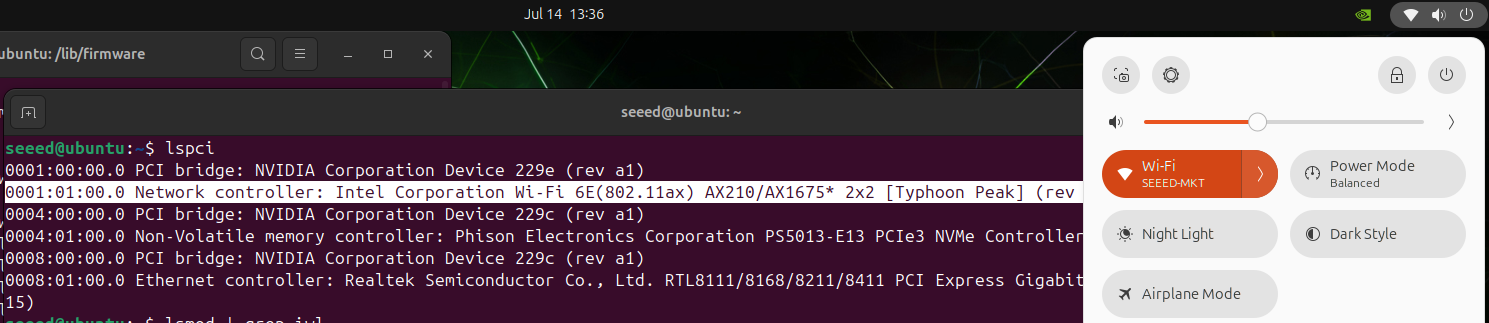
The following AX210 result shows the final Wi-Fi enabled state after repair:
Troubleshooting
| Symptom | Check |
|---|---|
lspci cannot detect the Wi-Fi module | Check M.2 Key E installation and confirm the PCIe lane is enabled by the carrier board device tree. |
Intel dmesg reports firmware loading failures | Confirm the matching .ucode and, for AX210, .pnvm files were decompressed under /lib/firmware/. |
Realtek dmesg reports firmware loading failures | Confirm rtw885*.zst files were decompressed under /lib/firmware/rtw89/, especially the rtw8852b firmware files. |
modprobe iwlwifi reports Invalid argument | Check whether rfkill.ko exists with find /lib/modules/$(uname -r) -name "rfkill.ko". If it is missing, use the correct BSP image or rebuild the kernel modules. |
modprobe rtw89_8852be reports module not found | Confirm the four rtw89*.ko files were copied to /lib/modules/$(uname -r)/kernel/drivers/net/wireless/realtek/rtw89/, then run sudo depmod -a. |
modprobe 8852be fails | Use sudo modprobe rtw89_8852be; 8852be is not the module name. |
| Wi-Fi disappears after reboot | Confirm /etc/modules-load.d/iwlwifi.conf or /etc/modules-load.d/rtw89_8852be.conf exists and run sudo depmod -a again. |
| AX210 loads but cannot scan 6 GHz networks | Confirm iwlwifi-ty-a0-gf-a0.pnvm exists and check whether the configured regulatory domain supports 6 GHz with iw reg get. |
Notes
- AX210 and AX200 firmware files are not interchangeable. AX210 uses
ty-a0-gf-a0; AX200 usescc-a0. - Realtek RTL8852BE uses the
rtw89driver stack and firmware under/lib/firmware/rtw89/. - These repair packages are built for JetPack 7.2 kernel
6.8.12-1021-tegra. - Avoid using
apt upgradeas a workaround on custom Jetson carrier boards. Use a validated BSP image or driver package for the target kernel instead.
Tech Support & Product Discussion
Thank you for choosing our products! We are here to provide you with different support to ensure that your experience with our products is as smooth as possible. We offer several communication channels to cater to different preferences and needs.