JetPack 7.2 Deep Dive: What Changes for Jetson AGX Orin Inference?
This FAQ summarizes why JetPack 7.2 matters for Jetson AGX Orin users, what Seeed measured when comparing JetPack 7.2 with JetPack 6.2, and how to evaluate an upgrade path with Seeed Jetson DevelopTool.
The test platform used by Seeed is the reComputer Jetson AGX Orin Developer Kit GMSL Bundle.

FAQ
Q1: What are the main JetPack 7.2 changes for Jetson users?
JetPack 7.2 moves the Jetson software stack forward with a newer Jetson Linux base, Ubuntu 24.04, CUDA 13, updated AI runtime components, and platform-level improvements for memory efficiency and agentic AI workflows.
For Jetson AGX Orin 32GB users, one of the most important changes is the new high-performance power mode used in Seeed's test, which allows the same module to run at a higher GPU frequency and deliver higher AI throughput when the carrier board power and thermal design can support it.
Always check the NVIDIA release notes and the Seeed BSP release notes for the exact component versions supported by your target carrier board and image.
Q2: What hardware and software did Seeed compare?
Seeed compared an AGX Orin 32GB Developer Kit with a reComputer J5011 using the JetPack 6.2 and JetPack 7.2 software environments and the same large language model inference workload.
| Item | JetPack 6.2 test | JetPack 7.2 test |
|---|---|---|
| Module | Jetson AGX Orin 32GB | Jetson AGX Orin 32GB |
| Test device | AGX Orin 32GB Developer Kit | reComputer J5011 |
| Jetson Linux | L4T 36.4.3 | L4T 39.2 |
| Ubuntu | 22.04 | 24.04 |
| CUDA | 12.6 | 13.x |
| Inference engine | llama.cpp | llama.cpp |
| Model | Qwen3.5-27B-Q4_K_M.gguf | Qwen3.5-27B-Q4_K_M.gguf |
| Main parameters | -ngl 999 -fa on -ub 512 -t 12 | -ngl 999 -fa on -ub 512 -t 12 |
Q3: What memory and performance improvement did Seeed observe?
In Seeed's comparison, JetPack 7.2 reduced memory usage after model loading and improved both prompt processing speed and token generation speed.
| Metric | JetPack 6.2 | JetPack 7.2 | Observed change |
|---|---|---|---|
| Memory after model load | 24.6 GB / 30 GB | 14.7 GB / 30 GB | About 40% lower |
| GPU frequency during inference | 930 MHz | 1.36 GHz | Higher boost frequency |
| Prompt processing | 18.2 tokens/s | 25.8 tokens/s | About 41.8% faster |
| Token generation | 4.3 tokens/s | 5.5 tokens/s | About 27.9% faster |
The most practical result is the memory headroom. In the JetPack 6.2 run, the 27B model occupied most of the available memory after loading. In the JetPack 7.2 run, the system kept roughly 10 GB more memory available, which is useful when running vision preprocessing, robotics middleware, or other services alongside the LLM workload.
Q4: Can I watch the JetPack 7.2 and JetPack 6.2 comparison result?
Yes. The following video shows the comparison effect.
Q5: Should I upgrade my Jetson device to JetPack 7.2?
Use the following table as a starting point:
| Scenario | Recommendation |
|---|---|
| New Jetson AGX Orin project | Consider starting with JetPack 7.2 if the required BSP, drivers, and application stack are available. |
| Existing JetPack 6.x project | Validate kernel modules, CUDA dependencies, TensorRT engines, camera drivers, and peripheral drivers before migration. |
| LLM or VLM workloads limited by memory | JetPack 7.2 is worth evaluating because the measured memory reduction can make larger models or multi-service pipelines easier to run. |
| Production system with custom carrier board | Do not upgrade only by running apt upgrade. Use a validated full image or an officially supported OTA path from Seeed. |
Higher performance modes increase power and thermal requirements. Before enabling a high-power mode, confirm that the carrier board, power adapter, enclosure, and heat dissipation design can sustain the target workload.
Q6: How can I upgrade to JetPack 7.2 with Seeed Jetson DevelopTool?
Seeed Jetson DevelopTool provides a guided workflow for Jetson firmware download, flashing, device connection, and OTA operations.
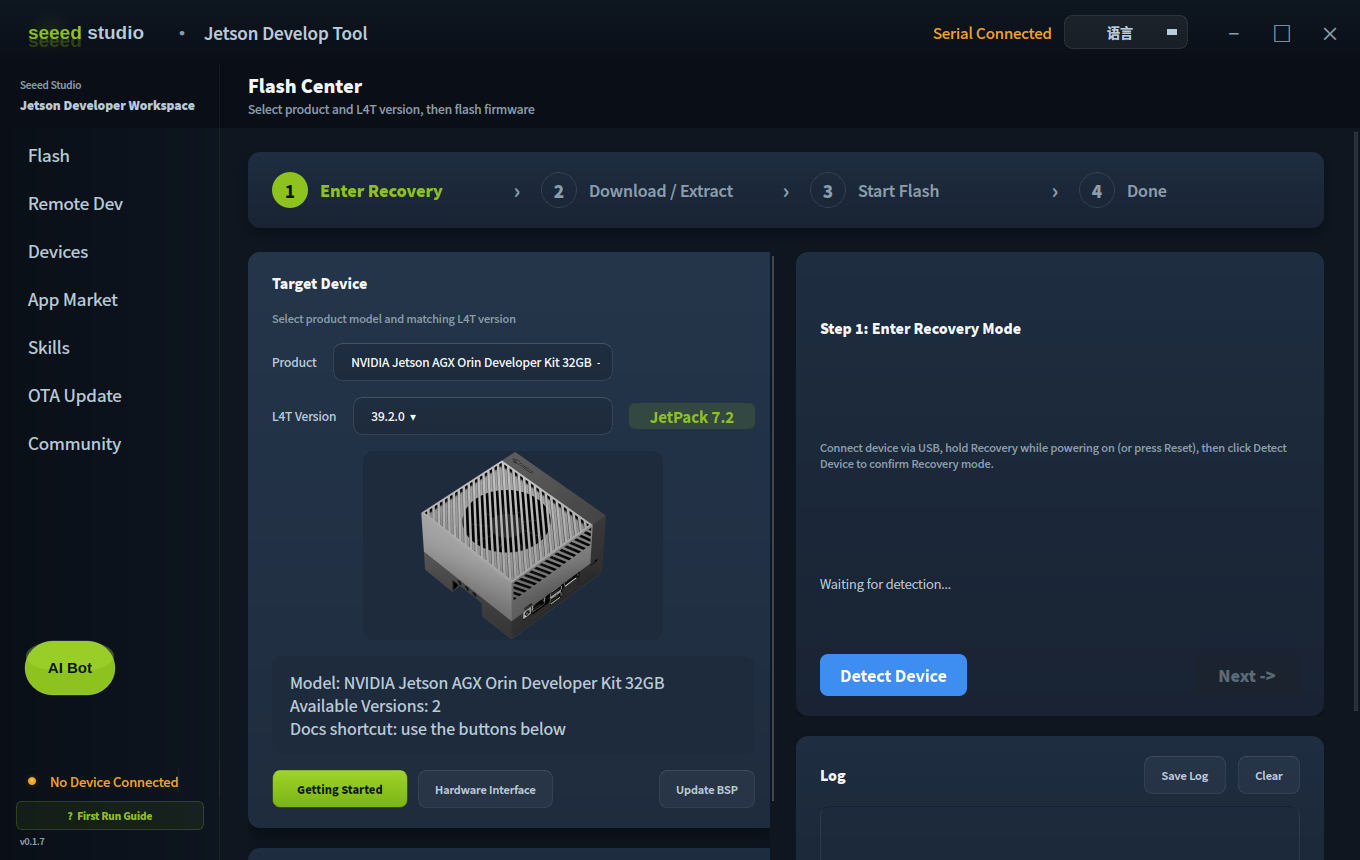
For a major-version migration such as JetPack 6.x to JetPack 7.x, a full flash is recommended unless Seeed explicitly provides a validated OTA path for your exact product and source image.
For the complete JetPack 7.2 flashing and OTA decision flow, DevelopTool video, verification commands, and migration checklist, see Flash and OTA Upgrade to JetPack 7.2.
General workflow:
- Install and open Seeed Jetson DevelopTool.
- Select the Jetson product or carrier board model.
- Select the target L4T or JetPack version that matches JetPack 7.2.
- Download and extract the BSP package from the tool.
- Put the Jetson device into Force Recovery Mode.
- Detect the device from the host PC.
- Start flashing and wait until the device reboots.
- Complete first boot setup and verify the system version.
For more details about the tool, refer to Seeed Jetson DevelopTool.
Q7: What should I verify after upgrading?
After flashing or upgrading, verify the following items before running production workloads:
- JetPack, L4T, CUDA, cuDNN, and TensorRT versions.
- GPU frequency, power mode, and thermal behavior under load.
- Camera, GMSL, Ethernet, CAN, USB, M.2, and other peripheral interfaces.
- Custom kernel modules and out-of-tree drivers.
- AI framework compatibility, including PyTorch, TensorRT engines, llama.cpp builds, and CUDA extensions.
- Long-duration stress tests for power and temperature stability.
Resources
- reComputer Jetson AGX Orin Developer Kit GMSL Bundle
- Seeed Jetson DevelopTool
- NVIDIA JetPack Archive
- Seeed Jetson Wiki
Tech Support & Product Discussion
Thank you for choosing our products! We are here to provide you with different support to ensure that your experience with our products is as smooth as possible. We offer several communication channels to cater to different preferences and needs.