JetPack 7.2 Memory Optimization
Jetson uses unified memory, so the operating system, GPU workloads, camera and display firmware, model weights, TensorRT engines, KV cache, and application services all compete for the same physical DRAM. Memory optimization therefore needs to cover both the platform and the inference workload.
This guide combines the JetPack 7.2 material already available in this collection:
- the JetPack 7.2 Deep Dive, including the measured reduction in memory after loading a 27B model;
- the NVIDIA Skills workflow for device diagnosis, memory auditing, and headless deployment;
- the TensorRT Edge-LLM guide for FP16, INT8, and INT4 inference on JetPack 7.2.
BSP-level memory reclamation changes boot firmware, device trees, and kernel command-line settings. Apply only validated headless, no-camera, or SWIOTLB recipes to a recoverable test device. Keep the original BSP and confirm that the device can be reflashed before making these changes.
Looking for the "why" behind these steps? The companion JetPack 7.2 Memory Optimization Deep Dive explains where the headroom comes from: the platform baseline versus JetPack 6.2, the LLM memory budget, runtime mechanics, and field observations.
Optimization Layers
Use the least invasive layer that solves the problem.
| Layer | Typical action | Risk | Reboot or reflash |
|---|---|---|---|
| Measurement | Record available memory and per-process use | Low | No |
| Inference configuration | Quantization, shorter context, batch size 1, lower concurrency | Low | No |
| Service configuration | Headless target, stop duplicate model servers, disable unused user services | Medium | Usually reboot |
| BSP memory reclamation | Disable unused display or camera firmware and reserved memory | High | Rebuild and reflash |
| SWIOTLB tuning | Reduce the DMA bounce pool after measuring actual use | High | Rebuild and reflash |
1. Record a Reproducible Baseline
Confirm the software release and capture memory before starting the application:
cat /etc/nv_tegra_release
free -h
grep -E 'MemTotal|MemAvailable|SwapTotal|SwapFree|CmaTotal|CmaFree' /proc/meminfo
Monitor unified memory, GPU use, temperatures, and power while loading and running the model:
sudo tegrastats --interval 1000
In another terminal, identify the largest processes and control groups:
ps -eo pid,comm,rss,vsz,%mem --sort=-rss | head -20
systemd-cgtop
Record at least four states:
- after boot and before the application starts;
- after the model or TensorRT engine loads;
- during prompt prefill or peak vision preprocessing;
- during steady-state token generation or application operation.
Do not compare only the used value from free. Use MemAvailable, the process RSS list, and the peak reported by tegrastats together.
2. Use Skills to Audit Before Editing the BSP
The skill-driven workflow should begin with observation rather than immediate configuration changes.
Diagnose the Device
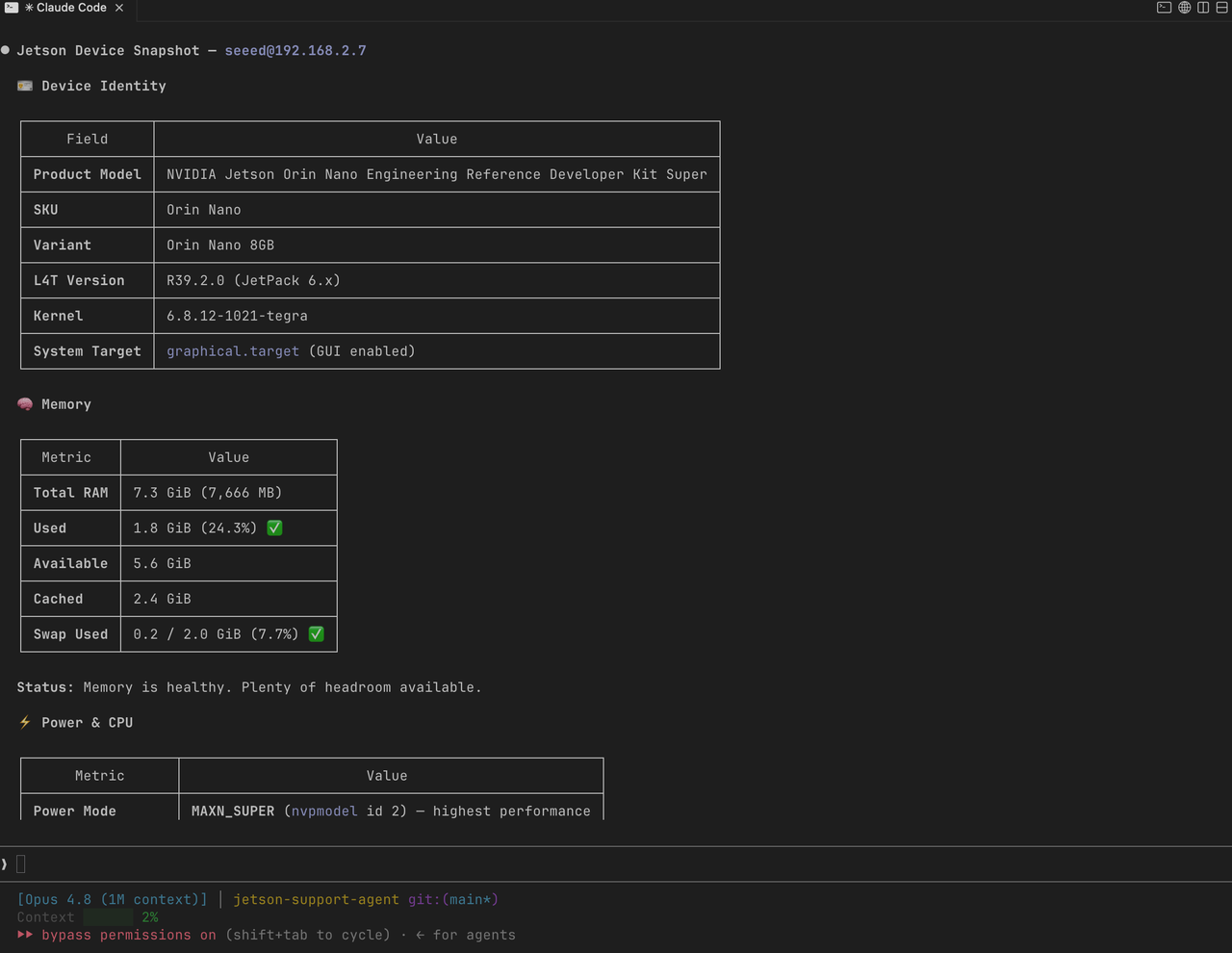
Use jetson-diagnostic to collect the module, JetPack/L4T release, memory state, storage, thermals, services, and visible hardware endpoints.
Example prompt:
/jetson-diagnostic Confirm that this device is running JetPack 7.2 / L4T 39.2,
capture its idle memory baseline, and identify services or hardware subsystems
that consume memory before the inference application starts.
Audit Memory Pressure
Use jetson-memory-audit when the model fails to load, the OOM killer terminates a process, or memory use grows unexpectedly.
/jetson-memory-audit Compare idle, engine-load, prefill, and decode memory use.
Separate model weights, KV cache, application processes, filesystem cache,
desktop services, and reserved platform memory where possible.
The audit should produce evidence before recommending a change. Do not disable a service only because it appears near the top of a process list.
Convert Appliance Deployments to Headless Mode
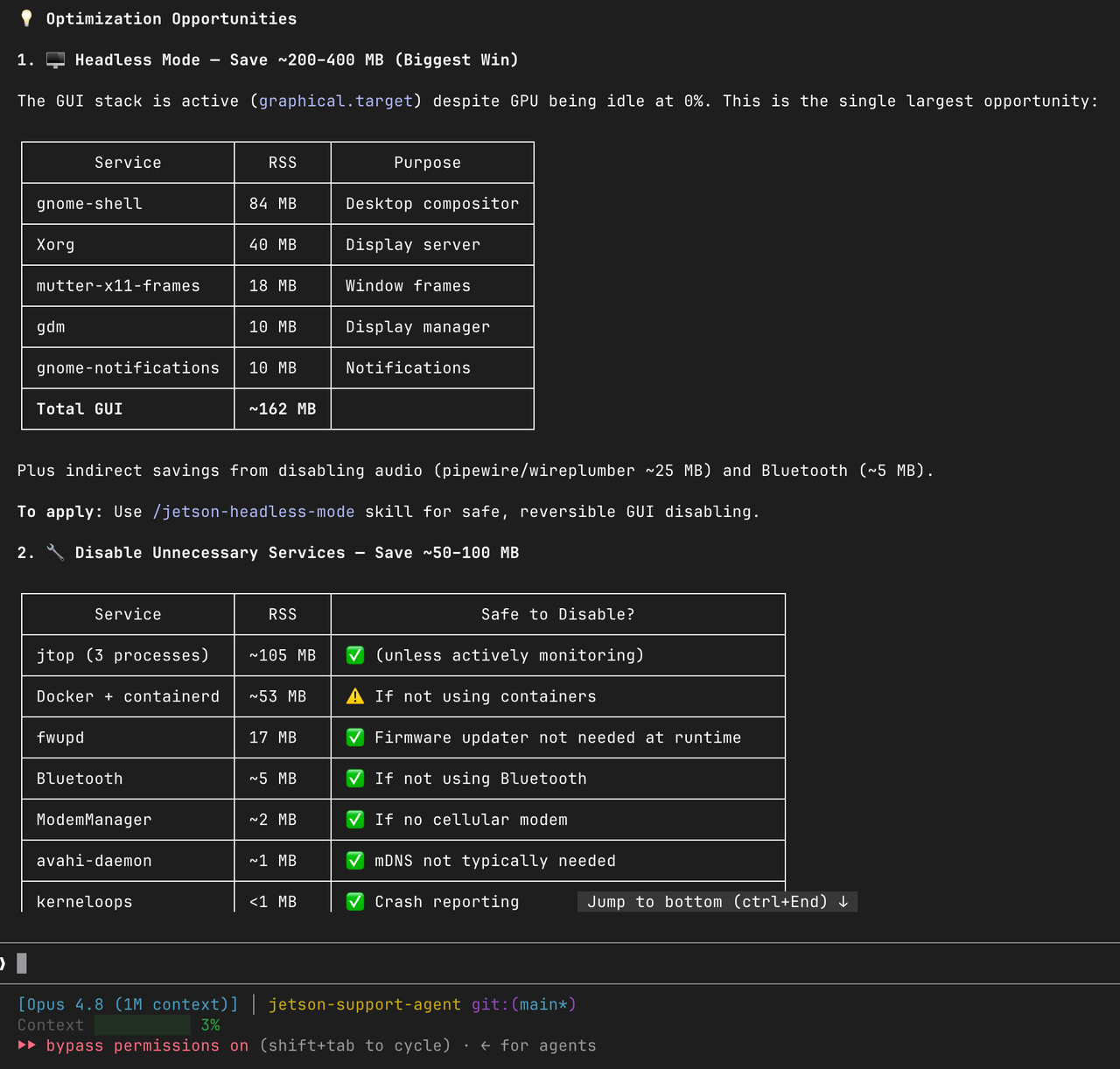
If the Jetson runs without a local display, use jetson-headless-mode to remove desktop overhead at the service level.
The standard systemd target is:
sudo systemctl set-default multi-user.target
sudo reboot
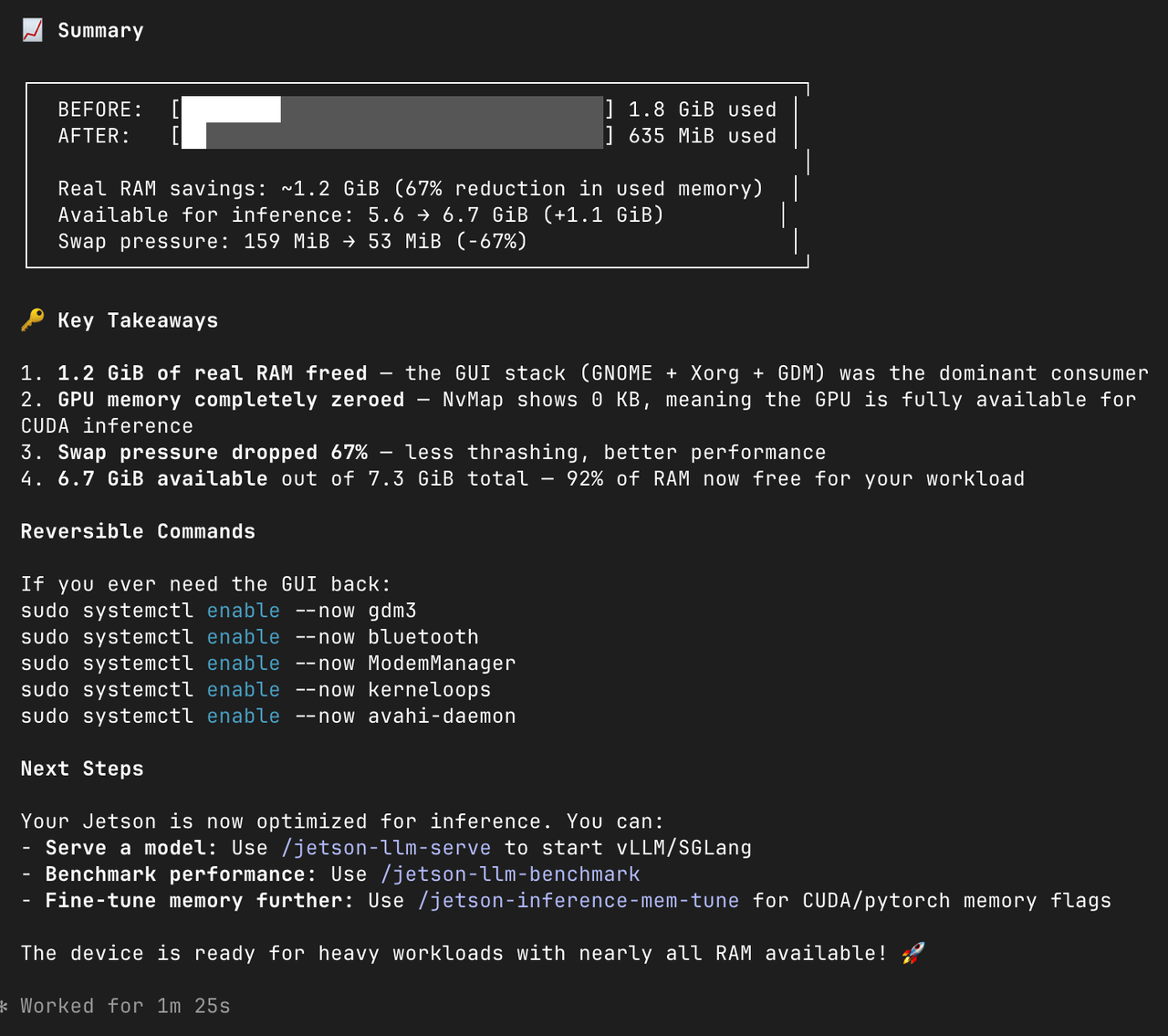
Confirm SSH access before rebooting. This service-level change is separate from reclaiming display firmware carveouts in the BSP.
Use jetson-optimize-memory Only for Validated BSP Scenarios
The BSP-level skill supports three bounded workflows:
| Scenario | Intended deployment | Reclaimed platform area |
|---|---|---|
headless | No local display output | DCE/display firmware, early framebuffer, and matching kernel nodes |
no-camera | No CSI, GMSL, or other camera pipeline | RCE, VI, ISP, NVCSI, and matching firmware carveouts |
swiotlb | Measured DMA bounce-pool use is far below the reserved pool | A smaller, non-zero SWIOTLB allocation |
Example requests:
/jetson-optimize-memory headless
/jetson-optimize-memory no-camera
/jetson-optimize-memory swiotlb
For carveout changes, the MB1 BCT, MB2 loading controls, MB2 AST references, and kernel device-tree nodes must remain consistent. Zeroing only one carveout entry is not a valid optimization. For SWIOTLB, never configure a zero-sized pool and revert immediately if io_tlb_used approaches io_tlb_nslabs.
3. Reduce LLM and VLM Memory Use
Choose the Smallest Supported Precision
TensorRT Edge-LLM on JetPack 7.2 supports FP16, INT8, and INT4 on Jetson Orin. Start with FP16 to validate correctness, then evaluate INT8 or INT4 checkpoints supported by the selected model.
| Precision | Memory tendency | Recommended use |
|---|---|---|
| FP16 | Highest of the supported Orin paths | Functional baseline and accuracy-sensitive workloads |
| INT8 | Lower weight memory with moderate accuracy trade-offs | Balanced production evaluation |
| INT4 | Lowest weight memory among the supported paths | Large models or multi-service deployments with limited DRAM |
Do not assume that changing an engine flag quantizes an FP16 checkpoint correctly. Use a checkpoint and export path supported by the model, then rebuild the TensorRT engine on JetPack 7.2.
Control Context, KV Cache, and Concurrency
LLM memory is not determined by model weights alone. KV cache grows with context length, batch size, generated tokens, and concurrent requests.
Start with a conservative request:
{
  "batch_size": 1,
  "max_generate_length": 128,
  "requests": [
    {
      "messages": [
        {
          "role": "user",
          "content": "Summarize the current device status."
        }
      ]
    }
  ]
}
Then increase one dimension at a time:
- input context length;
- generation length;
- batch size;
- concurrent requests;
- additional vision or robotics services.
If memory rises sharply during prefill, shorten the prompt or context window. If it rises as sessions remain active, inspect KV-cache retention and concurrent request handling.
Avoid Duplicate Model Loads
Use one long-running model server when several applications need the same model. Separate Python scripts, notebooks, test servers, and production services can each load another copy of the weights or engine.
Before starting inference, check for existing model processes:
ps -ef | grep -E 'llm|triton|python|ollama' | grep -v grep
Stop only processes that are confirmed duplicates. Do not terminate system services based on a name match alone.
Keep Export and Engine Build Off the Target When Possible
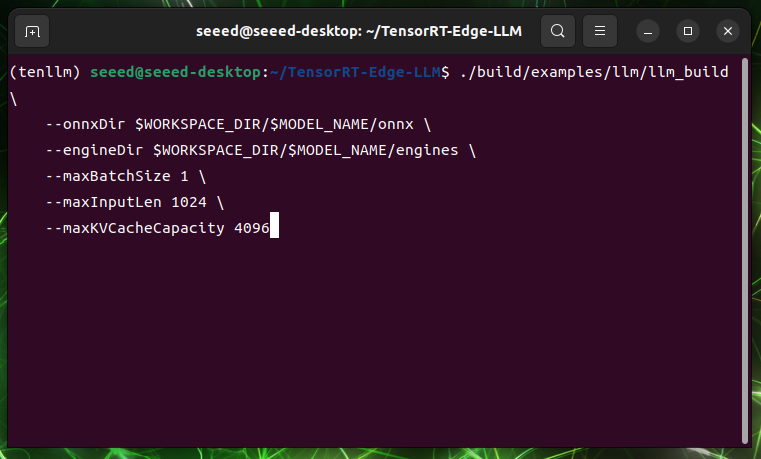
TensorRT Edge-LLM uses an x86 GPU host for checkpoint export and the Jetson for the target engine build. Export can require several times the checkpoint size in RAM and VRAM, so keeping export on the host preserves Jetson memory for validation and inference.
During engine build, close unrelated model servers and record peak memory separately from runtime memory. Build-time memory pressure does not necessarily represent the steady-state deployment requirement.
Treat Swap as a Recovery Tool, Not Free DRAM
Swap can help a one-time model conversion or engine build finish, but sustained swapping reduces latency and can increase storage wear. For real-time inference, prefer a smaller or quantized model, shorter context, lower concurrency, and fewer duplicate services before relying on swap.
4. Validate the Result
Use the same prompt, input, power mode, and application topology before and after each change.
| Metric | Why it matters |
|---|---|
Idle MemAvailable | Measures system and service overhead |
| Memory after engine load | Shows model and runtime footprint |
| Peak prefill memory | Exposes context and temporary workspace pressure |
| Steady decode memory | Shows KV cache and session retention |
| Time to first token | Detects regressions caused by swapping or constrained workspaces |
| Decode throughput | Confirms that lower memory did not make inference unusably slow |
| Temperature and board power | Confirms that the result is stable, not a short burst |
The JetPack 7.2 Deep Dive recorded memory after loading a 27B model falling from approximately 24.6 GB on JetPack 6.2 to 14.7 GB on JetPack 7.2 in Seeed's comparison. Treat that result as a workload-specific reference, not a guaranteed reduction for every model.
Recommended Order
- Measure idle, engine-load, prefill, and decode memory.
- Remove duplicate model processes and unnecessary application services.
- Reduce context, generation length, batch size, and concurrency.
- Evaluate INT8 or INT4 checkpoints supported by TensorRT Edge-LLM.
- Use
jetson-headless-modefor display-free appliance deployments. - Use
jetson-optimize-memory headlessorno-cameraonly when the hardware scenario exactly matches. - Consider SWIOTLB reduction only after measuring actual DMA bounce-pool use.
- Re-run correctness, latency, throughput, thermal, and stability tests after every change.
Rollback
- Restore the original service target if a graphical desktop is required again.
- Restore the pristine BSP source and reflash if a carveout or device-tree change causes boot or peripheral failures.
- Revert SWIOTLB changes if DMA errors appear or usage approaches the configured pool.
- Keep the last known-good TensorRT engine and model configuration until the optimized configuration passes acceptance testing.
Tech Support & Product Discussion
Thank you for choosing Seeed Studio products! For technical support and product discussion, please use the following channels: