Seeed Jetson DevelopTool Overview
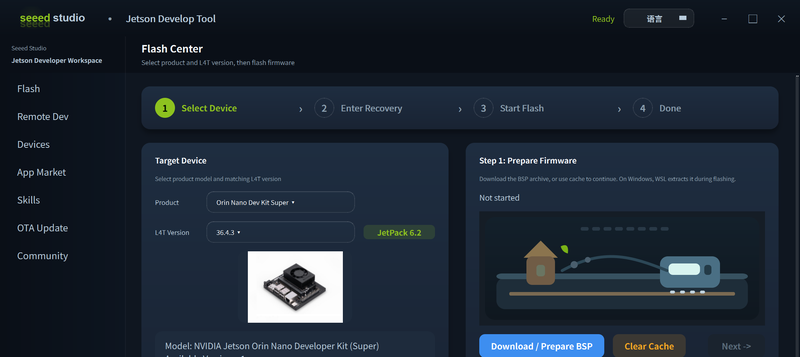
Seeed Jetson DevelopTool is an all-in-one AI development workbench designed for Seeed Studio Jetson products. It consolidates the most common Jetson development workflows — from first-time firmware flashing to AI app deployment — into a single desktop GUI application.
Why Seeed Jetson DevelopTool?
Setting up a Jetson device from scratch traditionally involves downloading BSP tarballs, running command-line flash scripts, manually configuring SSH, installing drivers, and hunting for AI frameworks. Seeed Jetson DevelopTool replaces all of this with a guided, visual interface that works on both Linux and Windows hosts.
Feature Modules
| Module | Description |
|---|---|
| Flash Center | Download, verify (SHA256), and flash firmware for all Jetson series with one click |
| Device Management | Quick diagnostics, peripheral detection, real-time device info |
| App Market | Browse and install AI apps — YOLOv8, Ollama, DeepSeek, Node-RED, and more |
| Skills | 50+ built-in automation skills covering drivers, AI deployment, and system tuning |
| Remote Dev | SSH, VS Code Server, Jupyter Lab, VNC remote desktop, AI agent install |
| PC Network Sharing | Share PC internet to Jetson over Ethernet with automatic proxy forwarding |
| Jetson Init | First-boot serial terminal wizard for username, network, and system setup |
| Community | Quick links to Wiki, forum, Discord, and video tutorials |
System Requirements
| Item | Requirement |
|---|---|
| Host OS | Ubuntu 20.04 / 22.04 / 24.04 (Linux recommended for flashing) |
| Python | 3.8+ |
| Dependencies | PyQt5, paramiko, requests |
Firmware flashing is most reliable on a native Linux host. On Windows, the tool can guide a WSL2 + usbipd workflow, but native Ubuntu is recommended if USB passthrough is unstable.
Get Started
Tech Support & Product Discussion
Thank you for choosing our products! We are here to provide you with different support to ensure that your experience with our products is as smooth as possible. We offer several communication channels to cater to different preferences and needs.