What Is the Relationship Between JetPack, L4T, Ubuntu, Kernel, and UEFI?
When you first start working with Jetson, there is one question almost everyone runs into: How many "system versions" does Jetson actually have?
You may see completely different numbers in different places:
JetPack 6.2.3
L4T / Jetson Linux R36.5.2
Ubuntu 22.04
Linux Kernel 5.15
UEFI 36.5.2
They look like five separate systems. In reality, they describe different layers within the software stack of the same Jetson device.
The most important thing about these concepts is not memorizing definitions, but building an awareness like this:
Jetson software is not as simple as "Ubuntu + NVIDIA GPU driver". It is a complete software platform that spans boot firmware, the Linux kernel, the Ubuntu user space, and right up to acceleration packages such as CUDA and TensorRT.
Let's start with a diagram showing how these components relate to and contain one another.
JetPack
│
├── Jetson Linux / L4T
│   │
│   ├── UEFI
│   ├── Linux Kernel
│   ├── NVIDIA Drivers
│   └── Ubuntu RootFS
│
├── CUDA
├── TensorRT
├── cuDNN
├── VPI
└── ...
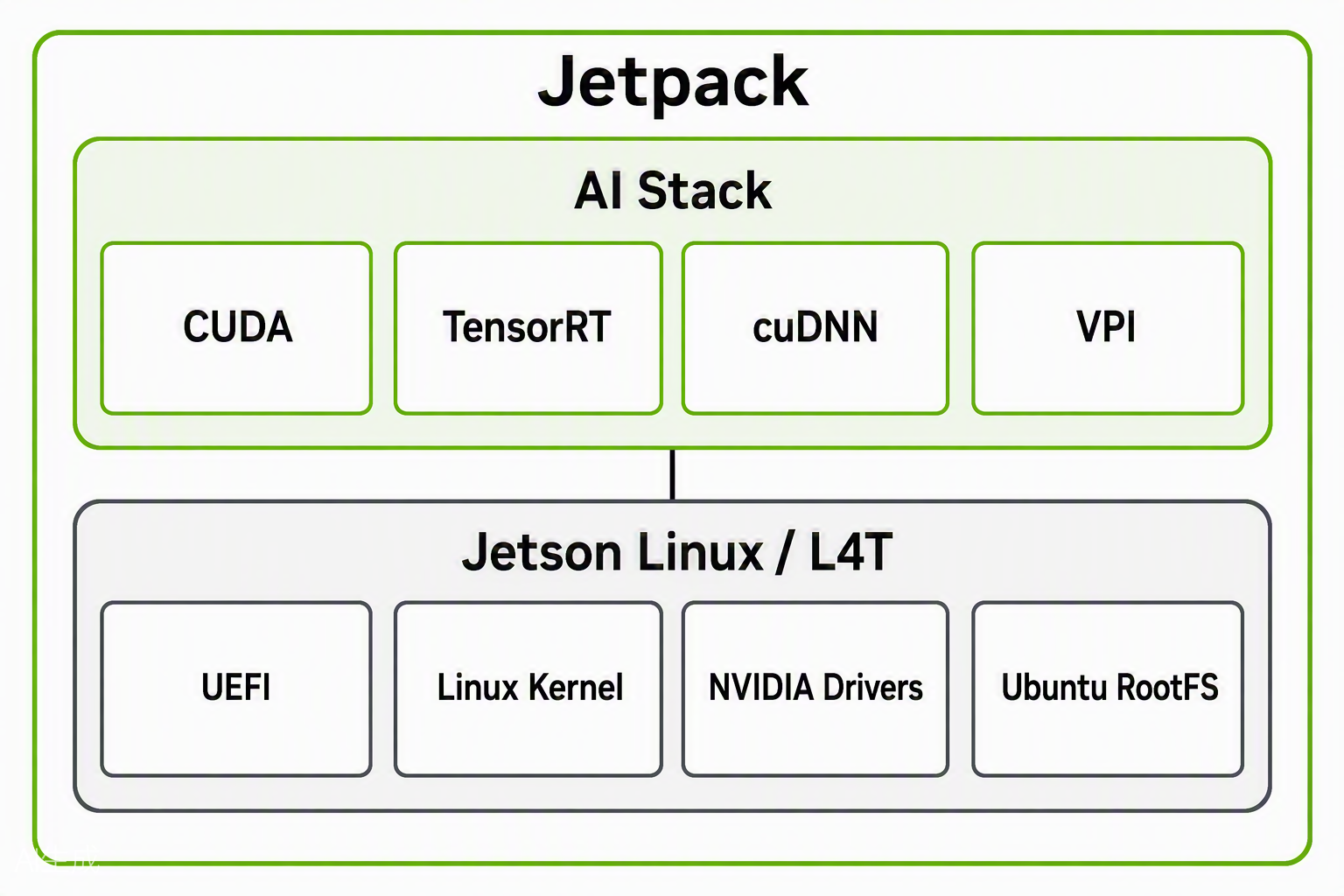
This diagram is not exhaustive, but it is enough to show the relationships among the terms covered in this article. A more complete architecture diagram is provided at the end of this article.
JetPack
You can think of JetPack as the complete software development environment NVIDIA prepares for Jetson edge computing devices. It includes not only OS-related components, but also security-related software packages and AI acceleration packages.
So when someone asks, "What JetPack are you using?"
what they are really asking is:
Which NVIDIA Jetson software platform are you currently using?
In this sense, JetPack can be understood as the top-level "software collection".
If you have a Jetson device with a working system, you can run the following command in the Jetson terminal to check the JetPack version:
seeed@ubuntu:~$ dpkg -l | grep nvidia-jetpack
ii  nvidia-jetpack                                    6.2.1+b38                                   arm64        NVIDIA Jetpack Meta Package
ii  nvidia-jetpack-dev                                6.2.1+b38                                   arm64        NVIDIA Jetpack dev Meta Package
ii  nvidia-jetpack-runtime                            6.2.1+b38                                   arm64        NVIDIA Jetpack runtime Meta Package
The output shows that the current device is running JetPack 6.2.1.
Jetson Linux / L4T
If JetPack is the "complete software" of Jetson, then Jetson Linux / L4T is the underlying system that Jetson actually relies on to run. First, let's clarify the relationship between Jetson Linux and L4T:
L4T is the older / technical name, while Jetson Linux is the name NVIDIA uses more commonly today. They can be understood as the same software.
For brevity, we will use L4T to refer to Jetson Linux / L4T throughout the rest of this article.
The full name of L4T is Linux for Tegra.
Tegra is the SoC platform used by NVIDIA Jetson, so L4T can be understood as:
A Linux BSP customized by NVIDIA specifically for Jetson hardware.
Here we meet another new term: BSP, Board Support Package.
Its role is not merely to provide a Linux desktop; it is responsible for actually connecting the Linux system to the Jetson hardware.
You can think of it like this:
                Jetson Linux / L4T
                        │
        ┌───────────────┼───────────────┐
        ↓               ↓               ↓
      UEFI          Linux Kernel     Ubuntu RootFS
        │               │               │
   Boot system      Manage HW      User space
                        │
                   NVIDIA Drivers
                        │
                  Jetson Hardware
In other words, L4T is not a single software component; it is a complete underlying system environment.
It typically includes:
- UEFI / Bootloader: responsible for early-stage boot and system bring-up after the device is powered on.
- Linux Kernel: the core of Linux, responsible for CPU scheduling, memory management, process management, and the frameworks for various hardware drivers.
- Device Tree: describes what hardware is on the board and how that hardware is connected.
- NVIDIA Drivers: drivers provided by NVIDIA for Jetson hardware to support features such as GPU, ISP, and NVCSI.
- Ubuntu RootFS: the user-space environment of Jetson — the Ubuntu desktop we see and use every day.
- ...
Note that Jetson is not an ordinary ARM Linux computer. It has a lot of NVIDIA-specific hardware: GPU, NVCSI, VI, and more. For this hardware to work properly, the Device Tree, kernel drivers, firmware, and NVIDIA drivers must work together. This low-level support is not included in standard Ubuntu — it is provided by L4T.
Therefore:
What actually makes Ubuntu run on Jetson hardware is L4T.
We have introduced many terms here. You don't need to deeply understand every component at this point — just build a rough mental model for now. When you encounter them later in real work, you can dig deeper then.
Use the following command to check the L4T version of a Jetson device:
seeed@ubuntu:~$ cat /etc/nv_tegra_release
# R36 (release), REVISION: 4.3, GCID: 38968081, BOARD: generic, EABI: aarch64, DATE: Wed Jan  8 01:49:37 UTC 2025
# KERNEL_VARIANT: oot
TARGET_USERSPACE_LIB_DIR=nvidia
TARGET_USERSPACE_LIB_DIR_PATH=usr/lib/aarch64-linux-gnu/nvidia
The output shows that the current device is running L4T 36.4.3.
Note that JetPack and L4T have a strict one-to-one correspondence. You can look up all JetPack versions released by NVIDIA at this link: https://developer.nvidia.com/embedded/jetson-linux-archive
Ubuntu: The User Space You Interact With Most on Jetson
On Jetson, Ubuntu is the layer you see most often and interact with on a daily basis.
When you boot into the desktop, open a terminal, and run:
apt install
python3
docker
systemctl
cd /home
All of these operations happen in the Ubuntu user space. That is why many people assume: "Jetson runs Ubuntu." By now, you can tell that this statement is not wrong, but it is incomplete. A more accurate way to put it: L4T uses Ubuntu as the RootFS and user-space base, but Ubuntu is not the entire Jetson system.
In other words, Ubuntu provides the user interaction layer — "it lets users and applications use the machine."
What actually manages the Jetson hardware directly is mainly:
Linux Kernel
NVIDIA Drivers
Device Tree
Firmware
We will explain more details in later articles. For now, there are two key points to note:
- When we say "the system is installed on NVMe," in many cases what we actually mean is "the Ubuntu RootFS is stored on NVMe."
- Ubuntu is only the user-space part of Jetson Linux, not the entire system. That is why two Jetson devices can both run Ubuntu 22.04 yet behave completely differently. For example, both L4T R36.4.x and L4T R36.5.x use Ubuntu 22.04 as their filesystem, but their Kernel and NVIDIA Driver versions are different.
On Jetson, you can simply run cat /etc/os-release to check the Ubuntu version.
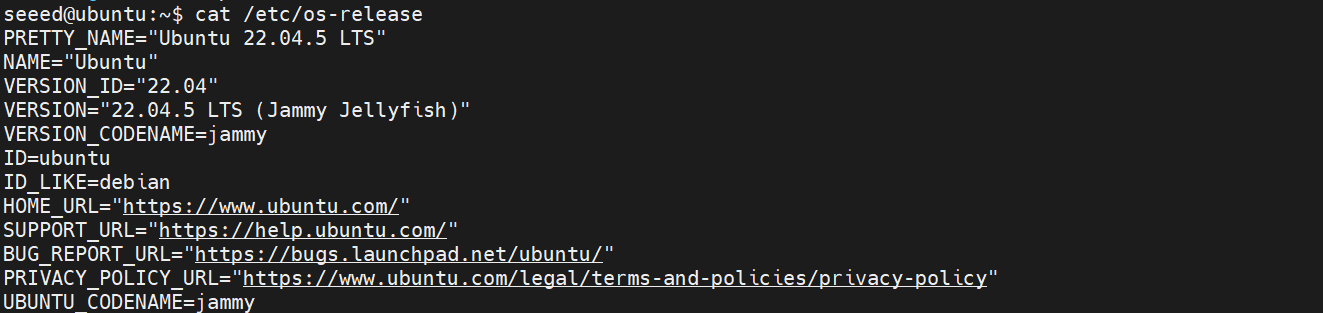
Linux Kernel
If Ubuntu is the "user space" we see and use every day, then the Linux Kernel is the core of the entire system that actually manages hardware and system resources.
It sits between Ubuntu and the hardware: Application --> Ubuntu --> Linux Kernel --> Drivers --> Jetson
In short:
Ubuntu handles interaction with users; the Kernel handles interaction with hardware.
The Linux Kernel handles a great many things, the most important of which include CPU scheduling, memory management, process management, and so on.
Let's look at an example of how the Linux Kernel works. If you plug in a USB camera, before you see the /dev/video0 device, the data goes through:
USB Camera
    ↓
USB Controller
    ↓
Kernel USB Driver
    ↓
/dev/video0
    ↓
Application
You can check the Linux Kernel version with uname -r in the Jetson terminal:
seeed@ubuntu:~$ uname -r
5.15.148-tegra
UEFI
If Ubuntu is the user space and the Linux Kernel is the system core, then UEFI is the critical layer responsible for "bringing the system up" before Linux starts. UEFI stands for Unified Extensible Firmware Interface — you can think of it as the boot firmware interface that modern computers use to replace the traditional BIOS.
On Jetson, it takes the device from "hardware is powered on" to "the Linux Kernel can start running." Its work includes: initializing the boot environment, identifying bootable devices, reading boot configuration, loading the Kernel, loading initrd, loading the Device Tree, and handing control over to Linux.
Let's first build a simple mental model:
Power On --> UEFI --> Linux Kernel --> Ubuntu RootFS
That is:
When UEFI is working, the Linux Kernel has not actually started running yet, and Ubuntu hasn't started at all.
Points to note here:
-
On many Jetson Orin devices, the boot firmware is stored in QSPI NOR Flash. Even if your Ubuntu RootFS is installed on NVMe, the device may still need to boot through the UEFI in QSPI first.
-
If a Jetson fails to boot, the first thing to check is the UEFI log from the boot process — the root cause is very likely hidden there.
-
UEFI decides which boot device Linux should be loaded from first. When the NVIDIA logo appears after powering on, you can press
ESCorF1to enter the UEFI Setup page and configure this.
Run cat /sys/class/dmi/id/bios_version in the Jetson terminal to check the UEFI version:

Today we put several common boot-related concepts of the Jetson software stack together, with the goal of quickly building a map. The most important thing in this article is not memorizing the definition of each term, but building the basic understanding that these concepts are not independent systems — they are different layers within the Jetson software stack. With this foundation, you will be more efficient and effective whether you are debugging Jetson boot/system issues or discussing technical details with other developers.
Of course, what we covered today is only a small part of Jetson boot-related topics. You can find more on NVIDIA's website.
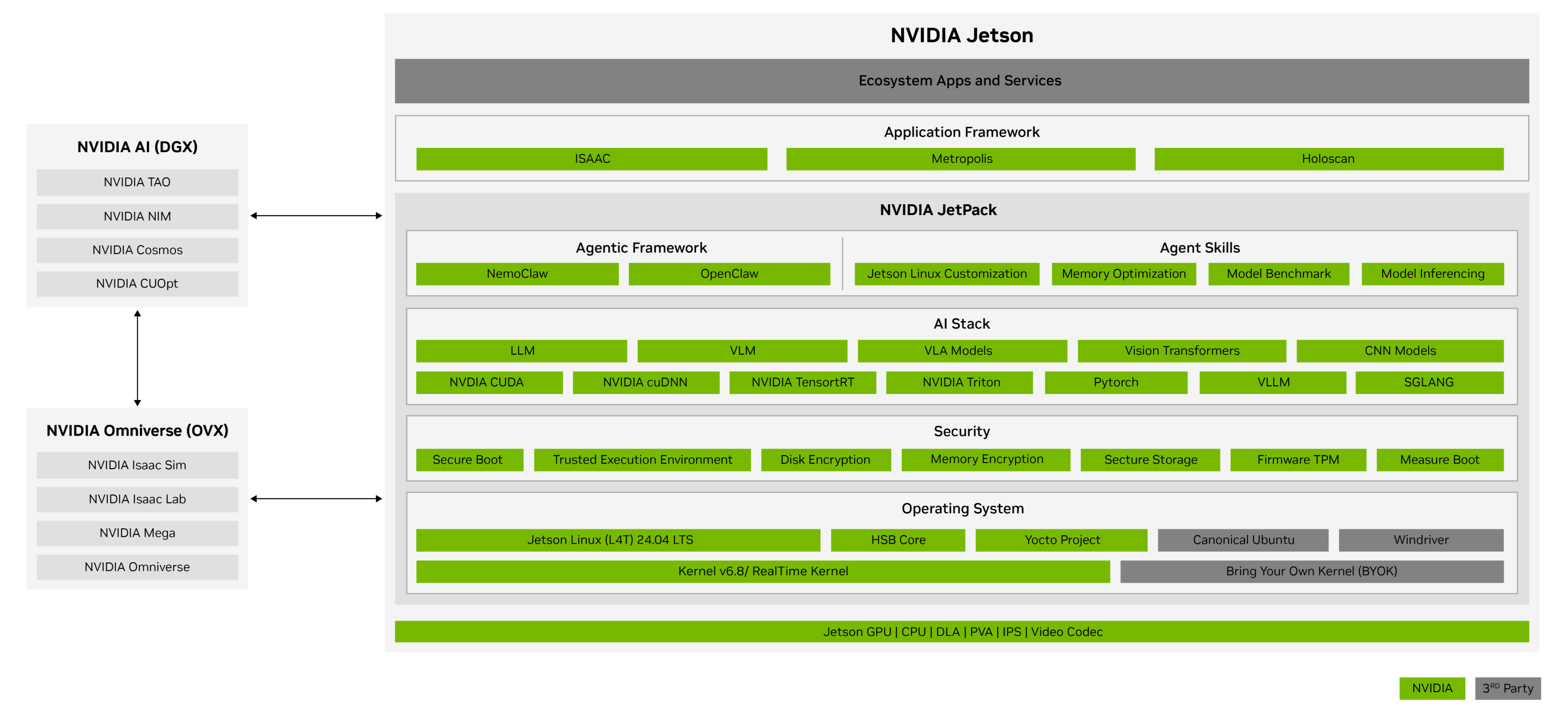
Image source: https://developer.nvidia.com/embedded/jetpack
In the following articles, we will continue along this boot chain — first explaining the complete process from power-on, firmware initialization, and Kernel loading all the way to entering Ubuntu, then moving on to hardware interfaces, cameras, robot control, and more. If there are topics you'd like to learn about, feel free to leave a comment or message me.
Next time, we'll start with the most fundamental question:
What exactly does a Jetson go through, from power-on to entering Ubuntu?
Tech Support & Product Discussion
Thank you for choosing our products! We are here to provide you with different support to ensure that your experience with our products is as smooth as possible. We offer several communication channels to cater to different preferences and needs.