Jetson USB
In this article, let's talk about a very common and easy-to-get-wrong problem on Jetson: USB.
For example, you plug in a USB 3.0 Camera, but after running lsusb -t, you find the speed is only 480M. In other words, this device that natively supports USB 3.0 is actually only running at USB 2.0 on the Jetson. At this point, many people's first reaction is: is the USB 3.0 Driver not working? But things are often not that simple. Because from the Jetson SoC to the USB device in your hand, there are actually quite a few things in between.
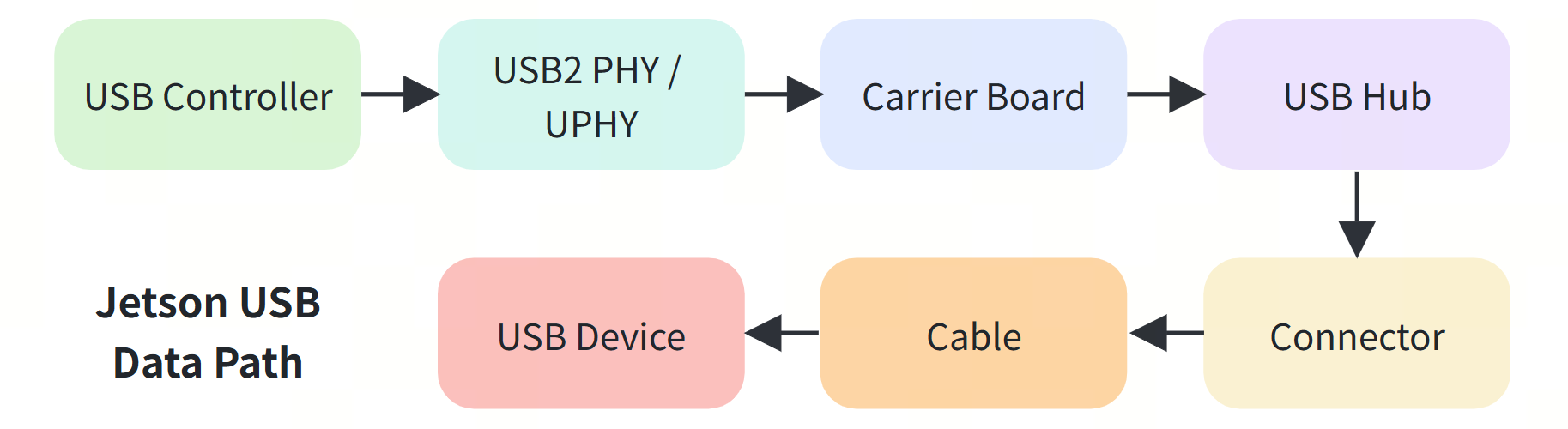
A problem in any of these layers can cause a USB 3.x device to end up working at USB 2.0 only.
So in this article, instead of only explaining "why it becomes 480M", I want to use this problem to tie together how USB works on Jetson, how the Carrier Board brings USB out, and how Linux sees these devices.
In the following content, we will take the reComputer Classic J4012 as an example and break down the underlying logic of Jetson USB step by step. I believe you will learn a lot from it! First, let me put two concerns to rest:
- If your Jetson device is a different model, it won't affect your reading of the following content. The key point is the analysis approach when a problem occurs, not the hardware.
- If you are not familiar with concepts like
lsusb -t, USB Hub, or UPHY, don't worry — we will break them down step by step together with real logs later.
Please enjoy.
How Much USB Does the Jetson Orin NX Actually Have?
Let's start with the NVIDIA Jetson module specifications. Each module has fixed resources, which we usually call native interfaces.
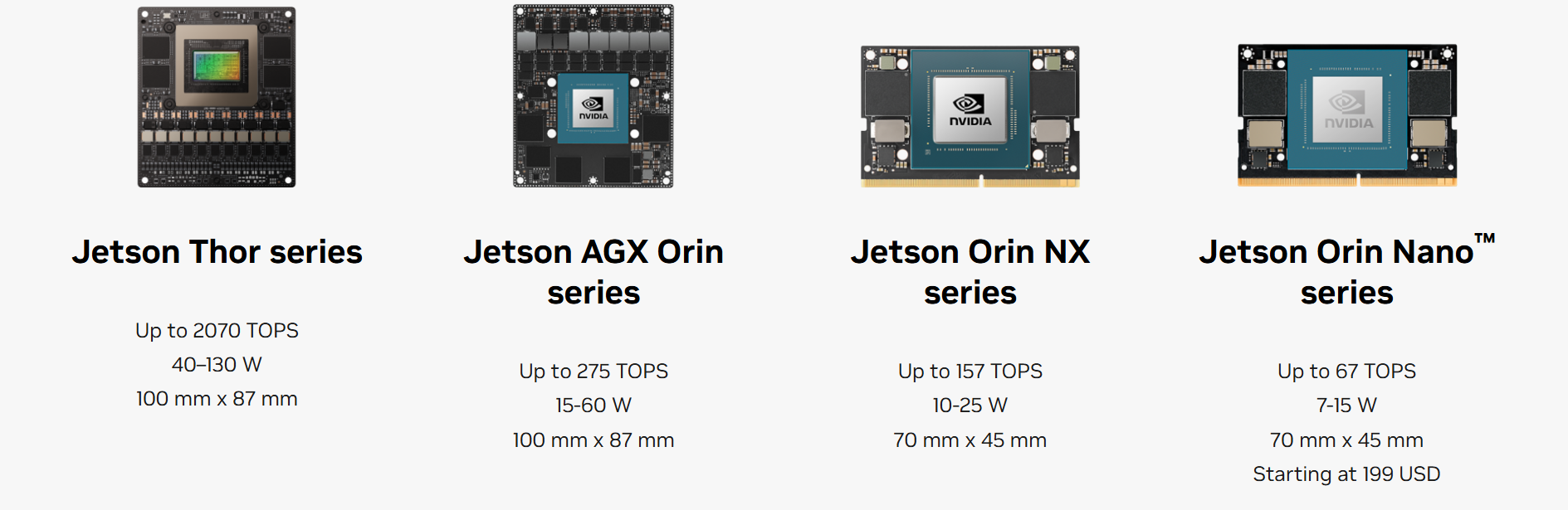
Image source: https://www.nvidia.com/en-us/autonomous-machines/embedded-systems/
For the Jetson Orin Nano and Jetson Orin NX, NVIDIA provides 3x USB 3.2 Gen2 and 3x USB 2.0. You can find the detailed description on the NVIDIA website. Seeing this, it is easy to develop a misunderstanding:
[3 × USB3] + [3 × USB2] = 6 USB Connectors?
Actually, no. What is described here is:
The underlying USB Interface / PHY resources provided by the Jetson Module.
Whether they end up as several Type-A ports, several Type-C ports, or are connected to a Hub, M.2, or onboard devices is decided by the Carrier Board.
In other words, the Jetson Module provides USB resources; the Carrier Board decides how these resources are used; and only then do they become the ports we see.
How Does the reComputer Classic J401 Use These USB Ports?
On the J401 Datasheet, the board ultimately provides users with 4x USB 3.2 Type-A and 1x USB 2.0 Type-C. The Type-C port works in Device Mode and is mainly used for flashing the system; the four Type-A ports work in Host Mode for connecting peripheral devices.

But here is a very interesting question: the Orin NX only has 3 native USB3 ports, so why does the J401 have 4 USB3 Type-A ports?
The answer is already given in the board's open-source schematic: a USB Hub.
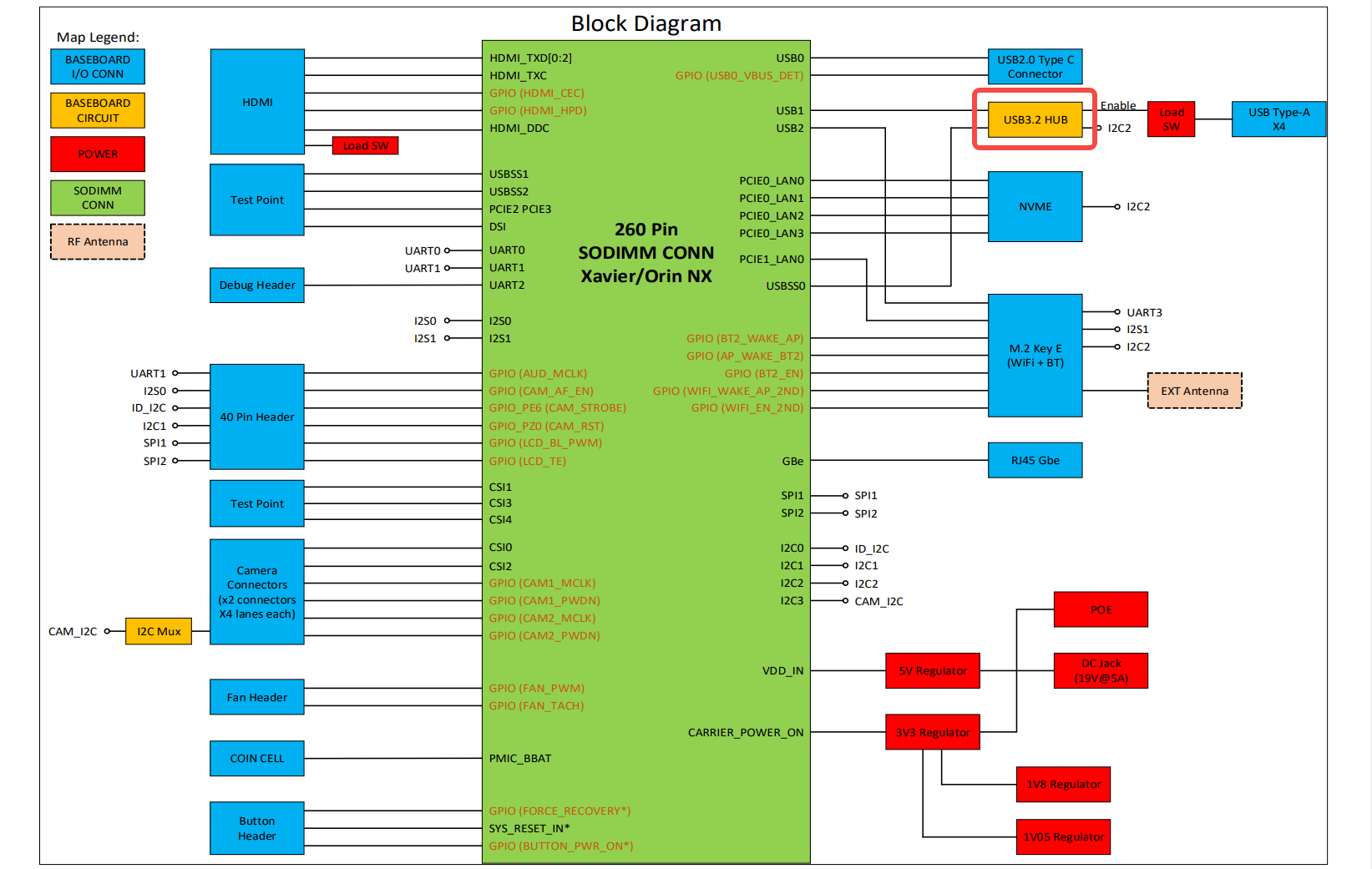
The carrier board expands one USB3.2 channel into four USB 3.2 Type-A ports. Looking further into the schematic, you can see that this Hub is a VL822-Q7.
Note that although all four ports support 10 Gbps, they ultimately share the uplink from the Hub to the Jetson. In other words, the four USB ports share a total of 10 Gbps of bandwidth.
USB3 Ports Still Contain USB2
If you only look at the appearance, USB 2.0 Type-A and USB 3.x Type-A are almost identical, and USB3 devices can also be plugged directly into USB2 ports.
So it is easy to have the intuition that USB3 simply upgrades the USB2 speed from 480 Mbps to 5 Gbps or 10 Gbps.
But that is not actually the case. In order to remain compatible with USB2, USB3 does not simply "upgrade" the original USB2 signals. Instead, on top of keeping the USB2 wiring, it adds a separate set of high-speed signals dedicated to SuperSpeed.
A USB2 Type-A port usually has 4 wires: VBUS, D+, D-, and GND. A USB3 Type-A port adds extra SuperSpeed signals on top of those pins: SSTX+ / SSTX- and SSRX+ / SSRX-.
So although USB2 and USB3 Type-A are physically compatible, the signals actually used inside are not exactly the same.
You can simply understand it as:
              USB 3.x Type-A Connector
                         │
          ┌──────────────┴──────────────┐
          ↓                             ↓
       USB 2.0                       USB 3.x
      Original pins               New high-speed pins
          │                             │
       D+ / D-                     SSTX / SSRX
          │                             │
      USB2 PHY                        UPHY
          │                             │
        480M                         5G / 10G
In other words, a USB3 Type-A port actually contains two data paths at the same time. The biggest benefit of this design is backward compatibility.
This also explains a very important phenomenon: even if the SuperSpeed link of a USB3 device has a problem, it may still be recognized by the system through the USB2 D+ / D- pins. In many cases, being usable does not mean it is working normally.
Let's go back to the carrier board schematic. The VL822-Q7 has both HSD0+/HSD0- and SSTX0+/SSTX0- and SSRX0+/SSRX0-. Here, HSD corresponds to the USB2 High-Speed channel, while SSTX / SSRX correspond to the USB SuperSpeed channel.
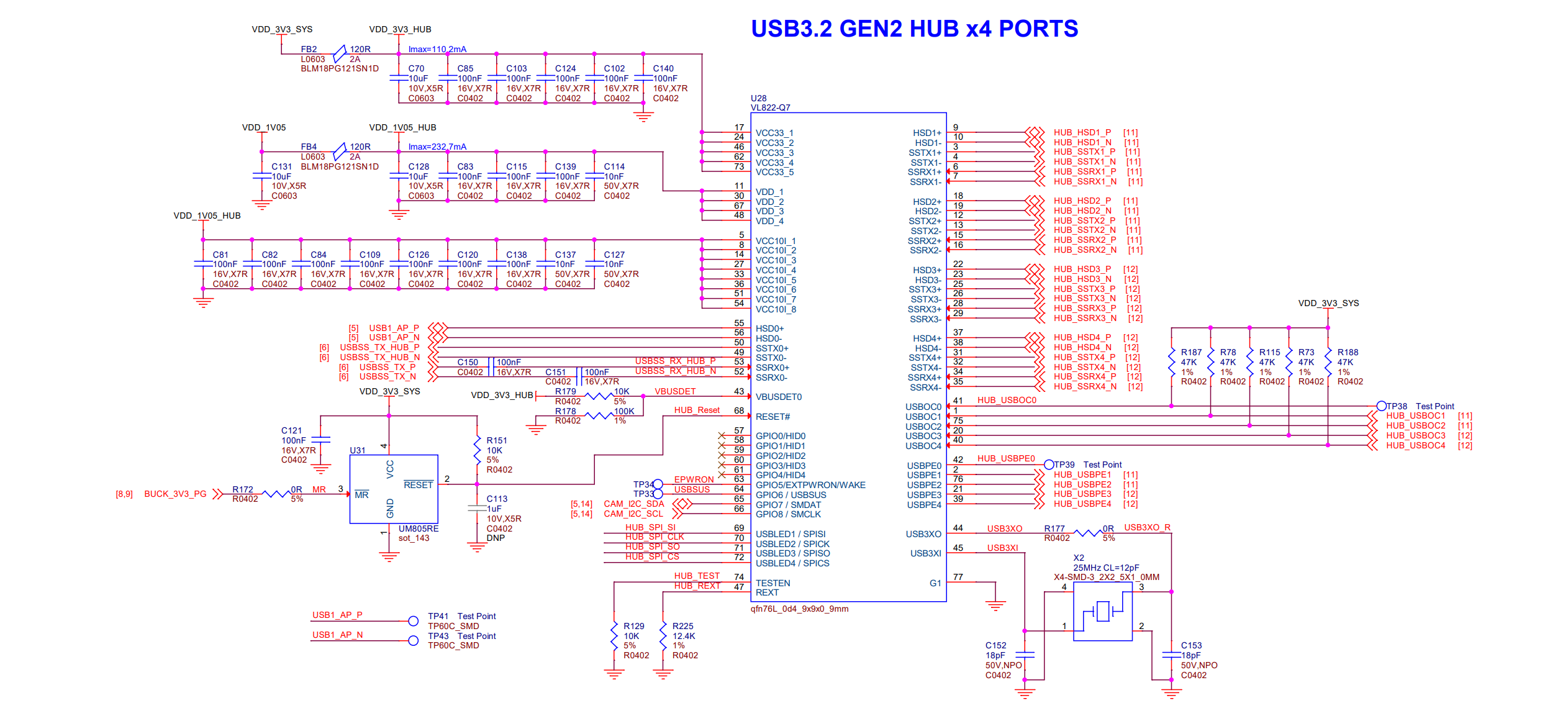
So the real USB architecture of the J401 is actually closer to:
                     Jetson Orin NX

                USB2                USB3
                  │                   │
                D+/D-             TX / RX
                  │                   │
                  └────────┬──────────┘
                           ↓
                        VL822-Q7
                           │
              ┌────────────┴────────────┐
              ↓                         ↓
           USB2 Path                USB3 Path
              │                         │
           HSD1~4                 SSTX/SSRX 1~4
              │                         │
              └────────────┬────────────┘
                           ↓
                      4 × USB-A
In other words: behind every USB3 Type-A port on the J401, there are both a USB2 path and a SuperSpeed path. This point is very important for the fault analysis later.
How Does Linux See These USB Devices?
After analyzing the circuit, let's go back to Linux and see how the system ultimately sees these USB devices.
First, a supplementary command: when troubleshooting USB on Linux, a very commonly used command is lsusb -t. It can directly show:
USB Topology
Hub
Driver
Interface
Link Speed
The most common speeds can be understood as follows:
| lsusb -t Display | Corresponding USB Link |
|---|---|
| 1.5M | Low-Speed |
| 12M | Full-Speed |
| 480M | USB 2.0 High-Speed |
| 5000M | USB 3.x SuperSpeed 5 Gbps |
| 10000M | USB 3.x SuperSpeed 10 Gbps |
Note:
What is shown here is the USB Link Speed, not the actual data throughput of the device.
For example, 5000M means this USB Link is working in 5 Gbps SuperSpeed mode; it does not mean the Camera can actually sustain 5000 Mbps of effective data.
On my reComputer Classic J4012, I connected an Orbbec Camera that supports USB 3.0 and ran the lsusb -t command, which returned the information shown in the figure below.
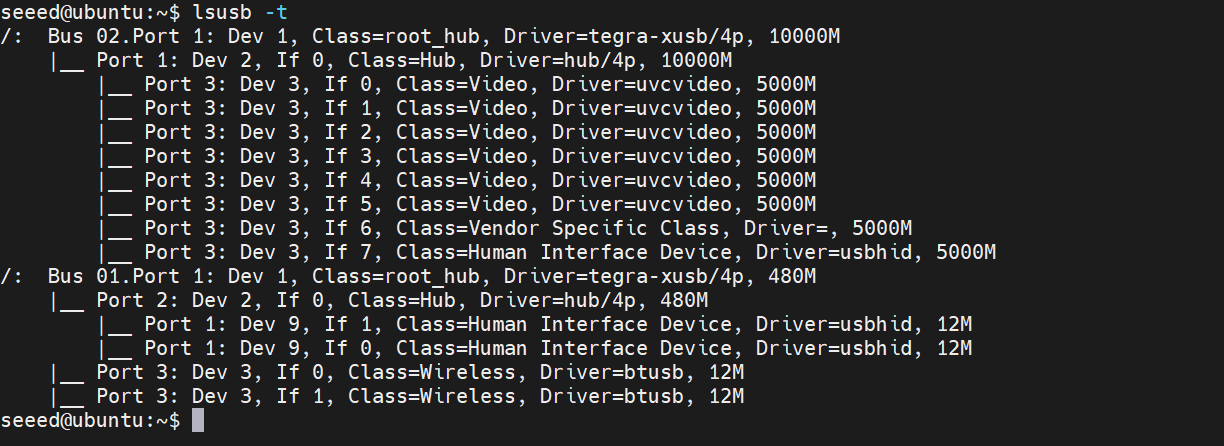
Here you can clearly see two buses, corresponding to the two logical topologies of the USB2 Root Hub and the SuperSpeed Root Hub.
Let's parse the terminal output together.
/:  Bus 02.Port 1: Dev 1, Class=root_hub, Driver=tegra-xusb/4p, 10000M
    |__ Port 1: Dev 2, If 0, Class=Hub, Driver=hub/4p, 10000M
        |__ Port 3: Dev 3, If 0, Class=Video, Driver=uvcvideo, 5000M
        |__ Port 3: Dev 3, If 1, Class=Video, Driver=uvcvideo, 5000M
        ...
Don't worry about the many If 0 / If 1 / If 2 lines for now; we only look at the main three layers:
Jetson XUSB Root Hub
       10000M
          ↓
   J401 VL822 Hub
       10000M
          ↓
    Orbbec Camera
        5000M
This actually corresponds exactly to the schematic we analyzed earlier.
Driver=tegra-xusb/4p, 10000M
Here, tegra-xusb is the USB Host Controller Driver of Jetson. And 10000M means the Root Hub on this side supports 10 Gbps SuperSpeed.
Class=Hub, Driver=hub/4p, 10000M
This Hub corresponds to the VL822-Q7 we saw earlier in the J401 schematic. It also shows 10000M, which means the SuperSpeed uplink between the Jetson and the VL822 Hub has been established normally.
Class=Video, Driver=uvcvideo, 5000M
You can see that the Camera's current Link Speed is 5000M, meaning this Orbbec Camera has successfully established a 5 Gbps SuperSpeed Link.
So the complete chain can be drawn as:
Jetson XUSB
   │
   │ 10000M
   ↓
J401 VL822 Hub
   │
   │ 5000M
   ↓
Orbbec Camera
Here someone may ask: the Hub is clearly 10000M, so why is the Camera only 5000M?
This is completely normal. Because 10000M describes the capability of the Jetson ↔ Hub segment, while 5000M describes the speed negotiated on the Hub ↔ Camera segment. Different segments can absolutely run at different speeds.
Why Does the Same Camera Show So Many Lines?
Let me take this opportunity to explain an easily misunderstood problem. I only connected one camera, so why are there multiple lines of information?
In the log, Dev 3 appears many times. This does not mean 8 USB devices are connected. It means: the same USB Composite Device has exposed multiple USB Interfaces. My depth camera has many functions, and each independently usable function has an Interface. Linux binds the corresponding Driver to each of these Interfaces. So Dev can be understood as a USB Device, while If represents the different Interfaces inside that Device.
Now Let's Look at the 480M Bus
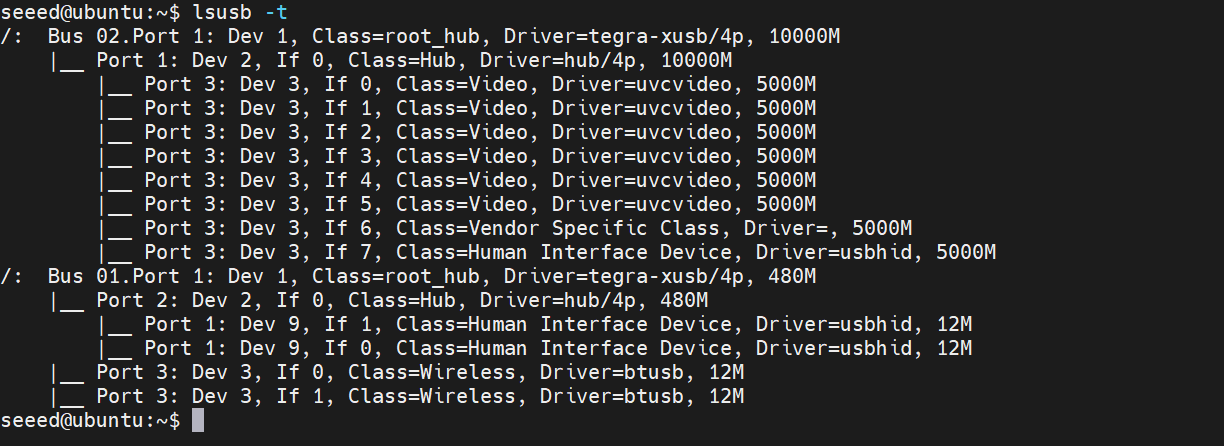
Note that there is more below:
Port 3: Dev 3, If 0, Class=Wireless, Driver=btusb, 12M
This is a Bluetooth device. But I didn't connect any Bluetooth device to my USB Type-A port, so how did Linux discover this device? At the very beginning, when we looked at the carrier board schematic, we learned that USB2_D is connected to the M.2 Key E slot. The btusb appearing here is actually connected on the M.2 interface.
Troubleshooting Approach: When a USB3 Device Becomes USB2
Now we can finally answer the question from the beginning. From a troubleshooting perspective, a more accurate understanding of "a USB3 device downgraded to USB2" is: the USB2 link is normal, but the SuperSpeed link was not established. So if a device that natively supports USB3 only shows 480M in lsusb -t, you should trace back along the USB communication chain. For my current test scenario, if you see:
Hub      10000M
Camera    480M
it means the Jetson → VL822 SuperSpeed link is normal. Then the problem is more likely to be in:
VL822 Downstream Port --> USB Connector --> Cable --> Camera
At this point, the priorities should be:
- Check whether there is an external HUB and whether the external HUB supports USB3.x
- Try another USB Type-A port to rule out a single faulty USB Type-A port
- Check whether the data cable being used supports USB3.x
- Try another known-good USB3 device to rule out a problem with the USB device itself
- ...
Conversely, if even the Hub 10000M is gone and you can only see the USB2 Hub 480M, then the problem is closer to the upstream:
Jetson --> UPHY --> Carrier Board
In this case, you need to check:
- Whether the flashed system is the one provided by the device manufacturer
- If you compiled the firmware yourself, check whether the UPHY Configuration, Device Tree, and other configuration files are correct
- Whether the carrier board design is reasonable and the USB HUB wiring is normal
- ...
Conclusion
Finally, let me quickly summarize the core content of this article. When a USB3 device only shows 480M, it is usually not "the whole USB is broken", but that the USB2 link is normal while the SuperSpeed link was not established. When troubleshooting, first use lsusb -t to determine how far the SuperSpeed Link successfully reached, then narrow down the scope layer by layer along the Cable, Hub, Carrier Board, UPHY, and BSP.
Tech Support & Product Discussion
Thank you for choosing our products! We are here to provide you with different support to ensure that your experience with our products is as smooth as possible. We offer several communication channels to cater to different preferences and needs.