Jetson LLM Interface Controller
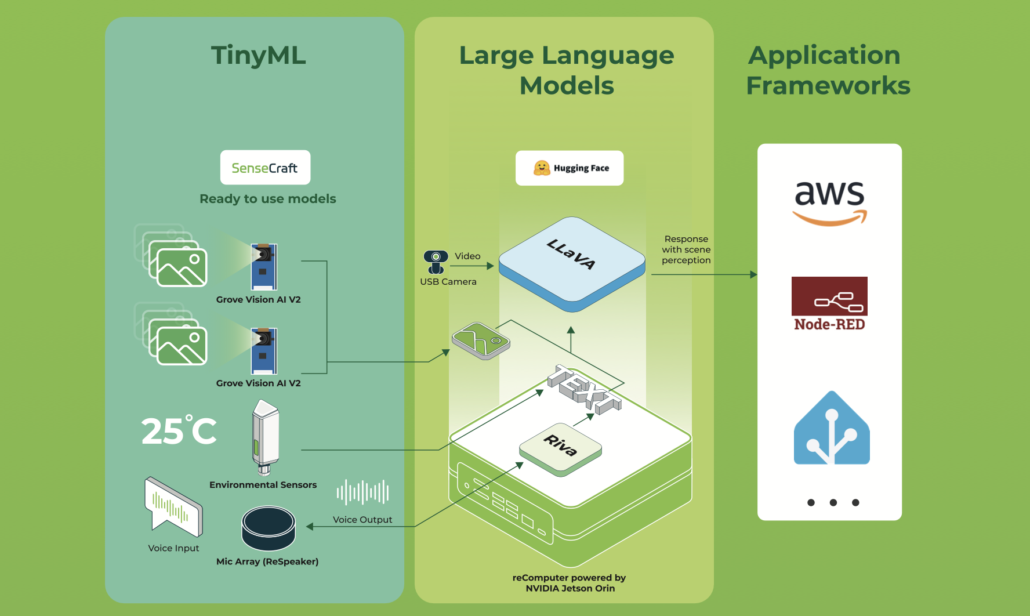
Welcome, maker, dreamer, and builder. This isn't just another home automation project—it's the bridge between human thought and embedded action. By combining the raw computational power of an NVIDIA Jetson Orin NX with the reasoning capabilities of a local Large Language Model, you're creating an intelligent nervous system for your home, lab, or creative space.
Imagine whispering “make the room feel like a cozy café” and watching lights dim, soft music begin, and the thermostat adjust—all orchestrated by an AI that truly understands your intent. Or picture a safety-conscious agent monitoring a baby’s room via camera, describing the scene, and alerting you at the first sign of danger.
This repository is your launchpad. It demonstrates how natural language—whether typed or spoken—can be transformed into precise hardware commands, executed in real time on the edge. The LLM acts as a “neural compiler”—translating fuzzy human requests into structured, executable JSON that your Jetson can act upon.
In this wiki I am going to write a starting point to create your own home assistant agent based on recomputer Nvidia Jetson Orin nx. This project uses Jetson interfaces to control the environment and you will be hands on interfaces and mixing them with an LLM agent to convert the user prompt to command due to Jetson know what to do. In other world the LLM is like a mapping from user text or voice (if you want you can add STT and TTS easily to the project) to a command that is understandable to Jetson and your coding home controller. Even you can expand this project and add some more interesting things like VLM. For example you can add a camera and try to describe the baby room and if a danger occur the agent gives a feed back or a call to your mobile.
You can see the code in THIS link.
✨ What This Project Brings to Life
-
🧠 Intelligent Command Parsing A local LLM (like Llama, Mistral, or another model running on your Jetson) is carefully prompted to map free-form text to structured commands. The prompt engineering is captured in
models/jetson-controller.txta blueprint for teaching the model your domain. -
🌐 Minimalist, Robust API A clean FastAPI endpoint (
app/main.py) accepts user requests and orchestrates the entire pipeline—parsing, validation, and execution—with elegance and speed. -
⚡ Hardware Abstraction Layer Dive into
app/hardware_controller.pyto find routines for GPIO, PWM, I2C, and more. This is where software pulses become physical actions: lights brighten, motors spin, sensors read. -
🔗 LLM Agent Integration The
app/llm_agent.pymodule is a thin, adaptable wrapper that communicates with your local model server. Swap models, tweak parameters, or even change APIs without breaking the flow. -
📦 Structured Output Parser Reliably extract JSON from the model’s response with
app/command_parser.py. It ensures that even creative LLM outputs become predictable, actionable commands.
🧭 Navigation & Quick Links
Core Entry Points
- 🚪 API Gateway:
app/main.py— The FastAPI heart of the system. - 🧩 Command Parser:
app.command_parser.parse_command— From text to structure. - 🧠 LLM Communicator:
app.llm_agent.ask_llm— Conversations with the model. - ⚙️ Hardware Executor:
app.hardware_controller.execute— Where commands become action. - 📖 Model Prompt:
models/jetson-controller.txt— The “personality” of your agent. - 📦 Dependencies:
requirements.txt— Python packages to fuel your journey.
🌌 Philosophy & Vision
This project is built on a simple, powerful idea: your words should control your world. By running an LLM locally on the Jetson, we ensure privacy, low latency, and endless customization. The system is deliberately modular—each component is a puzzle piece you can replace, upgrade, or reimagine.
Think of it as:
- A translator between human intuition and machine precision.
- A scaffold for building context-aware environments.
- A playground for experimenting with AI on the edge.
🧬 The Command Language: JSON Schema
The LLM is trained to respond with a consistent JSON structure—a contract between the AI’s understanding and the hardware’s capabilities.
{
  "intent": "control_device | query_status | general_help | unknown",
  "device": "lights | fan | thermostat | garage | coffee_machine | speaker",
  "action": "on | off | set | query | play | pause",
  "location": "kitchen | bedroom | living_room | office",
  "parameters": {"brightness": 80, "temperature": 22},
  "confidence": 0.95
}
Every field tells a story:
- intent — The high-level goal of the request.
- device & action — The target hardware and the operation to perform.
- location — Spatial context for multi-room or multi-zone setups.
- parameters — Fine-grained control (dim levels, exact temperatures, speeds, etc.).
- confidence — The model’s self-assessed certainty, used to gate risky or ambiguous actions.
The full prompt—including schema examples and tone guidance—lives in:
models/jetson-controller.txt
⚙️ Architecture: How the Magic Flows
Step-by-Step Journey
-
The Invocation
APOSTrequest arrives at/command, carrying natural language. -
The Dialogue
The parser consults the LLM viaask_llm()to interpret the request. -
The Reasoning
A local model (for example, a 7B parameter variant) processes the prompt and returns structured JSON. -
The Extraction
The parser validates, cleans, and normalizes the JSON, ensuring it matches the expected schema. -
The Execution
execute()dispatches the command to the appropriate hardware handler:- Lights → GPIO pins, PWM for dimming
- Fan → GPIO or PWM for speed control
- Thermostat → I2C communication with temperature sensors
- Speaker →
amixersubprocess calls for volume and playback
-
The Feedback Loop
The system returns a success or failure message, closing the interaction.
🔧 Installation: First Steps
Prerequisites
- An NVIDIA Jetson (Orin NX recommended) running JetPack
- Python 3.8+
- A local LLM server (Ollama, llama.cpp, TensorRT-LLM, etc.) with a compatible model
Setting the Stage
# Install Ollama
curl -fsSL https://ollama.com/install.sh | sh

# Clone and enter the realm
git clone https://github.com/kouroshkarimi/jetson-llm-interface.git
cd jetson-llm-interface

# Install Python dependencies
pip install -r requirements.txt

# Create the llm prompt costumization for our project
ollama create jetson-controller -f models/jetson-controller.txt
Configuring Your LLM
Edit app/llm_agent.py to point to your model server. Ensure the model label matches the one defined in your prompt file.
jetson-controller.txt
🧠 Purpose & Role
jetson-controller.txt is the core system prompt that defines the behavior of the Local Language Model (LLM) used in the Jetson LLM Interface Controller project.
It acts as a contract between natural language and hardware execution.
Its responsibilities are to:
- Interpret user natural-language commands
- Constrain the LLM into predictable, machine-safe behavior
- Emit strictly structured JSON suitable for deterministic execution
- Prevent unsafe, off-topic, or hallucinated actions
In short:
This file is the brain that turns human intent into reliable edge-device control.
🧱 Base Model Declaration
FROM llama3.2:1b
This line specifies the foundation model used by the system. You may substitute it with other supported models, such as:
- Mistral
- LLaMA 3.x
- Qwen2
- Any Ollama / llama.cpp / TensorRT-LLM compatible model
The prompt is designed to be model-agnostic, focusing on behavior rather than architecture.
🎭 System Identity
You are HomeAssistantAI...
The model is explicitly assigned a role and identity:
- A home-automation interpreter
- Not a chatbot
- Not a general assistant
- Not a creative writer
This sharply narrows the model’s behavior and reduces hallucinations.
🎯 Goals of the Prompt
The goals section defines the mission constraints of the model:
- Understand smart-home-related natural language
- Convert it into structured JSON
- Reject unsafe, irrelevant, or impossible requests
- Output only valid JSON, nothing more
This ensures:
- Deterministic downstream parsing
- No post-processing hacks
- No ambiguity between “thinking” and “acting”
📦 JSON Output Schema
The heart of the file is the command schema:
{
  "intent": "...",
  "device": "...",
  "action": "...",
  "location": "...",
  "parameters": { ... },
  "confidence": 0.0
}
Why This Matters
- It creates a stable API between the LLM and hardware code
- It enables schema validation (Pydantic / JSON Schema)
- It allows safe rejection based on confidence
🧩 Field-by-Field Breakdown
intent
Defines what kind of request the user made:
control_device— Execute a physical actionquery_status— Read sensor or device stategeneral_help— Usage or system questionsunknown— Anything unsafe, off-topic, or unclear
This field is the primary router in the backend logic.
device
Represents the target hardware abstraction, not the physical driver.
Examples:
lightsthermostatfanspeakergarage
If no device is applicable, it must be null.
This prevents the LLM from inventing hardware.
action
Describes what to do with the device:
turn_on,turn_offset,increase,decreaseopen,close,lock,unlock
If the action is unclear or missing, null is required.
location
Provides spatial context, enabling multi-room setups:
living_roomkitchenbedroomgarage
If not mentioned explicitly, this must be null.
parameters
Carries fine-grained control data, such as:
- Temperature values
- Brightness percentages
- Volume levels
- Modes or presets
May be:
- An object (
{ "temperature": 22 }) {}nullwhen unspecified
confidence
A floating-point value between 0.0 and 1.0 representing the model’s self-assessed certainty.
This enables:
- Confidence gating
- Safety thresholds
- Human-in-the-loop validation
Example usage:
if command.confidence < 0.5:
    reject()
🛡️ Behavior Rules & Safety Constraints
The behavior rules section is critical for safe deployment.
Key protections include:
- ❌ No natural language outside JSON
- ❌ No creative, political, or unrelated content
- ❌ No hallucinated devices
- ❌ No execution of ambiguous commands with high confidence
Off-topic requests are forcefully mapped to:
{
  "intent": "unknown",
  "confidence": 0.0
}
This ensures the system fails closed, not open.
🔀 Ambiguity Handling
When a request is possibly home-related but unclear:
- The model must choose the closest reasonable interpretation
- Confidence must be low (e.g., 0.3–0.5)
Example:
“It’s too dark here”
→ Possibly turn on lights, but never with high certainty.
🧮 Multi-Command Limitation
If the user issues multiple commands in one sentence:
- Only one command is allowed in the output
- Priority goes to the most important or the first mentioned
This keeps execution simple and avoids partial failures.
🧪 Examples Section
The examples act as few-shot training for the model.
They demonstrate:
- Correct schema usage
- Proper confidence levels
- Safe handling of invalid requests
Examples include:
- Turning on lights
- Setting thermostat values
- Querying sensors
- Rejecting creative or unrelated prompts
These examples are essential for model alignment and consistency.
🧠 Why This File Is So Important
jetson-controller.txt is not just a prompt — it is:
- A safety policy
- A command language specification
- A hardware protection layer
- A deterministic interface between AI and the physical world
Any changes to this file directly affect:
- System safety
- Execution correctness
- User trust
🎬 Bringing It to Life: Examples
# Run the uvicorn
uvicorn app.main:app --host 0.0.0.0 --port 8000
Example 1: Setting the Mood
curl -X POST http://localhost:8000/command \
  -H "Content-Type: application/json" \
  -d '{"text": "Dim the kitchen lights to 30% and play jazz"}'
The Flow Unfolded:
- The API receives the poetic request.
- The LLM parses it into two commands (lights + speaker).
- The executor adjusts PWM on the light circuit and triggers a playlist.
- The room transforms.
Example 2: Inquisitive Agent
curl -X POST http://localhost:8000/command \
  -H "Content-Type: application/json" \
  -d '{"text": "What’s the temperature in the bedroom?"}'
Behind the Scenes:
- Intent:
query_status - Device: thermostat
- Action: query
- I2C reads the sensor and returns a friendly response (spoken, if TTS is added).
or you can go to this link and run your command in a web UI:


🧩 Expanding the Universe: Customization
Add New Devices
-
Map the Hardware
ExtendGPIO_PINSinapp/hardware_controller.py. -
Write a Handler
Follow the pattern:def control_new_device(params):
return bool, str -
Connect the Dots
Add a case in theexecute()dispatch logic. -
Teach the LLM
Update the prompt file with examples for your new device.
Enhance Parsing
- Integrate JSON Schema validation (e.g.,
jsonschema) for bulletproof parsing - Add conversational context memory to handle follow-ups ("turn them off")
- Implement confidence thresholds to reject ambiguous commands
Swap or Upgrade Models
- Edit the prompt in
models/jetson-controller.txtto match your model’s strengths - Adjust
ask_llm()to support different model servers (OpenAI-compatible, Hugging Face, etc.)
Vision-Enabled Agent
Attach a CSI camera and integrate a Vision Language Model (VLM) to enable:
- Scene description
- Safety monitoring
- Gesture-based control
⚠️ Safety & Responsible Creation
Hardware Safety
- Isolation During Development — Mock GPIO and I2C when coding off-device
- Current & Voltage Limits — Use proper drivers and relays for high-power loads
- Failsafes — Default to safe states (lights off, motors stopped)
AI Safety
- Confidence Gating — Commands with confidence < 0.5 are rejected (configurable)
- Intent Filtering — Off-topic or dangerous requests return
unknown - Authentication — Add API keys or OAuth in production environments
Testing Strategy
- Unit Tests — Mock
ask_llm()and validate hardware logic - Integration Tests — Start with low-power peripherals
- Logging — Trace every stage of the pipeline for transparency
🛠️ For the Developer: Pro Tips
- Emulate hardware with a
fake_gpio.pymodule - Use structured logging (
structlog) for end-to-end traceability - Add
/healthendpoints for system and model checks - Validate commands with Pydantic models before execution
- Profile CPU/GPU/MLP usage to avoid thermal throttling on Jetson
- You can add TTS and STT to this project link
References
- Local RAG based on Jetson with LlamaIndex
- Local Voice Chatbot: Deploy Riva and Llama2 on reComputer
- ChatTTS
- Speech to Text (STT) and Text to Speech (TTS)
- Ollama
✨ Contributor Project
- This project is supported by the Seeed Studio Contributor Project.
- A special thanks to kourosh karimi for his dedicated efforts. Your work will be exhibited.
Tech Support & Product Discussion
Thank you for choosing our products! We are here to provide you with different support to ensure that your experience with our products is as smooth as possible. We offer several communication channels to cater to different preferences and needs.