Grove - Demonstração de Aplicação Wio-E5 Helium e TinyML
Primeiros Passos
Aqui, vamos construir um projeto que utiliza tinyML e a rede IoT LoRa da Helium para prevenir o corte ilegal de madeira.
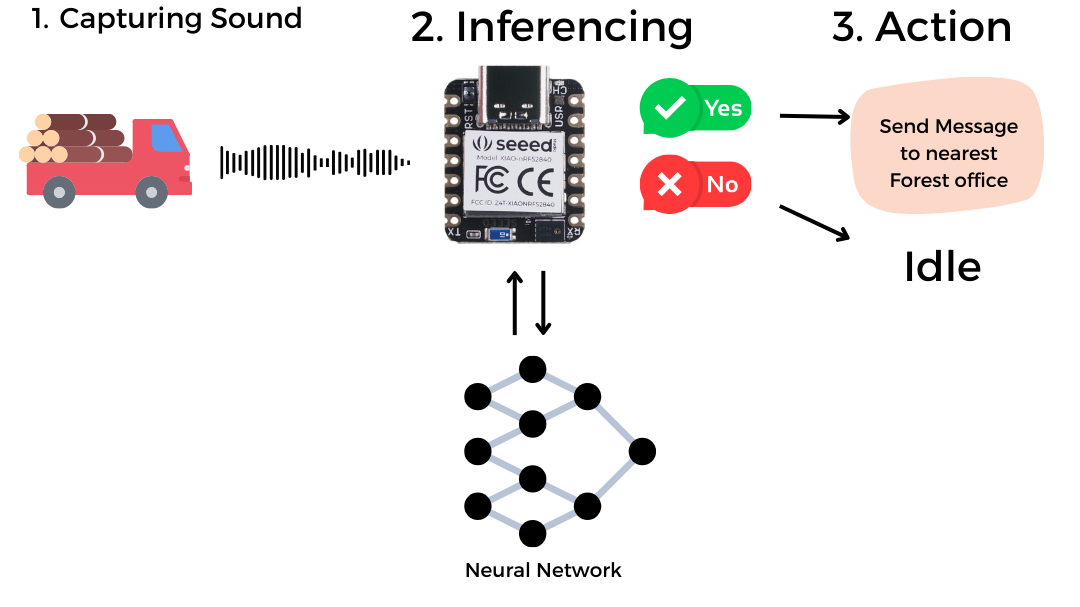
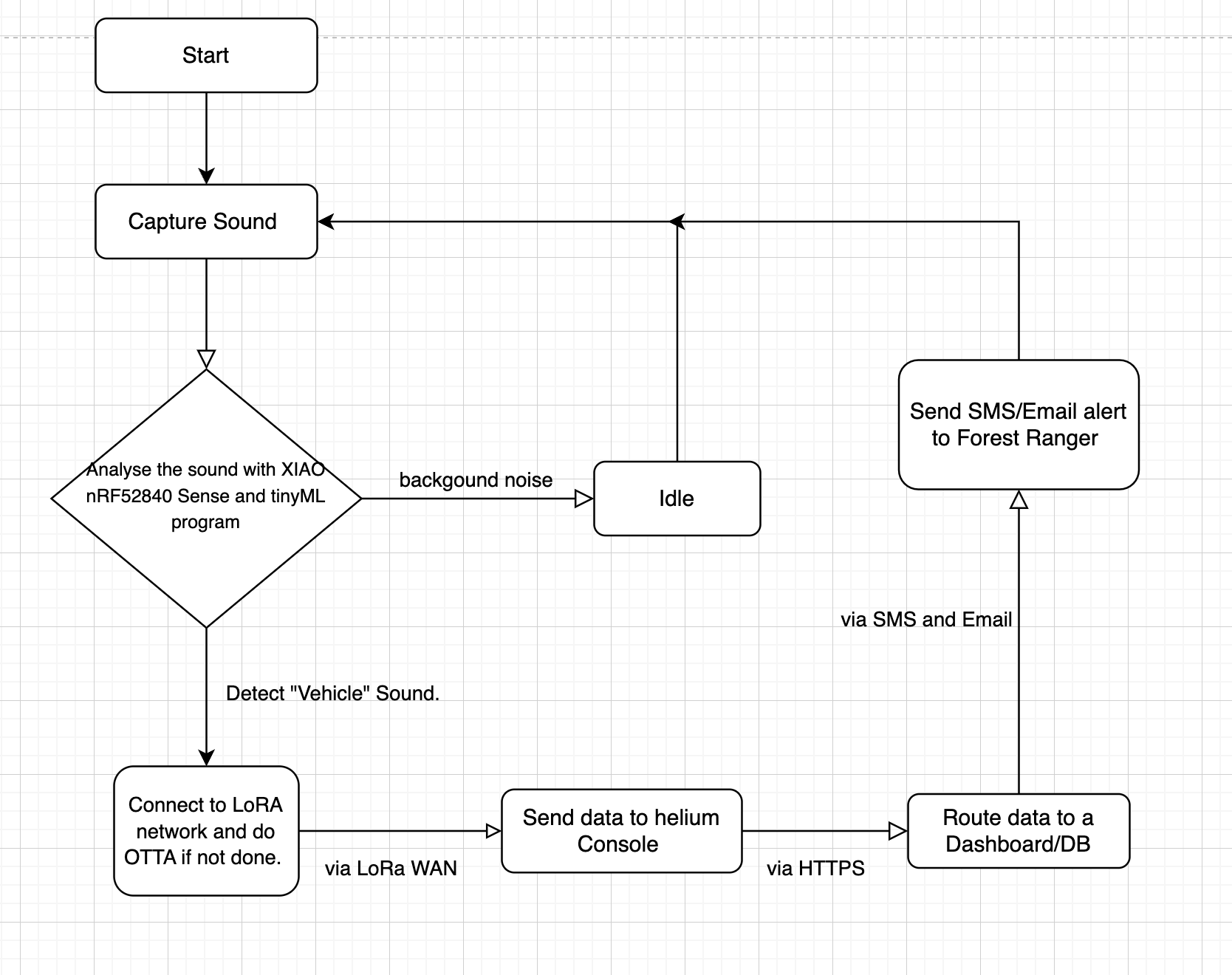
Fluxograma
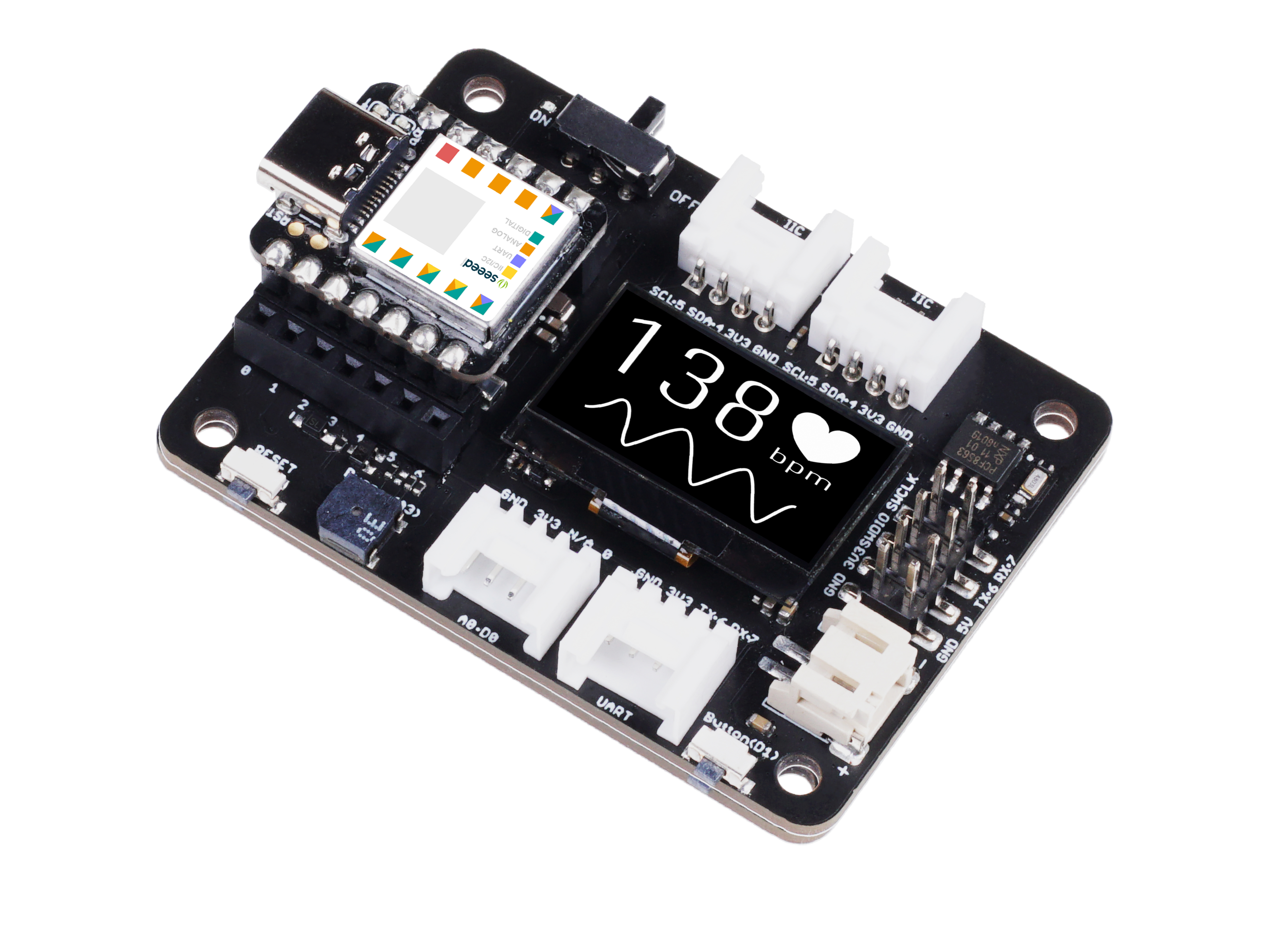
Hardware Necessário
| Seeeduino XIAO nRF52840 Sense | Grove - Wio-E5 | Placa de Expansão Seeeduino XIAO |
|---|---|---|
|
|
|


Ferramentas/Serviços de Software Necessários
- 1x Arduino IDE
- 1x Helium IoT Console .
- 1 x Computador
- 1 x Cabo USB Tipo-C
Configurar XIAO nRF52840 Sense no Arduino IDE
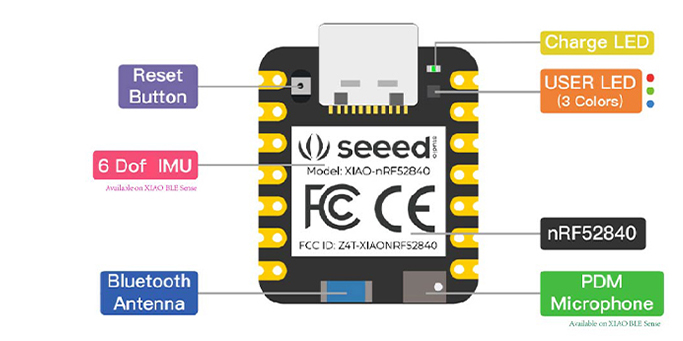


Alguns cabos USB só podem fornecer energia e não transferem dados. Se você não tiver um cabo USB ou não souber se o seu cabo USB pode transmitir dados, você pode verificar o Seeed USB Type-C support USB 3.1.
Conecte o Seeed Studio XIAO nRF52840 (Sense) ao seu computador através de um cabo USB Tipo-C.

Configuração de Software
- Passo 1. Baixe e instale a versão mais recente do Arduino IDE de acordo com o seu sistema operacional

-
Passo 2. Inicie o aplicativo Arduino
-
Passo 3. Adicione o pacote de placa Seeed Studio XIAO nRF52840 (Sense) ao seu Arduino IDE
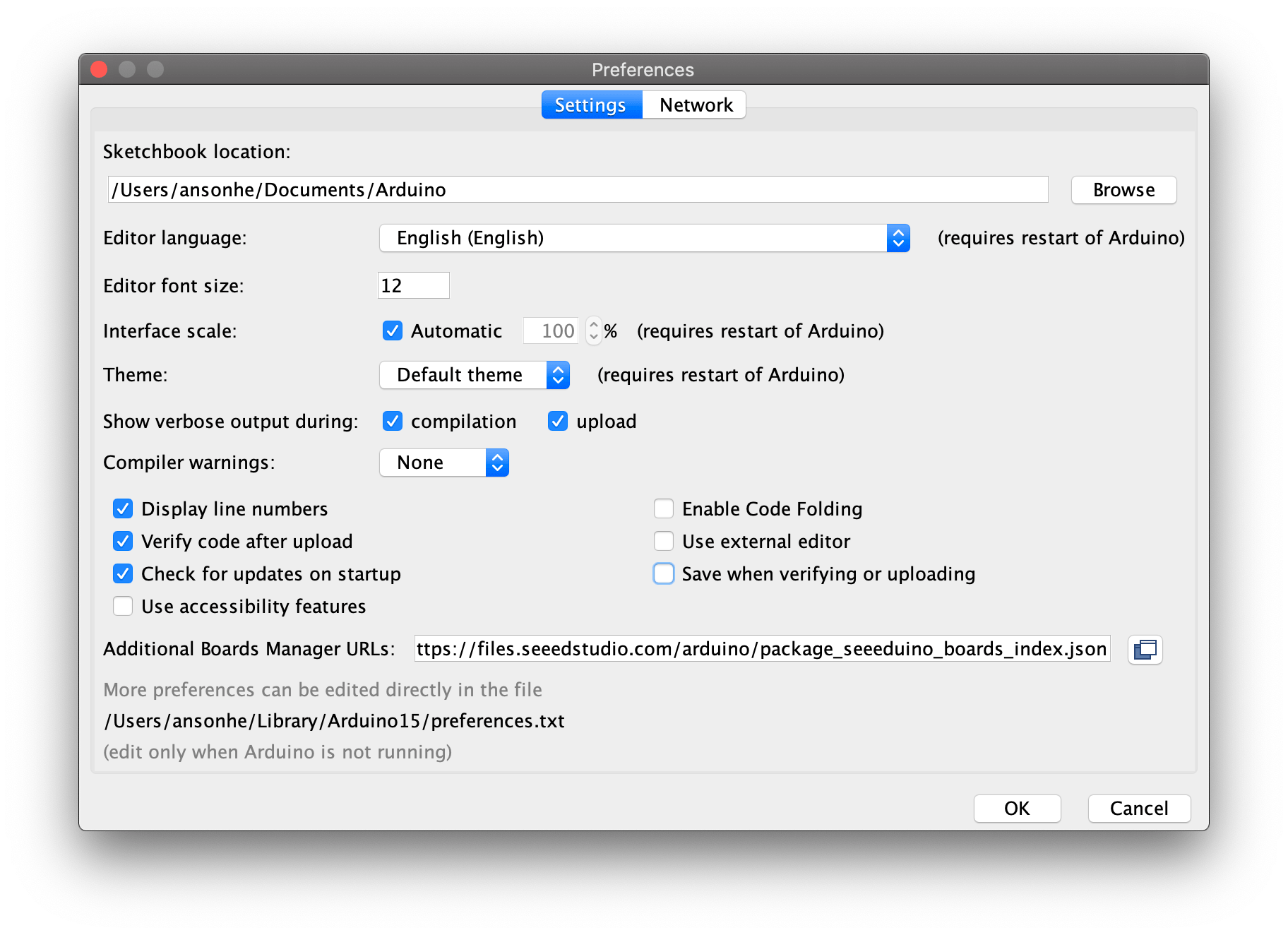
Navegue até File > Preferences, e preencha "Additional Boards Manager URLs" com a URL abaixo: https://files.seeedstudio.com/arduino/package_seeeduino_boards_index.json
Navegue até Tools > Board > Boards Manager..., digite a palavra-chave "seeed nrf52" na caixa de busca, selecione a versão mais recente da placa desejada e instale-a. Você pode instalar ambas.

- Passo 4. Selecione sua placa e porta
Placa
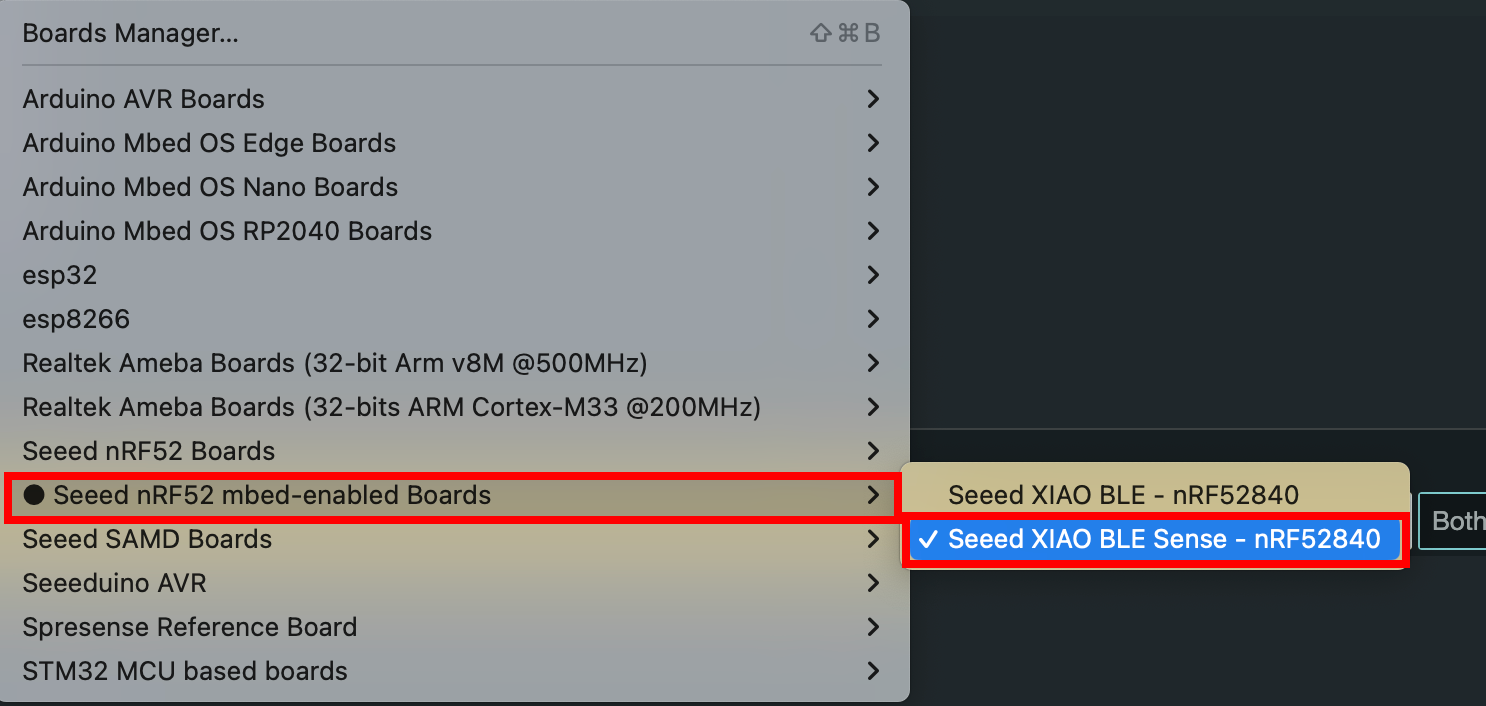
Após instalar o pacote de placa, navegue até Tools > Board e escolha a placa desejada, continue selecionando "Seeed XIAO BLE Sense nRF52840" em "Seeed nRF mbed-enabled Boards". Agora terminamos a configuração do Seeed Studio XIAO nRF52840 (Sense) para o Arduino IDE.
Porta
Navegue até Tools > Port e selecione o nome da porta serial do Seeed Studio XIAO nRF52840 (Sense) conectado. Provavelmente será COM3 ou superior (COM1 e COM2 geralmente são reservadas para portas seriais de hardware). A porta serial do Seeed Studio XIAO nRF52840 (Sense) conectado normalmente contém entre parênteses o texto Seeed Studio XIAO nRF52840 para Seeed Studio XIAO nRF52840 ou Seeed Studio XIAO nRF52840 Sense para Seeed Studio XIAO nRF52840 Sense.

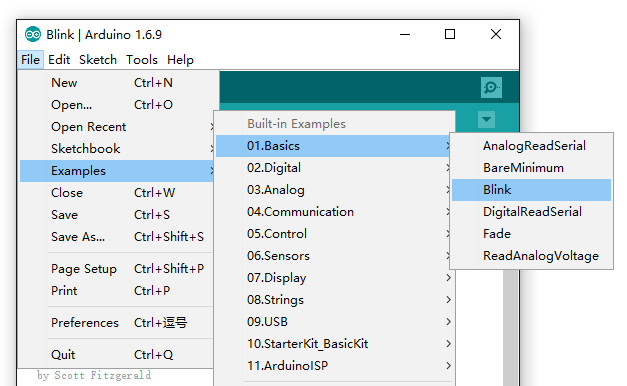
- Passo 5. Navegue até File > Examples > 01.Basics > Blink para abrir o exemplo Blink
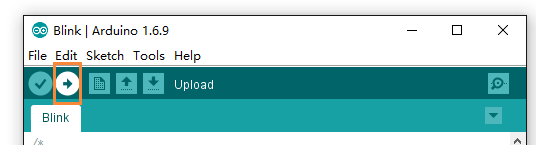
- Passo 6. Clique no botão Upload para enviar o código de exemplo Blink para a placa
Depois do upload, você verá o LED vermelho embutido piscando com um atraso de 1 segundo entre cada piscada. Isso significa que a conexão foi bem-sucedida e agora você pode explorar mais projetos com o Seeed Studio XIAO nRF52840 (Sense)!
Configurar o Console Helium LoRa WAN
Certifique-se de que você está dentro da área de cobertura da rede Helium. Você pode encontrar a cobertura da rede em explorer.helium.com
Certifique-se de que a faixa de frequência seja consistente entre os nós finais, o gateway e a configuração Helium que você está usando, seguindo estas instruções. O plano de frequência aplicado nesta demonstração é para IN865.
A Rede Helium IOT usa o protocolo LoRaWAN para fornecer conectividade à internet para dispositivos de "Internet das Coisas" e é a sub-rede original no ecossistema Helium. Desenvolvedores e empresas em todo o mundo dependem da Rede Helium IOT para conectividade.
Preparação do Helium IoT Console
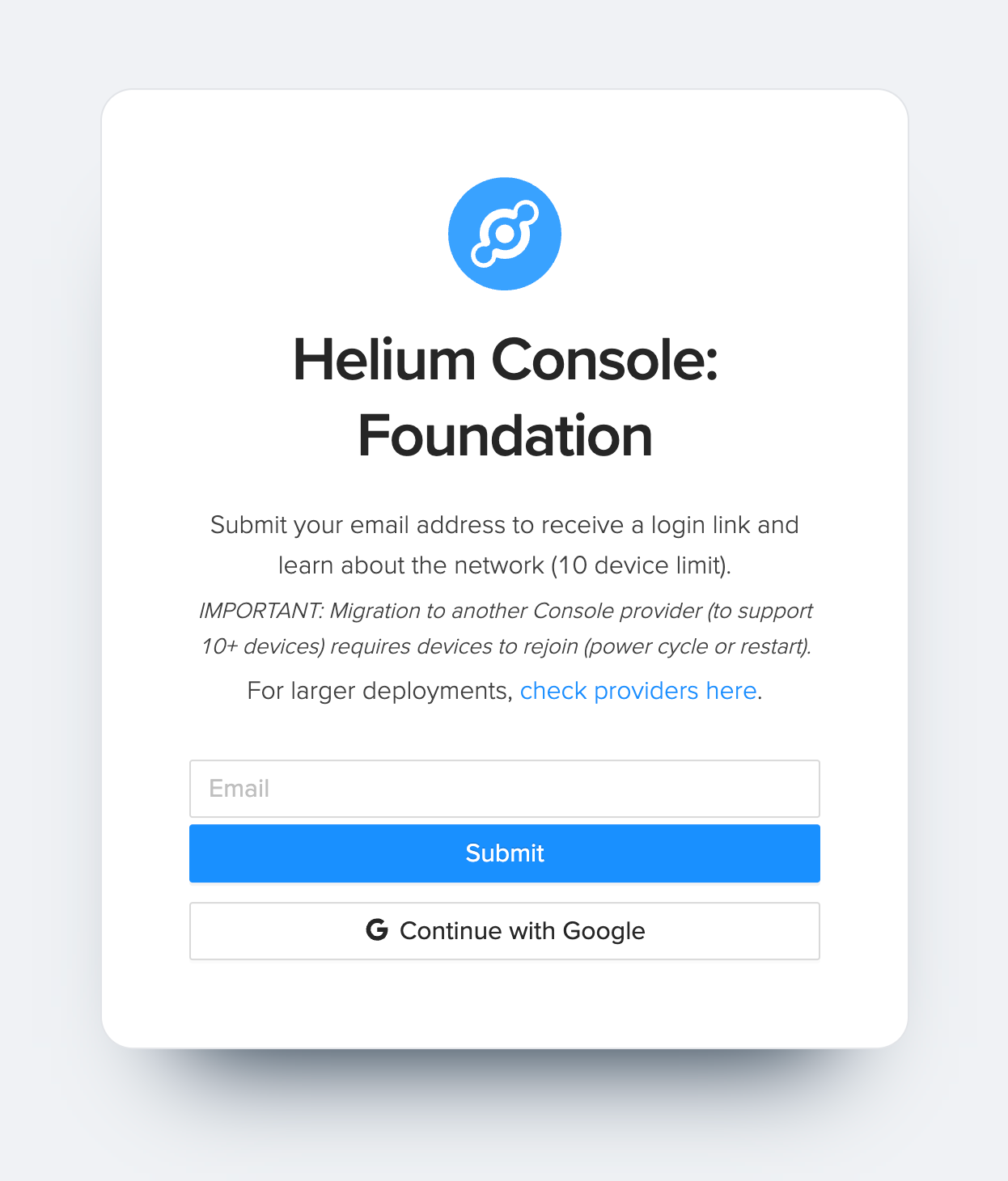
- Passo 1. Visite o site do Helium Console e cadastre uma nova conta
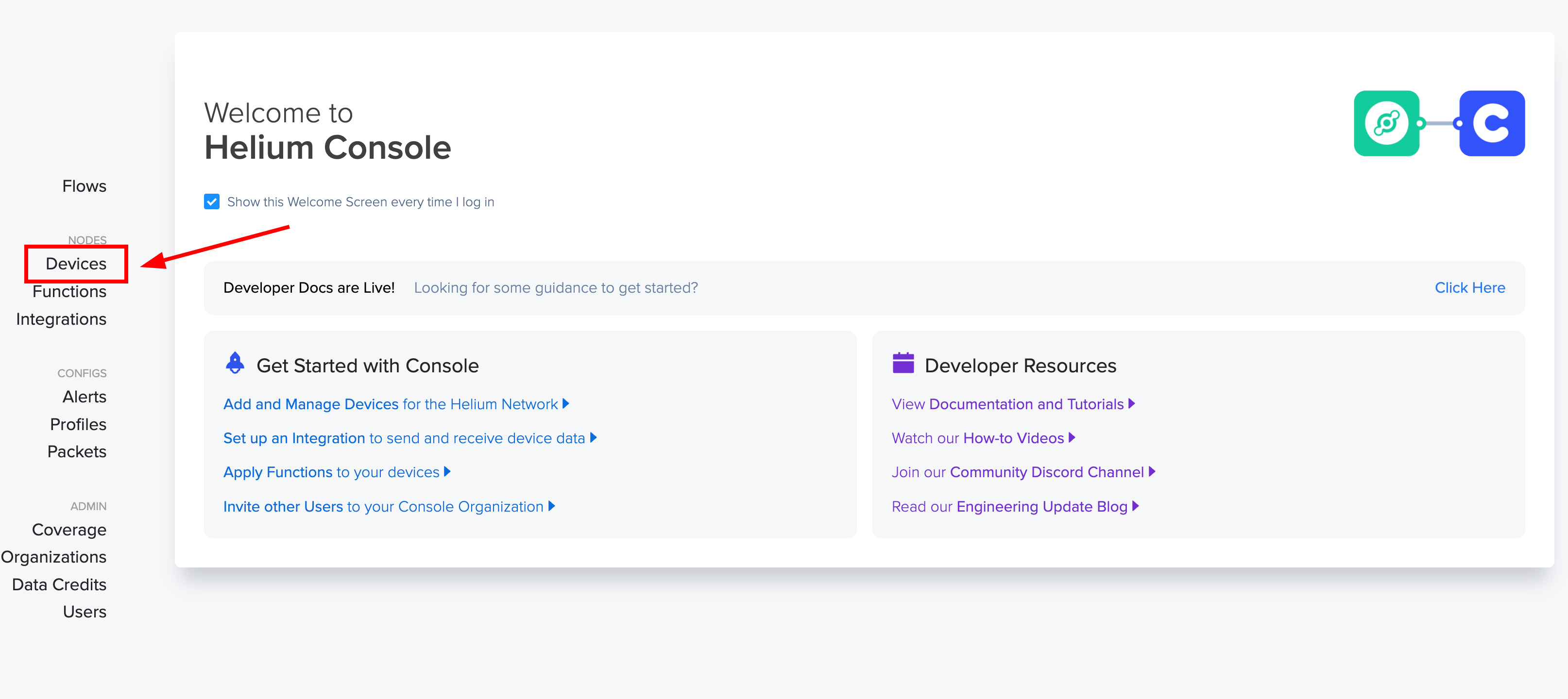
- Passo 2. Após fazer login, clique em "Devices" para gerenciar os dispositivos.
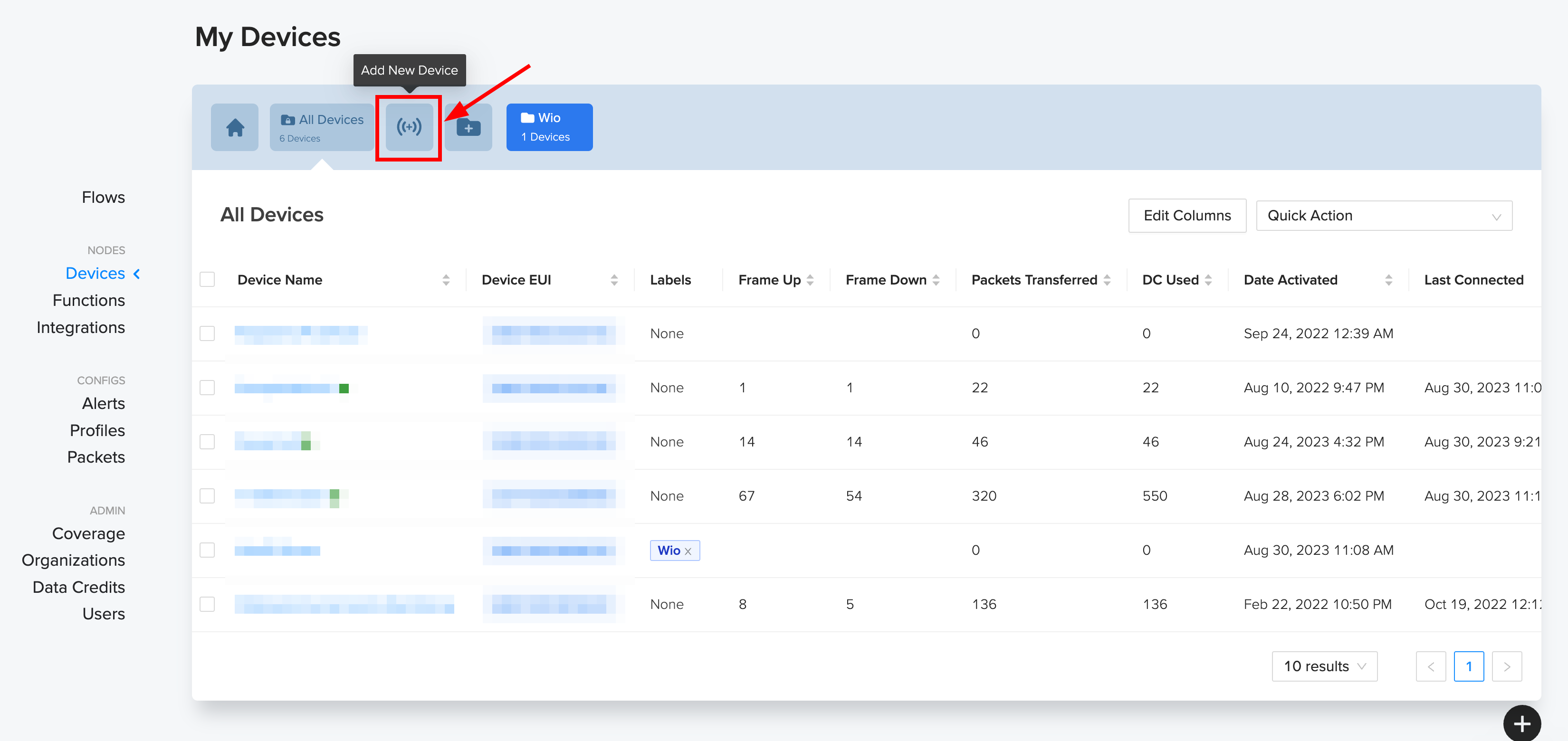
- Passo 3. Em seguida, clique em "Add New Device"
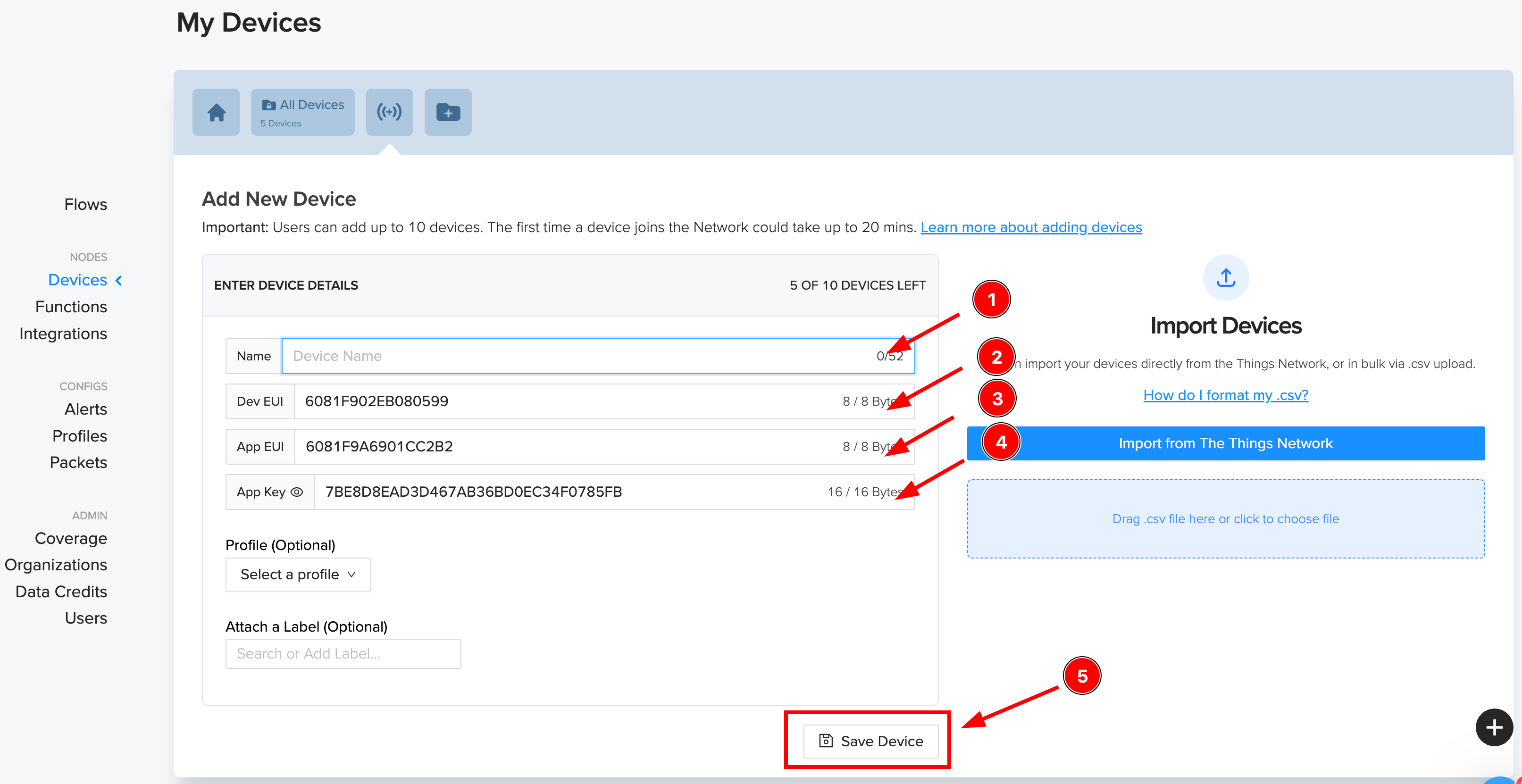
- Passo 4. Aqui, 1) Adicione um novo dispositivo , 2) Copie o Dev EUI , 3) Copie o App EUI, 4) Copie o App Key, 5) Por fim clique em Save.
- Passo 5. Agora você pode ver o dispositivo na seção "Devices".

Agora, a configuração do console Helium está concluída. Podemos passar para a parte de Software e enviar dados para o console Helium pela rede Helium LoRa.
Preparação de Hardware
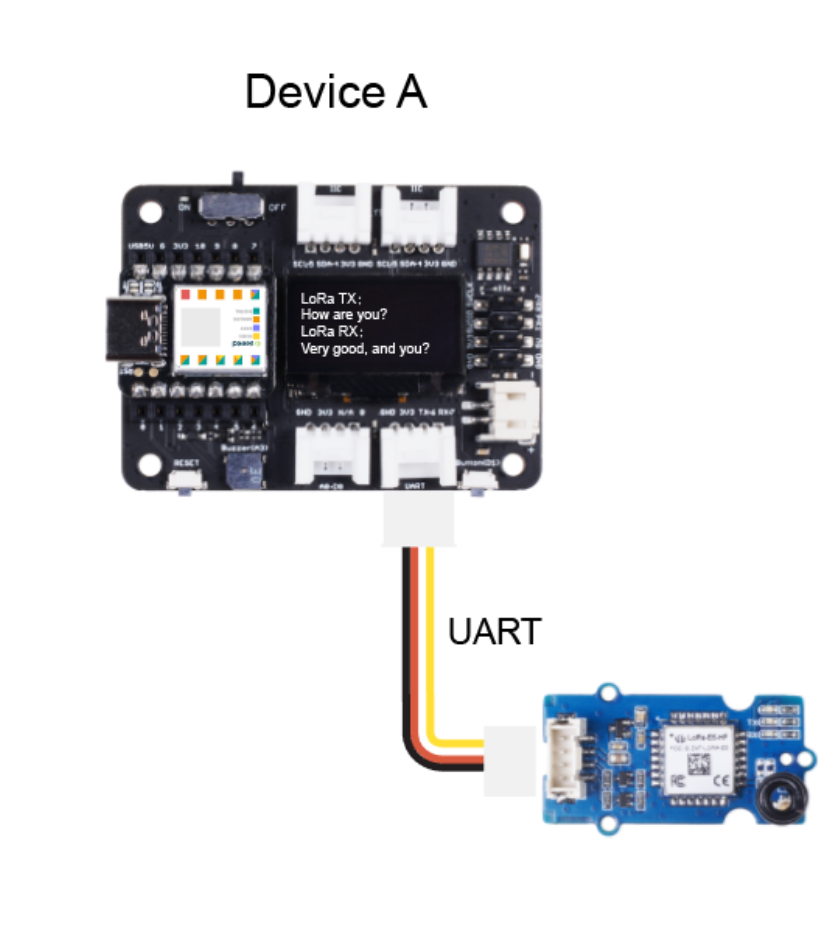
Coloque o XIAO nRF52840 BLE Sense na placa de expansão Seeeduino XIAO e depois conecte o Grove - Wio E5 à porta UART da placa de expansão XIAO.
Preparação de Software
Desenvolvemos o modelo tinyML usando a ferramenta Edge Impulse, e você pode encontrar o conjunto de dados e detalhes do projeto aqui. Você também pode clonar o projeto e fazer modificações conforme a sua necessidade.
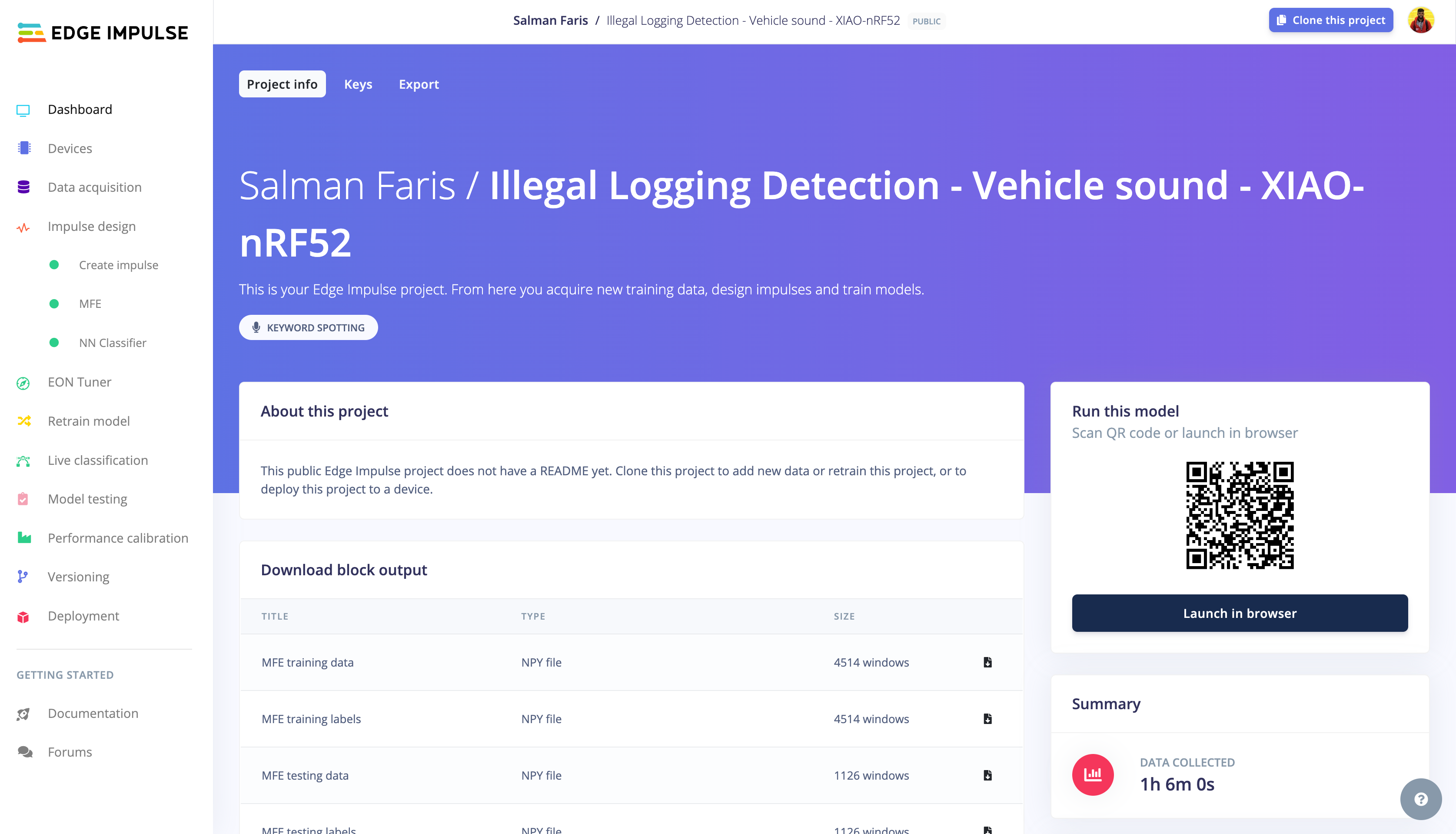
Por enquanto, baixe a biblioteca tinyML Edge Impulse a partir daqui e adicione-a ao Arduino. Siga este guia para aprender como adicionar bibliotecas ZIP.
Depois de adicionar a biblioteca, copie o código abaixo e cole no seu sketch do Arduino e substitua as credenciais Helium LoRa WAN.
/* Edge Impulse ingestion SDK
* Copyright (c) 2022 EdgeImpulse Inc.
*
* Licensed under the Apache License, Version 2.0 (the "License");
* you may not use this file except in compliance with the License.
* You may obtain a copy of the License at
* http://www.apache.org/licenses/LICENSE-2.0
*
* Unless required by applicable law or agreed to in writing, software
* distributed under the License is distributed on an "AS IS" BASIS,
* WITHOUT WARRANTIES OR CONDITIONS OF ANY KIND, either express or implied.
* See the License for the specific language governing permissions and
* limitations under the License.
*
*/
// If your target is limited in memory remove this macro to save 10K RAM
#define EIDSP_QUANTIZE_FILTERBANK 0
/*
** NOTE: If you run into TFLite arena allocation issue.
**
** This may be due to may dynamic memory fragmentation.
** Try defining "-DEI_CLASSIFIER_ALLOCATION_STATIC" in boards.local.txt (create
** if it doesn't exist) and copy this file to
** `<ARDUINO_CORE_INSTALL_PATH>/arduino/hardware/<mbed_core>/<core_version>/`.
**
** See
** (https://support.arduino.cc/hc/en-us/articles/360012076960-Where-are-the-installed-cores-located-)
** to find where Arduino installs cores on your machine.
**
** If the problem persists then there's not enough memory for this model and application.
*/
/*
** Developed by Salman Faris
** Date: 20/09/2023
*/
/* Includes ---------------------------------------------------------------- */
#include <PDM.h>
#include <Illegal_Logging_Detection_-_Vehicle_sound_-_XIAO-nRF52_inferencing.h>
#include <Arduino.h>
#include <U8x8lib.h>
U8X8_SSD1306_128X64_NONAME_HW_I2C u8x8(/*reset=*/U8X8_PIN_NONE);
/** Audio buffers, pointers and selectors */
typedef struct {
int16_t *buffer;
uint8_t buf_ready;
uint32_t buf_count;
uint32_t n_samples;
} inference_t;
static inference_t inference;
static signed short sampleBuffer[2048];
static bool debug_nn = false; // Set this to true to see e.g. features generated from the raw signal
//LoRa Buffer
static char recv_buf[512];
static bool is_exist = false;
static bool is_join = false;
static int led = 0;
//Inference Data
int pred_index = 0; // Initialize pred_index
float pred_value = 0; // Initialize pred_value
static int at_send_check_response(char *p_ack, int timeout_ms, char *p_cmd, ...) {
int ch;
int num = 0;
int index = 0;
int startMillis = 0;
va_list args;
char cmd_buffer[256]; // Adjust the buffer size as needed
memset(recv_buf, 0, sizeof(recv_buf));
va_start(args, p_cmd);
vsprintf(cmd_buffer, p_cmd, args); // Format the command string
Serial1.print(cmd_buffer);
Serial.print(cmd_buffer);
va_end(args);
delay(200);
startMillis = millis();
if (p_ack == NULL) {
return 0;
}
do {
while (Serial1.available() > 0) {
ch = Serial1.read();
recv_buf[index++] = ch;
Serial.print((char)ch);
delay(2);
}
if (strstr(recv_buf, p_ack) != NULL) {
return 1;
}
} while (millis() - startMillis < timeout_ms);
return 0;
}
static void recv_prase(char *p_msg) {
if (p_msg == NULL) {
return;
}
char *p_start = NULL;
int data = 0;
int rssi = 0;
int snr = 0;
p_start = strstr(p_msg, "RX");
if (p_start && (1 == sscanf(p_start, "RX: \"%d\"\r\n", &data))) {
Serial.println(data);
u8x8.setCursor(2, 4);
u8x8.print("led :");
led = !!data;
u8x8.print(led);
if (led) {
digitalWrite(LED_BUILTIN, LOW);
} else {
digitalWrite(LED_BUILTIN, HIGH);
}
}
p_start = strstr(p_msg, "RSSI");
if (p_start && (1 == sscanf(p_start, "RSSI %d,", &rssi))) {
u8x8.setCursor(0, 6);
u8x8.print(" ");
u8x8.setCursor(2, 6);
u8x8.print("rssi:");
u8x8.print(rssi);
}
p_start = strstr(p_msg, "SNR");
if (p_start && (1 == sscanf(p_start, "SNR %d", &snr))) {
u8x8.setCursor(0, 7);
u8x8.print(" ");
u8x8.setCursor(2, 7);
u8x8.print("snr :");
u8x8.print(snr);
}
}
/**
* @brief Arduino setup function
*/
void setup() {
// put your setup code here, to run once:
Serial.begin(115200);
Serial1.begin(9600);
// comment out the below line to cancel the wait for USB connection (needed for native USB)
while (!Serial)
;
Serial.println("Edge Impulse Inferencing Demo");
// summary of inferencing settings (from model_metadata.h)
ei_printf("Inferencing settings:\n");
ei_printf("\tInterval: %.2f ms.\n", (float)EI_CLASSIFIER_INTERVAL_MS);
ei_printf("\tFrame size: %d\n", EI_CLASSIFIER_DSP_INPUT_FRAME_SIZE);
ei_printf("\tSample length: %d ms.\n", EI_CLASSIFIER_RAW_SAMPLE_COUNT / 16);
ei_printf("\tNo. of classes: %d\n", sizeof(ei_classifier_inferencing_categories) / sizeof(ei_classifier_inferencing_categories[0]));
if (microphone_inference_start(EI_CLASSIFIER_RAW_SAMPLE_COUNT) == false) {
ei_printf("ERR: Could not allocate audio buffer (size %d), this could be due to the window length of your model\r\n", EI_CLASSIFIER_RAW_SAMPLE_COUNT);
return;
}
u8x8.begin();
u8x8.setFlipMode(1);
u8x8.setFont(u8x8_font_chroma48medium8_r);
Serial.begin(115200);
pinMode(LED_BUILTIN, OUTPUT);
digitalWrite(LED_BUILTIN, HIGH);
Serial1.begin(9600);
Serial.print("E5 LORAWAN TEST\r\n");
u8x8.setCursor(0, 0);
if (at_send_check_response("+AT: OK", 100, "AT\r\n")) {
is_exist = true;
at_send_check_response("+ID: DevEui", 1000, "AT+ID=DevEui,\"XXXXXXXXXX"\r\n");
at_send_check_response("+ID: AppEui", 1000, "AT+ID=AppEui,\"XXXXXXXXXXX\"\r\n");
at_send_check_response("+KEY: APPKEY", 1000, "AT+KEY=APPKEY,\"XXXXXXXXXXXX\"\r\n");
at_send_check_response("+ID: DevAddr", 1000, "AT+ID=DevAddr\r\n");
at_send_check_response("+ID: AppEui", 1000, "AT+ID\r\n");
at_send_check_response("+MODE: LWOTAA", 1000, "AT+MODE=LWOTAA\r\n");
at_send_check_response("+DR: IN865", 1000, "AT+DR=IN865\r\n");
at_send_check_response("+CH: NUM", 1000, "AT+CH=NUM,0-2\r\n");
at_send_check_response("+CLASS: A", 1000, "AT+CLASS=A\r\n");
at_send_check_response("+PORT: 8", 1000, "AT+PORT=8\r\n");
delay(200);
u8x8.setCursor(5, 0);
u8x8.print("LoRaWAN");
is_join = true;
} else {
is_exist = false;
Serial.print("No E5 module found.\r\n");
u8x8.setCursor(0, 1);
u8x8.print("unfound E5 !");
}
//dht.begin();
}
/**
* @brief Arduino main function. Runs the inferencing loop.
*/
void loop() {
ei_printf("Starting inferencing in 2 seconds...\n");
delay(2000);
ei_printf("Recording...\n");
bool m = microphone_inference_record();
if (!m) {
ei_printf("ERR: Failed to record audio...\n");
return;
}
ei_printf("Recording done\n");
signal_t signal;
signal.total_length = EI_CLASSIFIER_RAW_SAMPLE_COUNT;
signal.get_data = µphone_audio_signal_get_data;
ei_impulse_result_t result = { 0 };
EI_IMPULSE_ERROR r = run_classifier(&signal, &result, debug_nn);
if (r != EI_IMPULSE_OK) {
ei_printf("ERR: Failed to run classifier (%d)\n", r);
return;
}
int pred_index = 0; // Initialize pred_index
float pred_value = 0; // Initialize pred_value
// print the predictions
ei_printf("Predictions ");
ei_printf("(DSP: %d ms., Classification: %d ms., Anomaly: %d ms.)",
result.timing.dsp, result.timing.classification, result.timing.anomaly);
ei_printf(": \n");
for (size_t ix = 0; ix < EI_CLASSIFIER_LABEL_COUNT; ix++) {
ei_printf(" %s: %.5f\n", result.classification[ix].label, result.classification[ix].value);
ei_printf("\n");
if (result.classification[ix].value > pred_value) {
pred_index = ix;
pred_value = result.classification[ix].value;
}
}
// Display inference result and Send message to Helium Console.
if ((pred_index == 1 && (pred_value > 0.8))) {
ei_printf("Vehicle Sound is Detected ");
ei_printf("\n");
int SOS = 10;
int DeviceID = 1;
if (is_exist) {
int ret = 0;
if (is_join) {
ret = at_send_check_response("+JOIN: Network joined", 12000, "AT+JOIN\r\n");
if (ret) {
is_join = false;
} else {
at_send_check_response("+ID: AppEui", 1000, "AT+ID\r\n");
Serial.print("JOIN failed!\r\n\r\n");
delay(5000);
}
} else {
char cmd[128];
sprintf(cmd, "AT+CMSGHEX=\"%04X%04X\"\r\n", (int)DeviceID, (int)SOS);
ret = at_send_check_response("Done", 5000, cmd);
u8x8.setCursor(0, 2);
u8x8.print(" ");
u8x8.setCursor(2, 2);
u8x8.print("Vehicle Detected");
u8x8.setCursor(2, 3);
u8x8.print("Sending SOS");
if (ret) {
recv_prase(recv_buf);
} else {
Serial.print("Send failed!\r\n\r\n");
}
delay(5000);
}
} else {
delay(1000);
}
}
else {
u8x8.setCursor(0, 2);
u8x8.print(" ");
u8x8.setCursor(2, 2);
u8x8.print("Normal Condition");
u8x8.setCursor(2, 3);
u8x8.print("idle");
}
#if EI_CLASSIFIER_HAS_ANOMALY == 1
ei_printf(" anomaly score: %.3f\n", result.anomaly);
#endif
}
/**
* @brief PDM buffer full callback
* Get data and call audio thread callback
*/
static void pdm_data_ready_inference_callback(void) {
int bytesAvailable = PDM.available();
// read into the sample buffer
int bytesRead = PDM.read((char *)&sampleBuffer[0], bytesAvailable);
if (inference.buf_ready == 0) {
for (int i = 0; i < bytesRead >> 1; i++) {
inference.buffer[inference.buf_count++] = sampleBuffer[i];
if (inference.buf_count >= inference.n_samples) {
inference.buf_count = 0;
inference.buf_ready = 1;
break;
}
}
}
}
/**
* @brief Init inferencing struct and setup/start PDM
*
* @param[in] n_samples The n samples
*
* @return { description_of_the_return_value }
*/
static bool microphone_inference_start(uint32_t n_samples) {
inference.buffer = (int16_t *)malloc(n_samples * sizeof(int16_t));
if (inference.buffer == NULL) {
return false;
}
inference.buf_count = 0;
inference.n_samples = n_samples;
inference.buf_ready = 0;
// configure the data receive callback
PDM.onReceive(&pdm_data_ready_inference_callback);
PDM.setBufferSize(4096);
// initialize PDM with:
// - one channel (mono mode)
// - a 16 kHz sample rate
if (!PDM.begin(1, EI_CLASSIFIER_FREQUENCY)) {
ei_printf("Failed to start PDM!");
microphone_inference_end();
return false;
}
// set the gain, defaults to 20
PDM.setGain(127);
return true;
}
/**
* @brief Wait on new data
*
* @return True when finished
*/
static bool microphone_inference_record(void) {
inference.buf_ready = 0;
inference.buf_count = 0;
while (inference.buf_ready == 0) {
delay(10);
}
return true;
}
/**
* Get raw audio signal data
*/
static int microphone_audio_signal_get_data(size_t offset, size_t length, float *out_ptr) {
numpy::int16_to_float(&inference.buffer[offset], out_ptr, length);
return 0;
}
/**h
* @brief Stop PDM and release buffers
*/
static void microphone_inference_end(void) {
PDM.end();
free(inference.buffer);
}
#if !defined(EI_CLASSIFIER_SENSOR) || EI_CLASSIFIER_SENSOR != EI_CLASSIFIER_SENSOR_MICROPHONE
#error "Invalid model for current sensor."
#endif
Substitua o DevEUI , AppEUI e APPKEY com suas credenciais obtidas no console Helium. Certifique-se também de substituir o IN865 de acordo com o plano de frequência da sua região.
at_send_check_response("+ID: DevEui", 1000, "AT+ID=DevEui,\"xxxxxxxxxxx\"\r\n");
at_send_check_response("+ID: AppEui", 1000, "AT+ID=AppEui,\"xxxxxxxxxxx\"\r\n");
at_send_check_response("+KEY: APPKEY", 1000, "AT+KEY=APPKEY,\"xxxxxxxxxxxxxxx\"\r\n");
at_send_check_response("+ID: DevAddr", 1000, "AT+ID=DevAddr\r\n");
at_send_check_response("+ID: AppEui", 1000, "AT+ID\r\n");
at_send_check_response("+MODE: LWOTAA", 1000, "AT+MODE=LWOTAA\r\n");
at_send_check_response("+DR: IN865", 1000, "AT+DR=IN865\r\n");
at_send_check_response("+CH: NUM", 1000, "AT+CH=NUM,0-2\r\n");
at_send_check_response("+CLASS: A", 1000, "AT+CLASS=A\r\n");
at_send_check_response("+PORT: 8", 1000, "AT+PORT=8\r\n");
Na seção abaixo, você pode ver que o XIAO verificará se há algum som de veículo detectado e, se for detectado, ele estabelecerá uma conexão LoRa WAN com o console Helium e enviará o dado 1 como símbolo de Som de Veículo Detectado.
// Display inference result and Send message to Helium Console.
  if ((pred_index == 1 && (pred_value > 0.8))) {
    ei_printf("Vehicle Sound is Detected ");
    ei_printf("\n");
    int SOS = 10;
    int DeviceID = 1;
    if (is_exist) {
      int ret = 0;
      if (is_join) {

        ret = at_send_check_response("+JOIN: Network joined", 12000, "AT+JOIN\r\n");
        if (ret) {
          is_join = false;
        } else {
          at_send_check_response("+ID: AppEui", 1000, "AT+ID\r\n");
          Serial.print("JOIN failed!\r\n\r\n");
          delay(5000);
        }
      } else {
        char cmd[128];
        sprintf(cmd, "AT+CMSGHEX=\"%04X%04X\"\r\n", (int)DeviceID, (int)SOS);
        ret = at_send_check_response("Done", 5000, cmd);

        u8x8.setCursor(0, 2);
        u8x8.print("      ");
        u8x8.setCursor(2, 2);
        u8x8.print("Vehicle Detected");
        u8x8.setCursor(2, 3);
        u8x8.print("Sending SOS");
        if (ret) {
          recv_prase(recv_buf);
        } else {
          Serial.print("Send failed!\r\n\r\n");
        }
        delay(5000);
      }
    } else {
      delay(1000);
    }

  }
  else {
        u8x8.setCursor(0, 2);
        u8x8.print("      ");
        u8x8.setCursor(2, 2);
        u8x8.print("Normal Condition");
        u8x8.setCursor(2, 3);
        u8x8.print("idle");
  }
Demonstração
Certifique-se de que você está dentro da área de cobertura da rede Helium. Você pode encontrar a cobertura de rede em explorer.helium.com
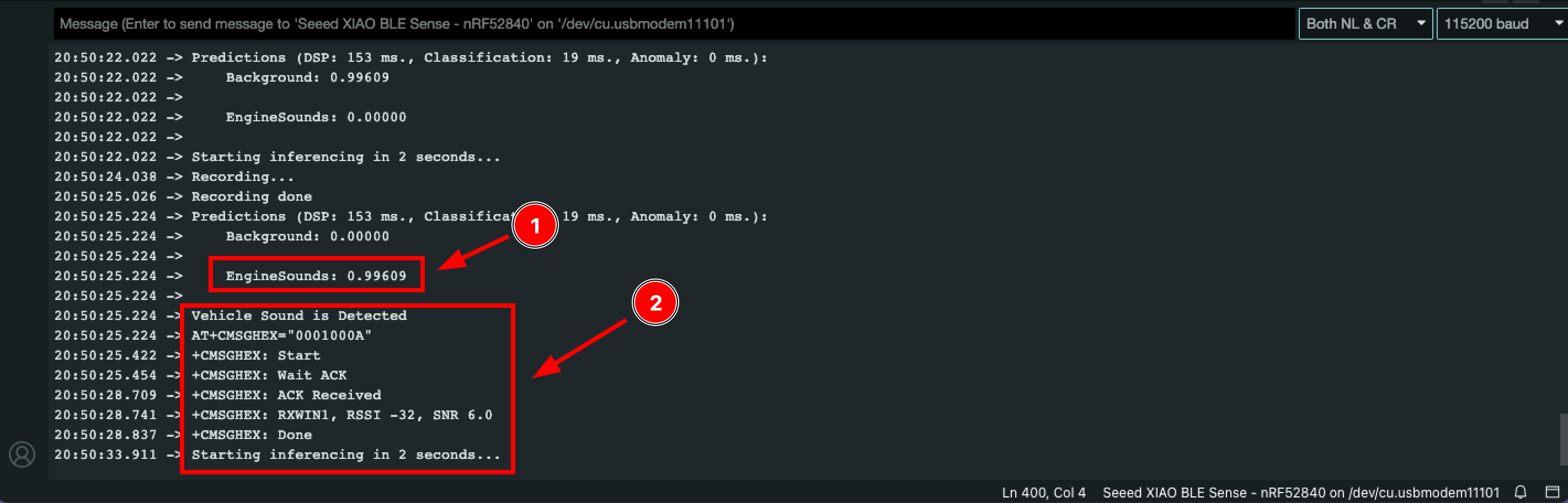
Após enviar o código, o XIAO nRF52840 Sense irá capturar som e verificar se há algum som de motor usando tinyML; então, tente reproduzir som de motor para acionar a ação. Assim que detectar o som de motor (1), o XIAO estabelecerá a conexão de rede Helium LoRa e enviará o comando "1" como símbolo de Som de Veículo Detectado (2).
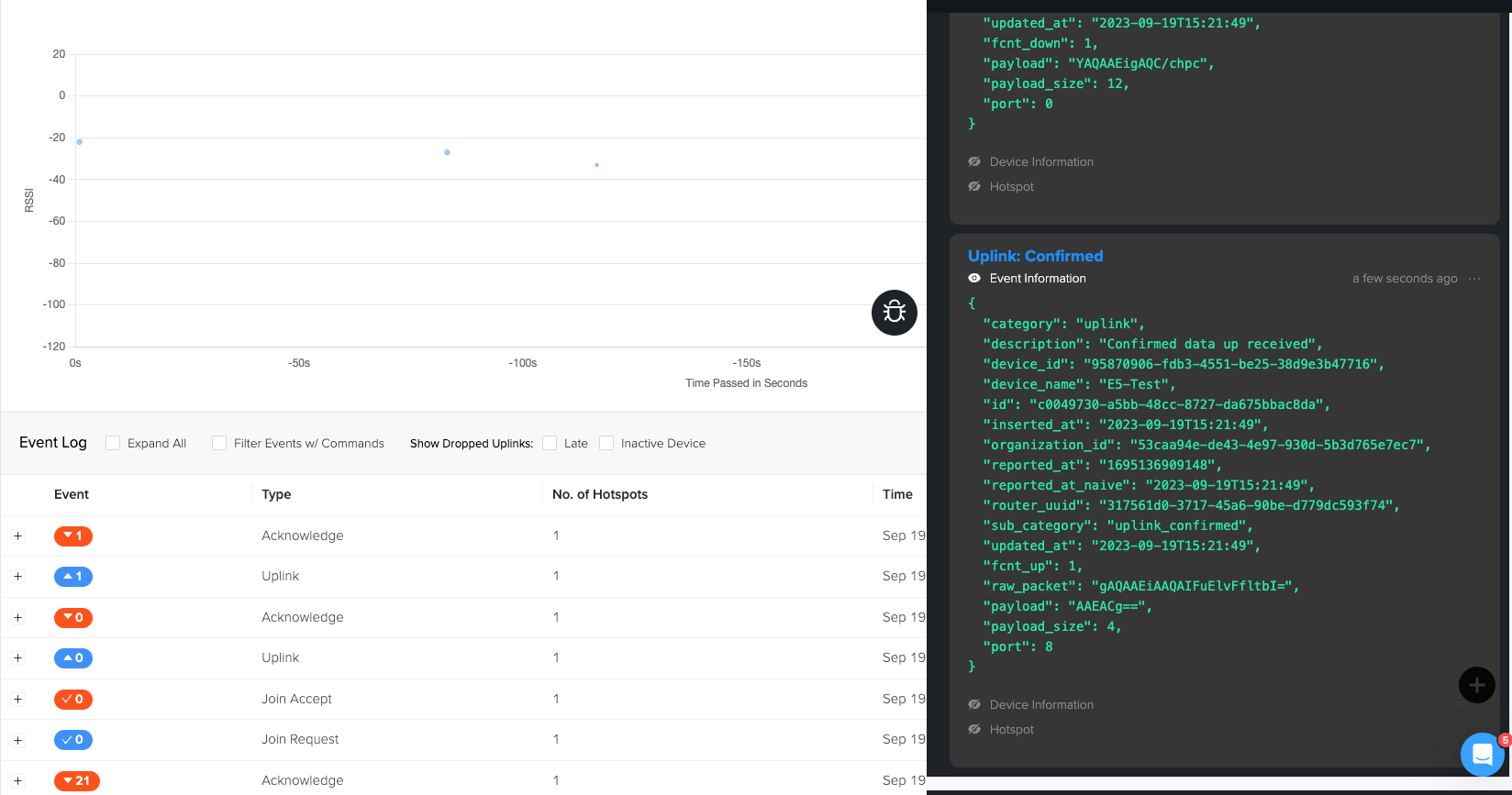
Você pode ver os dados no console Helium e na janela de depuração.
Tarefas Pendentes
Até agora, fizemos a integração com tinyML e LoRa, e temos algumas tarefas pendentes que você pode fazer como exercício para melhorar o projeto.
- Integrar o console Helium com um dashboard e visualizar os dados
- Criar alerta por E-mail/SMS/Telefone com dashboard personalizado para informar o guarda florestal.
Recursos
Folha de dados:
Certificações:
SDK relevante:
Suporte Técnico & Discussão de Produtos
Obrigado por escolher nossos produtos! Estamos aqui para fornecer diferentes tipos de suporte para garantir que sua experiência com nossos produtos seja a mais tranquila possível. Oferecemos vários canais de comunicação para atender a diferentes preferências e necessidades.