SenseCAP Indicator - Desenvolvimento de Aplicação LoRa
Introdução
LoRa® é uma tecnologia de comunicação sem fio de longo alcance otimizada para enviar pequenas quantidades de dados a grandes distâncias. Ela funciona modulando sinais de rádio no espectro sub-GHz usando um método chamado Chirp Spread Spectrum (CSS).
O SenseCAP Indicator (versão D1L e D1Pro) da Seeed Studio inclui um módulo transceptor LoRa integrado (chip LoRa® Semtech SX1262), tornando simples adicionar conectividade sem fio de baixo consumo aos seus projetos. Neste artigo, mostraremos como configurar a comunicação LoRa entre duas placas SenseCAP Indicator.
Visão geral
Esta demonstração mostra como estabelecer uma comunicação LoRa básica entre o SenseCAP Indicator e a placa XIAO usando o Wio-E5 como intermediário. O SenseCAP Indicator obtém dados de sensores da XIAO, que são então transmitidos via Wio-E5. A carga útil transmitida é posteriormente recebida pelo SenseCAP Indicator, que a decodifica e gera o resultado, exibindo os dados na sua tela.
Sem código LVGL: Code · GitHub
Hardware
SenseCAP Indicator
Na página Dive_into_the_Hardware, podemos ver que o transceptor LoRa está conectado ao MCU ESP32-S3 por meio da interface SPI.
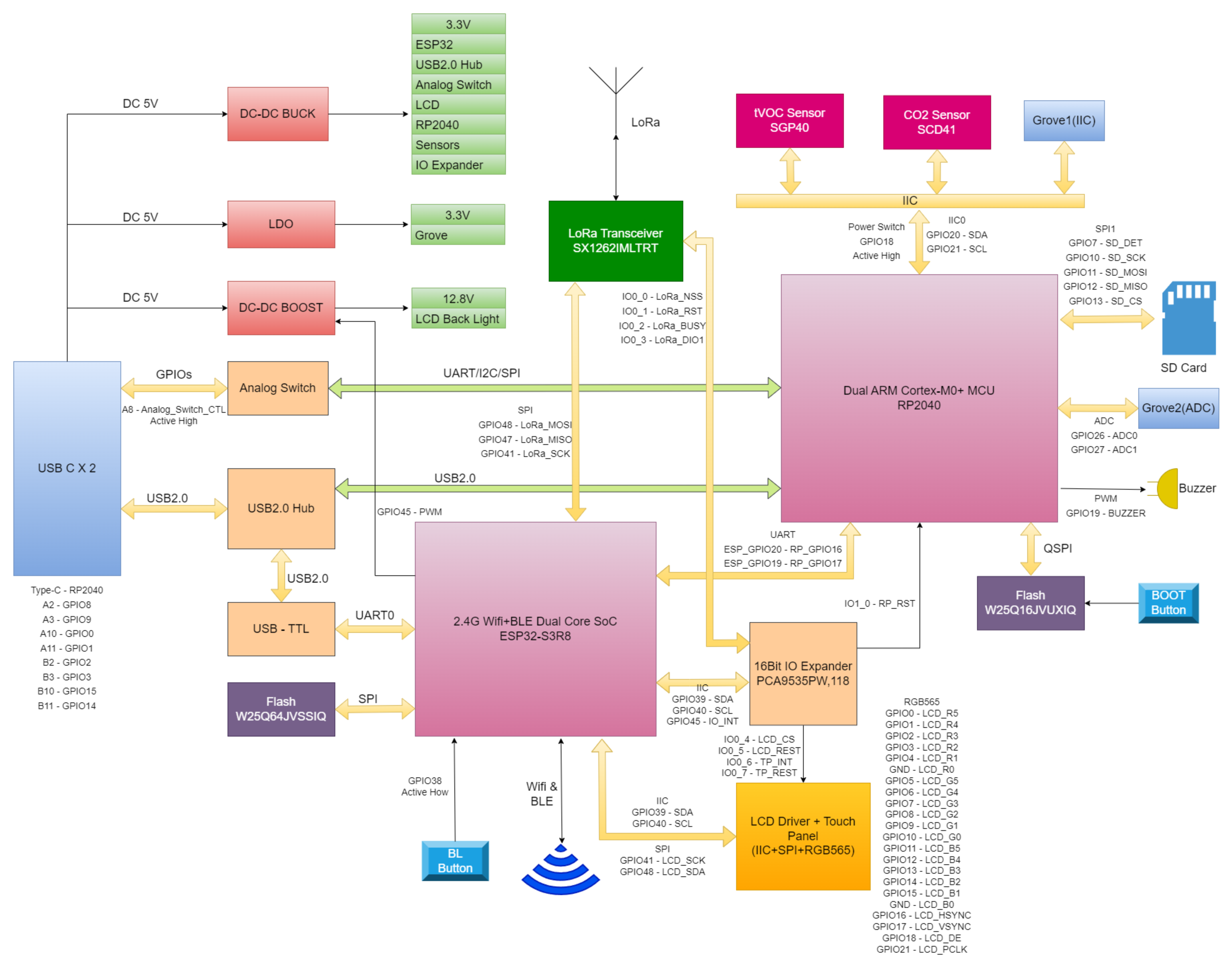
Os principais componentes são:
- Front-end de rádio Semtech SX1262
- MCU ESP32-S3
O transceptor LoRa lida com toda a modulação e demodulação em baixo nível dos sinais LoRa. Podemos nos comunicar com ele usando a interface SPI a partir do ESP32-S3.
XIAO
O XIAO neste demo é necessário para coletar dados de sensores e transmiti-los ao SenseCAP Indicator por meio do Wio-E5. O XIAO é conectado ao Wio-E5 via interface UART.
- XIAO
- Wio-E5
- SEN5x
Software
Como o SDK SenseCAP_Indicator_ESP32 já fornece a biblioteca LoRa, podemos usá-la diretamente; você pode revisar rapidamente a página LoRa® para ver como usar a biblioteca LoRa.
Primeiros passos
Este demo demonstra como configurar um Hub LoRa® Local para conectividade IoT.
Pré-requisitos
Siga as instruções fornecidas para configurar o ambiente de desenvolvimento.
Etapa 1: Baixar o código de demonstração
Clone ou baixe o código de demonstração a partir deste link. Este código servirá como ponto de partida para sua aplicação LoRa.
Etapa 2: Implementar o codificador de payload (XIAO;Arduino)
Etapa 2.1: Implementar sua estrutura de payload e codificador
- XIAO/include/Frame.h
- XIAO/include/Frame.cpp
#ifndef _FRAME_H
#define _FRAME_H
#include <Arduino.h>
#include <vector>

/** payload format
* | topic | dataLength | Data Payload | CRC |
* | 1byte | 1byte      | n byte       | 2byte |
* example:
* | 0x01 | 0x0E | 14 bytes | 2byte | for SEN54
* | 0x01 | 0x10 | 16 bytes | 2byte | for SEN55
*/

#pragma pack(1)
enum topics {
    TOPICS_MIN   = 0x00,
    TOPICS_SEN5x = 0x01,
    TOPIC_MAX,
};

#pragma pack(1)
typedef struct
{
    enum topics topic;         /*msg type*/
    uint8_t dataLength;
    std::vector<uint8_t> data; /*actual data of payload*/
    uint16_t crc;
} Frame_t;
String packFrame(Frame_t frame);
void deleteFrame(Frame_t *frame);
uint16_t crc16_ccitt(const uint8_t *data, size_t length);
#endif
#include "Frame.h"
String packFrame(Frame_t frame) {
    uint8_t *packedData = (uint8_t *)malloc(2 + frame.dataLength + 2);
    if (packedData == NULL) {
        return String(); // Return an empty string if memory allocation fails
    }
    // Pack the frame topic
    packedData[0] = frame.topic;
    packedData[1] = frame.dataLength;
    // Pack the data payload
    for (size_t i = 0; i < frame.dataLength; i++) {
        packedData[2 + i] = frame.data[i];
    }
    // Calculate CRC (for simplicity, we assume CRC is just the sum of all bytes)
    frame.crc = crc16_ccitt(packedData, 2 + frame.dataLength);

    // Pack the CRC
    packedData[2 + frame.dataLength]     = (frame.crc & 0xFF00) >> 8;
    packedData[2 + frame.dataLength + 1] = frame.crc & 0x00FF;
    // String packedFrame; serialize the packed data into a string
    char packedFrameBuffer[(2 + frame.dataLength + 2) * 2];
    for (size_t i = 0; i < 2 + frame.dataLength + 2; i++) {
        snprintf(&packedFrameBuffer[i * 2], 3, "%02X", packedData[i]); // 3 to include null terminator
    }
    free(packedData);

    return String(packedFrameBuffer);
}

void deleteFrame(Frame_t *frame) {
    free(frame);
}

uint16_t crc16_ccitt(const uint8_t *data, size_t length) {
    uint16_t crc = 0xFFFF;

    for (size_t i = 0; i < length; i++) {
        crc ^= (uint8_t)data[i] << 8;
        for (uint8_t j = 0; j < 8; j++) {
            if (crc & 0x8000) {
                crc = (crc << 1) ^ 0x1021;
            } else {
                crc <<= 1;
            }
        }
    }

    return crc & 0xFFFF;
}
Etapa 2.2: Implementar a estrutura de dados do sensor e adaptá-la ao codificador de payload
- XIAO/include/sensor_sen5x.h
- XIAO/src/sensor_sen5x.cpp
#ifndef PAYLOAD_SEN5X_H
#define PAYLOAD_SEN5X_H
#include "Frame.h"
#include "SensorPayload.h"
#include <SensirionI2CSen5x.h>

#define DEVICE_SEN54

#if defined(DEVICE_SEN54)
#elif defined(DEVICE_SEN55)
#else
#error "Please define a device in the compiler options."
#endif

class PayloadSEN5x : public SensorPayload<SensirionI2CSen5x> {
  public:
    PayloadSEN5x(SensirionI2CSen5x handler);
    uint16_t init() override;
    String toPayloadString() override;

  private:
    uint16_t massConcentrationPm1p0;
    uint16_t massConcentrationPm2p5;
    uint16_t massConcentrationPm4p0;
    uint16_t massConcentrationPm10p0;
    int16_t ambientHumidity;
    int16_t ambientTemperature;
    int16_t vocIndex;
#ifdef DEVICE_SEN55
// int16_t noxIndex; // Sensor SEN54 does not support NOx
#endif
    SensirionI2CSen5x _sen5x;
};
#endif // PAYLOAD_SEN5X_H
#include "sensor_sen5x.h"
#include "main.h"

PayloadSEN5x::PayloadSEN5x(SensirionI2CSen5x handler)
    : SensorPayload<SensirionI2CSen5x>(handler), _sen5x(handler) {
    // Initialize specific data members for SEN5X here (if needed)
    _sen5x.begin(Wire);
}

uint16_t PayloadSEN5x::init() {
    // Implement the initialization logic for SEN5X here
    uint16_t error;
    char errorMessage[256];
    error = _sen5x.deviceReset();
    if (error) {
        Serial.print("Error trying to execute deviceReset(): ");
        errorToString(error, errorMessage, 256);
        Serial.println(errorMessage);
    }
    float tempOffset = 0.0;
    error            = _sen5x.setTemperatureOffsetSimple(tempOffset);
    if (error) {
        Serial.print("Error trying to execute setTemperatureOffsetSimple(): ");
        errorToString(error, errorMessage, 256);
        Serial.println(errorMessage);
    } else {
        Serial.print("Temperature Offset set to ");
        Serial.print(tempOffset);
        Serial.println(" deg. Celsius (SEN54/SEN55 only)");
    }

    // Start Measurement
    error = _sen5x.startMeasurement();
    if (error) {
        Serial.print("Error trying to execute startMeasurement(): ");
        errorToString(error, errorMessage, 256);
        Serial.println(errorMessage);
    }
    return 0;
}

String PayloadSEN5x::toPayloadString() {
// Add your code to convert data to payload string here
#ifdef DEVICE_SEN55
    _sen5x.readMeasuredValuesAsIntegers(massConcentrationPm1p0, massConcentrationPm2p5, massConcentrationPm4p0, massConcentrationPm10p0, ambientHumidity, ambientTemperature, vocIndex, noxIndex);
    _frame.dataLength = 16;
#else
    int16_t __noxIndex;
    _sen5x.readMeasuredValuesAsIntegers(massConcentrationPm1p0, massConcentrationPm2p5, massConcentrationPm4p0, massConcentrationPm10p0, ambientHumidity, ambientTemperature, vocIndex, __noxIndex);
    _frame.dataLength = 14;
#endif

    _frame.topic = TOPICS_SEN5x;

    // empty the data vector
    _frame.data.clear();
    // make the value into hex payload string
    _frame.data.push_back((uint8_t)(massConcentrationPm1p0 >> 8));
    _frame.data.push_back((uint8_t)(massConcentrationPm1p0 & 0xFF));
    _frame.data.push_back((uint8_t)(massConcentrationPm2p5 >> 8));
    _frame.data.push_back((uint8_t)(massConcentrationPm2p5 & 0xFF));
    _frame.data.push_back((uint8_t)(massConcentrationPm4p0 >> 8));
    _frame.data.push_back((uint8_t)(massConcentrationPm4p0 & 0xFF));
    _frame.data.push_back((uint8_t)(massConcentrationPm10p0 >> 8));
    _frame.data.push_back((uint8_t)(massConcentrationPm10p0 & 0xFF));
    _frame.data.push_back((uint8_t)(ambientHumidity >> 8));
    _frame.data.push_back((uint8_t)(ambientHumidity & 0xFF));
    _frame.data.push_back((uint8_t)(ambientTemperature >> 8));
    _frame.data.push_back((uint8_t)(ambientTemperature & 0xFF));
    _frame.data.push_back((uint8_t)(vocIndex >> 8));
    _frame.data.push_back((uint8_t)(vocIndex & 0xFF));
#ifdef DEVICE_SEN55
// _frame.data.push_back((uint8_t)(noxIndex >> 8));
// _frame.data.push_back((uint8_t)(noxIndex & 0xFF));
#endif
    char data[256];
    sprintf(data, "%d,%d,%d,%d,%d,%d,%d", massConcentrationPm1p0, massConcentrationPm2p5, massConcentrationPm4p0, massConcentrationPm10p0, ambientHumidity, ambientTemperature, vocIndex);
    Serial.println("String: " + String(data));

    for (int i = 0; i < _frame.dataLength; i++) {
        Serial.print(_frame.data[i], HEX);
        Serial.print(" ");
    }
    Serial.println();

    return packFrame(_frame);
}
A função toPayloadString irá serializar os dados em uma string, e a string será enviada para o SenseCAP Indicator via Wio-E5.
Etapa 2.3: Compile e envie o código para o XIAO
#include "sensor_sen5x.h"
#include "wio_e5_at.h"
#include <Arduino.h>
#include <SensirionI2CSen5x.h>
#include <Wire.h>
SoftwareSerial serial_lora( D2, D3 );
Radio radio( serial_lora, RF_FREQUENCY, LORA_SF12, LORA_BW_125, 15, 15, 14, LORA_CRC_ON, LORA_IQ_NORMAL, LORA_PUBLIC_OFF );

SensirionI2CSen5x sen5x;
PayloadSEN5x payloadSEN5x( sen5x );

void setup() {
    delay( 2000 );
    wait_serial();
    Serial.println( "Starting..." );

    radio.begin();

    Wire.begin();
    payloadSEN5x.init();

    Serial.println( "APP begin" );
}

void loop() {
    static int count               = 0;
    static unsigned long task_time = 0;
    static String test_string;

    if ( millis() - task_time > 10000 ) {
        task_time   = millis();

        radio.sendPayload( payloadSEN5x.toPayloadString() );

        Serial.printf( "Send data %d\r\n", count++ );
    }
}
Conclua o Payload, agora vamos nos aprofundar no SenseCAP Indicator para programar o decodificador de payload.
Etapa 3: Implementar o decodificador de Payload (SenseCAP Indicator;ESP-IDF)
O decodificador de payload é uma função que converte o payload binário recebido do transceptor LoRa em um formato legível por humanos. O decodificador de payload é específico para a sua aplicação e deve ser implementado por você. O decodificador de payload para esta demonstração é fornecido no código de demonstração.
Etapa 3.1: Implemente o seu decodificador de Payload
- Indicator/main/Frame/frame.h
- Indicator/main/Frame/frame.c
  #ifndef __SIMPLE_FRAME_H
  #define __SIMPLE_FRAME_H
  #include <stdint.h>
  #include <stdio.h>
  #include <stdlib.h>

  /** payload format
  * | topic | dataLength | Data Payload | CRC |
  * | 1byte | 1byte      | n byte       | 2byte |
  * example:
  * | 0x01 | 0x0E | 14 bytes | 2byte | for SEN54
  * | 0x01 | 0x10 | 16 bytes | 2byte | for SEN55
  */

  #pragma pack(1)
  enum topics {
      TOPICS_MIN   = 0x00,
      TOPICS_SEN5x = 0x01,
      TOPIC_MAX,
  };
  typedef struct
  {
      enum topics topic; /*msg type or DataId*/
      uint8_t dataLength;
      uint8_t *data;     /*actual data of payload*/
      uint16_t crc;
  } Frame_t;
  Frame_t *parsePayload( uint8_t *payload, uint8_t length );
  void deleteFrame( Frame_t *frame );
  uint16_t crc16_ccitt( const uint8_t *data, size_t length );
  #endif
  #include "frame.h"
  #include "esp_log.h"

  Frame_t *parsePayload( uint8_t *payload, uint8_t length )
  {
      Frame_t *frame = (Frame_t *)malloc( sizeof( Frame_t ) );
      if ( frame == NULL ) {
          ESP_LOGE( "parsePayload", "Failed to allocate memory for frame" );
          return NULL;
      }

      frame->topic = (enum topics)payload[0];

      frame->dataLength = payload[1];
      frame->data = (uint8_t *)malloc( frame->dataLength );
      if ( frame->data == NULL ) {
          ESP_LOGE( "parsePayload", "Failed to allocate memory for frame data" );
          free( frame ); // Clean up previously allocated memory
          return NULL;
      }
      memcpy( frame->data, payload + 2, frame->dataLength );

      frame->crc = (uint16_t)payload[length - 2] << 8 | (uint16_t)payload[length - 1];

      if ( frame->crc != crc16_ccitt( payload, length - 2 ) ) {
          ESP_LOGE( "parsePayload", "CRC mismatch" );
          free( frame->data );
          free( frame );
          return NULL;
      }

      return frame;
  }

  void deleteFrame( Frame_t *frame )
  {
      free( frame->data );
      free( frame );
  }

  uint16_t crc16_ccitt( const uint8_t *data, size_t length )
  {
      uint16_t crc = 0xFFFF;

      for ( size_t i = 0; i < length; i++ ) {
          crc ^= (uint8_t)data[i] << 8;
          for ( uint8_t j = 0; j < 8; j++ ) {
              if ( crc & 0x8000 ) {
                  crc = ( crc << 1 ) ^ 0x1021;
              } else {
                  crc <<= 1;
              }
          }
      }

      return crc & 0xFFFF;
  }
Etapa 3.2: Implementar a estrutura de dados do sensor
- Indicator/main/Sensors/sen5x.h
- Indicator/main/Sensors/sen5x.c
  #ifndef PAYLOAD_SEN5X_H
  #define PAYLOAD_SEN5X_H
  #include "SensorPayload.h"

  #define DEVICE_SEN54

  #if defined( DEVICE_SEN54 )
  #elif defined( DEVICE_SEN55 )
  #else
  #error "Please define a device in the compiler options."
  #endif
  #pragma pack(push, 1)
  typedef union {
      struct
      {
          uint16_t massConcentrationPm1p0;
          uint16_t massConcentrationPm2p5;
          uint16_t massConcentrationPm4p0;
          uint16_t massConcentrationPm10p0;
          int16_t  ambientHumidity;
          int16_t  ambientTemperature;
          int16_t  vocIndex;
  #ifdef DEVICE_SEN55
          int16_t noxIndex;
  #endif
      };

  #ifdef DEVICE_SEN55
      int16_t data[8];
  #else
      int16_t data[7];
  #endif
  } SEN5xData_t;
  #pragma pack(pop)
  void phraseSEN5xData( uint8_t *data_arry, SEN5xData_t *SEN5x );
  void prinSEN5xData( const SEN5xData_t *SEN5x );
  #endif // PAYLOAD_SEN5X_H
  #include "sen5x.h"
  #include "esp_log.h"
  void phraseSEN5xData( uint8_t *data_arry, SEN5xData_t *SEN5x )
  {
      for ( uint8_t i = 0; i < sizeof( SEN5xData_t ); i++ ) {
          SEN5x->data[i] = data_arry[2 * i] << 8 | data_arry[2 * i + 1];
      }
  }
  void prinSEN5xData( const SEN5xData_t *SEN5x )
  {
      static const char *TAG = "sen5x_";
      ESP_LOGI( TAG, "massConcentrationPm1p0: %d", SEN5x->massConcentrationPm1p0 );
      ESP_LOGI( TAG, "massConcentrationPm2p5: %d", SEN5x->massConcentrationPm2p5 );
      ESP_LOGI( TAG, "massConcentrationPm4p0: %d", SEN5x->massConcentrationPm4p0 );
      ESP_LOGI( TAG, "massConcentrationPm10p0: %d", SEN5x->massConcentrationPm10p0 );
      ESP_LOGI( TAG, "ambientHumidity: %d", SEN5x->ambientHumidity );
      ESP_LOGI( TAG, "ambientTemperature: %d", SEN5x->ambientTemperature );
      ESP_LOGI( TAG, "vocIndex: %d", SEN5x->vocIndex );
  #ifdef DEVICE_SEN55
      ESP_LOGI( TAG, "noxIndex: %d", SEN5x->noxIndex );
  #endif
  }
Etapa 3.3: Configurar o LoRa
Configurar parâmetros do LoRa
defina os parâmetros necessários do LoRa, como frequência, fator de espalhamento e largura de banda. Essas configurações devem coincidir entre os dois canais LoRa para uma comunicação bem-sucedida.
#define RF_FREQUENCY               868000000 // Hz
#define LORA_BANDWIDTH             0         // [0: 125 kHz, 1: 250 kHz, 2: 500 kHz, 3: Reserved]
#define LORA_SPREADING_FACTOR      12        // [SF7..SF12]
#define LORA_CODINGRATE            1         // [1: 4/5, 2: 4/6, 3: 4/7, 4: 4/8]
#define LORA_PREAMBLE_LENGTH       15        // Same for Tx and Rx
#define LORA_SYMBOL_TIMEOUT        5         // Symbols
#define LORA_FIX_LENGTH_PAYLOAD_ON false
#define LORA_IQ_INVERSION_ON       false
Configurar o receptor do transceptor LoRa
void OnRxDone( uint8_t *payload, uint16_t size, int16_t rssi, int8_t snr )
{
    SEN5xData_t sen5x_data;
    Frame_t *frame = parsePayload( payload, size );
    if ( frame == NULL ) {
        ESP_LOGE( TAG, "parsePayload error" );
        return;
    }
    ESP_LOGI( TAG, "frame->type: %s", dataIDToString( frame->topic ) );

    switch ( frame->topic ) {
        case TOPICS_SEN5x:
            phraseSEN5xData( frame->data, &sen5x_data );
            break;
        default:
            break;
    }
    deleteFrame( frame );
}
Inicializar o transceptor LoRa
RadioEvents.RxDone = OnRxDone;
Radio.Init( &RadioEvents );

Radio.SetChannel( RF_FREQUENCY );

Radio.SetRxConfig( MODEM_LORA, LORA_BANDWIDTH, LORA_SPREADING_FACTOR,
                    LORA_CODINGRATE, 0, LORA_PREAMBLE_LENGTH,
                    LORA_SYMBOL_TIMEOUT, LORA_FIX_LENGTH_PAYLOAD_ON,
                    0, true, 0, 0, LORA_IQ_INVERSION_ON, true );
Radio.SetMaxPayloadLength( MODEM_LORA, 255 );

Radio.Rx( 0 ); // Continuous Rx
Etapa 3.4: Compile e grave o código no SenseCAP Indicator
/**
 * @source: https://github.com/Seeed-Solution/indicator_lora_commu/blob/29624d10643a41ae5e1e24124b81e93b5e3cd3bb/Indicator/main/main.c
 */
#include "bsp_board.h"
#include "esp_log.h"
#include "frame.h"
#include "radio.h"
#include "sen5x.h"

static const char *TAG = "app_main";

#define VERSION "v0.0.1"

#define SENSECAP "\n\
   _____                      _________    ____         \n\
  / ___/___  ____  ________  / ____/   |  / __ \\       \n\
  \__ \\/ _ \\/ __ \\/ ___/ _ \\/ /   / /| | / /_/ /   \n\
 ___/ /  __/ / / (__  )  __/ /___/ ___ |/ ____/         \n\
/____/\___/_/ /_/____/\___/\____/_/  |_/_/           \n\
--------------------------------------------------------\n\
 Version: %s %s %s\n\
--------------------------------------------------------\n\
"

#define RF_FREQUENCY               868000000 // Hz
#define LORA_BANDWIDTH             0         // [0: 125 kHz, 1: 250 kHz, 2: 500 kHz, 3: Reserved]
#define LORA_SPREADING_FACTOR      12        // [SF7..SF12]
#define LORA_CODINGRATE            1         // [1: 4/5, 2: 4/6, 3: 4/7, 4: 4/8]
#define LORA_PREAMBLE_LENGTH       15        // Same for Tx and Rx
#define LORA_SYMBOL_TIMEOUT        5         // Symbols
#define LORA_FIX_LENGTH_PAYLOAD_ON false
#define LORA_IQ_INVERSION_ON       false

static RadioEvents_t RadioEvents;

SEN5xData_t sen5x_data;

void OnRxDone( uint8_t *payload, uint16_t size, int16_t rssi, int8_t snr ) {
    int i = 0;
    ESP_LOGI( TAG, "rssi:%d dBm, snr:%d dB, len:%d, payload:", rssi, snr, size );
    for ( i = 0; i < size; i++ ) {
        printf( "0x%x ", payload[i] );
    }
    printf( "\n" );

    Frame_t *frame = parsePayload( payload, size );
    if ( frame == NULL ) {
        ESP_LOGE( TAG, "parsePayload error" );
        return;
    }
    ESP_LOGI( TAG, "frame->type: %s", dataIDToString( frame->topic ) );

    switch ( frame->topic ) {
        case TOPICS_SEN5x:
            phraseSEN5xData( frame->data, &sen5x_data );
            prinSEN5xData( &sen5x_data );
            break;

        default:
            break;
    }

    deleteFrame( frame );
}

void app_main( void ) {
    ESP_LOGI( "", SENSECAP, VERSION, __DATE__, __TIME__ );

    ESP_ERROR_CHECK( bsp_board_init() );

    ESP_LOGI( TAG, "APP MAIN START" );

    RadioEvents.RxDone = OnRxDone;
    Radio.Init( &RadioEvents );

    Radio.SetChannel( RF_FREQUENCY );

    Radio.SetRxConfig( MODEM_LORA, LORA_BANDWIDTH, LORA_SPREADING_FACTOR,
                       LORA_CODINGRATE, 0, LORA_PREAMBLE_LENGTH,
                       LORA_SYMBOL_TIMEOUT, LORA_FIX_LENGTH_PAYLOAD_ON,
                       0, true, 0, 0, LORA_IQ_INVERSION_ON, true );
    Radio.SetMaxPayloadLength( MODEM_LORA, 255 );

    Radio.Rx( 0 ); // Continuous Rx

    while ( 1 ) {
        vTaskDelay( pdMS_TO_TICKS( 10000 ) );
    }
}
Passo 4: Testar a Comunicação
Ligue as duas placas SenseCAP Indicator e abra o monitor serial. Você deverá ver mensagens sendo enviadas e recebidas entre as duas placas. Parabéns! Você configurou com sucesso a comunicação LoRa usando o SenseCAP Indicator.
String: 76,80,81,81,5389,5990,980
0 4C 0 50 0 51 0 51 15 D 17 66 3 D4
CRC: 629
<<<AT+TEST=TXLRPKT,"010E004C005000510051150D176603D40629"
>>>+TEST: TX DONE
+TEST: TXLRPKT

Send payload successfully
Send data 1
I (95490) app_main: rssi:-22 dBm, snr:5 dB, len:18, payload:
0x1 0xe 0x0 0x4c 0x0 0x50 0x0 0x51 0x0 0x51 0x15 0xd 0x17 0x66 0x3 0xd4 0x6 0x29
W (95541) parsePayload: topic: 1
W (95541) parsePayload: dataLength: 14
W (95545) parsePayload: payload[0]: 00
W (95549) parsePayload: payload[1]: 4C
W (95554) parsePayload: payload[2]: 00
W (95558) parsePayload: payload[3]: 50
W (95563) parsePayload: payload[4]: 00
W (95567) parsePayload: payload[5]: 51
W (95572) parsePayload: payload[6]: 00
W (95576) parsePayload: payload[7]: 51
W (95580) parsePayload: payload[8]: 15
W (95585) parsePayload: payload[9]: 0D
W (95589) parsePayload: payload[10]: 17
W (95594) parsePayload: payload[11]: 66
W (95598) parsePayload: payload[12]: 03
W (95603) parsePayload: payload[13]: D4
I (95607) app_main: frame->type: SEN5X
I (95612) sen5x_: massConcentrationPm1p0: 76
I (95617) sen5x_: massConcentrationPm2p5: 80
I (95622) sen5x_: massConcentrationPm4p0: 81
I (95627) sen5x_: massConcentrationPm10p0: 81
I (95632) sen5x_: ambientHumidity: 5389
I (95636) sen5x_: ambientTemperature: 5990
I (95641) sen5x_: vocIndex: 980
Recursos
| name | Função |
|---|---|
| Controle de Beep | Recebe a string "ON" ou "OFF" e pode executar as funções correspondentes |
| PingPong | estabelece um padrão de comunicação ping-pong entre um dispositivo mestre e um escravo. |
| Upload de Dados de Múltiplos Sensores | O XIAOS3 coleta dados e utiliza o Wio-E5 (com módulo LoRa e comandos AT) para enviar os dados dos sensores para o Indicator. |
Para mais detalhes, consulte o arquivo README.
Suporte Técnico
Precisa de ajuda com o seu SenseCAP Indicator? Estamos aqui para ajudar você!
Se você encontrar qualquer problema ou tiver dúvidas ao seguir este tutorial, sinta-se à vontade para entrar em contato com o nosso suporte técnico. Estamos sempre aqui para ajudar!
Visite nosso Canal Oficial da Seeed no Discord para fazer suas perguntas ou o GitHub discussions para compartilhar tudo o que quiser!