Wio Terminal exibindo e armazenando dados analógicos
Visão geral
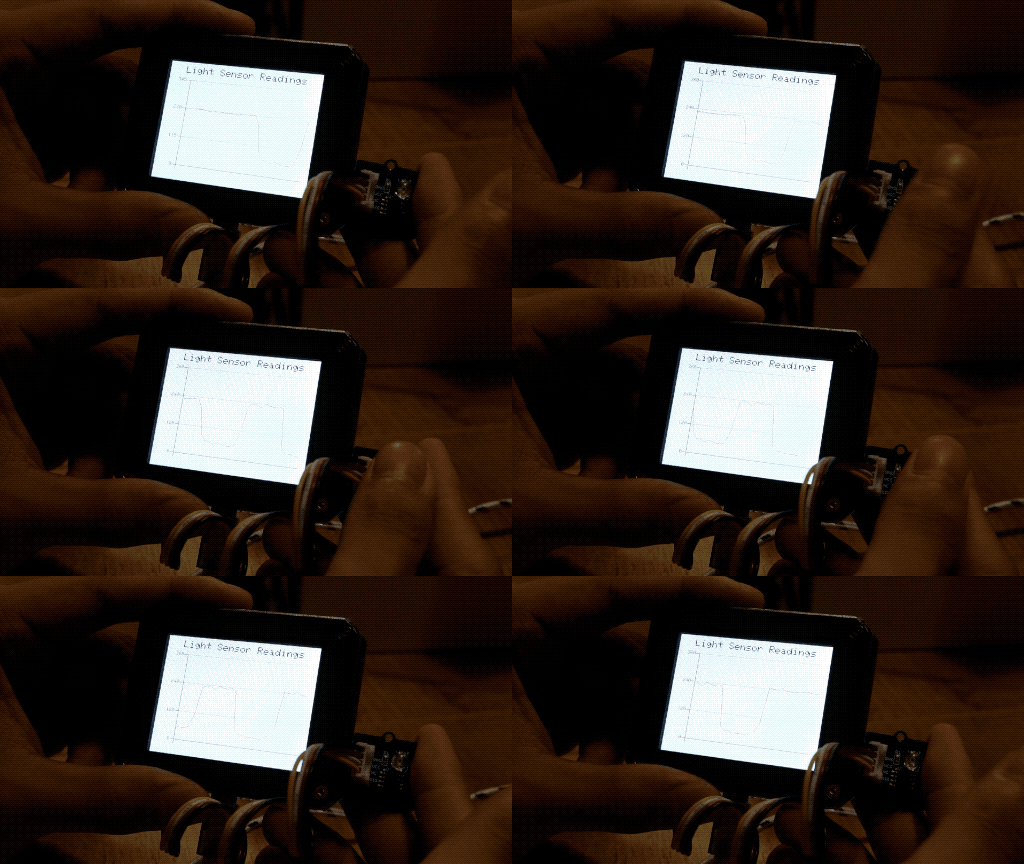
Este exemplo demonstra o uso das funções de gráfico de linha para exibir a leitura do sensor Grove - Light no Wio Terminal, assim como o Serial Plotter! Além disso, os dados do sensor de luz são armazenados no cartão SD.
Recursos
- Ler valores do sensor de luz e plotá‑los em um gráfico de linha
Bibliotecas Arduino necessárias
-
Instale a biblioteca de gráfico de linha
Seeed_Arduino_Linechart. Para mais informações, visite Line Charts. -
Instale a biblioteca SD. Para mais informações, visite FS.
Instruções Arduino
-
É altamente recomendado ler primeiro Line Charts antes de testar este código de exemplo.
-
Baixe o arquivo
LightReadings.inoe faça o upload para o seu Wio Terminal através daArduino IDE. Certifique‑se de que você instalou todas as bibliotecas. -
Altere o brilho do ambiente e veja as mudanças no gráfico de linhas!
-
A leitura analógica pode ser encontrada no cartão SD em
Readings.txt
Código
- Inicializar LCD e porta analógica
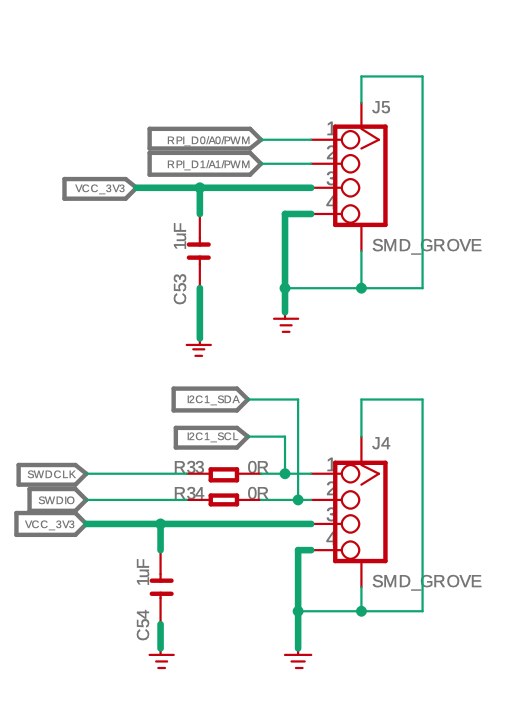
Como podemos ver, o Wio Terminal possui duas portas Grove, uma é a porta I2C padrão e a outra é configurável como Digital D0, D1 ou Analógica A0 e A1, bem como portas UART. Neste caso, é necessária a porta analógica, portanto ela é definida como entrada analógica.
Além disso, inicializando o cartão SD da seguinte forma:
#include <SPI.h>
#include <Seeed_FS.h>
#include "SD/Seeed_SD.h"
#include"seeed_line_chart.h" //include the library

File myFile;
TFT_eSPI tft;
TFT_eSprite spr = TFT_eSprite(&tft);  // Sprite

#define max_size 30 //maximum size of data
doubles data; //Initilising a doubles type to store data
int brightness;

void setup() {
    Serial.begin(115200);
    if (!SD.begin(SDCARD_SS_PIN, SDCARD_SPI)) {
        Serial.println("initialization failed!");
        while(1);
  }
    pinMode(A0, INPUT);
    tft.begin();
    tft.setRotation(3);
    spr.createSprite(TFT_HEIGHT,TFT_WIDTH);
}
- Ler valores do sensor e carregar dados
void loop() {
    spr.fillSprite(TFT_WHITE);
    brightness = analogRead(A0);
    int brightness = analogRead(LIGHT); //Reading light sensor values

    if (data.size() == max_size) {
        data.pop();//this is used to remove the first read variable
    }
    data.push(brightness); //Storing light sensor values
    saveData(); //Saving data to SD card
    ...
}
- Configurações de título
Consulte Line Charts para mais informações.
//Settings for the line graph title
auto header =  text(0, 0)
            .value("Light Sensor Readings")
            .align(center)
            .valign(vcenter)
            .width(tft.width())
            .thickness(2);

header.height(header.font_height() * 2);
header.draw(); //Header height is the twice the height of the font
- Configurações do gráfico de linha
Consulte Line Charts para mais informações.
//Settings for the line graph
auto content = line_chart(20, header.height()); //(x,y) where the line graph begins
        content
            .height(tft.height() - header.height() * 1.5) //actual height of the line chart
            .width(tft.width() - content.x() * 2) //actual width of the line chart
            .based_on(0.0) //Starting point of y-axis, must be a float
            .show_circle(false) //drawing a cirle at each point, default is on.
            .value(data) //passing through the data to line graph
            .color(TFT_RED) //Setting the color for the line
            .draw();

spr.pushSprite(0, 0);
- Gravando dados no cartão SD
Consulte Reading/Writing from the SD Card para mais informações.
void saveData(){
     myFile = SD.open("Readings.txt",FILE_APPEND);
     brightness = analogRead(A0);
     Serial.println(brightness);
     myFile.println(brightness);
     myFile.close();
}
Código completo
##include <SPI.h>
#include <Seeed_FS.h>
#include "SD/Seeed_SD.h"
#include"seeed_line_chart.h" //include the library

File myFile;
TFT_eSPI tft;
TFT_eSprite spr = TFT_eSprite(&tft);  // Sprite

#define max_size 30 //maximum size of data
doubles data; //Initilising a doubles type to store data
int brightness;

void setup() {
    Serial.begin(115200);
    if (!SD.begin(SDCARD_SS_PIN, SDCARD_SPI)) {
        Serial.println("initialization failed!");
        while(1);
  }
    pinMode(A0, INPUT);
    tft.begin();
    tft.setRotation(3);
    spr.createSprite(TFT_HEIGHT,TFT_WIDTH);
}

void loop() {
    spr.fillSprite(TFT_WHITE);
    brightness = analogRead(A0);

    if (data.size() == max_size) {
        data.pop();//this is used to remove the first read variable
    }
    data.push(brightness); //read variables and store in data
    saveData();

    //Settings for the line graph title
    auto header =  text(0, 0)
                .value("Light Sensor Readings")
                .align(center)
                .valign(vcenter)
                .width(tft.width())
                .thickness(2);

    header.height(header.font_height() * 2);
    header.draw(); //Header height is the twice the height of the font

  //Settings for the line graph
    auto content = line_chart(20, header.height()); //(x,y) where the line graph begins
         content
                .height(tft.height() - header.height() * 1.5) //actual height of the line chart
                .width(tft.width() - content.x() * 2) //actual width of the line chart
                .based_on(0.0) //Starting point of y-axis, must be a float
                .show_circle(false) //drawing a cirle at each point, default is on.
                .value(data) //passing through the data to line graph
                .color(TFT_RED) //Setting the color for the line
                .draw();

    spr.pushSprite(0, 0);
}

void saveData(){
     myFile = SD.open("Readings.txt",FILE_APPEND);
     brightness = analogRead(A0);
     Serial.println(brightness);
     myFile.println(brightness);
     myFile.close();
}