Implantação Eficiente de Motor de Inferência de Visão Multitarefa no Jetson
Introdução
Visual Perception Engine é um framework de ponta que revoluciona a percepção robótica ao eliminar computações redundantes por meio de redes de backbone compartilhadas. Diferentemente das abordagens tradicionais em que cada tarefa visual é executada de forma independente, o VPEngine usa um backbone de modelo base unificado (por exemplo, DINOv2) para extrair recursos de imagem apenas uma vez, que então são reutilizados por múltiplas cabeças de tarefa. Essa abordagem reduz significativamente a sobrecarga de memória e a transferência de dados CPU-GPU, ao mesmo tempo em que oferece suporte a agendamento dinâmico de tarefas e integração transparente com ROS2. Este wiki mostrará como usar o reComputer Robotics em conjunto com câmeras GMSL para implantar o Visual Perception Engine na borda.

Pré-requisitos
- reComputer Robotics (Jetson Orin NX 16GB) com JetPack 6.2
- GMSL Boar
- 3MP GMSL2 Camera
Destaques Técnicos
-
Eliminação de Computações Redundantes: As soluções tradicionais executam cada tarefa visual de forma independente, levando a pré-processamento de imagens e extração de recursos de backbone repetitivos. O VPEngine compartilha um backbone de modelo base unificado para extrair recursos de imagem apenas uma vez, que então são reutilizados por múltiplas cabeças de tarefa.
-
Redução de Sobrecarga de Memória e Transferência de Dados CPU-GPU: Todas as tarefas são executadas em paralelo na GPU, com recursos compartilhados diretamente por meio de ponteiros de memória da GPU. Isso evita cópias frequentes de dados GPU ↔ CPU, melhorando significativamente a eficiência.
-
Suporte a Agendamento Dinâmico de Tarefas: Diferentes tarefas podem ser configuradas com diferentes frequências de inferência (por exemplo, estimativa de profundidade a 50 Hz, segmentação semântica a 10 Hz) e ajustadas dinamicamente em tempo de execução para se adaptar às necessidades de percepção dos robôs em diferentes estágios.
-
Simplificação da Integração ao Sistema Robótico: Fornece nós ROS2 (Humble) em C++ para integração fácil em pilhas de software robótico existentes, oferecendo suporte à publicação de resultados via tópicos ROS e ao ajuste dinâmico de parâmetros.
Configuração do Ambiente
Passo 1. Instalar Conda
# Download and install Miniconda
wget https://repo.anaconda.com/miniconda/Miniconda3-latest-Linux-aarch64.sh
chmod +x Miniconda3-latest-Linux-aarch64.sh
./Miniconda3-latest-Linux-aarch64.sh
source ~/.bashrc
Passo 2. Criar e Ativar Ambiente
# Create v_engine environment
conda create -n v_engine python=3.10
conda activate v_engine
Passo 3. Instalar Torch, Torchvision e Verificar Disponibilidade do CUDA Baixe o arquivo wheel:
- torch
- torchvision
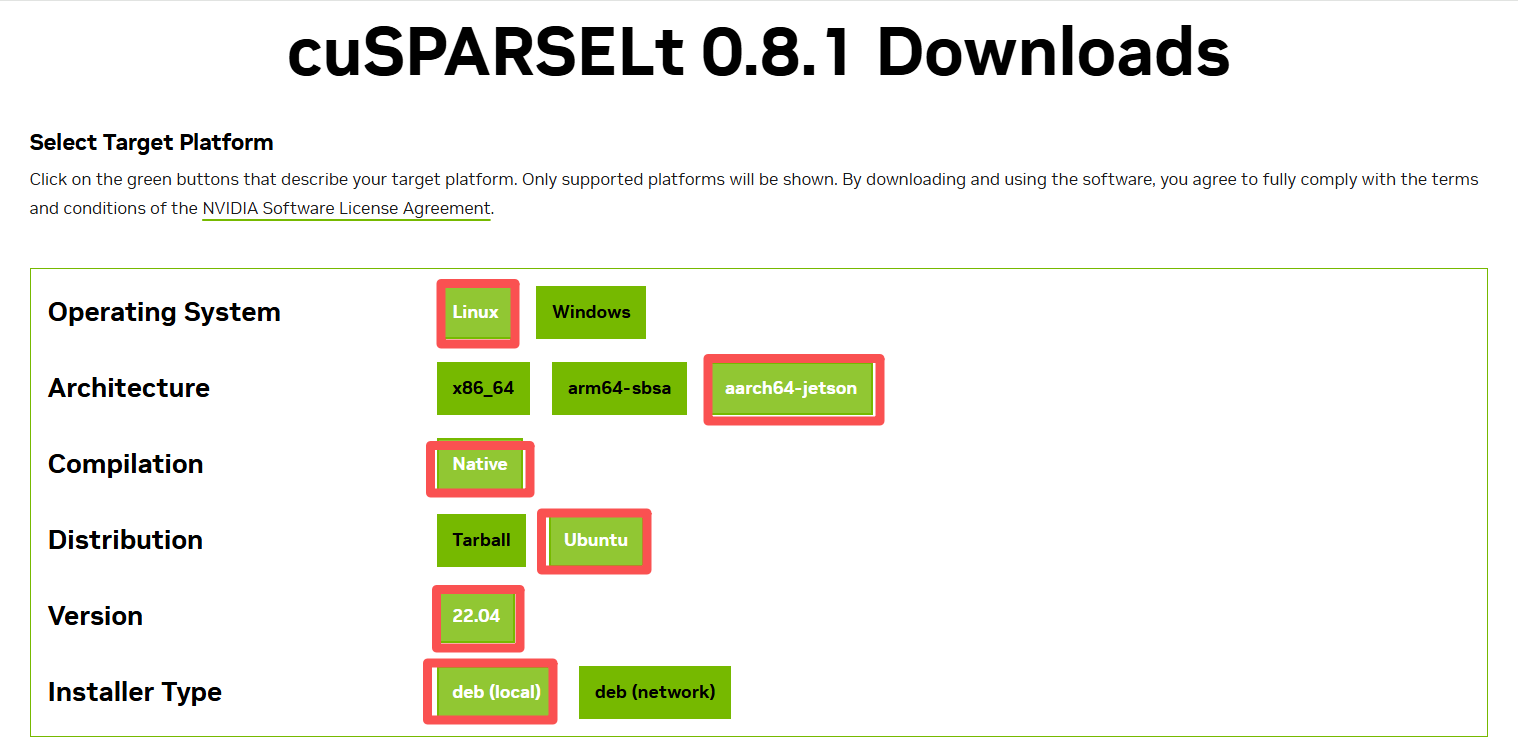
- O Jetpack 6.2 requer a instalação de algumas dependências. Primeiro, instale isto e depois use pip para instalar torch e torchvision. Siga as instruções na página para instalar: cuSPARSELt 0.8.1 Downloads | NVIDIA Developer
#test cuda is available
python -c "import torch; print(f'CUDA available: {torch.cuda.is_available()}'); print(f'CUDA version: {torch.version.cuda}')"
Saída Esperada:
CUDA available: True
CUDA version: 12.6
Passo 4. Atualizar pip e Instalar Ferramentas Básicas
# Upgrade pip
pip install --upgrade pip
# Install basic tools
pip install setuptools wheel
#Install Core Packages
pip install numpy>=1.26.4
pip install opencv-python>=4.8.0
pip install pillow>=9.0.0
pip install tqdm>=4.64.0
pip install matplotlib
pip install scipy
pip install psutil
python3 -m pip install colored
pip install torch-2.5.0a0+872d972e41.nv24.08-cp310-cp310-linux_aarch64.whl
pip install torchvision-0.20.0a0+afc54f7-cp310-cp310-linux_aarch64.whl
# Install ONNX packages
pip install onnx>=1.17.0
pip install onnxruntime>=1.21.0
pip install onnx_graphsurgeon>=0.5.6
# Install CUDA Python
pip install cuda-python==12.6.0
# Install development tools
pip install pytest
Passo 5. Configurar TensorRT e Verificar Instalação do TensorRT no Sistema
# Check TensorRT installation
find /usr -name "tensorrt" -type d 2>/dev/null | head -5

Saída Esperada: Deve exibir diretórios relacionados ao TensorRT
Passo 6. Vincular Módulos TensorRT
# Get Python package path
python -c "import sysconfig; print(sysconfig.get_paths()['purelib'])"

# Set up TensorRT links
PURELIB=$(python -c "import sysconfig; print(sysconfig.get_paths()['purelib'])")
ls -ld "$PURELIB" || mkdir -p "$PURELIB"

# Create symbolic links for TensorRT modules
for d in tensorrt tensorrt_dispatch tensorrt_lean; do
  ln -sfn "/usr/lib/python3.10/dist-packages/$d" "$PURELIB/$d"
done

# Set up system path
echo "/usr/lib/python3.10/dist-packages" > "$PURELIB/_system_tensorrt.pth"
export LD_LIBRARY_PATH=/usr/lib/aarch64-linux-gnu:${LD_LIBRARY_PATH}

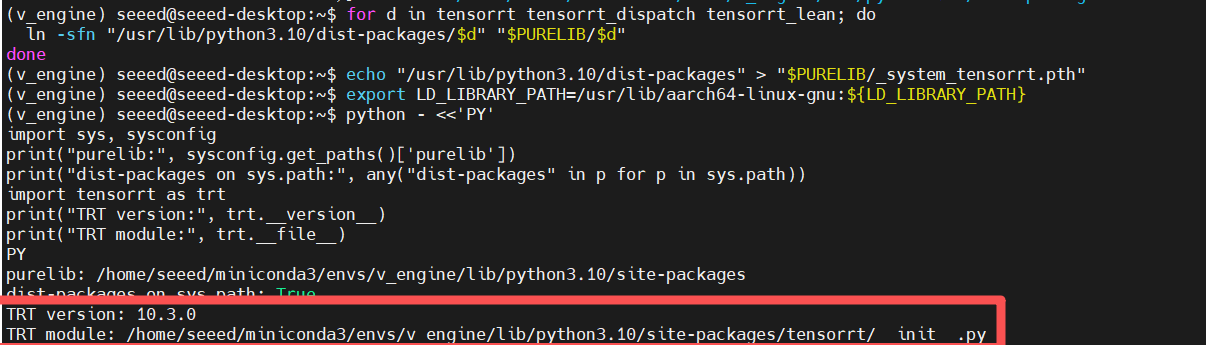
#Verify TensorRT import
python - <<'PY'

import sys, sysconfig

print("purelib:", sysconfig.get_paths()['purelib'])

print("dist-packages on sys.path:", any("dist-packages" in p for p in sys.path))

import tensorrt as trt

print("TRT version:", trt.__version__)

print("TRT module:", trt.__file__)

PY
Passo 7. Clonar e Instalar torch2trt
# Clone torch2trt repository
cd /tmp
git clone https://github.com/NVIDIA-AI-IOT/torch2trt.git
cd torch2trt

# Install torch2trt
pip install .

# Clean up
cd -
rm -rf /tmp/torch2trt
Passo 8. Corrigir Problemas de Compatibilidade de Biblioteca
Se você encontrar erros de símbolo GLIBCXX_3.4.30:

O arquivo libstdc++.so.6 no ambiente conda está desatualizado e não possui o símbolo GLIBCXX_3.4.30. No entanto, a biblioteca dinâmica TensorRT /usr/lib/aarch64-linux-gnu/libnvinfer.so.10 no sistema requer esse símbolo!
# Check library versions
strings $CONDA_PREFIX/lib/libstdc++.so.6 | grep GLIBCXX_3.4.30 || echo "conda don't have 3.4.30"
strings /usr/lib/aarch64-linux-gnu/libstdc++.so.6 | grep GLIBCXX_3.4.30 || echo "system don't have 3.4.30"

# Fix by using system libstdc++
LD_PRELOAD=/usr/lib/aarch64-linux-gnu/libstdc++.so.6 \
python -c "import tensorrt as trt; print(trt.__version__)"

# Add to environment variables
echo 'export LD_LIBRARY_PATH=/usr/lib/aarch64-linux-gnu:$LD_LIBRARY_PATH' >> ~/.bashrc
source ~/.bashrc

conda activate v_engine
python -c "import torch2trt; print('torch2trt installed successfully')"

# Replace conda libstdc++ with system version
echo $CONDA_PREFIX
mv $CONDA_PREFIX/lib/libstdc++.so.6 $CONDA_PREFIX/lib/libstdc++.so.6.bak
ln -s /usr/lib/aarch64-linux-gnu/libstdc++.so.6 $CONDA_PREFIX/lib/libstdc++.so.6
# Verify the fix
python -c "import tensorrt as trt, torch2trt; print('TRT', trt.__version__, 'torch2trt OK')"

Passo 9. Configurar CUDA MPS e Definir Variáveis de Ambiente CUDA
# Set CUDA environment variables
export CUDA_VISIBLE_DEVICES=0
export CUDA_MPS_PIPE_DIRECTORY=/tmp/nvidia-mps
export CUDA_MPS_LOG_DIRECTORY=/tmp/nvidia-mps/log
# Create MPS directories
mkdir -p $CUDA_MPS_PIPE_DIRECTORY $CUDA_MPS_LOG_DIRECTORY
Passo 10. Iniciar o Daemon do CUDA MPS
# Check for existing MPS processes
pgrep -f "nvidia-cuda-mps-control"

# Stop existing MPS processes (if any)
echo quit | nvidia-cuda-mps-control

# Start CUDA MPS daemon
nvidia-cuda-mps-control -d

# Verify MPS startup
pgrep -f "nvidia-cuda-mps-control"
Saída Esperada: Deve exibir o ID do processo
Passo 11. Testar Funcionalidade do CUDA MPS
# Test CUDA MPS
python -c "
import torch
if torch.cuda.is_available():
    print(f'CUDA available: {torch.cuda.get_device_name(0)}')
    x = torch.randn(100, 100).cuda()
    y = torch.randn(100, 100).cuda()
    z = torch.mm(x, y)
    print('GPU tensor operations working')
else:
    print('CUDA not available')
"
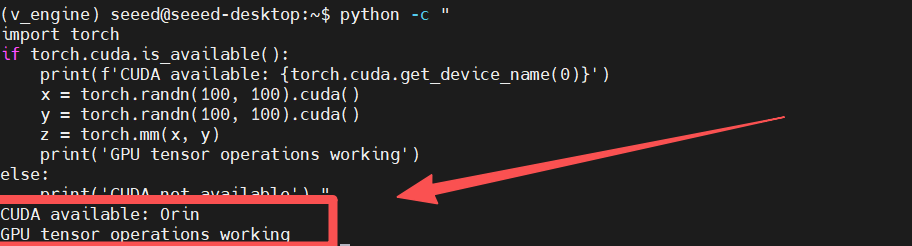
Resultado Esperado: Deve exibir a disponibilidade do CUDA e as operações da GPU funcionando
Passo 12. Instalar o Visual Perception Engine
# Enter project directory
git clone https://github.com/nasa-jpl/visual-perception-engine.git
cd /home/seeed/demo/visual-perception-engine
# Install without dependencies to avoid conflicts
export PYTHONNOUSERSITE=1
pip install --no-deps -e .
# Verify package installation
pip show vp_engine
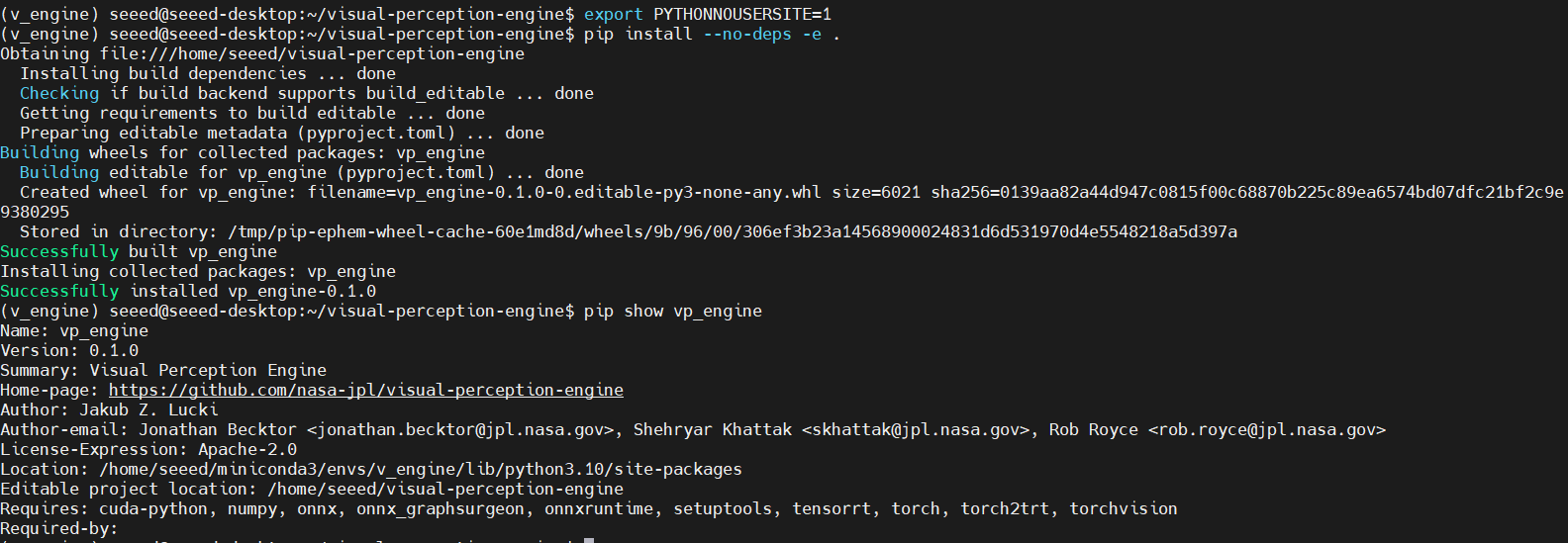
Resultado Esperado: Deve exibir as informações do pacote vp_engine
Passo 13. Baixar os Checkpoints do Modelo
# Create model directory
mkdir -p models/checkpoints
Você precisa baixar manualmente os arquivos de modelo a partir do seguinte link:
- Visite: https://drive.google.com/drive/folders/1SWMlEqOE_7EWPCkMloDTXG1_mZAmeW3-
- Baixe todos os arquivos de modelo necessários
- Coloque os arquivos no diretório
models/checkpoints/
Passo 14. Exportar Modelos para TensorRT
# Verify model files
ls -la models/checkpoints/
# Set environment variables
export PYTHONNOUSERSITE=1

# Install additional dependencies
python -m pip install "typing_extensions==4.12.2"
pip install mpmath tqdm jsonschema onnx_graphsurgeon onnxruntime
python3 -m pip install colored
#Export Models to TensorRT
python -c "
import vp_engine
print('Starting model export process...')
try:
    vp_engine.export_default_models()
    print('Model export completed successfully!')
except Exception as e:
    print(f'Model export failed: {e}')
    exit(1)
"
O processo de exportação do modelo é bastante demorado. Por favor, seja paciente e aguarde!

Passo 15. Executar o Teste de Instalação
Crie um script de teste abrangente para verificar a instalação:
test.py
#!/usr/bin/env python3
"""
Test script for Visual Perception Engine on JetPack 6.2
This script verifies that all components are properly installed and working.
"""

import sys
import os
import traceback
import time
import numpy as np
import cv2

def test_imports():
    """Test that all required packages can be imported."""
    print("Testing package imports...")

    try:
        import torch
        print(f"✓ PyTorch {torch.__version__}")
    except ImportError as e:
        print(f"✗ PyTorch import failed: {e}")
        return False

    try:
        import torchvision
        print(f"✓ TorchVision {torchvision.__version__}")
    except ImportError as e:
        print(f"✗ TorchVision import failed: {e}")
        return False

    try:
        import onnx
        print(f"✓ ONNX {onnx.__version__}")
    except ImportError as e:
        print(f"✗ ONNX import failed: {e}")
        return False

    try:
        import onnxruntime
        print(f"✓ ONNXRuntime {onnxruntime.__version__}")
    except ImportError as e:
        print(f"✗ ONNXRuntime import failed: {e}")
        return False

    try:
        import tensorrt as trt
        print(f"✓ TensorRT {trt.__version__}")
    except ImportError as e:
        print(f"✗ TensorRT import failed: {e}")
        return False

    try:
        import torch2trt
        print("✓ torch2trt")
    except ImportError as e:
        print(f"✗ torch2trt import failed: {e}")
        return False

    try:
        import cuda
        print("✓ CUDA Python")
    except ImportError as e:
        print(f"✗ CUDA Python import failed: {e}")
        return False

    return True

def test_cuda():
    """Test CUDA functionality."""
    print("\nTesting CUDA functionality...")

    try:
        import torch

        if not torch.cuda.is_available():
            print("✗ CUDA not available")
            return False

        print(f"✓ CUDA available: {torch.cuda.get_device_name(0)}")
        print(f"✓ CUDA version: {torch.version.cuda}")
        print(f"✓ GPU memory: {torch.cuda.get_device_properties(0).total_memory / 1024**3:.1f} GB")

        # Test basic tensor operations
        x = torch.randn(1000, 1000).cuda()
        y = torch.randn(1000, 1000).cuda()
        z = torch.mm(x, y)
        print("✓ GPU tensor operations working")

        return True

    except Exception as e:
        print(f"✗ CUDA test failed: {e}")
        return False

def test_vp_engine_import():
    """Test Visual Perception Engine import."""
    print("\nTesting Visual Perception Engine import...")

    try:
        # Add current directory to path
        sys.path.insert(0, os.path.dirname(os.path.abspath(__file__)))

        from src.vp_engine import Engine
        print("✓ Visual Perception Engine imported successfully")

        return True

    except Exception as e:
        print(f"✗ Visual Perception Engine import failed: {e}")
        traceback.print_exc()
        return False

def test_model_registry():
    """Test model registry functionality."""
    print("\nTesting model registry...")

    try:
        from src.model_management.registry import ModelRegistry

        # Check if registry file exists
        registry_path = "model_registry/registry.jsonl"
        if not os.path.exists(registry_path):
            print("⚠ Model registry file not found - models not exported yet")
            return True

        registry = ModelRegistry(registry_path)
        models = registry.get_registered_models()
        print(f"✓ Model registry loaded: {len(models)} models found")

        return True

    except Exception as e:
        print(f"✗ Model registry test failed: {e}")
        return False

def test_config():
    """Test configuration loading."""
    print("\nTesting configuration...")

    try:
        from src.vp_engine.config import Config

        config_path = "configs/default.json"
        if not os.path.exists(config_path):
            print(f"✗ Configuration file not found: {config_path}")
            return False

        config = Config(config_path)
        print("✓ Configuration loaded successfully")

        return True

    except Exception as e:
        print(f"✗ Configuration test failed: {e}")
        return False

def test_cuda_mps():
    """Test CUDA MPS functionality."""
    print("\nTesting CUDA MPS...")

    try:
        import torch

        # Check if MPS is enabled
        if 'CUDA_MPS_PIPE_DIRECTORY' in os.environ:
            print("✓ CUDA MPS environment variables set")
        else:
            print("⚠ CUDA MPS environment variables not set")

        # Test multi-process CUDA usage (simplified test)
        import multiprocessing as mp

        # Simple test without complex function pickling
        try:
            # Test basic CUDA operations in current process
            x = torch.randn(100, 100).cuda()
            y = torch.randn(100, 100).cuda()
            z = torch.mm(x, y)
            result = z.sum().item()
            print("✓ CUDA operations working in current process")

            # Test if MPS is enabled by checking environment
            if 'CUDA_MPS_PIPE_DIRECTORY' in os.environ:
                print("✓ CUDA MPS environment variables set")
            else:
                print("⚠ CUDA MPS environment variables not set")

        except Exception as e:
            print(f"✗ CUDA operations failed: {e}")
            return False
        return True

    except Exception as e:
        print(f"✗ CUDA MPS test failed: {e}")
        return False

def test_opencv():
    """Test OpenCV functionality."""
    print("\nTesting OpenCV...")

    try:
        import cv2
        print(f"✓ OpenCV {cv2.__version__}")

        # Test image operations
        img = np.random.randint(0, 255, (480, 640, 3), dtype=np.uint8)
        resized = cv2.resize(img, (1920, 1080))
        print("✓ OpenCV image operations working")

        return True

    except Exception as e:
        print(f"✗ OpenCV test failed: {e}")
        return False

def main():
    """Run all tests."""
    print("=" * 60)
    print("Visual Perception Engine - JetPack 6.2 Installation Test")
    print("=" * 60)

    tests = [
        test_imports,
        test_cuda,
        test_opencv,
        test_cuda_mps,
        test_vp_engine_import,
        test_config,
        test_model_registry,
    ]

    passed = 0
    total = len(tests)

    for test in tests:
        try:
            if test():
                passed += 1
        except Exception as e:
            print(f"✗ Test {test.__name__} failed with exception: {e}")
            traceback.print_exc()

    print("\n" + "=" * 60)
    print(f"Test Results: {passed}/{total} tests passed")
    print("=" * 60)

    if passed == total:
        print("🎉 All tests passed! Visual Perception Engine is ready to use.")
        return 0
    else:
        print("⚠ Some tests failed. Please check the installation.")
        return 1

if __name__ == "__main__":
    sys.exit(main())
Resultado Esperado:
============================================================
Visual Perception Engine - JetPack 6.2 Installation Test
============================================================
Testing package imports...
✓ PyTorch 2.5.0a0+872d972e41.nv24.08
✓ TorchVision 0.20.0a0+afc54f7
✓ ONNX 1.19.0
✓ ONNXRuntime 1.22.1
✓ TensorRT 10.3.0
✓ torch2trt
✓ CUDA Python

Testing CUDA functionality...
✓ CUDA available: Orin
✓ CUDA version: 12.6
✓ GPU memory: 15.3 GB
✓ GPU tensor operations working

Testing OpenCV...
✓ OpenCV 4.12.0
✓ OpenCV image operations working

Testing CUDA MPS...
✓ CUDA operations working in current process

Testing Visual Perception Engine import...
✓ Visual Perception Engine imported successfully

Testing configuration...
✓ Configuration loaded successfully

Testing model registry...
✓ Model registry loaded: 17 models found

============================================================
Test Results: 7/7 tests passed
============================================================
🎉 All tests passed! Visual Perception Engine is ready to use.
Etapa 16. Definir variáveis de ambiente persistentes:
# Add environment variables to .bashrc
echo 'export CUDA_VISIBLE_DEVICES=0' >> ~/.bashrc
echo 'export CUDA_MPS_PIPE_DIRECTORY=/tmp/nvidia-mps' >> ~/.bashrc
echo 'export CUDA_MPS_LOG_DIRECTORY=/tmp/nvidia-mps/log' >> ~/.bashrc

# Reload configuration
source ~/.bashrc
Teste de Desempenho
Você pode preparar quatro vídeos e colocá-los no diretório resources. Em seguida, execute o seguinte script:
demo.py
#!/usr/bin/env python3
"""
Video Demo Script for Visual Perception Engine
This script demonstrates real-time inference performance of the Visual Perception Engine framework
for multiple models (depth estimation, semantic segmentation, object detection) on Jetson Orin NX 16GB.
Supports processing multiple video files simultaneously with different models.
Usage:
# Use all 4 videos from resources folder with 4 models
python video_multi_task_inference.py --use-resources
# Maximum performance mode (ultra-high FPS)
python video_multi_task_inference.py \
--videos resources/demo1.mp4 resources/demo2.mp4 resources/demo3.mp4 resources/demo4.mp4 \
--models depth segmentation segmentation depth \
--resolution 640x480 \
--fast-mode
# Performance mode (high FPS with good quality)
python video_multi_task_inference.py \
--videos resources/demo1.mp4 resources/demo2.mp4 resources/demo3.mp4 resources/demo4.mp4 \
--models depth segmentation segmentation depth \
--resolution 640x480 \
--performance-mode
# Use specific models with resources videos
python video_multi_task_inference.py --use-resources --models depth segmentation
# Use custom videos
python video_multi_task_inference.py --videos video1.mp4 video2.mp4 --models depth segmentation
"""
import os
import sys
import cv2
import time
import json
import argparse
import threading
import numpy as np
# Torch imports removed - not needed for VPE-only demo
from collections import deque
from typing import Dict, List, Tuple, Optional
from pathlib import Path
# Add the src directory to Python path
sys.path.append(os.path.join(os.path.dirname(__file__), 'src'))
from vp_engine import Engine
class FPSCounter:
"""Simple FPS counter with moving average."""
def __init__(self, window_size: int = 10): # Smaller window for more responsive FPS
self.window_size = window_size
self.timestamps = deque(maxlen=window_size)
self.last_fps = 0.0
def tick(self):
"""Record a new frame timestamp."""
self.timestamps.append(time.time())
def get_fps(self) -> float:
"""Get current FPS based on moving window."""
if len(self.timestamps) < 2:
return self.last_fps
# Calculate FPS based on recent frames
time_diff = self.timestamps[-1] - self.timestamps[0]
if time_diff <= 0:
return self.last_fps
# Calculate FPS and smooth it
current_fps = (len(self.timestamps) - 1) / time_diff
# Smooth the FPS to avoid jitter
if self.last_fps == 0:
self.last_fps = current_fps
else:
# Exponential moving average for smoother display
self.last_fps = 0.7 * self.last_fps + 0.3 * current_fps
return self.last_fps
class VideoProcessor:
"""Process videos with VPE framework - flexible model count."""
def __init__(self, model_configs: dict, registry_path: str, input_resolution: tuple = (960, 640)):
self.model_configs = model_configs # {'model_name': {'config_path': str, 'video_path': str, 'display_name': str}}
self.registry_path = registry_path
self.input_resolution = input_resolution # (width, height)
# FPS counters for all models
self.fps_counters = {}
self.results = {}
# Result caching to prevent flickering
self.last_valid_results = {}
self.result_stability_count = {}
for model_name in self.model_configs.keys():
self.fps_counters[model_name] = FPSCounter()
self.results[model_name] = []
self.last_valid_results[model_name] = None
self.result_stability_count[model_name] = 0
def create_config_files(self):
"""Create configuration files for all models dynamically."""
# Common foundation model config
foundation_config = {
"preprocessing_function": "DINOV2PreprocessingTorch",
"canonical_name": "DinoFoundationModel_fp16_tensorrt__encoder_size_vits__ignore_xformers_True",
"alias": "DINOV2",
"rate": 100
}
common_settings = {
"logging": {"log_level": "INFO", "log_to_console": False},
"canonical_image_shape_hwc": [self.input_resolution[1], self.input_resolution[0], 3],
"queue_sizes": {"input": 2, "intermediate": 2, "output": 10}
}
# Model definitions
model_definitions = {
'depth': {
"model_heads": [{
"canonical_name": "DepthAnythingV2Head_fp16_tensorrt__encoder_size_vits",
"alias": "DepthAnythingV2DepthHead",
"postprocessing_function": "ResizeAndToCV2ImageWithVisualization",
"rate": 100
}],
"log_file": "depth_log.txt",
"output_dir": "runs/depth_test"
},
'segmentation': {
"model_heads": [{
"canonical_name": "SemanticSegmentationHead_fp16_tensorrt__encoder_size_vits__dataset_voc2012",
"alias": "SemanticSegmentationHead",
"postprocessing_function": "SemSegPostprocessingWithVisualizationVOC2012",
"rate": 100
}],
"log_file": "seg_log.txt",
"output_dir": "runs/seg_test"
},
'detection': {
"model_heads": [{
"canonical_name": "ObjectDetectionHead_fp16_torch__encoder_size_vits",
"alias": "ObjectDetectionHead",
"rate": 100
}],
"log_file": "detection_log.txt",
"output_dir": "runs/detection_test"
},
'segmentation2': {
"model_heads": [{
"canonical_name": "SemanticSegmentationHead_fp16_tensorrt__encoder_size_vits__dataset_ade20k",
"alias": "SemanticSegmentationHead2",
"postprocessing_function": "SemSegPostprocessingWithVisualizationADE20K",
"rate": 100
}],
"log_file": "seg2_log.txt",
"output_dir": "runs/seg2_test"
}
}
# Create configs for each model
for model_name, model_config in self.model_configs.items():
# Use the original model type for configuration
model_type = model_config.get('model_type', model_name)
if model_type not in model_definitions:
print(f"Warning: Unknown model type '{model_name}', skipping...")
continue
model_def = model_definitions[model_type]
config = {
"foundation_model": foundation_config.copy(),
"model_heads": model_def["model_heads"],
**common_settings,
"logging": {**common_settings["logging"], "log_file": model_def["log_file"]},
"output_dir": model_def["output_dir"]
}
# Write config file
with open(model_config['config_path'], 'w') as f:
json.dump(config, f, indent=2)
def setup_vpe_engines(self):
"""Setup all VPE engines dynamically."""
self.engines = {}
for model_name, model_config in self.model_configs.items():
display_name = model_config.get('display_name', model_name)
print(f"Setting up VPE {display_name} engine...")
engine = Engine(model_config['config_path'], self.registry_path)
engine.build()
engine.start_inference()
self.engines[model_name] = engine
print(f"All {len(self.engines)} VPE engines ready!")
def process_videos(self, max_frames: int = 300, display: bool = True, performance_mode: bool = False, smooth_mode: bool = False, display_interval: int = 1, fast_mode: bool = False):
"""Process videos with VPE framework - optimized for high performance."""
# Open video captures for all videos
caps = {}
for model_name, model_config in self.model_configs.items():
video_path = model_config['video_path']
caps[model_name] = cv2.VideoCapture(video_path)
if not caps[model_name].isOpened():
raise RuntimeError(f"Failed to open video file: {video_path}")
print(f"Opened {len(caps)} video files successfully")
frame_count = 0
start_time = time.time()
print(f"Processing videos (max {max_frames} frames)...")
if performance_mode:
print("Performance mode: Maximum speed, reduced display overhead")
elif smooth_mode:
print("Smooth mode: Balanced performance and display")
else:
print("Normal mode: Good balance of speed and quality")
print("Press 'q' to quit early")
# Performance optimization settings
num_models = len(self.model_configs)
if fast_mode:
print("Fast mode: Ultra-high speed with minimal processing")
elif performance_mode:
print("Performance mode: Maximum speed with real-time visualization")
elif smooth_mode:
print("Smooth mode: Balanced performance and display quality")
else:
print("Normal mode: Good balance of speed and quality")
try:
while frame_count < max_frames:
# Read frames from all videos
frames = {}
all_ret = True
for model_name, cap in caps.items():
ret, frame = cap.read()
if not ret:
all_ret = False
break
frames[model_name] = frame
if not all_ret:
break
frame_count += 1
# Resize all frames to specified size for faster inference
# Use INTER_LINEAR for better performance
for model_name, frame in frames.items():
frames[model_name] = cv2.resize(frame, self.input_resolution, interpolation=cv2.INTER_LINEAR)
# Process all models in real-time (immediate processing for visualization)
results = {}
# Process each model immediately for real-time visualization
for model_name, frame in frames.items():
try:
# Always tick FPS counter for each frame processed
self.fps_counters[model_name].tick()
# Submit and get result immediately
current_time = time.time()
self.engines[model_name].input_image(frame, current_time)
# Adjust delay based on performance mode and stability
stability_factor = min(1.0, self.result_stability_count[model_name] * 0.1)
if fast_mode:
base_delay = 0.0002
elif performance_mode:
base_delay = 0.0005
elif smooth_mode:
base_delay = 0.001
else:
base_delay = 0.002
# Increase delay slightly if we're getting unstable results
adjusted_delay = base_delay * (1.0 + stability_factor)
time.sleep(adjusted_delay)
# Get result immediately
result = self.engines[model_name].get_head_output(0)
if result is not None:
# Update valid result and reset stability counter
self.last_valid_results[model_name] = result
self.result_stability_count[model_name] = 0
results[model_name] = result
else:
# No new result, use cached result if available
if self.last_valid_results[model_name] is not None:
results[model_name] = self.last_valid_results[model_name]
self.result_stability_count[model_name] += 1
else:
# No cached result, create placeholder
results[model_name] = None
except Exception as e:
if "CUDA" not in str(e):
print(f"Error processing {model_name}: {e}")
# Use cached result on error
if self.last_valid_results[model_name] is not None:
results[model_name] = self.last_valid_results[model_name]
# Display results every frame for real-time visualization
if display:
if fast_mode:
# Fast mode: ultra-minimal display processing
self.display_results(frames, results, skip_heavy_processing=True)
elif performance_mode:
# Performance mode: minimal display processing
self.display_results(frames, results, skip_heavy_processing=True)
elif smooth_mode:
# Smooth mode: display with reduced processing
self.display_results(frames, results, skip_heavy_processing=True)
else:
# Normal mode: full display
self.display_results(frames, results)
# Check for quit with minimal wait
if cv2.waitKey(1) & 0xFF == ord('q'):
break
# Record FPS every 10 frames
if frame_count % 10 == 0:
self.record_fps_stats(frame_count, time.time() - start_time)
finally:
# Release all video captures
for cap in caps.values():
cap.release()
cv2.destroyAllWindows()
# Final statistics
self.print_final_stats(frame_count, time.time() - start_time)
def process_vpe_model(self, model_name: str, frame: np.ndarray) -> Optional[np.ndarray]:
"""Process frame with specified VPE model."""
try:
# Input image with timestamp
timestamp = time.time()
self.engines[model_name].input_image(frame, timestamp)
# Try to get output
time.sleep(0.01) # Small delay to allow processing
result = self.engines[model_name].get_head_output(0)
if result is not None:
self.fps_counters[model_name].tick()
return result
except Exception as e:
print(f"VPE {model_name} error: {e}")
return None
def display_results(self, frames: dict, results: dict, skip_display=False, skip_heavy_processing=False):
"""Display VPE results for all models - optimized for performance."""
if skip_display:
return
# Skip heavy processing in performance/fast mode
if skip_heavy_processing:
# Minimal processing for maximum speed
# Skip some expensive operations like detailed text rendering
pass
# Calculate grid layout based on number of models
# New layout: 2 rows x N columns (first row: input videos, second row: results)
num_models = len(self.model_configs)
if num_models == 1:
cols = 1
rows = 2 # 1 column, 2 rows
elif num_models == 2:
cols = 2
rows = 2 # 2 columns, 2 rows
elif num_models == 3:
cols = 3
rows = 2 # 3 columns, 2 rows
elif num_models == 4:
cols = 4
rows = 2 # 4 columns, 2 rows
else:
cols = min(num_models, 4) # Max 4 columns
rows = 2
# Optimized display sizes for 2-row layout with larger windows
if num_models == 1:
display_height = 600
display_width = 800
elif num_models == 2:
display_height = 500
display_width = 700
elif num_models == 3:
display_height = 400 # Larger for better visibility
display_width = 600
elif num_models == 4:
display_height = 350 # Larger for 4 models in 2x4 grid
display_width = 500
else:
display_height = 400
display_width = 500
# Process all frames and results - separate input and result rows
input_images = [] # First row: input videos
result_images = [] # Second row: inference results
for model_name, model_config in self.model_configs.items():
# Input frame
frame = frames[model_name]
frame_small = cv2.resize(frame, (display_width, display_height))
# Result frame with stability improvements
result = results.get(model_name)
if result is not None:
# Handle different result types
if isinstance(result, np.ndarray):
# Image result (depth, segmentation)
result_disp = cv2.resize(result, (display_width, display_height))
elif isinstance(result, list) and len(result) == 3:
# Object detection result [labels, scores, boxes]
# Create a visualization for object detection on the input frame
result_disp = self.visualize_object_detection_on_frame(result, frame_small, display_width, display_height)
else:
# Unknown result type - show last frame instead of black
if self.last_valid_results[model_name] is not None and isinstance(self.last_valid_results[model_name], np.ndarray):
result_disp = cv2.resize(self.last_valid_results[model_name], (display_width, display_height))
else:
result_disp = frame_small.copy() # Show input frame instead of black
# Calculate appropriate font size for processing text
font_scale = max(0.6, min(1.0, display_width / 400.0))
thickness = max(1, int(font_scale * 2))
cv2.putText(result_disp, "Processing...", (50, display_height//2),
cv2.FONT_HERSHEY_SIMPLEX, font_scale, (255, 255, 255), thickness)
else:
# No result - show last valid result or input frame instead of black
if self.last_valid_results[model_name] is not None and isinstance(self.last_valid_results[model_name], np.ndarray):
result_disp = cv2.resize(self.last_valid_results[model_name], (display_width, display_height))
# No overlay - clean display
else:
# Show input frame with processing indicator
result_disp = frame_small.copy()
# Calculate appropriate font size for initializing text
font_scale = max(0.6, min(1.0, display_width / 400.0))
thickness = max(1, int(font_scale * 2))
cv2.putText(result_disp, "Initializing...", (50, display_height//2),
cv2.FONT_HERSHEY_SIMPLEX, font_scale, (255, 255, 255), thickness)
# Add text labels and FPS (optimized for performance and visibility)
def add_text(img, text, fps=None, status="running"):
# Calculate font size based on image dimensions for better visibility
img_height, img_width = img.shape[:2]
base_font_scale = max(0.4, min(1.2, img_width / 500.0)) # Scale with image size, range 0.4-1.2
if skip_heavy_processing:
# Fast/Performance mode: larger font for visibility
font_scale = base_font_scale * 0.8
thickness = max(2, int(base_font_scale * 2))
font = cv2.FONT_HERSHEY_SIMPLEX
else:
# Normal mode: better text quality with larger font
font_scale = base_font_scale
thickness = max(2, int(base_font_scale * 2.5))
font = cv2.FONT_HERSHEY_SIMPLEX
img = img.copy()
# No background rectangle - clean text display
# Status indicator with high contrast colors
if status == "cached":
color = (0, 255, 255) # Yellow for cached
status_text = " (cached)"
elif status == "processing":
color = (0, 255, 0) # Green for processing
else:
color = (255, 255, 255) # White for better visibility
status_text = ""
# Main text
cv2.putText(img, text, (5, 20), font, font_scale, color, thickness)
# FPS text with high contrast color
if fps is not None:
fps_text = f"{fps:.0f} fps"
cv2.putText(img, fps_text, (5, 40), font, font_scale * 0.8, (255, 255, 0), thickness)
return img
# Simplified display names - short task type
task_short = {
'depth': 'DEPTH',
'segmentation': 'SEG',
'detection': 'DET',
'segmentation2': 'SEG2'
}.get(model_name, model_name.upper())
# Input frame - no text overlay, just clean video
frame_with_text = frame_small
# Determine status for result display
if result is not None:
status = "processing"
elif self.last_valid_results[model_name] is not None:
status = "cached"
else:
status = "initializing"
# Result frame - show text with task name and FPS
result_with_text = add_text(result_disp, f"{task_short}",
self.fps_counters[model_name].get_fps(), status)
# Add to separate rows
input_images.append(frame_with_text)
result_images.append(result_with_text)
# Create 2-row grid layout (input row + result row)
# First row: input videos, Second row: inference results
# Pad input images to match number of columns
while len(input_images) < cols:
input_images.append(np.zeros((display_height, display_width, 3), dtype=np.uint8))
# Pad result images to match number of columns
while len(result_images) < cols:
result_images.append(np.zeros((display_height, display_width, 3), dtype=np.uint8))
# Create the two rows
input_row = np.hstack(input_images[:cols]) # First row: input videos
result_row = np.hstack(result_images[:cols]) # Second row: inference results
# Combine rows vertically
full_display = np.vstack([input_row, result_row])
# Scale down if the display is too large for screen
max_width = 1920 # Maximum display width
if full_display.shape[1] > max_width:
scale_factor = (max_width / full_display.shape[1]) * 0.8
new_height = int(full_display.shape[0] * scale_factor)
new_width = int(full_display.shape[1] * scale_factor)
full_display = cv2.resize(full_display, (new_width, new_height), interpolation=cv2.INTER_LINEAR)
cv2.imshow(f"VPE Demo - {num_models} Models (2x{cols} Layout)", full_display)
def visualize_object_detection_on_frame(self, detection_result, input_frame, width, height):
"""Create visualization for object detection results on the input frame."""
labels, scores, boxes = detection_result
# Start with the input frame
canvas = input_frame.copy()
# Draw detection info as text overlay
y_offset = 30
cv2.putText(canvas, f"Detections: {len(labels)}", (10, y_offset),
cv2.FONT_HERSHEY_SIMPLEX, 0.6, (0, 255, 0), 2)
if len(labels) > 0:
# Draw boxes if available
if len(boxes) > 0 and boxes.shape[1] == 4:
# Draw bounding boxes on the input frame
for i, box in enumerate(boxes[:10]): # Show first 10 boxes
if len(box) == 4:
x1, y1, x2, y2 = box
# Convert normalized coordinates to pixel coordinates
x1 = int(x1 * width)
y1 = int(y1 * height)
x2 = int(x2 * width)
y2 = int(y2 * height)
# Ensure coordinates are within bounds
x1 = max(0, min(x1, width-1))
y1 = max(0, min(y1, height-1))
x2 = max(0, min(x2, width-1))
y2 = max(0, min(y2, height-1))
# Draw rectangle with different colors
color = [(0, 255, 255), (255, 0, 255), (255, 255, 0), (0, 255, 0), (255, 0, 0),
(255, 128, 0), (128, 255, 0), (0, 128, 255), (255, 0, 128), (128, 0, 255)][i % 10]
cv2.rectangle(canvas, (x1, y1), (x2, y2), color, 3)
# Draw label with background
label_text = f"Obj{i+1}: {scores[i]:.2f}"
label_size = cv2.getTextSize(label_text, cv2.FONT_HERSHEY_SIMPLEX, 0.5, 1)[0]
cv2.rectangle(canvas, (x1, y1-25), (x1 + label_size[0] + 5, y1), color, -1)
cv2.putText(canvas, label_text, (x1 + 2, y1-8),
cv2.FONT_HERSHEY_SIMPLEX, 0.5, (0, 0, 0), 1)
else:
y_offset += 30
cv2.putText(canvas, "No detections", (10, y_offset),
cv2.FONT_HERSHEY_SIMPLEX, 0.6, (255, 255, 255), 2)
return canvas
def visualize_object_detection(self, detection_result, width, height):
"""Create visualization for object detection results (legacy method)."""
labels, scores, boxes = detection_result
# Create a canvas with gradient background instead of black
canvas = np.zeros((height, width, 3), dtype=np.uint8)
# Add a subtle gradient background
for i in range(height):
canvas[i, :] = [int(20 + i * 0.1), int(20 + i * 0.1), int(40 + i * 0.1)]
# Draw detection info as text
y_offset = 30
cv2.putText(canvas, f"Detections: {len(labels)}", (10, y_offset),
cv2.FONT_HERSHEY_SIMPLEX, 0.6, (0, 255, 0), 2)
if len(labels) > 0:
y_offset += 30
cv2.putText(canvas, f"Labels: {labels.flatten()[:5]}", (10, y_offset),
cv2.FONT_HERSHEY_SIMPLEX, 0.5, (255, 255, 255), 1)
y_offset += 25
scores_text = ", ".join([f"{s:.2f}" for s in scores.flatten()[:5]])
cv2.putText(canvas, f"Scores: {scores_text}", (10, y_offset),
cv2.FONT_HERSHEY_SIMPLEX, 0.5, (255, 255, 255), 1)
# Draw boxes if available
if len(boxes) > 0 and boxes.shape[1] == 4:
y_offset += 25
cv2.putText(canvas, f"Boxes: {boxes.shape[0]} found", (10, y_offset),
cv2.FONT_HERSHEY_SIMPLEX, 0.5, (255, 255, 255), 1)
# Draw sample boxes with better visualization
for i, box in enumerate(boxes[:5]): # Show first 5 boxes
if len(box) == 4:
x1, y1, x2, y2 = box
# Convert normalized coordinates to pixel coordinates
x1 = int(x1 * width)
y1 = int(y1 * height)
x2 = int(x2 * width)
y2 = int(y2 * height)
# Ensure coordinates are within bounds
x1 = max(0, min(x1, width-1))
y1 = max(0, min(y1, height-1))
x2 = max(0, min(x2, width-1))
y2 = max(0, min(y2, height-1))
# Draw rectangle with different colors
color = [(0, 255, 255), (255, 0, 255), (255, 255, 0), (0, 255, 0), (255, 0, 0)][i % 5]
cv2.rectangle(canvas, (x1, y1), (x2, y2), color, 3)
# Draw label with background
label_text = f"Obj{i+1}: {scores[i]:.2f}"
label_size = cv2.getTextSize(label_text, cv2.FONT_HERSHEY_SIMPLEX, 0.5, 1)[0]
cv2.rectangle(canvas, (x1, y1-25), (x1 + label_size[0] + 5, y1), color, -1)
cv2.putText(canvas, label_text, (x1 + 2, y1-8),
cv2.FONT_HERSHEY_SIMPLEX, 0.5, (0, 0, 0), 1)
else:
y_offset += 30
cv2.putText(canvas, "No detections", (10, y_offset),
cv2.FONT_HERSHEY_SIMPLEX, 0.6, (255, 255, 255), 2)
return canvas
def record_fps_stats(self, frame_count: int, elapsed_time: float):
"""Record FPS statistics for all models."""
overall_fps = frame_count / elapsed_time
stats = {
'frame': frame_count,
'elapsed_time': elapsed_time,
'overall_fps': overall_fps
}
# Collect FPS for all models
fps_info = []
for model_name, fps_counter in self.fps_counters.items():
fps = fps_counter.get_fps()
stats[f'{model_name}_fps'] = fps
fps_info.append(f"{model_name}: {fps:.1f}")
self.results[model_name].append(fps)
print(f"Frame {frame_count}: Overall FPS: {overall_fps:.1f}, " + ", ".join(fps_info))
def print_final_stats(self, total_frames: int, total_time: float):
"""Print final performance statistics for all models."""
print("\n" + "="*80)
print("VISUAL PERCEPTION ENGINE PERFORMANCE REPORT")
print("="*80)
overall_fps = total_frames / total_time
print(f"Total Frames Processed: {total_frames}")
print(f"Total Time: {total_time:.2f}s")
print(f"Overall Processing FPS: {overall_fps:.2f}")
print(f"\nVPE Model Performance ({len(self.model_configs)} models):")
# Calculate statistics for all models
model_stats = {}
for model_name, results in self.results.items():
if results:
avg_fps = np.mean(results)
max_fps = np.max(results)
model_stats[model_name] = {'avg': avg_fps, 'max': max_fps}
display_name = self.model_configs[model_name].get('display_name', model_name)
print(f"{display_name:<25} - Avg: {avg_fps:.2f} FPS, Max: {max_fps:.2f} FPS")
print("\nPerformance Summary:")
if model_stats:
# Calculate combined average
all_avg_fps = [stats['avg'] for stats in model_stats.values()]
combined_avg = np.mean(all_avg_fps)
print(f"Combined Average FPS: {combined_avg:.2f}")
# Performance assessment
if combined_avg > 25:
print("🚀 Excellent performance! Framework optimizations working well.")
elif combined_avg > 15:
print("✅ Good performance for real-time applications.")
elif combined_avg > 8:
print("⚠️ Moderate performance. Consider reducing resolution or model count.")
else:
print("❌ Low performance. Check GPU utilization and model complexity.")
# Individual model performance
print(f"\nModel Performance Ranking:")
sorted_models = sorted(model_stats.items(), key=lambda x: x[1]['avg'], reverse=True)
for i, (model_name, stats) in enumerate(sorted_models, 1):
display_name = self.model_configs[model_name].get('display_name', model_name)
print(f" {i}. {display_name}: {stats['avg']:.1f} FPS")
print("="*80)
def cleanup(self):
"""Cleanup resources."""
print("Stopping VPE engines...")
try:
if hasattr(self, 'engines'):
for model_name, engine in self.engines.items():
try:
print(f" Stopping {model_name} engine...")
engine.stop()
print(f" ✓ {model_name} engine stopped")
except Exception as e:
print(f" ⚠️ Error stopping {model_name} engine: {e}")
# Try to force stop if normal stop fails
try:
if hasattr(engine, 'force_stop'):
engine.force_stop()
print(f" ✓ {model_name} engine force stopped")
except:
pass
except Exception as e:
print(f" ⚠️ Error during cleanup: {e}")
print("Closing video captures...")
try:
if hasattr(self, 'video_captures'):
for video_path, cap in self.video_captures.items():
try:
cap.release()
print(f" ✓ Released {video_path}")
except Exception as e:
print(f" ⚠️ Error releasing {video_path}: {e}")
except Exception as e:
print(f" ⚠️ Error releasing video captures: {e}")
print("Closing OpenCV windows...")
try:
cv2.destroyAllWindows()
except Exception as e:
print(f" ⚠️ Error closing windows: {e}")
# Force garbage collection to help with cleanup
import gc
gc.collect()
print("Cleanup completed!")
def main():
parser = argparse.ArgumentParser(description="Flexible VPE Demo - Multiple Models")
parser.add_argument("--models", nargs="+",
choices=['depth', 'segmentation', 'detection', 'segmentation2'],
default=['depth', 'segmentation', 'detection', 'segmentation2'],
help="Models to run (depth, segmentation, detection, segmentation2)")
parser.add_argument("--videos", nargs="+",
help="Video files (one per model, in same order as --models)")
parser.add_argument("--use-resources", action="store_true",
help="Use all 4 videos from resources/ folder (demo1.mp4, demo2.mp4, demo3.mp4, demo4.mp4)")
parser.add_argument("--max-frames", type=int, default=300, help="Maximum frames to process")
parser.add_argument("--no-display", action="store_true", help="Disable visual display (headless mode for max FPS)")
parser.add_argument("--performance-mode", action="store_true", help="Enable performance mode (maximum speed)")
parser.add_argument("--smooth-mode", action="store_true", help="Enable smooth mode (balanced performance and display)")
parser.add_argument("--fast-mode", action="store_true", help="Enable fast mode (ultra-high speed with minimal processing)")
parser.add_argument("--display-interval", type=int, default=1, help="Display interval (deprecated - now displays every frame)")
parser.add_argument("--registry", default="model_registry/registry.jsonl", help="Model registry path")
parser.add_argument("--resolution", default="960x640", help="Input resolution (WIDTHxHEIGHT)")
args = parser.parse_args()
# Parse resolution
try:
width, height = map(int, args.resolution.split('x'))
input_resolution = (width, height)
# Resolution info
total_pixels = width * height
if total_pixels <= 640 * 480:
print("🚀 Ultra-fast mode: Very low resolution for maximum speed")
elif total_pixels <= 960 * 640:
print("⚡ Fast mode: Low resolution for high speed")
elif total_pixels <= 1280 * 720:
print("🏃 Balanced mode: Medium resolution for good speed/quality balance")
elif total_pixels <= 1920 * 1080:
print("🎯 Quality mode: High resolution for better quality")
else:
print("⚠️ High resolution: May impact performance significantly")
print(f"Input resolution: {width}x{height} ({total_pixels:,} pixels)")
except ValueError:
print(f"Invalid resolution format: {args.resolution}. Use format like '960x640'")
return
# Handle video files
if args.use_resources:
# Use all 4 videos from resources folder
resource_videos = [
'resources/demo1.mp4',
'resources/demo2.mp4',
'resources/demo3.mp4',
'resources/demo4.mp4'
]
# Check if all resource videos exist
missing_videos = []
for video in resource_videos:
if not os.path.exists(video):
missing_videos.append(video)
if missing_videos:
print(f"Error: Missing resource videos: {missing_videos}")
return
# Use first N videos for N models
video_files = resource_videos[:len(args.models)]
print(f"Using {len(video_files)} videos from resources folder:")
for i, video in enumerate(video_files):
print(f" {i+1}. {video}")
elif args.videos:
if len(args.videos) != len(args.models):
print(f"Error: Number of videos ({len(args.videos)}) must match number of models ({len(args.models)})")
return
video_files = args.videos
else:
# Use default videos
default_videos = {
'depth': 'resources/demo1.mp4',
'segmentation': 'resources/demo2.mp4',
'detection': 'resources/demo1.mp4',
'segmentation2': 'resources/demo2.mp4'
}
video_files = [default_videos[model] for model in args.models]
# Check if video files exist
for i, video_path in enumerate(video_files):
if not os.path.exists(video_path):
print(f"Error: Video file not found: {video_path}")
return
# Create model configurations
model_configs = {}
temp_config_files = []
# Count occurrences of each model type to create unique names
model_counts = {}
for i, model_name in enumerate(args.models):
# Create unique key for duplicate models
if model_name in model_counts:
model_counts[model_name] += 1
unique_key = f"{model_name}_{model_counts[model_name]}"
else:
model_counts[model_name] = 1
unique_key = model_name
config_path = f"temp_{unique_key}_config.json"
temp_config_files.append(config_path)
# Create display name with index for duplicates
base_display_name = {
'depth': 'Depth Estimation',
'segmentation': 'Semantic Segmentation (VOC2012)',
'detection': 'Object Detection',
'segmentation2': 'Semantic Segmentation (ADE20K)'
}[model_name]
if model_counts[model_name] > 1:
display_name = f"{base_display_name} #{model_counts[model_name]}"
else:
display_name = base_display_name
model_configs[unique_key] = {
'config_path': config_path,
'video_path': video_files[i],
'display_name': display_name,
'model_type': model_name # Store original model type
}
print(f"Running {len(model_configs)} models: {', '.join(args.models)}")
processor = VideoProcessor(model_configs, args.registry, input_resolution)
try:
print("Creating configuration files...")
processor.create_config_files()
print("Setting up VPE engines...")
processor.setup_vpe_engines()
print("Starting video processing...")
processor.process_videos(
max_frames=args.max_frames,
display=not args.no_display,
performance_mode=args.performance_mode,
smooth_mode=args.smooth_mode,
display_interval=args.display_interval,
fast_mode=args.fast_mode
)
except KeyboardInterrupt:
print("\nInterrupted by user")
except Exception as e:
print(f"Error: {e}")
import traceback
traceback.print_exc()
finally:
print("Cleaning up...")
try:
processor.cleanup()
except Exception as e:
print(f"Error during cleanup: {e}")
# Remove temporary config files
print("Removing temporary config files...")
for config_file in temp_config_files:
try:
if os.path.exists(config_file):
os.remove(config_file)
print(f" ✓ Removed {config_file}")
except Exception as e:
print(f" ⚠️ Error removing {config_file}: {e}")
print("All cleanup completed!")
if __name__ == "__main__":
main()
# Run basic demonstration
python demo.py \
    --videos resources/demo1.mp4 resources/demo2.mp4 resources/demo3.mp4 resources/demo4.mp4\
    --resolution 640x480 \
    --models depth segmentation segmentation depth
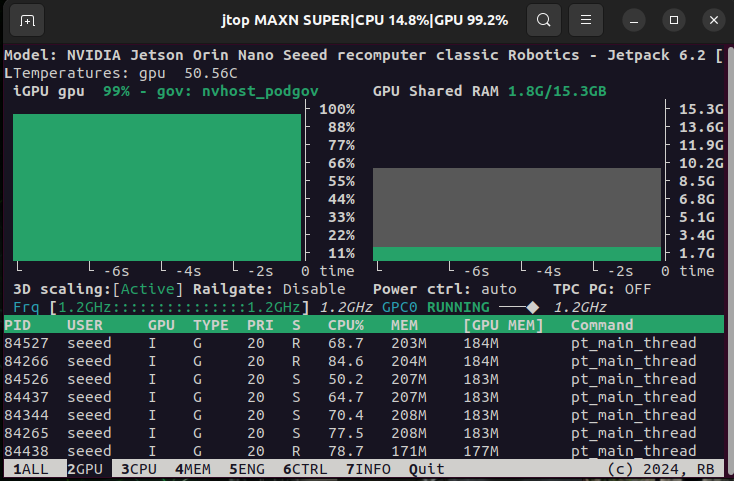
Durante a execução deste script, ao monitorar o uso de recursos do sistema por meio do jtop, pode-se observar que o uso de memória da GPU é relativamente baixo, o que demonstra a eficiência deste framework!
Entrada de câmera em tempo real para inferência
Antes de executar o script a seguir, configure o formato da sua câmera GMSL conforme descrito nesta wiki!
Modifique o conteúdo do arquivo ./src/vp_engine/engine.py dentro do projeto. Altere o conteúdo em torno da linha 184 para o conteúdo mostrado na figura a seguir.

realtime_inference.py
#!/usr/bin/env python3
"""
Real-time Multi-Camera Inference Script for Visual Perception Engine
This script demonstrates real-time inference on 4 camera streams simultaneously:
- Cameras 0 and 1: Depth Estimation
- Cameras 2 and 3: Semantic Segmentation
Architecture:
- Multi-threaded camera capture (one thread per camera for parallel frame capture)
- Single-threaded inference (round-robin through all cameras to avoid CUDA context conflicts)
- VPE engines run in their own processes (managed by VPE framework)
This design avoids CUDA context conflicts that occur when multiple threads
try to access CUDA resources simultaneously.
Optimized for maximum performance on Jetson Orin NX 16GB.
Display:
- Shows only inference results (no raw camera feeds)
- Segmentation models display overlay on original image (adjustable transparency)
- Depth models show colorized depth map
Usage:
# Default (2 cameras: depth + segmentation)
python realtime_multi_camera_inference.py
# 4 cameras with performance optimizations
python realtime_multi_camera_inference.py \
--camera-ids 0 1 2 3 \
--models depth depth segmentation segmentation \
--resolution 640x480 \
--display-scale 0.5
# Maximum FPS mode (no display, lower resolution)
python realtime_multi_camera_inference.py \
--camera-ids 0 1 2 3 \
--models depth depth segmentation segmentation \
--resolution 480x320 \
--no-display \
--duration 60
# Adjust segmentation overlay transparency
python realtime_multi_camera_inference.py --seg-alpha 0.7
# Smaller display for better performance
python realtime_multi_camera_inference.py --display-scale 0.5
"""
import os
import sys
import cv2
import time
import json
import argparse
import threading
import numpy as np
from collections import deque
from typing import Dict, List, Tuple, Optional
from pathlib import Path
from queue import Queue, Empty, Full
# Add the src directory to Python path
sys.path.append(os.path.join(os.path.dirname(__file__), 'src'))
from vp_engine import Engine
class FPSCounter:
"""Thread-safe FPS counter with moving average."""
def __init__(self, window_size: int = 30):
self.window_size = window_size
self.timestamps = deque(maxlen=window_size)
self.lock = threading.Lock()
def tick(self):
"""Record a new frame timestamp."""
with self.lock:
self.timestamps.append(time.time())
def get_fps(self) -> float:
"""Get current FPS based on moving window."""
with self.lock:
if len(self.timestamps) < 2:
return 0.0
time_diff = self.timestamps[-1] - self.timestamps[0]
if time_diff == 0:
return 0.0
return (len(self.timestamps) - 1) / time_diff
class CameraCapture:
"""Thread-safe camera capture with frame buffering."""
def __init__(self, camera_id: int, resolution: Tuple[int, int] = (960, 640), buffer_size: int = 2):
self.camera_id = camera_id
self.resolution = resolution # (width, height)
self.buffer_size = buffer_size
self.frame_queue = Queue(maxsize=buffer_size)
self.running = False
self.thread = None
self.cap = None
self.fps_counter = FPSCounter()
def start(self):
"""Start camera capture thread."""
print(f" Opening camera {self.camera_id}...")
# Try different backends for better performance
self.cap = cv2.VideoCapture(self.camera_id, cv2.CAP_V4L2)
if not self.cap.isOpened():
# Fallback to default backend
self.cap = cv2.VideoCapture(self.camera_id)
if not self.cap.isOpened():
raise RuntimeError(f"Failed to open camera {self.camera_id}")
# Set camera properties for performance
self.cap.set(cv2.CAP_PROP_FRAME_WIDTH, self.resolution[0])
self.cap.set(cv2.CAP_PROP_FRAME_HEIGHT, self.resolution[1])
self.cap.set(cv2.CAP_PROP_BUFFERSIZE, 1) # Minimize buffer lag
# Try to set FPS if supported
self.cap.set(cv2.CAP_PROP_FPS, 30)
actual_width = int(self.cap.get(cv2.CAP_PROP_FRAME_WIDTH))
actual_height = int(self.cap.get(cv2.CAP_PROP_FRAME_HEIGHT))
print(f" Camera {self.camera_id}: {actual_width}x{actual_height}")
self.running = True
self.thread = threading.Thread(target=self._capture_loop, daemon=True)
self.thread.start()
print(f" ✓ Camera {self.camera_id} started")
def _capture_loop(self):
"""Continuous capture loop running in separate thread."""
while self.running:
ret, frame = self.cap.read()
if not ret:
print(f"Warning: Failed to read from camera {self.camera_id}")
time.sleep(0.1)
continue
# Resize if needed
if frame.shape[1] != self.resolution[0] or frame.shape[0] != self.resolution[1]:
frame = cv2.resize(frame, self.resolution, interpolation=cv2.INTER_LINEAR)
# Update queue (drop old frames if full)
try:
self.frame_queue.put(frame, block=False)
except Full:
# Remove old frame and add new one
try:
self.frame_queue.get_nowait()
self.frame_queue.put(frame, block=False)
except:
pass
self.fps_counter.tick()
def get_frame(self, timeout: float = 0.1) -> Optional[np.ndarray]:
"""Get latest frame from queue."""
try:
return self.frame_queue.get(timeout=timeout)
except Empty:
return None
def stop(self):
"""Stop camera capture."""
self.running = False
if self.thread:
self.thread.join(timeout=2.0)
if self.cap:
self.cap.release()
print(f" ✓ Camera {self.camera_id} stopped")
class MultiCameraProcessor:
"""Process multiple camera streams with VPE framework - optimized for performance."""
def __init__(self, camera_configs: dict, registry_path: str, input_resolution: tuple = (960, 640),
segmentation_alpha: float = 0.6, enable_display: bool = True, display_scale: float = 1.0):
"""
Initialize multi-camera processor.
Args:
camera_configs: {
'camera_name': {
'camera_id': int,
'model_type': str, # 'depth' or 'segmentation'
'config_path': str,
'display_name': str
}
}
segmentation_alpha: Transparency for segmentation overlay (0.0-1.0, default 0.6)
0.0 = only mask visible, 1.0 = only original image visible
enable_display: Enable visual display (False for headless mode)
display_scale: Scale factor for display resolution (0.5=half, 1.0=normal, 2.0=double)
"""
self.camera_configs = camera_configs
self.registry_path = registry_path
self.input_resolution = input_resolution # (width, height)
self.segmentation_alpha = segmentation_alpha
self.enable_display = enable_display
self.display_scale = display_scale
# Camera captures
self.cameras = {}
# FPS counters for inference
self.inference_fps_counters = {}
self.results = {}
# Latest results cache
self.latest_results = {}
for camera_name in self.camera_configs.keys():
self.inference_fps_counters[camera_name] = FPSCounter()
self.results[camera_name] = []
self.latest_results[camera_name] = None
# Performance tracking
self.total_frames_processed = 0
self.start_time = None
def create_config_files(self):
"""Create configuration files for all models dynamically."""
# Common foundation model config
foundation_config = {
"preprocessing_function": "DINOV2PreprocessingTorch",
"canonical_name": "DinoFoundationModel_fp16_tensorrt__encoder_size_vits__ignore_xformers_True",
"alias": "DINOV2",
"rate": 100
}
common_settings = {
"logging": {"log_level": "INFO", "log_to_console": False},
"canonical_image_shape_hwc": [self.input_resolution[1], self.input_resolution[0], 3],
"queue_sizes": {"input": 2, "intermediate": 2, "output": 10}
}
# Model definitions
model_definitions = {
'depth': {
"model_heads": [{
"canonical_name": "DepthAnythingV2Head_fp16_tensorrt__encoder_size_vits",
"alias": "DepthAnythingV2DepthHead",
"postprocessing_function": "ResizeAndToCV2ImageWithVisualization",
"rate": 100
}],
"log_file": "depth_camera_log.txt",
"output_dir": "runs/depth_camera"
},
'segmentation': {
"model_heads": [{
"canonical_name": "SemanticSegmentationHead_fp16_tensorrt__encoder_size_vits__dataset_voc2012",
"alias": "SemanticSegmentationHead",
"postprocessing_function": "SemSegPostprocessingWithVisualizationVOC2012",
"rate": 100
}],
"log_file": "seg_camera_log.txt",
"output_dir": "runs/seg_camera"
}
}
# Create configs for each camera
for camera_name, camera_config in self.camera_configs.items():
model_type = camera_config['model_type']
if model_type not in model_definitions:
print(f"Warning: Unknown model type '{model_type}', skipping...")
continue
model_def = model_definitions[model_type]
# Create unique output directory for each camera
output_dir = f"{model_def['output_dir']}_{camera_name}"
log_file = f"{model_type}_{camera_name}_log.txt"
config = {
"foundation_model": foundation_config.copy(),
"model_heads": model_def["model_heads"],
**common_settings,
"logging": {**common_settings["logging"], "log_file": log_file},
"output_dir": output_dir
}
# Write config file
with open(camera_config['config_path'], 'w') as f:
json.dump(config, f, indent=2)
def setup_cameras(self):
"""Setup all camera captures."""
print("Setting up cameras...")
for camera_name, camera_config in self.camera_configs.items():
camera_id = camera_config['camera_id']
camera = CameraCapture(camera_id, self.input_resolution, buffer_size=2)
camera.start()
self.cameras[camera_name] = camera
print(f"All {len(self.cameras)} cameras ready!")
def setup_vpe_engines(self):
"""Setup all VPE engines dynamically."""
self.engines = {}
for camera_name, camera_config in self.camera_configs.items():
display_name = camera_config.get('display_name', camera_name)
print(f"Setting up VPE engine for {display_name}...")
engine = Engine(camera_config['config_path'], self.registry_path)
engine.build()
engine.start_inference()
self.engines[camera_name] = engine
print(f"All {len(self.engines)} VPE engines ready!")
def process_all_cameras_batch(self) -> int:
"""
Process all cameras in batch mode for better performance.
Returns number of cameras that got new results.
"""
successful_count = 0
current_time = time.time()
# Phase 1: Submit all frames to engines (fast, non-blocking)
submitted = {}
for camera_name in self.camera_configs.keys():
try:
camera = self.cameras[camera_name]
engine = self.engines[camera_name]
# Get frame from camera (non-blocking)
frame = camera.get_frame(timeout=0.0001)
if frame is not None:
# Submit to engine immediately
engine.input_image(frame, current_time)
submitted[camera_name] = frame
except Exception as e:
if "CUDA" not in str(e):
print(f"Error submitting {camera_name}: {e}")
# Small delay to allow batch processing
if len(submitted) > 0:
time.sleep(0.003) # Reduced delay for batch mode
# Phase 2: Collect all available results (fast, non-blocking)
for camera_name in submitted.keys():
try:
engine = self.engines[camera_name]
fps_counter = self.inference_fps_counters[camera_name]
# Try to get output (non-blocking)
result = engine.get_head_output(0)
if result is not None:
# Update latest result
self.latest_results[camera_name] = (submitted[camera_name], result, current_time)
fps_counter.tick()
self.results[camera_name].append(fps_counter.get_fps())
successful_count += 1
except Exception as e:
if "CUDA" not in str(e):
print(f"Error collecting {camera_name}: {e}")
return successful_count
def run_inference(self, duration: int = 300):
"""
Run inference on all cameras for specified duration.
Args:
duration: Duration in seconds (0 = infinite)
"""
print(f"\nStarting real-time inference on {len(self.cameras)} cameras...")
print("Press 'q' to quit\n")
self.running = True
self.start_time = time.time()
# Main processing loop - batch processing for better performance
frame_count = 0
last_stats_time = time.time()
stats_interval = 5.0 # Print stats every 5 seconds
display_counter = 0
# Adaptive display frequency based on number of cameras
num_cameras = len(self.camera_configs)
display_interval = 2 if num_cameras >= 4 else 1 # Reduce display overhead for 4+ cameras
print(f"Starting with display interval: {display_interval} (lower = more frequent)")
try:
while self.running:
current_time = time.time()
elapsed_time = current_time - self.start_time
# Check duration
if duration > 0 and elapsed_time > duration:
print(f"\nReached duration limit of {duration}s")
break
# Process all cameras in batch mode (parallel submission)
successful_count = self.process_all_cameras_batch()
# Small delay only if no frames were processed
if successful_count == 0:
time.sleep(0.001)
# Display results with reduced frequency for better performance
display_counter += 1
if display_counter >= display_interval:
if hasattr(self, 'enable_display') and self.enable_display:
self.display_results()
# Check for quit
key = cv2.waitKey(1) & 0xFF
if key == ord('q'):
print("\nQuitting...")
break
display_counter = 0
frame_count += 1
# Print statistics periodically
if current_time - last_stats_time > stats_interval:
self.print_stats(elapsed_time)
last_stats_time = current_time
except KeyboardInterrupt:
print("\nInterrupted by user")
finally:
self.running = False
# Final statistics
self.print_final_stats(time.time() - self.start_time)
def display_results(self):
"""Display results from all cameras in a grid layout."""
num_cameras = len(self.camera_configs)
# Grid layout - adjust based on number of cameras
# Now each camera only shows one image (inference result), so we can make them bigger
if num_cameras == 1:
base_height = 540
base_width = 720
cols = 1
rows = 1
elif num_cameras == 2:
base_height = 480
base_width = 640
cols = 2
rows = 1
elif num_cameras == 3:
base_height = 360
base_width = 480
cols = 2
rows = 2 # Will have one empty slot
elif num_cameras == 4:
base_height = 360
base_width = 480
cols = 2
rows = 2
else:
base_height = 320
base_width = 480
cols = 2
rows = (num_cameras + 1) // 2
# Apply display scale
display_height = int(base_height * self.display_scale)
display_width = int(base_width * self.display_scale)
# Collect display images
display_images = []
for camera_name, camera_config in self.camera_configs.items():
display_name = camera_config.get('display_name', camera_name)
model_type = camera_config['model_type']
# Get latest result
latest = self.latest_results[camera_name]
if latest is not None:
frame, result, timestamp = latest
# Resize original frame
frame_small = cv2.resize(frame, (display_width, display_height))
# Handle different result types
if isinstance(result, np.ndarray):
# Check if this is a segmentation result (needs overlay)
if model_type == 'segmentation':
# Create overlay: blend segmentation mask with original image
result_resized = cv2.resize(result, (display_width, display_height))
# Blend with configurable alpha
# alpha: weight for original image (higher = more original visible)
result_disp = cv2.addWeighted(frame_small, self.segmentation_alpha,
result_resized, 1-self.segmentation_alpha, 0)
else:
# Depth or other results: just resize
result_disp = cv2.resize(result, (display_width, display_height))
elif isinstance(result, list) and len(result) == 3:
# Object detection result (future use)
result_disp = frame_small.copy()
else:
result_disp = np.zeros((display_height, display_width, 3), dtype=np.uint8)
# Add labels and FPS info
fps = self.inference_fps_counters[camera_name].get_fps()
camera_fps = self.cameras[camera_name].fps_counter.get_fps()
# Calculate text size based on display width for better scaling
font_scale = display_width / 640.0 # Scale relative to 640px width
text_thickness = max(1, int(font_scale * 2))
# Add semi-transparent background for text
overlay = result_disp.copy()
bg_width = int(display_width * 0.4) # 40% of width
bg_height = int(display_height * 0.12) # 12% of height
cv2.rectangle(overlay, (5, 5), (bg_width, bg_height), (0, 0, 0), -1)
result_disp = cv2.addWeighted(overlay, 0.6, result_disp, 0.4, 0)
# Add text with adaptive size
y_offset = int(display_height * 0.05)
cv2.putText(result_disp, f"{display_name}", (10, y_offset),
cv2.FONT_HERSHEY_SIMPLEX, font_scale * 0.6, (0, 255, 0), text_thickness)
cv2.putText(result_disp, f"FPS: {fps:.1f}", (10, y_offset + int(display_height * 0.05)),
cv2.FONT_HERSHEY_SIMPLEX, font_scale * 0.5, (0, 255, 255), text_thickness)
# Only use the result display (no input frame)
combined = result_disp
else:
# No data yet
combined = np.zeros((display_height, display_width, 3), dtype=np.uint8)
cv2.putText(combined, f"{display_name}",
(50, display_height // 2 - 20),
cv2.FONT_HERSHEY_SIMPLEX, 0.7, (255, 255, 255), 2)
cv2.putText(combined, "Initializing...",
(50, display_height // 2 + 20),
cv2.FONT_HERSHEY_SIMPLEX, 0.6, (200, 200, 200), 2)
display_images.append(combined)
# Create grid layout (now each camera only shows one image)
if num_cameras == 1:
# Single camera - just display it
full_display = display_images[0]
elif num_cameras == 2:
# 1x2 horizontal grid
full_display = np.hstack(display_images)
else:
# Dynamic grid for 3+ cameras
rows_images = []
for i in range(rows):
row_imgs = []
for j in range(cols):
idx = i * cols + j
if idx < len(display_images):
row_imgs.append(display_images[idx])
else:
# Add empty placeholder
row_imgs.append(np.zeros((display_height, display_width, 3), dtype=np.uint8))
if len(row_imgs) > 0:
rows_images.append(np.hstack(row_imgs))
if len(rows_images) > 0:
full_display = np.vstack(rows_images)
else:
full_display = np.zeros((display_height, display_width, 3), dtype=np.uint8)
cv2.imshow(f"Multi-Camera VPE - {num_cameras} Cameras", full_display)
def print_stats(self, elapsed_time: float):
"""Print current statistics."""
print(f"\n--- Statistics at {elapsed_time:.1f}s ---")
for camera_name, camera_config in self.camera_configs.items():
display_name = camera_config.get('display_name', camera_name)
camera_fps = self.cameras[camera_name].fps_counter.get_fps()
inference_fps = self.inference_fps_counters[camera_name].get_fps()
print(f" {display_name:<25} Camera: {camera_fps:>5.1f} FPS | Inference: {inference_fps:>5.1f} FPS")
def print_final_stats(self, total_time: float):
"""Print final performance statistics."""
print("\n" + "="*80)
print("MULTI-CAMERA VPE PERFORMANCE REPORT")
print("="*80)
print(f"Total Runtime: {total_time:.2f}s")
print(f"Number of Cameras: {len(self.cameras)}")
print(f"\nPer-Camera Performance:")
# Group by model type
depth_cameras = []
seg_cameras = []
for camera_name, camera_config in self.camera_configs.items():
display_name = camera_config.get('display_name', camera_name)
model_type = camera_config['model_type']
results = self.results[camera_name]
if results:
avg_fps = np.mean(results)
max_fps = np.max(results)
min_fps = np.min(results)
stats = {
'name': display_name,
'avg': avg_fps,
'max': max_fps,
'min': min_fps
}
if model_type == 'depth':
depth_cameras.append(stats)
else:
seg_cameras.append(stats)
print(f"\n {display_name}")
print(f" Average FPS: {avg_fps:.2f}")
print(f" Max FPS: {max_fps:.2f}")
print(f" Min FPS: {min_fps:.2f}")
# Summary by model type
print(f"\nPerformance by Model Type:")
if depth_cameras:
avg_depth = np.mean([cam['avg'] for cam in depth_cameras])
print(f" Depth Estimation: {avg_depth:.2f} FPS (avg across {len(depth_cameras)} cameras)")
if seg_cameras:
avg_seg = np.mean([cam['avg'] for cam in seg_cameras])
print(f" Semantic Segmentation: {avg_seg:.2f} FPS (avg across {len(seg_cameras)} cameras)")
# Overall assessment
all_fps = []
for results in self.results.values():
if results:
all_fps.extend(results)
if all_fps:
overall_avg = np.mean(all_fps)
print(f"\nOverall Average FPS: {overall_avg:.2f}")
if overall_avg > 20:
print("🚀 Excellent performance! Multi-camera system running smoothly.")
elif overall_avg > 12:
print("✅ Good performance for real-time multi-camera applications.")
elif overall_avg > 6:
print("⚠️ Moderate performance. Consider optimization or resolution reduction.")
else:
print("❌ Low performance. Check system resources and configuration.")
print("="*80)
def cleanup(self):
"""Cleanup all resources."""
print("\nCleaning up...")
# Stop cameras
print("Stopping cameras...")
for camera_name, camera in self.cameras.items():
try:
camera.stop()
except Exception as e:
print(f" Error stopping camera {camera_name}: {e}")
# Stop VPE engines
print("Stopping VPE engines...")
if hasattr(self, 'engines'):
for camera_name, engine in self.engines.items():
try:
print(f" Stopping engine for {camera_name}...")
engine.stop()
print(f" ✓ Engine for {camera_name} stopped")
except Exception as e:
print(f" ⚠️ Error stopping engine for {camera_name}: {e}")
# Close OpenCV windows
print("Closing windows...")
try:
cv2.destroyAllWindows()
except Exception as e:
print(f" Error closing windows: {e}")
# Force garbage collection
import gc
gc.collect()
print("Cleanup completed!")
def main():
parser = argparse.ArgumentParser(description="Real-time Multi-Camera VPE Inference")
parser.add_argument("--camera-ids", nargs="+", type=int, default=[0, 1],
help="Camera device IDs (2-4 cameras supported)")
parser.add_argument("--models", nargs="+",
choices=['depth', 'segmentation'],
default=['depth', 'segmentation'],
help="Models to use for each camera (same order as camera-ids)")
parser.add_argument("--duration", type=int, default=0,
help="Duration in seconds (0 = infinite)")
parser.add_argument("--registry", default="model_registry/registry.jsonl",
help="Model registry path")
parser.add_argument("--resolution", default="960x640",
help="Input resolution (WIDTHxHEIGHT)")
parser.add_argument("--seg-alpha", type=float, default=0.6,
help="Segmentation overlay transparency (0.0=only mask, 1.0=only original, default=0.6)")
parser.add_argument("--no-display", action="store_true",
help="Disable display (headless mode for maximum FPS)")
parser.add_argument("--display-scale", type=float, default=1.0,
help="Display resolution scale (0.5=half size, 1.0=normal, 2.0=double)")
args = parser.parse_args()
# Validate camera count
if len(args.camera_ids) < 1 or len(args.camera_ids) > 4:
print("Error: 1-4 cameras supported")
return
if len(args.models) != len(args.camera_ids):
print(f"Error: Number of models ({len(args.models)}) must match number of cameras ({len(args.camera_ids)})")
return
# Parse resolution
try:
width, height = map(int, args.resolution.split('x'))
input_resolution = (width, height)
total_pixels = width * height
print(f"Resolution: {width}x{height} ({total_pixels:,} pixels per camera)")
print(f"Total throughput: {total_pixels * 4:,} pixels across 4 cameras")
except ValueError:
print(f"Invalid resolution format: {args.resolution}. Use format like '960x640'")
return
# Create camera configurations dynamically
camera_configs = {}
model_display_names = {
'depth': 'Depth',
'segmentation': 'Segmentation'
}
for i, (camera_id, model_type) in enumerate(zip(args.camera_ids, args.models)):
camera_key = f'camera{i}'
model_suffix = 'depth' if model_type == 'depth' else 'seg'
camera_configs[camera_key] = {
'camera_id': camera_id,
'model_type': model_type,
'config_path': f'temp_camera{i}_{model_suffix}_config.json',
'display_name': f'Camera {camera_id} - {model_display_names[model_type]}'
}
temp_config_files = [config['config_path'] for config in camera_configs.values()]
print("="*80)
print("REAL-TIME MULTI-CAMERA VPE INFERENCE")
print("="*80)
print(f"Number of Cameras: {len(camera_configs)}")
print(f"\nCamera Configuration:")
for camera_name, config in camera_configs.items():
print(f" • {config['display_name']}")
print("\n" + "="*80 + "\n")
# Validate and clamp segmentation alpha
seg_alpha = max(0.0, min(1.0, args.seg_alpha))
if seg_alpha != args.seg_alpha:
print(f"Warning: seg-alpha clamped to valid range [0.0, 1.0]: {seg_alpha:.2f}")
# Validate display scale
display_scale = max(0.25, min(2.0, args.display_scale))
if display_scale != args.display_scale:
print(f"Warning: display-scale clamped to valid range [0.25, 2.0]: {display_scale:.2f}")
# Display mode
enable_display = not args.no_display
if not enable_display:
print("Running in headless mode (no display)")
processor = MultiCameraProcessor(camera_configs, args.registry, input_resolution,
seg_alpha, enable_display, display_scale)
try:
print("Creating configuration files...")
processor.create_config_files()
print("\nSetting up cameras...")
processor.setup_cameras()
# Small delay to let cameras warm up
print("Warming up cameras...")
time.sleep(2)
print("\nSetting up VPE engines...")
processor.setup_vpe_engines()
# Start inference
processor.run_inference(duration=args.duration)
except KeyboardInterrupt:
print("\nInterrupted by user")
except Exception as e:
print(f"Error: {e}")
import traceback
traceback.print_exc()
finally:
print("\nShutting down...")
try:
processor.cleanup()
except Exception as e:
print(f"Error during cleanup: {e}")
# Remove temporary config files
print("\nRemoving temporary config files...")
for config_file in temp_config_files:
try:
if os.path.exists(config_file):
os.remove(config_file)
print(f" ✓ Removed {config_file}")
except Exception as e:
print(f" ⚠️ Error removing {config_file}: {e}")
print("\nAll done!")
if __name__ == "__main__":
main()
# Performance camera_input test
python realtime_inference.py \
    --camera-ids 0 1 2 3 \
    --models depth depth segmentation segmentation \
    --resolution 640x480 \
    --seg-alpha 0.7 \
    --display-scale 0.75
Este exemplo usa o modelo oficial pré-treinado, sem qualquer treinamento de tarefa específica e ajuste fino. Além disso, nossa câmera é uma câmera GMSL com distorção significativa. Portanto, o resultado da inferência pode não ser muito satisfatório. Este caso tem como principal objetivo demonstrar a você a eficiência de utilização de recursos deste framework e suas vantagens!
Outras Aplicações
- Desenvolvimento eficiente de percepção de robôs
No desenvolvimento de robôs, a percepção visual eficiente é de grande importância! Com o framework de raciocínio visual eficiente acima, combinado com a aceleração eficiente de GPU da odometria visual, é possível aumentar a eficiência de utilização de recursos no desenvolvimento de robôs de borda! Combinando este algoritmo de SLAM visual implantado neste wiki, é possível realizar um desenvolvimento eficiente de robôs no Jetson!
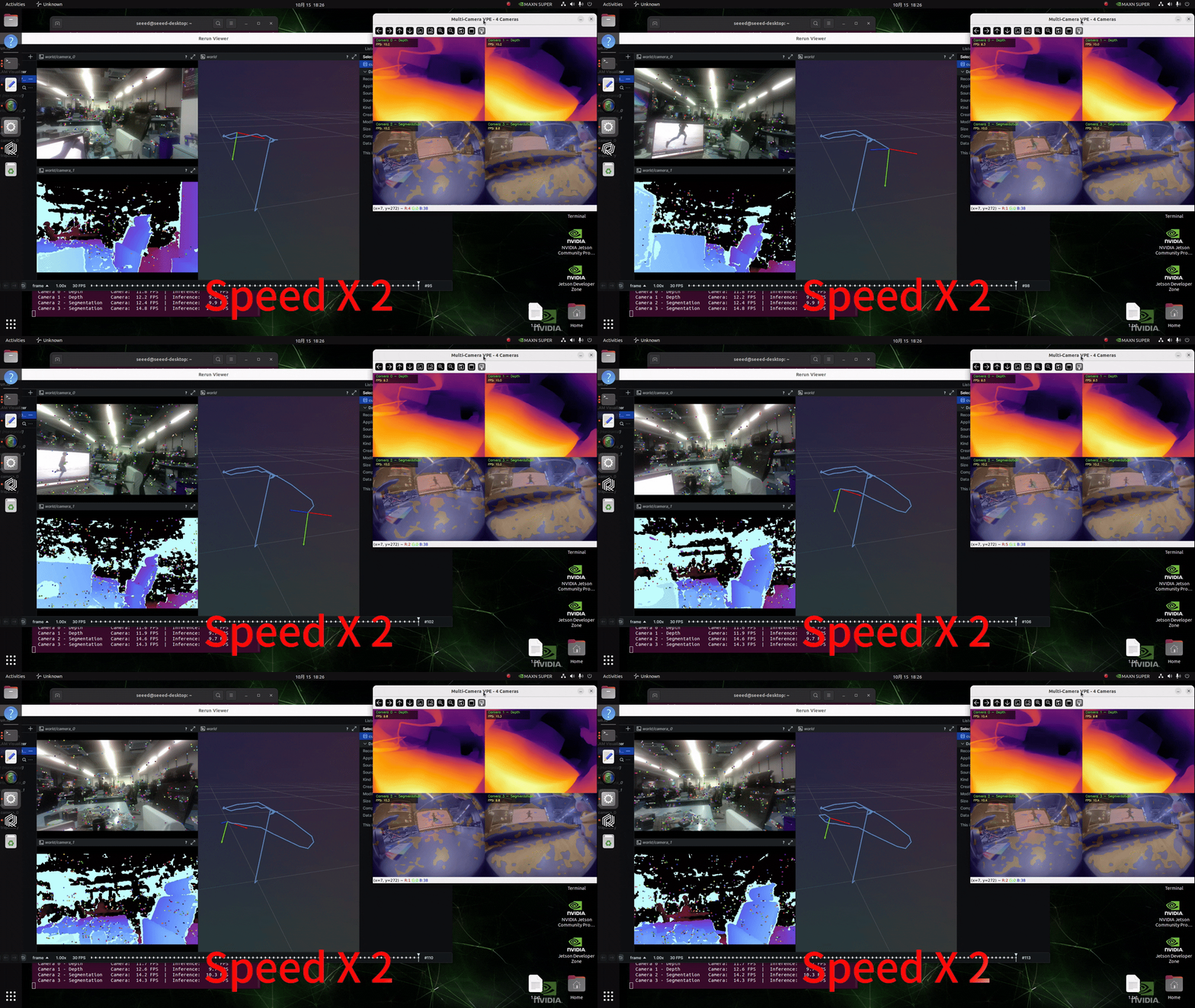
Como habilitar o software de gravação de tela consumirá uma certa quantidade de recursos do sistema, isso resulta em um aumento na latência de inferência!
- Direção inteligente
- Sistemas de monitoramento inteligente de borda
Recursos
Suporte Técnico & Discussão de Produtos
Obrigado por escolher nossos produtos! Estamos aqui para fornecer a você diferentes formas de suporte para garantir que sua experiência com nossos produtos seja a mais tranquila possível. Oferecemos vários canais de comunicação para atender a diferentes preferências e necessidades.