Efeitos de LED para reSpeaker XVF3800 44mm com XIAO ESP32-S3 Plus
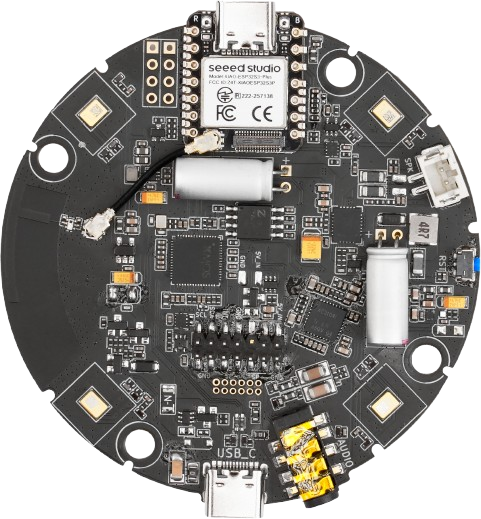
Os 24 LEDs WS2812 na matriz de 44 mm são acionados pelo XVF3800. Um MCU host pode assumi-los via I2C — alimentar o trilho de LED, escolher um efeito, definir brilho e velocidade e enviar uma cor RGB. Este sketch alterna entre sete cores a cada dois segundos e lê cada cor de volta para confirmar que o comando foi recebido.
Pré-requisitos
- A matriz deve estar executando o firmware I2S — o controle I2C está disponível neste modo.
- Arduino IDE com o pacote de placas ESP32. A biblioteca Arduino Audio Tools não é necessária para este sketch. Consulte Preparação de software.
- Placa selecionada como XIAO_ESP32S3_Plus, o número da porta precisa ser selecionado.
Comandos de controle de LED
Todos os comandos vão para o serviço GPO (RESID 20). Escritas usam o formato [resid, cmd, len, payload...]; leituras usam [resid, cmd | 0x80, len + 1] e retornam primeiro um byte de status.
| Comando | ID | Payload | Notas |
|---|---|---|---|
| GPO write value | 1 | pin, value | Usado para comutar o trilho de alimentação dos LEDs (X0D33 = 33) |
| Efeito de LED | 12 | 1 byte | Veja a tabela de efeitos abaixo |
| Brilho do LED | 13 | 1 byte | 0–255 |
| Velocidade do LED | 15 | 1 byte | Velocidade da animação do efeito |
| Cor do LED | 16 | 4 bytes | Azul, Verde, Vermelho, 0x00 |
| Efeito | Valor | Descrição |
|---|---|---|
LED_EFFECT_OFF | 0 | LEDs desligados |
LED_EFFECT_BREATHING | 1 | Fade respirando |
LED_EFFECT_RAINBOW | 2 | Ciclo arco-íris |
LED_EFFECT_SOLID | 3 | Cor sólida única |
LED_EFFECT_DOA | 4 | Indicador de direção DoA |
LED_EFFECT_RING | 5 | Animação em anel |
O valor da cor é armazenado como 0xRRGGBB no sketch, mas é transmitido em little-endian, então os bytes do payload são Azul, Verde, Vermelho, 0x00.
Como funciona
setup()inicia o I2C a 100 kHz e espera 2,5 s para a animação de boot do próprio XVF3800 terminar.- Ele habilita o trilho de alimentação dos LEDs com uma escrita GPO para o pino
33, define o brilho para150e selecionaLED_EFFECT_SOLID. applyColor()envia a cor, espera 30 ms, então lê a cor de volta e compara os 24 bits menos significativos com o que foi enviado, imprimindoColor readback PASSouMISMATCH.loop()avança para a próxima cor a cada dois segundos.
Se os botões e LEDs estiverem roteados para o XIAO em vez do XVF3800 (chave de roteamento em D11), o anel também pode ser acionado a partir de WS2812_DIN_XIAO em D15 como uma cadeia WS2812 simples. O sketch abaixo usa o caminho via XVF3800.
Sketch Arduino
#include <Wire.h>

// =====================================================
// I2C CONFIGURATION
// =====================================================

#define XMOS_ADDR                 0x2C

#define I2C_SDA_PIN               5
#define I2C_SCL_PIN               6

#define GPO_SERVICER_RESID        20

#define CMD_GPO_WRITE_VALUE       1

#define CMD_LED_EFFECT            12
#define CMD_LED_BRIGHTNESS        13
#define CMD_LED_SPEED             15
#define CMD_LED_COLOR             16

#define LED_POWER_PIN             33

// LED effect modes
#define LED_EFFECT_OFF            0
#define LED_EFFECT_BREATHING      1
#define LED_EFFECT_RAINBOW        2
#define LED_EFFECT_SOLID          3
#define LED_EFFECT_DOA            4
#define LED_EFFECT_RING           5

// =====================================================
// LED CONFIGURATION
// =====================================================

#define LED_BRIGHTNESS            150

// Change LED color every 2 seconds
#define COLOR_INTERVAL_MS         2000

// =====================================================
// COLOR DEFINITIONS
// Format: 0xRRGGBB
// =====================================================

struct LEDColor {
    const char *name;
    uint32_t value;
};

LEDColor colors[] = {
    {"RED",     0xFF0000},
    {"GREEN",   0x00FF00},
    {"BLUE",    0x0000FF},
    {"ORANGE",  0xFF8800},
    {"PURPLE",  0x8000FF},
    {"WHITE",   0xFFFFFF},
    {"YELLOW",  0xFFFF00}
};

const uint8_t COLOR_COUNT =
    sizeof(colors) / sizeof(colors[0]);

uint8_t currentColor = 0;

unsigned long lastColorChange = 0;

// =====================================================
// XMOS I2C WRITE
// =====================================================

bool xmos_write_bytes(
    uint8_t resid,
    uint8_t cmd,
    const uint8_t *value,
    uint8_t write_byte_num
) {

    Wire.beginTransmission(XMOS_ADDR);

    Wire.write(resid);
    Wire.write(cmd);
    Wire.write(write_byte_num);

    for (uint8_t i = 0; i < write_byte_num; i++) {
        Wire.write(value[i]);
    }

    uint8_t error = Wire.endTransmission();

    if (error != 0) {

        Serial.printf(
            "I2C write failed! RESID=%u CMD=%u ERROR=%u\n",
            resid,
            cmd,
            error
        );

        return false;
    }

    return true;
}

// =====================================================
// ENABLE LED POWER
// GPIO X0D33 HIGH = WS2812 LED POWER ENABLE
// =====================================================

bool setLEDPower(bool enable) {

    uint8_t payload[2] = {
        LED_POWER_PIN,
        enable ? 1 : 0
    };

    bool result = xmos_write_bytes(
        GPO_SERVICER_RESID,
        CMD_GPO_WRITE_VALUE,
        payload,
        2
    );

    if (result) {
        Serial.printf(
            "LED power: %s\n",
            enable ? "ON" : "OFF"
        );
    }

    return result;
}

// =====================================================
// SET LED EFFECT
// =====================================================

bool setLEDEffect(uint8_t effect) {

    uint8_t payload[1] = {effect};

    bool result = xmos_write_bytes(
        GPO_SERVICER_RESID,
        CMD_LED_EFFECT,
        payload,
        1
    );

    if (result) {
        Serial.printf("LED effect set: %u\n", effect);
    }

    return result;
}

// =====================================================
// SET LED BRIGHTNESS
// =====================================================

bool setLEDBrightness(uint8_t brightness) {

    uint8_t payload[1] = {brightness};

    bool result = xmos_write_bytes(
        GPO_SERVICER_RESID,
        CMD_LED_BRIGHTNESS,
        payload,
        1
    );

    if (result) {
        Serial.printf("LED brightness: %u\n", brightness);
    }

    return result;
}

// =====================================================
// SET LED SPEED
// =====================================================

bool setLEDSpeed(uint8_t speed) {

    uint8_t payload[1] = {speed};

    return xmos_write_bytes(
        GPO_SERVICER_RESID,
        CMD_LED_SPEED,
        payload,
        1
    );
}

// =====================================================
// SET LED COLOR
// Color format: 0xRRGGBB
// =====================================================

bool setLEDColor(uint32_t color) {

    // Serialize uint32_t in little-endian order.
    // Byte 0 = Blue
    // Byte 1 = Green
    // Byte 2 = Red
    // Byte 3 = Reserved

    uint8_t payload[4] = {
        (uint8_t)(color & 0xFF),
        (uint8_t)((color >> 8) & 0xFF),
        (uint8_t)((color >> 16) & 0xFF),
        0x00
    };

    bool result = xmos_write_bytes(
        GPO_SERVICER_RESID,
        CMD_LED_COLOR,
        payload,
        4
    );

    if (result) {

        Serial.printf(
            "LED color command sent: 0x%06lX\n",
            (unsigned long)(color & 0xFFFFFF)
        );

        Serial.printf(
            "Payload: %02X %02X %02X %02X\n",
            payload[0],
            payload[1],
            payload[2],
            payload[3]
        );
    }

    return result;
}

// =====================================================
// READ BACK LED COLOR
// =====================================================

bool readLEDColor(uint32_t &color) {

    Wire.beginTransmission(XMOS_ADDR);

    Wire.write(GPO_SERVICER_RESID);
    Wire.write(CMD_LED_COLOR | 0x80);
    Wire.write(5);  // Status + 4-byte payload

    if (Wire.endTransmission() != 0) {
        Serial.println("LED color read command failed");
        return false;
    }

    uint8_t received = Wire.requestFrom(
        (uint8_t)XMOS_ADDR,
        (uint8_t)5
    );

    if (received != 5) {

        Serial.printf(
            "LED read response incomplete: %u/5\n",
            received
        );

        while (Wire.available()) {
            Wire.read();
        }

        return false;
    }

    uint8_t status = Wire.read();

    uint8_t b0 = Wire.read();
    uint8_t b1 = Wire.read();
    uint8_t b2 = Wire.read();
    uint8_t b3 = Wire.read();

    if (status != 0) {
        Serial.printf(
            "LED read status error: 0x%02X\n",
            status
        );

        return false;
    }

    color =
        ((uint32_t)b3 << 24) |
        ((uint32_t)b2 << 16) |
        ((uint32_t)b1 << 8) |
        b0;

    Serial.printf(
        "LED readback: 0x%06lX\n",
        (unsigned long)(color & 0xFFFFFF)
    );

    return true;
}

// =====================================================
// APPLY COLOR
// =====================================================

void applyColor(uint8_t index) {

    if (index >= COLOR_COUNT) {
        return;
    }

    Serial.println("\n----------------------------");

    Serial.printf(
        "Changing LED color to: %s\n",
        colors[index].name
    );

    if (!setLEDColor(colors[index].value)) {
        Serial.println("Color update failed!");
        return;
    }

    delay(30);

    uint32_t readback = 0;

    if (readLEDColor(readback)) {

        if ((readback & 0xFFFFFF) ==
            (colors[index].value & 0xFFFFFF)) {

            Serial.println("Color readback PASS");

        } else {

            Serial.println("Color readback MISMATCH");
        }
    }

    Serial.println("----------------------------");
}

// =====================================================
// SETUP
// =====================================================

void setup() {

    Serial.begin(115200);
    delay(1000);

    Serial.println("\n================================");
    Serial.println("ReSpeaker 44mm LED COLOR TEST");
    Serial.println("================================");

    // Initialize I2C
    Wire.begin(
        I2C_SDA_PIN,
        I2C_SCL_PIN
    );

    Wire.setClock(100000);

    Serial.println("I2C initialized");

    // Allow XMOS startup LED initialization to finish
    delay(2500);

    // Enable LED hardware power
    setLEDPower(true);

    delay(100);

    // Configure LED brightness
    setLEDBrightness(LED_BRIGHTNESS);

    // Configure solid color mode
    setLEDEffect(LED_EFFECT_SOLID);

    delay(100);

    // Start with RED
    applyColor(currentColor);

    lastColorChange = millis();

    Serial.println("\nAutomatic LED color changing started");
}

// =====================================================
// LOOP
// =====================================================

void loop() {

    unsigned long now = millis();

    if (now - lastColorChange >= COLOR_INTERVAL_MS) {

        lastColorChange = now;

        currentColor++;

        if (currentColor >= COLOR_COUNT) {
            currentColor = 0;
        }

        applyColor(currentColor);
    }
}
Saída esperada
================================
ReSpeaker 44mm LED COLOR TEST
================================
I2C initialized
LED power: ON
LED brightness: 150
LED effect set: 3

----------------------------
Changing LED color to: RED
LED color command sent: 0xFF0000
Payload: 00 00 FF 00
LED readback: 0xFF0000
Color readback PASS
----------------------------

Automatic LED color changing started

----------------------------
Changing LED color to: GREEN
LED color command sent: 0x00FF00
Payload: 00 FF 00 00
LED readback: 0x00FF00
Color readback PASS
----------------------------
O anel deve alternar entre vermelho, verde, azul, laranja, roxo, branco e amarelo a cada dois segundos.
Suporte Técnico e Discussão de Produtos
Obrigado por escolher nossos produtos! Estamos aqui para oferecer diferentes tipos de suporte para garantir que sua experiência com nossos produtos seja a mais tranquila possível. Oferecemos vários canais de comunicação para atender a diferentes preferências e necessidades.