Uso de Bluetooth com o Seeed Studio XIAO MG24
| Seeed Studio XIAO MG24 | Seeed Studio XIAO MG24 Sense |
|---|---|
 |  |
O Seeed Studio XIAO MG24 é uma placa de desenvolvimento robusta que suporta Bluetooth LE 5.3 e Bluetooth Mesh, tornando-o uma escolha ideal para uma ampla gama de aplicações de IoT que exigem conectividade sem fio. Aproveitando seu desempenho de RF excepcional, o XIAO MG24 oferece comunicação sem fio confiável e de alta velocidade em várias distâncias, tornando-o uma solução versátil tanto para aplicações de curto quanto de longo alcance. Neste tutorial, exploraremos os recursos fundamentais das capacidades de Bluetooth do XIAO MG24, incluindo como escanear dispositivos Bluetooth próximos, estabelecer uma conexão Bluetooth e transmitir e receber dados por essa conexão.
Método para alternar antenas
O Seeed Studio XIAO MG24 possui duas opções de antena: uma antena interna e uma antena externa. Para conveniência, você pode optar por usar a antena interna e, para melhorar a intensidade do sinal, pode escolher a antena externa. Abaixo está o método para alternar entre as duas antenas.
PB04 é usado para selecionar entre usar a antena interna ou uma antena externa. Antes disso, você precisa definir PB05 em nível alto para ativar essa função. Se PB04 estiver em nível baixo, ele usa a antena interna; se estiver em nível alto, usa a antena externa. O padrão é nível baixo. Se você quiser defini-lo em alto, pode consultar o código abaixo.
#define RF_SW_PW_PIN PB5
#define RF_SW_PIN PB4

void setup() {
  // turn on this antenna function
  pinMode(RF_SW_PW_PIN, OUTPUT);
  digitalWrite(RF_SW_PW_PIN, HIGH);

  delay(100);

  // HIGH -> Use external antenna / LOW -> Use built-in antenna
  pinMode(RF_SW_PIN, OUTPUT);
  digitalWrite(RF_SW_PIN, HIGH);
Uso de Bluetooth Low Energy (BLE)
Bluetooth Low Energy, BLE para abreviar, é uma variante de Bluetooth que economiza energia. A aplicação principal do BLE é a transmissão a curta distância de pequenas quantidades de dados (baixa largura de banda). Diferente do Bluetooth, que está sempre ligado, o BLE permanece constantemente em modo de suspensão, exceto quando uma conexão é iniciada.
Devido às suas propriedades, o BLE é adequado para aplicações que precisam trocar pequenas quantidades de dados periodicamente, funcionando com uma bateria tipo moeda. Por exemplo, o BLE é muito útil nas indústrias de saúde, fitness, rastreamento, beacons, segurança e automação residencial.
Isso faz com que ele consuma muito pouca energia. O BLE consome aproximadamente 100 vezes menos energia que o Bluetooth (dependendo do caso de uso).
Sobre a parte de BLE do XIAO MG24, apresentaremos seu uso nas seções a seguir.
- Alguns conceitos fundamentais -- Primeiro conheceremos alguns conceitos que podem ser usados com frequência em BLE, a fim de nos ajudar a entender o processo de execução e o raciocínio dos programas BLE.
- BLE Scanner -- Esta seção explicará como procurar dispositivos Bluetooth próximos e imprimi-los no monitor serial.
- Servidor/cliente BLE -- Esta seção explicará como usar o XIAO MG24 como servidor e cliente para enviar e receber mensagens de dados especificadas. Também será usado para receber ou enviar mensagens do celular para o XIAO.
Alguns conceitos fundamentais
Servidor e Cliente
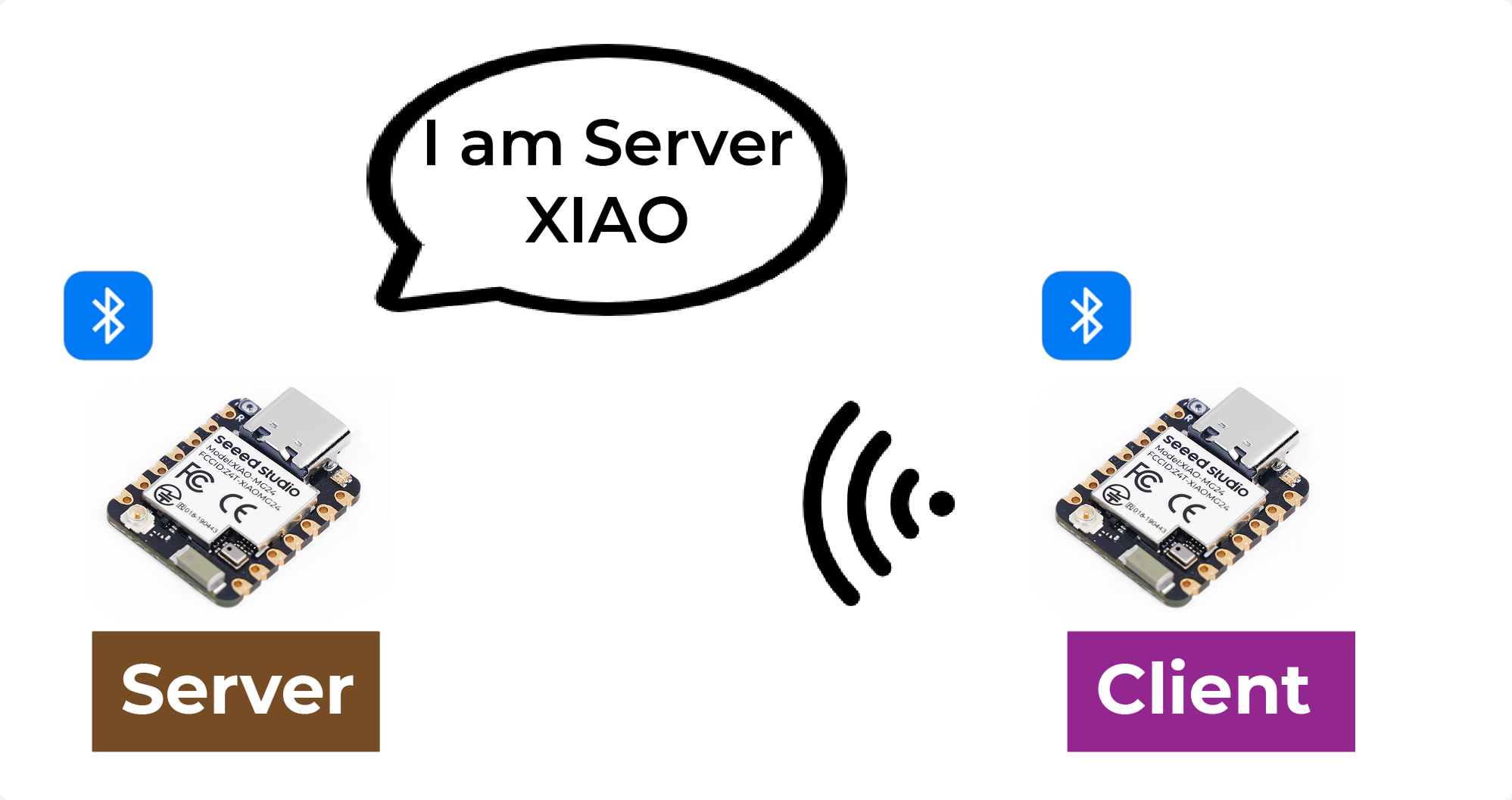
Com Bluetooth Low Energy, existem dois tipos de dispositivos: o servidor e o cliente. O XIAO MG24 pode atuar tanto como cliente quanto como servidor.
O servidor anuncia sua existência, para que possa ser encontrado por outros dispositivos, e contém os dados que o cliente pode ler. O cliente escaneia os dispositivos próximos e, quando encontra o servidor que está procurando, estabelece uma conexão e escuta os dados recebidos. Isso é chamado de comunicação ponto a ponto.
Atributo
Atributo é, na verdade, um pedaço de dado. Cada dispositivo Bluetooth é usado para fornecer um serviço, e o serviço é uma coleção de dados; essa coleção pode ser chamada de banco de dados, e cada entrada no banco de dados é um Atributo, então aqui traduzo Atributo como entradas de dados. Você pode imaginar um dispositivo Bluetooth como uma tabela, em que cada linha dentro da tabela é um Atributo.

GATT
Quando dois dispositivos Bluetooth estabelecem uma conexão, eles precisam de um protocolo para determinar como se comunicar. GATT (Generic Attribute Profile) é esse protocolo que define como os dados são transmitidos entre dispositivos Bluetooth.
No protocolo GATT, as funções e propriedades de um dispositivo são organizadas em estruturas chamadas serviços, características e descritores. Um serviço representa um conjunto de funções e recursos relacionados fornecidos por um dispositivo. Cada serviço pode incluir várias características, que definem uma determinada propriedade ou comportamento do serviço, como dados de sensores ou comandos de controle. Cada característica tem um identificador exclusivo e um valor, que podem ser lidos ou escritos para se comunicar. Os descritores são usados para descrever metadados das características, como formato e permissão de acesso dos valores das características.
Ao usar o protocolo GATT, dispositivos Bluetooth podem se comunicar em diferentes cenários de aplicação, como transmitir dados de sensores ou controlar dispositivos remotos.
Característica BLE
ATT, nome completo Attribute Protocol. No fim, o ATT é composto por um grupo de comandos ATT, ou seja, comandos de requisição e resposta; o ATT também é a camada mais alta do pacote nulo do Bluetooth, isto é, o ATT é onde mais analisamos o pacote Bluetooth.
O comando ATT, formalmente conhecido como ATT PDU (Protocol Data Unit). Ele inclui 4 categorias: read, write, notify e indicate. Esses comandos podem ser divididos em dois tipos: se ele exige uma resposta, então será seguido por uma requisição; ao contrário, se exigir apenas um ACK e não uma resposta, então não será seguido por uma requisição.
Service e Characteristic são definidos na camada GATT. O lado do Service fornece o Service, o Service é o dado, e o dado é o atributo, e o Service e a Characteristic são a apresentação lógica dos dados, ou seja, os dados que o usuário pode ver são eventualmente transformados em Service e Characteristic.
Vamos dar uma olhada em como o service e a characteristic se parecem a partir da perspectiva de um celular. nRF Connect é um aplicativo que nos mostra de forma bastante visual como cada pacote deve ser.
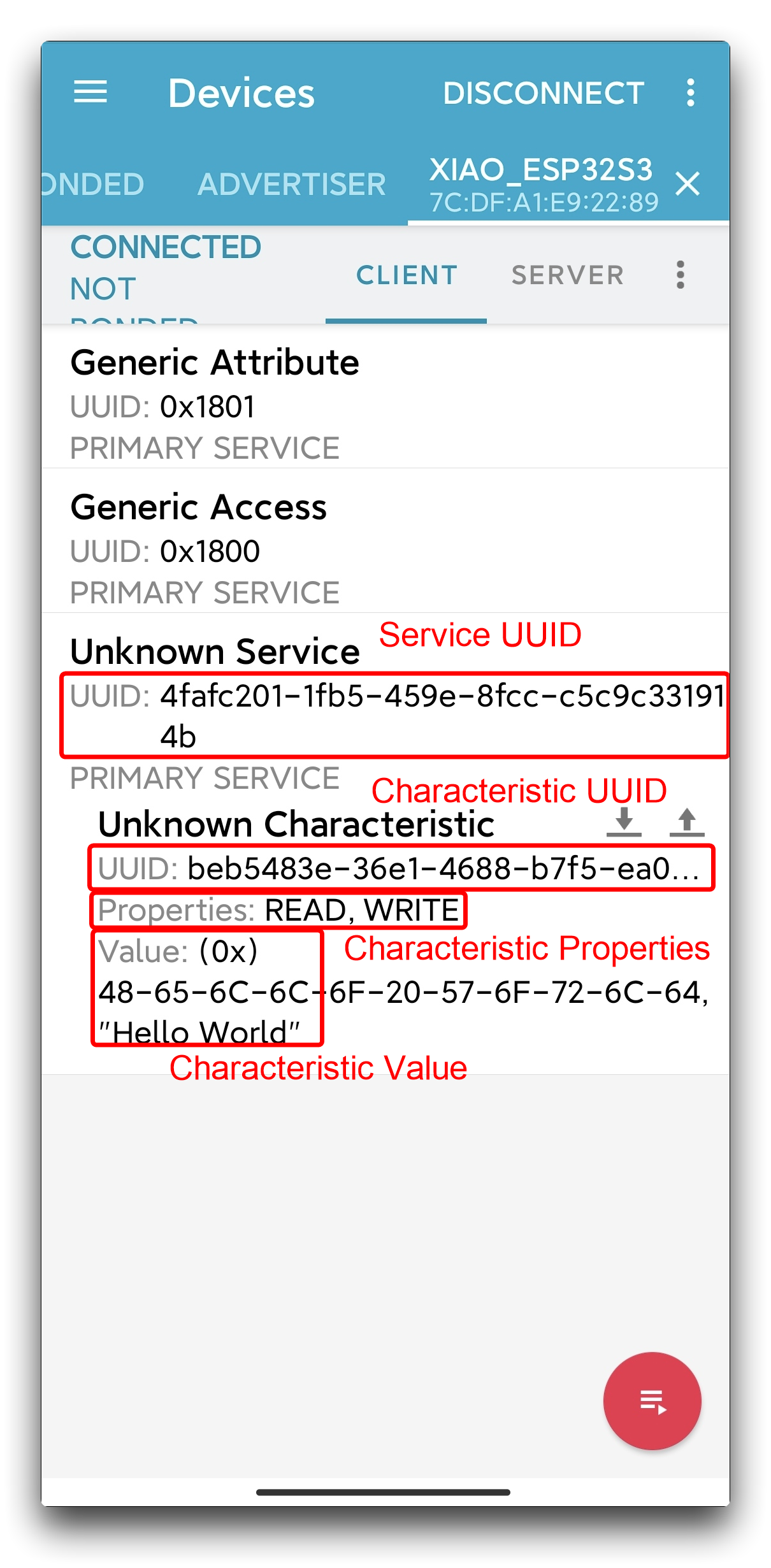
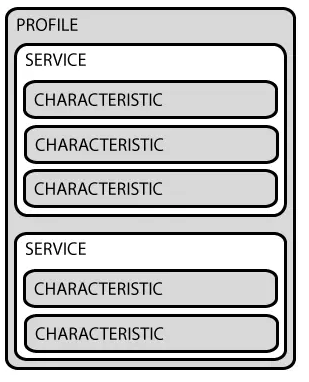
Como você pode ver, na especificação Bluetooth, cada aplicação Bluetooth específica é composta por múltiplos Services, e cada Service é composto por múltiplas Characteristics. Uma Characteristic consiste em um UUID, Properties e um Value.
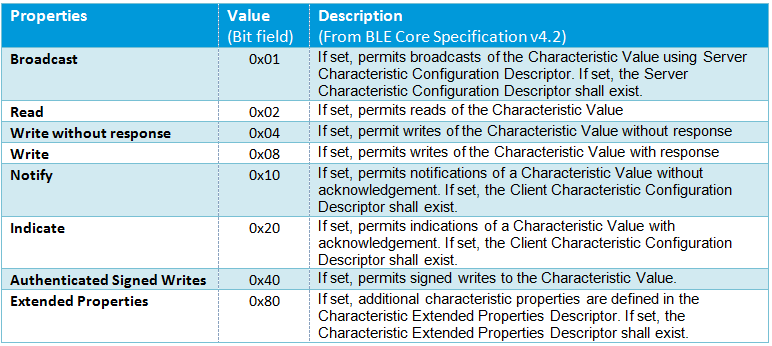
Properties são usadas para descrever os tipos e permissões de operações em uma characteristic, como se ela suporta read, write, notify e assim por diante. Isso é semelhante às quatro categorias incluídas em uma ATT PDU.
UUID
Cada service, characteristic e descriptor possuem um UUID (Universally Unique Identifier). Um UUID é um número exclusivo de 128 bits (16 bytes). Por exemplo:
ea094cbd-3695-4205-b32d-70c1dea93c35
Existem UUIDs encurtados para todos os tipos, serviços e perfis especificados no SIG (Bluetooth Special Interest Group). Mas, se a sua aplicação precisar de seu próprio UUID, você pode gerá-lo usando este site gerador de UUID.
BLE Scanner
Criar um scanner BLE com o XIAO MG24 é simples. A seguir está um programa de exemplo para criar um scanner.
/*
   BLE scan example

   The example scans for other BLE devices and prints out the address, RSSI, channel and name for each found device.

   Find out more on the Silabs BLE API usage at: https://docs.silabs.com/bluetooth/latest/bluetooth-stack-api/

   This example only works with the 'BLE (Silabs)' protocol stack variant.

   Compatible boards:
   - Arduino Nano Matter
   - SparkFun Thing Plus MGM240P
   - xG27 DevKit
   - xG24 Explorer Kit
   - xG24 Dev Kit
   - BGM220 Explorer Kit
   - Ezurio Lyra 24P 20dBm Dev Kit
   - Seeed Studio XIAO MG24 (Sense)

   Author: Tamas Jozsi (Silicon Labs)
 */
#define RF_SW_PW_PIN PB5
#define RF_SW_PIN PB4

void setup() {
  Serial.begin(115200);
}

void loop() {

}

static String get_complete_local_name_from_ble_advertisement(sl_bt_evt_scanner_legacy_advertisement_report_t* response);

/**************************************************************************/ /**
 * Bluetooth stack event handler
 * Called when an event happens on BLE the stack
 *
 * @param[in] evt Event coming from the Bluetooth stack
 *****************************************************************************/
void sl_bt_on_event(sl_bt_msg_t* evt) {
  static uint32_t scan_report_num = 0u;
  sl_status_t sc;

  switch (SL_BT_MSG_ID(evt->header)) {
    // This event is received when the BLE device has successfully booted
    case sl_bt_evt_system_boot_id:
      // Print a welcome message
      Serial.begin(115200);

      // turn on this antenna function
      pinMode(RF_SW_PW_PIN, OUTPUT);
      digitalWrite(RF_SW_PW_PIN, HIGH);

      delay(100);
      // HIGH -> Use external antenna / LOW -> Use built-in antenna
      pinMode(RF_SW_PIN, OUTPUT);
      digitalWrite(RF_SW_PIN, HIGH);

      Serial.println();
      Serial.println("Silicon Labs BLE scan example");
      Serial.println("BLE stack booted");
      // Start scanning for other BLE devices
      sc = sl_bt_scanner_set_parameters(sl_bt_scanner_scan_mode_active,  // mode
                                        16,                              // interval (value * 0.625 ms)
                                        16);                             // window (value * 0.625 ms)
      app_assert_status(sc);
      sc = sl_bt_scanner_start(sl_bt_scanner_scan_phy_1m,
                               sl_bt_scanner_discover_generic);
      app_assert_status(sc);
      Serial.println("Started scanning...");
      break;

    // This event is received when we scan the advertisement of another BLE device
    case sl_bt_evt_scanner_legacy_advertisement_report_id:
      scan_report_num++;
      Serial.print(" -> #");
      Serial.print(scan_report_num);
      Serial.print(" | Address: ");
      for (int i = 5; i >= 0; i--) {
        Serial.printf("%02x", evt->data.evt_scanner_legacy_advertisement_report.address.addr[i]);
        if (i > 0) {
          Serial.print(":");
        }
      }
      Serial.print(" | RSSI: ");
      Serial.print(evt->data.evt_scanner_legacy_advertisement_report.rssi);
      Serial.print(" dBm");
      Serial.print(" | Channel: ");
      Serial.print(evt->data.evt_scanner_legacy_advertisement_report.channel);
      Serial.print(" | Name: ");
      Serial.println(get_complete_local_name_from_ble_advertisement(&(evt->data.evt_scanner_legacy_advertisement_report)));
      break;

    // Default event handler
    default:
      Serial.print("BLE event: 0x");
      Serial.println(SL_BT_MSG_ID(evt->header), HEX);
      break;
  }
}

/**************************************************************************/ /**
 * Finds the complete local name in BLE advertisements
 *
 * @param[in] response BLE response event received from scanning
 *
 * @return The complete local name if found, "N/A" otherwise
 *****************************************************************************/
static String get_complete_local_name_from_ble_advertisement(sl_bt_evt_scanner_legacy_advertisement_report_t* response) {
  int i = 0;
  // Go through the response data
  while (i < (response->data.len - 1)) {
    uint8_t advertisement_length = response->data.data[i];
    uint8_t advertisement_type = response->data.data[i + 1];

    // If the length exceeds the maximum possible device name length
    if (advertisement_length > 29) {
      continue;
    }

    // Type 0x09 = Complete Local Name, 0x08 Shortened Name
    // If the field type matches the Complete Local Name
    if (advertisement_type == 0x09) {
      // Copy the device name
      char device_name[advertisement_length + 1];
      memcpy(device_name, response->data.data + i + 2, advertisement_length);
      device_name[advertisement_length] = '\0';
      return String(device_name);
    }
    // Jump to next advertisement record
    i = i + advertisement_length + 1;
  }
  return "N/A";
}

#ifndef BLE_STACK_SILABS
#error "This example is only compatible with the Silicon Labs BLE stack. Please select 'BLE (Silabs)' in 'Tools > Protocol stack'."
#endif
É importante observar que 'BLE (Silabs)' em 'Tools > Protocol stack' precisa ser selecionado antes da compilação.
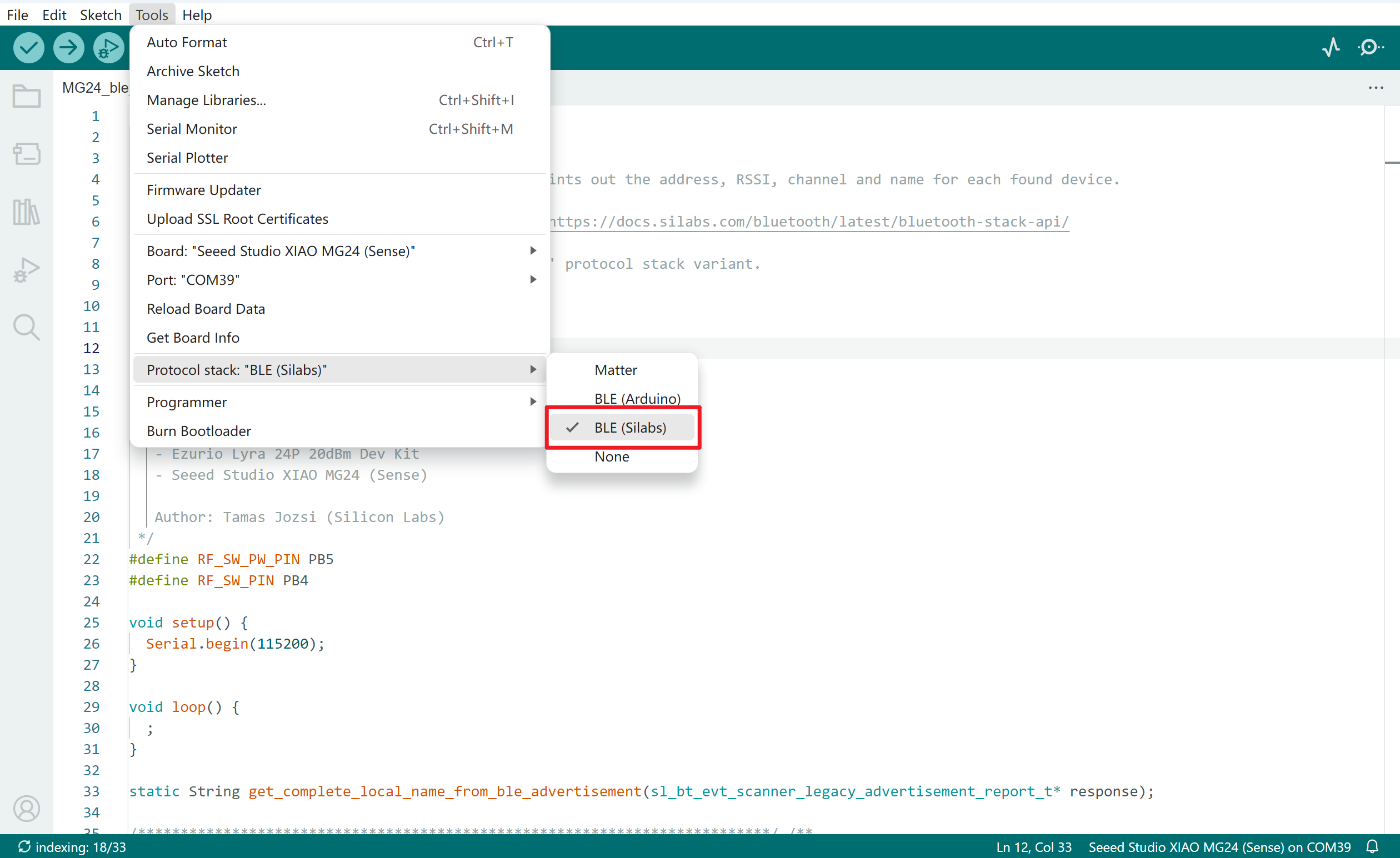
Agora você pode selecionar a placa-mãe XIAO MG24 e enviar o programa. Se o programa for executado sem problemas, abra o monitor serial e configure a taxa de baud para 115200, você poderá ver o seguinte resultado.
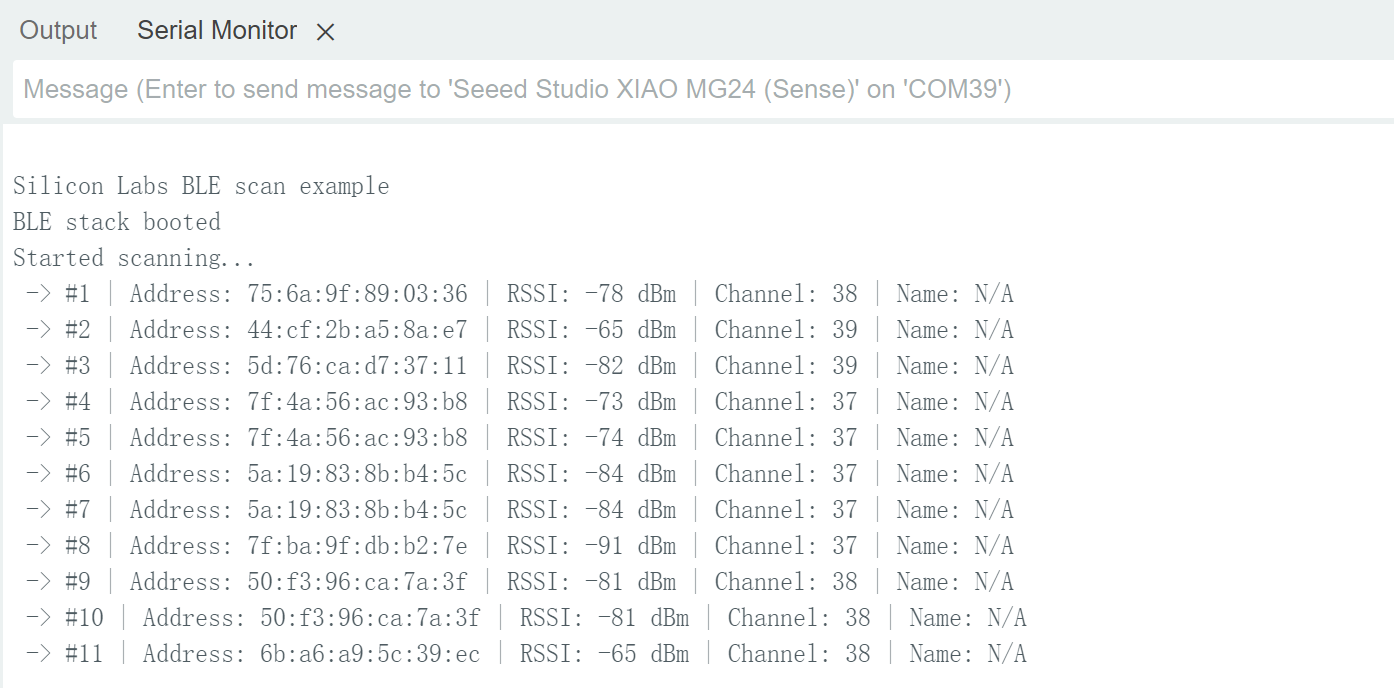
Este programa imprime o nome, endereço MAC, canal e sinal do dispositivo Bluetooth escaneado.
Anotação do programa
Este exemplo demonstra como escanear dispositivos Bluetooth Low Energy (BLE) próximos usando a pilha BLE da Silicon Labs, imprimindo o endereço, RSSI (Received Signal Strength Indicator), canal e nome de cada dispositivo descoberto.
O código começa definindo uma função manipuladora de eventos sl_bt_on_event, que processa vários eventos Bluetooth Low Energy (BLE) gerados pela pilha BLE. Esta função usa uma instrução switch para diferenciar entre tipos de eventos, como quando o dispositivo BLE inicia e quando recebe relatórios de anúncio de dispositivos próximos. Ao receber o evento de boot, ela inicializa a comunicação serial, configura os pinos GPIO para controle da antena e inicia o escaneamento de dispositivos BLE com parâmetros especificados.
Quando o processo de escaneamento detecta um relatório de anúncio de um dispositivo BLE, o caso sl_bt_evt_scanner_legacy_advertisement_report_id é acionado. Nesse caso, a função incrementa um contador para cada dispositivo detectado e extrai informações principais, incluindo o endereço do dispositivo, RSSI, canal e nome local. Ela utiliza a função auxiliar get_complete_local_name_from_ble_advertisement para obter o nome completo do dispositivo a partir dos dados de anúncio, que então é impresso na saída serial.
A função auxiliar get_complete_local_name_from_ble_advertisement percorre os dados de anúncio para localizar o campo de nome local completo. Ela verifica cada registro de anúncio pelo tipo que corresponde ao nome local completo e o retorna como uma string. Se o nome completo não for encontrado, a função retorna "N/A." Essa abordagem sistemática permite que o aplicativo descubra e identifique de forma eficaz dispositivos BLE próximos, fornecendo informações valiosas durante o processo de escaneamento.
Servidor/cliente BLE
Como mencionado anteriormente, o XIAO MG24 pode atuar tanto como servidor quanto como cliente. Vamos dar uma olhada no programa como servidor e em como usá-lo. Depois de enviar o programa a seguir para o XIAO, ele atuará como servidor e enviará uma mensagem "Hello World" para todos os dispositivos Bluetooth conectados ao XIAO.
//Server Code
#define RF_SW_PW_PIN PB5
#define RF_SW_PIN PB4
bool notification_enabled = false;
void setup() {
pinMode(LED_BUILTIN, OUTPUT);
digitalWrite(LED_BUILTIN, LED_BUILTIN_INACTIVE);
Serial.begin(115200);
Serial.println("Silicon Labs BLE send hello world example");
// turn on the antenna function
pinMode(RF_SW_PW_PIN, OUTPUT);
digitalWrite(RF_SW_PW_PIN, HIGH);
delay(100);
// HIGH -> Use external antenna / LOW -> Use built-in antenna
pinMode(RF_SW_PIN, OUTPUT);
digitalWrite(RF_SW_PIN, LOW);
}
void loop() {
if (notification_enabled) {
// Send a notification every two seconds with the message 'hello world'
send_helloworld_notification();
}
delay(2000);
}
static void ble_initialize_gatt_db();
static void ble_start_advertising();
static const uint8_t advertised_name[] = "XIAO_MG24 Server"; // Name of your BLE device
static uint16_t gattdb_session_id;
static uint16_t generic_access_service_handle;
static uint16_t name_characteristic_handle;
static uint16_t my_service_handle;
static uint16_t led_control_characteristic_handle;
static uint16_t notify_characteristic_handle;
/**************************************************************************/ /**
* Bluetooth stack event handler
* Called when an event happens on BLE the stack
*
* @param[in] evt Event coming from the Bluetooth stack
*****************************************************************************/
void sl_bt_on_event(sl_bt_msg_t *evt) {
switch (SL_BT_MSG_ID(evt->header)) {
// -------------------------------
// This event indicates the device has started and the radio is ready.
// Do not call any stack command before receiving this boot event!
case sl_bt_evt_system_boot_id:
{
Serial.println("BLE stack booted");
// Initialize the application specific GATT table
ble_initialize_gatt_db();
// Start advertising
ble_start_advertising();
Serial.println("BLE advertisement started");
}
break;
// -------------------------------
// This event indicates that a new connection was opened
case sl_bt_evt_connection_opened_id:
Serial.println("BLE connection opened");
break;
// -------------------------------
// This event indicates that a connection was closed
case sl_bt_evt_connection_closed_id:
Serial.println("BLE connection closed");
// Restart the advertisement
ble_start_advertising();
Serial.println("BLE advertisement restarted");
break;
// -------------------------------
// This event indicates that the value of an attribute in the local GATT
// database was changed by a remote GATT client
case sl_bt_evt_gatt_server_attribute_value_id:
// Check if the changed characteristic is the LED control
if (led_control_characteristic_handle == evt->data.evt_gatt_server_attribute_value.attribute) {
Serial.println("LED control characteristic data received");
// Check the length of the received data
if (evt->data.evt_gatt_server_attribute_value.value.len == 0) {
break;
}
// Get the received byte
uint8_t received_data = evt->data.evt_gatt_server_attribute_value.value.data[0];
// Turn the LED on/off according to the received data
// If we receive a '0' - turn the LED off
// If we receive a '1' - turn the LED on
if (received_data == 0x00) {
digitalWrite(LED_BUILTIN, LED_BUILTIN_INACTIVE);
Serial.println("LED off");
} else if (received_data == 0x01) {
Serial.println("LED on");
digitalWrite(LED_BUILTIN, LED_BUILTIN_ACTIVE);
}
}
break;
// -------------------------------
// This event is received when a GATT characteristic status changes
case sl_bt_evt_gatt_server_characteristic_status_id:
// If the 'Notify' characteristic has been changed
if (evt->data.evt_gatt_server_characteristic_status.characteristic == notify_characteristic_handle) {
// The client just enabled the notification - send notification of the current state
if (evt->data.evt_gatt_server_characteristic_status.client_config_flags & sl_bt_gatt_notification) {
Serial.println("change notification enabled");
notification_enabled = true;
} else {
Serial.println("change notification disabled");
notification_enabled = false;
}
}
break;
// -------------------------------
// Default event handler
default:
break;
}
}
/**************************************************************************/ /**
* Sends a BLE notification the the client if notifications are enabled
*****************************************************************************/
static void send_helloworld_notification() {
uint8_t str[12] = "Hello World";
sl_status_t sc = sl_bt_gatt_server_notify_all(notify_characteristic_handle,
sizeof(str),
(const uint8_t *)&str);
if (sc == SL_STATUS_OK) {
Serial.println("Send notification!");
}
}
/**************************************************************************/ /**
* Starts BLE advertisement
* Initializes advertising if it's called for the first time
*****************************************************************************/
static void ble_start_advertising() {
static uint8_t advertising_set_handle = 0xff;
static bool init = true;
sl_status_t sc;
if (init) {
// Create an advertising set
sc = sl_bt_advertiser_create_set(&advertising_set_handle);
app_assert_status(sc);
// Set advertising interval to 100ms
sc = sl_bt_advertiser_set_timing(
advertising_set_handle,
160, // minimum advertisement interval (milliseconds * 1.6)
160, // maximum advertisement interval (milliseconds * 1.6)
0, // advertisement duration
0); // maximum number of advertisement events
app_assert_status(sc);
init = false;
}
// Generate data for advertising
sc = sl_bt_legacy_advertiser_generate_data(advertising_set_handle, sl_bt_advertiser_general_discoverable);
app_assert_status(sc);
// Start advertising and enable connections
sc = sl_bt_legacy_advertiser_start(advertising_set_handle, sl_bt_advertiser_connectable_scannable);
app_assert_status(sc);
}
/**************************************************************************/ /**
* Initializes the GATT database
* Creates a new GATT session and adds certain services and characteristics
*****************************************************************************/
static void ble_initialize_gatt_db() {
sl_status_t sc;
// Create a new GATT database
sc = sl_bt_gattdb_new_session(&gattdb_session_id);
app_assert_status(sc);
// Add the Generic Access service to the GATT DB
const uint8_t generic_access_service_uuid[] = { 0x00, 0x18 };
sc = sl_bt_gattdb_add_service(gattdb_session_id,
sl_bt_gattdb_primary_service,
SL_BT_GATTDB_ADVERTISED_SERVICE,
sizeof(generic_access_service_uuid),
generic_access_service_uuid,
&generic_access_service_handle);
app_assert_status(sc);
// Add the Device Name characteristic to the Generic Access service
// The value of the Device Name characteristic will be advertised
const sl_bt_uuid_16_t device_name_characteristic_uuid = { .data = { 0x00, 0x2A } };
sc = sl_bt_gattdb_add_uuid16_characteristic(gattdb_session_id,
generic_access_service_handle,
SL_BT_GATTDB_CHARACTERISTIC_READ,
0x00,
0x00,
device_name_characteristic_uuid,
sl_bt_gattdb_fixed_length_value,
sizeof(advertised_name) - 1,
sizeof(advertised_name) - 1,
advertised_name,
&name_characteristic_handle);
app_assert_status(sc);
// Start the Generic Access service
sc = sl_bt_gattdb_start_service(gattdb_session_id, generic_access_service_handle);
app_assert_status(sc);
// Add my BLE service to the GATT DB
// UUID: de8a5aac-a99b-c315-0c80-60d4cbb51224
const uuid_128 my_service_uuid = {
.data = { 0x24, 0x12, 0xb5, 0xcb, 0xd4, 0x60, 0x80, 0x0c, 0x15, 0xc3, 0x9b, 0xa9, 0xac, 0x5a, 0x8a, 0xde }
};
sc = sl_bt_gattdb_add_service(gattdb_session_id,
sl_bt_gattdb_primary_service,
SL_BT_GATTDB_ADVERTISED_SERVICE,
sizeof(my_service_uuid),
my_service_uuid.data,
&my_service_handle);
app_assert_status(sc);
// Add the 'LED Control' characteristic to the Blinky service
// UUID: 5b026510-4088-c297-46d8-be6c736a087a
const uuid_128 led_control_characteristic_uuid = {
.data = { 0x7a, 0x08, 0x6a, 0x73, 0x6c, 0xbe, 0xd8, 0x46, 0x97, 0xc2, 0x88, 0x40, 0x10, 0x65, 0x02, 0x5b }
};
uint8_t led_char_init_value = 0;
sc = sl_bt_gattdb_add_uuid128_characteristic(gattdb_session_id,
my_service_handle,
SL_BT_GATTDB_CHARACTERISTIC_READ | SL_BT_GATTDB_CHARACTERISTIC_WRITE,
0x00,
0x00,
led_control_characteristic_uuid,
sl_bt_gattdb_fixed_length_value,
1, // max length
sizeof(led_char_init_value), // initial value length
&led_char_init_value, // initial value
&led_control_characteristic_handle);
// Start the Blinky service
sc = sl_bt_gattdb_start_service(gattdb_session_id, my_service_handle);
app_assert_status(sc);
// Add the 'Notify' characteristic to my BLE service
// UUID: 61a885a4-41c3-60d0-9a53-6d652a70d29c
const uuid_128 btn_report_characteristic_uuid = {
.data = { 0x9c, 0xd2, 0x70, 0x2a, 0x65, 0x6d, 0x53, 0x9a, 0xd0, 0x60, 0xc3, 0x41, 0xa4, 0x85, 0xa8, 0x61 }
};
uint8_t notify_char_init_value = 0;
sc = sl_bt_gattdb_add_uuid128_characteristic(gattdb_session_id,
my_service_handle,
SL_BT_GATTDB_CHARACTERISTIC_READ | SL_BT_GATTDB_CHARACTERISTIC_NOTIFY,
0x00,
0x00,
btn_report_characteristic_uuid,
sl_bt_gattdb_fixed_length_value,
1, // max length
sizeof(notify_char_init_value), // initial value length
¬ify_char_init_value, // initial value
¬ify_characteristic_handle);
// Start my BLE service
sc = sl_bt_gattdb_start_service(gattdb_session_id, my_service_handle);
app_assert_status(sc);
// Commit the GATT DB changes
sc = sl_bt_gattdb_commit(gattdb_session_id);
app_assert_status(sc);
}
#ifndef BLE_STACK_SILABS
#error "This example is only compatible with the Silicon Labs BLE stack. Please select 'BLE (Silabs)' in 'Tools > Protocol stack'."
#endif
Enquanto isso, você pode procurar e baixar o aplicativo nRF Connect nas principais lojas de aplicativos móveis, o que permite que seu telefone procure e se conecte a dispositivos Bluetooth.
- Android: nRF Connect
- IOS: nRF Connect
Depois de baixar o software, siga as etapas mostradas abaixo para procurar e conectar o XIAO_MG24, e você verá o "Hello World" anunciado.
 |  |  |  |
Se você quiser usar outro XIAO MG24 como cliente para receber mensagens do servidor, poderá então usar o seguinte procedimento para o XIAO cliente.
// Client Code
#define RF_SW_PW_PIN PB5
#define RF_SW_PIN PB4

// Connection states
enum conn_state_t {
  ST_BOOT,
  ST_SCAN,
  ST_CONNECT,
  ST_SERVICE_DISCOVER,
  ST_CHAR_DISCOVER,
  ST_READY
};

conn_state_t connection_state = ST_BOOT;
uint8_t connection_handle = __UINT8_MAX__;
uint32_t blinky_service_handle = __UINT32_MAX__;
uint16_t led_control_char_handle = __UINT16_MAX__;
bool gatt_procedure_in_progress = false;

// If there's no built-in button set a pin where a button is connected
#ifndef BTN_BUILTIN
#define BTN_BUILTIN D0
#endif

void setup() {
  // Set the built-in LED as output
  pinMode(LED_BUILTIN, OUTPUT);
  // Turn the built-in LED off
  digitalWrite(LED_BUILTIN, LED_BUILTIN_INACTIVE);
  // Set the built-in button as input
  pinMode(BTN_BUILTIN, INPUT);
  // Start Serial
  Serial.begin(115200);

  // turn on the antenna function
  pinMode(RF_SW_PW_PIN, OUTPUT);
  digitalWrite(RF_SW_PW_PIN, HIGH);

  delay(100);

  // HIGH -> Use external antenna / LOW -> Use built-in antenna
  pinMode(RF_SW_PIN, OUTPUT);
  digitalWrite(RF_SW_PIN, LOW);
}

void loop() {
  // Static variable for remembering the previous state of the button
  static uint8_t btn_state_prev = LOW;
  // If the connection is fully established and we don't have any ongoing GATT procedures
  if (connection_state == ST_READY && !gatt_procedure_in_progress) {
    // Read the current state of the button
    uint8_t btn_state = digitalRead(BTN_BUILTIN);
    // If the current state is different than the previous state
    if (btn_state_prev != btn_state) {
      // Update the previous state
      btn_state_prev = btn_state;
      // Invert the state (the SL board buttons give a 0 when pressed and 1 when released)
      uint8_t btn_state_inv = !btn_state;
      // Log the state change
      Serial.print("Sending button state: ");
      Serial.println(btn_state_inv);
      // Send the new state over BLE by writing the other device's LED Control characteristic
      sl_status_t sc = sl_bt_gatt_write_characteristic_value(connection_handle, led_control_char_handle, sizeof(uint8_t), &btn_state_inv);
      app_assert_status(sc);
      gatt_procedure_in_progress = true;
    }
  }
}

// Blinky service
// UUID: de8a5aac-a99b-c315-0c80-60d4cbb51224
const uuid_128 blinky_service_uuid = {
  .data = { 0x24, 0x12, 0xb5, 0xcb, 0xd4, 0x60, 0x80, 0x0c, 0x15, 0xc3, 0x9b, 0xa9, 0xac, 0x5a, 0x8a, 0xde }
};

// LED Control characteristic
// UUID: 5b026510-4088-c297-46d8-be6c736a087a
const uuid_128 led_control_characteristic_uuid = {
  .data = { 0x7a, 0x08, 0x6a, 0x73, 0x6c, 0xbe, 0xd8, 0x46, 0x97, 0xc2, 0x88, 0x40, 0x10, 0x65, 0x02, 0x5b }
};
const uint8_t advertised_name[] = "XIAO_MG24 Server";

static bool find_complete_local_name_in_advertisement(sl_bt_evt_scanner_legacy_advertisement_report_t* response);

/**************************************************************************/ /**
 * Bluetooth stack event handler
 * Called when an event happens on BLE the stack
 *
 * @param[in] evt Event coming from the Bluetooth stack
 *****************************************************************************/
void sl_bt_on_event(sl_bt_msg_t* evt) {
  static uint32_t scan_report_num = 0u;
  sl_status_t sc;

  switch (SL_BT_MSG_ID(evt->header)) {
    // This event is received when the BLE device has successfully booted
    case sl_bt_evt_system_boot_id:
      // Print a welcome message
      Serial.println();
      Serial.println("Silicon Labs BLE light switch client example");
      Serial.println("BLE stack booted");
      // Start scanning for other BLE devices
      sc = sl_bt_scanner_set_parameters(sl_bt_scanner_scan_mode_active, 16, 16);
      app_assert_status(sc);
      sc = sl_bt_scanner_start(sl_bt_scanner_scan_phy_1m,
                               sl_bt_scanner_discover_generic);
      app_assert_status(sc);
      Serial.println("Started scanning...");
      connection_state = ST_SCAN;
      break;

    // This event is received when we scan the advertisement of another BLE device
    case sl_bt_evt_scanner_legacy_advertisement_report_id:
      scan_report_num++;
      Serial.print(" -> #");
      Serial.print(scan_report_num);
      Serial.print(" | Address: ");
      for (int i = 5; i >= 0; i--) {
        Serial.printf("%02x", evt->data.evt_scanner_legacy_advertisement_report.address.addr[i]);
        if (i > 0) {
          Serial.print(":");
        }
      }
      Serial.print(" | RSSI: ");
      Serial.print(evt->data.evt_scanner_legacy_advertisement_report.rssi);
      Serial.print(" dBm");
      Serial.print(" | Channel: ");
      Serial.print(evt->data.evt_scanner_legacy_advertisement_report.channel);
      Serial.print(" | Name: ");
      Serial.println(find_complete_local_name_in_advertisement(&(evt->data.evt_scanner_legacy_advertisement_report)));

      // If we find the other devices's name
      if (find_complete_local_name_in_advertisement(&(evt->data.evt_scanner_legacy_advertisement_report))) {
        Serial.println("Target device found!");
        Serial.print("Forming a connection to ");
        for (int i = 5; i >= 0; i--) {
          Serial.printf("%02x", evt->data.evt_scanner_legacy_advertisement_report.address.addr[i]);
          if (i > 0) {
            Serial.print(":");
          }
        }
        Serial.println(" ");

        // Stop scanning
        sc = sl_bt_scanner_stop();
        app_assert_status(sc);
        // Connect to the device
        sc = sl_bt_connection_open(evt->data.evt_scanner_legacy_advertisement_report.address,
                                   evt->data.evt_scanner_legacy_advertisement_report.address_type,
                                   sl_bt_gap_phy_1m,
                                   NULL);
        // app_assert_status(sc);
        connection_state = ST_CONNECT;

        Serial.println("We are now connected to the BLE Server");
      }
      break;

    // This event is received when a BLE connection has been opened
    case sl_bt_evt_connection_opened_id:
      Serial.println("Connection opened");
      digitalWrite(LED_BUILTIN, LED_BUILTIN_ACTIVE);
      connection_handle = evt->data.evt_connection_opened.connection;
      // Discover Health Thermometer service on the connected device
      sc = sl_bt_gatt_discover_primary_services_by_uuid(connection_handle,
                                                        sizeof(blinky_service_uuid),
                                                        blinky_service_uuid.data);
      app_assert_status(sc);
      gatt_procedure_in_progress = true;
      connection_state = ST_SERVICE_DISCOVER;
      break;

    // This event is received when a BLE connection has been closed
    case sl_bt_evt_connection_closed_id:
      Serial.println("Connection closed");
      digitalWrite(LED_BUILTIN, LED_BUILTIN_INACTIVE);
      connection_handle = __UINT8_MAX__;
      // Restart scanning
      sc = sl_bt_scanner_start(sl_bt_scanner_scan_phy_1m,
                               sl_bt_scanner_discover_generic);
      app_assert_status(sc);
      Serial.println("Restarted scanning...");
      connection_state = ST_SCAN;
      break;

    // This event is generated when a new service is discovered
    case sl_bt_evt_gatt_service_id:
      Serial.println("GATT service discovered");
      // Store the handle of the discovered Thermometer Service
      blinky_service_handle = evt->data.evt_gatt_service.service;
      break;

    // This event is generated when a new characteristic is discovered
    case sl_bt_evt_gatt_characteristic_id:
      Serial.println("GATT charactersitic discovered");
      // Store the handle of the discovered Temperature Measurement characteristic
      led_control_char_handle = evt->data.evt_gatt_characteristic.characteristic;
      break;

    // This event is received when a GATT procedure completes
    case sl_bt_evt_gatt_procedure_completed_id:
      Serial.println("GATT procedure completed");
      gatt_procedure_in_progress = false;

      if (connection_state == ST_SERVICE_DISCOVER) {
        Serial.println("GATT service discovery finished");
        // Discover thermometer characteristic on the connected device
        sc = sl_bt_gatt_discover_characteristics_by_uuid(evt->data.evt_gatt_procedure_completed.connection,
                                                         blinky_service_handle,
                                                         sizeof(led_control_characteristic_uuid.data),
                                                         led_control_characteristic_uuid.data);
        app_assert_status(sc);
        gatt_procedure_in_progress = true;
        connection_state = ST_CHAR_DISCOVER;
        break;
      }

      if (connection_state == ST_CHAR_DISCOVER) {
        Serial.println("GATT characteristic discovery finished");
        connection_state = ST_READY;
        break;
      }
      break;

    // Default event handler
    default:
      Serial.print("BLE event: 0x");
      Serial.println(SL_BT_MSG_ID(evt->header), HEX);
      break;
  }
}

/**************************************************************************/ /**
 * Finds a configured name in BLE advertisements
 *
 * @param[in] response BLE response event received from scanning
 *
 * @return true if found, false otherwise
 *****************************************************************************/
static bool find_complete_local_name_in_advertisement(sl_bt_evt_scanner_legacy_advertisement_report_t* response) {
  int i = 0;
  bool found = false;

  // Go through the response data
  while (i < (response->data.len - 1)) {
    uint8_t advertisement_length = response->data.data[i];
    uint8_t advertisement_type = response->data.data[i + 1];

    // Type 0x09 = Complete Local Name, 0x08 Shortened Name
    // If the field type matches the Complete Local Name
    if (advertisement_type == 0x09) {
      // Check if device name matches
      if (memcmp(response->data.data + i + 2, advertised_name, strlen((const char*)advertised_name)) == 0) {
        found = true;
        break;
      }
    }
    // Jump to next advertisement record
    i = i + advertisement_length + 1;
  }
  return found;
}

#ifndef BLE_STACK_SILABS
#error "This example is only compatible with the Silicon Labs BLE stack. Please select 'BLE (Silabs)' in 'Tools > Protocol stack'."
#endif
O programa acima transformará o XIAO em um cliente e buscará dispositivos Bluetooth próximos. Quando o UUID do dispositivo Bluetooth corresponder ao UUID que você forneceu, ele se conectará ao dispositivo e obterá o valor de sua característica.
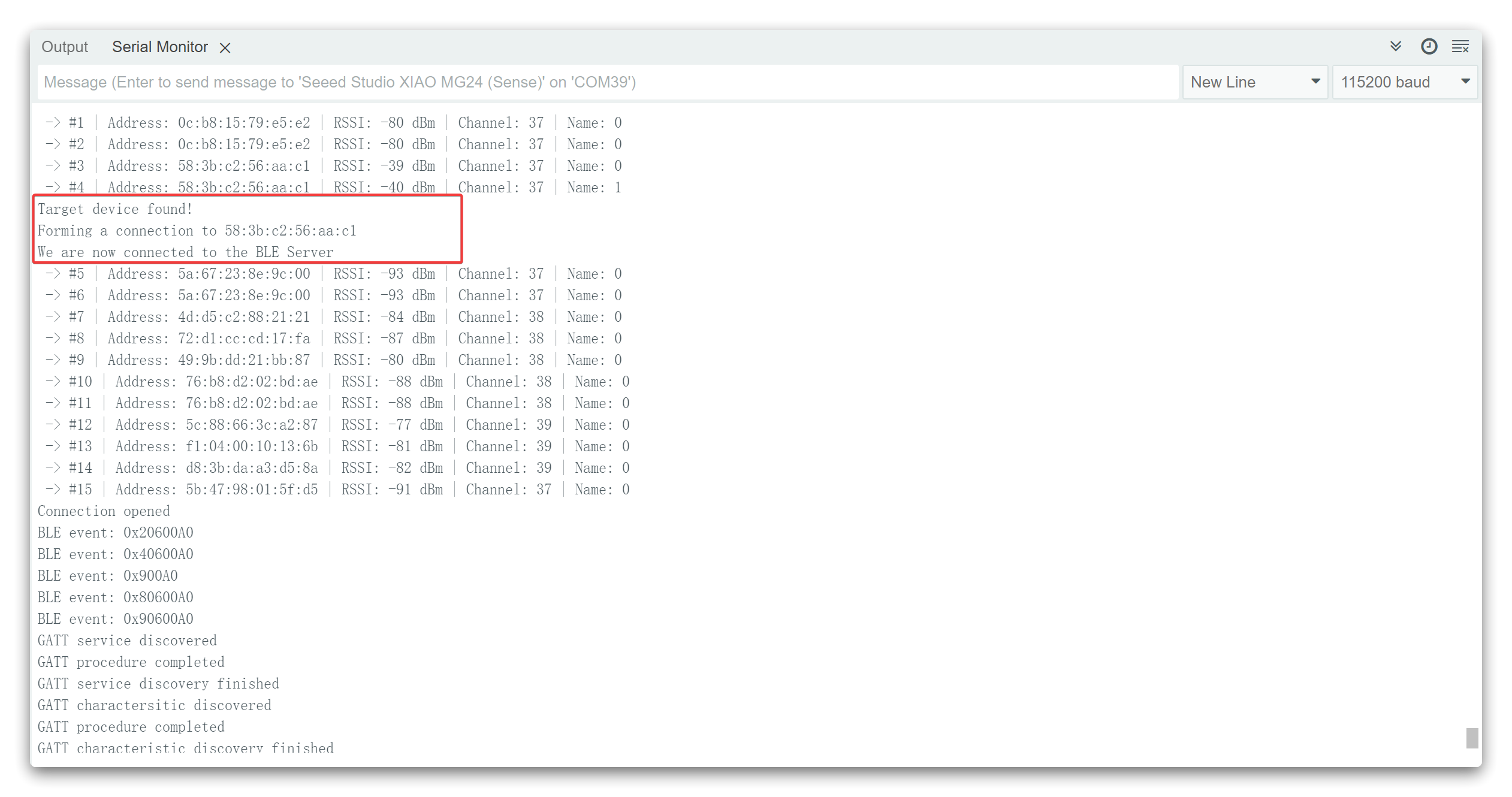
Anotação do programa
Vamos dar uma olhada rápida em como o código de exemplo do servidor BLE funciona. Ele começa importando as bibliotecas necessárias para os recursos de BLE. Em seguida, você precisa definir um UUID para o Service e para a Characteristic.
// Add my BLE service to the GATT DB
// UUID: de8a5aac-a99b-c315-0c80-60d4cbb51224
const uuid_128 my_service_uuid = {
  .data = { 0x24, 0x12, 0xb5, 0xcb, 0xd4, 0x60, 0x80, 0x0c, 0x15, 0xc3, 0x9b, 0xa9, 0xac, 0x5a, 0x8a, 0xde }
};

// Add the 'Notify' characteristic to my BLE service
// UUID: 61a885a4-41c3-60d0-9a53-6d652a70d29c
const uuid_128 btn_report_characteristic_uuid = {
  .data = { 0x9c, 0xd2, 0x70, 0x2a, 0x65, 0x6d, 0x53, 0x9a, 0xd0, 0x60, 0xc3, 0x41, 0xa4, 0x85, 0xa8, 0x61 }
};
Você pode manter os UUIDs padrão ou acessar uuidgenerator.net para criar UUIDs aleatórios para seus serviços e características.
Em seguida, você cria um dispositivo BLE chamado “XIAO_MG24 Server”. Você pode alterar esse nome para o que quiser. Na linha seguinte, você define o dispositivo BLE como um servidor. Depois disso, você cria um serviço para o servidor BLE com o UUID definido anteriormente.
sl_status_t sc;
// Create a new GATT database
sc = sl_bt_gattdb_new_session(&gattdb_session_id);
app_assert_status(sc);

// Add the Generic Access service to the GATT DB
const uint8_t generic_access_service_uuid[] = { 0x00, 0x18 };
sc = sl_bt_gattdb_add_service(gattdb_session_id,
                              sl_bt_gattdb_primary_service,
                              SL_BT_GATTDB_ADVERTISED_SERVICE,
                              sizeof(generic_access_service_uuid),
                              generic_access_service_uuid,
                              &generic_access_service_handle);
app_assert_status(sc);

// Add the Device Name characteristic to the Generic Access service
// The value of the Device Name characteristic will be advertised
const sl_bt_uuid_16_t device_name_characteristic_uuid = { .data = { 0x00, 0x2A } };
sc = sl_bt_gattdb_add_uuid16_characteristic(gattdb_session_id,
                                            generic_access_service_handle,
                                            SL_BT_GATTDB_CHARACTERISTIC_READ,
                                            0x00,
                                            0x00,
                                            device_name_characteristic_uuid,
                                            sl_bt_gattdb_fixed_length_value,
                                            sizeof(advertised_name) - 1,
                                            sizeof(advertised_name) - 1,
                                            advertised_name,
                                            &name_characteristic_handle);
app_assert_status(sc);

// Start the Generic Access service
sc = sl_bt_gattdb_start_service(gattdb_session_id, generic_access_service_handle);
app_assert_status(sc);

// Add my BLE service to the GATT DB
// UUID: de8a5aac-a99b-c315-0c80-60d4cbb51224
const uuid_128 my_service_uuid = {
  .data = { 0x24, 0x12, 0xb5, 0xcb, 0xd4, 0x60, 0x80, 0x0c, 0x15, 0xc3, 0x9b, 0xa9, 0xac, 0x5a, 0x8a, 0xde }
};
sc = sl_bt_gattdb_add_service(gattdb_session_id,
                              sl_bt_gattdb_primary_service,
                              SL_BT_GATTDB_ADVERTISED_SERVICE,
                              sizeof(my_service_uuid),
                              my_service_uuid.data,
                              &my_service_handle);
app_assert_status(sc);
Então, você define a característica para esse serviço. Como você pode ver, você também usa o UUID definido anteriormente, e precisa passar como argumentos as propriedades da característica. Neste caso, são: READ e NOTIFY.
// Add the 'Notify' characteristic to my BLE service
// UUID: 61a885a4-41c3-60d0-9a53-6d652a70d29c
const uuid_128 btn_report_characteristic_uuid = {
.data = { 0x9c, 0xd2, 0x70, 0x2a, 0x65, 0x6d, 0x53, 0x9a, 0xd0, 0x60, 0xc3, 0x41, 0xa4, 0x85, 0xa8, 0x61 }
};
uint8_t notify_char_init_value = 0;
sc = sl_bt_gattdb_add_uuid128_characteristic(gattdb_session_id,
my_service_handle,
SL_BT_GATTDB_CHARACTERISTIC_READ | SL_BT_GATTDB_CHARACTERISTIC_NOTIFY,
0x00,
0x00,
btn_report_characteristic_uuid,
sl_bt_gattdb_fixed_length_value,
1, // max length
sizeof(notify_char_init_value), // initial value length
¬ify_char_init_value, // initial value
¬ify_characteristic_handle);
// Start my BLE service
sc = sl_bt_gattdb_start_service(gattdb_session_id, my_service_handle);
app_assert_status(sc);
// Commit the GATT DB changes
sc = sl_bt_gattdb_commit(gattdb_session_id);
app_assert_status(sc);
Depois de criar a característica, você pode definir o seu valor com o método sl_bt_gatt_server_notify_all(). Neste caso, estamos definindo o valor para o texto “Hello World”. Você pode alterar esse texto para o que quiser. Em projetos futuros, esse texto pode ser uma leitura de sensor ou o estado de uma lâmpada, por exemplo.
Por fim, você pode iniciar o serviço e o advertising, para que outros dispositivos BLE possam escanear e encontrar este dispositivo BLE.
// Start advertising
ble_start_advertising();
Este é apenas um exemplo simples de como criar um servidor BLE. A função deste programa é enviar notificações a cada dois segundos, com o conteúdo sendo "Hello World".
Troca de Dados de Sensor via BLE
Em seguida, iremos para o mundo real para completar um caso. Neste caso, usaremos a função getCPUTemp() do XIAO MG24 para medir a temperatura do MCU atual e, em seguida, enviar o valor de temperatura do MCU para outro XIAO MG24 via Bluetooth para simular um termômetro de saúde.
Precisamos preparar dois XIAO, um como servidor e outro como cliente. Aqui está o programa de exemplo como servidor. O XIAO como servidor tem as seguintes tarefas principais.
- Primeiro, usar a função
getCPUTemp()para obter a temperatura atual do MCU; - Segundo, criar o servidor Bluetooth;
- Terceiro, anunciar os valores de temperatura por meio de Bluetooth;
- Quarto, mostrar a temperatura em tempo real.
// server

/*
   BLE health thermometer example

   The example implements a minimal BLE Health Thermometer profile to provide temperature measurements over BLE

   On startup the sketch will start a BLE advertisement with the configured name, then
   it will accept any incoming connection. When a device is connected and enables indications for the
   health thermometer characteristic, then the device will send it's CPU temperature readings as thermometer data.
   With the EFR Connect app you can test this functionality by going to the "Demo" tab and selecting "Health Thermometer".
   Alternatively, you can test this example by flashing an other BLE board with the 'ble_health_thermometer_client' demo
   and have the two boards exchange the temperature measurements over BLE.

   Find out more on the API usage at: https://docs.silabs.com/bluetooth/latest/bluetooth-stack-api/

   This example only works with the 'BLE (Silabs)' protocol stack variant.

   You can test the thermometer device with the EFR Connect app:
    - https://play.google.com/store/apps/details?id=com.siliconlabs.bledemo
    - https://apps.apple.com/us/app/efr-connect-ble-mobile-app/id1030932759

   Compatible boards:
   - Arduino Nano Matter
   - SparkFun Thing Plus MGM240P
   - xG27 DevKit
   - xG24 Explorer Kit
   - xG24 Dev Kit
   - BGM220 Explorer Kit
   - Ezurio Lyra 24P 20dBm Dev Kit
   - Seeed Studio XIAO MG24 (Sense)

   Author: Tamas Jozsi (Silicon Labs)
 */

#define RF_SW_PW_PIN PB5
#define RF_SW_PIN PB4

static void handle_temperature_indication();
static void ble_initialize_gatt_db();
static void ble_start_advertising();

const uint8_t advertised_name[] = "XIAOMG24_BLE";
uint8_t connection_handle = 0u;
uint16_t temp_measurement_characteristic_handle = 0u;
bool indication_enabled = false;

void setup()
{
  pinMode(LED_BUILTIN, OUTPUT);
  digitalWrite(LED_BUILTIN, LED_BUILTIN_INACTIVE);
  Serial.begin(115200);

  // turn on this antenna function
  pinMode(RF_SW_PW_PIN, OUTPUT);
  digitalWrite(RF_SW_PW_PIN, HIGH);

  delay(100);

  // HIGH -> Use external antenna / LOW -> Use built-in antenna
  pinMode(RF_SW_PIN, OUTPUT);
  digitalWrite(RF_SW_PIN, LOW);
}

void loop()
{
  handle_temperature_indication();
}

/**************************************************************************//**
 * Sends a BLE indication with the current temperature to the connected device
 * if enabled, then waits for a second
 *****************************************************************************/
static void handle_temperature_indication()
{
  // Return immediately if indications are not enabled
  if (!indication_enabled) {
    return;
  }

  // Get the current CPU temperature
  float temperature = getCPUTemp();

  // Convert the temperature to an IEEE 11073 float value
  int32_t millicelsius = (int32_t)(temperature * 1000);
  uint8_t buffer[5];
  uint32_t tmp_value = ((uint32_t)millicelsius & 0x00ffffffu) | ((uint32_t)(-3) << 24);
  buffer[0] = 0;
  buffer[1] = tmp_value & 0xff;
  buffer[2] = (tmp_value >> 8) & 0xff;
  buffer[3] = (tmp_value >> 16) & 0xff;
  buffer[4] = (tmp_value >> 24) & 0xff;

  // Send the indication
  sl_bt_gatt_server_send_indication(connection_handle, temp_measurement_characteristic_handle, sizeof(buffer), buffer);

  // Log the temperature
  Serial.print("Temperature indication sent - current temperature: ");
  Serial.print(temperature);
  Serial.println(" C");

  // Wait for a second
  delay(1000);
}

/**************************************************************************//**
 * Bluetooth stack event handler
 * Called when an event happens on BLE the stack
 *
 * @param[in] evt Event coming from the Bluetooth stack
 *****************************************************************************/
void sl_bt_on_event(sl_bt_msg_t *evt)
{
  switch (SL_BT_MSG_ID(evt->header)) {
    // This event is received when the BLE device has successfully booted
    case sl_bt_evt_system_boot_id:
    {
      // Print a welcome message
      Serial.begin(115200);
      Serial.println();
      Serial.println("Silicon Labs BLE health thermometer example");
      Serial.println("BLE stack booted");
      // Initialize the application specific GATT DB
      ble_initialize_gatt_db();
      // Start advertising
      ble_start_advertising();
    }
    break;

    // This event is received when a BLE connection has been opened
    case sl_bt_evt_connection_opened_id:
      // Store the connection handle which will be needed for sending indications
      connection_handle = evt->data.evt_connection_opened.connection;
      Serial.println("Connection opened");
      digitalWrite(LED_BUILTIN, LED_BUILTIN_ACTIVE);
      break;

    // This event is received when a BLE connection has been closed
    case sl_bt_evt_connection_closed_id:
      // Reset stored values
      connection_handle = 0u;
      indication_enabled = false;
      Serial.println("Connection closed");
      digitalWrite(LED_BUILTIN, LED_BUILTIN_INACTIVE);
      // Restart the advertisement
      ble_start_advertising();
      break;

    // This event is received when a GATT characteristic status changes
    case sl_bt_evt_gatt_server_characteristic_status_id:
    {
      // If the temperature measurement characteristic has been changed
      if (evt->data.evt_gatt_server_characteristic_status.characteristic == temp_measurement_characteristic_handle) {
        uint16_t client_config_flags = evt->data.evt_gatt_server_characteristic_status.client_config_flags;
        uint8_t status_flags = evt->data.evt_gatt_server_characteristic_status.status_flags;
        if ((client_config_flags == 0x02) && (status_flags == 0x01)) {
          // If indication was enabled (0x02) in the client config flags, and the status flag shows that it's a change
          Serial.println("Temperature indication enabled");
          indication_enabled = true;
        } else if ((client_config_flags == 0x00) && (status_flags == 0x01)) {
          // If indication was disabled (0x00) in the client config flags, and the status flag shows that it's a change
          Serial.println("Temperature indication disabled");
          indication_enabled = false;
        }
      }
    }
    break;

    // Default event handler
    default:
      Serial.print("BLE event: 0x");
      Serial.println(SL_BT_MSG_ID(evt->header), HEX);
      break;
  }
}

/**************************************************************************//**
 * Starts BLE advertisement
 * Initializes advertising if it's called for the first time
 *****************************************************************************/
static void ble_start_advertising()
{
  static uint8_t advertising_set_handle = 0xff;
  static bool init = true;
  sl_status_t sc;

  if (init) {
    // Create an advertising set
    sc = sl_bt_advertiser_create_set(&advertising_set_handle);
    app_assert_status(sc);

    // Set advertising interval to 100ms
    sc = sl_bt_advertiser_set_timing(
      advertising_set_handle,
      160,   // minimum advertisement interval (milliseconds * 1.6)
      160,   // maximum advertisement interval (milliseconds * 1.6)
      0,     // advertisement duration
      0);    // maximum number of advertisement events
    app_assert_status(sc);

    init = false;
  }

  // Generate data for advertising
  sc = sl_bt_legacy_advertiser_generate_data(advertising_set_handle, sl_bt_advertiser_general_discoverable);
  app_assert_status(sc);

  // Start advertising and enable connections
  sc = sl_bt_legacy_advertiser_start(advertising_set_handle, sl_bt_advertiser_connectable_scannable);
  app_assert_status(sc);

  Serial.print("Started advertising as '");
  Serial.print((const char*)advertised_name);
  Serial.println("'...");
}

/**************************************************************************//**
 * Initializes the GATT database
 * Creates a new GATT session and adds certain services and characteristics
 *****************************************************************************/
static void ble_initialize_gatt_db()
{
  sl_status_t sc;
  uint16_t gattdb_session_id;
  uint16_t service_handle;
  uint16_t device_name_characteristic_handle;
  uint16_t temp_type_characteristic_handle;

  // Create a new GATT database
  sc = sl_bt_gattdb_new_session(&gattdb_session_id);
  app_assert_status(sc);

  // Generic Access service
  const uint8_t generic_access_service_uuid[] = { 0x00, 0x18 };
  sc = sl_bt_gattdb_add_service(gattdb_session_id,
                                sl_bt_gattdb_primary_service,
                                SL_BT_GATTDB_ADVERTISED_SERVICE,
                                sizeof(generic_access_service_uuid),
                                generic_access_service_uuid,
                                &service_handle);
  app_assert_status(sc);

  // Device Name characteristic
  const sl_bt_uuid_16_t device_name_characteristic_uuid = { .data = { 0x00, 0x2A } };
  sc = sl_bt_gattdb_add_uuid16_characteristic(gattdb_session_id,
                                              service_handle,
                                              SL_BT_GATTDB_CHARACTERISTIC_READ,
                                              0x00,
                                              0x00,
                                              device_name_characteristic_uuid,
                                              sl_bt_gattdb_fixed_length_value,
                                              sizeof(advertised_name) - 1,
                                              sizeof(advertised_name) - 1,
                                              advertised_name,
                                              &device_name_characteristic_handle);
  app_assert_status(sc);

  sc = sl_bt_gattdb_start_service(gattdb_session_id, service_handle);
  app_assert_status(sc);

  // Health Thermometer service
  const uint8_t thermometer_service_uuid[] = { 0x09, 0x18 };
  sc = sl_bt_gattdb_add_service(gattdb_session_id,
                                sl_bt_gattdb_primary_service,
                                SL_BT_GATTDB_ADVERTISED_SERVICE,
                                sizeof(thermometer_service_uuid),
                                thermometer_service_uuid,
                                &service_handle);
  app_assert_status(sc);

  // Temperature Measurement characteristic
  const sl_bt_uuid_16_t temp_measurement_characteristic_uuid = { .data = { 0x1C, 0x2A } };
  uint8_t temp_initial_value[5] = { 0, 0, 0, 0, 0 };
  sc = sl_bt_gattdb_add_uuid16_characteristic(gattdb_session_id,
                                              service_handle,
                                              SL_BT_GATTDB_CHARACTERISTIC_INDICATE,
                                              0x00,
                                              0x00,
                                              temp_measurement_characteristic_uuid,
                                              sl_bt_gattdb_fixed_length_value,
                                              5,
                                              5,
                                              temp_initial_value,
                                              &temp_measurement_characteristic_handle);
  app_assert_status(sc);

  // Temperature Type characteristic
  const sl_bt_uuid_16_t temp_type_characteristic_uuid = { .data = { 0x1D, 0x2A } };
  // Temperature type: body (2)
  uint8_t temp_type_initial_value = 2;
  sc = sl_bt_gattdb_add_uuid16_characteristic(gattdb_session_id,
                                              service_handle,
                                              SL_BT_GATTDB_CHARACTERISTIC_READ,
                                              0x00,
                                              0x00,
                                              temp_type_characteristic_uuid,
                                              sl_bt_gattdb_fixed_length_value,
                                              1,
                                              1,
                                              &temp_type_initial_value,
                                              &temp_type_characteristic_handle);
  app_assert_status(sc);

  // Start the Health Thermometer service
  sc = sl_bt_gattdb_start_service(gattdb_session_id, service_handle);
  app_assert_status(sc);

  // Commit the GATT DB changes
  sc = sl_bt_gattdb_commit(gattdb_session_id);
  app_assert_status(sc);
}

#ifndef BLE_STACK_SILABS
  #error "This example is only compatible with the Silicon Labs BLE stack. Please select 'BLE (Silabs)' in 'Tools > Protocol stack'."
#endif
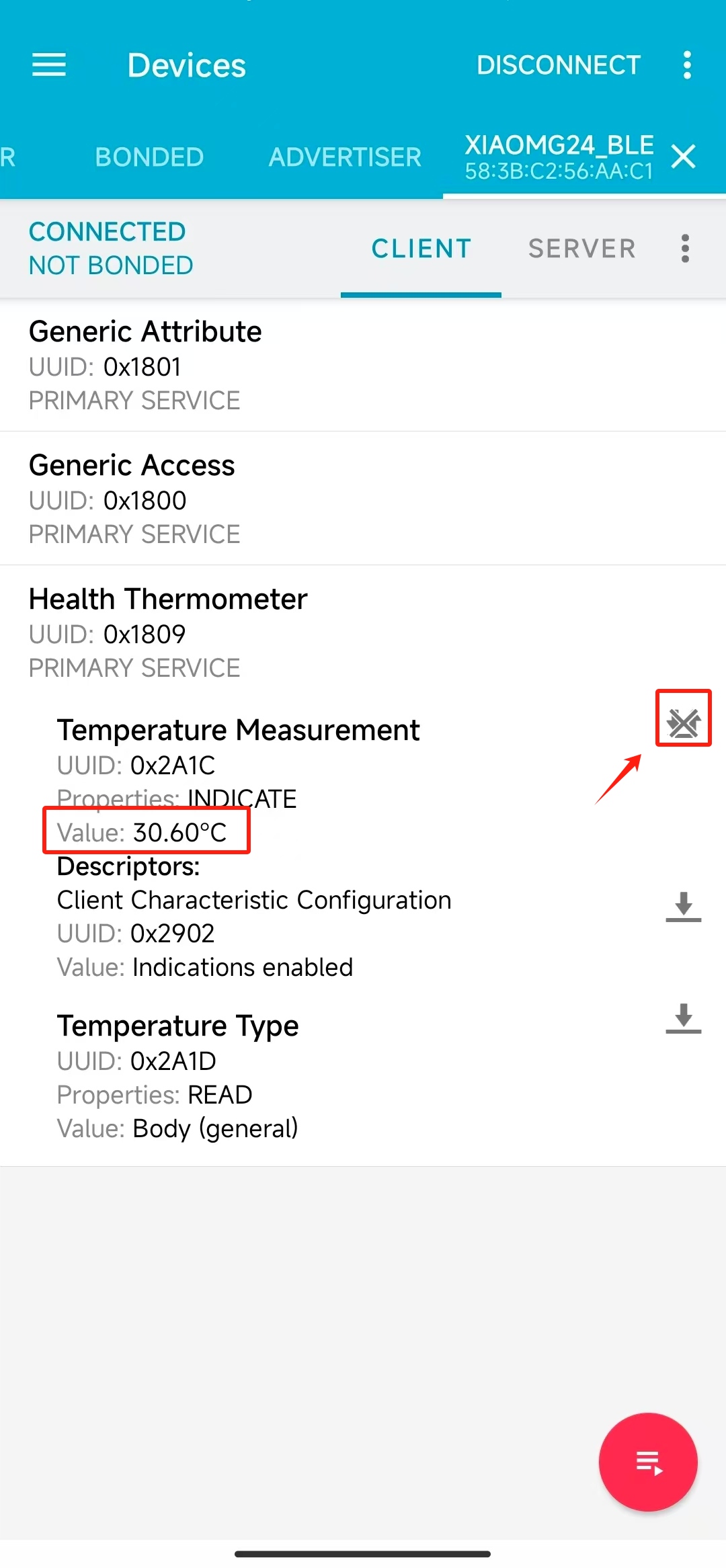
Depois de fazer o upload do programa para um dos XIAO, se o programa estiver sendo executado sem problemas, você pode pegar o seu telefone e usar o aplicativo nRF Connect para procurar o dispositivo Bluetooth chamado XIAOMG24_BLE, conectá-lo e clicar no botão mostrado abaixo; você receberá as informações de dados de temperatura.
Em seguida, precisamos pegar o nosso outro XIAO, que atua como cliente para coletar e exibir nossos dados.
// client

/*
   BLE health thermometer client example

   The example connects to another board running the 'BLE Health Thermometer' example and reads the temperature through BLE

   On startup the sketch will start a scanning for the other board running the 'ble_health_thermometer' example and
   advertising as "Thermometer Example". Once the other board is found, it establishes a connection,
   discovers it's services and characteristics, then subscribes to the temperature measurements.
   After the subscription the example starts receiving the temperature data from the other board periodically,
   and prints it to Serial.

   Find out more on the API usage at: https://docs.silabs.com/bluetooth/latest/bluetooth-stack-api/

   This example only works with the 'BLE (Silabs)' protocol stack variant.

   Compatible boards:
   - Arduino Nano Matter
   - SparkFun Thing Plus MGM240P
   - xG27 DevKit
   - xG24 Explorer Kit
   - xG24 Dev Kit
   - BGM220 Explorer Kit
   - Ezurio Lyra 24P 20dBm Dev Kit
   - Seeed Studio XIAO MG24 (Sense)

   Author: Tamas Jozsi (Silicon Labs)
 */

#define RF_SW_PW_PIN PB5
#define RF_SW_PIN PB4

void setup()
{
  pinMode(LED_BUILTIN, OUTPUT);
  digitalWrite(LED_BUILTIN, LED_BUILTIN_INACTIVE);
  Serial.begin(115200);

  // turn on this antenna function
  pinMode(RF_SW_PW_PIN, OUTPUT);
  digitalWrite(RF_SW_PW_PIN, HIGH);

  delay(100);

  // HIGH -> Use external antenna / LOW -> Use built-in antenna
  pinMode(RF_SW_PIN, OUTPUT);
  digitalWrite(RF_SW_PIN, LOW);
}

void loop()
{
}

// Connection states
enum conn_state_t {
  ST_BOOT,
  ST_SCAN,
  ST_CONNECT,
  ST_SERVICE_DISCOVER,
  ST_CHAR_DISCOVER,
  ST_REQUEST_INDICATION,
  ST_RECEIVE_DATA
};

// IEEE 11073 float structure
typedef struct {
  uint8_t mantissa_l;
  uint8_t mantissa_m;
  int8_t mantissa_h;
  int8_t exponent;
} IEEE_11073_float;

static bool find_complete_local_name_in_advertisement(sl_bt_evt_scanner_legacy_advertisement_report_t *response);
static float translate_IEEE_11073_temperature_to_float(IEEE_11073_float const *IEEE_11073_value);

const uint8_t thermometer_service_uuid[] = { 0x09, 0x18 };
const sl_bt_uuid_16_t temp_measurement_characteristic_uuid = { .data = { 0x1C, 0x2A } };
const uint8_t advertised_name[] = "XIAOMG24_BLE";

uint32_t thermometer_service_handle = __UINT32_MAX__;
uint16_t temp_measurement_char_handle = __UINT16_MAX__;
conn_state_t connection_state = ST_BOOT;

/**************************************************************************//**
 * Bluetooth stack event handler
 * Called when an event happens on BLE the stack
 *
 * @param[in] evt Event coming from the Bluetooth stack
 *****************************************************************************/
void sl_bt_on_event(sl_bt_msg_t *evt)
{
  sl_status_t sc;

  switch (SL_BT_MSG_ID(evt->header)) {
    // This event is received when the BLE device has successfully booted
    case sl_bt_evt_system_boot_id:
      // Print a welcome message
      Serial.println();
      Serial.println("Silicon Labs BLE health thermometer client example");
      Serial.println("BLE stack booted");
      // Start scanning for other BLE devices
      sc = sl_bt_scanner_set_parameters(sl_bt_scanner_scan_mode_active, 16, 16);
      app_assert_status(sc);
      sc = sl_bt_scanner_start(sl_bt_scanner_scan_phy_1m,
                               sl_bt_scanner_discover_generic);
      app_assert_status(sc);
      Serial.println("Started scanning...");
      connection_state = ST_SCAN;
      break;

    // This event is received when we scan the advertisement of another BLE device
    case sl_bt_evt_scanner_legacy_advertisement_report_id:
      Serial.println("BLE scan report received");
      // If we find the other devices's name
      if (find_complete_local_name_in_advertisement(&(evt->data.evt_scanner_legacy_advertisement_report))) {
        Serial.println("Target device found");
        // Stop scanning
        sc = sl_bt_scanner_stop();
        app_assert_status(sc);
        // Connect to the device
        sc = sl_bt_connection_open(evt->data.evt_scanner_legacy_advertisement_report.address,
                                   evt->data.evt_scanner_legacy_advertisement_report.address_type,
                                   sl_bt_gap_phy_1m,
                                   NULL);
        app_assert_status(sc);
        connection_state = ST_CONNECT;
      }
      break;

    // This event is received when a BLE connection has been opened
    case sl_bt_evt_connection_opened_id:
      Serial.println("Connection opened");
      digitalWrite(LED_BUILTIN, LED_BUILTIN_ACTIVE);
      // Discover Health Thermometer service on the connected device
      sc = sl_bt_gatt_discover_primary_services_by_uuid(evt->data.evt_connection_opened.connection,
                                                        sizeof(thermometer_service_uuid),
                                                        thermometer_service_uuid);
      app_assert_status(sc);
      connection_state = ST_SERVICE_DISCOVER;
      break;

    // This event is received when a BLE connection has been closed
    case sl_bt_evt_connection_closed_id:
      Serial.println("Connection closed");
      digitalWrite(LED_BUILTIN, LED_BUILTIN_INACTIVE);
      // Restart scanning
      sc = sl_bt_scanner_start(sl_bt_scanner_scan_phy_1m,
                               sl_bt_scanner_discover_generic);
      app_assert_status(sc);
      Serial.println("Restarted scanning...");
      connection_state = ST_SCAN;
      break;

    // This event is generated when a new service is discovered
    case sl_bt_evt_gatt_service_id:
      Serial.println("GATT service discovered");
      // Store the handle of the discovered Thermometer Service
      thermometer_service_handle = evt->data.evt_gatt_service.service;
      break;

    // This event is generated when a new characteristic is discovered
    case sl_bt_evt_gatt_characteristic_id:
      Serial.println("GATT charactersitic discovered");
      // Store the handle of the discovered Temperature Measurement characteristic
      temp_measurement_char_handle = evt->data.evt_gatt_characteristic.characteristic;
      break;

    // This event is received when a GATT procedure completes
    case sl_bt_evt_gatt_procedure_completed_id:
      Serial.println("GATT procedure completed");

      if (connection_state == ST_SERVICE_DISCOVER) {
        Serial.println("GATT service discovery finished");
        // Discover thermometer characteristic on the connected device
        sc = sl_bt_gatt_discover_characteristics_by_uuid(evt->data.evt_gatt_procedure_completed.connection,
                                                         thermometer_service_handle,
                                                         sizeof(temp_measurement_characteristic_uuid.data),
                                                         temp_measurement_characteristic_uuid.data);
        app_assert_status(sc);
        connection_state = ST_CHAR_DISCOVER;
        break;
      }

      if (connection_state == ST_CHAR_DISCOVER) {
        Serial.println("GATT characteristic discovery finished");
        // Enable temperature measurement indications
        sc = sl_bt_gatt_set_characteristic_notification(evt->data.evt_gatt_procedure_completed.connection,
                                                        temp_measurement_char_handle,
                                                        sl_bt_gatt_indication);
        app_assert_status(sc);
        connection_state = ST_REQUEST_INDICATION;
        break;
      }

      if (connection_state == ST_REQUEST_INDICATION) {
        Serial.println("Temperature measurement indications enabled");
        connection_state = ST_RECEIVE_DATA;
      }
      break;

    // This event is received when a characteristic value was received (like an indication)
    case sl_bt_evt_gatt_characteristic_value_id:
    {
      Serial.println("GATT data received");
      // Get the received data from the event
      uint8_t* char_value = &(evt->data.evt_gatt_characteristic_value.value.data[0]);
      // Convert it back to float
      float temperature = translate_IEEE_11073_temperature_to_float((IEEE_11073_float *)(char_value + 1));
      // Print to Serial
      Serial.print("Received temperature: ");
      Serial.print(temperature);
      Serial.println(" C");

      sc = sl_bt_gatt_send_characteristic_confirmation(evt->data.evt_gatt_characteristic_value.connection);
      app_assert_status(sc);
    }
    break;

    // Default event handler
    default:
      Serial.print("BLE event: 0x");
      Serial.println(SL_BT_MSG_ID(evt->header), HEX);
      break;
  }
}

/**************************************************************************//**
 * Finds a configured name in BLE advertisements
 *
 * @param[in] response BLE response event received from scanning
 *
 * @return true if found, false otherwise
 *****************************************************************************/
static bool find_complete_local_name_in_advertisement(sl_bt_evt_scanner_legacy_advertisement_report_t *response)
{
  int i = 0;
  bool found = false;

  // Go through the response data
  while (i < (response->data.len - 1)) {
    uint8_t advertisement_length = response->data.data[i];
    uint8_t advertisement_type = response->data.data[i + 1];

    // Type 0x09 = Complete Local Name, 0x08 Shortened Name
    // If the field type matches the Complete Local Name
    if (advertisement_type == 0x09) {
      // Check if device name matches
      if (memcmp(response->data.data + i + 2, advertised_name, strlen((const char*)advertised_name)) == 0) {
        found = true;
        break;
      }
    }
    // Jump to next advertisement record
    i = i + advertisement_length + 1;
  }
  return found;
}

/**************************************************************************//**
 * Translates a IEEE-11073 temperature value to float
 *
 * @param[in] IEEE_11073_value the IEEE 11073 float value to convert
 *
 * @return the converted value in float, NAN on failure
 *****************************************************************************/
static float translate_IEEE_11073_temperature_to_float(IEEE_11073_float const *IEEE_11073_value)
{
  int32_t mantissa = 0;
  uint8_t mantissa_l;
  uint8_t mantissa_m;
  int8_t mantissa_h;
  int8_t exponent;

  // Wrong Argument: NULL pointer is passed
  if (!IEEE_11073_value) {
    return NAN;
  }

  // Caching Fields
  mantissa_l = IEEE_11073_value->mantissa_l;
  mantissa_m = IEEE_11073_value->mantissa_m;
  mantissa_h = IEEE_11073_value->mantissa_h;
  exponent =  IEEE_11073_value->exponent;

  // IEEE-11073 Standard NaN Value Passed
  if ((mantissa_l == 0xFF) && (mantissa_m == 0xFF) && (mantissa_h == 0x7F) && (exponent == 0x00)) {
    return NAN;
  }

  // Converting a 24bit Signed Value to a 32bit Signed Value
  mantissa |= mantissa_h;
  mantissa <<= 8;
  mantissa |= mantissa_m;
  mantissa <<= 8;
  mantissa |= mantissa_l;
  mantissa <<= 8;
  mantissa >>= 8;

  return ((float)mantissa) * pow(10.0f, (float)exponent);
}

#ifndef BLE_STACK_SILABS
  #error "This example is only compatible with the Silicon Labs BLE stack. Please select 'BLE (Silabs)' in 'Tools > Protocol stack'."
#endif
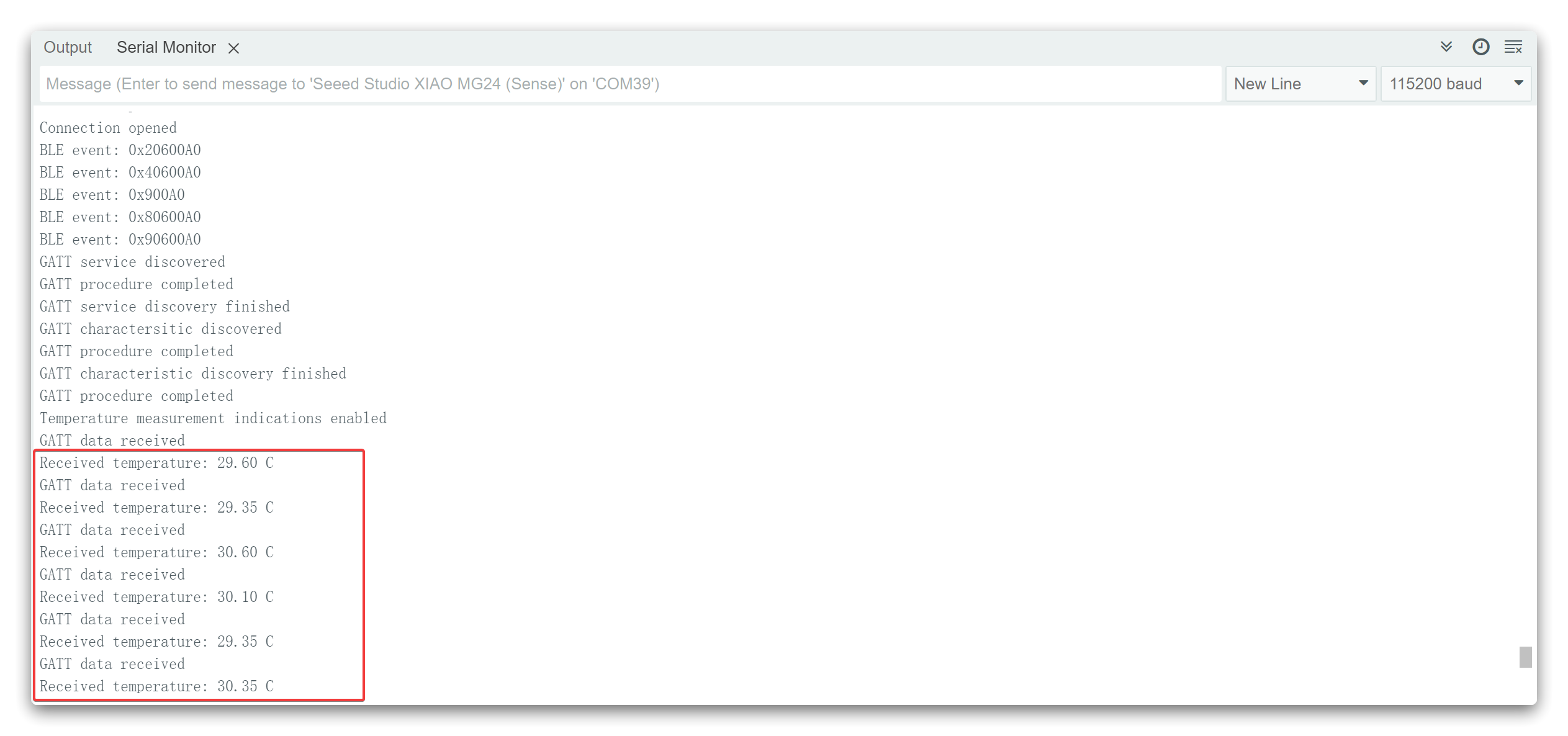
Por fim, se os programas de Servidor e Cliente estiverem sendo executados sem problemas, você poderá ver as seguintes informações impressas pelo Cliente através da porta serial.
Anotação do programa
Para os programas acima, selecionaremos as partes mais importantes para explicar. Começaremos com o programa do servidor.
No início do programa, definimos o nome do servidor Bluetooth; esse nome pode ser o que você definir, mas você precisa se lembrar dele, pois será necessário usá‑lo para pesquisar esse dispositivo Bluetooth.
const uint8_t advertised_name[] = "XIAOMG24_BLE";
Nas seções anteriores do tutorial, falamos que sob o servidor haverá uma Characteristic, e sob a Characteristic haverá os valores e o restante do conteúdo. Portanto, precisamos seguir esse princípio ao criar anúncios.
// Health Thermometer service
const uint8_t thermometer_service_uuid[] = { 0x09, 0x18 };
sc = sl_bt_gattdb_add_service(gattdb_session_id,
                              sl_bt_gattdb_primary_service,
                              SL_BT_GATTDB_ADVERTISED_SERVICE,
                              sizeof(thermometer_service_uuid),
                              thermometer_service_uuid,
                              &service_handle);
app_assert_status(sc);

// Temperature Measurement characteristic
const sl_bt_uuid_16_t temp_measurement_characteristic_uuid = { .data = { 0x1C, 0x2A } };
uint8_t temp_initial_value[5] = { 0, 0, 0, 0, 0 };
sc = sl_bt_gattdb_add_uuid16_characteristic(gattdb_session_id,
                                            service_handle,
                                            SL_BT_GATTDB_CHARACTERISTIC_INDICATE,
                                            0x00,
                                            0x00,
                                            temp_measurement_characteristic_uuid,
                                            sl_bt_gattdb_fixed_length_value,
                                            5,
                                            5,
                                            temp_initial_value,
                                            &temp_measurement_characteristic_handle);
app_assert_status(sc);
No programa acima, você pode ver que sl_bt_gattdb_add_service() é usada para criar um servidor. O parâmetro é um UUID específico: 0x1809. Nas regras do GATT, 0x1809 indica dados do tipo termômetro, e o UUID da mesma Characteristic: 0x2A1C também tem um significado especial. No GATT, ele indica a medição de temperatura. Isso se encaixa no caso de nossos valores de temperatura, então aqui estou definindo assim. Você pode ler aqui o que significam alguns dos UUIDs específicos que o GATT preparou para nós.
Claro, você também pode definir os UUIDs sem seguir o padrão GATT, você só precisa garantir que esses dois valores sejam exclusivos e não afetem a capacidade do seu cliente de encontrar os valores reconhecendo esses UUIDs. Você pode acessar uuidgenerator.net para criar UUIDs aleatórios para seus serviços e characteristics.
Por fim, medimos e anunciamos o valor de temperatura do MCU uma vez por segundo no loop.
A próxima etapa é o programa do Cliente, que parecerá muito mais complexo.
No início do programa, ainda é um conteúdo muito familiar. Você precisa garantir que esse conteúdo seja consistente com o que você configurou no lado do servidor.
const uint8_t thermometer_service_uuid[] = { 0x09, 0x18 };
const sl_bt_uuid_16_t temp_measurement_characteristic_uuid = { .data = { 0x1C, 0x2A } };
const uint8_t advertised_name[] = "XIAOMG24_BLE";
Em seguida, escreveremos uma função manipuladora de eventos da pilha Bluetooth, que lida principalmente com tarefas de callback acionadas por vários eventos Bluetooth, incluindo inicialização de dispositivos Bluetooth, conexão e desconexão de Bluetooth e pesquisa de dispositivos Bluetooth próximos.
/**************************************************************************//**
 * Bluetooth stack event handler
 * Called when an event happens on BLE the stack
 *
 * @param[in] evt Event coming from the Bluetooth stack
 *****************************************************************************/
void sl_bt_on_event(sl_bt_msg_t *evt)
O processo a seguir é a chave para encontrar valores de temperatura no servidor. Primeiramente, depois que localizarmos com sucesso o UUID do nosso servidor e encontrarmos o UUID da characteristic sob o servidor, processaremos os dados obtidos, como mostrado no trecho de código a seguir. Por fim, imprimimos os dados processados através da porta serial. Esse método de análise é uma correspondência um‑para‑um com a estrutura de dados do Bluetooth.
void sl_bt_on_event(sl_bt_msg_t *evt)
{
  sl_status_t sc;

  switch (SL_BT_MSG_ID(evt->header)) {

    ...

    // This event is received when a characteristic value was received (like an indication)
    case sl_bt_evt_gatt_characteristic_value_id:
    {
      Serial.println("GATT data received");
      // Get the received data from the event
      uint8_t* char_value = &(evt->data.evt_gatt_characteristic_value.value.data[0]);
      // Convert it back to float
      float temperature = translate_IEEE_11073_temperature_to_float((IEEE_11073_float *)(char_value + 1));
      // Print to Serial
      Serial.print("Received temperature: ");
      Serial.print(temperature);
      Serial.println(" C");

      sc = sl_bt_gatt_send_characteristic_confirmation(evt->data.evt_gatt_characteristic_value.connection);
      app_assert_status(sc);
    }
    break;

    ...

  }
}
O exemplo acima fornece o exemplo mais simples de um único valor para um único sensor, originado da Silicon Labs. Se você quiser obter uma compreensão mais profunda do uso da SiliconLabs BLE API, recomendamos a leitura do tutorial aqui.
Suporte Técnico e Discussão de Produto
Obrigado por escolher nossos produtos! Estamos aqui para fornecer diferentes tipos de suporte para garantir que sua experiência com nossos produtos seja a mais tranquila possível. Oferecemos vários canais de comunicação para atender a diferentes preferências e necessidades.