Uso do Sensor Integrado Seeed Studio XIAO MG24 Sense
IMU do XIAO MG24 Sense
Visão geral dos sensores integrados
IMU (Unidade de Medição Inercial) de 6 eixos Sensores como o LSM6DS3TR-C integram acelerômetros e giroscópios para medir o movimento e a orientação de um objeto no espaço tridimensional. Especificamente, o LSM6DS3TR-C possui as seguintes características:
Função de acelerômetro:
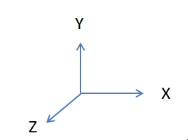
- Mede a aceleração de um objeto ao longo dos eixos X, Y e Z. Ele é capaz de detectar o movimento do objeto (por exemplo, em repouso, aceleração, desaceleração) e mudanças de inclinação (por exemplo, o ângulo do objeto).
- Pode ser usado para detectar marcha, mudanças de posição, vibrações etc.
Função de giroscópio (Gyroscope):
- Mede a velocidade angular de um objeto em torno dos eixos X, Y e Z, ou seja, a rotação do objeto.
- Pode ser usado para detectar rotação, taxa de rotação e mudança de direção.
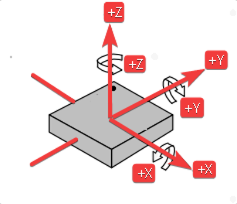
- O ângulo do eixo X ( Roll ) é o ângulo na direção de rotação em torno do eixo X.
- O ângulo do eixo Y ( Pitch ) é o ângulo na direção de rotação em torno do eixo Y.
- O ângulo do eixo Z ( Yaw ) é o ângulo na direção de rotação em torno do eixo Z.
Preparação de Software
Clique no link de download do GitHub para controlar o sensor de seis eixos.
Implementação do Código
#include <LSM6DS3.h>
#include <Wire.h>

//Create a instance of class LSM6DS3
LSM6DS3 myIMU(I2C_MODE, 0x6A);    //I2C device address 0x6A
float aX, aY, aZ, gX, gY, gZ;
const float accelerationThreshold = 2.5; // threshold of significant in G's
const int numSamples = 119;
int samplesRead = numSamples;

void setup() {
  // put your setup code here, to run once:
  Serial.begin(9600);
  while (!Serial);

  pinMode(PD5,OUTPUT);
  digitalWrite(PD5,HIGH);
  //Call .begin() to configure the IMUs
  if (myIMU.begin() != 0) {
    Serial.println("Device error");
  } else {
    Serial.println("aX,aY,aZ,gX,gY,gZ");
  }
}

void loop() {
  // wait for significant motion
  while (samplesRead == numSamples) {
    // read the acceleration data
    aX = myIMU.readFloatAccelX();
    aY = myIMU.readFloatAccelY();
    aZ = myIMU.readFloatAccelZ();

    // sum up the absolutes
    float aSum = fabs(aX) + fabs(aY) + fabs(aZ);

    // check if it's above the threshold
    if (aSum >= accelerationThreshold) {
      // reset the sample read count
      samplesRead = 0;
      break;
    }
  }

  // check if the all the required samples have been read since
  // the last time the significant motion was detected
  while (samplesRead < numSamples) {
    // check if both new acceleration and gyroscope data is
    // available
    // read the acceleration and gyroscope data

    samplesRead++;

    // print the data in CSV format
    Serial.print(myIMU.readFloatAccelX(), 3);
    Serial.print(',');
    Serial.print(myIMU.readFloatAccelY(), 3);
    Serial.print(',');
    Serial.print(myIMU.readFloatAccelZ(), 3);
    Serial.print(',');
    Serial.print(myIMU.readFloatGyroX(), 3);
    Serial.print(',');
    Serial.print(myIMU.readFloatGyroY(), 3);
    Serial.print(',');
    Serial.print(myIMU.readFloatGyroZ(), 3);
    Serial.println();

    if (samplesRead == numSamples) {
      // add an empty line if it's the last sample
      Serial.println();
    }
  }
}
Devido à atualização da biblioteca LSM6DS3, se você já adicionou essa biblioteca anteriormente ao usuário, será necessário baixar novamente a versão 2.0.4 ou superior e adicionar o arquivo ZIP ao Arduino.
Visão geral das funções
-
Incluir Bibliotecas
  #include <LSM6DS3.h>
#include <Wire.h>- Inclui a biblioteca para comunicação com o sensor LSM6DS3.
- Inclui a biblioteca para comunicação I2C.
-
Criar Instância do Sensor
LSM6DS3 myIMU(I2C_MODE, 0x6A)Cria uma instância da classe LSM6DS3 para o sensor IMU, especificando o modo de comunicação I2C e o endereço do dispositivo 0x6A.
-
Variáveis e Constantes
float aX, aY, aZ, gX, gY, gZ: Variáveis para armazenar dados do acelerômetro e do giroscópio.const float accelerationThreshold = 2.5: O valor de limiar em G's para detectar movimento significativo.const int numSamples = 119: O número de amostras a serem coletadas após detectar movimento significativo.int samplesRead = numSamples: Inicializa o contador de amostras com o número total de amostras, indicando que nenhum dado foi coletado ainda.
-
Configurações Básicas
  pinMode(PD5,OUTPUT);
digitalWrite(PD5,HIGH);- Liga o pino de habilitação do giroscópio.
-
Processamento de Dados
aX = myIMU.readFloatAccelX();:
aY = myIMU.readFloatAccelY();:
aZ = myIMU.readFloatAccelZ();:
float aSum = fabs(aX) + fabs(aY) + fabs(aZ);- Lê a aceleração ao longo de X.
- Lê a aceleração ao longo de Y.
- Lê a aceleração ao longo de Z.
- Calcula a soma dos valores absolutos dos dados de aceleração,
fabs()Retorna o valor absoluto.
  // check if it's above the threshold
  if (aSum >= accelerationThreshold) {
    // reset the sample read count
    samplesRead = 0;
    break;
}- Se a soma dos valores absolutos da aceleração for maior ou igual ao limiar definido, redefine a contagem de amostras samplesRead para 0 e sai do loop.
-
Verificar Dados
while (samplesRead < numSamples) {
  samplesRead++;
  .
  .
  .
  .
  .
  if (samplesRead == numSamples) {
    // add an empty line if it's the last sample
    Serial.println();
  }
}- Vai para outro loop e verifica se o número necessário de amostras foi lido.
- Aumenta a contagem de samplesRead.
- Se todas as amostras tiverem sido lidas, imprime uma linha em branco para separar a saída de dados.
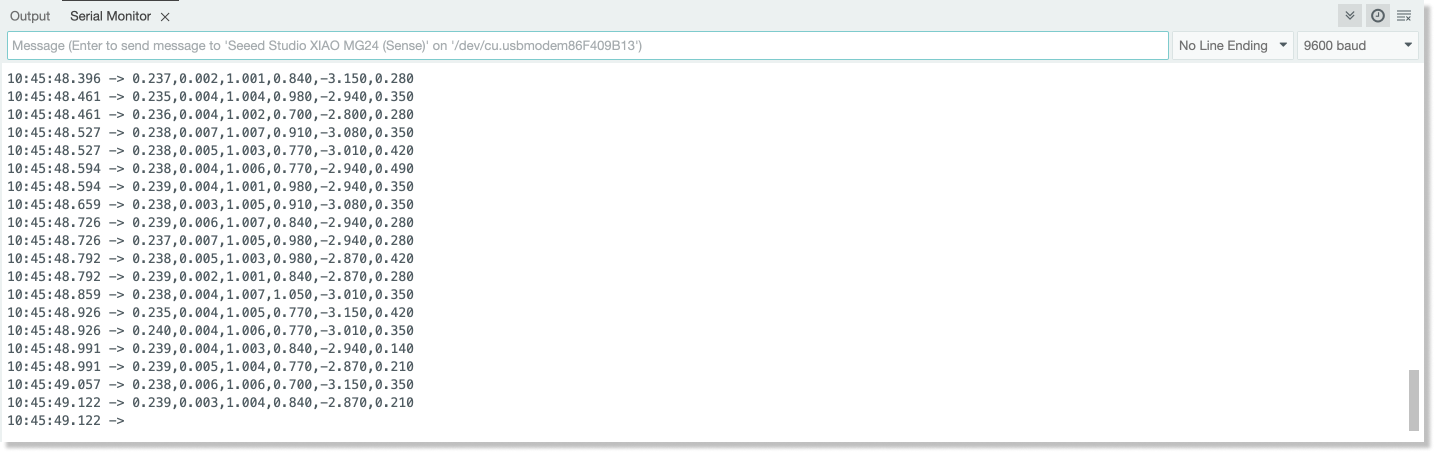
Gráfico de Resultados
Mais
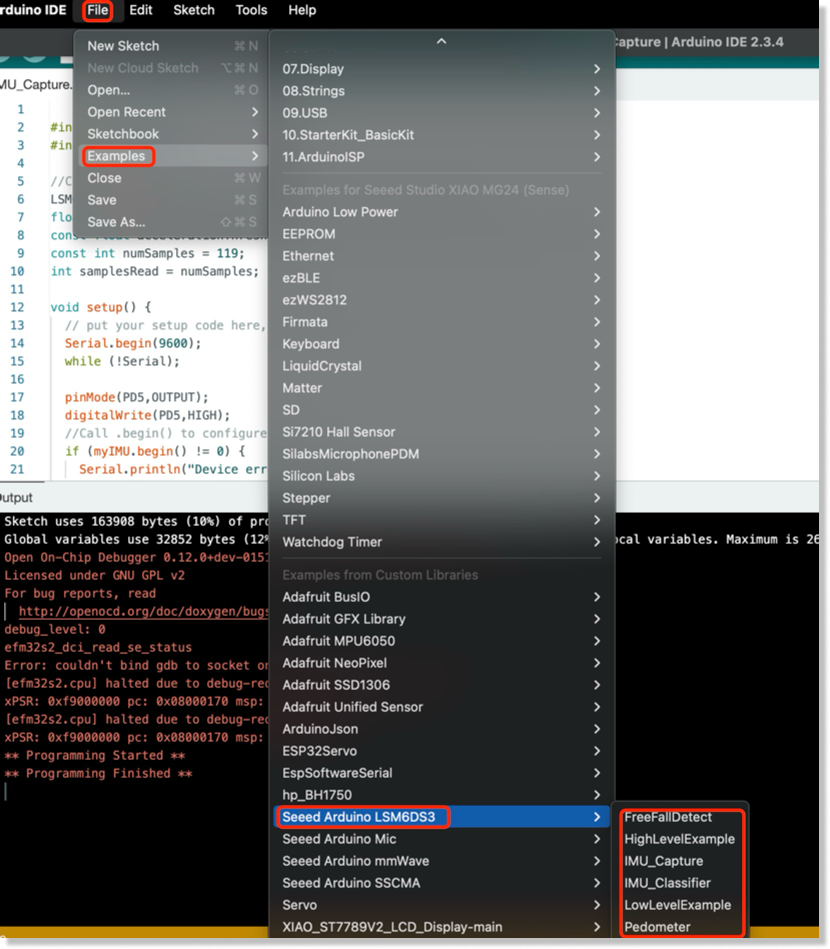
Se você quiser mais códigos de exemplo, clique em: "File" -> Example -> Seeed Arduino LSM6DS3"
Demo Avançado de IMU
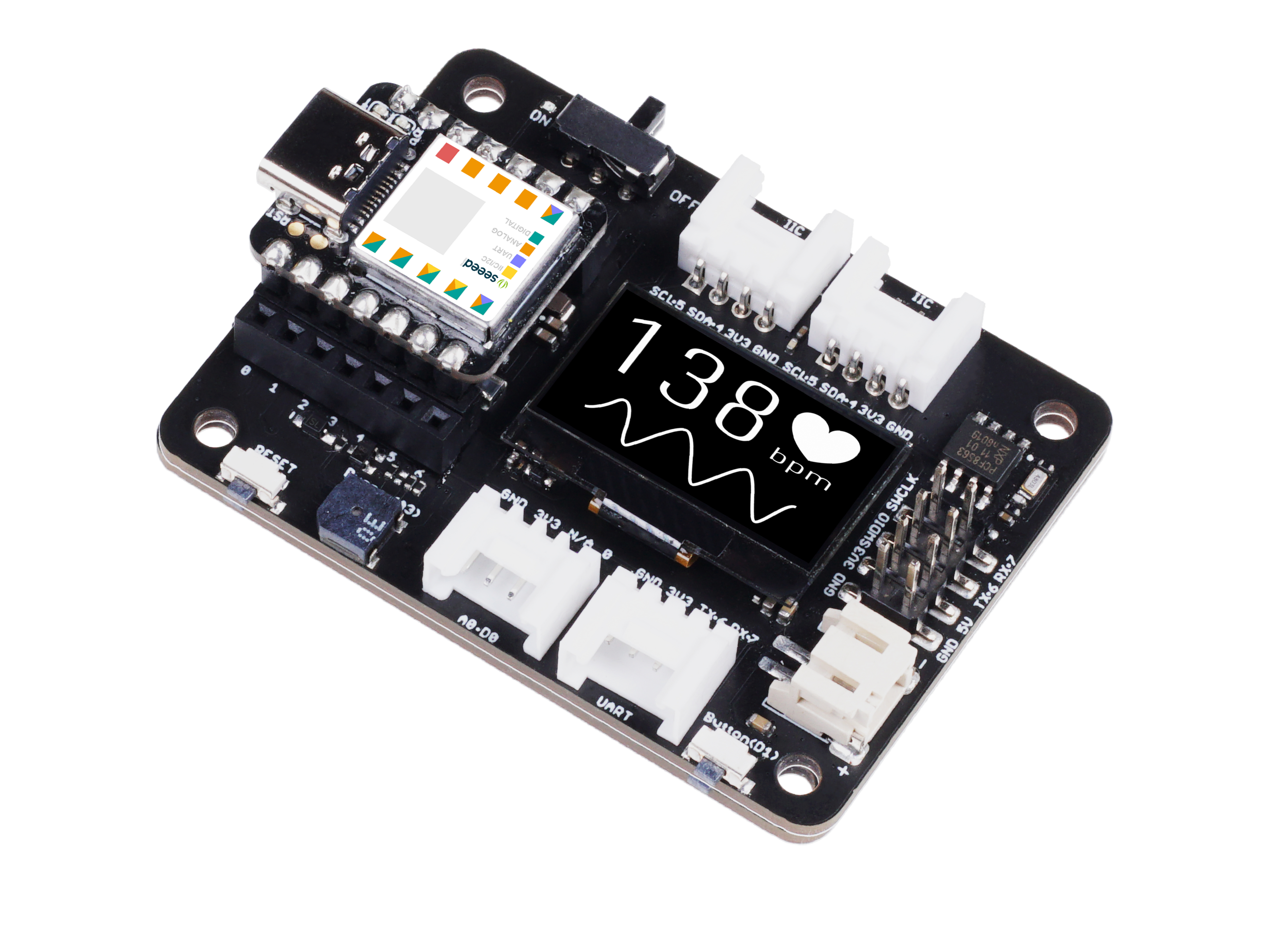
Preparação de Hardware
| Seeeduino-XIAO-Expansion-Board | Seeed Studio XIAO MG24 Sense |
|---|---|
 |  |
Preparação de Software
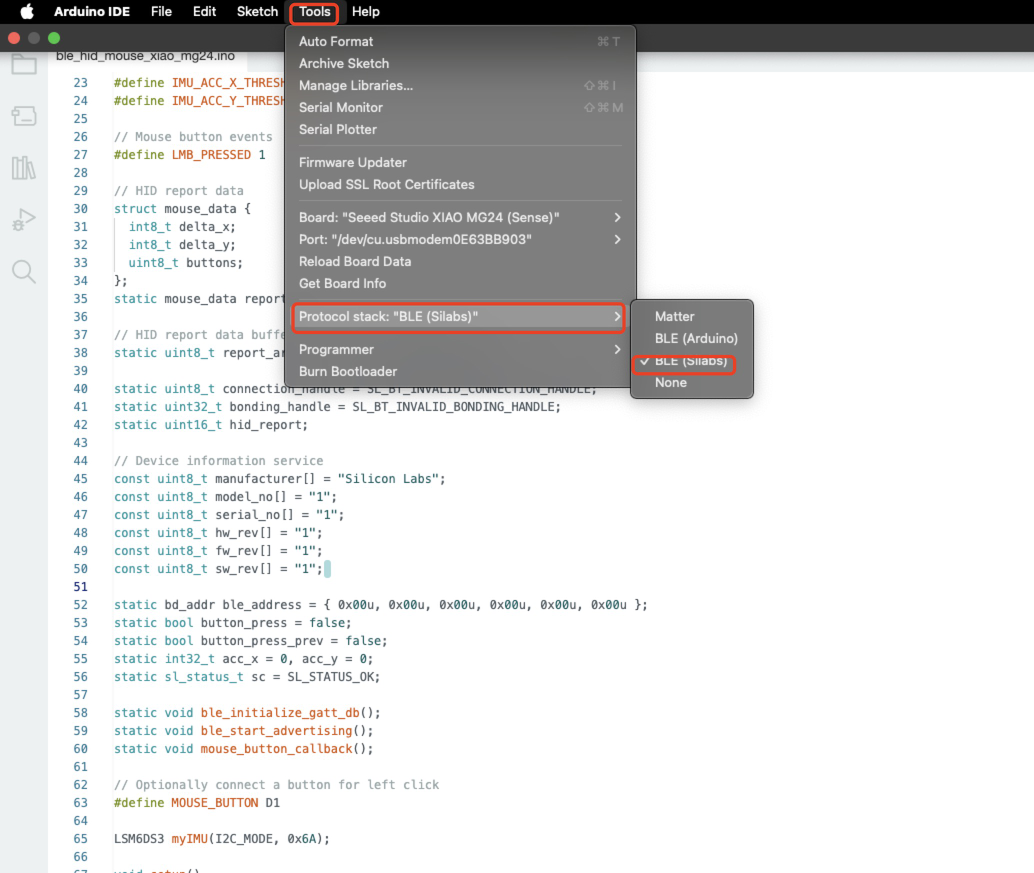
Precisamos selecionar a pilha correspondente na barra de ferramentas para gravar o programa.
Código do Programa
#include <LSM6DS3.h>
#include "Wire.h"
#define DEVICE_NAME "XIAO MG24 Mouse"
#define IMU_ACC_X_THRESHOLD 10
#define IMU_ACC_Y_THRESHOLD 10
// Mouse button events
#define LMB_PRESSED 1
// HID report data
struct mouse_data {
int8_t delta_x;
int8_t delta_y;
uint8_t buttons;
};
static mouse_data report;
// HID report data buffer
static uint8_t report_array[] = { 0x00, 0x00, 0x00 };
static uint8_t connection_handle = SL_BT_INVALID_CONNECTION_HANDLE;
static uint32_t bonding_handle = SL_BT_INVALID_BONDING_HANDLE;
static uint16_t hid_report;
// Device information service
const uint8_t manufacturer[] = "Silicon Labs";
const uint8_t model_no[] = "1";
const uint8_t serial_no[] = "1";
const uint8_t hw_rev[] = "1";
const uint8_t fw_rev[] = "1";
const uint8_t sw_rev[] = "1";
static bd_addr ble_address = { 0x00u, 0x00u, 0x00u, 0x00u, 0x00u, 0x00u };
static bool button_press = false;
static bool button_press_prev = false;
static int32_t acc_x = 0, acc_y = 0;
static sl_status_t sc = SL_STATUS_OK;
static void ble_initialize_gatt_db();
static void ble_start_advertising();
static void mouse_button_callback();
// Optionally connect a button for left click
#define MOUSE_BUTTON D1
LSM6DS3 myIMU(I2C_MODE, 0x6A);
void setup()
{
// Initialize report data
memset(&report, 0, sizeof(report));
// Enable the IMU power
pinMode(PD5, OUTPUT);
digitalWrite(PD5, HIGH);
delay(300);
pinMode(MOUSE_BUTTON, INPUT_PULLUP);
attachInterrupt(MOUSE_BUTTON, mouse_button_callback, CHANGE);
Serial.begin(115200);
Serial.println("XIAO MG24 BLE mouse");
myIMU.begin();
Serial.println("---");
Serial.println("IMU initialized");
}
void loop()
{
// Update 'left mouse button' bit
if (button_press) {
report.buttons |= LMB_PRESSED;
if (!button_press_prev) {
button_press_prev = true;
Serial.println("Button pressed");
}
} else {
button_press_prev = false;
report.buttons &= ~LMB_PRESSED;
}
// Change x and y for correct orientation of the boards
acc_y = (int32_t)(myIMU.readFloatAccelX() * 10.0f);
acc_x = (int32_t)(myIMU.readFloatAccelY() * 10.0f * -1.0f);
// In case the acceleration value would surpass the threshold value
// in positive or negative direction assign the threshold value
if (acc_x > IMU_ACC_X_THRESHOLD) {
report.delta_x = IMU_ACC_X_THRESHOLD;
} else if (acc_x < (-1 * IMU_ACC_X_THRESHOLD)) {
report.delta_x = (-1 * IMU_ACC_X_THRESHOLD);
} else {
report.delta_x = acc_x;
}
if (acc_y > IMU_ACC_Y_THRESHOLD) {
report.delta_y = IMU_ACC_Y_THRESHOLD;
} else if (acc_y < (-1 * IMU_ACC_Y_THRESHOLD)) {
report.delta_y = (-1 * IMU_ACC_Y_THRESHOLD);
} else {
report.delta_y = acc_y;
}
memcpy(report_array, &report, sizeof(report));
if (connection_handle != SL_BT_INVALID_CONNECTION_HANDLE && bonding_handle != SL_BT_INVALID_BONDING_HANDLE) {
// Indicate report data change with GATT notification
sc = sl_bt_gatt_server_notify_all(hid_report, sizeof(report_array), report_array);
if (sc != SL_STATUS_OK) {
Serial.print("sl_bt_gatt_server_notify_all() returned with error code 0x");
Serial.println(sc, HEX);
} else {
Serial.print("cursor [delta-X: ");
Serial.print(report.delta_x, DEC);
Serial.print(" delta-Y: ");
Serial.print(report.delta_y, DEC);
Serial.print(" ] LMB: ");
Serial.println(report.buttons, HEX);
}
}
}
/******************************************************************************
* Mouse button callback
*****************************************************************************/
void mouse_button_callback()
{
if (digitalRead(MOUSE_BUTTON) == LOW) {
button_press = true;
} else {
button_press = false;
}
}
/******************************************************************************
* Bluetooth stack event handler
* Called when an event happens on BLE the stack
*
* @param[in] evt Event coming from the Bluetooth stack
*****************************************************************************/
void sl_bt_on_event(sl_bt_msg_t* evt)
{
sl_status_t sc = SL_STATUS_OK;
uint8_t ble_address_type;
switch (SL_BT_MSG_ID(evt->header)) {
// -------------------------------
// This event indicates the device has started and the radio is ready
case sl_bt_evt_system_boot_id:
{
// Get BLE address and address type
sc = sl_bt_system_get_identity_address(&ble_address, &ble_address_type);
app_assert_status(sc);
// Print welcome message
Serial.begin(115200);
Serial.println();
Serial.println("BLE stack booted");
// Initialize the application specific GATT DB
ble_initialize_gatt_db();
// HID input devices requires mandatory secure level and bonding
sc = sl_bt_sm_configure(0, sl_bt_sm_io_capability_noinputnooutput);
app_assert_status(sc);
// Allow bonding
sc = sl_bt_sm_set_bondable_mode(1);
app_assert_status(sc);
ble_start_advertising();
}
break;
// -------------------------------
// This event indicates that a BLE connection has been opened
case sl_bt_evt_connection_opened_id:
{
// Store the connection handle which will be needed for sending indications
connection_handle = evt->data.evt_connection_opened.connection;
bonding_handle = evt->data.evt_connection_opened.bonding;
Serial.print("Connection opened - handle 0x");
Serial.println(connection_handle, HEX);
if (bonding_handle == SL_BT_INVALID_BONDING_HANDLE) {
Serial.println("Connection not bonded yet");
} else {
Serial.println("Connection bonded");
}
Serial.println("Increase security");
sc = sl_bt_sm_increase_security(evt->data.evt_connection_opened.connection);
app_assert_status(sc);
}
break;
// -------------------------------
// This event indicates that bonding was successful
case sl_bt_evt_sm_bonded_id:
{
Serial.print("Bonded - handle: 0x");
Serial.print(evt->data.evt_sm_bonded.connection, HEX);
bonding_handle = evt->data.evt_sm_bonded.bonding;
connection_handle = evt->data.evt_sm_bonded.connection;
Serial.print(" - security mode: 0x");
Serial.println(evt->data.evt_sm_bonded.security_mode, HEX);
}
break;
// -------------------------------
// This event indicates that a BLE connection has closed
case sl_bt_evt_connection_closed_id:
{
Serial.print("Connection closed - handle: 0x");
Serial.print(connection_handle, HEX);
Serial.print(" reason: 0x");
Serial.println(evt->data.evt_connection_closed.reason, HEX);
connection_handle = SL_BT_INVALID_CONNECTION_HANDLE;
bonding_handle = SL_BT_INVALID_BONDING_HANDLE;
sc = sl_bt_sm_delete_bondings();
Serial.println("Deleted bondings");
app_assert_status(sc);
ble_start_advertising();
}
break;
// -------------------------------
// This event indicates that the connection parameters have changed
case sl_bt_evt_connection_parameters_id:
{
Serial.print("Set connection parameters, security_mode: ");
Serial.println(evt->data.evt_connection_parameters.security_mode, HEX);
}
break;
// -------------------------------
// This event indicates that bonding has failed
case sl_bt_evt_sm_bonding_failed_id:
{
Serial.print("Bonding failed, reason: 0x");
Serial.println(evt->data.evt_sm_bonding_failed.reason, HEX);
Serial.println("Delete bondings.");
sc = sl_bt_sm_delete_bondings();
app_assert_status(sc);
Serial.println("Bondings deleted");
Serial.print("Close connection - handle: 0x");
Serial.println(evt->data.evt_sm_bonding_failed.connection, HEX);
}
break;
// -------------------------------
// Default event handler
default:
break;
}
}
/******************************************************************************
* Starts BLE advertisement
* Initializes advertising if it's called for the first time
*****************************************************************************/
static void ble_start_advertising()
{
static uint8_t advertising_set_handle = 0xff;
static bool init = true;
sl_status_t sc;
if (init) {
// Create an advertising set
sc = sl_bt_advertiser_create_set(&advertising_set_handle);
app_assert_status(sc);
// Set advertising interval to 100ms
sc = sl_bt_advertiser_set_timing(
advertising_set_handle,
160, // Minimum advertisement interval (milliseconds * 1.6)
160, // Maximum advertisement interval (milliseconds * 1.6)
0, // Advertisement duration
0); // Maximum number of advertisement events
app_assert_status(sc);
init = false;
}
// Generate data for advertising
sc = sl_bt_legacy_advertiser_generate_data(advertising_set_handle, sl_bt_advertiser_general_discoverable);
app_assert_status(sc);
// Start advertising and enable connections
sc = sl_bt_legacy_advertiser_start(advertising_set_handle, sl_bt_advertiser_connectable_scannable);
app_assert_status(sc);
Serial.print("Started advertising as '");
Serial.print(DEVICE_NAME);
Serial.print("' address: ");
// Print address in format 'FF:FF:FF:FF:FF:FF'
for (uint8_t i = (sizeof(bd_addr) - 1); i > 0; i--) {
Serial.print(ble_address.addr[i], HEX);
Serial.print(":");
}
Serial.println(ble_address.addr[0], HEX);
}
/******************************************************************************
* Initializes the GATT database
* Creates a new GATT session and adds certain services and characteristics
*****************************************************************************/
static void ble_initialize_gatt_db()
{
sl_status_t sc;
uint16_t gattdb_session_id;
uint16_t service;
uint16_t characteristic;
uint16_t descriptor;
// Create a new GATT database
sc = sl_bt_gattdb_new_session(&gattdb_session_id);
app_assert_status(sc);
// Generic access service
uint8_t generic_access_service_uuid[] = { 0x00, 0x18 };
sc = sl_bt_gattdb_add_service(gattdb_session_id,
sl_bt_gattdb_primary_service,
SL_BT_GATTDB_ADVERTISED_SERVICE,
2,
generic_access_service_uuid,
&service);
app_assert_status(sc);
// Device name characteristic
sl_bt_uuid_16_t device_name_uuid = { .data = { 0x00, 0x2A } };
sc = sl_bt_gattdb_add_uuid16_characteristic(gattdb_session_id,
service,
(SL_BT_GATTDB_CHARACTERISTIC_READ | SL_BT_GATTDB_CHARACTERISTIC_WRITE),
0,
0,
device_name_uuid,
sl_bt_gattdb_fixed_length_value,
strlen(DEVICE_NAME),
strlen(DEVICE_NAME),
(uint8_t *)DEVICE_NAME,
&characteristic);
app_assert_status(sc);
// Appearance characteristic
sl_bt_uuid_16_t appearence_uuid = { .data = { 0x01, 0x2A } };
const uint8_t appearance_value[] = { 0xC2, 0x03 };
sc = sl_bt_gattdb_add_uuid16_characteristic(gattdb_session_id,
service,
SL_BT_GATTDB_CHARACTERISTIC_READ,
0,
0,
appearence_uuid,
sl_bt_gattdb_fixed_length_value,
2,
sizeof(appearance_value),
appearance_value,
&characteristic);
app_assert_status(sc);
// Generic access service start
sc = sl_bt_gattdb_start_service(gattdb_session_id, service);
app_assert_status(sc);
// Battery service
const uint8_t battery_service_uuid[] = { 0x0F, 0x18 };
sc = sl_bt_gattdb_add_service(gattdb_session_id,
sl_bt_gattdb_primary_service,
0,
sizeof(battery_service_uuid),
battery_service_uuid,
&service);
app_assert_status(sc);
// Battery level characteristic
const sl_bt_uuid_16_t battery_level_uuid = { .data = { 0x19, 0x2A } };
const uint8_t battery_level_init_value = 100;
sc = sl_bt_gattdb_add_uuid16_characteristic(gattdb_session_id,
service,
SL_BT_GATTDB_CHARACTERISTIC_READ,
0,
0,
battery_level_uuid,
sl_bt_gattdb_fixed_length_value,
sizeof(battery_level_init_value),
sizeof(battery_level_init_value),
&battery_level_init_value,
&characteristic);
app_assert_status(sc);
// Characteristic presentation format descriptor
const sl_bt_uuid_16_t chara_presentation_format_descriptor_uuid = { .data = { 0x04, 0x29 } };
const uint8_t chara_presentation_format_value[] = { 0x00, 0x00, 0x00, 0x00, 0x00, 0x00, 0x00 };
sc = sl_bt_gattdb_add_uuid16_descriptor(gattdb_session_id,
characteristic,
SL_BT_GATTDB_DESCRIPTOR_READ,
0,
chara_presentation_format_descriptor_uuid,
sl_bt_gattdb_fixed_length_value,
sizeof(chara_presentation_format_value),
sizeof(chara_presentation_format_value),
chara_presentation_format_value,
&descriptor);
app_assert_status(sc);
// Client characteristic configuration descriptor
const sl_bt_uuid_16_t client_configuration_descriptor_uuid = { .data = { 0x02, 0x29 } };
const uint8_t client_configuration_value[] = { 0x00, 0x00 };
sc = sl_bt_gattdb_add_uuid16_descriptor(gattdb_session_id,
characteristic,
(SL_BT_GATTDB_DESCRIPTOR_READ | SL_BT_GATTDB_DESCRIPTOR_WRITE),
0,
client_configuration_descriptor_uuid,
sl_bt_gattdb_fixed_length_value,
sizeof(client_configuration_value),
sizeof(client_configuration_value),
client_configuration_value,
&descriptor);
app_assert_status(sc);
// Battery service start
sc = sl_bt_gattdb_start_service(gattdb_session_id, service);
app_assert_status(sc);
// Device information service
const uint8_t device_info_service_uuid[] = { 0x0A, 0x18 };
sc = sl_bt_gattdb_add_service(gattdb_session_id,
sl_bt_gattdb_primary_service,
0,
sizeof(device_info_service_uuid),
device_info_service_uuid,
&service);
app_assert_status(sc);
// Manufacturer name string characteristic
const sl_bt_uuid_16_t manufacturer_uuid = { .data = { 0x29, 0x2A } };
sc = sl_bt_gattdb_add_uuid16_characteristic(gattdb_session_id,
service,
SL_BT_GATTDB_CHARACTERISTIC_READ,
0,
0,
manufacturer_uuid,
sl_bt_gattdb_fixed_length_value,
(sizeof(manufacturer) - 1),
(sizeof(manufacturer) - 1),
manufacturer,
&characteristic);
app_assert_status(sc);
// Model number string characteristic
const sl_bt_uuid_16_t model_no_uuid = { .data = { 0x24, 0x2A } };
sc = sl_bt_gattdb_add_uuid16_characteristic(gattdb_session_id,
service,
SL_BT_GATTDB_CHARACTERISTIC_READ,
0,
0,
model_no_uuid,
sl_bt_gattdb_fixed_length_value,
(sizeof(model_no) - 1),
(sizeof(model_no) - 1),
model_no,
&characteristic);
app_assert_status(sc);
// Serial number string characteristic
const sl_bt_uuid_16_t serial_no_uuid = { .data = { 0x25, 0x2A } };
sc = sl_bt_gattdb_add_uuid16_characteristic(gattdb_session_id,
service,
SL_BT_GATTDB_CHARACTERISTIC_READ,
0,
0,
serial_no_uuid,
sl_bt_gattdb_fixed_length_value,
(sizeof(serial_no) - 1),
(sizeof(serial_no) - 1),
serial_no,
&characteristic);
app_assert_status(sc);
// Hardware revision string characteristic
const sl_bt_uuid_16_t hw_rev_uuid = { .data = { 0x27, 0x2A } };
sc = sl_bt_gattdb_add_uuid16_characteristic(gattdb_session_id,
service,
SL_BT_GATTDB_CHARACTERISTIC_READ,
0,
0,
hw_rev_uuid,
sl_bt_gattdb_fixed_length_value,
(sizeof(hw_rev) - 1),
(sizeof(hw_rev) - 1),
hw_rev,
&characteristic);
app_assert_status(sc);
// Firmware revision string characteristic
const sl_bt_uuid_16_t fw_rev_uuid = { .data = { 0x26, 0x2A } };
sc = sl_bt_gattdb_add_uuid16_characteristic(gattdb_session_id,
service,
SL_BT_GATTDB_CHARACTERISTIC_READ,
0,
0,
fw_rev_uuid,
sl_bt_gattdb_fixed_length_value,
(sizeof(fw_rev) - 1),
(sizeof(fw_rev) - 1),
fw_rev,
&characteristic);
app_assert_status(sc);
// Software revision string characteristic
const sl_bt_uuid_16_t sw_rev_uuid = { .data = { 0x28, 0x2A } };
sc = sl_bt_gattdb_add_uuid16_characteristic(gattdb_session_id,
service,
SL_BT_GATTDB_CHARACTERISTIC_READ,
0,
0,
sw_rev_uuid,
sl_bt_gattdb_fixed_length_value,
(sizeof(sw_rev) - 1),
(sizeof(sw_rev) - 1),
sw_rev,
&characteristic);
app_assert_status(sc);
// System ID characteristic
const sl_bt_uuid_16_t sys_id_uuid = { .data = { 0x23, 0x2A } };
const uint8_t sys_id_initial_value[] = { 0x12, 0x34, 0x56, 0xFF, 0xFE, 0x9A, 0xBC, 0xDE };
sc = sl_bt_gattdb_add_uuid16_characteristic(gattdb_session_id,
service,
SL_BT_GATTDB_CHARACTERISTIC_READ,
0,
0,
sys_id_uuid,
sl_bt_gattdb_fixed_length_value,
sizeof(sys_id_initial_value),
sizeof(sys_id_initial_value),
sys_id_initial_value,
&characteristic);
app_assert_status(sc);
// PnP ID characteristic
const sl_bt_uuid_16_t pnp_id_uuid = { .data = { 0x50, 0x2A } };
const uint8_t pnp_id_initial_value[] = { 0x02, 0x10, 0xC4, 0x00, 0x01, 0x00, 0x01 };
sc = sl_bt_gattdb_add_uuid16_characteristic(gattdb_session_id,
service,
SL_BT_GATTDB_CHARACTERISTIC_READ,
0,
0,
pnp_id_uuid,
sl_bt_gattdb_fixed_length_value,
sizeof(pnp_id_initial_value),
sizeof(pnp_id_initial_value),
pnp_id_initial_value,
&characteristic);
app_assert_status(sc);
// Device information service start
sc = sl_bt_gattdb_start_service(gattdb_session_id, service);
app_assert_status(sc);
// HID service
uint8_t hid_service_uuid[] = { 0x12, 0x18 };
sc = sl_bt_gattdb_add_service(gattdb_session_id,
sl_bt_gattdb_primary_service,
SL_BT_GATTDB_ADVERTISED_SERVICE,
2,
hid_service_uuid,
&service);
app_assert_status(sc);
// Protocol mode characteristic
sl_bt_uuid_16_t hid_protocol_mode_uuid = { .data = { 0x4E, 0x2A } };
const uint8_t hid_protocol_mode_init_value[] = { 1 };
sc = sl_bt_gattdb_add_uuid16_characteristic(gattdb_session_id,
service,
(SL_BT_GATTDB_CHARACTERISTIC_READ | SL_BT_GATTDB_CHARACTERISTIC_WRITE_NO_RESPONSE),
0,
0,
hid_protocol_mode_uuid,
sl_bt_gattdb_fixed_length_value,
sizeof(hid_protocol_mode_init_value),
sizeof(hid_protocol_mode_init_value),
hid_protocol_mode_init_value,
&characteristic);
app_assert_status(sc);
// HID report characteristic
const sl_bt_uuid_16_t hid_report_uuid = { .data = { 0x4D, 0x2A } };
const uint8_t hid_report_init_value[] = { 0x00, 0x00, 0x00 };
sc = sl_bt_gattdb_add_uuid16_characteristic(gattdb_session_id,
service,
(SL_BT_GATTDB_CHARACTERISTIC_READ | SL_BT_GATTDB_CHARACTERISTIC_WRITE | SL_BT_GATTDB_CHARACTERISTIC_NOTIFY),
0,
0,
hid_report_uuid,
sl_bt_gattdb_fixed_length_value,
sizeof(hid_report_init_value),
sizeof(hid_report_init_value),
hid_report_init_value,
&characteristic);
app_assert_status(sc);
hid_report = characteristic;
// HID report reference descriptor
const sl_bt_uuid_16_t hid_report_reference_desc_uuid = { .data = { 0x08, 0x29 } };
const uint8_t hid_report_reference_desc_init_val[] = { 0x00, 0x01 };
sc = sl_bt_gattdb_add_uuid16_descriptor(gattdb_session_id,
characteristic,
SL_BT_GATTDB_DESCRIPTOR_READ,
SL_BT_GATTDB_ENCRYPTED_READ,
hid_report_reference_desc_uuid,
sl_bt_gattdb_fixed_length_value,
sizeof(hid_report_reference_desc_init_val),
sizeof(hid_report_reference_desc_init_val),
hid_report_reference_desc_init_val,
&descriptor);
app_assert_status(sc);
// HID report map characteristic
const sl_bt_uuid_16_t hid_report_map_uuid = { .data = { 0x4B, 0x2A } };
const uint8_t hid_report_map_init_value[] = { 0x05, 0x01, // Usage page (Generic Desktop)
0x09, 0x02, // Usage (Mouse)
0xA1, 0x01, // Collection (Application)
0x09, 0x01, // UsageId (Pointer)
0xA1, 0x00, // Collection (Physical)
0x09, 0x30, // UsageId (x)
0x09, 0x31, // UsageId (y)
0x15, 0x80, // LogicalMinimum(-128)
0x25, 0x7F, // LogicalMaximum(127)
0x95, 0x02, // ReportCount(2)
0x75, 0x08, // ReportSize(8)
0x81, 0x06, // Input(Data, Variable, Relative, NoWrap, Linear, PreferredState, NoNullPosition, BitField)
0x05, 0x09, // UsagePage(Button)
0x19, 0x01, // UsageIdMin(Button 1)
0x29, 0x03, // UsageIdMax(Button 3)
0x15, 0x00, // LogicalMinimum(0)
0x25, 0x01, // LogicalMaximum(1)
0x95, 0x03, // ReportCount(3)
0x75, 0x01, // ReportSize(1)
0x81, 0x02, // Input(Data, Variable, Absolute, NoWrap, Linear, PreferredState, NoNullPosition, BitField)
0x95, 0x01, // ReportCount(1)
0x75, 0x05, // ReportSize(5)
0x81, 0x03, // Input(Constant, Variable, Absolute, NoWrap, Linear, PreferredState, NoNullPosition, BitField)
0xC0, // EndCollection()
0xC0 }; // EndCollection()
sc = sl_bt_gattdb_add_uuid16_characteristic(gattdb_session_id,
service,
SL_BT_GATTDB_CHARACTERISTIC_READ,
SL_BT_GATTDB_ENCRYPTED_READ,
0,
hid_report_map_uuid,
sl_bt_gattdb_fixed_length_value,
sizeof(hid_report_map_init_value),
sizeof(hid_report_map_init_value),
hid_report_map_init_value,
&characteristic);
app_assert_status(sc);
// HID external report reference descriptor
const sl_bt_uuid_16_t hid_external_report_reference_descriptor_uuid = { .data = { 0x07, 0x29 } };
const uint8_t hid_external_report_reference_value[] = { 0x00, 0x00 };
sc = sl_bt_gattdb_add_uuid16_descriptor(gattdb_session_id,
characteristic,
SL_BT_GATTDB_DESCRIPTOR_READ,
0,
hid_external_report_reference_descriptor_uuid,
sl_bt_gattdb_fixed_length_value,
sizeof(hid_external_report_reference_value),
sizeof(hid_external_report_reference_value),
hid_external_report_reference_value,
&descriptor);
app_assert_status(sc);
// HID information characteristic
const sl_bt_uuid_16_t hid_info_uuid = { .data = { 0x4A, 0x2A } };
const uint8_t hid_info_init_value[] = { 0x01, 0x11, 0x00, 0x02 };
sc = sl_bt_gattdb_add_uuid16_characteristic(gattdb_session_id,
service,
SL_BT_GATTDB_CHARACTERISTIC_READ,
0,
0,
hid_info_uuid,
sl_bt_gattdb_fixed_length_value,
sizeof(hid_info_init_value),
sizeof(hid_info_init_value),
hid_info_init_value,
&characteristic);
app_assert_status(sc);
// HID control point characteristic
const sl_bt_uuid_16_t hid_control_point_uuid = { .data = { 0x4C, 0x2A } };
const uint8_t hid_control_point_init_value[] = { 0x00 };
sc = sl_bt_gattdb_add_uuid16_characteristic(gattdb_session_id,
service,
SL_BT_GATTDB_CHARACTERISTIC_WRITE_NO_RESPONSE,
0,
0,
hid_control_point_uuid,
sl_bt_gattdb_fixed_length_value,
sizeof(hid_control_point_init_value),
sizeof(hid_control_point_init_value),
hid_control_point_init_value,
&characteristic);
app_assert_status(sc);
// HID service start
sc = sl_bt_gattdb_start_service(gattdb_session_id, service);
app_assert_status(sc);
// Commit the GATT DB changes
sc = sl_bt_gattdb_commit(gattdb_session_id);
app_assert_status(sc);
}
#ifndef BLE_STACK_SILABS
#error "This example is only compatible with the Silicon Labs BLE stack. Please select 'BLE (Silabs)' in 'Tools > Protocol stack'."
#endif
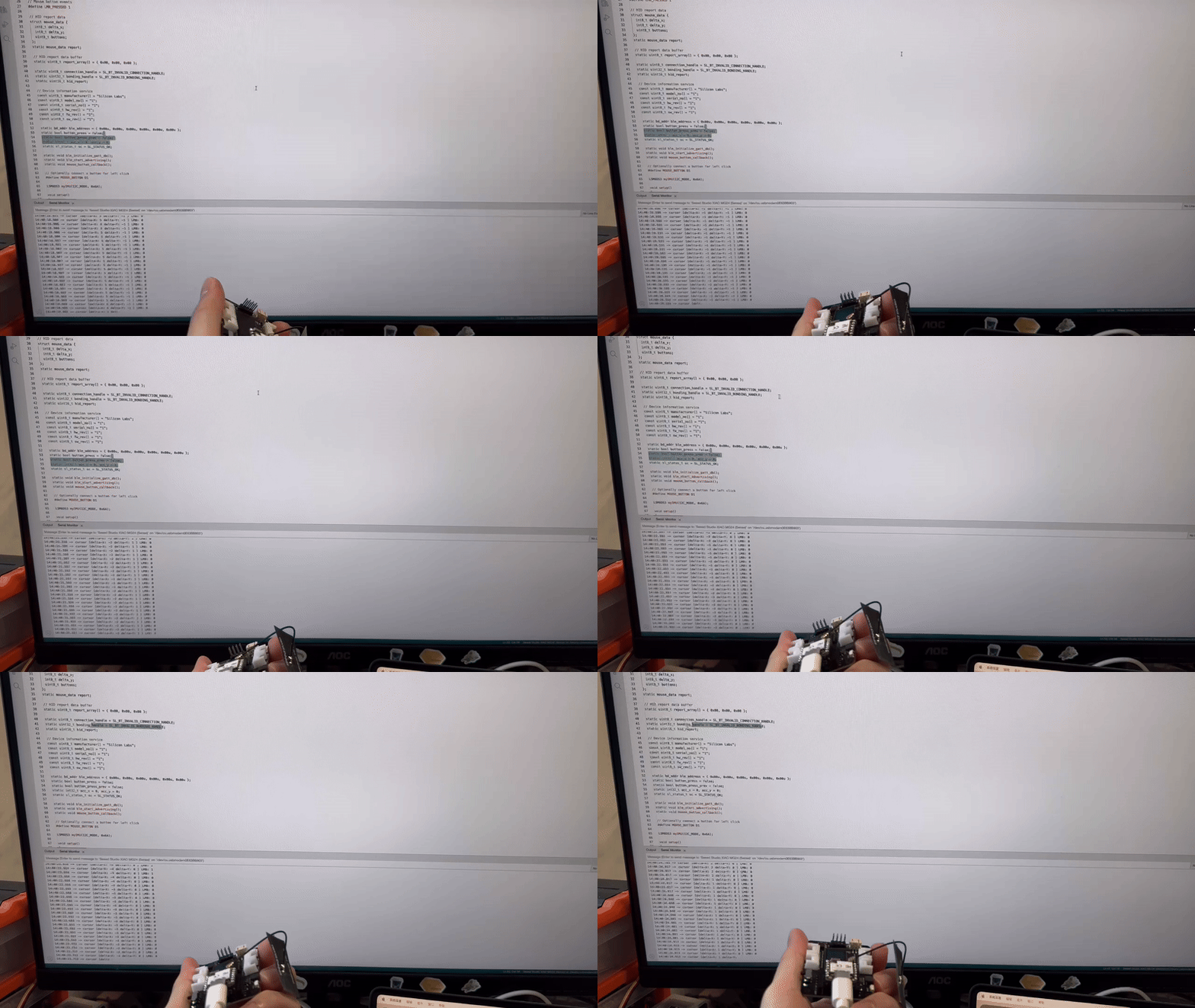
Gráfico de Resultados
Quando pressionamos o botão na placa de expansão, podemos observar que o evento do mouse é disparado!
XIAO MG24 Sense Microphone(Seeed Studio Demo)
Visão Geral dos Sensores Integrados
Sensor de Microfone como o MSM381ACT001 é um microfone MEMS (Micro-Electro-Mechanical Systems) projetado para capturar sinais de áudio com alta sensibilidade e baixo ruído. Especificamente, o MSM381ACT001 possui as seguintes características:
Função do Microfone:
- Captura ondas sonoras e as converte em sinais elétricos, possibilitando a detecção de entrada de áudio em vários ambientes.
- Possui uma ampla faixa de resposta em frequência, tipicamente de 20 Hz a 20 kHz, adequada para uma variedade de aplicações de áudio, incluindo reconhecimento de voz e reprodução de música.
Principais Características
- Alta Sensibilidade: Capaz de detectar sons fracos, tornando-o ideal para aplicações que exigem captura de áudio precisa.
- Baixo Ruído: Projetado para fornecer uma alta relação sinal-ruído (SNR), garantindo saída de áudio clara mesmo em ambientes ruidosos.
- Tamanho Compacto: A tecnologia MEMS permite um formato pequeno, facilitando a integração em dispositivos portáteis como smartphones e wearables.
- Saída Digital: Oferece opções de saída de sinal digital (por exemplo, I2S), simplificando a interface com processadores de sinal digital (DSPs) e microcontroladores.
Preparação de Software
Clique no link de download do GitHub para acionar o sensor de microfone.
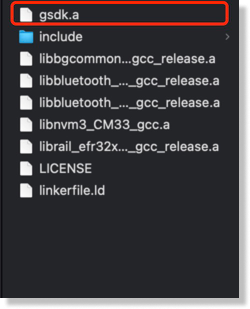
Atualmente precisamos modificar manualmente o arquivo de substituição; posteriormente a biblioteca poderá ser usada diretamente após o download, aguarde a atualização do nosso wiki.
- [Arquivos de Substituição] gsdk.a
Alterando o caminho do arquivo
- /Users/yourname/Library/Arduino15/packages/SiliconLabs/hardware/silabs/2.2.0/variants/xiao_mg24/ble_silabs/
Implementação de Código
#include <mic.h>
#if defined(WIO_TERMINAL)
#include "processing/filters.h"
#endif

// Settings
#if defined(WIO_TERMINAL)
#define DEBUG 1                 // Enable pin pulse during ISR
#define SAMPLES 16000*3
#elif defined(ARDUINO_ARCH_NRF52840)
#define DEBUG 1                 // Enable pin pulse during ISR
#define SAMPLES 800
#elif defined(ARDUINO_SILABS)
#define DEBUG 1                 // Enable pin pulse during ISR
#define SAMPLES 800
#endif

mic_config_t mic_config{
  .channel_cnt = 1,
  .sampling_rate = 16000,
  .buf_size = 1600,
#if defined(WIO_TERMINAL)
  .debug_pin = 1                // Toggles each DAC ISR (if DEBUG is set to 1)
#elif defined(ARDUINO_ARCH_NRF52840)
  .debug_pin = LED_BUILTIN                // Toggles each DAC ISR (if DEBUG is set to 1)
#elif defined(ARDUINO_SILABS)
  .debug_pin = LED_BUILTIN                // Toggles each DAC ISR (if DEBUG is set to 1)
#endif
};

#if defined(WIO_TERMINAL)
DMA_ADC_Class Mic(&mic_config);
#elif defined(ARDUINO_ARCH_NRF52840)
NRF52840_ADC_Class Mic(&mic_config);
#elif defined(ARDUINO_SILABS)
MG24_ADC_Class Mic(&mic_config);
#endif

int16_t recording_buf[SAMPLES];
volatile uint8_t recording = 0;
volatile static bool record_ready = false;

#if defined(WIO_TERMINAL)
FilterBuHp filter;
#endif

void setup() {

  Serial.begin(115200);
  while (!Serial) {delay(10);}

#if defined(WIO_TERMINAL)
  pinMode(WIO_KEY_A, INPUT_PULLUP);
#endif

  Mic.set_callback(audio_rec_callback);

  if (!Mic.begin()) {
    Serial.println("Mic initialization failed");
    while (1);
  }

  Serial.println("Mic initialization done.");

}

void loop() {

#if defined(WIO_TERMINAL)
if (digitalRead(WIO_KEY_A) == LOW && !recording) {

    Serial.println("Starting sampling");
    recording = 1;
    record_ready = false;
}
#endif

#if defined(WIO_TERMINAL)
  if (!recording && record_ready)
#elif defined(ARDUINO_ARCH_NRF52840) || defined(ARDUINO_SILABS)
  if (record_ready)
#endif
  {
  Serial.println("Finished sampling");

  for (int i = 0; i < SAMPLES; i++) {

  //int16_t sample = filter.step(recording_buf[i]);
  int16_t sample = recording_buf[i];
  Serial.println(sample);
  }

  record_ready = false;
  }
}

static void audio_rec_callback(uint16_t *buf, uint32_t buf_len) {

  static uint32_t idx = 0;
  // Copy samples from DMA buffer to inference buffer
#if defined(WIO_TERMINAL)
  if (recording)
#endif
  {
    for (uint32_t i = 0; i < buf_len; i++) {

      // Convert 12-bit unsigned ADC value to 16-bit PCM (signed) audio value
#if defined(WIO_TERMINAL)
      recording_buf[idx++] = filter.step((int16_t)(buf[i] - 1024) * 16);
      //recording_buf[idx++] = (int16_t)(buf[i] - 1024) * 16;
#elif defined(ARDUINO_ARCH_NRF52840) || defined(ARDUINO_SILABS)
      recording_buf[idx++] = buf[i];
#endif

      if (idx >= SAMPLES){
      idx = 0;
      recording = 0;
      record_ready = true;
      break;
     }
    }
  }

}
Visão Geral da Função
Configuração do Microfone
mic_config_t mic_config{
.channel_cnt = 1,
.sampling_rate = 16000,
.buf_size = 1600,
#if defined(WIO_TERMINAL)
.debug_pin = 1
#elif defined(ARDUINO_ARCH_NRF52840)
.debug_pin = LED_BUILTIN
#elif defined(ARDUINO_SILABS)
.debug_pin = LED_BUILTIN
#endif
};
- mic_config_t: Define uma estrutura de configuração de microfone.
- channel_cnt: definido como 1 para mono.
- sampling_rate: Definido como 16000 Hz para a frequência de amostragem.
- buf_size: definido como 1600 para o tamanho do buffer.
- ebug_pin: define o pino de depuração de acordo com a plataforma, usado para indicação de sinal durante a depuração.
Instanciação do Microfone
#if defined(WIO_TERMINAL)
DMA_ADC_Class Mic(&mic_config);
#elif defined(ARDUINO_ARCH_NRF52840)
NRF52840_ADC_Class Mic(&mic_config);
#elif defined(ARDUINO_SILABS)
MG24_ADC_Class Mic(&mic_config);
#endif
- Compilação condicional: cria as instâncias adequadas de classes de microfone para diferentes plataformas, utilizando a configuração definida anteriormente.
Buffers e flags de gravação
int16_t recording_buf[SAMPLES];
volatile uint8_t recording = 0;
volatile static bool record_ready = false;
- recording_buf: Define um array de SAMPLES para armazenar amostras de gravação.
- recording: uma variável volátil que indica se a gravação está em andamento, para evitar otimização pelo compilador.
- record_ready: uma variável estática volátil que indica se a gravação foi concluída e está pronta para processamento posterior.
Exemplo de Filtro (para WIO Terminal)
#if defined(WIO_TERMINAL)
FilterBuHp filter;
#endif
- Se estiver no WIO Terminal, crie uma instância de um filtro passa‑altas para o processamento de filtragem.
setup
void setup() {
Serial.begin(115200);
while (!Serial) {delay(10);}

#if defined(WIO_TERMINAL)
pinMode(WIO_KEY_A, INPUT_PULLUP);
#endif

Mic.set_callback(audio_rec_callback);

if (!Mic.begin()) {
  Serial.println("Mic initialization failed");
  while (1);
}

Serial.println("Mic initialization done.");
}
-Initialize Serial Port: Inicia a comunicação serial a 115200 bauds e aguarda a porta serial estar pronta.
- Definir modo do pino: No WIO Terminal, define os pinos das teclas como modo de entrada com pull-up.
- Definir função de callback: chama Mic.set_callback(audio_rec_callback) para especificar a função de callback ao gravar áudio.
- Inicializar o microfone: chama Mic.begin(); se a inicialização falhar, imprime uma mensagem de erro e entra em um loop infinito.
loop
void loop() {
#if defined(WIO_TERMINAL)
if (digitalRead(WIO_KEY_A) == LOW && !recording) {
  Serial.println("Starting sampling");
  recording = 1;
  record_ready = false;
}
#endif

#if defined(WIO_TERMINAL)
if (!recording && record_ready)
#elif defined(ARDUINO_ARCH_NRF52840) || defined(ARDUINO_SILABS)
if (record_ready)
#endif
{
  Serial.println("Finished sampling");

  for (int i = 0; i < SAMPLES; i++) {
    int16_t sample = recording_buf[i];
    Serial.println(sample);
  }

  record_ready = false;
}
}
- Detectar tecla: No WIO Terminal, inicia a gravação quando detecta que uma tecla foi pressionada e não está gravando.
- Amostragem concluída: Imprime “Finished sampling” se não estiver gravando e record_ready estiver definido como true.
- Itera pelo buffer de gravação e imprime cada valor de amostra.
Função de callback de gravação de áudio
static void audio_rec_callback(uint16_t *buf, uint32_t buf_len) {
static uint32_t idx = 0;
#if defined(WIO_TERMINAL)
if (recording)
#endif
{
  for (uint32_t i = 0; i < buf_len; i++) {
    #if defined(WIO_TERMINAL)
    recording_buf[idx++] = filter.step((int16_t)(buf[i] - 1024) * 16);
    #elif defined(ARDUINO_ARCH_NRF52840) || defined(ARDUINO_SILABS)
    recording_buf[idx++] = buf[i];
    #endif

    if (idx >= SAMPLES){
      idx = 0;
      recording = 0;
      record_ready = true;
      break;
    }
  }
}
}
- Função de callback: chamada durante a gravação de áudio, responsável por copiar amostras do buffer DMA para o buffer de gravação.
- Compilação condicional: processa a entrada usando filtros se estiver no WIO Terminal.
- Converte valores ADC de 12 bits sem sinal para valores de áudio PCM de 16 bits (com sinal).
- Preenchimento de amostras: copia amostras para
recording_bufe atualiza o índiceidx. - Finalizar gravação: se o número de amostras preenchidas atingir
SAMPLES, reinicia o índice, marca o fim da gravação e definerecord_readycomo verdadeiro.
Gráfico de Resultados
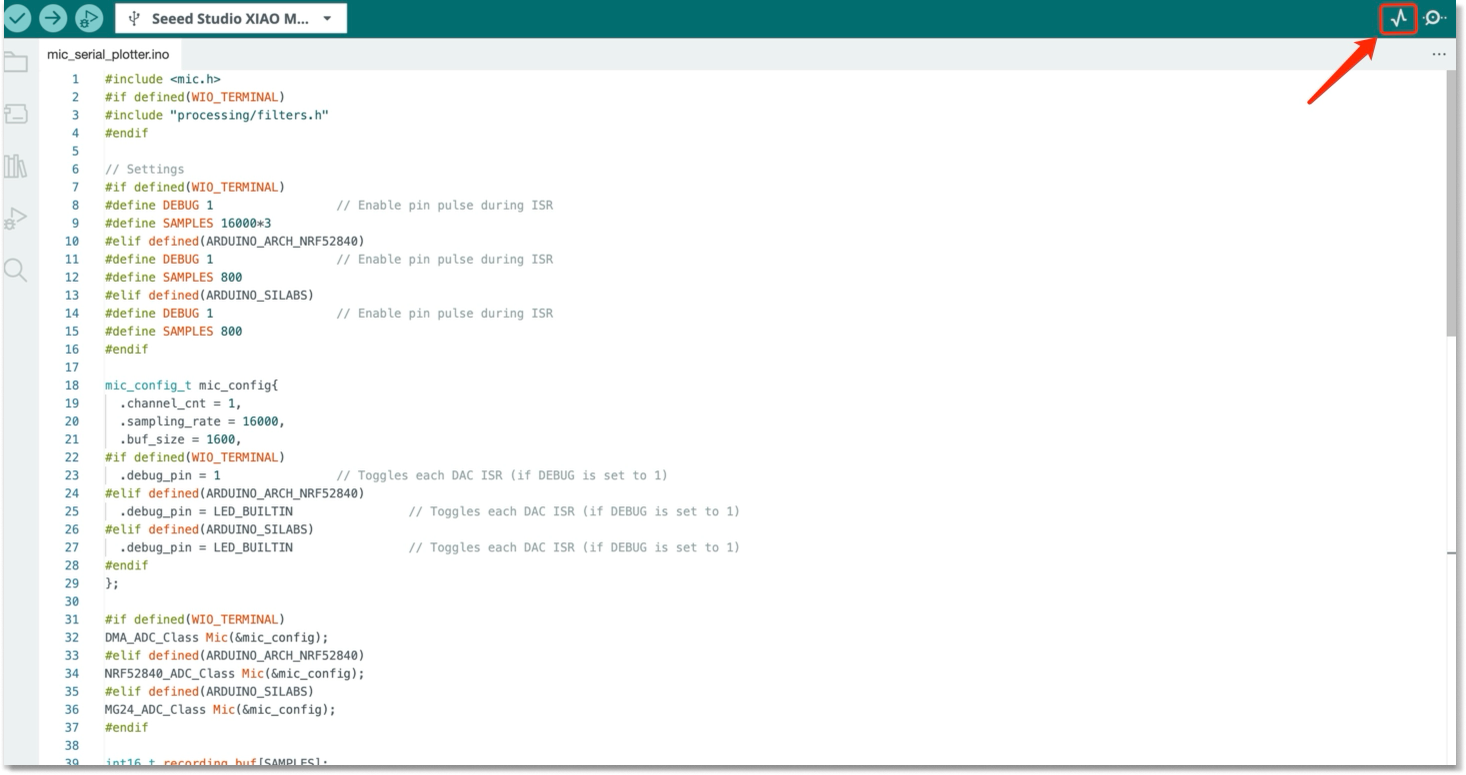
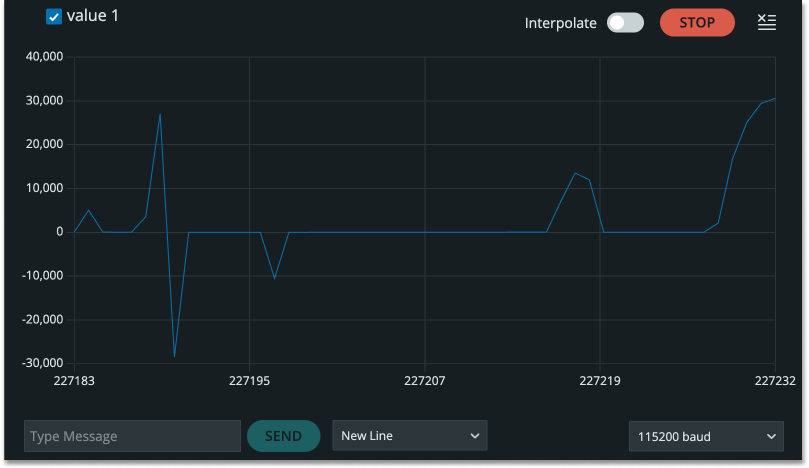
Aqui está a forma de onda do som reconhecido; quando você assopra, é possível ver claramente que a amplitude de oscilação da forma de onda aumenta.
Mais
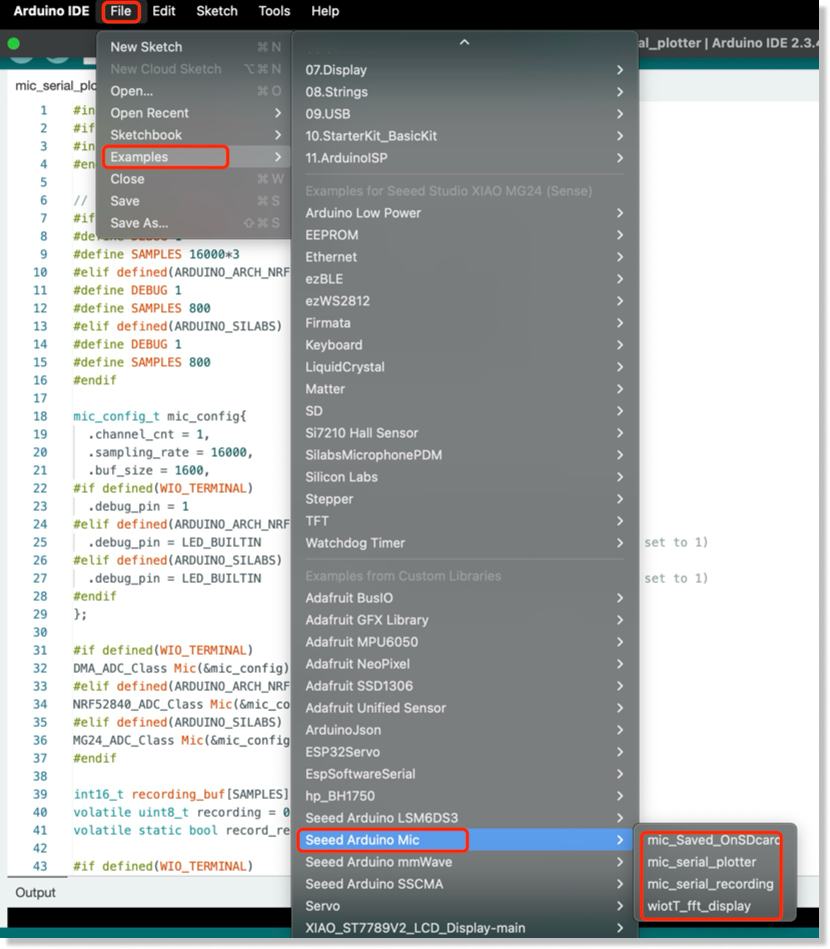
Se você quiser mais códigos de exemplo, por favor clique em: -> "Example -> Seeed Arduino Mic"
XIAO MG24 Sense Microphone(Silicon Labs Demo)
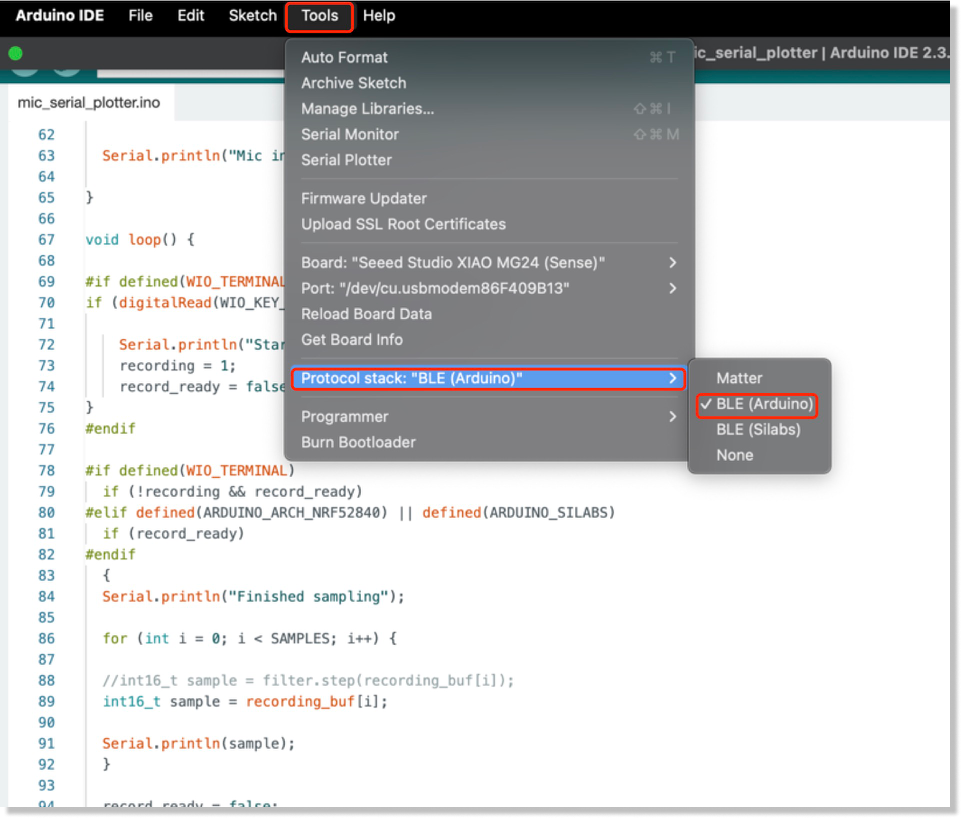
Precisamos baixar o pacote mais recente para a placa (2.3.0) para encontrar o código oficial mais recente no exemplo
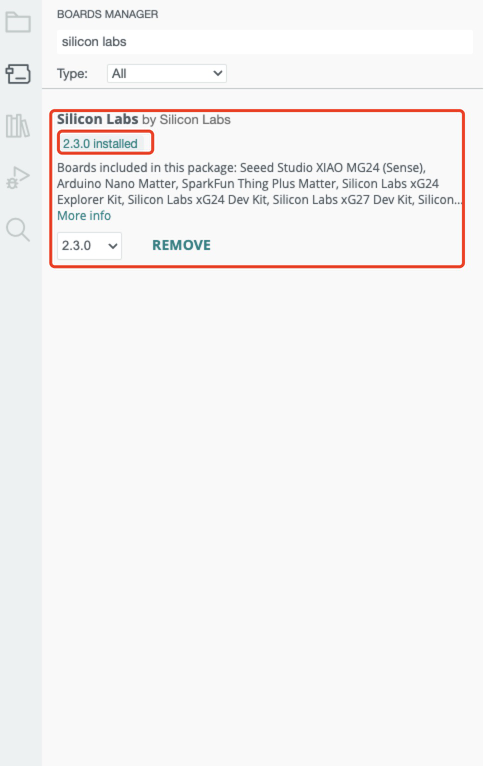
Preparação de Software
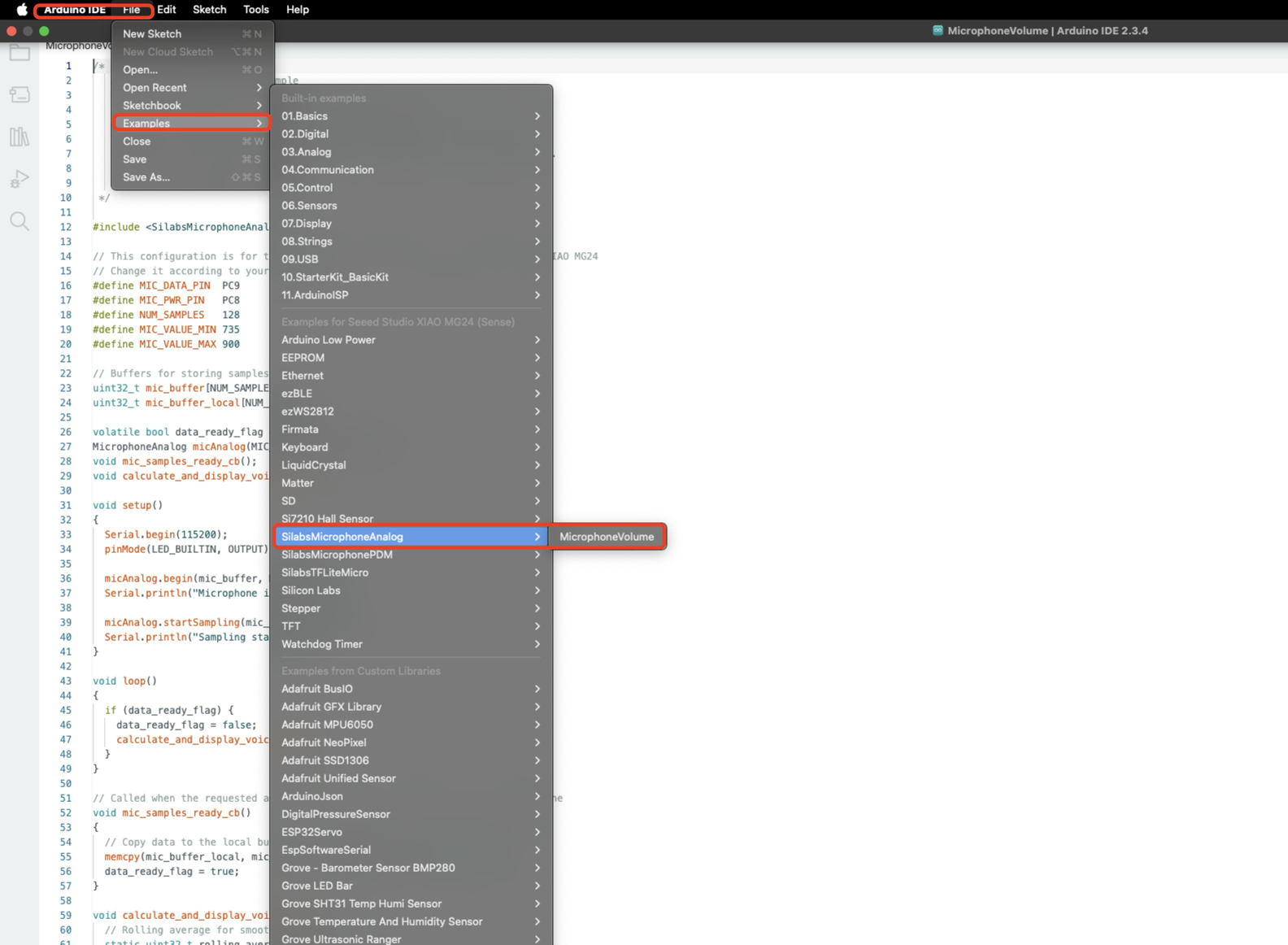
Implementação do Código
/*
   Analog microphone volume example

   The example showcases the usage of analog MEMS microphones and dims the
   on-board LED based on the microphone's input volume.
   This example is compatible with all Silicon Labs Arduino boards, however
   it requires an analog microphone on-board or connected to the specified pin.

   Author: Áron Gyapjas (Silicon Labs)
 */

#include <SilabsMicrophoneAnalog.h>

// This configuration is for the MSM381ACT001 microphone on the Seeed Studio XIAO MG24
// Change it according to your hardware
#define MIC_DATA_PIN  PC9
#define MIC_PWR_PIN   PC8
#define NUM_SAMPLES   128
#define MIC_VALUE_MIN 735
#define MIC_VALUE_MAX 900

// Buffers for storing samples
uint32_t mic_buffer[NUM_SAMPLES];
uint32_t mic_buffer_local[NUM_SAMPLES];

volatile bool data_ready_flag = false;
MicrophoneAnalog micAnalog(MIC_DATA_PIN, MIC_PWR_PIN);
void mic_samples_ready_cb();
void calculate_and_display_voice_level();

void setup()
{
  Serial.begin(115200);
  pinMode(LED_BUILTIN, OUTPUT);

  micAnalog.begin(mic_buffer, NUM_SAMPLES);
  Serial.println("Microphone initialized...");

  micAnalog.startSampling(mic_samples_ready_cb);
  Serial.println("Sampling started...");
}

void loop()
{
  if (data_ready_flag) {
    data_ready_flag = false;
    calculate_and_display_voice_level();
  }
}

// Called when the requested amount of samples are available from the microphone
void mic_samples_ready_cb()
{
  // Copy data to the local buffer in order to prevent it from overwriting
  memcpy(mic_buffer_local, mic_buffer, NUM_SAMPLES * sizeof(uint32_t));
  data_ready_flag = true;
}

void calculate_and_display_voice_level() {
  // Rolling average for smoothing the voice level
  static uint32_t rolling_average = 0u;

  // Stop sampling in order to prevent overwriting the current data
  micAnalog.stopSampling();

  // Get the average of the sampled values
  uint32_t voice_level = (uint32_t)micAnalog.getAverage(mic_buffer_local, NUM_SAMPLES);
  // Adjust the voice level relative to minimum/maximum of the microphone's output
  voice_level = constrain(voice_level, MIC_VALUE_MIN, MIC_VALUE_MAX);
  // Calculate the rolling average
  rolling_average = (voice_level + rolling_average) / 2;

  // Map the current average level to brightness
  int brightness = map(rolling_average, MIC_VALUE_MIN, MIC_VALUE_MAX, 0, 255);
  if (LED_BUILTIN_ACTIVE == LOW) {
    analogWrite(LED_BUILTIN, 255 - brightness);
  } else {
    analogWrite(LED_BUILTIN, brightness);
  }
  // Print the average voice level (you can use the Serial Plotter to view this value on a graph)
  Serial.println(rolling_average);

  // Restart sampling
  micAnalog.startSampling(mic_samples_ready_cb);
}
Visão Geral das Funções
Introdução ao arquivo de cabeçalho
#include <SilabsMicrophoneAnalog.h>
- Inclui o arquivo de cabeçalho
SilabsMicrophoneAnalog.h, que contém as funções de biblioteca e definições necessárias para usar o microfone analógico.
Configuração de hardware
#define MIC_DATA_PIN  PC9
#define MIC_PWR_PIN   PC8
#define NUM_SAMPLES   128
#define MIC_VALUE_MIN 735
#define MIC_VALUE_MAX 900
-
MIC_DATA_PIN: Define o pino de dados do microfone comoPC9. -
MIC_PWR_PIN: Define o pino de alimentação do microfone comoPC8. -
NUM_SAMPLES: Define o número de amostras por leitura como 128. -
MIC_VALUE_MINeMIC_VALUE_MAX: Definem o intervalo mínimo e máximo da saída do microfone.
Definição de buffers
uint32_t mic_buffer[NUM_SAMPLES];
uint32_t mic_buffer_local[NUM_SAMPLES];
-
mic_buffer: Usado para armazenar dados de amostra brutos coletados do microfone. -
mic_buffer_local: Usado para armazenar temporariamente dados de amostra para evitar sobrescrita.
Flags e definições de objetos
volatile bool data_ready_flag = false;
MicrophoneAnalog micAnalog(MIC_DATA_PIN, MIC_PWR_PIN);
-
data_ready_flag: Uma flag para indicar se novos dados de amostra estão prontos. -
micAnalog: Cria um objeto MicrophoneAnalog para controlar o microfone.
Declaração da função de callback
void mic_samples_ready_cb();
void calculate_and_display_voice_level();
-
mic_samples_ready_cb(): Uma função de callback chamada quando a amostragem é concluída. -
calculate_and_display_voice_level(): Uma função para calcular o volume e controlar o brilho do LED.
Função setup()
void setup()
{
  Serial.begin(115200);
  pinMode(LED_BUILTIN, OUTPUT);

  micAnalog.begin(mic_buffer, NUM_SAMPLES);
  Serial.println("Microphone initialized...");

  micAnalog.startSampling(mic_samples_ready_cb);
  Serial.println("Sampling started...");
}
-
Inicializa a comunicação serial com taxa de 115200 baud.
-
Define o pino do LED onboard como modo de saída.
-
Inicializa o microfone e especifica o buffer de amostras.
-
Inicia a amostragem e define a função de callback para quando a amostragem for concluída.
Função loop()
void loop()
{
  if (data_ready_flag) {
    data_ready_flag = false;
    calculate_and_display_voice_level();
  }
}
-
Verifica se
data_ready_flagétrue, indicando que novos dados estão prontos. -
Se novos dados estiverem disponíveis, chama a função
calculate_and_display_voice_level()para processá-los.
void mic_samples_ready_cb()
{
  memcpy(mic_buffer_local, mic_buffer, NUM_SAMPLES * sizeof(uint32_t));
  data_ready_flag = true;
}
Copia os dados de amostra de mic_buffer para mic_buffer_local para evitar sobrescrita.
Define data_ready_flag como true para indicar que novos dados estão prontos.
void calculate_and_display_voice_level() {
  static uint32_t rolling_average = 0u;

  micAnalog.stopSampling();

  uint32_t voice_level = (uint32_t)micAnalog.getAverage(mic_buffer_local, NUM_SAMPLES);
  voice_level = constrain(voice_level, MIC_VALUE_MIN, MIC_VALUE_MAX);
  rolling_average = (voice_level + rolling_average) / 2;

  int brightness = map(rolling_average, MIC_VALUE_MIN, MIC_VALUE_MAX, 0, 255);
  if (LED_BUILTIN_ACTIVE == LOW) {
    analogWrite(LED_BUILTIN, 255 - brightness);
  } else {
    analogWrite(LED_BUILTIN, brightness);
  }
  Serial.println(rolling_average);

  micAnalog.startSampling(mic_samples_ready_cb);
}
-
Interrompe a amostragem para evitar sobrescrita de dados.
-
Calcula a média dos dados de amostra e a restringe entre
MIC_VALUE_MINeMIC_VALUE_MAX. -
Calcula uma média móvel para suavizar as variações de volume.
-
Mapeia a média móvel para a faixa de brilho do LED (0 a 255) e ajusta o brilho do LED.
-
Envia a média móvel via serial para observar as mudanças de volume.
-
Reinicia a amostragem para coletar novos dados de áudio.
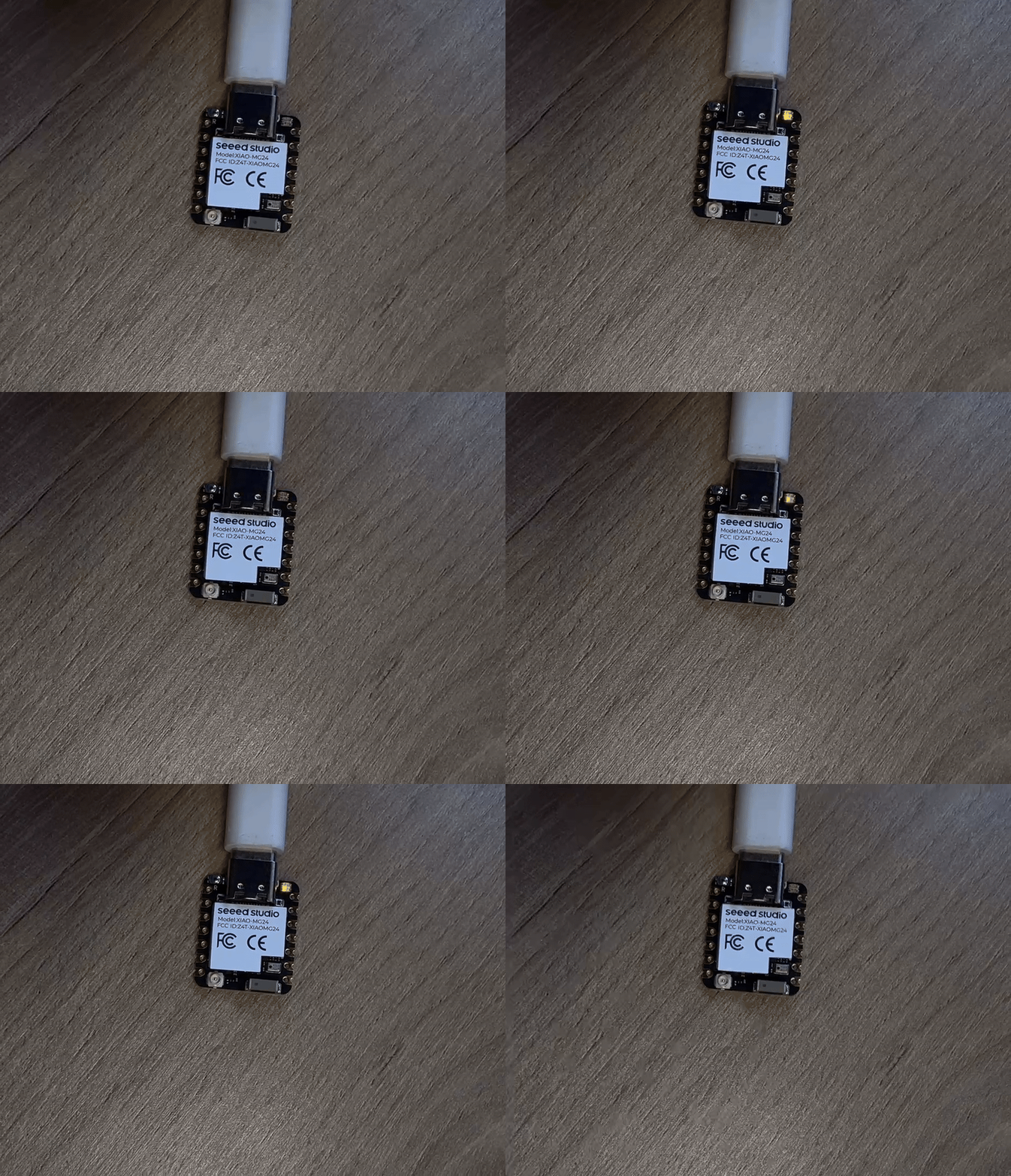
Gráfico de Resultados
Quando assopramos no microfone, podemos ver que o LED na parte superior ficará mais claro e mais escuro de acordo com o som.
Mais
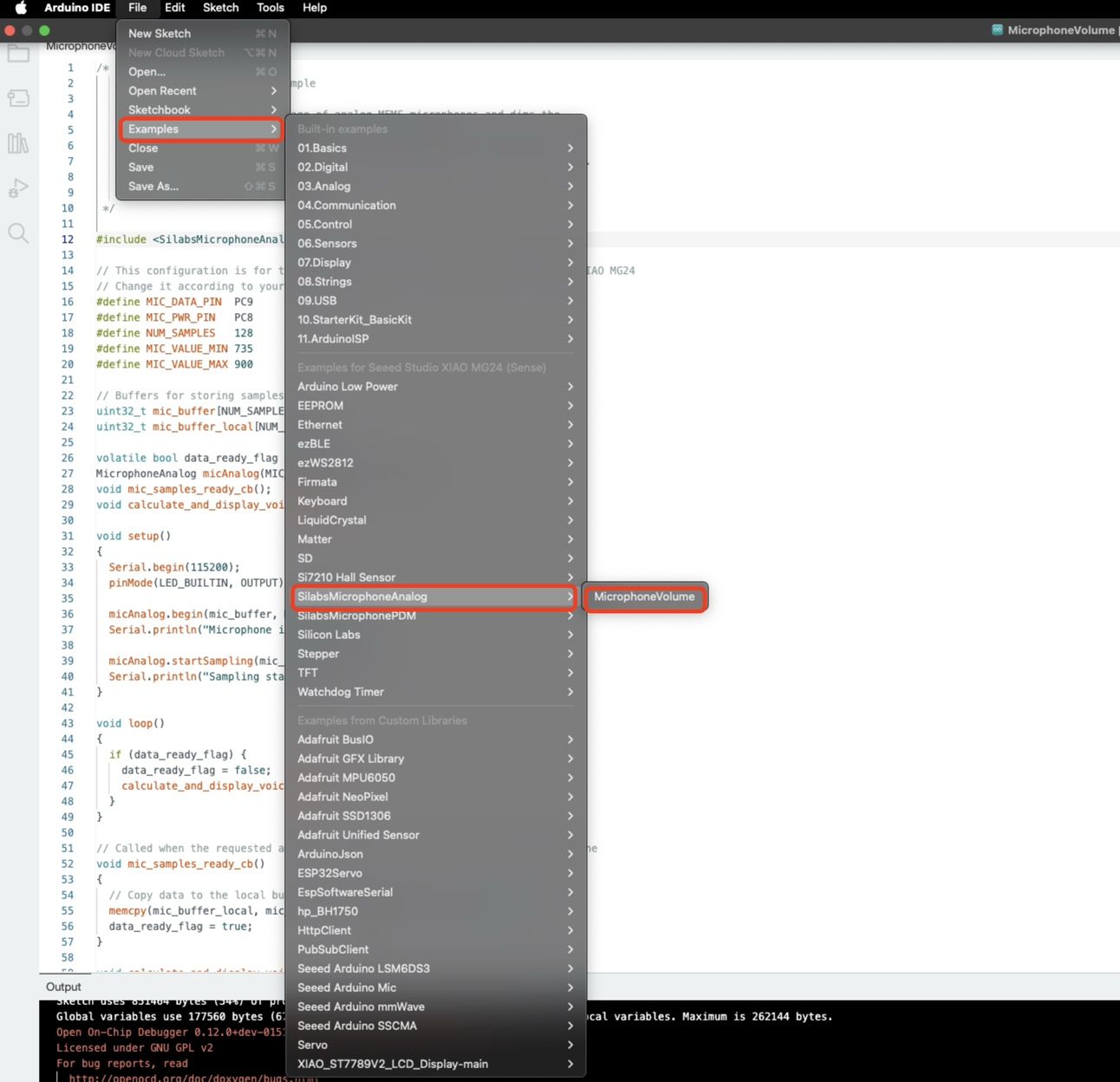
Se você quiser mais códigos de exemplo, por favor clique em: -> "Example -> SilabsMicrophoneAnalog -> MicrophoneVolume"
Recursos
Para Seeed Studio XIAO MG24 Sense
- 📄 [PDF] Seeed Studio 6-Axis IMU(LSM6DS3TR-C) datasheet
- 📄 [PDF] Seeed Studio Analog Microphone(MSM381ACT001) datasheet
Suporte Técnico & Discussão de Produto
Obrigado por escolher nossos produtos! Estamos aqui para oferecer diferentes tipos de suporte para garantir que sua experiência com nossos produtos seja a mais tranquila possível. Oferecemos vários canais de comunicação para atender a diferentes preferências e necessidades.