Bluetooth LE para XIAO nRF54LM20A Sense
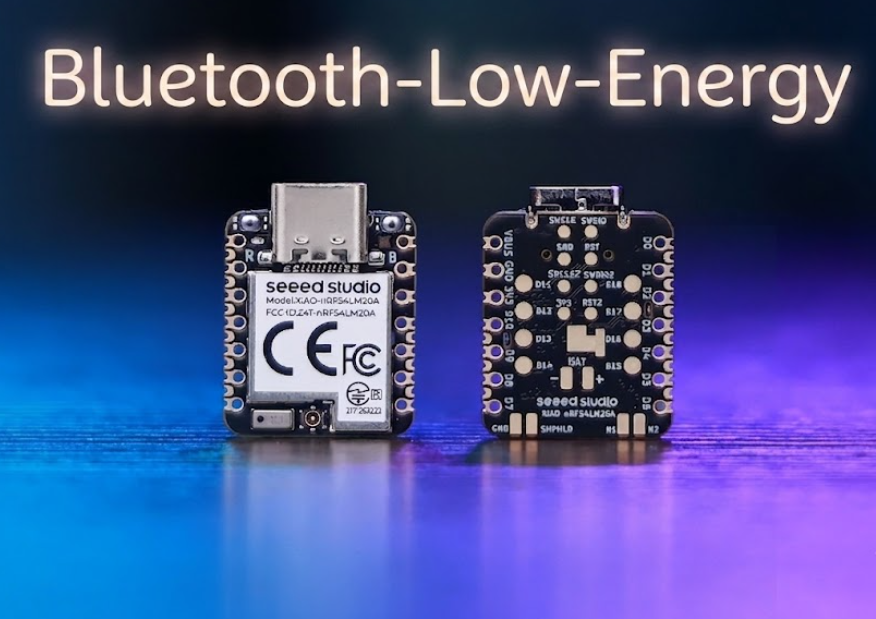
Bluetooth Low Energy (BLE) é um padrão de comunicação sem fio de baixo consumo introduzido no Bluetooth 4.0. Projetado para transmissão intermitente de pequenos dados, ele permite conectividade sem fio em dezenas de metros enquanto mantém um consumo médio de corrente ultrabaixo em nível de microampères. É amplamente aplicado em dispositivos vestíveis, sensores de casa inteligente, posicionamento interno e cenários de IoT industrial.
Alimentada pelo SoC nRF54LM20A, a série XIAO nRF54LM20A oferece suporte a Bluetooth LE, Matter, Thread, Zigbee e protocolos proprietários de 2,4 GHz, fornecendo uma taxa de dados de pico de 4 Mbps ideal para cenários de baixa latência. Ela também oferece suporte a Bluetooth Channel Sounding e Bluetooth Mesh. Este artigo ilustra sua funcionalidade BLE por meio de dois exemplos práticos: transmissão básica de Beacon de broadcast e uma conexão BLE LED Button Service (LBS) entre dispositivos Central e Peripheral.
- Este tutorial é baseado no sistema de build PlatformIO e no Zephyr RTOS. Se você não estiver familiarizado com a criação de um projeto PlatformIO para o XIAO nRF54LM20A, consulte Getting Started with Seeed Studio XIAO nRF54LM20A.
- Se você quiser saber mais sobre o SoC nRF54LM20A e BLE, visite os links abaixo: nRF54LM20A SoC Introduction e Bluetooth-Low-Energy for Nordic
Preparação de hardware
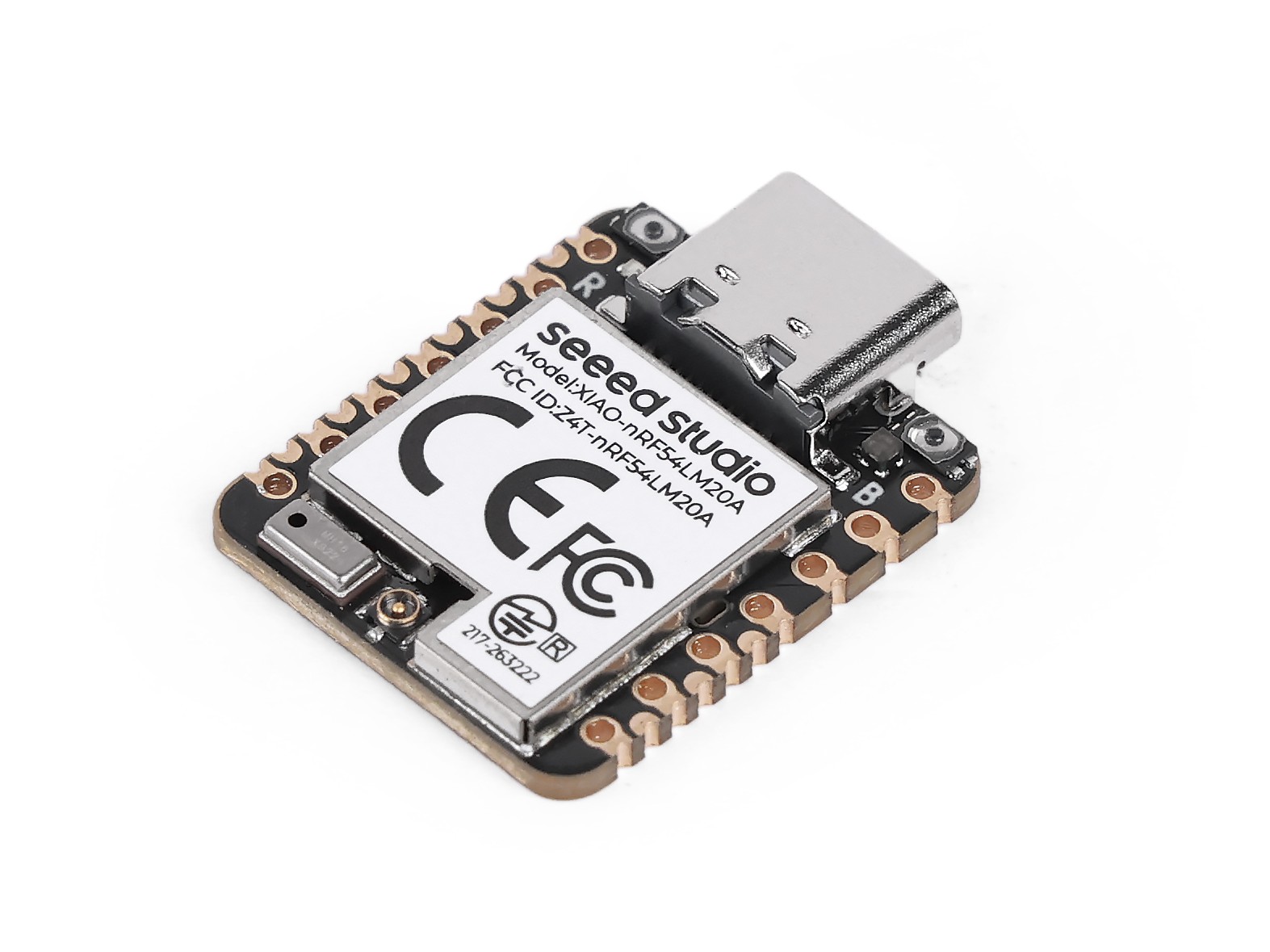
Antes de começar, prepare pelo menos duas placas XIAO nRF54LM20A Sense se você planeja executar o exemplo BLE LBS.
| Seeed Studio XIAO nRF54LM20A Sense |
|---|
 |
Antena Bluetooth
Esta placa usa uma antena Bluetooth externa. Para garantir melhor qualidade de sinal Bluetooth e aprimorar sua experiência de uso de Bluetooth, é recomendável instalar uma antena Bluetooth. O método de conexão é mostrado abaixo:
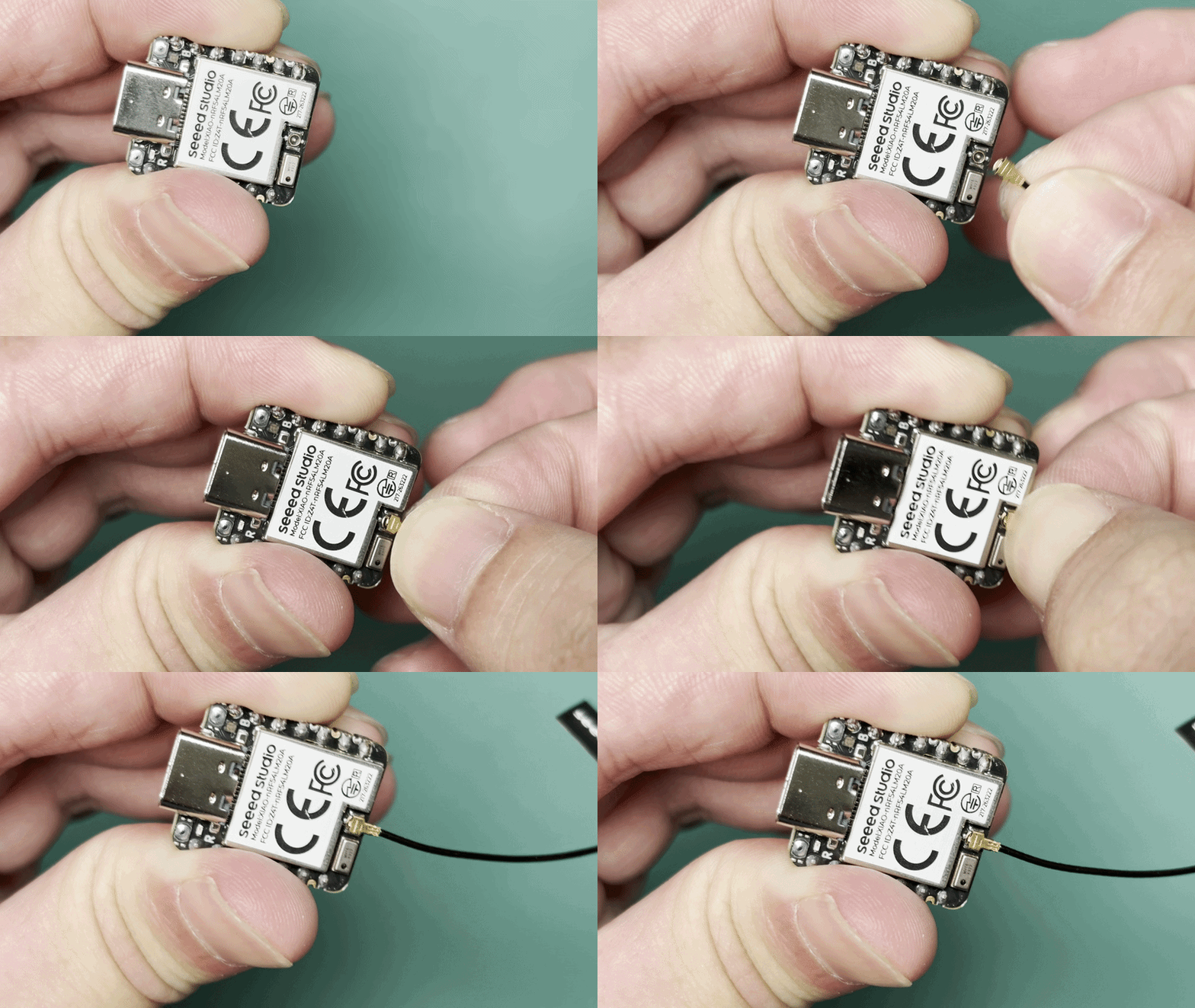
Instalação da antena
O pacote Seeed Studio XIAO nRF54LM20A inclui uma antena dedicada de 2,4 GHz. Para desempenho ideal de Bluetooth, conecte a antena fornecida ao conector de antena onboard.
| Antena FPC 2,4GHz A-04 para XIAO nRF54 Série |
|---|
 |
Aplicação
Esta seção apresenta os principais recursos de BLE e o método de uso de BLE no XIAO nRF54LM20A Sense por meio de casos práticos.
BLE Beacon
Este exemplo implementa um BLE Beacon no XIAO nRF54LM20A. Após a inicialização, o dispositivo transmite continuamente pacotes de advertising contendo Manufacturer Specific Data. O pacote inclui um contador que é incrementado uma vez por segundo, permitindo que as mudanças de dados sejam monitoradas em tempo real usando o nRF Connect.
Software
- As configurações relevantes da device tree devem ser habilitadas em
app.overlaypara alternar o controlador BLE para a implementação nativa do Zephyr.
/* Enable Zephyr native BLE controller (LL SW Split) */
&bt_hci_controller {
        status = "okay";
};

/ {
        chosen {
                zephyr,bt-hci = &bt_hci_controller;
        };
};
- Habilite as configurações relevantes de Bluetooth em
prj.conf, defina o modo de saída de log e renomeie o nome do dispositivo Bluetooth para XIAO-Beacon.
# GPIO
CONFIG_GPIO=y
# XIAO nRF54LM20A can fault early with the MPU enabled in this toolchain/board package.
CONFIG_ARM_MPU=n
# Regulator (for power_en)
CONFIG_REGULATOR=y
# Logging
CONFIG_LOG=y
# UART for console logging
CONFIG_SERIAL=y
CONFIG_UART_ASYNC_API=y
CONFIG_UART_20_ASYNC=y
CONFIG_UART_21_ASYNC=y
CONFIG_UART_NRFX_UARTE_ENHANCED_RX=y
# BLE
CONFIG_BT=y
CONFIG_BT_PERIPHERAL=y
CONFIG_BT_DEVICE_NAME="XIAO-Beacon"
# Avoid GCC 8.2 rejecting the controller's optimized assert inline asm path.
CONFIG_BT_CTLR_ASSERT_OPTIMIZE_FOR_SIZE=n
CONFIG_BT_CTLR_ASSERT_DEBUG=n
CONFIG_BT_CTLR_ASSERT_OVERHEAD_START=n
# Disable auto-procedures to avoid LL Procedure Collision on nRF54L
CONFIG_BT_AUTO_PHY_UPDATE=n
CONFIG_BT_DATA_LEN_UPDATE=n
# Memory
CONFIG_HEAP_MEM_POOL_SIZE=8192
# System workqueue stack
CONFIG_SYSTEM_WORKQUEUE_STACK_SIZE=2048
# Assert level
CONFIG_ASSERT=y
- Implemente o formato dos dados de advertising e a lógica de atualização em
main.c.
main.c
#include <stdio.h>

#include <zephyr/kernel.h>
#include <zephyr/device.h>
#include <zephyr/drivers/gpio.h>
#include <zephyr/drivers/regulator.h>
#include <zephyr/bluetooth/bluetooth.h>
#include <zephyr/bluetooth/hci.h>
#include <zephyr/logging/log.h>

LOG_MODULE_REGISTER(ble_beacon, LOG_LEVEL_INF);

/* Manufacturer Data configuration */
#define MANUF_COMPANY_ID    0x0059
#define MANUF_DATA_SIZE     8

static uint32_t manufacturer_counter;

static const uint8_t adv_flags[] __aligned(4) = {
    BT_LE_AD_GENERAL | BT_LE_AD_NO_BREDR,
};

static const uint8_t adv_name[] __aligned(4) = CONFIG_BT_DEVICE_NAME;

static uint8_t manuf_data[MANUF_DATA_SIZE] __aligned(4);

static const struct bt_data ad[] __aligned(4) = {
    BT_DATA(BT_DATA_FLAGS, adv_flags, sizeof(adv_flags)),
    BT_DATA(BT_DATA_NAME_COMPLETE, adv_name, sizeof(adv_name) - 1),
    BT_DATA(BT_DATA_MANUFACTURER_DATA, manuf_data, sizeof(manuf_data)),
};

/* Power enable regulator (GPIO1_12) - must be enabled before BLE init */
static const struct device *const power_en_dev =
    DEVICE_DT_GET(DT_NODELABEL(power_en));

static void adv_update_work_handler(struct k_work *work);

static K_WORK_DELAYABLE_DEFINE(adv_update_work, adv_update_work_handler);

static void fill_manuf_data(uint32_t counter)
{
    /* [Company ID (2B)][Counter (4B)][Custom (2B)] */
    manuf_data[0] = MANUF_COMPANY_ID & 0xFF;
    manuf_data[1] = (MANUF_COMPANY_ID >> 8) & 0xFF;
    manuf_data[2] = (counter >> 0) & 0xFF;
    manuf_data[3] = (counter >> 8) & 0xFF;
    manuf_data[4] = (counter >> 16) & 0xFF;
    manuf_data[5] = (counter >> 24) & 0xFF;
    manuf_data[6] = 0xAA;
    manuf_data[7] = 0xBB;
}

static int enable_power(void)
{
    int ret;

    if (!device_is_ready(power_en_dev)) {
        LOG_ERR("power_en regulator is not ready");
        return -ENODEV;
    }

    ret = regulator_enable(power_en_dev);
    if (ret < 0 && ret != -EALREADY) {
        LOG_ERR("Failed to enable power_en: %d", ret);
        return ret;
    }

    k_sleep(K_MSEC(20));
    LOG_INF("Power rail enabled");
    return 0;
}

static void adv_update_work_handler(struct k_work *work)
{
    int err;

    manufacturer_counter++;
    fill_manuf_data(manufacturer_counter);

    err = bt_le_adv_update_data(ad, ARRAY_SIZE(ad), NULL, 0);
    if (err < 0) {
        LOG_ERR("Failed to update advertising data (err %d)", err);
    } else {
        LOG_INF("Manufacturer counter: %u", manufacturer_counter);
    }

    k_work_schedule(&adv_update_work, K_SECONDS(1));
}

int main(void)
{
    int err;

    LOG_INF("BLE Manufacturer Data Beacon");

    /* Enable board power rail before BLE initialization */
    err = enable_power();
    if (err < 0) {
        LOG_ERR("Power enable failed (err %d)", err);
        return err;
    }

    LOG_INF("Initializing BLE...");

    err = bt_enable(NULL);
    if (err < 0) {
        LOG_ERR("Bluetooth enable failed (err %d)", err);
        return err;
    }

    LOG_INF("BLE initialized");

    /* Initial advertising data with counter = 0 */
    fill_manuf_data(0);

    err = bt_le_adv_start(BT_LE_ADV_NCONN, ad, ARRAY_SIZE(ad), NULL, 0);
    if (err < 0) {
        LOG_ERR("Advertising failed to start (err %d)", err);
        return err;
    }

    LOG_INF("BLE advertising started");

    /* Schedule counter update after 1 second */
    k_work_schedule(&adv_update_work, K_SECONDS(1));

    for (;;) {
        k_sleep(K_FOREVER);
    }

    return 0;
}
Resultado
- Após gravar o firmware, instale o aplicativo nRF Connect para escanear e detectar dispositivos BLE.
Enquanto isso, você pode pesquisar e baixar o app nRF Connect nas principais lojas de aplicativos móveis, o que permite que seu telefone procure e se conecte a dispositivos Bluetooth.
- Android: nRF Connect
- IOS: nRF Connect
- Após instalar o software, procure pelo dispositivo Bluetooth chamado XIAO-Beacon e verifique os dados de fabricante (Manufacturer Data) recebidos. Ao mesmo tempo, abra a porta serial para visualizar os logs de saída.
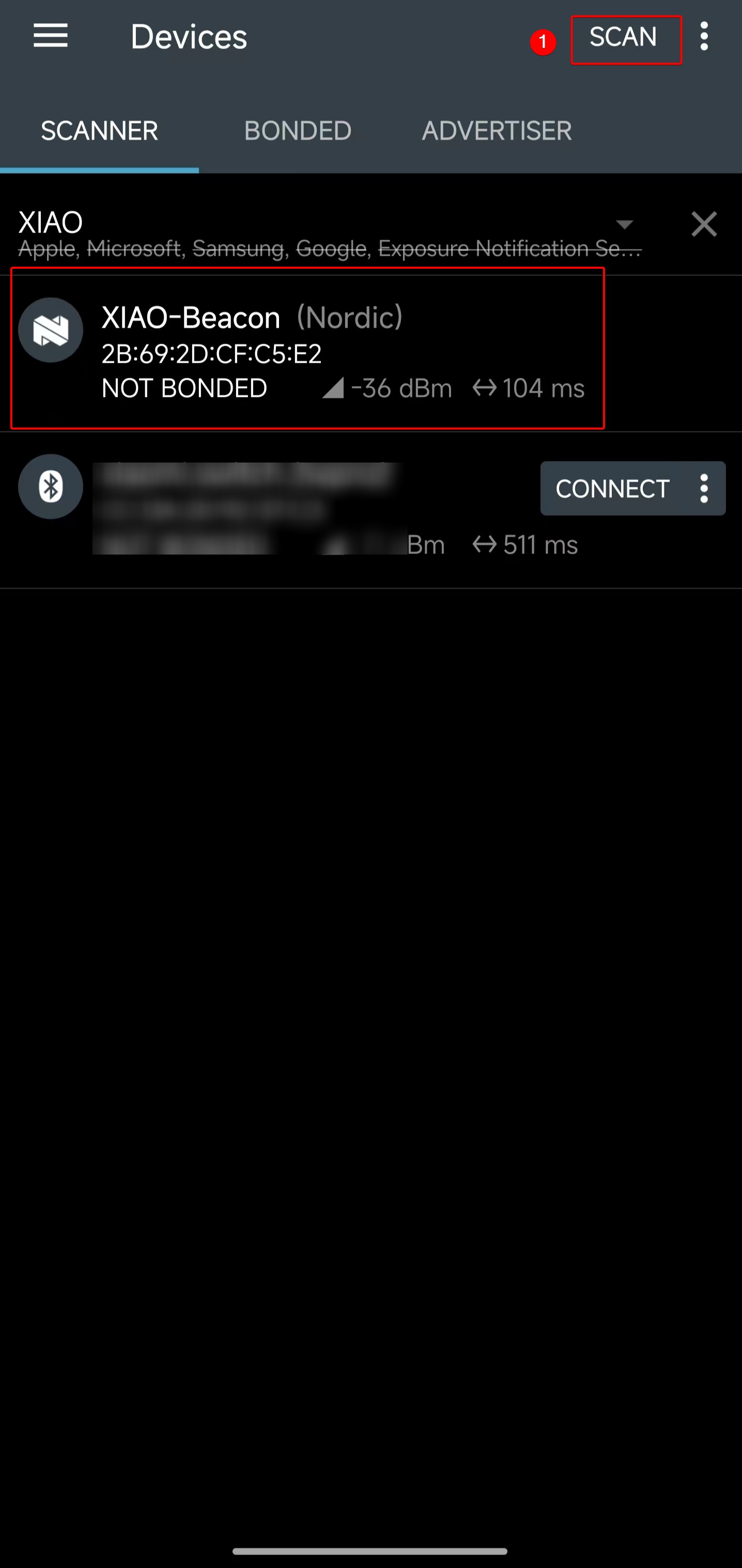 | 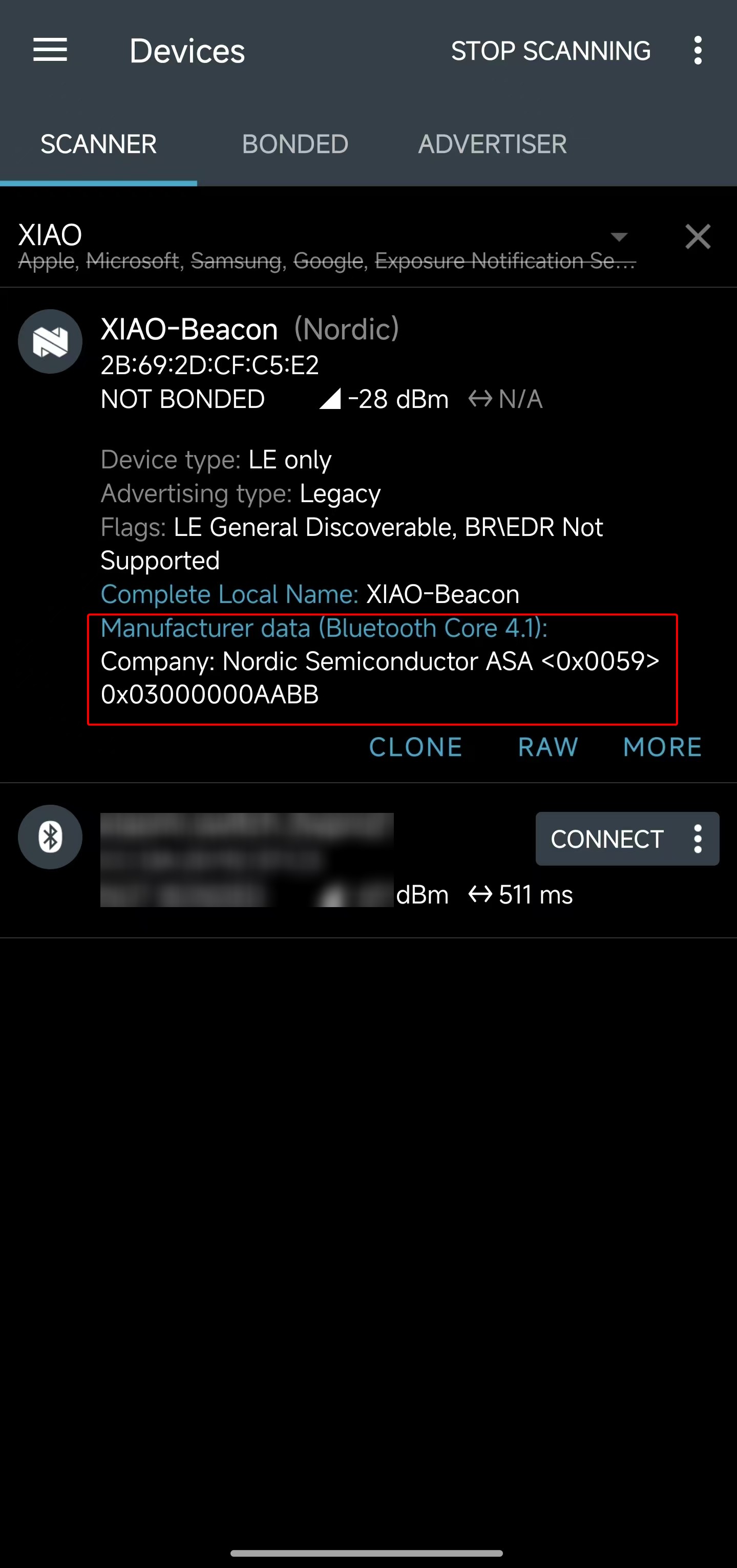 |
- Os dados de fabricante obtidos (Manufacturer Data) são o valor hexadecimal
<0x0059> 0x03000000AABB. Verificando o código do programa, o segmento0x03000000indica que o valor atual do contador é 3.
#define MANUF_COMPANY_ID    0x0059
static uint32_t manufacturer_counter;
...
manuf_data[0] = MANUF_COMPANY_ID & 0xFF;
manuf_data[1] = (MANUF_COMPANY_ID >> 8) & 0xFF;
manuf_data[2] = (manufacturer_counter >> 0) & 0xFF;
manuf_data[3] = (manufacturer_counter >> 8) & 0xFF;
manuf_data[4] = (manufacturer_counter >> 16) & 0xFF;
manuf_data[5] = (manufacturer_counter >> 24) & 0xFF;
manuf_data[6] = 0xAA;
manuf_data[7] = 0xBB;
- Abra a ferramenta de porta serial e verifique se os valores do contador são impressos linha por linha, com a contagem atual chegando a 3.
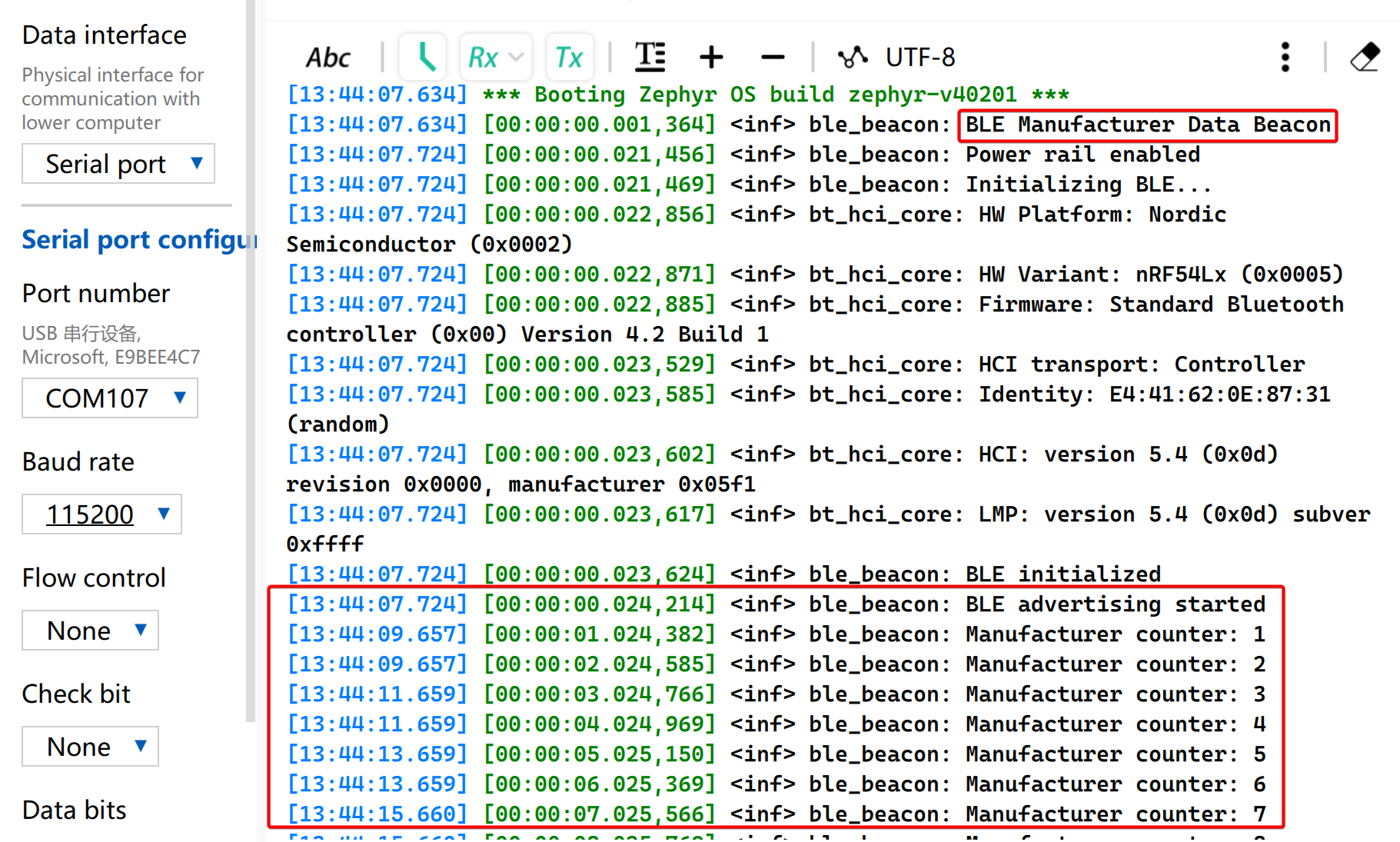
A partir dos resultados acima, o processo de transmissão de pacotes de advertising BLE personalizados no XIAO nRF54LM20A Sense pode ser claramente compreendido, o que facilita pesquisas adicionais sobre as características de operação do BLE. Em cenários de aplicação específicos, os dados de advertising podem ser usados para julgar condições de disparo sem estabelecer conexões reais.
BLE LBS
Este exemplo usa duas placas XIAO nRF54 para implementar um serviço BLE LED Button Service (LBS). Uma placa atua como um periférico BLE e faz advertising de um serviço LBS personalizado. A outra atua como um dispositivo central BLE, procura pelo serviço, conecta-se automaticamente e controla o LED no periférico por meio de uma característica de escrita GATT (GATT Write Characteristic).
Nenhum arquivo app.overlay adicional é necessário porque a definição da placa já fornece os aliases led0 e sw0 usados por este exemplo.
Software
BLE Central
- Configure o projeto em
CMakeLists.txt.
# SPDX-License-Identifier: Apache-2.0

cmake_minimum_required(VERSION 3.13.1)
find_package(Zephyr REQUIRED HINTS $ENV{ZEPHYR_BASE})
project(ble-lbs-min-central)

target_sources(app PRIVATE src/main.c)
- Habilite as configurações relacionadas a Bluetooth em
prj.conf
CONFIG_GPIO=y
CONFIG_SERIAL=y
CONFIG_CONSOLE=y
CONFIG_UART_CONSOLE=y
CONFIG_PRINTK=y

CONFIG_LOG=y
CONFIG_LOG_BACKEND_UART=y
CONFIG_LOG_BUFFER_SIZE=2048

CONFIG_BT=y
CONFIG_BT_CENTRAL=y
CONFIG_BT_OBSERVER=y
CONFIG_BT_GATT_CLIENT=y
CONFIG_BT_CTLR_TX_PWR_PLUS_8=y
CONFIG_BT_DEVICE_NAME="zephyr_ble_lbs_central"

CONFIG_BT_BUF_ACL_RX_SIZE=255
CONFIG_BT_BUF_ACL_TX_SIZE=251
CONFIG_BT_BUF_CMD_TX_SIZE=255
CONFIG_BT_BUF_EVT_DISCARDABLE_SIZE=255
CONFIG_BT_L2CAP_TX_MTU=247

CONFIG_MAIN_STACK_SIZE=4096
CONFIG_SYSTEM_WORKQUEUE_STACK_SIZE=2048
- Implemente a lógica da aplicação BLE em
main.c.
main.c
#include <zephyr/kernel.h>
#include <zephyr/drivers/gpio.h>
#include <zephyr/logging/log.h>
#include <zephyr/sys/atomic.h>

#include <zephyr/bluetooth/bluetooth.h>
#include <zephyr/bluetooth/conn.h>
#include <zephyr/bluetooth/hci.h>
#include <zephyr/bluetooth/uuid.h>
#include <zephyr/bluetooth/gatt.h>

#include <string.h>

LOG_MODULE_REGISTER(app, LOG_LEVEL_INF);

#define BT_UUID_LBS_MIN_VAL BT_UUID_128_ENCODE(0x8e7f1a23, 0x4b2c, 0x11ee, 0xbe56, 0x0242ac120002)
#define BT_UUID_LBS_MIN BT_UUID_DECLARE_128(BT_UUID_LBS_MIN_VAL)

#define BT_UUID_LBS_MIN_WRITE_VAL \
	BT_UUID_128_ENCODE(0x8e7f1a24, 0x4b2c, 0x11ee, 0xbe56, 0x0242ac120002)
#define BT_UUID_LBS_MIN_WRITE BT_UUID_DECLARE_128(BT_UUID_LBS_MIN_WRITE_VAL)

#define LED0_NODE DT_ALIAS(led0)
#define SW0_NODE DT_ALIAS(sw0)

static const struct gpio_dt_spec led0 = GPIO_DT_SPEC_GET_OR(LED0_NODE, gpios, {0});
static const struct gpio_dt_spec sw0 = GPIO_DT_SPEC_GET_OR(SW0_NODE, gpios, {0});

static struct bt_conn *default_conn;
static struct bt_conn *discover_conn;
static struct bt_gatt_discover_params discover_params;
static struct bt_gatt_write_params write_params;
static struct gpio_callback sw0_cb;
static struct k_work button_work;
static struct k_work_delayable debounce_work;
static struct k_work_delayable blink_work;
static atomic_t write_busy;

static uint16_t svc_start_handle;
static uint16_t svc_end_handle;
static uint16_t write_handle;
static uint8_t remote_led_state;
static uint8_t blink_led_state;
static bool blink_active;

static bool gpio_ready(const struct gpio_dt_spec *spec)
{
	return spec->port != NULL && device_is_ready(spec->port);
}

static void status_led_apply(uint8_t value)
{
	if (!gpio_ready(&led0)) {
		return;
	}

	(void)gpio_pin_set_dt(&led0, value ? 1 : 0);
}

static void blink_handler(struct k_work *work)
{
	ARG_UNUSED(work);

	if (!blink_active) {
		return;
	}

	blink_led_state = blink_led_state ? 0U : 1U;
	status_led_apply(blink_led_state);
	k_work_reschedule(&blink_work, K_MSEC(500));
}

static int init_status_led(void)
{
	int err;

	k_work_init_delayable(&blink_work, blink_handler);

	if (!gpio_ready(&led0)) {
		return -ENODEV;
	}

	err = gpio_pin_configure_dt(&led0, GPIO_OUTPUT_INACTIVE);
	if (err) {
		return err;
	}

	status_led_apply(0U);
	return 0;
}

static void start_blink(void)
{
	if (!gpio_ready(&led0)) {
		return;
	}

	blink_active = true;
	k_work_reschedule(&blink_work, K_NO_WAIT);
}

static void stop_blink(void)
{
	blink_active = false;
	(void)k_work_cancel_delayable(&blink_work);
	blink_led_state = 0U;
	status_led_apply(0U);
}

static bool ad_has_uuid(struct bt_data *data, void *user_data)
{
	bool *found = user_data;
	struct bt_uuid_128 uuid;

	if (data->type != BT_DATA_UUID128_ALL && data->type != BT_DATA_UUID128_SOME) {
		return true;
	}

	if ((data->data_len % 16U) != 0U) {
		return true;
	}

	for (size_t i = 0; i < data->data_len; i += 16U) {
		memcpy(uuid.val, &data->data[i], 16U);
		uuid.uuid.type = BT_UUID_TYPE_128;
		if (bt_uuid_cmp(&uuid.uuid, BT_UUID_LBS_MIN) == 0) {
			*found = true;
			return false;
		}
	}

	return true;
}

static void start_scan(void);

static void device_found(const bt_addr_le_t *addr, int8_t rssi, uint8_t type,
			 struct net_buf_simple *ad)
{
	bool found = false;
	int err;

	ARG_UNUSED(rssi);

	if (default_conn != NULL) {
		return;
	}

	if (type != BT_GAP_ADV_TYPE_ADV_IND &&
	    type != BT_GAP_ADV_TYPE_ADV_DIRECT_IND &&
	    type != BT_GAP_ADV_TYPE_ADV_SCAN_IND &&
	    type != BT_GAP_ADV_TYPE_SCAN_RSP) {
		return;
	}

	bt_data_parse(ad, ad_has_uuid, &found);
	if (!found) {
		return;
	}

	{
		char addr_str[BT_ADDR_LE_STR_LEN];

		bt_addr_le_to_str(addr, addr_str, sizeof(addr_str));
		LOG_INF("LBS adv matched from %s (type=0x%02x)", addr_str, type);
	}

	err = bt_le_scan_stop();
	if (err) {
		LOG_WRN("scan stop failed: %d", err);
	}

	err = bt_conn_le_create(addr, BT_CONN_LE_CREATE_CONN, BT_LE_CONN_PARAM_DEFAULT,
				&default_conn);
	if (err) {
		LOG_ERR("create conn failed: %d", err);
		start_scan();
	} else {
		LOG_INF("connecting to matching peripheral");
	}
}

static void start_scan(void)
{
	int err = bt_le_scan_start(BT_LE_SCAN_ACTIVE, device_found);

	if (err) {
		LOG_ERR("scan start failed: %d", err);
		return;
	}

	LOG_INF("scanning");
}

static uint8_t discover_func(struct bt_conn *conn, const struct bt_gatt_attr *attr,
			     struct bt_gatt_discover_params *params)
{
	if (attr == NULL) {
		LOG_INF("discover complete (attr=NULL) write_handle=0x%04x", write_handle);
		memset(params, 0, sizeof(*params));
		if (discover_conn) {
			bt_conn_unref(discover_conn);
			discover_conn = NULL;
		}
		return BT_GATT_ITER_STOP;
	}

	if (params->type == BT_GATT_DISCOVER_PRIMARY) {
		const struct bt_gatt_service_val *svc = attr->user_data;

		svc_start_handle = attr->handle;
		svc_end_handle = svc->end_handle;
		LOG_INF("primary svc found: start=0x%04x end=0x%04x",
			svc_start_handle, svc_end_handle);

		memset(params, 0, sizeof(*params));
		/* Discover all characteristics in the service, then match the write
		 * characteristic in code. Filtering by the 128-bit UUID at ATT level
		 * can return nothing even when the characteristic exists.
		 */
		params->uuid = NULL;
		params->func = discover_func;
		params->start_handle = svc_start_handle + 1U;
		params->end_handle = svc_end_handle;
		params->type = BT_GATT_DISCOVER_CHARACTERISTIC;

		if (bt_gatt_discover(conn, params)) {
			LOG_ERR("characteristic discover failed");
		}

		return BT_GATT_ITER_STOP;
	}

	if (params->type == BT_GATT_DISCOVER_CHARACTERISTIC) {
		const struct bt_gatt_chrc *chrc = attr->user_data;
		char uuid_str[37];

		bt_uuid_to_str(chrc->uuid, uuid_str, sizeof(uuid_str));
		LOG_INF("chrc: value_handle=0x%04x props=0x%02x uuid=%s",
			chrc->value_handle, chrc->properties, uuid_str);

		if (bt_uuid_cmp(chrc->uuid, BT_UUID_LBS_MIN_WRITE) == 0) {
			write_handle = chrc->value_handle;
			LOG_INF("write handle found: 0x%04x", write_handle);
			return BT_GATT_ITER_STOP;
		}
	}

	return BT_GATT_ITER_CONTINUE;
}

static void discover_lbs_service(struct bt_conn *conn)
{
	svc_start_handle = 0U;
	svc_end_handle = 0U;
	write_handle = 0U;

	if (discover_conn) {
		bt_conn_unref(discover_conn);
	}

	discover_conn = bt_conn_ref(conn);

	memset(&discover_params, 0, sizeof(discover_params));
	discover_params.uuid = BT_UUID_LBS_MIN;
	discover_params.func = discover_func;
	discover_params.start_handle = BT_ATT_FIRST_ATTRIBUTE_HANDLE;
	discover_params.end_handle = BT_ATT_LAST_ATTRIBUTE_HANDLE;
	discover_params.type = BT_GATT_DISCOVER_PRIMARY;

	if (bt_gatt_discover(conn, &discover_params)) {
		LOG_ERR("service discover failed");
	} else {
		LOG_INF("discovering LBS service");
	}
}

static void write_cb(struct bt_conn *conn, uint8_t err, struct bt_gatt_write_params *params)
{
	ARG_UNUSED(conn);
	ARG_UNUSED(params);

	atomic_set(&write_busy, 0);

	if (err) {
		LOG_ERR("write failed: 0x%02x", err);
		return;
	}

	LOG_INF("write ok");
}

static void button_work_handler(struct k_work *work)
{
	uint8_t next_state;
	int err;

	ARG_UNUSED(work);

	if (default_conn == NULL || write_handle == 0U) {
		return;
	}

	if (!atomic_cas(&write_busy, 0, 1)) {
		return;
	}

	next_state = remote_led_state ? 0U : 1U;
	remote_led_state = next_state;
	LOG_INF("button press -> write 0x%02x", remote_led_state);

	write_params.handle = write_handle;
	write_params.offset = 0U;
	write_params.data = &remote_led_state;
	write_params.length = sizeof(remote_led_state);
	write_params.func = write_cb;

	err = bt_gatt_write(default_conn, &write_params);
	if (err) {
		atomic_set(&write_busy, 0);
		LOG_ERR("write start failed: %d", err);
	} else {
		LOG_INF("write started");
	}
}

static void debounce_handler(struct k_work *work)
{
	ARG_UNUSED(work);

	if (gpio_pin_get_dt(&sw0) > 0) {
		LOG_INF("button debounced");
		k_work_submit(&button_work);
	}
}

static void sw0_isr(const struct device *dev, struct gpio_callback *cb, uint32_t pins)
{
	ARG_UNUSED(dev);
	ARG_UNUSED(cb);
	ARG_UNUSED(pins);

	k_work_reschedule(&debounce_work, K_MSEC(30));
}

static int init_button(void)
{
	int err;

	if (!gpio_ready(&sw0)) {
		return -ENODEV;
	}

	err = gpio_pin_configure_dt(&sw0, GPIO_INPUT);
	if (err) {
		return err;
	}

	k_work_init(&button_work, button_work_handler);
	k_work_init_delayable(&debounce_work, debounce_handler);

	gpio_init_callback(&sw0_cb, sw0_isr, BIT(sw0.pin));
	err = gpio_add_callback(sw0.port, &sw0_cb);
	if (err) {
		return err;
	}

	return gpio_pin_interrupt_configure_dt(&sw0, GPIO_INT_EDGE_TO_ACTIVE);
}

static void connected(struct bt_conn *conn, uint8_t err)
{
	if (err) {
		LOG_ERR("connect failed: 0x%02x %s", err, bt_hci_err_to_str(err));
		if (default_conn) {
			bt_conn_unref(default_conn);
			default_conn = NULL;
		}
		start_scan();
		return;
	}

	LOG_INF("connected");
	stop_blink();
	discover_lbs_service(conn);
}

static void disconnected(struct bt_conn *conn, uint8_t reason)
{
	ARG_UNUSED(conn);

	LOG_INF("disconnected: 0x%02x %s", reason, bt_hci_err_to_str(reason));

	if (default_conn) {
		bt_conn_unref(default_conn);
		default_conn = NULL;
	}

	write_handle = 0U;
	atomic_set(&write_busy, 0);
	start_blink();
	start_scan();
}

BT_CONN_CB_DEFINE(conn_callbacks) = {
	.connected = connected,
	.disconnected = disconnected,
};

int main(void)
{
	int err;

	remote_led_state = 0U;

	err = init_status_led();
	if (err) {
		LOG_WRN("status led init failed: %d", err);
	}

	err = init_button();
	if (err) {
		LOG_WRN("button init failed: %d", err);
	}

	err = bt_enable(NULL);
	if (err) {
		LOG_ERR("bt enable failed: %d", err);
		return err;
	}

	LOG_INF("bluetooth initialized");
	start_blink();
	start_scan();

	for (;;) {
		k_sleep(K_FOREVER);
	}
}
- Configure o projeto PlatformIO em
platformio.ini.
[env:seeed-xiao-nrf54lm20a]
platform = https://github.com/Seeed-Studio/platform-seeedboards.git
framework = zephyr
board = seeed-xiao-nrf54lm20a
platform_packages =
  platformio/toolchain-gccarmnoneeabi@~1.90201.0
monitor_speed = 115200
Periférico BLE
- Configure o projeto em
CMakeLists.txt.
# SPDX-License-Identifier: Apache-2.0

cmake_minimum_required(VERSION 3.13.1)
find_package(Zephyr REQUIRED HINTS $ENV{ZEPHYR_BASE})
project(ble-lbs-min-peripheral)

target_sources(app PRIVATE src/main.c)
- Ative as configurações relacionadas a Bluetooth em
prj.conf
CONFIG_GPIO=y
CONFIG_SERIAL=y
CONFIG_CONSOLE=y
CONFIG_UART_CONSOLE=y
CONFIG_PRINTK=y

CONFIG_LOG=y
CONFIG_LOG_BACKEND_UART=y
CONFIG_LOG_BUFFER_SIZE=2048

CONFIG_BT=y
CONFIG_BT_PERIPHERAL=y
CONFIG_BT_CTLR_TX_PWR_PLUS_8=y
CONFIG_BT_DEVICE_NAME="zephyr_ble_lbs"

CONFIG_MAIN_STACK_SIZE=4096
CONFIG_SYSTEM_WORKQUEUE_STACK_SIZE=2048
- Implemente a lógica da aplicação BLE em
main.c.
main.c
#include <zephyr/kernel.h>
#include <zephyr/drivers/gpio.h>
#include <zephyr/logging/log.h>

#include <zephyr/bluetooth/bluetooth.h>
#include <zephyr/bluetooth/conn.h>
#include <zephyr/bluetooth/hci.h>
#include <zephyr/bluetooth/uuid.h>
#include <zephyr/bluetooth/gatt.h>

LOG_MODULE_REGISTER(app, LOG_LEVEL_INF);

#define BT_UUID_LBS_MIN_VAL BT_UUID_128_ENCODE(0x8e7f1a23, 0x4b2c, 0x11ee, 0xbe56, 0x0242ac120002)

#define BT_UUID_LBS_MIN_WRITE_VAL \
	BT_UUID_128_ENCODE(0x8e7f1a24, 0x4b2c, 0x11ee, 0xbe56, 0x0242ac120002)

#define BT_UUID_LBS_MIN_READ_VAL \
	BT_UUID_128_ENCODE(0x8e7f1a25, 0x4b2c, 0x11ee, 0xbe56, 0x0242ac120003)

static const struct bt_uuid_128 lbs_min_uuid __aligned(4) =
	BT_UUID_INIT_128(BT_UUID_LBS_MIN_VAL);
static const struct bt_uuid_128 lbs_min_write_uuid __aligned(4) =
	BT_UUID_INIT_128(BT_UUID_LBS_MIN_WRITE_VAL);
static const struct bt_uuid_128 lbs_min_read_uuid __aligned(4) =
	BT_UUID_INIT_128(BT_UUID_LBS_MIN_READ_VAL);

#define BT_UUID_LBS_MIN ((const struct bt_uuid *)&lbs_min_uuid.uuid)
#define BT_UUID_LBS_MIN_WRITE ((const struct bt_uuid *)&lbs_min_write_uuid.uuid)
#define BT_UUID_LBS_MIN_READ ((const struct bt_uuid *)&lbs_min_read_uuid.uuid)

#define LED0_NODE DT_ALIAS(led0)

static const struct gpio_dt_spec led0 = GPIO_DT_SPEC_GET_OR(LED0_NODE, gpios, {0});
static struct k_work_delayable blink_work;
static uint8_t led_state __aligned(4);
static uint8_t blink_led_state __aligned(4);
static bool blink_active;

static bool gpio_ready(const struct gpio_dt_spec *spec)
{
	return spec->port != NULL && device_is_ready(spec->port);
}

static void led_apply(uint8_t value)
{
	if (!gpio_ready(&led0)) {
		return;
	}

	(void)gpio_pin_set_dt(&led0, value ? 1 : 0);
}

static void blink_handler(struct k_work *work)
{
	ARG_UNUSED(work);

	if (!blink_active) {
		return;
	}

	blink_led_state = blink_led_state ? 0U : 1U;
	led_apply(blink_led_state);
	k_work_reschedule(&blink_work, K_MSEC(500));
}

static void start_blink(void)
{
	if (!gpio_ready(&led0)) {
		return;
	}

	blink_active = true;
	k_work_reschedule(&blink_work, K_NO_WAIT);
}

static void stop_blink(void)
{
	blink_active = false;
	(void)k_work_cancel_delayable(&blink_work);
	blink_led_state = 0U;
	led_apply(led_state);
}

static ssize_t read_led(struct bt_conn *conn, const struct bt_gatt_attr *attr,
			void *buf, uint16_t len, uint16_t offset)
{
	const uint8_t *value = attr->user_data;

	return bt_gatt_attr_read(conn, attr, buf, len, offset, value, sizeof(*value));
}

static ssize_t write_led(struct bt_conn *conn, const struct bt_gatt_attr *attr,
			 const void *buf, uint16_t len, uint16_t offset, uint8_t flags)
{
	uint8_t value;

	ARG_UNUSED(conn);
	ARG_UNUSED(attr);
	ARG_UNUSED(flags);

	if (len != 1U) {
		return BT_GATT_ERR(BT_ATT_ERR_INVALID_ATTRIBUTE_LEN);
	}

	if (offset != 0U) {
		return BT_GATT_ERR(BT_ATT_ERR_INVALID_OFFSET);
	}

	value = ((const uint8_t *)buf)[0];
	if (value != 0U && value != 1U) {
		return BT_GATT_ERR(BT_ATT_ERR_VALUE_NOT_ALLOWED);
	}

	led_state = value;
	led_apply(led_state);
	LOG_INF("remote led state=%u", led_state);

	return len;
}

BT_GATT_SERVICE_DEFINE(lbs_min_svc,
	BT_GATT_PRIMARY_SERVICE(BT_UUID_LBS_MIN),
	BT_GATT_CHARACTERISTIC(BT_UUID_LBS_MIN_WRITE, BT_GATT_CHRC_WRITE,
			       BT_GATT_PERM_WRITE, NULL, write_led, NULL),
	BT_GATT_CHARACTERISTIC(BT_UUID_LBS_MIN_READ, BT_GATT_CHRC_READ,
			       BT_GATT_PERM_READ, read_led, NULL, &led_state),
);

static const struct bt_data ad[] __aligned(4) = {
	BT_DATA_BYTES(BT_DATA_FLAGS, (BT_LE_AD_GENERAL | BT_LE_AD_NO_BREDR)),
	BT_DATA(BT_DATA_NAME_COMPLETE, CONFIG_BT_DEVICE_NAME,
		sizeof(CONFIG_BT_DEVICE_NAME) - 1),
};

static const struct bt_data sd[] __aligned(4) = {
	BT_DATA_BYTES(BT_DATA_UUID128_ALL, BT_UUID_LBS_MIN_VAL),
};

static void connected(struct bt_conn *conn, uint8_t err)
{
	ARG_UNUSED(conn);

	if (err) {
		LOG_ERR("connect failed: 0x%02x %s", err, bt_hci_err_to_str(err));
		return;
	}

	LOG_INF("connected");
	stop_blink();
}

static void disconnected(struct bt_conn *conn, uint8_t reason)
{
	ARG_UNUSED(conn);

	LOG_INF("disconnected: 0x%02x %s", reason, bt_hci_err_to_str(reason));
	start_blink();
}

BT_CONN_CB_DEFINE(conn_callbacks) = {
	.connected = connected,
	.disconnected = disconnected,
};

int main(void)
{
	int err;

	k_work_init_delayable(&blink_work, blink_handler);

	led_state = 0U;
	if (gpio_ready(&led0)) {
		err = gpio_pin_configure_dt(&led0, GPIO_OUTPUT_INACTIVE);
		if (err == 0) {
			led_apply(led_state);
		}
	}

	err = bt_enable(NULL);
	if (err) {
		LOG_ERR("bt enable failed: %d", err);
		return err;
	}

	LOG_INF("bluetooth initialized");

	err = bt_le_adv_start(BT_LE_ADV_CONN_FAST_1, ad, ARRAY_SIZE(ad), sd, ARRAY_SIZE(sd));
	if (err) {
		LOG_ERR("advertising failed: %d", err);
		return err;
	}

	LOG_INF("advertising");
	start_blink();

	for (;;) {
		k_sleep(K_FOREVER);
	}
}
- Configure o projeto PlatformIO em
platformio.ini.
[env:seeed-xiao-nrf54lm20a]
platform = https://github.com/Seeed-Studio/platform-seeedboards.git
framework = zephyr
board = seeed-xiao-nrf54lm20a
platform_packages =
  platformio/toolchain-gccarmnoneeabi@~1.90201.0
monitor_speed = 115200
Resultado
-
Grave o firmware do Periférico em uma placa XIAO e o firmware do Central em outra.
-
Redefina ambas as placas. Antes que uma conexão seja estabelecida, o LED do Periférico pisca para indicar a publicidade, enquanto o LED do Central pisca para indicar a varredura.
-
Assim que o Central descobrir o Periférico, as duas placas se conectam automaticamente. Após a conexão ser estabelecida, ambos os LEDs param de piscar.
-
Pressione o botão BOOT na placa Central. O Central grava
0ou1no Periférico por meio da GATT Write Characteristic, e o Periférico atualiza seu LED de acordo.
Por meio deste exemplo, você aprenderá como construir uma aplicação completa de Central e Periférico BLE, incluindo BLE Advertising, Scanning, Auto Connection, GATT Service Discovery e o processo básico de comunicação usando um botão em uma placa de desenvolvimento para controlar remotamente o LED em outra placa de desenvolvimento.
Resumo
Este exemplo demonstra como construir uma aplicação de Central e Periférico BLE, incluindo publicidade BLE, varredura, conexão automática, descoberta de serviço GATT e controle remoto de LED por meio de uma GATT Write Characteristic.
Suporte Técnico & Discussão de Produto
Obrigado por escolher nossos produtos! Estamos aqui para fornecer diferentes tipos de suporte para garantir que sua experiência com nossos produtos seja a mais tranquila possível. Oferecemos vários canais de comunicação para atender a diferentes preferências e necessidades.