Reachy Mini Voice Control for SO-ARM
This case uses the Reachy Mini conversation app to open and close the SO-ARM follower arm gripper with voice commands — without modifying the official source code, using the app's built-in external tools mechanism.
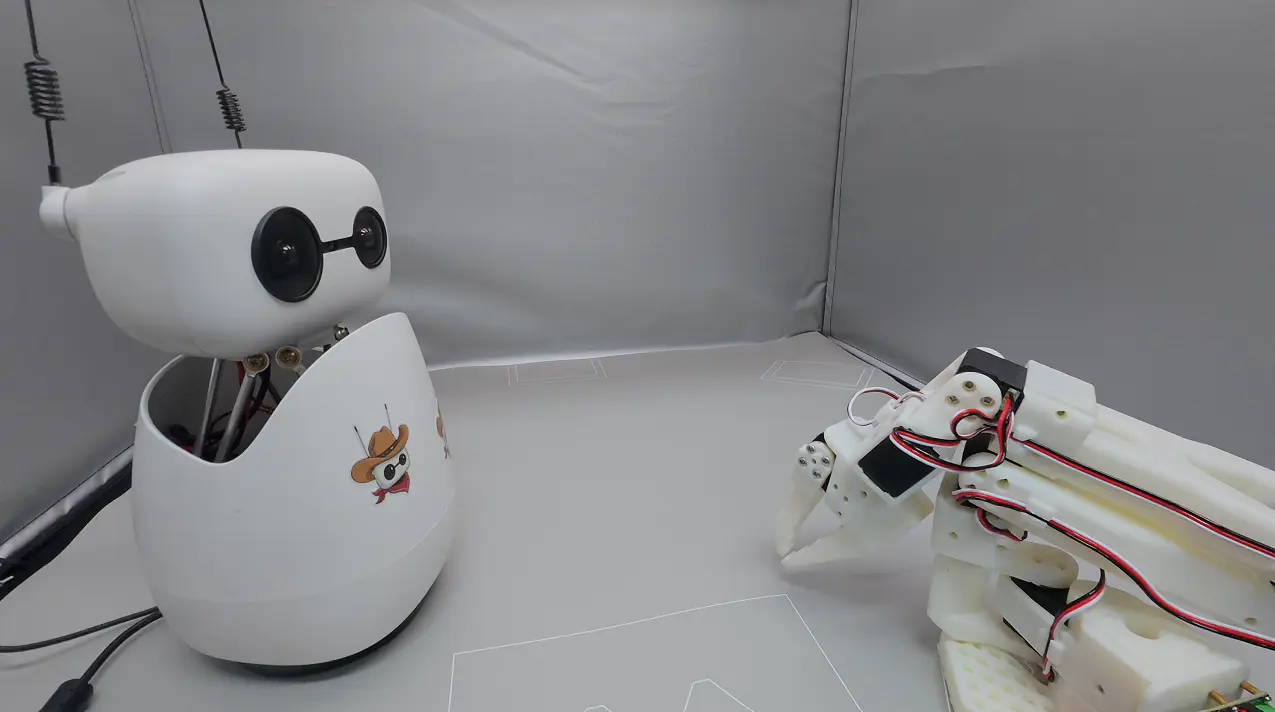
How it works
Voice command
  → gripper_control external tool (LLM function calling)
  → subprocess runs the driver script: soarm_gripper.py open|close
  → lerobot SOFollower → /dev/ttyACM1 drives the SO-ARM gripper
Files added by this fork:
| File | Purpose |
|---|---|
soarm_gripper.py | Gripper driver script (based on lerobot) |
external_content/external_tools/gripper_control.py | External tool exposed to the LLM |
.gitignore | Un-ignores the tool files so they can be committed |
Prerequisites
-
Reachy Mini is connected (
/dev/ttyACM0) and the daemon is running. -
The SO-ARM follower arm is connected. This guide assumes it enumerates as
/dev/ttyACM1— confirm withls /dev/ttyACM*; if it differs, updatePORTinsoarm_gripper.py. -
A
lerobotconda environment with feetech support has been created:conda create -n lerobot python=3.12
conda activate lerobot
pip install lerobot[feetech] -
You have calibrated the arm once with lerobot (this generates a calibration file under
~/.cache/huggingface/lerobot/calibration/robots/so_follower/). The script usesARM_ID = "my_awesome_follower_arm", which must match your calibration file name.
Install reachy_mini_conversation_app
Note: before installing this app, you need to install the Reachy Mini SDK first.
Clone the fork repository:
git clone https://github.com/xiehuangbao888/reachy_mini_conversation_app.git
cd reachy_mini_conversation_app
Using conda
conda create -n reachy_mini python=3.12
conda activate reachy_mini
pip install -e .
(or) Using uv
# macOS (Homebrew)
uv venv --python /opt/homebrew/bin/python3.12 .venv

# Linux / Windows (Python on PATH)
uv venv --python python3.12 .venv

source .venv/bin/activate
uv sync
If you install this app in a conda environment while lerobot lives in another conda environment (see Prerequisites), set LEROBOT_PYTHON in .env to the python path of the lerobot environment (e.g. /home/ubuntu/miniconda3/envs/lerobot/bin/python). Do not mix it with the reachy_mini environment.
Configure gripper voice control
Add the following two lines to .env in the repository root (create the file if it does not exist):
REACHY_MINI_EXTERNAL_TOOLS_DIRECTORY=external_content/external_tools
AUTOLOAD_EXTERNAL_TOOLS=1
If your lerobot python path is different, also set:
LEROBOT_PYTHON=/path/to/lerobot/env/bin/python
Run
You must start the app from the repository root so that .env and the relative tools directory resolve correctly:
cd reachy_mini_conversation_app
reachy-mini-conversation-app
Voice commands
- Open: "open the gripper" / "open the claw" / "release" / "let go"
- Close: "close the gripper" / "close the claw" / "grab it" / "hold this"
Manual testing
Without starting the conversation app, verify that the hardware and calibration work first:
/home/ubuntu/miniconda3/envs/lerobot/bin/python soarm_gripper.py open
/home/ubuntu/miniconda3/envs/lerobot/bin/python soarm_gripper.py close
/home/ubuntu/miniconda3/envs/lerobot/bin/python soarm_gripper.py demo   # open and close twice
Customize: control other parts of the arm
The whole chain only involves two files — modify the one that matches your need:
1. Change the motion itself → soarm_gripper.py (repository root)
This is the script that actually drives the arm. It currently only sends gripper actions:
robot.send_action({"gripper.pos": target})
The available joint keys for the SO-ARM follower are shoulder_pan.pos, shoulder_lift.pos, elbow_flex.pos, wrist_flex.pos, wrist_roll.pos, and gripper.pos (normalized 0–100). To control other parts, add the corresponding joints to the dict passed to send_action(), for example:
robot.send_action({
    "shoulder_pan.pos": 50.0,
    "elbow_flex.pos": 70.0,
    "gripper.pos": OPEN_POS,
})
You can also add your own action branches (e.g. wave, home) in main(), following the open / close / demo pattern.
Common tuning parameters in this file:
OPEN_POS/CLOSE_POS— gripper travel, normalized 0–100 (defaults 60 / 20).PORT— follower arm serial device.ARM_ID— calibration profile name.
2. Let the LLM call the new action → external_content/external_tools/gripper_control.py
This is the external tool exposed to the LLM — it determines which actions the LLM "knows" are available. When adding an action, update these in sync:
description— the tool description, telling the LLM when to call it (which user utterances should trigger it).parameters_schema— add the new action name (e.g."wave") to theenumofaction.__call__()— pass the newactionthrough to the subprocess commandcmd = [LEROBOT_PYTHON, GRIPPER_SCRIPT, action].
If you want to control a completely different device, you can also create a new tool file in that directory (e.g. arm_control.py), likewise inheriting from reachy_mini_conversation_app.tools.core_tools.Tool; with AUTOLOAD_EXTERNAL_TOOLS=1, all valid tool files in the directory are loaded automatically. Note that each tool class must have a unique Tool.name.
Troubleshooting
Backend fails to start: Unknown scheme for proxy URL 'socks://...'
The app uses httpx, which does not accept the socks:// scheme in ALL_PROXY (it only recognizes http(s)://, socks5://, socks5h://). If your shell (e.g. clash) sets ALL_PROXY=socks://..., unset it at startup — keeping HTTPS_PROXY=http://... is enough:
env -u ALL_PROXY -u all_proxy reachy-mini-conversation-app
Or change the proxy variable to socks5://127.0.0.1:port/ (httpx accepts this form; it requires socksio, which is already installed in the environment).