Reachy Mini Home Assistant integration
Want Reachy Mini to control your smart home devices — Mi Home (Xiaomi), Aqara, Midea, Haier, and more (such as refrigerators and air conditioners)? This project explains in detail how to control them with Reachy Mini, no code required. You can even hand this document directly to an AI and let it install and set everything up for you.
For end users: install the official Reachy Mini integration — https://github.com/pollen-robotics/reachy_mini_homeassistant — via HACS (Custom Repository → Integration). Once your robot is on the same LAN, Home Assistant auto-discovers it within ~30 seconds and creates a real device card with sensors and binary sensors grouped underneath. Six automation blueprints ship in the same repo. No YAML, no manual entity wiring.
This page documents the SDK-side surface the integration (and any other monitoring client) consumes:
- the mDNS / zeroconf discovery contract — how HA finds the daemon on the LAN.
- the existing REST endpoints the integration polls to assemble its view of robot state.
The SDK does not ship a dedicated "Home Assistant aggregator" endpoint. HA consumers fan out to the same routes any other client uses (daemon status, app-lock status, audio mixer, DoA). The HA-shaped semantics — awake, active_app_transport, webrtc_active — live entirely in the integration repo.
Discovery surface
The Reachy Mini daemon advertises itself on the LAN over mDNS as _reachy-mini._tcp.local.. Home Assistant's zeroconf component matches the Reachy Mini integration against model=ReachyMini in the TXT record, so the property filter is what makes auto-discovery unambiguous.
| TXT key | Type | Meaning |
|---|---|---|
unit_id | 16-char hex | Stable per-robot identifier — SHA-256 of the audio device serial, truncated. Used by the integration as the unique-id for HA's config entry. |
model | string | "ReachyMini". Used as the manifest filter. |
manufacturer | string | "Pollen Robotics". |
version | string | Daemon package version. |
caps | comma-separated | Capability flags:camera,mic,speaker,motion,apps. |
api | string | "rest+ws". |
robot_name | string | User-configurable display name. |
ws_path | string | /ws/sdk — the SDK WebSocket path. |
address | string | IP address (also resolvable from the A record). |
Verify from any LAN host:
avahi-browse -rt _reachy-mini._tcp        # Linux
dns-sd -Z _reachy-mini._tcp local.        # macOS
dns-sd.exe -B _reachy-mini._tcp           # Windows
Resolve-DnsName reachy-mini.local         # PowerShell
Platform-independent check: in Home Assistant, Settings → Devices & Services shows a "Discovered: Reachy Mini" card as soon as the HACS integration is installed and the robot is on the same LAN. That is the actual end-user verification — the CLI commands above are for debugging when discovery silently fails.
Implementation: src/reachy_mini/utils/discovery.py.
Endpoints consumed by the integration
The integration's coordinator polls these every 30 seconds in parallel (asyncio.gather). Each one fails independently — a partial outage takes only the affected entities offline, not the whole device.
| Endpoint | Fields used by the integration |
|---|---|
GET /api/daemon/status | version → firmware version, hardware_id → unit_id (cross-check vs the mDNS TXT), backend_status.motor_control_mode → awake + raw motor_mode, backend_status.ready → availability gate |
GET /api/daemon/robot-app-lock-status | state + holder_name → active_app, active_app_transport, webrtc_active |
GET /api/state/doa | angle → DoA radians, speech_detected → speech VAD |
GET /api/volume/current | volume → speaker volume |
GET /api/volume/microphone/current | volume → microphone volume |
The integration's coordinator (coordinator.py) does the HA-shaping on top: awake = motor_mode in {"enabled", "gravity_compensation"}, active_app_transport derivation from lock state, etc. The SDK never ships HA-specific fields; consumers compose them.
Not currently exposed
These would be useful in HA but no SDK route exposes them today:
- CPU / memory / uptime — host-process metrics. These work on both Lite and Wireless (they're daemon-process stats, not robot-hardware sensors).
- IMU pitch / roll / temperature — Wireless-only (the BMI088 is only on the CM4 board). On Lite these would be null.
Both could be added later as small additive routes (e.g. /api/daemon/host, /api/state/imu) without breaking anything. The integration would pick them up as additional fan-out targets and expose them as new entities.
No-integration fallback
If you don't want to install the custom integration, the same endpoints are usable directly from Home Assistant's built-in rest: integration — one rest: block per endpoint. The trade-off is that you maintain the YAML yourself and write the Jinja derivations (awake, webrtc_active, …) inline.
rest:
  - resource: http://reachy-mini.local:8000/api/daemon/status
    scan_interval: 30
    sensor:
      - name: "Reachy Mini Motor Mode"
        unique_id: reachy_mini_motor_mode
        value_template: "{{ value_json.backend_status.motor_control_mode }}"
      - name: "Reachy Mini Firmware"
        unique_id: reachy_mini_firmware
        value_template: "{{ value_json.version }}"
    binary_sensor:
      - name: "Reachy Mini Awake"
        unique_id: reachy_mini_awake
        value_template: >-
          {{ value_json.backend_status.motor_control_mode in
             ['enabled', 'gravity_compensation'] }}
        device_class: power

  - resource: http://reachy-mini.local:8000/api/daemon/robot-app-lock-status
    scan_interval: 30
    sensor:
      - name: "Reachy Mini Active App"
        unique_id: reachy_mini_active_app
        value_template: "{{ value_json.holder_name | default('none') }}"
    binary_sensor:
      - name: "Reachy Mini WebRTC Active"
        unique_id: reachy_mini_webrtc_active
        value_template: "{{ value_json.state == 'remote_session' }}"
        device_class: connectivity
Add more rest: blocks for /api/state/doa, /api/volume/current, and /api/volume/microphone/current as needed — see the response schemas at /docs on the live daemon for exact field shapes.
Then call the rest.reload action (Developer Tools → Actions) or restart Home Assistant; entities appear under Settings → Devices & Services → Entities filtered by reachy_mini.
Taking control after installation
Once Home Assistant is installed, follow these steps to take control:
- Open http://localhost:8123.
- The first launch starts the onboarding wizard: create an admin account (name/username/password), select China as the region, and keep clicking next.
- Go to Settings → Devices & Services.
- Within ~30 seconds a "Discovered: Reachy Mini" card should appear → click Add to confirm.
- On the first add, HA automatically downloads the camera's aiortc dependency; this requires internet access, so give it a moment.
- If the discovery card doesn't show up: click Add Integration in the bottom-right corner → search for "Reachy Mini" → enter the address manually (for the Lite version you can use 127.0.0.1).
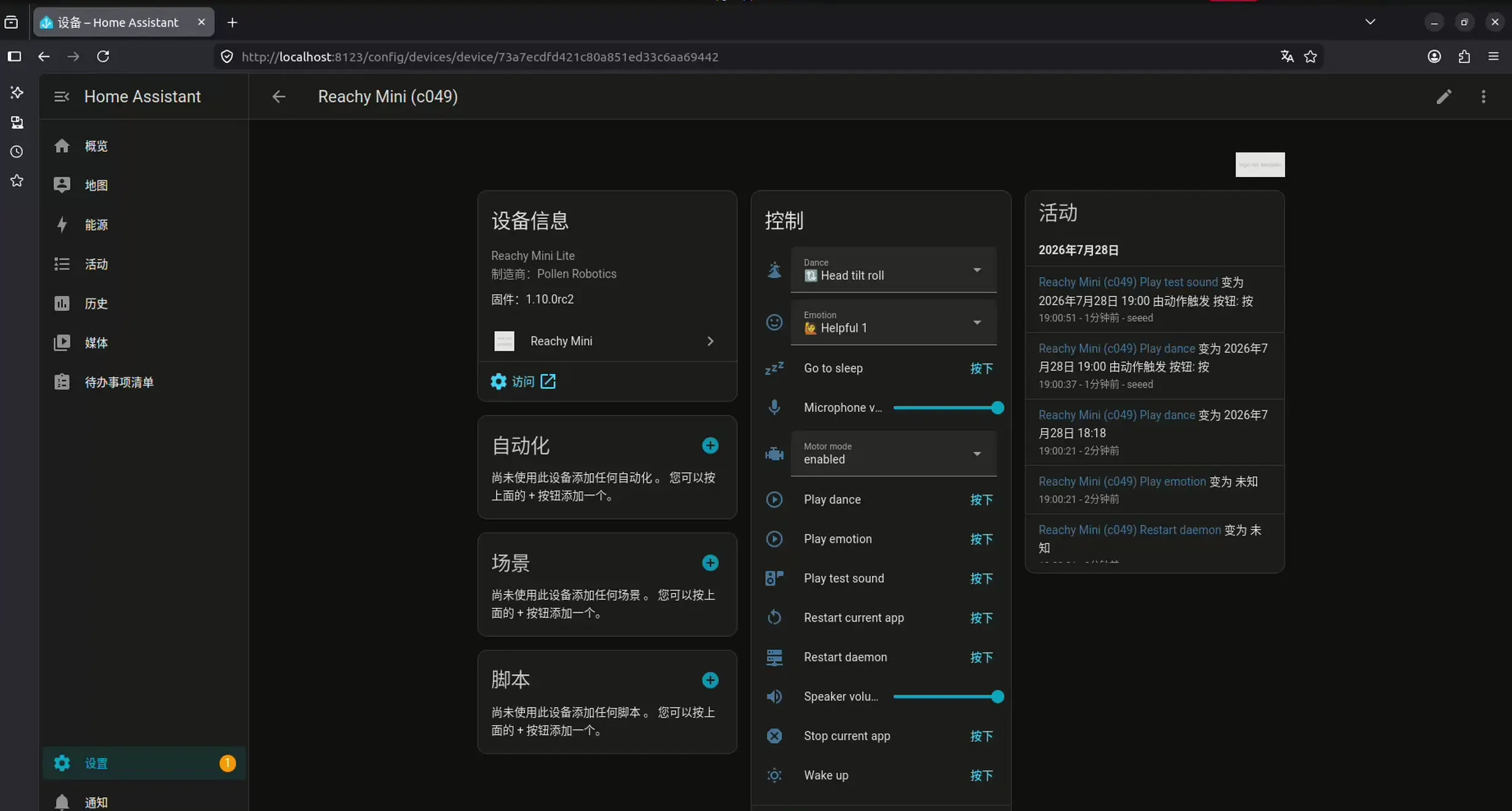
Once added, you'll see a Reachy Mini device with: a live camera feed, wake/sleep buttons, dropdowns with 81 expressions + 34 dances, volume sliders, a motor mode selector (disabled works as a soft e-stop), and sensors such as speech detection.
Design notes
- The SDK exposes only general-purpose endpoints — daemon status, state, volume, app lock. No HA-shaped semantics live in the daemon.
- HA-specific derivations (
awake,active_app_transport,webrtc_active) live entirely in the integration repo's coordinator. Bumping their definitions doesn't touch the SDK. - The integration is intentionally tolerant of missing endpoints — if
/api/state/doareturns 404 (audio disabled), DoA fields just go unavailable while the rest of the device card keeps working. - No auth, LAN-only trust. Same posture as every other
/api/*route on the daemon. Do not expose port 8000 directly to the internet.
For the user-facing install / configuration / automation flow, see the integration repo at https://github.com/pollen-robotics/reachy_mini_homeassistant.