B601-RS with Isaac Sim
Introduction
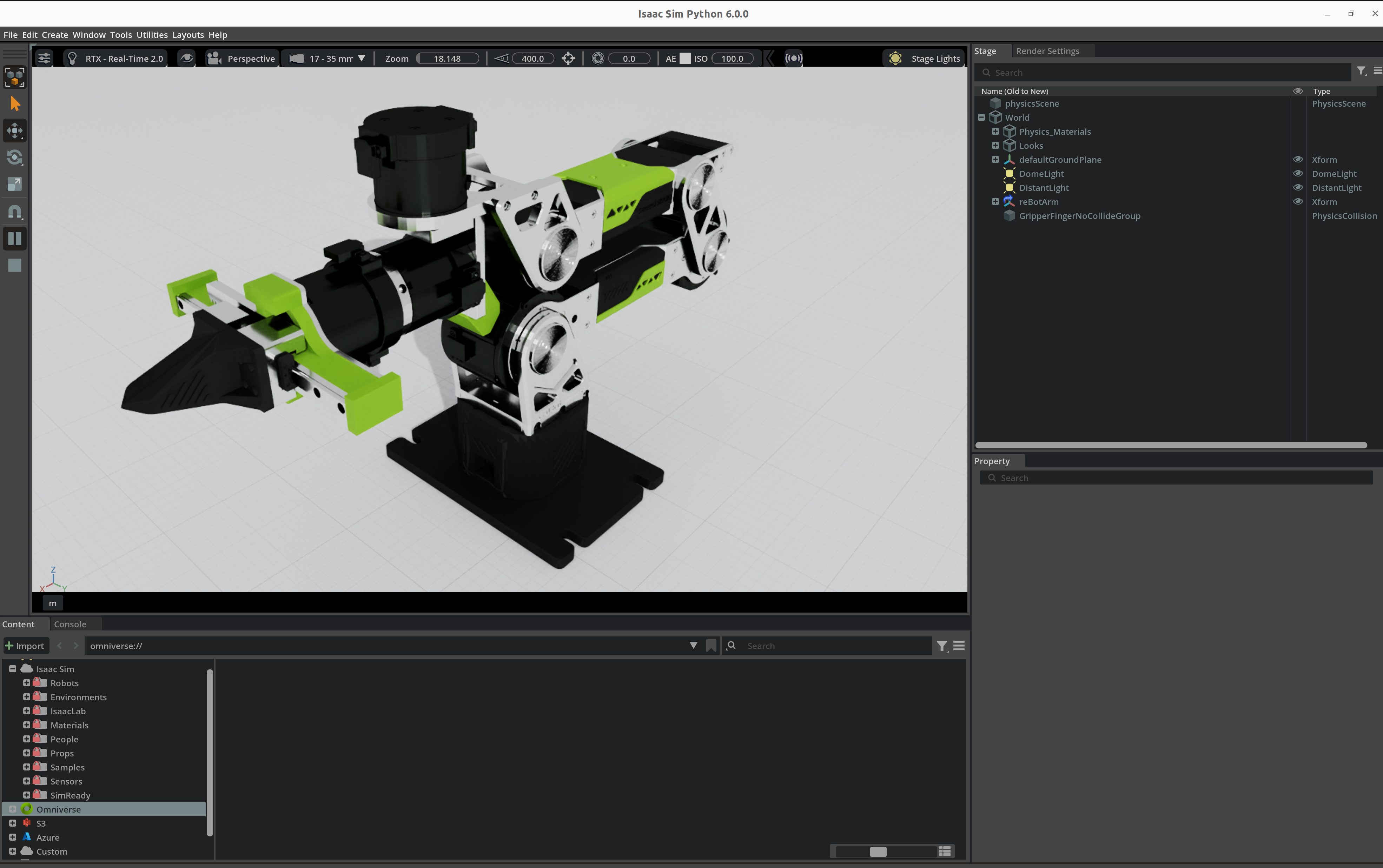
reBot-Isaacsim is an NVIDIA Isaac Sim simulation project designed specifically for the reBotArm. It leverages Isaac Sim's high-fidelity physics engine to accurately replicate the kinematic characteristics and gripper coordination logic of the robot arm in a virtual environment, providing an independent simulation-only environment for control algorithm development, trajectory planning verification, and communication protocol testing.
Environmental requirements
- Operating System: Ubuntu 22.04 LTS / 24.04 LTS (recommended) or Windows 11 (requires WSL2)
- GPU: NVIDIA RTX series graphics card (recommended RTX 3070 or above), VRAM ≥ 8GB
- Driver: NVIDIA official driver ≥ 535.x, supports CUDA 12.x
- Memory: ≥ 32GB RAM (Isaac Sim scenes and physics simulations use a lot of memory)
- Storage: ≥ 100GB SSD available space (for Isaac Sim installation, cache, and USD assets)
The computers used in this wiki are equipped with NVIDIA RTX 4080 GPUs and run the Ubuntu 22.04 LTS operating system.
Install Isaac Sim
Official links and resources:
https://docs.isaacsim.omniverse.nvidia.com/6.0.0/installation/quick-install.html
https://docs.isaacsim.omniverse.nvidia.com/6.0.0/installation/download.html#isaac-sim-latest-release
🔧 Method 1: Precompiled Binary Installation
💡 Suitable for most users, no need to compile, ready to use out of the box.
Download and unzip
Download isaac-sim-standalone-6.0.0-linux-x86_64.zip from the NVIDIA official website.
mkdir -p ~/isaacsim
cd ~/Downloads
unzip isaac-sim-standalone-6.0.0-linux-x86_64.zip -d ~/isaacsim
cd ~/isaacsim
./post_install.sh
Set up environment variables
Add the following to ~/.bashrc or ~/.zshrc:
export ISAACSIM_PATH="${HOME}/isaacsim"
export ISAACSIM_PYTHON_EXE="${ISAACSIM_PATH}/python.sh"
export ISAACSIM_ROOT="${HOME}/isaacsim"
Then run source ~/.bashrc to make it take effect.
Start Verification
${ISAACSIM_PATH}/isaac-sim.sh
The first launch will cache shaders, which may take 5-10 minutes, so please be patient while the GUI appears.
⚙️ Method 2: Build from source (recommended)
💡 Good for developers who need to tweak the underlying code or debug core features.
Install dependencies
sudo apt update
sudo apt install cmake build-essential git python3-pip
Make sure CUDA and cuDNN are properly installed and match your GPU driver.
Cloning and Building
git clone https://github.com/NVIDIA-Omniverse/IsaacSim.git
cd IsaacSim
./build.sh release
The build process might take 30-60 minutes, depending on your hardware.
Run test
_build/linux-x86_64/release/isaac-sim.sh
After a source build, point ISAACSIM_ROOT at that runtime directory so run_isaacsim_receiver.sh can find Isaac Sim:
export ISAACSIM_ROOT="$PWD/_build/linux-x86_64/release"
Download project
This repo pulls the upstream control library reBotArm_control_py as a git submodule. Clone with submodules:
git clone --recurse-submodules https://github.com/Seeed-Projects/reBot-Isaacsim.git
If you already cloned the repo and third_party/reBotArm_control_py is empty:
git submodule update --init --recursive
Install sender dependencies at the repo root (run_sender.sh and uv run both use the root uv workspace):
cd reBot-Isaacsim
uv sync
Switch the hardware config to RS
This repo's Isaac Sim asset is RS (usd/RS-rebot-dev-arm). Upstream rebotarm.yaml defaults to DM. Both RebotArm() and load_robot_model() follow this file, so gravity compensation, joint-reader, IK, and Traj all need RS first; leave it on DM and the motor protocol will not match, and Pinocchio will load the DM URDF. This only dirties the submodule working tree — do not commit it:
cd reBotArm_Isaacsim
python set_hw_rs.py
On success it prints .../config/rebotarm.yaml -> rebotarm_rs.yaml.
Overview of Functional Components
This project provides various senders to meet different use scenarios:
| Component | Description |
|---|---|
gravity_joint_sender | Gravity Compensation + Handle Mode: For modified robot arms (gripper removed, handle attached), hand-guided; compensation comes from upstream GravityCompensation, this repo only mirrors joint angles to Isaac Sim |
isaacsim_ik_sender | Inverse Kinematics (IK) Mode: Input the end-effector pose, use the IK solver to get joint angles, and send them to Isaac Sim |
isaacsim_traj_sender | Trajectory Planning (Traj) Mode: Adds joint-space trajectory planning (MIN_JERK time profile) on top of IK to achieve smooth motion control |
isaacsim_joint_test_sender | Joint Test Mode: Sends preset joint angle trajectories without a real robot to verify if Isaac Sim's receiver and communication are working properly |
joint_reader_sender | Real-to-Sim Mapping Mode: Read-only joint angles and map them to Isaac Sim, ideal for use with other control projects (e.g., synchronize the real robot performing other tasks to Isaac Sim for visualization) |
Directory Structure
reBot-Isaacsim/
├── pyproject.toml                           # uv workspace configuration
├── README.md
├── README_EN.md
├── README_ES.md
├── reBotArm_Isaacsim/                       # Main example directory
│   ├── gravity_joint_sender.py              # Gravity-comp handle mode (upstream GravityCompensation + UDP)
│   ├── isaacsim_ik_sender.py                # Inverse kinematics mode (IK control)
│   ├── isaacsim_traj_sender.py              # Trajectory planning mode (IK + joint-space trajectory)
│   ├── isaacsim_joint_test_sender.py        # Joint test mode (preset trajectory, no hardware needed)
│   ├── joint_reader_sender.py                # Real-to-Sim mapping mode (read-only joints, sync visualization)
│   ├── isaacsim_joint_receiver.py           # Isaac Sim receiver (joint-angle sync)
│   ├── live_sync.py                         # Startup instruction script
│   ├── set_hw_rs.py                         # Point submodule hardware YAML at RS (local; do not commit)
│   ├── run_sender.sh                        # Launch the sender
│   └── run_isaacsim_receiver.sh             # Launch the Isaac Sim receiver
├── .gitmodules
├── third_party/
│   └── reBotArm_control_py/                 # git submodule: upstream control library
└── usd/
    └── RS-rebot-dev-arm/
        └── RS-rebot-dev-arm.usda            # Isaac Sim robot asset
Launch (Dual-Terminal Mode)
Two separate terminals are required. Terminal 1 runs the Isaac Sim receiver, while Terminal 2 runs the appropriate sender depending on the desired functionality.
Terminal 1 — Launch the Isaac Sim Receiver (Shared by All Modes)
cd reBotArm_Isaacsim
./run_isaacsim_receiver.sh
Expected behavior:
- Launch the Isaac Sim GUI
- Load the ground plane and robot arm USD assets
- Listen for UDP packets on
127.0.0.1:5005 - Wait for a sender to connect
Terminal 2 — Launch the Appropriate Sender
Always start the receiver first, then the sender.
Some modes require a physical robot arm. Configure the USB-to-CAN adapter as shown below.
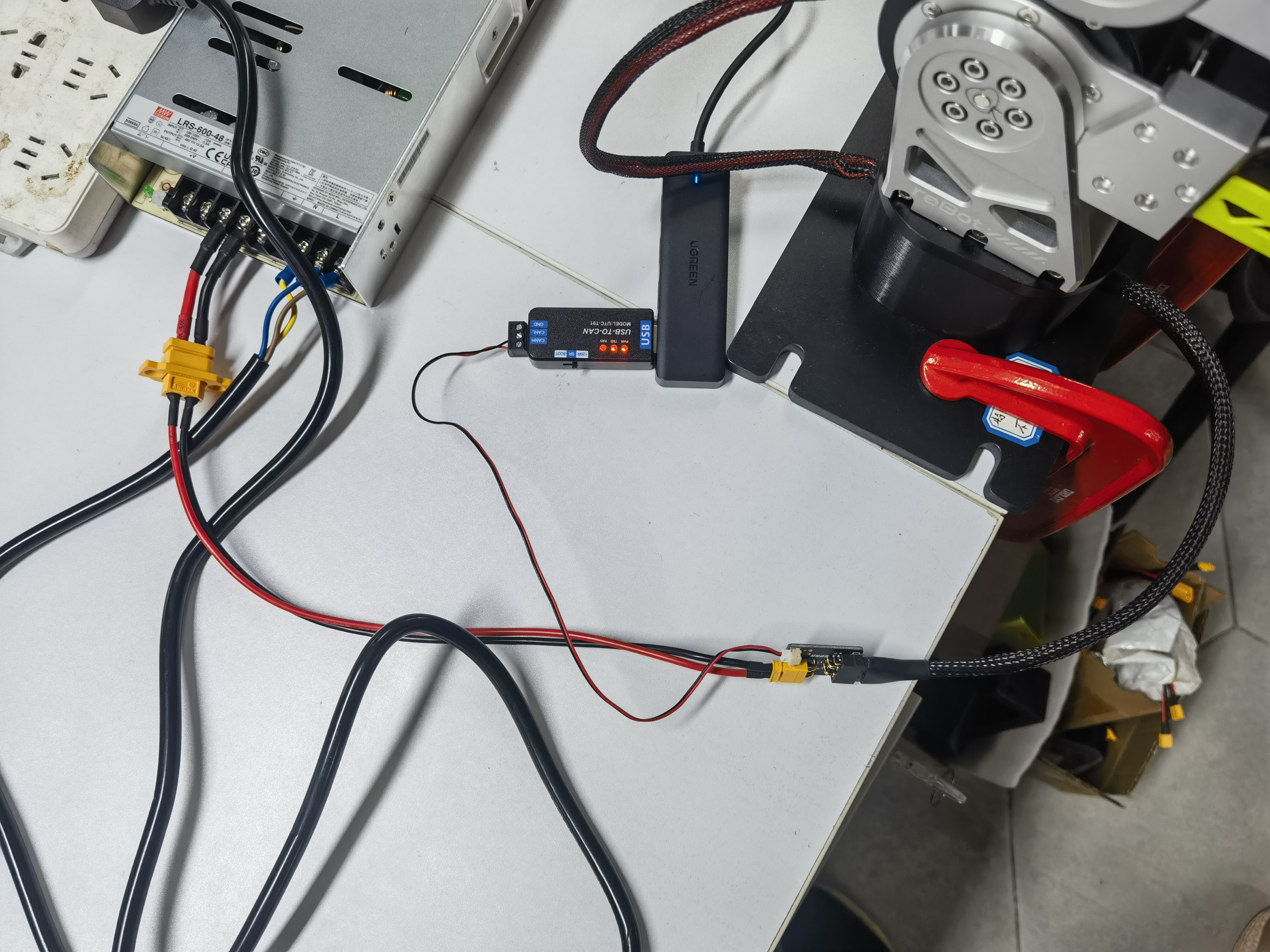
# Check the CAN interface status
ip link show can0

# Bring up the CAN interface with a bitrate of 1000000
sudo ip link set can0 up type can bitrate 1000000 restart-ms 100
① Joint Test Mode (isaacsim_joint_test_sender)
No physical hardware is required. A predefined joint trajectory is continuously sent to verify communication with the Isaac Sim receiver.
cd reBotArm_Isaacsim
uv run python isaacsim_joint_test_sender.py
The sender continuously interpolates between several predefined joint configurations and transmits them to Isaac Sim. It does not read the hardware YAML, so neither set_hw_rs.py nor CAN is required.
② Inverse Kinematics Mode (isaacsim_ik_sender)
Enter an end-effector pose (position/orientation). The IK solver computes the joint configuration and drives the robot arm in Isaac Sim. load_robot_model() reads the submodule rebotarm.yaml, so switch to RS first:
cd reBotArm_Isaacsim
python set_hw_rs.py
uv run python isaacsim_ik_sender.py
Input format (one command per line):
x y z                       # Position (meters), keep current orientation
x y z r p y                 # Position + orientation (meters/degrees)
q j1 j2 j3 j4 j5 j6         # Send joint angles directly (degrees)
gripper <0~1>               # Update gripper only
③ Trajectory Planning Mode (isaacsim_traj_sender)
Adds joint-space trajectory planning (MIN_JERK) on top of IK for smooth robot motion. It also uses load_robot_model() against that YAML, so switch to RS first:
cd reBotArm_Isaacsim
python set_hw_rs.py
uv run python isaacsim_traj_sender.py
Input format (one command per line):
x y z                       # Position (meters)
x y z r p y                 # Position + orientation (meters/degrees)
q j1 j2 j3 j4 j5 j6         # Send joint angles directly (degrees)
gripper <0~1>               # Update gripper only
speed <scale>               # Adjust trajectory duration scaling
resync                      # Re-read the current joint state from Isaac Sim
④ Gravity Compensation Handle Mode (gravity_joint_sender)
Designed for modified robot arms (gripper removed and handle installed). The robot can be manually guided while Isaac Sim follows the motion.
cd reBotArm_Isaacsim
python set_hw_rs.py
./run_sender.sh
Expected behavior:
set_hw_rs.pypoints the submodulerebotarm.yamlatrebotarm_rs.yamlso motors and the gravity model share one YAML (local change; do not commit)- The physical arm connects and starts upstream
GravityCompensation(same MIT +g(q)feed-forward asexample/9) - The arm can be moved freely by hand
- This script only forwards joint angles to Isaac Sim over UDP at 60 Hz
- Do not also run upstream
example/9at the same time; the two processes would contend for CAN
⑤ Real-to-Sim Mapping Mode (joint_reader_sender)
Reads joint angles only and mirrors the physical robot state into Isaac Sim. This mode is intended for visualization while the real robot is controlled by another application. RebotArm() reads the submodule rebotarm.yaml, so switch to RS first:
cd reBotArm_Isaacsim
python set_hw_rs.py
uv run python joint_reader_sender.py
Expected behavior:
set_hw_rs.pyswitches the motor config to RS (local change; do not commit)- Read joint angles only (passive feedback mode), without sending any control commands
- Continuously transmit joint angles via UDP at 60 Hz
- Visualize the physical robot in Isaac Sim while it is controlled by another project
Communication Protocol
UDP JSON over port 127.0.0.1:5005.
Sender Payload (per frame):
{
  "sequence": 123,
  "timestamp": 1718000000.123,
  "joint_positions": [0.0, 0.1, 0.2, -0.1, 0.0, -0.02],
  "gripper_position": 0.05
}
| Field | Type | Description |
|---|---|---|
sequence | int | Incrementing frame sequence number |
timestamp | float | Unix timestamp (seconds) |
joint_positions | float[6] | First six joint positions (rad) |
gripper_position | float | Gripper finger position target (m); each sender computes it with its own mapping (see below) |
Gripper control pipeline:
The receiver applies the received gripper_position directly as the position target of both prismatic finger joints, clipped per finger to [0, upper limit] (USD upper limits: 0.05 m on both fingers; the fingers are driven 1:1 by one motor through a single pinion). There is no extra scaling on the receiver side. The senders map their input to gripper_position as follows:
| Sender | Mapping to gripper_position (m) |
|---|---|
gravity_joint_sender | gripper_q × 0.03 (GRIPPER_POSITION_SCALE = 0.03) |
joint_reader_sender | gripper_q × 0.007 (GRIPPER_POSITION_SCALE = 0.007) |
isaacsim_traj_sender | ratio × 0.045 (gripper <0~1> input, clipped to 0.045 m) |
isaacsim_ik_sender | raw ratio ∈ [0, 1] sent as meters, so any ratio ≥ a finger's upper limit fully opens that finger |
Configuration Parameters
Sender (gravity_joint_sender.py)
| Parameter | Default | Description |
|---|---|---|
| Hardware YAML | set_hw_rs.py → rebotarm_rs.yaml | RebotArm() reads submodule config/rebotarm.yaml; motors and Pinocchio share it |
ARM_JOINT_COUNT | 6 | Number of arm joints |
DEFAULT_PORT | 5005 | UDP port |
DEFAULT_SEND_HZ | 60.0 | Transmission frequency (Hz) |
GRIPPER_POSITION_SCALE | 0.03 | Conversion factor from gripper angle to position |
position_alpha | 0.2 | Low-pass filter coefficient |
Receiver (isaacsim_joint_receiver.py)
| Parameter | Default | Description |
|---|---|---|
ARM_JOINT_COUNT | 6 | Number of arm joints |
DEFAULT_PORT | 5005 | UDP port |
DEFAULT_RENDER_HZ | 120.0 | Simulation rendering frequency (Hz) |
ROBOT_PRIM_PATH | /World/reBotArm | Robot Prim path in Isaac Sim |
ASSET_RELATIVE_PATH | usd/RS-rebot-dev-arm/RS-rebot-dev-arm.usda | Relative path to the USD asset |
Troubleshooting
OSError: [Errno 98] Address already in use
Port 5005 is already occupied. Find and terminate the process using the port:
# Find the process using port 5005
sudo lsof -i :5005

# Terminate the process (replace PID with the actual process ID)
kill <PID>
Isaac Sim Asset Not Found
Verify that the USD asset exists and that REPO_ROOT is configured correctly:
ls usd/RS-rebot-dev-arm/RS-rebot-dev-arm.usda
CAN Bus Not Ready
Make sure the CAN interface is up and configured with the correct bitrate:
can_restart can0

# Verify the bitrate
ip -details link show can0 | grep bitrate
Joint Angles Not Synchronizing
- Verify that both the sender and receiver are using port
5005. - Check that the sender log continuously outputs
[send]. - Check that the receiver log continuously outputs
[recv]. - Try
isaacsim_joint_test_sender.pyto rule out hardware-related issues.
Components and Python Environments
| Component | Python Environment | Launch Script |
|---|---|---|
| Sender (Physical Robot) | reBotArm_control_py uv environment | run_sender.sh |
| Sender (Test Mode) | reBotArm_control_py uv environment | isaacsim_joint_test_sender.py |
| Receiver | Isaac Sim official Python (python.sh) | run_isaacsim_receiver.sh |
Tech Support & Product Discussion
Thank you for choosing our products! We are here to provide you with different support to ensure that your experience with our products is as smooth as possible. We offer several communication channels to cater to different preferences and needs.