reBot Arm B601-RS Pinocchio & MeshCat
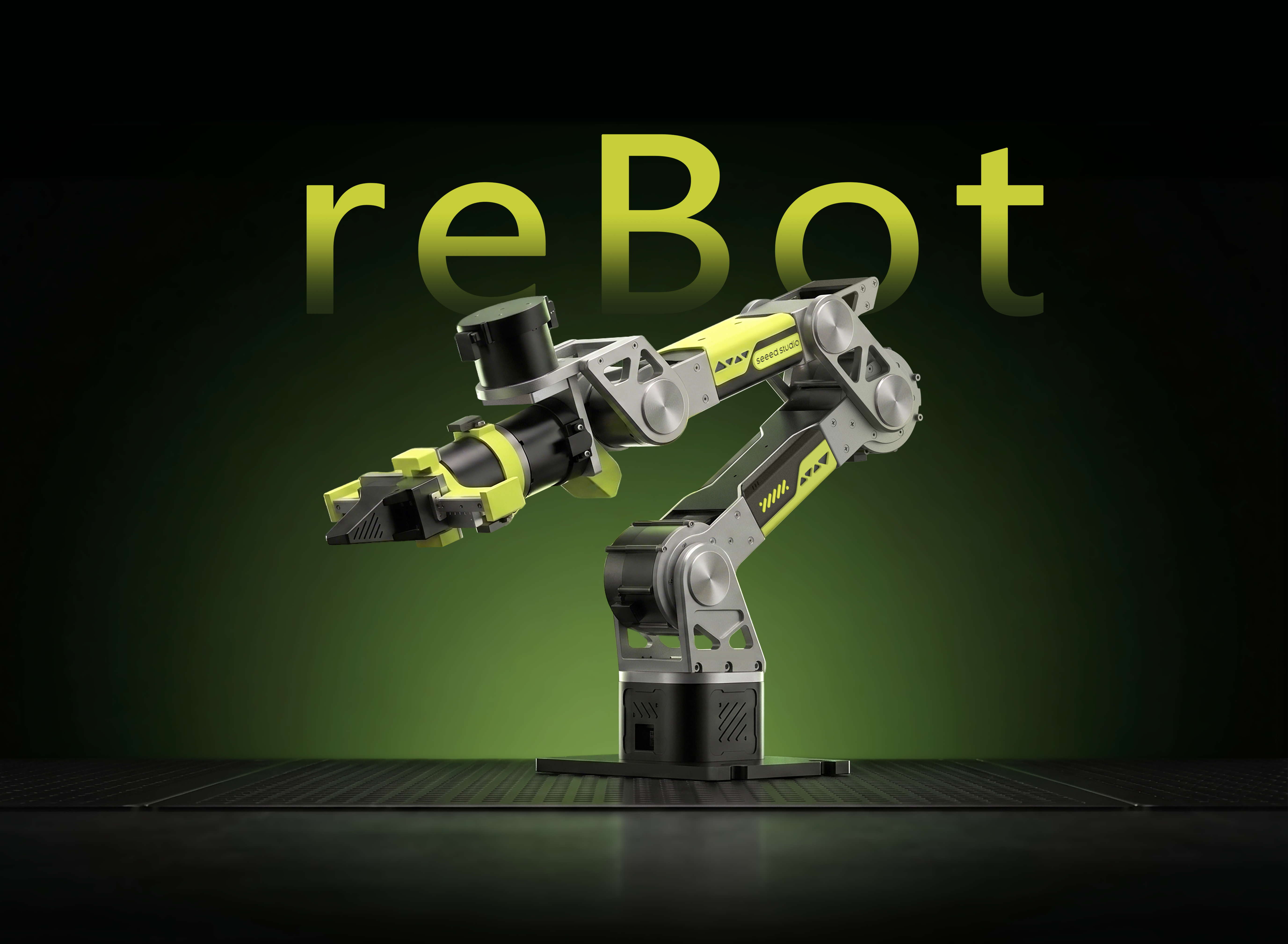




6-DOF Robotic Arm · Multi-Motor Support · Kinematics Solver · Trajectory Planning · Fully Open Source
Pinocchio is an open-source library for robot dynamics analysis and optimization. It provides efficient forward/inverse kinematics, dynamics computation, and trajectory planning.
MeshCat is a web-based 3D visualization tool that can display robot states and motion trajectories in real time.
This project combines Pinocchio's powerful computation capabilities with MeshCat's intuitive visualization, providing a complete set of kinematics analysis and debugging tools for reBot Arm B601-RS.
Project Features
-
Complete Kinematics Analysis Supports forward kinematics (FK) and inverse kinematics (IK) calculations, enabling real-time solving of the robotic arm's end-effector pose.
-
Real-time 3D Visualization Displays the robotic arm's state and motion trajectories in the browser through MeshCat in real time, without additional software.
-
Trajectory Planning and Tracking Implements SE(3) geodesic trajectory planning, supporting CLIK (Closed-Loop Inverse Kinematics) tracking control.
-
Gravity Compensation Control Calculates joint gravity torques based on the Pinocchio dynamics model, achieving a "floating" effect for the robotic arm. Supports both basic and end-effector velocity lock versions.
-
Multi-Mode Motor Control Supports MIT, POS_VEL, and VEL control modes, compatible with both Damiao and Robostride motor protocols.
-
Open Source & Extensible All code is open source, allowing users to customize control algorithms and visualization effects according to their needs.
Specifications
The hardware for this tutorial is provided by Seeed Studio
| Parameter | Specification |
|---|---|
| Robot Arm Model | reBot Arm B601-RS Assembled Kit with Gripper |
| Degrees of Freedom | 6+1 (with gripper) |
| Reach | 754.7 mm (with gripper) / 587.5 mm (without gripper) |
| Load Capacity | Rated load 2.5 kg / Max load 5 kg |
| Joint Range of Motion | J1: ±150° / J2: 220° ~ 0° / J3: 220° ~ 0° / J4: ±90° / J5: ±90° / J6: ±180° / Gripper: 345° ~ 0° |
| Repeatability | 0.1 mm |
| Self Weight | 6.7 kg |
| Servo Motors | RobStride 06 × 3 / RobStride 00 × 4 |
| Communication | CAN Bus @ 1 Mbps |
| Operating Voltage | DC 48V |
| Power Supply | DC 48V 15A |
| Operating Temperature | -20°C ~ 50°C |
| Control Method | PC |
Supported Software Platforms
| Platform | Support Status |
|---|---|
| ROS1 | ✅ |
| MoveIt1 | ✅ |
| ROS2 | ✅ |
| MoveIt2 | ✅ |
| Python | ✅ |
| LeRobot | ✅ |
| Isaac Sim | ✅ |
| Pinocchio | ✅ |
Joint Motor Parameters
| Parameter | RobStride 00 | RobStride 06 |
|---|---|---|
| Rated Voltage | 48V | 48V |
| Rated Current | 4.7 Apk ± 10% | 14.3 Apk ± 10% |
| Peak Current | 15.5 Apk ± 10% | 57 Apk ± 10% |
| Rated Torque | 5 N.m | 11 N.m |
| Peak Torque | 14 N.m | 36 N.m |
| Rated Speed | 100 rpm ± 10% | 100 rpm ± 10% |
| No-Load Max Speed | 315 rpm ± 10% | 480 rpm ± 10% |
| Reduction Ratio | 10 : 1 | 9 : 1 |
| Pole Pairs | 28 | — |
| Motor Inductance | 750 ± 20 μH | 0.165 mH ± 10% |
| Line Resistance | 1.5 ± 10% Ω | 0.23 ± 10% Ω |
| Outer Diameter | 57 mm | 82 mm |
| Height | 51 ± 1 mm | 49 ± 0.5 mm |
| Motor Weight | 310 g ± 3 g | 621 g |
| Encoder Resolution | 14 bit (single-turn absolute) | |
| Encoder Count | 2 | |
| Encoder Type | Magnetic encoder (single-turn) | |
| Control Interface | CAN @ 1 Mbps | |
| Debug Interface | UART @ 921600 bps | |
| Control Modes | MIT Mode / Speed Mode / Position Mode / Torque Mode | |
| Protection | Over-temperature protection: motor thermistor temperature exceeds 145°C Under-voltage protection: motor voltage below protection voltage 12V |
Bill of Materials (BOM)
| Component | Quantity | Included |
|---|---|---|
| reBot Arm B601-RS Robotic Arm | 1 | ✅ |
| CANABLE | 1 | ✅ |
| Power Adapter (DC 48V 15A) | 1 | ✅ |
| USB-C Cable | 1 | ✅ |
| Gripper | 1 | ✅ |
Environment Requirements
Before proceeding with this tutorial, you must finish the reBot Arm B601-RS Quick Start document end-to-end, including:
- Hardware unboxing, wiring, and power-on checklist
- CAN channel bring-up (
can0@ 1 Mbps) and device permission (sudo chmod 666 /dev/can0) - Zero calibration of all joints (
2_zero_and_read.py) and verifying the arm can be commanded in MIT / POS_VEL mode
This tutorial assumes the arm is already responsive on the CAN bus, joints are zeroed, and the operator is familiar with the safety limits (stay within 70% of the arm's reach workspace). Skipping the Quick Start can lead to mis-configured motors, stalled joints, or arm drops.
| Item | Requirement |
|---|---|
| Python | 3.10+ |
| Operating System | Ubuntu (Ubuntu 24.04 LTS recommended) |
| Communication Interface | CAN interface (can0) |
| Power Supply | DC 48V 15A |
While the robotic arm is running examples, it must operate within 70% of the arm's reach workspace. Staying outside the workspace for an extended period will cause the second joint motor to enter stall protection, resulting in the arm dropping.
Installation Steps
Install uv (if not installed)
Step 1
curl -LsSf https://astral.sh/uv/install.sh | sh
After installation, run the following command to verify that uv is available:
uv --version
If the installation succeeded, you should see output similar to the following (the version and platform may differ):
uv 0.11.31 (x86_64-unknown-linux-gnu)
Sync the Environment (Install All Dependencies)
Step 2
git clone https://github.com/Seeed-Projects/reBotArm_control_py.git
cd reBotArm_control_py
uv sync
uv sync will automatically create a virtual environment (if it doesn't exist) and install all dependencies based on pyproject.toml and uv.lock.
Switch to the RS Hardware Configuration
Step 3
This Wiki is for reBot Arm B601-RS. Before running any examples, please switch the hardware configuration in config/rebotarm.yaml from the DM version to the RS version:
# Before modification
hardware_yaml: "rebotarm_dm.yaml"

# After modification
hardware_yaml: "rebotarm_rs.yaml"
If this configuration is not modified, the program will communicate using the Damiao motor protocol, causing the RS motors to fail to be recognized or run properly.
Set Up the CAN Channel
Step 4
Before running real-machine control examples and debugging motors, you need to set up the CAN channel (for PCAN-USB, you need to configure this again after re-plugging):
# PCAN-USB should usually appear directly as can0 or can1
sudo modprobe peak_usb
ip -br link

# If can0 appears, set the bitrate
sudo ip link set can0 down 2>/dev/null
sudo ip link set can0 type can bitrate 1000000
sudo ip link set can0 up    # Bring up can0
Debugging Tools (use only when an exception occurs)
Single Motor Console — Robostride RS06 (0x01rs06_test.py)
Directly use the motorbridge SDK for Robostride RS06 single motor testing. RS06 motors communicate via CAN bus.
Run Command:
uv run python example/0x01rs06_test.py
Interactive Commands:
| Command | Description |
|---|---|
enable / disable | Enable/Disable |
set_zero | Set software zero position |
state | View current state |
ping | Ping motor to get response |
clear_error | Clear motor errors |
mode <mit/posvel/vel> | Switch control mode |
mit <pos> [vel] [kp] [kd] | MIT mode command |
posvel <pos> [vlim] | POS_VEL mode command |
vel <velocity> | Pure velocity mode command |
read_param <id> [type] | Read motor parameters |
write_param <id> <value> [type] | Write motor parameters |
loop | Enter loop control mode |
q / quit | Quit |
Note: Robostride motors use the CAN interface (default can0), with host/feedback ID defaulting to 0xFD. During motor testing, the motor needs to be disabled first and then re-enabled to allow normal reading and control.
Zero Calibration and Angle Monitoring (2_zero_and_read.py)
Automatically set all joint zero positions and display joint angles in real time.
Run Command:
uv run python example/2_zero_and_read.py

# Example output
-0.12  +0.23  -6.42  +41.74  -0.45  -0.01  -0.01
Tuning MIT / POS_VEL Controller Parameters
This section explains how to modify the controller parameters for each joint of the arm under MIT mode and POS_VEL mode, and how to make the changes take effect.
Suitable parameters can only be obtained through on-hardware tuning. This section only covers: where the parameters live, what each field controls, and how to make the changes effective and verify them. For specific tuning strategies (e.g., trial-and-error, Ziegler‑Nichols), please refer to general motor control references.
Configuration File Location
| Hardware version | Motor config file | Switch entry |
|---|---|---|
| reBot Arm B601-RS (this document) | config/rebotarm_rs.yaml | Set hardware_yaml: "rebotarm_rs.yaml" in config/rebotarm.yaml |
| reBot Arm B601-DM | config/rebotarm_dm.yaml | Set hardware_yaml: "rebotarm_dm.yaml" in config/rebotarm.yaml |
rebotarm.yaml directlyThat file only contains a single line hardware_yaml: ...; all motor parameters live in rebotarm_rs.yaml / rebotarm_dm.yaml.
Configuration File Structure
Each joint has its own entry, grouped by control mode:
joints:
  - name: joint1
    motor_id: 0x01
    feedback_id: 0xFD
    model: "rs-06"
    vendor: "robstride"
    MIT:
      kp: 50.0
      kd: 3.0
    POS_VEL:
      vel_kp: 12.0
      vel_ki: 0.1
      pos_kp: 13.0
      vlim: 10.0
  # ... joint2 ~ joint6 follow the same structure ...
How to locate:
- By joint name: to modify a joint, find the
- name: jointXblock; - By mode: under that joint,
MIT:holds MIT mode parameters,POS_VEL:holds POS_VEL mode parameters; - Current mode determines which set is sent: the script switches modes via
mode mit/mode posvel; the motor actually receives the parameters under the corresponding sub-block.
MIT Mode Field Meanings
| Field | Role |
|---|---|
kp | Position-loop proportional gain: the "stiffness" of tracking the target position. |
kd | Velocity-loop damping gain: suppresses oscillations caused by position error. |
POS_VEL Mode Field Meanings
| Field | Role |
|---|---|
vel_kp | Velocity-loop proportional gain. |
vel_ki | Velocity-loop integral gain. |
pos_kp | Position-loop proportional gain (works with vlim for position‑velocity hybrid control). |
vlim | Speed limit, caps the maximum motion speed. |
Damiao (DM) and Robostride (RS) motors use different protocol-layer units, so the same field name has no cross-vendor comparability. Modifying RS's vel_kp and modifying DM's vel_kp mean different things. Please interpret each YAML according to its own field order, do not compare values across config files.
Large kp / kd changes across several joints can cause immediate oscillation, overcurrent, or hard-stop collisions if any joint direction or sign is wrong. Before tuning, clear the arm's workspace and plan to test one joint and one mode at a time, in small steps.
Editing Procedure
-
Stop any running script. The motor is enabled when you edit YAML, changes do not take effect immediately, and inconsistent behavior is easy to trigger.
-
Edit the corresponding YAML file:
# Example for RS
vim config/rebotarm_rs.yaml- Only change the joint you need to tune (e.g.,
joint1); leave unrelated joints alone; - Within one joint, only change the mode you need to tune (MIT or POS_VEL); do not modify the other mode's fields without reason.
- Only change the joint you need to tune (e.g.,
-
Preserve YAML indentation: 2 spaces per level, keys separated from values by
:. Wrong indentation causesyaml.safe_loadparsing to fail, and all parameters will fall back to defaults. -
Restart the script after saving. The YAML is read once at script startup; runtime edits do not take effect immediately.
-
Single-joint verification: use a script like demo3 (MIT) / demo4 (POS_VEL) to verify the change with a small single-joint motion before doing a full-arm test.
Verifying the Change Took Effect
-
Runtime observation: enable the motor in demo3 / demo4 and check
state; if parameters look unchanged or the motor behaves exactly as before, the YAML was edited incorrectly or got overridden by defaults. -
YAML self-check: parse it directly with Python and print one joint's fields to confirm the values match what you just wrote:
uv run python -c "import yaml; print(yaml.safe_load(open('config/rebotarm_rs.yaml'))['joints'][0])" -
Quick rollback:
git checkout config/rebotarm_rs.yamlrestores the repository defaults.
Basic Control Tests
MIT Mode Full Joint Control
Demo 3 · 3_mit_control.py
All joints use MIT mode uniformly, sending control commands synchronously every cycle.
Input: All joint angles (degrees), space-separated. If gripper is configured, an additional gripper angle is required.
This example sends target joint angles directly to the motors, with no path or velocity planning. A large target change can cause sudden high-speed motion and trigger overcurrent protection.
- This example is not required to complete the tutorial. If your goal is safe, smooth arm motion, skip this example and go directly to Smooth Trajectory IK Control (
8_arm_traj_control.py); - Run it only when you need to verify low-level MIT joint control. Start by moving one joint by only 5–10 degrees, then increase the change gradually after confirming the response and direction;
- Clear the arm's workspace before running and make sure you can cut power immediately.
Show Run Instructions (Optional)
Run Command:
uv run python example/3_mit_control.py
> 30 0 0 0 0 0 # Control motor 1 to rotate 30 degrees
> state
  pos (deg): ['+29.99', '+0.00', '-45.00', '+0.00', '+0.00', '+0.00']
> q # Exit system
POS_VEL Mode Full Joint Control (Optional)
Demo 4 · 4_pos_vel_control.py
This example updates each joint's position target directly and does not include complete trajectory planning. On the reBot Arm B601-RS, POS_VEL (Position‑Velocity) mode also requires separate parameter tuning for good results; its default parameters are generally less smooth than a properly tuned MIT mode.
This example is not required to complete the tutorial. Unless you specifically need to debug POS_VEL mode, skip this example and go directly to Smooth Trajectory IK Control (8_arm_traj_control.py). If you do run it, use only small target changes and keep people and equipment outside the arm's workspace.
Enter target angles for all joints to control the motors in POS_VEL (Position-Velocity) hybrid mode. When tuned correctly, this mode can limit the speed used to reach a target angle; the example itself does not provide complete smooth trajectory planning. Run Command:Show Run Instructions (Optional)
uv run python example/4_pos_vel_control.py
> 30 0 0 0 0 0 # Control motor 1 to rotate 30 degrees
> state
  pos (deg): ['+29.99', '+0.00', '-45.00', '+0.00', '+0.00', '+0.00']
> q # Exit system
Kinematics Tests
Forward Kinematics Test
Demo 5 · 5_fk_test.py
Calculate the end-effector pose based on joint angles.
Input: 6 joint angles (degrees)
Output:
- End-effector position (X, Y, Z) — unit: meters
- Rotation matrix (3×3)
- Euler angles (roll/pitch/yaw) — unit: degrees
Example:
uv run python example/5_fk_test.py
> 0 0 0 0 0 0
> 45 -30 15 -60 90 180
Inverse Kinematics Test
Demo 6 · 6_ik_test.py
Solve joint angles based on the desired end-effector pose.
Input Format:
- Position only:
<x> <y> <z>(meters) - Position + Orientation:
<x> <y> <z> <roll> <pitch> <yaw>(degrees)
Example:
uv run python example/6_ik_test.py
> 0.25 0.0 0.15              # Position only
> 0.25 0.0 0.15 0 0 0        # Position + orientation
Inverse Kinematics Control in MIT Mode (Optional)
Demo 7 · 7_arm_ik_control.py
Use inverse kinematics (IK) in MIT mode to specify the 3D coordinates (X, Y, Z) and orientation (Euler angles) where the robotic arm end-effector should move.
Input Format:
- Position only:
<x> <y> <z>(meters) - Position + Orientation:
<x> <y> <z> <roll> <pitch> <yaw>(degrees) - Input
state: View current actual radian values of each joint. - Input
end_state: View current end-effector actual coordinates (m) and Euler angles (rad) in space.
This example sends the IK solution directly as the joint target, with no path or velocity planning. A large target-pose change can cause sudden high-speed motion and trigger overcurrent protection.
- This example is not required to complete the tutorial. In most cases, skip this example and use the next section, Smooth Trajectory IK Control (
8_arm_traj_control.py), which includes minimum-jerk acceleration/deceleration planning; - Run it only when you need to compare or debug IK control without trajectory planning. Keep the first target within 5–10 cm of the current end-effector position;
- Before running, confirm the target pose is reachable, clear the workspace of people and obstacles, and make sure you can cut power immediately.
Show Run Instructions (Optional)
Run Command:
uv run python example/7_arm_ik_control.py

#Usage A
> 0.3 0.0 0.4 # Position only (orientation defaults to 0), move the arm end-effector to 0.3 meters forward and 0.4 meters above.

#Usage B
> 0.3 0.0 0.4 0.0 0.0 0.5 # Control both position and orientation: move to the specified position while rotating the wrist yaw angle by 0.5 radians.

> ctrl + c # Exit system
Inverse Kinematics Control with Smooth Trajectory (Recommended)
Demo 8 · 8_arm_traj_control.py
Use inverse kinematics (IK) in MIT mode to automatically plan a uniform or smooth acceleration/deceleration motion trajectory within the target time, avoiding severe joint vibration.
Input Format:
- Position only:
<x> <y> <z>(meters) - Position + Orientation:
<x> <y> <z> <roll> <pitch> <yaw>(degrees) - Position + Orientation + Time (default 2.0):
<x> <y> <z> <roll> <pitch> <yaw> <time>(degrees) - Input
state: View current actual radian values of each joint. - Input
end_state: View current end-effector actual coordinates (m) and Euler angles (rad) in space.
Run Command:
uv run python example/8_arm_traj_control.py

#Usage A
> 0.3 0.0 0.4 # Position only, orientation defaults to 0, default movement time is 2.0 seconds

#Usage B
> 0.3 0.0 0.4 0.0 0.0 0.5 # Control both position and orientation: move to the specified position while rotating the wrist yaw angle by 0.5 radians, default movement time is 2.0 seconds

#Usage C
> 0.3 0.0 0.4 0.0 0.0 0.0 5.0 # Move the arm to the specific position and specify 5.0 seconds to slowly move there. (Note: If entering time, the preceding orientation parameters 0 0 0 cannot be omitted)

> ctrl + c # Exit system
If you notice that the read end-effector pose differs from the commanded target pose, and the pose itself is reachable (not outside workspace, not at a singularity), the problem is likely in your MIT / POS_VEL controller parameters. In that case, please refer to the earlier Tuning MIT / POS_VEL Controller Parameters section and manually tune kp / kd etc. using the "single joint, mode by mode, small steps" approach; once tuned, return to this example to verify.
Gravity Compensation Tests
Gravity Compensation Control — Basic Version
Demo 9 · 9_gravity_compensation.py
Use the Pinocchio dynamics model to compensate for joint gravity.
Control Law:
tau = g(q)          — Gravity feedforward
pos = current motor position   — Joint position follows current position
kp = 2,  kd = 1     — Unified stiffness/damping for all joints
Expected Behavior:
- The robotic arm can "float" at any pose
- Will not fall due to self-weight after release
- Can be manually moved to any position
When you stop the script normally with Ctrl+C, it first stops gravity-compensation control and holds the current pose with stiff gains and gravity feedforward. It then returns the arm to zero through a minimum-jerk trajectory; only after homing completes does it disconnect and disable the motors.
Automatic homing depends on normal program execution, communication, and power. Keep people and obstacles outside the arm's workspace and be ready to support the arm during homing. A communication failure, unexpected power loss, or forced termination may prevent the protection sequence from completing; cut power immediately if abnormal motion occurs.
Run Command:
uv run python example/9_gravity_compensation.py
Output:
- Display desired torque for each joint in real time (N·m)
- Press
Ctrl+Cto stop and disconnect
If some joints are under-compensated or over-compensated due to structural friction or assembly differences, you can apply additional scaling to the corresponding element of the tau_g array in the code:
tau_g[x] *= y  # x is the joint motor id, y is the compensation factor, usually starting from 1
# This compensation is generally only used for joints 2 and 3
For example, tau_g[2] *= 1.2 means increasing the gravity compensation torque of joint 2 by 20%. It is recommended to adjust item by item based on the actual floating effect to avoid making excessively large changes at once.
Gravity Compensation Control — End-Effector Velocity Lock Version
Demo 10 · 10_gravity_compensation_lock.py
Based on the basic gravity compensation, adds end-effector velocity detection and joint angle locking mechanism.
Control Law:
tau = g(q) + integral_term    — Gravity feedforward + integral term
pos = q_target                 — Target joint angle (locked or updated)
kp = 8.0,  kd = 1.0           — Enhanced stiffness/damping
Lock Logic:
- When end linear velocity
||v_ee|| < 0.04 m/sand angular velocity||w_ee|| < 0.08 rad/s:- Target joint angle
q_targetremains locked - Robotic arm locks in current position
- Target joint angle
- When end velocity exceeds threshold:
q_targetupdates to current joint angle- Allows manual pushing to change position
Expected Behavior:
- Robotic arm locks in current position, requiring force to change target angle
- More stable than basic version, suitable for scenarios requiring pose maintenance
When you stop the script normally with Ctrl+C, it first stops gravity-compensation control and holds the current pose with stiff gains and gravity feedforward. It then returns the arm to zero through a minimum-jerk trajectory; only after homing completes does it disconnect and disable the motors.
Automatic homing depends on normal program execution, communication, and power. Keep people and obstacles outside the arm's workspace and be ready to support the arm during homing. A communication failure, unexpected power loss, or forced termination may prevent the protection sequence from completing; cut power immediately if abnormal motion occurs.
Run Command:
uv run python example/10_gravity_compensation_lock.py
Output:
- Display lock status in real time (LOCKED / UPDATE)
- End linear velocity, angular velocity
- Gravity compensation torque for each joint (N·m)
- Press
Ctrl+Cto stop and disconnect
If some joints are under-compensated or over-compensated due to structural friction or assembly differences, you can apply additional scaling to the corresponding element of the tau_g array in the code:
tau_g[x] *= y  # x is the joint motor id, y is the compensation factor, usually starting from 1
# This compensation is generally only used for joints 2 and 3
For example, tau_g[2] *= 1.2 means increasing the gravity compensation torque of joint 2 by 20%. It is recommended to adjust item by item based on the actual floating effect to avoid making excessively large changes at once.
Safety Test Configuration:
You can modify the ENABLED_JOINTS list at the top of the script to enable only specified joints for safety testing:
ENABLED_JOINTS = ["joint1"] # Enable only joint1
Simulation Environment
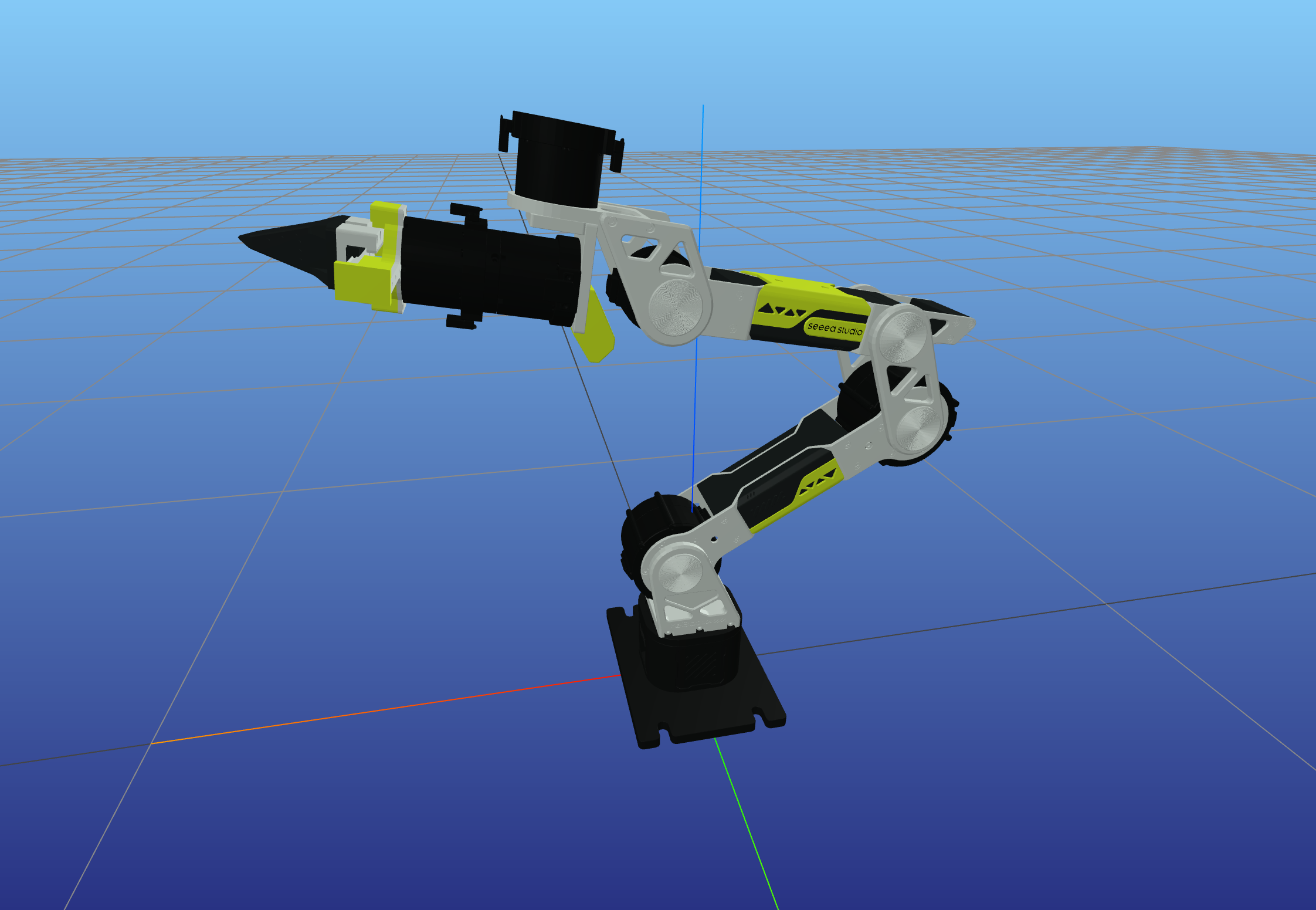
After starting a simulation, the terminal prints the actual access URL. The default is http://127.0.0.1:7000/static/; if the port is occupied, MeshCat automatically tries the next port, so use the URL printed in the terminal.
Forward Kinematics Simulation
Simulation Demo 1 · sim/fk_sim.py
Interactive forward kinematics simulation, visualizing the robotic arm's pose in MeshCat by inputting joint angles.
Run Command:
uv run python example/sim/fk_sim.py
Interactive Commands:
- Input 6 joint angles (degrees), space-separated
- Example:
0 0 0 0 0 0 - Example:
45 -30 15 -60 90 -180 q/quit/exit: Exit
Features:
- Display end-effector position and orientation in real time
- Support continuous input to test different poses
- Output formatted pose information
Inverse Kinematics Simulation
Simulation Demo 2 · sim/ik_sim.py
Interactive inverse kinematics simulation, automatically solving joint angles and visualizing for a target pose.
Run Command:
uv run python example/sim/ik_sim.py
Input Format:
- Position only:
x y z(meters) - Position + Orientation:
x y z roll pitch yaw(radians)
Example:
> 0.25 0.0 0.25              # Position only
> 0.29545 0.0 0.28664 0 0.17453 0  # Position + orientation
Features:
- Automatically determine whether IK converges
- Display iteration count and error
- Update robot pose in real time
Trajectory Planning Simulation
Simulation Demo 3 · sim/traj_sim.py
SE(3) geodesic trajectory planning simulation, including CLIK tracking and MeshCat animation playback.
Run Command:
uv run python example/sim/traj_sim.py
Interactive Commands:
- Input:
x y z [roll pitch yaw](meters/radians) - Press Enter directly to use default configuration
q: Quit
Features:
- Plan from current position to target pose
- Use minimum jerk trajectory profile
- Display trajectory statistics in real time
- Playback full trajectory animation in MeshCat
- Display reference path (gray) and actual path (green)
Visualization Tool
Simulation Demo 4 · sim/visualizer.py
MeshCat visualizer wrapper, providing a unified robot display interface.
Main Functions:
- Load URDF model and display robot
- Draw 3D polyline paths (reference/actual)
- Display IK target pose (three-color axes + sphere)
- Support joint trajectory animation playback
Usage Example:
from example.sim.visualizer import Visualizer
viz = Visualizer()
viz.update(q)  # Update robot pose
viz.draw_path(points, "path_name", color)  # Draw path
FAQ
-
Encounter
Permission deniederror Make sure to runsudo chmod 666 /dev/ttyACM0(Damiao) orsudo chmod 666 /dev/can0(Robostride) to set device permissions. -
IK solving fails or results are abnormal Check whether the target pose is within the robotic arm's workspace and ensure joint limits are configured correctly.
-
Gravity compensation effect is poor This may be caused by structural errors and machining accuracy. The gravity compensation in this project relies on URDF and Pinocchio. You can try correcting the URDF to parameters you actually measured (you can ask AI for this step).
-
Robostride motors cannot read status Internal protocol configuration issues in motorbridge may prevent RS motors from querying status like DM motors. Please judge based on actual motion effects, or try using the
pingcommand to confirm normal motor communication. -
How to switch between Damiao and Robostride motor configurations Modify the
config/rebotarm_dm.yaml(Damiao) orconfig/rebotarm_rs.yaml(Robostride) configuration file and load the corresponding configuration in the code. -
If the robotic arm remains stationary beyond 70% of the arm's reach workspace for an extended period, the second joint motor will enter stall protection
Power cycle the robotic arm; the second joint motor stall protection error will clear automatically.
Contact
- Technical Support: Submit Issue
- Project Repository: GitHub
- Forum: Seeed Studio Forum