14. Dataset Structure and Quality Inspection
Chapter 14 of the Seeed Embodied Intelligence Beginner's Course — what is actually stored on disk, the four quality standards, playback and image inspection, and what to do when problems are found.
14.1 Dataset Structure: What's Actually Stored on Disk
14.1 Dataset Structure: What's Actually Stored on Disk
The dataset recorded in Chapter 13, seeed_rebot_b601_rs/test, looks like this on disk:
~/.cache/huggingface/lerobot/seeed_rebot_b601_rs/test/
├── data/
│   └── chunk-000/
│       └── file-000.parquet          ← All numeric frames (state / action / timestamps)
├── videos/
│   ├── observation.images.front/
│   │   └── chunk-000/
│   │       └── file-000.mp4          ← Overhead camera: 50 videos concatenated
│   └── observation.images.wrist/
│       └── chunk-000/
│           └── file-000.mp4          ← Wrist camera: same
└── meta/
    ├── info.json                     ← Info: version, fps, total frames, feature definitions
    ├── stats.json                    ← Stats: mean/variance/extremes per feature
    ├── tasks.parquet                 ← Task description table
    └── episodes/
        └── chunk-000/
            └── file-000.parquet      ← Profile card for each Episode
Three storage formats, each for one data type:
| Format | What It Stores | Why |
|---|---|---|
| MP4 video | All image frames from both cameras | Images take up >90% of dataset size; video compression saves 1–2 orders of magnitude vs. per-frame images. |
| Parquet table | Per-frame numeric values: state, action, timestamps, indices | Columnar storage; reading "all values of joint 3" doesn't require loading the whole file. |
| Meta info | Structure definitions, statistics, tasks, episode index | Loaders and training programs read this first to know how to interpret the other two. |
14.2 What Counts as "Good" Data: Four Quality Standards
14.2 What Counts as "Good" Data: Four Quality Standards
To judge whether a dataset is ready for training, look at four dimensions:
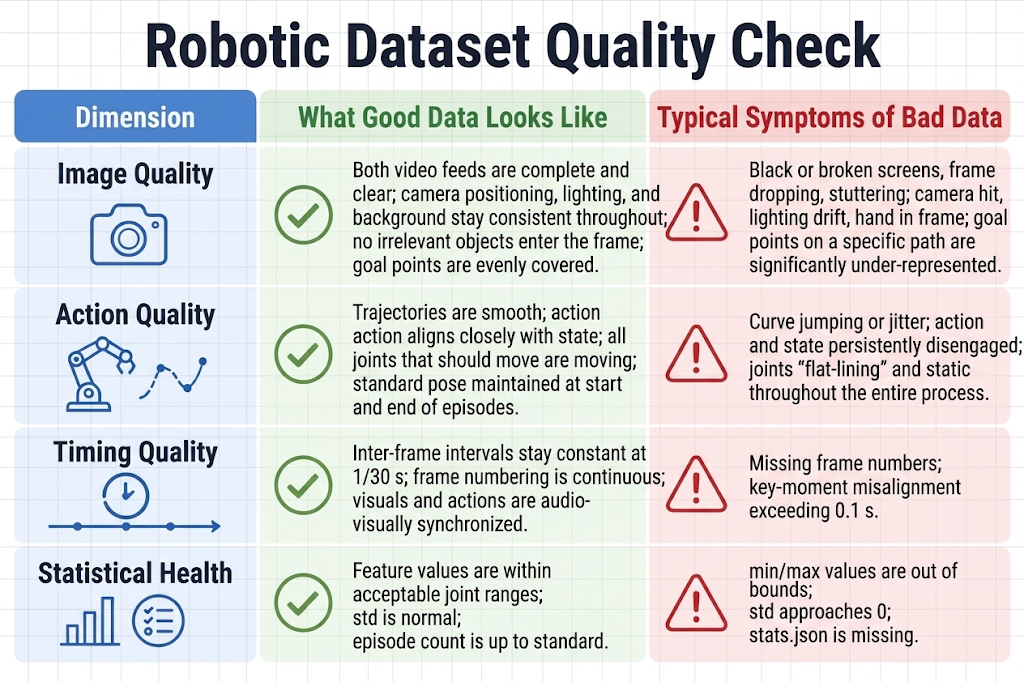
14.3 Playback and Image Inspection
14.3 Playback and Image Inspection
For visualization playback use lerobot-dataset-viz; for real-robot playback use lerobot-replay. For real-robot playback, use Episode 0, one in the middle, and the last one: the first checks workflow correctness, the middle checks state drift, the last most easily reveals fatigue-related quality decline.
During playback, check against these criteria:
- Both camera feeds present; no black screens, artifacts, or frozen streams.
- Clear, well-exposed images; block and gripper always visible.
- Actions synchronized with images: at the moment the gripper closes, it should be touching the block.
- Starts in standard starting pose, ends satisfying end conditions.
14.4 What to Do When Problems Are Found
14.4 What to Do When Problems Are Found: Delete, Supplement, or Re-record the Whole Set
Three paths when issues are found:
- A few bad Episodes (e.g., Episodes 3 and 17 are blurry) → delete those 2, then record 2 more.
- Batch-wide problems (e.g., half have changed lighting, entire batch has audio-video desync) → don't patch, re-record the whole set. A patched-together dataset hurts the model more than having less data.
Two facts about deletion: after deletion, the tool automatically rebuilds the dataset — episodes are renumbered consecutively, stats.json recalculated; you don't need to manually fix anything. Whether deleting or supplementing, the tool regenerates the meta.