19. Robot Embodiment and GR00T System Architecture
Chapter 19 of the Seeed Physical AI Beginner's Course — what an embodiment is, joints/state/action definitions, camera and language modalities, the observation and action windows, foundation model fine-tuning, the LeRobot stack, and the reBot Arm's position in GR00T.
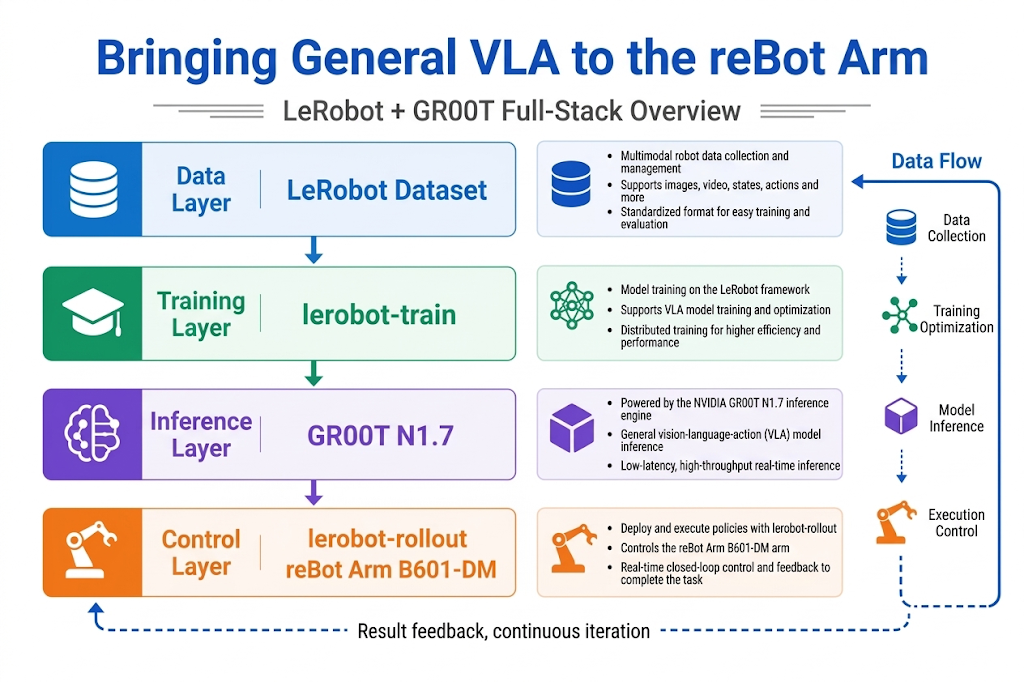
GR00T is a cross-embodiment foundation model: it is pretrained on multiple robot datasets, and distinguishes different hardware through Embodiment Tags and Modality configuration. This chapter explains where the reBot Arm sits in the LeRobot + GR00T stack and how the components collaborate at inference time.
19.1 What Is a Robot Embodiment?
19.1 What Is a Robot Embodiment?
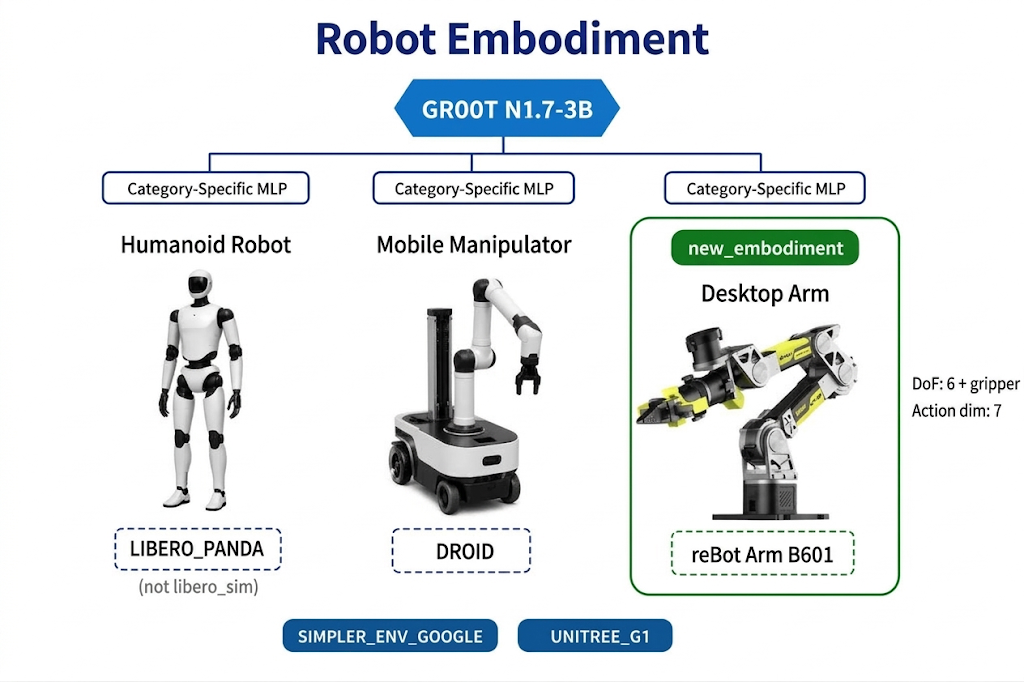
Embodiment describes the "physical and control identity" of a robot, including:
- Number of degrees of freedom (DoF) and joint ordering
- Joint limits, gear ratios, control mode (position/torque)
- Number of cameras, mounting positions, and resolution
- Action space definition (joint space vs. end-effector Cartesian space)
- Gripper type and open/close range
The same GR00T foundation model cannot directly apply SO-101's 6-dimensional joint vector to the reBot Arm. Internally, the model uses a Category-Specific MLP (projection layer per embodiment) to map state/action of different dimensions into a shared latent space, and then map back to each embodiment's action dimensions.
In LeRobot / GR00T, the embodiment is specified via embodiment_tag. Official pretraining tags (EmbodimentTag) include:
LIBERO_PANDA,DROID,SIMPLER_ENV_GOOGLE,UNITREE_G1,OXE_WIDOWX, etc.- New hardware:
new_embodiment/NEW_EMBODIMENT(used when fine-tuning the reBot Arm).
There is no official tag called libero_sim. Do not apply pretraining tags to reBot data.
--policy.embodiment_tag=new_embodiment
This tells GR00T: the current data comes from a new robot not seen during training; please use the new-embodiment projection layer for fine-tuning.
19.2 Robot Joints, State, and Action Definitions
19.2 Robot Joints, State, and Action Definitions
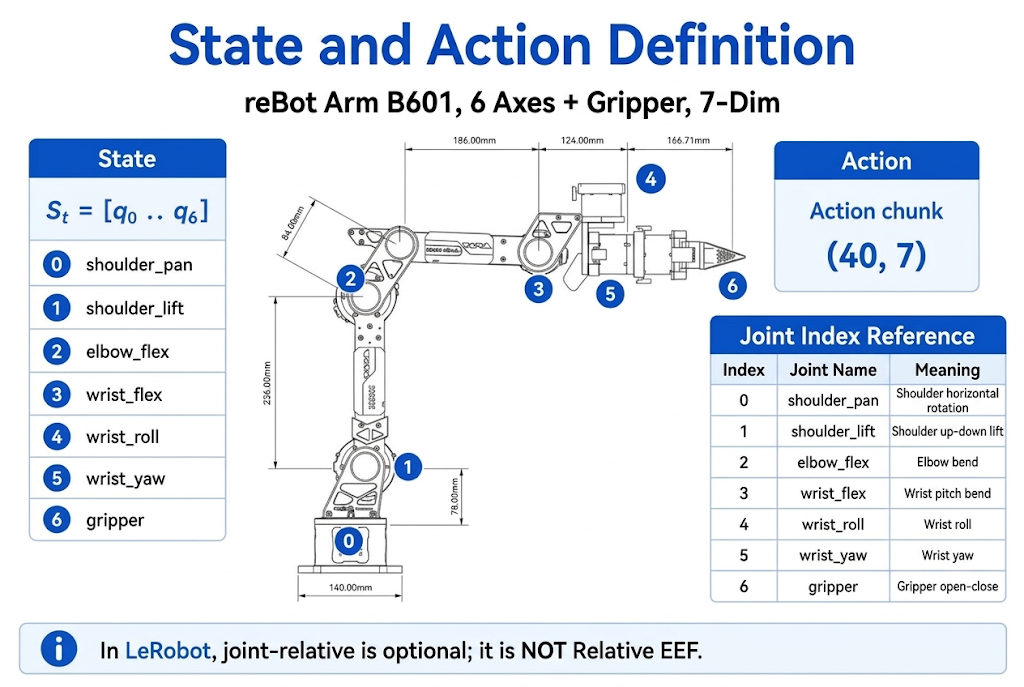
Taking the reBot Arm B601 (6-axis + gripper) as an example:
Joints and State
State (observation state) is one of the policy's inputs, representing the robot's current configuration:
observation.state = [q1, q2, q3, q4, q5, q6, gripper_pos]
                     └──────── 6 joint angles ─────┘  └ gripper ┘
- Unit: joint angles are usually radians (rad) or degrees (deg); must be consistent within the dataset.
- Order: must be exactly consistent with the recording script,
modality.json, and the inference client. - In
meta/modality.json, it can be split into:state.single_arm-> indices 0-5state.gripper-> index 6
Action
Action is the policy output, executed by the low-level controller:
action = [target_q1, ..., target_q6, target_gripper]
GR00T N1.7 outputs an H-step action chunk at a time (pretrained action_horizon=40; LeRobot groot defaults to chunk_size=50). This tutorial aligns training with N1.7, using H=40:
action_chunk.shape = (40, 7) # 40 steps x 7 dimensions
The control loop usually takes a row from the chunk and sends it to the motor every step or every k steps; LeRobot rollout uses n_action_steps to control how many steps are executed per inference.
19.3 Camera Modality
19.3 Camera Modality
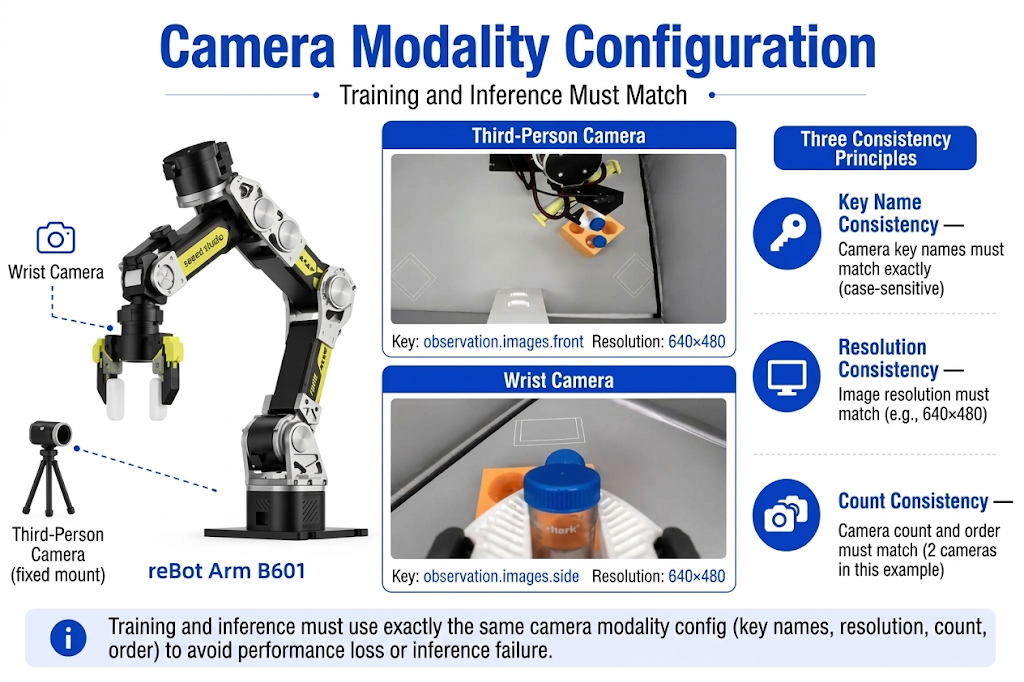
GR00T uses vision as primary, language as auxiliary, and state as supplementary. Camera configuration must be strictly aligned with the training data.
Common camera layouts (reBot Arm)
| Key name (example) | Position | Purpose |
|---|---|---|
front | Bracket-mounted wide-view camera | Global scene, target object localization |
side / wrist | Wrist camera | Close-up aiming, occluded scenes |
In LeRobot datasets, videos are stored as observation.images.<camera_name>; in the video field of meta/modality.json, the resolution and index of each camera are declared.
Notes
- Camera key names, count, and resolution must be identical between training and inference.
- The GR00T backbone supports native aspect ratios, but it is recommended to unify to 640x480 or the dataset's agreed resolution.
- During fine-tuning, enable
dataset.image_transforms(brightness, contrast jitter) to improve robustness. - Find the local camera index with
lerobot-find-cameras opencv.
19.4 Language Modality
19.4 Language Modality
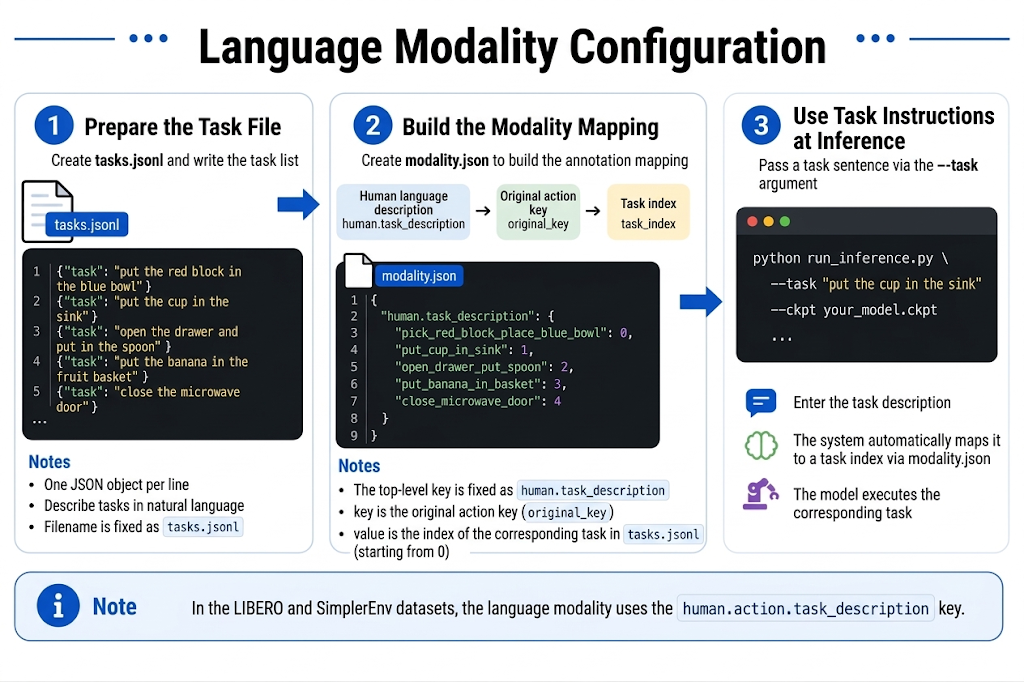
In the GR00T pipeline, language serves as a conditioning input, fed into the VLM backbone together with image tokens.
Data side
- LeRobot:
meta/tasks.jsonlor episode-level annotation - GR00T extension:
meta/modality.json->annotationfield
Example modality.json snippet (reBot desktop tasks use human.task_description):
{
  "annotation": {
    "human.task_description": {
      "original_key": "task_index"
    }
  }
}
If the data comes from LIBERO / SimplerEnv, use human.action.task_description instead. The key name must match the complete modality.json in Chapter 20.
Inference side
When running lerobot-rollout, pass it via --task:
--task="place the red cube on the blue tray"
This string is encoded and fed into the model together with the current image and state. Please use a language style and sentence pattern similar to the training data.
19.5 Observation Window and Action Window
19.5 Observation Window and Action Window
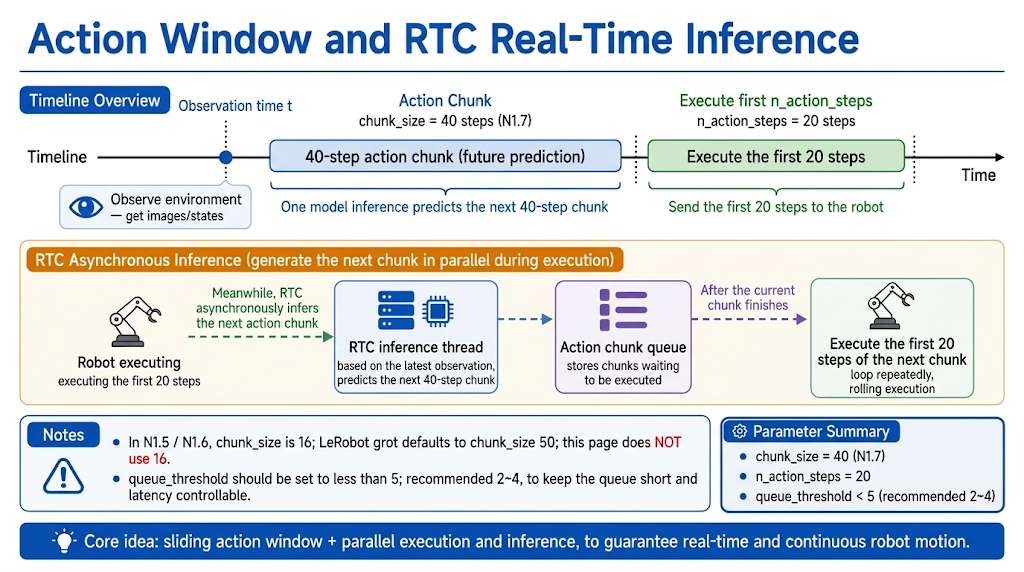
VLA inference is not "look at one frame, output one action"; it involves time-dimension sampling design:
Time axis ─────────────────────────────────────────────►

Observation window:  [t-k ... t-1, t]     ← historical image frames (optional)
State:              S_t
Language:           L
Action prediction window:    [A_t, A_{t+1}, ... A_{t+H-1}]
                              └── H = chunk_size / action_horizon
| Parameter | Typical value (N1.7) | Meaning |
|---|---|---|
chunk_size / action_horizon | 40 (aligned with N1.7; LeRobot groot source defaults to 50; N1.5/N1.6 is 16) | Number of action steps predicted per inference |
n_action_steps | 8-40 | Steps actually executed per inference, must be ≤ chunk_size |
n_obs_steps | 1 | How many historical image frames to use |
RTC (Real-Time Chunking): when inference time approaches the control period, LeRobot supports the RTC policy, which asynchronously computes the next chunk while executing the current one, reducing pauses. In rollout, enable it via --inference.type=rtc; queue_threshold indicates how few steps remain in the action queue before triggering a new inference, recommended at 2-5; setting it to 0 causes re-inference every time, which tends to increase jitter.
19.6 Foundation Model and Fine-Tuning
19.6 Foundation Model and Fine-Tuning
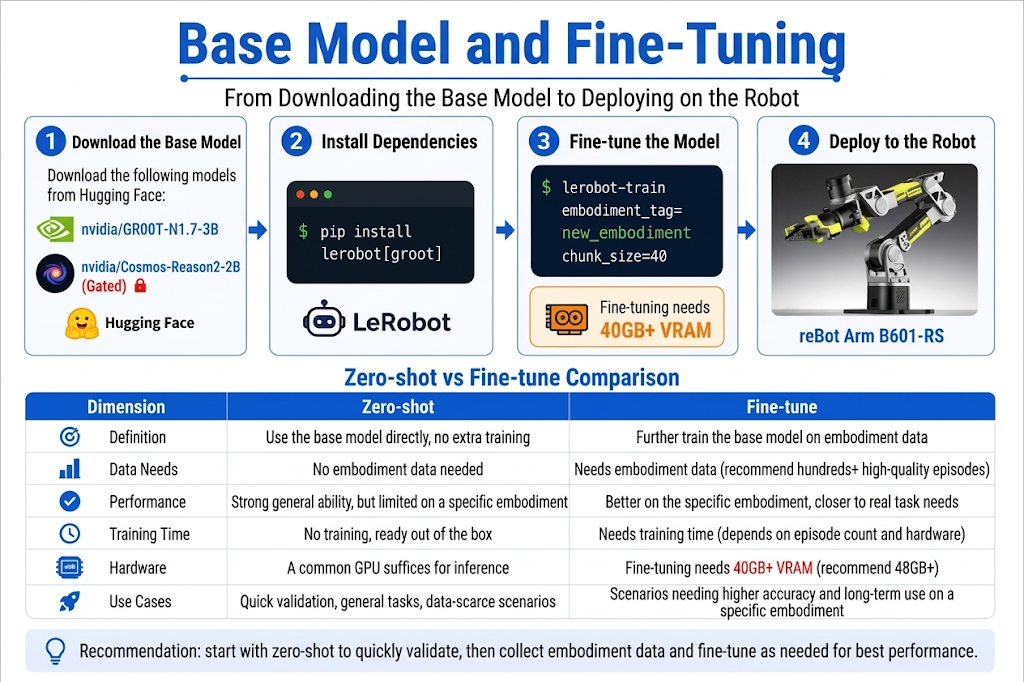
Foundation Model
NVIDIA GR00T N1.7-3B is pretrained on large-scale multi-embodiment data and has general vision-language-action capabilities. It can be obtained via Hugging Face:
nvidia/GR00T-N1.7-3B
LeRobot installs GR00T support:
pip install "lerobot[groot]"
# or from source:
pip install -e ".[groot]"
See the LeRobot installation documentation for details.
Fine-Tuning
The typical workflow on the reBot Arm:
- Prepare the LeRobot v2 dataset +
meta/modality.json(Chapter 20). - Specify
embodiment_tag=new_embodiment. - Start training with
lerobot-train --policy.type=groot(Chapter 21). - Push the checkpoint to the Hugging Face Hub or save it locally in
outputs/.
During fine-tuning:
- VLM backbone is Cosmos-Reason2-2B; default fine-tuning often freezes the LLM and focuses on training the projector + DiT head (peak around 35 GB).
- The DiT action head and embodiment projection layer adapt to the reBot state/action dimensions.
- Data volume recommendation: at least 50 successful demonstrations per task, and more for multi-task.
- VRAM: 40 GB+ for fine-tuning; for 24 GB cards use LoRA/PEFT, or run inference only.
Zero-Shot vs. Fine-Tuning
| Method | Description |
|---|---|
| Zero-shot | Use GR00T-N1.7-3B directly; may work only when the task is extremely similar to a pretrained embodiment |
| Fine-tuning | The reBot Arm recommended path; a small amount of desktop manipulation data significantly improves success rate |
19.7 GR00T System Architecture (LeRobot Stack)
19.7 GR00T System Architecture (LeRobot Stack)
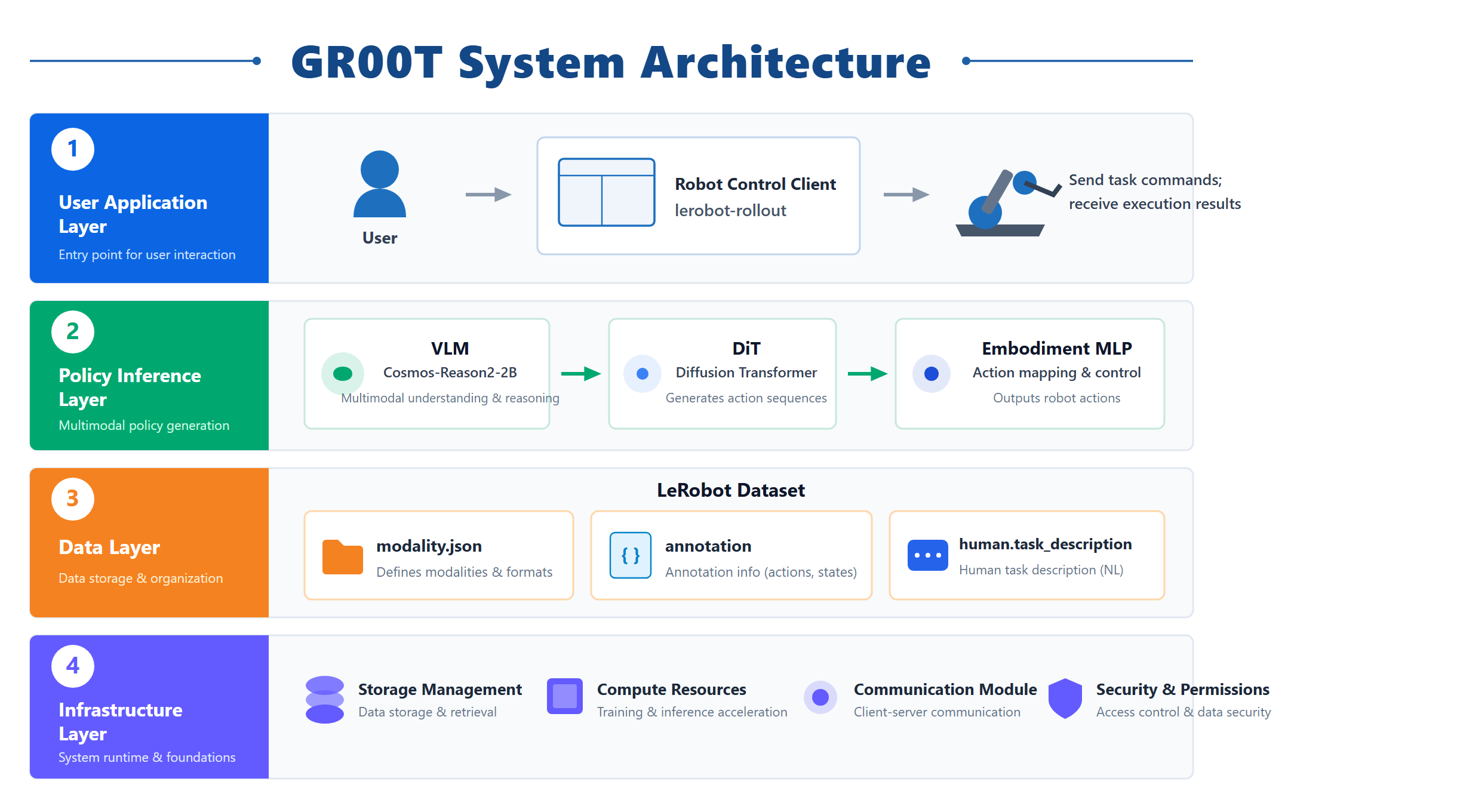
The reBot GR00T system based on LeRobot can be divided into four layers:
┌────────────────────────────────────────────────────────────┐
│                    User / Application Layer                 │
│         Natural language task  +  start rollout / teach UI  │
└────────────────────────────┬───────────────────────────────┘
                             │
┌────────────────────────────▼───────────────────────────────┐
│              Robot Control Client (LeRobot Rollout)         │
│  - Capture camera images, read joint state                  │
│  - Send observation to policy, receive action chunk        │
│  - Execute actions via reBot driver (serial/CAN)            │
│  lerobot-rollout --policy.type=groot --robot.type=...      │
└────────────────────────────┬───────────────────────────────┘
                             │ observation / action
┌────────────────────────────▼───────────────────────────────┐
│              Policy Inference (GR00T N1.7)                 │
│  ┌──────────────┐  ┌─────────────┐  ┌──────────────────┐ │
│  │ VLM Backbone │→ │  DiT Head   │→ │ Embodiment MLP   │ │
│  │ Cosmos-Reason2-2B │  │ Flow Match  │  │ decode to 7-DoF  │ │
│  └──────────────┘  └─────────────┘  └──────────────────┘ │
│  Can be in the same process as rollout, or split into a     │
│  separate GPU inference service (advanced deployment)       │
└────────────────────────────┬───────────────────────────────┘
                             │
┌────────────────────────────▼───────────────────────────────┐
│              Data and Training Layer (LeRobot Dataset v2)   │
│  episodes / videos / meta/modality.json / tasks.jsonl      │
│  lerobot-train / lerobot-record / lerobot-replay           │
└────────────────────────────────────────────────────────────┘
Internal model data flow (simplified)
- Image -> VLM visual encoder -> visual tokens
- Language instruction -> text tokenizer -> language tokens
- State -> embodiment encoding MLP -> state tokens
- Multimodal token fusion -> DiT iterative denoising -> action latent variables
- Embodiment decoding MLP ->
action_chunk (H x action_dim)
19.8 GR00T Inference Server and Robot Control Client
19.8 GR00T Inference Server and Robot Control Client
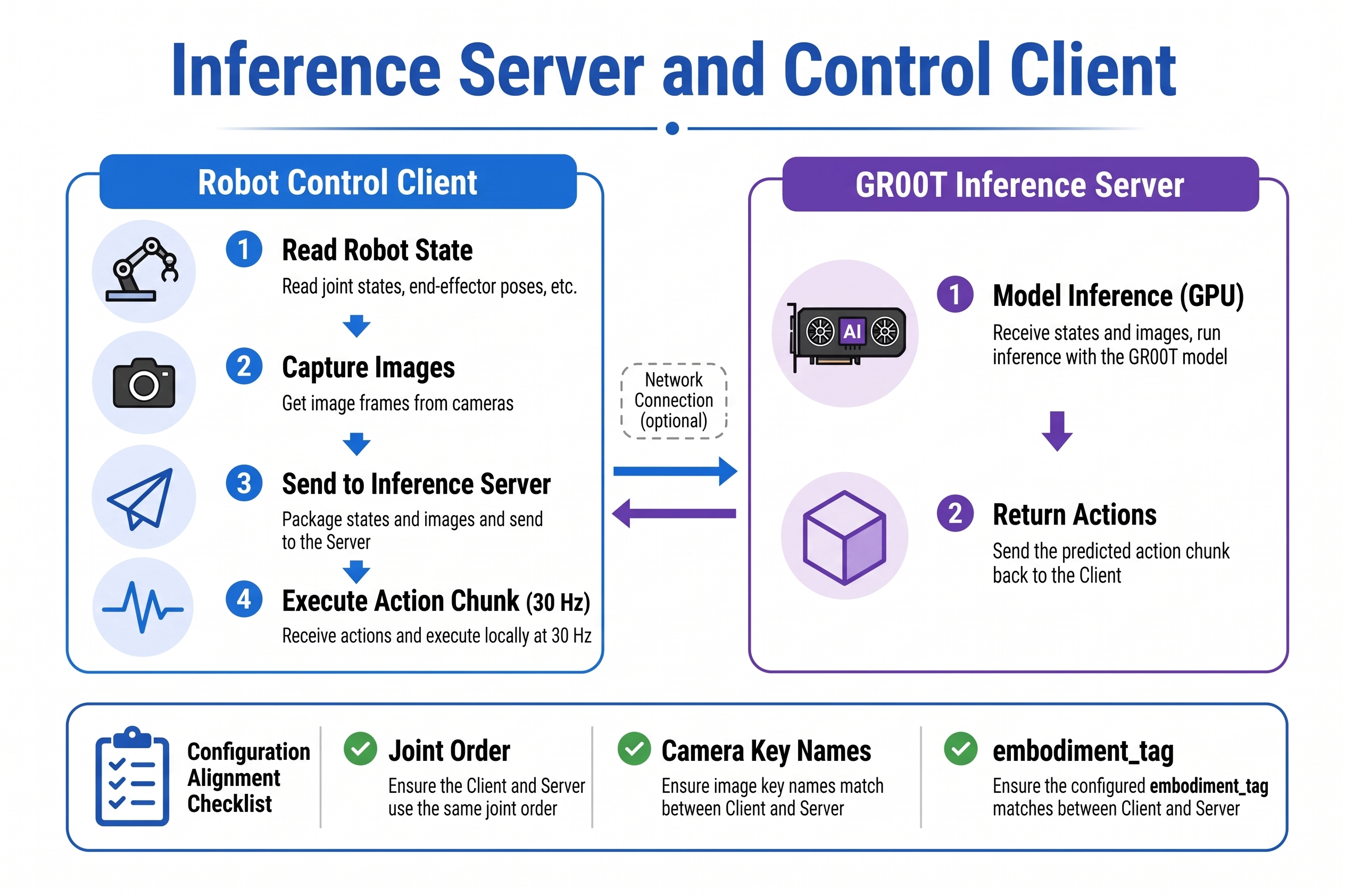
When getting things running on a development board, it is common to separate heavy computation from real-time control:
Robot Control Client
Responsibilities:
- Read reBot Arm joint state at a fixed frequency (e.g. 30 Hz)
- Grab the latest image from the camera
- Send
{images, state, task}to the inference side - Receive
action_chunkand step down actions to the motor according ton_action_steps - Monitor safety limits and e-stop
In LeRobot this corresponds to lerobot-rollout, configured with reBot's robot.type, port, can_adapter, and camera dict cameras. RS uses can0 + socketcan; DM uses /dev/ttyACM0 + damiao.
GR00T Inference Server (optional)
When the GPU is in a desktop machine and the arm is on-site, the policy can be deployed as a standalone service:
- The client sends observation JSON / tensors over the network
- The server loads
policy.pathandbase_model_pathand returns action chunks - Reduces compute pressure on the arm side
LeRobot puts inference and rollout in the same process by default (--device=cuda), suitable for single-machine debugging. For production, refer to the deployment examples in the Isaac GR00T repository and wrap inference as an HTTP/gRPC service; the core model interface is consistent with the LeRobot groot policy.
Integration Checklist
| Check item | Description |
|---|---|
| Joint order | dataset = modality.json = rollout driver |
| Angle unit | rad and deg must not be mixed |
| Camera key names | front, wrist, etc. match training |
embodiment_tag | Both fine-tuning and inference use new_embodiment |
base_model_path | At inference, usually still needs nvidia/GR00T-N1.7-3B as the configuration base |
| Chunk and RTC | n_action_steps ≤ chunk_size; RTC queue threshold ≤ 5 |
19.9 The reBot Arm's Position in GR00T
19.9 The reBot Arm's Position in GR00T
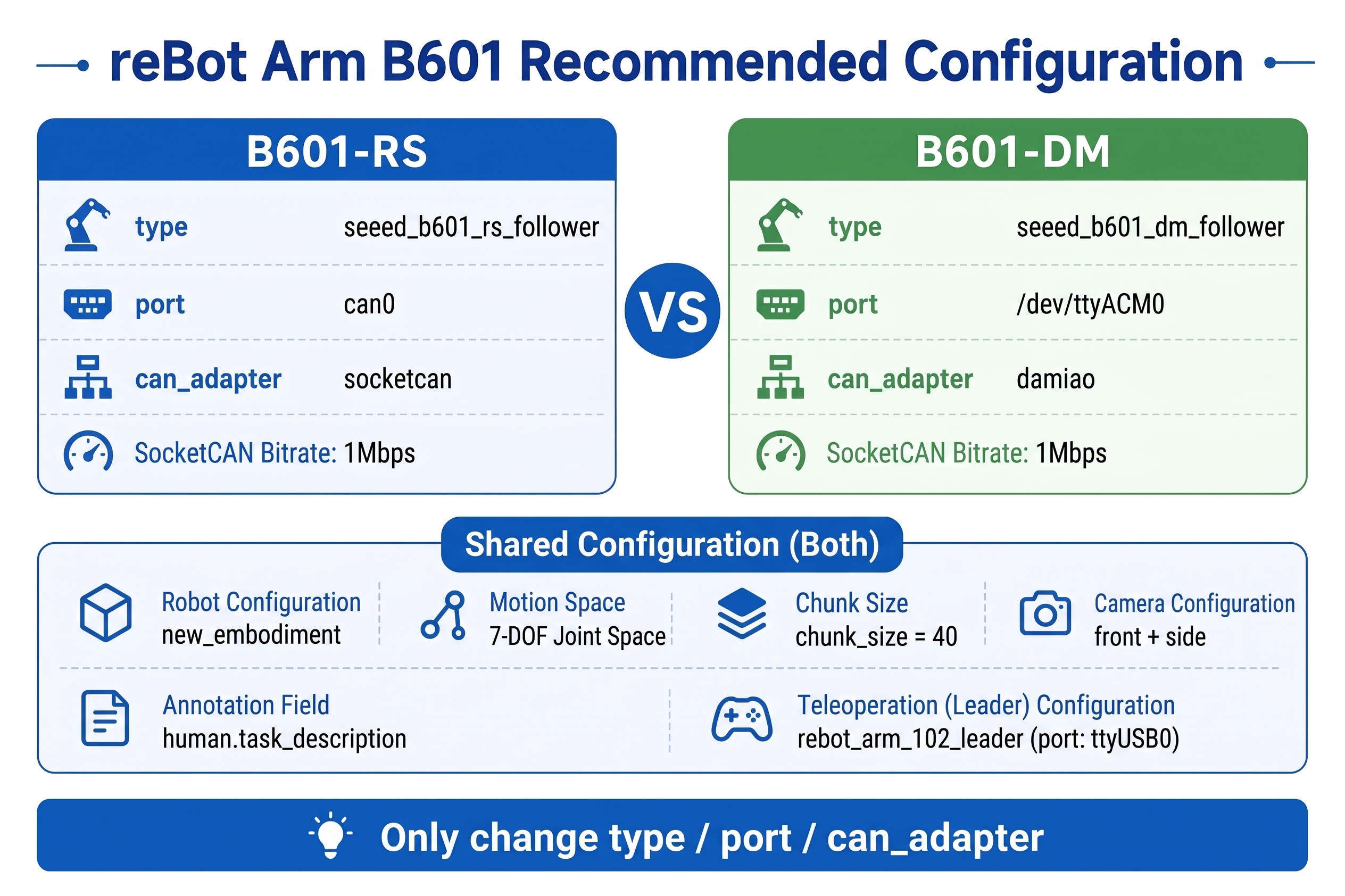
| Item | reBot Arm B601 recommended configuration |
|---|---|
embodiment_tag | new_embodiment |
| state keys | single_arm (6) + gripper (1) |
| action keys | Aligned with state, 7 dimensions |
| action type | Joint space NON_EEF. LeRobot optional use_relative_actions=true (joint-relative, not Relative EEF) |
| Action window | Training chunk_size=40 (aligned with N1.7 action_horizon) |
| Cameras | At least 1 stream; recommended front + wrist / side |
| Language | One task description per episode; annotation uses human.task_description |
| Control interface | See table below: RS uses SocketCAN; DM uses Damiao serial |
B601-RS vs B601-DM driver differences (only change these three in LeRobot commands):
| Version | robot.type | robot.port | robot.can_adapter | Reference |
|---|---|---|---|---|
| B601-RS | seeed_b601_rs_follower | can0 | socketcan | B601-RS LeRobot Wiki |
| B601-DM | seeed_b601_dm_follower | /dev/ttyACM0 | damiao | B601-DM LeRobot Wiki |
Both are 6-axis + gripper, 7-dimensional state/action; the teleop side is always --teleop.type=rebot_arm_102_leader --teleop.port=/dev/ttyUSB0. Before using RS, configure CAN: sudo ip link set can0 type can bitrate 1000000 && sudo ip link set can0 up.
Chapter 20 will walk through organizing existing imitation learning data into the above format step by step; Chapter 21 builds on this to complete lerobot-train fine-tuning.
19.10 Chapter Summary
19.10 Chapter Summary
- Embodiment defines the robot's physical and control interface; the reBot Arm joins GR00T as
new_embodiment(do not use pretraining tags likeLIBERO_PANDA/DROID). - State / Action must be strictly consistent across the dataset, modality config, and inference client.
- Vision and language are the two conditioning modalities of a VLA; reBot annotation uses
human.task_description. - Action window: N1.7's
action_horizon=40, together with RTC, determines real-time performance. - Model variant: B601-RS (SocketCAN) and B601-DM (Damiao serial) differ only in
type/port/can_adapter. - LeRobot provides a unified toolchain for data, training, and rollout; GR00T provides pretrained VLA capabilities.
- The next chapter enters practice: preparing the reBot VLA dataset.