20. Preparing the reBot VLA Dataset
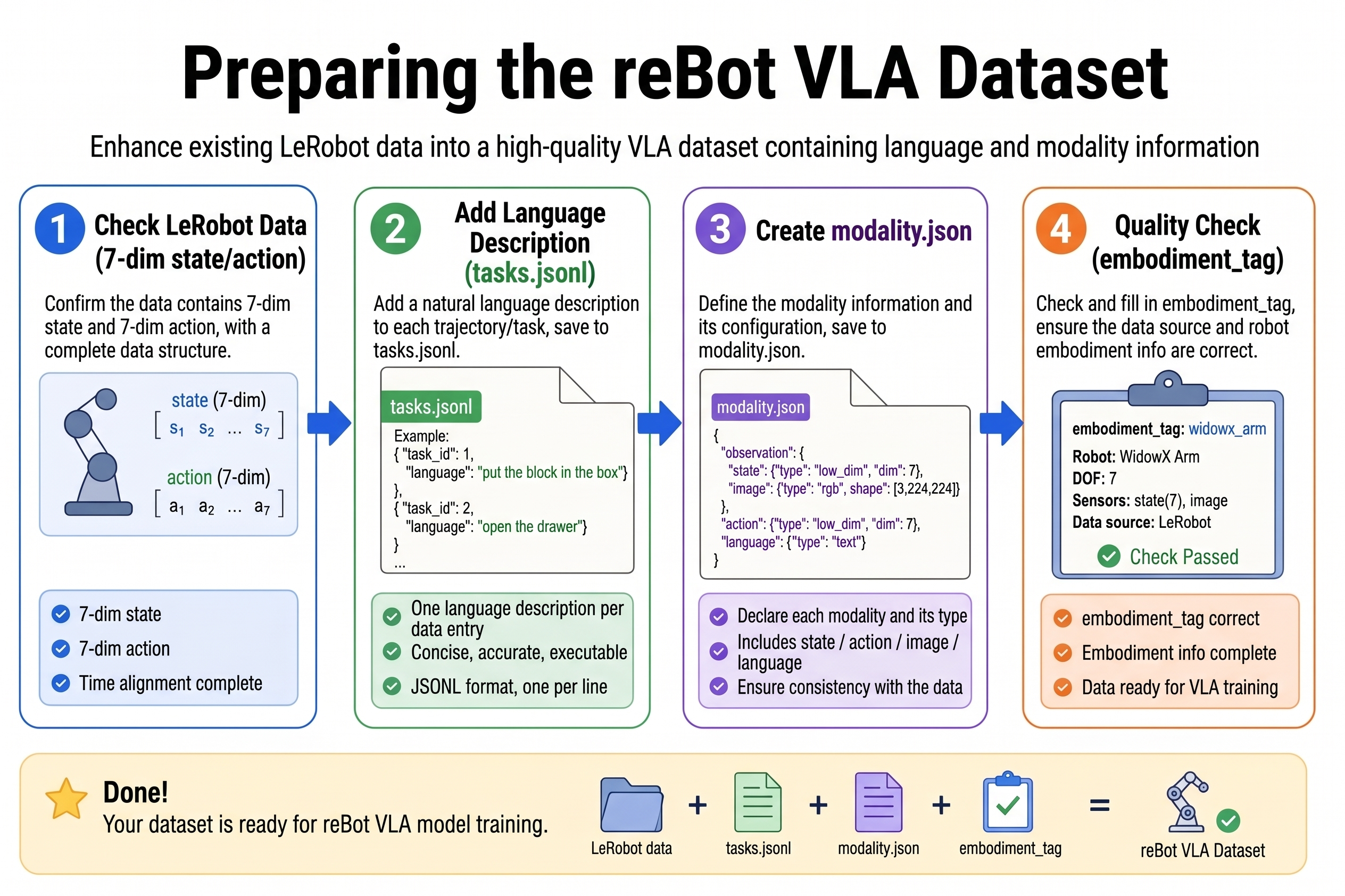
Chapter 20 of the Seeed Physical AI Beginner's Course — prerequisites, checking the LeRobot dataset, adding language task descriptions, configuring state/action/camera keys, creating meta/modality.json, setting the embodiment tag, verifying joint order and dimensions, and multi-task organization.
GR00T uses the LeRobotDataset v2/v3 format on LeRobot, and additionally requires meta/modality.json to describe the semantic split of state, action, video, and annotation. This chapter assumes you have already collected ACT data on the reBot Arm via lerobot-record; next we will upgrade it to VLA training data.
20.1 Prerequisites
20.1 Prerequisites
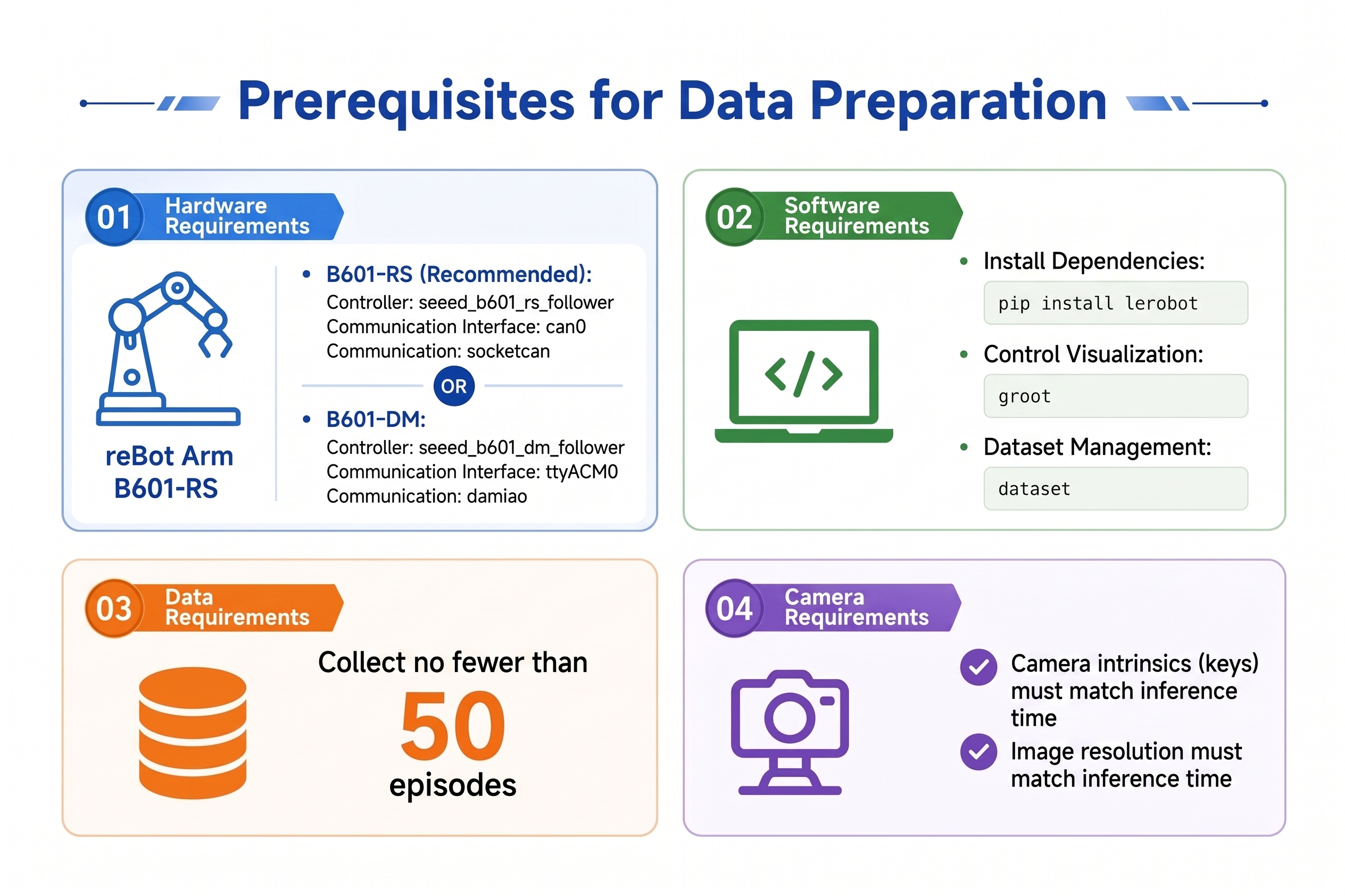
| Item | Requirement |
|---|---|
| Hardware | reBot Arm B601-RS or B601-DM calibrated (see table below) |
| Software | LeRobot installed; recommended pip install "lerobot[groot,training]" |
| Data | At least 50 successful demonstrations for one task; for multi-task, ≥ 30 per task |
| Camera | Training and inference use the same key names, resolution, and count |
Model variant reference (only change these three in all subsequent lerobot-record / lerobot-rollout):
| Version | robot.type | robot.port | robot.can_adapter | Wiki |
|---|---|---|---|---|
| B601-RS | seeed_b601_rs_follower | can0 | socketcan | Getting Started with LeRobot |
| B601-DM | seeed_b601_dm_follower | /dev/ttyACM0 | damiao | Getting Started with LeRobot |
Before using RS, configure CAN: sudo ip link set can0 type can bitrate 1000000 && sudo ip link set can0 up. The teleop side is always rebot_arm_102_leader, commonly on port /dev/ttyUSB0.
Reference documents:
20.2 Checking the LeRobot Dataset
20.2 Checking the LeRobot Dataset
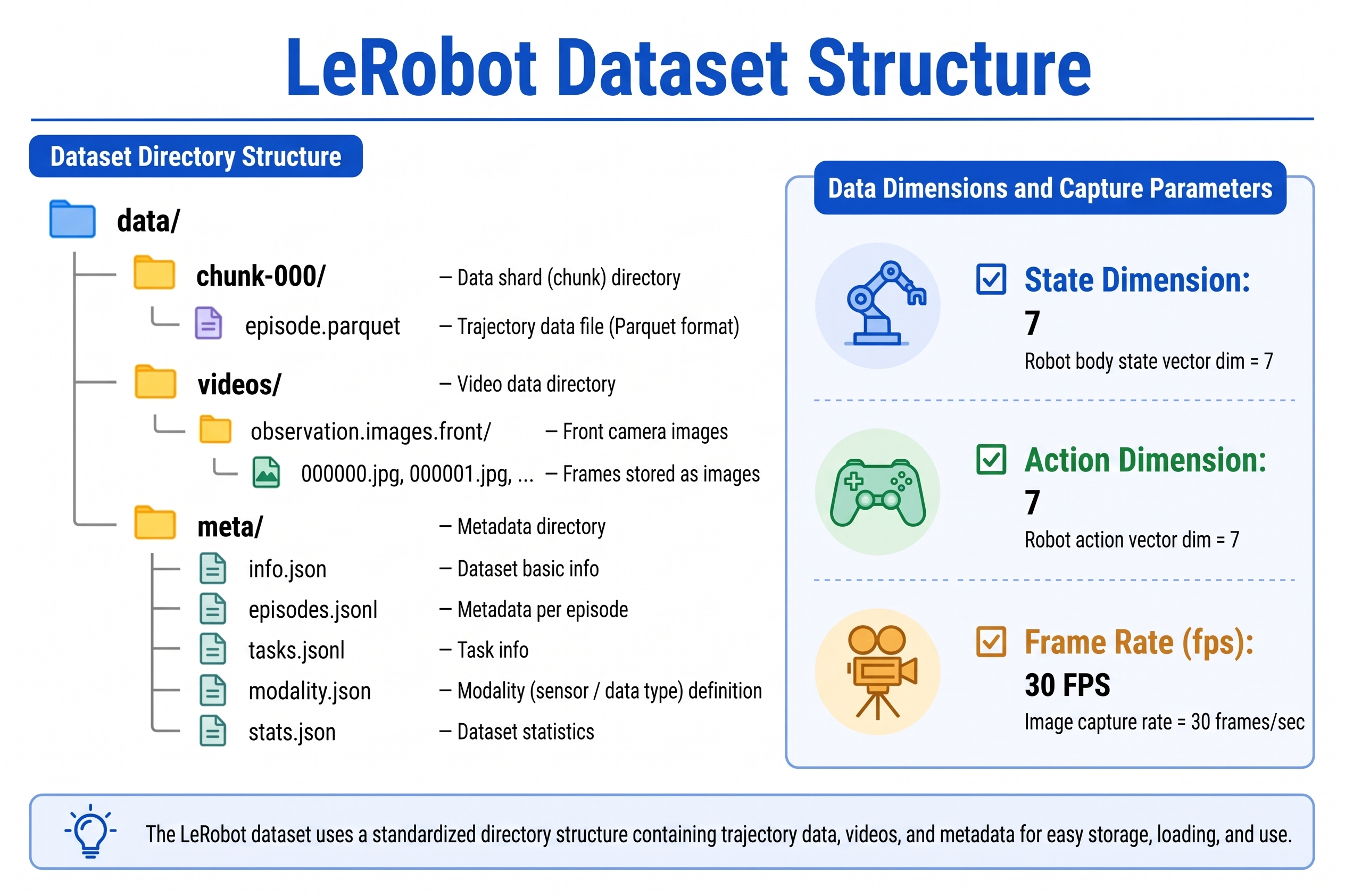
Dataset Directory Structure
Local datasets are located by default at:
~/.cache/huggingface/lerobot/<repo_id>/
├── data/
│   └── chunk-000/
│       └── episode_*.parquet
├── videos/
│   └── chunk-000/
│       └── observation.images.<camera_name>/
├── meta/
│   ├── info.json
│   ├── episodes.jsonl
│   ├── tasks.jsonl          ← language task descriptions
│   ├── stats.json
│   └── modality.json        ← required by GR00T, create or verify manually
Quick Check with Python
from lerobot.datasets.lerobot_dataset import LeRobotDataset

dataset = LeRobotDataset("seeed_rebot_b601_rs/pick_cube")  # RS example; for DM use seeed_rebot_b601_dm/pick_cube
print(dataset)
print("Feature keys:", dataset.features.keys())
print("Frame 0 state shape:", dataset[0]["observation.state"].shape)
print("Frame 0 action shape:", dataset[0]["action"].shape)
Required Checklist
| Check item | Expected value (reBot B601-RS / B601-DM single arm) |
|---|---|
observation.state dimension | (7,) - 6 joints + 1 gripper |
action dimension | (7,) - aligned with state |
| Video keys | e.g. observation.images.front, observation.images.side |
| FPS | Usually 30 |
tasks.jsonl | Every task_index has a corresponding language description |
| Failed episodes | Deleted or marked out to avoid polluting training |
If state/action is not 7-dimensional, the robot configuration during recording was wrong; go back to lerobot-record to troubleshoot. Do not force-edit modality.json to pad dimensions.
20.3 Adding Language Task Descriptions
20.3 Adding Language Task Descriptions
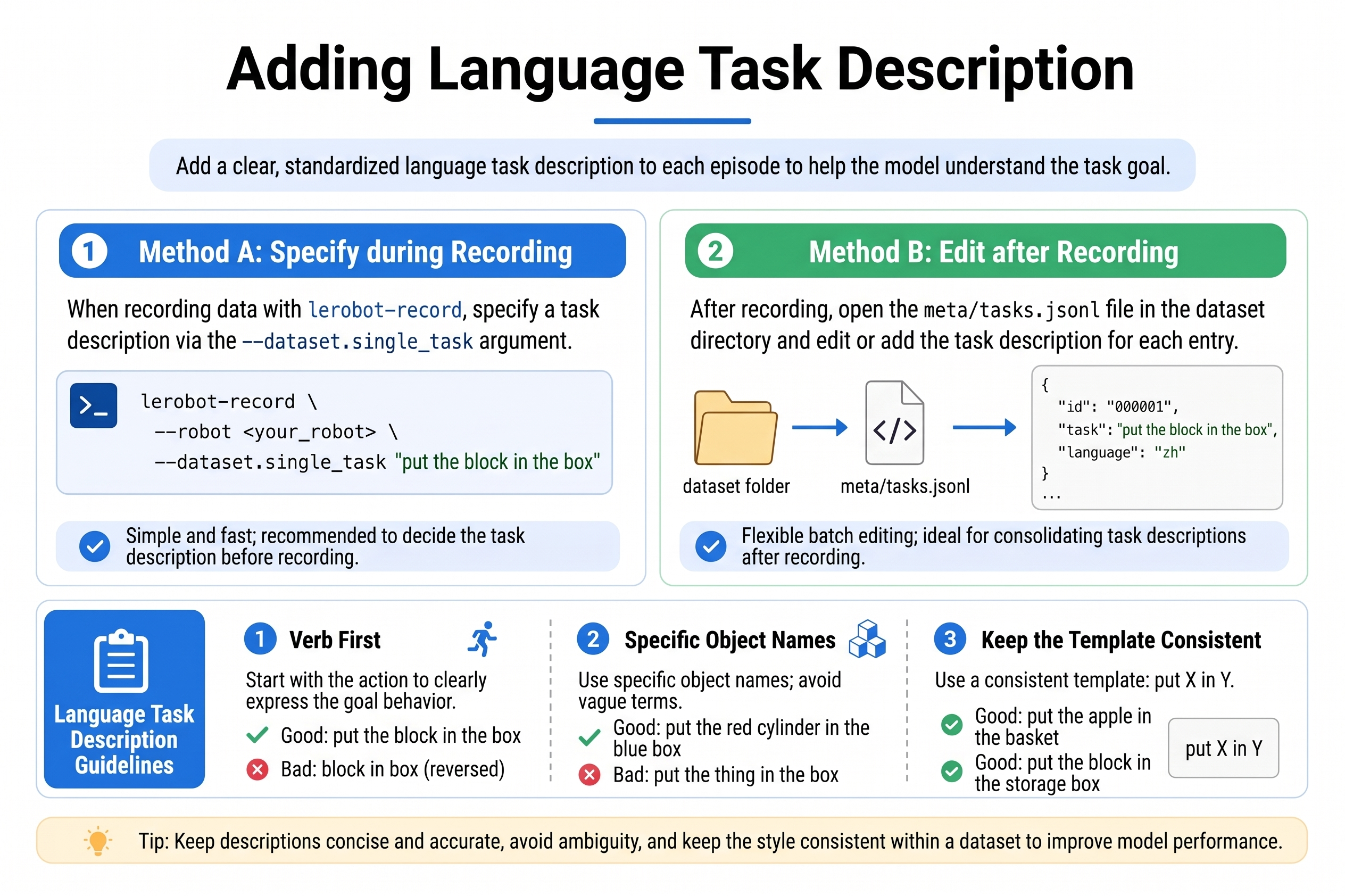
VLA training requires language conditioning. There are two ways:
Method A: Write directly during recording (recommended)
Each episode is recorded with --dataset.single_task. The following uses B601-RS as an example (Wiki); DM users replace type / port / can_adapter with seeed_b601_dm_follower, /dev/ttyACM0, damiao.
# RS: bring up CAN first
sudo ip link set can0 down 2>/dev/null
sudo ip link set can0 type can bitrate 1000000
sudo ip link set can0 up

lerobot-record \
  --robot.type=seeed_b601_rs_follower \
  --robot.port=can0 \
  --robot.id=follower1 \
  --robot.can_adapter=socketcan \
  --robot.cameras="{ front: {type: opencv, index_or_path: 0, width: 640, height: 480, fps: 30, fourcc: "MJPG"}, side: {type: opencv, index_or_path: 2, width: 640, height: 480, fps: 30, fourcc: "MJPG"}}" \
  --teleop.type=rebot_arm_102_leader \
  --teleop.port=/dev/ttyUSB0 \
  --teleop.id=rebot_arm_102_leader \
  --display_data=true \
  --dataset.repo_id=${HF_USER}/rebot_vla_pick_cube \
  --dataset.num_episodes=50 \
  --dataset.single_task="put the black cube on the blue tray" \
  --dataset.push_to_hub=false \
  --dataset.episode_time_s=30 \
  --dataset.reset_time_s=20
Method B: Backfill meta/tasks.jsonl
If existing ACT data lacks language, edit meta/tasks.jsonl:
{"task_index": 0, "task": "put the black cube on the blue tray"}
{"task_index": 1, "task": "put the screwdriver into the toolbox"}
In a multi-task dataset, different episodes are associated with different descriptions via the task_index field. All episodes of the same task should share the same task_index.
Language Annotation Guidelines
- Verb-first, describing the target action: "grasp...", "place...", "push...".
- Be specific about object names: "black cube" is better than "object".
- Keep sentence patterns consistent: for multi-task, use the same template, e.g. always "put X on Y".
- Either Chinese or English works, but the language should be consistent between training and inference.
- Avoid multiple phrasings for one data point (especially during early fine-tuning).
20.4 Configuring State Keys and Action Keys
20.4 Configuring State Keys and Action Keys
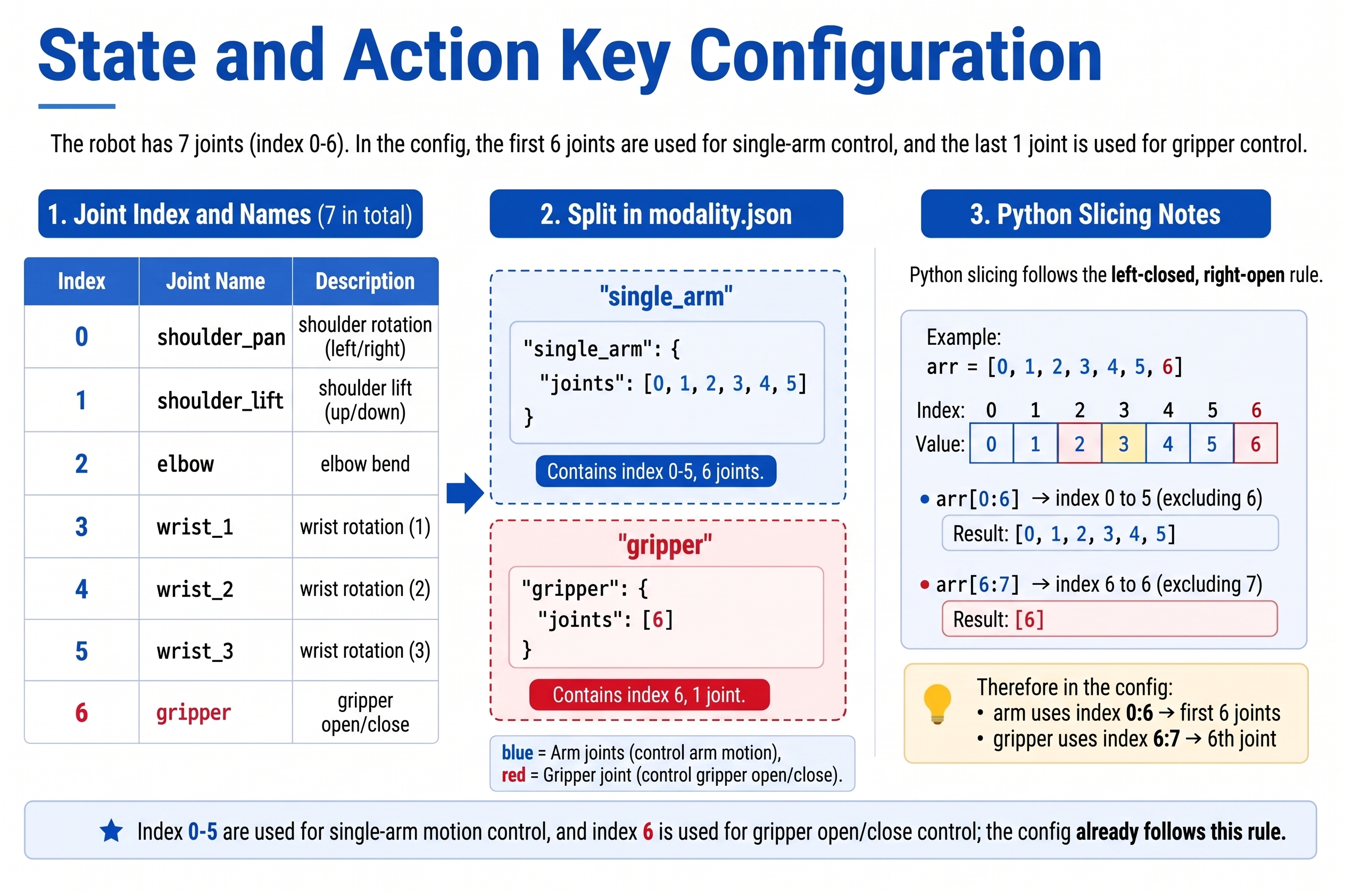
The 7-dimensional vector of the reBot Arm B601-RS / B601-DM is concatenated in the following joint order (consistent with the LeRobot driver):
| Index | Key name (semantic) | Meaning |
|---|---|---|
| 0 | shoulder_pan | Shoulder rotation |
| 1 | shoulder_lift | Shoulder lift |
| 2 | elbow_flex | Elbow flexion |
| 3 | wrist_flex | Wrist flexion |
| 4 | wrist_yaw | Wrist yaw |
| 5 | wrist_roll | Wrist roll |
| 6 | gripper | Gripper open/close |
In GR00T's modality.json, the above 7 dimensions are split into two semantic keys:
single_arm: indices 0-5 (6 joints)gripper: index 6 (gripper)
Python slicing is half-open: "end": 6 means up to index 5, and "start": 6, "end": 7 means index 6.
20.5 Configuring Camera Keys
20.5 Configuring Camera Keys
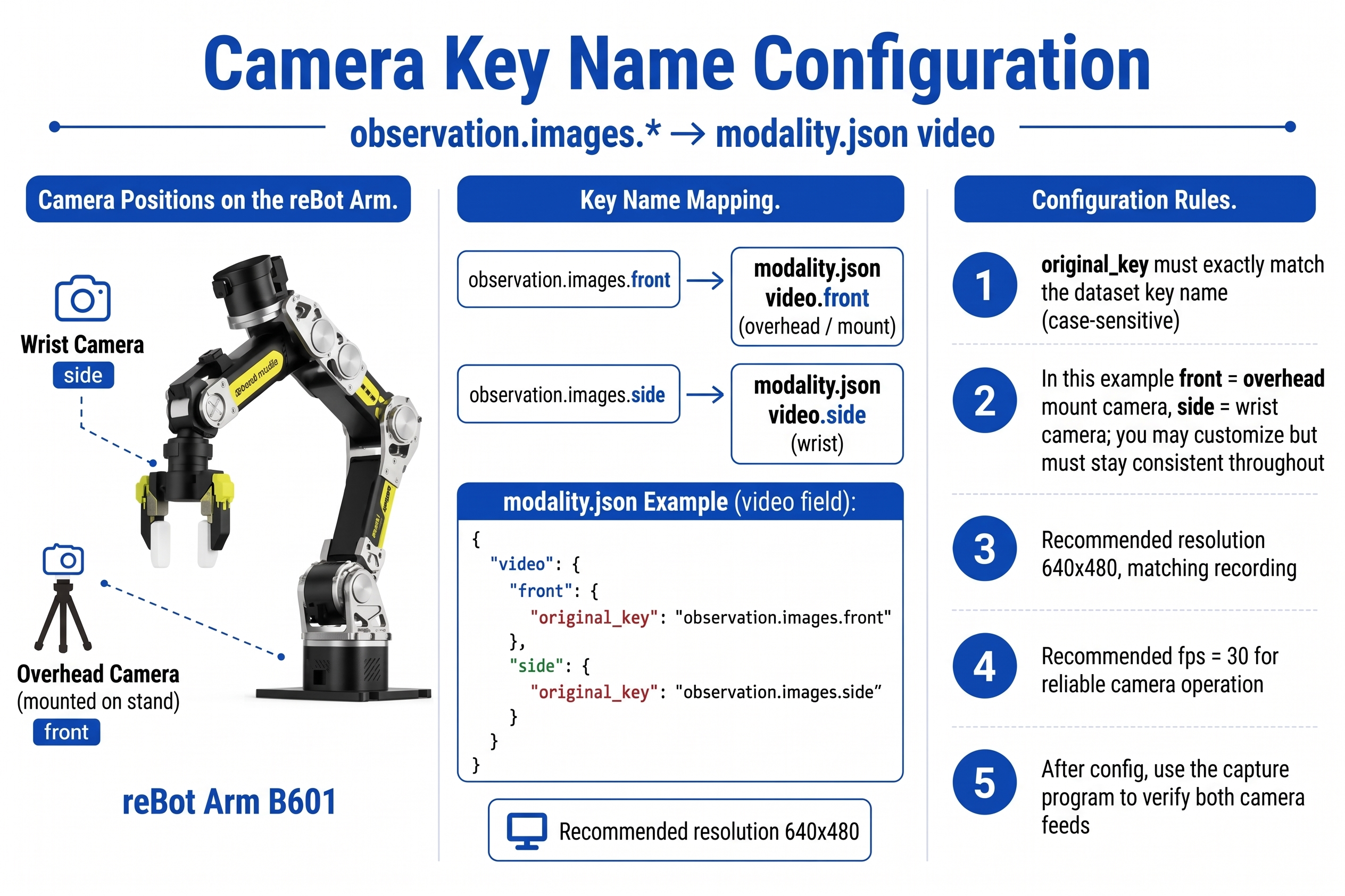
GR00T maps original camera keys in the dataset to standard key names via the video field of modality.json.
Common reBot camera layouts
Dataset key (original_key) | Modality standard key | Recommended use |
|---|---|---|
observation.images.front | front | Bracket-mounted wide view |
observation.images.side | side | Wrist close-up |
Example: if the camera keys during recording are front and side:
"video": {
  "front": {
    "original_key": "observation.images.front"
  },
  "side": {
    "original_key": "observation.images.side"
  }
}
Key principles:
original_keymust exactly match the actual key in the dataset.- The standard keys on the left side of modality (
front,side) will be used uniformly during training and inference. - A single camera can train, but two cameras usually perform better.
- Recommended resolution is uniformly 640x480, consistent with recording parameters.
Find the local camera index:
lerobot-find-cameras opencv
20.6 Creating meta/modality.json
20.6 Creating meta/modality.json
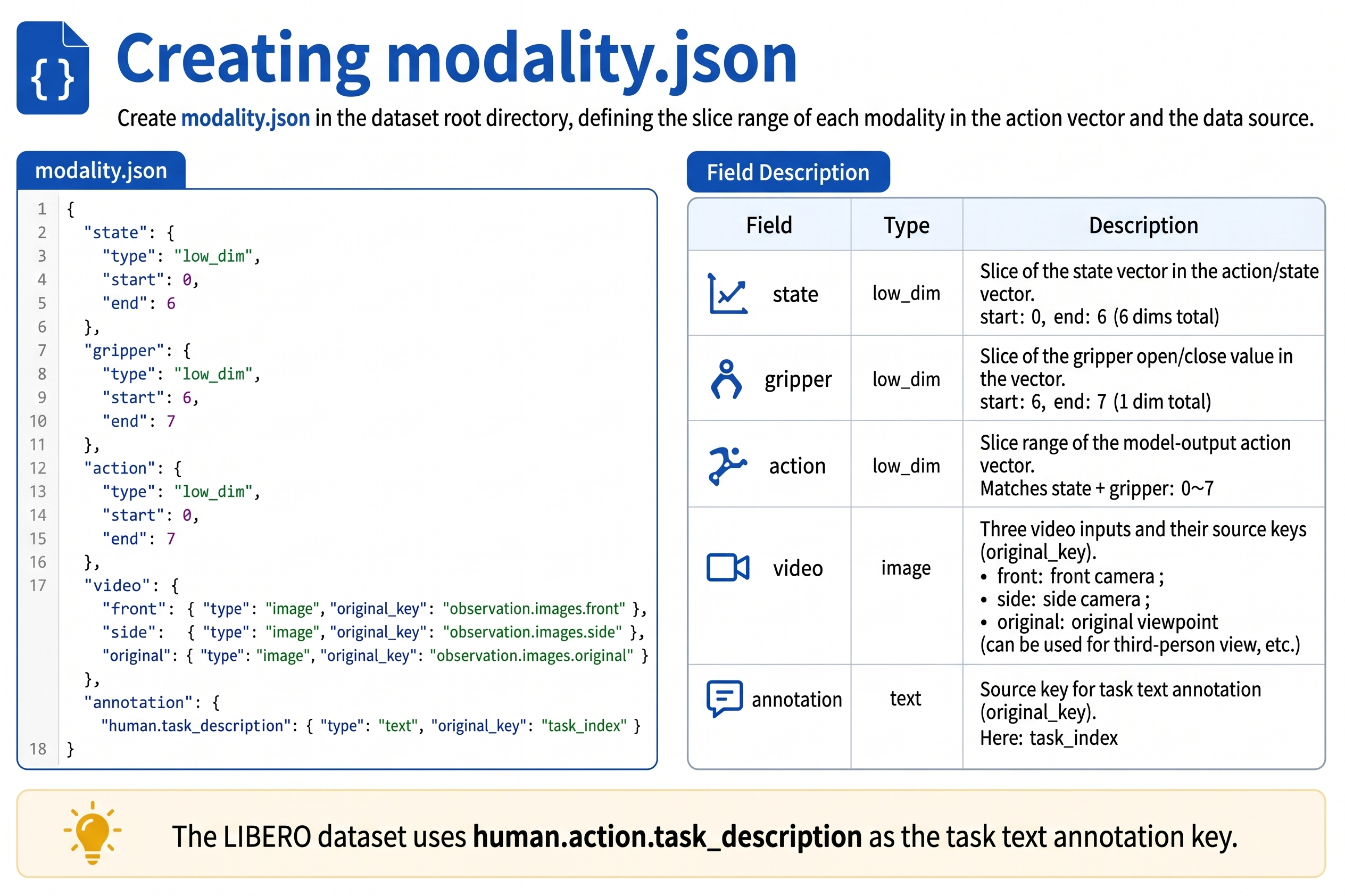
Create modality.json in the dataset's meta/ directory. Below is the complete example for the reBot Arm B601 single-arm 7-dimensional joint space (identical for RS / DM):
{
  "state": {
    "single_arm": {
      "start": 0,
      "end": 6
    },
    "gripper": {
      "start": 6,
      "end": 7
    }
  },
  "action": {
    "single_arm": {
      "start": 0,
      "end": 6
    },
    "gripper": {
      "start": 6,
      "end": 7
    }
  },
  "video": {
    "front": {
      "original_key": "observation.images.front"
    },
    "side": {
      "original_key": "observation.images.side"
    }
  },
  "annotation": {
    "human.task_description": {
      "original_key": "task_index"
    }
  }
}
Field Description
| Field | Purpose |
|---|---|
state / action | Define the index range of each segment in the concatenated vector |
video | Map LeRobot video keys to GR00T standard camera names |
annotation | Associate task_index with tasks.jsonl. reBot uses human.task_description; LIBERO / SimplerEnv use human.action.task_description |
If the dataset has only one task and no task_index field, first ensure lerobot-record wrote tasks.jsonl, otherwise GR00T cannot read the language condition.
20.7 Setting the Embodiment Tag
20.7 Setting the Embodiment Tag
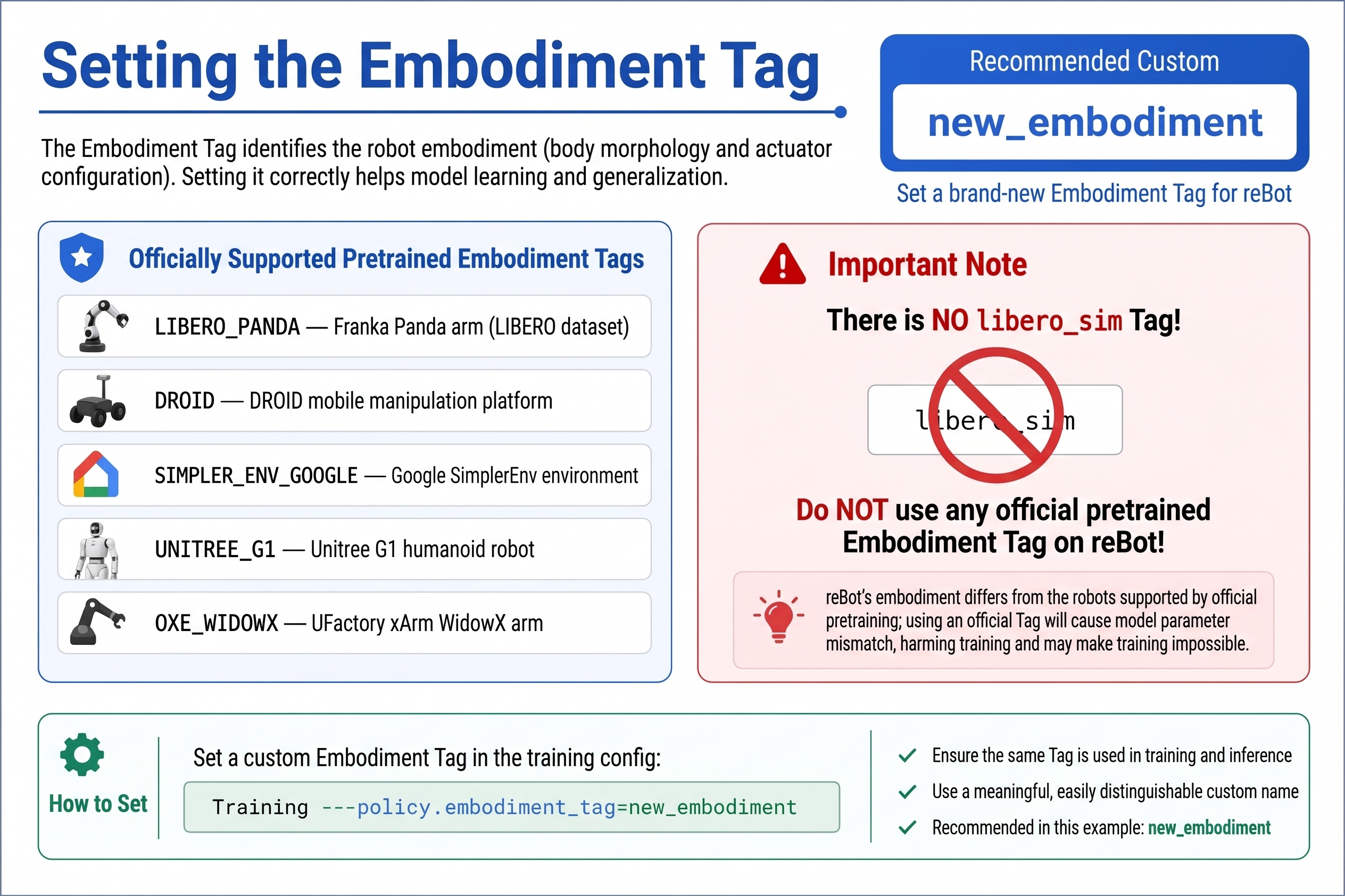
For custom robots like the reBot Arm, use the same setting for both training and inference:
embodiment_tag = new_embodiment
Meaning:
- Tells GR00T to use the new-embodiment projection layer, not reusing the pretrained humanoid state/action dimensions.
- LeRobot training parameter:
--policy.embodiment_tag=new_embodiment. - The fine-tuned checkpoint saves the corresponding modality config, which is automatically loaded at inference time.
Do not use pretraining tags such as LIBERO_PANDA, DROID, SIMPLER_ENV_GOOGLE on reBot data — their state/action dimensions and semantics do not match reBot. There is also no official tag called libero_sim.
20.8 Checking Joint Order and Data Dimensions
20.8 Checking Joint Order and Data Dimensions
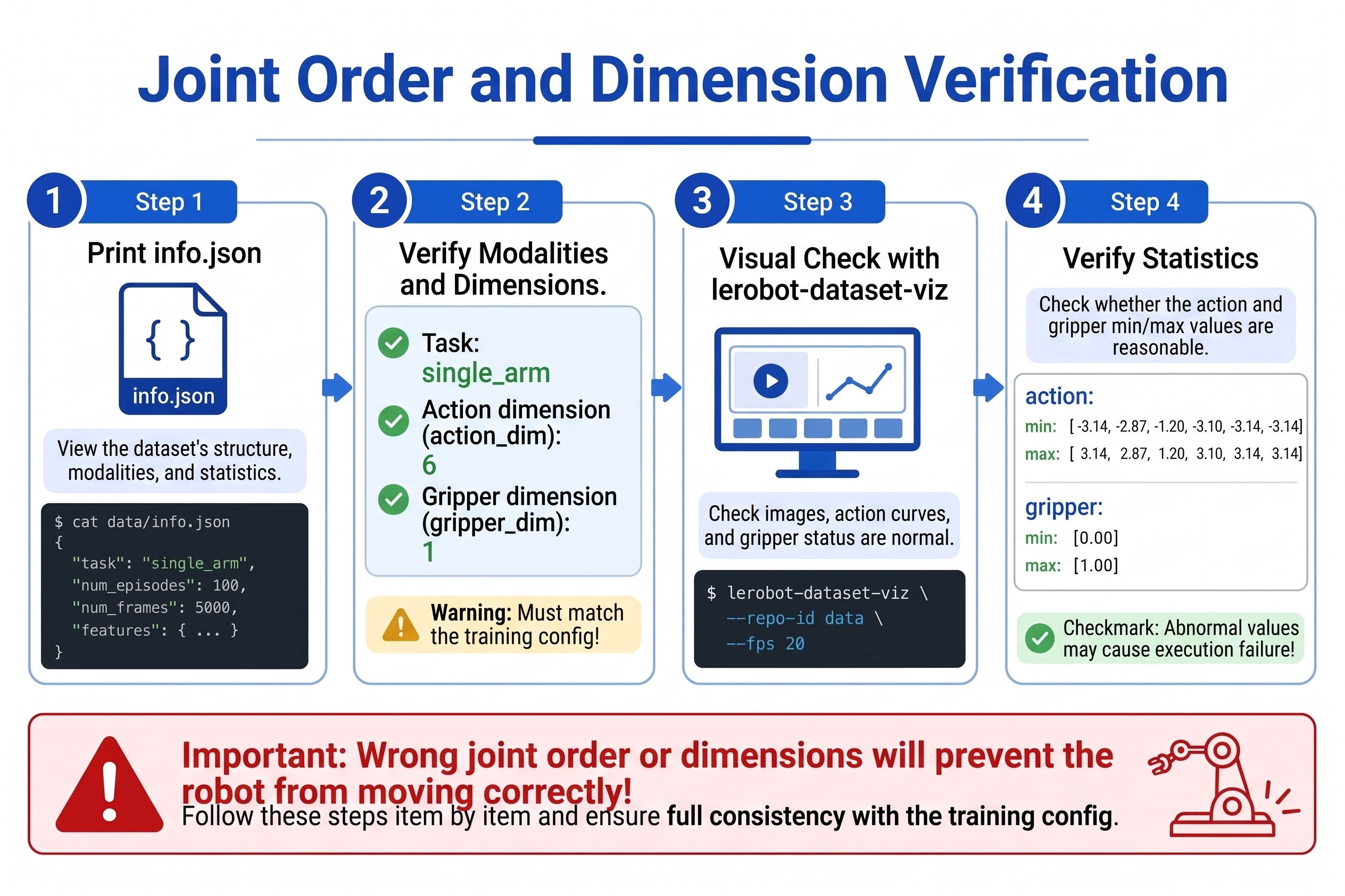
This is the most common cause of "training loss decreases but the real robot does not move at all." Please verify item by item:
Step 1: Print dataset meta
import json
from pathlib import Path

meta_dir = Path.home() / ".cache/huggingface/lerobot/seeed_rebot_b601_rs/pick_cube/meta"
print(json.dumps(json.loads((meta_dir / "info.json").read_text()), indent=2))
print((meta_dir / "modality.json").read_text())
Step 2: Verify modality slicing
import numpy as np
from lerobot.datasets.lerobot_dataset import LeRobotDataset

ds = LeRobotDataset("seeed_rebot_b601_rs/pick_cube")
s = ds[0]["observation.state"].numpy()
mod = json.loads((meta_dir / "modality.json").read_text())

arm = s[mod["state"]["single_arm"]["start"]:mod["state"]["single_arm"]["end"]]
grip = s[mod["state"]["gripper"]["start"]:mod["state"]["gripper"]["end"]]
print("single_arm:", arm.shape)  # expect (6,)
print("gripper:", grip.shape)    # expect (1,)
Step 3: Visualize the data
lerobot-dataset-viz --repo_id=seeed_rebot_b601_rs/pick_cube --episode-index=0
Observe:
- Are images synchronized with joint motion?
- Does the
gripperdimension change when the gripper opens/closes? - Does the language description match the visual content?
Step 4: Statistical checks
print(ds.meta.stats["observation.state"])
print(ds.meta.stats["action"])
If some dimension has min == max (no variation), that joint did not move in the data; consider excluding it from training or recollecting.
20.9 Multi-task Dataset Organization
20.9 Multi-task Dataset Organization
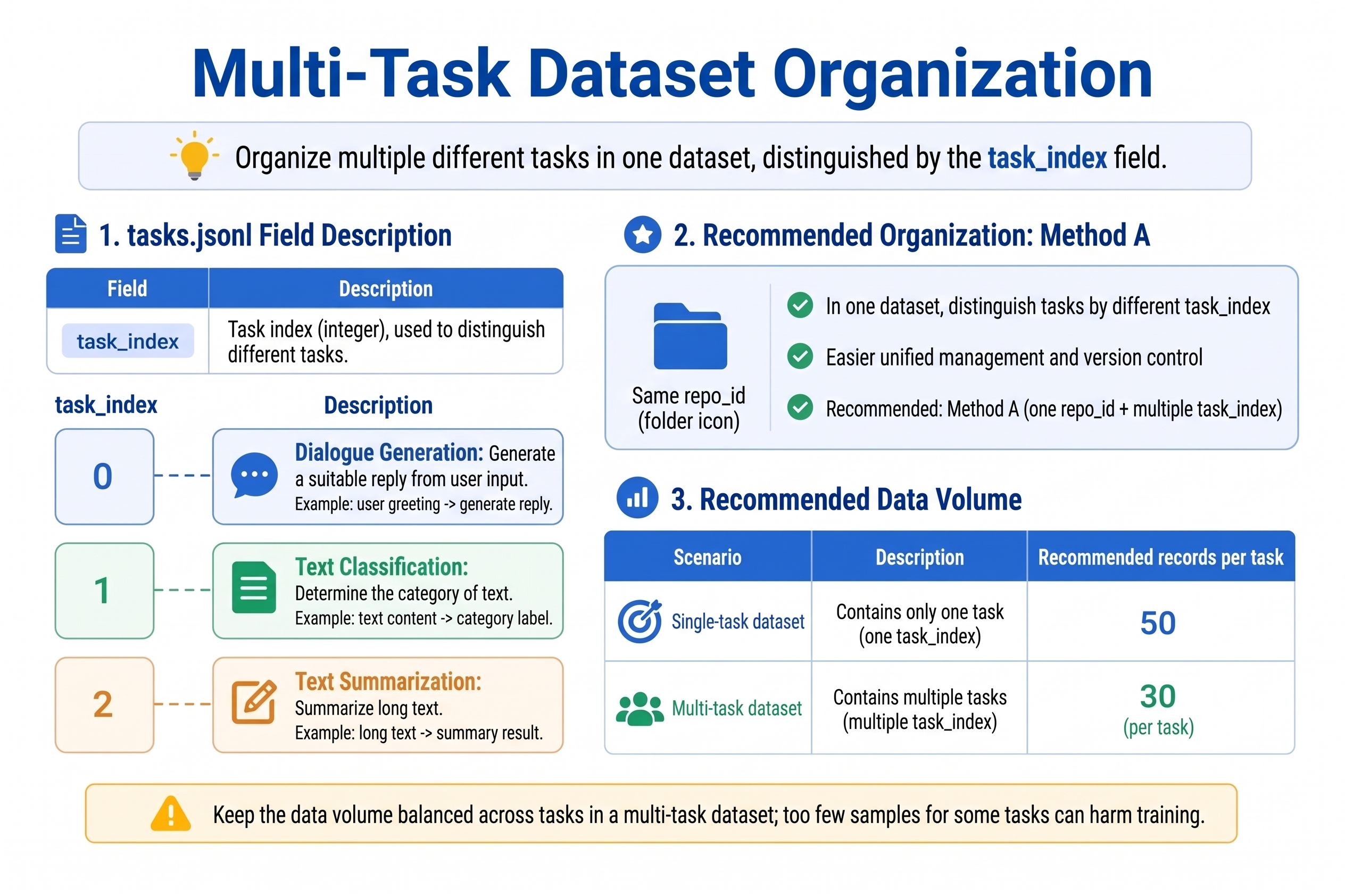
To train "one model, multiple language tasks", two approaches are recommended:
Method A: Same repo_id, multiple task_index (recommended)
{"task_index": 0, "task": "put the black cube on the blue tray"}
{"task_index": 1, "task": "put the screwdriver into the toolbox"}
{"task_index": 2, "task": "push the red cup to the left side of the table"}
Cycle through --dataset.single_task while recording, or record in batches and merge into the same dataset.
Method B: Merging multiple datasets
LeRobot supports multi-dataset training (depending on version); the simpler approach is to use one repo_id during recording and distinguish tasks by task_index.
Data Volume Recommendations
| Scenario | Recommendation |
|---|---|
| Single-task starter | 50 episodes |
| Single-task stable | 100-200 episodes |
| Multi-task (3 tasks) | ≥ 30 episodes each |
| Position generalization | ≥ 10 episodes per position variant |
20.10 Data Quality Checklist
20.10 Data Quality Checklist
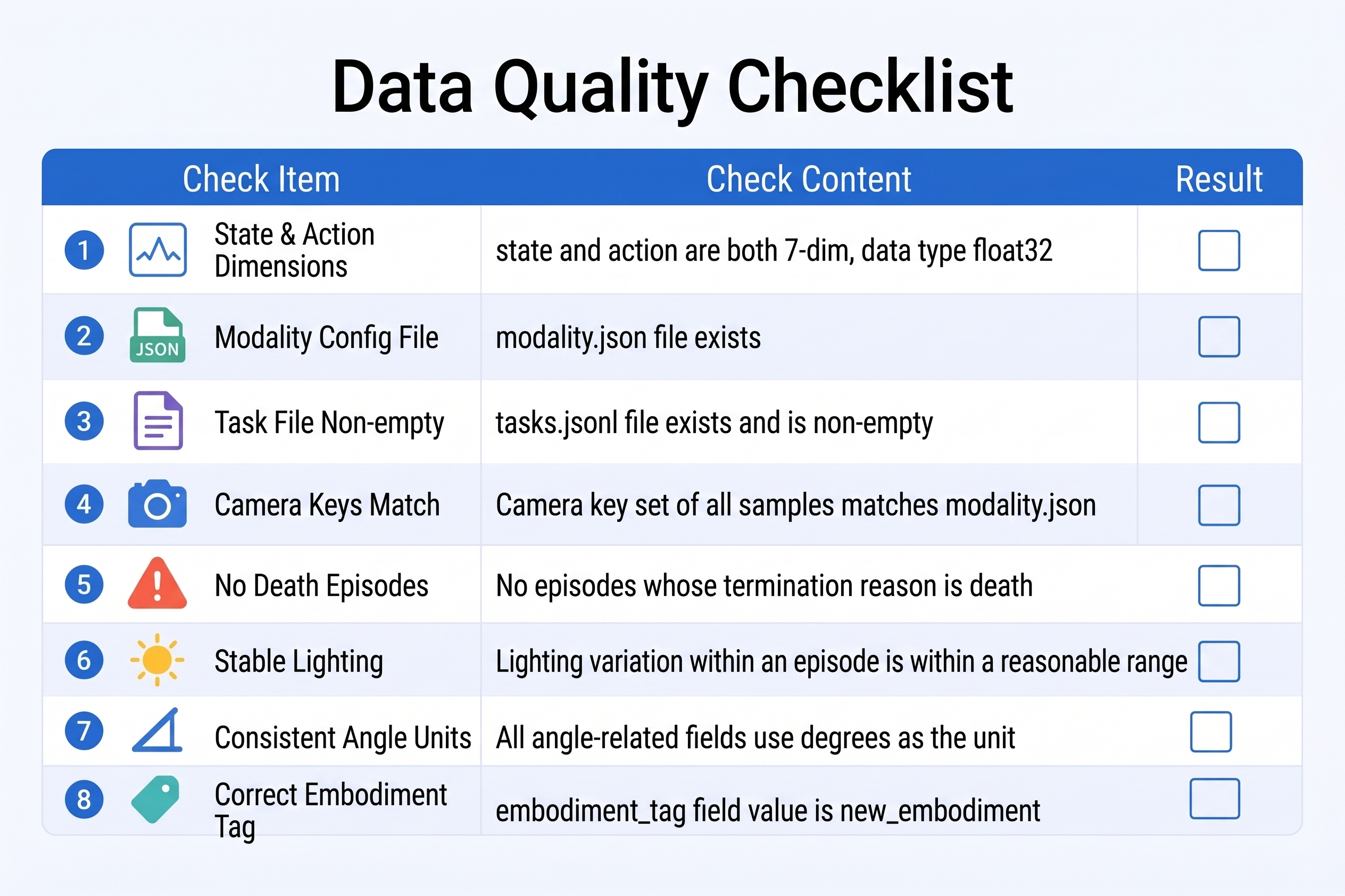
Before uploading to Hub or starting training, confirm:
-
observation.stateandactionare both 7-dimensional float32 -
meta/modality.jsonexists and index slicing is correct - Every
task_indexinmeta/tasks.jsonlhas a non-empty description - Camera key names match between
modality.jsonand the dataset - No all-zero / idle waste episodes
- Cameras fixed, objects in view, stable lighting
- Angle units unified (the reBot low-level motor API uses degrees; the LeRobot driver internally converts to radians; the dataset and training/inference must stay consistent)
- Plan to use
new_embodimentforembodiment_tag
Push to Hugging Face Hub (optional)
huggingface-cli login
lerobot-record ... --dataset.push_to_hub=true
# or upload manually
huggingface-cli upload ${HF_USER}/rebot_vla_pick_cube ~/.cache/huggingface/lerobot/seeed_rebot_b601_rs/pick_cube
20.11 Chapter Summary
20.11 Chapter Summary
- GR00T needs standard LeRobot data +
meta/modality.json. - reBot's 7-dimensional vector is split into
single_arm(6) +gripper(1); RS / DM have the same dimensions, only driver parameters differ. - Language is connected via
tasks.jsonl+annotation.human.task_description. - Camera key names must align across recording, modality, and inference.
- The next chapter uses the prepared data to start
lerobot-train --policy.type=groot.