21. Fine-tuning the reBot Arm with Isaac GR00T
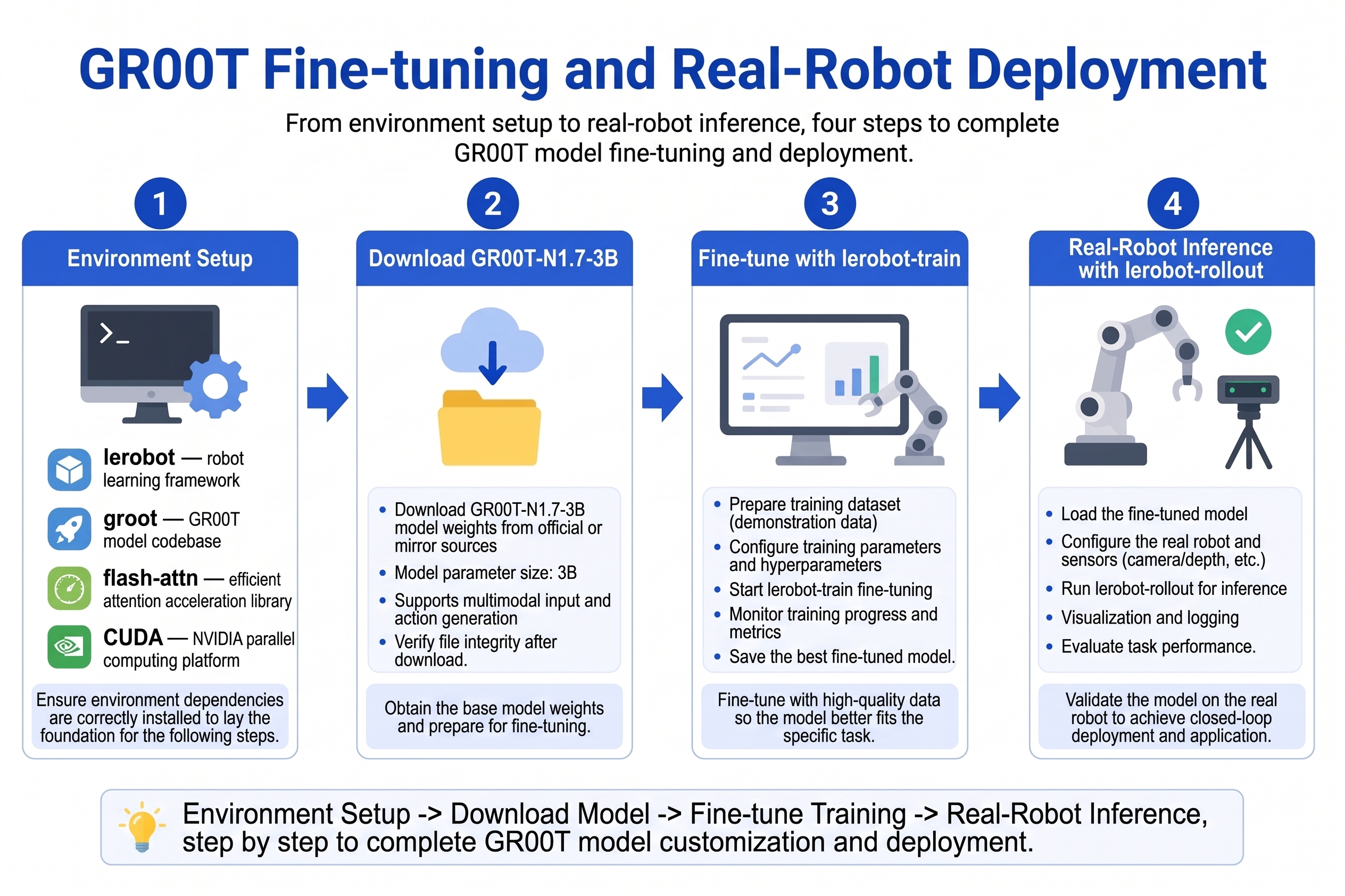
Chapter 21 of the Seeed Physical AI Beginner's Course — environment setup, downloading the foundation model, dataset path, single-GPU and multi-GPU fine-tuning, monitoring VRAM and loss, saving checkpoints, real-robot inference, troubleshooting, and training tips.
This chapter is based on LeRobot + GR00T N1.7 (nvidia/GR00T-N1.7-3B). Please ensure the dataset from Chapter 20 is ready.
21.1 Environment Setup
21.1 Environment Setup
Recommended Hardware
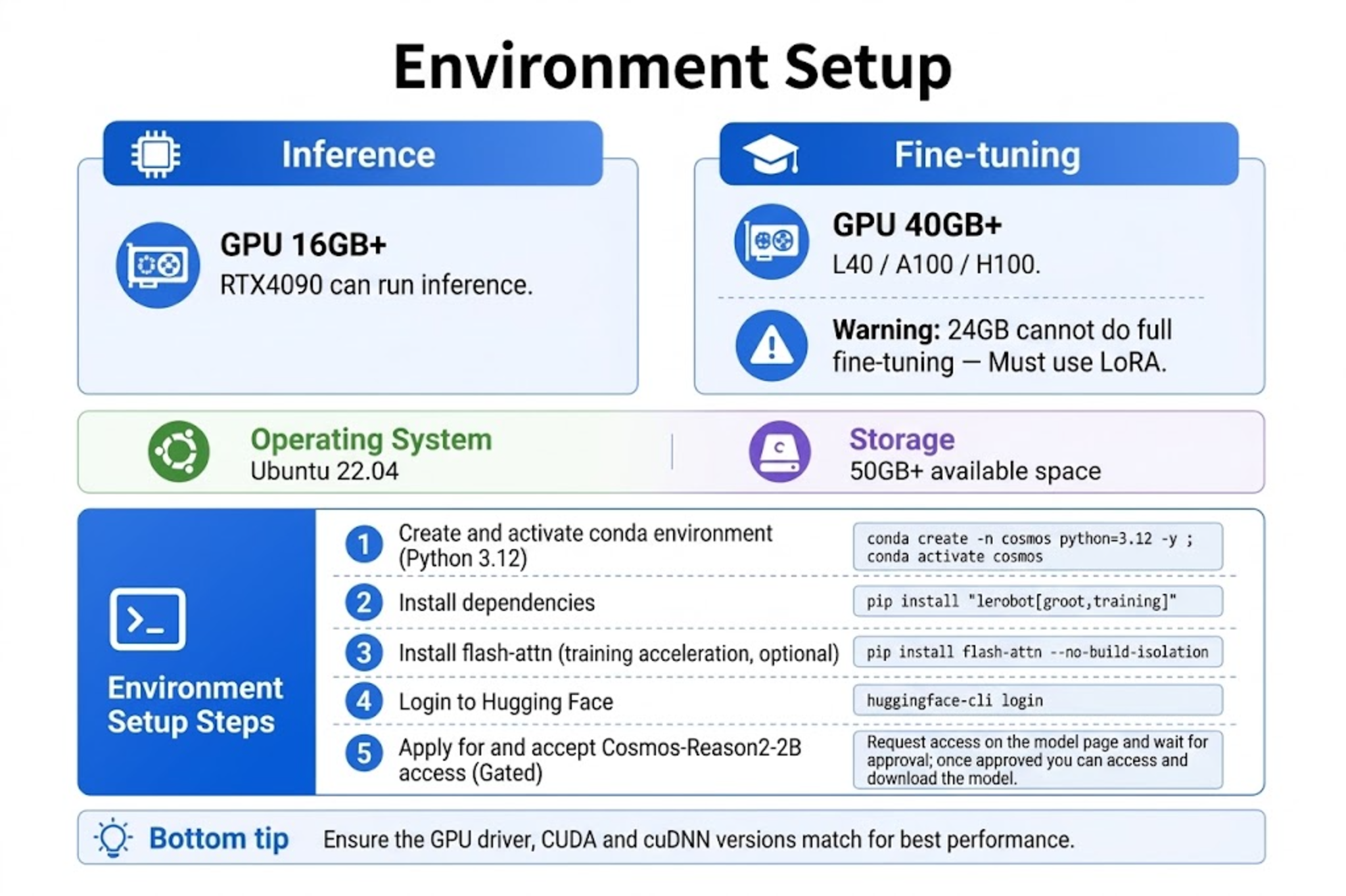
| Configuration | Inference minimum | Fine-tuning recommended |
|---|---|---|
| GPU | 16 GB+ (RTX 4090 can run inference) | 40 GB+ (L40 / A100 80GB / H100); official simulation fine-tuning requires ≥ 48 GB |
| System | Linux (Ubuntu 22.04+) | Native Linux or WSL2 |
| Storage | 50 GB free space | 100 GB+ (including model cache) |
GR00T requires a CUDA GPU; CPU-only training is not supported. Default fine-tuning (projector + DiT head) peaks at about 35 GB. RTX 4090 / 24 GB cannot do full fine-tuning and is only suitable for inference; if you must train on 24 GB, use LoRA / PEFT (pip install "lerobot[peft]"), whose results are not directly comparable to official full fine-tuning.
Installing LeRobot and GR00T Dependencies
After creating a Python 3.12 environment per the LeRobot installation documentation:
conda create -y -n lerobot python=3.12
conda activate lerobot

# Install ffmpeg (video decoding, Linux + TorchCodec)
conda install ffmpeg -c conda-forge

# Install LeRobot + GR00T + training tools
pip install "lerobot[groot,training]"
Flash Attention (Important)
GR00T N1.7 relies on Flash Attention for acceleration. It is recommended to install PyTorch matching your CUDA first, then install flash-attn:
# Example: CUDA 12.8 + PyTorch 2.7 (RTX 50 series can reference this combo)
pip install torch torchvision --index-url https://download.pytorch.org/whl/cu128

pip install ninja "packaging>=24.2,<26.0"
pip install "flash-attn>=2.5.9,<3.0.0" --no-build-isolation

python -c "import flash_attn; print(f'Flash Attention {flash_attn.__version__} OK')"
If flash-attn compilation fails, common causes:
- PyTorch and CUDA versions mismatch -> reinstall the matching wheel.
- Missing build tools ->
sudo apt install build-essential. - Insufficient VRAM/memory -> close other GPU processes and retry.
Logging in to Hugging Face and W&B
huggingface-cli login
wandb login   # optional, for training curve visualization
21.2 Downloading the Foundation Model
21.2 Downloading the Foundation Model
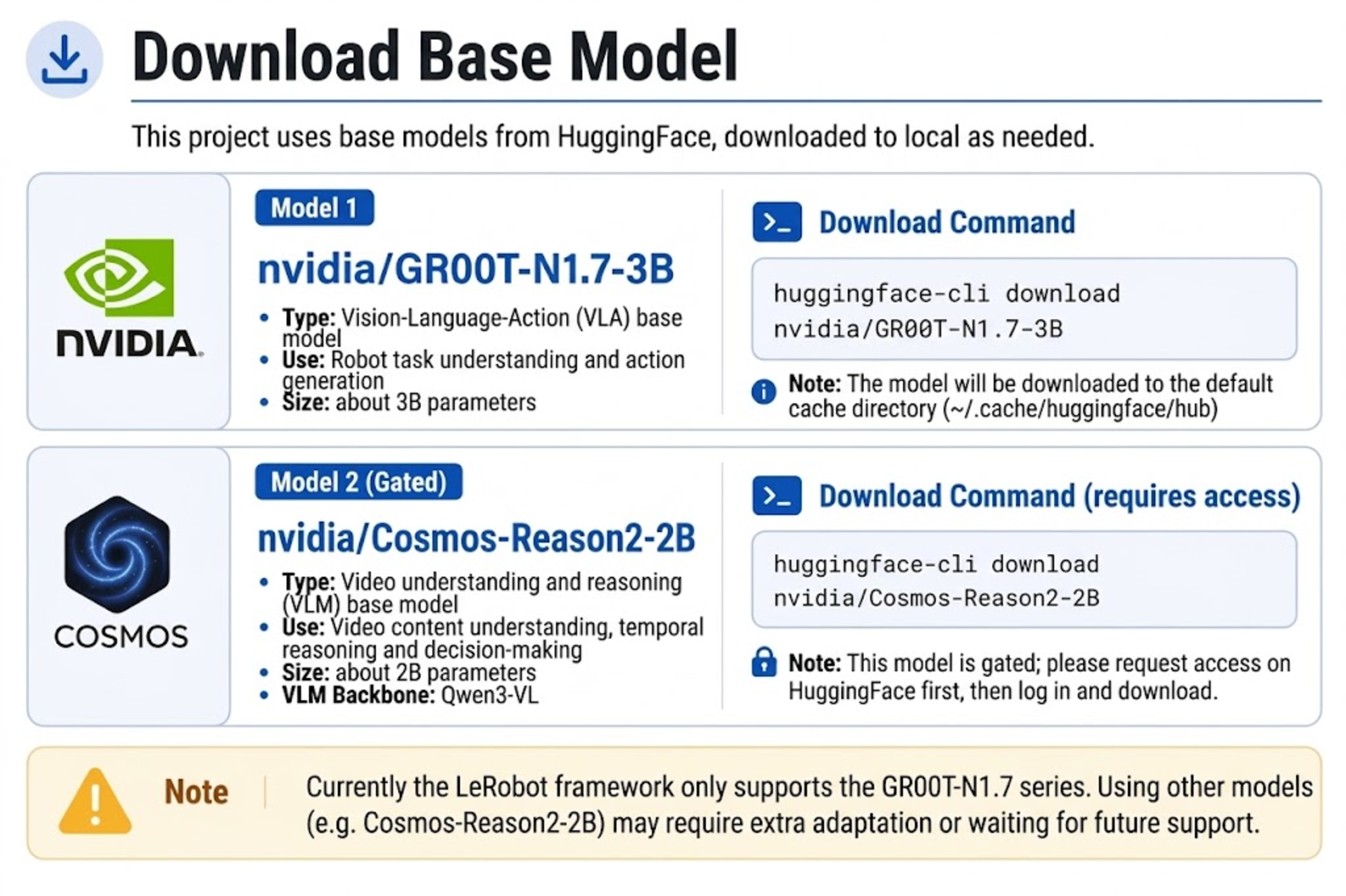
The foundation model is hosted on Hugging Face:
nvidia/GR00T-N1.7-3B
On first training, LeRobot automatically downloads it to ~/.cache/huggingface/hub/. N1.7's VLM backbone nvidia/Cosmos-Reason2-2B is a gated model; you must accept the terms on Hugging Face before huggingface-cli login. You can also pre-download manually:
huggingface-cli download nvidia/GR00T-N1.7-3B --local-dir ./models/GR00T-N1.7-3B
huggingface-cli download nvidia/Cosmos-Reason2-2B
Specify in training arguments:
--policy.base_model_path=nvidia/GR00T-N1.7-3B
The current LeRobot only supports GR00T N1.7. N1.5 requires pinning the old version lerobot==0.5.1, which is not covered in this tutorial.
21.3 Configuring the Dataset Path
21.3 Configuring the Dataset Path
Local Dataset
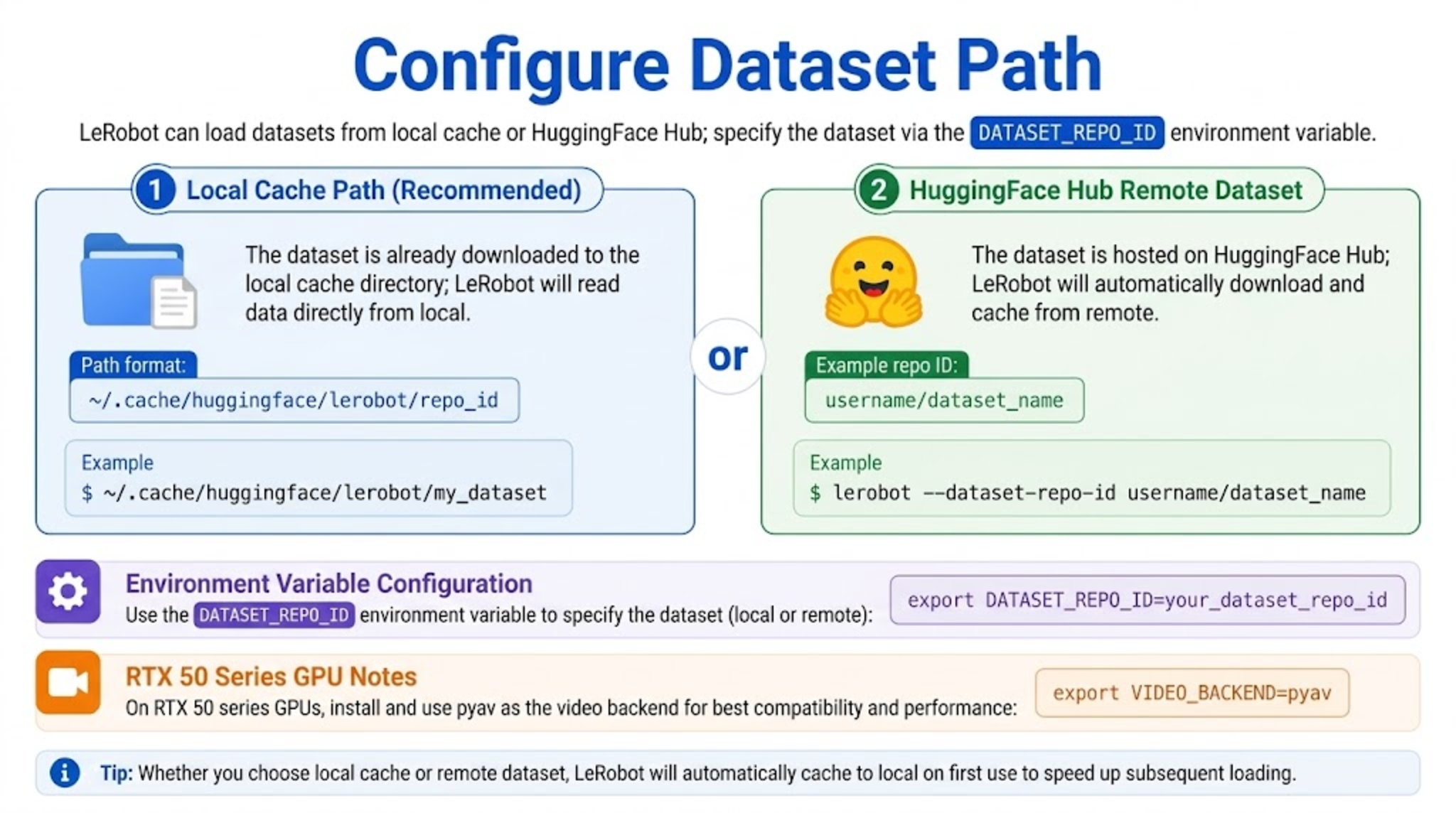
If the data is in the local cache (not uploaded to Hub), repo_id must match the one used during recording:
export DATASET_REPO_ID="seeed_rebot_b601_rs/pick_cube" # for DM: seeed_rebot_b601_dm/pick_cube
LeRobot automatically loads from ~/.cache/huggingface/lerobot/.
Hub Dataset
export HF_USER="your_hf_username"
export DATASET_REPO_ID="${HF_USER}/rebot_vla_pick_cube"
Ensure the dataset on Hub includes meta/modality.json (created in Chapter 20).
21.4 Starting Single-GPU Fine-tuning
21.4 Starting Single-GPU Fine-tuning
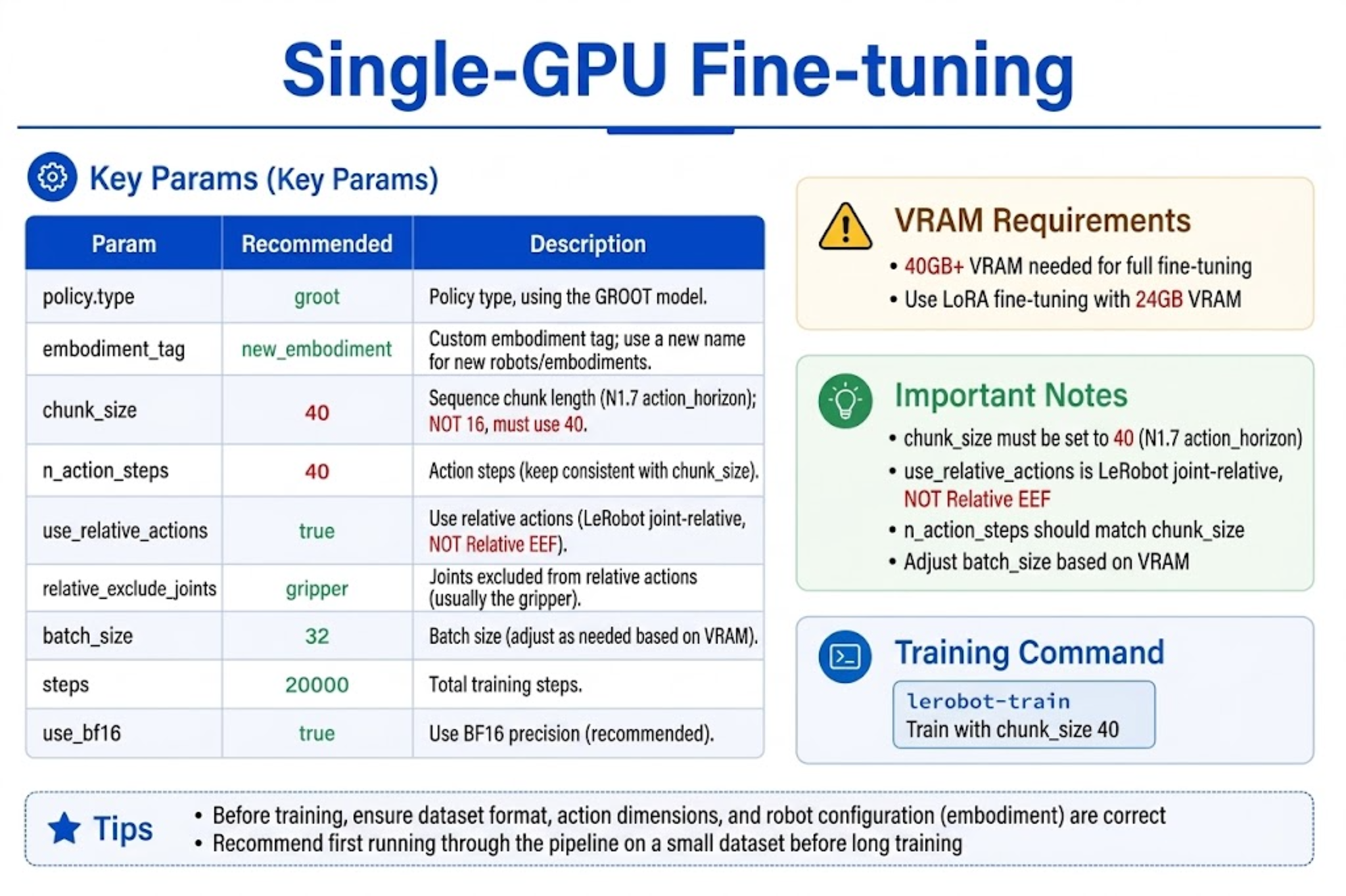
The following command targets the reBot Arm single arm, new_embodiment (replace the dataset repo_id for RS/DM). chunk_size=40 aligns with the official N1.7 action_horizon; the LeRobot groot source defaults to 50, both far larger than N1.5/N1.6's 16 — do not use 16.
export HF_USER="your_hf_username"
export DATASET_REPO_ID="seeed_rebot_b601_rs/pick_cube"   # local or Hub; for DM use b601_dm
export REPO_ID="${HF_USER}/rebot_groot17_pick_cube"      # uploaded model name after fine-tuning
export OUTPUT_DIR="outputs/train/${REPO_ID}"

lerobot-train \
  --dataset.repo_id=${DATASET_REPO_ID} \
  --dataset.image_transforms.enable=true \
  --policy.type=groot \
  --policy.device=cuda \
  --policy.base_model_path=nvidia/GR00T-N1.7-3B \
  --policy.embodiment_tag=new_embodiment \
  --policy.chunk_size=40 \
  --policy.n_action_steps=40 \
  --policy.use_relative_actions=true \
  --policy.relative_exclude_joints='["gripper"]' \
  --policy.use_bf16=true \
  --policy.push_to_hub=true \
  --policy.repo_id=${REPO_ID} \
  --seed=42 \
  --batch_size=32 \
  --steps=20000 \
  --save_checkpoint=true \
  --save_freq=5000 \
  --use_policy_training_preset=true \
  --env_eval_freq=0 \
  --eval_steps=0 \
  --log_freq=10 \
  --output_dir=${OUTPUT_DIR} \
  --job_name=rebot_groot_finetune \
  --wandb.enable=true \
  --wandb.disable_artifact=true
Key Parameters
| Parameter | Value | Description |
|---|---|---|
--policy.type | groot | Use the GR00T policy |
--policy.embodiment_tag | new_embodiment | reBot custom embodiment |
--policy.chunk_size | 40 | Align with N1.7 action_horizon=40 (do not use 16) |
--policy.n_action_steps | 40 | Usually matches chunk during training; can be reduced at inference |
--policy.use_relative_actions | true | LeRobot joint-relative preprocessing, not Relative EEF |
--policy.relative_exclude_joints | ["gripper"] | Keep the gripper in absolute control |
--policy.use_bf16 | true | Mixed precision, saves VRAM |
--batch_size | 32 (adjustable) | 32 on a 40 GB card; drop to 8 or 16 if OOM |
--steps | 20000 | Fine-tuning steps; can reduce to 10000 with little data |
--save_freq | 5000 | Save a checkpoint every 5000 steps |
To save locally only without uploading to Hub:
--policy.push_to_hub=false
21.5 Starting Multi-GPU Fine-tuning
21.5 Starting Multi-GPU Fine-tuning
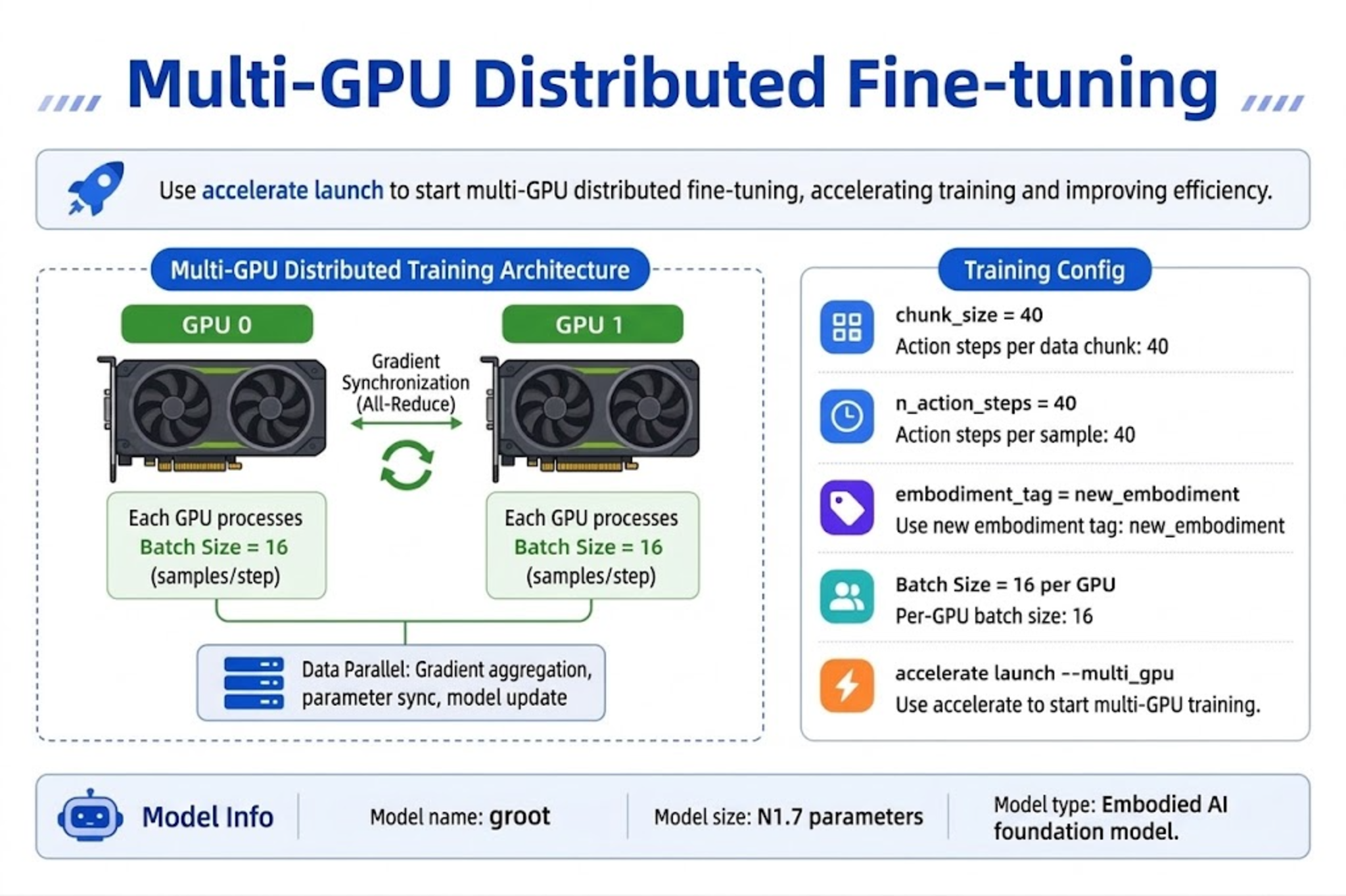
For multi-GPU environments, use accelerate:
export NUM_GPUS=2
export BATCH_SIZE=16        # per-GPU batch; total batch = 16 x num GPUs
export NUM_STEPS=20000
export SAVE_FREQ=5000
export LOG_FREQ=10
export DATASET_REPO_ID="seeed_rebot_b601_rs/pick_cube"
export REPO_ID="${HF_USER}/rebot_groot17_pick_cube"
export OUTPUT_DIR="outputs/train/${REPO_ID}"

accelerate launch \
  --multi_gpu \
  --num_processes=${NUM_GPUS} \
  $(which lerobot-train) \
  --dataset.repo_id=${DATASET_REPO_ID} \
  --dataset.image_transforms.enable=true \
  --policy.type=groot \
  --policy.device=cuda \
  --policy.base_model_path=nvidia/GR00T-N1.7-3B \
  --policy.embodiment_tag=new_embodiment \
  --policy.chunk_size=40 \
  --policy.n_action_steps=40 \
  --policy.use_relative_actions=true \
  --policy.relative_exclude_joints='["gripper"]' \
  --policy.use_bf16=true \
  --policy.push_to_hub=true \
  --policy.repo_id=${REPO_ID} \
  --output_dir=${OUTPUT_DIR} \
  --save_checkpoint=true \
  --batch_size=${BATCH_SIZE} \
  --steps=${NUM_STEPS} \
  --save_freq=${SAVE_FREQ} \
  --log_freq=${LOG_FREQ} \
  --use_policy_training_preset=true \
  --wandb.enable=true \
  --wandb.disable_artifact=true \
  --job_name=rebot_groot_multi_gpu
21.6 Monitoring VRAM, Loss, and Training Logs
21.6 Monitoring VRAM, Loss, and Training Logs
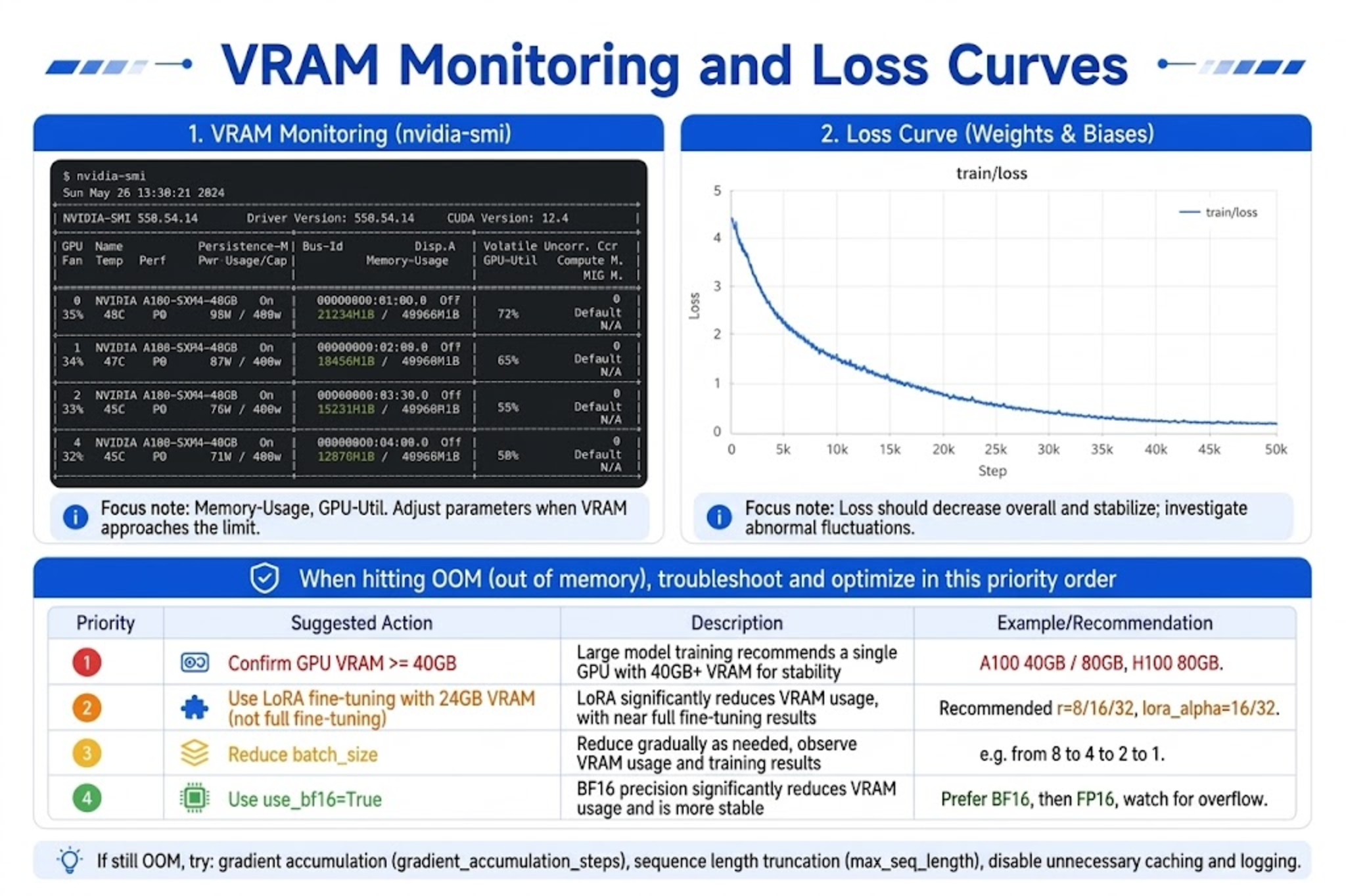
VRAM Monitor
In a separate terminal:
watch -n 1 nvidia-smi
| Symptom | Action |
|---|---|
| OOM (out of memory) | First confirm GPU ≥ 40 GB; then lower --batch_size and keep --policy.use_bf16=true. On 24 GB, use LoRA/PEFT rather than forcing a smaller batch for full fine-tuning |
| VRAM headroom available | Increase batch_size appropriately to speed up training |
| Low utilization | Check num_workers; confirm data is on a local SSD |
Loss Curve
After enabling W&B, watch the train/loss decreasing trend on the web. Healthy fine-tuning:
- Loss drops quickly in the first 1000 steps.
- Plateau after 5000 steps.
- If loss does not decrease: check
modality.json, data dimensions, and language annotations.
Local Logs
tail -f ${OUTPUT_DIR}/logs/*.log
Or view the W&B offline/online dashboard.
21.7 Saving Checkpoints
21.7 Saving Checkpoints
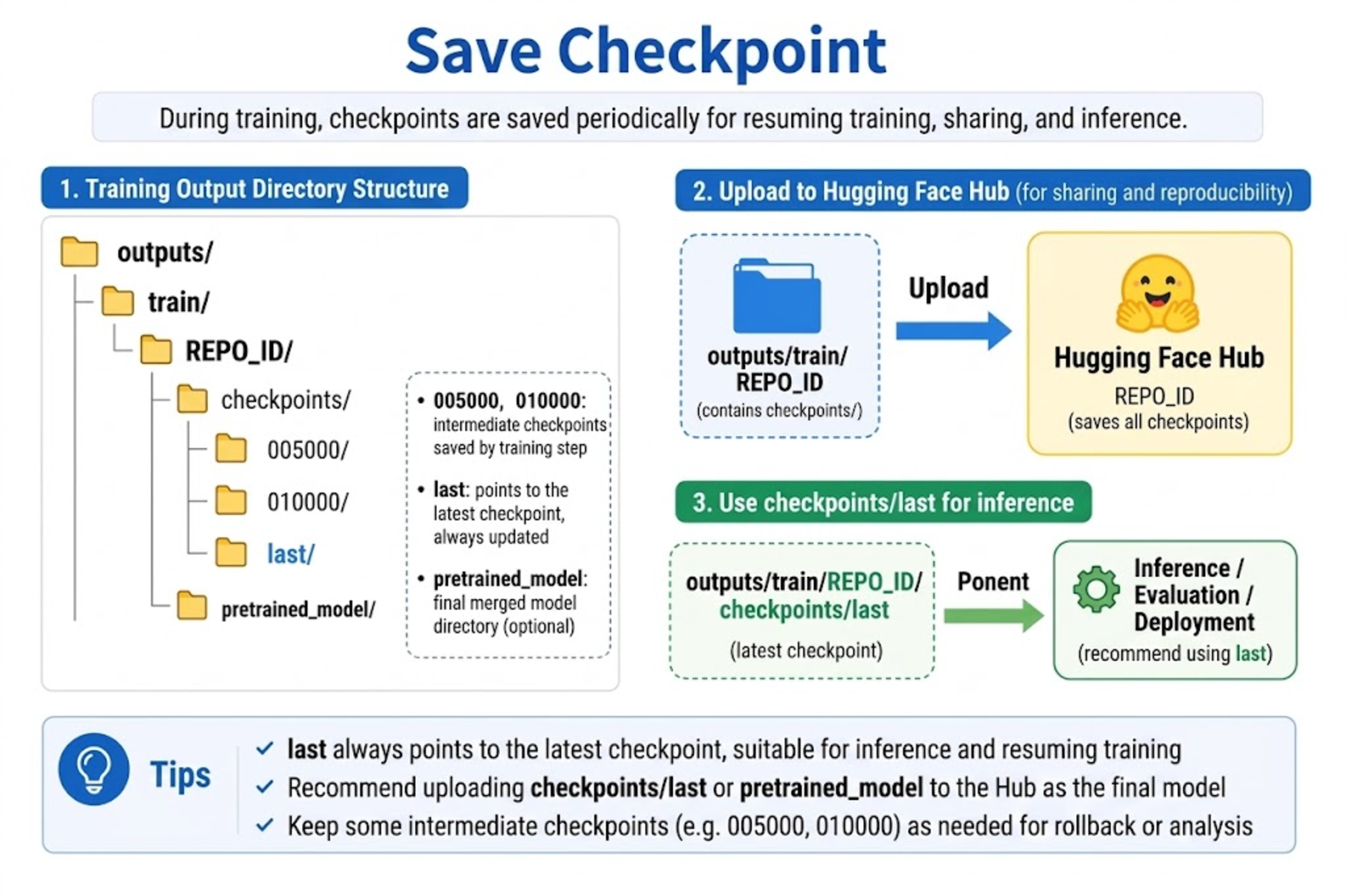
During training, checkpoints are saved to:
outputs/train/<REPO_ID>/
├── checkpoints/
│   ├── 005000/
│   │   └── pretrained_model/
│   ├── 010000/
│   ├── 015000/
│   ├── 020000/
│   └── last/
│       └── pretrained_model/    ← latest weights, use this for inference
└── logs/
Inference with a specific checkpoint
--policy.path=outputs/train/${REPO_ID}/checkpoints/010000/pretrained_model
Uploading to Hub
If --policy.push_to_hub=true, upload happens automatically at the end of training. Manual upload:
huggingface-cli upload ${REPO_ID} \
  outputs/train/${REPO_ID}/checkpoints/last/pretrained_model
21.8 Real-robot Inference and Evaluation
21.8 Real-robot Inference and Evaluation
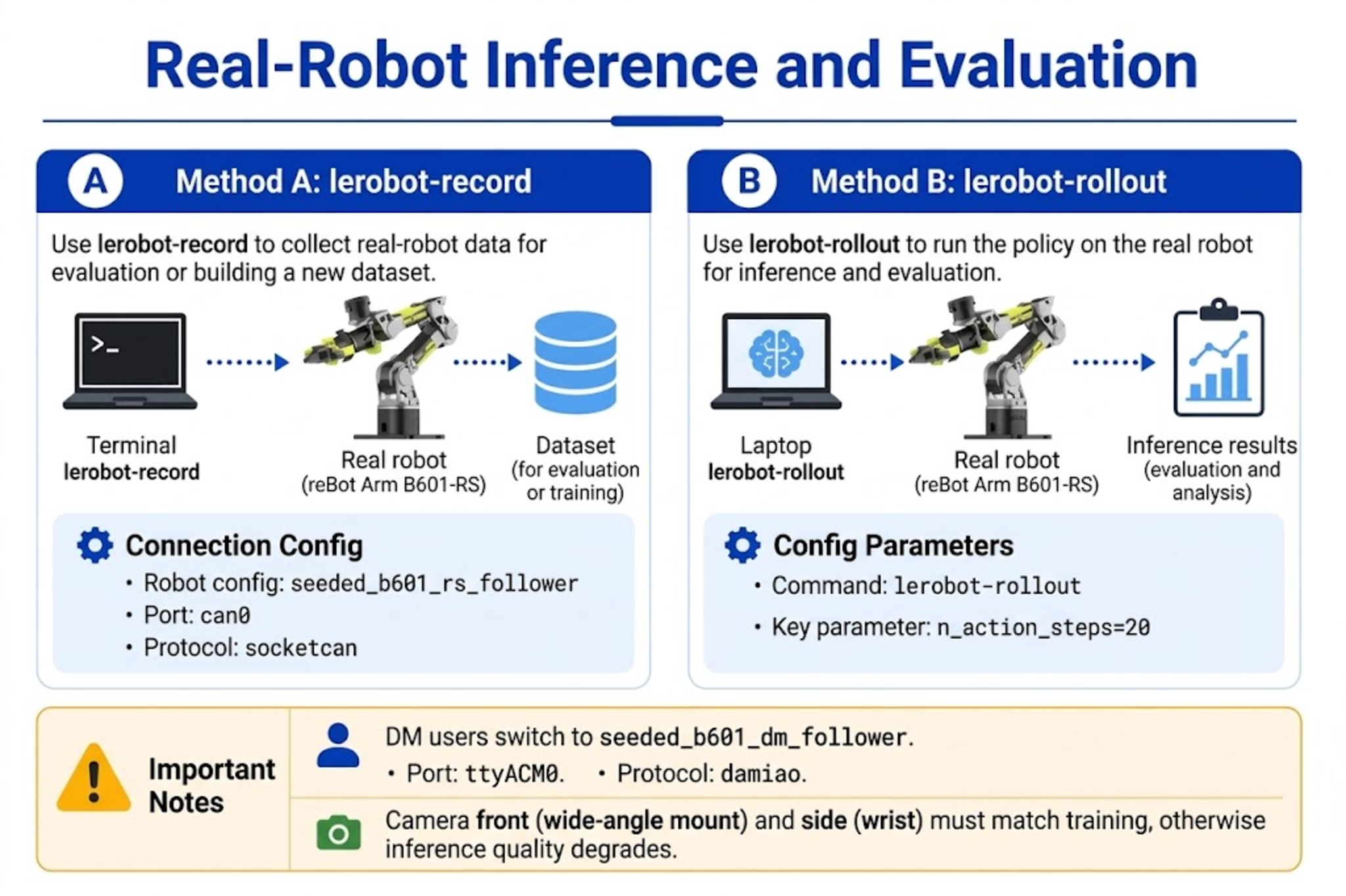
Method A: lerobot-record with policy recording (recommended for beginners)
Same as the ACT evaluation flow, just swap in the GR00T checkpoint. Below uses B601-RS as an example; DM replaces type / port / can_adapter.
export HF_USER="your_hf_username"
export MODEL_PATH="${HF_USER}/rebot_groot17_pick_cube"   # Hub or local path

# RS CAN
sudo ip link set can0 down 2>/dev/null
sudo ip link set can0 type can bitrate 1000000
sudo ip link set can0 up

lerobot-record \
  --robot.type=seeed_b601_rs_follower \
  --robot.port=can0 \
  --robot.id=follower1 \
  --robot.can_adapter=socketcan \
  --robot.cameras="{ front: {type: opencv, index_or_path: 0, width: 640, height: 480, fps: 30, fourcc: "MJPG"}, side: {type: opencv, index_or_path: 2, width: 640, height: 480, fps: 30, fourcc: "MJPG"}}" \
  --display_data=true \
  --dataset.repo_id=${HF_USER}/eval_groot_rebot \
  --dataset.num_episodes=10 \
  --dataset.single_task="put the black cube on the blue tray" \
  --dataset.episode_time_s=30 \
  --dataset.reset_time_s=15 \
  --policy.path=${MODEL_PATH} \
  --policy.base_model_path=nvidia/GR00T-N1.7-3B \
  --policy.embodiment_tag=new_embodiment
The front and side in --robot.cameras must match the training dataset key names.
Method B: lerobot-rollout real-time deployment (advanced)
Suitable for low-latency closed-loop control; supports RTC (Real-Time Chunking):
export MODEL_PATH="${HF_USER}/rebot_groot17_pick_cube"

lerobot-rollout \
  --strategy.type=base \
  --policy.path=${MODEL_PATH} \
  --policy.base_model_path=nvidia/GR00T-N1.7-3B \
  --policy.embodiment_tag=new_embodiment \
  --policy.chunk_size=40 \
  --policy.n_action_steps=20 \
  --policy.use_relative_actions=true \
  --policy.relative_exclude_joints='["gripper"]' \
  --robot.type=seeed_b601_rs_follower \
  --robot.port=can0 \
  --robot.id=follower1 \
  --robot.can_adapter=socketcan \
  --robot.cameras="{ front: {type: opencv, index_or_path: 0, width: 640, height: 480, fps: 30, fourcc: "MJPG"}, side: {type: opencv, index_or_path: 2, width: 640, height: 480, fps: 30, fourcc: "MJPG"}}" \
  --task="put the black cube on the blue tray" \
  --duration=60 \
  --device=cuda \
  --display_data=true \
  --inference.type=rtc \
  --inference.rtc.enabled=true \
  --inference.rtc.execution_horizon=20 \
  --inference.queue_threshold=2
If RTC causes jitter, set --inference.rtc.enabled=false. queue_threshold is recommended at 2-5 (setting it to 0 triggers re-inference too often and tends to jitter).
21.9 Troubleshooting FAQ
21.9 Troubleshooting FAQ
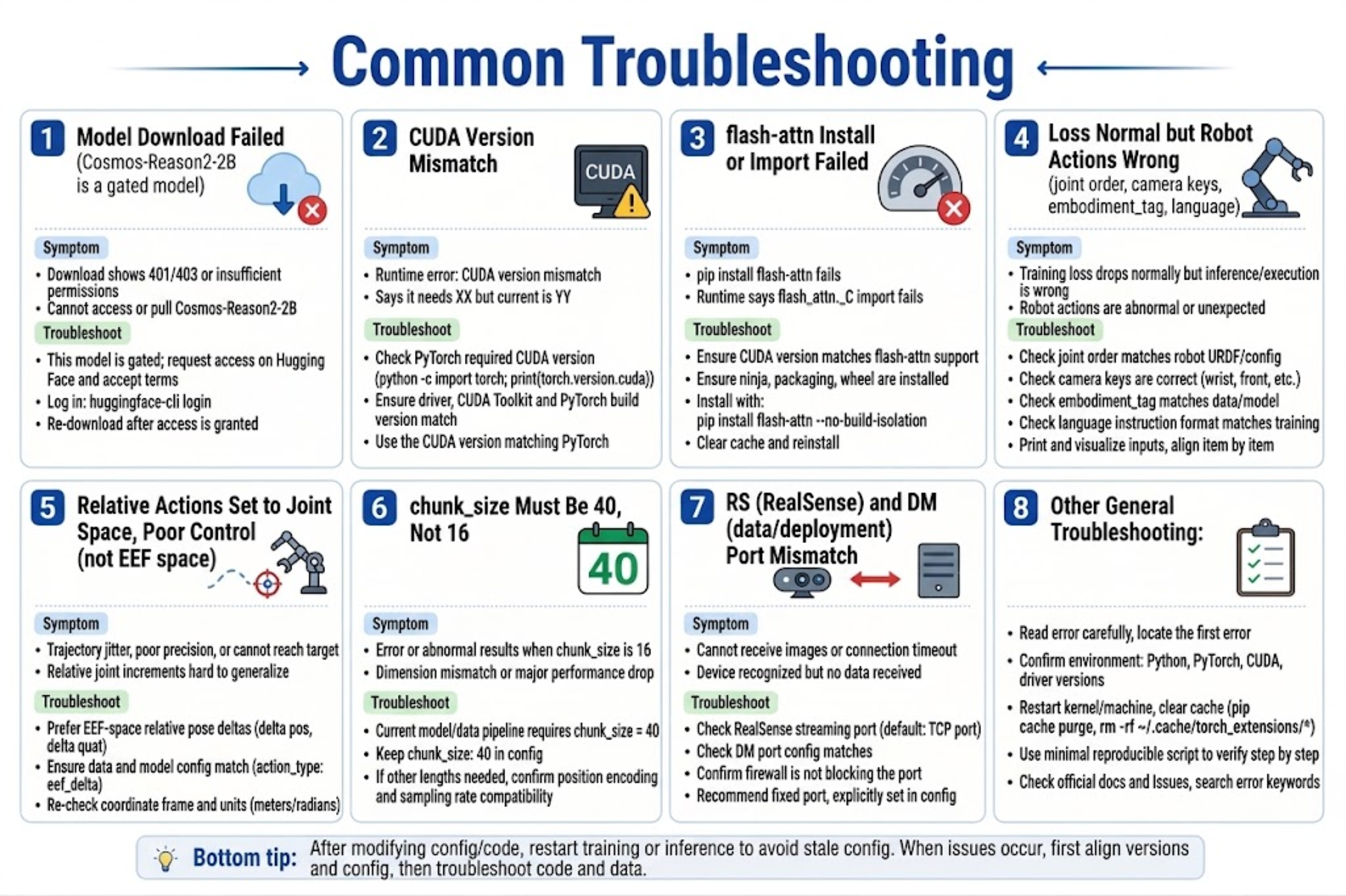
Model download failure
# Set mirror or proxy and retry
export HF_ENDPOINT=https://hf-mirror.com   # optional
huggingface-cli download nvidia/GR00T-N1.7-3B
huggingface-cli download nvidia/Cosmos-Reason2-2B   # gated; accept terms on HF first
CUDA / PyTorch version mismatch
python -c "import torch; print(torch.__version__, torch.cuda.is_available(), torch.version.cuda)"
nvidia-smi
Ensure the driver version meets PyTorch CUDA requirements.
Flash Attention installation failure
- Confirm
nvcc --versionmatches PyTorch CUDA. - Try a prebuilt wheel:
pip install flash-attn --no-build-isolation. - RTX 50 series can try:
pip install flash_attn==2.8.0.post2 torch==2.7.1 --no-build-isolation. - If still failing, consult the official Isaac GR00T documentation.
Training loss is normal but the real robot moves erratically
| Possible cause | Investigation |
|---|---|
| Inconsistent joint order | Compare dataset meta with --robot.cameras / driver |
| Wrong angle unit | Confirm deg/rad is consistent between training and inference |
| Camera key name mismatch | front/side aligned with training data |
| Wrong embodiment_tag | Must be new_embodiment |
| Language instruction mismatch | --task sentence pattern matches training data |
| Relative actions not correctly restored | Confirm use_relative_actions matches between training and inference; this is joint-relative, not Relative EEF |
mean is infinity error
Usually caused by camera key names at evaluation time not matching training. Check --robot.cameras key names.
21.10 Training Improvement Suggestions
21.10 Training Improvement Suggestions
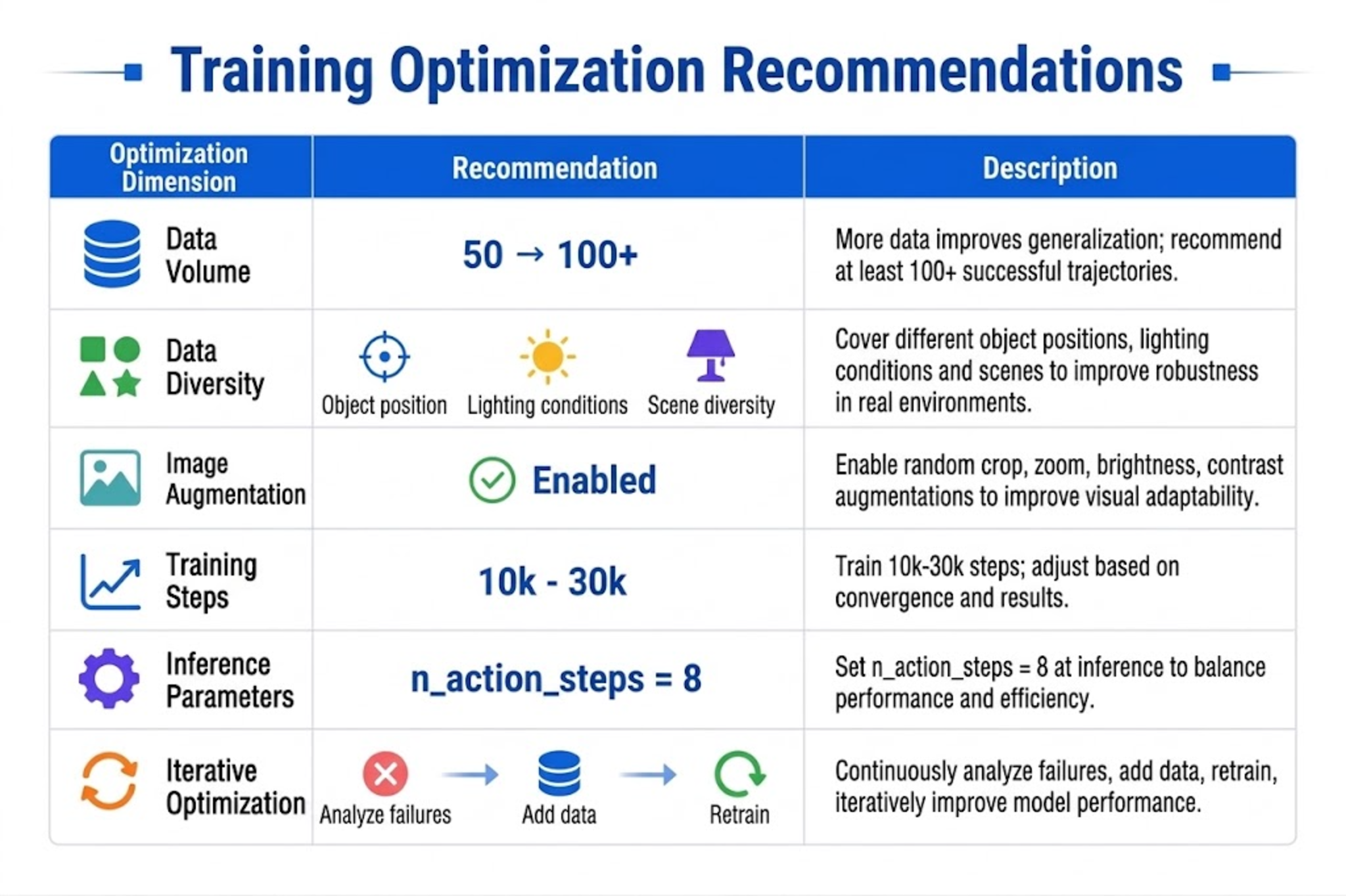
| Direction | Suggestion |
|---|---|
| Data volume | Start with 50 episodes for a single task, then expand to 100+ |
| Data diversity | Vary object positions, lighting, and initial poses |
| Augmentation | Keep --dataset.image_transforms.enable=true |
| Steps | 10k-15k with little data; 20k-30k with more data |
| Inference | First try n_action_steps=20 (must be ≤ training chunk_size=40), then tune RTC |
| Iteration | Collect data for failure cases -> merge datasets -> continue fine-tuning |
21.11 Chapter Summary
21.11 Chapter Summary
- Environment:
pip install "lerobot[groot,training]"+ Flash Attention + 40 GB+ GPU for fine-tuning (16 GB for inference only). - Foundation model:
nvidia/GR00T-N1.7-3B(backboneCosmos-Reason2-2B). - Training:
lerobot-train --policy.type=groot --policy.embodiment_tag=new_embodiment. - reBot key config: joint space + optional LeRobot joint-relative actions (gripper absolute) +
chunk_size=40(aligned with N1.7). - Model variant: RS uses
seeed_b601_rs_follower+can0+socketcan; DM usesseeed_b601_dm_follower+/dev/ttyACM0+damiao. - Evaluation:
lerobot-recordorlerobot-rollout; cameras and language must align with training. - Checkpoint is at
outputs/train/<REPO_ID>/checkpoints/last/pretrained_model.
After completing this chapter, you should be able to drive the VLA policy on the reBot Arm with natural language instructions. If results are unsatisfactory, first go back to Chapter 20 to check data quality, then increase demonstration count and iterate fine-tuning.