22. GR00T Inference and Real-Robot Deployment
Chapter 22 of the Seeed Physical AI Beginner's Course — the end-to-end loop, decoupling inference and control, single-machine vs distributed, camera/state/language inputs, action chunk output, latency, action buffering and RTC, safety limits, evaluation, and the stage project.
Chapter 21 covered fine-tuning and the basic real-robot commands; this chapter zooms in on inference deployment: how the inference side and control side are decoupled, how to choose between single-machine and distributed, how inputs/outputs are aligned, and latency, async buffering, safety limits, and task evaluation. Finally, the stage project "place the test tube into the left rack" runs through the entire pipeline.
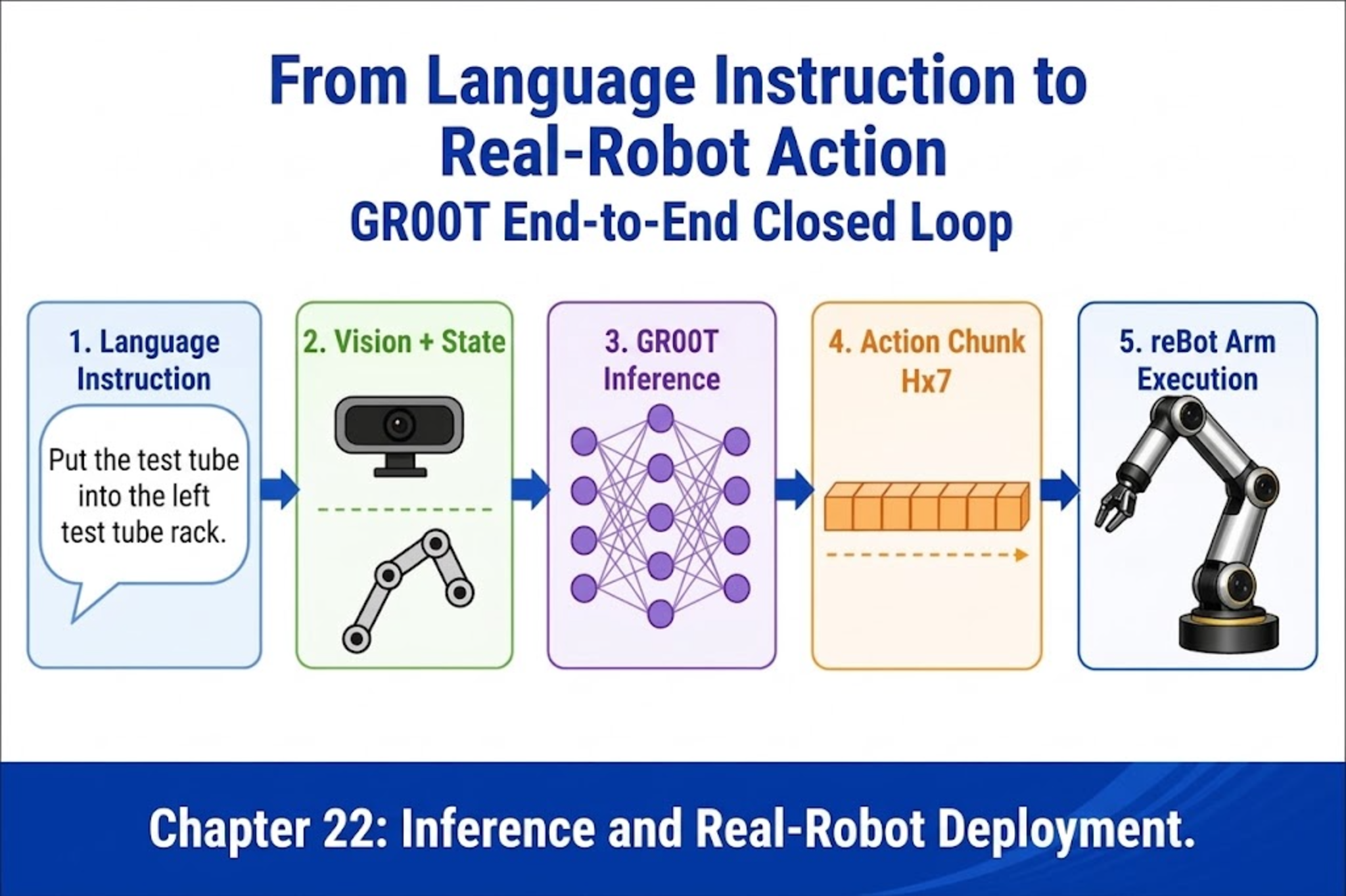
22.1 What Does the End-to-End Loop Look Like?
22.1 What Does the End-to-End Loop Look Like?
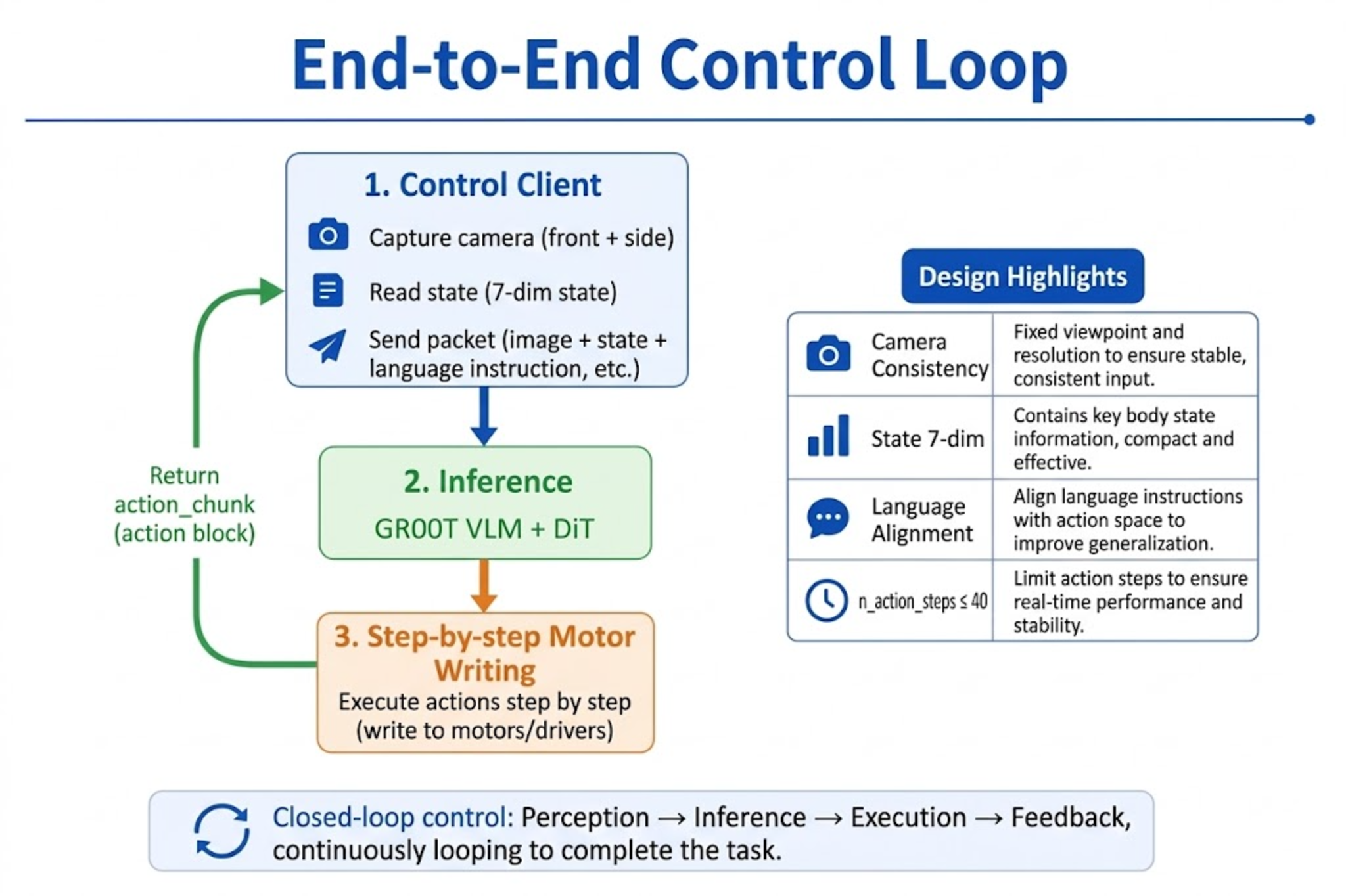
A successful VLA real-robot episode can be abstracted as a fixed-frequency control loop:
User language instruction L (e.g. place the test tube into the left rack)
        |
        v
+---------------------------------------+
|  Control Client (Robot Control)        |
|  1. Capture cameras: front + side      |
|  2. Read joint state (7-dim)          |
|  3. Pack observation -> send to infer |
+-------------------+-------------------+
                    |  images + state + task
                    v
+---------------------------------------+
|  Inference side (GR00T Policy/Server)|
|  VLM + DiT -> action_chunk (H x 7)    |
+-------------------+-------------------+
                    |  action chunk
                    v
+---------------------------------------+
|  Control side executes                |
|  Write motors step by n_action_steps  |
|  (optional RTC: async prefetch next)  |
+---------------------------------------+
| Stage | Key constraint |
|---|---|
| Camera | Key names, resolution, and count match training (front bracket wide view / side wrist) |
| State | 7-dim order matches modality.json; angle unit is consistent between training and inference |
| Language | --task sentence pattern close to training annotations |
| Action | n_action_steps ≤ training chunk_size (N1.7 commonly 40) |
22.2 Decoupling the Inference Side and Control Side
22.2 Decoupling the Inference Side and Control Side
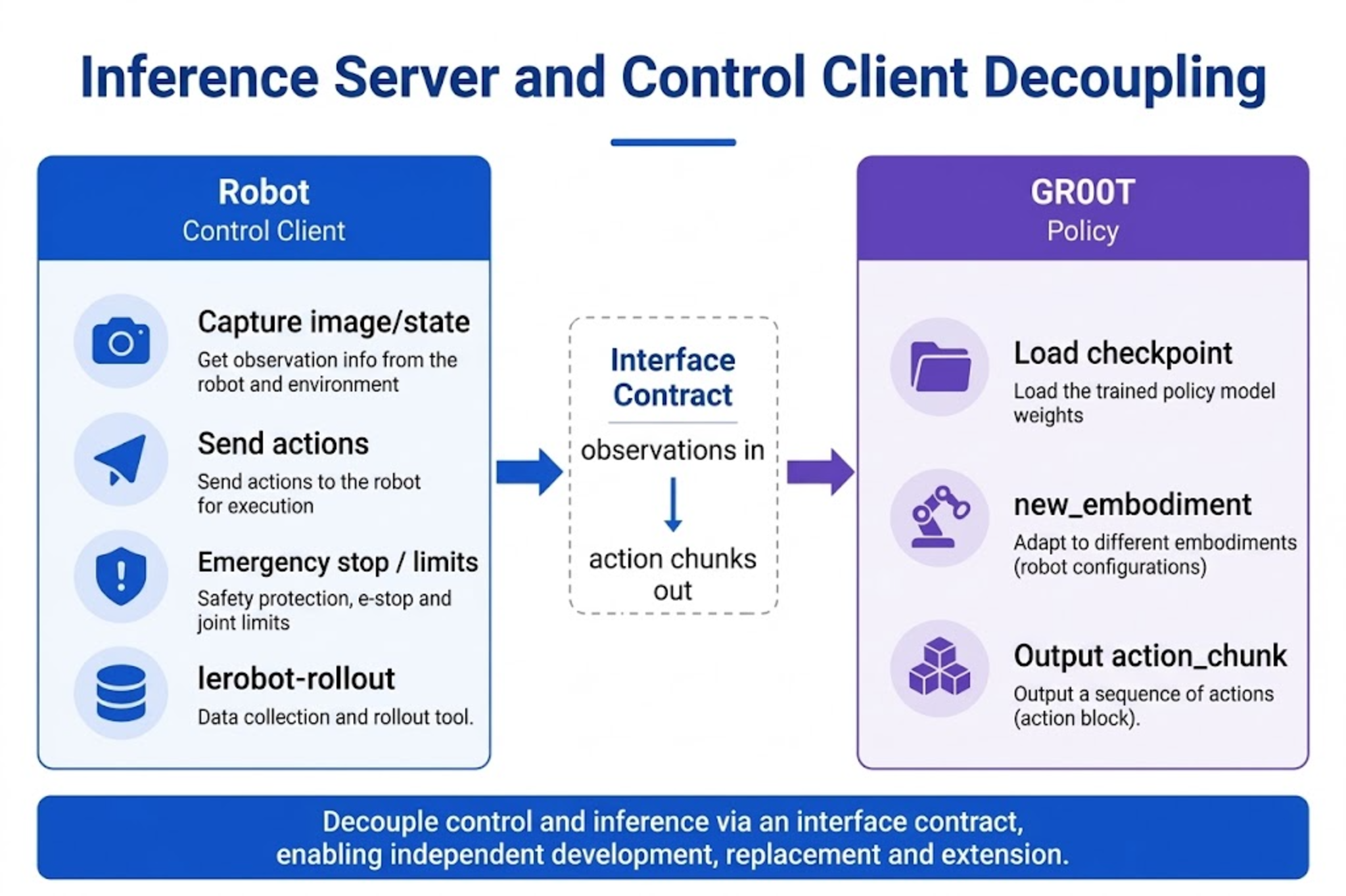
Splitting the system into two sides keeps real-time control and heavy computation from dragging each other down:
Control side responsibilities
- Capture images and joint state at a fixed frequency (e.g. 30 Hz)
- Assemble the observation packet
{images, state, task} - Receive
action_chunkand dispatch step by step to the reBot driver - Execute e-stop, soft limits, and timeout protection
Corresponding tools: lerobot-rollout / lerobot-record (with --policy.path).
Inference side responsibilities
- Load
policy.path(fine-tuned checkpoint) andbase_model_path=nvidia/GR00T-N1.7-3B - Decode the reBot action space with
embodiment_tag=new_embodiment - Return an action chunk of shape about
(H, 7)(H determined by trainingchunk_size)
Corresponding form: by default the in-process groot policy; advanced use can be a standalone HTTP/gRPC service (refer to the deployment examples in the Isaac GR00T repository).
Decoupling principle: the control side is unaware of the model's internal structure; the inference side does not directly operate motors. The interface contract is only "observation in, action chunk out."
22.3 Single-Machine vs. Distributed Deployment
22.3 Single-Machine vs. Distributed Deployment
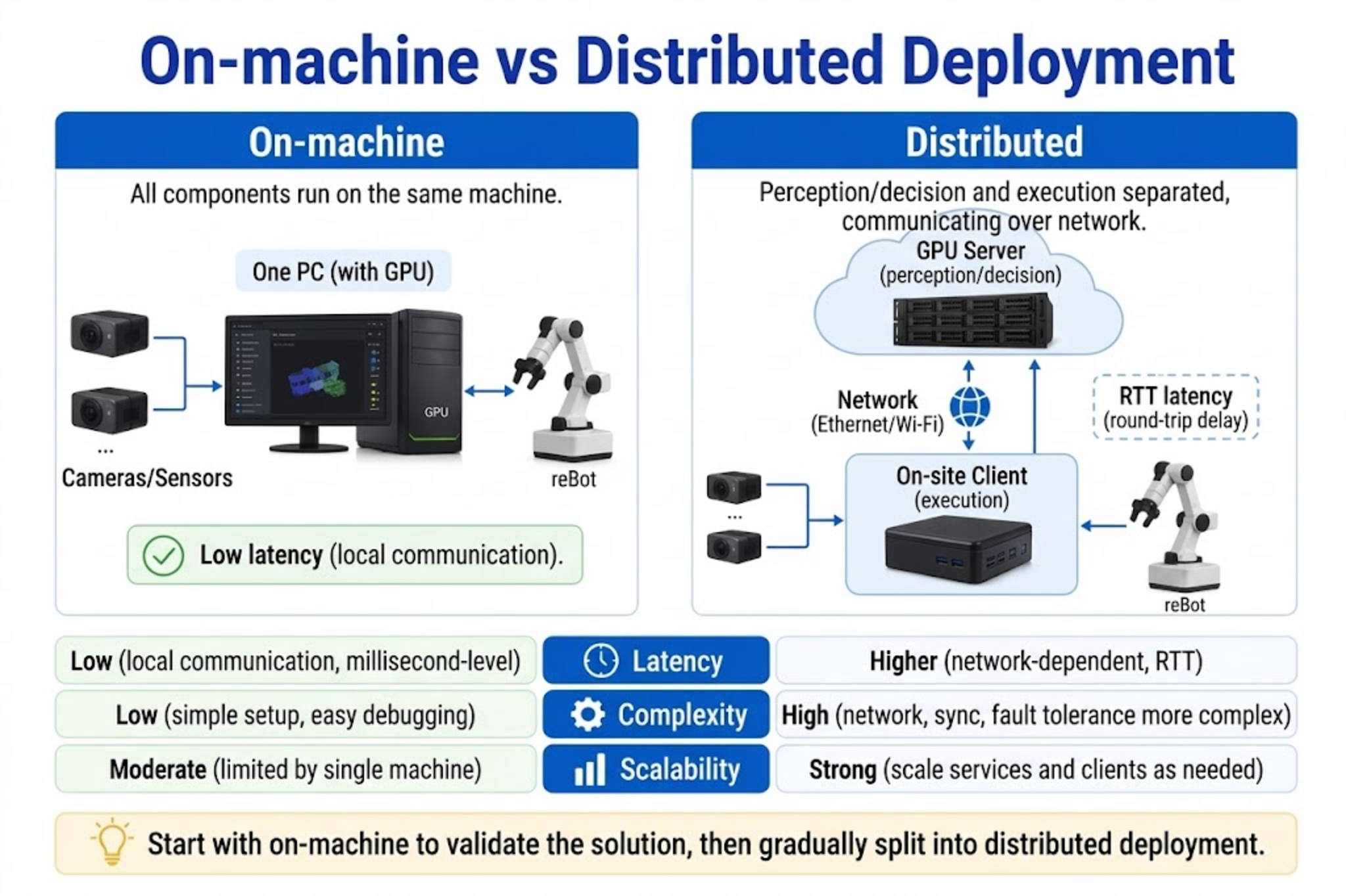
Single-machine deployment (recommended for beginners)
The GPU workstation connects cameras, CAN/serial, and the arm at the same time:
lerobot-rollout \
  --policy.path=${MODEL_PATH} \
  --policy.base_model_path=nvidia/GR00T-N1.7-3B \
  --policy.embodiment_tag=new_embodiment \
  --device=cuda \
  --robot.type=seeed_b601_rs_follower \
  ...
Pros: no network round-trip, simple joint debugging. Cons: a GPU host must be on-site.
Distributed deployment (advanced)
| Node | Placement |
|---|---|
| GPU machine | Inference Server (loads GR00T) |
| On-site / IPC | Control Client (cameras + reBot driver) |
Suitable scenarios: lab GPU separated from production arm, multiple arms sharing one inference pool.
| Comparison | Single-machine | Distributed |
|---|---|---|
| Latency | Mainly inference time | Inference + network RTT |
| Complexity | Low | Need serialization, timeout, reconnect conventions |
| Scalability | One machine, one arm | One service, multiple clients |
Selection advice: first get the stage project running on a single machine; after confirming success rate, split to distributed.
22.4 Camera, State, and Language Inputs
22.4 Camera, State, and Language Inputs
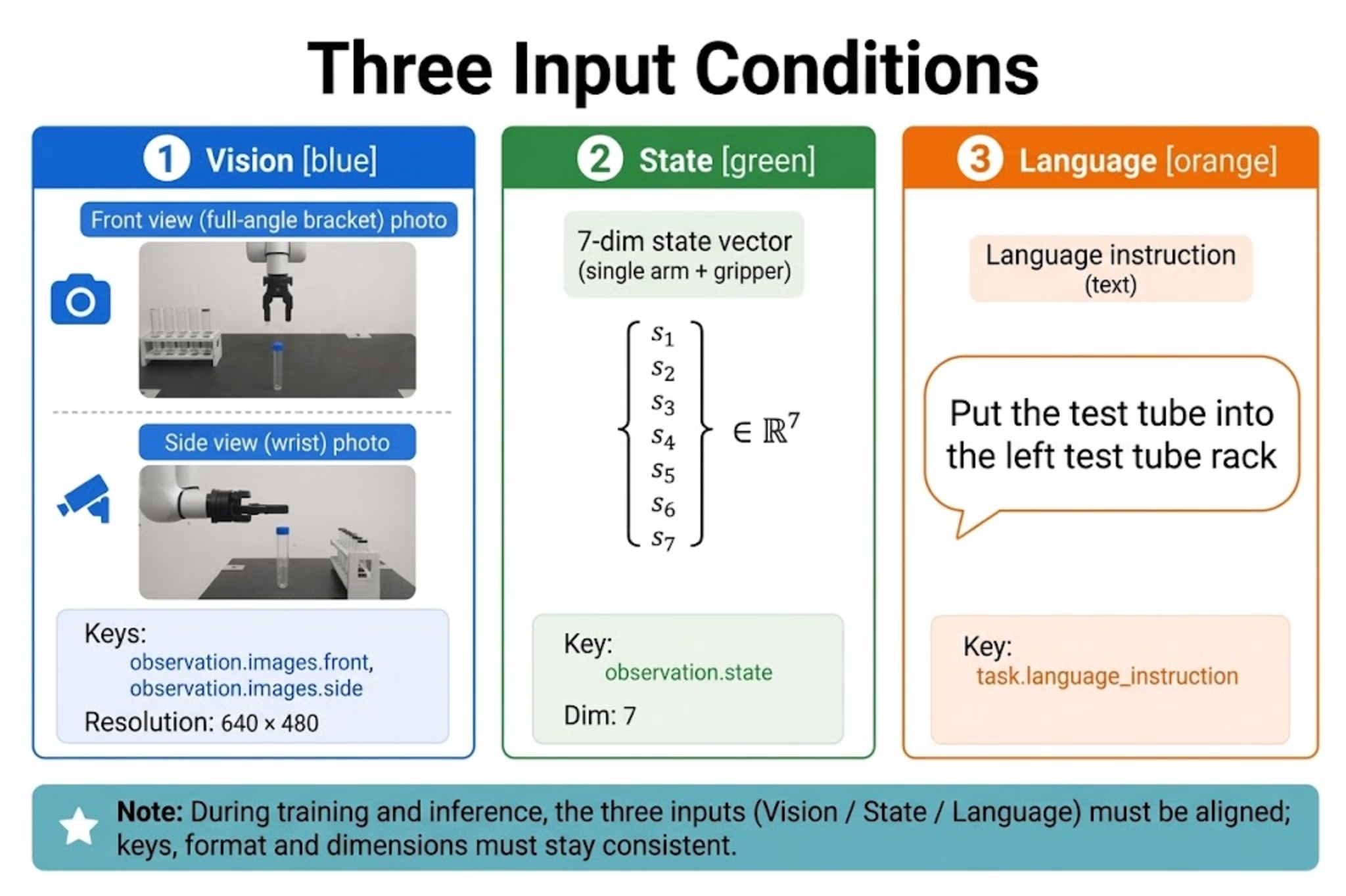
Each inference call requires three conditional inputs, all of which are essential (or consistent with what was declared during training):
1. Camera (Vision)
| Key name | Mount | Purpose |
|---|---|---|
observation.images.front -> front | Bracket wide view | Scene and target localization |
observation.images.side -> side | Wrist | Close-up aiming, grasp/place |
Recommended resolution 640x480; training and inference must match.
2. State
reBot Arm: single_arm 6-dim + gripper 1-dim = 7 dimensions, order consistent with Chapters 19/20. The control side reads the latest joint angles each control cycle before sending to inference.
3. Language
Injected via --task / dataset.single_task. Example:
Place the test tube into the left rack.
Requirements:
- Same language and sentence-style as training
tasks.jsonl/human.task_description. - Clear object reference ("left rack" must be visually distinguishable).
- Do not suddenly switch to a complex composite instruction never seen in training.
22.5 Action Chunk Output
22.5 Action Chunk Output
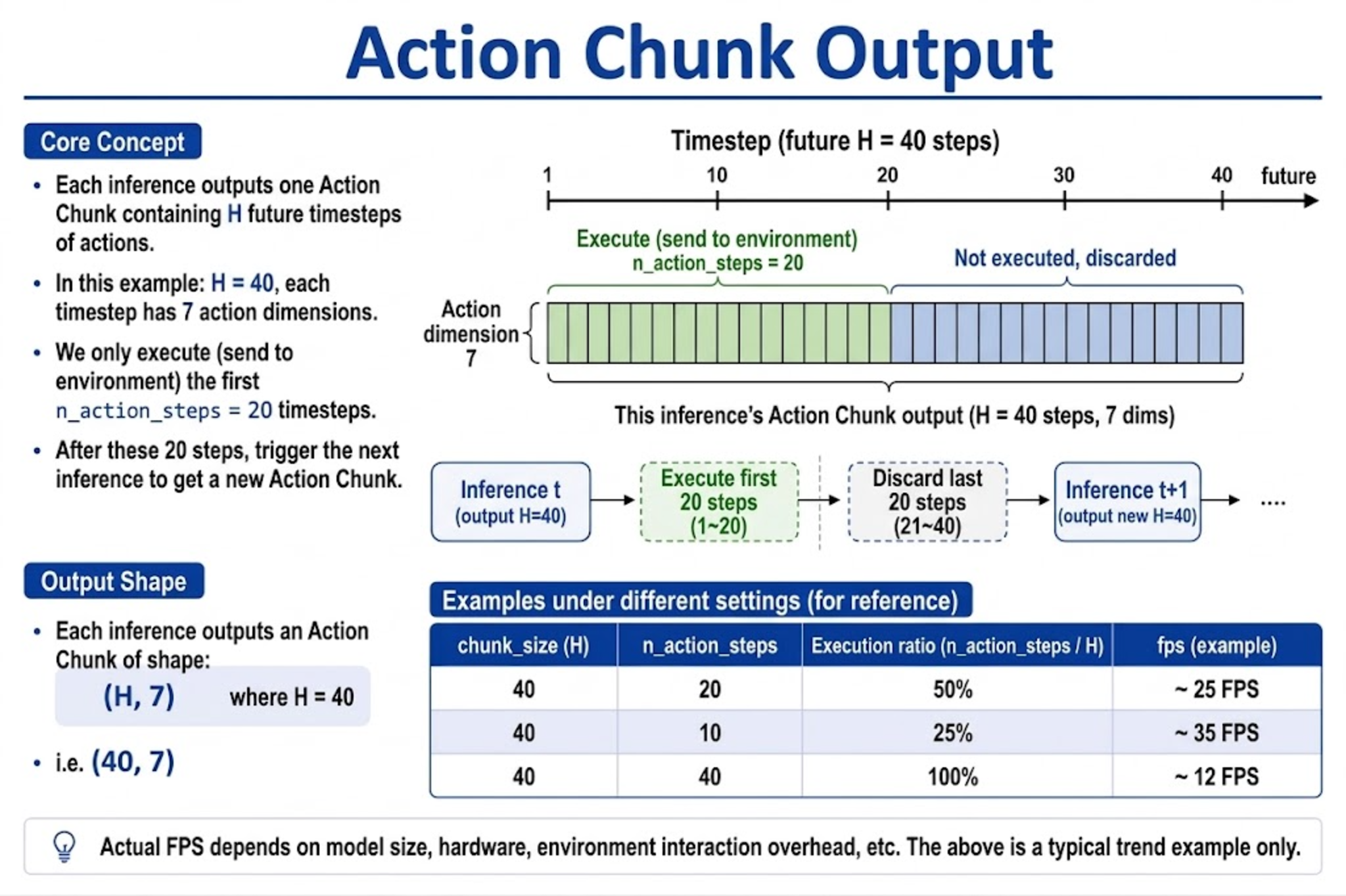
A single GR00T inference does not output an instantaneous joint command, but an action chunk:
action_chunk.shape ~= (H, 7)
H = chunk_size / action_horizon   # N1.7 fine-tuning commonly 40
each row 7-dim = 6 joints + gripper
Control-side execution strategy:
| Parameter | Suggestion | Description |
|---|---|---|
chunk_size | 40 at training | Determines how far ahead the model can predict; do not arbitrarily enlarge at inference |
n_action_steps | Start with 20 | Steps actually executed this round, must be ≤ chunk_size |
| Execution frequency | Close to recording fps (e.g. 30 Hz) | Too fast or too slow deviates from the training distribution |
If relative actions are enabled (use_relative_actions), the control side must restore them to absolute joint commands using the same rules as training; the gripper is usually excluded from relative.
22.6 Network and Inference Latency
22.6 Network and Inference Latency
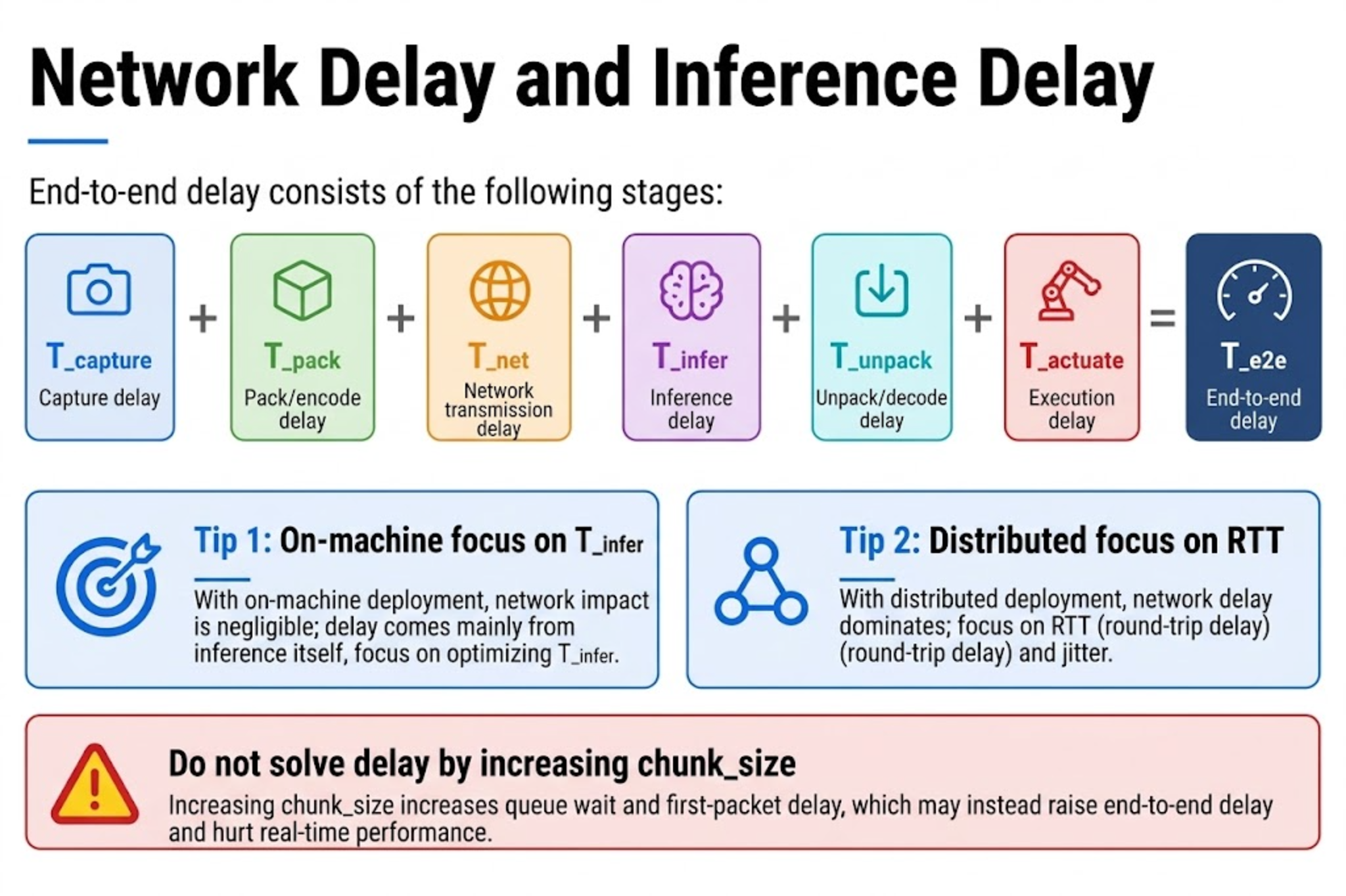
End-to-end latency roughly:
T_e2e ~= T_capture + T_pack + T_net + T_infer + T_unpack + T_actuate
| Component | Typical source | Mitigation |
|---|---|---|
T_capture | Camera exposure/USB | MJPG, fixed resolution, avoid extra preprocessing |
T_infer | VLM + DiT | bf16, batch=1, Flash Attention |
T_net | Distributed RTT | Gigabit, same datacenter, compress observations |
T_actuate | CAN/serial write cycle | Keep control frequency close to training |
Rules of thumb:
- Single-machine: bottleneck is usually
T_infer; use smallern_action_steps+ RTC to mask stalls. - Distributed: if RTT is unstable, first turn off RTC for synchronous debugging, then gradually enable async.
- Do not solve latency by "enlarging
chunk_size" — the window is fixed by training.
22.7 Action Buffering and Asynchronous Inference
22.7 Action Buffering and Asynchronous Inference
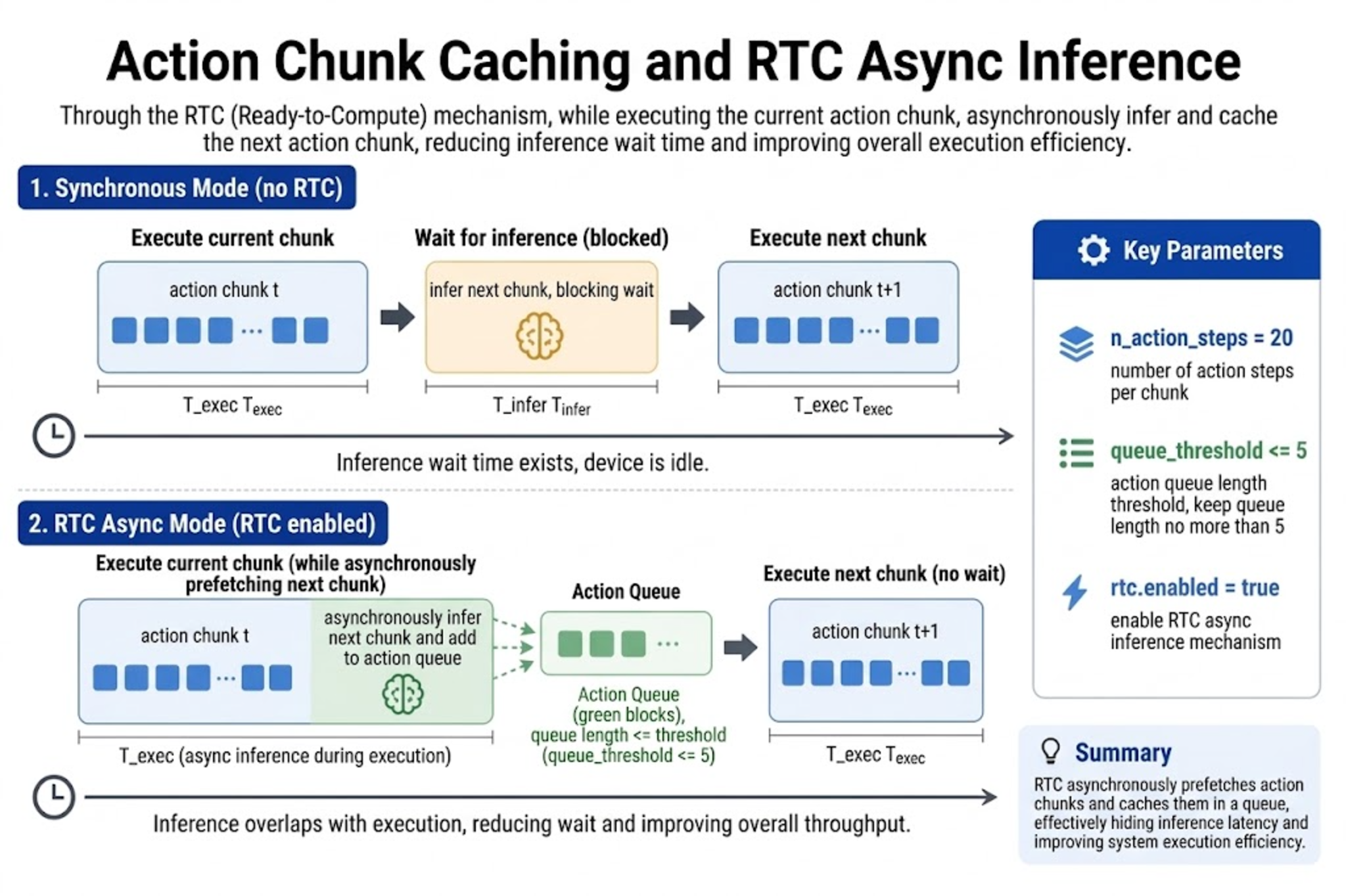
Action Queue
The control side writes received action_chunk into a queue and pops it per control cycle. If the next chunk has not arrived before the queue empties, the arm will pause or reuse the last action — which is exactly what async inference avoids.
RTC (Real-Time Chunking)
While executing the current chunk, the backend requests the next chunk with the latest observation:
lerobot-rollout \
  ... \
  --policy.n_action_steps=20 \
  --inference.type=rtc \
  --inference.rtc.enabled=true \
  --inference.rtc.execution_horizon=20 \
  --inference.queue_threshold=0
| Parameter | Suggestion |
|---|---|
n_action_steps / execution_horizon | Start at 20, then tune for jitter |
queue_threshold | Recommend ≤ 5; too large stacks stale actions |
If jitter/twitch appears, first set --inference.rtc.enabled=false, confirm the synchronous path is healthy, then enable RTC.
22.8 Real-Robot Safety Limits
22.8 Real-Robot Safety Limits
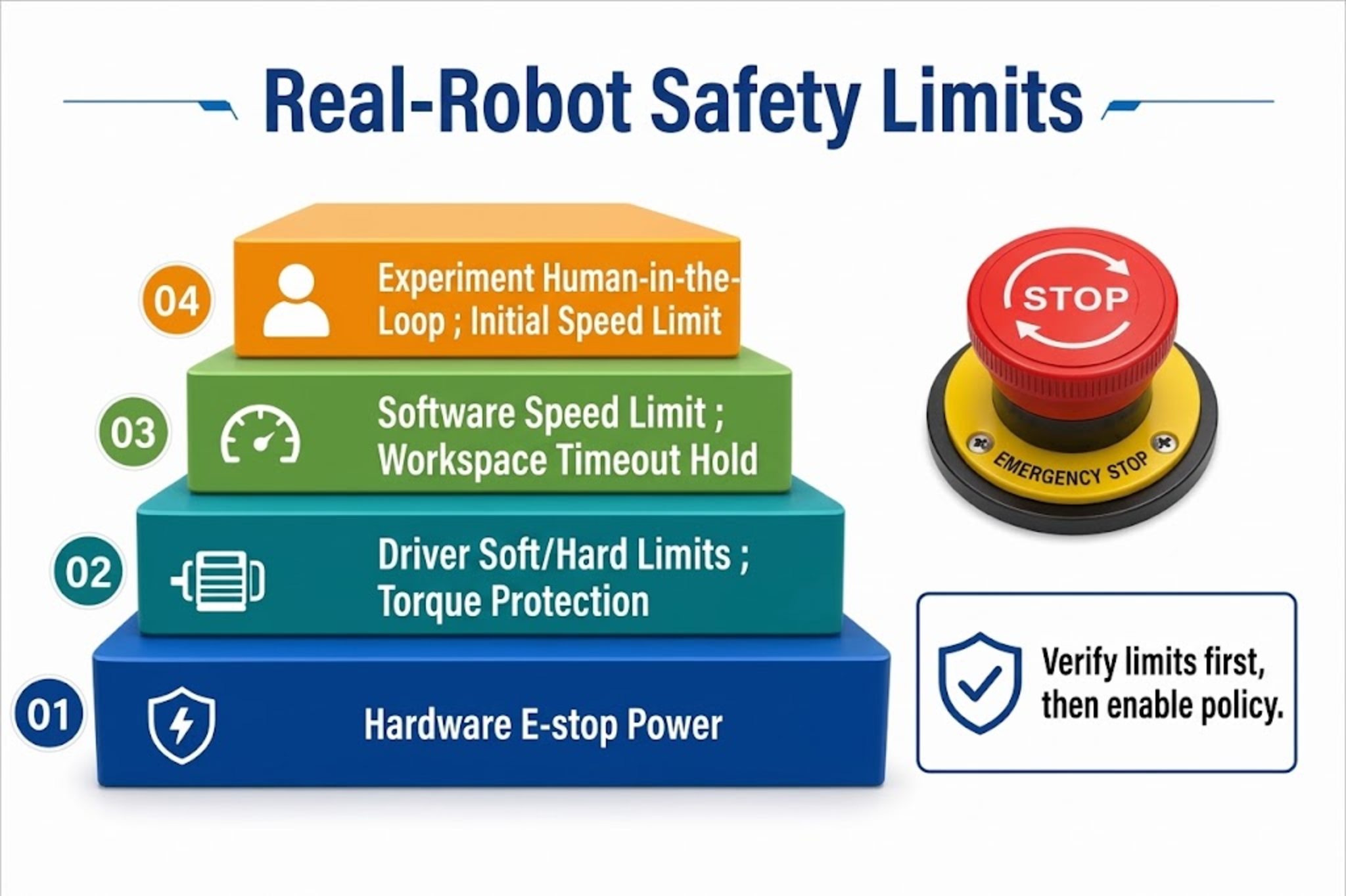
VLA output carries no physical guarantees, so safety must be enforced by the control layer:
| Layer | Measure |
|---|---|
| Hardware | E-stop button, power cut, cable management to prevent tangling |
| Driver / firmware | Joint soft/hard limits, current/torque protection |
| Software control | Velocity/acceleration clipping, workspace box, hold or move to safe pose on timeout |
| Experiment flow | Lower gain/speed on first inference; human in the loop; clear unrelated obstacles from the table |
Debug checklist:
- Before loading the policy, use manual/teleop to confirm limits are effective.
- On policy rollout, first use a short
--durationto confirm no runaway. - On abnormal motion, e-stop immediately, record the current
task, camera frames, and state, then review data and modality.
22.9 VLA Task Evaluation
22.9 VLA Task Evaluation
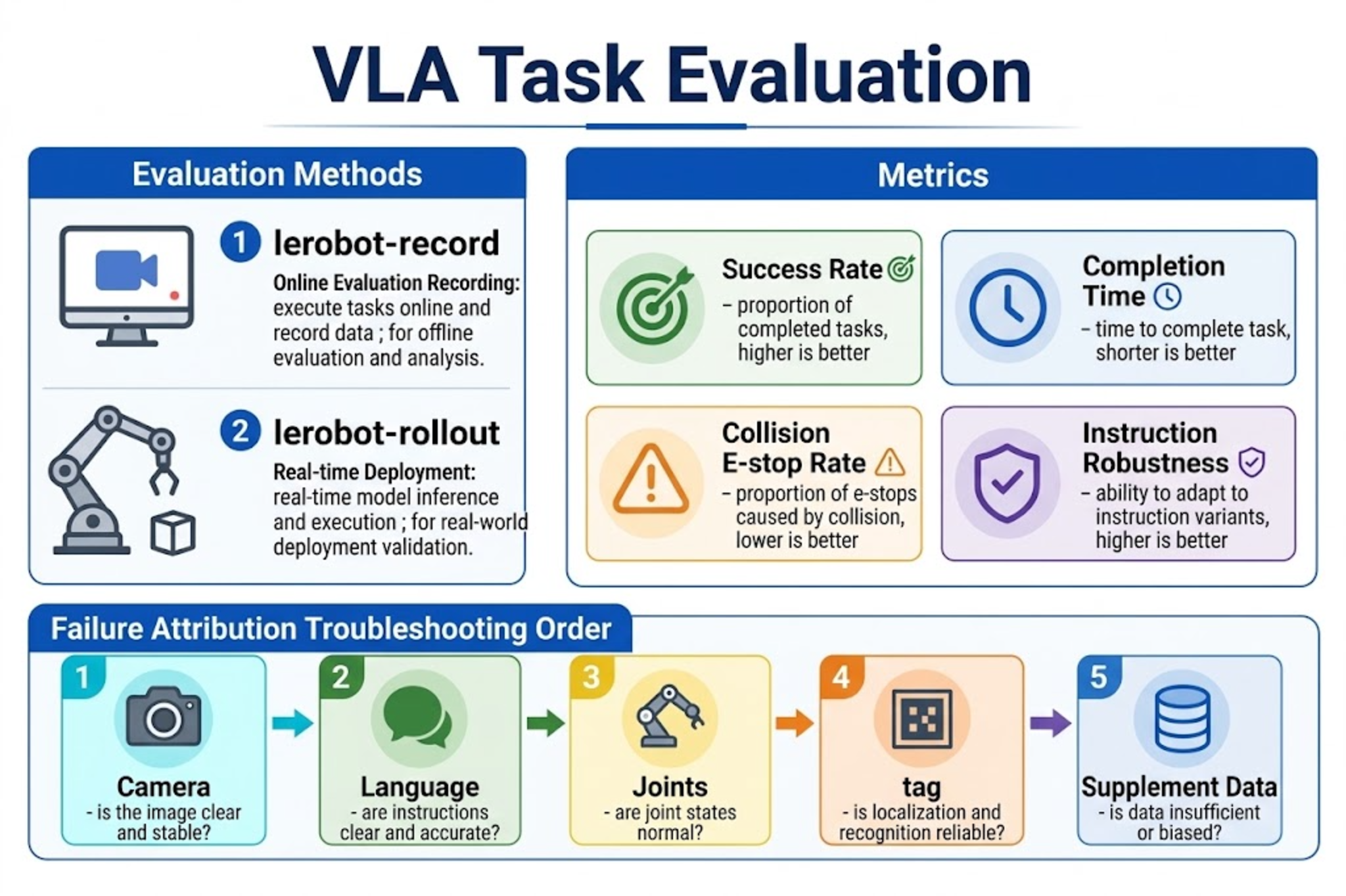
Evaluation methods
| Method | Tool | Purpose |
|---|---|---|
| Online eval recording | lerobot-record + --policy.path | Save fail/success episodes for replay |
| Real-time deployment | lerobot-rollout | Test latency, RTC, long-horizon stability |
Suggested metrics
| Metric | Description |
|---|---|
| Success rate | Under fixed initial conditions and instructions, successes / total (recommend ≥ 20 runs) |
| Completion time | Seconds from start to placement done |
| Collision / e-stop rate | Ratio of non-task collisions or manual interventions |
| Instruction robustness | Does a slightly rephrased instruction for the same task still succeed (within training distribution only) |
Failure attribution order
- Are camera key names / resolution consistent with training?
- Does the language sentence pattern deviate from annotations?
- Joint order and units.
embodiment_tag, relative-action switch.- Insufficient data coverage -> return to Chapter 20 to collect more.
22.10 Stage Project: Place the Test Tube into the Left Rack
22.10 Stage Project: Place the Test Tube into the Left Rack
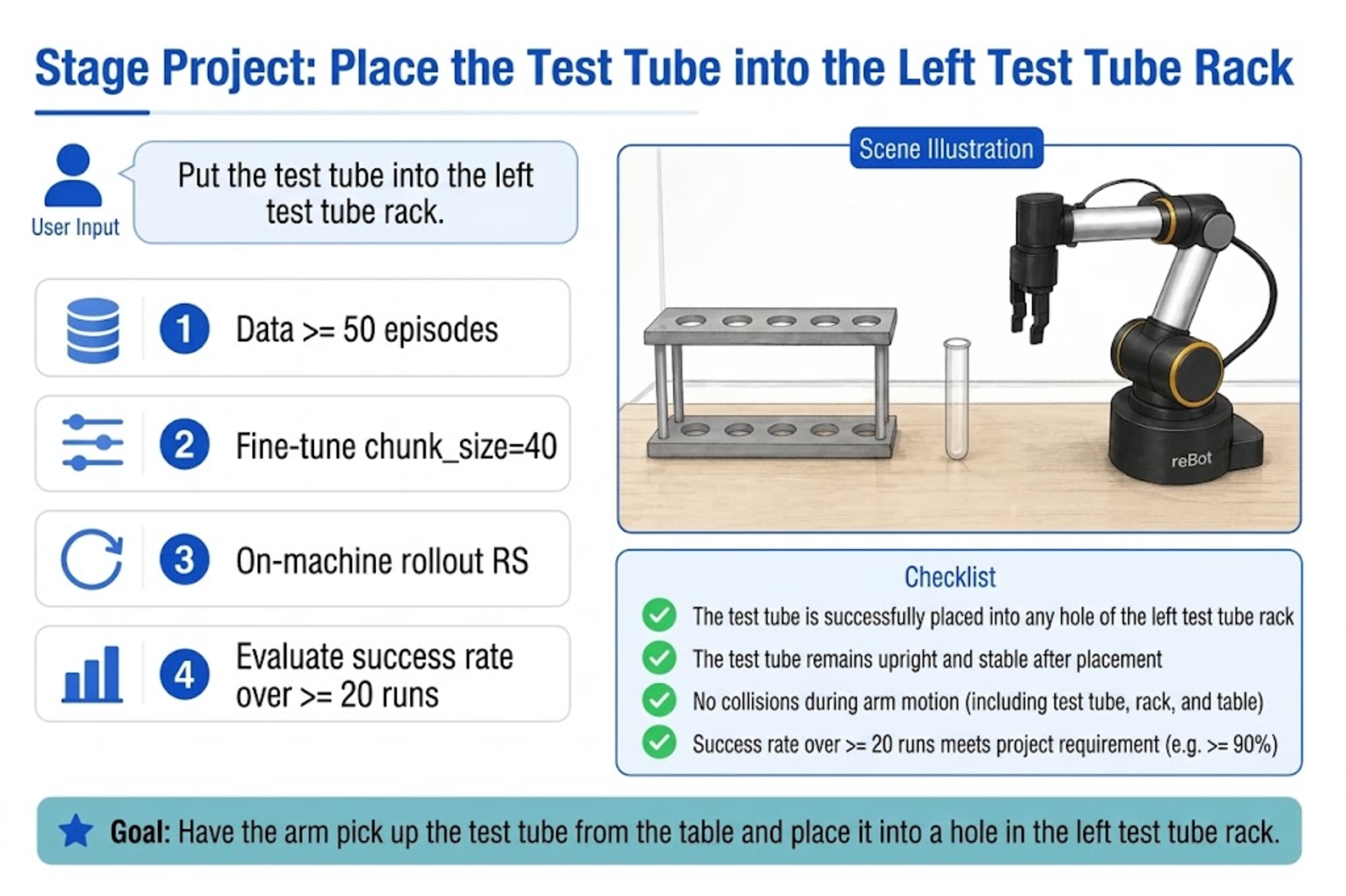
Project goal
| Item | Content |
|---|---|
| User input | Place the test tube into the left rack. |
| System input | Wide-view front + wrist side + current 7-dim state |
| Expected output | The arm completes pick tube -> move to left rack -> place -> release gripper |
Implementation steps
-
Data (if not already covering this task)
- Collect ≥ 50 successful demonstrations; annotate uniformly using the above sentence pattern.
- Write
meta/modality.json(front/side,single_arm+gripper,human.task_description).
-
Fine-tuning (Chapter 21)
embodiment_tag=new_embodiment,chunk_size=40.- Obtain
checkpoints/last/pretrained_model.
-
Single-machine deployment inference (B601-RS example; for DM change
type/port/can_adapter)
export MODEL_PATH="outputs/train/${REPO_ID}/checkpoints/last/pretrained_model"

# RS CAN
sudo ip link set can0 down 2>/dev/null
sudo ip link set can0 type can bitrate 1000000
sudo ip link set can0 up

lerobot-rollout \
  --strategy.type=base \
  --policy.path=${MODEL_PATH} \
  --policy.base_model_path=nvidia/GR00T-N1.7-3B \
  --policy.embodiment_tag=new_embodiment \
  --policy.n_action_steps=20 \
  --robot.type=seeed_b601_rs_follower \
  --robot.port=can0 \
  --robot.id=follower1 \
  --robot.can_adapter=socketcan \
  --robot.cameras="{ front: {type: opencv, index_or_path: 0, width: 640, height: 480, fps: 30, fourcc: "MJPG"}, side: {type: opencv, index_or_path: 2, width: 640, height: 480, fps: 30, fourcc: "MJPG"}}" \
  --task="Place the test tube into the left rack." \
  --duration=90 \
  --device=cuda \
  --display_data=true \
  --inference.type=rtc \
  --inference.rtc.enabled=true \
  --inference.rtc.execution_horizon=20 \
  --inference.queue_threshold=0
- Evaluation
- Fix the table layout, repeat ≥ 20 times, record success rate.
- Archive failure episodes with
lerobot-record; analyze whether the error is in localization, grasping, or placement.
Acceptance criteria
- Given the instruction "Place the test tube into the left rack.", the task can be executed end-to-end.
-
front/sidematch training, nomean is infinity-style key errors. - E-stop and soft limits work; motion can be cut off manually on abnormal behavior.
- Record success rate and decide the next step is more data or tuning
n_action_steps/ RTC.
22.11 Chapter Summary
22.11 Chapter Summary
- Decoupling: the control side handles capture and execution, the inference side handles VLA forward pass; the interface is observation -> Action Chunk.
- Deployment: start single-machine, then go distributed as needed; distributed needs extra attention to network latency.
- Inputs: cameras + state + language must align strictly with training.
- Output: consume the action chunk by
n_action_steps; RTC uses a queue to mask inference time. - Safety: limits, e-stop, and speed clipping are enforced by the control layer.
- Evaluation: success rate + failure attribution; the stage project validates the "language -> real-robot action" closed loop.
You have now completed the full path from VLA theory, data, fine-tuning, to GR00T real-robot deployment. For future iteration, prioritize collecting data for failure scenarios rather than blindly lengthening training steps.